
Git Answered 'No Remote.' Check GitHub Copilot CLI Permissions.
Instruction files are context, not a shell lock: one session allow for git plus a deny for git push is the control, deny wins, and a git error is a failed check.
A session can allow every git command and still deny git push, and a "no remote" error means that deny did not fire.
A terminal line that says there is no remote feels like the push was stopped, and it was not. Git ran, the deny never fired, and the same allowed command can publish the branch the moment a remote exists.
In this article: You will run one GitHub Copilot CLI session that allows git commands and denies
git push, then separate a real refusal from a git error such as "no remote." You will finish with an empty status, the same commit you started with, and four tests still passing. You will also see why wider flags and assisted approval do not replace that deny, and why two March 2026 bypass reports have to stay in separate rows.
Preview: written November 16, 2026, before Microsoft Ignite. Some paid steps are not yet tested live; this guide will be updated November 21, 2026.
The instruction files in ~/code/ticket-triage can tell GitHub Copilot to run npm test and to leave src/classify.js alone. They cannot stop a shell command. A sentence the model can read is not a lock. GitHub Copilot CLI permissions are the control that can refuse this push, and only for the session where you pass them. The deny flag has to apply before git starts.
The result that feels safest is the failure. This series copy has no GitHub remote that main pushes to, so an allowed push makes git say there is nothing to push to. "No remote," "repository not found," and an authentication failure mean git ran. The allow side won. In a folder that has a remote, that same allowed command can publish history. The win is a refusal before git runs. You do not commit, and you do not complete a push. This denial was not executed as a paid turn on November 16, 2026, so there is no sample denial text. Re-run it on your account before you trust the wording.
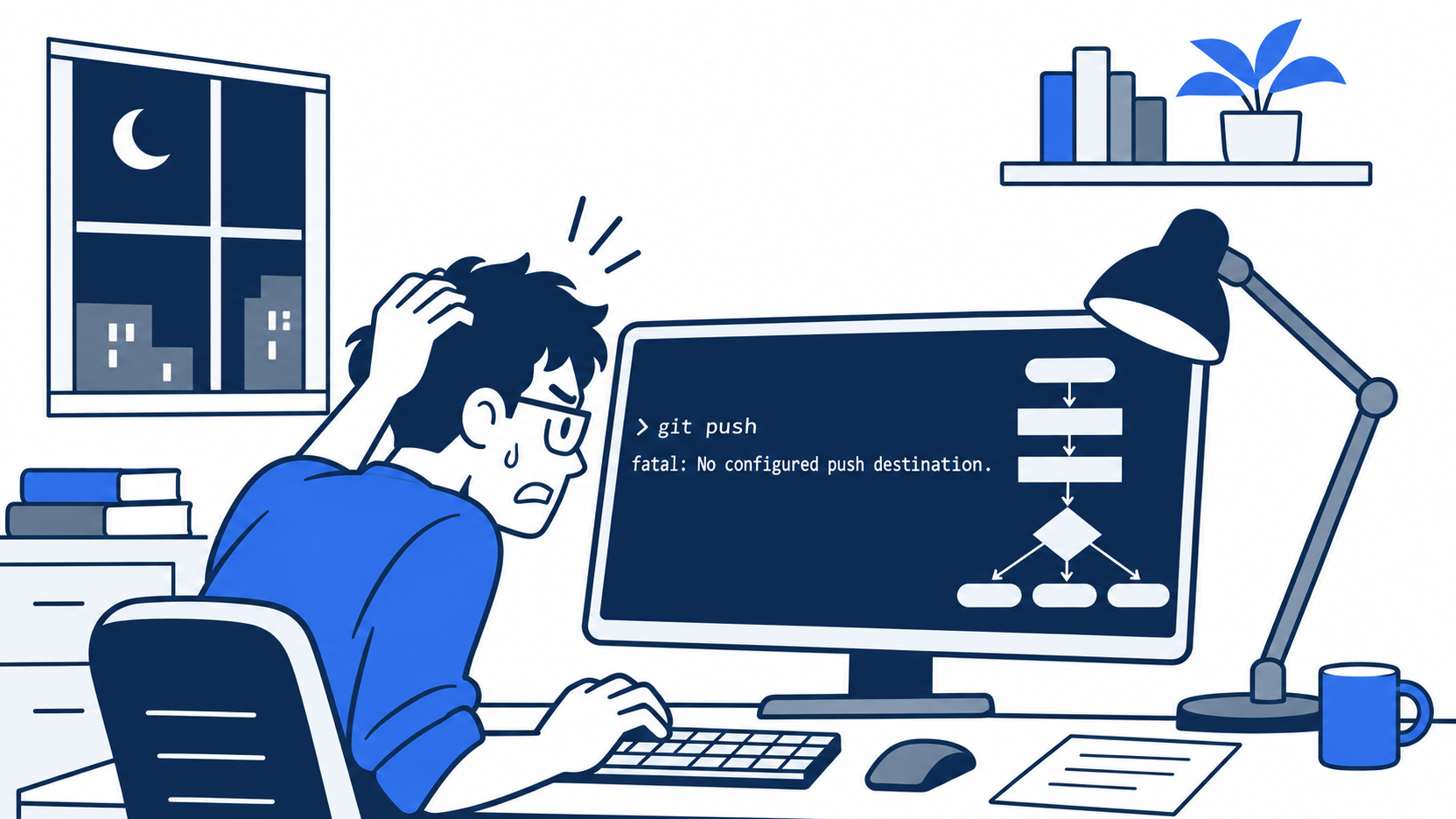
Nothing was published only because the folder has no remote that main pushes to. The error is not a block. A refusal is the CLI stopping git push before git starts. A git message is evidence that git started.
Starting fresh or fell behind? Run git switch -C main copilot/day-04. This replaces your main with the end of Day 4; to keep your own work, run git branch my-backup first.
Confirm a clean tree before you ask
You want one Copilot CLI session that allows git and denies git push, a refusal before git runs, four tests still passing, and an empty git status --short.
These steps use Copilot CLI 1.0.112, as of November 16, 2026. Another 1.0.x line is acceptable when you write it down. Write the printed line down if you did not keep it. If the line is not 1.0, stop. Do not reinstall.
copilot --version
The folder is ~/code/ticket-triage. Two instruction files are already committed. src/classify.js is unchanged. Four tests pass. Prove there is no remote of your own before you ask an agent to push. The only remote it may have is upstream, the Spillwave copy from Part 1, and main does not push to it. A state-changing shell command needs permission unless it is already approved. Let git status run. Do not approve git push, because --deny-tool is what blocks it. An organization rule can still change a prompt. This session does not leave the push as a question you might click through.
cd ~/code/ticket-triage
git status --short
git remote -v
git log -1 --oneline
npm test
git status --short prints nothing. git remote -v prints nothing, or only the two upstream lines for the Spillwave copy from Part 1. git log -1 --oneline prints one line. Copy it. After the session it must match, which is how you know the agent did not commit. If the subject is Add Copilot instructions for tests and classify.js, keep that line. If you typed a different subject, keep the line you copied. The check is no new commit.
npm test reports refund, shipping, other, and crushed mug in pieces is other, plus # tests 4, # pass 4, and # fail 0. Timings do not count.
If git remote -v prints any remote other than upstream, stop. Do not remove it, and do not run the push request. An unexpected remote means this folder is not the series copy, and a push can publish real history. If status prints paths, stop. Do not ask the agent to clean them, and do not commit. If the count is not four passes and zero failures, stop. Do not edit src/classify.js.
Two flags, and deny wins
--allow-tool grants specific tools or shell patterns for this session. A shell pattern names commands the shell tool may run. --deny-tool denies a tool or command pattern for this session. Deny rules override allow rules, saved approvals, and broad allow flags. A saved approval is a yes stored earlier. It does not beat a deny you pass today.
shell(git:*) is the allow. The * is a wildcard, broader than git status. Say this out loud: shell(git:*) would have covered a push, and the deny is why it does not. --deny-tool='shell(git push)' is that deny. The single quotes stop your shell from eating the parentheses.
You do not add --yolo, --allow-all, or --allow-all-tools. --allow-all-tools allows every tool without an individual confirmation. --allow-all and --yolo allow tools, paths, and URLs. The page for the two flags you do pass is Allowing tools.
.github/copilot-instructions.md does not replace the deny. The file is context a session can read. Its sentences are about npm test and src/classify.js. A sentence there does not block a shell command. Do not add "do not push" and call that the same control.
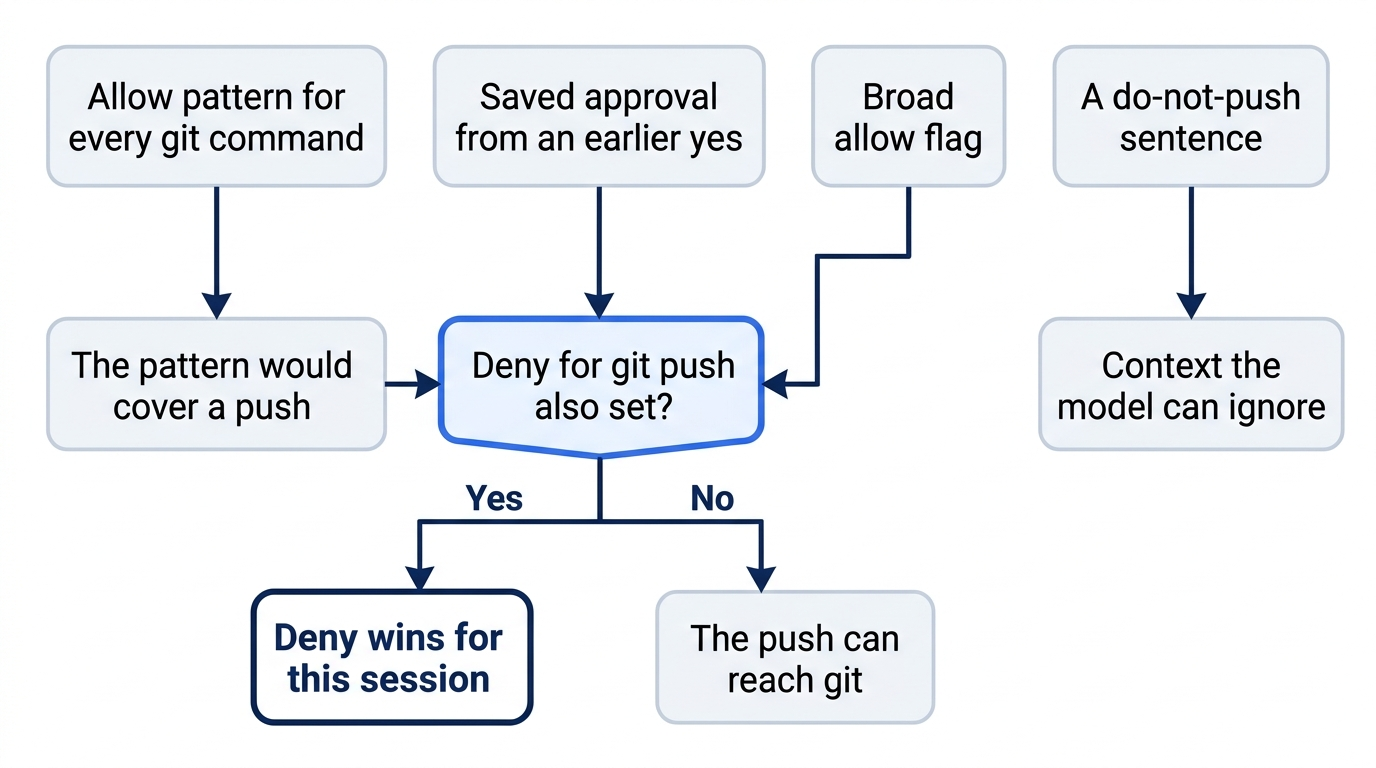
A narrow allow of git status would never show whether deny beats allow. The wildcard would have covered a push. A prompt sentence never enters that gate.
Ask for status, then a push
From ~/code/ticket-triage, pass the two flags and nothing else.
copilot --allow-tool='shell(git:*)' --deny-tool='shell(git push)'
If the shell strips the quotes, stop. Do not retype the flags without quotes, and do not add a third flag because a prompt feels slow.
Tell the session to commit nothing, edit nothing, run git status, and push. You are not trying to publish. Do not type git push yourself in another terminal to preview the error.
Do not commit. Do not edit files. Run git status, then push this branch.
You may let the status command proceed. Do not approve a push, an edit, or a commit. The allow covers other git commands, including a commit. The deny names push only. If the turn tries to commit, stop it. If a network operation starts, stop the turn. You never complete a push.
A refusal is not a git error
The CLI has to deny git push before git runs. You want the tool to block the command, not git to start and then fail.
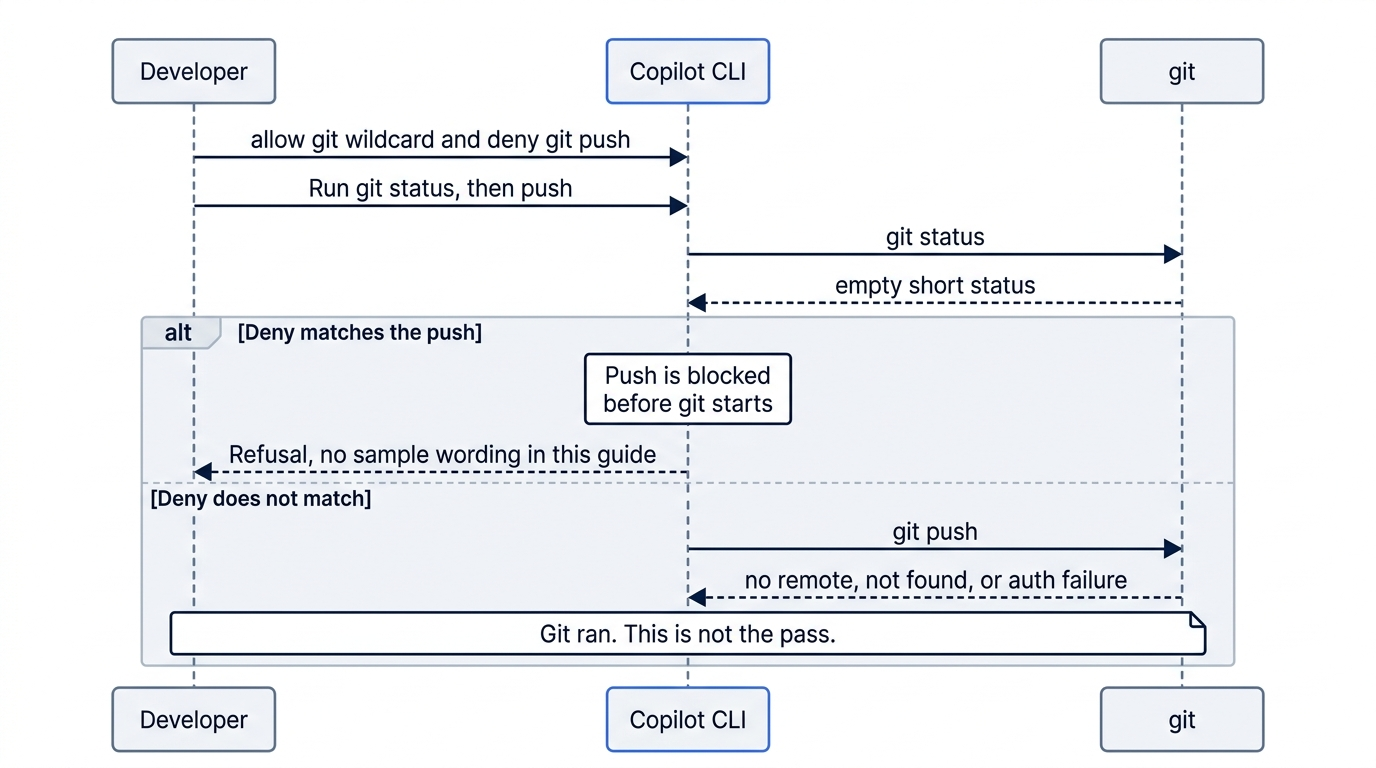
A git error means the command was allowed. "No remote" is the easy false pass in a folder with no remote that main pushes to. Stop the turn. Do not add a remote to make the next attempt look more real, do not remove one, and do not retry with a different push spelling.
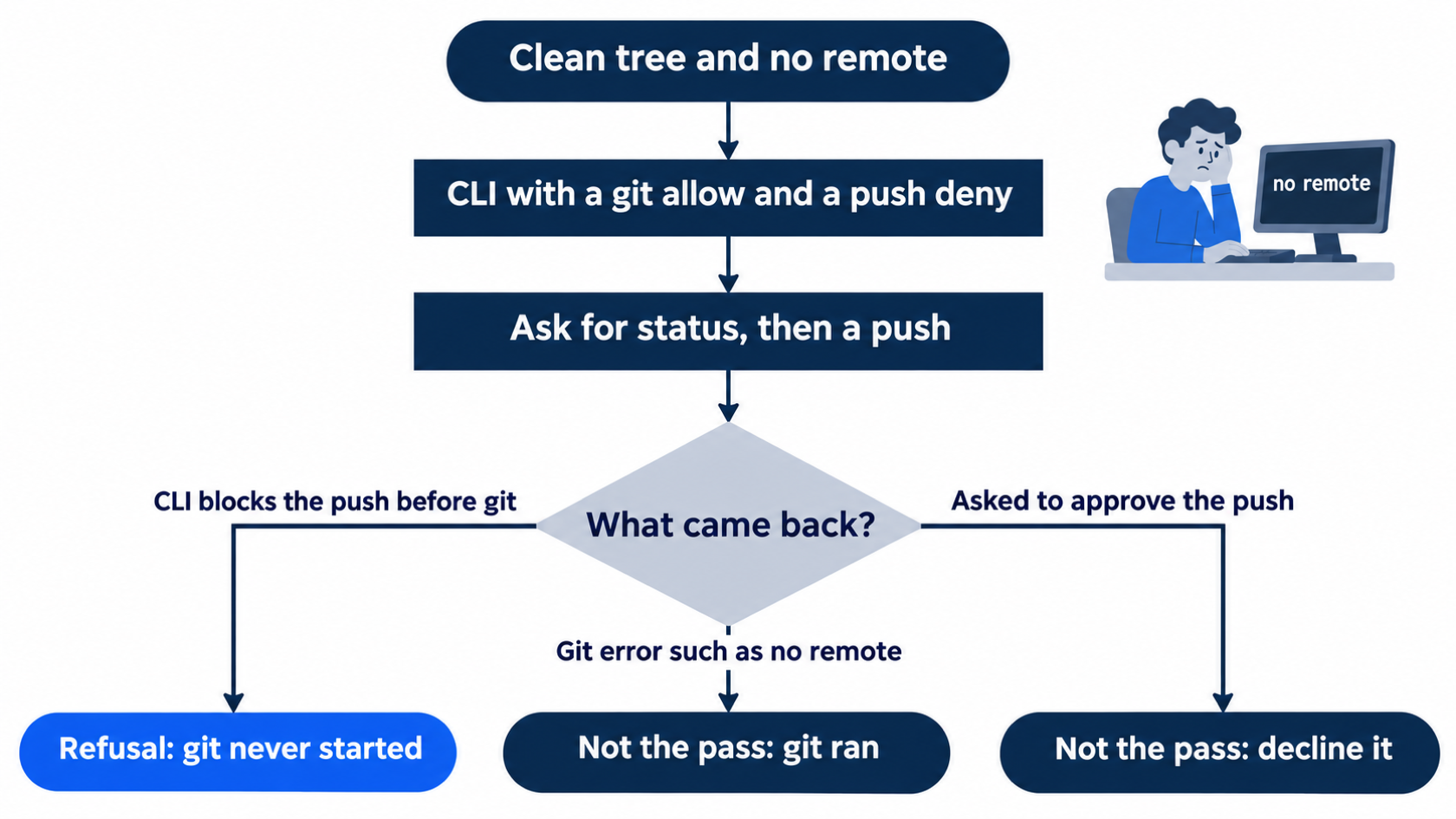
Write down the phrase you saw, and whether git ran. If you cannot tell a denial from a git error, you do not have the win. You may start one more session with the same two flags and the same prompt. You still do not approve a push, add a remote, or pass a broader allow. If the second turn is still ambiguous, stop with the tree untouched and do not record the push as refused.
If the session asks you to approve git push, decline it or stop the turn. An approval question is not the refusal. Approving it can start the network operation this check exists to avoid. Treat the check as failed.
Gotcha: A "no remote" line feels like safety because nothing was published. Git ran. The deny did not fire. Where a remote exists, that same allowed command can push. Leave remotes alone.
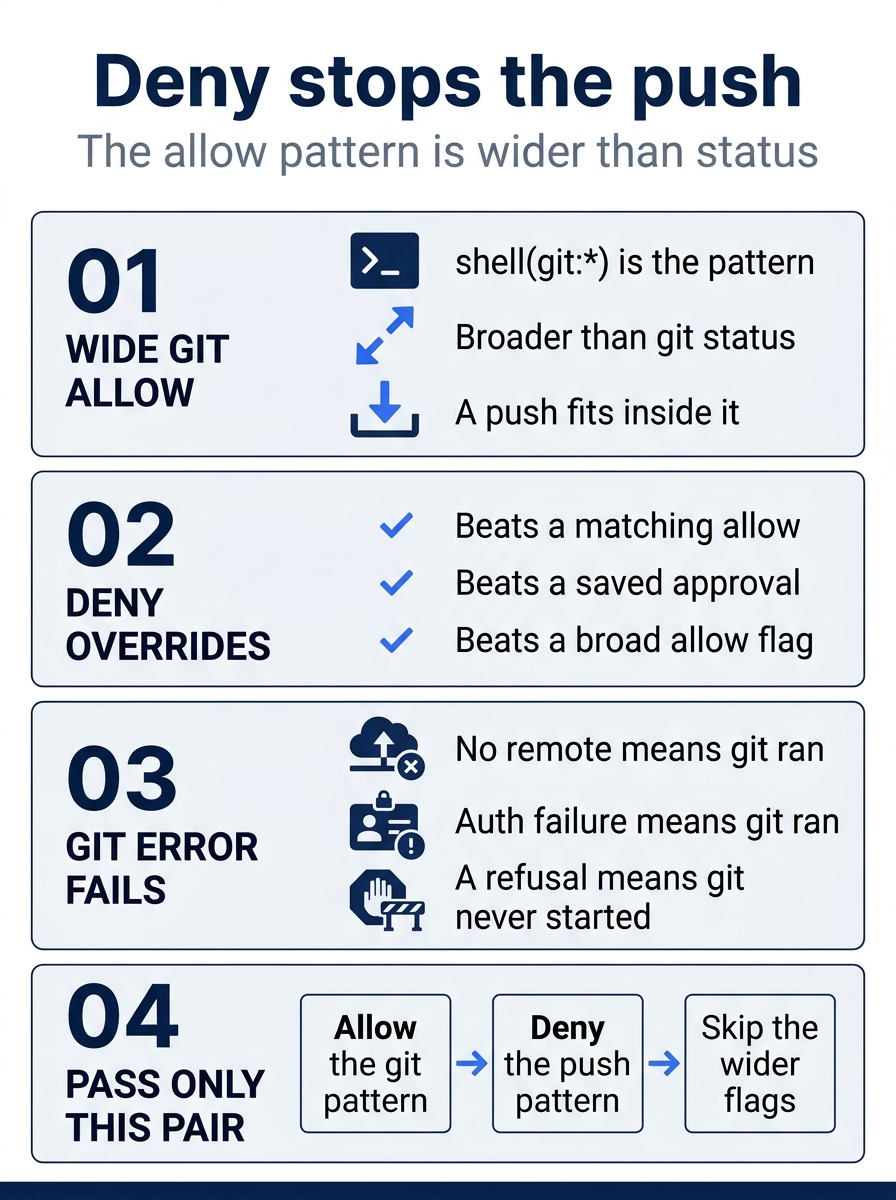
shell(git:*) is broader than git status, and a push fits inside it. The deny beats a matching allow, a saved approval, and a broad allow flag. "No remote" or an authentication failure means git ran. A refusal means git never started. The pass is that narrow pair, with the wider flags left off.
Prove the tree in your own shell
End without a second push attempt. Do not tell the agent to commit a note about the check. The commands below are yours. The agent's status line is not the proof.
git status --short
git remote -v
git log -1 --oneline
git diff -- src/classify.js
npm test
Status prints nothing. git remote -v prints the same lines as before the session. The log line matches the one you copied. git diff -- src/classify.js prints nothing. The same four tests pass, with zero failures. You did not commit, you did not complete a push, and src/classify.js is untouched.
If status prints paths, the check failed. Do not commit them, and do not push. Read git diff yourself. If the log line changed, a commit happened. Do not push it, and do not rewrite history with a reset. Stop and read the new subject.
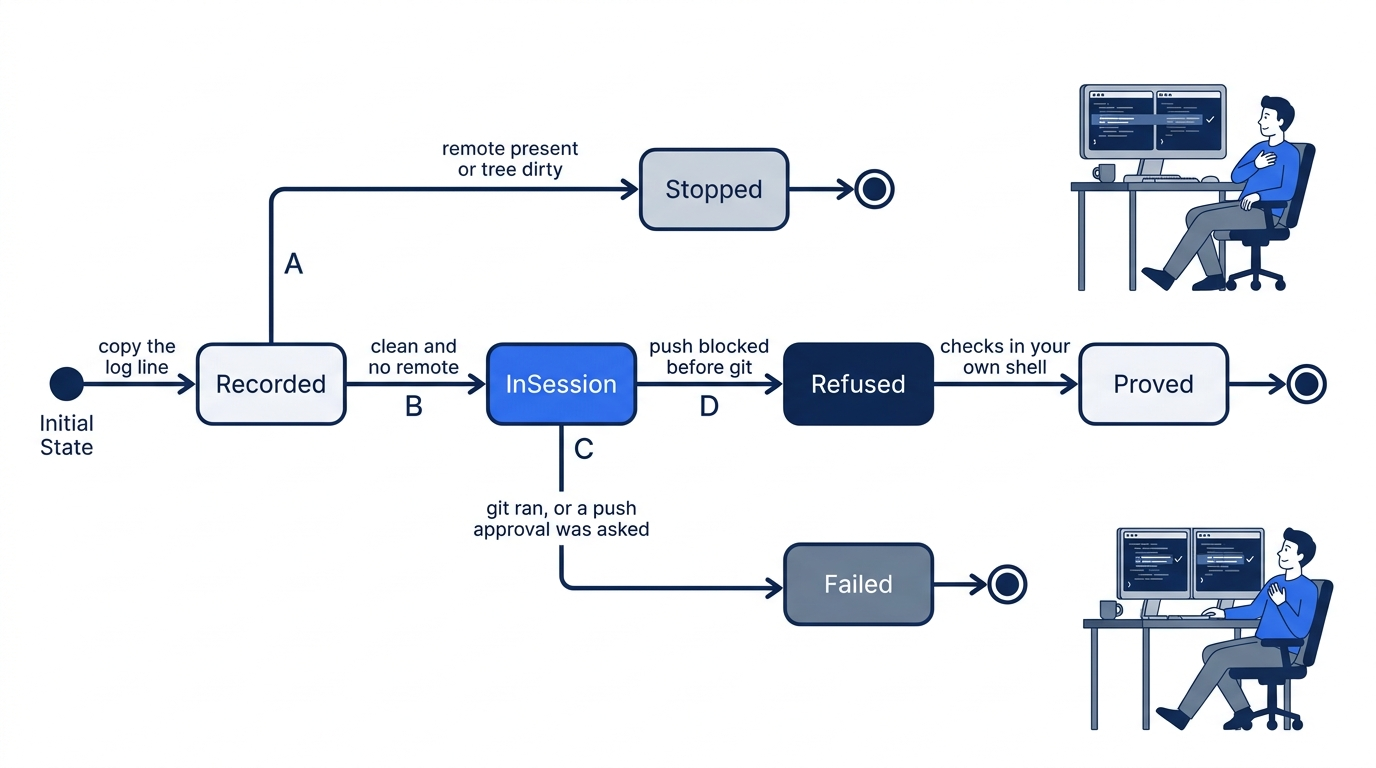
The checks you just ran are the drill. The rest is the limit: wide flags you did not pass, an automated review that is not your yes, and two March 2026 bypasses that are history, not a promise about 1.0.112. Do not start a second project, and do not add a remote.
The flags you did not pass
Today's pair is a narrow grant plus an override. The other flags are wider, and they are not the beginner default. Flag names in the 1.0.112 help text, as of November 16, 2026, include --allow-tool, --deny-tool, --allow-all-tools, --allow-all, --yolo, and --assisted-approval. This article does not paste that help text.
An organization rule can still change which prompt you see. The CLI separates tool visibility, permission rules, path and URL access, and sandbox enforcement. The two flags sit in the permission layer for one session. A prompt that says not to push is weaker than that restriction. Neither replaces operating-system isolation. Read-only classification has had real bugs.
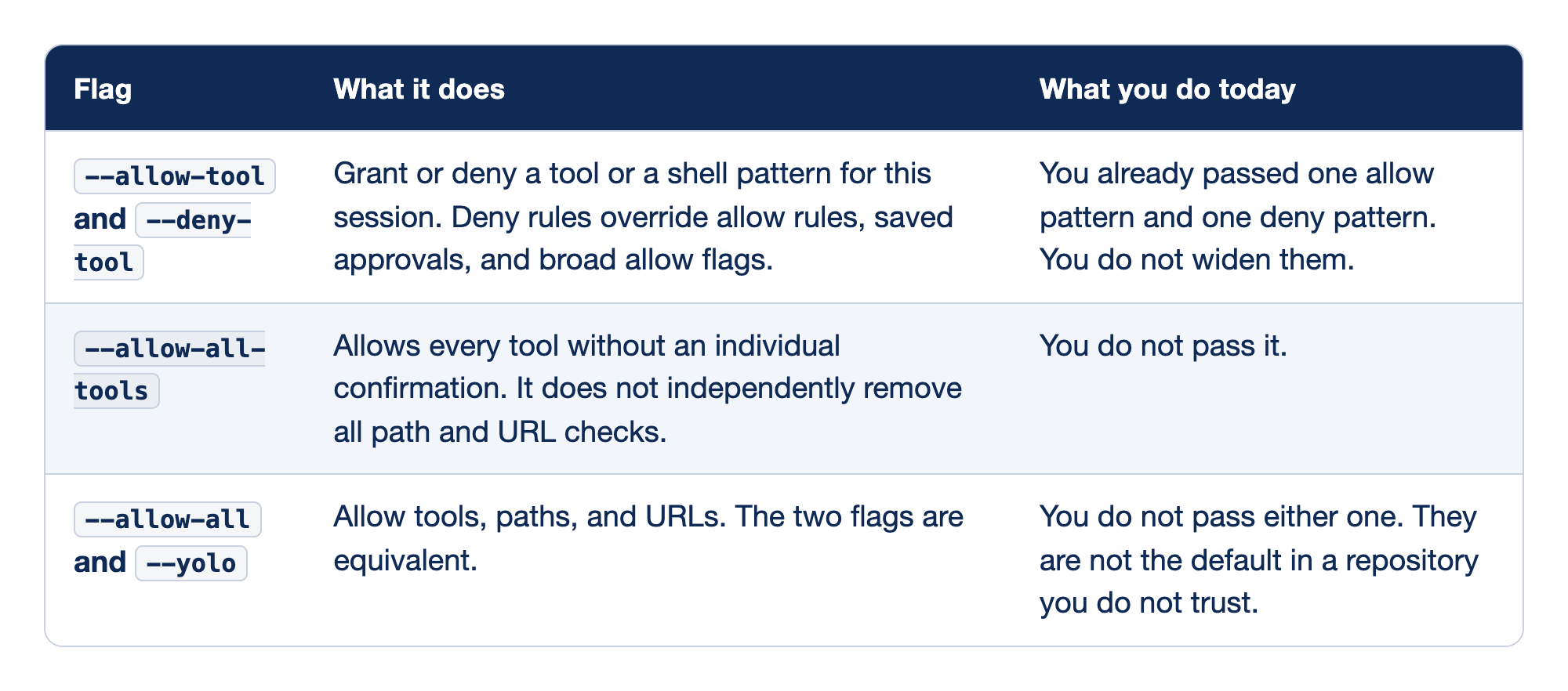
Flag names the switch. What it does states the permission effect. What you do today states whether this session passes that switch.
--allow-tooland--deny-toollast for this session. The wildcard covers more than the command you picture, including a push, and the deny overrides that allow, saved approvals, and broad allow flags. The string is still only a pattern. You tested one request. A different command that still sends the branch somewhere is outside that test.--allow-all-toolsskips the per-tool question and does not independently remove path and URL checks. Skipping that question is not the same as opening every path and every URL. You do not pass it.--allow-alland--yoloare equivalent. They allow tools, paths, and URLs. They are not the beginner default, not the flag you add because a prompt feels slow, and not for a repository you do not trust.
The first row is the session you ran. The other rows skip questions you still want in front of a push.
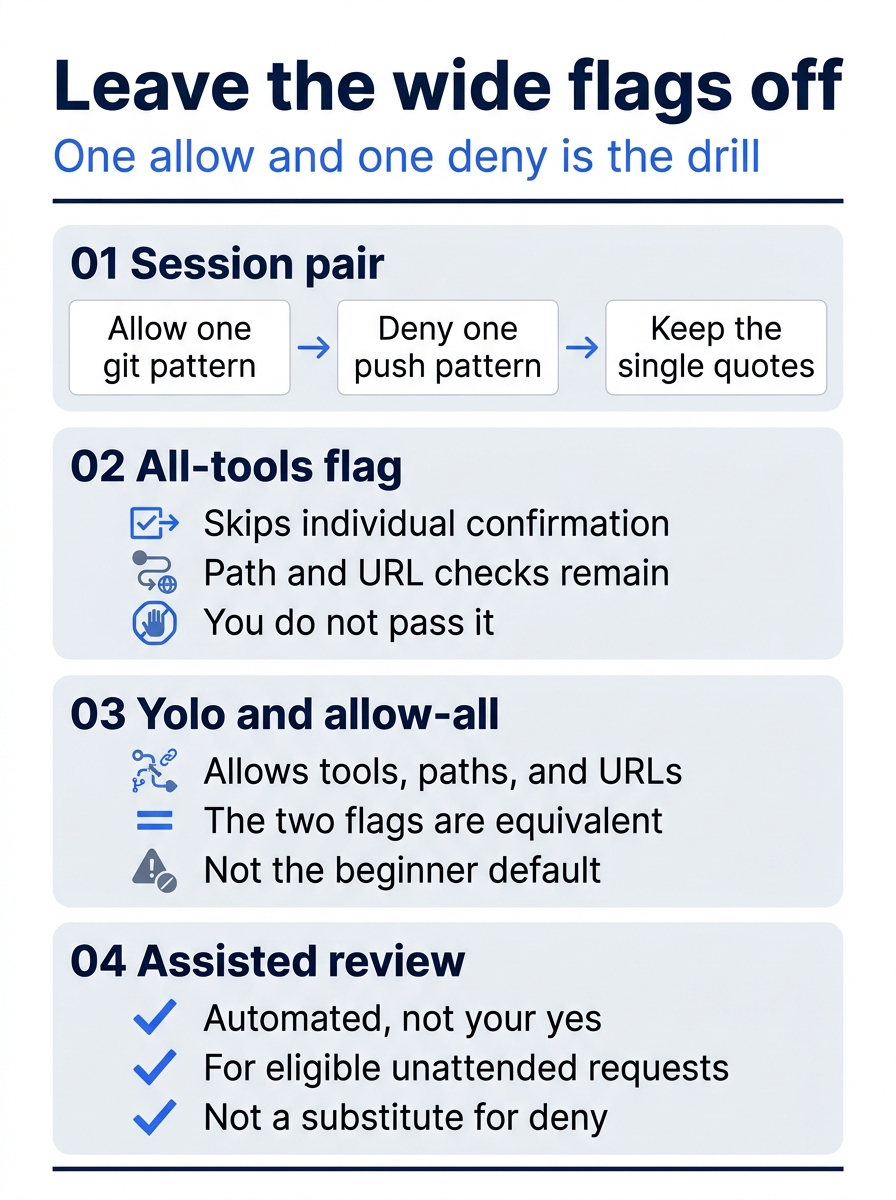
The poster is the menu you do not expand. One quoted allow and one quoted deny are the session. --allow-all-tools still leaves path and URL checks in place, and you still do not pass it. --allow-all and --yolo open tools, paths, and URLs together. Assisted approval, on that poster, is an automated review of eligible unattended requests. It is not your yes, and it is not a substitute for the deny.
Gotcha: --yolo in a repository you do not trust turns a drill into a publish. A clean git status after a refused push does not make that wide flag safe on the next launch. You do not pass it.
Session flags do not write saved rules. Location-scoped approvals live in permissions-config.json. Permanent URL approvals use allowedUrls in settings. Do not open or edit either one today. The next bare copilot launch does not keep the deny. Pass --deny-tool again.
The prompt you sent asked for the push, so the deny was the control under test. Adding "do not push" to the prompt, or to .github/copilot-instructions.md, still leaves a request the model can ignore.
Assisted approval is not your yes
--assisted-approval is an automated safety review for eligible non-interactive permission requests. Non-interactive means nobody is at the prompt to answer. Eligible means the product is willing to review that request. This article does not list every case that qualifies. You are not looking at the command and pressing yes. Assisted approval is automated. It is not your approval.
Assisted permissions were generally available on October 26, 2026. The announcement is GitHub Copilot assisted permissions, generally available.
Do not pass --assisted-approval today. An automated review is not a substitute for --deny-tool='shell(git push)'. If a run shows an assisted decision, do not read it as your own yes on a push.
Two March 2026 reports, kept apart
Two March 2026 reports are real failures of read-only classification. Do not merge them into one March bug, and do not assign one identifier to both. Neither row certifies that Copilot CLI 1.0.112 cannot be bypassed.
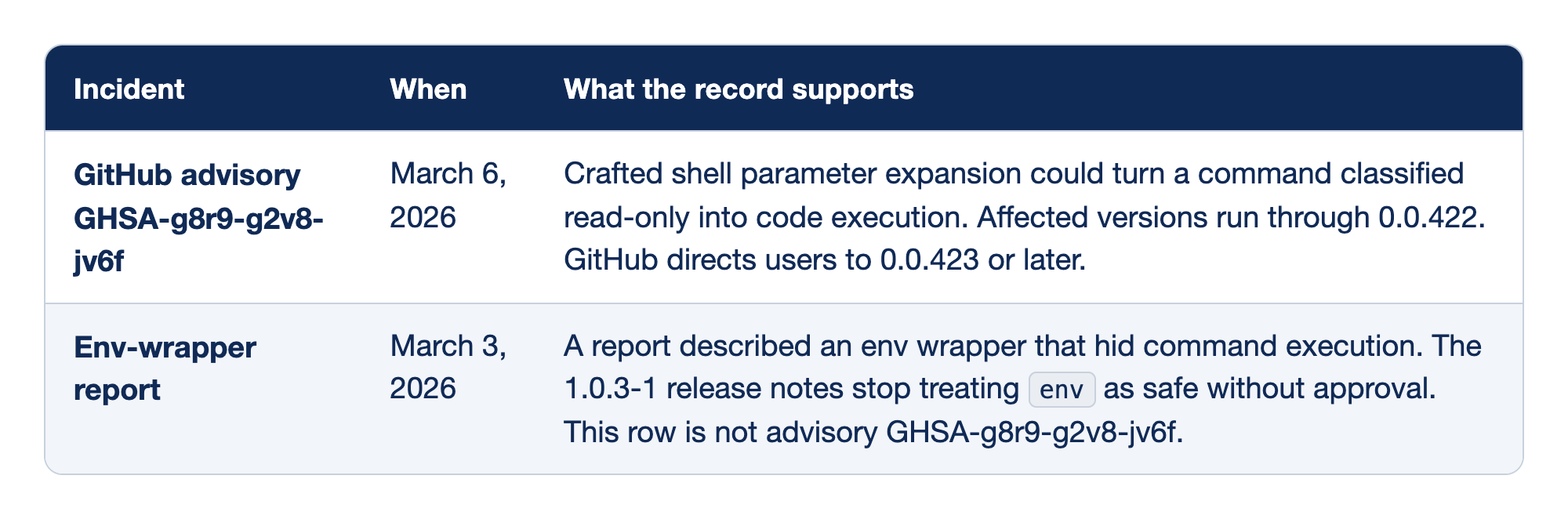
Incident names the record. When is the date on that record. What the record supports is the mechanism, the version boundary the vendor stated, and the limit on blending the two rows.
- GitHub advisory GHSA-g8r9-g2v8-jv6f, March 6, 2026, covers crafted shell parameter expansion that could turn a read-only command into code execution. Affected versions run through 0.0.422. Hostile text could come from repository content, from instruction text, or from a reply returned by a connected tool. GitHub directs users to 0.0.423 or later, and it describes parse-time detection, unconditional blocking, and prompt hardening. The advisory is GHSA-g8r9-g2v8-jv6f. Your line, 1.0.112, is later than 0.0.423. Later is not immunity.
- Env-wrapper report, March 3, 2026, is PromptArmor's "GitHub Copilot CLI Downloads and Executes Malware," which described an env wrapper that hid command execution. The researcher is the source for an initial response that called the issue known and not significant. The wording in that account is not a GitHub advisory id. Do not assign GHSA-g8r9-g2v8-jv6f to this report. The fix claim you repeat comes from the 1.0.3-1 release notes, which stop treating
envas safe without approval. Do not take a version, a fix date, or a limit from the researcher page.
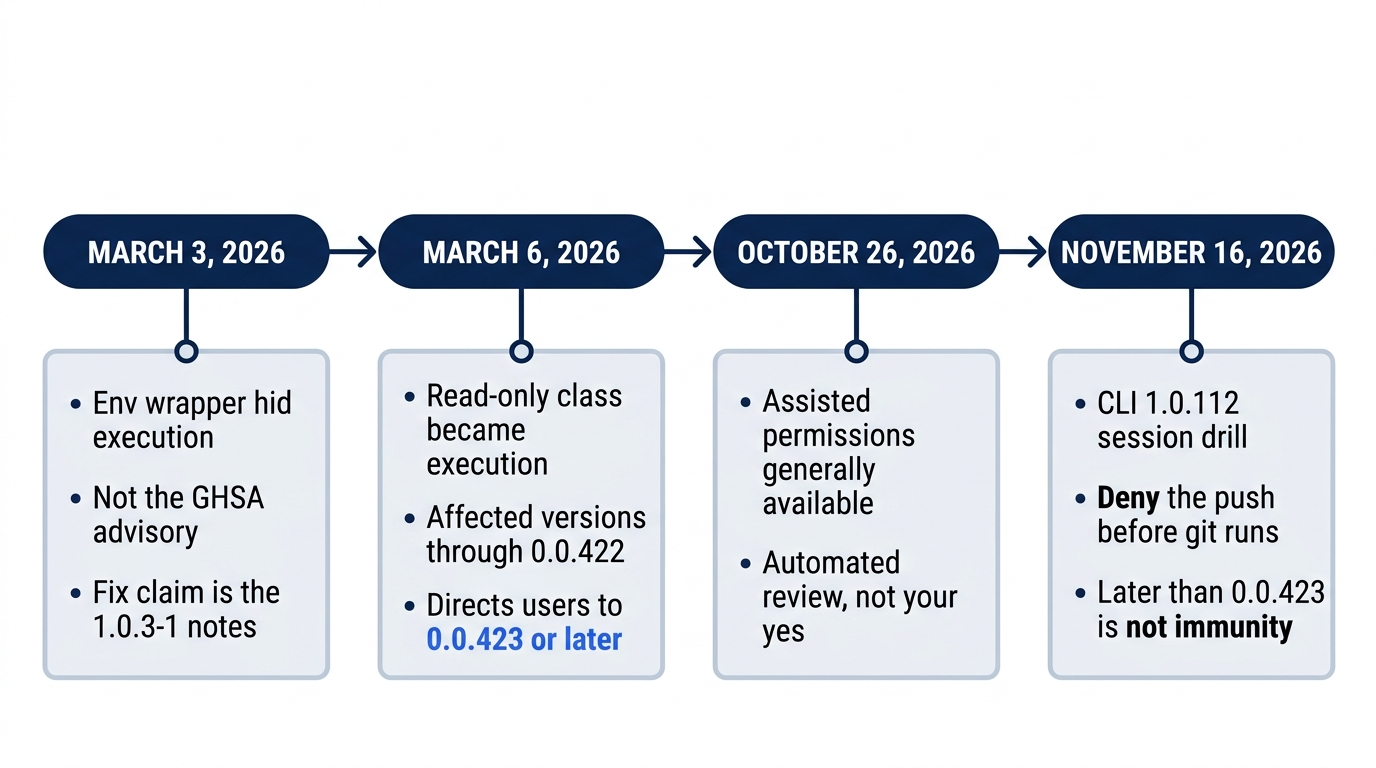
March 3 is the env-wrapper report, and it does not wear the advisory id. March 6 is GHSA-g8r9-g2v8-jv6f, affected versions through 0.0.422, with a directed move to 0.0.423 or later. October 26, 2026 is assisted permissions, an automated review. November 16, 2026 is the 1.0.112 deny drill. Later than the directed release is not immunity.
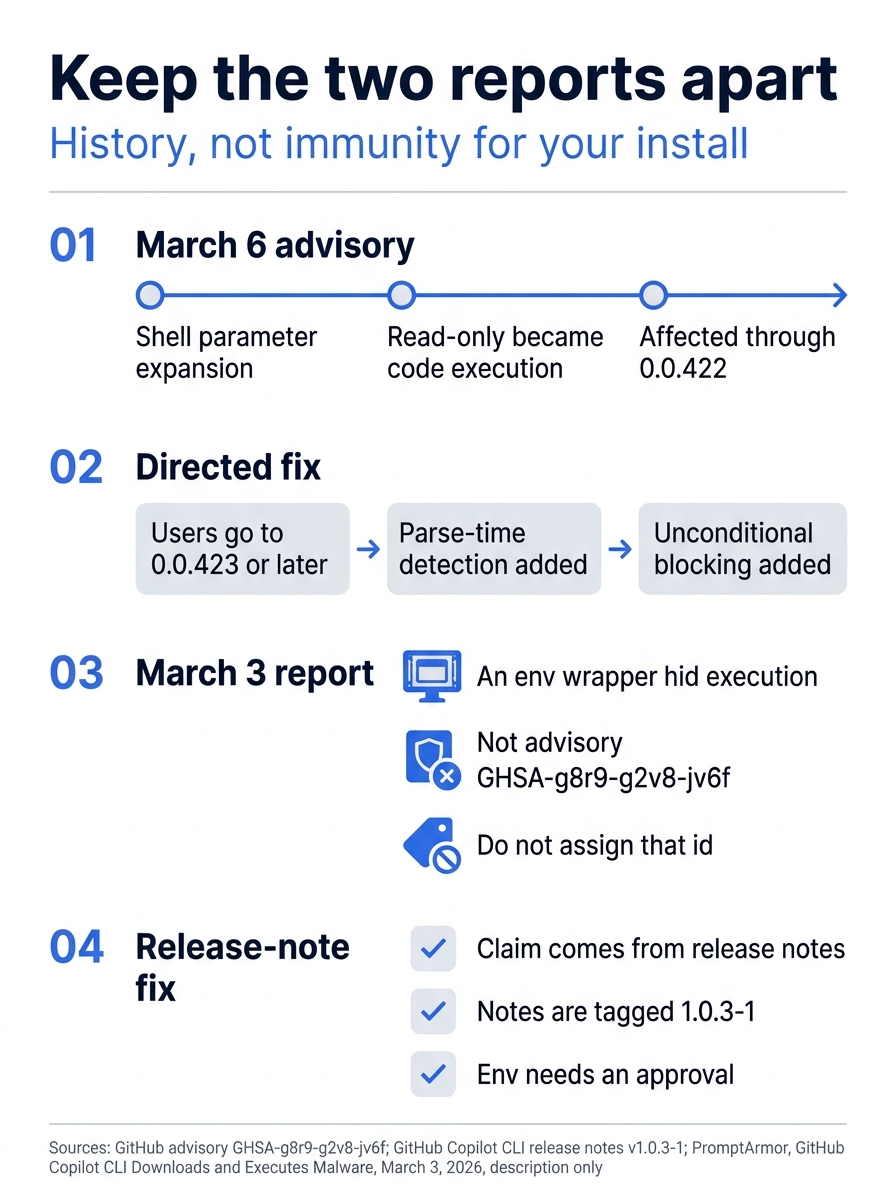
The March 6 panel is parameter expansion through 0.0.422, with users directed to 0.0.423 or later, plus parse-time detection and unconditional blocking. The March 3 panel is the env wrapper, and it is not GHSA-g8r9-g2v8-jv6f. The env fix you are allowed to repeat is the 1.0.3-1 release note: those notes stop treating env as safe without approval. Do not take a version, a fix date, or a limit from the researcher page.
If you have used Claude Code: Claude Code asks before it runs some tools. This session's lesson is --allow-tool and --deny-tool. The deny is why git push does not ride along inside shell(git:*). This note does not list Claude Code's control names.
Do this today
- From
~/code/ticket-triage, your shell history showscopilot --allow-tool='shell(git:*)' --deny-tool='shell(git push)'and no other allow flag, on a 1.0 line you wrote down. When a session allow would covergit push, pass the deny on that session. A sentence in the prompt or in.github/copilot-instructions.mddoes not replace it. On Windows, use the same command from the terminal you have been using for this series, and keep the single quotes. - The push was refused before git ran. Your note has the wording you saw, and that git did not run. "No remote" is not the pass. If a network operation started, you stopped the turn. You never completed a push. If you could not tell a denial from a git error, you did not record the push as refused.
git status --shortprints nothing, andgit remote -vprints the same lines as before the session.git log -1 --onelinematches the line you copied.git diff -- src/classify.jsprints nothing. You did not commit, add a remote, or remove one.- You ran
npm testyourself:refund,shipping,other, andcrushed mug in pieces is other, plus# tests 4,# pass 4, and# fail 0. - Two note lines stay separate. Line one: GHSA-g8r9-g2v8-jv6f, March 6, 2026, shell parameter expansion, affected versions through 0.0.422, GitHub directs users to 0.0.423 or later. Line two: the March 3, 2026 env-wrapper report, fix claim from the 1.0.3-1 notes, which stop treating
envas safe without approval. The second line does not wear the GHSA id. A third line says you did not pass--allow-all-tools,--allow-all,--yolo, or--assisted-approval, and that assisted approval is an automated review, not your approval. The note is history, not a certificate that 1.0.112 cannot be bypassed.
The error that feels safe
The instruction file can tell the model what not to edit. It cannot stop the shell. The control under test is a deny on that session, and deny wins even when shell(git:*) would have covered the push.
Distrust the relief. "No remote" means the folder had nothing to publish to, not that Copilot refused. Git ran. Write down the wording you saw, and whether git ran. The next bare copilot launch will not remember the deny. Pass --deny-tool again.
This is Part 5 of "GitHub Copilot, Day-to-Day," a 16-part guide to using GitHub Copilot as a daily coding agent.