
GitHub Copilot Custom Instructions Load Only in a New Session
A chat sentence dies with the Copilot CLI session, so two short repository files are the context a new session can read, and a reply that names the file is a check, not a lock.
Write two short files, skip the old chat, and check that the reply names src/classify.js.
You closed the terminal believing the agent would remember the rule. The next session had never seen that sentence, and even a file on disk is context the model can ignore.
In this article: You will commit two GitHub Copilot custom instruction files, start a new Copilot CLI session, and check that the reply names
src/classify.jsas off limits. You will see why a path-scoped rule is not an override, why the CLI filename list is not a load order, and why the file still will not stop an edit or a push. By the end, four tests still pass andgit status --shortprints nothing.
Preview: written November 16, 2026, before Microsoft Ignite. Some paid steps are not yet tested live; this guide will be updated November 21, 2026.
You can spend a whole session telling GitHub Copilot CLI the same two rules. Run npm test before you call the work done. Leave src/classify.js alone. The reply sounds obedient. You close the terminal. The next session has none of that conversation. A sentence in chat dies with the session.
GitHub Copilot custom instructions are how the next session can see those rules without you typing them again. You put them in repository files you write yourself. The files are context, which means text a session can read. They are not an executable policy, and they are not a permission boundary. The agent can still try an edit. You still read the diff.
This check uses Ticket Triage, a small Node project at ~/code/ticket-triage. Four tests already pass, including crushed mug in pieces is other. src/classify.js is unchanged, and the crushed-mug sentence still returns other. Git status is empty. You add instruction files only. You do not change the function.
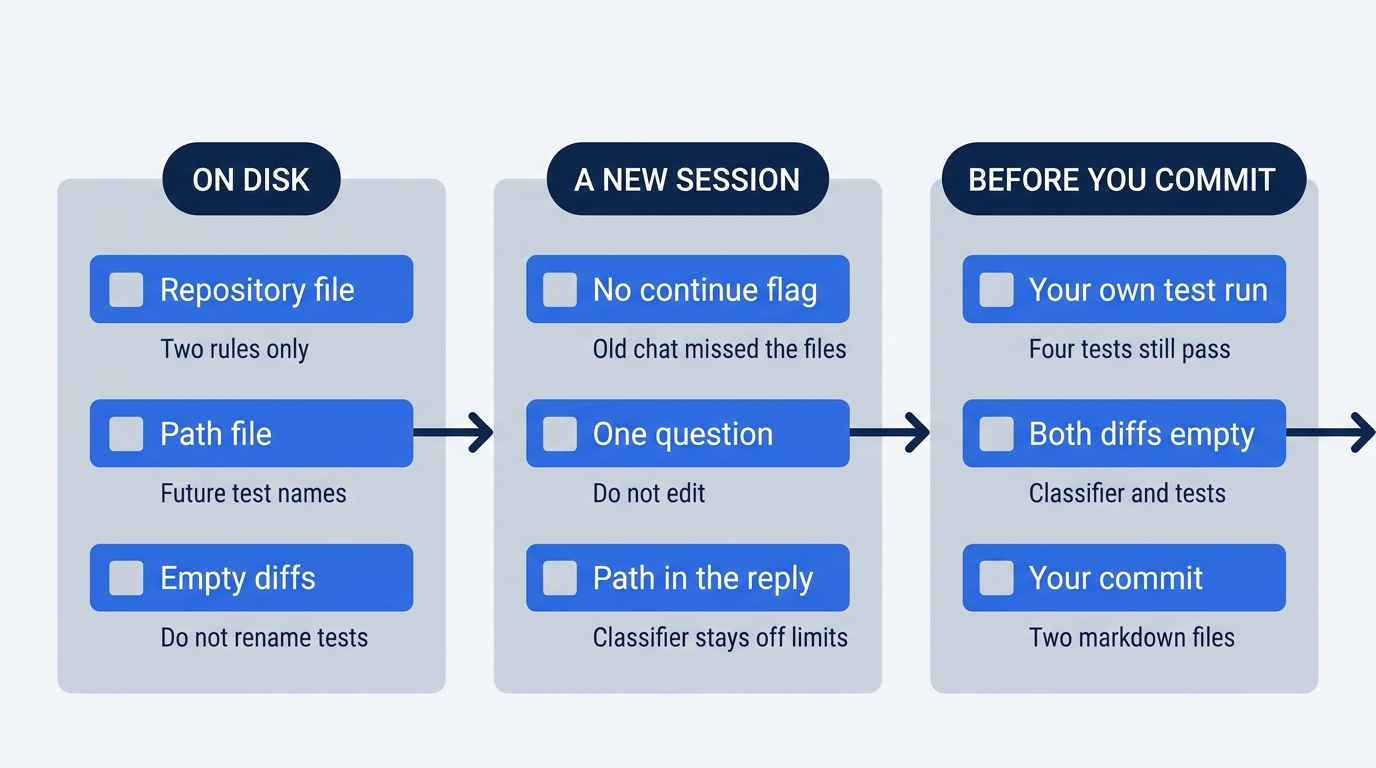
The timeline is the order of your checks, not an order the product uses to load files. The repository file and the path file go on disk first. A new copilot session, with no --continue, is the session that can see them. You commit only after the reply names src/classify.js, your own npm test still passes, and both diffs print nothing.
Starting fresh or fell behind? Run git switch -C main copilot/day-03. This replaces your main with the end of Day 3; to keep your own work, run git branch my-backup first.
Confirm the version and the tree
By the end of this pass you have two instruction files committed, a new Copilot CLI session whose reply names src/classify.js as off limits, four tests still passing, and git status --short empty.
These steps use Copilot CLI 1.0.112, as of November 16, 2026. Another 1.0.x line is acceptable when you write it down. If the line is not 1.0, stop. Do not reinstall.
copilot --version
Write the line down if you did not keep it. This article did not run this paid turn on November 16, 2026. There is no sample reply. Re-run the question on your account before you trust the wording.
On Windows, use your Ticket Triage folder. When you created it at the path this walkthrough uses, it is C:\code\ticket-triage.
cd ~/code/ticket-triage
git status --short
npm test
git diff -- src/classify.js
git status --short prints nothing. git diff -- src/classify.js prints nothing. npm test shows # pass 4 and # fail 0. Ignore timings. The names include other and crushed mug in pieces is other. If status prints a path, the diff prints a patch, or the pass count is not 4, stop. Do not start a session on a dirty tree, and do not edit src/classify.js to get back to green.
Write the two instruction files
.github/copilot-instructions.md is short repository-wide guidance. An executable policy would block an edit by itself. A permission boundary is a rule the tool enforces when a tool is requested. This file is neither.
You write the file. The agent does not. The file holds these two rules and nothing else.
mkdir -p .github/instructions
cat > .github/copilot-instructions.md << 'EOF'
Run npm test before you say a change is done.
Do not edit src/classify.js until a crushed-mug issue says so.
EOF
The directory .github/instructions is for the next file. The repository file has two lines: run npm test before you say a change is done, and do not edit src/classify.js until a crushed-mug issue says so. There is no such issue in this folder today, so the function stays as it is. Do not add a title, a third rule, or a note about renaming tests.
cat .github/copilot-instructions.md
The command prints those two lines. If it prints more, replace the file with the same two lines before you continue.
A path-scoped file applies to the paths you name, not to the whole repository. applyTo is a glob in YAML frontmatter. A glob is a path pattern. YAML frontmatter is the --- block at the top of a markdown file. More than one instruction file can apply to the same path, so these two files must not contradict. A tighter applyTo glob is not documented as an override. Both can be true at once: leave src/classify.js alone, and name new tests after the ticket.
test/** matches files under test/. You write .github/instructions/tests.instructions.md with that glob and one rule.
cat > .github/instructions/tests.instructions.md << 'EOF'
---
applyTo: "test/**"
---
Test names say what the ticket is, not only the word other.
EOF
The frontmatter is the glob only. The body is that one sentence. It does not say to edit src/classify.js, and it does not cancel the npm test line.
cat .github/instructions/tests.instructions.md
You should see the three frontmatter lines and the test-name sentence. The existing test named other stays. Do not rename it. The new rule is for tests you add from now on. You add no test today. The test crushed mug in pieces is other already names the ticket, so you do not rename that one either.
git diff -- test/classify.test.js
git diff -- src/classify.js
Both commands print nothing. If the test diff prints a rename, restore the file and run the diff again until it prints nothing.
git restore test/classify.test.js
Do not ask the agent to rename other so the new rule looks tidy.
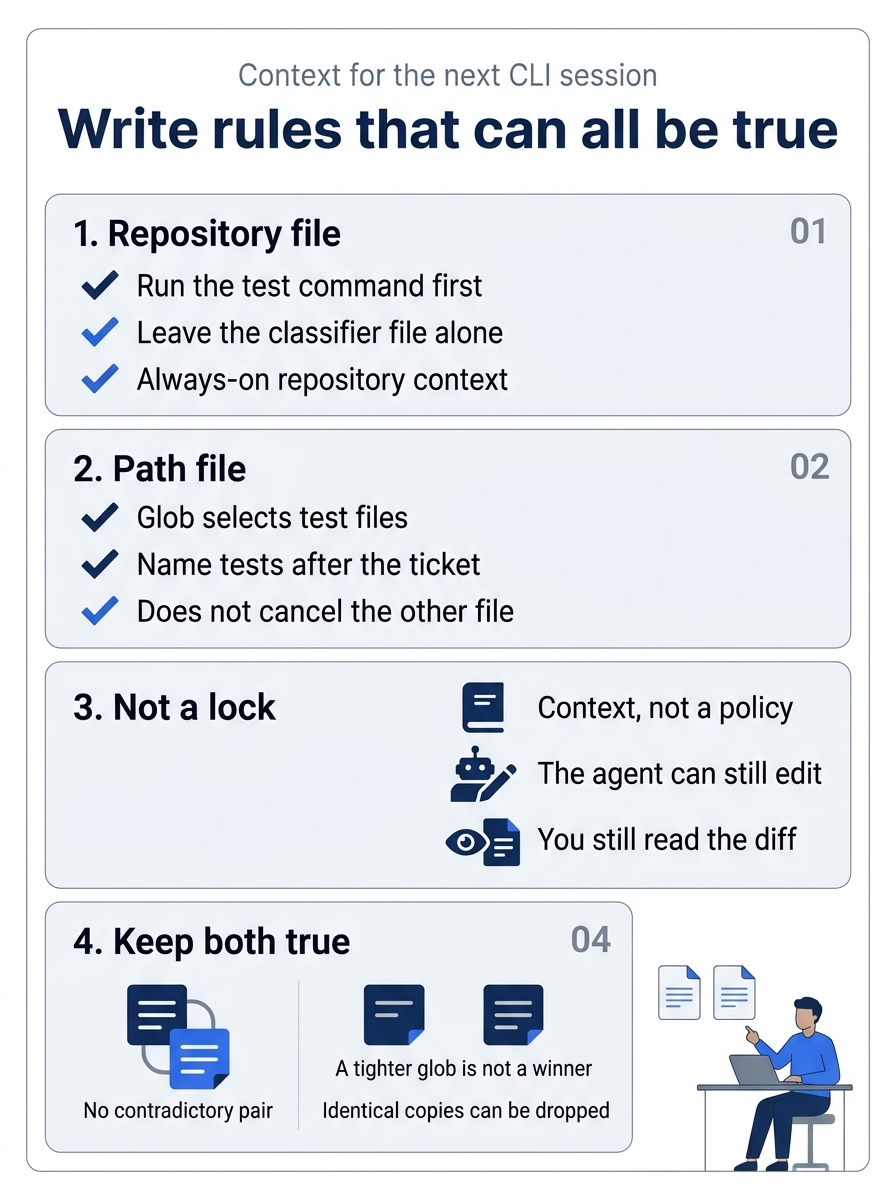
The poster is the limit on what you just wrote. The repository file is always-on context: run the test command before you call the work done, and do not edit the classifier until a crushed-mug issue says so. The path file only constrains future test names under test/. Neither file blocks an edit by itself. You still read the diff. A tighter glob is not a documented winner over a repository sentence that says the opposite, and pasting the same sentence into both files is not emphasis. The CLI can drop an identical duplicate.
Ask in a new session
Instruction changes need a new session. A session is this CLI conversation. --continue resumes the most recent session, the one from before these files existed. You do not use it. You start copilot from ~/code/ticket-triage.
cd ~/code/ticket-triage
copilot
You are at a fresh prompt in this repository. Paste one question. It tells the agent not to edit.
What file must you not change, and what must you run before you say a change is done? Do not edit files.
The win is a reply that names src/classify.js as off limits. If the reply also answers the second half, it names npm test. This article has no sample reply. Re-run this on your account before you trust the wording. Look for that path in the reply, not for a confident tone.
If the reply does not name src/classify.js, read the file on disk. You are checking the bytes, not rewriting the file to match a bad reply.
cat .github/copilot-instructions.md
The two rules are still the only lines. /exit closes the session and returns you to the shell. Run it, then start another new session. Do not pass --continue.
/exit
copilot
Paste the same question once more. If the second reply still does not name src/classify.js, stop. Do not edit src/classify.js to help. Do not add a third rule. Do not rename a test. A wrong reply is not the win, and you do not commit on top of it. From a second terminal, confirm that the agent did not edit anyway.
git diff -- src/classify.js
npm test
The diff prints nothing. The test run is still # pass 4 and # fail 0. Leave the markdown uncommitted until a new session names the file.
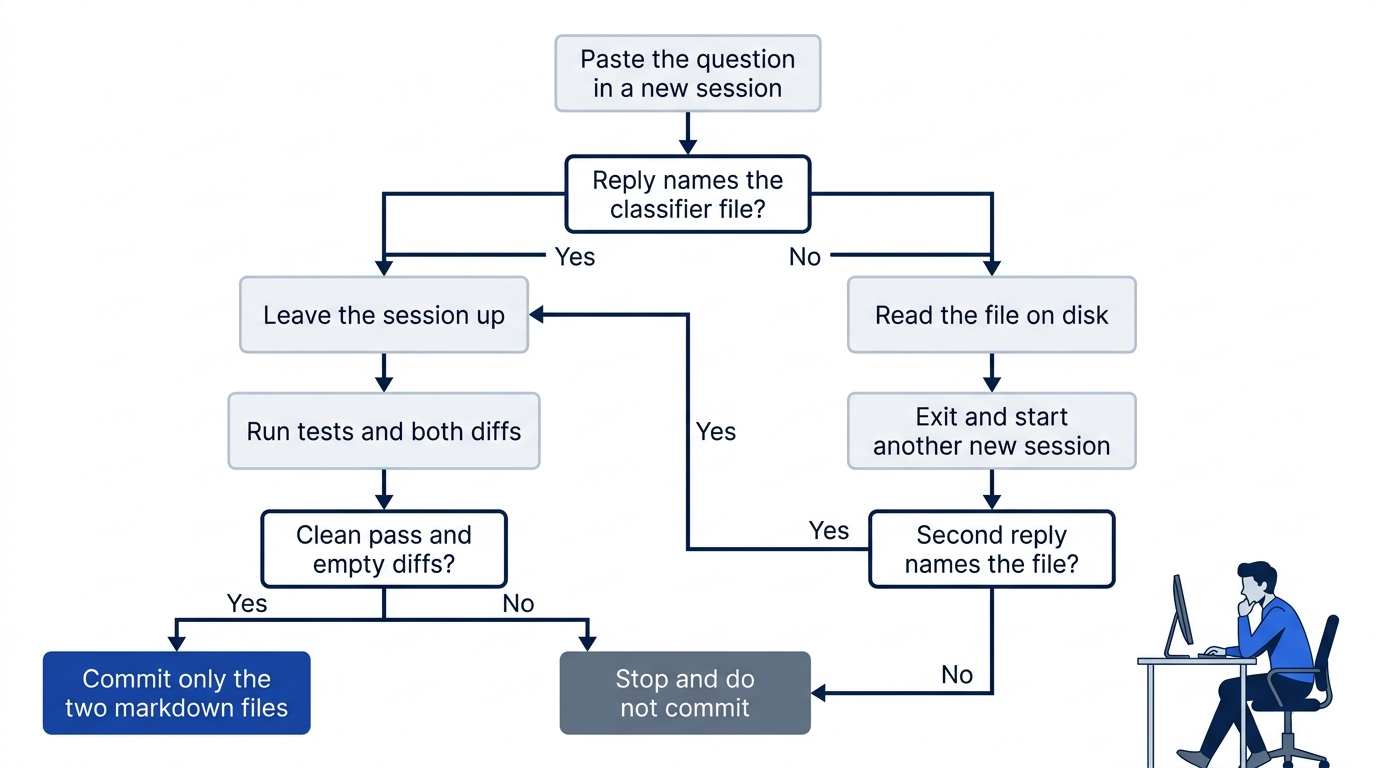
One miss gets one more new session. A second miss is a stop. The yes path still does not trust the reply alone: you leave the session up and run npm test plus both diffs from a second terminal. The commit names only the two markdown files.
Prove the tree, then commit
When a reply has named src/classify.js, leave that session up until you have read it. Run the checks from a second terminal so a surprise write is still visible.
cd ~/code/ticket-triage
npm test
git diff -- src/classify.js
git diff -- test/classify.test.js
Ignore timings. The shape you want is four named results and a pass count of 4. The name other is still there. The crushed-mug name is still there.
ok 1 - refund
ok 2 - shipping
ok 3 - other
ok 4 - crushed mug in pieces is other
# tests 4
# pass 4
# fail 0
Node's runner registers tests in source order in this one file, so those names stay in that order if you never rewrote the file. Extra summary lines, including a suites line, may appear. If the names match and the counts are # tests 4, # pass 4, and # fail 0, the run passed even if the ok numbers differ. Both diffs print nothing. On a failure, or on any classifier patch, stop. Restore src/classify.js if that diff prints anything. Do not change the function to force a green run.
The agent does not run git. If it offers to add, commit, or push, refuse. Return to the session and close it.
/exit
Before the add, status lists only the two new markdown files. A leading ?? is git's mark for a new file. If src/classify.js or test/classify.test.js appears, stop and do not commit. If some other path appears and you do not recognize it, stop.
git status --short
git add .github/copilot-instructions.md .github/instructions/tests.instructions.md
git commit -m "Add Copilot instructions for tests and classify.js"
git status --short
git add names those two files only. The message is that one line. After the commit, git status --short prints nothing. The function file is not in the commit. The crushed-mug sentence still returns other.
The win is the two files on disk, a new-session reply that names src/classify.js, four passing tests, an empty diff on src/classify.js, and an empty git status --short after your commit. You can stop after the commit. The rest explains what else can load, which surfaces do not share one order, and what this file still cannot stop. It does not add a third instruction file.
Three files people mix up
Two pages sit behind today's files. The CLI how-to is Add custom instructions. The support reference is Custom instructions support. What follows is only what those references support in the notes for this series, as of November 16, 2026. The pages are living docs. This article did not run the paid turn that day. Re-run /instructions on your account before you trust a listing's exact wording.
You wrote the first two rows. The third is a different filename you do not add today. Knowing the difference keeps you from fixing a miss by creating the wrong file.
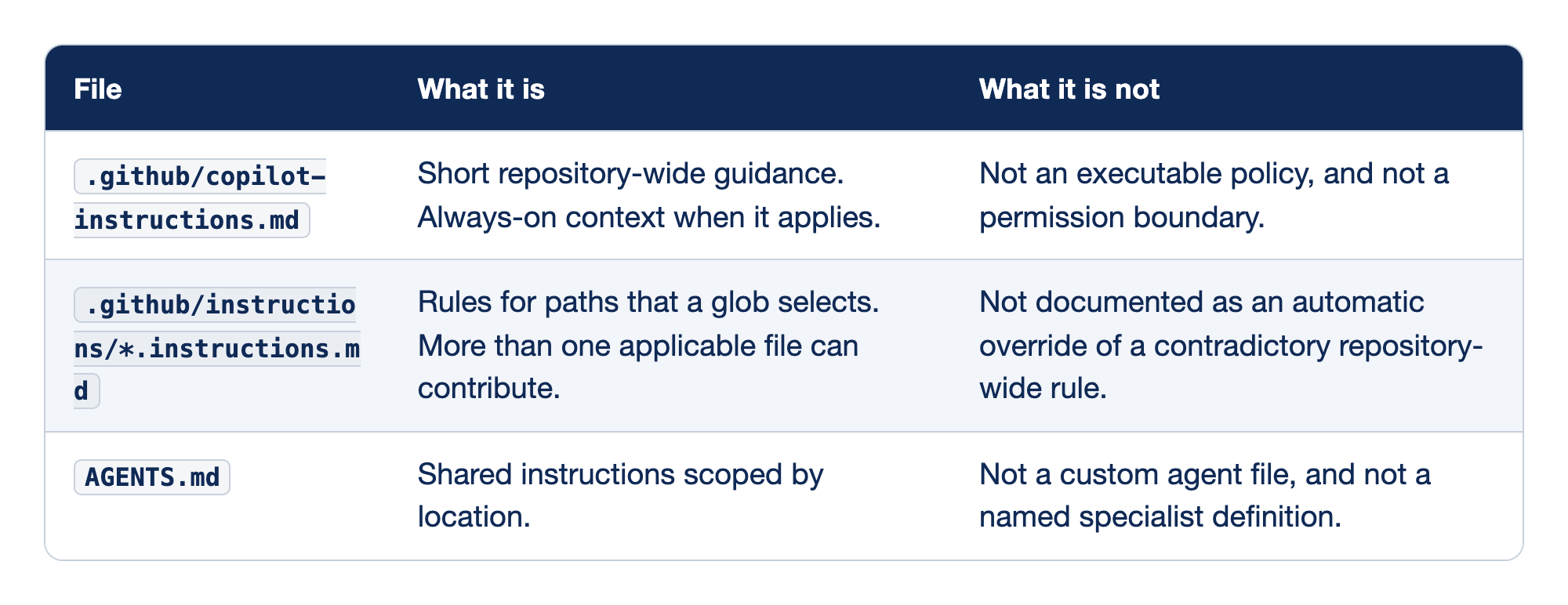
File names the path. What it is holds the job of that path. What it is not holds the job people assign by mistake. You already wrote the first two paths. You do not add AGENTS.md today to make the reply more certain.
.github/copilot-instructions.mdis short repository-wide guidance and always-on context when it applies, and it is not an executable policy or a permission boundary. Context is text the session can read. It does not execute, and it does not replace a permission check. Your two lines are this file..github/instructions/*.instructions.mdholds rules for the paths a glob selects, more than one applicable file can contribute, and a tighter glob is not documented as an automatic override of a contradictory repository-wide rule. Your test-name file is this kind of file, and it does not disagree with the repository file.AGENTS.mdis shared instructions scoped by where the file sits in the tree, and it is not a custom agent file or a named specialist definition. A custom agent is a specialist you select, stored as a different kind of file. You do not create either one today.
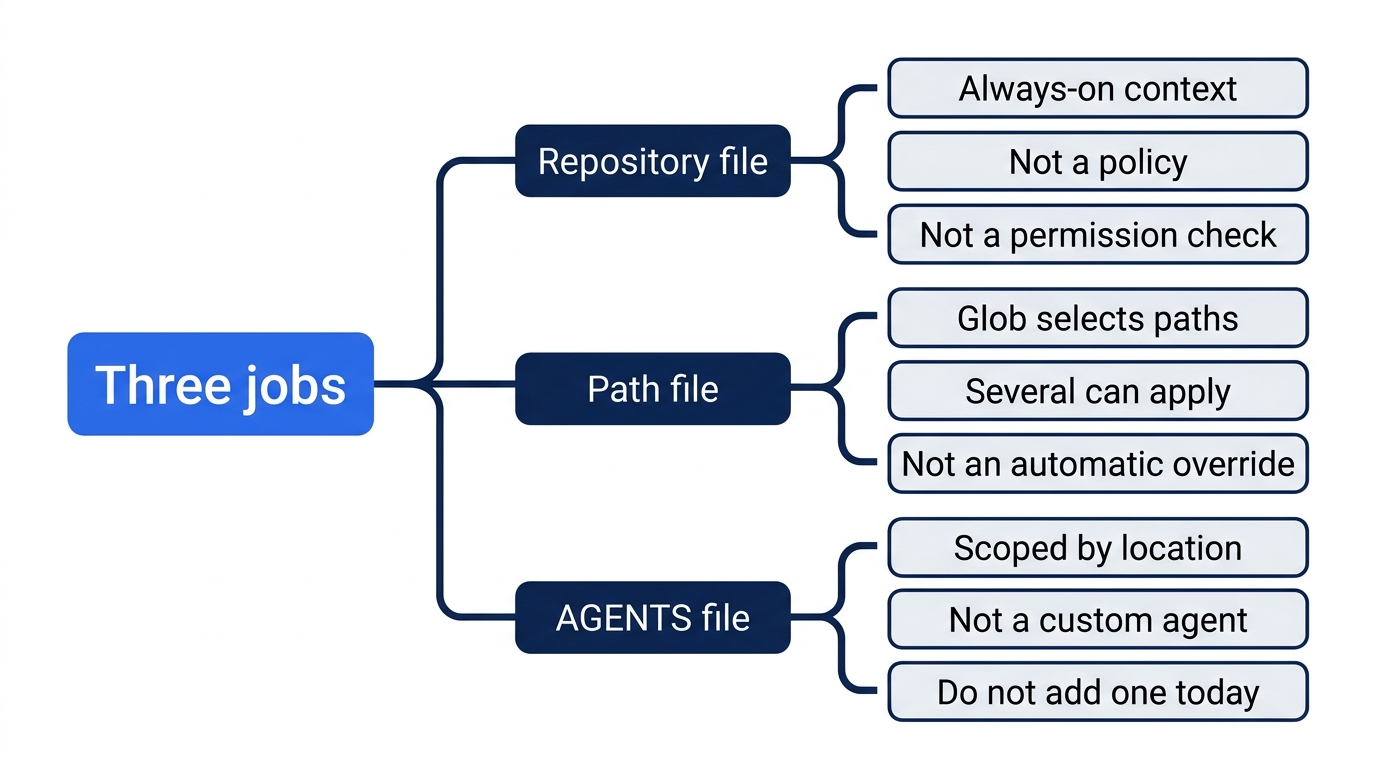
The map keeps the three jobs apart. The repository file is context for the whole repo, not a policy and not a permission check. The path file can sit beside other path files, and a tighter glob is not an automatic override. AGENTS.md is scoped by location. It is not a custom agent, and you do not add one today to make the reply sound more certain.
Two sentences, two scopes
Do not build one global order out of two sentences that are about different things.
The general repository-instructions page says that the nearest AGENTS.md takes precedence. Read that as a claim about AGENTS.md on that page: a closer file in the tree beats a farther one. It is not a claim that every Copilot surface sorts every instruction file the same way.
The CLI combines applicable user and repository instruction files. It drops identical duplicates. It does not define a general precedence order among those files. A more specific applyTo rule is not documented as an automatic override of a contradictory repository-wide instruction. Identical text in two files is not two votes. The duplicate can be dropped. Your two files stay different on purpose: one names npm test and src/classify.js, and the other names how new tests are titled.
Those statements differ in scope. One is the general page on AGENTS.md. The other is the CLI, combining user files and repository files, with no general precedence order. They sit on undated living pages, so you do not treat one sentence as a later edit that cancels the other. Flattening them into "nearest always wins," "the path file always wins," or "the repository file always wins" invents an order the CLI page does not give you.
The habit is the one you already followed. Write rules that can all be true. Do not put a path file that tells the agent to edit src/classify.js next to a repository file that forbids that edit. Do not add two AGENTS.md files that disagree and then guess which one loaded.
User instruction files can be part of that combined set. This article does not create one, and it does not name a home directory for one. If a listing shows an extra file you did not add, leave it. The check is that today's two files appear, not that the list is only those two.
What each surface lists
Do not treat one product surface as proof about another. CLI and cloud support for CLAUDE.md are explicit. Explicit support on those two surfaces does not mean that every editor chat reads CLAUDE.md. The CLI row on the custom instructions support page also lists GEMINI.md.
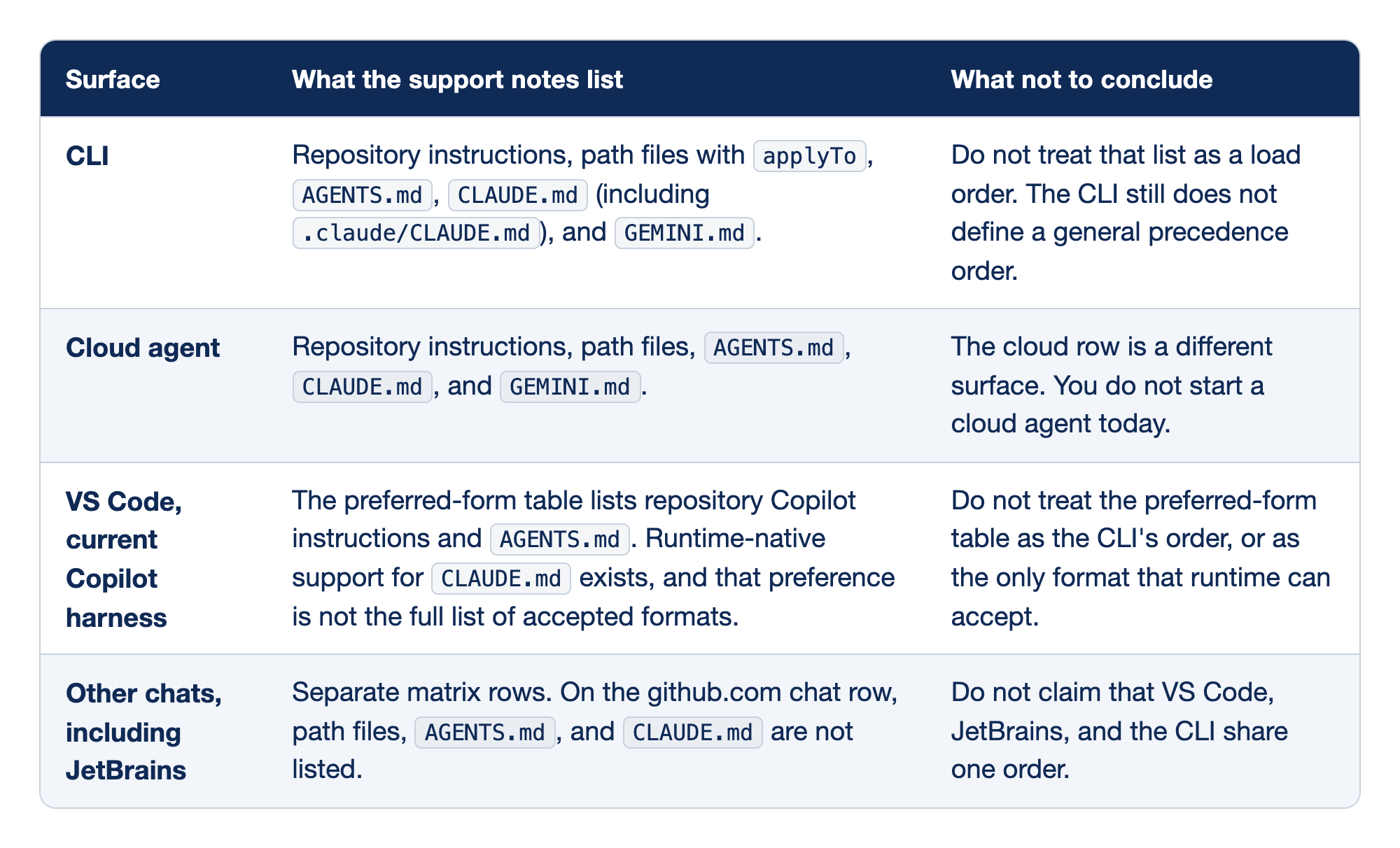
Each row is one product surface, not a step in a shared sequence. Surface names the product. What the support notes list holds the instruction files that row names, as of the custom instructions support page on November 16, 2026. What not to conclude holds the claim you must not draw from that row. A name on one row is not a load order, and it is not proof about a different surface. Not listed means the cited row does not name the file. It does not prove that a newer runtime will never read it.
- CLI lists repository instructions, path files with
applyTo,AGENTS.md,CLAUDE.md(including.claude/CLAUDE.md), andGEMINI.md. Do not treat that list as a load order. The CLI still does not define a general precedence order. It combines applicable user and repository files and drops identical duplicates. You do not add aGEMINI.mdtoday. Listing that name on the support page is not a task. - Cloud agent lists repository instructions, path files,
AGENTS.md,CLAUDE.md, andGEMINI.md. The cloud row is a different surface. You do not start a cloud agent today to confirm a file the CLI already has on disk. - VS Code, current Copilot harness, prefers repository Copilot instructions and
AGENTS.mdin its preferred-form table. Runtime-native support forCLAUDE.mdexists, and that preference is not the full list of accepted formats. Do not treat the preferred-form table as the CLI's order, or as the only format that runtime can accept. Preference is not the same sentence as the CLI's lack of a general precedence order. - Other chats, including JetBrains, are separate matrix rows. On the github.com chat row, path files,
AGENTS.md, andCLAUDE.mdare not listed. Chat on github.com does list the repository instructions file, and personal and organization instructions also apply on that chat. Visual Studio and the desktop app are other rows too. Do not claim that VS Code, JetBrains, and the CLI share one order.
You still do not rely on a file the row does not name. A reply in this terminal does not tell you what JetBrains loaded. A name on the CLI row is not proof that VS Code chat loaded the same file.
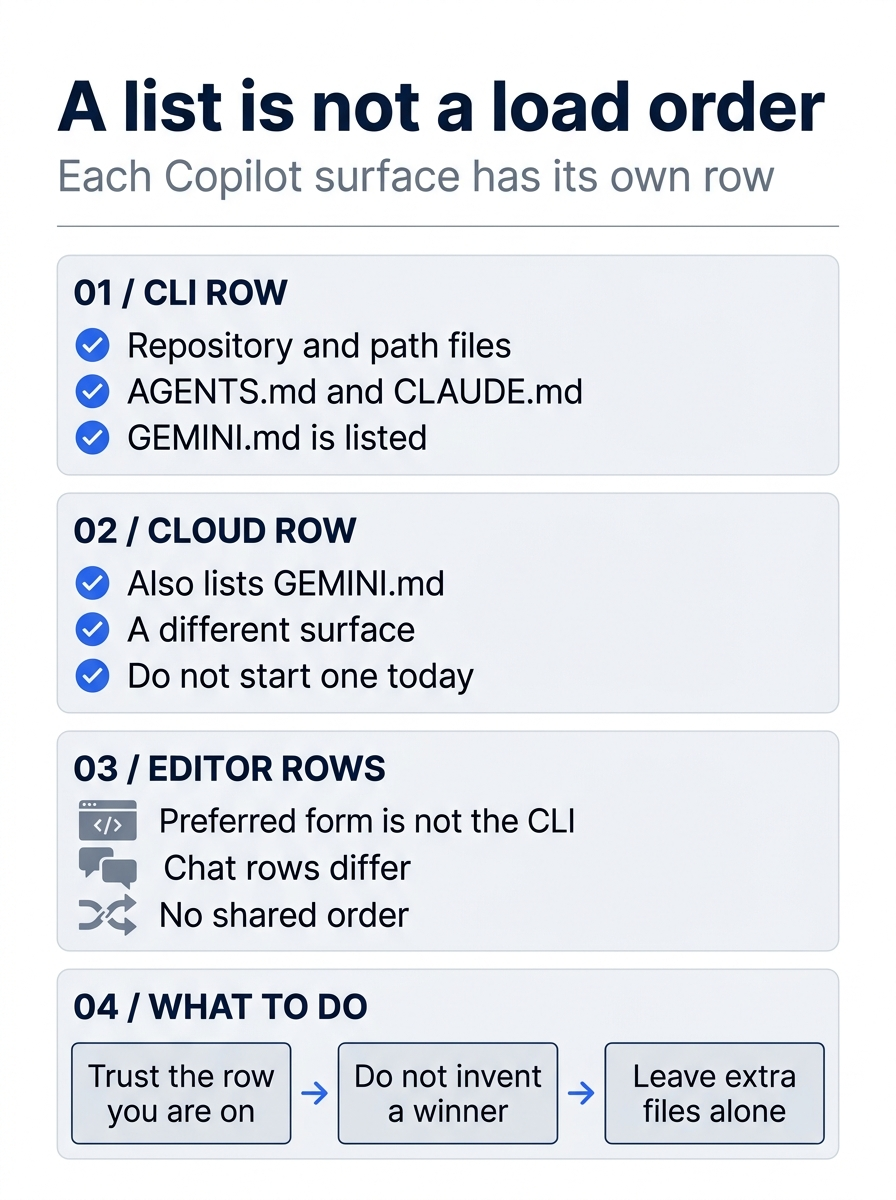
The poster is a limit on what one successful CLI reply allows you to say. The CLI row names those files, including GEMINI.md, and still does not define a general precedence order. The cloud row also names GEMINI.md, and you do not start a cloud agent to re-check a file that is already on disk. Editor chats have their own rows. A preferred form in VS Code is not the CLI's order, and a github.com chat row that omits a filename is not a shared sequence.
Look at what loaded
/instructions shows discovered files in the CLI. You type it inside a session, not at the shell. Use it after a new session, once the files are saved. Resume or start a new session after instruction changes, which is what the CLI guide directs. You started a new session on purpose. --continue of the session from before the files existed is the wrong check. A resume of some older conversation can still be a conversation that never saw these files.
Start copilot from ~/code/ticket-triage again. Do not pass --continue. Then type:
/instructions
Look for both names: copilot-instructions.md and tests.instructions.md. This article has no sample listing. Re-run this on your account before you trust the wording. Write down whether both appear. Extra lines can be user files. They do not replace a missing name.
If a file is missing from that list, the check fails even if the model guessed the rule. A reply can mention src/classify.js because your question asked what not to change, or because an earlier chat said it, even if the session did not load the file. The guess is not the win.
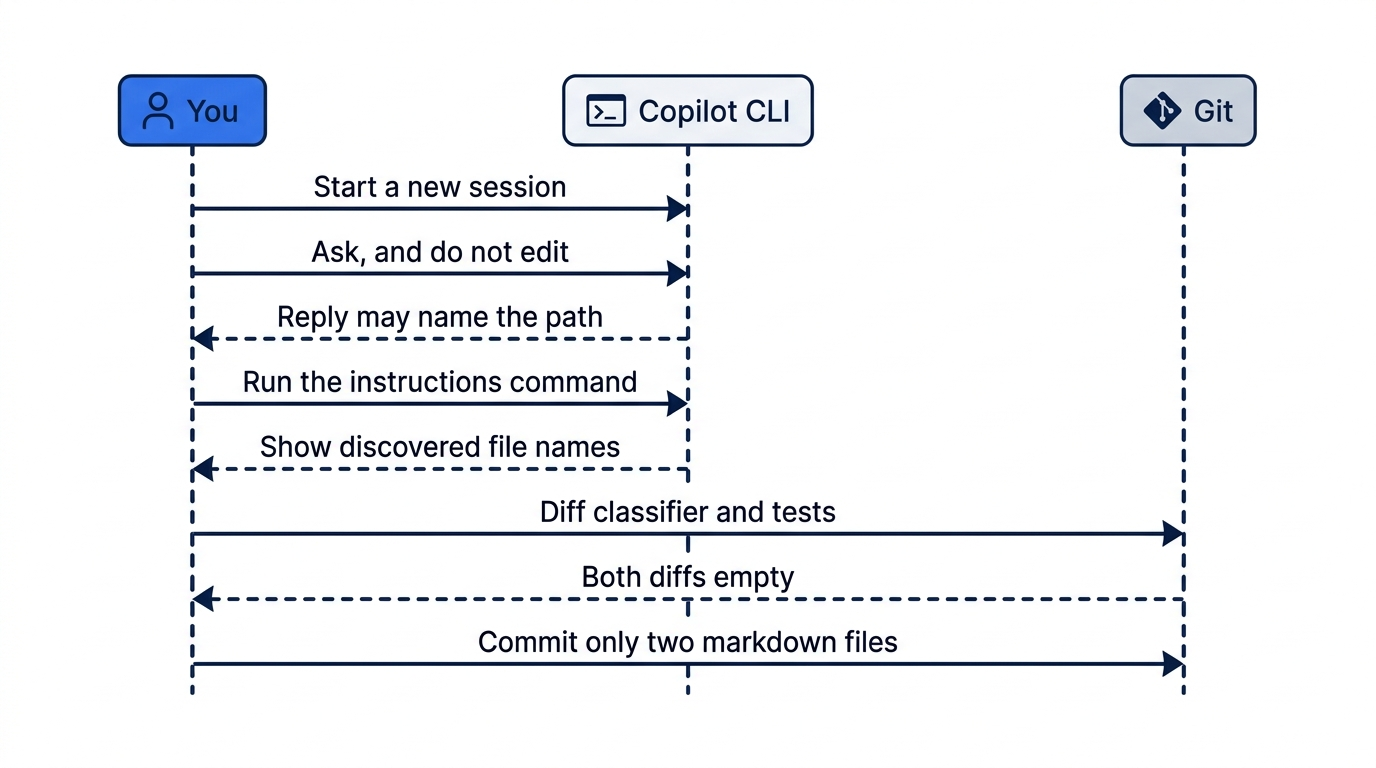
The sequence separates a guess from a load. The reply can name src/classify.js because you asked about it. /instructions is the list of files this session discovered. The diff is the proof the classifier did not change. You add only the two markdown files. Any extra user file in the listing stays where it is. You did not create it, and you do not need the list to contain only today's two names.
One failure looks like continuity. You pass --continue, the old session answers from memory, and the reply sounds right. The files were saved later. /instructions in a new session is how you separate those cases. Another failure looks like clever rules. The repository file forbids an edit and the path file demands it. Nothing you read documents applyTo as the automatic winner. You cannot tell which sentence the model followed, so you do not write that pair. A third failure looks like a duplicate used as emphasis. The same sentence pasted into both files can be dropped as an identical duplicate. Emphasis by copy is not a second rule.
An include is a different mechanism from a sentence that tells the model to open a file. Inside a Copilot instruction file, an AGENTS.md, or a CLAUDE.md, the CLI can pull in another file immediately through an @relative/path reference. The @relative/path form is the documented include. It is not the same as writing "please read this link." Do not add an include today. Do not point one at a credential file, a token, or anything else you would not commit. A shared instruction tree is a bad place for a secret, because the include brings the file into context.
The file will not stop a push
A prompt is weaker than the file. The prompt lived in one session. The file is what the next session can pick up. The file is weaker than a deny rule, and it will not stop a push by itself. This article does not add a deny rule.
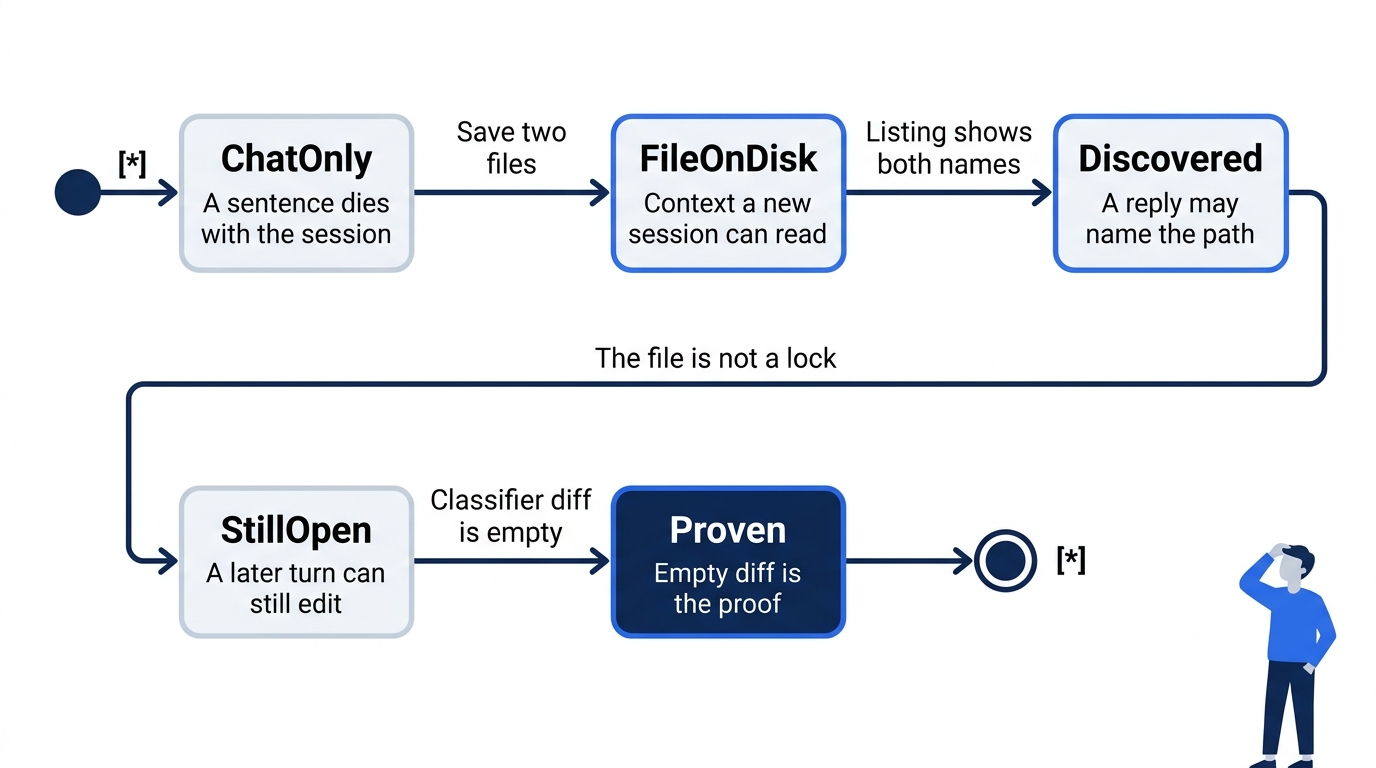
The states are strengths, not a load order. A chat sentence is gone when the session ends. The two files are context the next session can read, once /instructions lists them. Naming the path in a reply does not close the door. A later turn can still edit src/classify.js. The empty diff is what shows that it did not.
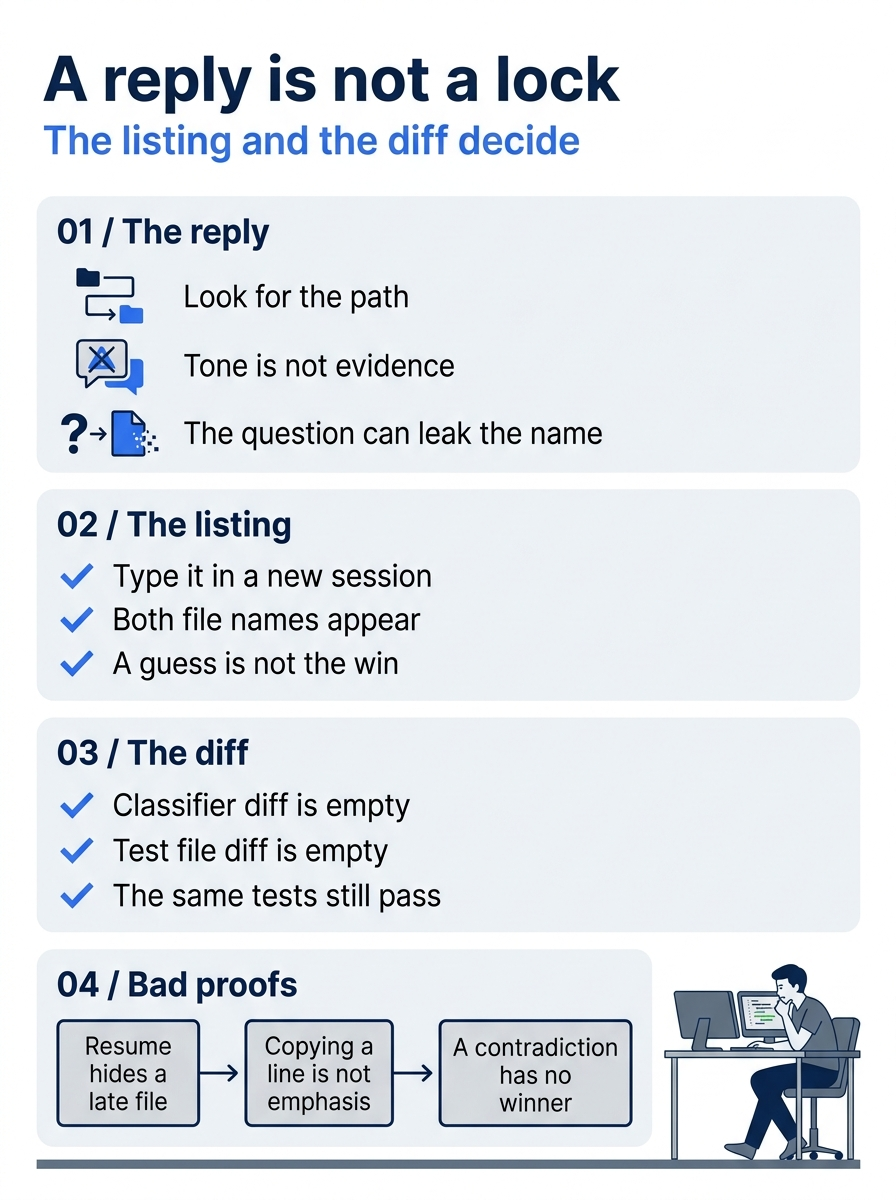
Three checks sit next to each other, and none of them replaces the others. Look for src/classify.js in the reply, then ignore how confident the wording sounds. In a new session, /instructions should show both copilot-instructions.md and tests.instructions.md. From a second terminal, git diff -- src/classify.js and git diff -- test/classify.test.js should print nothing, and npm test should still pass. Resuming the old session, copying one sentence into both files, or writing two rules that contradict each other does not make the proof stronger.

The picture is the miss this section is about. The reply sounded finished. The file was only context. You still have to look at the diff.
Gotcha: the miss is treating a polite reply as a lock. The model names src/classify.js, you skip the diff, and a later turn edits the function anyway. Or /instructions never listed the file, and you commit the story that the rule loaded. The file is context. git diff -- src/classify.js is the check that the function did not change. /instructions is the check that the file was discovered. A reply is neither check.
If you already use Claude Code
Claude Code's always-on file is CLAUDE.md. Copilot's always-on repository file is .github/copilot-instructions.md. Keep both if the repo serves both tools. One does not import the other. The Copilot CLI can also read a CLAUDE.md that is already in the tree, including .claude/CLAUDE.md. Recognizing that filename is not an import. It is not a reason to delete the Copilot file, and it is not a reason to skip writing it.
Do this today
- From
~/code/ticket-triage, confirm both files exist and still say only what you wrote: thenpm testline, thesrc/classify.jsline,applyTo: "test/**", and the test-name sentence. The check iscaton each path. After you change either file, start a newcopilotsession, and do not pass--continueinto the session from before the change. - In that new session, the reply names
src/classify.js. If it answers the second half, it namesnpm test. The check is the path in the reply you actually saw. There is no sample transcript. If it missed, you already read the file, started one more new session, and asked once more. You did not editsrc/classify.js. - Run
npm testyourself. The check is the four names (refund,shipping,other, andcrushed mug in pieces is other), plus# tests 4,# pass 4, and# fail 0. The test namedotherwas not renamed. Timings do not count. - Run
git diff -- src/classify.jsandgit diff -- test/classify.test.js. The check is no output from either command. Commit only.github/copilot-instructions.mdand.github/instructions/tests.instructions.md, with the messageAdd Copilot instructions for tests and classify.js, then rungit status --short. The check is no output. The commit is yours. The agent does not run git. On Windows, run the same commands from your Ticket Triage folder. - Start a new session from
~/code/ticket-triageand run/instructions. Write down whether bothcopilot-instructions.mdandtests.instructions.mdappear. If either name is missing from the list, the check fails even when the model guessed the rule. Also write one line that your two files do not contradict: the repository file forbids an edit tosrc/classify.jsand requiresnpm test, and the path file only constrains future test names. The check is that sentence in the note, not a new file on disk. You did not addAGENTS.md, and you did not addGEMINI.md.
A reply is not the lock
The sentence you typed in chat is gone when the session is gone. The two files stay in the repository, and a new Copilot CLI session can read them. The upgrade is real, and it is smaller than it feels. The files are context. They do not block an edit, and they do not stop a push.
A reply that names src/classify.js is the sign you hoped for. It is not the lock. /instructions shows whether the files were discovered. git diff -- src/classify.js shows whether the function stayed put. Commit the two markdown files only when those checks agree, and leave the classifier out of the commit.
Write rules that can all be true. Then prove the tree yourself.
This is Part 4 of "GitHub Copilot, Day-to-Day," a 16-part guide to using GitHub Copilot as a daily coding agent.