
The Copilot CLI Ten-Minute Loop That Survives Compact
The chat is not the copy that lasts: append the crushed-mug test, compact once, return with copilot --continue, and commit that test yourself while classify.js stays unchanged.
Append one crushed-mug test, compact once, and come back with copilot --continue while classify.js stays unchanged.
You compact the chat, come back, and the agent talks as if the test is already on disk. The file never received those lines, and a green run can still hide a rewrite of the function you promised not to touch.
In this article: You run one Copilot CLI ten-minute loop on Ticket Triage. You confirm a clean tree and three passing tests, leave plan mode, and append one crushed-mug test without touching
src/classify.js. You compact once, return withcopilot --continue, and treat your ownnpm testplus an empty classifier diff as the proof. By the end, four tests pass, the new test is in a commit you made, andgit status --shortprints nothing.
Preview: written November 16, 2026, before Microsoft Ignite. Some paid steps are not yet tested live; this guide will be updated November 21, 2026.
A compacted Copilot CLI session can sound finished. The summary mentions the crushed-mug test. You come back, ask for a run, and test/classify.test.js still has the three tests you started with. Those new lines were never written. Coming back cannot restore a file the session never saved.
The chat is not the copy that lasts. This Copilot CLI ten-minute loop puts one assertion on disk before /compact, leaves, and returns with copilot --continue. You run npm test yourself. You commit the test yourself. The agent does not run git.
Ticket Triage lives at ~/code/ticket-triage. src/classify.js already returns other for "The box showed up crushed and the mug inside is in pieces", because that sentence does not contain shipping, delivery, package, refund, or money back. You are pinning that result. You are not teaching the function a new label.
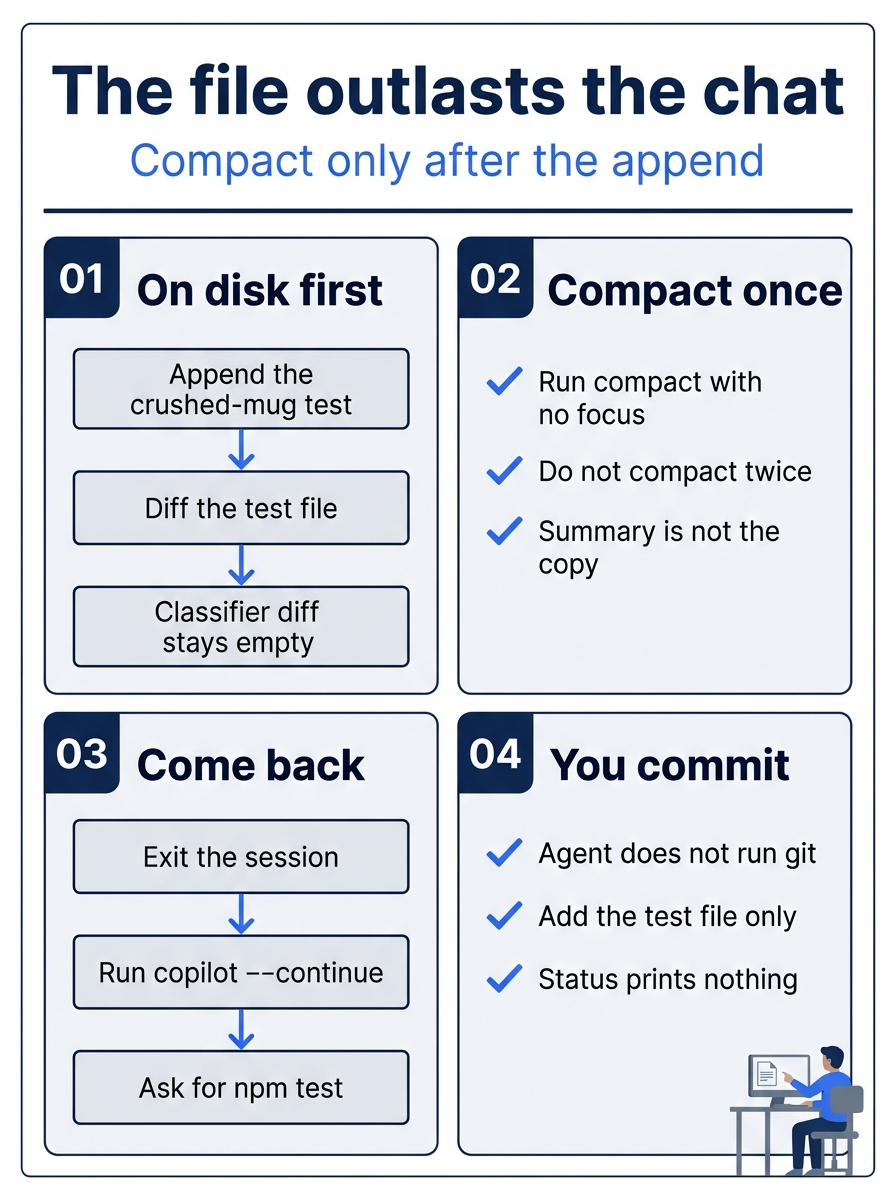
The poster is the order, not a second procedure. Append the crushed-mug test and confirm the classifier diff is empty. Compact once, with no focus words. Exit, return with copilot --continue, and ask for npm test without edits. Then add only test/classify.test.js and commit it.
Starting fresh or fell behind? Run git switch -C main copilot/day-02. This replaces your main with the end of Day 2; to keep your own work, run git branch my-backup first.
Confirm the CLI and a clean tree
These steps use Copilot CLI 1.0.112, as of November 16, 2026. Another 1.0.x line is acceptable when you write it down. If the line is not 1.0, stop. Do not reinstall.
copilot --version
A session is this CLI conversation. /compact summarizes long history. The Copilot CLI concept page calls /compact the manual control for compressing that history. A compressed history can drop detail. /resume continues a session from inside the CLI. --continue resumes the most recent session. A bare picker is a chooser you open without typing a session id. It needs an interactive terminal. In a script you would pass an id. Today is interactive, so you do not pass an id.
The Copilot CLI command reference documents /compact, /resume, and --continue. This article did not run this paid turn on November 16, 2026. There is no sample transcript. Re-run this on your account before you trust the wording. Look for the checks in each step. The agent does not run git.
On Windows, use your Ticket Triage folder. If you followed that path, it is C:\code\ticket-triage.
cd ~/code/ticket-triage
git status --short
npm test
git status --short prints nothing. npm test shows # pass 3 and # fail 0. Ignore timings. test/classify.test.js still has three tests: refund for "I want my money back", shipping for "Where is my package?", and Hello as other. If status prints a path, or the pass count is not 3, stop until both checks match. Do not resume on a dirty tree.
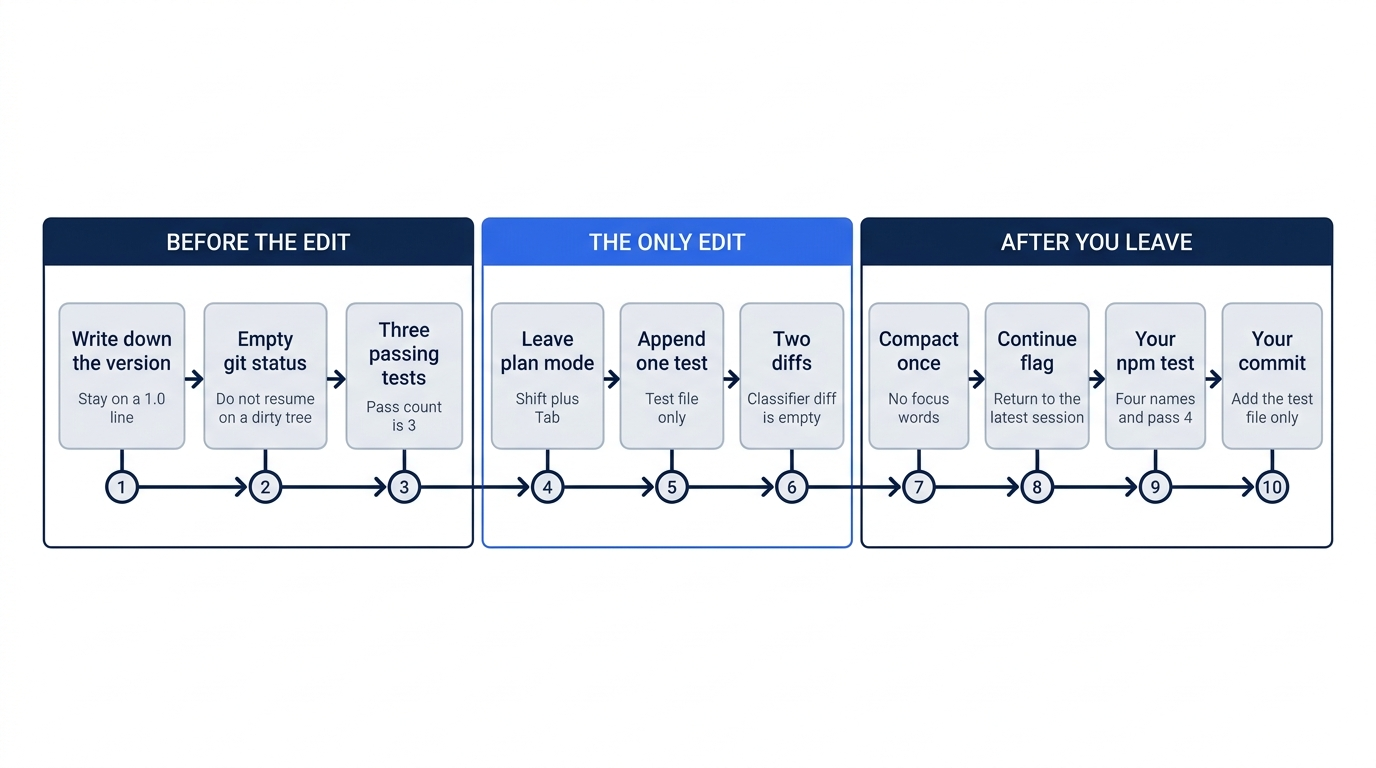
Nothing on that path rewrites src/classify.js. The return command is copilot --continue. You do not pass a session id, and you do not add another flag.
Leave plan mode and append one test
Plan mode builds a plan before any code is written. Today you want one file edit, so you leave it. The Copilot CLI concept page says that Shift+Tab cycles between the default mode and plan mode. Press Shift+Tab until the session is not in plan mode. Do not stay in a mode whose name you do not recognize.
Resume the most recent session from Ticket Triage.
cd ~/code/ticket-triage
copilot --continue
If the CLI says there is no session to continue, start a new interactive session from the same folder.
copilot
Paste one sentence of intent. The sentence is intent only. You still paste the exact test next.
Pin the crushed-mug behavior with a test so "The box showed up crushed and the mug inside is in pieces" keeps returning other, and classify.js must not change.
Press Shift+Tab until you are not in plan mode, whether you continued or started fresh.
Do not approve a leftover plan. Approving a plan exits plan mode and lets Copilot make the changes. The leftover plan can still aim at src/classify.js. Refuse the approval. If a write starts as soon as the session opens, stop the turn and check git status --short. Any new path is from this turn. If you cannot tell which answer refuses, stop. Look for a session waiting for your next instruction, not for an approval of a leftover plan. Re-run this on your account before you trust the wording.
The only allowed edit is appending one test to test/classify.test.js. The three existing tests stay. The imports stay. src/classify.js must not change. The agent does not create another file. Paste this only after you are out of plan mode.
Do not edit src/classify.js. Do not create files. Do not run git.
Append only the next test to the end of test/classify.test.js.
Do not change the three tests already in that file.
Then paste the test. The file has to contain this text, not a paraphrase.
test("crushed mug in pieces is other", () =>
  assert.equal(
    classify("The box showed up crushed and the mug inside is in pieces"),
    "other"
  ))
The name is crushed mug in pieces is other, the sentence is the crushed-mug ticket, and the expected value is other. You are not asking the function to return shipping.
Steering means interrupting or refusing the write, then repeating the limit: test file only. If the CLI asks to write src/classify.js, refuse, stop the turn, and repeat that limit. A reply that offers a smarter classifier is still a no.
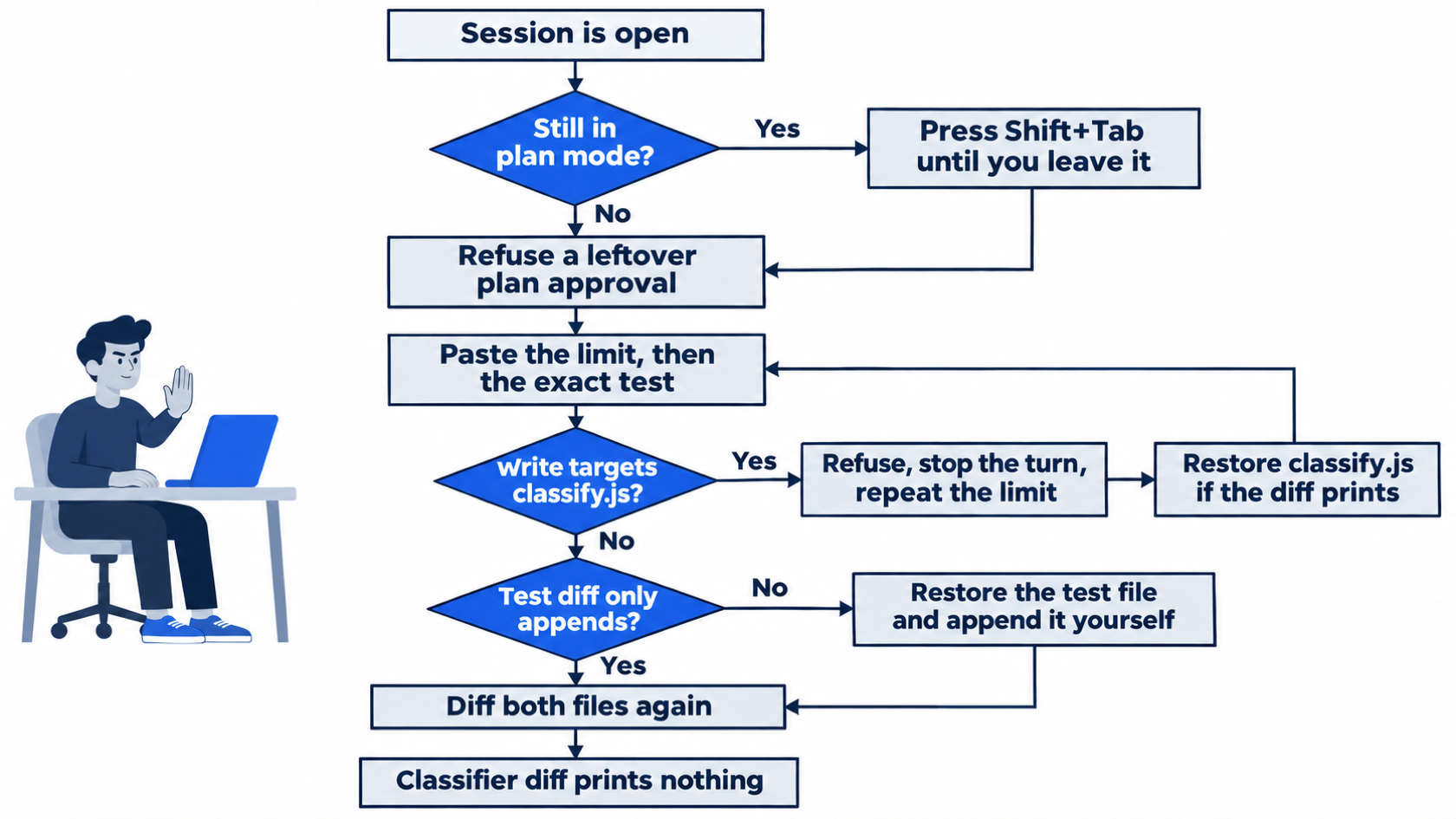
Check from a second terminal so the session stays open.
git diff -- test/classify.test.js
git diff -- src/classify.js
The test diff only adds the new test after the Hello test. The classifier diff prints nothing. In the file, the refund, shipping, and Hello tests are still first, and the new test is last.
If the classifier diff prints anything, restore that file and confirm the restore before you compact.
git restore src/classify.js
git diff -- src/classify.js
The second command prints nothing. Do not compact while it prints a patch.
If the test diff changes an import or any of the three original tests, restore that file too and append the test yourself. Do not give the agent another turn to rewrite the file.
git restore test/classify.test.js
Append the test at the end of test/classify.test.js, then run both diffs again.
Compact once, then return with copilot --continue
When the test file contains that test and nothing else new, run /compact once. Do not add focus words after it. This article does not define what those words change.
/compact
A summary appears. Do not hunt for a phrase in it, and do not run /compact again. This article has no sample summary. Re-run this on your account before you trust the wording. The test file is the copy that has to be right.
/exit closes the session and returns you to the shell.
/exit
Come back from ~/code/ticket-triage with the most recent session. This is the only return command in the loop.
copilot --continue
If you land in plan mode, press Shift+Tab until you leave it. Do not approve a plan. If an edit starts, stop the turn and run the two diffs again.
Ask for the test run, and forbid edits.
Run npm test. Do not edit files. Do not run git.
Look for a test run, not a sentence that only claims a pass. Re-run this on your account before you trust the wording. You also run npm test yourself.
npm test
Ignore timings. The shape you want is four named results and a pass count of 4.
ok 1 - refund
ok 2 - shipping
ok 3 - other
ok 4 - crushed mug in pieces is other
# tests 4
# pass 4
# fail 0
Node's runner registers tests in source order in this one file, so the new test is fourth if you appended it. Extra summary lines, including a suites line, may appear. When the names match and the counts are # tests 4, # pass 4, and # fail 0, the run passes even if the ok numbers differ. A count of 3 means the new test is not in the file that the runner loaded. On a failure, stop. Do not change src/classify.js to force a green run.
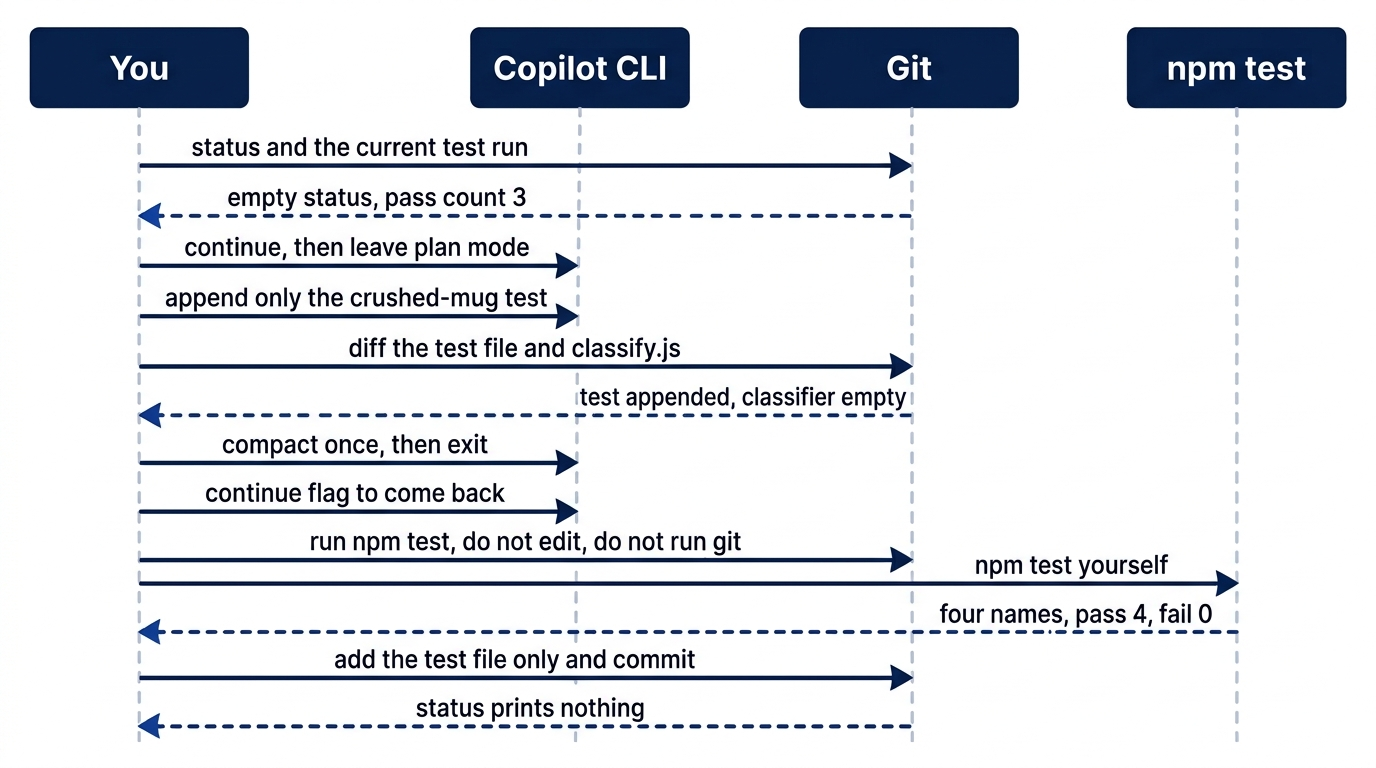
Git is the witness before compact and again at the commit. The session can be summarized and closed. The checks stay on the files and on the run you start.
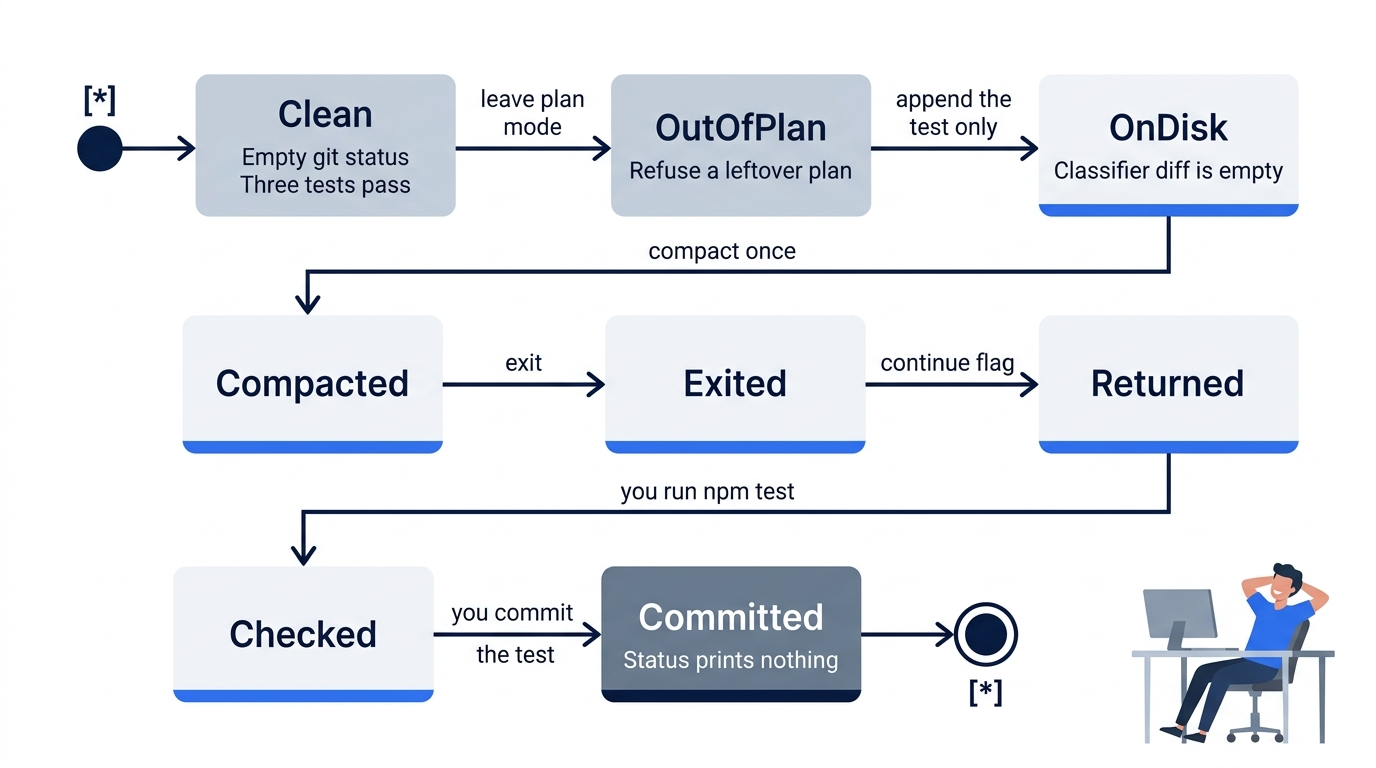
Each state is a check you can see. Plan mode is not one of the states you stay in. Compact happens only after the test is on disk.
Commit the test yourself
The agent does not run git. If it offers to add, commit, or push, refuse.
git diff -- src/classify.js must print nothing before the add. If it prints a diff, restore that file and do not commit the function change. Before the add, git status --short lists only test/classify.test.js. Do not add any other path. Delete an untracked file only when you recognize it as something that this session created. If you do not recognize the path, stop.
cd ~/code/ticket-triage
git diff -- src/classify.js
git add test/classify.test.js
git commit -m "Pin the crushed-mug ticket as other"
git status --short
git add names the test file only. The message is that one line. After the commit, git status --short prints nothing. The new test is in the commit you made.
The win is four passing tests, an empty diff on src/classify.js, the new test you committed, and an empty git status --short. You can stop here. The rest explains why this works and where it breaks. It does not add a second edit.

The illustration is the relief after that commit, not a second procedure. The work is done when the test file holds the exact assertion, your run shows the four names and a pass count of 4, and status is empty because you committed the test yourself.
Which command continues the work
The short path uses copilot --continue because it resumes the most recent session and you do not need an id. The Copilot CLI command reference also has forms for a chosen session. They are not extra steps for today's win. They are how you avoid resuming the wrong conversation when more than one exists.
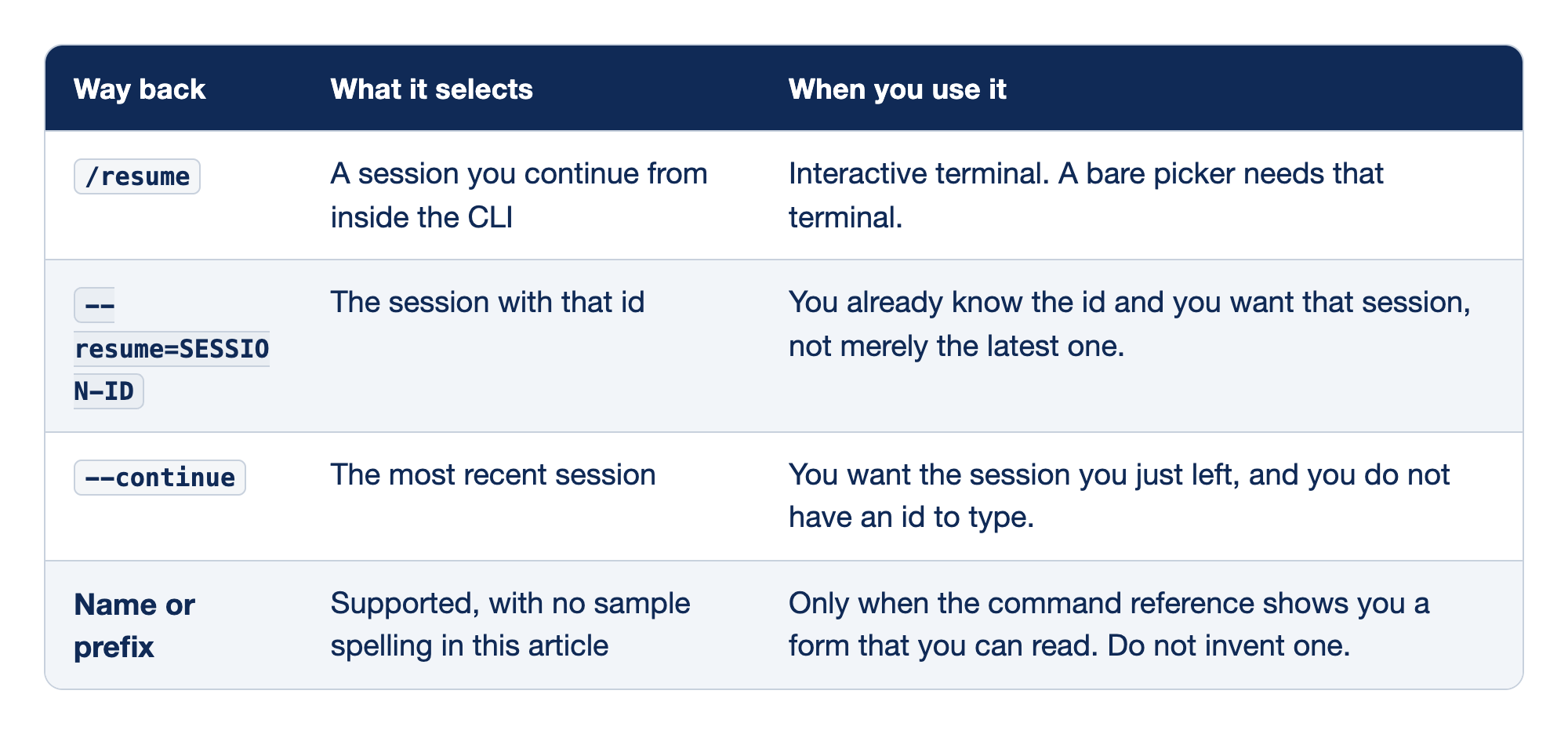
Four ways back into a Copilot CLI session sit side by side so you can pick one without guessing a directory. Way back names the form. What it selects says which session that form opens. When you use it says the situation that form is for. These rows are not a map of files on disk, and they are not a cloud control. --continue stays the default you already ran.
/resumecontinues a session from inside the CLI, and a bare/resumewith no id is the picker. The picker needs an interactive terminal, which you have today, so it can appear. You do not type/resumeat the shell. When--continuealready opened the session you compacted, you do not need the picker.--resume=SESSION-IDcontinues the session with that id, which you use when you already know the id and you want that session rather than merely the latest one. This article does not invent an id format, and today's steps do not ask you to pass one. In a non-interactive script you pass the identifier instead of relying on a picker, because a picker has nowhere to appear. You are not writing that script today.--continueresumes the most recent session and does not take an id. It is the shell command in the loop, for the session you just left when you do not have an id to type. If it opens a session you do not recognize, exit and use/resumeso you can choose, rather than steering the wrong conversation.- Name or prefix is also supported, and this article shows no sample spelling for either one. Use that form only when the command reference shows you a form you can read. A made-up flag would be a guess. Use
/resumeor--continueunless that page shows a name form, and write down only a form you actually read there.
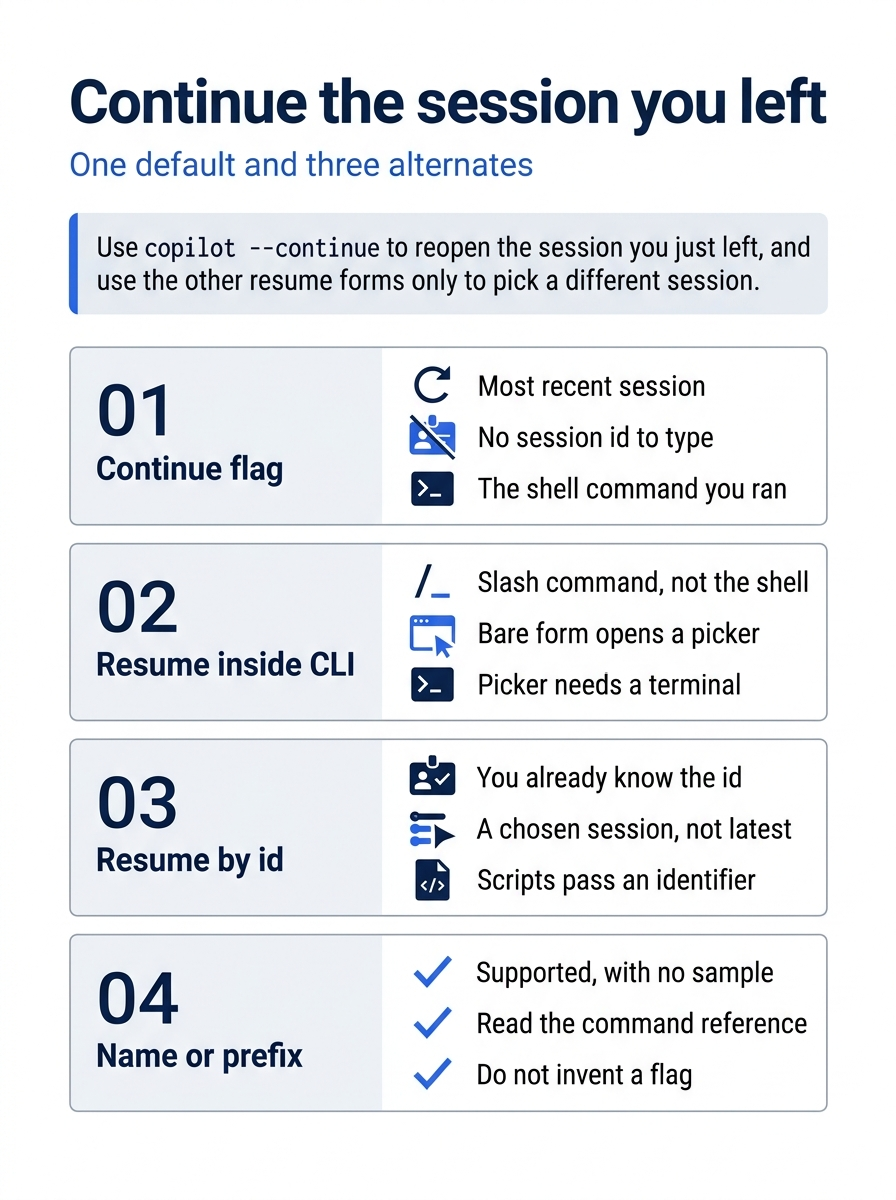
copilot --continue reopens the session you just left, with no id to type. /resume is a slash command inside the CLI, and a bare picker needs an interactive terminal. --resume=SESSION-ID is for a session whose id you already have. A name or a prefix is supported, and this article does not invent the spelling.
This article does not have a documented folder of session files to open, copy, or delete. Do not guess ~/.copilot. Do not guess another directory and call it the session store. Resume with /resume, with --resume=SESSION-ID when you have an id, or with --continue for the most recent session. If a path is not on the command reference, it is not part of this loop. Hunting the disk for a transcript is how you start trusting a file this article never told you to trust.
Cloud snapshots and local CLI sessions have different persistence and environment rules. The October 28, 2026 connected cloud changelog is the source for the cloud side of that split. A resumed cloud session is not this local CLI session. You stay on the local session that you compacted.
What a compact is allowed to forget
/compact summarizes long history. The command form allows optional focus instructions after /compact. You do not add any. You already ran /compact alone, once. Compaction can lose detail either way. Do not promise that a resumed or compacted conversation has perfect recall.
The durable copy is the test you appended. The acceptance criterion is the assertion: the crushed-mug sentence equals other. The verification is your own npm test, with the four names, # pass 4, and # fail 0. Those live in test/classify.test.js and in the run you started. They do not live in the summary.
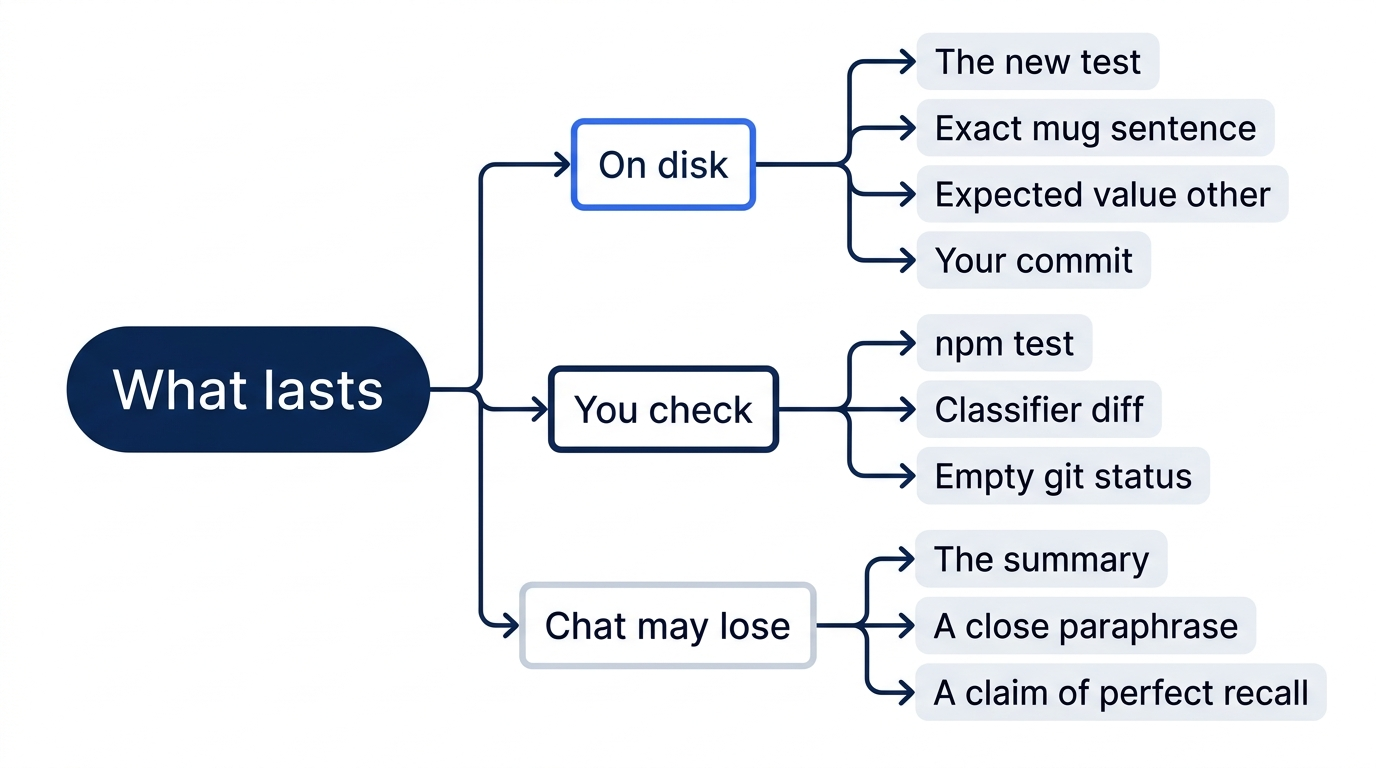
Read the file after you resume, before you trust a paraphrase. The last test name is crushed mug in pieces is other. The string inside classify(...) is The box showed up crushed and the mug inside is in pieces. The expected value is other. If the resumed session describes a different sentence, a different name, or a different return value, the file wins. You do not edit the file to match the chat.
One failure looks like speed. You compact before the append is on disk. The summary may talk as if the test exists. The file does not have it. Coming back cannot restore lines that were never written. The diffs come first for that reason.
Another failure looks like help. You ask the resumed session to repeat the test from memory, and it paraphrases the mug sentence. You paste the paraphrase over the real test. npm test can still pass, because the new wording still returns other. The pinned ticket is no longer the one you were given. The check is a literal match to the block you pasted, not a summary that sounds close.
A green run can hide a function edit
The three older tests never send the crushed-mug sentence. They can pass after a bad edit to classify(). The new test catches a change only if its text is still the text you required. If the agent changes the function and rewrites the new test to expect the new return value, your run can still show # pass 4 and # fail 0. The names can even look right. git diff -- src/classify.js is what shows the function edit. The open test file is what shows a rewritten assertion. You need both. A summary that says the ticket is pinned as other is not a third proof.
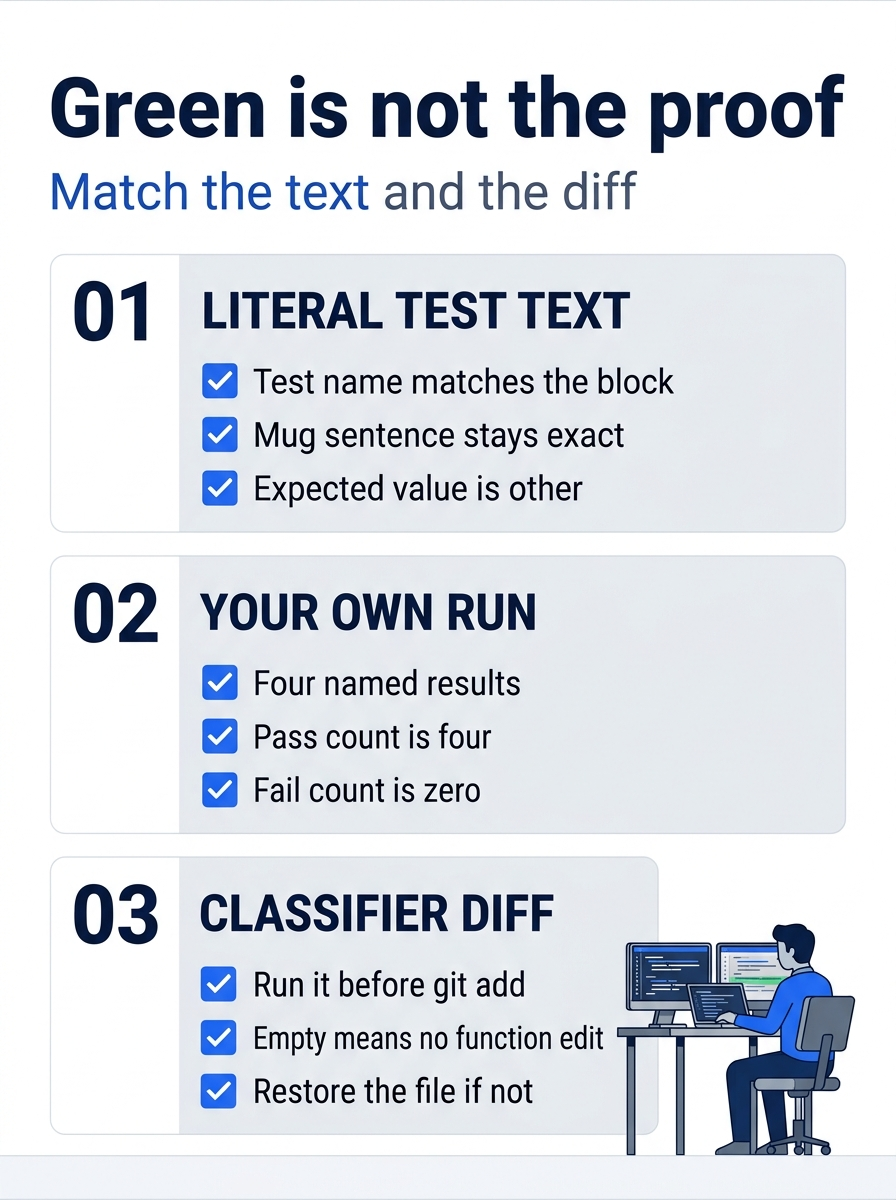
A passing count is one check, not the whole proof. The test name, the mug sentence, and the expected value other have to match the block you pasted. Your own run should show four named results, a pass count of four, and a fail count of zero. Before git add, git diff -- src/classify.js should print nothing. If it prints a patch, restore the file and do not commit the function change.
Gotcha: the miss is committing while src/classify.js is dirty, or letting the agent run git commit. The function change is then in history, and # pass 4 can still be true. The agent does not run git. You run git diff -- src/classify.js, you restore that file if the diff prints anything, and you add only test/classify.test.js.
If you have used Claude Code, the same split applies. Both tools can compact a long chat, and the durable copy is the file on disk. The four passing tests are that copy. They do not depend on chat that compaction can drop.
Do this today
- From
~/code/ticket-triage, runnpm testyourself. The check is the four names: refund, shipping, other, andcrushed mug in pieces is other, plus# tests 4,# pass 4, and# fail 0. Theoknumbers may differ. Timings do not count. You run this test after the agent runs it. The agent's report is not the check. - Run
git diff -- src/classify.jsbeforegit add. The check is no output. If it prints a diff, rungit restore src/classify.jsand do not commit the function change. - Commit with the message
Pin the crushed-mug ticket as other, adding onlytest/classify.test.js, then rungit status --short. The check is no output. The commit is yours. On Windows, run the same commands from your Ticket Triage folder. - Write down whether you used
copilot --continueor started a new session when today's edit began. The check is one of those two phrases in the note, not a guessed file path. - Write down that you ran
/compactonce. The check is the word once. Zero compacts, or a second compact to be safe, is not the note this loop asked for.
The file is the copy that lasts
The session can summarize, exit, and open again. None of that writes the assertion. The assertion is in test/classify.test.js, or it is nowhere. copilot --continue brings back the most recent conversation. It does not bring back lines that were never saved.
Treat a green run as a clue, not a verdict. Read the last test. Diff src/classify.js. Add one path. Commit with the message you chose. When git status --short prints nothing, the crushed-mug ticket is pinned by a commit you made, and the function you refused to change is still the function you started with.
This is Part 3 of "GitHub Copilot, Day-to-Day," a 16-part guide to using GitHub Copilot as a daily coding agent.