Microsoft Foundry Ships a Thousand Tools. The Only Two Questions That Matter Are Not on the List.
A managed tool catalog is not interesting for the tools it has. It is interesting for the decision rule behind each one, the constraint that bites in production, and the governance layer that decides what your agents are allowed to reach at all.
What does this replace that I would otherwise build, and where does the platform quietly stop holding the rope? A working tour of Foundry's built-in tools, private catalogs, network isolation, and the AI gateway.
The interesting question about a managed tool catalog is never which tools it has. It is which ones your organization is allowed to reach, and who decides.
In this article: You will get a decision rule for every major tool on the Microsoft Foundry surface, from the sandboxed code interpreter to Foundry IQ to over a thousand SaaS connectors, along with the production constraint that bites for each one. Then the governance half that turns a feature list into a platform argument: private catalogs decide which tools may exist in your tenant, network isolation decides where their traffic goes, and an AI gateway decides what policy applies on the way out. By the end you will be able to look at any entry in this catalog and say what it takes off your plate and what it leaves on it.
Every cloud agent platform now ships a tool catalog, and every tool catalog is documented the same way: one page per tool, each one explaining how that tool works. That is the wrong reading order. Nobody adopting a platform actually asks "how does code interpreter work?" They ask which of these things they no longer have to build, and then, immediately after, where the managed version stops being managed.
This article reads the Microsoft Foundry built-in tools surface that second way. Every entry gets a one-line decision rule and the constraint that actually bites, because the constraints are where the design decisions live. A sandbox with no outbound network changes your architecture. A retrieval engine that returns unfiltered results unless you forward a token changes your threat model. A browser tool that is flatly unavailable in a hardened project can end a design conversation in one sentence.
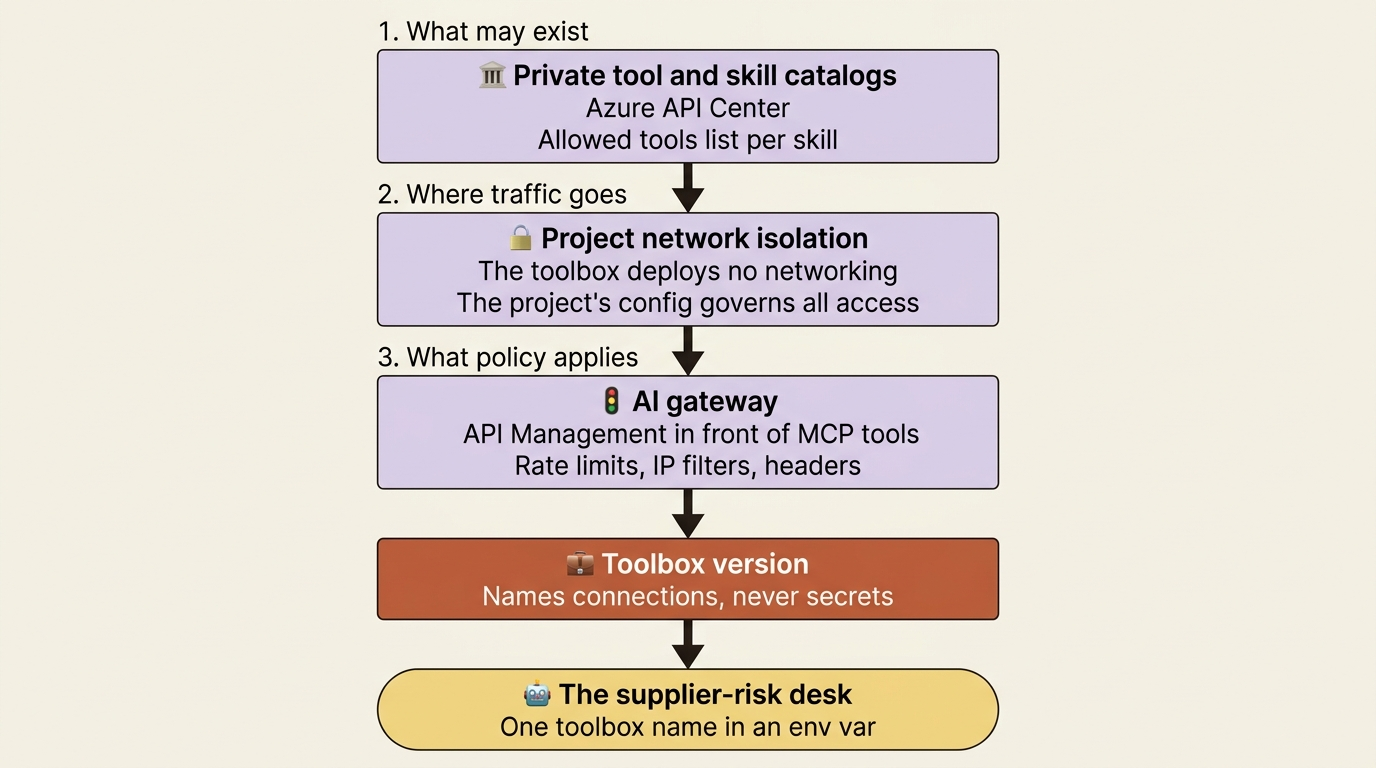
Then the half that most tool tours skip entirely. A catalog is a capability question, and capability without governance is just a bigger blast radius. Foundry answers with three separate layers: private catalogs that decide which tools can exist in your tenant at all, network isolation that decides where their traffic flows, and an AI gateway that decides what policy applies on the way out. That is the part worth your planning time.
Two class families, and picking the wrong one wastes an afternoon
Before any tool, one piece of plumbing, because it is the first thing that breaks when you move a working sample into a toolbox.
Most built-in tools ship two Python models. OpenApiTool attaches a tool directly to a prompt agent. OpenApiToolboxTool is the toolbox-specific model, and the docs state the rule in one sentence: use OpenApiTool only when attaching the tool directly to a prompt agent [VERIFIED-LEARN: agents-how-to-tools-openapi.md]. The same split runs across the surface. FileSearchToolboxTool, CodeInterpreterToolboxTool, BrowserAutomationPreviewToolboxTool, WebSearchToolboxTool, MCPToolboxTool, WorkIQPreviewToolboxTool, FabricIQPreviewToolboxTool, and ToolSearchToolboxTool all live in azure.ai.projects.models alongside their direct-attach twins [VERIFIED-LEARN: agents-how-to-tools-openapi.md, agents-how-to-tools-file-search.md, agents-how-to-tools-code-interpreter.md, agents-how-to-tools-browser-automation.md, agents-how-to-tools-work-iq.md].
Gotcha: Azure AI Search has no toolbox-specific twin in the mirror. AzureAISearchTool is what the SDK samples use for direct attachment, and the toolbox path goes through the declarative surface instead, as a - type: azure_ai_search entry carrying an azure_ai_search: block with an indexes: list [VERIFIED-LEARN: agents-how-to-tools-ai-search.md, agents-how-to-tools-toolbox.md]. Copying a working AzureAISearchTool snippet into a create_version call is the mistake to expect.
Everything below assumes the toolbox path, because nearly every tool page in the mirror now opens with the same tip: consider adding this tool through a toolbox, to reuse it across agents and runtimes and to centralize credentials, versioning, and policy [VERIFIED-LEARN: agents-includes-toolbox-recommended.md].
Sandboxed analysis: code interpreter, and the day you outgrow it
Decision rule: use code interpreter when the agent needs to compute, chart, or transform data that is already in the conversation, and you do not care which Python packages run.
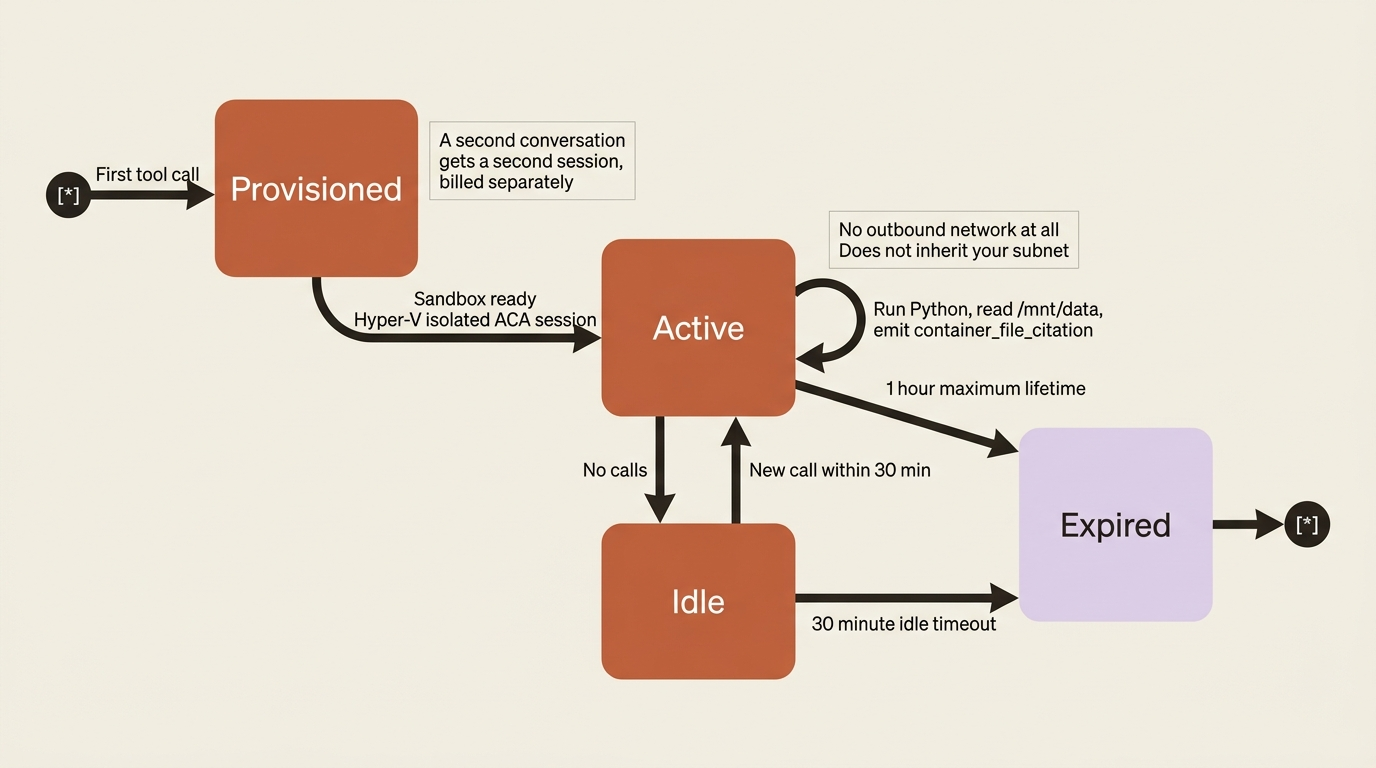
Code interpreter lets the agent write and execute Python iteratively for data analysis, math, and chart generation [VERIFIED-LEARN: agents-how-to-tools-code-interpreter.md]. Files you attach mount inside the sandbox at /mnt/data/{file-id}-{original-filename}, and generated files come back as downloadable outputs with container_file_citation annotations.
The operational facts are the ones worth memorizing, because all three surprise people. Each session is active for up to one hour with a 30-minute idle timeout. Concurrent calls in two different conversations create two separate sessions, and each one bills separately. And the sandbox does not inherit your agent's subnet configuration and cannot make outbound network requests at all [VERIFIED-LEARN: agents-how-to-tools-code-interpreter.md]. An agent that tries to fetch a URL from inside code interpreter fails in a way that reads like a firewall problem and is not one.
Gotcha: when code interpreter is used through a toolbox in a hosted agent, user isolation is not supported, and every user in the project shares the same container context [VERIFIED-LEARN: agents-how-to-tools-code-interpreter.md]. File search carries the identical warning about shared vector stores [VERIFIED-LEARN: agents-how-to-tools-file-search.md]. If you plan to serve many customers from one agent, those two sentences are a hard constraint on the design. Do not put one customer's documents in a toolbox-attached container and assume the next customer cannot reach them.
When the fixed package set is the blocker, the custom code interpreter is the escape hatch, in preview. You provision an Azure Container Apps environment and a dynamic session pool, the container exposes an MCP server, and you get your own image, packages, and compute [VERIFIED-LEARN: agents-how-to-tools-custom-code-interpreter.md]. The cost is real infrastructure: a Bicep deployment that can take up to an hour, a preview feature registration, and provisioning roles you should activate through Microsoft Entra Privileged Identity Management and deactivate afterward. One limitation decides most adoptions: the APIs do not support file input or output or file stores, so data moves in and out through URLs, data URLs for small payloads and Azure Blob shared access signature URLs for large ones [VERIFIED-LEARN: agents-how-to-tools-custom-code-interpreter.md].
Worth noting for the record: the built-in code interpreter sandbox is one place where the docs do name the compute product. It runs on Azure Container Apps dynamic sessions, with each session isolated by a Hyper-V boundary [VERIFIED-LEARN: agents-how-to-tools-code-interpreter.md]. The hosted-agent sandbox pages decline to name a product. Different component, different disclosure.
Governed web work: browser automation against computer use
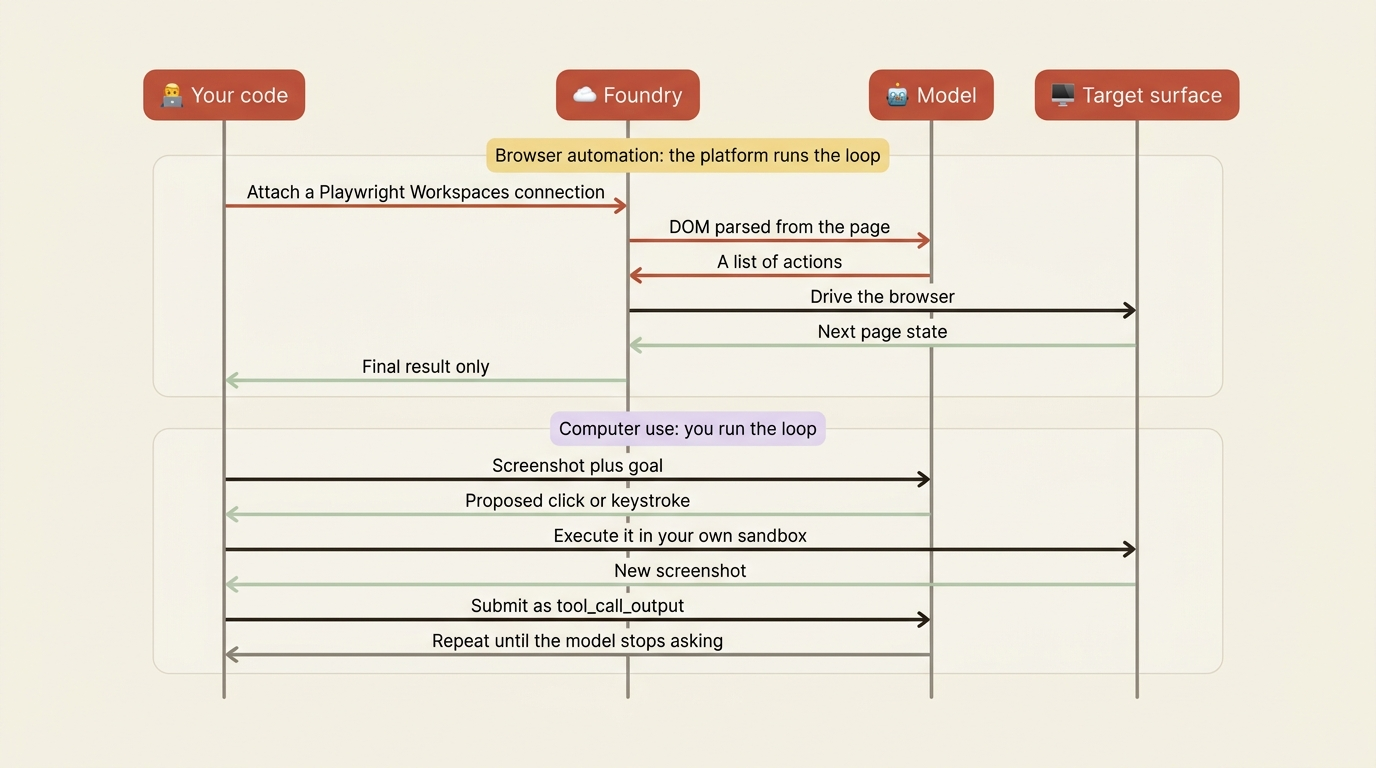
Decision rule: browser automation when the target is a website and you want the platform to drive it. Computer use when the target is a screen, including applications that are not a browser.
Both are preview, and both carry the strongest security warnings in the mirror [VERIFIED-LEARN: agents-how-to-tools-browser-automation.md, agents-how-to-tools-computer-use.md]. Read them before you demo either one to a security team, because the warnings say plainly that an AI driving a browser with your credentials can be fooled by malicious content and that you carry the liability.
The docs give a direct comparison, and it is the clearest decision table on the tool surface [VERIFIED-LEARN: agents-how-to-tools-computer-use.md]:
| Browser automation | Computer use | |
|---|---|---|
| Model support | All GPT models | computer-use-preview only |
| How it reads the screen | Parses HTML or XML into DOM documents | Raw pixel data from screenshots |
| How it acts | A list of actions from the model | Virtual keyboard and mouse |
| Interfaces | Browser | Computer and browser |
| Resource you bring | Your own Playwright workspace, key in a connection | None, but run it in a sandbox you provide |
| Who runs the loop | The platform | You |
The table compares the two tools across six dimensions. Read it as two profiles:
- Browser automation, model support: all GPT models.
- Browser automation, how it reads the screen: parses HTML or XML into DOM documents.
- Browser automation, how it acts: a list of actions returned by the model.
- Browser automation, interfaces: browser only.
- Browser automation, resource you bring: your own Playwright workspace, with the key held in a connection.
- Browser automation, who runs the loop: the platform.
- Computer use, model support:
computer-use-previewonly. - Computer use, how it reads the screen: raw pixel data from screenshots.
- Computer use, how it acts: a virtual keyboard and mouse.
- Computer use, interfaces: computer and browser.
- Computer use, resource you bring: none, but you run it in a sandbox you provide.
- Computer use, who runs the loop: you.
The last pair is the one that decides architectures. Browser automation runs the screenshot-and-act loop inside Foundry, on Playwright Workspaces as the headless browser layer, so you attach a connection and write nothing [VERIFIED-LEARN: agents-how-to-tools-browser-automation.md]. Computer use returns proposed actions and hands the loop back to you: your application executes each click and keystroke, captures the next screenshot, and submits it as a tool_call_output until the model stops asking [VERIFIED-LEARN: agents-how-to-tools-computer-use.md]. The tool does not control a device.
Gotcha: browser automation is not supported in a network-isolated project at all [VERIFIED-LEARN: agents-how-to-tools-toolbox-network-isolation.md]. Computer use additionally requires a computer-use-preview deployment, and the mirror lists exactly three regions for it, eastus2, swedencentral, and southindia [VERIFIED-LEARN: agents-how-to-tools-computer-use.md] [PERISHABLE: checked September 2026]. Either constraint can end a design conversation, and both are cheaper to discover now.
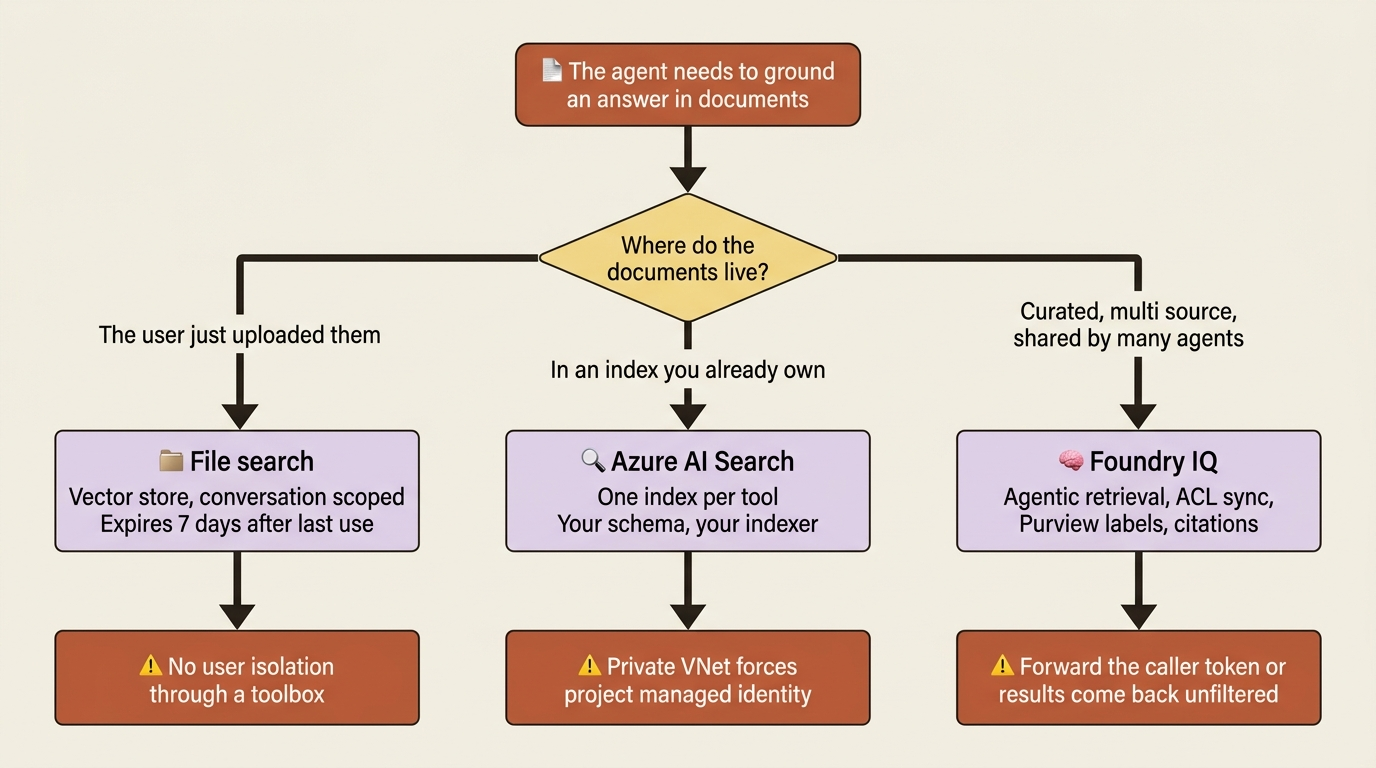
Document grounding: three tools that answer three different questions
This is where teams reach for the wrong tool most often.
- File search holds what a user just uploaded. Vector stores, conversation-scoped, disposable.
- Azure AI Search holds an index you already own and maintain. One index per tool, your schema, your indexer.
- Foundry IQ holds a curated, multi-source, permission-aware knowledge base that several agents share.
File search is the simplest and has the most defaults worth knowing. A vector store parses, chunks, embeds, and indexes your files, and the tool then runs keyword and semantic search across them [VERIFIED-LEARN: agents-concepts-vector-stores.md]. The defaults: 800-token chunks with 400-token overlap, text-embedding-3-large at 256 dimensions, and a maximum of 20 chunks added to context. Each vector store holds up to 10,000 files, and you can attach at most one vector store to an agent and one to a conversation.
Gotcha: vector stores created by conversation helpers expire seven days after last use, and when one expires, response generation for that conversation fails [VERIFIED-LEARN: agents-concepts-vector-stores.md]. The fix is recreating the store and reattaching it, which means an agent that assumes its uploaded documents are permanent is an agent with a week-long fuse. Deleting the underlying file object, rather than the vector store file, removes that file from every vector store across the organization.
One file-search behavior is genuinely useful for multi-tenancy, and it is easy to miss. If you omit vector_store_ids from the tool configuration, callers supply it in the tools/call arguments instead, so each call can target a different store [VERIFIED-LEARN: agents-how-to-tools-file-search.md]. The docs name the scenario directly: multitenant document stores where every request searches a different set of files. Pinning the IDs at toolbox creation is the opposite choice and fixes them for every call.
Azure AI Search is the "I already have an index" tool. It takes a project_connection_id and an index_name, both required, and the index name is singular on purpose because one tool can target exactly one index [VERIFIED-LEARN: agents-how-to-tools-ai-search.md]. Optional parameters are short enough to internalize: top_k defaults to 5, query_type defaults to vector_semantic_hybrid with simple, vector, semantic, and vector_simple_hybrid as the alternatives, and filter applies to every query the agent makes rather than to one call.
In production: if the search service sits behind a private virtual network, key-based authentication is not supported and the connection must use project managed identity [VERIFIED-LEARN: agents-how-to-tools-ai-search.md]. Teams routinely build with a key, then hit this during the network-hardening sprint and rediscover it as an outage.
Foundry IQ: the retrieval harness most teams build badly
Foundry IQ earns its own section, because it is the largest single piece of harness on this list and the one with the widest gap between what it does and what a team rolls by hand.
A knowledge base is a set of knowledge sources plus parameters that control retrieval behavior, and several agents can share one [VERIFIED-LEARN: agents-concepts-what-is-foundry-iq.md]. Sources include Azure Blob Storage, SharePoint, OneLake, and public web data. Azure AI Search provides the indexing and retrieval underneath. What sits on top is the part worth paying for: an agentic retrieval engine that decomposes a complex question into subqueries, runs them in parallel, picks sources, semantically reranks results, and returns extractive content with citations, with a retrieval reasoning effort setting of minimal, low, or medium [VERIFIED-LEARN: agents-concepts-what-is-foundry-iq.md].
Two capabilities in that list are the ones a hand-built RAG pipeline usually lacks. It synchronizes access control lists for supported sources and honors Microsoft Purview sensitivity labels, enforcing permissions at query time. And it can run queries under the caller's Microsoft Entra identity [VERIFIED-LEARN: agents-concepts-what-is-foundry-iq.md].
Connection is through MCP rather than a dedicated tool type, which is worth knowing because there is no foundry_iq tool in the mirror. You create a RemoteTool project connection with ProjectManagedIdentity authentication targeting the knowledge base's MCP endpoint, then attach an MCP tool [VERIFIED-LEARN: agents-how-to-foundry-iq-connect.md]:
from azure.ai.projects.models import MCPTool

mcp_kb_tool = MCPTool(
    server_label="knowledge-base",
    server_url=mcp_endpoint,
    require_approval="never",
    allowed_tools=["knowledge_base_retrieve"],
    project_connection_id=project_connection_name,
)
knowledge_base_retrieve is the only tool a knowledge base currently exposes to Foundry Agent Service, which makes allowed_tools an easy exclusion clause to get right [VERIFIED-LEARN: agents-how-to-foundry-iq-connect.md].
Gotcha: permission filtering does not happen by default. If a knowledge source holds permission-protected content, you forward the signed-in user's token in the x-ms-query-source-authorization header on the MCP tool connection, and without that token, permission-enabled sources return results unfiltered [VERIFIED-LEARN: agents-how-to-foundry-iq-connect.md]. Read "unfiltered" as what it is. The mechanism is a per-request header resolved from a structured input, which the docs demonstrate on a prompt agent; structured_inputs is a prompt-agent surface, so a hosted agent forwards the header through its own request handling instead.
The retrieval quality is also not free of you. The connect page gives an instruction template and explains why it exists: explicit directives raise MCP tool invocation rates and make the agent cite sources rather than answer from training data [VERIFIED-LEARN: agents-how-to-foundry-iq-connect.md]. A managed retrieval engine behind an agent that never calls it is an expensive no-op.
Two sibling workloads round out the family, and the docs draw the boundary cleanly [VERIFIED-LEARN: agents-concepts-what-is-foundry-iq.md]. Fabric IQ is the semantic layer over Microsoft Fabric: ontologies, Power BI semantic models, and Fabric data agents, reached through the fabric_iq_preview tool and answering questions in business vocabulary rather than table names [VERIFIED-LEARN: agents-how-to-tools-fabric-iq.md]. Work IQ is the Microsoft 365 collaboration layer: emails, meetings, files, and chats, reached through the work_iq_preview tool over A2A with on-behalf-of authentication so every request runs as the signed-in user [VERIFIED-LEARN: agents-how-to-tools-work-iq.md]. Both are preview, both carry data-boundary warnings, and Work IQ is not supported in a network-isolated project [VERIFIED-LEARN: agents-how-to-tools-toolbox-network-isolation.md].
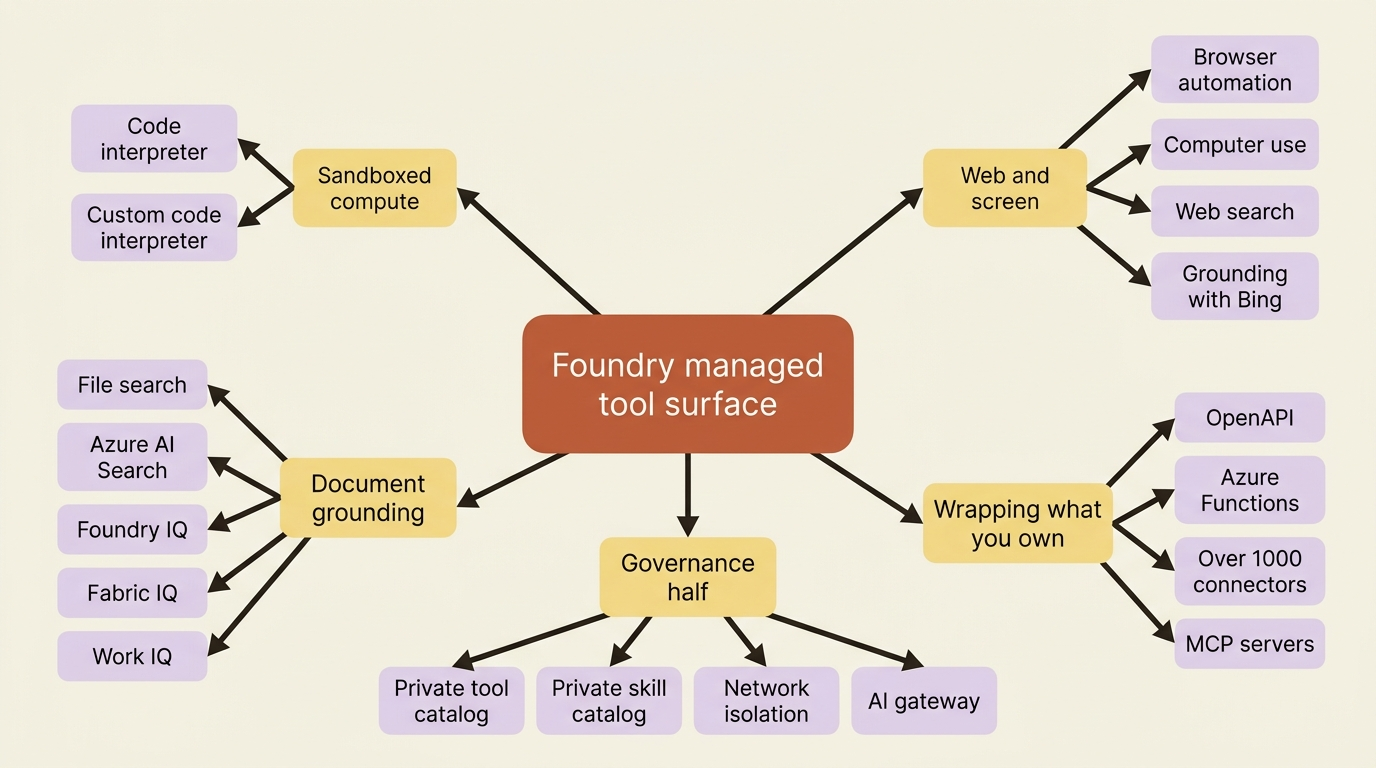
Wrapping what you already own: OpenAPI, Azure Functions, connectors
Decision rule: OpenAPI when the system speaks REST and you have a spec. Azure Functions when you want the tool's business logic to live and scale somewhere other than your agent. Connectors when someone else already wrote the integration.
OpenAPI is the workhorse. Point the tool at an OpenAPI 3.0 or 3.1 spec and its operations become callable, with three authentication methods [VERIFIED-LEARN: agents-how-to-tools-openapi.md]. Use anonymous for public APIs, and the setup cost is low. Use an API key held in a project connection for non-Microsoft APIs with key-based access, at medium setup cost. Use managed_identity for Azure services and Microsoft Entra-protected APIs, at medium to high setup cost, and take that cost as the price of never storing a secret.
Four limitations catch people, and three are spec problems rather than platform problems [VERIFIED-LEARN: agents-how-to-tools-openapi.md]. Every operation needs an operationId, and it may contain only letters, hyphens, and underscores. Request bodies must be application/json or application/json-patch+json. One API key security scheme per OpenAPI tool, so a spec with two schemes becomes two tools. And managed identity auth returns 401 Unauthorized until the Foundry project's managed identity holds the right least-privileged role on the target service.
Azure Functions is the different shape. Foundry's AzureFunctionTool is queue-based: the agent writes a message to an input queue, a storage-queue trigger runs your function, and the result comes back through an output queue [VERIFIED-LEARN: agents-how-to-tools-azure-functions.md]. The docs are honest about when that beats in-process function calling, and the list is an architecture argument rather than a feature list: separation of concerns, centralized reuse across teams, security isolation so the agent can call a tool without holding the tool's own database access, non-Microsoft libraries, and asynchronous long-running work with retries. For synchronous real-time calls, the same page points at exposing your function app as an MCP server instead. One planning constraint: Azure Functions is a direct-only tool, so it does not go in a toolbox.
Connectors are the largest single number on the tool surface. The Foundry Tools Catalog carries over 1,000 connectors, and adding one makes Foundry provision a managed MCP server inside your account's Connector Namespace, which handles hosting, tool definitions, authentication, credential management, and lifecycle [VERIFIED-LEARN: agents-how-to-tools-connectors.md]. Preview, and gated in three ways worth knowing up front. Only validated connectors surface the new managed-MCP experience in the portal, though the code-first path through REST, SDK, or azd has no such gating. Managed MCP servers are scoped to the project where they are created, and connector triggers are not supported, only actions your agent invokes. And the feature is limited to fourteen named regions [VERIFIED-LEARN: agents-how-to-tools-connectors.md] [PERISHABLE: checked September 2026].
In production: check the publisher tier before you connect anything. The docs split the catalog into Microsoft internal services, Microsoft external services such as GitHub, verified third parties such as Docusign and Databricks, and independent publishers with a lower certification bar [VERIFIED-LEARN: agents-how-to-tools-connectors.md]. The Connector Namespace proxies to the external service, so Microsoft privacy policies apply in transit and the destination company's policies apply at rest. An agent reaching a supplier's SaaS system through an independent-publisher connector is a data-residency decision, not a convenience.
Public information: web search against Grounding with Bing
Decision rule: if you are starting now, use web search. If you need per-query Bing parameters or a non-OpenAI model deployed directly on Azure, use Grounding with Bing Search.
Both are generally available, and the mirror recommends web search because it needs no separate Bing resource and no extra Azure roles [VERIFIED-LEARN: agents-how-to-tools-web-overview.md]. Web search exposes user_location for geo-relevant results and search_context_size at low, medium, or high with medium as the default. Grounding with Bing Search exposes count, freshness, market, and set_lang. Domain restriction through custom_search_configuration requires a Bing Custom Search resource and instance either way.
Gotcha: every web grounding tool sends data outside the Azure compliance and geographic boundary, the Microsoft Data Protection Addendum does not apply to it, and the tools act as public endpoints that do not respect VPNs or private endpoints [VERIFIED-LEARN: agents-how-to-tools-web-overview.md]. A network-isolated project with web search enabled is network-isolated for everything except the tool most likely to pull in untrusted text.
Which is why the administrative off-switch exists, and it is subscription-wide rather than per-project [VERIFIED-LEARN: agents-how-to-tools-web-search.md, agents-how-to-manage-grounding-with-bing.md]:
az feature register \
  --name OpenAI.BlockedTools.web_search \
  --namespace Microsoft.CognitiveServices \
  --subscription "<subscription-id>"
One command disables web search for every account in the subscription. Grounding with Bing Search and Grounding with Bing Custom Search have their own equivalent controls, and Azure AI Search's Web Knowledge Source has a third. Knowing these exist is worth more than knowing the tools, because the first question a compliance reviewer asks about an agent platform is how you turn the internet off.
Private catalogs: deciding which tools may exist at all
The governance half starts here, and the first surprise is that both private catalogs are Azure API Center wearing a Foundry hat.
A private tool catalog registers organization-scoped MCP servers in an API Center resource so your developers, and only your developers, can discover and configure them from Build > Tools in the portal [VERIFIED-LEARN: agents-how-to-private-tool-catalog.md]. Preview. The shape is three roles across two planes: catalog admins register MCP servers and configure authorization in API Center, developers get an Azure RBAC role to read that data, and developers configure tools inside the Foundry project. The API Center resource name is what developers search for, so name it descriptively.
A private skill catalog does the same for skills, registering them from a Git source URL, and it adds the governance control worth copying [VERIFIED-LEARN: agents-how-to-private-skill-catalog.md]. Each registered skill carries an Allowed tools list naming the APIs and MCP servers from your inventory that the skill may reach, and the docs call it the governance boundary explicitly: it defines which resources the skill can consume, so a shared skill cannot reach endpoints you did not approve. API Center can also assess registered skills against default or custom criteria before you promote them, with a score range, pass threshold, and weight per criterion.
Gotcha: the two role assignments are independent, and nobody discovers this quickly. Access to a Foundry project does not grant access to API Center catalog data. Developers need Azure API Center Data Reader at the API Center resource scope or an inherited scope, and role assignments can take up to 24 hours to propagate [VERIFIED-LEARN: agents-how-to-private-skill-catalog.md, agents-how-to-private-tool-catalog.md]. A missing catalog on the day you demo is usually not a bug, it is propagation.
One navigation detail costs people ten minutes: the skill catalog does not appear as a page. Its API Center name shows up as a Registry filter under Build > Tools > Skills > Browse skills [VERIFIED-LEARN: agents-how-to-private-skill-catalog.md].
Network isolation is a property of the project, not the toolbox
The single most useful sentence in the network-isolation page is the first one: a toolbox is a logical container for tools and deploys no networking resources of its own, so the hosting project's network configuration governs all access [VERIFIED-LEARN: agents-how-to-tools-toolbox-network-isolation.md]. Agents reach the toolbox MCP endpoint through the project's private endpoint, and each downstream tool then flows differently.
| Tool | Traffic flow under network isolation |
|---|---|
| MCP, OpenAPI, A2A | Supported, through your VNet subnet |
| Azure AI Search, file search | Supported, through a private endpoint |
| Code interpreter | Supported, over the Microsoft backbone |
| Web search | Supported, but relies on Microsoft-managed public endpoints |
| Skills | Supported, and the behavior depends on the tools the skill uses |
| Fabric IQ | Partial, depending on the Fabric item and its configuration |
| Work IQ | Not supported |
| Browser automation | Not supported |
The table maps each tool to how its traffic flows once the hosting project is network-isolated:
- MCP, OpenAPI, and A2A: supported, routed through your VNet subnet.
- Azure AI Search and file search: supported, routed through a private endpoint.
- Code interpreter: supported, routed over the Microsoft backbone.
- Web search: supported, but it relies on Microsoft-managed public endpoints.
- Skills: supported, and the behavior depends on which tools the skill uses.
- Fabric IQ: partial, depending on the Fabric item and its configuration.
- Work IQ: not supported.
- Browser automation: not supported.
Read that as a design input rather than a reference. Two tools are simply unavailable in a hardened project, one is conditional, and web search is listed as supported while relying on public endpoints, which is a different kind of supported than a private endpoint and is worth saying out loud in a design review. The page also names the infrastructure templates for a Basic agent project (platform-managed data resources) and a Standard agent project (your own Cosmos DB, Storage, and AI Search), which is the choice that decides whether full isolation with no public egress is even on the table [VERIFIED-LEARN: agents-how-to-tools-toolbox-network-isolation.md].
The AI gateway, and the naming collision worth untangling
"AI gateway" names two different things in this documentation set, and conflating them wastes a planning meeting.
The first governs MCP tools. You connect an Azure API Management instance to the Foundry resource, and new MCP tools created in the portal are routed through a gateway endpoint instead of calling the MCP server directly [VERIFIED-LEARN: agents-how-to-tools-governance.md]. Policy then lives in API Management as XML: rate limiting with rate-limit-by-key, IP allow-listing with ip-filter, correlation IDs with set-header, and header scrubbing. Verification is concrete, which is rare for a governance feature: confirm the tool's endpoint shows the API Management URL rather than your MCP server, then watch response codes in API Management metrics for 429s from rate limits and 403s from IP filters.
Four limitations decide whether the feature fits, and they are unusually sharp [VERIFIED-LEARN: agents-how-to-tools-governance.md]:
- Only MCP tools. Not SharePoint, not code-first MCP tools, not OpenAPI tools, and not tools using managed OAuth.
- The gateway does not log tool traces. Use API Management logging and your MCP server's own logs.
- Routing applies only at tool creation. Existing tools are not retrofitted, so you re-create them.
- API Management policies can only be applied from the Azure portal, not the Foundry portal.
The third one is the trap. Connecting a gateway to a resource that already has fifty MCP tools governs none of them.
The second AI gateway path is bring your own model, which is a different feature under a similar name [VERIFIED-LEARN: agents-how-to-ai-gateway.md]. You register a connection to models hosted behind API Management or a non-Azure gateway, Foundry deploys them as admin-connected model deployments, and agents reference them as <connection-name>/<model-name>. Two connection types exist, ApiManagement for API Management with its standard defaults and ModelGateway for OpenAI, MuleSoft, or a custom gateway with static or dynamic model discovery. Supported configurations are narrow: only prompt agents in the Agent SDK, and the Responses API is not supported at present. The licensing note is the part to read twice: bring-your-own models are Non-Microsoft Products, you implement your own responsible-AI mitigations for them, and you own the data-flow analysis.
Pattern check: the two gateways bracket the same question from opposite ends. One puts your policy in front of the tools an agent calls out to; the other puts your policy in front of the model an agent calls down to. Neither is a Foundry feature so much as a seam where Foundry agrees to route through infrastructure you already govern, which is the most honest form of enterprise integration on the platform.
Wiring a real toolbox: the supplier-risk desk
Take a concrete case. A supplier-risk desk is a procurement-team agent that watches supplier news and filings and cross-checks findings against internal contracts. It already has a toolbox holding web search, one MCP server for filings, and a skill that formats the weekly brief. Everything below is procurement's work, not the agent team's. The container is not rebuilt, not redeployed, and not aware.
The desk needs three additions. A browser for the supplier portals that publish filings as pages and offer no API. An OpenAPI tool over the internal contract system, because the procurement platform team ships a REST API with a spec rather than an MCP server. And a Foundry IQ knowledge base over procurement policy, so "does this breach our supplier code of conduct" stops being a question the model answers from training data.
Connections come first, one per credential record, and they carry every secret in the design [VERIFIED-LEARN: agents-how-to-tools-toolbox.md, agents-how-to-tools-browser-automation.md, agents-how-to-foundry-iq-connect.md]:
azd ai project set $FOUNDRY_PROJECT_ENDPOINT  # ①

# ②
azd ai connection create supplier-portal-browser-conn \
  --kind PlaywrightWorkspace \
  --target wss://<workspace>.api.playwright.microsoft.com/playwrightworkspaces/browsers \
  --auth-type api-key \
  --key "<playwright-workspaces-access-token>"  # ③

# ④
azd ai connection create policy-kb-conn \
  --kind remote-tool \
  --target "https://<search-service>.search.windows.net/knowledgebases/procurement-policy/mcp?api-version=2026-08-01-preview" \
  --auth-type project-managed-identity \
  --audience "https://search.azure.com/"  # ⑤
① Every later command resolves against this project endpoint, so the connections land in the project procurement owns rather than in yours.
② The browser connection is a Playwright Workspaces credential record, created once and named from the toolbox document below.
③ The access token is written here and nowhere else. No tool entry, no agent container, and no source file repeats it.
④ The knowledge base is reached as a remote tool at its MCP endpoint, which is why Foundry IQ needs no dedicated tool type.
⑤ Project managed identity with an audience replaces a stored secret entirely. Foundry mints the Azure AI Search token at call time.
Note: The full extracted listing at code/foundry-hyperscaler/part-7-the-managed-tool-surface/listings/01-desk-connections.sh includes the Part 6 contracts connection this block assumes already exists.
The existing contracts connection survives unchanged. Its oauth2 configuration was always about the identity reaching the contract system, not about the protocol on the wire, and OpenAPI tools accept oauth2 connections the same way MCP tools do [VERIFIED-LEARN: agents-how-to-tools-openapi.md]. Only the tool entry changes.
Gotcha: --kind PlaywrightWorkspace requires exact PascalCase, while every other kind on that command is lowercase and hyphenated [VERIFIED-LEARN: agents-how-to-tools-browser-automation.md, agents-how-to-tools-toolbox.md]. The documentation flags this itself, which is usually a sign that enough people have hit it.
Then the toolbox document, which references connections by name and never embeds a credential [VERIFIED-LEARN: agents-how-to-tools-toolbox.md]:
# procurement-toolbox.yaml
description: Supplier news, portals, filings, contracts, and procurement policy.
connections:  # ①
  - name: filings-mcp-conn
  - name: policy-kb-conn
tools:
  - type: web_search
    name: supplier_news  # ②
  - type: browser_automation_preview
    project_connection_id: supplier-portal-browser-conn  # ③
  - type: openapi
    name: contracts
    openapi:
      name: contracts
      spec:
        openapi: "3.0.1"
        info:
          title: "Contract system"
          version: "1.0"
        servers:
          - url: https://contracts.internal.example.com/v1
        paths:
          /contracts:
            get:
              operationId: list_contracts  # ④
              responses:
                "200":
                  description: OK
      auth:
        type: connection_auth
        connection_id: contracts-mcp-conn  # ⑤
  - type: toolbox_search  # ⑥
skills:
  - name: supplier-risk-brief  # ⑦
policies:
  rai_config:
    rai_policy_name: /subscriptions/<sub-id>/resourceGroups/<rg>/providers/Microsoft.CognitiveServices/accounts/<account>/raiPolicies/procurement-tool-policy  # ⑧
① The connections: list names the credential records this toolbox version may use. Names only, never a secret.
② name is load-bearing on a built-in tool type. A toolbox accepts at most one unnamed instance of each type, and a second unnamed one returns 400 invalid_payload.
③ The browser tool carries no configuration of its own. It points at the Playwright Workspaces connection created above.
④ Every OpenAPI operation needs an operationId containing only letters, hyphens, and underscores. This is the first limitation to check when a spec is rejected.
⑤ connection_auth reuses the Part 6 contracts connection, so the OpenAPI tool reaches the contract system under the signed-in buyer's OAuth identity.
⑥ toolbox_search hides every other tool from the initial tools/list response and exposes the two meta-tools instead.
⑦ Skills sit beside tools under their own key and are referenced by name, which is what makes the brief format procurement's to change.
⑧ The responsible AI policy attaches to the toolbox version, so tightening it ships as a version promotion rather than a redeploy.
Note: The full extracted listing at code/foundry-hyperscaler/part-7-the-managed-tool-surface/listings/02-procurement-toolbox.yaml is the same document with the marker comments removed.
azd ai toolbox create procurement-toolbox --from-file ./procurement-toolbox.yaml
azd ai toolbox publish procurement-toolbox 4 --no-prompt
Gotcha: this is not the same schema as the toolbox service block in azure.yaml, and the difference is easy to miss because both are YAML with a tools: list. The --from-file document takes a top-level connections: list and spells per-tool references project_connection_id, while the azure.yaml toolbox service names dependencies through uses: and spells per-tool references connection: [CONTESTED: agents-how-to-tools-toolbox.md against agents-concepts-azure-yaml-reference.md, two surfaces]. Pick one surface per toolbox and keep it there. The desk uses the --from-file document because OpenAPI and browser automation are documented against it and not against the azure.yaml toolbox block.
Read the finished state carefully, because it is the whole argument in one paragraph. The desk can now search public news, drive a supplier portal, pull filings from an MCP server, read the buyer's own contracts under the buyer's own OAuth identity, and ground a policy question against a permission-aware knowledge base. Its container holds one toolbox name in an environment variable and one class import. Procurement can add a filings source, swap the contract API version, tighten the brief format, or remove browser automation entirely after a security review, and every one of those is a version promotion rather than a pull request.
In production: an agent whose tool list is a constructor argument ships a redeploy every time legal changes its mind. The argument for a toolbox was never convenience. It is that tool policy and release cadence stop being the same decision, and the catalog in this article is what makes that separation worth having, because these tools change far more often than your loop does.
Do this today
- Write the decision rule next to each tool you were about to adopt. One line each: what it replaces, and the constraint that bites. If you cannot write the second line, you have not read far enough down the page.
- Check user isolation before you design multi-tenancy. Code interpreter and file search through a toolbox in a hosted agent share context across every user in the project
[VERIFIED-LEARN: agents-how-to-tools-code-interpreter.md, agents-how-to-tools-file-search.md]. Decide now whether that lands on your tenancy model. - Run the network-isolation table against your target topology. If browser automation or Work IQ is in your design and a hardened project is in your future, you have a conflict to resolve before you write code.
- Assign Azure API Center Data Reader today if a private catalog is anywhere in your plan. Role assignments can take up to 24 hours to propagate, and that latency is a terrible thing to discover the morning of a demo.
- Find your off-switches. Register
OpenAI.BlockedTools.web_searchin a non-production subscription once, so you know the control exists and how it behaves before a compliance reviewer asks.
What actually transferred, and what did not
Foundry owns an enormous amount here. A Python sandbox with Hyper-V isolation, a Playwright fleet, chunking and embedding and reranking, an agentic retrieval planner, ACL synchronization and sensitivity-label enforcement, over a thousand maintained SaaS integrations with their credential lifecycles, and a policy plane in front of the whole thing. None of that is loop logic, and all of it is expensive to build and tedious to keep running.
What stays yours is narrow and sharp. The decision about which tools an agent should have at all, which the private catalogs make enforceable but do not make for you. The isolation design, because code interpreter and file search through a toolbox in a hosted agent share context across users, and that constraint lands on your tenancy model rather than on theirs. The permission token, because Foundry IQ filters by identity only when you forward the header. The prompt that makes the model actually call the expensive retrieval engine you just provisioned. And the data-flow analysis, because web grounding, connectors, Work IQ, and Fabric IQ each move data outside the Azure compliance boundary under terms the docs state and decline to decide for you.
Worth saying plainly: there is no framework-native tool in this catalog. Every tool here reaches an agent through the toolbox MCP endpoint, which Microsoft Agent Framework, LangGraph, and a hand-rolled MCP client all speak to equally. The divergence lives one layer up, in how each framework attaches the toolbox, and one layer down, in whether a given tool works in your network topology.
And the exit question, because a catalog this large looks like the stickiest thing on the platform and mostly is not. Most of these tools are a thin wrapper over something portable: an OpenAPI spec you wrote, a search index you own, a Playwright workspace that is its own Azure resource, an MCP server any client can call. Foundry IQ is the deepest hook, since a knowledge base's sources, ACL synchronization, and retrieval parameters live in Azure AI Search and have no equivalent elsewhere. The private catalogs are the shallowest, because they are Azure API Center, which is not a Foundry resource at all and survives you leaving.
Keep the toolbox document in source control. A thousand connectors is a number a vendor puts on a slide. The file that says which four of them your agents may reach, and under whose identity, is the one you actually own.