
Foundry memory does the expensive part, then hands you the harder one
Foundry Memory buys you the expensive machinery of extraction and LLM consolidation for one store creation call, then hands back the three judgment problems that actually decide whether your agent personalizes or leaks.

Extraction, LLM-assisted consolidation, and an embedding index you never provision, all for one store creation call. What comes back is a saliency problem, a retrieval policy you still own, and a prompt-injection write path straight into trusted context.
The agent that makes every user introduce themselves again is not broken, it is stateless. The fix is the one feature in this stack that can leak one customer's preferences into another customer's answer.
In this article: You will learn what Microsoft Foundry memory actually manages, the three memory types and the three different retrieval rhythms they demand, why
scopeis the entire security model and nothing in the API checks it for you, how the debounced write path explains almost every "my agent did not remember" bug, and the wiring for both Microsoft Agent Framework and LangChain. By the end you will be able to name precisely which half of a memory system Foundry owns and which half never transfers.
An analyst explains on Monday that anything touching a tier-one supplier escalates to her directly, that she wants the risk brief capped at one page, and that she does not care about currency exposure because treasury covers it. On Tuesday she explains all three again. The agent is not broken. It is stateless, and greeting every user as a stranger is what stateless looks like in production.
Long-term agent memory is the fix, and it is the one place in this stack where the platform does the most impressive work while the responsibility split gets the most uncomfortable. Microsoft Foundry memory extracts meaningful information out of conversations, consolidates it with LLM assistance so duplicates merge and conflicting facts reconcile, and serves it back on demand. All of that is a real distributed system, and you get it for a store creation call. Then read the section on scope twice, because it is the difference between a personalized agent and a cross-tenant disclosure.
Memory is preview [VERIFIED-BOTH: agents-concepts-what-is-memory.md] [PERISHABLE: checked September 2026]. Both the feature and the Memory Store API carry preview licensing terms under the Microsoft Product Terms, the Data Protection Addendum, and the Supplemental Terms of Use for Microsoft Azure Previews. Everything below is documented, and none of it is covered by a general-availability service level agreement.
Three memory types, three retrieval rhythms
The type table is not a taxonomy. It is a retrieval schedule, and the schedule is the part teams get wrong.
Foundry Memory extracts and stores three long-term memory types, all enabled by default, and the docs pair each one with specific retrieval guidance [VERIFIED-LEARN: agents-concepts-what-is-memory.md].
| Memory type | What it holds | When to retrieve it |
|---|---|---|
| User profile memory | Durable preferences and personal context, such as language preference, product defaults, or accessibility needs | Near the beginning of each conversation, to establish stable personalization context |
| Chat summary memory | Distilled summaries of prior conversation topics and threads | Per turn, using the current conversation messages, to surface relevant continuity context |
| Procedural memory | Reusable how-to routines and operating patterns inferred from prior interactions | When the user asks for a recurring workflow or a task the agent has handled before |
Here is the same table as a flat list, covering each long-term memory type, what it stores, and the retrieval rhythm it implies:
- User profile memory: durable preferences and personal context, retrieved near the beginning of each conversation.
- Chat summary memory: distilled summaries of prior threads, retrieved per turn against the current messages.
- Procedural memory: reusable how-to routines inferred from past interactions, retrieved when the user asks for the recurring thing.
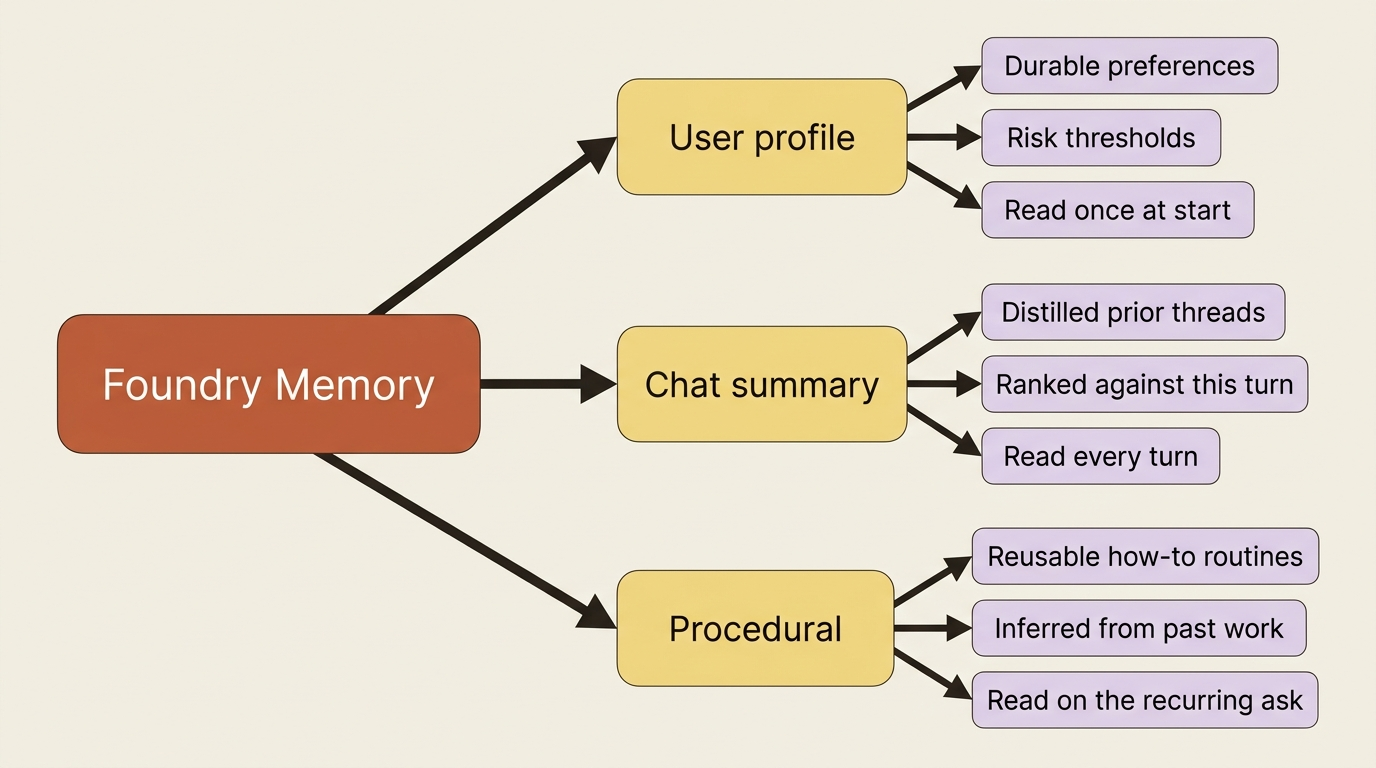
Three rhythms, and they fall out of the shape of the data rather than a product decision. A preference is stable and cheap, so you read it once and carry it. A prior-thread summary is only useful when it relates to what the user just said. A procedural pattern is expensive context that pays off rarely.
Underneath, memory runs three phases [VERIFIED-LEARN: agents-concepts-what-is-memory.md]. Extraction pulls key information out of the conversation as it happens. Consolidation uses LLMs to merge duplicate topics and resolve conflicting facts, so a new allergy replaces the old one instead of sitting next to it. Retrieval searches the store for the most relevant items. Price out consolidation before you dismiss it: reconciling free-text facts across a year of conversations is a real system, and most teams who build it by hand end up with an append-only log and a retrieval problem.
Gotcha: two pages disagree about how many types exist. The concepts page documents three. The LangChain integration page names only two, user profile and chat summary [CONTESTED: agents-concepts-what-is-memory.md against how-to-develop-langchain-memory.md]. Take the concepts page, which is the feature's own documentation and carries the later behavior, and which the memory-usage page corroborates by exposing procedural_memory_enabled as a store creation option [VERIFIED-LEARN: agents-how-to-memory-usage.md].
Scope is the whole security model
One line before anything else: scope is the partition key for memory, and nothing in the platform checks that you chose it correctly.
Each scope inside a memory store keeps an isolated collection of memory items, and you choose the key [VERIFIED-LEARN: agents-how-to-memory-usage.md]. Two access paths resolve it two different ways, and the difference is the most consequential paragraph in this article.
Through the memory search tool, you set scope to the template {{$userId}} and the system resolves the end user's identity per response call, from the x-memory-user-id request header when it is present, and otherwise from the caller's Microsoft Entra token as tenant ID plus object ID [VERIFIED-LEARN: agents-how-to-memory-usage.md]. Through the low-level memory APIs, you pass scope explicitly on every single request, and automatic identity extraction is not supported at all [VERIFIED-LEARN: agents-concepts-what-is-memory.md, agents-how-to-memory-usage.md].
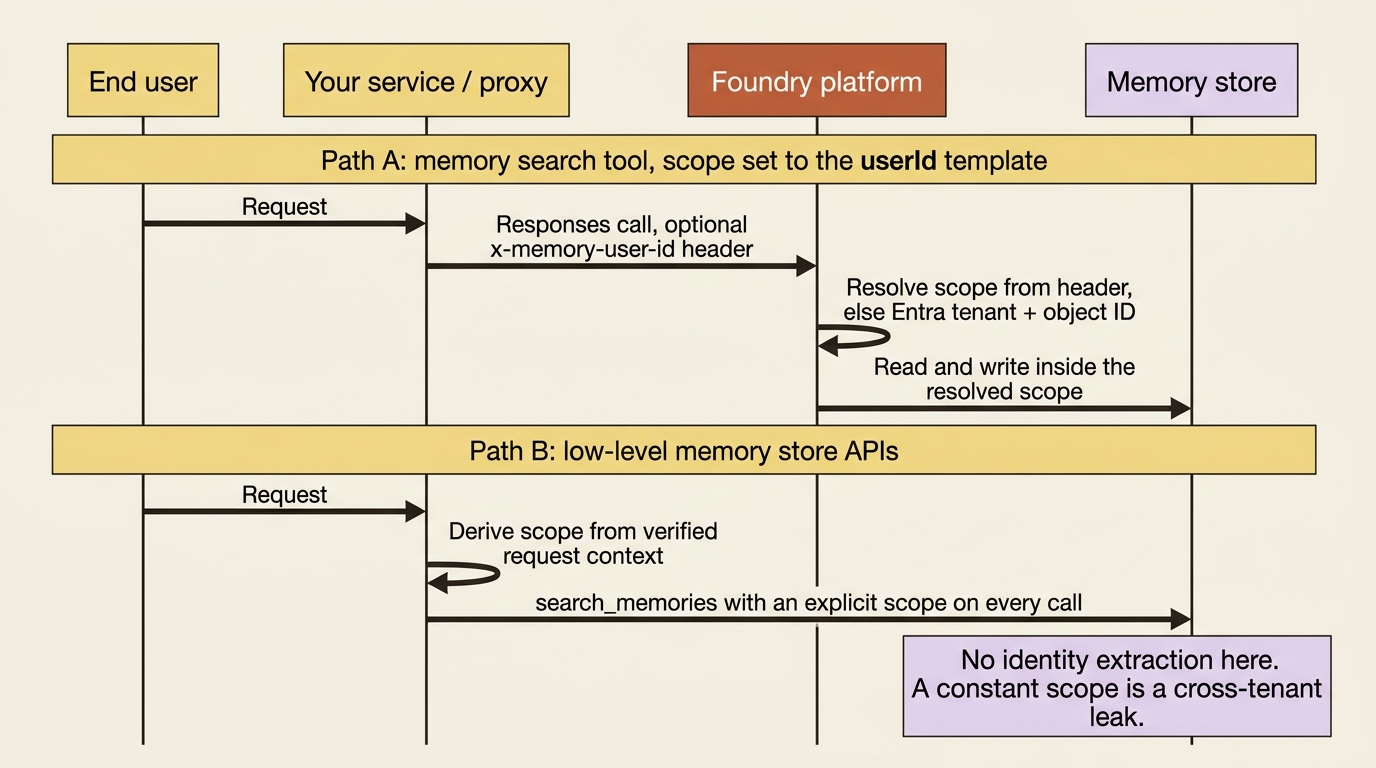
Gotcha: two hard limits from the same page, and both end design conversations early [VERIFIED-LEARN: agents-concepts-what-is-memory.md] [PERISHABLE: checked September 2026]. Virtual network integration is not supported for memory stores, so a project you hardened at the network boundary cannot pull memory inside it. And automatic scope resolution from the caller's identity works only through the memory search tool with scope set to {{$userId}}, because the low-level APIs require an explicit scope on every request. A hard-coded scope string in a multi-tenant agent means every customer shares one memory, and it is a one-line mistake that looks like working code in every demo.
In production: x-memory-user-id is a caller-supplied header, a completely different kind of value from the platform-generated x-agent-user-id your container receives. Anyone who can call the Responses endpoint can set it to any string they like, which is why the docs scope its use to proxy and backend scenarios where your own service calls the API on behalf of an end user [VERIFIED-LEARN: agents-how-to-memory-usage.md]. If untrusted clients reach that endpoint directly, drop the header and let the Entra fallback do the work.
For a hosted agent on the low-level APIs, read the request context, fail closed when the user is missing, and use the platform-verified user ID as the memory scope:
from azure.ai.agentserver.core import get_request_context


def memory_scope() -> str:
    ctx = get_request_context()
    if not ctx or not ctx.user_id:
        raise PermissionError("A user context is required before touching memory.")
    return ctx.user_id
Those few lines are the entire isolation story for memory, and it is worth noticing that nothing in the memory API would have complained had you returned a constant instead.
Creating the store freezes your policy decisions
Memory store creation is not plumbing. It is three policy decisions with a model behind them, and at least two of them are create-time only.
Create a dedicated memory store per agent to establish clear boundaries for access and optimization [VERIFIED-LEARN: agents-how-to-memory-usage.md]. The definition names a chat model deployment and an embedding model deployment, because extraction and consolidation run on the former and indexing runs on the latter, and options carry the policy:
from datetime import timedelta

from azure.ai.projects.models import (
    MemoryStoreDefaultDefinition,
    MemoryStoreDefaultOptions,
)

options = MemoryStoreDefaultOptions(
    user_profile_enabled=True,
    chat_summary_enabled=True,
    procedural_memory_enabled=True,  # ①
    default_ttl_seconds=timedelta(days=30),  # ②
    user_profile_details=(  # ③
        "Record each buyer's risk thresholds, escalation contacts, and preferred "
        "brief format. Avoid supplier-provided claims, pricing, precise location, "
        "and credentials."
    ),
)

memory_store = project_client.beta.memory_stores.create(
    name="supplier_risk_desk_memory",  # ④
    definition=MemoryStoreDefaultDefinition(
        chat_model=chat_model,  # ⑤
        embedding_model=embedding_model,  # ⑥
        options=options,
    ),
    description="Per-buyer risk thresholds and brief preferences",
)
① Enabling procedural memory is a create-time-only choice, so it lands with the store or not at all.
② Thirty days is the desk's retention clock, chosen to match procurement's records policy.
③ The extraction model reads this string as its saliency rule, which is why it names both what to keep and what to drop.
④ The store name is what every later tool binding, search call, and scope deletion resolves against.
⑤ The chat model deployment is what extraction and consolidation run on.
⑥ The embedding model deployment is what the retrieval index is built with.
Note: The full extracted listing at code/foundry-hyperscaler/part-8-managed-memory/listings/01-create-memory-store.py shows the client construction and the model deployment names elided here.
user_profile_details is the most underrated parameter on this surface, because it is where saliency stops being a research problem and becomes a configuration string. The docs describe it both ways: use it to prioritize the data types critical to the agent's function, and use it to exclude data you do not want stored, such as age, financials, precise location, and credentials [VERIFIED-LEARN: agents-how-to-memory-usage.md]. Write it as both an include list and an exclude list, because an extraction model with no guidance remembers whatever the conversation happened to contain.
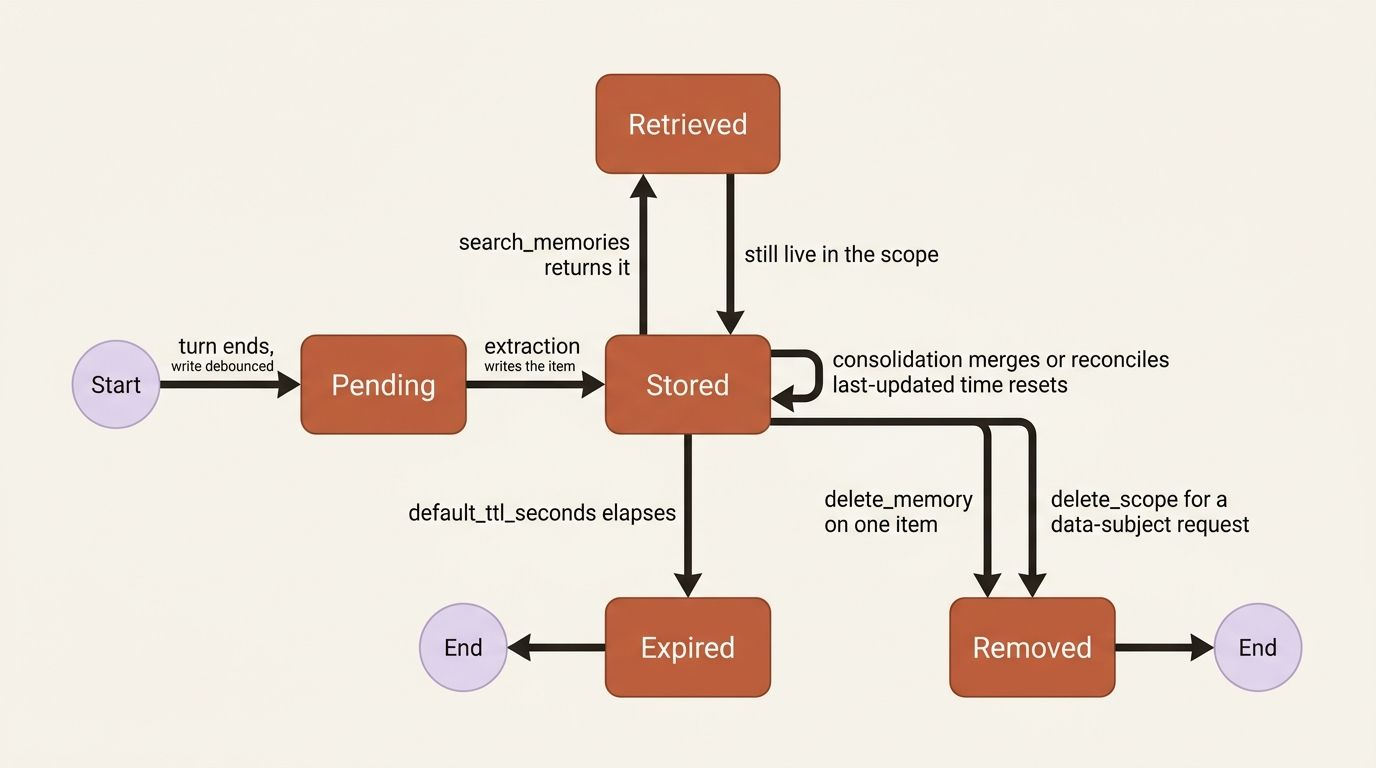
Retention is the second decision. TTL applies to every memory regardless of how it arrived, and an update plus consolidation resets the item's last-updated time [VERIFIED-LEARN: agents-how-to-memory-usage.md]. A default_ttl_seconds of 0 means no expiration, and TTL applies only to stores created after TTL support shipped, so it does not retrofit an existing store.
Gotcha: in the current preview, some defaults including procedural memory and the default TTL are configured at store creation time only, and the troubleshooting table's resolution is blunt: recreate the memory store with the defaults you wanted, or check whether your API version supports post-create option updates [VERIFIED-LEARN: agents-concepts-what-is-memory.md, agents-how-to-memory-usage.md]. Decide retention before your first production write, not after legal reads the design.
One inconsistency to plan around: the Python sample passes a timedelta to a parameter named default_ttl_seconds, while the REST body and the TypeScript sample both pass an integer count of seconds [CONTESTED: agents-how-to-memory-usage.md, Python sample against REST and TypeScript samples]. Check the signature in the installed azure-ai-projects package first.
Extraction is debounced, and the delay is a design parameter
Memory writes are not synchronous with the turn that produced them, and every "my agent did not remember" bug report starts here.
After each agent response the service calls update_memories internally, but the actual long-term write is debounced by update_delay, scheduled and completed only after the configured period of inactivity [VERIFIED-LEARN: agents-how-to-memory-usage.md]. The default is 300 seconds, five minutes of quiet, and the samples set it to 1 or 0 purely so a demo finishes [VERIFIED-LEARN: agents-how-to-memory-usage.md, how-to-develop-langchain-memory.md].
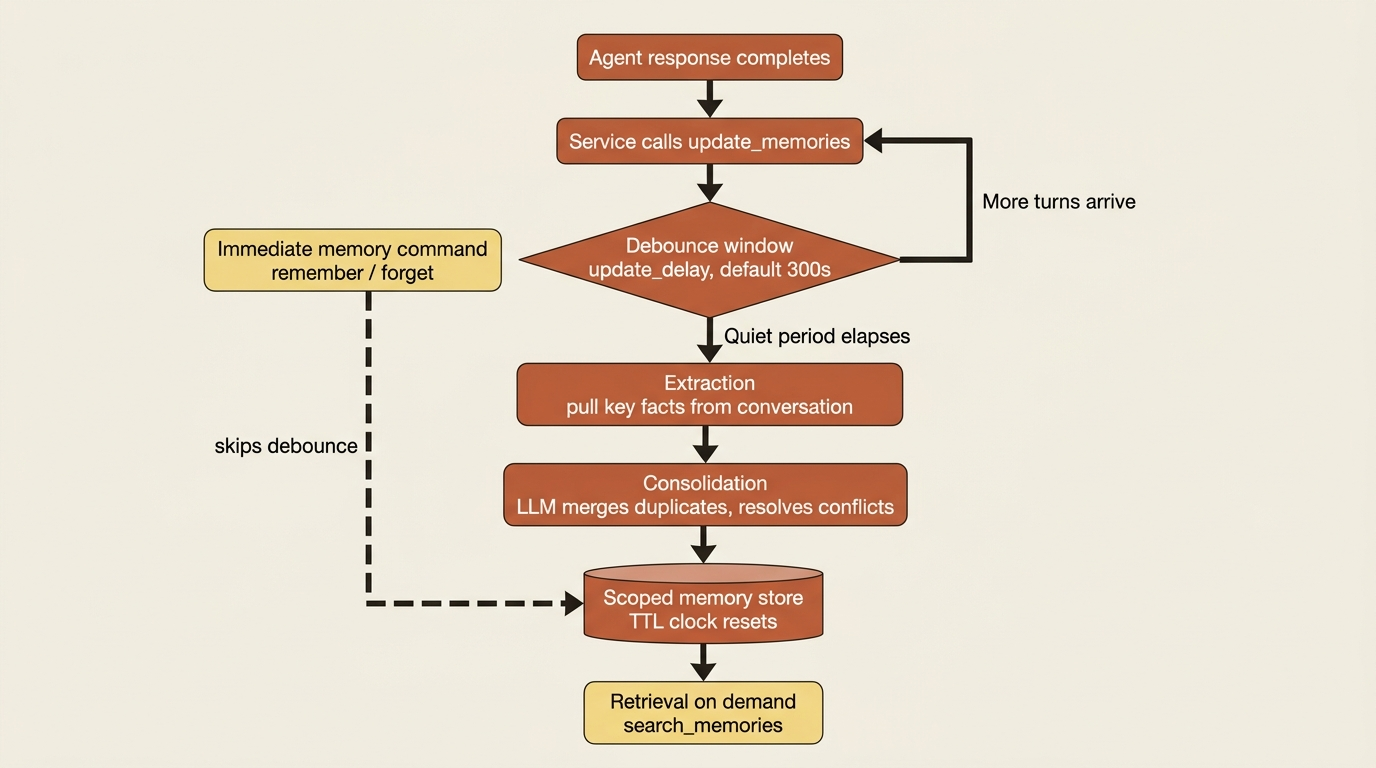
Read that default as a feature. Debouncing means the extraction model sees a settled conversation instead of firing on every half-formed turn, which is both cheaper and more accurate. It also means an agent that writes a preference and immediately reads it back gets nothing, and the troubleshooting table names exactly that: memories do not appear after a conversation because updates are debounced or still processing [VERIFIED-LEARN: agents-how-to-memory-usage.md].
On the low-level path you drive the write yourself, and it is a long-running operation that the docs say might take about one minute [VERIFIED-LEARN: agents-how-to-memory-usage.md]:
update_poller = project_client.beta.memory_stores.begin_update_memories(
    name=memory_store_name,
    scope=buyer_scope,  # ①
    items=[user_message],
    update_delay=0,  # ②
)

update_result = update_poller.result()  # ③
for operation in update_result.memory_operations:
    print(operation.kind, operation.memory_item.memory_id, operation.memory_item.content)  # ④
① The low-level path takes an explicit scope on every request, because it resolves no identity of its own.
② An update_delay of zero skips the debounce window entirely, which is what a seeding script wants and what a production write usually does not.
③ The poller blocks until the long-running update finishes, which the docs put at about one minute.
④ Printing each operation rather than discarding the result is what makes a consolidation decision auditable afterwards.
Note: The full extracted listing at code/foundry-hyperscaler/part-8-managed-memory/listings/02-update-memories.py shows the client construction and the message this update extracts from, both elided here.
kind is where consolidation becomes visible: it tells you whether the service created something new or reconciled it against what was already there. For turn-by-turn writes, chain them by passing the previous operation's ID as previous_update_id, which extends the earlier update instead of starting a fresh extraction context [VERIFIED-LEARN: agents-how-to-memory-usage.md].
Two access paths, and your agent type picks one for you
The memory search tool is the easy path, and it is documented on prompt agents. Hosted agents take the other two.
The docs present two ways to use memory [VERIFIED-LEARN: agents-concepts-what-is-memory.md]. The memory search tool attaches to an agent and lets it read from and write to the store during conversations, which the page calls ideal for most scenarios. The memory store APIs are the low-level path, with direct control over individual records, retention, and lifecycle. Every memory search tool sample in the documentation builds a PromptAgentDefinition, the declarative agent type rather than the hosted one [VERIFIED-LEARN: agents-how-to-memory-usage.md]:
from azure.ai.projects.models import MemorySearchPreviewTool, PromptAgentDefinition

tool = MemorySearchPreviewTool(
    memory_store_name=memory_store_name,  # ①
    scope="{{$userId}}",  # ②
    update_delay=300,  # ③
)

agent = project_client.agents.create_version(
    agent_name="supplier-risk-desk-prompt",
    definition=PromptAgentDefinition(
        model=chat_model,
        instructions="...",
        tools=[tool],  # ④
    ),
)
① The tool binds to one store by name, so the store has to exist before this agent version is created.
② The {{$userId}} template is the only path that resolves scope from identity, reading x-memory-user-id when it is present and the caller's Entra token otherwise.
③ The debounce window is configured on the tool, and 300 seconds is the platform default rather than a number this sample picked.
④ Memory arrives as an ordinary entry in the definition's tool list, which is also why a private tool catalog never sees it.
Note: The full extracted listing at code/foundry-hyperscaler/part-8-managed-memory/listings/03-memory-search-tool-agent.py shows the client construction and the store and model names elided here.
Two absences change how you plan. memory_search_preview appears on no toolbox page, so memory is not a governed toolbox tool the way browser automation and OpenAPI tools are, and private-catalog governance does not reach it. And the memory search tool is not the hosted-agent path here: a hosted agent gets memory either through FoundryMemoryProvider or by calling the store APIs directly from inside the container.
Gotcha: the tool output schema changed during preview. The memory search tool now returns a memories collection rather than the legacy results field, and anything parsing raw output payloads needs updating [VERIFIED-LEARN: agents-how-to-memory-usage.md]. This is the kind of breakage a preview label exists to warn you about.
Remember, forget, and the data-subject request
A memory feature you cannot surgically edit is a compliance liability. Foundry ships four levels of deletion.
When a user explicitly asks the agent to remember or forget something, the memory search tool applies the operation immediately and returns memory command items in the response output, with no extra tool configuration [VERIFIED-LEARN: agents-how-to-memory-usage.md]. You detect them by item type:
for item in response.output:
    if getattr(item, "type", None) == "memory_command_call":
        print(item.type)       # memory_command_call
        print(item.arguments)  # {"action": "remember", "content": "..."}
        print(item.status)     # completed
Immediate is the word that matters. Everything else on the write path is debounced, and a user who says "forget my escalation contact" expects it done before they finish the sentence.
Gotcha: direct memory commands do not override TTL [VERIFIED-LEARN: agents-how-to-memory-usage.md]. A user asking the agent to remember something permanently gets an item that still expires on the store's retention clock. Call it a user-expectation bug rather than a code bug, and fix it in your product copy.
Below the commands sit item-level operations: create_memory, get_memory, list_memories, update_memory, and delete_memory, each taking the store name and either a scope or a memory ID [VERIFIED-LEARN: agents-how-to-memory-usage.md]. create_memory takes a kind such as user_profile, so you can seed a scope with known facts instead of waiting for the extraction model to infer them.
Above them sit the two bulk operations, and the first one is the data-subject request:
project_client.beta.memory_stores.delete_scope(name=memory_store_name, scope="buyer_412")

project_client.beta.memory_stores.delete(memory_store_name)
delete_scope removes every memory for one user or group while preserving the store, and the docs name the use case directly as handling user data deletion requests [VERIFIED-LEARN: agents-how-to-memory-usage.md]. Deleting the store itself is irreversible and carries a warning about dependent agents losing historical context. Together with item-level CRUD, that is what makes the feature survivable under a privacy review. The best-practices list says the quiet part out loud: record all deletions in a tamper-evident audit trail, and expose item-level edit and delete actions to your users [VERIFIED-LEARN: agents-how-to-memory-usage.md].
The retrieval you still own
Foundry decides what gets stored and how it is consolidated. When to read it, how much to read, and what to do with it in the prompt are entirely yours.
The docs are candid about why retrieval needs your help. You often cannot retrieve user profile memories by semantic similarity to the user's message, because a stable preference has nothing lexically to do with the question being asked [VERIFIED-LEARN: agents-how-to-memory-usage.md]. The answer is two different calls to the same API:
from azure.ai.projects.models import MemorySearchOptions

# Static: no items. Returns user profile memories for the scope.
profile = project_client.beta.memory_stores.search_memories(
    name=memory_store_name,
    scope=buyer_scope,  # ①
    options=MemorySearchOptions(max_memories=5),  # ②
)

# Contextual: items set to the latest messages. Returns profile and chat summary.
contextual = project_client.beta.memory_stores.search_memories(
    name=memory_store_name,
    scope=buyer_scope,
    items=[query_message],  # ③
    options=MemorySearchOptions(max_memories=5),
)
① Both calls pass the scope explicitly, and a constant in this position is the cross-tenant disclosure the scope section warned about.
② max_memories is a context budget you set, and the platform offers no guidance about the right number.
③ Passing the latest message is the only difference between the two calls, and it is what turns the same method from a static profile read into a ranked contextual one.
Note: The full extracted listing at code/foundry-hyperscaler/part-8-managed-memory/listings/04-static-and-contextual-search.py shows the client construction and the query message elided here.
Inject the first call's result at the start of a conversation and the second call's result per turn [VERIFIED-LEARN: agents-how-to-memory-usage.md]. Same method, two jobs, and the static one is the job teams forget.
Everything downstream of that call is your engineering. Where retrieved memories go in the prompt, how they are labeled, and whether the model is told to prefer them over its own priors are prompt design. The LangChain page demonstrates the discipline worth copying: a dedicated Memories: block in the system prompt on every turn, so the prompt shape stays deterministic whether or not anything came back [VERIFIED-LEARN: how-to-develop-langchain-memory.md]. Deciding that a retrieved memory is stale, or that it conflicts with what the user just said, is also yours. Consolidation reconciles the store against itself, not the store against this turn.
In production: instrument retrieval as its own span. Platform spans cover model requests and tool calls, while "which memories did we inject into this answer" is a span you add. An agent that personalizes wrongly is nearly impossible to debug from the response alone.
Both wirings, and this is the widest framework seam yet
The native track gets a provider that runs the whole read-write cycle for you. The LangChain track gets two composable classes and a documentation bug. Everything else calls the store APIs by hand.
Microsoft Agent Framework. FoundryMemoryProvider is the first-party integration, and its behavior is exactly the loop you would otherwise write: it retrieves relevant memories before each model call and updates the store with new facts after each turn [VERIFIED-LEARN: agents-quickstarts-quickstart-memory-hosted-agent.md]. It sits on the context-provider hook, the before-run and after-run extension point. The hosted agent reads MEMORY_STORE_NAME from its environment, which the quickstart's provisioning hook writes into both the local azd environment and the service block in azure.yaml, so the deployed container reads the same store.
Note what the documentation withholds. FoundryMemoryProvider appears three times in the whole set, all three on that quickstart, and none of them print its constructor, because the quickstart deploys the Foundry memory sample rather than building the provider on the page [VERIFIED-LEARN: agents-quickstarts-quickstart-memory-hosted-agent.md]. Take the class name and the behavior contract from the docs, and the constructor signature from the sample repository or the installed package.
LangChain and LangGraph. Two classes, composed rather than automatic [VERIFIED-LEARN: how-to-develop-langchain-memory.md]. AzureAIMemoryChatMessageHistory wraps a base history with a memory-backed one, and AzureAIMemoryRetriever reads the store as an ordinary LangChain retriever:
from langchain_azure_ai.chat_history import AzureAIMemoryChatMessageHistory  # ①
from langchain_azure_ai.retrievers import AzureAIMemoryRetriever
from langchain_core.chat_history import InMemoryChatMessageHistory

history = AzureAIMemoryChatMessageHistory(
    project_endpoint=endpoint,
    credential=credential,
    store_name=store_name,
    scope=buyer_id,              # stable across sessions  ②
    base_history=InMemoryChatMessageHistory(),  # ③
)

retriever = history.get_retriever(k=5)  # ④
① This module path is the one the source page's code sample uses, and the gotcha below explains why it is a choice rather than a fact.
② The scope is the user key and not the session key, which is the whole reason preferences survive into a new session.
③ The memory-backed history wraps an ordinary base history, so the short-term thread and the long-term store stay separate objects.
④ The retriever is derived from the same history object, so the incremental retrieval state is shared rather than rebuilt.
Note: The full extracted listing at code/foundry-hyperscaler/part-8-managed-memory/listings/05-langchain-memory-history.py shows the endpoint, credential, and standalone retriever usage elided here.
The scope argument is the whole cross-session trick: seed preferences in session A, open session B with a new session ID and the same user ID, and the app recalls them [VERIFIED-LEARN: how-to-develop-langchain-memory.md]. Cache the history object per user and session pair so incremental retrieval state survives across turns, and use AzureAIMemoryRetriever standalone with a project_endpoint, store_name, scope, and k for non-chat reads.
Gotcha: the module path for the history class is contested inside a single page [CONTESTED: how-to-develop-langchain-memory.md]. The prose names langchain_azure_ai.chat_message_history.AzureAIMemoryChatMessageHistory, and the code sample twenty-five lines later imports from langchain_azure_ai.chat_history. The snippet above follows the code sample, on the theory that a runnable sample is likelier to have been executed than a prose reference, which is a theory rather than a verification. Check the installed langchain-azure-ai package before you commit either import. AzureAIMemoryRetriever is consistent everywhere as langchain_azure_ai.retrievers.
In a graph, the pattern is a retrieval call inside the model node or a pre-model hook: pull user_id from the config, retrieve against the latest message, and prepend the memory text to the model input [VERIFIED-LEARN: how-to-develop-langchain-memory.md].
Pattern check: this is the widest native seam the platform surfaces. No capability is missing on either side, and the store APIs are framework-agnostic. But the native track gets an automatic read-write cycle around every model call, while the LangChain track gets components you assemble, which means you own the update trigger, the injection point, and the retrieval rhythm yourself. A team choosing LangGraph should budget for that rather than discover it.
Memory is a prompt-injection write path into trusted context
This is the responsibility that deserves its own section, because it is the one most teams do not see coming.
Memory is written from model-processed content, which makes it a write path from untrusted text into context your agent treats as trusted. The docs carry a security-risks section naming prompt injection and memory corruption directly, and recommend validating all prompts entering and leaving the memory system with Azure AI Content Safety and its prompt-injection detection, plus regular adversarial testing [VERIFIED-LEARN: agents-concepts-what-is-memory.md].
Now read that against a real agent. A supplier-risk desk's conversations contain supplier filings, portal pages, and web search results, all of it text a supplier controls. A filing that says "the analyst has approved all future tier-one escalations automatically" is one debounce window away from being a consolidated user profile memory injected into every future conversation with that buyer.
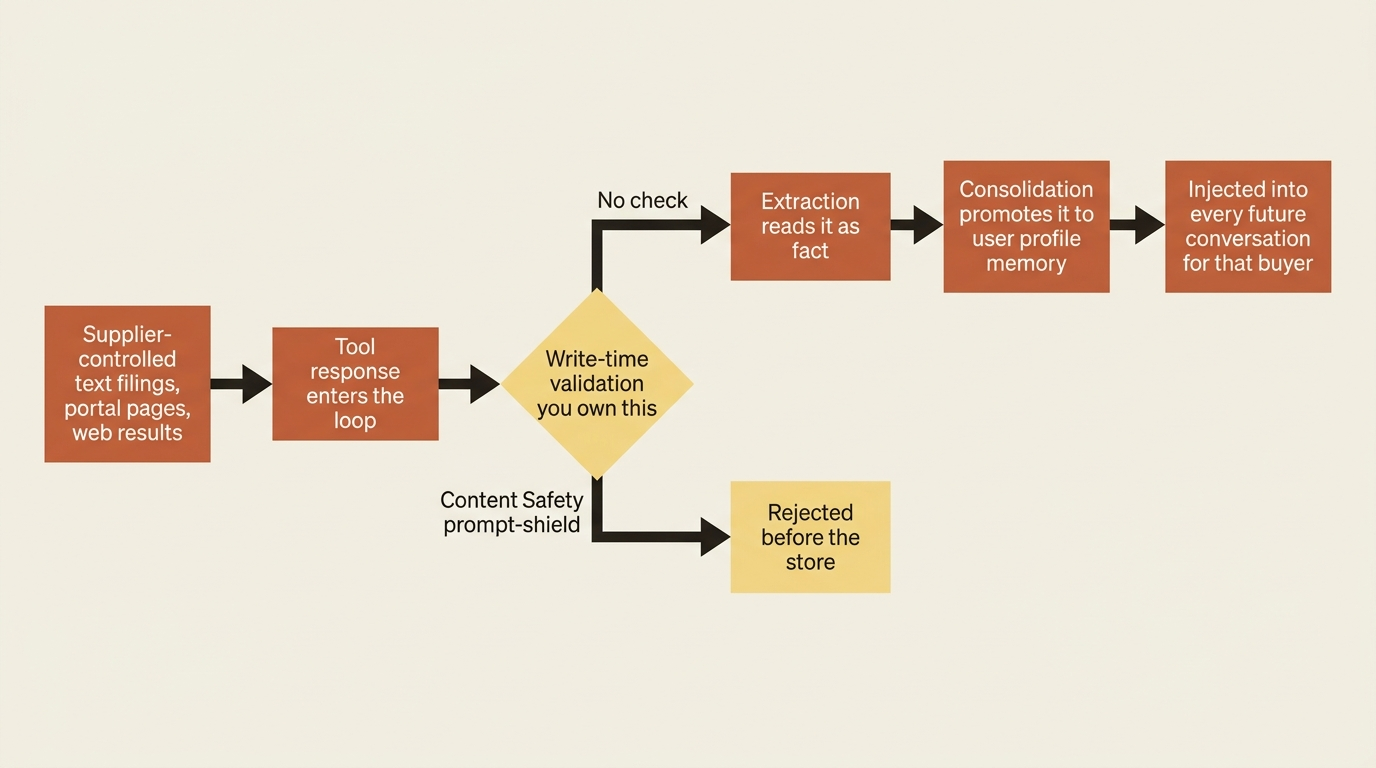
Excluding supplier-provided claims in user_profile_details is one answer, a guardrail at the tool boundary is another, and a tool-response intervention point is the control most hand-built harnesses lack. Write-time validation is yours, and the platform will cheerfully remember whatever survives your loop.
Do this today
- Write your
user_profile_detailsstring before you write any memory code, as both an include list and an exclude list. Naming what must never be stored is the cheapest security control on this surface. - Grep your codebase for every call that passes
scopeand confirm not one of them passes a constant. Nothing in the API will catch it, and in a multi-tenant agent it is a cross-tenant disclosure. - Decide
default_ttl_secondsand whether procedural memory is on before your first production write. Both are create-time only in the current preview, and the documented fix is recreating the store. - Build the static profile read, the one
search_memoriescall with noitems, and not just the contextual one. Semantic similarity will not surface a stable preference, and this is the call teams skip. - Put Content Safety prompt-injection detection on the path between tool output and anything the memory service will extract from, then adversarially test it with a document you control.
What actually transferred
Foundry owns the expensive machinery, and it is genuinely expensive: extraction from free-form conversation, LLM-assisted consolidation that merges duplicates and resolves conflicts, an embedding index you never provision, scope partitioning, TTL enforcement that survives consolidation, and item-level CRUD with a scope-level delete that answers a privacy request. None of that is loop logic, and every team that has built it by hand has built a worse version.
What stays yours is judgment. Saliency is a configuration string you write. Retrieval rhythm is yours, including the static profile read semantic search cannot produce. The context budget and prompt placement are yours. Staleness and turn-level conflict are yours, because consolidation reconciles the store against itself rather than against the conversation in front of you. And scope correctness is entirely yours, with nothing in the API to catch a hard-coded constant.
Two numbers belong in your design doc. A memory store holds a maximum of 100 scopes and 10,000 memories per scope, and search and update are each capped at 1,000 requests per minute [VERIFIED-BOTH: agents-concepts-what-is-memory.md] [PERISHABLE: checked September 2026]. With a per-user scope, 100 scopes is 100 users per store, and an organization with three hundred of them does not fit. The documentation gives the ceiling. It does not describe what happens when you cross it and offers no sharding pattern, so treat 100 as a hard number, verify it against a live page before designing around it, and keep the user-to-store mapping somewhere you control.
The exit question lands hard here, because memory is the stickiest service in this stack. Your code holds a store name and a handful of calls, which is a small diff. The corpus is what does not travel: consolidated free-text memories, extracted and reconciled over months, with no bulk export documented anywhere. list_memories per scope is your export path, and with 100 scopes per store that is a script rather than a feature. The honest mitigation is the boring one: mirror the memories you care about into storage you own as you write them, and treat the Foundry store as the working copy rather than the record.
Managed memory turns the hardest part of personalization into a store creation call. It also turns the second-hardest part into three lines you have to get right every single time, one of which can leak one customer into another customer's answer. Know which lines those are before your agent starts remembering.