
Your agent's tools should not ship on your release cadence
The real argument for a managed tool registry is not convenience. It is that authentication stops being code and tool policy stops sharing a release cadence with your agent.
Foundry Toolbox turns five tool types, five authentication models, and five owning teams into one MCP endpoint your code names once.
Every team that has shipped more than two agents has rebuilt the same per-user token cache, and at least one of them keyed it wrong and will never find out from a test. Foundry Toolbox turns five tool types, five authentication models, and five owning teams into one MCP endpoint your code names once.
In this article: You will learn what a Foundry Toolbox actually takes over, and why the strongest case for it is not convenience. We cover the immutable version lifecycle that lets an administrator change tools without a redeployment, the two identity boundaries that make per-user tool access work with no token cache in your code, tool search as the answer to a toolbox with eighty tools in it, skills delivered as MCP resources, and the wirings for Microsoft Agent Framework, LangGraph, and DeepAgents. By the end you will know exactly which responsibilities transferred to the platform and which ones stayed yours.
A tool passed as a constructor argument is a tool whose credential lives in your process, whose description lives in your repository, and whose removal requires a redeploy. One agent can survive that. Five agents across three teams cannot, and the failure is not a matter of technical elegance. It is that legal changes its mind on a Tuesday and you ship a container on a Thursday.
A governed tool registry exists to fix that mismatch. Foundry Toolbox is Microsoft's managed answer: a curated set of tools defined once and exposed through a single MCP-compatible endpoint that agents consume across frameworks and runtimes, with centralized credential management, governance, observability, and access control [VERIFIED-LEARN: agents-concepts-toolbox-overview.md].
The running example throughout is a supplier-risk desk: a procurement agent that watches supplier news and filings, cross-checks findings against internal contracts, and produces a weekly risk brief for many buyers who share one deployment. It is deliberately multi-tenant, because multi-tenancy is what makes tool identity hard.
Five types, five auth models, five owning teams
The docs open their own case with an example worth borrowing, because it is the shape every enterprise agent eventually takes. An agent that onboards a new employee needs a knowledge base for onboarding guidance, a REST API to create the Microsoft Entra ID account, a long-running agent to provision cloud resources, a skill to draft the welcome email, and an MCP server to post in Teams [VERIFIED-LEARN: agents-concepts-toolbox-overview.md].
Five tool types, five authentication models, and five owning teams, for one agent. Multiply that by every agent your organization ships, and three things happen: teams re-implement the same tools independently, credentials are duplicated so every agent manages its own secrets and token refresh, and governance becomes inconsistent or missing, with nobody able to answer which tools exist or who is calling them [VERIFIED-LEARN: agents-concepts-toolbox-overview.md].

The docs organize the capability around four pillars, and the pillar names are worth keeping, because the rest of this article follows them in order.
| Pillar | What it covers |
|---|---|
| Build | Reusable collections of tools and skills, published once, with authentication configured centrally |
| Discover | Tool search, so one toolbox holds hundreds of tools without flooding the model's context or degrading selection |
| Consume | One MCP-compatible endpoint across protocols and authentication models, with no per-agent integration |
| Govern | Authentication, authorization, guardrails, observability, and version management applied at the toolbox level |
The four pillars, stated as a list:
- Build: reusable collections of tools and skills, published once, with authentication configured centrally.
- Discover: tool search, so one toolbox holds hundreds of tools without flooding the model's context or degrading selection.
- Consume: one MCP-compatible endpoint across protocols and authentication models, with no per-agent integration.
- Govern: authentication, authorization, guardrails, observability, and version management applied at the toolbox level.
One line in the overview does more work than the whole table, and it is the line that makes a toolbox worth adopting rather than merely worth understanding: because a toolbox is a managed resource, you can add, remove, or update tools without changing agent code [VERIFIED-LEARN: agents-concepts-toolbox-overview.md].
Not every tool goes in a toolbox, and the exceptions cut both ways
Before designing anything, read the support matrix, because it has two asymmetries a design will trip over. Most tools work either way, inside a toolbox or attached directly to an agent. A few are toolbox-only. A few are direct-only [VERIFIED-LEARN: agents-concepts-toolbox-overview.md, agents-how-to-tools-toolbox.md].
| Availability | Tools |
|---|---|
| Toolbox or direct | MCP, web search, Azure AI Search, code interpreter, file search, OpenAPI, agent-to-agent (A2A), browser automation, Fabric IQ, Work IQ |
| Toolbox only | Tool search, skills, the reminder tool |
| Direct only | Function calling (client-side execution), Grounding with Bing, computer use, image generation, SharePoint, Fabric data agent, Azure Functions |
The same matrix as a list:
- Toolbox or direct: MCP, web search, Azure AI Search, code interpreter, file search, OpenAPI, agent-to-agent, browser automation, Fabric IQ, Work IQ.
- Toolbox only: tool search, skills, the reminder tool.
- Direct only: function calling with client-side execution, Grounding with Bing, computer use, image generation, SharePoint, Fabric data agent, Azure Functions.
Read the third row as a planning constraint rather than a gap. An agent that needs Azure Functions or SharePoint will carry some direct tool configuration no matter how disciplined your toolbox policy is. The honest design says so up front instead of discovering it in a sprint review. Read the second row as the reason this topic is bigger than a feature tour: tool search and skills exist only because a toolbox exists, and they are where the interesting behavior lives.
Gotcha: tool availability depends on both the model and the region, and the two are evaluated independently. A toolbox can return "tool not supported" even when the tool is in the matrix, because the region table and the model table are separate, and either one saying no is fatal [VERIFIED-LEARN: agents-concepts-tool-best-practice.md]. Check the region before you design around a tool, not after.
One endpoint, two URLs, and the one you must not hard-code
A toolbox exposes two MCP endpoint patterns, and picking the wrong one silently removes the single best property of the whole feature [VERIFIED-LEARN: agents-how-to-tools-toolbox.md, agents-how-to-tools-use-toolbox-hosted-agent.md].
| Role | Endpoint | When |
|---|---|---|
| Consumer | {project_endpoint}/toolboxes/{name}/mcp?api-version=v1 |
Every agent. Always serves default_version |
| Developer | {project_endpoint}/toolboxes/{name}/versions/{version}/mcp?api-version=v1 |
Testing one immutable version before promoting it |
The two endpoints, stated as a list:
- Consumer endpoint:
{project_endpoint}/toolboxes/{name}/mcp?api-version=v1, used by every agent, always servingdefault_version. - Developer endpoint:
{project_endpoint}/toolboxes/{name}/versions/{version}/mcp?api-version=v1, used for testing one immutable version before promoting it.
Toolbox versions are immutable snapshots of the tool configuration. Every call to the create endpoint produces a new version, and creating a version does not promote it. You stage changes, test them against the version-specific endpoint, and update default_version on your own schedule [VERIFIED-LEARN: agents-how-to-tools-toolbox.md]. The first version of a new toolbox is promoted automatically. After that, promotion is always explicit.
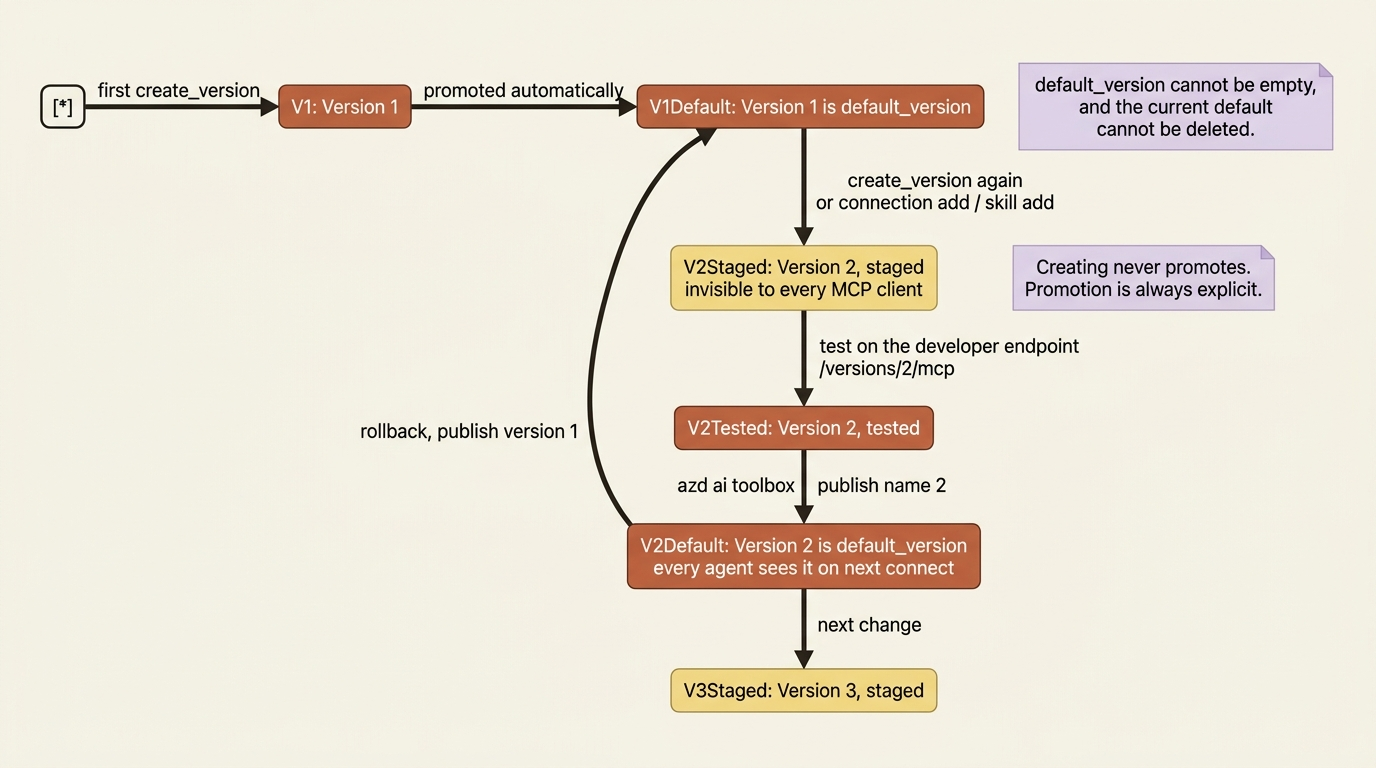
Here is the whole argument for a toolbox in three sentences of consequence. An agent pointed at the consumer endpoint picks up a promoted version with no endpoint change and no redeployment [VERIFIED-LEARN: agents-how-to-tools-use-toolbox-hosted-agent.md]. A procurement administrator who adds a filings source, tightens a description, or removes a tool the compliance team no longer trusts publishes a version, and every agent in the project reflects it on the next connection. Your release cadence and your tool policy stop being the same decision.
From the CLI, promotion is one verb, and it is the only verb that changes the default [VERIFIED-LEARN: agents-how-to-tools-toolbox.md]:
azd ai toolbox publish procurement-toolbox 3 --no-prompt
The mutating verbs behave in a way that reads as a bug until you see the design. Commands like azd ai toolbox connection add and azd ai toolbox skill add each create a new version carrying forward every previously attached connection and skill with your change applied, and none of them promote it [VERIFIED-LEARN: agents-how-to-tools-toolbox.md]. Nothing you do with those commands is visible to a single MCP client until you publish. Rollback is the same command pointed at an older version number, which is about as cheap as a rollback story gets.
Gotcha: default_version cannot be empty, and you cannot delete the version that is currently default [VERIFIED-LEARN: agents-how-to-tools-toolbox.md, agents-how-to-tools-skills.md]. Promote a replacement first, then delete. The same ordering applies to skill versions.
The desk gets a toolbox
Now wire it. The supplier-risk desk needs public supplier news, a supplier-filings MCP server the procurement platform team already runs, and room to grow, which in practice means tool search from day one.
Creating a toolbox version is one SDK call, and the tool models are typed per tool kind [VERIFIED-LEARN: agents-how-to-tools-toolbox.md, agents-how-to-tools-tool-search.md]:
from azure.ai.projects import AIProjectClient
from azure.ai.projects.models import (
    MCPToolboxTool,
    ToolSearchToolboxTool,
    WebSearchToolboxTool,
)
from azure.identity import DefaultAzureCredential

project = AIProjectClient(
    endpoint=os.environ["FOUNDRY_PROJECT_ENDPOINT"],
    credential=DefaultAzureCredential(),  # ①
)

version = project.toolboxes.create_version(  # ②
    name="procurement-toolbox",
    description="Supplier news, filings, and procurement policy.",
    tools=[
        WebSearchToolboxTool(
            name="supplier_news",  # ③
            search_context_size="medium",
        ),
        MCPToolboxTool(
            server_label="filings",
            server_url="https://filings-mcp.internal.example.com/mcp",
            require_approval="never",
            project_connection_id="filings-mcp-conn",  # ④
        ),
        ToolSearchToolboxTool(),  # ⑤
    ],
)
print(f"Created {version.name} version {version.version}")
① DefaultAzureCredential is the only authentication the creating process holds, and it authenticates the administrator to the project, not the agent to a tool.
② Every call to create_version produces a new immutable version and promotes nothing, so this line stages a change rather than shipping one.
③ name disambiguates a built-in tool instance. Two unnamed instances of the same built-in type in one toolbox return 400 invalid_payload.
④ The MCP server is reached through a project connection by id, which is the only place a credential is referenced and the reason no secret appears here.
⑤ Adding the tool search entry changes what every consuming agent sees on tools/list, which the next section covers.
Note: The full extracted listing at
code/foundry-hyperscaler/part-6-toolbox-the-governed-capability-registry/listings/01-create-toolbox-version.py
shows the os import elided here.
The declarative path is the one the desk actually uses, because azure.yaml is the deployment surface for a Foundry agent and the toolbox belongs in the same file. A toolbox is a service with host: azure.ai.toolbox, and an agent consumes it by naming it in both uses and toolboxes [VERIFIED-LEARN: agents-how-to-author-azure-yaml.md, agents-concepts-azure-yaml-reference.md]:
    filings-mcp-conn:
        host: azure.ai.connection  # ①
        uses:
            - ai-project
        category: RemoteTool
        target: https://filings-mcp.internal.example.com/mcp
        authType: CustomKeys
        credentials:
            Authorization: ${FILINGS_API_KEY}  # ②

    procurement-toolbox:
        host: azure.ai.toolbox  # ③
        uses:
            - ai-project
            - filings-mcp-conn
        description: Supplier news, filings, and procurement policy.
        tools:
            - type: web_search
            - type: mcp
              connection: filings-mcp-conn  # ④

    supplier-risk-desk:
        host: azure.ai.agent
        uses:
            - ai-project
            - filings-mcp-conn
            - procurement-toolbox
        toolboxes:
            - procurement-toolbox  # ⑤
        env:
            TOOLBOX_NAME: procurement-toolbox  # ⑥
① The connection is a service of its own, which is what lets the credential sit outside both the toolbox and the agent.
② The secret arrives by environment substitution at deployment time, so the manifest in source control holds a reference rather than a key.
③ host: azure.ai.toolbox makes the toolbox a deployed resource in the same file as the agent, not a library the agent imports.
④ The manifest spells the connection reference as connection naming another service, where the SDK call takes project_connection_id.
⑤ toolboxes is the consumption list. uses alone orders provisioning and wires references, and it does not attach the tools.
⑥ The toolbox name travels to the running container through env, because the application still opens the toolbox endpoint itself at runtime.
Note: The full extracted listing at
code/foundry-hyperscaler/part-6-toolbox-the-governed-capability-registry/listings/02-azure.yaml
shows the manifest header and the ai-project service elided here.
Gotcha: TOOLBOX_NAME, not FOUNDRY_TOOLBOX_NAME. The platform reserves every FOUNDRY_-prefixed environment variable and might silently overwrite yours, and the toolbox troubleshooting table flags it for exactly that reason [VERIFIED-LEARN: agents-how-to-tools-toolbox.md]. A configuration value that disappears between local and deployed is almost always this.
Authentication is a property of the connection, not a line of your code
The Build pillar is convenience. This section is the actual argument.
Hold two identities in your head, because every hard thing about per-user tool access lives in keeping them separate [VERIFIED-LEARN: agents-how-to-tools-tool-authentication.md]. The agent-to-toolbox boundary is the stable one: the agent authenticates to the platform with its own agent identity, and that gates access to the toolbox itself rather than to the individual tools inside it. The tool-to-data boundary is the per-user one: for the actual data call, Foundry supplies the downstream service with credentials representing the signed-in user, and the downstream service returns only what that user can access, honoring their permissions and sensitivity labels.
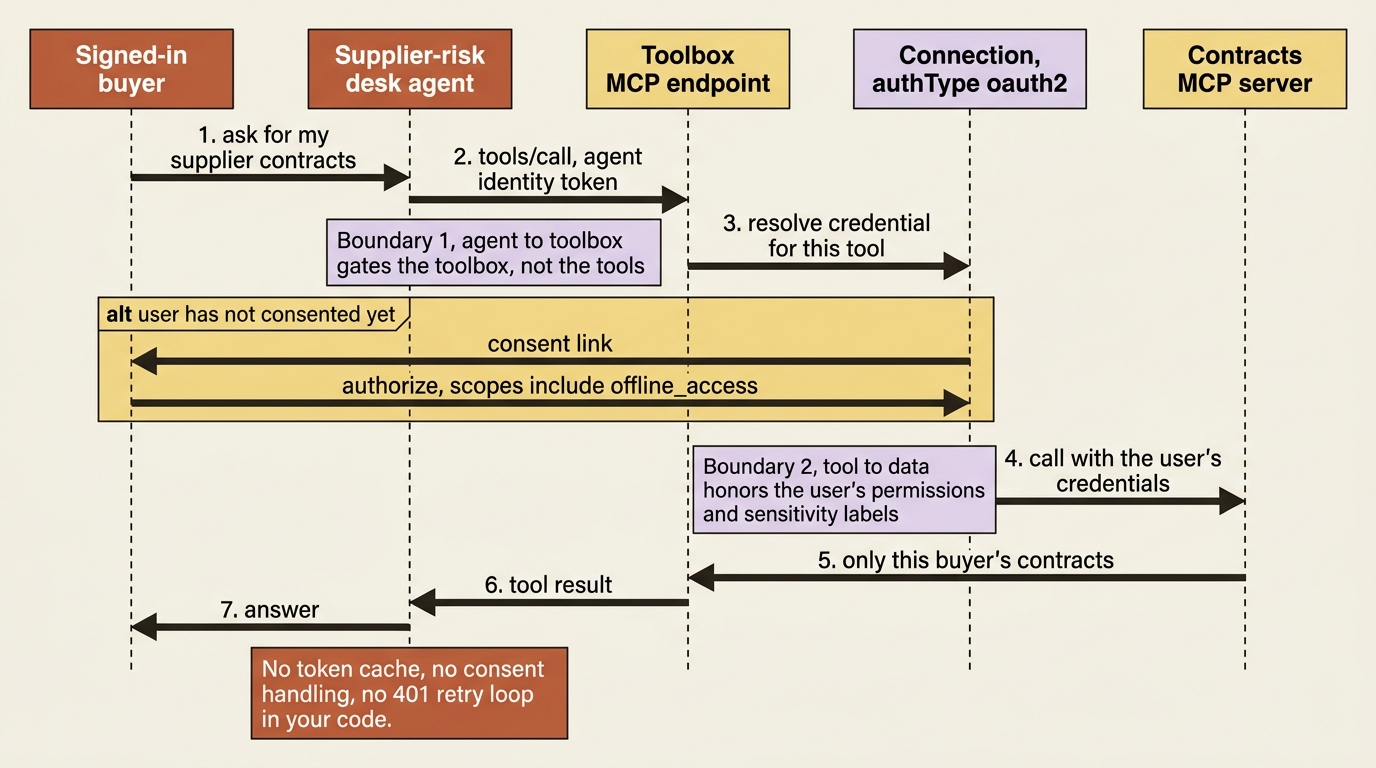
You choose which identity reaches a tool once, when you create the connection, never in agent code [VERIFIED-LEARN: agents-how-to-tools-tool-authentication.md]:
authType |
Whose identity reaches the tool | Use it for |
|---|---|---|
none |
Anonymous | Public servers |
custom-keys |
A stored API key or header | Key-based SaaS. The agent never sees the secret |
project-managed-identity |
The project's managed identity | Service-to-service calls with no user context |
agentic-identity |
The agent's own identity | Per-agent audit and least privilege |
oauth2 |
The user who completes OAuth authorization | OAuth-compliant services and partner MCP servers |
user-entra-token |
The signed-in Microsoft Entra user | Managed Microsoft services needing an audience-specific Entra token |
The six connection authentication types, stated as a list:
none: anonymous, for public servers.custom-keys: a stored API key or header, for key-based SaaS, where the agent never sees the secret.project-managed-identity: the project's managed identity, for service-to-service calls with no user context.agentic-identity: the agent's own identity, for per-agent audit and least privilege.oauth2: the user who completes OAuth authorization, for OAuth-compliant services and partner MCP servers.user-entra-token: the signed-in Microsoft Entra user, for managed Microsoft services needing an audience-specific Entra token.
For the supplier-risk desk, the contract system is the case that matters, because a buyer must see only their own contracts. One connection flag decides it:
azd ai connection create contracts-mcp \
  --kind remote-tool \
  --target https://contracts-mcp.internal.example.com/mcp \
  --auth-type oauth2 \
  --authorization-url https://auth.example.com/authorize \
  --token-url https://auth.example.com/token \
  --client-id <oauth-client-id> \
  --client-secret <oauth-client-secret> \
  --scopes "openid offline_access contracts.read"
One connection reference is the entire difference between the desk running as a shared service account and the desk acting on behalf of the signed-in buyer, with no token broker and no per-user token cache in your code [VERIFIED-LEARN: agents-how-to-tools-tool-authentication.md]. Include offline_access in the scopes to enable automatic token refresh. Foundry generates a consent link the first time a given user needs to authorize a tool, and later calls use that user's credentials until a refresh token expires or is revoked.
The docs are unusually direct about what you are not building, and the middle item is the one that should get your attention [VERIFIED-LEARN: agents-how-to-tools-tool-authentication.md]. You are not partitioning a token cache by user and tenant, where a wrong cache key silently leaks one user's downstream API access to another and passes every functional test. You are not detecting consent failures such as AADSTS65001, driving users through consent, refreshing expired tokens, and handling 401 and 403 retries per API per agent. You are not absorbing complexity that grows linearly with tools multiplied by agents.
The middle item is the strongest "you would otherwise build this" case on the platform, because it is the bug class that never fails loudly. A miskeyed token cache returns the wrong user's data and returns it quickly, correctly formatted, with a 200.
Gotcha: OAuth identity passthrough has two membership requirements that fail late. Consumers of an agent that uses it need at least the Foundry Agent Consumer role on the project, and the user's Microsoft Entra tenant must match the tenant of your Foundry project, because cross-tenant token exchange is not supported [VERIFIED-LEARN: agents-how-to-tools-tool-authentication.md]. A guest buyer from a partner tenant is not a configuration problem; it is an architecture problem, and you want to know that during design.
In production: the two boundaries fail differently, and the troubleshooting table says so. A 401 or 403 from a tool means either the agent-to-toolbox identity or the downstream authentication on that tool's connection, and they are separate authorization boundaries [VERIFIED-LEARN: agents-how-to-tools-use-toolbox-hosted-agent.md]. Check which one before you start changing role assignments.
Tool search: two meta-tools instead of two hundred definitions
A toolbox that starts with four tools becomes a toolbox with eighty. Sending every tool definition on every model request costs tokens whether or not the model uses the tool, competes with conversation history for context, and makes the model measurably worse at picking, because a similar-but-wrong tool is easy to select from a crowded list [VERIFIED-LEARN: agents-concepts-toolbox-overview.md, agents-how-to-tools-tool-search.md].
Adding {"type": "toolbox_search"} to a toolbox version hides every other tool from the initial tools/list response and exposes two meta-tools instead [VERIFIED-LEARN: agents-how-to-tools-tool-search.md]. The model calls tool_search with a natural-language description of the capability it needs, and call_tool to invoke anything it discovered by name. Ranking is BM25 over each tool's name, description, and parameter information. The tool_search function takes query and an optional limit that defaults to 5 and caps at 10. The model can search as many times as it needs within one turn, and tools returned by a search stay callable for the rest of that turn without searching again [VERIFIED-LEARN: agents-how-to-tools-tool-search.md].
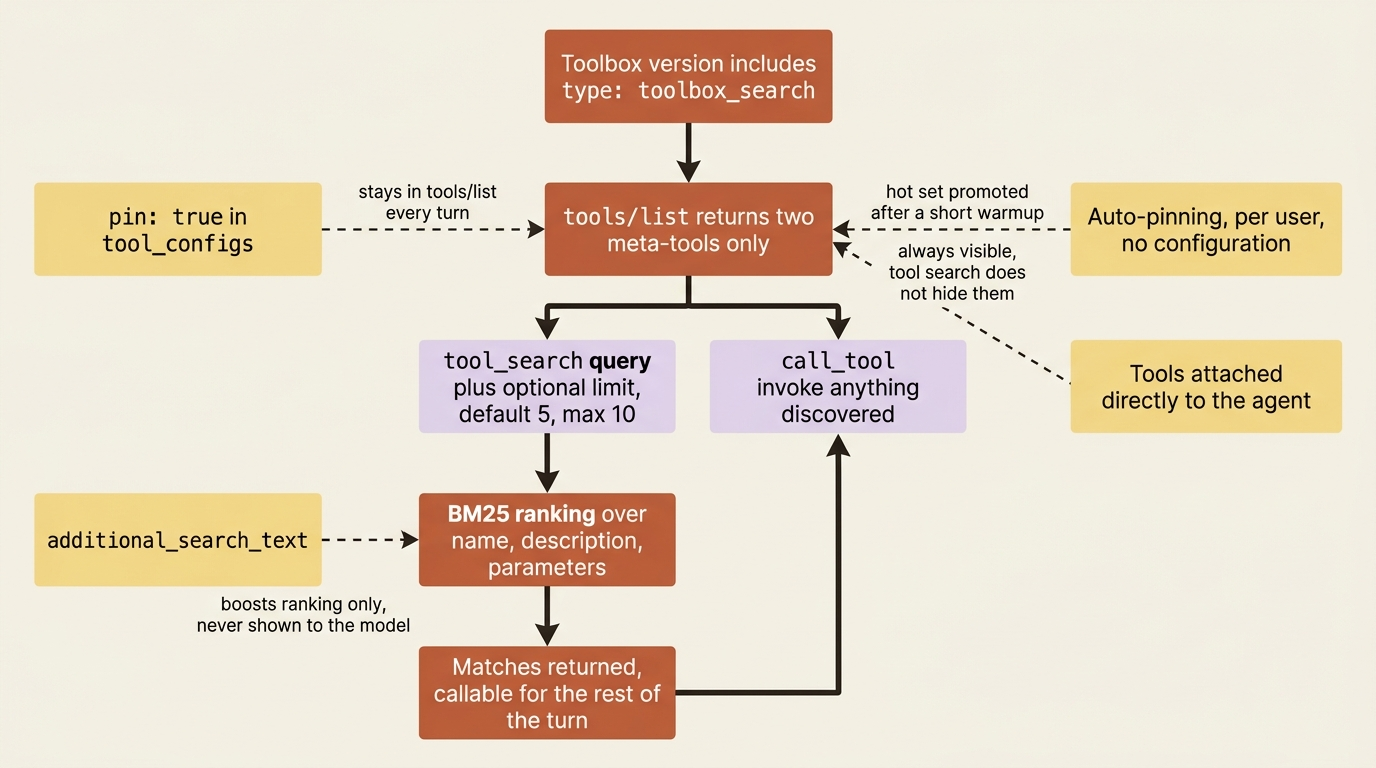
Three controls tune it, and they compose [VERIFIED-LEARN: agents-how-to-tools-tool-search.md]. Set pin on a tool in tool_configs to keep it in tools/list on every turn, using "*" as the key to pin everything from one MCP server. Set additional_search_text to add vocabulary your organization uses that the tool's own description does not, which affects ranking only and is never shown to the model. Auto-pinning runs without configuration: Foundry tracks which tools each user calls most often and promotes the hot set into tools/list after a short warmup, per user, with stale entries aging out.
For the desk, the filings lookup is called on nearly every turn and its MCP description uses the vendor's vocabulary rather than procurement's [VERIFIED-LEARN: agents-how-to-tools-tool-search.md]:
tools = [
    {"type": "toolbox_search"},  # ①
    {
        "type": "mcp",
        "server_label": "filings",
        "server_url": "https://filings-mcp.internal.example.com/mcp",
        "require_approval": "never",  # ②
        "project_connection_id": "filings-mcp-conn",
        "tool_configs": {  # ③
            "fetch_disclosure": {  # ④
                "pin": True,  # ⑤
                "additional_search_text": "10-K 10-Q annual report risk factors supplier filing",  # ⑥
            },
        },
    },
]
① The tool search entry hides every other tool from the initial tools/list and exposes tool_search and call_tool in their place.
② never is the honest setting until the runtime can pause a pending call, collect a decision, and resume that exact call.
③ tool_configs is set on the dict-shaped entry rather than on the typed MCPToolboxTool model, and create_version accepts either shape, so one list holds both the decision to enable tool search and the exceptions to it.
④ The key is the tool's own name on the MCP server, so the tuning below applies to one tool rather than to the server.
⑤ Pinning keeps this tool in tools/list on every turn, which saves the search round trip on the call the desk makes constantly.
⑥ The extra search text adds procurement's vocabulary to the ranking index. It affects BM25 matching only and is never shown to the model.
Note: The full extracted listing at
code/foundry-hyperscaler/part-6-toolbox-the-governed-capability-registry/listings/03-tool-search-config.py
shows the create_version call that consumes this list.
Pinning buys a saved round trip on the call that happens every turn, and the search text buys recall on the calls that happen rarely and have to work when they do.
Two behaviors surprise people. Tool descriptions drive match quality entirely, and a tool with a vague description will not be returned even for a relevant query [VERIFIED-LEARN: agents-how-to-tools-tool-search.md]. Tools attached directly to the agent, outside the toolbox, remain visible regardless of tool search, which is the usual explanation when one tool stubbornly shows up in the initial listing [VERIFIED-LEARN: agents-how-to-tools-tool-search.md].
In production: tell the model that tool search exists. The docs recommend a system-prompt line along the lines of "if you need a tool that isn't in your current list, call tool_search with a description of what you need before responding that you can't help" [VERIFIED-LEARN: agents-how-to-tools-tool-search.md]. Without it, the most common failure is an agent that politely declines a task it had a tool for.
Skills: versioned instructions that arrive as MCP resources
Tools define what an agent can do. Skills define how it performs a task [VERIFIED-LEARN: agents-concepts-toolbox-overview.md].
A skill is a SKILL.md file following the Agent Skills specification: YAML front matter with an unquoted name and description, then free Markdown that becomes the skill's injected instructions [VERIFIED-LEARN: agents-how-to-tools-skills.md]. You author it once, store it centrally through the versioned Skills API, and deliver it in one of two modes. Attach it to a toolbox so any MCP client discovers it, or download it directly into an agent project to inject at session start.
The desk's weekly brief has a format the procurement lead cares about, which is exactly the kind of guideline that otherwise lives in a system prompt and gets copied into every agent that touches it:
---
name: supplier-risk-brief
description: Format and evidence rules for the weekly supplier risk brief.
---

# Supplier risk brief

## Instructions

- Open with the risk level and one sentence of justification.
- Cite the filing section or article URL behind every claim.
- Say "no evidence found" rather than inferring from absence.
Skills are versioned and immutable: each update creates a new version, the parent skill tracks default_version, and a toolbox reference either follows the default or pins a version string [VERIFIED-LEARN: agents-how-to-tools-skills.md, agents-how-to-tools-toolbox.md]. Attach one to a toolbox version with a typed reference:
from azure.ai.projects.models import ToolboxSkillReference

version = project.toolboxes.create_version(
    name="procurement-toolbox",
    description="Supplier tools plus the brief format.",
    tools=[...],
    skills=[
        ToolboxSkillReference(name="supplier-risk-brief"),
        # ToolboxSkillReference(name="supplier-risk-brief", version="2"),
    ],
)
The delivery mechanism is the part worth understanding, because it is what makes skills runtime-agnostic. Skills attached to a toolbox appear as MCP resources, not tools, with URIs of the form skill://{name} [VERIFIED-LEARN: agents-how-to-tools-skills.md, how-to-develop-langchain-toolbox.md]. A client calls resources/list once at startup to discover them and resources/read to download the content. Any MCP client that supports the Resources protocol can consume them without a Foundry SDK at all [VERIFIED-LEARN: agents-how-to-tools-skills.md].
Two constraints on that. Skills attached to a toolbox must live in the same Foundry project, because cross-project references are not supported. Skills API calls also require a preview header, Foundry-Features: Skills=V1Preview, which is the kind of detail that turns into a mysterious rejection when a hand-rolled client omits it [VERIFIED-LEARN: agents-how-to-tools-skills.md] [PERISHABLE: checked September 2026].
Both wirings, and one correction worth making in the open
Microsoft's concepts page states the rule plainly: with Microsoft Agent Framework, connect through FoundryToolbox in Python or AddFoundryToolboxes in .NET instead of a generic MCP client, and other runtimes connect using standard MCP client libraries [VERIFIED-LEARN: agents-concepts-hosted-agents.md]. It is easy to read AddFoundryToolboxes as the one native one-liner, which is how it often gets quoted. It is the .NET spelling. The Python native path is a different class with a different shape, and both are first-party.
Python, Microsoft Agent Framework. FoundryToolbox takes the credential and the endpoint and goes in the agent's tools list [VERIFIED-LEARN: agents-how-to-tools-web-search.md, agents-how-to-tools-code-interpreter.md, agents-how-to-tools-toolbox.md]:
from agent_framework.foundry import FoundryToolbox

toolbox = FoundryToolbox(credential, url=os.environ["TOOLBOX_ENDPOINT"])

agent = chat_client.as_agent(
    name="supplier-risk-desk",
    instructions="...",
    tools=[toolbox],
)
The class resolves the toolbox from TOOLBOX_ENDPOINT, or from FOUNDRY_PROJECT_ENDPOINT plus TOOLBOX_NAME, authenticates MCP requests, and forwards the hosted runtime's per-request call ID [VERIFIED-LEARN: agents-how-to-tools-use-toolbox-hosted-agent.md]. Read that last clause carefully. The per-request call ID your hosted agent is told to capture, carry, and never parse is the same value that lets the toolbox resolve which buyer a tool call acts for.
.NET, Microsoft Agent Framework. AddFoundryToolboxes registers a toolbox by name on the host builder, constructs the consumer endpoint from FOUNDRY_PROJECT_ENDPOINT, calls tools/list during startup, and adds the discovered tools to each agent request [VERIFIED-LEARN: agents-how-to-tools-use-toolbox-hosted-agent.md, agents-how-to-tools-toolbox.md]:
builder.Services.AddFoundryResponses(agent);
builder.Services.AddFoundryToolboxes(credential, toolboxName);
One property of the .NET integration is genuinely better than its Python sibling and worth stealing in principle: it includes toolbox health in the readiness probe, so /readiness reports unhealthy when the host cannot enumerate the toolbox tools [VERIFIED-LEARN: agents-how-to-tools-use-toolbox-hosted-agent.md, agents-how-to-tools-toolbox.md]. An agent that starts successfully and then cannot reach any of its tools is the failure mode that wastes an afternoon, and the readiness endpoint is the right place to catch it.
LangGraph. AzureAIProjectToolbox from langchain_azure_ai.tools loads the toolbox tools as LangChain BaseTool instances [VERIFIED-LEARN: how-to-develop-langchain-toolbox.md, agents-how-to-tools-use-toolbox-hosted-agent.md]:
from langchain_azure_ai.tools import AzureAIProjectToolbox

toolbox = AzureAIProjectToolbox(toolbox_name="procurement-toolbox")
tools = await toolbox.aget_tools()
Each call is stateless: it opens a fresh MCP session, loads the tools, and returns them [VERIFIED-LEARN: how-to-develop-langchain-toolbox.md]. The approval companion sits right beside it. get_tools_requiring_approval() returns the names of tools whose configuration sets require_approval to always, so a LangGraph interrupt can gate exactly those [VERIFIED-LEARN: how-to-develop-langchain-toolbox.md].
DeepAgents is the cleanest single illustration of the keep-the-loop, rent-the-substrate thesis. get_skills() builds on get_resources() and returns the toolbox's skills as the file mapping create_deep_agent expects, removing the Blob conversion boilerplate [VERIFIED-LEARN: how-to-develop-langchain-toolbox.md]:
from deepagents import create_deep_agent
from deepagents.backends import StateBackend

toolbox = AzureAIProjectToolbox(toolbox_name="procurement-toolbox")  # ①
skill_files = toolbox.get_skills()  # ②

agent = create_deep_agent(
    model="azure_ai:gpt-4.1",
    backend=StateBackend(),  # ③
    skills=["/skills/"],  # ④
)

agent.invoke({"messages": [...], "files": skill_files})  # ⑤
① The toolbox is named, never credentialed. The harness holds a name and the platform holds the authentication.
② get_skills() returns the toolbox's skills already shaped as the file mapping the agent expects, which is the Blob conversion you do not write.
③ StateBackend keeps the skill files in the run's state. Passing a FilesystemBackend to aget_skills(backend=...) writes them out instead.
④ The agent is told where to read skills from, not what the skills say, which is why a promoted skill version changes behavior without a redeploy.
⑤ The mapping is handed in at invoke time, so each run picks up whatever the toolbox served when the skills were fetched.
Note: The full extracted listing at code/foundry-hyperscaler/part-6-toolbox-the-governed-capability-registry/listings/04-deepagents-toolbox-skills.py shows the toolbox import and the message payload elided here.
Read the ownership in that snippet. The harness is open source and in your repository; the skill text is Microsoft-managed, centrally versioned, and published by a procurement administrator who never opens your code; and the procurement lead can change the brief format by promoting a skill version while your container keeps running.
Everything else consumes the same toolbox over generic MCP. The docs make the portability claim explicitly, and it is the sentence to quote when someone calls this lock-in: toolboxes are created and managed in Microsoft Foundry but are not limited to Foundry-based agents, and any MCP-compatible runtime or client can use one [VERIFIED-LEARN: agents-concepts-toolbox-overview.md]. Open a Streamable HTTP MCP session against the consumer endpoint with a bearer token for https://ai.azure.com/.default, call initialize, and then tools/list [VERIFIED-LEARN: agents-how-to-tools-toolbox.md]. Nothing else is required.
Pattern check: the native convenience buys three things and no capability. It resolves the endpoint from environment variables, it attaches and refreshes the Entra token, and in Python it forwards the per-request call ID that makes per-user tool identity work without your code touching a header. What it does not buy is access, governance, or any tool the generic MCP path cannot reach. A LangGraph or hand-rolled agent gives up ergonomics rather than function, and what it costs is forwarding the call ID yourself.
Approval is a promise the endpoint does not keep
One behavior deserves its own section, because reading it wrong produces a security control that does not exist.
Every entry tools/list returns can carry _meta.tool_configuration.require_approval, set to always or never when the toolbox version was created. When it is always, your agent runtime must show the proposed tool name and arguments to the user, wait for explicit approval, and invoke only after approval, every single call [VERIFIED-LEARN: agents-how-to-tools-use-toolbox-hosted-agent.md].
Gotcha: the toolbox MCP endpoint does not block tools/call when require_approval is always, and a system-prompt instruction is not enforcement [VERIFIED-LEARN: agents-how-to-tools-use-toolbox-hosted-agent.md, agents-how-to-tools-toolbox.md]. Enforcement is entirely the agent runtime's responsibility. The docs give the honest rule that follows: use require_approval: never unless your runtime can pause the pending tool call, collect the user's decision, and resume or reject that exact call. A flag set to always against a runtime that ignores it is worse than no flag, because the toolbox configuration now reads as a control to everyone auditing it.
For the desk, that means the contract-amendment tool gets always only once a LangGraph interrupt or the Agent Framework approval path is actually wired to get_tools_requiring_approval(), and gets never until then.
Guardrails at the tool boundary
The Govern pillar has one more piece. A toolbox version can carry a named Responsible AI policy through policies.rai_config.rai_policy_name, and the guardrail runs at the toolbox layer, independently of any model-level content filter, screening tool inputs and outputs [VERIFIED-LEARN: agents-how-to-tools-toolbox.md].
The reason that placement matters more than it sounds: tool outputs are untrusted input. The best-practice page says to treat them that way and validate critical values before acting on them [VERIFIED-LEARN: agents-concepts-tool-best-practice.md], and the MCP page is blunter, warning that tool descriptions, annotations, and results from remote MCP servers can carry indirect prompt-injection instructions [VERIFIED-LEARN: agents-how-to-tools-model-context-protocol.md]. A guardrail at the toolbox boundary screens every tool's inputs and outputs, so an untrusted MCP response cannot smuggle unsafe content back into the agent [VERIFIED-LEARN: agents-how-to-tools-tool-authentication.md]. It sits outside your loop, which means a compromised loop cannot turn it off.
One documentation trap while you configure it: the prose says to reference a guardrail by its policy name, and every code sample passes a full ARM resource ID under Microsoft.CognitiveServices/accounts/<account>/raiPolicies/<policy> [CONTESTED: agents-how-to-tools-toolbox.md, prose against samples]. Follow the samples.
Do this today
- Inventory the tools your agents call, and mark each one against the support matrix. The direct-only row (Azure Functions, SharePoint, Grounding with Bing, and the rest) tells you today how much direct configuration your design will carry no matter what.
- Point every agent at the consumer endpoint,
{project_endpoint}/toolboxes/{name}/mcp?api-version=v1, and grep your codebase for a hard-coded/versions/URL. That one string is the difference between an administrator promoting a change and you shipping a container. - Move one credential out of your process and into a connection. Pick the tool where per-user access matters and set
authTypetooauth2withoffline_accessin the scopes, then delete the token cache it replaces. - Turn on tool search before your toolbox needs it, and write real descriptions. Add
additional_search_textfor the tools whose vendor vocabulary does not match your organization's, andpinthe one or two tools called on nearly every turn. - Keep the toolbox YAML in source control and create versions from files, so
azd ai toolbox create --from-fileis the only way a toolbox ever changes. This costs nothing on day one and is the whole exit story on day four hundred.
What just transferred, and what never will
Pattern check: Toolbox is the capability registry and the credential boundary, and it takes over more than it looks. Foundry owns credential storage, token acquisition, exchange, refresh, and injection, per-user token isolation, the OAuth consent flow, the version lifecycle, the search index over your tool descriptions, and the guardrail at the tool boundary. Tool descriptions, exclusion clauses through allowed_tools, structured error responses, approval enforcement in your runtime, and the decision about which tools an agent should have at all are still your craft. A badly described tool fails identically no matter who hosts it, and under tool search it fails harder, because a vague description now removes the tool from discovery rather than merely confusing the model.
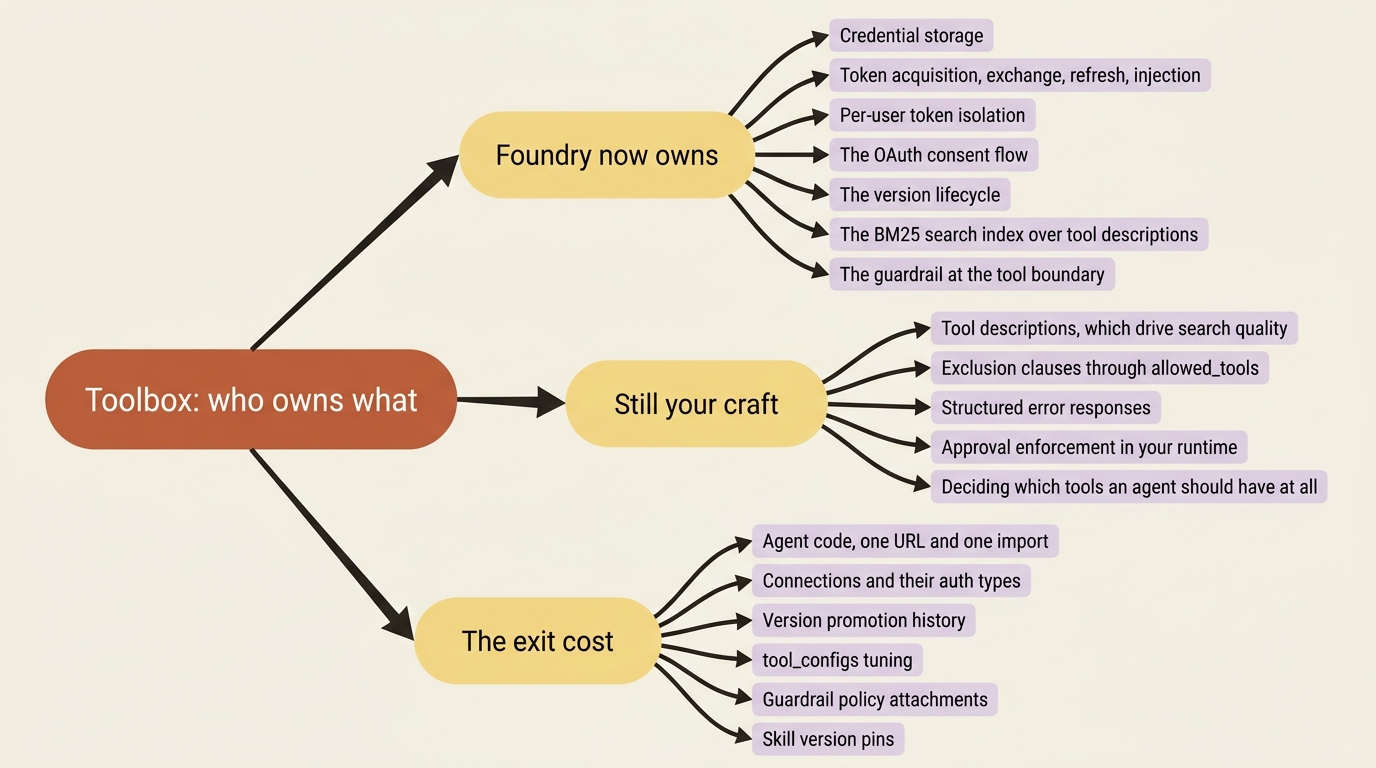
The two framework tracks come out closer than the marketing suggests. Both get a first-party class, FoundryToolbox in Python and AzureAIProjectToolbox on the LangChain side, and .NET gets the builder extension plus a readiness probe that neither Python path documents. The capability is identical in all three, and everything else on earth reaches the same toolbox over plain MCP.
Then the exit question, which every managed service deserves. Toolbox configuration is genuinely sticky, and the stickiness is specific. Your agent code holds one URL and one class import, which is a small diff to remove. What does not travel is the configuration: connections with their auth types, versions with their promotion history, tool_configs tuning, guardrail policy attachments, and skill version pins. Rebuilding that elsewhere is administrator work rather than developer work, and it is work nobody wrote down, because the whole point was that it stopped living in your repository.
Here is the bargain, stated plainly. You give up a configuration surface you can no longer read in a diff, and you get back the ability to let the people who own a policy change it without touching the people who own the loop. For most teams shipping more than one agent, that trade is not close.