
There is no `FoundryCheckpointSaver`
Foundry ships four state services with four different lifetimes, and the checkpoint class everyone recommends for wiring them together does not exist; here is the correct mental model and the durable store that actually replaces it.
Microsoft Foundry gives you four state services with four different lifetimes. Merge any two of them in your head and you ship a cross-tenant data leak. Here is the correct model, and the durable store that replaces the class everyone recommends.
A model or a vendor deck told you to use FoundryCheckpointSaver. You wrote the import, it failed, and now you are not sure which half of what you were told about Foundry state is real.
In this article: You will learn the four state services Microsoft Foundry exposes, what each one holds, and how long it lives. The article separates conversation from session from state store from memory, walks the Active, Idle, and Resumed compute lifecycle that drives both your bill and your failure modes, and then makes the correction:
FoundryCheckpointSaveris not a real class. The replacement,FoundryStateStore, is better, and you will see the adapter that points a LangGraph or Agent Framework checkpointer at it. By the end you will know which single flag stops one customer from reading another customer's checkpoints.
A procurement analyst opens a supplier review on Thursday afternoon. The agent reads two filings, cross-checks an internal contract, and gets halfway through a risk assessment. Then the container holding the work restarts on a routine platform event, and Monday morning the analyst comes back to an agent that has forgotten the entire exercise.
The fix looks obvious: give the agent a durable checkpointer. Ask a model or read a vendor deck and you will be handed a class name, FoundryCheckpointSaver. Write the import and it fails, because that class does not exist. Zero occurrences across the entire official Microsoft Foundry documentation mirror. Zero across 563 research claims collected from seven vendor sources [REFUTED].
The failed import is the good outcome, because it is loud. The quiet outcome is an agent that looks correct in a single-user demo and returns one buyer's checkpoints to another buyer in production, because of a default nobody changed. Both problems have one root cause: Foundry has four state services, and most people hold two or three of them as a single concept.
Four services, four lifetimes, four failure modes
Here is the whole model in one table. The interesting column is not what each service holds; it is how long it lives and who writes it [VERIFIED-LEARN: agents-concepts-hosted-agents.md, agents-concepts-agent-state-store.md, agents-concepts-what-is-memory.md].
| Service | What it holds | Lifetime | Who writes it |
|---|---|---|---|
| Conversation | Messages, tool calls, and responses | Durable in Foundry, independent of compute | The platform, on the Responses protocol |
| Session | A compute lease plus a persistent filesystem ($HOME and /files) |
Idle timeout of 2 to 60 minutes, then deprovisioned and persisted. Deleted permanently after 30 days of inactivity | The platform provisions it, your code writes the files |
| State store | Keyed JSON items under a store name you choose | Store-level idle window, 30 days by default, configurable to never expire | Your code, explicitly. The platform never populates it |
| Memory | LLM-extracted long-term knowledge about a user | Managed, with item-level control and a store default TTL | The platform extracts, you decide what is eligible |
Here is the same table as a flat list, one bullet per service:
- Conversation: a durable record of messages, tool calls, and responses. Lifetime: durable in Foundry, independent of compute. Written by: the platform, on the Responses protocol.
- Session: a compute lease plus a persistent filesystem at
$HOMEand/files. Lifetime: an idle timeout of 2 to 60 minutes, then deprovisioned with state persisted, and permanently deleted after 30 days of inactivity. Written by: the platform provisions the sandbox, your code writes the files. - State store: keyed JSON items under a store name you choose. Lifetime: a store-level idle window, 30 days by default, configurable to never expire. Written by: your code, explicitly, because the platform never populates it.
- Memory: LLM-extracted long-term knowledge about a user. Lifetime: managed, with item-level control and a store default TTL. Written by: the platform extracts it, and you decide what is eligible.
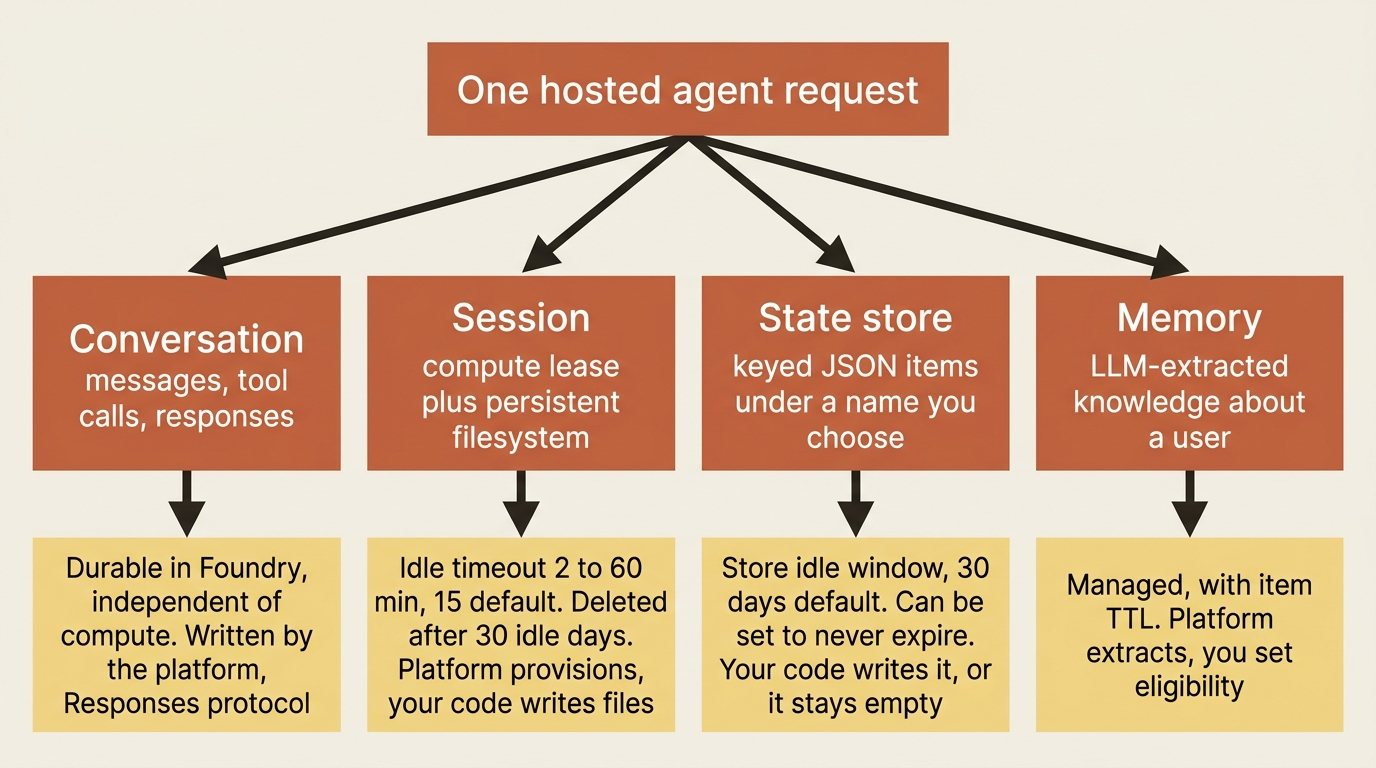
Read the "who writes it" column twice. The conversation fills itself, the session filesystem fills as a side effect of your code writing files, and the state store stays empty until your agent explicitly puts something in it. The documentation says so plainly: unlike sessions and conversations, the platform does not populate the store automatically [VERIFIED-LEARN: agents-concepts-agent-state-store.md]. An agent that assumes the platform is checkpointing on its behalf is an agent with no checkpoints.
Each service also fails differently. A conversation never disappears, and that is its failure mode. A session disappears quietly on a timer you configured months ago. A store item ages out of an idle window you probably did not set. Memory returns the wrong user's preferences when a scope is hard-coded.
Compute follows the session, not the request
One sentence makes the cost model and the failure model click at the same time: compute follows the session, not the individual request [VERIFIED-LEARN: agents-concepts-hosted-agents.md].
A session moves through three states, and the platform runs all three transitions without asking you [VERIFIED-LEARN: agents-concepts-hosted-agents.md]. Active means compute is running, requests route to it, and $HOME and /files are available. Idle means no requests have arrived for the configured timeout, so the platform deprovisions compute and persists session state. Resumed means the same session ID was referenced again, so the platform provisions new compute and restores that state.
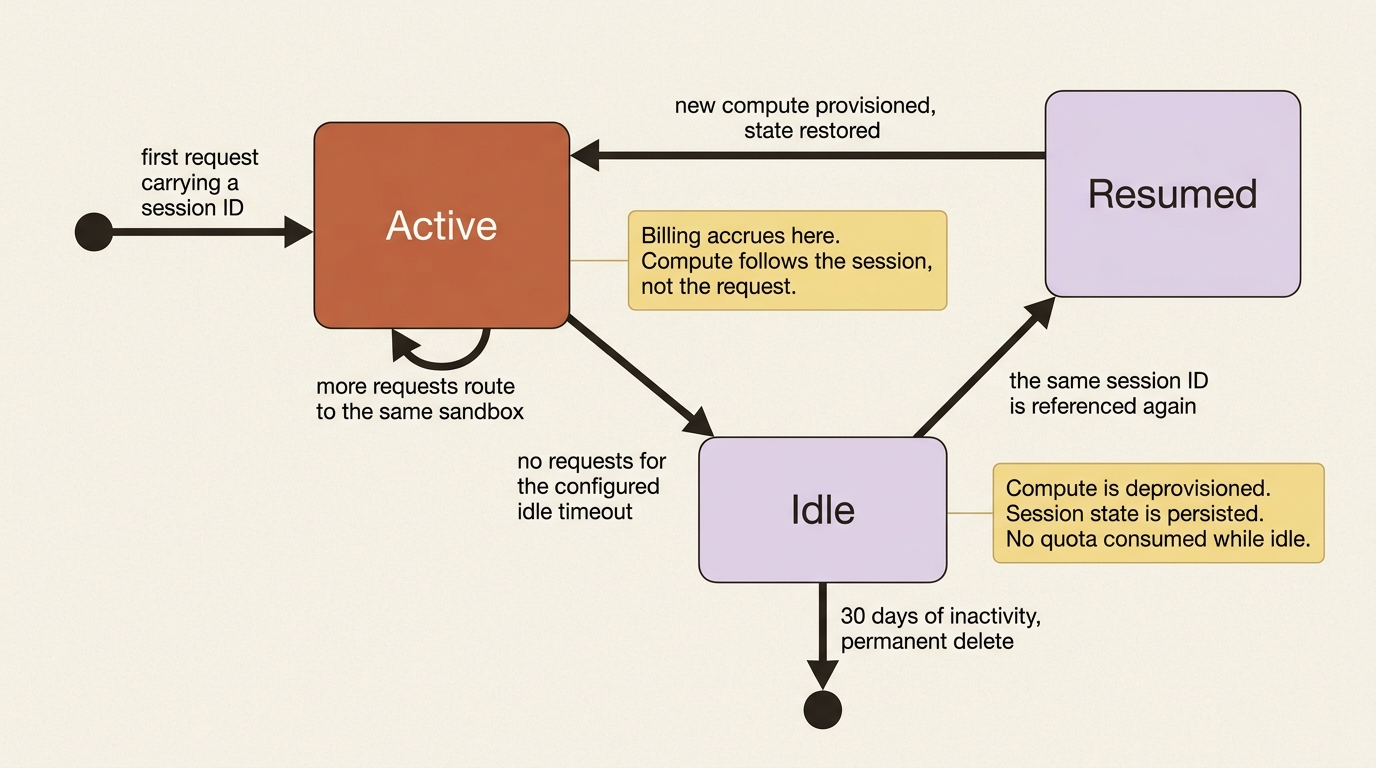
The idle timeout is per agent version, configurable from 2 through 60 minutes, and defaults to 15 minutes [VERIFIED-LEARN: agents-concepts-hosted-agents.md, agents-how-to-manage-hosted-sessions.md]. After 30 days of inactivity the platform permanently deletes the session, and the filesystem goes with it [VERIFIED-LEARN: agents-concepts-hosted-agents.md].
For a supplier-risk desk, 15 minutes is wrong in an obvious way. An analyst opens a review, reads a filing, talks to a colleague, and returns forty minutes later to a cold sandbox. Resuming is transparent, but the cold start is real, so the desk raises its window in azure.yaml [VERIFIED-LEARN: agents-how-to-manage-hosted-sessions.md]:
services:
    supplier-risk-desk:
        host: azure.ai.agent
        kind: hosted
        sessionConfiguration:
            idleTimeoutSeconds: 1800
The azure.ai.agents extension validates that value and maps it to the agent version's session_configuration.idle_timeout_seconds property. Omit the block and the service uses its 900-second default [VERIFIED-LEARN: agents-how-to-manage-hosted-sessions.md].
In production: the idle timeout is a bill, not just a user-experience knob. Hosted agents scale per session rather than per replica, so the CPU and memory on an agent version describe one session, and billing accrues across all active sessions [VERIFIED-LEARN: agents-concepts-hosted-agents.md]. Doubling the idle window doubles the tail of every abandoned session. Quota is friendlier: a session consumes the per-subscription concurrent limit only while its compute is provisioning or running, and that limit is 2,000 concurrent sessions in seven named regions and 1,000 everywhere else [VERIFIED-LEARN: agents-concepts-limits-quotas-regions.md] [PERISHABLE: checked September 2026]. Stopping a session terminates compute while preserving the filesystem volume, and deleting one releases everything. Stop is a cost control. Delete is a data-subject request.
Your primary key depends on the protocol you declared
Foundry hosted agents speak two protocols, and the choice is the one genuinely irreversible decision in the design, because the two protocols have different primary keys [VERIFIED-LEARN: agents-concepts-hosted-agents.md].
On the Responses protocol, conversation ID is the primary concept: the platform manages history automatically, associates a session ID with each conversation, and returns that session ID to the client. On the Invocations protocol, session ID is the primary concept, the client manages it directly, and there is no platform-managed conversation history at all [VERIFIED-LEARN: agents-concepts-hosted-agents.md].
The sessions how-to draws the same line one level lower, on four axes worth memorizing [VERIFIED-LEARN: agents-how-to-manage-hosted-sessions.md]:
- What it represents: a session is sandbox compute plus a persisted filesystem at
$HOMEand/files, while a conversation is the history of messages, tool calls, and responses. - Identifier: a session is
agent_session_id, while a conversation isprevious_response_idorconversation, on the Responses protocol only. - Used for: a session carries file uploads and working state across turns, while a conversation threads the turns of a chat together.
- Managed by: a session is managed by the platform through the
/sessionsAPI, while a conversation is managed by the platform on Responses and by your container code on Invocations.
The consequence trips anyone who assumes a session is a thread. Reusing the same agent_session_id does not, on its own, replay prior messages to the model [VERIFIED-LEARN: agents-how-to-manage-hosted-sessions.md]. Conversation continuity comes from previous_response_id or a conversation ID, and session continuity is a separate thing you ask for when later turns need the files. Passing previous_response_id alone lands each call in a new sandbox.
Gotcha: for Invocations, the platform reads agent_session_id from the query string only. A field named agent_session_id or session_id in the request body, and a header named x-agent-session-id, pass through to your container untouched and do not influence which sandbox the platform routes to [VERIFIED-LEARN: agents-how-to-manage-hosted-sessions.md]. A LangChain Invocations host hands back an x-agent-session-id response header, and the correct move is to put that value in the next request's query string. Echoing it back as a header produces an agent that works locally and silently gets a fresh sandbox on every call in production. On Responses, the same ID goes in the request body instead.
Isolation keys scope sessions, and they authorize nothing
Every session belongs to exactly one isolation key, and the platform routes requests so a caller sees only the sessions tagged with the key on the request [VERIFIED-LEARN: agents-how-to-manage-hosted-sessions.md]. Under the default Entra scheme the platform derives that key from the caller's token, and the x-ms-user-isolation-key header is accepted and ignored. Under the Header scheme the platform reads the key from that header, fails requests without it, and does not validate the value.
Read the second scheme as the warning it is. The documentation states the boundary directly: the isolation key is a partitioning value, not an authentication or authorization mechanism [VERIFIED-LEARN: agents-how-to-manage-hosted-sessions.md]. The token authenticates the caller, and the key only narrows which sessions that already-authenticated caller acts on. Deciding who may act on which keys is your application's job, one layer above the agent endpoint. The one administrative exception is the right kind: an identity that needs to list or delete every session for debugging or incident response needs the Foundry User role on the project, and you grant it to the operations identity rather than to the agent.
There is no FoundryCheckpointSaver
Now the correction.
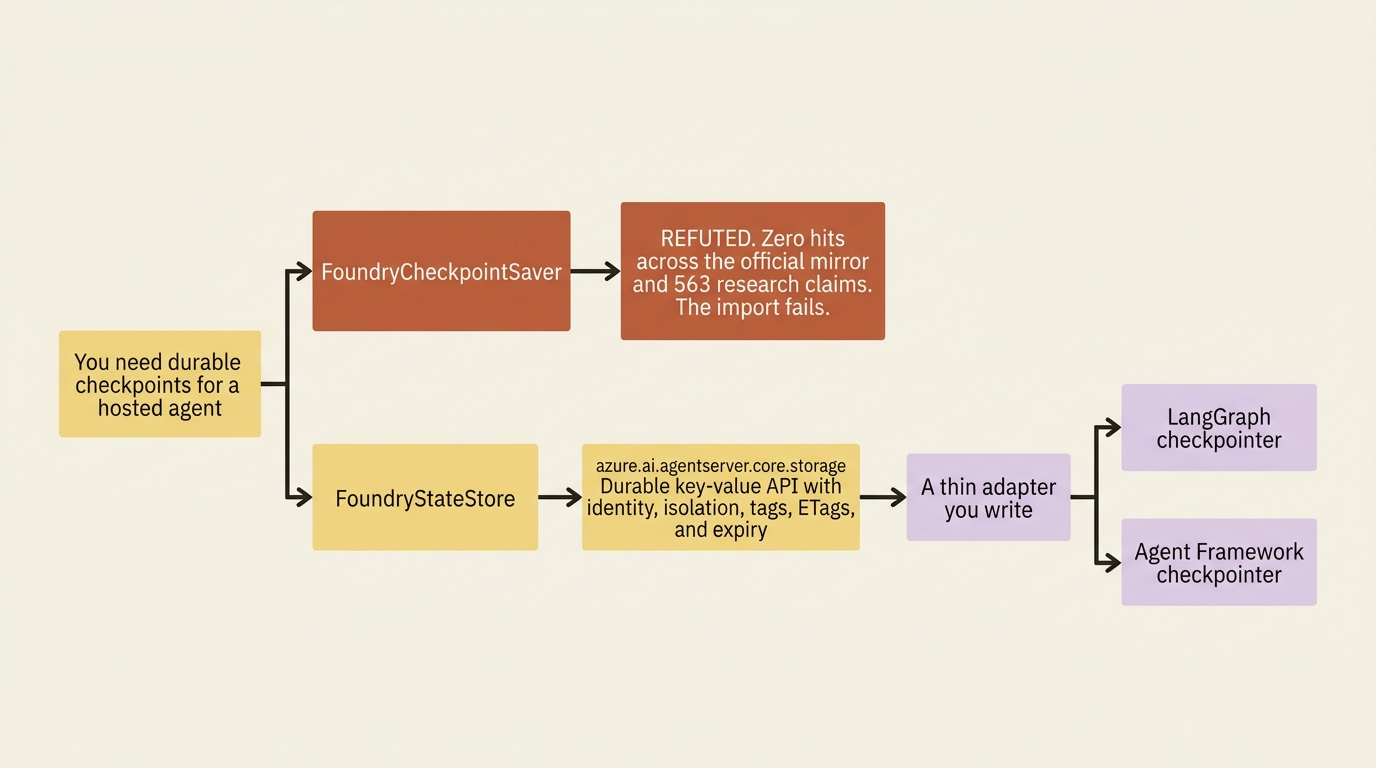
Search the entire official mirror for FoundryCheckpointSaver and you get zero hits. Search 563 research claims across seven vendor dumps and you get zero hits. It appears in confident conversational answers and in decks, and it is not a real class [REFUTED].
The real mechanism is not a worse consolation prize. It is a general-purpose durable key-value API called FoundryStateStore, imported from azure.ai.agentserver.core.storage, and you point your framework's checkpointer at it through a thin adapter you write [VERIFIED-LEARN: agents-how-to-manage-task-state.md, agents-concepts-agent-state-store.md]. Neither track gets a prebuilt saver. LangGraph does not, Microsoft Agent Framework does not, and for once the two tracks are exactly equal.
The correction ends there. The rest of this article is the mechanism that actually exists.
The state store is raw material, and the store name is the outer partition
A FoundryStateStore client binds to one store name you choose, and that name is both the store's identity and its outermost partition [VERIFIED-LEARN: agents-concepts-agent-state-store.md]. Three properties shape everything that follows. Store names cannot change after creation, so pick a stable scheme before you ship. Names can contain /, which makes them a hierarchy separator rather than a flat namespace, as in reviews/run-42. And get-or-create is the only store-level call an agent needs: it fetches the store or creates it when absent, and creation options apply only on first creation, so the service silently ignores them when the store already exists [VERIFIED-LEARN: agents-concepts-agent-state-store.md, agents-how-to-manage-task-state.md].
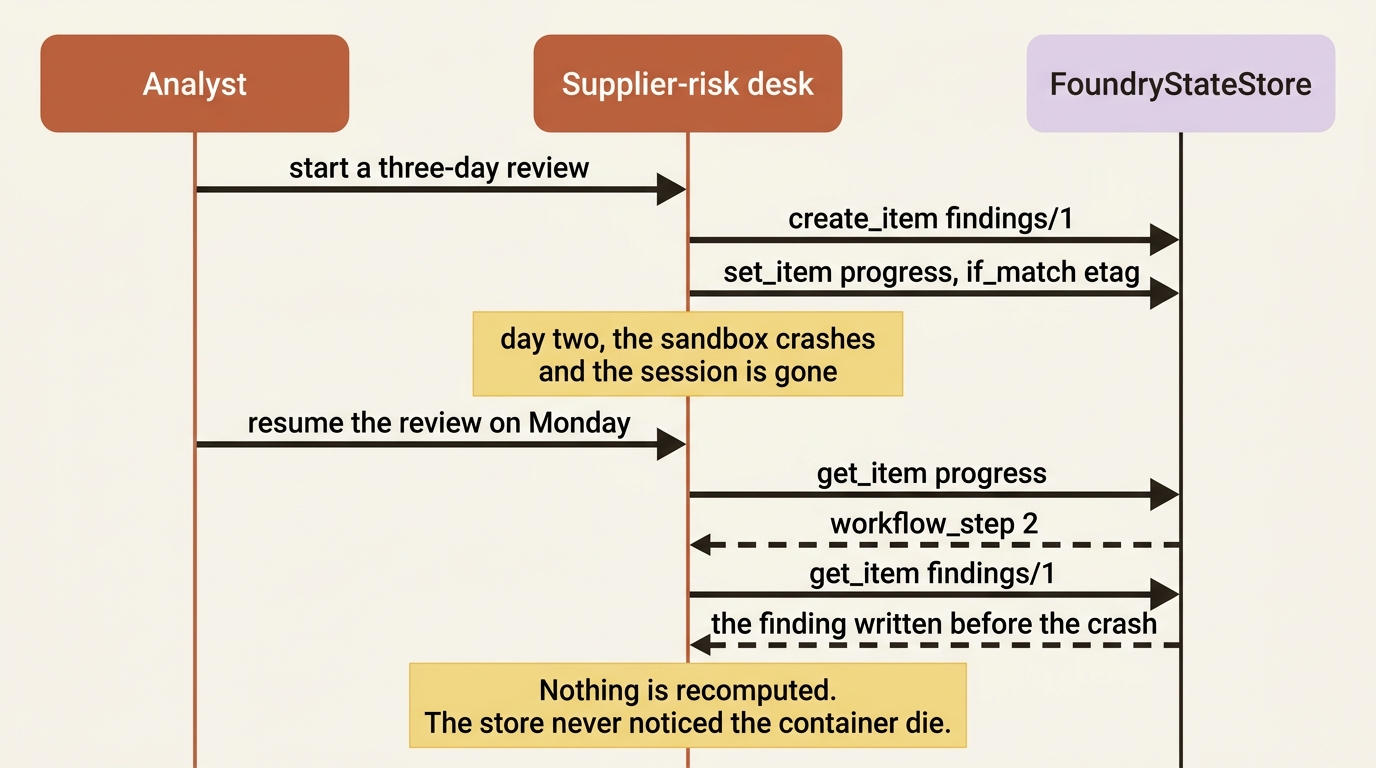
Here is a supplier-risk desk making its three-day review durable. The pattern comes straight from the documentation: keep the progress marker and the completed step results in separate items, so a recovered attempt can identify both the next step and the work already written [VERIFIED-LEARN: agents-how-to-manage-task-state.md].
from azure.ai.agentserver.core.storage import FoundryStateStore


async def record_review_step(review_id: str, step: int, finding: dict) -> None:
    store = await FoundryStateStore.get_or_create(
        f"reviews/{review_id}", user_isolation=True  # ①
    )
    async with store:
        progress = await store.get_item("progress")
        if progress and int(progress.value["workflow_step"]) > step:
            return                                    # already past this step  ②

        finding_key = f"findings/{step}"
        existing = await store.get_item(finding_key)
        if existing is None:
            await store.create_item(finding_key, finding)  # ③
        elif existing.value != finding:
            raise RuntimeError("The checkpoint contains a different result.")  # ④

        advanced = {"workflow_step": step + 1}
        if progress is None:
            await store.create_item("progress", advanced)
        else:
            await store.set_item("progress", advanced, if_match=progress.etag)  # ⑤
① The store name carries non-user scope only, the review ID, while user_isolation=True adds the per-caller partition the platform enforces.
② The progress marker is read first, so a recovered attempt that is already past this step returns without rewriting anything.
③ The finding lands under a deterministic key with create_item, an append-only write that cannot silently clobber a completed step.
④ A key that already holds a different value means two attempts disagreed, so the function raises instead of overwriting the earlier result.
⑤ The mutable progress marker advances last, guarded by if_match=progress.etag, which turns a lost update into a failed call.
Note: The full extracted listing at code/foundry-hyperscaler/part-5-conversation-session-memory/listings/01-record-review-step.py is the runnable form of this block.
Two ordering rules carry all the weight. Write the finding before you advance the progress marker, because the deterministic finding key lets a recovered attempt detect a completed write and skip it. And use if_match=item.etag for the mutable progress marker while using create_item for the append-only findings, because a lost update on a counter corrupts state while a competing create on a fresh key cannot [VERIFIED-LEARN: agents-concepts-agent-state-store.md]. On a 409 Conflict or 412 Precondition Failed, reread and reconcile before you retry rather than retrying blind [VERIFIED-LEARN: agents-how-to-manage-task-state.md].
The Monday-morning problem is now solved. The review crashed on day two, the sandbox went away, and the progress marker plus every finding written before the crash are sitting in a server-backed store that never noticed the container die.
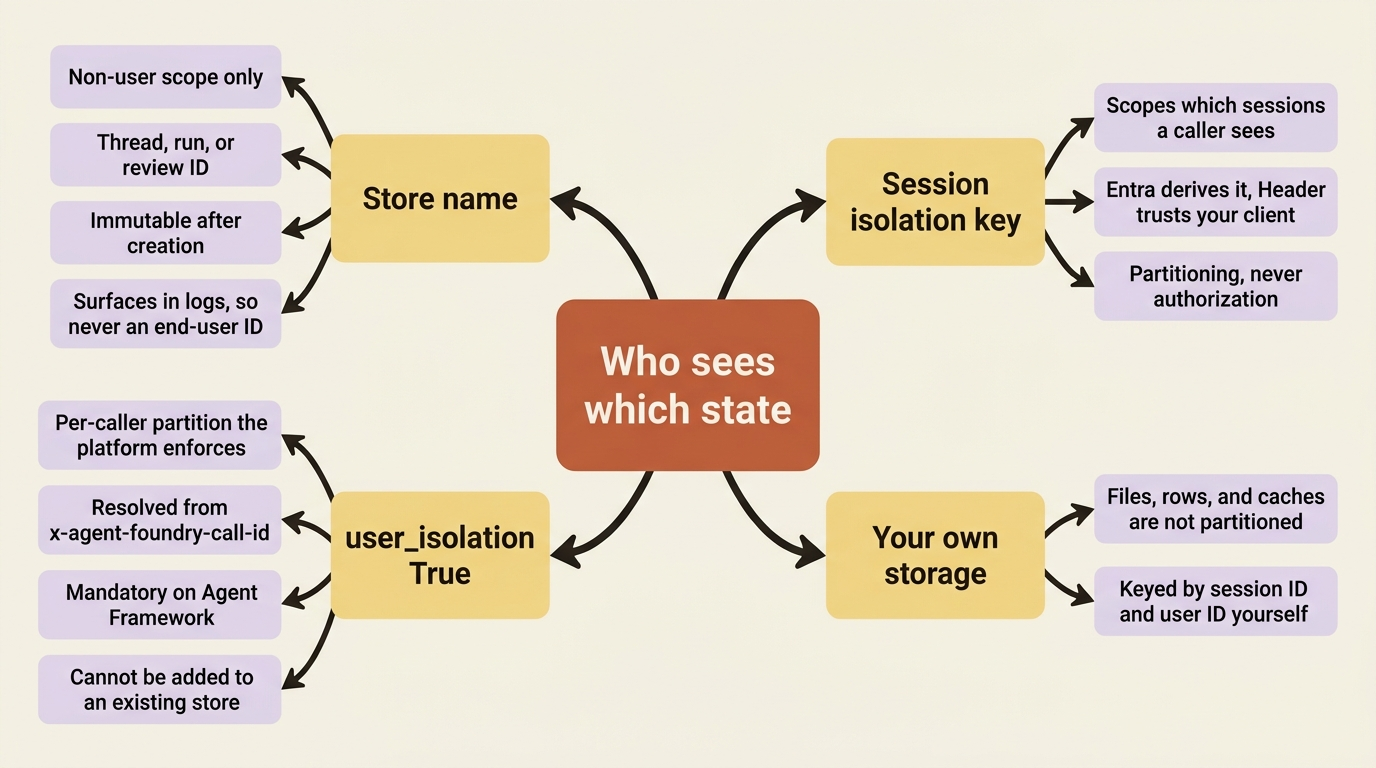
Gotcha: do not encode an end-user identifier in a store name. The reasoning is better than the rule: store names surface in operational surfaces such as logs and error messages, and a name your own code builds is not a verified identity [VERIFIED-LEARN: agents-concepts-agent-state-store.md]. Put non-user scope in the name, such as a thread, run, or workflow identifier, and let user isolation do the per-user partitioning so the platform enforces the boundary from the caller it established.
Back a framework checkpointer
The documentation gives the mapping between framework concepts and store concepts directly, and it is short enough to hold in your head [VERIFIED-LEARN: agents-how-to-manage-task-state.md]. Thread or scope becomes the store name, with the ID encoded into it. Checkpoint ID becomes the item key. The serialized checkpoint becomes the item value, a JSON dict. Latest, history, and filtering become tags plus list_keys(order="desc"). Per-user safety is user_isolation=True.
LangGraph first, because its checkpointer is the cleaner illustration. A graph compiled with MemorySaver is what the hosting page itself calls a local-testing choice, followed by a direct instruction: for production hosted agents, use a durable checkpointer instead of an in-memory one so graph state survives container restarts [VERIFIED-LEARN: how-to-develop-langchain-hosted-agents.md]. The documentation then hands you the store and stops, which is the seam.
One thread is one store, and the documentation prints exactly this helper [VERIFIED-LEARN: agents-how-to-manage-task-state.md]:
# LangGraph: one thread = one store
async def _store(thread_id: str) -> FoundryStateStore:
    return await FoundryStateStore.get_or_create(
        f"langGraphCheckpoints/{thread_id}", user_isolation=True
    )
Around that helper, the write path and the read path are four lines each, because checkpoints are append-only. Each save uses a fresh ID, so there is no write contention and the checkpoint path never needs if_match [VERIFIED-LEARN: agents-how-to-manage-task-state.md, agents-concepts-agent-state-store.md]:
async def save_checkpoint(thread_id: str, checkpoint_id: str, blob: dict) -> None:
    store = await _store(thread_id)
    async with store:
        await store.create_item(checkpoint_id, blob)  # ①


async def latest_checkpoint(thread_id: str) -> dict | None:
    store = await _store(thread_id)
    async with store:
        page = await store.list_keys(limit=1, order="desc")  # ②
        if not page.keys:
            return None
        item = await store.get_item(page.keys[0].key)  # ③
        return item.value if item else None
① Every save writes a fresh checkpoint ID through create_item, so the append-only path never contends and never needs if_match.
② list_keys returns keys only, newest first, so limit=1 makes the latest-checkpoint lookup one small page regardless of blob size.
③ Fetching the value is a deliberate second call, which is what keeps the listing step cheap when checkpoints are large.
Note: The full extracted listing at
code/foundry-hyperscaler/part-5-conversation-session-memory/listings/02-langgraph-checkpoint-adapter.py
shows the import and the _store helper elided here.
When one store holds more than one kind of item, promote the field you filter on into a tag and pass tags={...} to list_keys, which matches tags with AND [VERIFIED-LEARN: agents-concepts-agent-state-store.md].
Two honest notes, because this is where a guide starts inventing. The documentation never prints the framework-side base class or the method names you override, on either track, so the mapping above is the entire contract Microsoft Learn gives you and the signatures come from your framework's own docs. And the documentation does not say what order sorts on beyond the key itself, so give checkpoint IDs a lexicographically sortable form, a zero-padded counter or an ISO-8601 timestamp prefix.
Microsoft Agent Framework gets the same treatment and the same absent saver, with one difference that is the most important paragraph in this article.
Gotcha: for the Microsoft Agent Framework adapter, always set user_isolation=True. That framework's only grouping is workflow_name, a definition name shared across all users, so without user isolation get_latest and list_checkpoints return other callers' checkpoints [VERIFIED-LEARN: agents-how-to-manage-task-state.md]. Read the failure mode rather than the rule: a shared definition name means every buyer on the supplier-risk desk queries the same partition, and the latest checkpoint one buyer receives is whichever buyer wrote last. It is a cross-tenant data leak produced by a default, in code that works perfectly in a single-user demo.
The same flag belongs on the LangGraph path, for a less dramatic reason. A store name that encodes a thread ID is only a partition if every reader still has that thread ID. When a lookup carries an item key alone, as a checkpoint loader typically does, the documentation recommends keeping the store name flat and letting user isolation do the partitioning [VERIFIED-LEARN: agents-concepts-agent-state-store.md]. The two axes compose, and the rule for keeping them straight is that a store name carries non-user scope only.
Caller identity, and the work that outlives the request
User isolation raises an obvious question: isolated by which user, given that a hosted agent never passes an end-user identifier of its own?
On container protocol 2.0.0, every request the platform routes to your agent carries x-agent-foundry-call-id, and the store resolves the acting end user from it. The Foundry SDKs forward that header on store calls for you, so most agents never touch it [VERIFIED-LEARN: agents-concepts-agent-state-store.md]. In a user-isolated store the partition comes from the caller the platform identified rather than from anything your agent passes, which is precisely what makes it trustworthy. Item operations such as create_item, get_item, and list_keys resolve an acting user that way. Get-or-create for the store does not, because it is store-scoped.
By default an item operation uses the call ID of the request it runs inside, which is right for work that finishes during that request. Background processing and any step that resumes in a later process lifetime have no ambient call ID to inherit, so every item operation accepts an explicit one: capture it while you still have the request, carry it alongside the work, and pass it back so those operations keep acting for the original caller [VERIFIED-LEARN: agents-concepts-agent-state-store.md]. Capturing it is a six-line read of the request context [VERIFIED-LEARN: agents-how-to-multiplex-session-users.md]:
from azure.ai.agentserver.core import get_request_context


def queue_deep_review(review_id: str) -> dict:
    ctx = get_request_context()
    if not (ctx and ctx.user_id and ctx.call_id):
        raise PermissionError("A user context is required on protocol 2.0.0.")
    return {"review_id": review_id, "user_id": ctx.user_id, "call_id": ctx.call_id}
The documentation describes the explicit call ID as a parameter on every item operation but never prints its keyword name, so check the installed package signature rather than guessing at the spelling. The value stays opaque either way: read it, carry it, forward it unchanged, never parse it.
Gotcha: local runs cannot enforce user isolation. The platform does not provide the call ID off-platform, and neither the Python nor the .NET SDK can enforce the boundary when you run the container locally [VERIFIED-LEARN: agents-concepts-agent-state-store.md]. Your isolation test has to run against a deployed hosted agent. An azd ai agent run session that shows two users correctly separated has proven nothing.
One more boundary, because it is the most common misread of the call ID: it partitions items inside a user-isolated store and nothing else. Files, database rows, and caches your own code owns are not partitioned by it, and those stay keyed by a session ID and user ID tuple you maintain yourself [VERIFIED-LEARN: agents-concepts-agent-state-store.md, agents-how-to-multiplex-session-users.md].
Expiry is an idle window, not a clock
Items age out of a store-level idle window with a 30-day default, and you can configure a store so its items never expire. Writes renew the window and reads do not, and you set the option at creation [VERIFIED-LEARN: agents-concepts-agent-state-store.md].
Three consequences follow for quarterly reviews. A checkpoint for a supplier reviewed in March is gone by May unless something wrote to that store in between. Reading a checkpoint does not keep it alive, which is the opposite of what a cache-shaped intuition suggests. And because creation options are ignored on an existing store, a store first created without user isolation stays that way no matter how many times later code passes user_isolation=True [VERIFIED-LEARN: agents-how-to-manage-task-state.md]. Fixing that mistake means a new store name, not a new flag.
The service limits are small numbers worth knowing before you design a value schema [VERIFIED-LEARN: agents-concepts-agent-state-store.md]:
- Store name: 1 to 128 characters, unique within the project and agent.
- Item key: 1 to 128 characters, unique within the store.
- Item value: up to 1 MB of serialized JSON.
- Store or item tags: up to 16 entries, keys 1 to 64 characters, values up to 256 characters.
- Description: up to 1,024 characters.
- Keys per list page: 1 to 100, with a default of 20.
Exceed one and the service returns 400 Bad Request and names the invalid field. The 1 MB item cap is the one that shapes design: large binaries belong in blob storage with the store holding a reference. Long-running task inputs get their own cap, roughly 10 MiB after JSON serialization, rejected with InputTooLarge before any network call [VERIFIED-LEARN: agents-how-to-manage-task-state.md].
The state store is in preview, and during preview it is available only to hosted agents [VERIFIED-LEARN: agents-concepts-agent-state-store.md] [PERISHABLE: checked September 2026]. The documentation also makes a point a platform vendor did not have to make: a database, blob storage, or another application-owned store works the same way, and what Foundry removes is provisioning and securing that storage yourself.
The fourth service, and why it is not this one
"Durable state" and "memory" sound like synonyms and are not. The state store holds what your code decided to write, keyed by a name you chose, uninterpreted. Memory holds persistent knowledge the platform extracted from conversations, consolidated with LLM assistance so duplicates merge and conflicting facts resolve [VERIFIED-LEARN: agents-concepts-what-is-memory.md]. One is a key-value store. The other is a pipeline with a model in the middle, which is why it carries a security section a key-value store does not: memory written from model-processed content is a prompt-injection write path into trusted context.
The documentation gives an unusually clean three-way rule. Use memory for user-specific context that is learned and persists over time, a Foundry IQ knowledge base to ground the agent on curated organizational content, and the file search tool for documents the user provided during an interaction [VERIFIED-LEARN: agents-concepts-what-is-memory.md]. A supplier-risk desk eventually needs all three. Memory is preview, it does not support virtual network integration, and its low-level APIs require an explicit scope on every request [PERISHABLE: checked September 2026].
Do this today
- Grep your agent code and your team's design docs for
FoundryCheckpointSaver. Every hit is an import that will fail or a plan built on a class that does not exist. Replace it withFoundryStateStorefromazure.ai.agentserver.core.storage. - Add
user_isolation=Trueto everyget_or_createcall, then check whether any existing store was created without it. Creation options are ignored on an existing store, so that fix needs a new store name. - Set
sessionConfiguration.idleTimeoutSecondsinazure.yamldeliberately rather than inheriting the 900-second default, and price the change before you make it. - Audit every store name your code generates for embedded end-user identifiers. Store names appear in logs and error messages, and a name your code builds is not a verified identity.
- Run your isolation test against a deployed hosted agent, never locally. The call ID is not available off-platform, so a clean local run proves nothing.
What just transferred
Foundry owns two of these four services outright: conversation durability on the Responses protocol, and session filesystem persistence with transparent restore. The state store is different in kind. Foundry supplies raw material, a durable key-value API with identity, isolation, tags, ETags, and expiry already solved, then hands you back the semantics. Checkpoint granularity, the write-order protocol between progress and results, retention policy, and the isolation flag are yours in both tracks, which makes state the one area where the native track has no advantage to declare.
The exit cost moves in two directions here. Conversation state is sticky: there is no bulk export of managed conversation state, so an agent that has run for a year on the Responses protocol has a year of history that does not travel. The state store is the opposite. It is a key-value API with get_item, set_item, create_item, delete_item, and list_keys, and the adapter you wrote against it is the same forty lines you would write against Cosmos DB, Redis, or a table in Postgres.
Writing that adapter yourself felt like work Foundry should have done. It is also what makes the state store the cheapest managed service on the platform to walk away from. The class that does not exist was never the missing piece. The forty lines you write instead are the part you get to keep.