
Build a Codex Skill You Can Inspect Before You Trust It
A reusable review skill is useful when discovery, execution, and authorization each have visible evidence.
Create a small readiness workflow, verify discovery, and keep the commit as a separate decision.
Repeating a review prompt is tedious; a reusable workflow should also make its limits easier to inspect.
In this article: Write a ten-line project skill, verify discovery, and inspect its readiness review. Commit the skill separately after checking the seven-test result. Going deeper explains shared instructions and portable packages.
Tested on Codex CLI 0.169.0, macOS, Node.js 22.22.1, and Git 2.47.1.
Desktop skill controls are not run; follow the labeled desktop route when you use that surface.
Yesterday you saved a review profile, verified its settings, and returned to a normal launch with Ticket Triage clean and all seven tests passing.
If the previous Codex conversation is still open, enter /quit at its idle composer. Start the terminal command from your ticket-triage directory.
Start here
codex
Run this from your existing ticket-triage folder. By the end of today, you will have written a project skill, checked that Codex discovers it, invoked its readiness workflow, and saved only that skill in a local commit.
Starting fresh or fell behind? Run git switch -C main codex/day-08. This replaces your main with the end of Day 8; to keep your own work, run git branch my-backup first.
A skill is a folder containing reusable instructions in a file named SKILL.md. You give it a name and description so Codex can find the right workflow. Today's ship skill inspects the current work, runs the tests, and reports whether the project is ready. Its name does not authorize shipping anything.
Check the project before adding a workflow
If Codex asks Trust this folder?, confirm the Ticket Triage path and choose Trust and continue. Keep Ask for approval, the permission mode that asks when an action needs approval under its rules.
Enter the slash command that displays the running session's settings:
/status
Check: Confirm that Directory identifies Ticket Triage, Agents.md lists AGENTS.md, and Permissions shows Workspace (Ask for approval). Use a normal launch without selecting the review profile.
Use the composer, Codex's input box, to run the starting check. A leading ! executes a shell command that you supply:
!git status --short && npm test
git status --short lists changed or untracked files. A clean working tree prints no file entries. The && runs the next command after the Git command succeeds. npm test runs Ticket Triage's test script.
Check: Look for seven tests, seven passes, and zero failures. Resolve existing changes or failures before adding today's file.
Write the ten-line skill
Create the skill with this exact line in the composer:
!mkdir -p .agents/skills/ship && printf '%s\n' --- 'name: ship' 'description: Review Ticket Triage changes and run tests before a local readiness decision.' --- '# Local readiness' '' '1. Read AGENTS.md and inspect git status --short and git diff.' '2. Run npm test.' '3. Report Changed files, Tests, and Ready or Needs work, with reasons.' '4. Do not edit, commit, push, or publish during this readiness check.' > .agents/skills/ship/SKILL.md
mkdir -p creates the folder and any missing parents. printf prints each supplied string followed by a newline. The > writes that output into the named file, replacing its contents if it already exists. The resulting file has these ten lines, including the blank line:
---
name: ship
description: Review Ticket Triage changes and run tests before a local readiness decision.
---
# Local readiness

1. Read AGENTS.md and inspect git status --short and git diff.
2. Run npm test.
3. Report Changed files, Tests, and Ready or Needs work, with reasons.
4. Do not edit, commit, push, or publish during this readiness check.
Check: Compare all ten lines, including the blank line, with the file listing.
The block between the --- lines is frontmatter, metadata that describes the skill. name supplies its identifier, and description explains when it applies. The body supplies the steps. git diff shows changes to tracked file contents, and the separate status check also reveals new files.
Keep the readiness check within its stated no-edit, no-commit boundary.
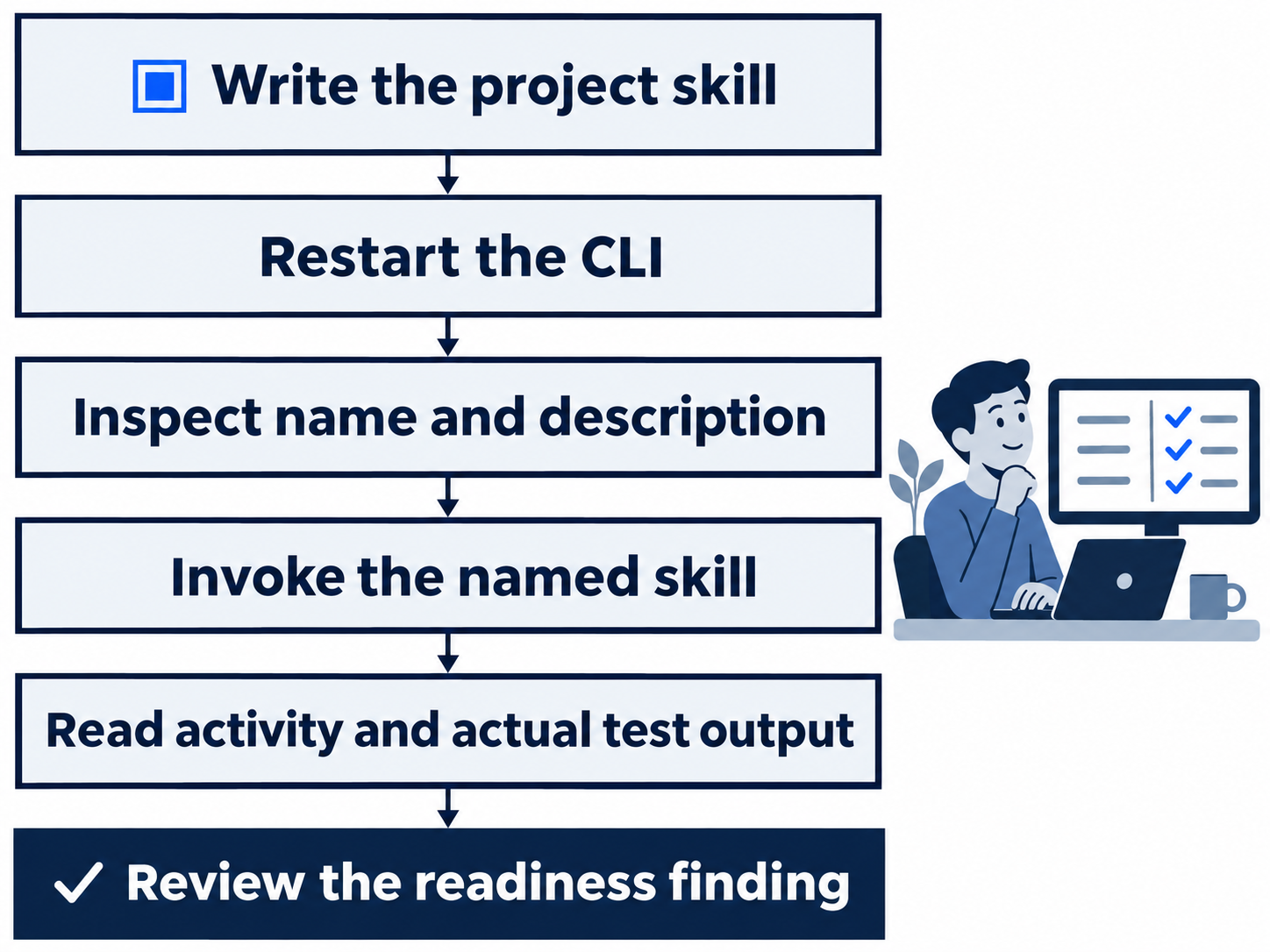
Check discovery before invocation
Enter /quit to leave this session, then run codex again from the same folder. Restarting gives the new conversation a fresh skill inventory.
Before asking the model to use it, inspect the prepared input:
!codex debug prompt-input "Check available skills" | grep -F -o "ship: Review Ticket Triage changes and run tests before a local readiness decision."
codex debug prompt-input renders the input prepared for a model call without sending a model request. The | passes its output to grep, which searches text. -F treats the search text literally, and -o prints only the match.
Check: Look for this line:
ship: Review Ticket Triage changes and run tests before a local readiness decision.
Discovery verifies the description; invocation must still read and perform the workflow.
Invoke the readiness check
An explicit invocation names the skill in your request. In the CLI, $ship selects the skill named ship. Type this directly into the composer, without an initial !:
$ship Check the current Ticket Triage work without changing files.
Check: Watch for the skill's SKILL.md and AGENTS.md in the read activity, Git status and diff commands, and an actual npm test run. The report should identify only the new untracked skill, seven passing tests, and a Ready verdict with reasons. Refund must still come before shipping and damage. The readiness check must change no files.
Read back the file and check the project yourself. cat prints the file contents:
!cat .agents/skills/ship/SKILL.md && git status --short && npm test
Check: Compare the ten lines against the listing above. Expect ?? .agents/, Git's short report of the new untracked skill directory, followed by seven passing tests. The classifier and tests must remain unchanged.
Authorize the local commit separately
A commit saves a selected set of changes in local Git history. The readiness check has finished. Send a separate request to save its one new file:
The skill file and seven passing tests are approved. Commit only .agents/skills/ship/SKILL.md with the message "Add Ticket Triage readiness skill". Do not push.
At the Git approval prompt, review the write to its protected index, the staging area used to prepare a commit.
Check: Inspect the proposed command and confirm that it names only the skill file. Choose Yes, proceed for this one execution. Keep the approval limited to this request.
Wait for the skill-only commit to finish, then check its history and tests:
!git log -1 --oneline && git status --short && npm test
git log -1 selects the most recent commit, and --oneline prints its short identifier and message together.
Check: Expect Add Ticket Triage readiness skill, no changed-file entries, and seven passes. Git gives your snapshot its own identifier; use its message and file scope to recognize it.
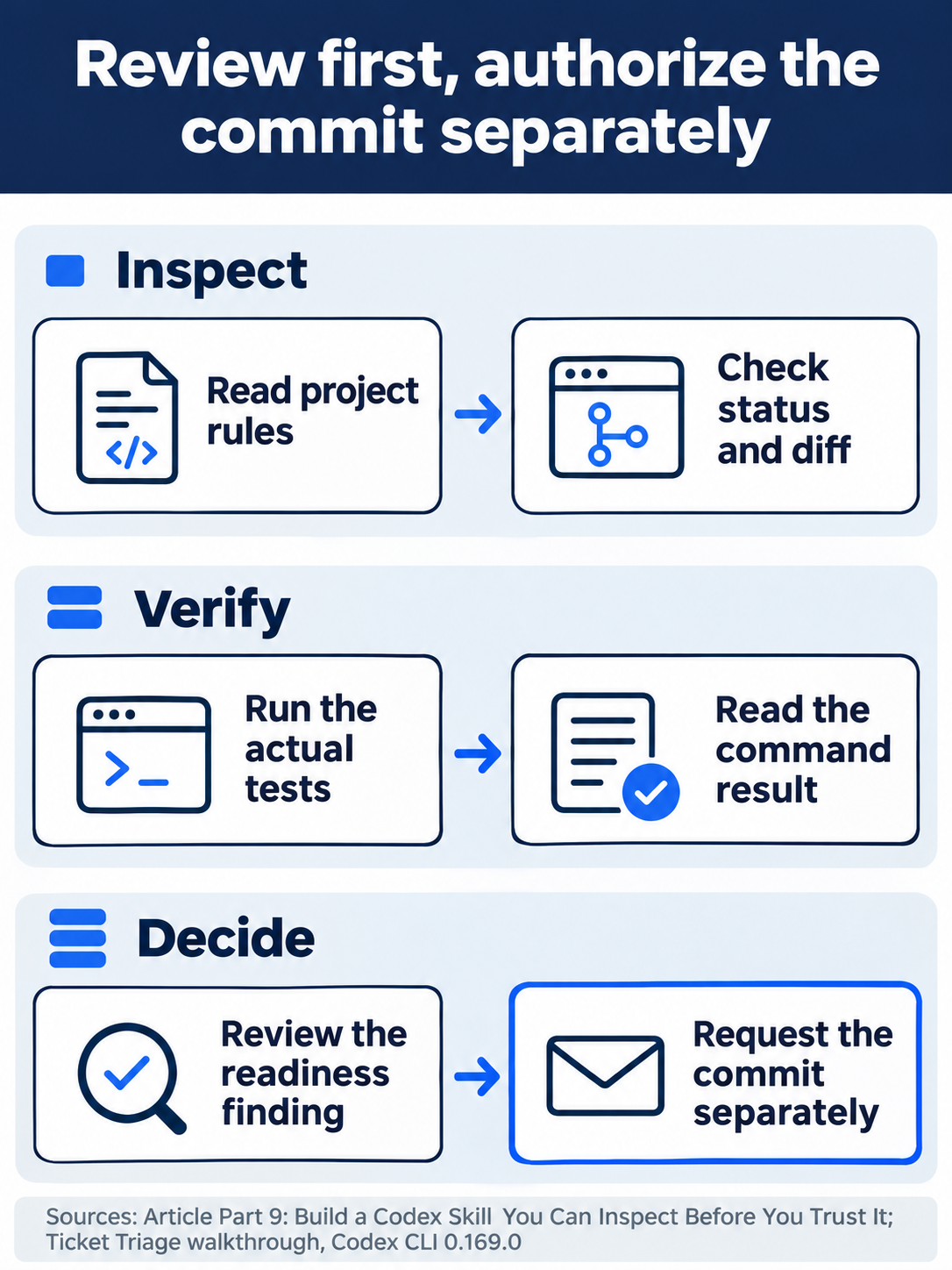
The readiness procedure stops at a finding. The commit needs a separate request.
The desktop path
Not run: desktop steps. Create and inspect the same file in the app's integrated terminal, its built-in shell. Omit the CLI's initial ! from shell commands.
The documented desktop route opens Skills in the sidebar. Find the project's ship skill, then type @ in the composer and select it for the same readiness request.
Check: Confirm the selected skill source, reads, and test output. Keep the commit as a separate explicit request, inspect any approval, and perform the same final Git and test checks. Stop this route if a required control is unavailable.
What you proved
- The project skill appears by name and description before invocation.
- The readiness workflow reads its instructions and passes all seven tests without editing files.
- Only the reviewed skill is committed, and the repository finishes clean.
You can stop here. Going deeper explains why this works and where it breaks.
Going deeper
Read this section to share a skill across tools or package it without confusing discovery with execution.
Let metadata select the workflow
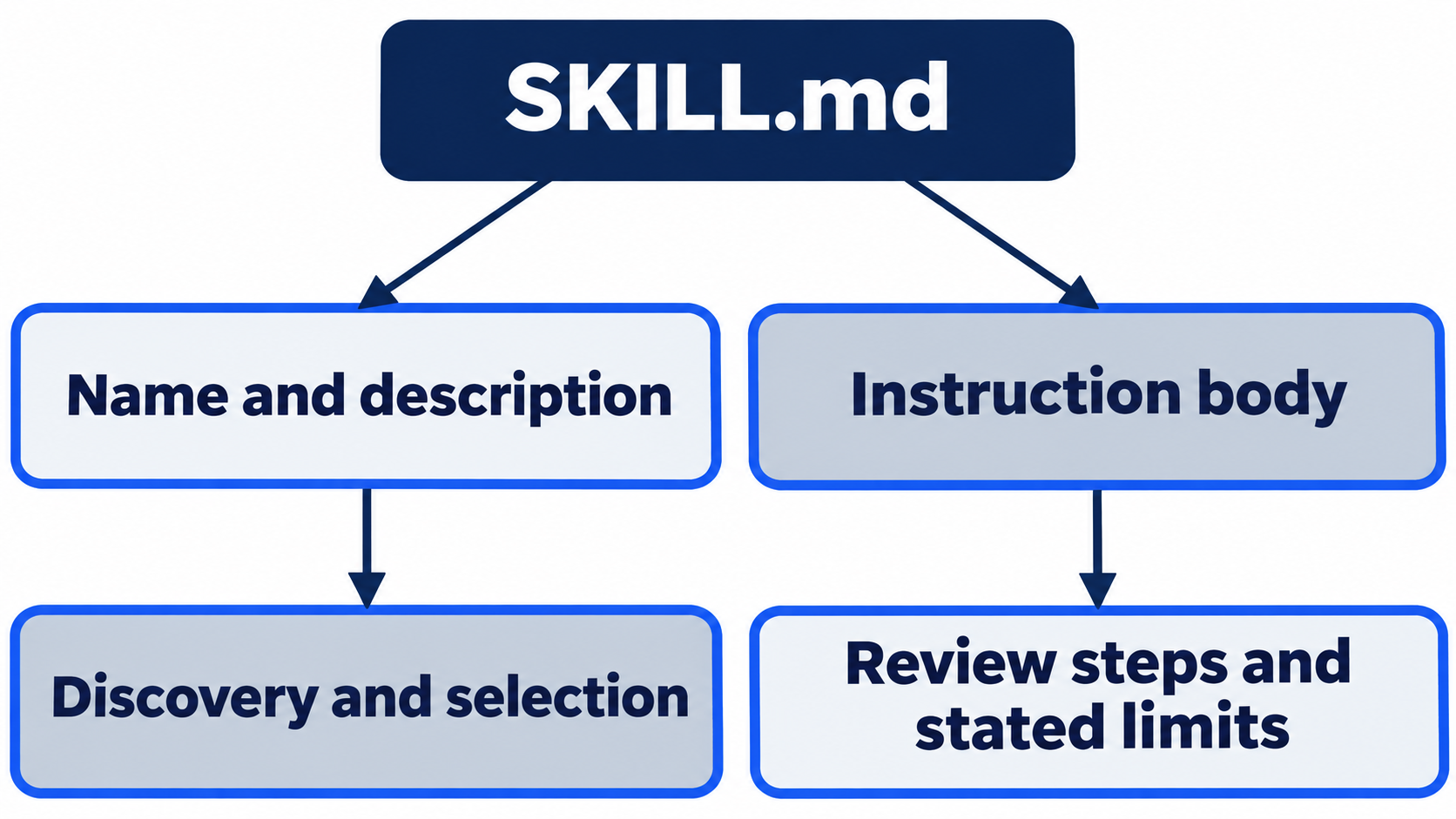
Codex receives a skill's name, description, and path before loading its selected body. Implicit invocation matches a request to the description; $ship selects explicitly. Write a task-focused description and procedural body. Skills guide
Optional agents/openai.yaml controls interface metadata, dependencies, and invocation. policy.allow_implicit_invocation defaults to true; false disables automatic selection only. Metadata and no-edit instructions create no filesystem boundary. Metadata
OS-1: Choose one shared skill location
The documented project root is .agents/skills, scanned from the current directory up to the Git root. Personal skills use ~/.agents/skills, administrator skills use /etc/codex/skills, and system skills ship with Codex. Symlinked skill folders are supported. Duplicate names are not merged; both can appear in selectors. Locations
CLI 0.169.0 also discovered $CODEX_HOME/skills, the ~/.codex/skills compatibility root under the default home. Different descriptions for the same repository and compatibility-root name both appeared. The controlled .claude/skills and CLAUDE.md markers did not. Do not infer a universal duplicate-name winner from that inventory. Prepared input can alias roots, which is why the discovery check searches the name and description rather than an absolute path.
OS-2 and OS-3: Package portable instructions separately from extensions
Agent Skills defines a folder with SKILL.md and optional resources. Agent Plugins 1.0 defines an installable package. Its root plugin.json requires only $schema and name; skills/ carries workflows, and optional mcp.json declares connected-tool servers. An instruction-only readiness check needs no MCP component.
Vendor namespaces hold host-specific components, such as Copilot's com.github.copilot/. OpenAI uses inline extensions.com.openai. When that object exists, it replaces the entire .codex-plugin/plugin.json compatibility overlay for OpenAI-specific settings; the two do not merge. Portable identity and components remain canonical. The creator currently scaffolds the compatibility layout, so do not assume that it emits the portable root manifest. These are documented format rules, not a hook-runtime comparison. Packaging
OS-4: Verify the workflow after installation
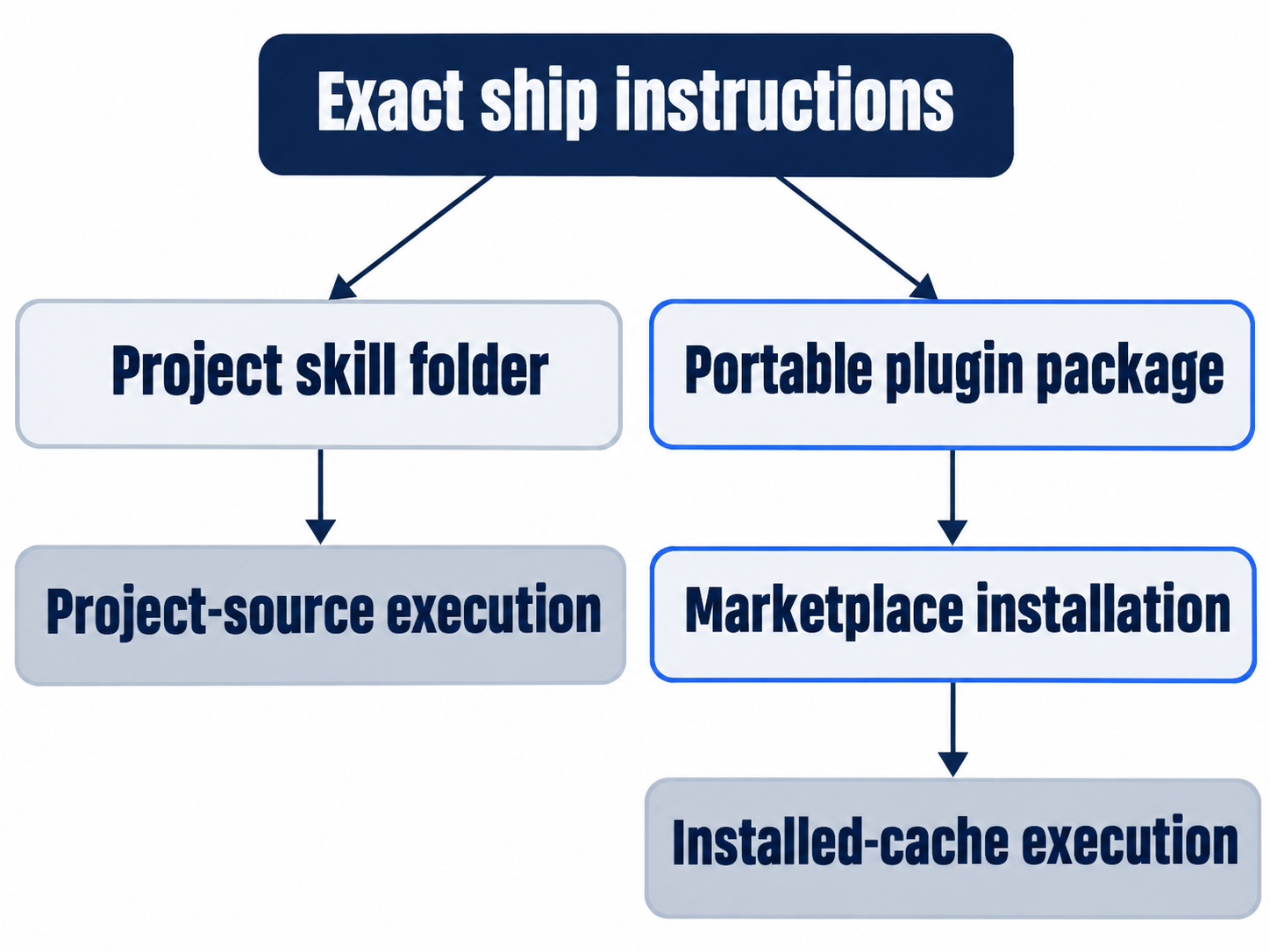
The ten-line ship ran from a root-manifest triage-tools package on CLI 0.169.0 through triage-tools@codex2-local. A loose-folder installation failed; the marketplace route succeeded.
With the project copy moved aside, a fresh conversation read the installed triage-tools:ship, passed seven tests, and reported Needs work for the missing committed skill. Restoring it returned clean status and seven passes. This verifies two Codex delivery paths, without establishing cross-tool execution or optional components. Installation formats
OS-5: Check the host's collision rules
The comparison uses documentation checked November 17, 2026, companion tests on Copilot CLI 1.0.112, Claude Code 2.1.325, and OpenCode 2.3.0, and documentation for Pi.
- GitHub Copilot CLI: reads
.github/skills,.agents/skills, and.claude/skills; first found wins. Portable packages loaded in the companion 1.0.112 test. Reference - Claude Code: reads
.claude/skills; enterprise, then personal, then project wins. The companion 2.1.325 test ignored portable identity and root MCP settings, while loading overlapping skills. Skills - OpenCode: reads
.opencode/skills,.claude/skills, and.agents/skills; later source wins. Its companion 2.3.0 test loaded no portable package; native plugins use another API. Skills - Pi: reads
.pi/skillsand.agents/skills; first found wins with a warning. No native portable-package loader exists; a community adapter adds support. Skills, configuration, adapter - Codex CLI: reads
.agents/skillsup to the Git root; duplicates stay unmerged and both can be listed. The marketplace-installed workflow ran on 0.169.0. Skills
OS-6: Share folders without overwriting existing work
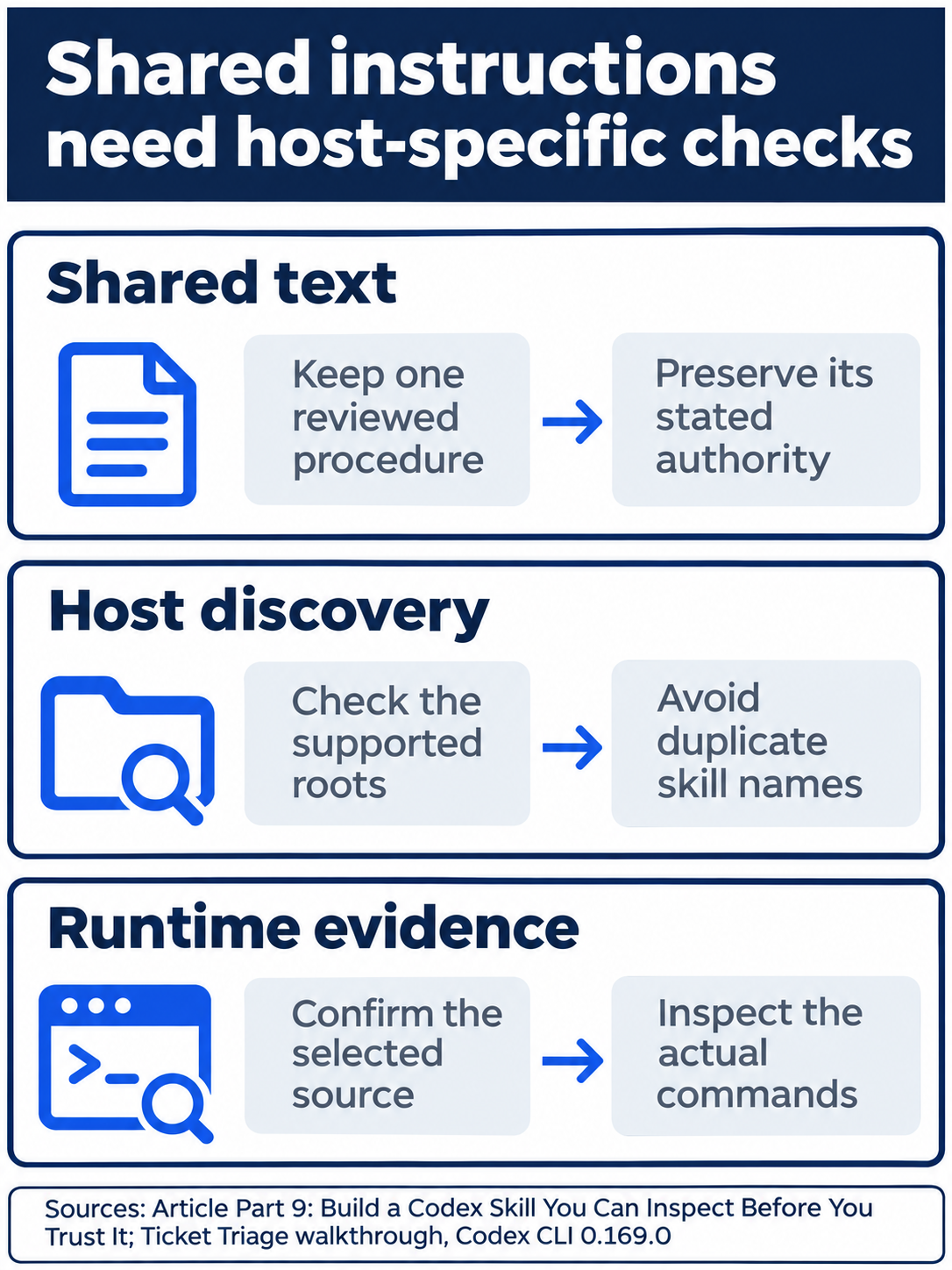
Check each host’s folders and collision rules before sharing the workflow.
Share instructions through .agents/skills. Preserve a correct Claude .claude/skills symbolic link; reconcile a real directory before changing it, without overwriting work. Avoid duplicates and supply native formats where required.
CLI import copies supported items and preserves the original setup. Desktop import offers optional automatic updates. Neither establishes a CLI live-folder link or identical hook behavior. Import
Optional inspection, not run: identify existing skill folders without moving, linking, or importing anything. Reset: close views, preserve the committed skill and global settings, retain Ask for approval, and check clean status with seven passes.
OS-7 and OS-8: Match the claim to the check
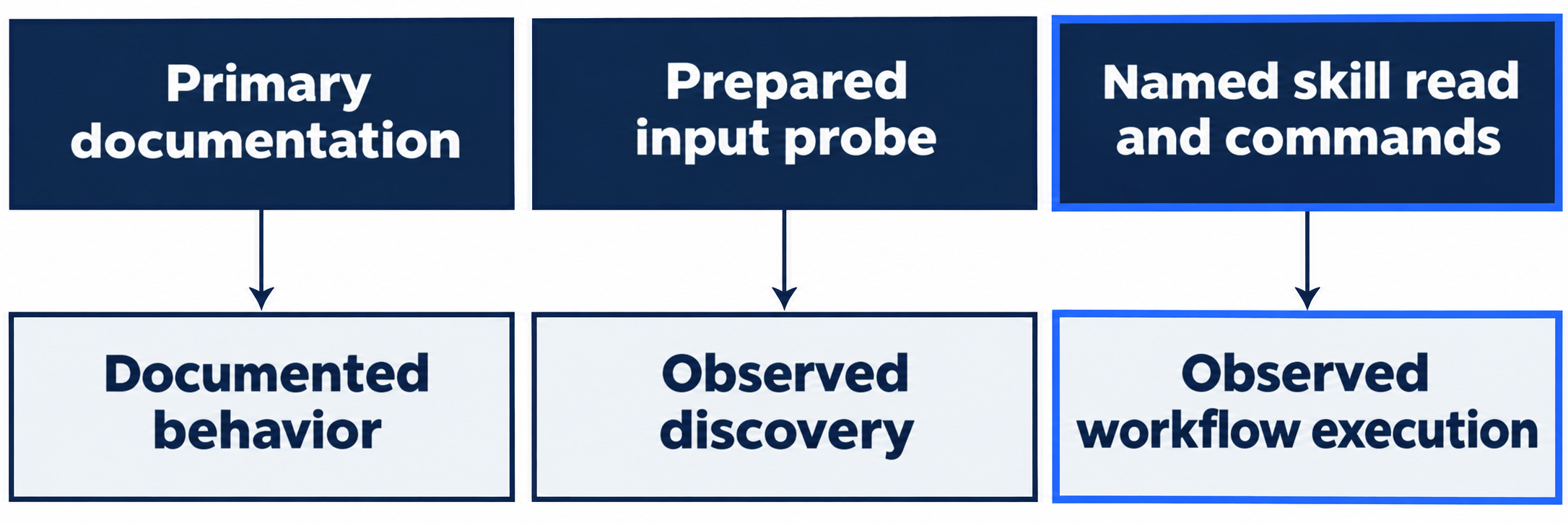
Documentation establishes formats; prepared input establishes discovery; file reads and executed commands establish use. An incomplete plugin listing proves neither execution nor hook support.
Optional evidence inspection: compare the packaged skill with the committed project file and its readiness result. Reset: preserve both files, install or remove nothing, close views, and check Ask for approval plus clean status and seven passes.

Read the procedure and its command evidence together before accepting readiness.
Do this today
Everyone
- Create, discover, and invoke
ship; inspect its actual reads and seven-test result. - Commit only the reviewed skill in a separate request. Keep readiness and authorization separate.
If you read Going deeper
- Inspect shared folders without changing them. Reset by closing views and checking the clean seven-test project with Ask for approval.
- Compare package and project instructions. Reset by preserving files, links, installations, and global settings.
Coming up in Part 10: MCP, connecting Codex to a documentation tool and verifying the real tool call.