
Every platform says it is Framework-Agnostic. here is the receipt.
Every vendor claims to be framework-agnostic, so run the controlled experiment: rebuild the same agent in LangGraph, deploy it with the identical five commands, and audit the four places where the two tracks stop matching.
The same agent, the same azure.yaml, the same five commands, a completely different loop. Running LangGraph on Azure through Microsoft Foundry, and then an honest audit of the four places where the native and bring-your-own tracks stop being identical.
You have been told framework-agnostic by every platform vendor and you have learned to discount it. This time you get the receipt.
In this article: You will rebuild a production agent on Microsoft Foundry using LangGraph and DeepAgents instead of the native Microsoft Agent Framework, and deploy it with an unchanged deployment ritual. We cover the
langchain-azure-ainamespace map, three ways to reach a Foundry model, the conversation-state fork thatResponsesHostServermakes for you, the interrupt projection that lets human-in-the-loop approval cross an OpenAI-compatible wire, a hosting path that requires zero code changes, and a governed Microsoft-managed skill library feeding an open-source harness. By the end you will know exactly where the two tracks diverge, in both directions.
The native track was a deliberately cheap seat: one Foundry-specific import, one platform-injected environment variable, and an agent that would run anywhere if you swapped the last line. Microsoft wrote the framework and Microsoft wrote the bridge, so of course it fit.
Now the interesting question. Does the substrate care?
The honest way to answer that is not to read a marketing page but to run the experiment. Same agent, same instructions, same azure.yaml, same azd ritual, different loop. If Microsoft Foundry is a control plane rather than a framework with a cloud attached, the diff should be small and it should be confined to places you can name. If it is not, the diff will sprawl, and the sprawl will be the real story.
The diff is small. Then it stops being small in four specific places, and naming those four is what this article is actually for.
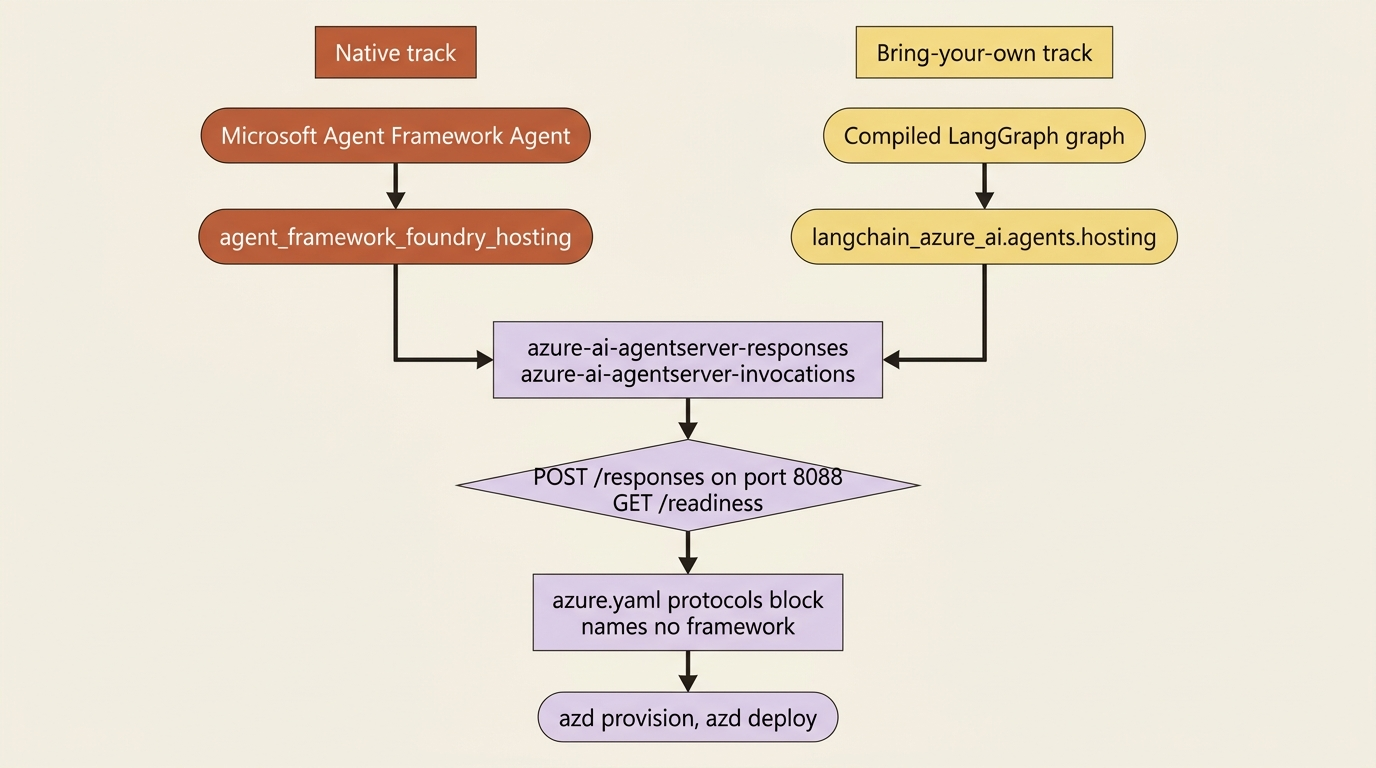
One package is the whole bring-your-own track
The takeaway comes before the detail: the LangChain and LangGraph path on Foundry is a single PyPI package with a namespace map. The map is worth memorizing, because every managed service in this series reaches into a different corner of it.
The package is langchain-azure-ai, documented as the entry point for building LangChain and LangGraph applications with Microsoft Foundry capabilities. It is not a wrapper around one feature. It is an eight-page first-class track in the official docs, parallel to the Agent Framework track, and its namespaces line up almost one for one with the platform's managed services.
| Capability | Namespace |
|---|---|
| LangGraph hosting | langchain_azure_ai.agents.hosting |
| Foundry Agent Service nodes | langchain_azure_ai.agents |
| Foundry Toolbox | langchain_azure_ai.tools |
| Content safety middleware | langchain_azure_ai.agents.middleware |
| Chat models | langchain_azure_ai.chat_models |
| Chat history stores | langchain_azure_ai.chat_history |
| Retrievers and vector stores | langchain_azure_ai.retrievers, langchain_azure_ai.vectorstores |
| Callbacks and tracing | langchain_azure_ai.callbacks |
The table above maps each Foundry capability to the langchain-azure-ai namespace that reaches it, taken from the package's own building-block map:
- LangGraph hosting:
langchain_azure_ai.agents.hosting - Foundry Agent Service nodes:
langchain_azure_ai.agents - Foundry Toolbox:
langchain_azure_ai.tools - Content safety middleware:
langchain_azure_ai.agents.middleware - Chat models:
langchain_azure_ai.chat_models - Chat history stores:
langchain_azure_ai.chat_history - Retrievers and vector stores:
langchain_azure_ai.retrieversandlangchain_azure_ai.vectorstores - Callbacks and tracing:
langchain_azure_ai.callbacks
Read it as a coverage claim: every managed service on this platform has a documented LangChain door, which is not something you can say about most "bring your own framework" stories.
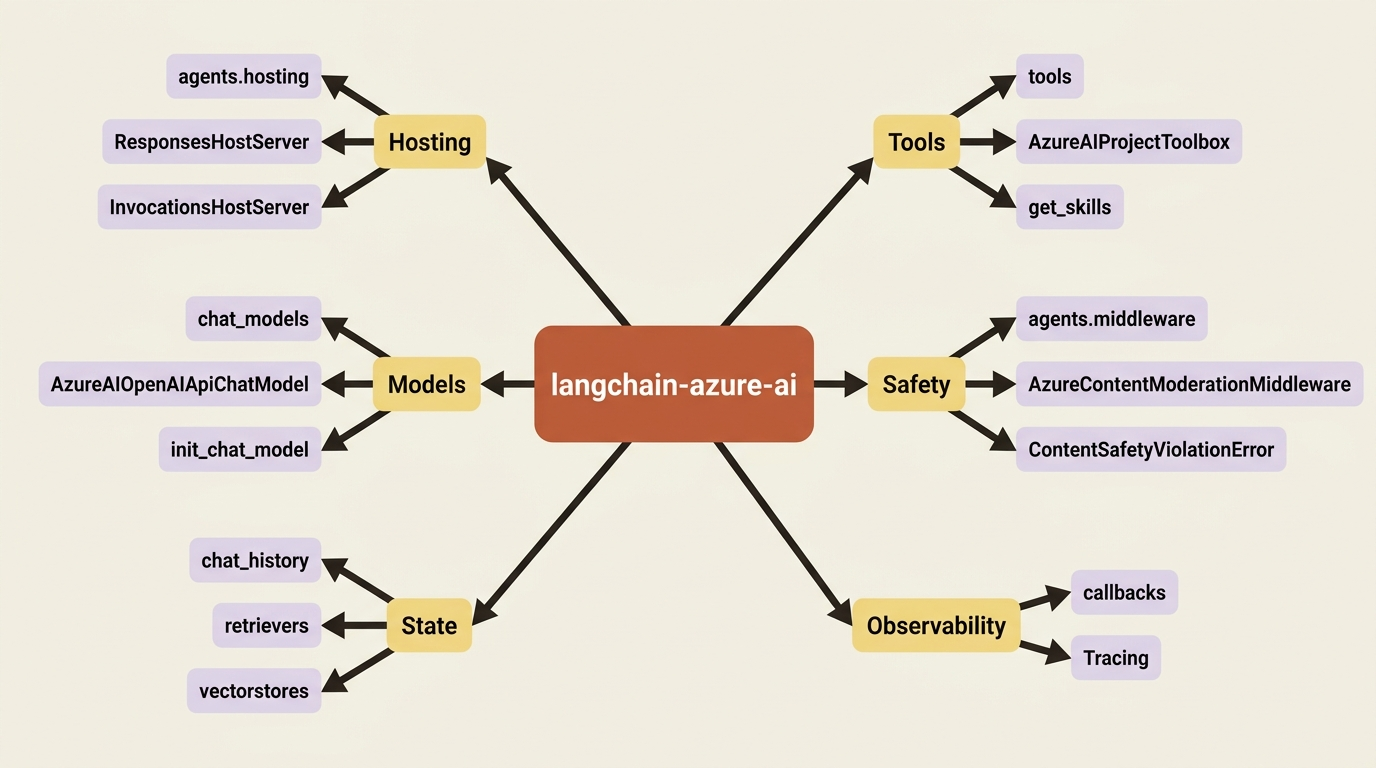
For this work you need the base package plus the hosting extra:
pip install -U "langchain-azure-ai[hosting]>=1.2.9" azure-identity
The hosting extra pulls in the same protocol libraries the native track uses: azure-ai-agentserver-responses for /responses and azure-ai-agentserver-invocations for /invocations. Same wire, same contract, same port. The bridge on top is different, and that is the entire structural difference between the two tracks at this layer.
Gotcha: the docs pin a floor of langchain-azure-ai 1.2.9 for the hosting extra on the LangGraph hosting page, while the toolbox-on-hosted-agents page asks for 1.2.8 [CONTESTED: how-to-develop-langchain-hosted-agents.md against agents-how-to-tools-use-toolbox-hosted-agent.md]. Take the higher one. Also note the v1 split: langchain-azure-ai targets the new Foundry SDK (azure-ai-projects>=2.0), and Foundry classic needs the [v1] extra instead. Installing the wrong one against the wrong portal is a confusing afternoon.
Connecting the model, three ways
LangChain reaches Foundry models three ways, and the docs show all three because they suit different situations.
The shortest is one line. Set FOUNDRY_PROJECT_ENDPOINT, then:
from langchain.chat_models import init_chat_model

model = init_chat_model("azure_ai:gpt-4.1")
One line routes through the project endpoint with Microsoft Entra ID authentication, requires the Foundry User role on the project, and requires langchain>=1.2.13, which is the kind of floor that produces a baffling import error rather than a clear one.
The explicit client is AzureAIOpenAIApiChatModel from langchain_azure_ai.chat_models, which takes either a project_endpoint with a credential or a direct endpoint with an API key. Use the project endpoint. API keys belong to direct service endpoints such as /openai/v1, and agent endpoints do not accept them at all.
The third way is the one the hosting page itself uses, and it is worth a look because it exposes the plumbing:
from azure.ai.projects import AIProjectClient
from azure.identity import DefaultAzureCredential, get_bearer_token_provider
from langchain_openai import ChatOpenAI  # ①

_AZURE_AI_SCOPE = "https://ai.azure.com/.default"  # ②

credential = DefaultAzureCredential()
project = AIProjectClient(endpoint=project_endpoint, credential=credential)
openai_client = project.get_openai_client()  # ③

model = ChatOpenAI(
    model=deployment,
    base_url=str(openai_client.base_url),  # ④
    api_key=get_bearer_token_provider(credential, _AZURE_AI_SCOPE),  # ⑤
)
① The chat model class is stock ChatOpenAI from stock langchain-openai, with no Foundry-specific model class anywhere in the import list.
② The token scope is the constant Part 1 flagged as contested, and this sample uses the recommended ai.azure.com form.
③ get_openai_client() is the plumbing the paragraph below is about: the project hands back an OpenAI-compatible client already pointed at your deployment.
④ Only the base URL crosses over from Foundry into the model object, which is what keeps the object itself framework-neutral.
⑤ The api_key slot carries an Entra bearer token provider instead of a key, which is how key-free authentication reaches a client that expects keys.
Note: The full extracted listing at code/azure-foundry-hyperscaler/part-3-the-second-loop-langgraph-and-deepagents/listings/01-stock-chatopenai-foundry-model.py shows the imports and the two environment lookups elided here.
What that snippet proves is more useful than what it does. No Foundry-specific model class is required to talk to a Foundry model. The OpenAI-compatible surface is real, and this is the layer where the lock-in argument is weakest by design.
The research desk, LangGraph edition
The running example through this series is a research desk: a research-team agent that reads a covered company's public filings and refuses to conclude more than the filing supports. Same analyst, same instructions. The loop underneath is now a compiled LangGraph graph instead of an Agent Framework Agent.
import os

from langchain.agents import create_agent
from langchain.chat_models import init_chat_model

from langchain_azure_ai.agents.hosting import ResponsesHostServer  # ①

INSTRUCTIONS = (  # ②
    "You are a market-research analyst for a research team. "
    "Given an excerpt from a covered company's public filing, summarize the "
    "financial and operational risks it discloses. Quote the filing for "
    "every claim. If the excerpt does not support a conclusion, say so."
)


def main() -> None:
    model = init_chat_model(f"azure_ai:{os.environ['FOUNDRY_MODEL_NAME']}")  # ③
    graph = create_agent(model, tools=[], system_prompt=INSTRUCTIONS)  # ④
    port = int(os.environ.get("PORT", "8088"))  # ⑤
    ResponsesHostServer(graph).run(port=port)  # ⑥


if __name__ == "__main__":
    main()
① This is the only Foundry-specific import in the file. Delete it, keep the graph, and the program is ordinary LangGraph again.
② The instructions carry over from Part 2 unchanged, which is what makes this a controlled experiment rather than a second agent.
③ The LangChain track reads FOUNDRY_MODEL_NAME, the variable the Gotcha below warns about, and the azure_ai: prefix routes the deployment name through the project endpoint.
④ create_agent compiles the graph with no tools, matching Part 2's deliberately toolless first deploy.
⑤ The port defaults to 8088, the contract's port, and yields to PORT when the platform sets it.
⑥ One call turns the compiled graph into a POST /responses endpoint with the readiness probe already attached.
Note: The full extracted listing at
code/azure-foundry-hyperscaler/part-3-the-second-loop-langgraph-and-deepagents/listings/02-research-desk-langgraph.py
is this program in full, ready to run as the project's main.py.
Swap in InvocationsHostServer and the same graph serves POST /invocations instead, for callers whose payload shape you do not control.
Compare the two entry points side by side and the framework-agnostic claim stops being a claim:
# Native track
ResponsesHostServer(agent).run()           # agent_framework_foundry_hosting

# Bring-your-own track
ResponsesHostServer(graph).run(port=port)  # langchain_azure_ai.agents.hosting
Two packages, two frameworks, one contract. Neither one negotiates with the platform about ports, probes, streaming, or conversation hydration, because the protocol library underneath both is doing that work and it was written to be framework-agnostic.
Gotcha: the LangChain track reads FOUNDRY_MODEL_NAME for the model deployment, and states that azd ai agent init generates projects using that name. The Agent Framework path used MICROSOFT_FOUNDRY_MODEL_DEPLOYMENT_NAME on the authority of the azure.yaml page. Both are documented, neither is platform-injected, and the mirror carries at least four spellings across its own pages [CONTESTED: how-to-develop-langchain-hosted-agents.md against agents-how-to-author-azure-yaml.md]. The name in your env map and the name in your code are one decision made twice. Pick one per project and grep for the other before you ship.
Gotcha: the default hosts expect a compiled graph whose state has a messages field, such as MessagesState. A custom state schema fails validation at startup, and the documented fix is to subclass the host and override build_input, or override handle_create on the Responses host when you need full control of parsing and event emission. This is the first real constraint the substrate places on your loop's internals, and it is a shape constraint rather than a behavior one.
Conversation state, and the fork the host makes for you
One genuinely interesting behavior lives in ResponsesHostServer, and it is the kind of thing you want to know before it surprises you: the host changes what it sends your graph depending on whether your graph has a checkpointer.
| Graph configuration | Conversation source | What the graph receives on later turns |
|---|---|---|
| No checkpointer | Responses history from the protocol runtime | Prior response history plus the current input |
| Compiled with a checkpointer | LangGraph checkpoint state keyed by the conversation or response thread | The current input only |
The table above covers the two conversation-state configurations and who owns memory in each:
- Graph configuration: no checkpointer. Conversation source: Responses history from the protocol runtime. Later turns receive: prior response history plus the current input.
- Graph configuration: compiled with a checkpointer. Conversation source: LangGraph checkpoint state keyed by the conversation or response thread. Later turns receive: the current input only.
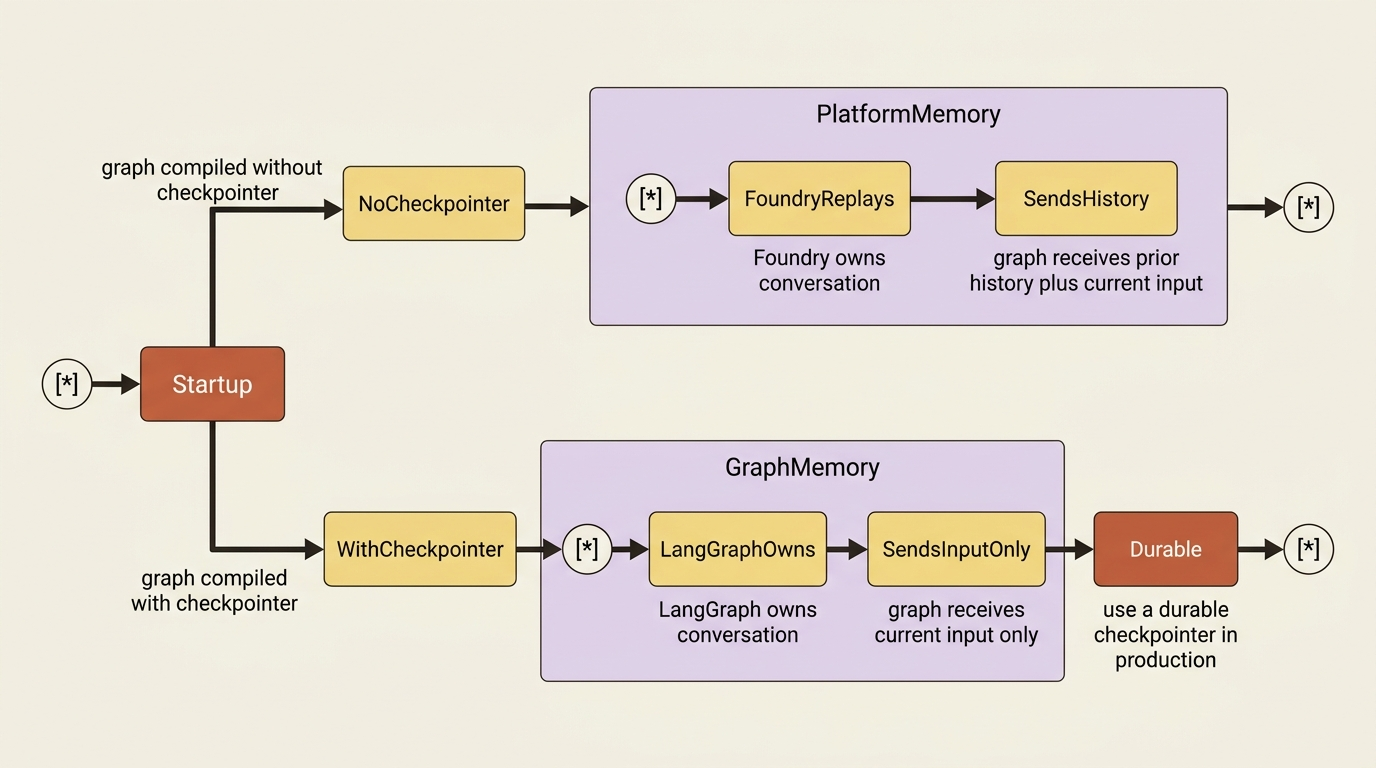
Read that as a responsibility handoff with a switch on it. Without a checkpointer, Foundry is your conversation memory and replays history into every turn. With one, LangGraph is your conversation memory and the platform stops replaying, because you told it you had this. Use a checkpointer when your graph needs runtime state, interrupts, or node-local state across turns.
For local testing, MemorySaver from langgraph.checkpoint.memory is fine. For a deployed agent it is not, and the docs say so plainly: use a durable checkpointer so graph state survives container restarts.
Which raises the obvious question, and this is where this series makes its loudest correction. There is no prebuilt Foundry checkpointer class. The durable mechanism is a key-value store you adapt yourself, and the widely repeated class name people reach for does not exist. For now, run MemorySaver locally and hold the question.
Clients continue a conversation by passing previous_response_id or a conversation ID, which is ordinary Responses API behavior and means an ordinary OpenAI client threads conversations against your LangGraph agent without knowing what LangGraph is. If later turns also need the same sandbox filesystem, you include agent_session_id or use a conversation ID. Conversation and session are different things with different lifetimes, and conflating them is the most expensive mistake on this platform.
The interrupt, which is a bring-your-own advantage
The two tracks genuinely diverge for the first time here, and the divergence runs the direction most readers do not expect.
If your graph calls LangGraph's interrupt(), ResponsesHostServer surfaces the pending interrupt through standard Responses API output items: a function_call item named __hosted_agent_adapter_interrupt__, and an mcp_approval_request item with server_label set to langgraph. The client resumes by sending back either a function_call_output whose call_id matches the interrupt ID, when it needs to send a rich LangGraph Command payload with resume, update, or goto fields, or an mcp_approval_response whose approval_request_id matches, for a plain approve or reject.
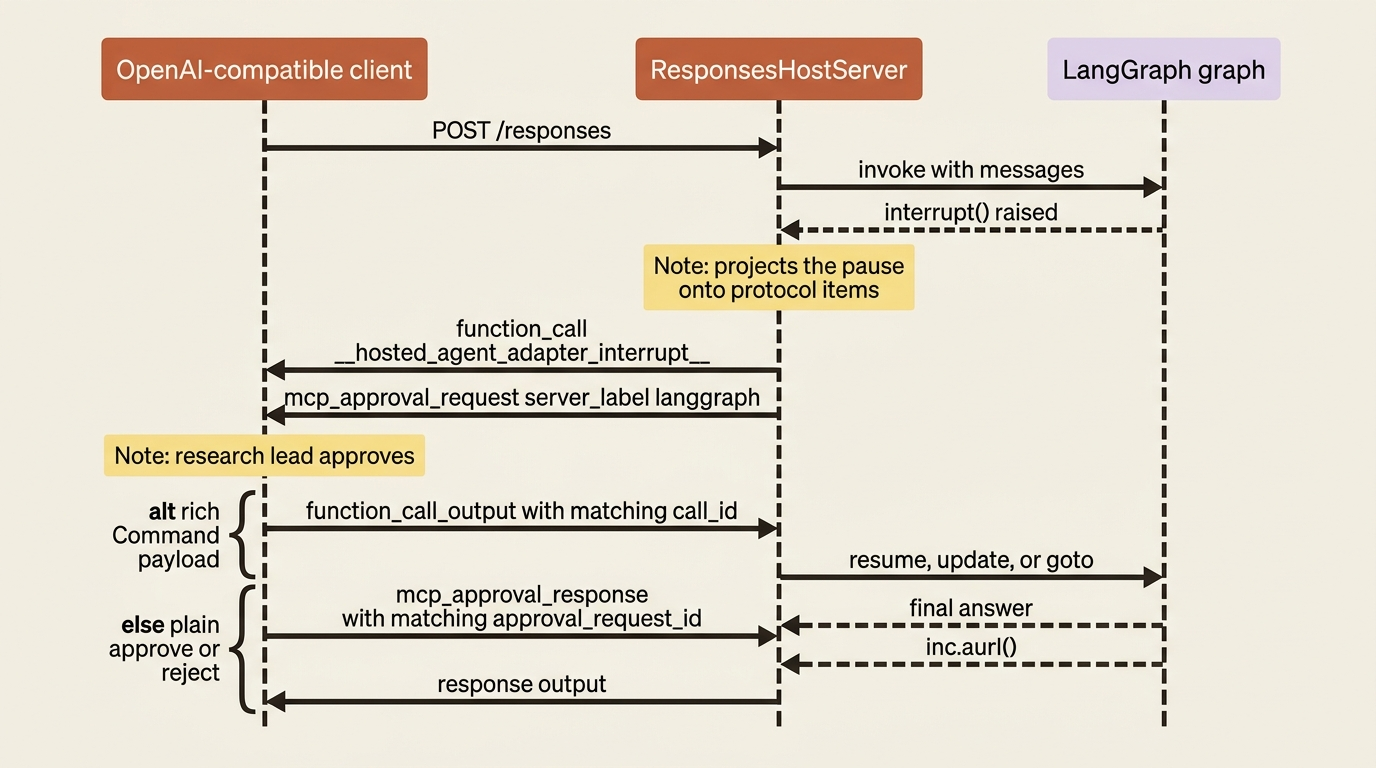
Think about what that translation is doing. A framework-native pause primitive is being projected onto protocol items an OpenAI-compatible client already knows how to render. Your human-in-the-loop approval reaches a caller that has never heard of LangGraph, over a protocol that was not designed for it.
The Microsoft Agent Framework hosting page documents no equivalent projection. Agent Framework has its own tool-approval machinery, but the hosted-agent wire mapping for it is not in this mirror. Call that what it is: on this specific capability, the bring-your-own track is currently ahead.
When the research desk grows a tool that can spend money or touch the research archive, this is the mechanism that puts a research lead between the model and the action, and get_tools_requiring_approval() tells you which tools an administrator marked as needing one.
Same azure.yaml, same five commands
Now the part that makes the thesis concrete. The deployment ritual does not change.
azd ext install, azd auth login, azd ai agent init, azd provision, azd ai agent run, azd deploy. Same commands, same order, same outcome. The LangGraph hosting page walks the identical sequence, with samples initialized from a langchain-azure-ai repository azure.yaml instead of a Microsoft one. The bring-your-own quickstart lists LangGraph in a table of frameworks whose only requirement is adding langgraph and langchain-azure-ai to requirements.txt next to the hosting library.
The native track's azure.yaml survives nearly intact. What changes is the deployment block, and it is worth showing because the source-code path is the one most Python readers will actually take:
    research-desk:
        host: azure.ai.agent
        kind: hosted
        project: src/research-desk
        codeConfiguration:  # ①
            runtime: python_3_13  # ②
            entryPoint:  # ③
                - python
                - main.py
            dependencyResolution: remote_build  # ④
        uses:
            - ai-project
        protocols:  # ⑤
            - protocol: responses
              version: 2.0.0
① codeConfiguration replaces Part 2's language: docker, and that one swap is the whole difference between the image path and the source-code path.
② The runtime pins which Python the Agent Service container boots, chosen from the two values the docs list.
③ The entry point is the command the container runs, so it names the same main.py the LangGraph listing above defines.
④ remote_build tells Agent Service to install from your requirements.txt during provisioning, rather than running a zip of prebuilt wheels.
⑤ The protocols block decides which endpoints go live, and it is byte-identical to Part 2's, because no field here names your framework.
Note: The full extracted listing at
code/azure-foundry-hyperscaler/part-3-the-second-loop-langgraph-and-deepagents/listings/03-azure-yaml-code-deployment.yaml
shows the surrounding file, including the ai-project service elided here.
The documented Python runtimes are python_3_13 and python_3_14, and the other dependencyResolution value is bundled, where you ship prebuilt Linux wheels in packages/ and the zip runs as-is. Take remote_build until a private or wheels-only dependency forces your hand. The CI-friendly form of the same choice is azd ai agent init --no-prompt --deploy-mode code --runtime python_3_13 --entry-point main.py.
Notice what did not change. The platform has no field anywhere in this file that names your framework. It asks which protocol endpoints go live and which runtime to boot, and it stops asking.
Gotcha: the LangGraph hosting page says Docker must be running locally because azd ai agent run builds the image declared in the sample's Dockerfile, while the source-code deployment page describes a path that builds no image at all [CONTESTED: how-to-develop-langchain-hosted-agents.md against agents-how-to-deploy-hosted-agent-code.md]. Both are correct about different deploy modes: the LangGraph samples ship a Dockerfile, so running them as written needs Docker, and initializing your own project with --deploy-mode code does not. Either way you need Foundry Project Manager at project scope.
One small asymmetry shows up in the CLI instructions themselves: the LangGraph page tells you to install azd ext install azure.ai.agents, the single agents extension, where the native track installed the microsoft.foundry meta-package. Take the meta-package. Later work needs the routine, toolbox, and skill extensions regardless of which framework you picked.
The zero-code-change path, which is the sharpest version of the argument
Everything above still asked you to write a main.py. There is a path that does not.
If your application already runs under LangSmith or the LangGraph CLI, meaning it has a langgraph.json, you can host it on Foundry without changing its code or its configuration by running the hosting module directly:
python -m langchain_azure_ai.agents.hosting.run --protocol responses
Set --protocol to invocations for the other endpoint. If langgraph.json defines several graphs, pass the graph name as the first argument, and use --config <path> when the file is not at the default location. The same command becomes your container entry point in azure.yaml:
        codeConfiguration:
            runtime: python_3_13
            entryPoint: '-m langchain_azure_ai.agents.hosting.run --protocol responses'
An existing LangGraph application, unmodified, reading an unmodified config file, becoming a governed Foundry endpoint with a dedicated Entra identity through a change to one YAML string. If you wanted one piece of evidence for "the loop is yours, the substrate is theirs," this is it, and the reason is structural rather than generous: the platform's contract is an HTTP shape, and anything that can serve that shape qualifies.
DeepAgents, and a governed skill library feeding an open-source harness
DeepAgents is where the bring-your-own track gets genuinely interesting on this platform, and the reason is not hosting. Hosting is boring here, which is the point: the docs note that Deep Agents are hosted the same way as any other LangGraph agent, and you pass the agent directly to ResponsesHostServer or InvocationsHostServer.
agent = create_deep_agent(...)
ResponsesHostServer(agent).run(port=port)
The interesting part is what you feed it.
A Foundry Toolbox is a managed multi-MCP server that aggregates configured tools behind a single MCP endpoint, and it exposes skills as MCP resources with URIs of the form skill://{name}. A skill, for now, is a versioned packaged workflow an administrator publishes centrally.
AzureAIProjectToolbox, from langchain_azure_ai.tools, connects to one:
from langchain_azure_ai.tools import AzureAIProjectToolbox

toolbox = AzureAIProjectToolbox(toolbox_name="research-toolbox")
The integration reads either FOUNDRY_PROJECT_ENDPOINT or AZURE_AI_PROJECT_ENDPOINT and authenticates with DefaultAzureCredential, so you construct no credential yourself. No environment variable supplies the toolbox name, so toolbox_name is always explicit.
Then the method that makes this pairing worth a section. get_skills() loads the toolbox's skills as a ready-to-use file mapping for create_deep_agent, building on get_resources() and removing the boilerplate of converting each Blob into the file layout deep agents expect:
from deepagents import create_deep_agent
from deepagents.backends import StateBackend
from langchain.messages import HumanMessage

toolbox = AzureAIProjectToolbox(toolbox_name="research-toolbox")
skill_files = toolbox.get_skills()  # ①

agent = create_deep_agent(
    model="azure_ai:gpt-4.1",  # ②
    backend=StateBackend(),  # ③
    skills=["/skills/"],  # ④
)

agent.invoke({"messages": [HumanMessage("Review this filing")], "files": skill_files})  # ⑤
① get_skills() returns the toolbox's skills already shaped as the file mapping deep agents expect, so no Blob conversion is left for you to write.
② The model string is a Foundry deployment, resolved through the same azure_ai: prefix the LangGraph agent used earlier in this part.
③ StateBackend is the default, thread-scoped backend, so the skill files live for the life of the thread and nothing lands on disk.
④ The skills path must match the toolbox's base_path, and a mismatch between the two is the usual reason an agent cannot see a skill.
⑤ Skills arrive in the files payload at invocation time, which is why a skill published next quarter needs no redeploy of this agent.
Note: The full extracted listing at code/azure-foundry-hyperscaler/part-3-the-second-loop-langgraph-and-deepagents/listings/04-deep-agent-governed-skills.py shows the toolbox import elided here.
For standalone storage instead, pass a backend and let the toolbox write into it:
from deepagents.backends import FilesystemBackend

backend = FilesystemBackend(root_dir="./research-desk")
await toolbox.aget_skills(backend=backend)

agent = create_deep_agent(
    model="azure_ai:gpt-4.1",
    backend=backend,
    skills=["/skills/"],
)
Skill files land under /skills/ by default, and a different base_path must start and end with a slash and must match the value you pass to the skills argument. The matching pair of paths is a quiet source of "why does the agent not see my skill."
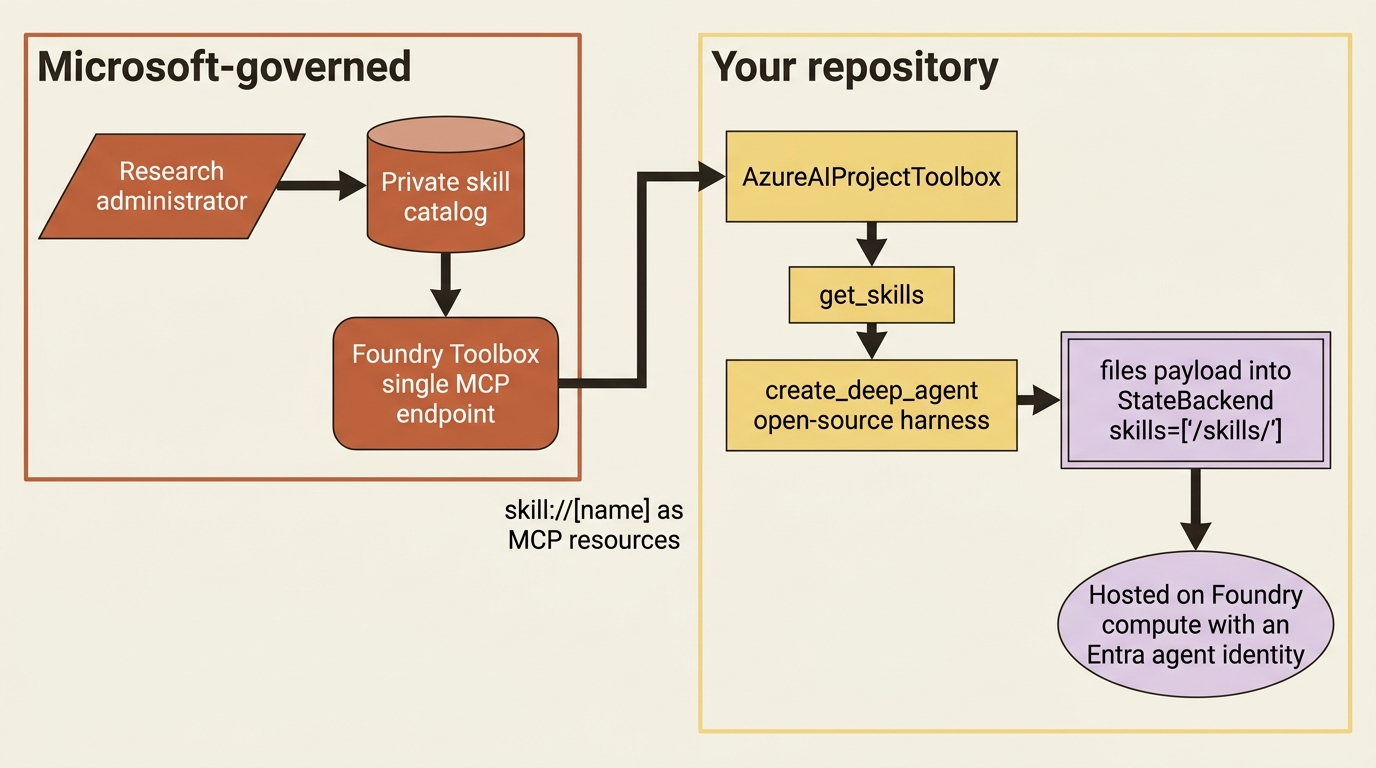
A governed, versioned, centrally administered capability library, loaded by a framework Microsoft does not own, into an agent whose loop Microsoft cannot see, running on Microsoft's compute with Microsoft's identity. The arrangement is the cleanest single picture of what renting the substrate means. When research compliance adds a disclosure-review skill next quarter, nobody redeploys the research desk.
Gotcha: AzureAIProjectToolbox is in preview and raises an ExperimentalWarning on construction, with an API subject to change [PERISHABLE: as of September 2026]. A second one bites at runtime rather than import time: when a toolbox tool reaches a service that has not been authorized, the Foundry gateway requires OAuth consent, and aget_tools() returns a fallback tool carrying the consent URL instead of raising. You must open the URL, grant consent, and restart the agent. An agent that silently answers "I need authorization" forever is an agent nobody restarted.
Note also what create_deep_agent receives in every documented example here: model, backend, and skills. Tools are a separate conversation, and deliberately so. Resist wiring a function tool into this agent, because tools become a governed, administrator-owned resource on this platform, not a constructor argument.
Where the two tracks actually diverge
Both tracks are now deployed, and the comparison can be specific rather than diplomatic. Four seams, running in both directions.
Native-only, one. Microsoft Agent Framework gets a first-party one-liner, FoundryToolbox in Python and AddFoundryToolboxes in .NET that shows up across a dozen tool pages in the mirror. LangChain reaches the same toolbox through AzureAIProjectToolbox and the generic MCP endpoint underneath it. The capability is equal; the ergonomics are not, and the native path is shorter.
Native-only, two. Foundry Memory's first-party provider, FoundryMemoryProvider, is an Agent Framework construct. It retrieves before each model call and updates the store after each turn without you writing either step. LangChain gets memory classes instead, composed by hand into a runnable or a graph.
Bring-your-own-only, one. The interrupt() projection onto Responses approval items, covered above, has no documented Agent Framework equivalent in this mirror.
Bring-your-own-only, two, and this is the big one. LangChain gets in-process Foundry content safety through langchain_azure_ai.agents.middleware, including AzureContentModerationMiddleware with configurable exit_behavior and a ContentSafetyViolationError you can catch. Platform guardrails apply to both tracks identically, because they are enforced outside your container, but the ability to moderate inside the loop, shape the failure, and handle the violation as an exception is documented for LangChain and not for Agent Framework in this mirror.
Underneath those four, everything is identical. Same port, same readiness probe, same protocol adapter, same azure.yaml schema, same azd commands, same dedicated Entra agent identity minted at deploy, same per-session VM-isolated sandbox, same conversation store, same platform-injected environment variables, same version routing, same log streaming. The divergence starts at the convenience layer and nowhere below it.
The deeper difference is philosophical, and it predicts every seam above. Microsoft Agent Framework internalizes the harness: sessions, memory, middleware, and tool approval are framework concepts with Foundry integrations attached as first-class APIs. LangGraph externalizes it: the checkpointer, the backend, the middleware list, and the skills path are constructor arguments you can see, read, and replace. Neither is better. Internalizing gets you a shorter path and a shallower view. Externalizing gets you a longer signature and a harness that is legible by construction. Running both is what makes the boundary between loop and substrate something you can point at rather than something you take on faith.
Do this today
- Install the bring-your-own track with
pip install -U "langchain-azure-ai[hosting]>=1.2.9" azure-identity, and take the higher version floor when the docs disagree with themselves. - Pick one model-deployment environment variable name per project, put it in your
envmap and your code, then grep for every other spelling before you ship. - Wrap a graph you already have in
ResponsesHostServer(graph).run(port=port)and hitPOST /responseslocally on port 8088 to confirm the contract before you touch Azure. - If you already have a
langgraph.json, skip themain.pyentirely and set yourentryPointto-m langchain_azure_ai.agents.hosting.run --protocol responses. - Decide the conversation-memory question deliberately: no checkpointer means Foundry replays history, and a checkpointer means your graph owns it and needs a durable store in production.
The receipt, and what it does not cover
Foundry took exactly the same things from the LangGraph agent that it took from the Agent Framework agent: the HTTP server, the health probe, TLS termination, the image or zip build, the rollout, version routing, the Entra agent identity, the session sandbox, and conversation durability. What stayed yours is the whole graph: nodes, edges, state schema, interrupts, stopping conditions, and the instructions that decide what the analyst refuses to conclude. Neither framework gets a better substrate. One gets shorter wiring for two services and gives up in-process moderation and a documented interrupt projection to get it.
The cost accounting is cheap, and slightly cheaper on this track. Your agent imports langchain_azure_ai.agents.hosting and reads two environment variables. Delete the hosting import, keep the graph, and it runs on your laptop or anyone else's cloud unchanged. The zero-code-change hosting module makes that reversibility explicit rather than theoretical, which is a genuinely unusual property for a managed agent platform to ship on purpose.
What you do not have yet is anything that respects the contract properly. Both agents treat the endpoint as a function call with a JSON body. The function-call view works until an analyst asks a follow-up and the agent has no idea who they are, or until a webhook arrives with a payload shape nobody can change, or until you need to know which of five hundred analysts is on the other end of a shared session. Framework-agnostic was the claim, and the receipt is in hand. The answers to the harder questions live in headers you have not read yet.