
Your Foundry agent is deployed and has no idea who is calling it
The Foundry hosted agent runtime contract looks like a table of transport trivia, but the two request headers at the end of it are the ones that decide whether your multi-tenancy is real.
The Foundry hosted agent runtime contract is five requirements, four protocols, and one header allowlist. The part that actually shapes your code is the two headers almost nobody reads.
Your agent is deployed, it answers questions, and it has no idea who is asking. Neither does your data layer.
In this article: You will learn the full runtime contract a Microsoft Foundry hosted agent has to satisfy: the port, the readiness probe, the protocol endpoints, the injected environment variables, and graceful shutdown. Then the two decisions that matter. Which protocol you declare picks your primary key, and which header you partition on decides whether your multi-tenancy is an authorization boundary or a hope. By the end you will know why
x-agent-user-idis worth more than the entire protocol table.
A hosted agent that works is easy to mistake for a hosted agent that ships. You POST some JSON, you get an answer back, the demo lands, and the platform makes the whole thing feel like a function call with an HTTP envelope around it.
The demo hides three problems. A research analyst asks a follow-up question and the agent has no idea which analyst. A filings feed fires a webhook whose payload nobody can change, and the Responses endpoint rejects it on sight. Five hundred analysts share one deployed agent, and the only key your container has for partitioning their data is a session ID, which is not an authorization boundary.
Every one of those problems is answered in the same place: the Foundry hosted agent runtime contract, and specifically in headers your handler has not read yet. This article reads the contract line by line, and it ends on the claim worth taking away: the two headers are worth more than the four protocols.
Five requirements, and most tutorials show you four
The contract a hosted agent container must satisfy is five rows long, and the docs publish it as a table.
| Requirement | Detail |
|---|---|
| Listen on port 8088 | HTTP/1.1, plain HTTP. The platform terminates TLS. |
| Serve a health probe | Return 200 OK from GET /readiness. |
| Implement a protocol endpoint | Serve at least one of POST /responses or POST /invocations. |
| Consume platform environment variables | Read the variables the platform injects at startup. |
| Shut down gracefully | Flush writes and close connections on SIGTERM. |
The five requirements, each paired with what it actually demands:
- Listen on port 8088: HTTP/1.1, plain HTTP, with the platform terminating TLS.
- Serve a health probe: return
200 OKfromGET /readiness. - Implement a protocol endpoint: serve at least one of
POST /responsesorPOST /invocations. - Consume platform environment variables: read what the platform injects at startup.
- Shut down gracefully: flush writes and close connections on
SIGTERM.
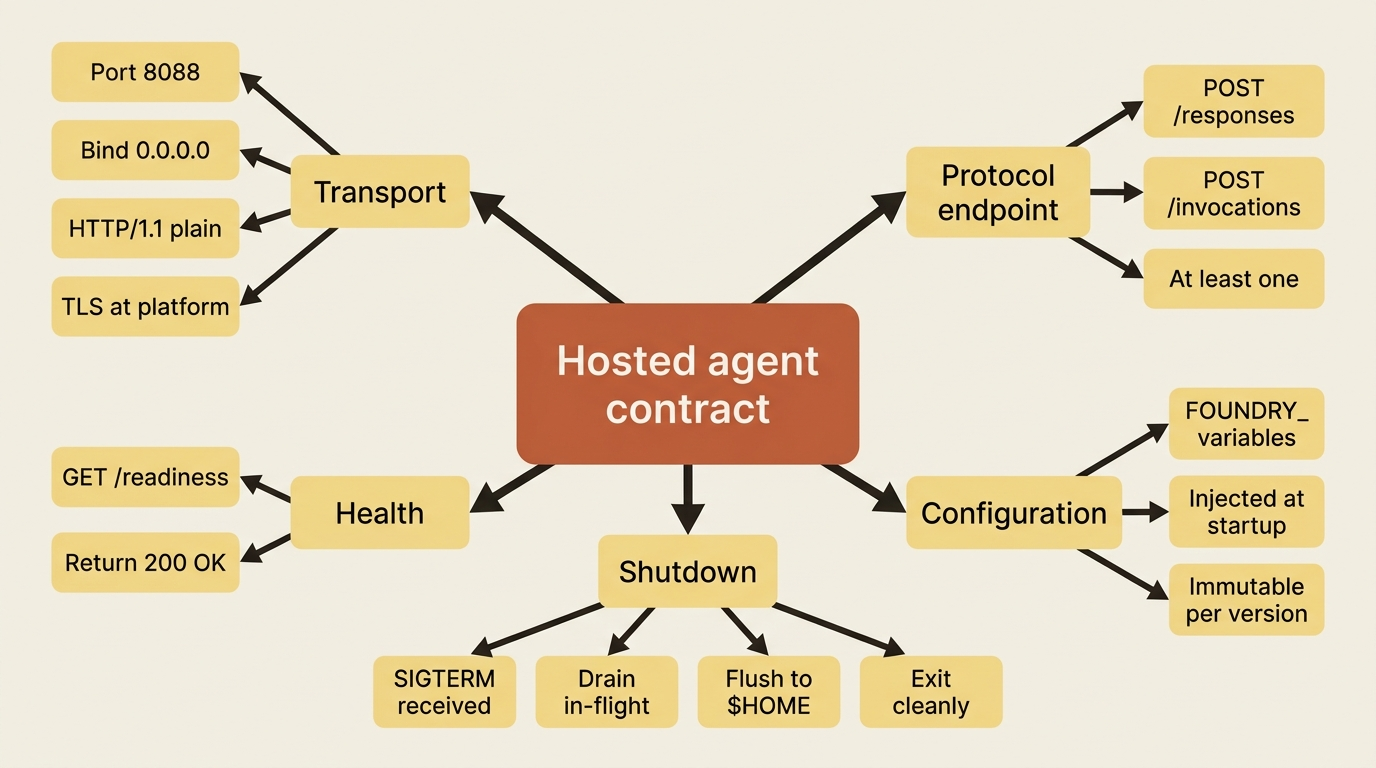
Most walkthroughs cover four and skip graceful shutdown, because the adapter handles it. The fifth is the one worth understanding anyway. On SIGTERM, your container stops accepting new requests, finishes in-flight requests, flushes pending writes to $HOME, and exits cleanly. The shutdown sequence is why an agent writing a draft research note to the session filesystem does not lose it when the platform recycles the sandbox, and it is the first hint that $HOME is a real durability surface rather than scratch space.
The transport details are unglamorous and worth memorizing, because getting one of them wrong produces a container that deploys successfully and never receives a request. The protocol is HTTP/1.1. The default port is 8088, overridable with the PORT environment variable. The bind address is 0.0.0.0, all interfaces. TLS is terminated by the platform, so your container serves plain HTTP.
Gotcha: three separate things bite here, and they bite in order. The port is 8088, not the 8080 that nearly every other agent-hosting platform defaults to. The bind address must be 0.0.0.0, not 127.0.0.1, or the platform's health probe never reaches you and the instance restarts forever. Finally, your container serves plain HTTP, so a hand-rolled server that insists on its own TLS certificate fails at the proxy rather than in your logs. The adapter packages get all three right, which is the strongest argument for not writing the server yourself.
The protocol is the only irreversible decision here
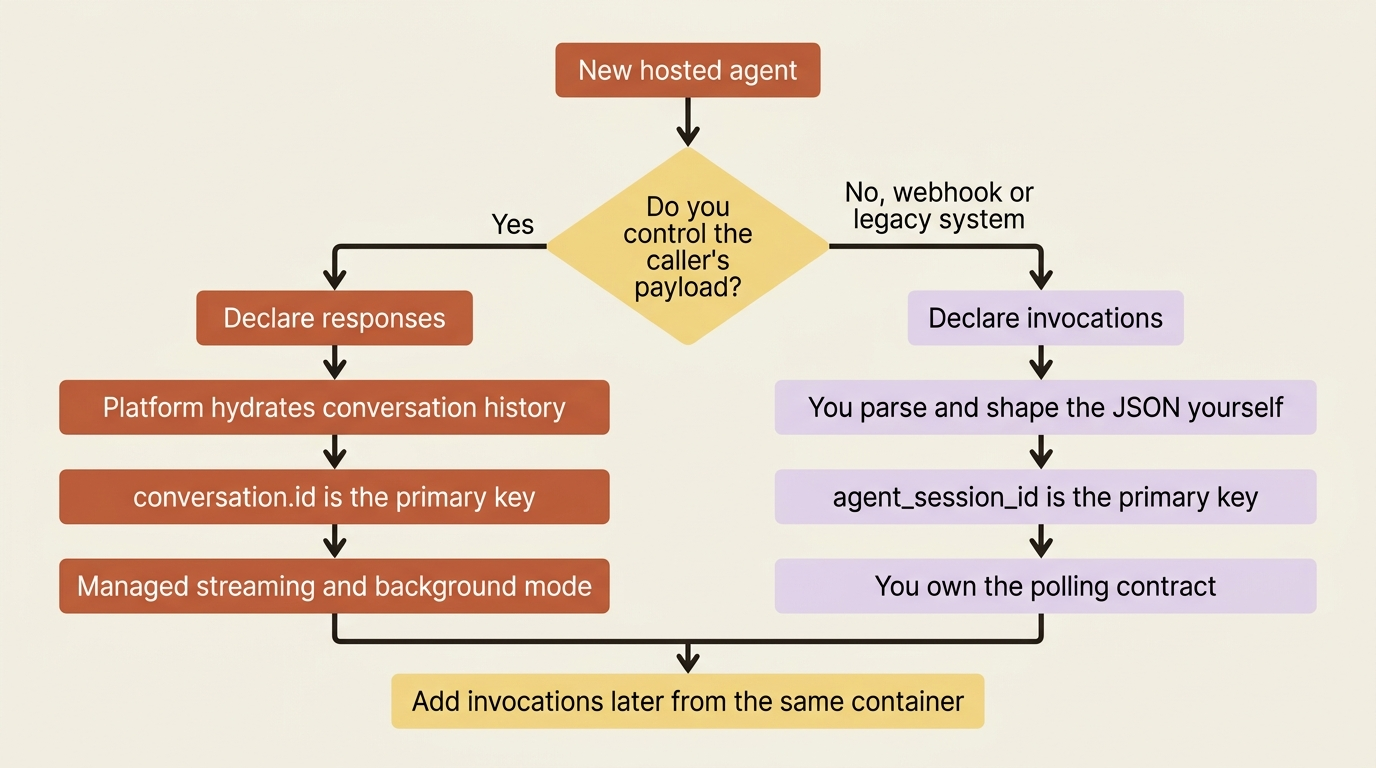
Everything else in the contract is mechanical. The protocol choice shapes your code, because it decides how much of the conversation, streaming, and background lifecycle the platform runs on your behalf.
Two protocols carry the weight.
| Responses | Invocations | |
|---|---|---|
| Endpoint | POST /responses |
POST /invocations |
| Payload | OpenAI Responses API request and response | Any JSON you define, in and out |
| Client | Any OpenAI-compatible SDK works unchanged | A custom client you write |
| Conversation history | Hydrated automatically by the adapter when conversation.id is present |
Not managed. Your code handles state. |
| Streaming | Platform-managed event stream with lifecycle events | Raw SSE that you format and write |
| Background work | Built-in background mode with platform polling and cancellation | Resilient tasks in the SDK, and you define the polling contract |
How the two protocols compare, row by row:
- Responses endpoint:
POST /responses. Invocations endpoint:POST /invocations. - Responses payload: the OpenAI Responses API request and response shape. Invocations payload: any JSON you define, in and out.
- Responses client: any OpenAI-compatible SDK works unchanged. Invocations client: a custom client you write.
- Responses conversation history: hydrated automatically by the adapter when
conversation.idis present. Invocations conversation history: not managed, so your code handles state. - Responses streaming: a platform-managed event stream with lifecycle events. Invocations streaming: raw SSE that you format and write.
- Responses background work: built-in background mode with platform polling and cancellation. Invocations background work: resilient tasks in the SDK, with a polling contract you define.
The decision rule the docs give is blunt and correct: start with Responses, because an agent can add an Invocations endpoint later. Reach for Invocations when the caller's payload is not yours to change. A GitHub, Stripe, or Jira webhook sends its own shape. A classification or extraction job takes structured data, not a chat message. A protocol bridge for a proprietary system has its own contract.
Three more protocols exist, and none of them is something you write a handler for in the usual sense. Invocations over WebSocket (invocations_ws) is the bidirectional path for real-time voice, a single full-duplex connection where the platform relays text and binary frames end to end without parsing them. Activity is the Microsoft 365 and Teams channel protocol, and the platform bridges Responses to it automatically when you publish an agent to a channel, with no separate wiring. A2A is the agent-to-agent delegation protocol, version 1.0 GA with v0.3 still in preview.
One behavioral difference between the two main protocols is easy to skim past and expensive to discover later. On the Responses protocol, conversation ID is the primary concept: the platform manages history and associates a session with each conversation. On the Invocations protocol, session ID is the primary concept: the client passes agent_session_id directly and there is no platform-managed conversation history at all. Those are two different primary keys for the same agent, with two different lifetimes. Conflating them is a genuine production bug, not a naming quibble.
Declaring a protocol is what turns an endpoint on
The takeaway first: your code implementing a protocol does not make that protocol reachable. The protocols block in azure.yaml does.
The service block for a research desk that needs both doors open, one for analysts and one for a webhook, looks like this:
services:
    research-desk:                 # ①
        host: azure.ai.agent       # ②
        kind: hosted               # ③
        project: src/research-desk # ④
        protocols:
            - protocol: responses  # ⑤
              version: 2.0.0       # ⑥
            - protocol: invocations   # ⑦
              version: 2.0.0
① The map key is the service name, and it is what azd uses to build the AGENT_<SERVICE>_* environment variable names after a deploy.
② The host field declares the kind of Foundry resource, so azure.ai.agent is what makes this service an agent rather than a project or a deployment.
③ kind: hosted selects the hosted-agent runtime, the container contract this whole part describes.
④ project points at the source directory holding the container that must satisfy the five requirements.
⑤ Each list entry turns on one endpoint URL. This one publishes POST /responses.
⑥ The version is the container protocol version, not your agent's version, and 2.0.0 is what turns on the two platform headers.
⑦ A second entry publishes POST /invocations from the same container, which is how one service serves analysts and the filings-feed webhook at once.
Note: The full extracted listing at code/azure-foundry-hyperscaler/part-4-the-runtime-contract/listings/01-azure-yaml-protocols.yaml shows the surrounding project service and agent fields elided here.
The protocols you declare determine which endpoint URLs go live after deployment. The documented values are responses, invocations, and a2a, plus invocations_ws for WebSocket and activity for Microsoft 365.
The resulting URLs follow a fixed shape off the project endpoint:
Responses:              {project_endpoint}/agents/{name}/endpoint/protocols/openai/responses
Invocations:            {project_endpoint}/agents/{name}/endpoint/protocols/invocations
Invocations (WebSocket): wss://{account}.services.ai.azure.com/api/projects/{project}/agents/{name}/endpoint/protocols/invocations_ws?api-version=v1
A2A:                    {project_endpoint}/agents/{name}/endpoint/protocols/a2a
You do not have to build those strings by hand. After a deploy, azd writes AGENT_<SERVICE>_<PROTOCOL>_ENDPOINT into the active environment for every enabled responses, invocations, and invocations_ws protocol, alongside AGENT_<SERVICE>_NAME, AGENT_<SERVICE>_VERSION, and AGENT_<SERVICE>_ENDPOINT. Read those in your CI pipeline instead of templating URLs. azd ai agent show prints the deployed agent and its endpoints when you want to look with your eyes.
Gotcha: the version under each protocol is the container protocol version, and the docs disagree with themselves about what to put there for Invocations. The protocol-adapter page declares invocations at version: 1.0.0 in its sample azure.yaml, while the migration page states that container protocol version 1.0.0 is deprecated and that the platform will block requests to agents still running on it after the deprecation period [CONTESTED: agents-how-to-add-protocol-adapter.md against agents-how-to-migrate-hosted-agent-preview.md]. Declare 2.0.0. The migration page's instruction is unambiguous, it is the page whose job is this exact question, and 2.0.0 is what turns on the two headers the rest of this article is about.
Giving one agent a second door
The research archive's filings feed fires a webhook when a covered company files a new disclosure, and that system predates the agent by a decade. Its payload is not negotiable, and it has never heard of the Responses API. This is the textbook Invocations case.
The desk keeps its Responses endpoint for analysts and adds an Invocations endpoint for the webhook. On the native track, a Microsoft Agent Framework agent gets a different host class:
from agent_framework_foundry_hosting import InvocationsHostServer

server = InvocationsHostServer(agent)
server.run()
The Agent Framework Invocations host manages per-session state through an agent_session_id query parameter and a response header, which is the platform's answer to "there is no conversation here, so what threads the turns together". On the bring-your-own track, it is the same one-word change against a compiled LangGraph graph:
from langchain_azure_ai.agents.hosting import InvocationsHostServer

InvocationsHostServer(graph).run(port=port)
Both tracks reach the same wire. The LangChain Invocations host accepts a message string and an optional stream flag by default, returns {"response": "..."} for non-streaming calls, and hands back an x-agent-session-id response header you pass as agent_session_id on the next request:
curl -X POST "http://localhost:8088/invocations?agent_session_id=<session-id>" \
  -H "Content-Type: application/json" \
  -d '{"message":"What is my name?"}'
The default shape is a starting point, not the contract. The whole point of Invocations is that you define the payload, so subclass InvocationsHostServer and override parse_request to accept the filings feed's actual JSON, then override build_input to map it into your graph state.
Below both tracks, the raw protocol library gives you a Starlette request and gets out of the way entirely:
from azure.ai.agentserver.invocations import InvocationAgentServerHost  # ①
from starlette.requests import Request
from starlette.responses import JSONResponse, Response

app = InvocationAgentServerHost()  # ②


@app.invoke_handler  # ③
async def handle_invoke(request: Request) -> Response:  # ④
    payload = await request.json()  # ⑤
    return JSONResponse({"filing_review": await review(payload)})  # ⑥


if __name__ == "__main__":
    app.run()  # ⑦
① The host comes from the Invocations protocol library, one layer below both the Agent Framework bridge and the LangChain bridge shown above.
② Constructing the host is what supplies the port, the readiness probe, the OpenTelemetry instrumentation, and the SIGTERM handling, none of which you write.
③ The decorator registers your function as the POST /invocations handler. Registration, not naming, is what wires it up.
④ The handler signature is a plain Starlette request in and a plain Starlette response out, so nothing about the payload shape is prescribed.
⑤ You parse the body yourself, which is the point of Invocations: this is where the filings feed's decade-old JSON arrives unchanged.
⑥ The response shape is equally yours. The library serializes what you return and adds no envelope of its own.
⑦ app.run() starts the server on port 8088 bound to 0.0.0.0, satisfying the transport rows of the contract without a line of server code.
Note: The full extracted listing at
code/azure-foundry-hyperscaler/part-4-the-runtime-contract/listings/02-invocations-host.py
shows the review() helper elided here.
Arbitrary JSON in, arbitrary JSON out. For long-running invocations the same host exposes @app.get_invocation_handler and @app.cancel_invocation_handler so you can build polling and cancellation. Note the word "build." The Invocations adapter deliberately prescribes no status or polling contract, which means the shape of "is the filing review done yet" is a design decision you own.
Gotcha: the docs spell the Invocations host two ways. Four pages use InvocationAgentServerHost with the @app.invoke_handler decorator; the voice-agent page uses InvocationsAgentServerHost with @app.invocation_handler [CONTESTED: agents-concepts-hosted-agent-contract.md, agents-how-to-add-protocol-adapter.md, agents-how-to-migrate-hosted-agent-preview.md, agents-quickstarts-quickstart-deploy-own-code.md against agents-how-to-build-voice-agent.md]. Take the four-page majority, and if an import fails, the other spelling is the first thing to try.
If the desk ever grows a voice channel, the WebSocket route lives on that same Invocations host rather than a separate server: register @app.ws_handler alongside @app.invoke_handler and you serve GET /invocations_ws and POST /invocations from one process. Two constraints are worth knowing before you plan around it. The platform proxy enforces a 1 MB maximum frame size and rejects larger frames with close code 1009, and individual WebSocket connections are capped at roughly 30 minutes, after which the platform sends close code 1001 and your client must reconnect with the same agent_session_id. The sandbox survives the reconnect; the missed frames do not, because the platform replays nothing at the application layer.
What the platform hands your container at startup
Five environment variables arrive at container start, and they are the least surprising part of the contract.
| Variable | Purpose |
|---|---|
FOUNDRY_PROJECT_ENDPOINT |
The Foundry project endpoint for API calls |
FOUNDRY_AGENT_ID |
The agent's stable GUID. Use it for per-agent routing, telemetry, or storage partitioning. |
FOUNDRY_AGENT_NAME |
The agent's name |
FOUNDRY_AGENT_VERSION |
The agent's version |
FOUNDRY_AGENT_SESSION_ID |
The current session ID |
The five injected variables and what each is for:
FOUNDRY_PROJECT_ENDPOINT: the Foundry project endpoint for API calls.FOUNDRY_AGENT_ID: the agent's stable GUID, useful for per-agent routing, telemetry, or storage partitioning.FOUNDRY_AGENT_NAME: the agent's name.FOUNDRY_AGENT_VERSION: the agent's version.FOUNDRY_AGENT_SESSION_ID: the current session ID.
Two rules govern them, and both are stated as rules rather than suggestions. The platform reserves the FOUNDRY_ and AGENT_ prefixes, so read those variables and never define or override them in your env block. Also, do not declare FOUNDRY_PROJECT_ENDPOINT in env at all: the platform injects it into hosted containers, azd ai agent run sets it locally, and declaring it risks shadowing the platform value with a stale one.
Your own configuration goes in env and becomes part of the immutable agent version. Environment variables are set per version and cannot change once the version is created. Flipping a feature flag means a new version, which is the correct behavior for a governed platform and a surprise for anyone used to editing app settings in the portal.
Two headers, and one of them is your multi-tenancy design
This is the section the contract exists for. On container protocol 2.0.0, the platform injects two headers on every request to your protocol endpoints, for both Responses and Invocations, and it does not send them to infrastructure endpoints such as the health probe.
| Header | Purpose |
|---|---|
x-agent-user-id |
Global per-user identifier for the current caller. The primary partition key for per-user data your container stores. It is for your container's own use and is not forwarded outbound. The same user yields the same value across agents. |
x-agent-foundry-call-id |
Per-request identifier. Forward it unchanged on outbound calls to Foundry services such as Storage, Toolbox, and other agents. The platform resolves the caller's identity from it. |
The two platform headers and what each one is for:
x-agent-user-id: a global per-user identifier for the current caller, and the primary partition key for per-user data your container stores. It is for your container's own use, it is never forwarded outbound, and the same user yields the same value across agents.x-agent-foundry-call-id: a per-request identifier that you forward unchanged on outbound calls to Foundry services such as Storage, Toolbox, and other agents, so the platform can resolve the caller's identity from it.
Read those two rows slowly, because they divide cleanly into "for you" and "for them." x-agent-user-id never leaves your container and answers the question "whose data is this." x-agent-foundry-call-id never gets parsed by you and answers the question "on whose behalf am I calling out." Mixing them up produces either a data leak or a permission failure, and the docs are explicit that you should treat both values as opaque, reading them but never overriding them.
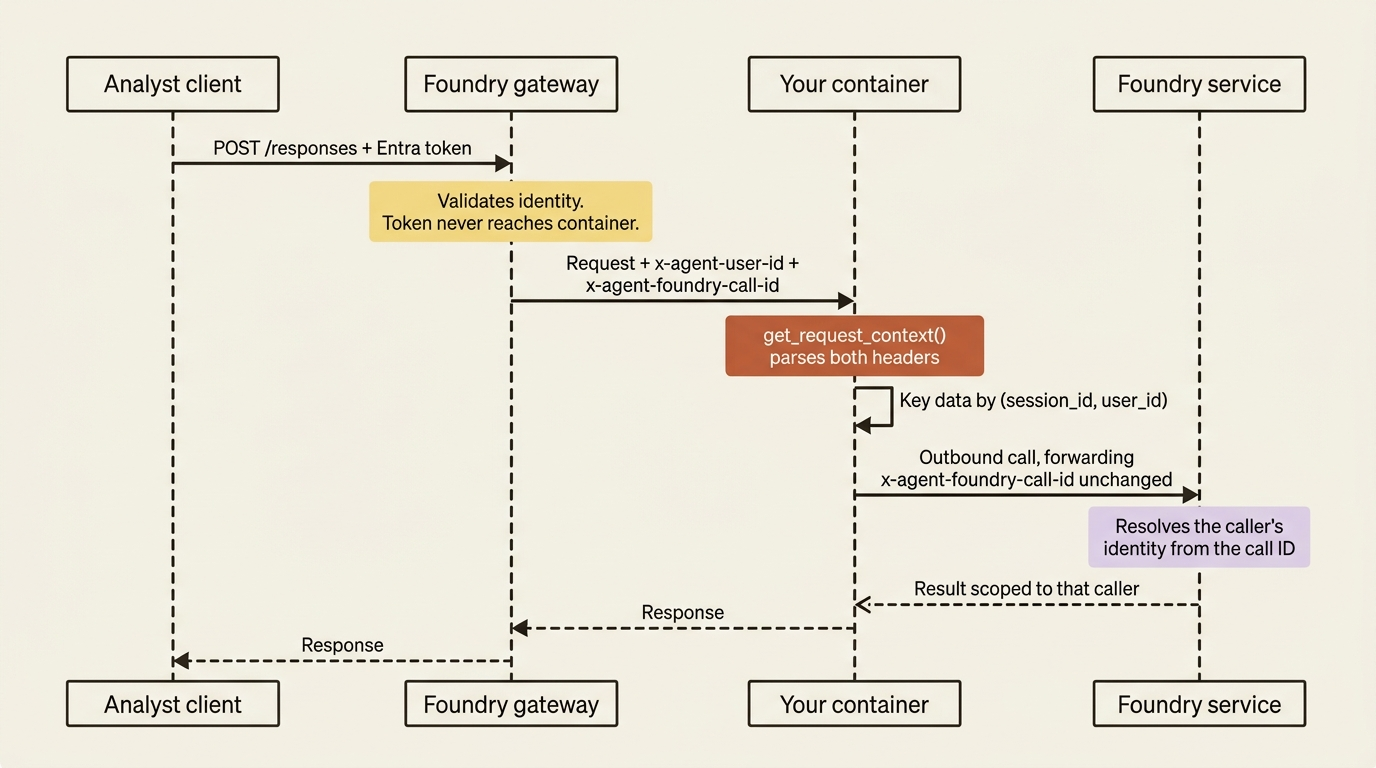
Both headers are trustworthy, because the platform generates them from verified identity rather than from anything the caller typed. The platform-generated guarantee is what makes x-agent-user-id usable as a partition key at all, and it is the property a hand-built harness has to earn the hard way.
You rarely read the raw headers. The AgentServer SDK exposes them as constants on PlatformHeaders and surfaces the parsed values through get_request_context() in Python or FoundryAgentRequestContext.Current in .NET. The context carries user_id, call_id, and session_id, and the documented pattern is to fail closed when the user is missing:
from azure.ai.agentserver.core import get_request_context  # ①


def partition_key() -> tuple[str, str]:
    ctx = get_request_context()  # ②
    if not ctx or not ctx.user_id:  # ③
        raise PermissionError("A user context is required on protocol 2.0.0.")
    return (ctx.session_id, ctx.user_id)   # key all user-owned data by this  ④
① The context helper lives in the protocol library's core package, below Agent Framework and below LangGraph, which is why both tracks read identity the same way.
② One call parses both platform headers. You never touch x-agent-user-id or x-agent-foundry-call-id as raw strings.
③ The guard fails closed. A missing context or a missing user is an error, never a default value, because the alternative is a cross-tenant read.
④ The returned tuple is the partition key. Session alone is not an authorization boundary, so the user ID has to be part of it.
Note: The full extracted listing at code/azure-foundry-hyperscaler/part-4-the-runtime-contract/listings/03-partition-key.py shows the runnable module this snippet came from.
Those six lines are the whole multi-tenancy design. Every draft note, cached filing, and per-analyst scratch file the container writes under $HOME gets keyed by that tuple, not by session ID alone. The .NET equivalent reads FoundryAgentRequestContext.Current.UserId and .SessionId and throws UnauthorizedAccessException on the same condition.
Gotcha: neither header is guaranteed when you run locally, which is the whole reason the snippet above raises rather than defaults. The tempting local workaround is ctx.user_id or "local-dev", and that fallback is a cross-tenant read waiting for the day someone deploys without noticing. Fail closed and set the value explicitly in your local harness instead.
The outbound half is easier than it looks, because the official SDK adapters forward x-agent-foundry-call-id automatically when you call Foundry services through their clients. You only do this by hand when you make raw HTTP calls yourself, and then the rule is one line: read it from the inbound request and add it, unchanged, to the outbound request, without parsing it.
In production: protocol 2.0.0 is not just a header change; it is a concurrency change. On 1.0.0 a session was tied to a single caller's identity, so two users on one session could interfere with each other. On 2.0.0 each request carries its own user context, which is what makes one session safe to share across many users. Per-request user context is the foundation of session multiplexing, and it is how one deployed agent serves five hundred analysts without five hundred sandboxes.
Both tracks get this identically, and that is worth saying out loud. The request context lives in the protocol library, below Agent Framework and below LangGraph. There is no native advantage here and no bring-your-own workaround needed, because identity propagation is a property of the contract rather than of your framework.
The gateway drops almost everything you send
One rule surprises people who try to pass context in a header the obvious way: the gateway forwards only a fixed allowlist of caller-supplied request headers to your container, and drops everything else before the request arrives.
The allowlist is short:
| Header or prefix | Purpose |
|---|---|
x-client-* |
Any custom header you prefix with x-client-. Forwarded unchanged. |
accept, accept-encoding, accept-language, content-type, content-length, content-encoding |
Content negotiation and body parsing |
traceparent, tracestate, baggage, x-ms-client-request-id, x-request-id, request-id, correlation-context, request-context, ms-cv |
Distributed tracing and correlation IDs |
user-agent |
Identifies the calling SDK, for diagnostics |
What survives the gateway, grouped by purpose:
x-client-*: any custom header you prefix withx-client-, forwarded unchanged.- Content negotiation and body parsing:
accept,accept-encoding,accept-language,content-type,content-length,content-encoding. - Distributed tracing and correlation IDs:
traceparent,tracestate,baggage,x-ms-client-request-id,x-request-id,request-id,correlation-context,request-context,ms-cv. - Diagnostics:
user-agent, which identifies the calling SDK.
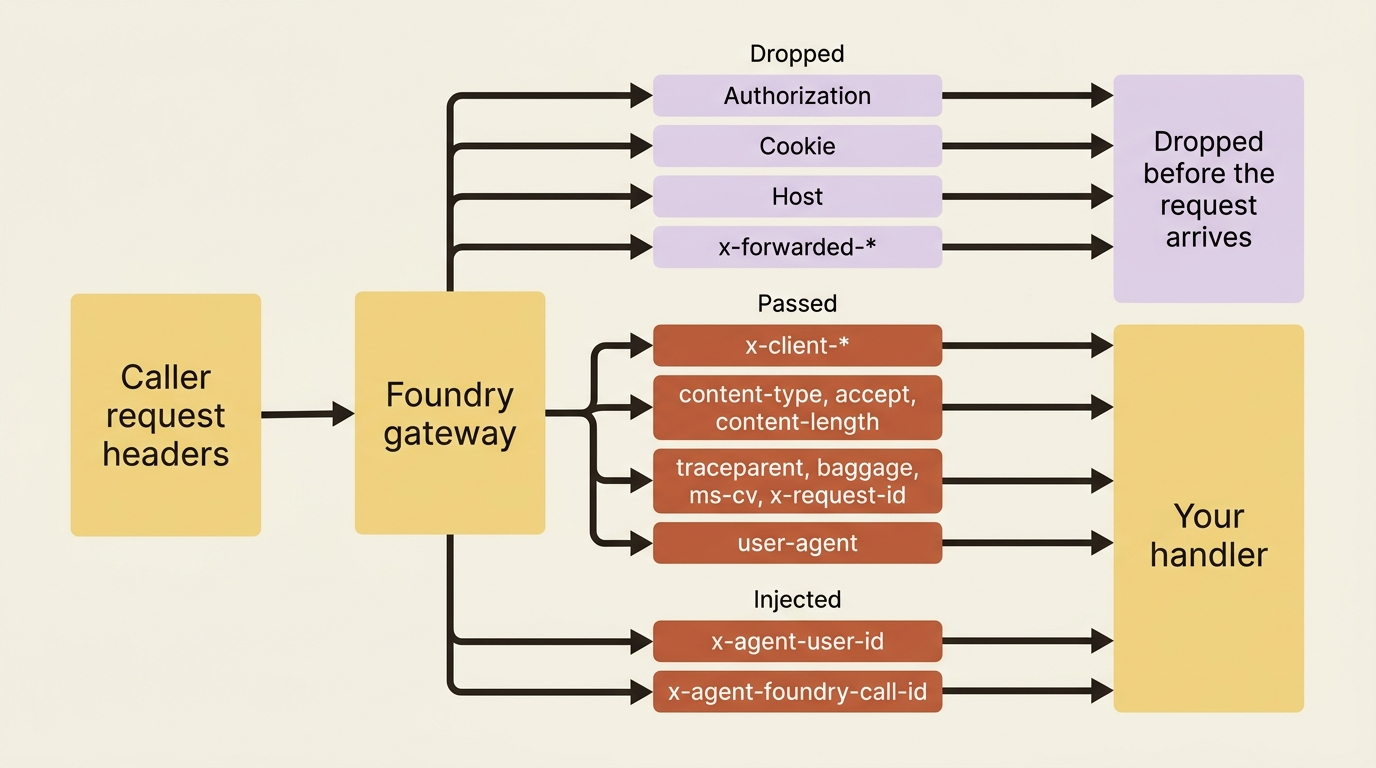
Everything outside that set is dropped. The docs call out Authorization, Host, Cookie, and x-forwarded-* by name as headers the gateway never forwards. Read that as a feature rather than a limitation: credentials and internal routing headers stay out of your container by default, so a compromised or careless handler cannot log a caller's bearer token because it never had one.
The voice path states the same rule even more sharply. Callers present a Microsoft Entra bearer token on the Authorization header during the WebSocket upgrade, the platform validates it, and the container does not see it. The docs then tell you not to depend on an Authorization header reaching /invocations_ws and not to accept an authorization query parameter as a substitute.
The escape hatch is the x-client- prefix. Every header starting with x-client- is forwarded unchanged, which is how you pass a tenant ID, a feature flag, or a correlation token without changing the request body. For the research desk, the analyst-facing web app sends the analyst's data-residency region on x-client-analyst-region, and the handler reads it like any other request header to decide whether a filing may be cached in the session filesystem at all. The SDK defines the prefix as PlatformHeaders.ClientHeaderPrefix so you are not typing the string literal in two places.
In production: do not skip the tracing row in that table. traceparent, baggage, and ms-cv are on the allowlist precisely so your container's logs link back to the originating request. A client that sends them gets a trace that spans the caller, the gateway, and your handler. A client that does not gets three disconnected log streams and an afternoon of guessing.
One honest limitation while you are here. The docs also describe structured inputs, handlebar placeholders such as {{userName}} in an agent definition that callers fill at request time through a structured_inputs object. This is the body-level way to parameterize an agent without creating a version per configuration. Every documented example builds it on PromptAgentDefinition, and the page never mentions hosted agents. Treat structured inputs as the prompt-agent path and x-client-* as the hosted-agent path until a Learn page says otherwise. The docs do carry one warning that applies to both: never pass secrets, access tokens, or credentials as structured inputs, because application logs and tracing may capture their values.
The sandbox nobody will name
The last piece of the contract is the thing your container runs inside, and the docs describe it by its properties rather than by its product name.
A hosted agent runs in a per-session, VM-isolated sandbox with a persistent filesystem at $HOME and /files. Each session gets a dedicated sandbox, sessions are isolated from each other, and state is restored automatically when a session resumes after going idle.
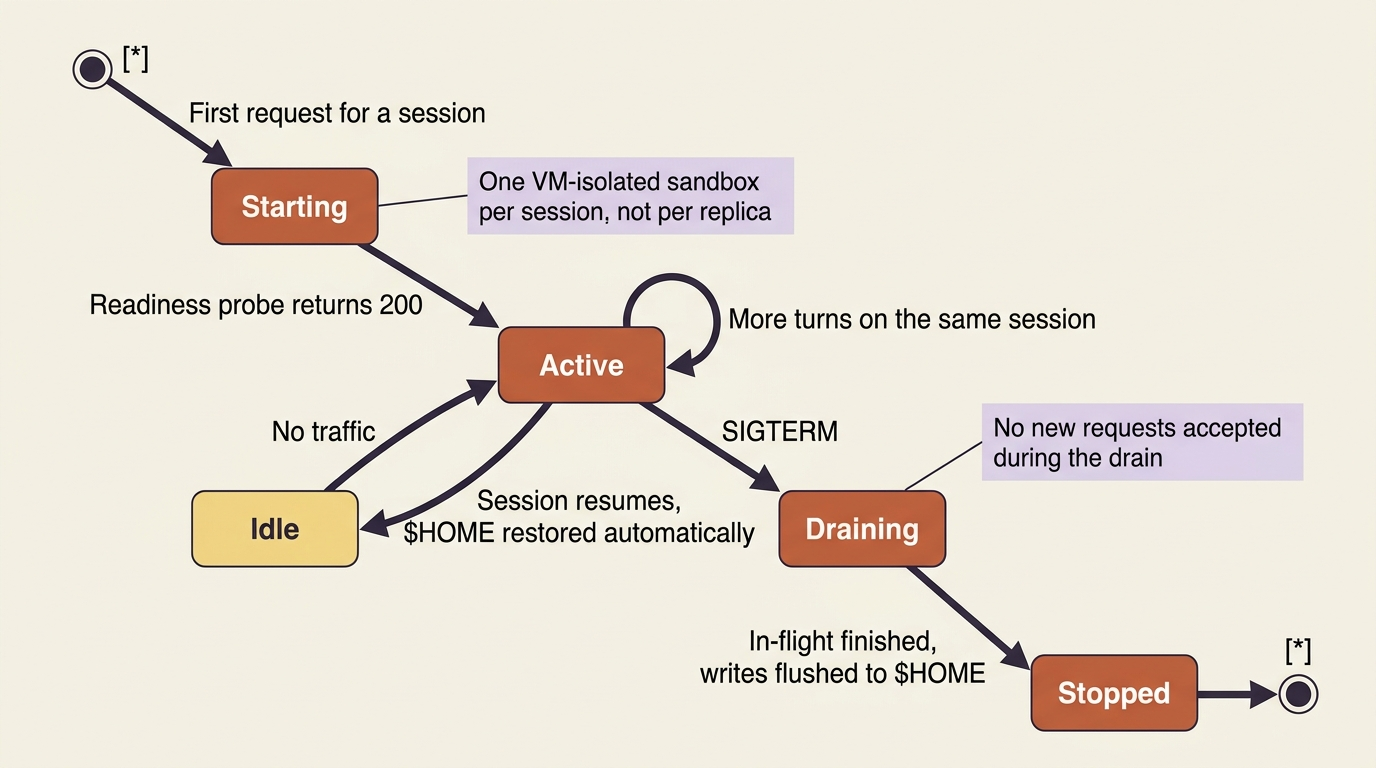
Scaling is per session, not per replica: there is no replica count to configure and no warm pool to size. The CPU and memory you set on an agent version describe a single session rather than the agent's aggregate footprint. Oversizing multiplies your bill by your concurrency, which is an unusual and useful cost model to understand before you pick a tier.
| CPU | Memory |
|---|---|
| 0.5 vCPU | 1 GiB |
| 1 vCPU | 2 GiB |
| 2 vCPU | 4 GiB |
The three resource tiers, each paired with its memory:
- 0.5 vCPU: 1 GiB.
- 1 vCPU: 2 GiB.
- 2 vCPU: 4 GiB.
Each session gets a disk budget of up to 20 GiB at 1 vCPU or larger, scaling down proportionally for smaller tiers, and the platform reserves roughly 20 percent of that budget for system use where your agent can neither see nor touch it. The remainder is shared between your container image, $HOME, and any other writable location in your container. A large base image is therefore not just a slow cold start; it is less room for the filings your agent caches.
Gotcha: vendor research will tell you hosted agents run on Azure Container Apps Dynamic Sessions. Do not repeat it. Neither the hosted-agents concept page nor the runtime-components page names Container Apps at all, and the correct description is the one the docs give: a Microsoft-managed, per-session, VM-isolated sandbox [CONTESTED]. The docs do supply one more detail if you dig: the networking deep dive states that hosted agents run in microVMs attached to your delegated subnet, and in the same article says that prompt agents "also run on Azure Container Apps" with fully managed compute. The overlap is almost certainly the source of the confusion. Container Apps is genuinely in the picture, for prompt agents and for the data proxy, and the bring-your-own-VNet requirements do ask you to delegate a subnet to Microsoft.App/environments. None of that makes it the hosted-agent runtime. Write "microVM" if you need a compute noun, and do not write a product SKU the docs decline to print.
One more property with a direct consequence for how you ship. Every call to create a version produces an immutable agent version, a snapshot of the container image, resource allocation, environment variables, and protocol configuration. An endpoint serves exactly one version at a time, with no traffic splitting. A canary deployment in the usual sense is not available to you. What you get instead is an atomic cutover and an audit trail, which is a trade the governance-minded half of your organization will consider a feature.
Do this today
- Check your
azure.yamland declareversion: 2.0.0under every protocol entry. Container protocol 1.0.0 is deprecated, and 2.0.0 is what turns the two platform headers on. - Add one call to
get_request_context()at the top of your handler and raise on a missinguser_id. Never default it to a local-dev string. - Audit every place your container writes to
$HOMEand make sure the path includes the user ID, not just the session ID. Session alone is not an authorization boundary. - Rename any custom header your callers send so it starts with
x-client-. Anything else is dropped at the gateway and your handler will never see it. - Confirm your server binds
0.0.0.0:8088and serves plain HTTP. A container listening on127.0.0.1or terminating its own TLS deploys cleanly and never receives a request.
The contract gives you identity. Using it is still your job
The runtime contract is where Foundry takes over the least glamorous and most error-prone parts of an agent harness: the HTTP server, the readiness probe, TLS termination, SSE streaming, conversation hydration, OpenTelemetry instrumentation, graceful shutdown, per-request identity resolution, and the credential hygiene of the header allowlist. Both the native and the bring-your-own tracks get all of it identically, because it lives in the protocol library below either framework.
What stays yours is every decision the contract exposes rather than makes: which protocol you declare, what your Invocations payload schema is, what your polling contract looks like, what you partition on, and what you do when the user context is missing. The platform hands you a trustworthy x-agent-user-id. Whether you actually key your data by it is your code, and nothing in the platform checks.
The lock-in accounting is mild. Reading get_request_context() is one import from azure.ai.agentserver.core, and the x-client-* convention is a string prefix rather than an API. Neither survives a move off Foundry, but neither is more than an afternoon to replace, because both are thin readers over an HTTP request your own gateway could populate the same way.
You now have an agent that can tell its callers apart. What you still do not have is anywhere durable to put what it learns about them.