
Your agent is four lines away from a governed cloud endpoint
The lift from a laptop agent to a governed, identity-bearing Foundry endpoint is four lines of hosting code, one YAML file, and five commands, and the contract underneath it is only four requirements long.
One YAML file, five commands, and a URL with its own Entra identity
You expect a week of infrastructure work before your agent is reachable from anything but your laptop. It is four lines and one YAML file, and you can finish before your coffee goes cold.
In this article: Foundry's hosted-agent contract is four requirements long. One library meets all four, so you never write the HTTP server.
azure.yamlis the file that decides which endpoints go live. Fiveazdcommands take an empty directory to a version-routed URL with its own Entra identity. By the end you have that endpoint, and a clear accounting of what the lift cost you.
Most platform quickstarts bury the contract. You follow the steps, something deploys, and you still cannot say what the platform requires of your code. I find that backwards. The contract is what you debug at three in the morning. The wizard is not.
The example is a research desk. It reads an excerpt from a covered company's public filing against instructions written by a research lead. No tools. No memory. A policy in prose. It is the smallest thing I am willing to call an agent, and it is enough to show the whole crossing.
The four lines
Install the framework and the bridge:
pip install -U agent-framework agent-framework-foundry-hosting azure-identity python-dotenv
Then the whole agent. Everything above the last line is ordinary Agent Framework code. The last line is the lift.
import os

from agent_framework import Agent
from agent_framework.foundry import FoundryChatClient
from agent_framework_foundry_hosting import ResponsesHostServer
from azure.identity import DefaultAzureCredential
from dotenv import load_dotenv

load_dotenv()

client = FoundryChatClient(
    project_endpoint=os.environ["FOUNDRY_PROJECT_ENDPOINT"],  # ①
    model=os.environ["MICROSOFT_FOUNDRY_MODEL_DEPLOYMENT_NAME"],  # ②
    credential=DefaultAzureCredential(),  # ③
)

agent = Agent(
    client=client,
    instructions=(  # ④
        "You are a market-research analyst for a research team. Given an "
        "excerpt from a covered company's public filing, summarize the "
        "financial and operational developments it discloses. Quote the "
        "filing for every claim. If it does not support a conclusion, say so."
    ),
    # The hosting layer manages conversation history, so the model call
    # should not also store it.
    default_options={"store": False},  # ⑤
)

ResponsesHostServer(agent).run()  # ⑥
① The project endpoint is platform-injected into hosted containers, so the code reads it rather than hard-coding a URL.
② The model deployment name is the one variable you declare yourself. It has to match the name you set in azure.yaml.
③ DefaultAzureCredential resolves to your developer login locally and to the agent's own Entra identity once deployed. The code does not change between the two.
④ The instructions are the whole behavior of version one. No tools, no retrieval, no memory, just a policy written in prose.
⑤ Turning off model-level storage keeps conversation history in exactly one place, the hosting layer.
⑥ This single line is the lift. It binds port 8088, exposes POST /responses, and serves the readiness probe.
Note: The full extracted listing at
code/azure-foundry-hyperscaler/part-2-your-first-hosted-loop/listings/02-research-desk-main.py
is the same main.py with the marker comments removed.
Notice what this agent cannot do. With no tools, it reasons only over text a caller hands it. An analyst pasting a filing excerpt is a real workflow and a fine place to start, but "go find the filing" is a tool, and tools on this platform become a governed, centrally administered resource rather than a constructor argument. I would not wire one in here. You would only have to unwire it in Part 6.
The contract those four lines already meet
A hosted agent is an HTTP container that does four things.
Listen on port 8088.
Return 200 OK from GET /readiness.
Implement one protocol endpoint.
Read the environment variables the platform injects.
Mistake: port 8080 and GET /health. Those belong to the other platforms. The adapter registers 8088 and /readiness for you, which is why a hand-rolled server fails in a way the samples never show.
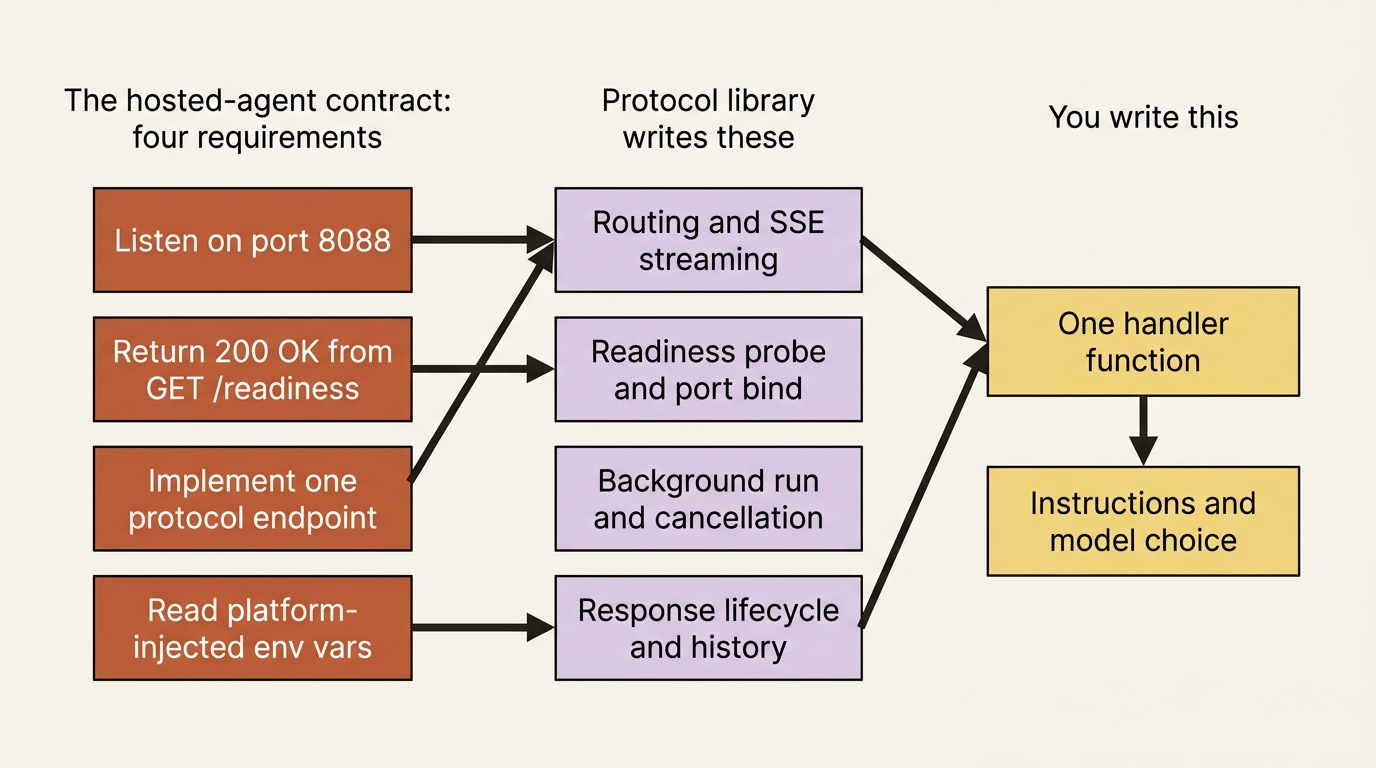
You wrote none of the code that meets those four. The Python package azure-ai-agentserver-responses exists so you never write the HTTP server: it handles routing, streaming with server-sent events, background execution, cancellation, caching, and the response lifecycle, along with the readiness endpoint and the port. The .NET equivalent is Azure.AI.AgentServer.Responses. For Microsoft Agent Framework the documented entry point sits one layer above that, in the bridge package agent-framework-foundry-hosting, which is where ResponsesHostServer comes from. Other frameworks import the protocol library directly.
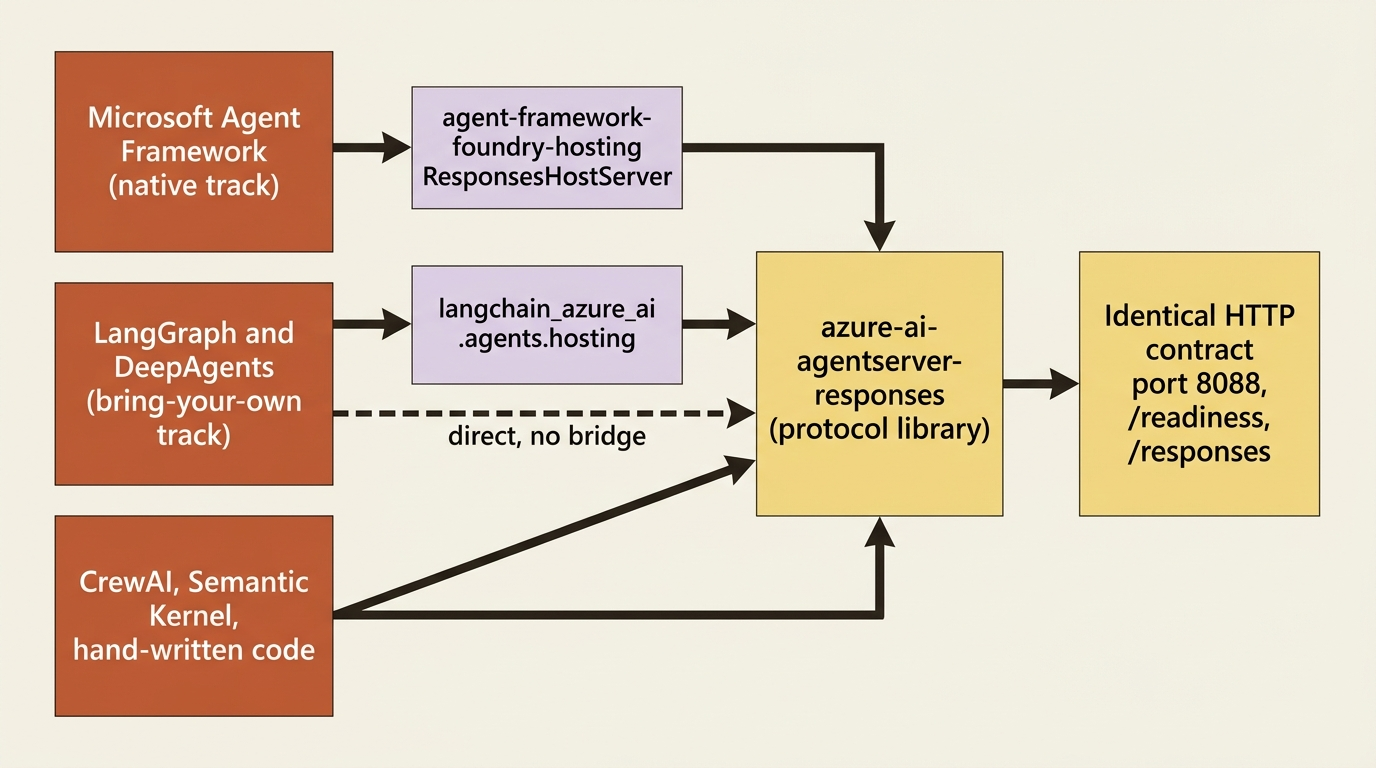
The library hands your handler one more convenience. A request context object hydrates the incoming request and the prior conversation turns, so you read plain text instead of parsing a Responses API payload, and default_fetch_history_count decides how many turns you get. The platform holds that history. Part 5 is where conversation and session stop being the same object.
Mistake: copying the model deployment variable name off whichever docs page you landed on. The documentation calls it AZURE_AI_MODEL_DEPLOYMENT_NAME, MODEL_DEPLOYMENT_NAME, FOUNDRY_MODEL_NAME, and MICROSOFT_FOUNDRY_MODEL_DEPLOYMENT_NAME in different places. Use the name you declare in azure.yaml and read in your code, because the two sides have to match. The platform does not inject a model name at all. It injects FOUNDRY_PROJECT_ENDPOINT.
azure.yaml declares the endpoint
I treat azure.yaml as the real source of truth for a hosted agent, not the portal. One file at the project root holds the configuration, and it is the file that says which endpoint URLs go live.
Each entry under services carries a host field naming the kind of Foundry resource it declares, and services reference each other through uses, the dependency graph azd resolves at provision and deploy time. A minimal project has two: a project that owns the model deployment, and an agent that depends on it.
# yaml-language-server: $schema=https://raw.githubusercontent.com/Azure/azure-dev/main/schemas/v1.0/azure.yaml.json
name: research-desk

services:
    ai-project:
        host: azure.ai.project  # ①
        deployments:
            - name: gpt-5.4-mini  # ②
              model:
                format: OpenAI
                name: gpt-5.4-mini
                version: "2026-03-17"
              sku:
                name: GlobalStandard
                capacity: 10

    research-desk:
        host: azure.ai.agent  # ③
        kind: hosted
        project: src/research-desk
        language: docker
        uses:  # ④
            - ai-project
        name: research-desk
        description: Summarizes material developments in covered-company filings.
        protocols:  # ⑤
            - protocol: responses
              version: 2.0.0
        env:
            MICROSOFT_FOUNDRY_MODEL_DEPLOYMENT_NAME: ${MICROSOFT_FOUNDRY_MODEL_DEPLOYMENT_NAME}  # ⑥
        startupCommand: python main.py  # ⑦
        container:
            resources:
                cpu: "0.25"
                memory: 0.5Gi
① The host value names the kind of Foundry resource this service declares. A project resource is what owns model deployments.
② The deployment name declared here is the name your code has to read at runtime, which is why the two sides must agree.
③ The agent service declares a hosted agent, the container Foundry runs for you.
④ uses is the dependency edge. It tells azd to provision the project before the agent that needs its model.
⑤ The protocols list decides which endpoint URLs the platform publishes. Declare only what your handler actually implements.
⑥ The ${VAR} placeholder resolves from the active azd environment, so one file serves dev, staging, and production.
⑦ Both the local run and the deployed container read startupCommand, so your agent starts exactly one way in either place.
Note: The full extracted listing at code/azure-foundry-hyperscaler/part-2-your-first-hosted-loop/listings/03-azure-yaml.yaml is the same manifest with the marker comments removed.
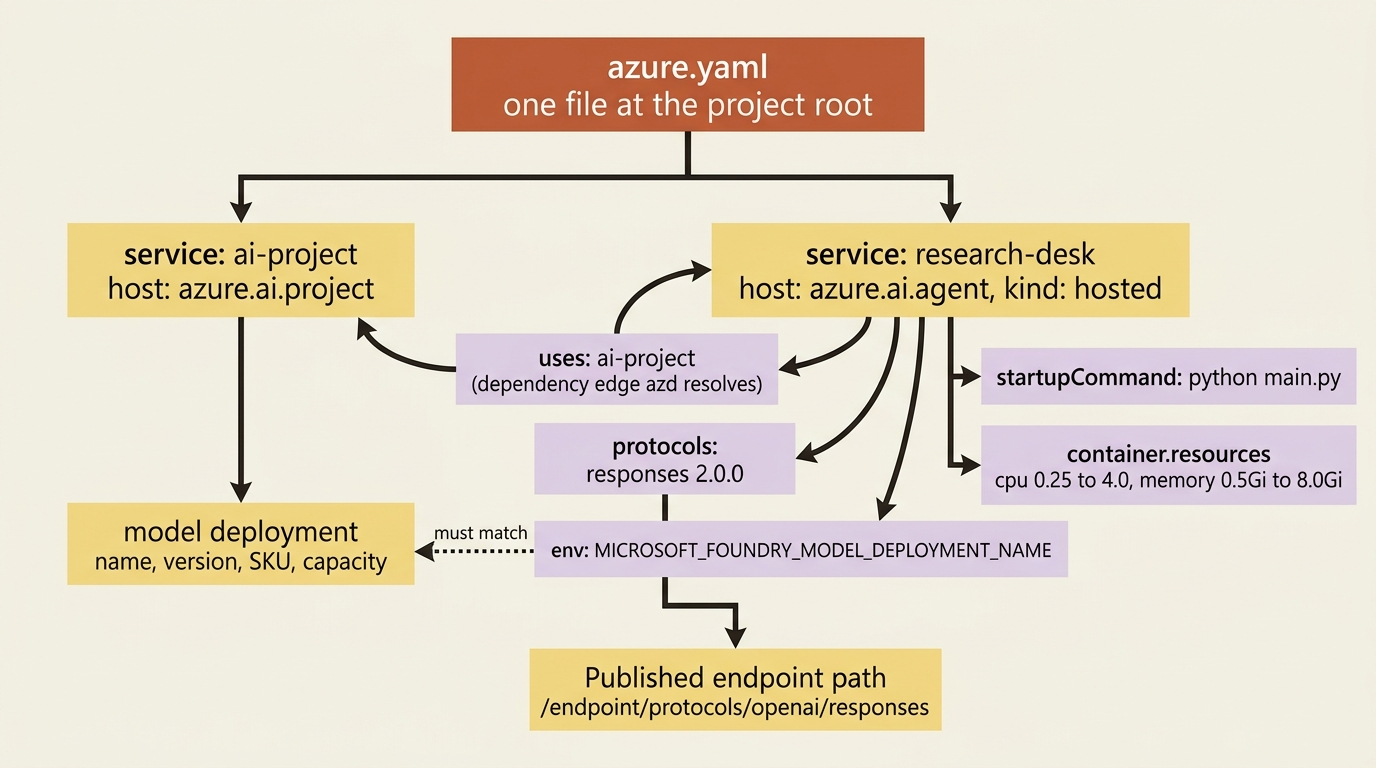
The protocols list decides which URLs go live. Valid values are responses, invocations, and a2a, with invocations_ws for WebSocket and activity for Teams and Microsoft 365. One agent can declare several. A protocol you declare but never implement is a live URL that fails, so the list and your handlers are one decision made twice.
container.resources accepts cpu from "0.25" to "4.0" and memory from 0.5Gi to 8.0Gi, the honest ceiling on one hosted agent's compute.
Mistake: declaring FOUNDRY_PROJECT_ENDPOINT in the env map. The platform injects it into hosted containers, and azd ai agent run sets it locally from your azd environment, so your declaration shadows a managed value. The whole FOUNDRY_* and AGENT_* prefix space is reserved. Name your own variables something else.
In production: secrets do not belong in the env map as literals, and they do not belong in the Dockerfile either, where they are fixed at build time and readable by anyone holding the image. Store them in a Foundry project connection and reference them with a ${{connections.<name>.credentials.<field>}} placeholder, which the platform resolves at sandbox start. A GET on the agent version returns the literal placeholder text, never the resolved secret.
Five commands
Install the toolchain once:
azd ext install microsoft.foundry
azd auth login
microsoft.foundry is a meta-package pulling in every Foundry extension, each independently versioned. Ask for azd 1.27.1 or later. Deploying a hosted agent needs Foundry Project Manager at project scope, creating a brand-new Foundry project needs Owner at resource-group scope, and calling the finished agent needs only Foundry Agent Consumer, which is the role your analysts eventually get.
Five commands take an empty directory to a deployed agent. I run them in this order, because a local container against the real project is the only inner loop I will tolerate.
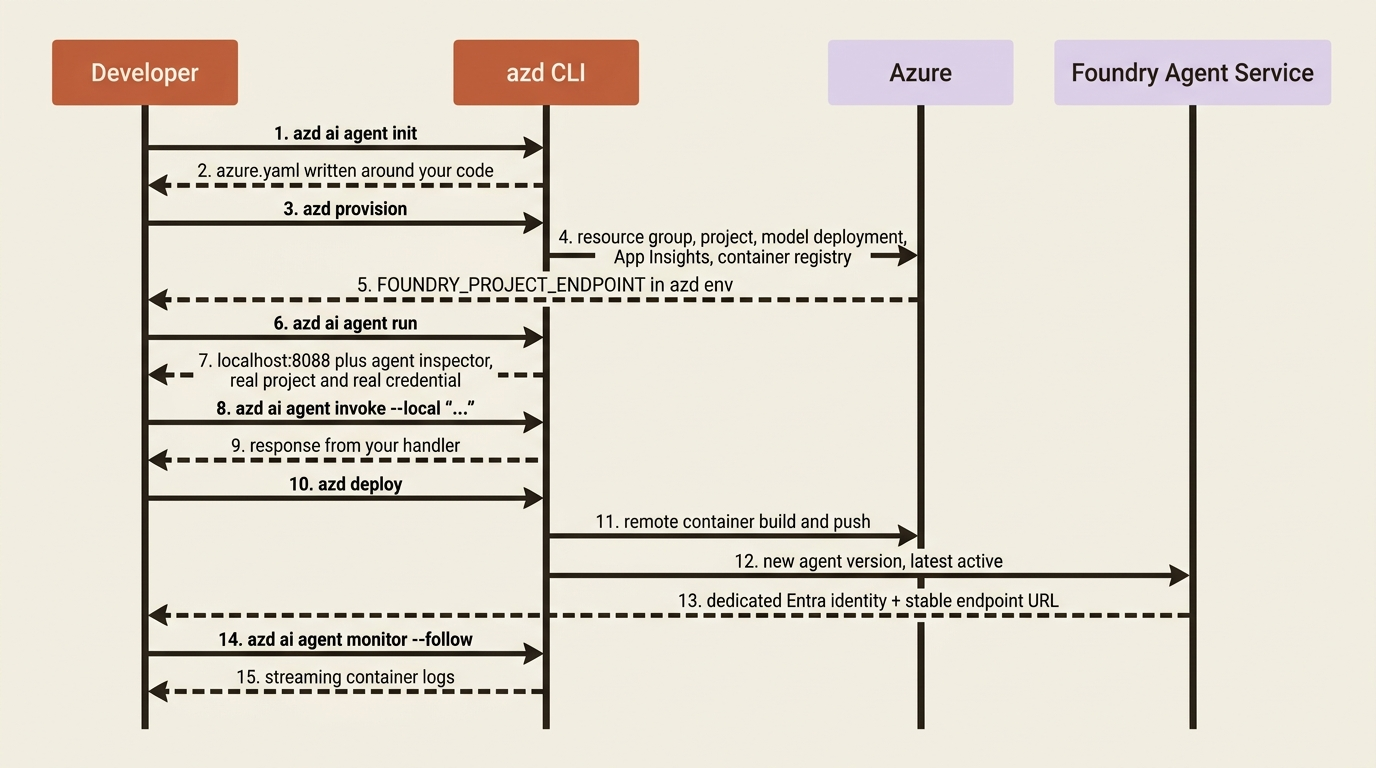
azd ai agent init --deploy-mode code
Scaffold. The CLI detects the files you already have and writes an azure.yaml service entry around them, overwriting nothing.
azd provision
The Azure side: a resource group, a Foundry instance, a project with a model deployment, an Application Insights instance, and a container registry for agent images.
azd ai agent run
Laptop container, real project, real model, your own login. The agent starts on localhost:8088 from startupCommand, and the inspector opens in your browser. Pass --port when 8088 is taken.
azd ai agent invoke --local "Summarize the material developments in this excerpt: ..."
Or speak the protocol, the way the eventual caller will:
curl -X POST http://localhost:8088/responses \
  -H "Content-Type: application/json" \
  -d '{"input": "Summarize the material developments in this excerpt: ...", "stream": false}'
Set stream to true and the same handler emits response.created, response.output_text.delta, and response.completed. You wrote none of that.
azd deploy
Remote image build in Azure Container Registry, a new agent version, a new Entra identity. Previous versions are preserved and the newest is active by default. azd up is provision plus deploy, for when infrastructure and code change together.
The platform mints a service principal per hosted agent at deploy time, so your container authenticates as itself rather than as a shared credential. Of everything in this chapter, I think that identity is the piece most worth having.
Calling it like any OpenAI endpoint
The deploy output prints two links, one to the agent playground in the portal and one to the agent endpoint. The endpoint is live the moment the agent exists, with no separate publish step, and its URL does not change as you roll out new versions. Version routing belongs to the agent, not to the URL: traffic goes to the newest version by default, and you can pin production to a specific one.
Each declared protocol gets its own path under that endpoint. For Responses:
https://{account}.services.ai.azure.com/api/projects/{project}/agents/{agent}/endpoint/protocols/openai/responses
Because the protocol is OpenAI-compatible by default, that URL is a base_url for an ordinary OpenAI client holding an Entra bearer token. The caller needs only Foundry Agent Consumer on the project or agent scope, and API key authentication is not supported on agent endpoints at all.
Two operational commands close the loop. azd ai agent show prints the name, version, protocols, container resources, environment variables, and creation timestamp. azd ai agent monitor --follow streams container logs while you interact with the agent, which is the first thing to reach for when a deployed agent behaves differently from the local one.
One quiet thing happened during azd provision. The platform injects APPLICATIONINSIGHTS_CONNECTION_STRING into your container, and when an Application Insights resource is attached to the project, OpenTelemetry tracing is on by default and traces may carry personal data and customer content. Provision through azd and you have that instance whether you asked for one or not. Wire the project by hand and you probably do not, and your traces dashboard will be silently empty.
Where the docs disagree
Three places, worth knowing before they cost you an afternoon.
Docker is optional or required depending on the deploy mode. Code deployment, the default for Python and .NET, uploads your source as a ZIP and builds it remotely, so --deploy-mode code needs no local Docker. Container mode with a local build does. If you build locally, the platform wants x86_64 images, so on Apple Silicon build with docker build --platform linux/amd64 ..
The azd version floor moves. One page asks for 1.25.2 or later, another for 1.27.1. Take the higher number and upgrade when a command behaves strangely.
The runtime is generally available and the tooling around it is not. As of September 2026, the extension installation page, the project-init page, the azure.yaml authoring page, and the protocol-adapter page all carry a preview banner.
What just transferred, and what it cost
Foundry took the HTTP server, the health probe, the TLS termination, the container build, the image registry, the rollout, the version routing, the agent's Entra identity, and the conversation history the Responses protocol hydrates into your handler.
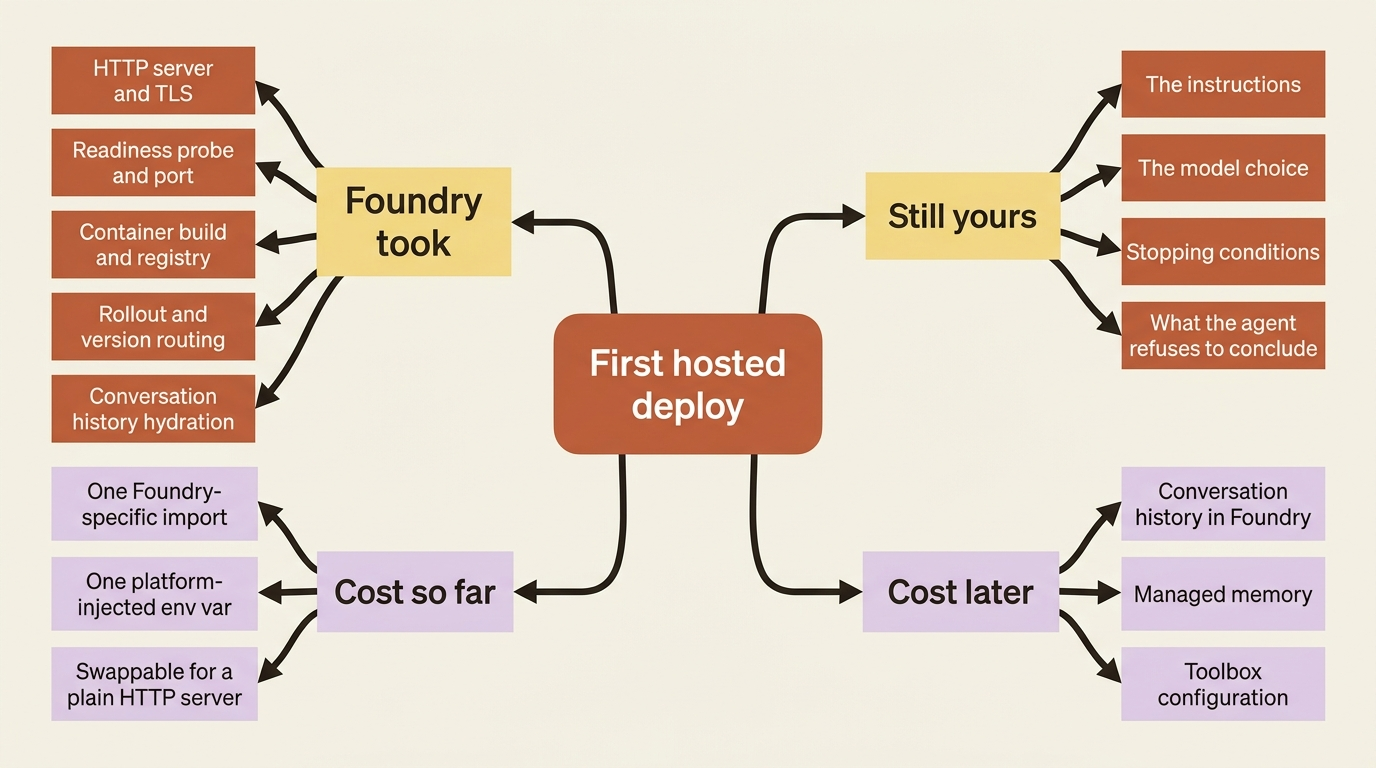
What stayed yours is everything in main.py above the last line: the instructions, the model choice, the stopping conditions, and the judgment about what the agent should refuse to conclude from a filing excerpt.
What it cost you is one import and one environment variable. Swap ResponsesHostServer for a plain HTTP server and this agent runs anywhere. The lock-in worth tracking starts later, when conversation history, memory, and toolbox configuration live in Foundry and have no bulk export.
Run the five commands and paste in a real filing excerpt. The endpoint, the Entra identity, and the version routing arrive with it, and you wrote no infrastructure to get them. The answer quality still rests entirely on those instructions in main.py, which is the one part of this system nobody can sell you.