
You Asked for a Plan and Got a Diff
Telling a coding agent to 'just plan' is a request the model can ignore; OpenCode's plan agent is a deny rule the server enforces, and that rule turns a plan into a spec you can review, commit, and hand to build.

In OpenCode, planning is not a mode you ask for. The plan agent puts a deny rule between the model and your files, and that rule turns a plan into a spec you can review, commit, and hand off.
You asked the agent for a plan and got a plan plus a diff, and you started to wonder whether any instruction you type is actually safe.
In this article: Day 3 of a 17-day guide. Start here reopens yesterday's OpenCode session by its ID, switches to the plan agent with
Shift+Tab, gets a numbered plan for the crushed-mug ticket without changing a project file, and hands the plan tobuild, which adds tests that fail first and then lands a one-line fix. Going deeper explains why "do not change anything" fails inbuild, reads the plan agent's actual rules on a 2.3.0 install, finds the one gap they leave open, walks through what the test runner printed, and builds a custom planner that fences the shell too.
Part 2 taught the daily loop in the TUI and ended with the first damage-rule attempt rolled back, so the tree is clean and the crushed-mug ticket still lands in other.
Start here
By the end of today you can reopen yesterday's session by its ID, get a numbered plan from the plan agent without changing a project file, and hand that plan to build, which adds tests that fail first and then fixes the crushed-mug ticket.
Starting fresh or fell behind? Run git switch -C main opencode/day-02. This replaces your main with the end of Day 2; to keep your own work, run git branch my-backup first.
Resume yesterday's session by its ID
Yesterday's session is still on disk, together with the rollback Part 2 staged. OpenCode gives every session an ID, and the ID is the reliable way back to it.
If the TUI is still open from yesterday, leave it with /exit. OpenCode prints the session's title and the command that reopens it.
/exit
Session   Damage rule in classify.js
Continue  opencode -s ses_e1a4ce943ffe9yOetsg1jehLpe
Your ID and title will differ, because OpenCode generates both. If you closed the TUI yesterday, list your sessions instead. opencode session list prints one row per session, newest first: the ID, the generated title, and the time of the last update.
cd ~/code/ticket-triage
opencode session list
ses_e1a492bd3ffesUYFBtEaPNesLV	Project file summaries	11/16/2026, 12:56:05 PM
ses_e1a4ce943ffe9yOetsg1jehLpe	Damage rule in classify.js	11/16/2026, 12:55:03 PM
ses_e1a4e784cffeiFxhASbUODIXi6	src/classify.js explanation	11/16/2026, 12:50:12 PM
Find the session that holds yesterday's damage-rule work, and open it by ID with -s, short for --session. Use your own ID in place of the one below.
opencode -s ses_e1a4ce943ffe9yOetsg1jehLpe
The TUI opens with that session active, the same model in the footer, and the staged rollback still waiting (ctrl+x r or /redo to restore). The prompt box comes back empty, because a restored prompt does not survive a restart. You type today's prompt fresh, which is what you want anyway. Sending the prompt commits Part 2's rollback, which is fine.
There is a shortcut that looks easier. The --continue flag, or -c, reopens the most recently updated session, which is not always the one you mean: a quick opencode run or a second tab moves a different session to the top. Resume by ID. The same ID works without the TUI, too: opencode run --session <id> "<prompt>" sends one prompt into that session and prints the answer, as the CLI commands page shows.
plan is an agent with a deny rule
Yesterday you worked in build, the default agent. On a fresh install, build's rules allow every edit, so "do not change anything" typed into build is a sentence the model may weigh and ignore. OpenCode ships a second primary agent, plan, whose rules deny its edit tools on every project file. A primary agent is one you switch to yourself, with the key in the next step. A permission rule is checked by OpenCode before the tool runs, so the model never gets the edit at all. The agents page says plan "may write OpenCode plan files when asked," and those plan files live in a folder in your home directory, ~/.opencode/plan/, not in the project.
Press Shift+Tab, the key the footer named in Part 2 (shift+tab agents). The footer changes from Build · Gemini 4 Hydrogen Google to Plan · Gemini 4 Hydrogen Google (tested on OpenCode 2.3.0 on November 16, 2026). The agent changed, and the model stayed. Check which agent is selected before you send, every time.
Ask plan for a plan
Attach the two files the way Part 2 did: type @src/cl and press Tab, then @test/cl and Tab. Type the rest of the prompt below, pressing Ctrl+J for each new line, then press Enter to send.
@src/classify.js @test/classify.test.js
Plan the damage rule. Do not implement it.
Damage means the words crushed, broken, or "in pieces", as in the ticket "The box showed up crushed and the mug inside is in pieces".
Decide the rule order: damage plus a money-back request goes to refund; damage alone goes to shipping.
Write a numbered plan. For each step, name the files to change and one new test, and say whether that test fails before the change.
Keep the existing if-chain in classify(), and add one damage check between the refund check and the shipping check. If the order is ambiguous, ask me.
Write the plan to ~/.opencode/plan/ticket-triage-damage-rule.md.
The third line matters most. The rollback removed the messages where you described the damage rule yesterday, so the model knows only what this prompt tells it, and the prompt names the three words. The last line names the file, so you know exactly where to look.
Watch the transcript while it works. The agent reads the two attached files and writes one file, the plan. If the model tries to edit src/classify.js anyway, the deny rule blocks the call before it touches the file. When the turn ends, the reply restates the rule order (refund, then damage, then shipping, then other) and lists numbered steps, each with a test and whether that test fails today.
Read the plan, then copy it into the repository
When the turn ends, read the plan from your second terminal, and confirm the project is untouched.
cat ~/.opencode/plan/ticket-triage-damage-rule.md
cd ~/code/ticket-triage
git status --short
git status --short prints nothing. The plan exists, and the repository has not changed, which is the property plan is for.
Read the plan for three things before you accept it: the rule order stated as a sentence, the files named for every step, and a crushed-mug test that fails today. Your plan's wording and its number of tests will differ, because a model wrote it. If the plan is wrong, fix it in plan with a follow-up prompt, not in build. Corrections to a plan are cheap; corrections to a diff cost a rollback.
Ticket Triage keeps its plans in the repository, beside the code they describe. Copy the plan from the second terminal.
mkdir -p docs/plans
cp ~/.opencode/plan/ticket-triage-damage-rule.md docs/plans/damage-rule.md
Hand the plan to build, tests first
Now the decision is on disk, and build can implement it. Press Shift+Tab back to build. The session still holds the planning conversation, so you could say "do the plan," but naming the file is more precise, and it attaches exactly the text you reviewed. The first prompt asks for the tests only. A test that never failed proves nothing about the fix, so the tests land before the code. Type @docs/pl and press Tab to attach the plan.
Implement @docs/plans/damage-rule.md, tests first.
Add the tests the plan names to test/classify.test.js. Do not touch src/classify.js yet.
Run npm test and stop. Tell me which test fails and why.
build adds the tests and runs npm test itself. Nothing asks before it edits the test file or runs the command. The reply reports the counts, such as "4 passed, 1 failed," and names each failing test. Every new test that sends damage alone fails, because classify() still returns other where the plan expects shipping. The money-back test passes, as the plan predicted. Read the counts against the plan, not against your hopes.
Now ask for the change itself.
Now do the step of the plan that changes the classifier: one damage check between the refund check and the shipping check.
Keep the existing if-chain. Run npm test.
Do not take the agent's word for the result. Run the check yourself, as Part 2 taught.
!npm test
The TUI folds the start of the output, so the visible part begins at # suites.
(36 earlier lines)
# suites 0
# pass 5
# fail 0
Your # pass count is the original three plus the tests your plan added, so five for a two-test plan like the one in Going deeper; # fail 0 is the check. Then compare the diff with the plan from the second terminal, and rerun the crushed-mug reproduction from Part 1.
git diff --stat
node --input-type=module -e "import { classify } from './src/classify.js'; console.log(classify('The box showed up crushed and the mug inside is in pieces'))"
 src/classify.js       | 1 +
 test/classify.test.js | 4 ++++
 2 files changed, 5 insertions(+)
shipping
src/classify.js grew by one line, the damage check, and the test file grew by the tests the plan named. The crushed-mug ticket prints shipping. Commit the fix together with the plan that produced it, and check the tree.
git add src/classify.js test/classify.test.js docs/plans/damage-rule.md
git commit -m "Route damaged items to shipping, keep refunds first"
git status --short
The last command prints nothing. Today's win is that empty result after # fail 0: Ticket Triage has its first green change, and the decision behind it is in Git next to the code.
You can stop here. Going deeper explains why this works and where it breaks.
Going deeper
This section is for readers who want the exact rules behind the plan agent, why the plan prompt is built the way it is, what the test runner printed, how to resume a session in other ways, and how to write a stricter planner once Part 4 has taught permission rules. It assumes you finished Start here in this part and in Parts 1 and 2.
The tempting version: "just plan" in build
You have a small bug and a clear prompt. Before sending it, you add one careful line at the top: "Just plan first. Do not change anything yet." You press Enter in OpenCode's default build agent and wait for a plan.
The agent writes four tidy plan bullets, then adds "I'll make the small change now so you can see it," and an edit to your source file appears in the transcript. You asked for a plan and got a plan plus a diff. This is a scenario, not a recorded run, but it is the common shape.
The model did not disobey anything OpenCode enforces. "Do not change anything" is a sentence in a prompt, and on a fresh install the build agent's rules allow every edit. Helpfulness won. This article replaces the sentence with a rule: the OpenCode plan agent, whose edit tools cannot touch project files no matter how helpful the model feels.
The scene is that moment: a developer who asked for a plan, looking at a transcript that ends in a diff.
The repository and the damage rule
The running example is Ticket Triage, a small Node.js service whose classify() if-chain sorts support tickets into refund, shipping, or other. "The box showed up crushed and the mug inside is in pieces" lands in other, because nothing matches "crushed." The fix is a damage rule, and it forces one decision: damage plus a money-back request is a refund, while damage alone is shipping.
Throw away the unwanted edit first. /undo rolls back the last message's changes and restores the prompt, and a second terminal confirms it.
/undo
cd ~/code/ticket-triage
git diff --stat
git diff --stat prints nothing. Now do it properly.
A sentence is a request; a rule is a fence
The OpenCode agents page says an agent "combines a system prompt, model preference, permissions, and display details into a named assistant profile." A system prompt asks the model to behave. A permission rule is checked before the tool runs, and the permissions page is blunt: deny blocks the operation.
The difference is who decides. Type "do not edit" into build, and the model decides on every turn whether to honor it. Select plan, and the server decides. A model that calls edit on src/classify.js from plan gets a denial back, not a file change.
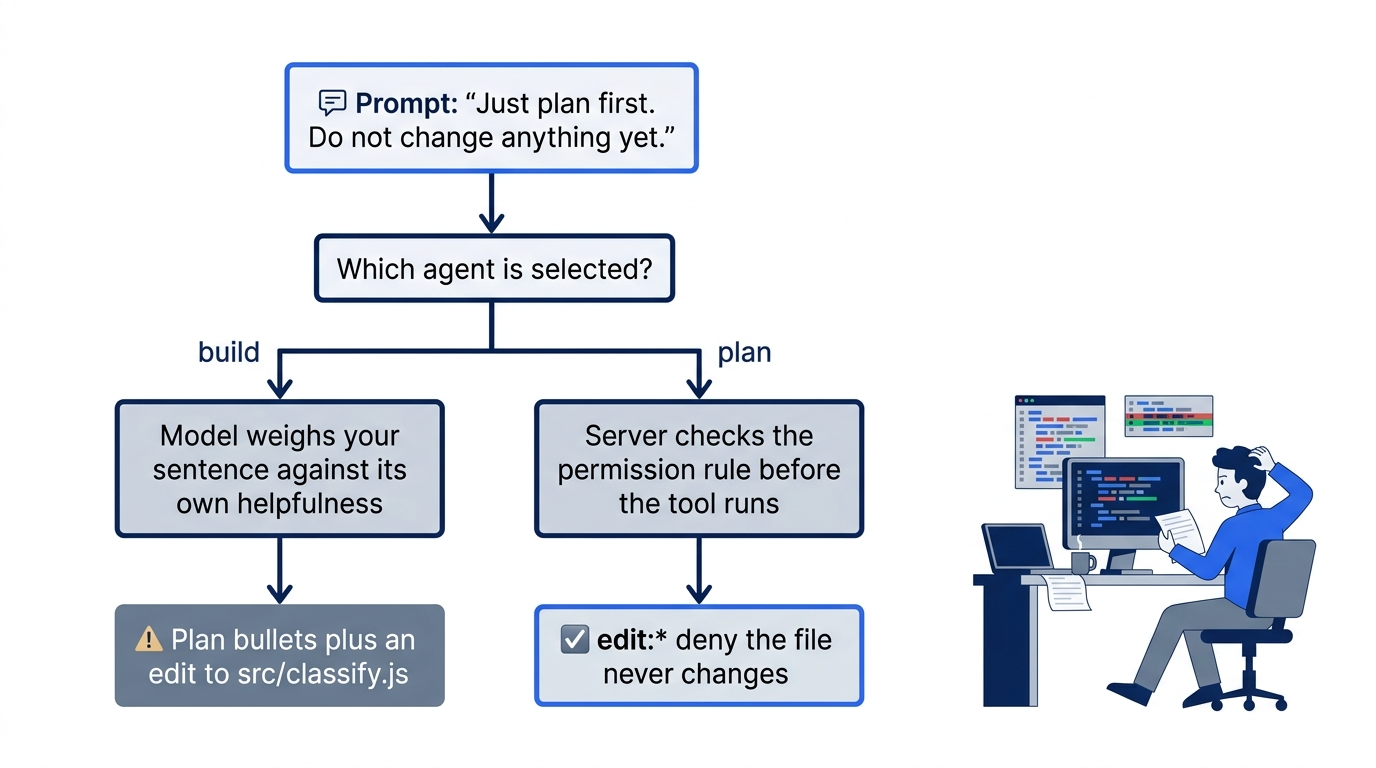
Planning in OpenCode is therefore not a mode you ask for. It is a different agent, chosen by ID, with its own rule list.
What the plan agent is actually allowed to do
Every agent, built-in or custom, starts from the same base policy. The permissions page documents it, and opencode debug agents printed the same list on a real 2.3.0 install.
[
  { "action": "*",    "resource": "*",              "effect": "allow" },
  { "action": "read", "resource": "*.env",          "effect": "ask" },
  { "action": "read", "resource": "*.env.*",        "effect": "ask" },
  { "action": "read", "resource": "*.env.example",  "effect": "allow" }
]
The first rule allows every action on every resource; the next two ask before reading .env files, and the fourth allows reading *.env.example files without asking. The last matching rule wins, so each agent's own rules, appended after these, can narrow them.
plan appends four rules of its own. On the tested install they read as question:* allow, edit:* deny, edit:~/.opencode/plan/* allow, and browser:* deny. In the config shape, they look like this.
[
  { "action": "question", "resource": "*", "effect": "allow" },
  { "action": "edit", "resource": "*", "effect": "deny" },
  { "action": "edit", "resource": "~/.opencode/plan/*", "effect": "allow" },
  { "action": "browser", "resource": "*", "effect": "deny" },
]
Read them in order, because order is the whole mechanism. The edit deny covers every path, and the next rule carves one exception back out: files under ~/.opencode/plan/ in your home directory. A later rule wins, so a plan file write is allowed and every other edit is denied.
Three details matter.
editcovers three tools. The tools page listsedit,write, andpatch, and all three check theeditaction with the target path as the resource.plancannot replace text, create a file, or apply a patch anywhere except the plan folder.questionletsplanask you. Thequestiontool "pauses execution and presents one or more questions to the user," with choices and a free-form answer. A plan with a real fork in it can stop and ask instead of guessing.- Shell is not in the list. Nothing
planadds mentionsshell, so the base allow still covers it. The agents page says shell commands "remain permission-controlled," and the default control is allow.
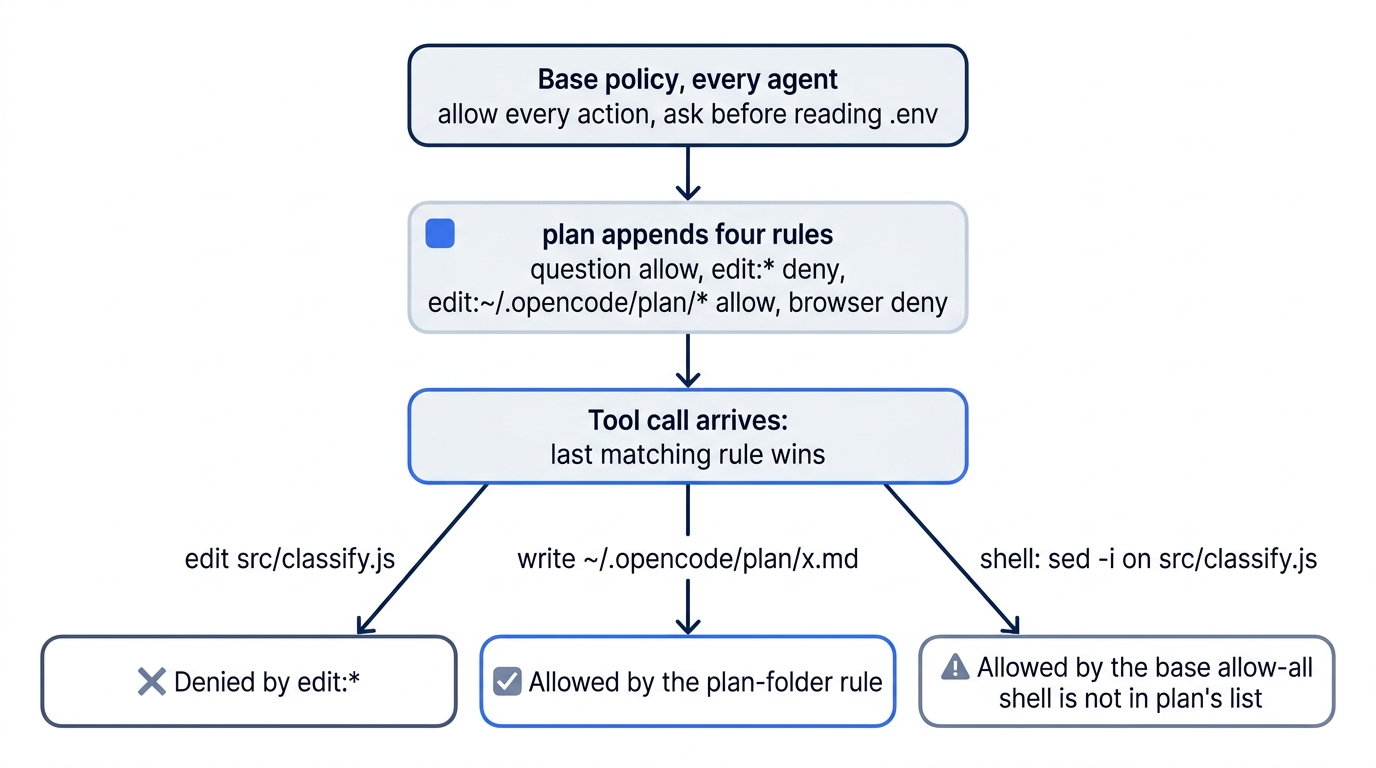
The third detail is the one to remember. plan cannot call edit on src/classify.js, but on a fresh install it can run sed -i on it, or git commit, or npm install. The tools page warns that shell runs with your filesystem, process, and network authority. A well-behaved model has no reason to edit through the shell, but "no reason to" is a mood again, not a rule. The custom planner at the end of this section closes the gap.
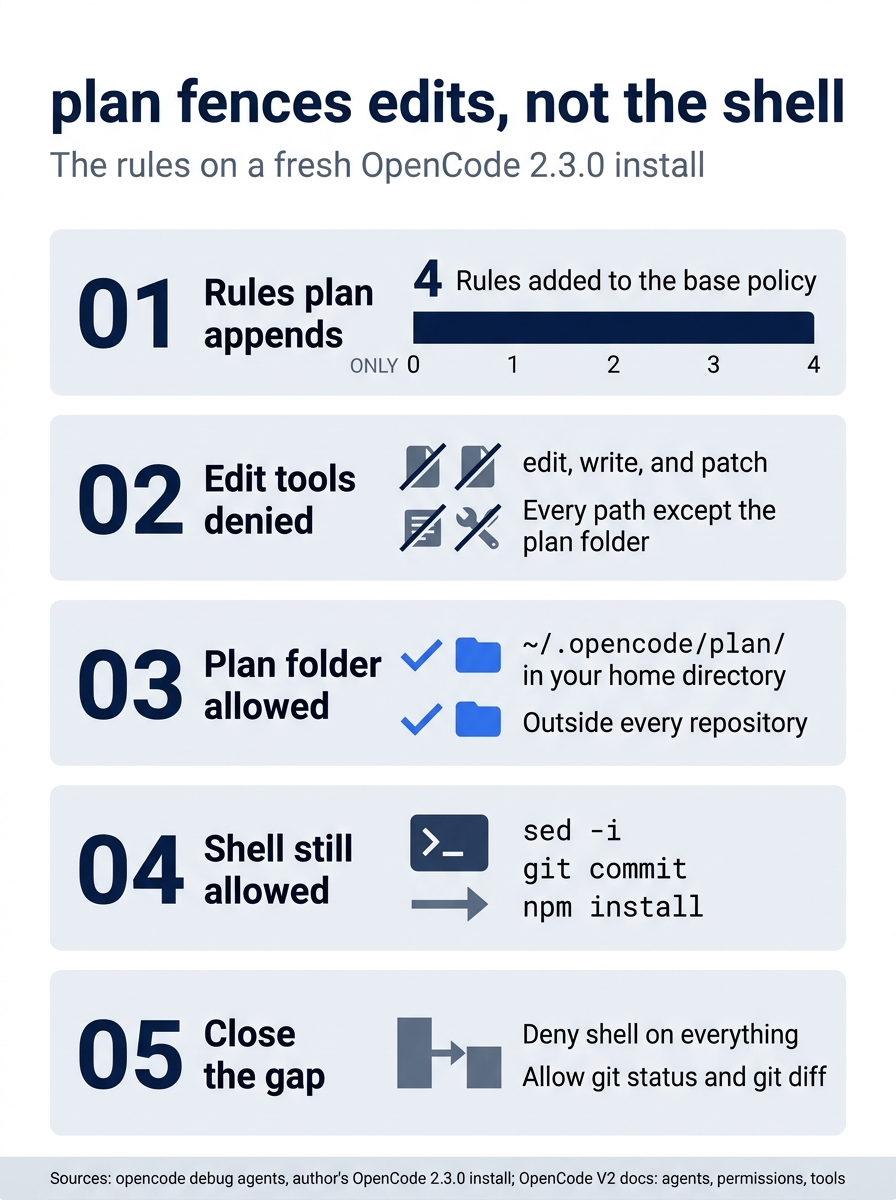
The gap is in the shell: four added rules deny the three edit tools everywhere except ~/.opencode/plan/, while sed -i, git commit, and npm install stay allowed until a shell deny closes them. Check the rules yourself with opencode debug agents: find plan, and look for the edit deny first and the plan-folder allow after it.
The edit fence itself holds. In my 2.3.0 test, a prompt in plan that asked for a one-line comment in src/classify.js through the edit tool got back Cannot use edit to modify files outside the Plan directory: ~/.opencode/plan, and git status --short stayed empty.
plan, build, and a custom planner side by side
The built-in primary agents differ by a handful of rules. A third row adds the custom planner you write later, which fixes the one cell where plan is weaker than it looks.
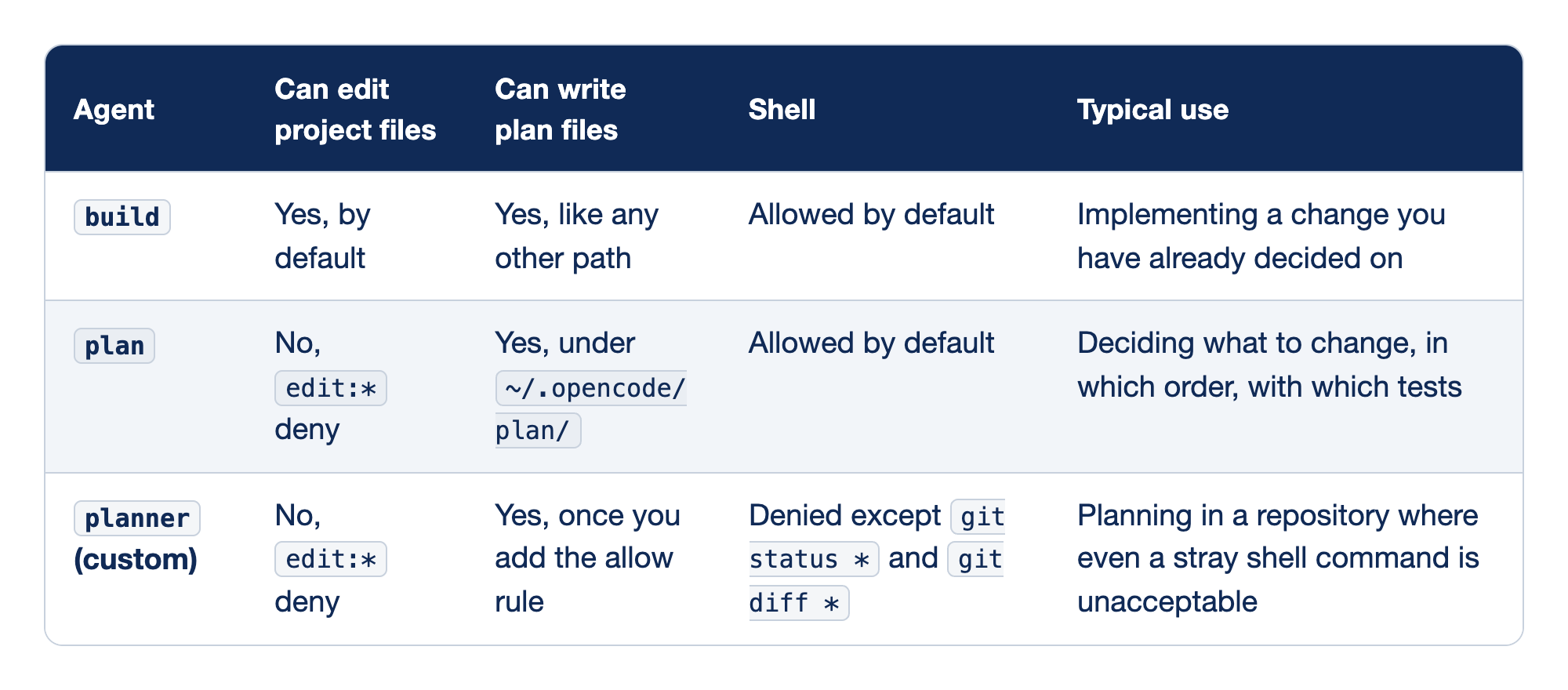
Each primary agent is compared on what its rule list permits. The Agent column names the agent, "Can edit project files" says whether edit tools reach your code, "Can write plan files" says whether it can save a plan, Shell says what happens to shell commands, and "Typical use" names the job each agent suits. Every cell comes from a rule you can read with opencode debug agents, and the model's good intentions appear nowhere in it.
buildedits project files and runs shell by default, and a plan file is just another path to it. Use it to implement a change you have already decided on.plancannot edit project files because of itsedit:*deny, can write plan files under~/.opencode/plan/, and still runs shell by default. Use it to decide what to change, in which order, with which tests.planner, the custom agent, cannot edit project files, can write plan files once you add the allow rule, and denies shell exceptgit status *andgit diff *. Use it when even a stray shell command is unacceptable.
Switching is a key, and the model stays
Shift+Tab cycles primary agents; on a fresh install that means build and plan, one press apart. <leader>a, or /agents, picks one by name, as the TUI page documents. Check which agent is selected before you send, every time. The opening failure was not a bad model; it was a prompt sent to the wrong agent.
Switching changes less than you might think. The session stores its model separately from its agent, and no built-in agent sets a model on the tested install, so plan thinks with the model build was using. Switching also keeps the conversation, so build sees the plan on its next turn.
Ask the plan agent for a plan you can check
Every line of the Start here prompt does a job. The attachments put the code in the window. "Decide the rule order" forces the one decision an agent tends to forget into writing. "Whether that test fails" makes the plan checkable before any code exists. The last line names the file, because the docs say plan "may write OpenCode plan files when asked" but set no filename convention.
The line that defines "damage" is there because a first version of the prompt left it out. In my 2.3.0 test, after Part 2's Revert, that version produced a plan for a literal "damage" keyword, because nothing in the session still said which words mean damage. A follow-up prompt in plan that named crushed, broken, and "in pieces" fixed it. Without the line that asks for one damage check between the refund and shipping checks, a second test added the three words to the existing shipping check instead.
If the model tries to edit src/classify.js anyway, the deny rule blocks it. Your plan's wording will differ; this example is illustrative, not a recorded output.
# Plan: damage rule for classify()

Rule order: refund, then damage, then shipping, then other.
Damage plus a money-back request is a refund. Damage alone is shipping.

1. Route damage alone to shipping.
   Files: test/classify.test.js, src/classify.js.
   Test: "The box showed up crushed and the mug inside is in pieces" returns "shipping".
   Fails today: it returns "other".
   Change: one damage check ("crushed", "broken", "in pieces") between the refund check and the shipping check.

2. Keep damage plus money back as a refund.
   Files: test/classify.test.js.
   Test: "The box showed up crushed and I want my money back" returns "refund".
   Passes today, because the refund check runs first. It pins the order: it fails if the damage check ever moves above the refund check.
   Change: none.

Risk: "broken" also matches tickets like "the link in your email is broken". Out of scope; note it for later.
Step 2's test passes before the fix, and the plan says why: it guards the rule order against the next agent that "tidies" the classifier.
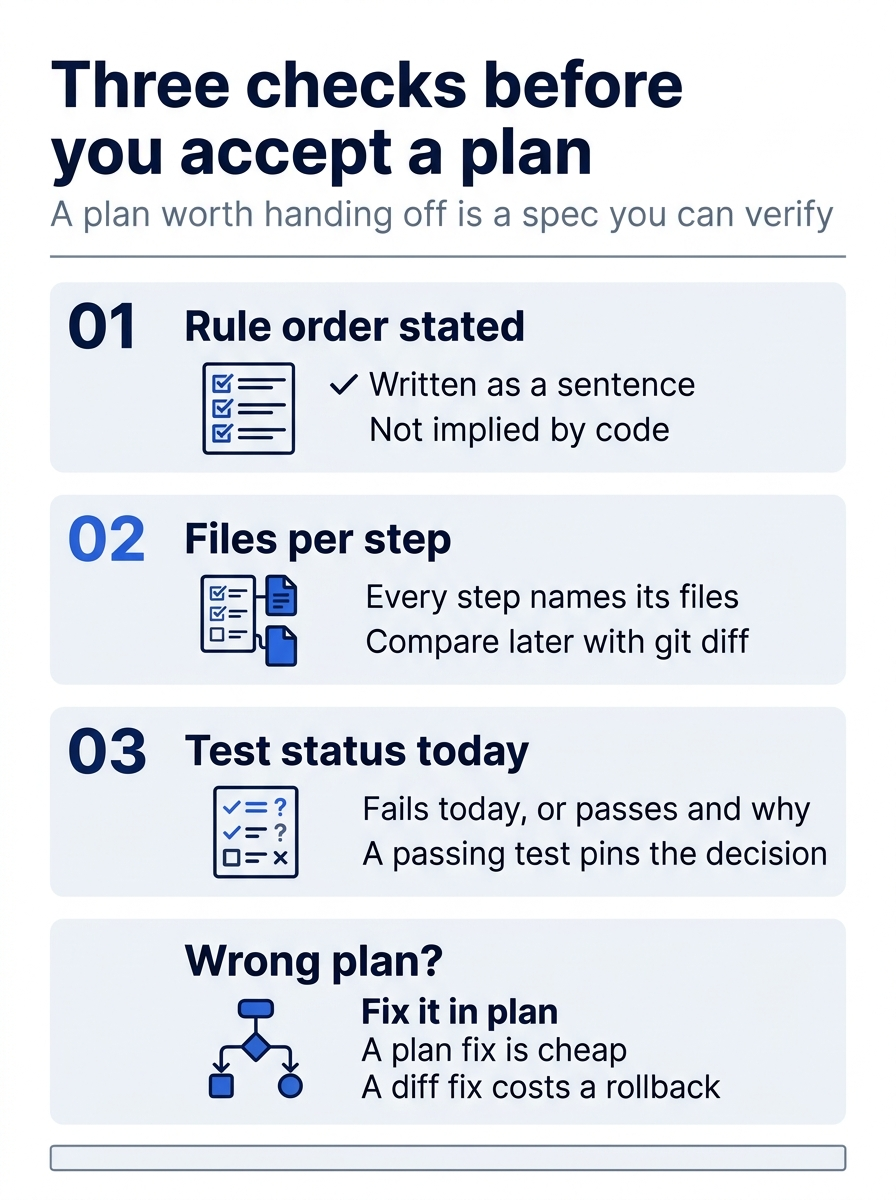
Read a plan for three things before you accept it: the rule order stated as a sentence, the files named for every step (so you can compare the eventual git diff), and what every test does today. If the plan is wrong, fix it in plan with a follow-up prompt. Corrections to a plan are cheap; corrections to a diff cost a rollback.
Plan files live in your home directory
The permissions page expands a leading ~ for edit resources, so the plan folder is in your home directory, not in the repository. Nobody else on the team can see the plan.
Gotcha: plan files live outside every repository, so copy a plan you want the team to see into the repository yourself, or paste it into the pull request description.
cd ~/code/ticket-triage
mkdir -p docs/plans
cp ~/.opencode/plan/ticket-triage-damage-rule.md docs/plans/damage-rule.md
plan could not have made this copy, because docs/plans/ is a project path. One home folder holds plans from every project, which is why the filename carries the project name. The write is also checked against the external_directory action; the shipped default allows it.
Hand the plan to build, tests first
This walkthrough uses the illustrative two-test plan above. Naming the plan file attaches exactly the text you reviewed.
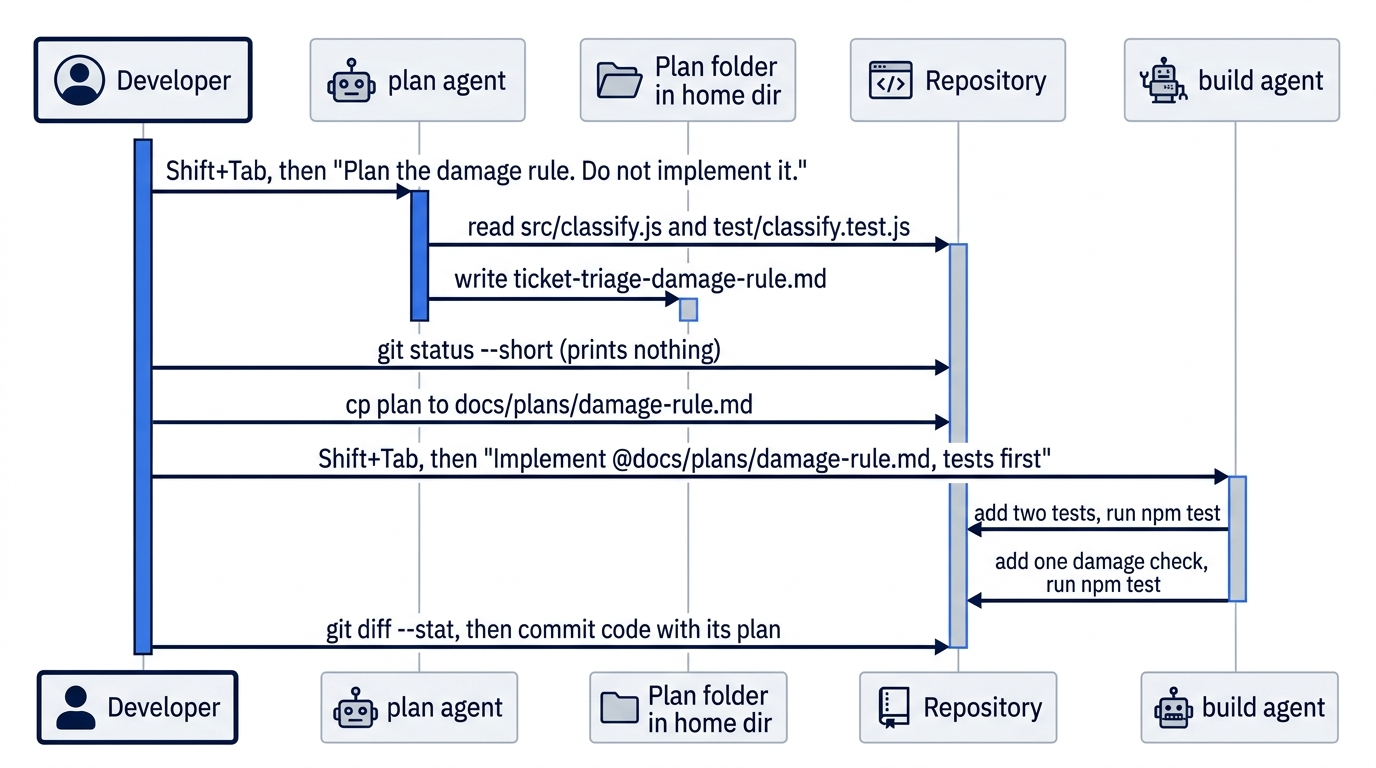
build adds the tests and runs npm test without asking, because the shipped default is allow. One correct shape for the two new tests:
// test/classify.test.js, two tests added from the plan
test("damage goes to shipping", () =>
  assert.equal(classify("The box showed up crushed and the mug inside is in pieces"), "shipping"))
test("damage with money back goes to refund", () =>
  assert.equal(classify("The box showed up crushed and I want my money back"), "refund"))
Against the unchanged classifier, Node.js 22 printed its TAP reporter through the shell tool, trimmed here to the lines that matter.
not ok 4 - damage goes to shipping
...
1..5
# tests 5
# suites 0
# pass 4
# fail 1
Four pass and one fails, and the failure is the right one: the crushed-mug ticket still lands in other. The money-back test passes, as the plan predicted. If both new tests had passed, they would not be measuring the bug. In my 2.3.0 tests, a three-test plan gave 4 passing and 2 failing, with the extra "broken" test failing for the same reason.
The plan said "one damage check," and the classifier grows by exactly one line.
// src/classify.js, after the plan
// Classifies a support ticket as refund, shipping, or other.
export function classify(text) {
  const t = text.toLowerCase()
  if (t.includes("refund") || t.includes("money back")) return "refund"
  if (t.includes("crushed") || t.includes("broken") || t.includes("in pieces")) return "shipping"
  if (t.includes("shipping") || t.includes("delivery") || t.includes("package")) return "shipping"
  return "other"
}
The damage check sits second, so a money-back request still wins. In shell mode, the 2.3.0 TUI folds 1..5 and # tests 5 into "(N earlier lines)", so on screen the summary starts at # suites.
1..5
# tests 5
# suites 0
# pass 5
# fail 0
Five of five pass. With two tests that wrap onto two lines each, the diff looks like this; a model that writes one-line tests shows fewer insertions.
 src/classify.js       | 1 +
 test/classify.test.js | 4 ++++
 2 files changed, 5 insertions(+)
shipping
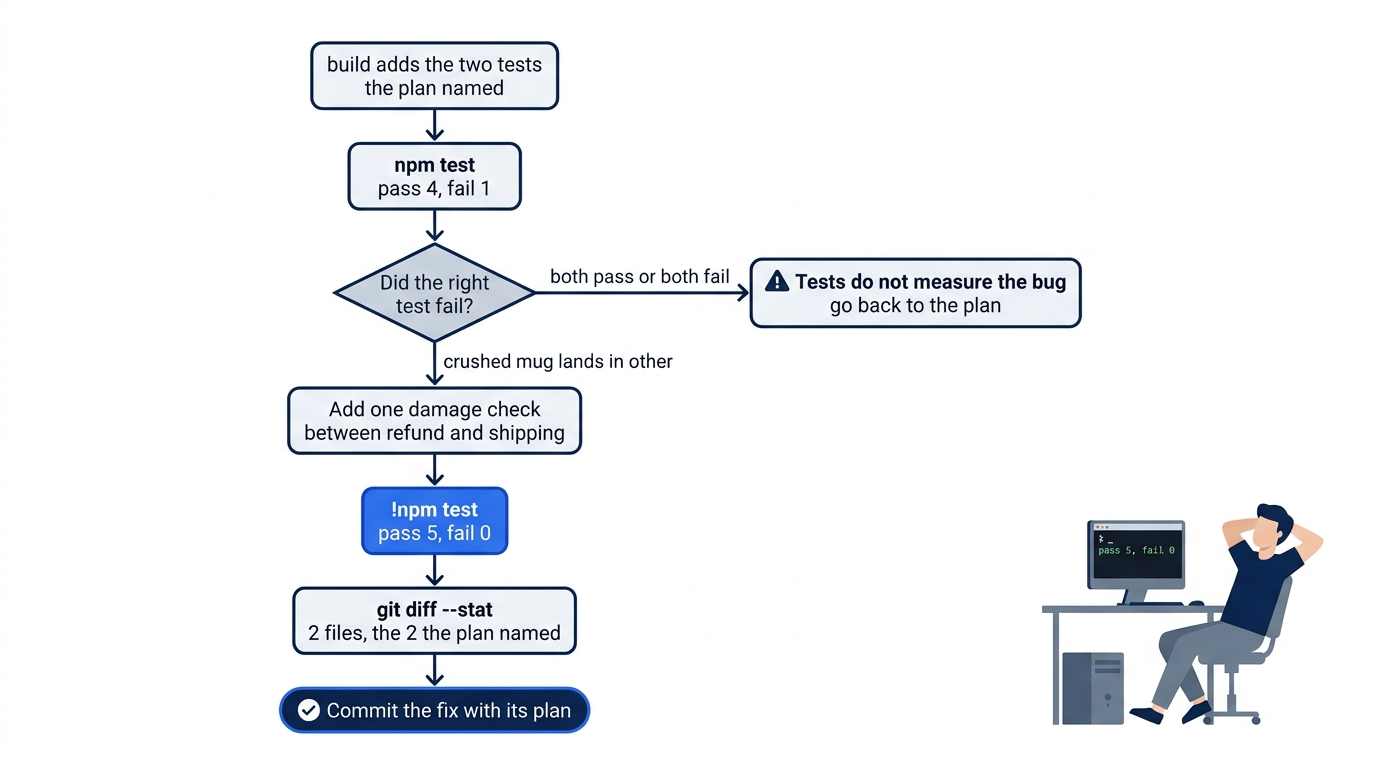
Two files changed, the two the plan named. The crushed-mug ticket prints shipping.
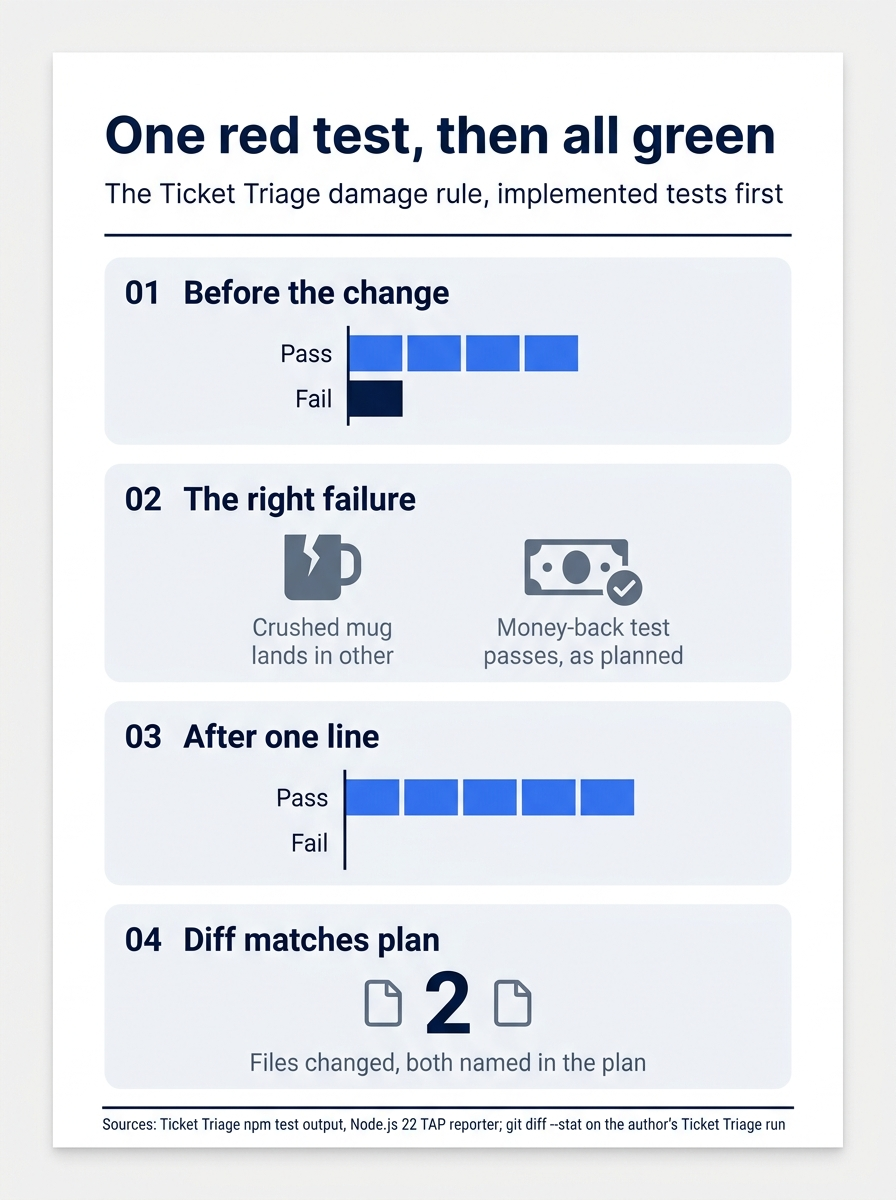
The handoff shows up in the numbers: four passing and one failing before the change, five passing and none failing after one line, and a diff of two files, both named in the plan. When the planning conversation runs long, hand off in a fresh session: <leader>n starts an empty window, and @docs/plans/damage-rule.md carries the decision without the back-and-forth.
Other ways back into a session
The ID always names one session; the other routes each have a catch. In my 2.3.0 tests, opencode run --continue took the most recently updated session, so it resumed the damage-rule session only when nothing else had run since. /sessions in the TUI, or Ctrl+X then L, lists sessions by title, not by ID. opencode run --session <id> resumed the named session and its memory, and it also moved that session to the top of the list, which changes what --continue picks next. The CLI commands page documents all three flags.
A planner that cannot run arbitrary shell
Read this section after Part 4, which teaches the permission rules it uses. When a repository has a deploy script one keystroke from disaster, fence the shell too. Custom agents are Markdown files in .opencode/agents/<name>.md; the frontmatter takes the same fields as an agents entry in config.
The frontmatter carries two fences, each a broad deny followed by narrow allows, and the body after the closing --- is the planner's system prompt.
---
description: Plans a change without editing project files or running arbitrary shell
mode: primary  # ①
permissions:
  - action: edit  # ②
    resource: "*"
    effect: deny
  - action: edit  # ③
    resource: "~/.opencode/plan/*"
    effect: allow
  - action: shell  # ④
    resource: "*"
    effect: deny
  - action: shell  # ⑤
    resource: "git status *"
    effect: allow
  - action: shell
    resource: "git diff *"
    effect: allow
---

You are the planner. Read the code. Write a numbered plan with files, risks, and a test for each step. <!-- ⑥ -->
Do not edit project files. Write plan files only under ~/.opencode/plan/ when asked.
① mode: primary makes the planner a top-level agent that you switch to, the same kind of agent as plan and build.
② The edit deny on every path is the same fence plan has, and it covers the edit, write, and patch tools alike.
③ The plan-folder allow comes after the deny, and the last match wins, so writing a plan file is the one edit the planner can make.
④ The shell deny on every command is the rule the built-in plan lacks; it blocks sed -i, git commit, and npm install in one line.
⑤ This allow and the one after it bring back git status and git diff, and a pattern ending in * also matches the bare command.
⑥ The Markdown body becomes the agent's system prompt; it asks for good behavior, while the rules above enforce it.
Note: The full extracted listing at
code/opencode/part-3-plan-agent/listings/01-planner-agent.md is the complete agent file, ready to save as .opencode/agents/planner.md.
Save it as .opencode/agents/planner.md. Everything the rules do not mention keeps the base allow, so the planner can still read, search, fetch web pages, and ask you questions.
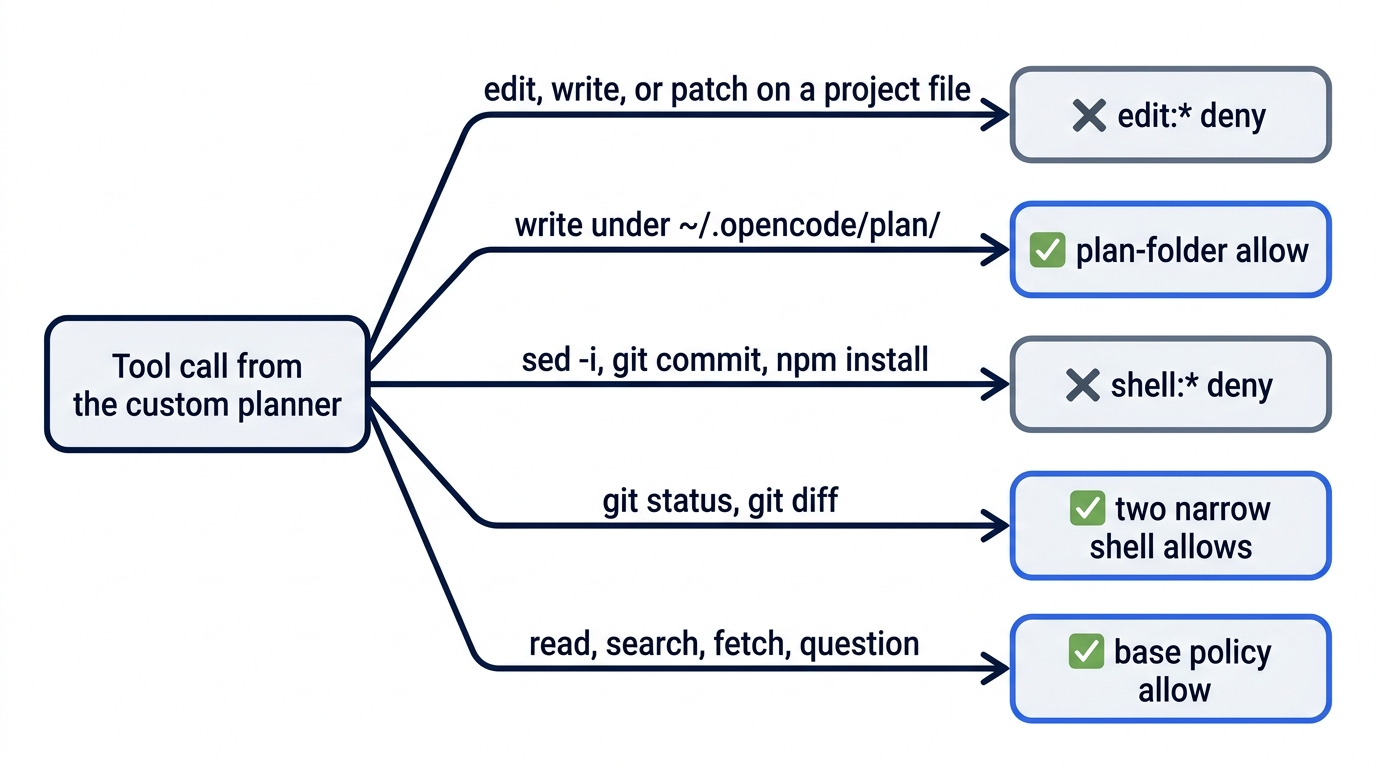
Run opencode debug agents and check that the shell deny comes before the two allows. In my 2.3.0 test, a TUI that was already running listed planner in /agents at once, with no restart and no opencode reload. Commit the file so the team plans with the same fence, and use <leader>a to pick planner by name, because Shift+Tab now cycles Plan, Planner, and Build.
The trade is honest. The planner's read-only promise covers shell as well as edits, but it cannot run npm test, so it predicts which tests fail and build does the proving.
If you learned V1: a file that uses permissions is read as V2, and V1 fields in it, such as tools, are ignored with only a log warning, as the migration guide says. Write the whole frontmatter in V2 form.
Make planning the default, or pin it to a command
default_agent chooses the primary agent for a new session; the named agent must exist, be visible, and support primary use, or OpenCode falls back to build.
{
  "$schema": "https://opencode.ai/config.json",
  "default_agent": "planner",
}
Every new session then starts read-only, and you switch to build on purpose. Alternatively, pin an agent to a command: a Markdown file in .opencode/commands/ whose frontmatter sets agent, as the commands page shows.
---
description: Plan a change without editing project files
agent: plan
---

Plan $ARGUMENTS. Write a numbered plan with files and one new test per step.
Saved as .opencode/commands/plan.md, it turns /plan the tracking-number rule into a prompt that switches to plan, then submits.
If you already use Claude Code: plan mode there is a permission mode with an approve step. In OpenCode, plan is an agent with its own rule list, and you switch to build yourself when the plan is ready.
Do this today
Everyone
- Resume by ID, plan, and land the fix. Run
opencode session list, reopen yesterday's session withopencode -s <your-session-id>, pressShift+Tabintoplan, and send the Start here plan prompt. Read the plan withcat, confirmgit status --shortprints nothing, copy it intodocs/plans/, then hand it tobuildtests first, make the change, run!npm testuntil it shows# fail 0, and commit. The finalgit status --shortprints nothing. - Start one habit: read the footer before you press
Enter. A change that needs a decision starts inPlan; a change you have already decided on goes toBuild.
If you read Going deeper
Keep a second terminal open; the steps take about twenty minutes.
- Read the fence you are relying on. Run
opencode debug agentsand find the twoeditrules onplan. - Plan one real change in
plan. PressShift+Tabuntilplanis selected, ask for a numbered plan that names files and one test per step, and give it a filename under~/.opencode/plan/. - Read the plan and prove nothing changed.
catthe plan file, confirmgit status --shortprints nothing, and copy the plan intodocs/plans/. - Hand it to
build, tests first. Ask for the tests only, run the test command, and check that at least one test fails for the reason the plan predicted. - Make it pass, and run the check yourself. Ask for the change, run your test command from shell mode, and compare
git diff --statwith the files the plan named.
A plan is only as strong as its fence
The opening failure looked like a disobedient model. It was a prompt sent to an agent whose rules allowed the edit. A sentence in a prompt is a request the model weighs on every turn; a deny rule is checked by the server before the tool runs, and the model never gets a vote.
Once planning is an agent, a plan becomes an artifact: a file that states the rule order, names the tests, and goes into Git beside the code it produced. The OpenCode plan agent fences the edit tools, a custom planner fences the shell too, and build proves the result with a test that fails first.
Stop asking the agent not to edit. Choose the agent that cannot.
This is Part 3 of "OpenCode, Day-to-Day," a 17-part guide to using OpenCode V2 as a daily, provider-neutral coding agent.