
Stop Restarting Your Coding Agent: The Ten-Minute Loop in the OpenCode TUI
Most of the cost of working with a coding agent is in correcting it, and the OpenCode TUI makes every correction cheap if you learn one small loop: steer, queue, attach one file, run the check yourself, ask on the side, and revert with a staged rollback.
Steer a running turn, attach exactly one file, run the test yourself, ask a side question for free, and throw a bad attempt away with a staged rollback, all without leaving the session.
The agent announced a rewrite you never asked for, and you froze with your finger over Enter, unsure whether pressing it would fix the turn or make it worse.
In this article: Day 2 of a 17-day guide. Start here takes you through one whole change in the OpenCode TUI on a small sample project: pick the model with
/models, attach one file with@, steer the agent while it works, queue a follow-up, runnpm testyourself with!, ask a free side question with/btw, and revert the attempt from/timelineuntilgit diffis empty. Going deeper covers what each key does according to the docs and on a tested 2.3.0 install, whyEscneeds two presses, how!output reaches the model, the keys on one card, and what an OpenCode snapshot can and cannot bring back.
Part 1 built Ticket Triage, installed OpenCode, connected Gemini 4 Hydrogen, and ran one read-only session with opencode run; today you work in OpenCode's full-screen interface instead.
Start here
By the end of today you can run one whole change through the OpenCode TUI: pick the model, attach a file, steer the agent while it works, queue a follow-up, run the tests yourself, ask a side question, and throw the attempt away until git diff is empty.
Starting fresh or fell behind? Run git switch -C main opencode/day-01. This replaces your main with the end of Day 1; to keep your own work, run git branch my-backup first.
Open the TUI on Ticket Triage
Part 1 used opencode run, which sends one prompt and prints one answer. Most days you work in the TUI instead, the full-screen terminal interface that the bare opencode command opens. Start from a clean tree, in the project folder.
cd ~/code/ticket-triage
git status --short
opencode
git status --short prints nothing. Open a second terminal in the same folder now; you use it for the git checks at the end. The TUI opens with an empty prompt box at the bottom, called the composer, where you type. Under the composer, a label names the agent and the model.
┃  Ask anything… "What is the tech stack of this project?"
┃  Build · Hy4 flash Free OpenCode
The footer under it shows the folder, the git branch, and two keys: shift+tab agents and ctrl+p commands. Build is the build agent from Part 1, the one that edits files and runs commands. The model is not the one you connected yesterday: a new TUI starts on one of OpenCode's free models. Change it before you type anything else.
Pick the model with /models
A command that starts with / is a slash command, and the TUI runs it instead of sending it to the model. Type /models and press Enter.
/models
A Select model dialog opens with a search box. Type hydrogen, and the list narrows to Gemini 4 Hydrogen. Press Enter. A second dialog, Select variant, lists Default, low, medium, high, and xhigh. Press Enter on Default, the variant this guide uses.
The label under the composer now reads Build · Gemini 4 Hydrogen Google. This guide uses google/gemini-4-hydrogen (tested on OpenCode 2.3.0 on November 16, 2026). The choice persists: the next time you start the TUI, the label still names Gemini 4 Hydrogen.
Attach exactly one file with @
Type @ in the composer, and OpenCode searches the project's files as you type. Type @src/cl, and a list of matches opens; press Tab to accept the first one, src/classify.js. Finish the prompt and press Enter.
Explain @src/classify.js in two sentences. Do not call any tool.
The transcript shows the attachment as file src/classify.js, then an answer that names the keywords of each check. The agent called no tool to find the file, because an attachment puts the file's text into your prompt. Naming the one file you mean, instead of "the classifier," keeps the agent from searching the project, and every search result would join the conversation the model reads again on each later request. Add a line range after the path, as in @src/classify.js#5-6, to attach only those lines.
Steer and queue while the agent works
Now give the agent real work. Attach the file the same way and send the damage-rule request for the crushed-mug ticket.
Add a damage rule to @src/classify.js: crushed, broken, or "in pieces" goes to shipping. Keep the refund check first.
While the agent works, the footer shows esc interrupt, and the composer still accepts input. What you type next does one of three things, depending on the key you press.
To steer, type a correction and press Enter. The correction joins the turn that is running, so the agent changes course before it finishes. Send this one as soon as the agent starts:
Keep the existing if-chain. Add one damage check between the refund check and the shipping check. Do not restructure classify().
To queue, type the next request, then press Ctrl+X and then Enter. Ctrl+X is the leader key: you press it first and then one more key, and the docs write that pair as <leader> plus the key. A queued prompt waits until the current turn ends, and the composer shows 1 queued with the prompt text.
When you are done, show me the change to src/classify.js and stop.
To stop, press Esc twice. The first Esc only shows esc again to interrupt, and the second stops the turn. Stop when the agent is going the wrong way and no one-sentence correction will fix it.
For a prompt of more than one line, press Ctrl+J to start a new line, because Enter sends.
When the turn ends, the agent summarizes what it did, and the queued prompt runs as its own turn and shows the change. Your result will differ in its details. In the tested run, the agent kept the if-chain, added the damage check between the other two, added tests, and reported that the tests passed.
Check the work yourself
A summary is the agent's claim. Two checks show what actually happened. First, open the diff viewer.
/diff
It opens beside the transcript and lists each changed file with its added and removed lines. Press q to close it.
Second, run the tests yourself. Type ! at the start of an empty composer. The label changes from Build to Shell: you are in shell mode, so the next line runs as a command in your own shell, in the project folder, instead of going to the model. Esc leaves shell mode without running anything.
!npm test
OpenCode captures the output, so Node.js prints TAP, the plain-text test format from Part 1, and the TUI folds all but the last lines.
$ npm test
(36 earlier lines)
# suites 0
# pass 5
# fail 0
Read # pass and # fail. Your counts depend on how many tests the agent added, and # fail 0 means every test passed. The output also reaches the model: OpenCode adds it to your next message, so if a test fails, your next prompt can ask for a fix, and the model already has the failure in front of it.
Ask a side question with /btw
A normal question and its answer join the conversation, and OpenCode sends them again with every later request. /btw asks without that cost.
/btw which test covers the damage line you added?
The answer uses the session's conversation so far and opens in a dialog; its footer offers copy c to copy it. Press Esc to close it. The question and the answer are not added to the conversation, so the agent will not know you asked.
Throw the attempt away from /timeline
The damage rule deserves a plan before it lands, so today's attempt goes, whatever it did. The attempt spans three of your messages: the damage-rule prompt, the correction, and the queued prompt. /undo takes back only the latest message, so go back to the first one instead.
/timeline
The Timeline dialog lists your messages, newest first. Move down to the damage-rule prompt at the bottom of the list, or press End, and press Enter. A Message Actions dialog offers Jump, Revert, Copy, and Fork. Choose Revert.
5 messages reverted
M src/classify.js -1
M test/classify.test.js -8
ctrl+x r or /redo to restore
The counts depend on your run. OpenCode restored every file the agent changed after that message and put the damage-rule prompt back in the composer. The rollback is staged: it becomes permanent when you send your next prompt, and until then /redo (or Ctrl+X, then R) brings the attempt back. Leave it staged and send nothing. If you close the TUI, the staged rollback survives, but the composer comes back empty, so keep a copy of the prompt.
Now check the files from the second terminal.
git diff --stat
git status --short
Both commands print nothing. Today's win is that empty result: the agent changed files, and you removed every change without opening an editor. src/classify.js is back to the version you committed in Part 1.
You can stop here. Going deeper explains why this works and where it breaks.
Going deeper
This section is for readers who want the documented behavior behind each key, the limits of a snapshot, and where to rebind the keys. It assumes you finished Start here in this part and in Part 1.
My TUI tests for this part ran opencode --standalone, the flag from Part 1's Going deeper that gives one command a private server, so the TUI talked to its own server instead of the shared one. The TUI client, its keys, and its dialogs are the same either way.
The finger over Enter
You resume yesterday's session on Ticket Triage, a small support-ticket classifier, and type the request you have been putting off since Part 1.
Add a damage rule to @src/classify.js: crushed, broken, or "in pieces" goes to shipping. Keep the refund check first.
The agent reads the file, then announces its plan in one cheerful line: it will restructure classify() into a table of rules so the order is "easier to maintain." You did not ask for that. You start typing a correction and stop with your finger over Enter. Will Enter send a prompt that waits until the rewrite has landed? Will Esc cancel the turn and take your half-written sentence with it? While you decide, the first edit appears in the transcript.
This opening is a scenario, not a recorded run. None of this is a model problem. The model did what an unsteered model does with a vague request. The problem is that you do not yet know the few keys that make a running session cheap to correct, and every slow correction adds another turn of noise to the context window. This article is those keys, taught as one ten-minute loop in the OpenCode TUI.
Steer, queue, or stop
While OpenCode is working, the prompt box still accepts input, and the key you press decides what happens to it. The TUI docs put it in two sentences: while OpenCode works, Enter steers the active session, and Ctrl+X then Enter queues the prompt for later.
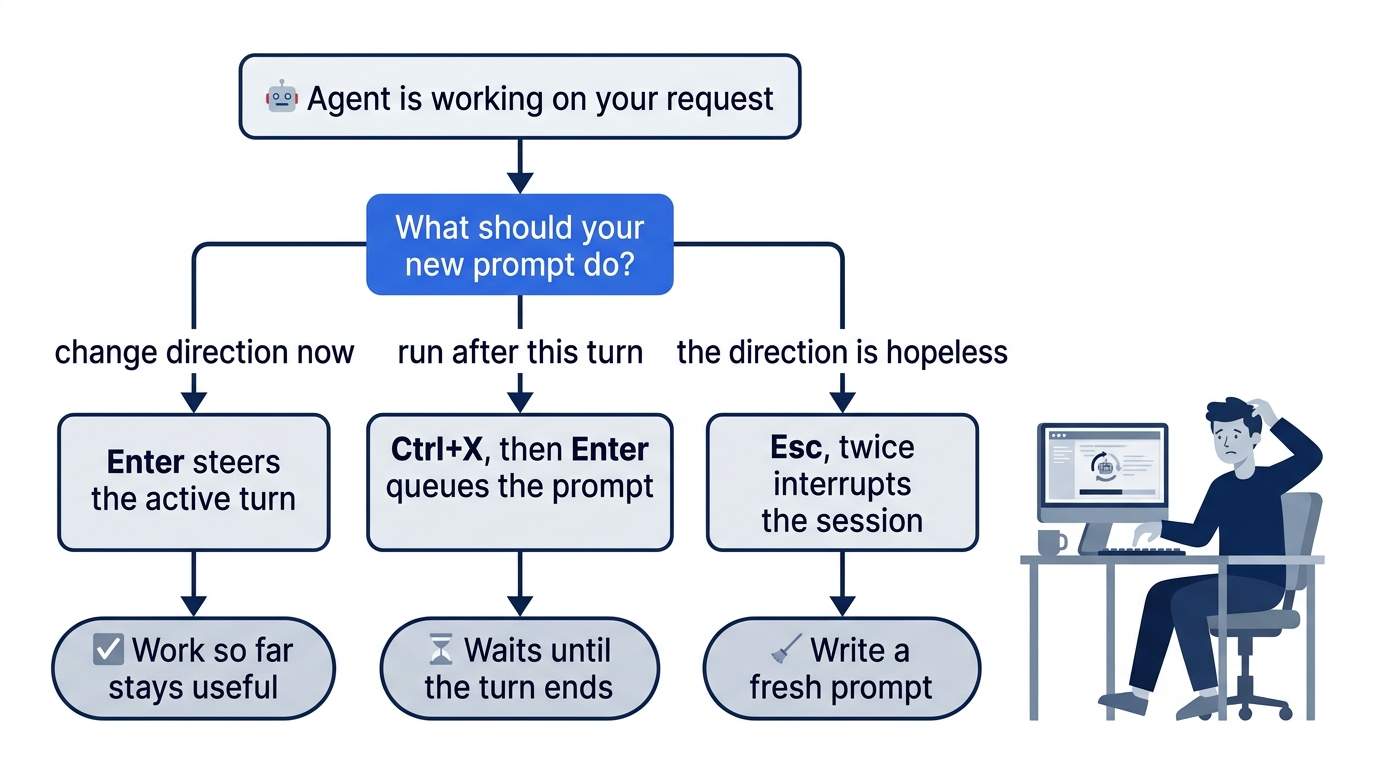
Steering is the move the opening needed. Type the correction and press Enter while the agent is still busy.
Keep the existing if-chain. Add one damage check between the refund check and the shipping check. Do not restructure classify().
The correction reaches the active session instead of waiting behind it, so the agent can change course before it finishes the rewrite. You keep your original prompt, and you do not start a second turn that argues with the first. In my 2.3.0 test, the correction joined the running turn at once, and the edits that followed kept the if-chain.
Queueing is for the request that should happen after the current one. Type it, then press Ctrl+X (the default leader key) and Enter.
When you are done, show me the change to src/classify.js and stop.
The keybinds page lists this as prompt.queue. To manage what you queued, open the command palette with Ctrl+P; the documented <leader>q for queued prompts collides with app.exit on the same page. In my 2.3.0 test, the composer showed 1 queued with the prompt text, and the queued prompt ran as its own turn after the first one ended.
Stopping is Esc, bound to session.interrupt. Use it when no one-sentence correction will save the turn. Steering is cheaper, because the work so far stays useful; interrupting is honest, because a turn heading the wrong way only gets more expensive to undo. On 2.3.0, one press is not enough: the first Esc only shows esc again to interrupt, and the second stops the turn.
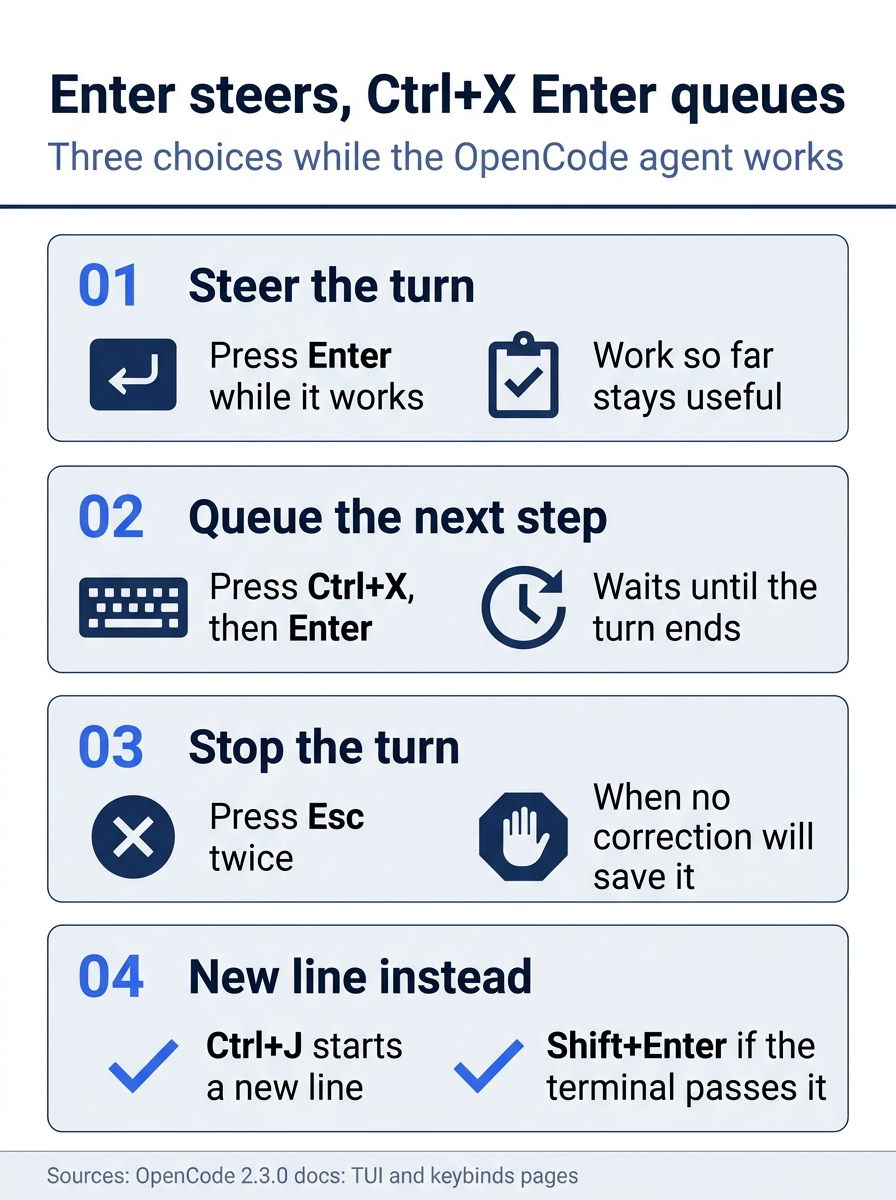
The first habit comes down to four moves. Enter steers the running turn and keeps its useful work, Ctrl+X then Enter holds a prompt until the turn ends, Esc stops a turn that cannot be saved, and Shift+Enter, Alt+Enter, or Ctrl+J add a line without sending anything. Two notes from the 2.3.0 test: Esc needs a second press, and Ctrl+J is the new-line key that was tested, because the test harness, tmux, sends Shift+Enter as a plain Enter.
Put exactly one thing in the window
The opening prompt did one thing right: it named @src/classify.js instead of saying "look at the classifier." Type @ and OpenCode searches the project's files as you type; Tab accepts the highlighted match. Add a line range to attach only those lines.
Explain @src/classify.js#1-8
Per the attachments docs, a text file arrives as its filename and decoded text inside your prompt, so the agent does not spend a read call finding it. A directory arrives as a non-recursive listing, not its contents. A range limits the text to those lines. In my 2.3.0 test, a range of #5-6 delivered exactly lines 5 and 6.
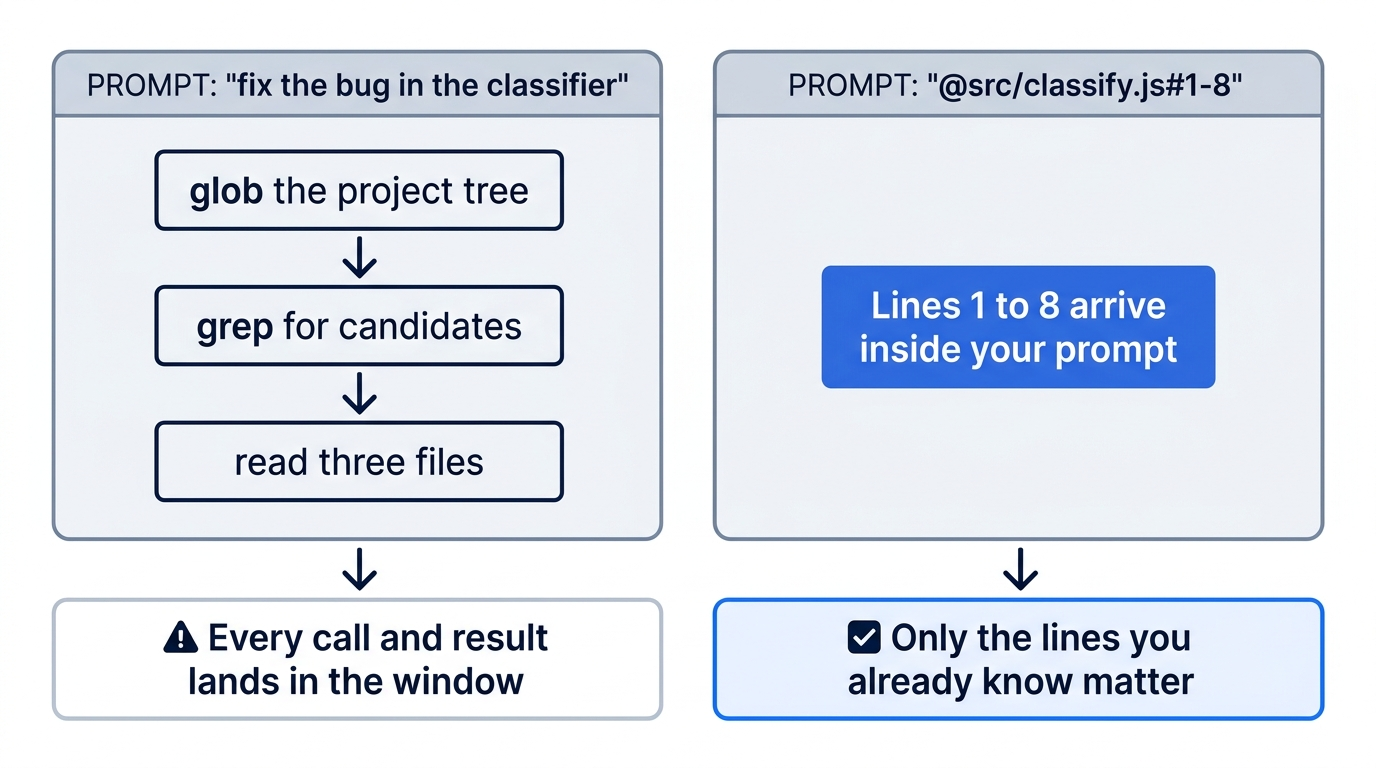
The Ticket Triage classifier is eight lines, so attaching all of it costs almost nothing. The habit pays on the day the file is eight hundred lines. "Fix the bug in the classifier" invites the agent to glob, grep, and read its way to the right function, and every call and result lands in the conversation. One @ with a range replaces all of it. Images and PDFs attach the same way, up to 20 MiB each, if the model accepts that input.
Gotcha: @ also mentions skills and agents, and an agent mention does not switch the active agent. Typing @plan leaves you in the agent you were already using.
Run the check yourself with !
Suppose the steered attempt lands like this. The agent kept the if-chain and placed the damage check correctly. It also decided that "package" was too vague a shipping keyword and quietly dropped it.
// src/classify.js, first attempt
export function classify(text) {
  const t = text.toLowerCase()
  if (t.includes("refund") || t.includes("money back")) return "refund"
  if (t.includes("crushed") || t.includes("broken") || t.includes("in pieces")) return "shipping"
  if (t.includes("shipping") || t.includes("delivery")) return "shipping"
  return "other"
}
A missing "package" is the kind of change an agent makes while "tidying," and it is invisible in a summary that says "added a damage rule." Your model's attempt will differ, which is why the next step is a command, not a reading of the reply. This attempt is an illustration, not a recorded run: in my 2.3.0 test on November 16, 2026, Gemini 4 Hydrogen kept "package", and all five tests passed.
First, look at the change with /diff, the 2.3.0 diff viewer; press d and choose Last turn to see only what the latest turn changed, as the CLI settings page describes, and press q to close it. Then type ! at the start of an empty prompt to enter shell mode and run the test.
!npm test
OpenCode captures the output in the session, so expect Node's TAP reporter; the author's 2.3.0 test run recorded TAP when the agent's own shell tool ran npm test. Trimmed, the summary shows the problem.
# tests 3
# suites 0
# pass 2
# fail 1
On 2.3.0 the TUI folds the output, so # tests hides inside a marker such as (36 earlier lines), and # pass and # fail are the first counts you see. The failing test sends "Where is my package?" to a classifier that no longer knows the word. One command told you more than the agent's summary did: "done" means a command ran.
Two cautions keep ! honest. The docs say shell output "stays in the session," but not whether the model reads it next turn. My 2.3.0 test answers it: OpenCode adds each ! command and its full output to the front of your next message, wrapped in <shell> tags, so the model reads it on the next turn; naming the failure in your next prompt still tells the model which lines matter. And ! is you running a command with your own authority, not the agent, so keep it for git status, git diff, and the test command.
Gotcha: on 2.3.0, a ! in the middle of fast-typed or pasted text can switch the composer to shell mode, and Enter then runs your sentence in the shell. Before you press Enter on a pasted prompt that contains !, check that the label reads Build. Esc leaves shell mode and keeps the text.
Switch agents and models without leaving the session
Two more dials change what reads the window without clearing it. Shift+Tab cycles agents, and /agents lists them. On a fresh install, build edits and runs commands, and plan explores and plans without editing project files. /models opens the model list, F2 cycles recent models, and Ctrl+T cycles variants. A session stores its model separately from its agent, as the agents page notes, and neither switch is a restart: you can ask plan to think, flip back to build to act, and send one hard question to a stronger model, all with the same files attached.
The loop on one card
Every key so far fits on one card.
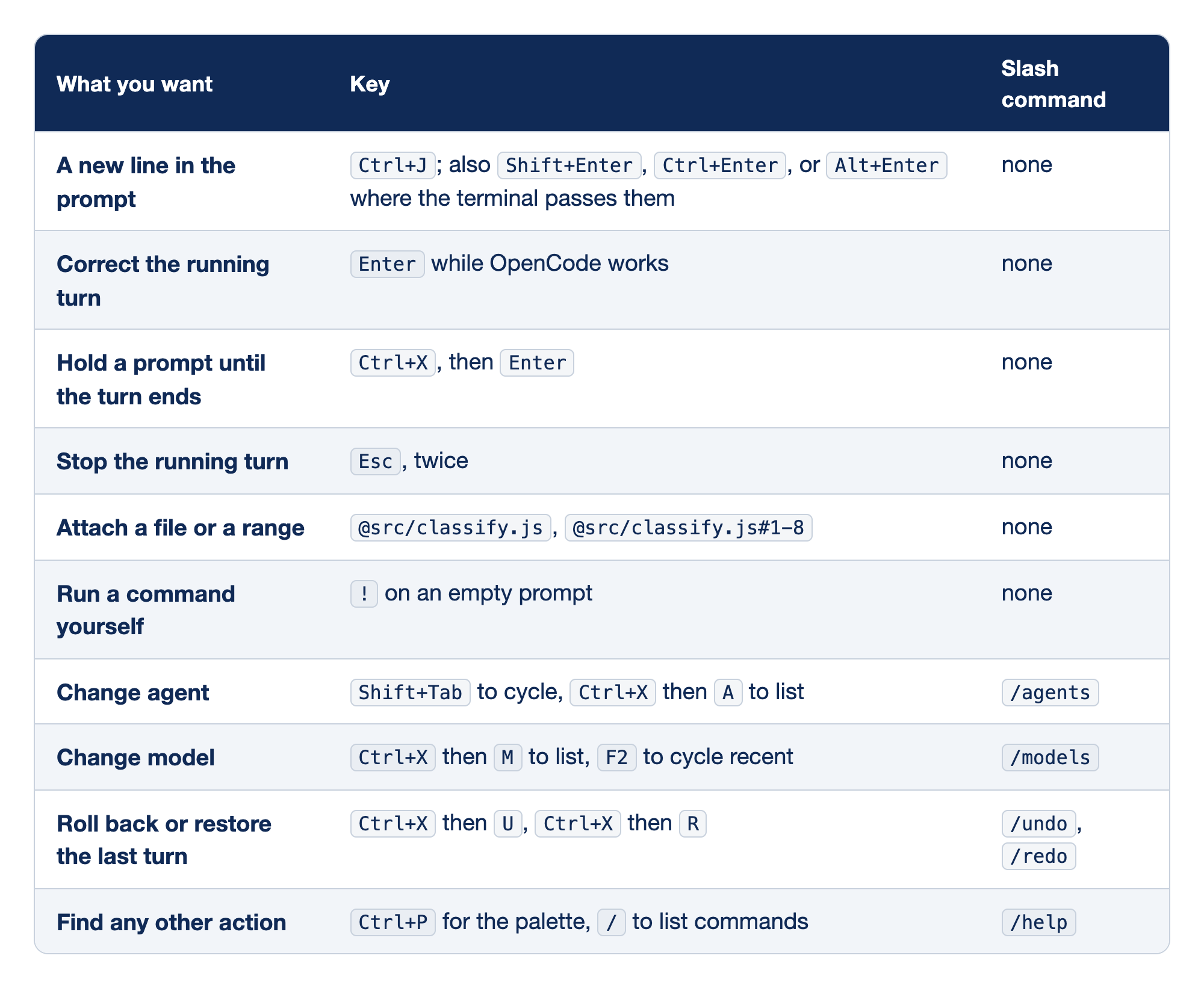
The card maps each goal of a working day to its default TUI key. The "What you want" column names the goal, the "Key" column gives the key, and the "Slash command" column gives the typed equivalent where one exists.
- A new line in the prompt takes
Shift+Enter,Ctrl+Enter,Alt+Enter, orCtrl+J; terminals disagree about modifiers, andCtrl+Jworks in most and is the one tested on 2.3.0. - Correct the running turn is
Enterwhile OpenCode works, the cheapest correction in the TUI. - Hold a prompt until the turn ends is
Ctrl+XthenEnter, which never interrupts the current step. - Stop the running turn is
Esc, pressed twice on 2.3.0, for when a correction would cost more than a fresh prompt. - Attach a file or a range is
@plus a path, with an optional#1-8range, which saves the agent a search. - Run a command yourself is
!on an empty prompt, the fastest proof in the loop. - Change agent is
Shift+Tabto cycle orCtrl+XthenAto list, or/agents. - Change model is
Ctrl+XthenMorF2, or/models; it swaps the reader, not the conversation. - Roll back or restore the last turn is
Ctrl+XthenUandCtrl+XthenR, or/undoand/redo, which act on the latest message only. - Find any other action is
Ctrl+Por/, or/help, so you never memorize a rare key.
Ask why without paying for it: /btw
The shipping test failed, and you want to know why before you throw the attempt away. A normal prompt would work, but its question and answer would ride along on every later request. /btw skips that cost.
/btw why did the shipping test fail?
Per the TUI docs, /btw asks a quick question about the conversation using the session's context and current model, and the answer is not added to the conversation, so it does not affect later prompts. The answer opens in a dialog, and the docs say C copies it; on 2.3.0 the dialog's footer reads copy c, a lowercase c. A good answer names the "package" keyword the attempt removed.
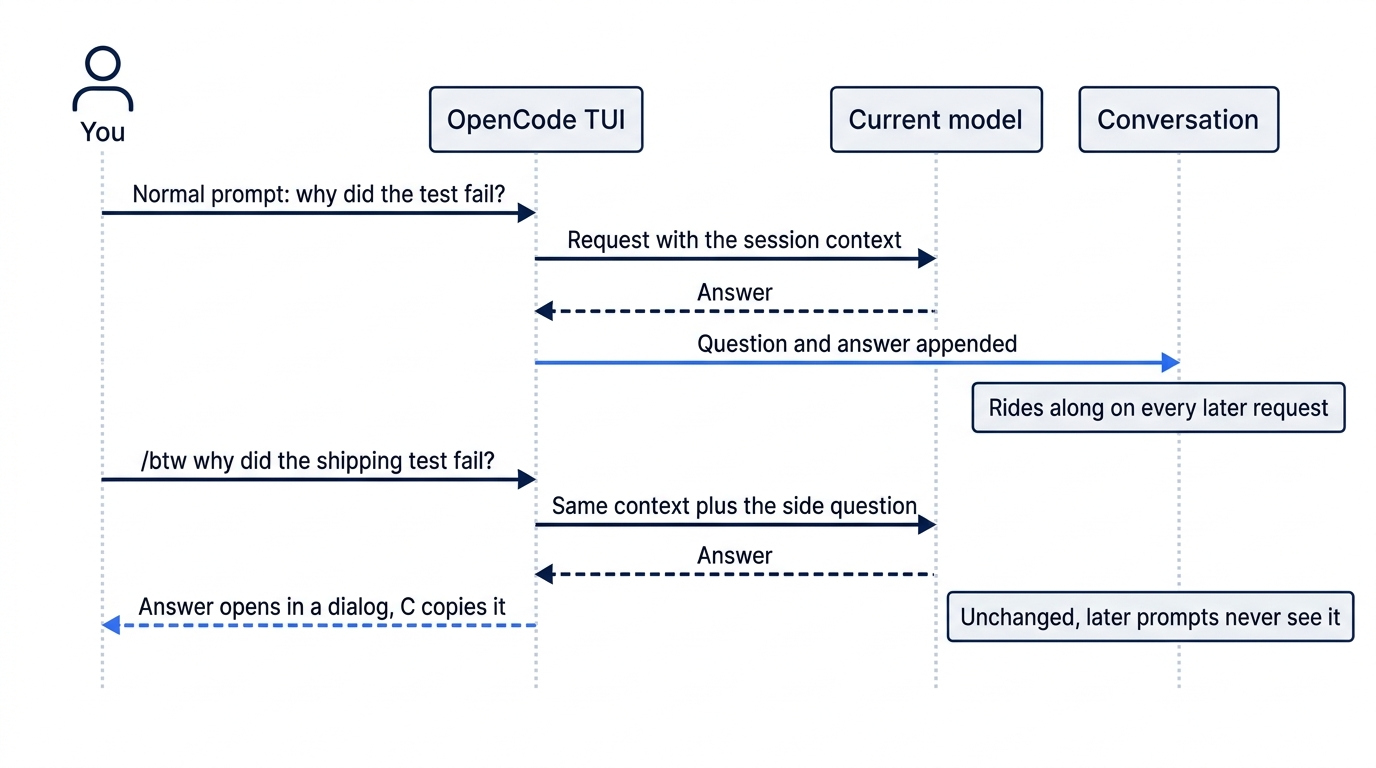
Use /btw for the questions you would ask a colleague across the desk. Do not use it for decisions you want the agent to remember: the answer never enters the conversation, so a decision reached through /btw exists only in your head until you write it into a prompt or into AGENTS.md.
Revert the whole attempt, not just the last message
You know why the attempt failed, and you do not want to fix it forward with three more turns of edits and test output built on a change you never wanted. The attempt goes.
The obvious key is /undo, but it reaches back one message: "the latest user message and the work that followed it." By now the session holds the damage-rule prompt, the steering correction, the queued prompt, and your !npm test. One /undo takes back only the last of those, which changed no files.
Go back to the message that started the attempt instead. Open /timeline ("Jump to message"), select the damage-rule prompt, and choose Revert.
/timeline
Per the snapshots docs, Revert on an earlier message stages the same rollback /undo performs, from an earlier boundary. OpenCode restores the affected files and puts the removed prompt back in the composer. "Staged" is the key word: the rollback becomes permanent only when you submit a prompt, and until then /redo cancels it.

My 2.3.0 test matched the docs: Revert printed 5 messages reverted, listed each restored file, offered ctrl+x r or /redo to restore, and put the prompt back in the composer. After a restart, the rollback was still staged, but the composer was empty, so keep a copy of the prompt if you close the TUI. The proof does not depend on the screen. Check the files from a second terminal.
cd ~/code/ticket-triage
git diff --stat
git status
git diff --stat prints nothing, and git status reports a clean working tree: src/classify.js is back to its committed version.
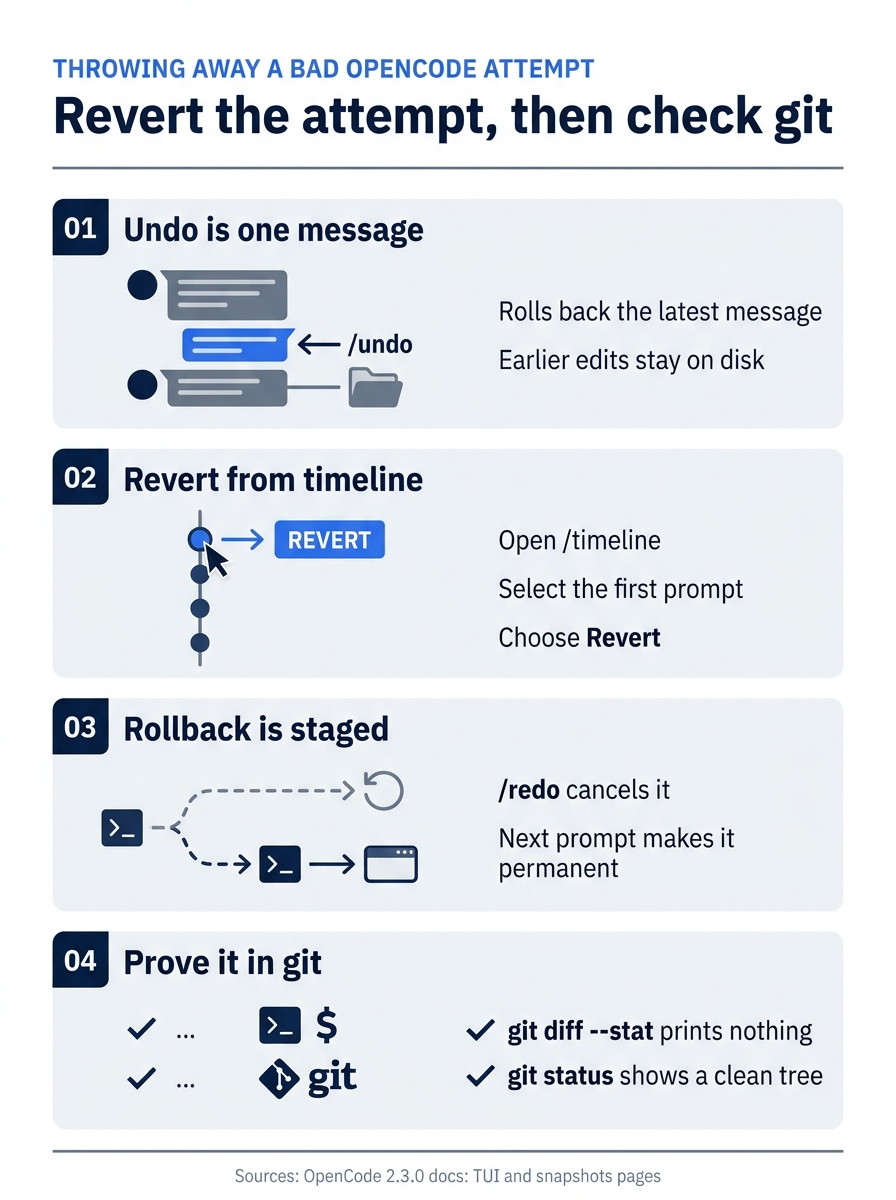
Make the rollback a routine. /undo covers only the latest message, so a multi-turn attempt is reverted from /timeline at its first prompt; the rollback stays staged, with /redo as the way out; and an empty git diff --stat plus a clean git status prove the result.
The restore is exact because OpenCode attempts a snapshot before and after each model step and records which paths each step changed. A rollback restores only those paths, each to its state before the first reverted step, and removes files those steps created.
Gotcha: a snapshot is a convenience, not a backup. If you hand-edited src/classify.js after the agent's step, a rollback can overwrite your edit along with the agent's. Commit or stash your own work first, and read git diff afterward.
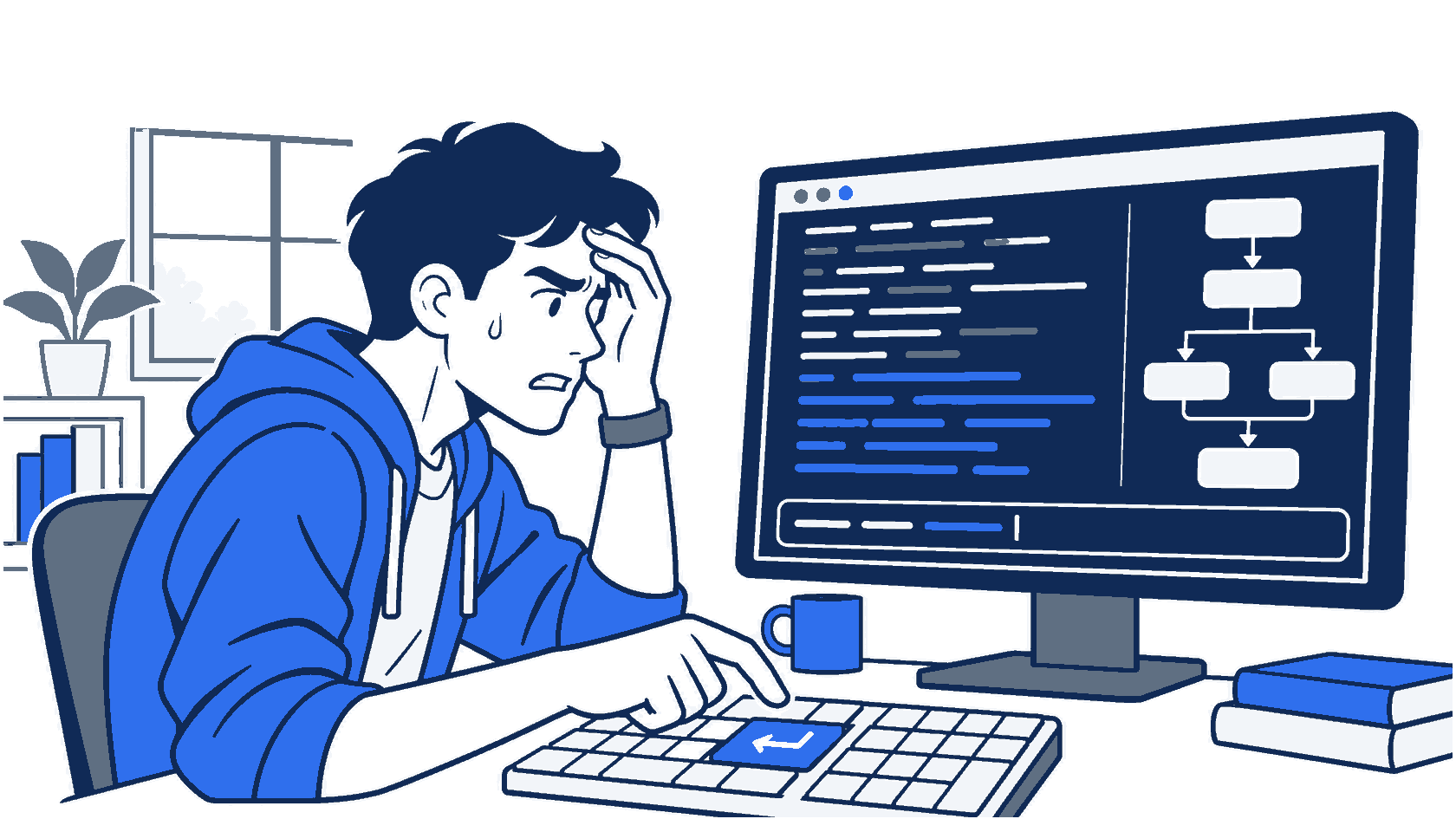
The scene returns to the opening moment: a developer frozen over Enter while the agent starts an unwanted rewrite, with the steer, queue, or stop decision on the monitor. Every key in this loop exists so that moment costs seconds instead of a ruined session.
What a snapshot covers, and what it does not
Trusting a rollback means knowing its boundary. Snapshots cover the session's active directory inside a Git worktree, and the snapshots docs draw the line file by file.
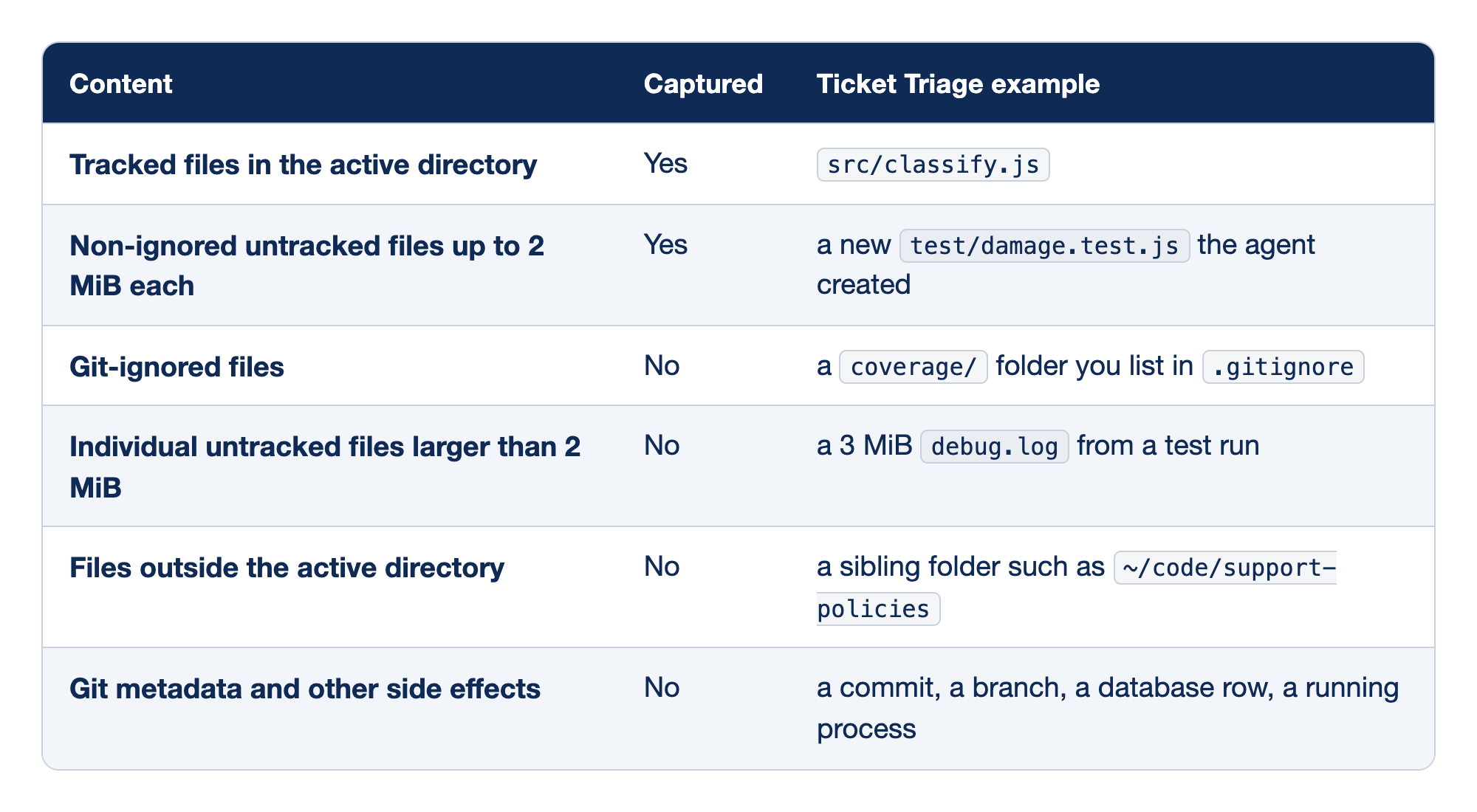
Each kind of content falls either inside the snapshot boundary or outside it. The "Content" column names the kind of change, the "Captured" column says whether a rollback can restore it, and the "Ticket Triage example" column gives a concrete case.
- Tracked files in the active directory are captured, so every agent edit to
src/classify.jsis restorable. - Non-ignored untracked files up to 2 MiB each are captured, and a rollback removes a new
test/damage.test.jsthe agent created. - Git-ignored files are not captured, so a rewritten
coverage/folder stays rewritten. - Individual untracked files larger than 2 MiB are not captured, which usually means logs such as a 3 MiB
debug.log. - Files outside the active directory are not captured, so an edit to
~/code/support-policieshas no snapshot, and the shipped permissions let the agent write there by default. - Git metadata and other side effects are not captured: on a fresh install,
buildmay rungit commitwithout asking, and no rollback takes that commit back.
The boundary is the edge of the working tree: a normal, reasonably small file in the folder you started in comes back, and nothing else does.
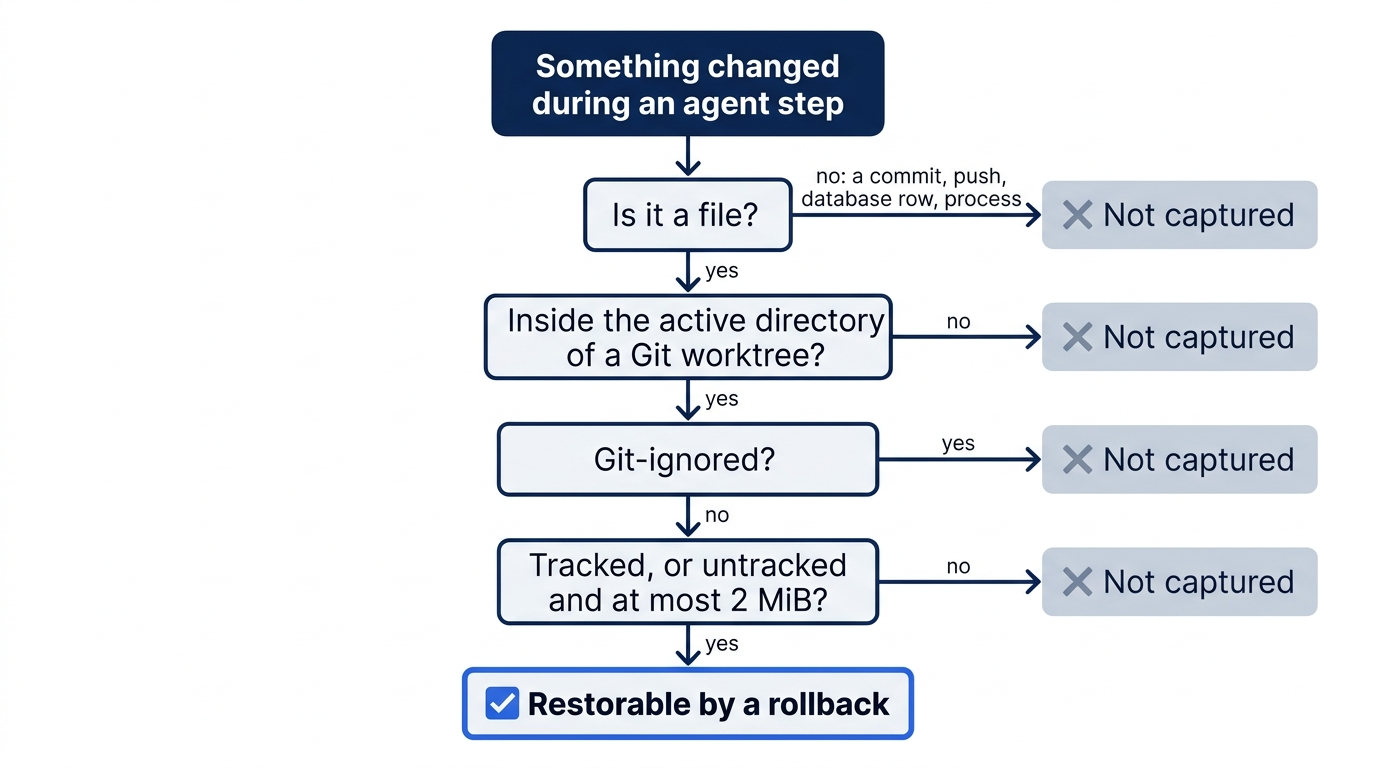
Three more limits matter. Snapshots require a Git repository; outside one, /undo rolls back only the conversation. Capture is best effort, so an interrupted step can leave changes with nothing to restore. And snapshots live in a separate internal Git object database under OpenCode's data directory, never as commits in your repository, and can hold full file contents, so treat that directory as sensitive. Snapshots are on by default; keep them on.
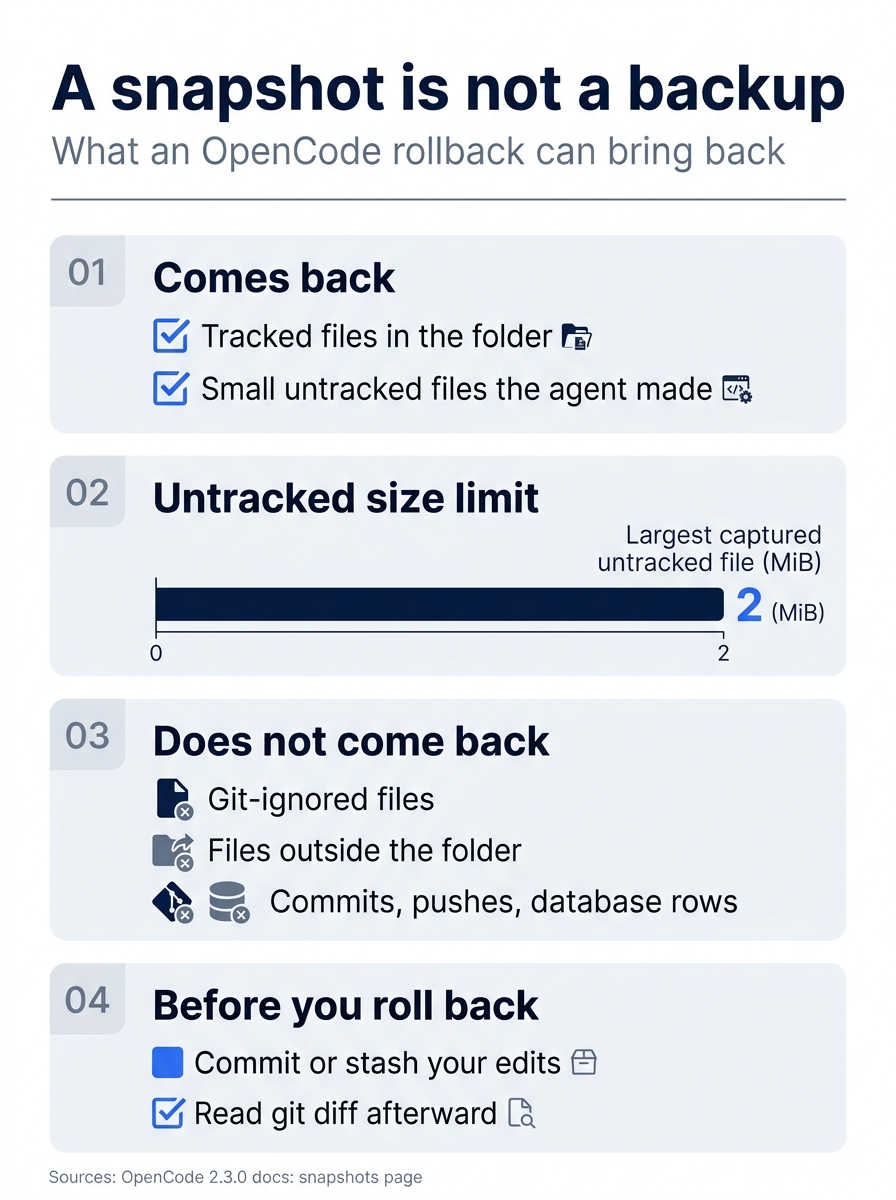
A snapshot is not a backup. Tracked files and small untracked files the agent made come back, with 2 MiB as the untracked limit; ignored files, files outside the folder, and side effects such as commits do not; and the safe habit is to commit or stash first and read git diff afterward.
Sessions and where the keys live
A session is the conversation the window is built from, so choosing one is a context decision. After a thrown-away attempt and a long test log, /new gives you the cleanest window available, and the files on disk do not change. /sessions returns to an old one, /fork branches a conversation from a message, and from the shell opencode --continue resumes the last session. Per the commands page, --session <id> opens a specific one. In my 2.3.0 tests, --continue took the most recently updated session, not necessarily the one I meant, so resume by ID: /exit prints opencode -s <id> for the active session, and opencode session list prints every ID.
/compact, "Compact session," is in the 2.3.0 TUI command list too. The compaction docs describe automatic compaction and an API route rather than the slash command.
Every key here is a default, and all of them live in one global file, ~/.config/opencode/cli.json. The side question and the diff viewer have no default key, so bind them.
{
  "$schema": "https://opencode.ai/v2/cli.json",
  "keybinds": {
    "session.aside": "<leader>k",
    "diff.open": "<leader>d"
  }
}
Valid edits reload while the TUI runs, and unknown command IDs are ignored, so keep the $schema line and let your editor catch typos.
If you learned V1: terminal settings moved from tui.json to cli.json. A keybind tutorial that edits tui.json is teaching V1.
If you already use Claude Code: Shift+Tab cycles agents in OpenCode, not permission modes; interactive Claude Code sessions start in auto mode since 2.1.283. /undo plays the role of /rewind, but OpenCode stages the rollback and commits it only when you send the next prompt. /btw behaves the same way in both tools, as a side question that never enters the conversation.
Do this today
Everyone
Work in Ticket Triage from a clean tree, with a second terminal open for the git checks. The whole loop takes about fifteen minutes.
- Pick the model. Run
/models, search forhydrogen, and pressEnteronDefault. The label readsBuild · Gemini 4 Hydrogen Google. - Steer once. Ask for the damage rule with one
@attachment, and while the agent works, pressEnteron a one-sentence correction. - Queue once. While the same turn runs, queue "show me the change and stop" with
Ctrl+X, thenEnter. - Run the check yourself. Open
/diff, then run!npm testand read the counts, not the summary. - Ask one
/btwquestion about the result, and notice that the answer does not appear in the conversation afterward. - Revert to the first prompt and prove it. Open
/timeline, select the prompt that started the attempt, choose Revert, and confirm thatgit diff --statandgit status --shortprint nothing. - Start one habit: read the counts, not the summary. Whenever the agent says the tests pass, run
!npm testyourself and read# failfirst.
If you read Going deeper
- Watch
!output reach the model. Run!git log --oneline -1, then ask "Without calling any tool, what did my last shell command print?" The answer quotes your commit line. - Resume by ID, not by recency. Type
/exit, copy theopencode -s <id>line it prints, and run it. The tabs come back with that session active. - Find what a rollback cannot restore. Run
git status --short --ignored; every!!line is outside every snapshot. - Bind the side question and the diff viewer in
cli.json, then pressCtrl+X, thenD. This step is untested on 2.3.0.
Corrections should be cheap
The developer in the opening was not stuck on a bad model. They were stuck on a keyboard: they did not know whether Enter would help, whether Esc would hurt, or how to throw away three turns of work without fixing it forward. Each question has a one-key answer in the OpenCode TUI, and together the answers make a loop you can run a dozen times a day.
Steer instead of restarting. Attach one file instead of the tree. Run the check yourself, because a summary is not proof. Ask side questions where they cost nothing, and when an attempt goes wrong, revert it from the prompt that started it and let git diff tell you it is gone.
A coding agent will make mistakes every day. Your job is to make each one cost ten seconds.
This is Part 2 of "OpenCode, Day-to-Day," a 17-part guide to using OpenCode V2 as a daily, provider-neutral coding agent.