
One Ripped Jacket, One Ordinary Day: The Cursor Agent Workflow From Casual to Elite
A finished Cursor setup is judged by an ordinary day, not a demo: four checks on the tool, one question in Ask mode, one skill, one reviewer, and a checklist you keep outside the repository, with a persona table, a fix list, a Claude Code map, and a glossary for the days that do not go to plan.
Day 18 of Cursor, Day-to-Day puts every piece of the series in order for one real ticket, then hands you a persona table, a fix list for when Cursor misbehaves, a Claude Code map, and a glossary of 118 terms.
You have installed, configured, and extended Cursor's agent for seventeen days, and now nobody is going to tell you which piece comes next. You want to know that you can run an ordinary day on your own, and what to check first when Cursor does something strange.
In this article: Day 18 of an 18-day guide, and the last. Start here runs one ordinary Ticket Triage day: check the tool and the account, ask a read-only question in Ask mode, make the change with a skill, review the commit with a subagent, and save a checklist of your own. Going deeper sorts the series into casual, pro, and elite setups with the failure each one invites, gives an eleven-step troubleshooting list, maps 17 Claude Code habits to their Cursor replacements, and closes with the full glossary.
Tested on Cursor CLI 2026.11.13-eacade1, from the Day 17 end state, November 17, 2026. Editor steps: written from the docs, not yet run.
Seventeen days of setup leave a repository with rules, a skill, a guard, a reviewer, a plugin, and a workflow. The open question on day eighteen is a quieter one: can you run an ordinary day with all of it, without a guide telling you which piece comes next?
Yesterday the agent ran headless: you read its JSON result, saw a refused step report success, and committed a workflow for GitHub Actions. Today adds nothing new. It puts the pieces in the order that keeps each step checkable, and it gives you the lookups for the days that do not go to plan.
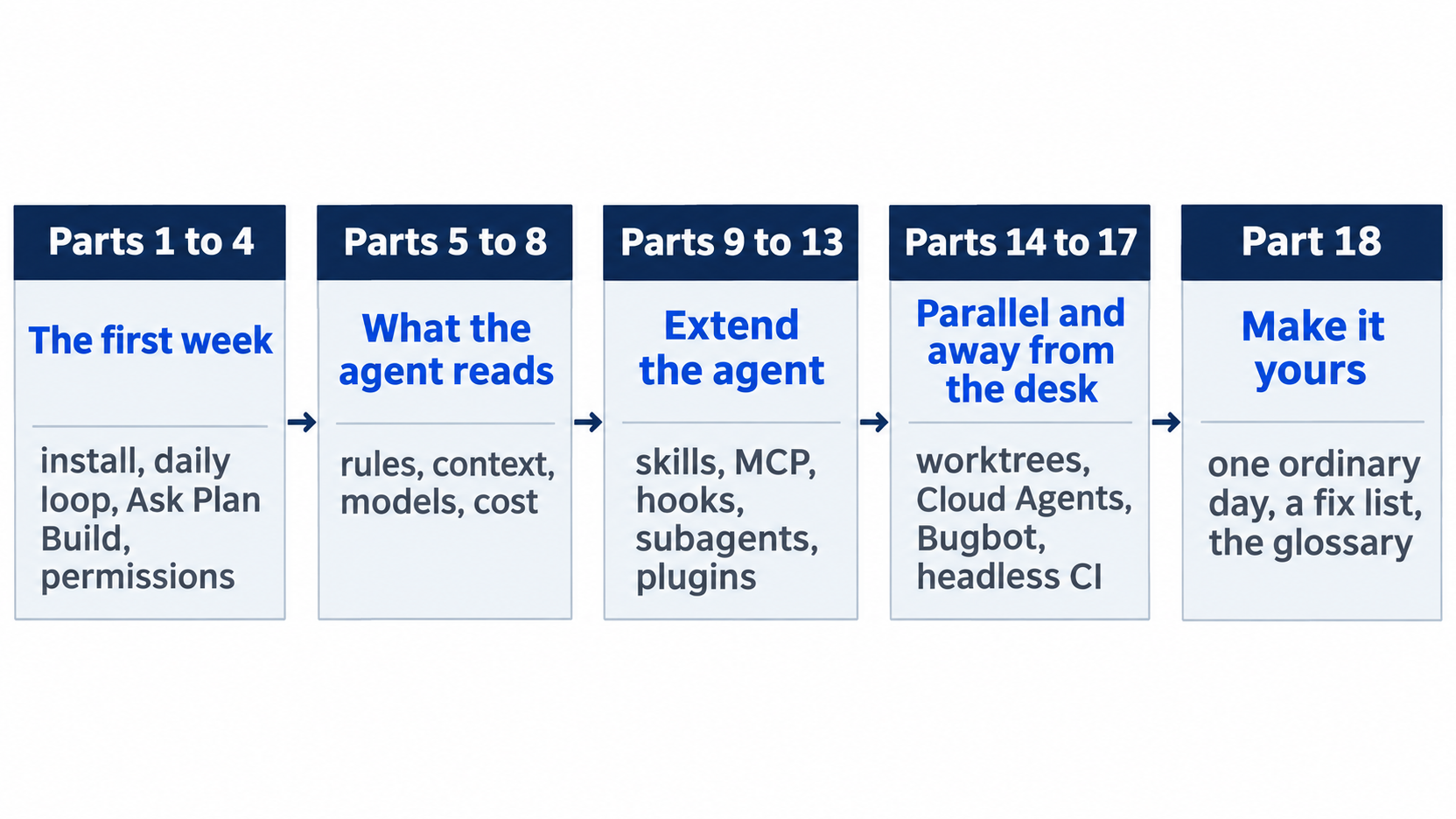
The series ran in five stretches: the first week of install, the daily loop, modes, and permissions; what the agent reads; the extensions; parallel and unattended work; and this last day, which makes the setup yours.
Start here
At the end of today, you have run one ordinary day with the tools from this series, from the morning check to a reviewed commit, and you have a checklist of your own outside the repository. Nothing today is new; it puts the pieces in order.
Starting fresh or fell behind? Run git switch -C main cursor/day-17. This replaces your main with the end of Day 17; to keep your own work, run git branch my-backup first.
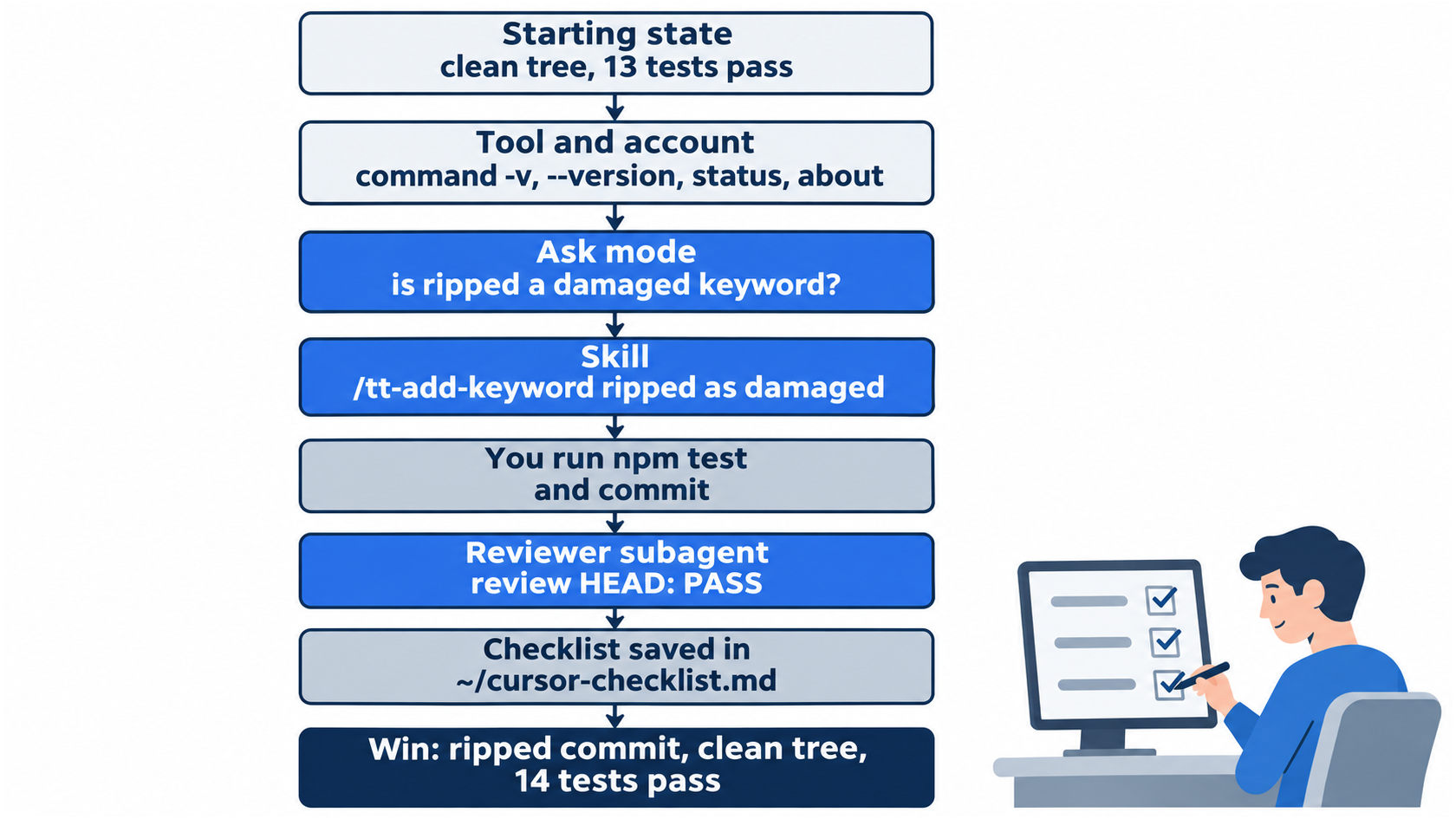
Green steps are checks you run yourself, and blue steps are the agent's work. The day alternates between them on purpose: every agent step is followed by something you can verify.
Check your starting state
Start where Day 17 ended. Run three checks in ~/code/ticket-triage.
cd ~/code/ticket-triage
git status --short
git log --oneline -1
npm test
git status --short prints nothing, the last commit is Add the tt-agent-check workflow, and npm test ends with ℹ pass 13 and ℹ fail 0.
Check the tool, then the account
Before a day's work, spend ten seconds on the tool itself. These four commands answer the questions behind most surprises: which program runs, which version, who is signed in, and which model and plan you have.
command -v cursor-agent
cursor-agent --version
cursor-agent status
cursor-agent about
In testing, the first printed the path ending in .local/bin/cursor-agent, the second 2026.11.13-eacade1, the third ✓ Logged in as and the account's email, and the fourth a table that included:
CLI Version         2026.11.13-eacade1
Latest              2026.11.17-f532c45 (update available — run `agent update`)
Model               Auto
Subscription Tier   Ultra
Your plan name and versions will differ. When Latest is newer than CLI Version, a new version is out. The CLI also updates itself in the background unless you start it with --disable-auto-update; in this guide's tests, it updated during a session that left the flag out. Check that Model says what you expect; Day 7 showed that --model and /model change the saved default.
Ask before you change anything
The day's ticket is "The jacket arrived ripped." Ask first, in Ask mode, with the plugin loaded, so that you learn the code before you touch it, as on Day 3.
cursor-agent --mode=ask --plugin-dir plugins/tt-triage-kit
Which keywords make classify() return damaged, and is ripped one of them?
The agent searches the code and lists the damaged keywords, then answers that ripped is not one of them. The footer shows Ask (shift+tab to cycle). Type /quit.
Allowlist: no prompts. Auto-review: not tested; Ask mode makes no edits and runs no commands that need approval.
A change you already know the shape of, such as one keyword and its test, does not need a plan. For a change whose shape you do not know yet, use Plan mode before you build, as on Day 3. Asking first costs one question and no edits, and it tells you which kind of change you have.
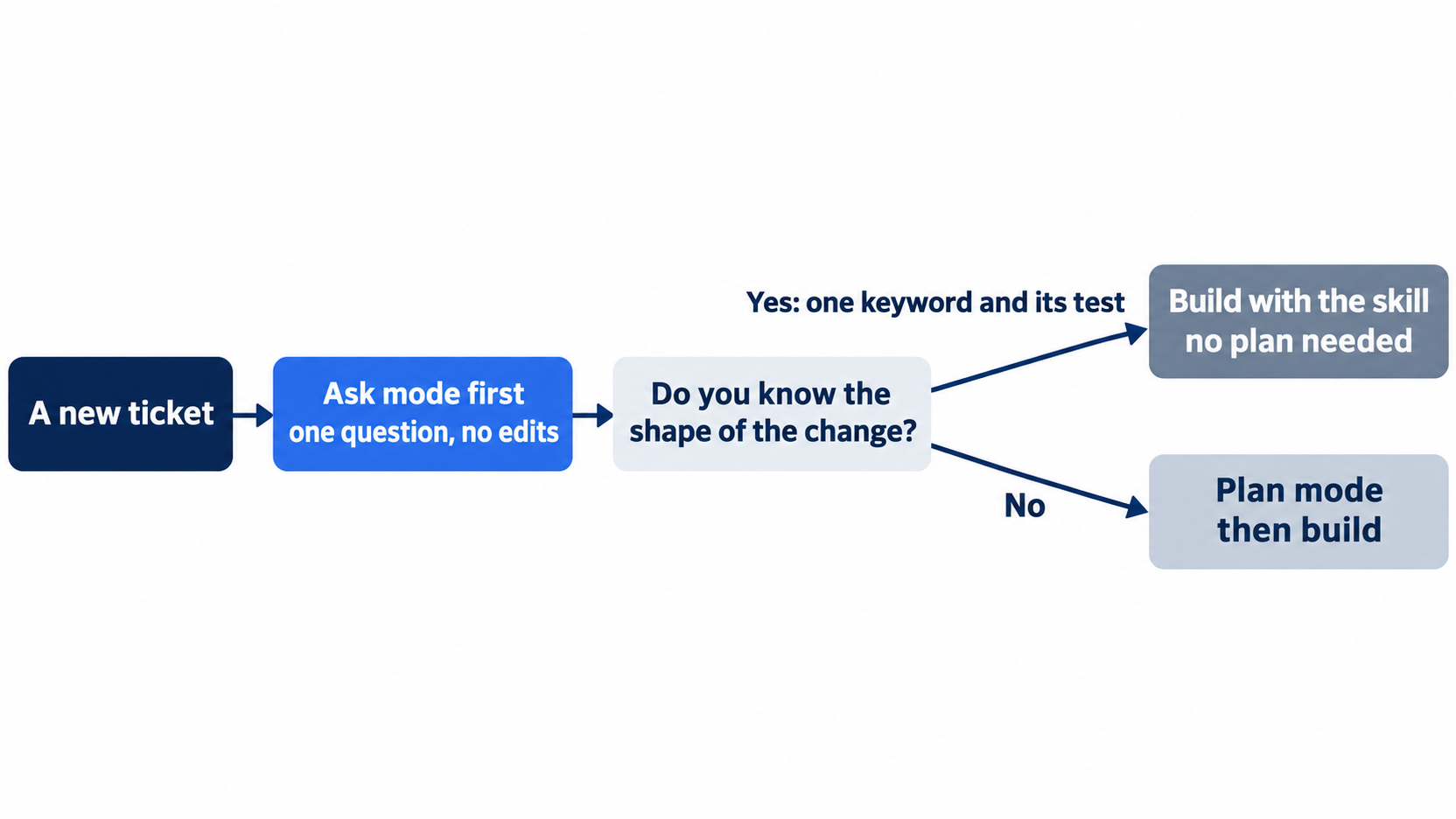
The decision is one question long. The Ask-mode answer tells you whether the change is a known shape, and only an unknown shape earns a plan.
Make the change with the skill
Start a session with the plugin and run the skill from Day 9.
cursor-agent --plugin-dir plugins/tt-triage-kit
/tt-add-keyword ripped as damaged
The agent edits both files and reports, in testing, "14 passed, 0 failed." Type /quit. Check and commit:
npm test
git add -A
git commit -m "Add ripped to the damaged keywords"
Allowlist: no prompts. Auto-review: not tested today; the same step ran with no prompts in Auto-review on Day 13.
Review the commit
Run the reviewer from Day 12 on the commit you just made.
cursor-agent --plugin-dir plugins/tt-triage-kit
/subagent-tt
Press Enter on /subagent-tt-reviewer and finish the line:
Use the Task tool with subagent_type="tt-reviewer" to: review HEAD
In testing, the report said PASS and that HEAD adds ripped with a matching test. Type /quit.
Allowlist: in testing, the reviewer asked once to run a git command; choose Run (once).
Auto-review: not tested today; the reviewer ran with no prompts in Auto-review on Day 12.
Write your own checklist
Save the day as a checklist in your home folder, outside the repository, so it goes with you to other projects. Change the lines to fit how you work.
cat > ~/cursor-checklist.md <<'EOF'
# My Cursor day

1. `git status --short` and `npm test` before I start.
2. Start with `--plugin-dir <path to my plugin>` when I need the skill or the reviewer (in Ticket Triage, `plugins/tt-triage-kit`).
3. Ask first. Plan before a change whose shape I do not know yet.
4. Run the reviewer on each keyword commit.
5. Something odd: `cursor-agent --version`, `cursor-agent status`, `cursor-agent about`, then `/logs`.
EOF
/logs, typed in a session, prints the path of the session's debug log and copies it to your clipboard. It is the file to attach when you ask for help.
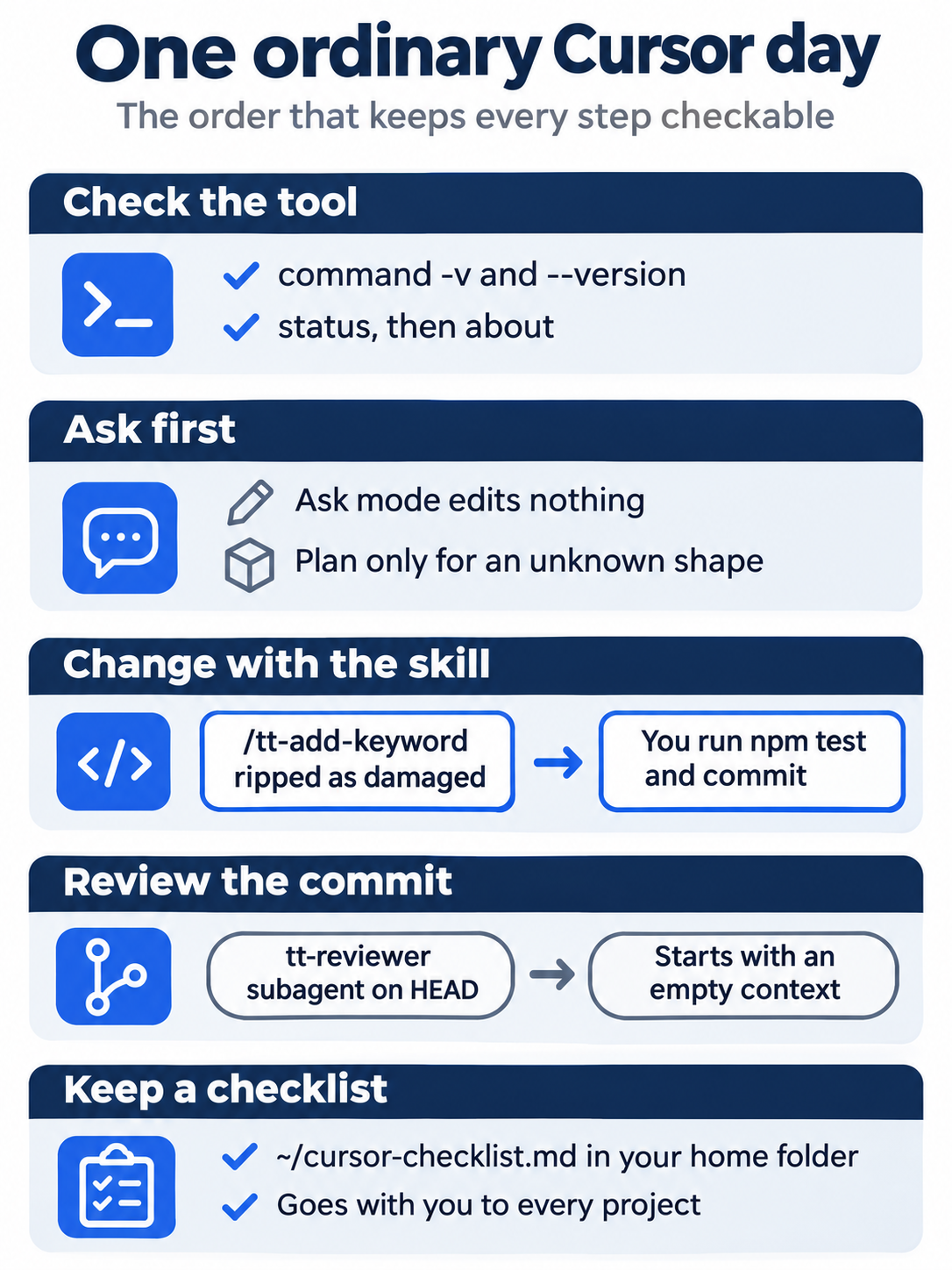
The whole day comes down to four tool checks, one read-only question, one skill, one review, and a checklist that lives in your home folder rather than in any one project.
The same steps in the editor
The editor runs the same day through the Agent panel. The steps change the repository, so do them in the CLI or the editor, not both. Every step here is written from the docs, not yet run.
- (written from the docs, not yet run) Copy the plugin so the editor can load it:
mkdir -p ~/.cursor/plugins/local && cp -R plugins/tt-triage-kit ~/.cursor/plugins/local/, then Developer: Reload Window from the Command Palette. - (written from the docs, not yet run) Switch the mode picker to Ask and send the
rippedquestion. - (written from the docs, not yet run) Switch to Agent and send
/tt-add-keyword ripped as damaged. Runnpm testand commit in the terminal. - (written from the docs, not yet run) Send
Use the tt-reviewer subagent to review HEAD.and read the report. - (written from the docs, not yet run) Remove the copy:
rm -r ~/.cursor/plugins/local/tt-triage-kit.
Your win
Run the check now.
git log --oneline -2
git status --short
npm test
ls ~/cursor-checklist.md
git log --oneline -2 shows Add ripped to the damaged keywords above Add the tt-agent-check workflow, git status --short prints nothing, npm test shows ℹ pass 14, and ls finds your checklist. You ran a whole day with the tools from eighteen parts, in the order that keeps each step checkable.

The scene is the end of the series in one picture: an ordinary ticket closed, fourteen tests passing, and a checklist that is yours.
You can stop here. Going deeper explains why this works and where it breaks.
Going deeper
This section is for readers who want a setup that fits how they work, a troubleshooting list, the Claude Code map, and the glossary. It assumes you finished Start here in Parts 1 to 18.
Three ways to work
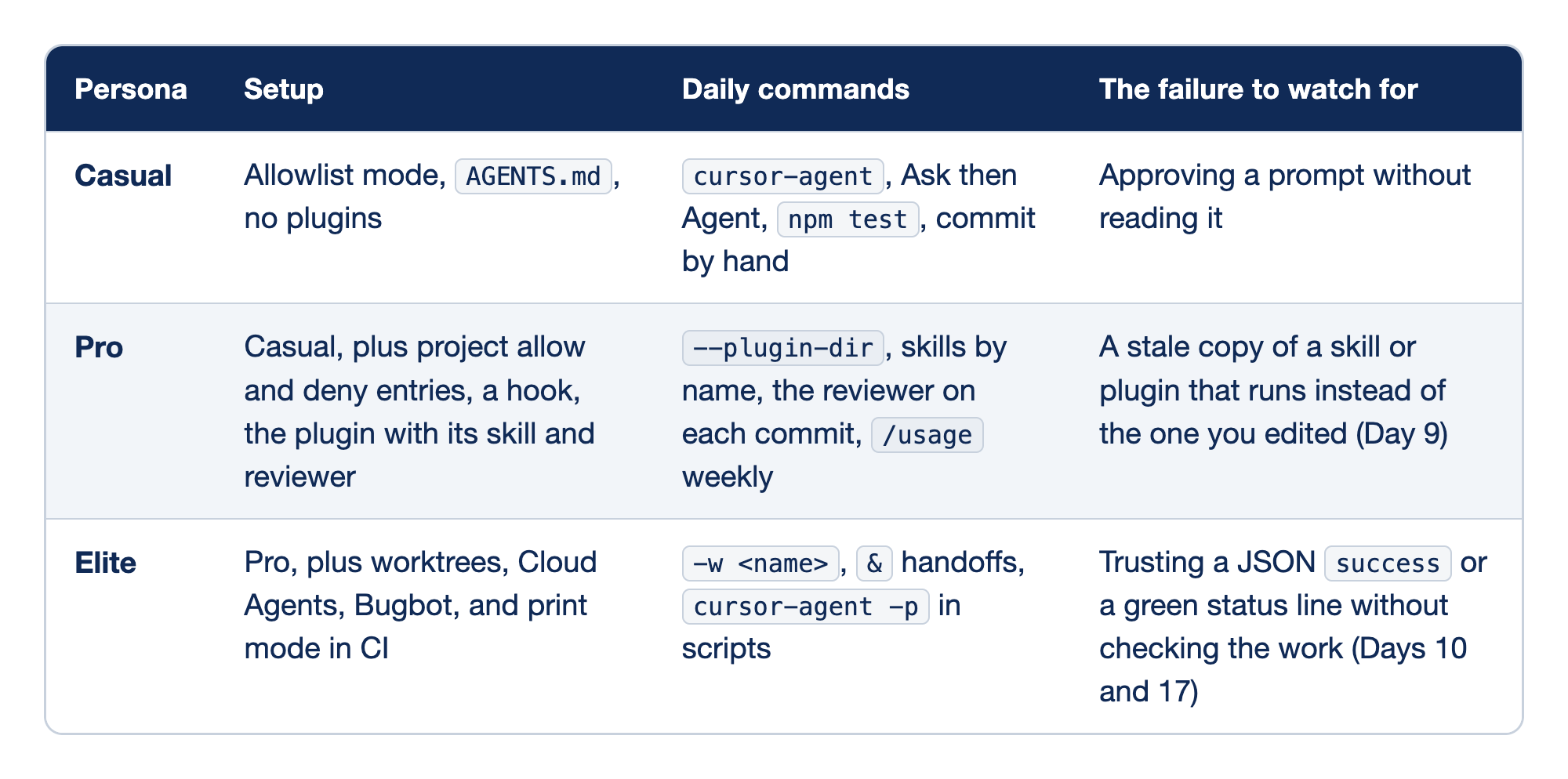
Each Cursor persona is described by four columns. The Persona column names the level, the Setup column holds what the level adds to the repository and your config, the Daily commands column holds what you type on an ordinary day, and the column for the failure to watch for names the way that level most often goes wrong. Each persona adds tools to the one before it and has its own way to fail.
- Casual is Days 1 to 5: allowlist mode, an
AGENTS.md, and no plugins, driven bycursor-agent, Ask then Agent,npm test, and a commit by hand. Its risk is a habit, not a tool: approving a prompt without reading it, so reading every prompt is the protection. The ranges overlap on purpose: Days 4 and 5 belong to both the casual and the pro setup. - Pro is Days 4 to 13: the casual setup plus project allow and deny entries, a hook, and the plugin with its skill and reviewer, used through
--plugin-dir, skills by name, the reviewer on each commit, and/usageonce a week. Its risk comes from copies: Day 9 showed that two files with one skill name can run differently, so keep one real folder per skill. - Elite is Days 14 to 17: the pro setup plus worktrees, Cloud Agents, Bugbot, and print mode in CI, used through
-w <name>,&handoffs, andcursor-agent -pin scripts. Its risk is unattended work: a refused step in print mode still sayssuccess, so every automated step needs a check of its own.
Most people move between the rows by project. Pick the row for the project in front of you, not for yourself.
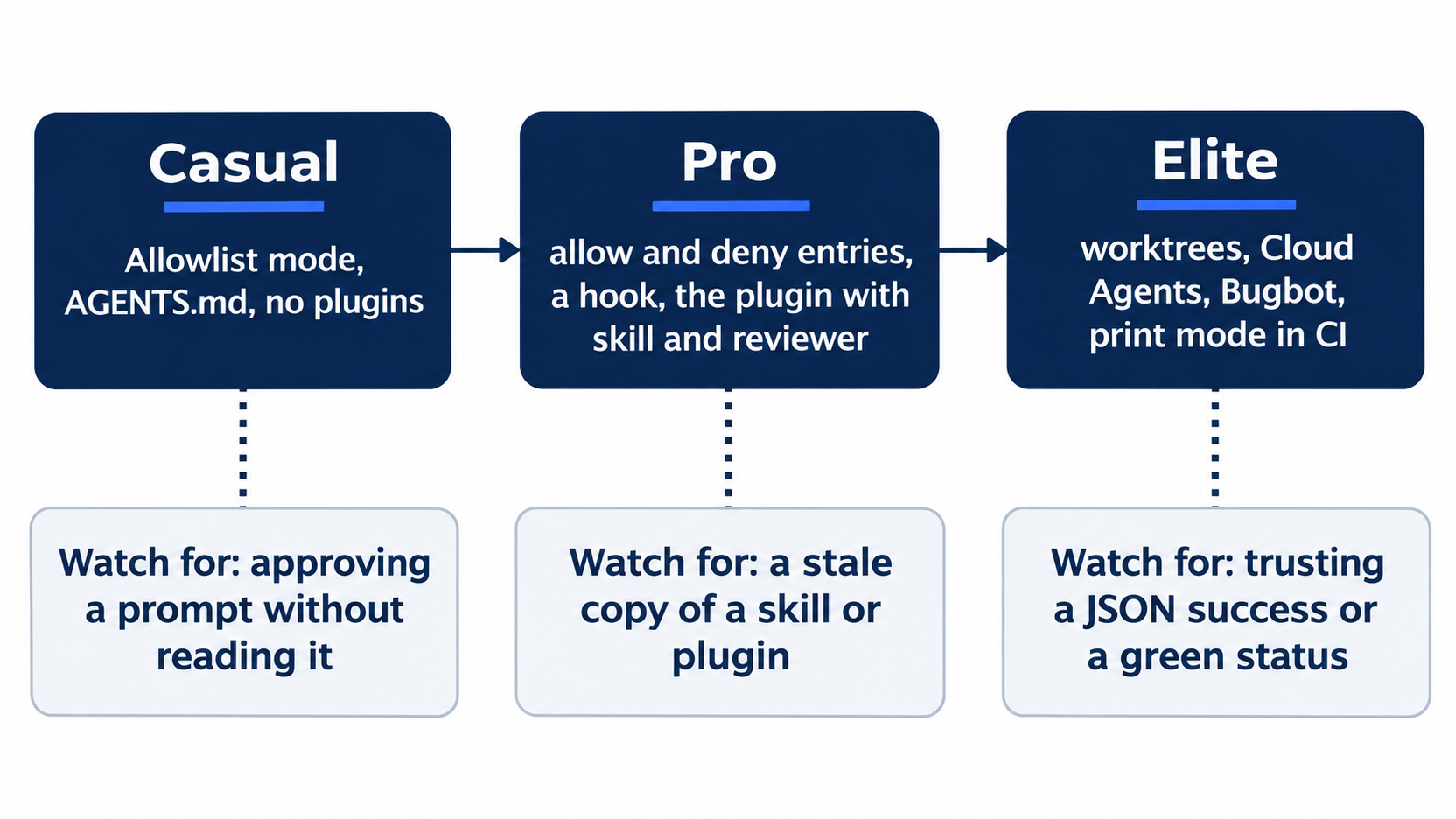
The ladder reads left to right, and each failure sits under the level that invites it. None of the three failures is a missing feature; each is a check that someone skipped.
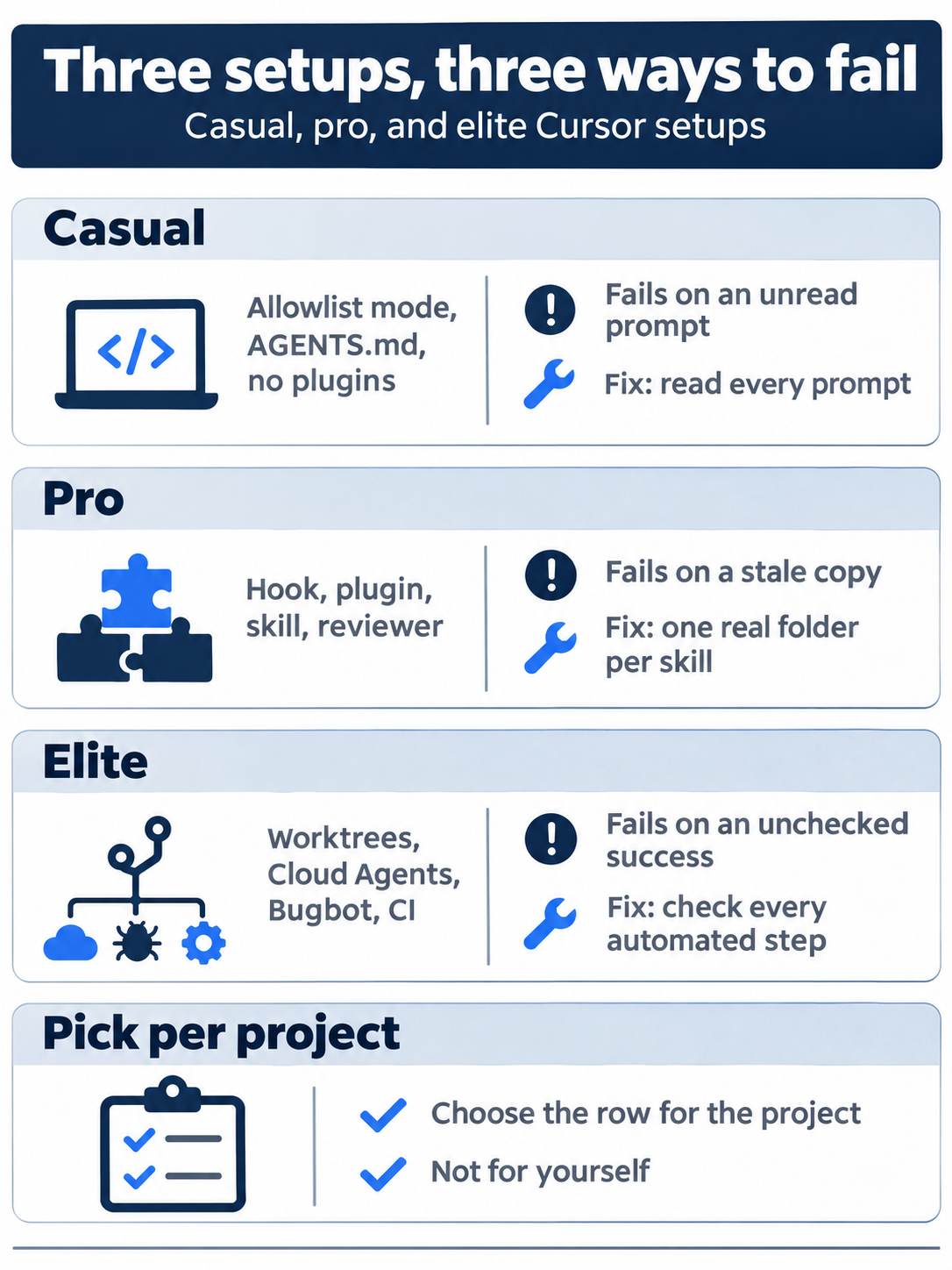
Each setup has its fix. Casual reads every prompt, pro keeps one real folder per skill, and elite gives every automated step a check of its own.
When Cursor misbehaves
Work down this list. Each line names a check and the part that explains it.
- Wrong program.
command -v cursor-agentshould print a path in~/.local/bin. Ifagentruns another tool, usecursor-agent(Part 1). - Not signed in.
cursor-agent status. If the browser does not open forcursor-agent login, runNO_OPEN_BROWSER=1 cursor-agent loginand open the printed address yourself (CLI authentication). - Unexpected model or plan.
cursor-agent about; reset the model with/model auto(Part 7). - A command keeps asking. Put the allow entry in the project's
.cursor/cli.json, not the global file, when the project has one (Parts 4 and 10). - A skill or plugin is missing. Did you start with
--plugin-dir? Does/skillslist it, and does/pluginshow it (Parts 9 and 13)? - A hook does not fire. Check the
matcher, the script's execute permission, and the exit code; a crashing hook lets the command through unlessfailClosedis set (Part 11). - Worktree setup did not run. The workspace must be trusted; the editor's Worktrees Setup output shows the log (Part 14).
- The sandbox does not start on Linux. Linux needs kernel 6.2 or later with Landlock v3 and unprivileged user namespaces; on an older kernel, Cursor falls back to asking (Part 4).
- Broken config. The CLI backs up a corrupted
~/.cursor/cli-config.jsonas.badand recreates it (CLI configuration). - Network. Behind a VPN or firewall, allow
*.cursor.shand*.cursorapi.com(CLI help). Behind a proxy, setHTTP_PROXY,HTTPS_PROXY, andNODE_USE_ENV_PROXY=1(CLI configuration). - Still stuck.
/logsfor the debug log,/copy-request-idfor the last request's ID, and/feedback <message>to send both to Cursor (CLI slash commands).
A clean HOME, as this guide's tests used, rules out your own settings: run HOME=$(mktemp -d) cursor-agent status to see the CLI with no config at all. This guide did not test the command in this form.
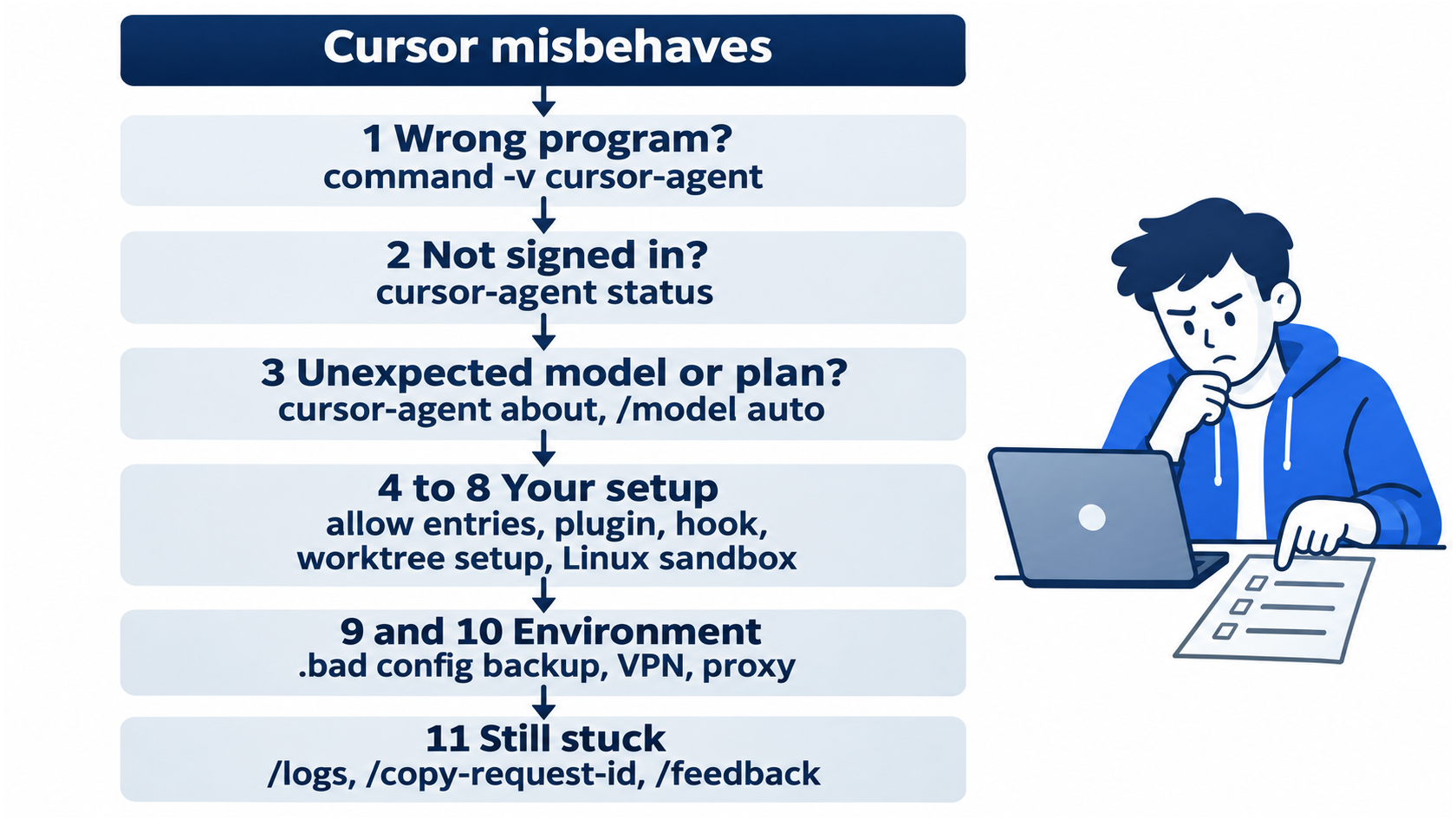
The order is cheapest first. The first three checks take seconds and rule out the tool and the account; your own setup comes next, the environment after that, and a support request last.
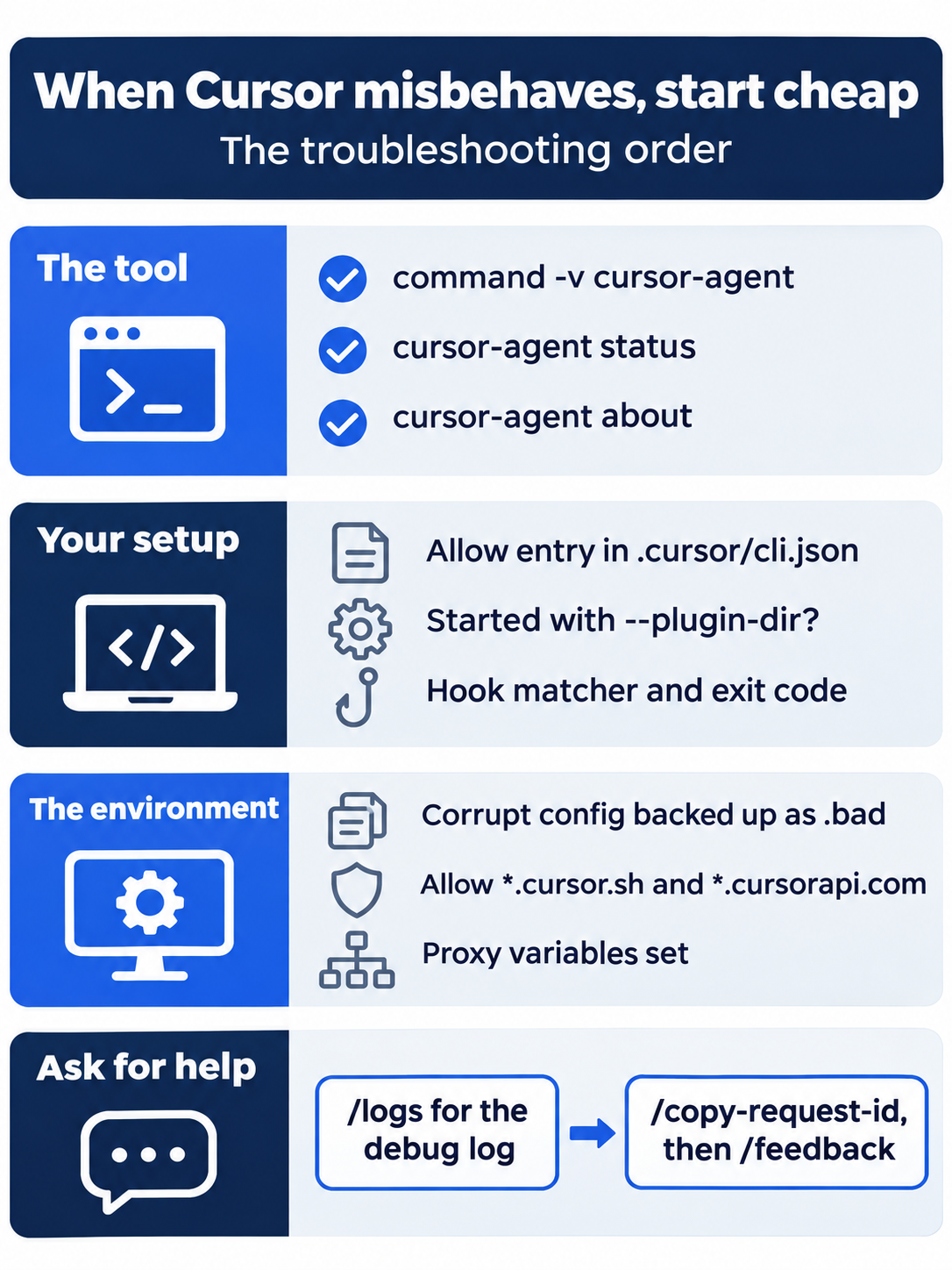
Pin this checklist beside your terminal. Most surprises end in the first three checks, and the ones that do not end with a debug log and a request ID that Cursor's support can trace.
Glossary
Each entry gives the term as you type or read it, the part that first introduced it, and a one-line meaning. The list holds 118 flags, commands, slash commands, files, and terms from the Start here sections of Parts 1 to 18.
&(Part 15): Message prefix that hands the message to a Cloud Agent instead of the agent on your computer.@mention (Part 6): Adds a named file to the context, so the agent reads it instead of guessing which file you mean.about(Part 7):cursor-agentsubcommand that prints the CLI version, your account details, theModel, and theSubscription Tier.agent(Part 1): Cursor's short name forcursor-agent. It works when no other program on your machine uses that name.- Agents Window (Part 14): Cursor 3's agent-first window, where the worktree screens live.
AGENTS.md(Part 5): The simplest rule file: plain Markdown at the project root, with no special format..agents/skills/(Part 9): Project skills folder that this guide uses. Cursor also finds project skills in.cursor/skills/.- allowlist (Part 1): The list of commands the agent may run without asking.
- API key (Part 17): Sign-in for a CI machine with no browser, read from a repository secret named
CURSOR_API_KEY. - API list price (Part 7): The per-token price that the model's own company charges.
- approval prompt (Part 1): The agent stopping to ask before a tool call runs.
approvalMode(Part 4): Setting in the global CLI file that picks the approval mode, such asallowlist.- Ask mode (Part 3): Mode that answers questions and edits nothing.
attribution.attributeCommitsToAgent(Part 2): Config key that turns off the agent's commit trailer.- Auto (Part 1): The default model setting. Cursor chooses the model that serves each request. A setting, not a model.
--auto-review(Part 1): Flag that starts a session in Auto-review. Without it, the CLI starts in allowlist mode.- Auto-review (Part 1): Approval mode: a classifier on Cursor's servers runs the tool calls it judges safe and prompts you for the rest.
beforeShellExecution(Part 11): Hook event that fires before the agent runs any shell command.- Bugbot (Part 16): Cursor's reviewer for pull requests. It comments on likely bugs and reports a GitHub check named
Cursor Bugbot. - checkpoint (Part 2): Editor snapshot of the files the agent changes, saved before significant changes. A restore reverts files only.
- Cloud Agent (Part 15): Agent on a machine that Cursor starts. It clones from GitHub, works on a new branch, and pushes it back.
command -v(Part 1): Shell command that prints which program a name runs, such ascommand -v cursor-agent./context(Part 6): Opens a panel that shows what fills the context window, by category.- context window (Part 6): The block of text Cursor sends the model on every turn. It has a size limit.
--continue(Part 6): With-p, resumes the previous session instead of starting a new one.Ctrl+R(Part 2): Opens the review screen with the diff of the agent's change.- Cursor models (Part 7): Grok 4.7, Grok 4.6, Grok 4.5, and Composer 2.5. Your plan's included usage covers them.
- Cursor Plugin (Part 13): Cursor's own plugin format, with its manifest at
.cursor-plugin/plugin.json. cursor-agent(Part 1): The terminal program that runs Cursor's agent. This guide's name for the command..cursor-plugin/plugin.json(Part 13): A Cursor Plugin's manifest. The only required field isname..cursor/agents/(Part 12): Folder for custom subagents, one Markdown file each, with frontmatter like a skill's..cursor/BUGBOT.md(Part 16): Bugbot's own rule file. Project rules in.cursor/rules/do not apply to Bugbot runs..cursor/cli.json(Part 4): The one project file the CLI reads. It holds only permissions..cursor/hooks.json(Part 11): Says which hook script runs on which event."version": 1is required..cursor/mcp.json(Part 10): File where Cursor reads project MCP servers. Each entry undermcpServersis one server..cursor/worktrees.json(Part 14): File whosesetup-worktreecommands Cursor runs in each new worktree.- Effort (Part 7): How much reasoning the model does before it answers.
- event (Part 11): A fixed point in the agent's work where a hook runs, such as
beforeShellExecution. - Fast (Part 7): The faster, higher-priced variant of a Cursor model, such as Composer 2.5 Fast.
- frontmatter (Part 9): Short header between two
---lines, with the fieldsnameanddescription. gh(Part 15): The GitHub CLI. Part 15 uses it to create the repository and open the pull request.- GitHub Actions (Part 17): Runs commands on GitHub's machines when you push.
- hook (Part 11): A program that Cursor runs at a fixed point in the agent's work. Its answer can stop the step.
- included usage (Part 7): The usage your monthly price already pays for.
is_error(Part 17): JSON field that says whether the run finished, not whether the agent did what you asked.login(Part 1):cursor-agentsubcommand that signs you in through your browser./logs(Part 18): Slash command that prints the path of the session's debug log and copies it to the clipboard.- manifest (Part 13): The small JSON file that names a plugin, such as
.cursor-plugin/plugin.json. matcher(Part 11): Pattern that Cursor checks against the full command. The hook runs only for commands that match.mcp enable(Part 10):cursor-agentsubcommand that approves an MCP server for this project folder.mcp list(Part 10):cursor-agentsubcommand that shows each MCP server and its state, such asneeds approvalorready.mcp list-tools(Part 10):cursor-agentsubcommand that lists a server's tools with their inputs. It refuses until you approve the server.- MCP server (Part 6): A connection to an outside tool. The Model Context Protocol (MCP) lets this separate program offer more tools to the agent.
--mode(Part 3): Flag that picks the starting mode.--mode=askstarts a session in Ask mode.- mode (Part 3): Sets what the agent may do in a session. The CLI has three: Agent, Plan, and Ask.
--model(Part 7): Flag that starts the session on a model ID. In testing it also saved that model as the default./model(Part 7): Changes the model inside a session and also saves the choice./model autosets it back to Auto.- model (Part 7): The AI system that reads the context window and writes the agent's replies.
- model ID (Part 7): The name you pass to commands, such as
composer-2.5.cursor-agent modelsprints it before a dash. models(Part 7):cursor-agentsubcommand that lists the models your account can use.- Monthly additional usage limit (Part 8): Spending cap on The X Subscription. At the limit, paid extra usage pauses and the weekly pool keeps working.
- on-demand usage (Part 8): Extra usage on a legacy Cursor plan, billed at the end of the month.
--output-format json(Part 17): Makes the answer one JSON object instead of text, so a script can read it.-p(Part 6): Print mode flag: sends one prompt, prints the answer, and exits.permission(Part 11): Hook answer field:allowruns the command,denyblocks it,askshows the approval prompt.- permission token (Part 4): One entry in an allow or deny list. Deny rules take precedence over allow rules.
- plan (Part 3): A written description of a change: which files change, in what order, and what the code does afterward.
/plan(Part 3): Brings the plan box back with your edits, ending in Ready to build?.- Plan mode (Part 3): Mode that writes a plan before any code.
- plugin (Part 9): An add-on package that can bring its own skills. A folder with a manifest plus the parts it bundles.
/plugin(Part 13): Opens the plugin list, withPlugins,Installed, andMarketplacetabs.--plugin-dir(Part 13): Flag that loads a plugin from a folder for that session.- prepaid credit (Part 7): Money you add to your Cursor account ahead of time.
- print mode (Part 6): Runs one prompt, prints the answer, and exits. A step that needs approval is rejected.
- prompt (Part 1): The message you type in the input box.
/quit(Part 1): Leaves the session and prints the hint to resume it.readonly: true(Part 12): Subagent field that blocks file edits and state-changing shell commands.- Ready to build? (Part 3): Plan prompt: build locally (
b), build in the cloud (c), or propose changes (p). - rejected (Part 17): Print-mode outcome for a step that needs approval: the step does not run, and the agent goes on.
resume(Part 2):cursor-agentsubcommand that reopens the latest session.--resume=<id>(Part 1): Flag that brings back the session with that id./review-bugbot(Part 16): Built-in skill that runs a Bugbot review on your machine./rewind(Part 2): Takes the session back to before a chosen turn. Option 1 restores files and conversation.- rule (Part 5): A standing instruction that Cursor gives the agent at the start of every session.
- Run Everything (Part 1): Approval choice that runs every later tool call without asking.
- sandbox (Part 4): Runs the agent's shell commands with access limited to your project. Writes outside approved paths fail.
--sandbox enabled(Part 4): Flag that turns the sandbox on for the session it starts.- session (Part 1): One conversation with the agent, in one folder.
Shell(git:push*)(Part 4): Permission token that matchesgitwith arguments that start withpush.Shell(npm:test)(Part 4): Permission token that matches the commandnpmwith the argumenttest.Shift+Tab(Part 3): Moves to the next mode, in the order Agent, Plan, Ask, and back to Agent.- skill (Part 6): A saved set of instructions that the agent loads only when a task needs it.
SKILL.md(Part 9): The one file in a skill folder: frontmatter, then the steps in plain Markdown./skills(Part 9): Opens the skills list. Entries show(project),(builtin), or(plugin).- slash command (Part 1): A command that starts with a slash, typed in the input box.
status(Part 1):cursor-agentsubcommand that confirms sign-in and prints✓ Logged in asand your email.- subagent (Part 6): A helper agent with its own window. It starts with an empty context and sends back one final message.
/subagent-<name>(Part 12): CLI menu form that calls a custom subagent, such as/subagent-tt-reviewer./summarize(Part 6): Replaces the conversation with a summary of it, to reduce context.- Task tool (Part 12): How the main agent starts a subagent.
subagent_typenames the subagent to start. - The X Subscription (Part 8): One subscription for Grok, Cursor, and X, with the plans Free, Plus, Premium, Super, and Ultra.
- third-party models (Part 7): Claude, GPT, Gemini, and others. On Premium and above, each request bills at API list price from prepaid credit.
- token (Part 6): The unit that models read and write; context windows and prices count tokens.
- tool (Part 10): One thing an MCP server can do, with a name and inputs.
- tool call (Part 1): One action the agent takes, such as reading a file, editing one, or running a shell command.
- trailer (Part 2): A
Key: valueline at the end of a commit message. The agent addsCo-authored-by: Cursor. --trust(Part 17): Flag that skips the workspace trust question, which a fresh checkout would otherwise ask.- turn (Part 2): One prompt and everything the agent did to answer it.
/usage(Part 8): Opens a panel with your plan name, usage meters, extra spend against your cap, and the reset date.--version(Part 1):cursor-agent --versionprints the installed CLI version.-w(Part 14): Flag that creates a worktree at~/.cursor/worktrees/<repository>/<name>and starts the agent there.- weekly pool (Part 8): Usage for Cursor models that refreshes every week. Unused usage does not roll over.
- workflow (Part 17): A YAML file in
.github/workflows/that lists the steps for GitHub Actions. - workspace trust (Part 1): Your yes or no on whether the agent may work in this folder.
- worktree (Part 14): A second working folder for the same repository, on its own branch, with its own files.
~/.cursor/cli-config.json(Part 4): The CLI's global settings file, withapprovalModeand the global allowlist.~/.cursor/plans/(Part 3): Folder that holds each plan file, a Markdown file in your home folder, outside your repository.~/.cursor/worktrees/<repository>/<name>(Part 14): Wherecursor-agent -w <name>creates a worktree.
If you already use Claude Code
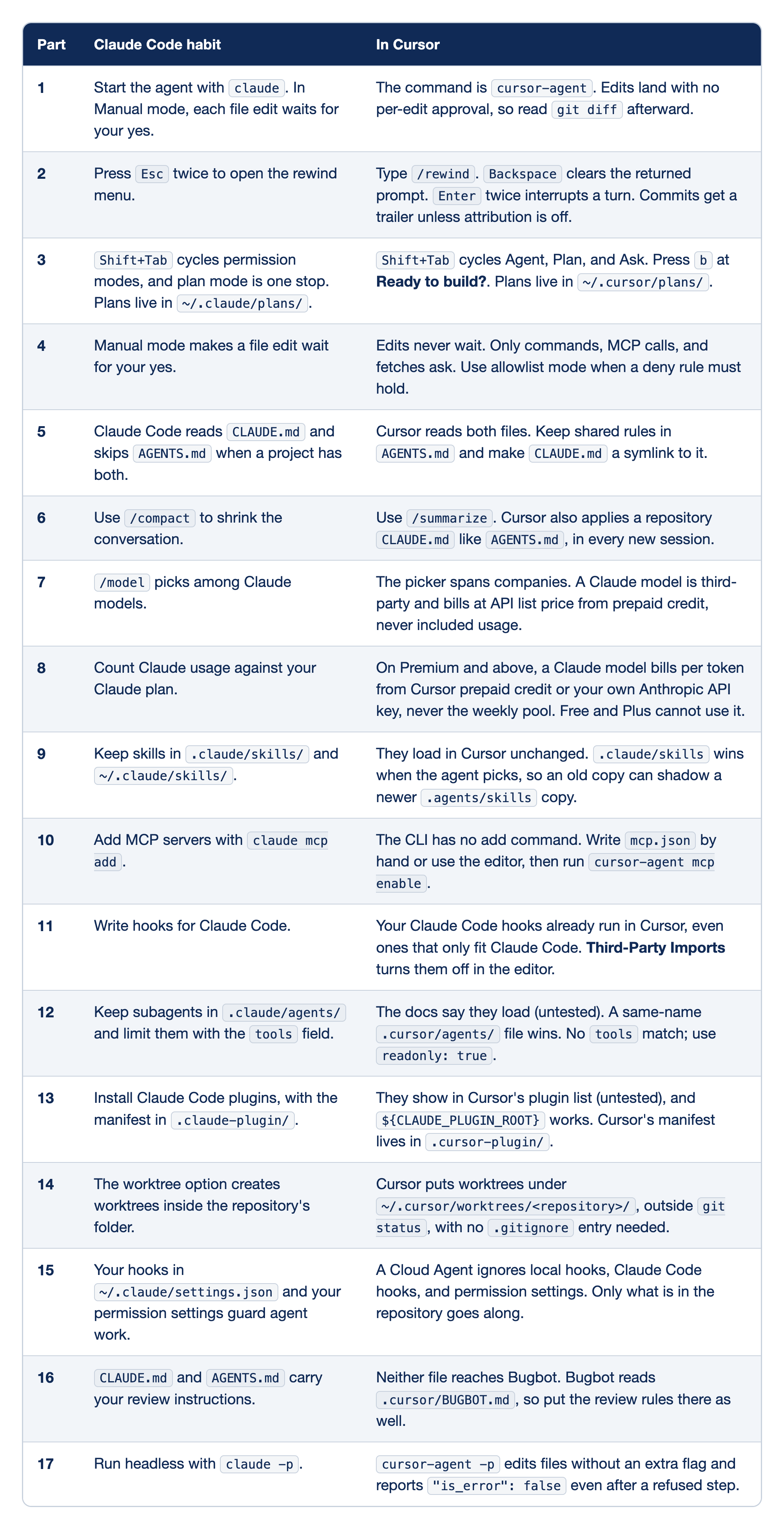
The Claude Code map has one row for each of the 17 Claude Code callouts in Parts 1 to 17. The Part column names the part that holds the callout, the Claude Code habit column holds what a Claude Code user does today, and the In Cursor column holds the Cursor behavior that replaces it. Each row comes down to one action:
- Part 1: expect Cursor to write files before its first question, and review the diff yourself.
- Part 2: use
/rewindandEntertwice, and turn off attribution if you do not want the trailer. - Part 3: look for your plans in
~/.cursor/plans/and build them withb. - Part 4: do not rely on Auto-review to enforce a deny rule.
- Part 5: two different files send two sets of instructions, so keep one file and one symlink.
- Part 6: type
/summarizewhere you typed/compact, and expectCLAUDE.mdto load every session. - Part 7: every Claude request in Cursor bills from prepaid credit, not from included usage.
- Part 8: budget Claude use in Cursor separately from your weekly pool.
- Part 9: an old
.claude/skillscopy can win over a newer.agents/skillscopy in plain requests. - Part 10: edit
mcp.jsonyourself and approve each server withmcp enable. - Part 11: a guard you wrote for Claude Code also protects your Cursor sessions.
- Part 12: add
readonly: truebefore you trust a Claude Code reviewer in Cursor. - Part 13: a Cursor Plugin needs its manifest in
.cursor-plugin/, not.claude-plugin/. - Part 14: look for Cursor worktrees in your home folder, not in the repository.
- Part 15: a Cloud Agent gets only what is in the repository, not your local guards.
- Part 16: copy the review rules you care about into
.cursor/BUGBOT.md. - Part 17: treat the JSON as the run's status, and check the task yourself.
Do this today
Everyone
-
Repeat the win. Run:
git log --oneline -2
git status --short
npm test
ls ~/cursor-checklist.md
The result: the
rippedcommit, a clean tree,ℹ pass 14, and your checklist. -
Start one habit: open
~/cursor-checklist.mdat the start of each day and change one line a week to match how you work. The result:ls -l ~/cursor-checklist.mdshows a modified date from the past seven days.
If you read Going deeper
-
Find your row. Read the persona table and add your row's name as a new line right under
# My Cursor dayin~/cursor-checklist.md. Then check:head -3 ~/cursor-checklist.md git status --shortThe result: your row's name on the line after the title, and nothing from
git status --short, because the file is outside the project. -
Run the troubleshooting list once while nothing is wrong. Run checks 1 to 3:
command -v cursor-agent
cursor-agent status
cursor-agent about
Note each answer in your checklist. The result: three lines in
~/cursor-checklist.mdthat describe a normal day, and nothing fromgit status --short. -
Look up five terms. Pick five glossary terms that you would not explain the same way, and add each with its part number to your checklist. The result: five new lines in
~/cursor-checklist.md. Reset: nothing in the project changes, sogit status --shortprints nothing.
A day that puts each piece in its place
The jacket ticket was small on purpose. One keyword and one test is the size of most real days, and the whole setup showed up for it only in the places it earned: a ten-second tool check, a question that changed no file, a skill that wrote the change, a reviewer that started cold, and a test run you did yourself.
The casual, pro, and elite rows are not a ladder you have to climb. They are a menu, chosen per project, and each row comes with the one check that keeps it honest. When something breaks, the fix list starts with the cheapest question, and the checklist in your home folder goes with you to the next repository.
You started with one bug and three tests. You end with a project that has rules, a skill, a guard, a reviewer, a plugin, and a workflow, and with a day that puts each of them in its place.
This is Part 18 of "Cursor, Day-to-Day," an 18-part guide to using Cursor's agent every day, from the CLI and the editor. It is the final part of the series.