
Success Is Not Done: Running the Cursor Agent Headless, Locally and in GitHub Actions
Cursor's print mode lets a script or a CI job run the agent with no one watching, but its JSON reports whether the run finished, not whether the work got done, so every headless run needs a check of its own after it.

Print mode runs one prompt with no one watching. Learn to read its JSON, spot the refusal it hides, and commit a GitHub Actions workflow that checks the work itself.
Your script got exit code 0 and a JSON object that said success, and the command you asked for never ran.
In this article: Day 17 of an 18-day guide. Start here runs
cursor-agent -pon a small sample project, reads its JSON result, shows the refused step that still reports"subtype": "success", and commits a GitHub Actions workflow that asks the agent for the test count and then runs the tests without it. Going deeper runs that workflow on GitHub, covers the streaming output format, the flags that give print mode more power, longer scripted jobs, and why the workflow cannot pin the CLI version.
Exit code 0. "subtype": "success". "is_error": false. Every signal a script knows how to read says the job went well, and the command you asked for never ran.
Cursor's print mode is how you run the agent from a script or a CI job, with nobody at the keyboard to approve anything. It is a genuinely useful tool, and it has one trap for anyone who reads its output the obvious way. The JSON tells you whether the agent's run finished. It does not tell you whether the agent did what you asked.
This article teaches print mode the way a careful script uses it: check the exit code, then is_error, then the result text, and then the work itself with a command of your own. By the end you have a GitHub Actions workflow that does exactly that on every push.
Part 16 merged the squashed pull request, and Bugbot found a missing test in the bent pull request before you merged that one too.
Tested on Cursor CLI 2026.11.13-eacade1 from the Day 16 end state, November 17, 2026. The GitHub Actions run ran once, on this guide's shared repository, and installed CLI 2026.11.17-f532c45, the newest version that day. There is no editor version of this part.
Start here
Headless runs exist only in the CLI; the editor has no print mode. At the end of today, you have run the agent with no interactive screen, read its JSON result, seen the case where that result misleads, and committed a GitHub Actions workflow that runs the same check on every push.
Starting fresh or fell behind? Run git switch -C main cursor/day-16. This replaces your main with the end of Day 16; to keep your own work, run git branch my-backup first.
Check your starting state
Start where Day 16 ended. Run three checks in ~/code/ticket-triage, the small support-ticket classifier this guide builds.
cd ~/code/ticket-triage
git status --short
git log --oneline -1
npm test
git status --short prints nothing, the last commit is the merge of the bent pull request, which GitHub names Merge pull request #<number> from <your account>/add-bent, and npm test ends with ℹ pass 13 and ℹ fail 0.
What print mode is
On Day 6 you used print mode to test what a new session remembers. Today you use it the way scripts do. Print mode, -p, runs one prompt, prints the answer, and exits (Using Headless CLI). Nobody is there to answer an approval prompt, so print mode follows two rules. Anything that would run without asking still runs, including file edits inside the project. Anything that would need your approval is rejected: the step does not run, and the agent goes on without it.
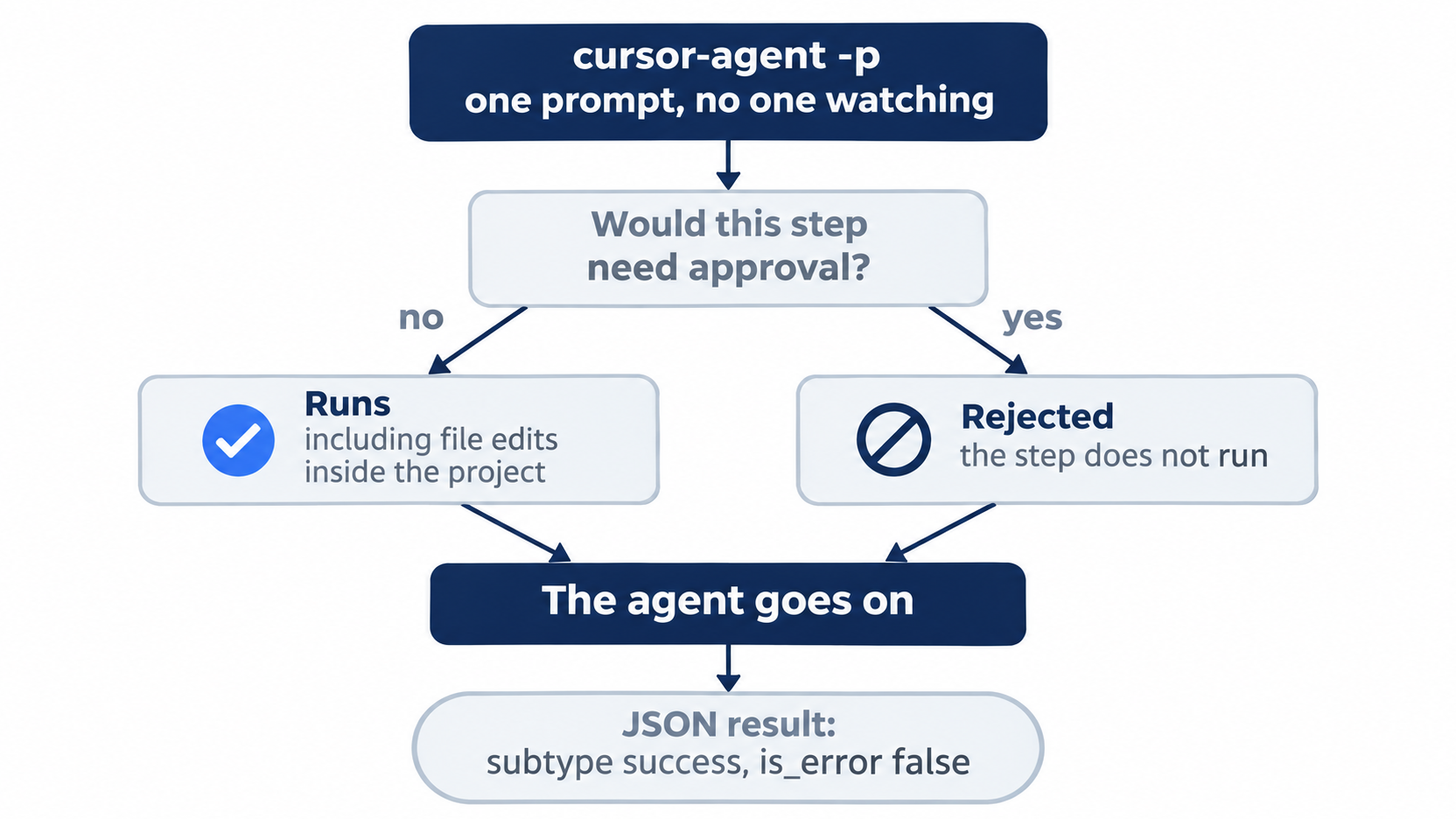
Both branches end in the same place. A rejected step does not stop the run, and the final JSON looks the same whether every step ran or one was refused.
--output-format json makes the answer one JSON object instead of text, so a script can read it (Output format).
Run one prompt headless
Ask for the test count. The prompt says not to edit files, because print mode could.
cursor-agent -p --output-format json "Run npm test and report the pass count. Do not edit files." > agent.json
echo $?
cat agent.json
echo $? prints the exit code, 0. The JSON looks like this, shortened:
{
  "type": "result",
  "subtype": "success",
  "is_error": false,
  "result": "**13** tests passed (0 failed).",
  "session_id": "..."
}
Read four fields. type is always result for the final answer. subtype and is_error say whether the run itself finished: success and false. result is the agent's answer, here the count from its own npm test run. The real output has a few more fields, such as duration_ms. Delete the file when you are done:
rm agent.json
Allowlist: no prompts; there is no one to ask. npm test runs because .cursor/cli.json allows it.
Auto-review: the same result, from cursor-agent -p --auto-review.
See what a refused step looks like
Now ask for a command that is not on your allow list. Since Day 4, the project's .cursor/cli.json allows only npm test.
cursor-agent -p --output-format json "Run this exact shell command and report what happened: ls -la src" > agent.json
echo $?
cat agent.json
rm agent.json
The exit code is still 0, and the JSON still says "subtype": "success" and "is_error": false. Only the result text tells the truth:
The command was **rejected** — it did not run, so there is no `ls` output to report.
Gotcha: is_error reports whether the agent's run finished, not whether the agent did what you asked. A step that print mode refused counts as a normal finish. A real error, such as a model name that does not exist, gives a non-zero exit code and no JSON, so check the exit code first and is_error second. Then check the result text, and check the work yourself, such as running npm test in its own step.
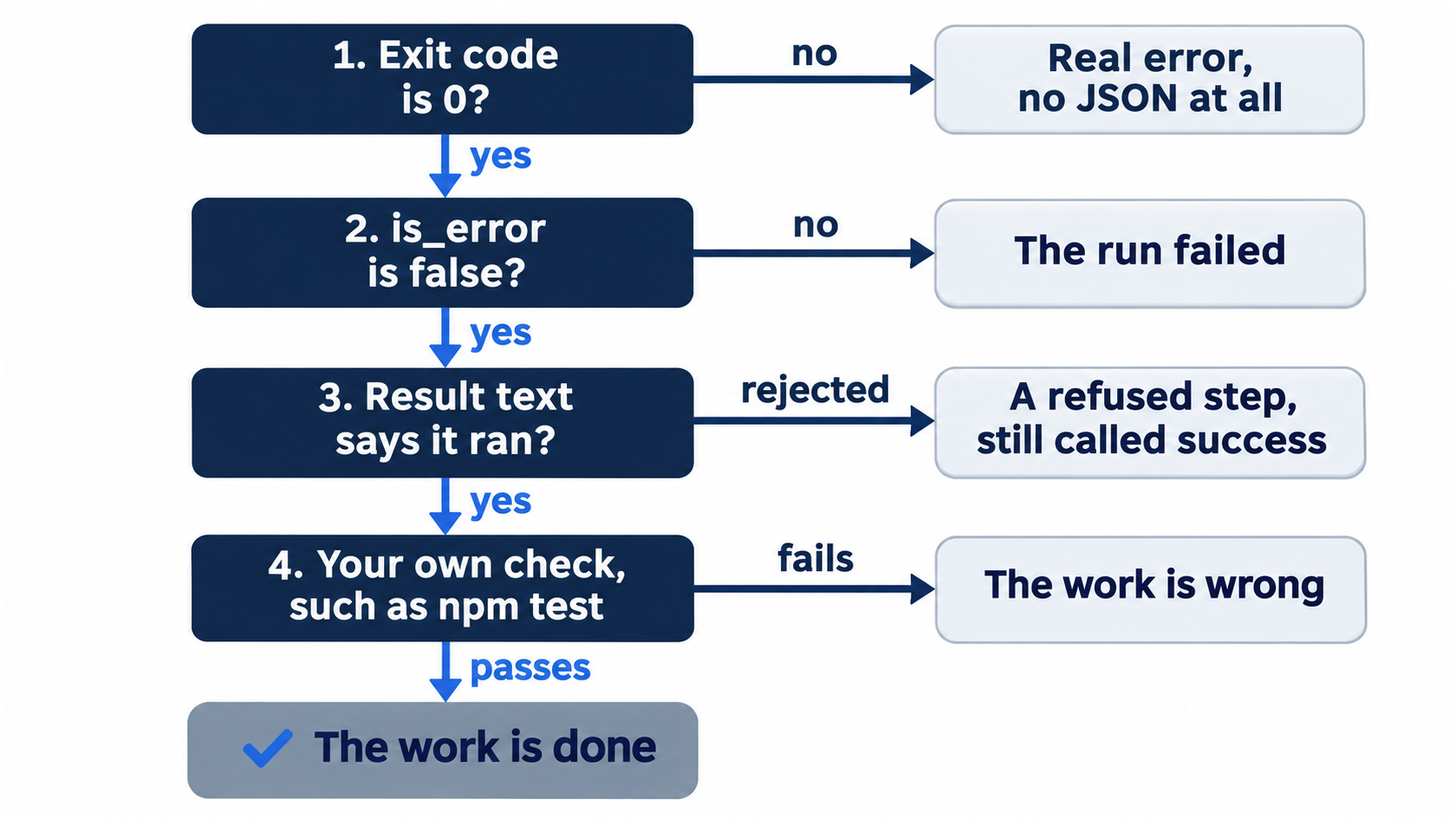
The order matters because each check catches what the one before it misses. The exit code catches a crash, is_error catches a failed run, the result text catches a refusal, and your own test catches everything the agent only claimed.
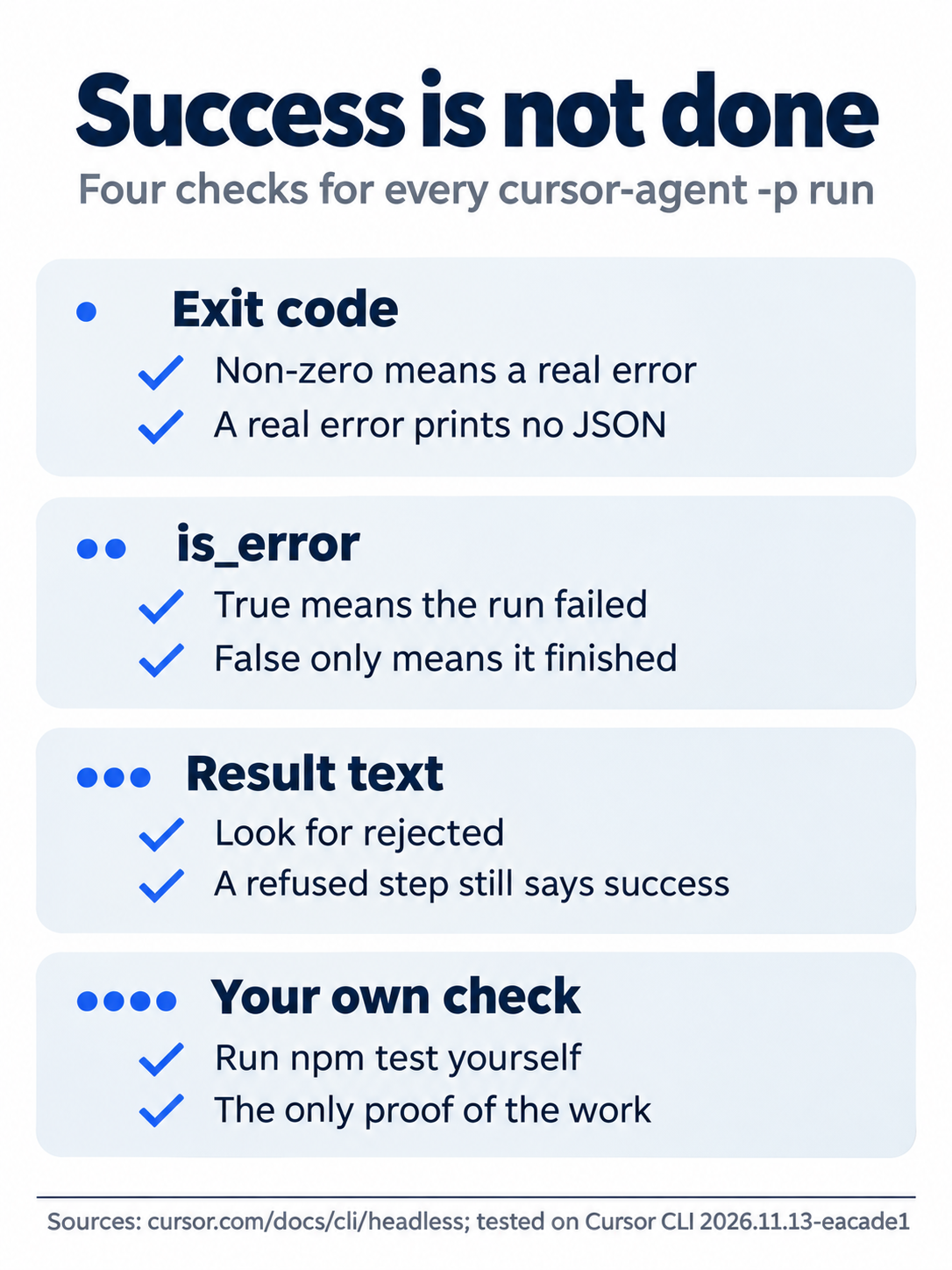
A refused ls step still gave exit code 0 and "is_error": false, so the last check, your own command, is the one that cannot be skipped.
Allowlist: the ls step is rejected, as above.
Auto-review: the classifier allowed ls, and it ran. The answer listed classify.js.
Add a workflow for GitHub Actions
GitHub Actions runs commands on GitHub's machines when you push. A workflow is a YAML file in .github/workflows/ that lists the steps. In the file below, on says when it runs: on every push, and by hand through workflow_dispatch. runs-on: ubuntu-latest picks a Linux machine. Each uses line runs a ready-made step: actions/checkout copies your repository onto the machine, and actions/setup-node installs Node.js. Each run line holds shell commands. Writing a folder to $GITHUB_PATH puts it on the path for the later steps, and secrets.CURSOR_API_KEY reads a secret that you store on GitHub. The other keys hold the structure: name labels the workflow or a step, jobs and steps list the work in order, with passes settings to a uses step, and env sets environment variables for one step, which is how the API key reaches the CLI. This one installs the CLI, asks the agent for the test count, fails if the run errored, and then runs npm test itself, because of the gotcha above.
mkdir -p .github/workflows
cat > .github/workflows/tt-agent-check.yml <<'EOF'
name: tt-agent-check

on:  # ①
  push:
  workflow_dispatch:

jobs:
  agent-check:
    runs-on: ubuntu-latest  # ②
    steps:
      - uses: actions/checkout@v4  # ③
      - uses: actions/setup-node@v4
        with:
          node-version: 22
      - name: Install the Cursor CLI  # ④
        run: |
          curl https://cursor.com/install -fsS | bash
          echo "$HOME/.local/bin" >> "$GITHUB_PATH"
          echo "$HOME/.cursor/bin" >> "$GITHUB_PATH"
      - name: Ask the agent for the test count
        env:
          CURSOR_API_KEY: ${{ secrets.CURSOR_API_KEY }}  # ⑤
        run: |
          cursor-agent -p --trust --output-format json "Run npm test and report the pass count. Do not edit files." > agent.json  # ⑥
          cat agent.json
          node -e 'const r = require("./agent.json"); if (r.is_error) process.exit(1)'  # ⑦
      - name: Run the tests without the agent
        run: npm test  # ⑧
EOF
git add .github
git commit -m "Add the tt-agent-check workflow"
① on runs the workflow on every push and also by hand through workflow_dispatch.
② runs-on: ubuntu-latest gives the job a fresh Linux machine with nothing from your laptop on it.
③ The two uses steps copy the repository onto the machine and install Node.js 22.
④ The install step runs Cursor's installer, then adds both ~/.local/bin and ~/.cursor/bin to $GITHUB_PATH for the later steps.
⑤ The env block hands the CURSOR_API_KEY repository secret to this one step, because the CI machine cannot sign in through a browser.
⑥ Print mode with --trust runs the agent once with no prompts and saves its JSON result to agent.json.
⑦ The node -e check fails the step when is_error is true; a non-zero exit from cursor-agent has already failed the step before it.
⑧ The last step runs npm test without the agent, because is_error does not prove that the agent did the work.
Note: The full extracted listing at code/cursor/part-17-headless-ci/listings/01-tt-agent-check.yml holds the complete .github/workflows/tt-agent-check.yml file.
Five details matter:
- The CI machine has no browser to sign in with, so it uses an API key from a repository secret named
CURSOR_API_KEY(GitHub Actions). --trustskips the trust question, which a fresh checkout would otherwise ask (CLI changelog).- The docs add
$HOME/.cursor/binto the path, but the installer put the commands in~/.local/binon Day 1, so the workflow adds both. - The install step gets the latest build of the CLI. This guide was tested on 2026.11.13-eacade1; Going deeper explains why the workflow cannot pin it.
- The workflow uses your committed
.cursor/cli.jsonfrom Part 4, so the agent there runsnpm testwithout approval. In testing on GitHub, it did, and reported 13 passing tests. The test did not ask it to push.
In a local test, the node -e line exited 0 for "is_error": false and 1 for true.
The workflow runs on every push, and it fails until GitHub has the CURSOR_API_KEY secret. Do not push today unless you also set the secret, as Going deeper shows.
Your win
Run the local check now:
cursor-agent -p --output-format json "Run npm test and report the pass count. Do not edit files." > agent.json
node -e 'const r = require("./agent.json"); console.log(r.is_error, r.result)'
rm agent.json
git status --short
git log --oneline -1
The node line prints false and the count, git status --short prints nothing, and the last commit is Add the tt-agent-check workflow.
You can stop here. Going deeper explains why this works and where it breaks.
Going deeper
This section is for readers who want the other output formats, the ways to give print mode more power, and how to script longer jobs. It assumes you finished Start here in Parts 1 to 17.
Run the workflow on GitHub
Create an API key in the Cursor dashboard (CLI authentication), store it as a secret, and push:
gh secret set CURSOR_API_KEY
git push
gh run watch
gh secret set asks for the value, so the key never lands in your shell history. git push starts the workflow, and gh run watch follows the run until it ends; gh run list shows past runs. In testing, the run started 6 seconds after the push and finished green 35 seconds later. The log of the Ask the agent for the test count step showed the JSON with "is_error":false and "13 tests passed (0 failed)." The Run the tests without the agent step showed # pass 13 and # fail 0. npm test prints # lines instead of ℹ lines when its output is not a terminal.
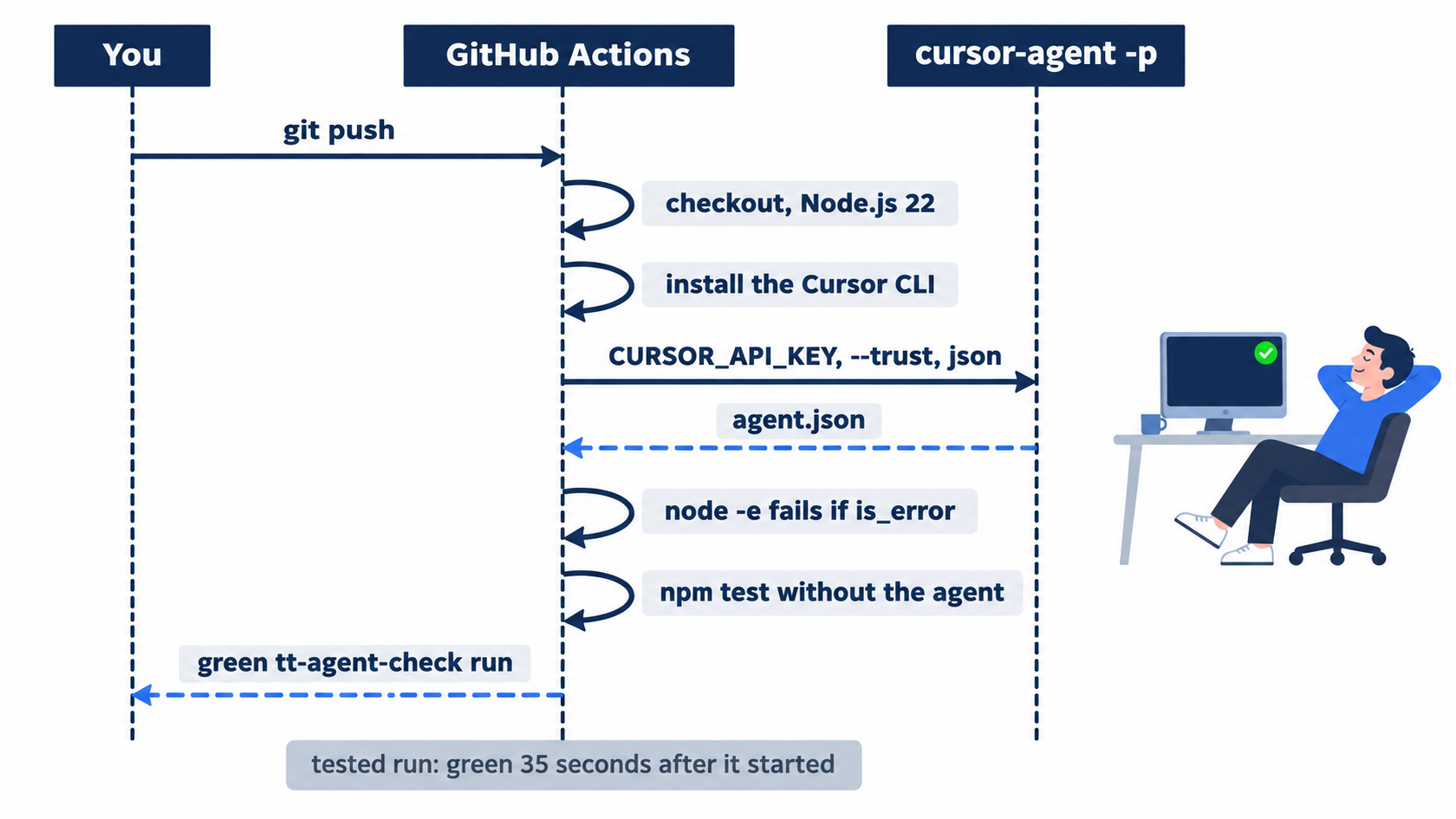
The agent is one step in the middle of the run, not the last word. The workflow trusts the agent's JSON only far enough to fail on is_error, and the green check comes from the npm test step that follows it.
Delete the secret and revoke the key when you stop using the workflow: gh secret delete CURSOR_API_KEY, then revoke the key in the Cursor dashboard. A key that sits in a repository's secrets can run agents on your plan's usage.
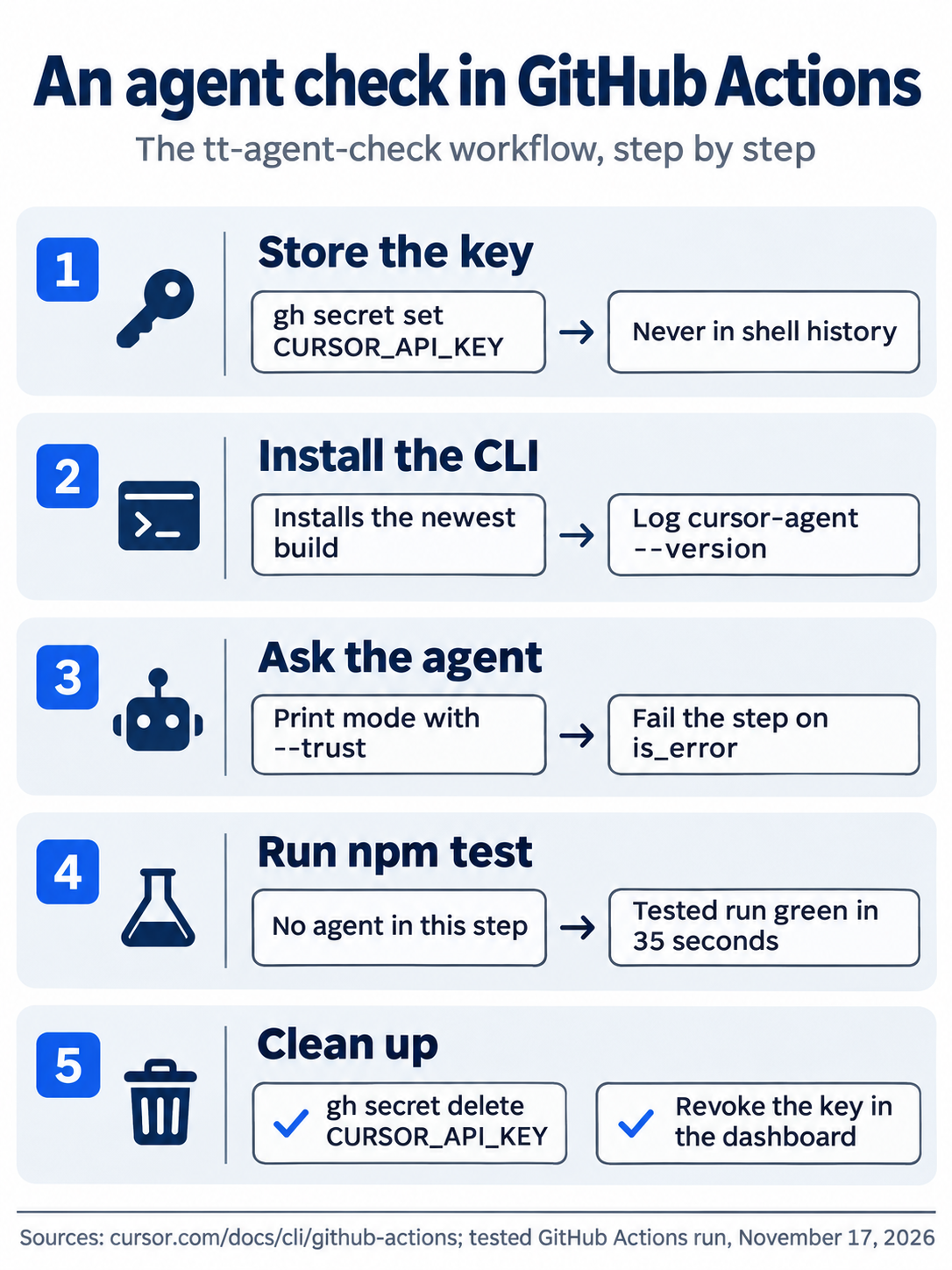
In testing, the run finished green 35 seconds after it started. The last step, cleanup, is the one people forget: a key left in a repository's secrets can keep spending your plan's usage.
More output formats
--output-format stream-json prints one JSON line per event while the agent works, and --stream-partial-output adds text as it is written (Output format). Use it when a script must watch progress. With json, a failure exits non-zero and prints no JSON at all, so a script must handle an empty output file. A run with a model name that does not exist shows this: --model no-such-model exited with 1, wrote nothing to standard output, and printed Cannot use this model: no-such-model. to the error output.
Giving print mode more power
--force, or its alias --yolo, runs every action without approval except what permissions.deny blocks. Setting approvalMode to unrestricted in the CLI config has the same effect in print mode (Using Headless CLI). In CI, the docs recommend the opposite: limit the agent to file edits, deny Shell(git) and Shell(gh) in permissions, and do the commits and pushes in separate workflow steps that you write (GitHub Actions). Team admins can turn on Disable CLI headless mode; the docs call it a usage policy enforced on the user's machine, "not a security boundary" (Using Headless CLI).
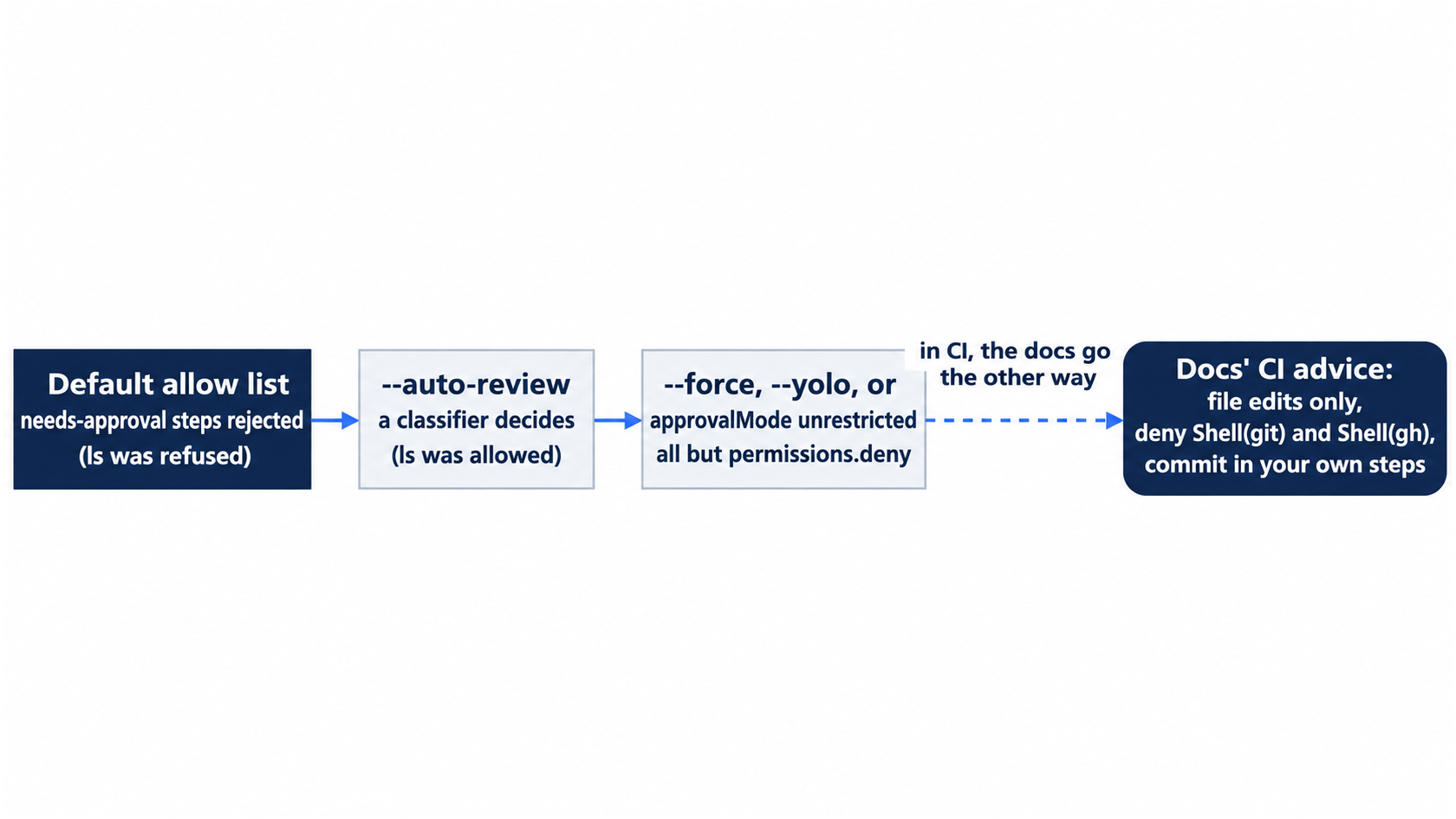
Each level hands the agent more of what it asks for. The tested default refused the ls step, Auto-review allowed it, and --force ran it in a throwaway copy. In CI, the docs point the other way: fewer powers for the agent, and the git work in steps you write.
Longer jobs
- Skills work in print mode:
cursor-agent -p "/tt-add-keyword ..."ran the skill on Day 9, before it moved into the plugin. Since Day 13, add--plugin-dir plugins/tt-triage-kit. This guide did not test that flag in print mode. --resume <id>continues an earlier session from a script, andcursor-agent create-chatmakes a new one and returns its ID; both appear incursor-agent --help. This guide did not run them.cursor-agent acpspeaks the Agent Client Protocol, so editors such as Zed and JetBrains can drive the CLI (ACP).- The built-in
/loopskill repeats a prompt on a schedule inside a session, and/goalis listed among the built-in skills in/skills(Agent Skills). This guide did not run either.
The workflow installs the newest CLI
curl https://cursor.com/install | bash installs the latest build, not the version this guide tested. The install script has the version written into it and takes no version option, so the workflow cannot pin one. This guide was tested on 2026.11.13-eacade1, and the run on GitHub installed 2026.11.17-f532c45. A new version can change behavior between runs. The script links the commands in ~/.local/bin; the docs add only $HOME/.cursor/bin to the path, so the workflow adds both. Add cursor-agent --version as the first line of the agent step so that the log records the version, and recheck this part when it changes.
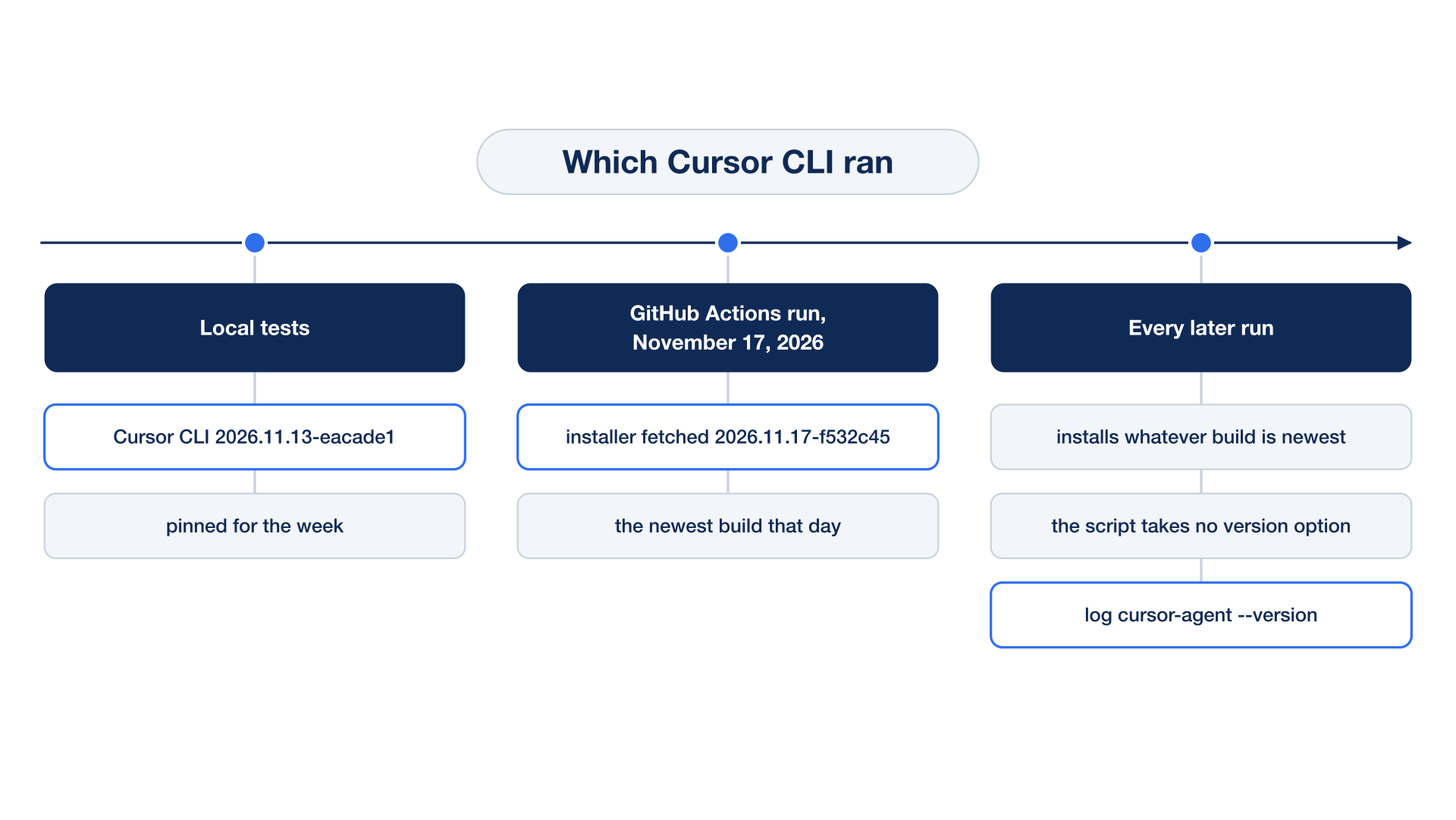
The build this guide tested and the build CI installed were already different on the day of the run. A workflow that cannot pin its tool has to record it instead, which is what the cursor-agent --version line is for.
If you already use Claude Code: Claude Code's print mode, claude -p, also runs one prompt and exits. cursor-agent -p looks the same, but it edits files without any extra flag, and it reports "is_error": false even when it refused a step. Treat its JSON as the run's status, not the task's.
The scene is the opening moment of this article: every field says success, and one sentence of result text says the work never happened.
Do this today
Everyone
-
Repeat the win. Run:
cursor-agent -p --output-format json "Run npm test and report the pass count. Do not edit files." > agent.json
node -e 'const r = require("./agent.json"); console.log(r.is_error, r.result)'
rm agent.json
git status --short
The result:
falseand the test count, and a clean tree. -
Start one habit: in any script that runs
cursor-agent -p, check the work with a command of your own after it. The result: each script you write has a step after the agent, such asnpm test, that fails when the work is wrong.
If you read Going deeper
-
Watch a refusal in the stream. Run:
cursor-agent -p --output-format stream-json "Run this exact shell command and report what happened: ls -la src" | tail -2The result, in testing: an
assistantline saying the command did not run, then aresultline with"subtype":"success"and"is_error":false. The agent retried the command before it gave up. Reset: nothing changed, sogit status --shortprints nothing andnpm testshowsℹ pass 13. -
Let print mode run everything, in a throwaway copy. Run:
cd ~/code && git clone -q ticket-triage tt-force && cd tt-force
cursor-agent -p --trust --force --output-format json "Run this exact shell command and report what happened: ls -la src"
The result, in testing:
"is_error": false, and this time the command ran and the result listedclassify.js. Reset:cd ~/code && rm -rf tt-force && cd ticket-triage git status --short npm testgit status --shortprints nothing, andnpm testshowsℹ pass 13. -
Run the workflow on GitHub. Run
gh secret set CURSOR_API_KEY,git push, andgh run watch. The result, in testing: a greentt-agent-checkrun in 35 seconds, andgh run listlists it. Reset: the run changes no file, sogit status --shortprints nothing. When you are done, delete the secret withgh secret delete CURSOR_API_KEYand revoke the key in the Cursor dashboard.
Trust the test, not the summary
Headless mode removes the one safeguard an interactive session always had: you, watching. Print mode answers that by refusing anything that needs approval, which is the right default. The cost is that a refusal looks like a success to any script that stops reading at is_error.
The fix is not a cleverer parser. It is a habit you already have from every earlier day of this guide: the agent's report is a claim, and a test you run is the proof. The workflow you committed today puts that habit into CI. The agent is asked for the count, and then npm test runs on its own and decides whether the build is green.
Let the agent run unattended. Never let it grade its own run.
This is Part 17 of "Cursor, Day-to-Day," an 18-part guide to using Cursor's agent every day, from the CLI and the editor.