
One Question, Three Models: Choosing a Model in the Cursor CLI
In the Cursor CLI the model is a saved setting, not a per-session choice, so the daily skill is to list what your plan offers, pick a model on purpose, read the footer before you type, reset to Auto, and judge every model by checking its answer against the code.
List what your plan offers, ask the same question on Auto, Grok 4.7, and Composer 2.5, learn that every pick is saved, and set the default back to Auto before you leave.
You passed --model for one quick experiment, and days later every new session was still running on that model without you noticing.
In this article: Day 7 of an 18-day guide. Start here lists the models your Cursor plan offers with
cursor-agent models, runs one read-only question on three of them, changes the model inside a session with/model, and resets the default to Auto, then checks every answer againstsrc/classify.js. Going deeper decodes a model ID, edits effort and context in the picker, passes bracketed parameters with--model, shows how a wrong ID fails, and explains how your plan, and Auto's modes, shape the list.
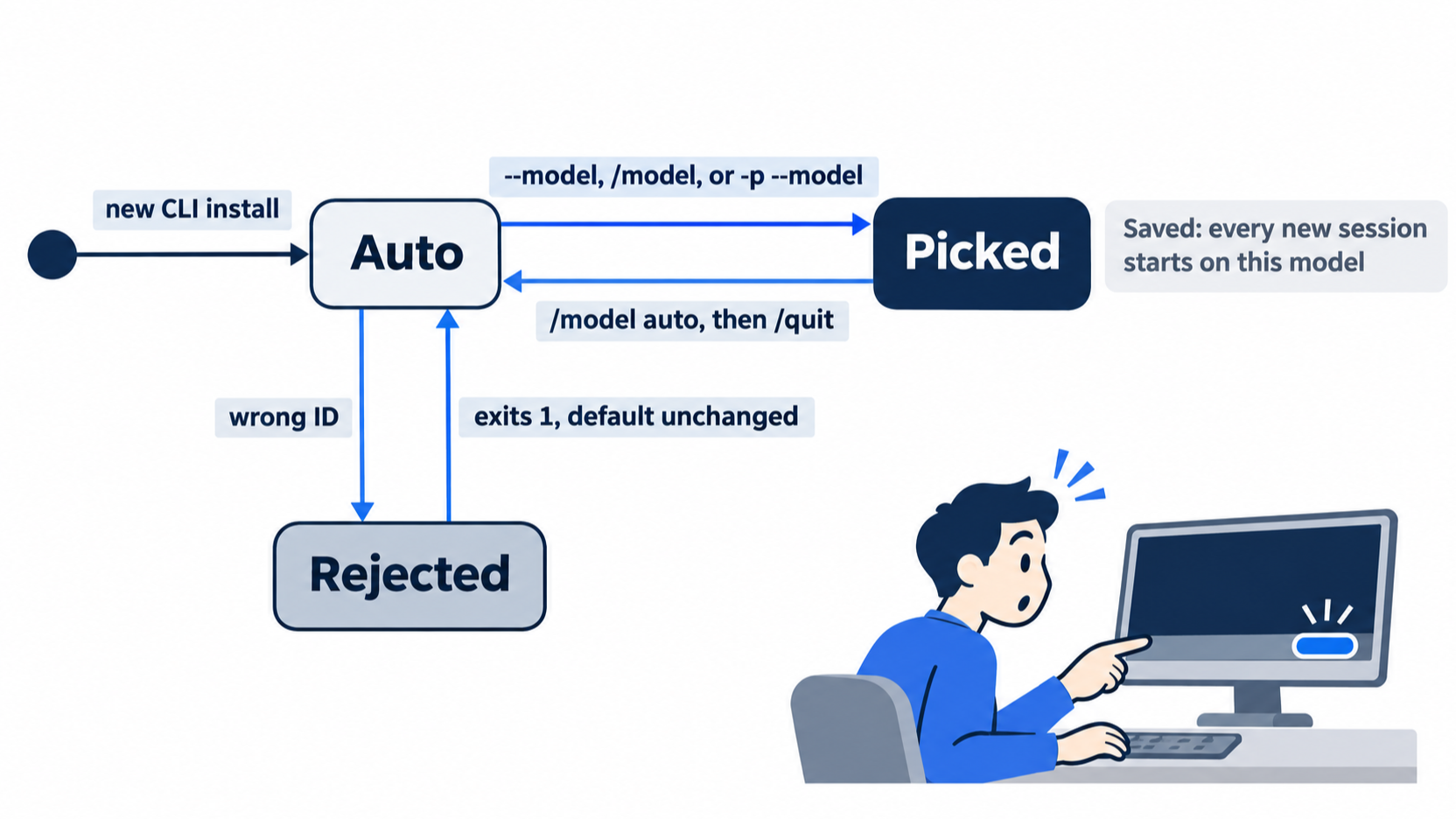
You pass --model to try one model for one question. The answer is fine, you quit, and you forget about it. Three days later a new session opens, and the footer under the input box still names the model from that one experiment. Nobody told you, because the CLI parameters page does not say it: in the test for this guide, --model started the session on that model and also saved it as the default for every session after.
The Cursor CLI model is not a one-time choice. It is a setting, it sticks, and it decides which system reads your code on every turn. The good news is that the whole skill fits in one short session: list the models your plan offers, pick one for the job, read the footer before you type, set it back to Auto, and judge every answer against the code instead of against the model's reputation.
Tested on Cursor CLI 2026.11.13-eacade1. Editor steps: written from the docs, not yet run.
Yesterday four short runs showed that a new session forgets your chat but still loads AGENTS.md.
Start here
By the end of today you can list the models your plan offers, run the same question on three of them, change the model inside a session, and set it back to Auto.
Starting fresh or fell behind? Run git switch -C main cursor/day-06. This replaces your main with the end of Day 6; to keep your own work, run git branch my-backup first.
Check where you are
Start in Ticket Triage and confirm that the tree is clean and green.
cd ~/code/ticket-triage
git status --short
git log --oneline -1
npm test
git status --short prints nothing. git log --oneline -1 prints a short hash and the message from Day 5, Add dented to the damaged keywords. Near the end, npm test prints a pass 7 line and a fail 0 line. Nothing today changes a file, so the same check closes the day.
What a model is here
The model is the AI system that reads the context window and writes the agent's replies. The cursor-agent program, its tools, and your rules stay the same when you change the model. Only the system that does the thinking changes.
Cursor offers models from several companies. Two groups matter today (Models & Pricing):
- Cursor models: Grok 4.7, Grok 4.6, Grok 4.5, and Composer 2.5. Composer is Cursor's own model. Your plan's included usage, the usage your monthly price already pays for, covers these four.
- Third-party models: Claude, GPT, Gemini, and others. On The X Subscription they are never part of included usage, on any plan. On Premium and above, each request bills at the model's API list price, the per-token price that the model's own company charges, from the first request. The money comes from prepaid credit, which is money you add to your Cursor account ahead of time. Free and Plus, the two plans below Premium, cannot use them.
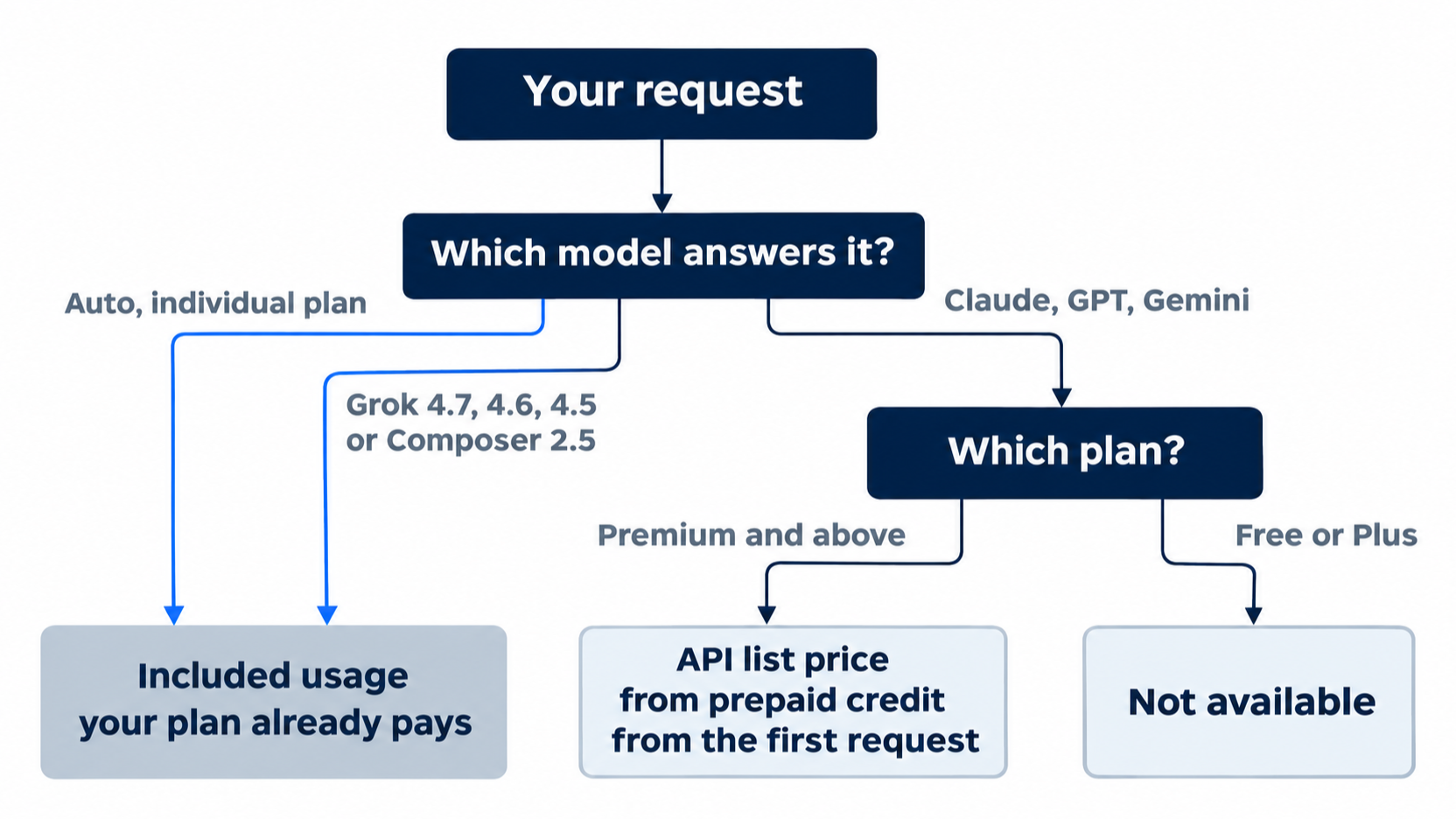
Every run today uses Auto or a Cursor model, so it stays inside your plan. On individual plans, an Auto request always bills from included usage, whichever model answers it (Auto modes).
Auto is a setting, not a model: Cursor picks the model for each request. A new CLI install starts on Auto (CLI changelog).
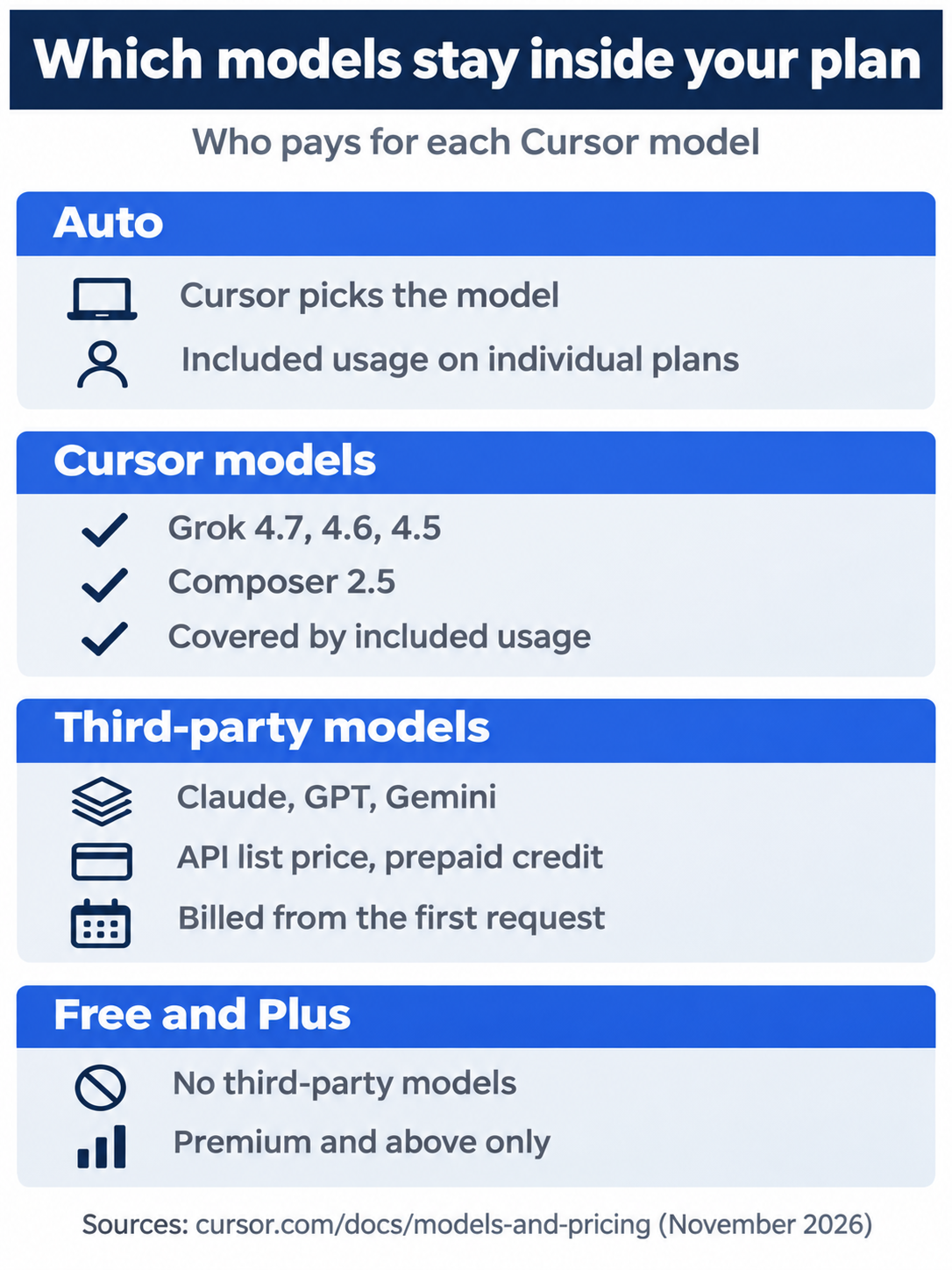
Auto and the four Cursor models (Grok 4.7, Grok 4.6, Grok 4.5, and Composer 2.5) draw from the included usage your plan already pays for. Claude, GPT, and Gemini bill at API list price from prepaid credit on Premium and above, from the first request. Free and Plus cannot pick them at all.
See the current model and the list
cursor-agent about
cursor-agent about prints the CLI version, your account details, and two lines that matter today:
Model               Auto
Subscription Tier   <your plan>
Model is the model the next session starts on. If it shows anything other than Auto, do the steps under Set the default back to Auto first, then come back here. Subscription Tier shows your plan's name. Now list the models the account can use, and pick out the three for today.
cursor-agent models | grep -E '^(auto|composer-2.5|grok-4.7-medium) '
auto - Auto (current, default)
composer-2.5 - Composer 2.5
grok-4.7-medium - Grok 4.7  Medium
Each line is a model ID, a dash, and the display name. You pass the ID to commands. Run cursor-agent models without the grep to see the full list; it is long, and its contents depend on your plan. The outputs in this part come from the guide's test account, which is on an older Cursor plan. If the grep prints fewer than three lines, find a Grok 4.7 medium ID and a Composer 2.5 ID in the full list and use them exactly as printed.
One question, three models
The question asks the agent to read src/classify.js and explain it. Each run uses Ask mode (--mode=ask), which reads files and answers but never edits, so no run can change the tree.
Run 1 is on Auto.
cursor-agent --mode=ask
The footer under the input box shows Ask (shift+tab to cycle) and, under it, Auto. Type the question.
Which keywords make classify() in src/classify.js return damaged? List them, and say whether a ticket that contains one of them can return something else.
The agent reads the file and answers. On the test run it said:
The keywords that make classify() return "damaged" are:
• crushed
• broken
• in pieces
• dented
Yes — a ticket with one of those can still return something else. Refund is checked first, so if the text also contains "refund" or "money back", it returns "refund" instead of "damaged".
Your wording will differ. Check the facts against the file, not against this text. End the session with /quit.
Run 2 names the model on the command line. --model <id> starts the session on that model.
cursor-agent --mode=ask --model grok-4.7-medium
The footer now shows Grok 4.7 256K Medium: the model, its context window size, and its effort level. Effort is how much reasoning the model does before it answers. Ask the same question. The test answer named the same four keywords and the same refund rule, and it added that shipping words do not override a damaged keyword. End the session with /quit.
--model did more than start one session. It also saved Grok 4.7 as your default. The CLI parameters page does not say this; the test showed it. Check it:
cursor-agent about | grep Model
Model Grok 4.7 256K Medium
Run 3 changes the model inside a session.
cursor-agent --mode=ask
The footer shows Grok 4.7 256K Medium, the saved default. Type /model composer and press Enter. A picker opens with the models that match composer:
Models matching "composer"
Filter: composer
→  Composer 2.5             Fast (Tab to modify)
Press Enter to select it. The footer changes to Composer 2.5 Fast. If the row has no Fast, the footer shows Composer 2.5; either works. Fast is a quicker variant of the same model, and Composer 2.5 uses it by default (Composer 2.5). Ask the same question. The test answer listed the same four keywords in a small table, quoted the matching lines of src/classify.js, and gave the same refund rule.
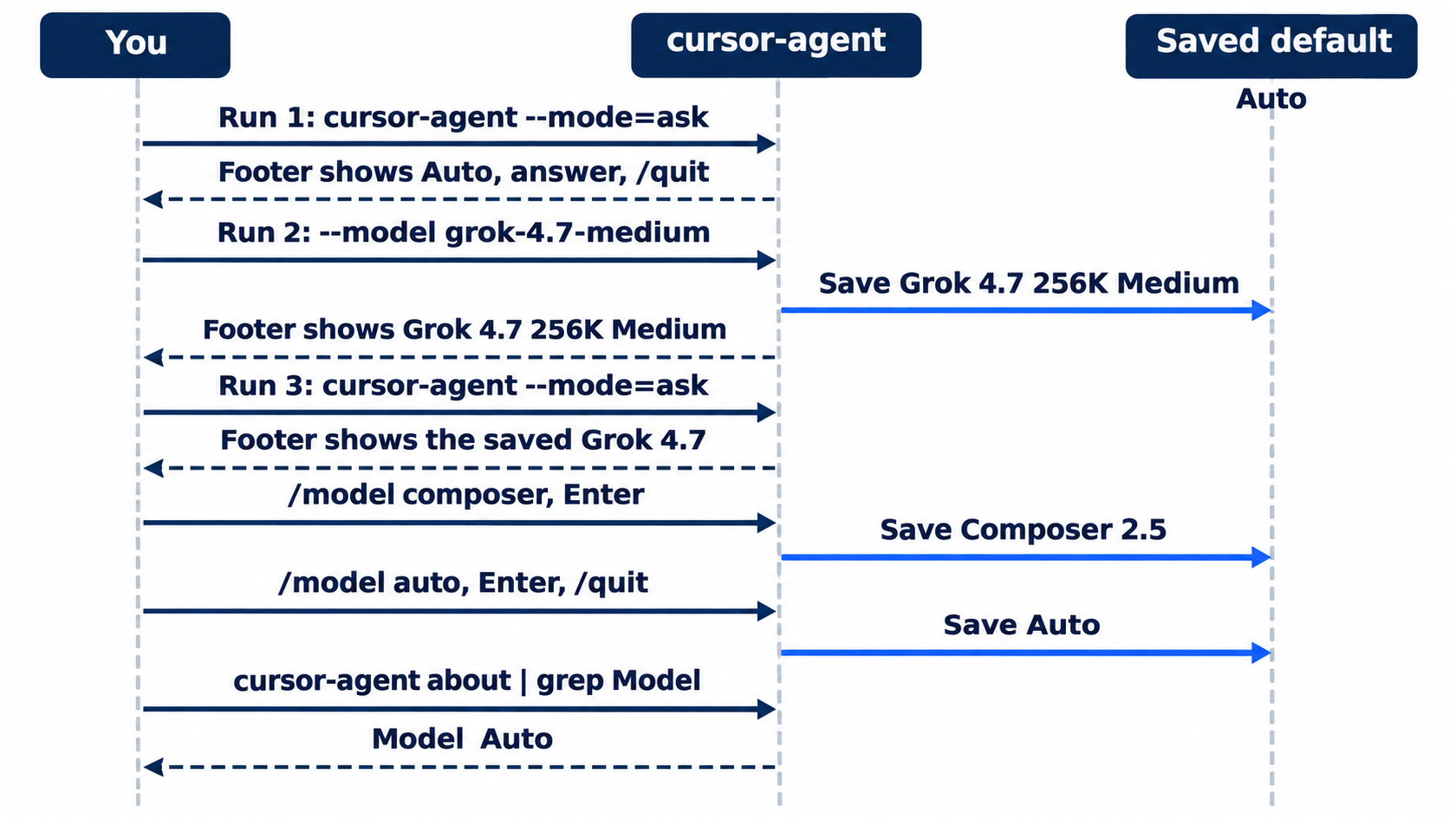
Set the default back to Auto
/model also saves your choice. Set it back before you leave the session.
/model auto
Press Enter in the picker. The footer shows Auto. Type /quit, then check:
cursor-agent about | grep Model
Model Auto
The same steps in the editor
Every step today only reads files, so you can also run it in the editor's Agent panel. Each step below is (written from the docs, not yet run): it comes from the docs and waits for a check on a current editor.
- (written from the docs, not yet run) Switch the panel to Ask with the mode picker, then pick a model with the model picker next to the input.
Cmd+/cycles through models (Prompting agents). - (written from the docs, not yet run) Ask the question three times, each in a new chat: on Auto, on Grok 4.7, and on Composer 2.5.
- (written from the docs, not yet run) Open Cursor Settings > Models to see and set the default model (Prompting agents).
Today's win
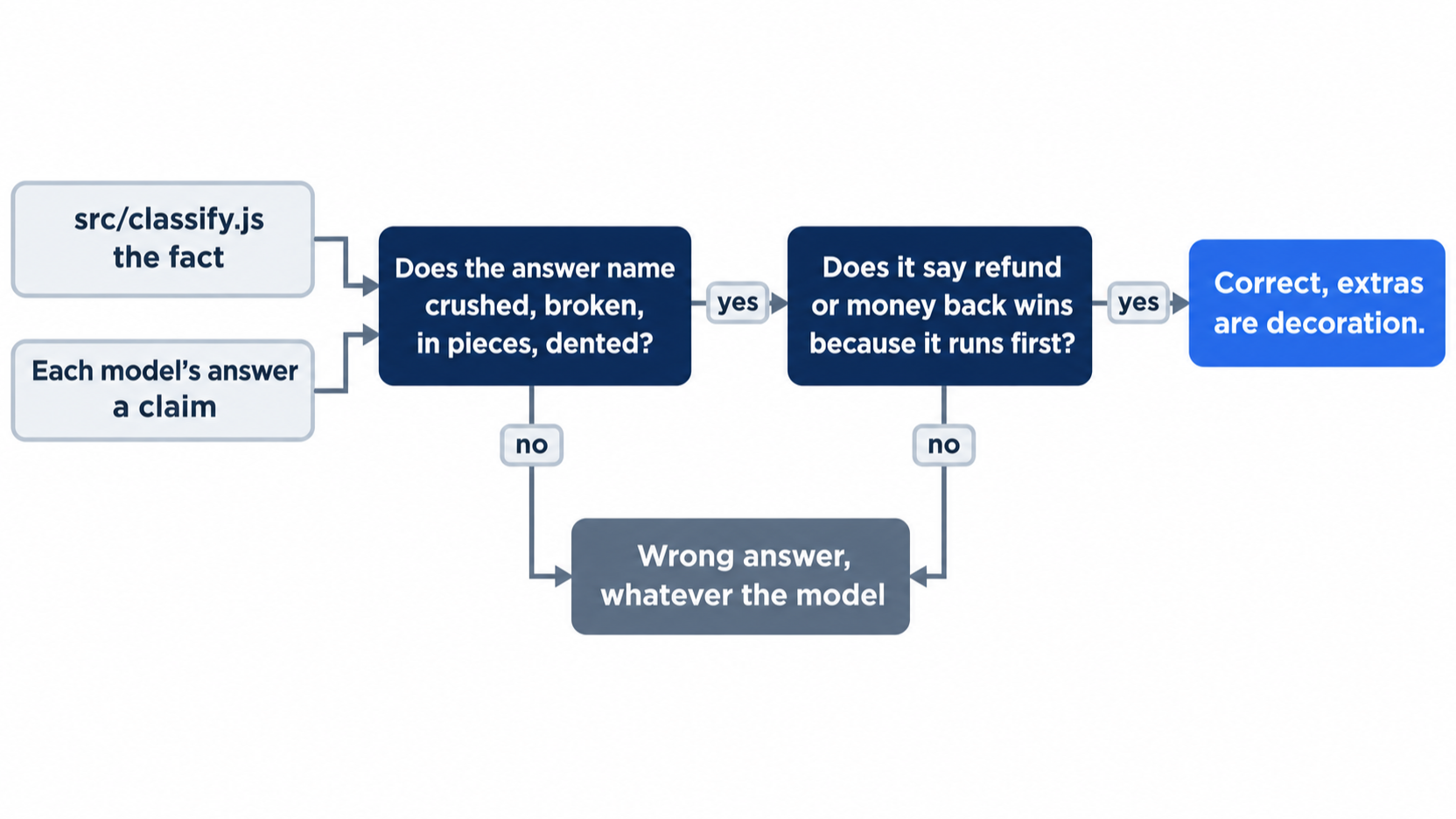
Check the three answers against the code. Open src/classify.js and find two lines:
  if (t.includes("refund") || t.includes("money back")) return "refund"
  if (t.includes("crushed") || t.includes("broken") || t.includes("in pieces") || t.includes("dented")) return "damaged"
Every answer must name exactly crushed, broken, in pieces, and dented, and must say that refund or money back wins because its check runs first. Then check the tree and the default.
git status --short
npm test
cursor-agent about | grep Model
git status --short prints nothing, npm test prints pass 7 and fail 0, and the last command prints Model Auto.
Allowlist: no approval prompts today; Ask mode only reads files.
Auto-review: add --auto-review to each command that starts a session. The Auto-review test asked the question on Grok 4.6 and changed the model to Grok 4.7 High with /model, with no prompts.
You can stop here. Going deeper explains why this works and where it breaks.
Going deeper
This section is for readers who want to know how the model list is built, what the ID parts mean, and where your plan limits the choice. It assumes you finished Start here in this part and in Parts 1 to 6.
Read a model ID
An ID packs the model, the effort level, and the speed into one string. From the test account's list:
grok-4.7-low - Grok 4.7  Low
grok-4.7-medium - Grok 4.7  Medium
grok-4.7-high-fast - Grok 4.7  High Fast
composer-2.5 - Composer 2.5
composer-2.5-fast - Composer 2.5 Fast
For Grok IDs, the suffix after the model name is the effort (low, medium, high, xhigh). For Grok and Composer, -fast marks the Fast variant. Composer IDs carry no effort. Other IDs add parts such as thinking or max, and Grok 4.6 and 4.5 IDs start with cursor-. Copy an ID exactly as cursor-agent models prints it.
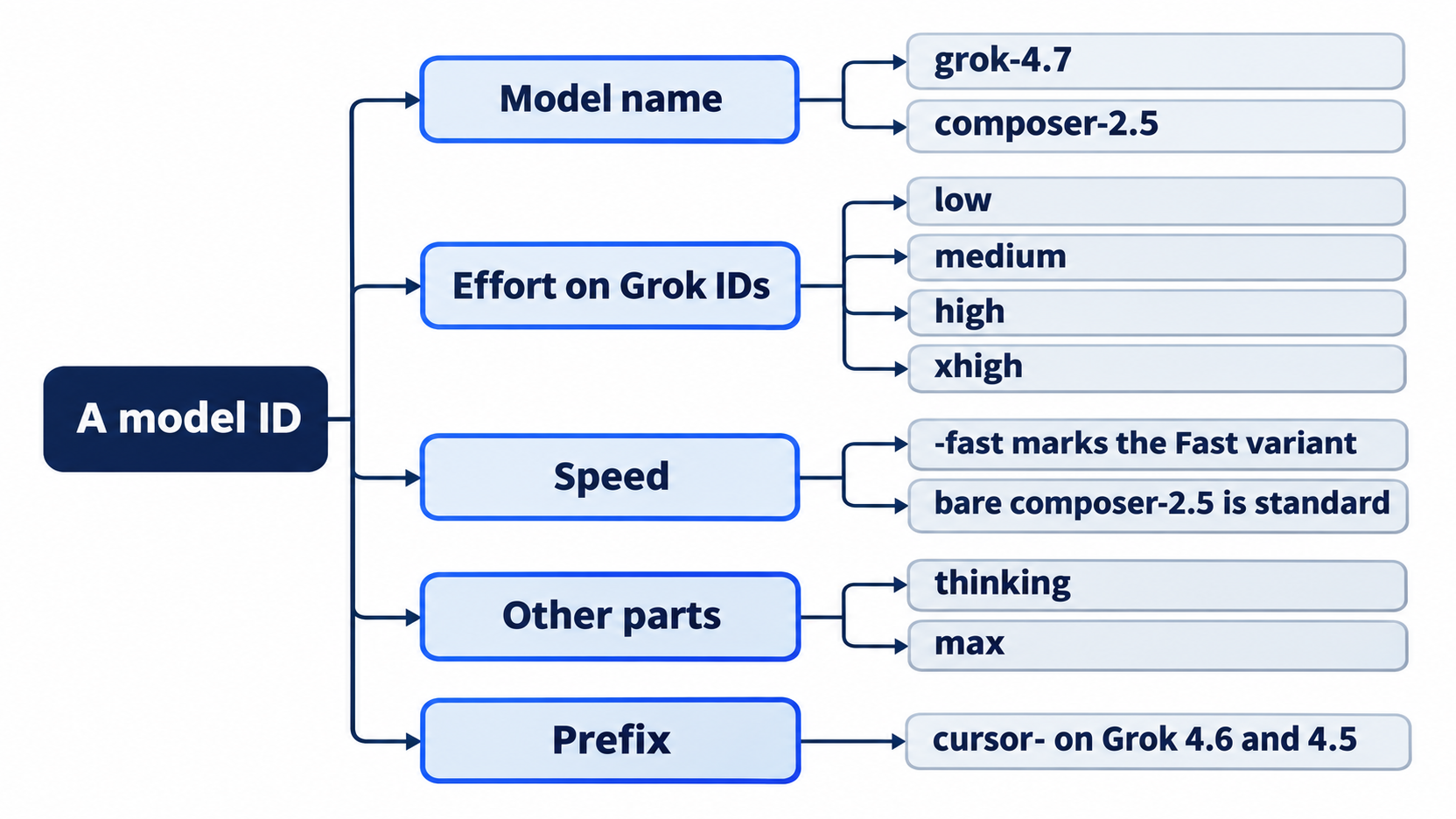
The same model can show up many times, once per combination. The bare composer-2.5 ID is the standard variant, which the Composer 2.5 page calls the tier "further optimized for cost per token". The picker selected Fast by default on a new config.
Edit the parameters in the picker
In the /model picker, Tab opens the parameters of the highlighted model. For Grok 4.7 the test showed:
Grok 4.7 — Edit Parameters                         Max mode: OFF
  Context
  → ● 256K ✓
    ○ 500K
  Effort
    ○ Low
    ● Medium ✓
    ○ High
    ○ Extra High
    ◯ Fast
Use the arrow keys and Enter to pick a value, then Esc to go back to the picker and Enter to select the model. Picking High on the test run changed the footer to Grok 4.7 256K High. The 500K context option costs more: Models & Pricing says Grok 4.7 bills input over 256k tokens at 2x, up to 500k.
The choice is saved. Reset in the same session: /model auto, Enter, /quit. Check: cursor-agent about | grep Model prints Model Auto.
Pass parameters with --model
The CLI's own list ends with a tip: "Parameterized models also accept quoted overrides, e.g. --model 'claude-opus-4-8[context=1m,effort=high,fast=false]'." The Subagents page documents the same bracket syntax for subagent files.
cursor-agent -p --mode=ask --model 'composer-2.5[fast=false]' 'Reply with OK.'
In the test, the command printed OK. and exited 0. Afterward, cursor-agent about showed Model Composer 2.5: print mode saves the model too. The test did not show which variant answered, so treat the brackets as accepted, not as proven to change the variant. Quote the whole value, or your shell reads the brackets as a pattern. Reset after a try: cursor-agent, /model auto, Enter, /quit. Check: cursor-agent about | grep Model prints Model Auto.
A wrong ID fails fast
cursor-agent -p --model no-such-model 'Reply with OK.'
echo $?
The CLI printed Cannot use this model: no-such-model. Available models: followed by every ID on one line, and exited 1. The saved default did not change. A script that passes --model can check the exit code before it trusts the output.
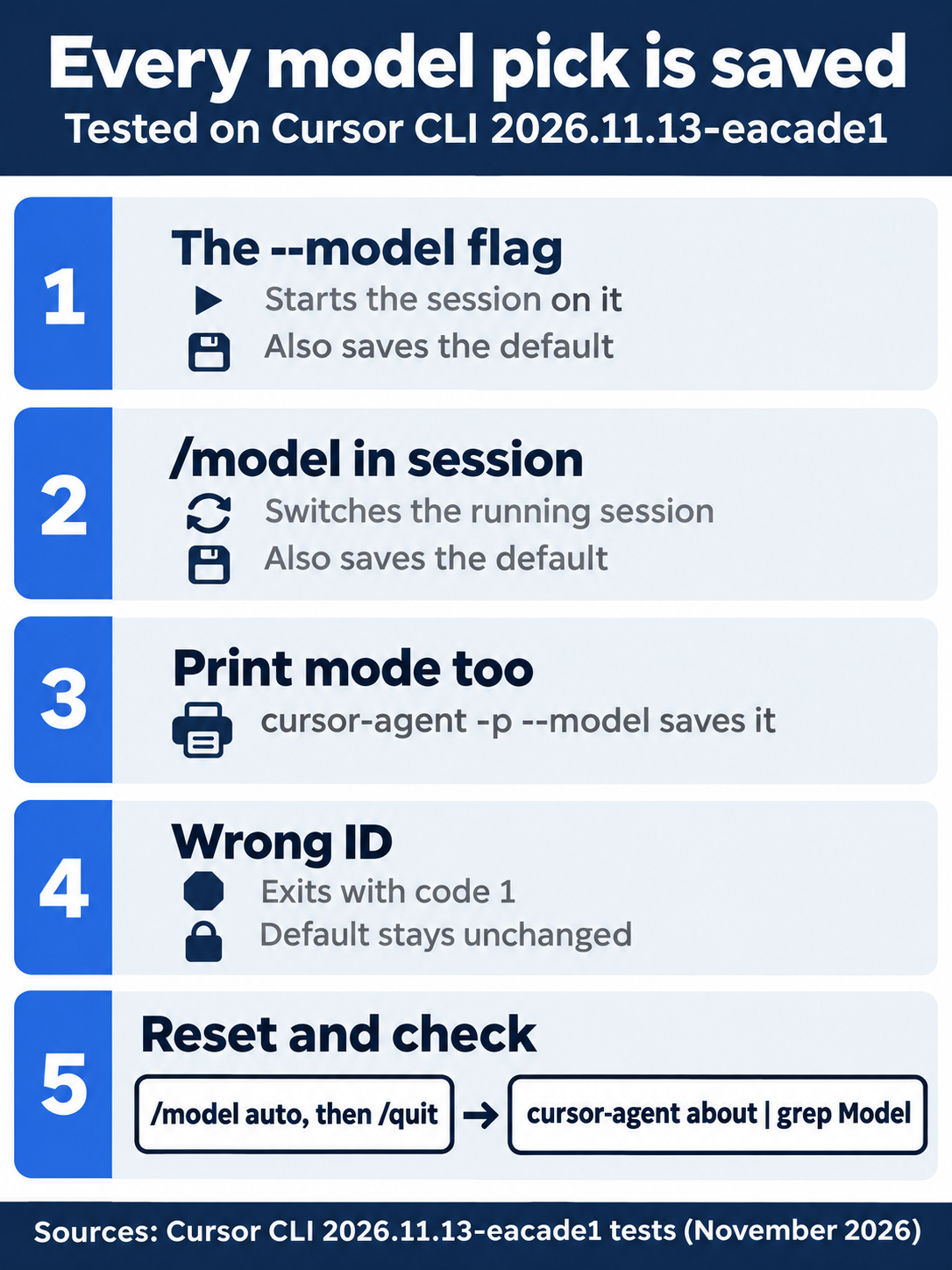
A --model flag, a /model pick, and a print-mode run with -p each save the model as the default for the next session. A wrong ID exits with code 1 and leaves the default alone. /model auto, then /quit, is the reset, and cursor-agent about | grep Model is the check.
Family shortcuts
Since v2026.07.06 you can type a family shortcut such as /composer or /opus to jump to a model, and each shortcut remembers your last choice in that family. /fast turns Fast on or off when the current model supports it. Turn the shortcuts off under Model slash commands in /config (CLI changelog). The test used /model composer with the shortcuts at their default setting.
Your plan shapes the list
- Plus has no Auto and no third-party models. It runs the four Cursor models at fixed settings: Fast is off, effort is medium, and Grok 4.7 uses the 256k window (Models & Pricing). Start here needs Auto, so a Plus reader would start each run with
--modelinstead. The guide has no Plus account, so this is not tested. - Premium and above can pick third-party models and choose Fast and effort. The pricing table labels many third-party models "Hidden by default" (Model pricing).
- Teams and Enterprise admins can limit the models. When they do,
cursor-agent modelsand the/modelpicker show only the allowed ones, and a blocked--modelexits with the restriction message (CLI changelog). On these plans, third-party models bill at API list price plus the Cursor Token Rate on eligible models (Models & Pricing).
The guide's test account is on a legacy Cursor plan, so its list and picker can differ from a Premium account's. For example, its picker shows Max mode: OFF. Max Mode extends a model's context window and exists only on legacy request-based plans (Max Mode on legacy plans). What a Premium account's list and picker show is not yet tested.
Auto has modes
Auto has three modes: Cost, Balance, and Intelligence. Cost mode is classic Auto. It bills as a Cursor-model request from included usage, whatever model serves it. Individual plans have Cost mode only. Balance and Intelligence use Cursor Router on Teams and Enterprise, and a route to a third-party model bills as third-party usage (Auto modes). The CLI does not show which model served an Auto request, so the footer says only Auto.
Why the answers differed
All four test answers, three in Start here and one on Grok 4.6 in Auto-review, named the same keywords and the same refund rule. They differed in what else they added: a note about shipping words, a table, quoted line numbers. The differences show why you check against the code. The code is the fact, and each model's answer is a claim about it. A question with one right answer in the code is the cheapest way to compare two models on your own project.

The scene shows the habit this part builds: a developer stopping before the first prompt to read the footer, because the session starts on whatever model was saved last, not on the one they assume. One glance at the footer, or at cursor-agent about, settles it.
If you already use Claude Code: Claude Code's /model picks among Claude models. Cursor's picker spans companies, and a Claude model is one entry beside Grok, Composer, GPT, and Gemini. In Cursor, a Claude model is a third-party model, so it bills at API list price from prepaid credit on Premium and above, never from included usage.
Do this today
Everyone
- Repeat the comparison on a fourth model. Run the question in a new session with
cursor-agent --mode=ask --model cursor-grok-4.6-medium. If that ID is not in your list, use any Grok 4.6 ID thatcursor-agent modelsprints, exactly as printed. Check: the answer namescrushed,broken,in pieces, anddented, and says refund wins. Reset:cursor-agent, then/model auto,Enter,/quit;cursor-agent about | grep ModelprintsModel Auto. - Start one habit: read the footer before you type. The footer names the model the session is on. A session that starts on a model you picked days ago runs on that model until you change it. Check: in your next session, before the first prompt, the footer model matches the
Modelline ofcursor-agent about. Then/quit.
If you read Going deeper
- Raise the effort. In a
cursor-agent --mode=asksession, type/model grok-4.7, pressTab, pick High, pressEsc, thenEnter. Check: the footer showsGrok 4.7 256K High. Reset:/model auto,Enter,/quit;cursor-agent about | grep ModelprintsModel Auto. - Make a wrong ID fail. Run
cursor-agent -p --model no-such-model 'Reply with OK.'; echo $?. Check: the output starts withCannot use this model: no-such-model.and the last line is1. Reset: none needed;cursor-agent about | grep Modelstill printsModel Auto. - Confirm the tree. Check:
git status --shortprints nothing andnpm testprintspass 7.
The code is the fact
The opening problem was never which model is best. It was a setting that changed quietly: one --model flag for one experiment, saved as the default for every session after it. Once you know that every pick sticks, the routine is short. List what your plan offers, pick a model on purpose, read the footer before you type, and run /model auto before you leave.
The comparison itself is just as simple. Three models read the same file, and all three named the same four keywords and the same refund rule; they differed only in what they added around the answer. None of that decoration settles anything. Two lines of src/classify.js do.
Pick the model for the job, and grade it against the code.
This is Part 7 of "Cursor, Day-to-Day," an 18-part guide to using Cursor's agent every day, from the CLI and the editor.