
Why Your Cursor Agent Forgot: Four Runs That Show What It Can See
Four one-line print-mode runs prove what a Cursor session can see: a fact said in chat survives --continue but not a new session, while the same fact in AGENTS.md comes back every time, and /context shows what fills the window.
A code word, four print-mode commands, and one /context panel prove that a new Cursor session drops your chat but keeps your rules.
You explained the plan to the agent an hour ago, opened a new session, and it acted as if the conversation had never happened.
In this article: Day 6 of an 18-day guide. Start here runs four
cursor-agent -pcommands that show a new session forgetting a code word said in chat and remembering it once it is inAGENTS.md, then reads/contextand runs/summarizein a live session. Going deeper covers a full window, window sizes,.cursorignore, and a print-mode trap with Plan mode.
You explain a decision to the agent, start a new session later, and the agent has no idea what you mean. The tool is not flaky. The model reads one block of text per turn, and a new session builds that block without your old chat. Today you prove it with a code word and four one-line commands.
Tested on Cursor CLI 2026.11.13-eacade1. Editor steps: written from the docs, not yet run.
On Day 5, a three-line AGENTS.md made the agent add a test named dented without being asked, and seven tests passed.
Start here
By the end of today, you can prove with four short runs that a new Cursor session forgets your chat but keeps your rules, and you can read what fills the agent's context in a live session.
Starting fresh or fell behind? Run git switch -C main cursor/day-05. This replaces your main with the end of Day 5; to keep your own work, run git branch my-backup first.
Check where you are
Start in Ticket Triage, the small support-ticket classifier this guide builds on, and confirm that Day 5's work is committed and green.
cd ~/code/ticket-triage
git status --short
git log --oneline -1
npm test
git status --short prints nothing. git log --oneline -1 prints a short commit hash, then the message from Day 5:
<hash> Add dented to the damaged keywords
Your hash differs from anyone else's; the message is the check. Near the end, npm test prints a pass 7 line and a fail 0 line. If the tree is not clean, commit or discard the change first, because the last step today restores AGENTS.md and would throw away an uncommitted edit to it.
What the model reads
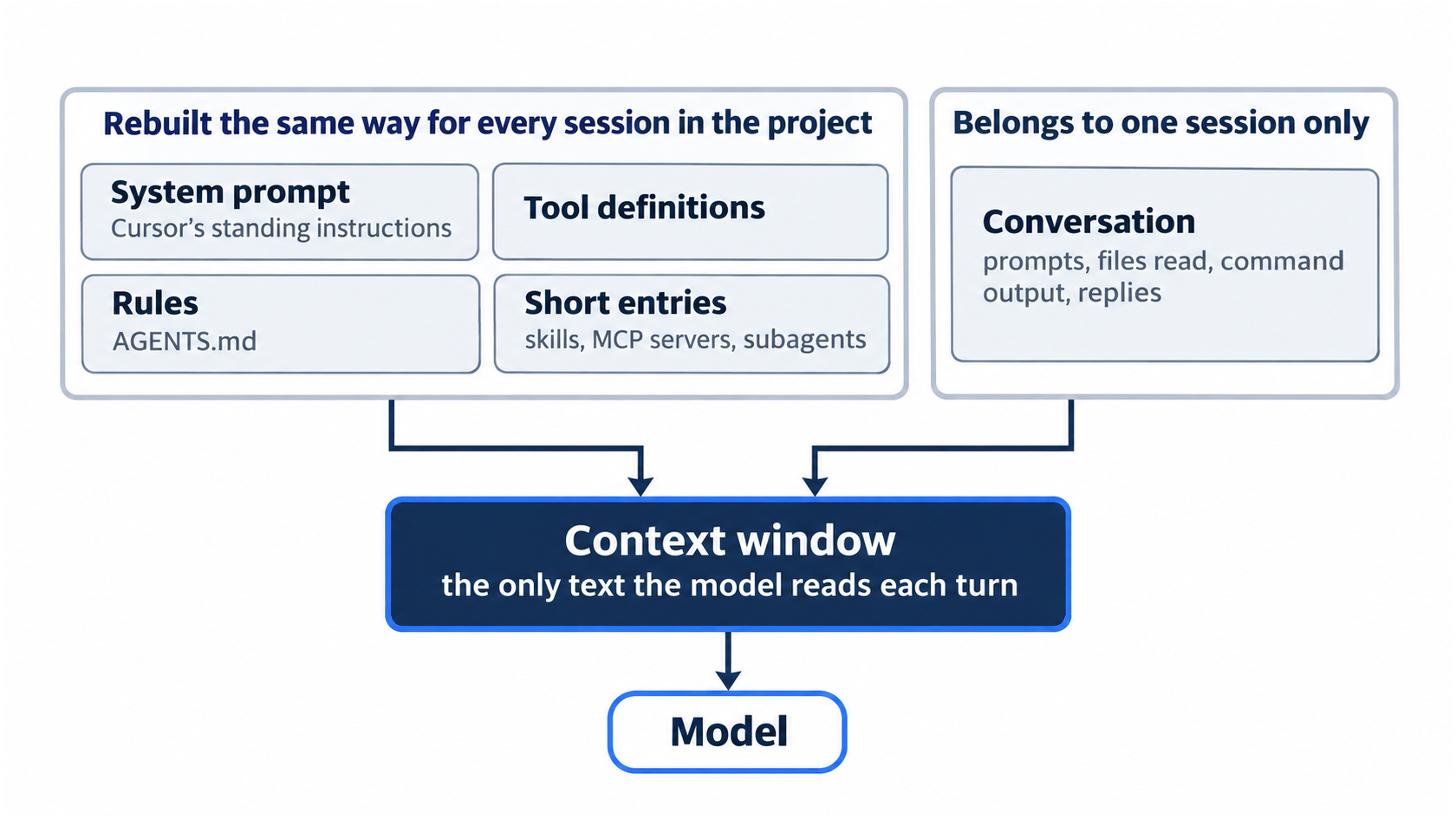
The model behind the agent does not remember anything between turns. On every turn, Cursor sends it a block of text, and the model reads that block and nothing else. The block is the context window, and it has a size limit.
It holds Cursor's standing instructions, called the system prompt, and the definitions of the tools the agent can call. It holds your rules, such as AGENTS.md. It holds a short entry for each skill, each MCP server, and each subagent: a skill is a saved set of instructions the agent loads only when a task needs it, an MCP server is a connection to an outside tool, and a subagent is a helper agent with its own window. Last, it holds the conversation so far: your prompts, the files the agent read, command output, and its replies.
A session is one conversation with its own history. Everything in that list except the conversation is rebuilt the same way for every session in this project. The conversation belongs to one session only, so a new session starts with an empty one.
Four runs
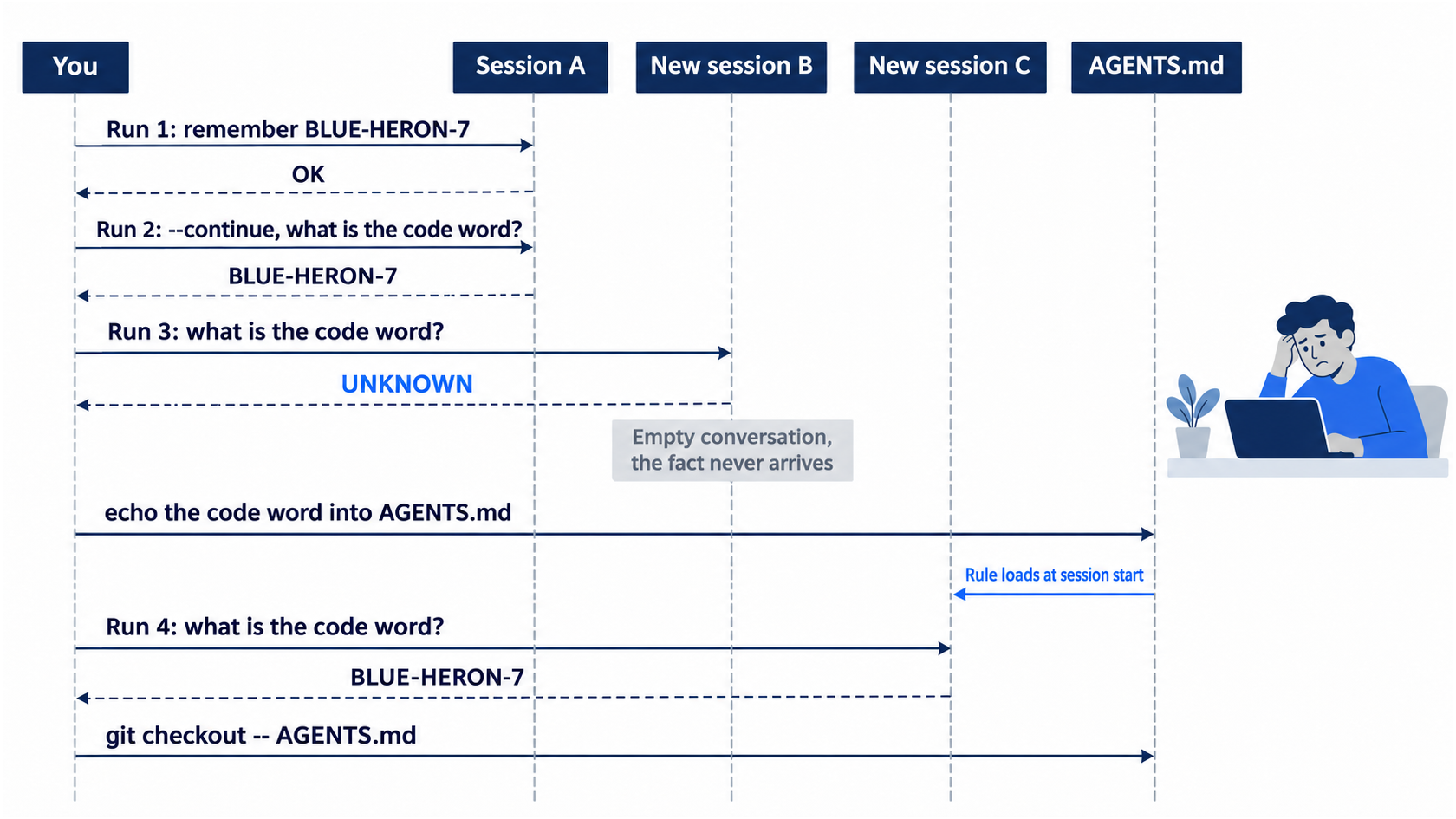
Each run uses print mode: cursor-agent -p "<prompt>" sends one prompt, prints the answer, and exits. Adding --continue resumes the previous session instead of starting a new one (CLI parameters). Run the four commands in order, with no other cursor-agent prompt in between, because --continue picks whichever session ran last.
First, tell a session a fact.
cursor-agent -p "Remember this code word for later: BLUE-HERON-7. Reply only OK."
OK
The fact now lives in that session's conversation and nowhere else. Next, ask the same session.
cursor-agent -p --continue "What is the code word? Reply with only the code word, or UNKNOWN if you do not know it."
BLUE-HERON-7
--continue brought the earlier session back, so the earlier prompt was in the window again. Now ask the same question in a new session.
cursor-agent -p "What is the code word? Reply with only the code word, or UNKNOWN if you do not know it."
UNKNOWN
Nothing deleted the fact. The new session's conversation was empty, so the code word never reached the model. Last, put the fact in AGENTS.md and ask a new session once more.
echo '- The code word is BLUE-HERON-7.' >> AGENTS.md
cursor-agent -p "What is the code word? Reply with only the code word, or UNKNOWN if you do not know it."
BLUE-HERON-7
The session was new, but AGENTS.md is a rule, and rules load into every new session. The code word was only a test, so restore the file and check the tree.
git checkout -- AGENTS.md
git status --short
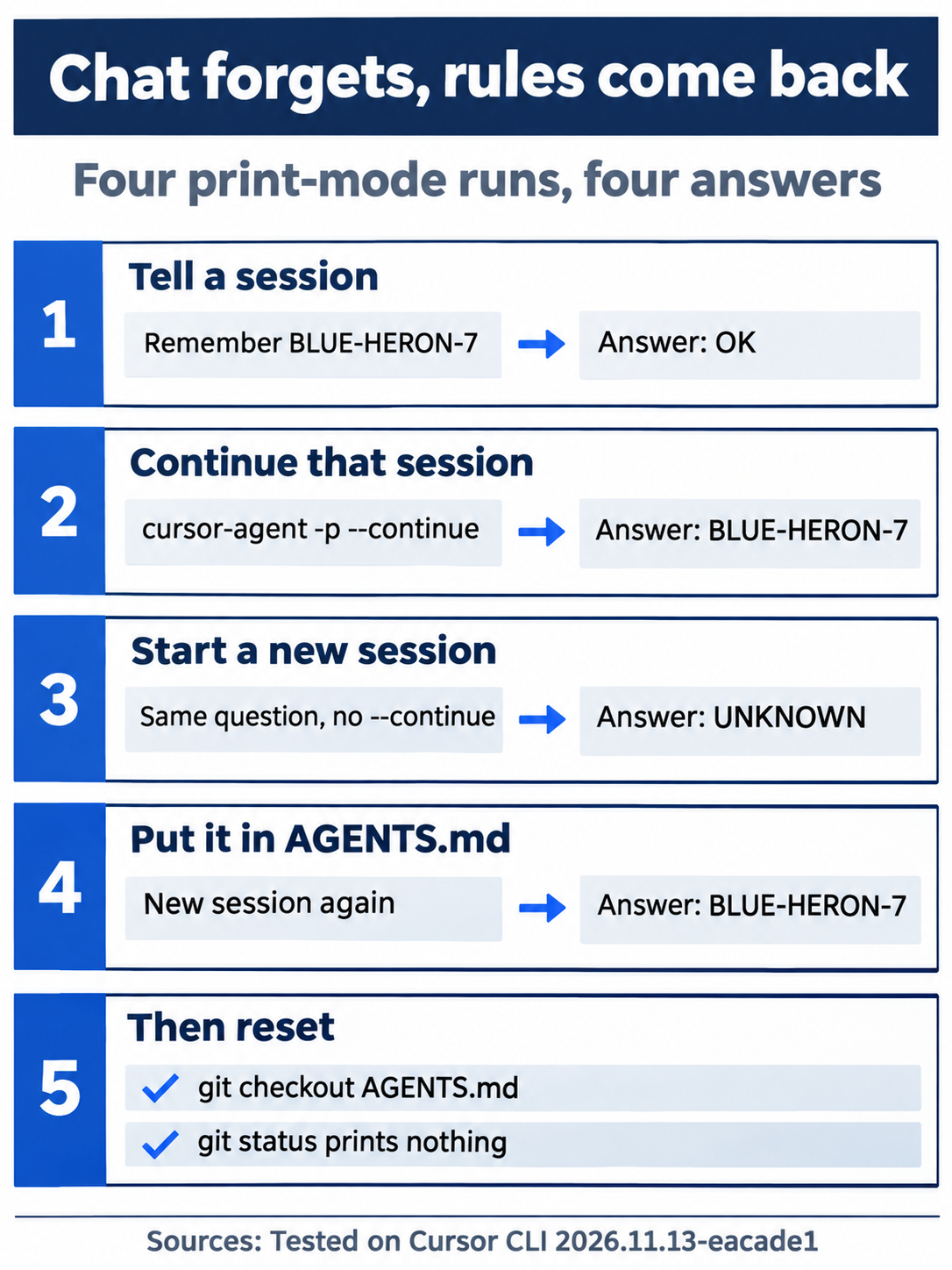
The last command prints nothing. Read the four answers together: chat lasts as long as its session, --continue brings that session back, a new session starts without it, and a rule file reaches every session until you change the file.
Look inside a live session
Print mode hides the window. A live session shows it. Start one in Ticket Triage.
cursor-agent
The input box shows → Plan, search, build anything. Before you type a prompt, ask for the breakdown.
/context
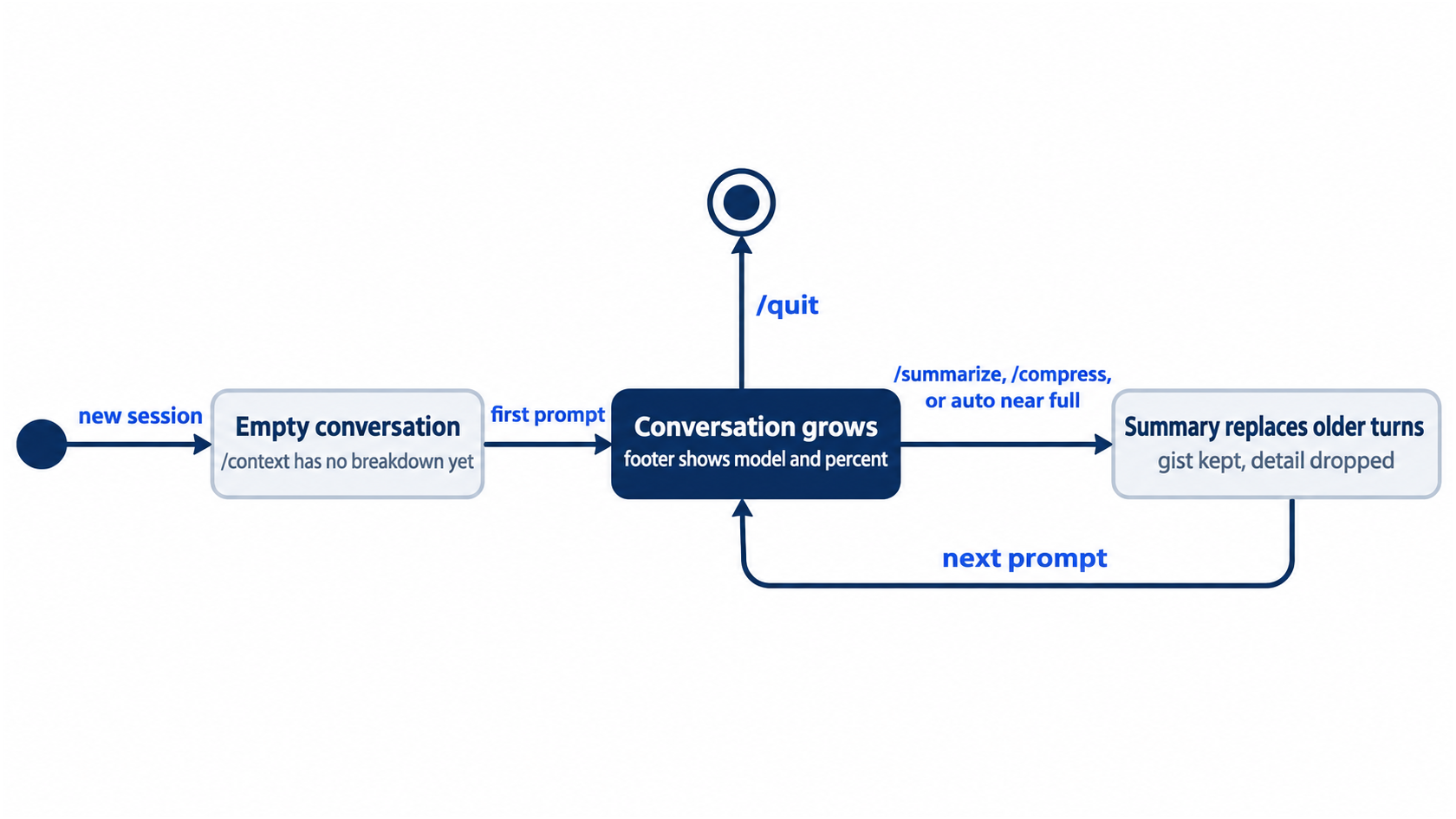
/context opens a panel that shows what fills the window. On a session with no prompt yet, it reads:
Context • Auto
Current context usage by category.
No context usage breakdown to show yet.
No prompt has gone to the model yet, so there is nothing to measure. Press Esc to close the panel. Now ask a question that names a file with @. An @ mention adds that file to the context, so the agent reads it instead of guessing which file you mean. Type @src/cl and Cursor lists matching files, such as classify.js src. Press Enter to pick it, then type the rest of the prompt.
In one sentence, what does @src/classify.js return for a dented can?
The agent reads src/classify.js and answers:
For a dented can, classify returns "damaged".
Look at the footer under the input box. It shows Auto, a dot, and a percentage. Auto is the model setting, which lets Cursor pick the model, and the percentage is how full the context window is. Run /context again.
The panel now has a header with the model, the tokens used out of the window size, and the same percentage, then one bar and a list of categories: System prompt, Tool definitions, Rules, Skills, MCP, Subagents, Conversation, and Free space. A token is a short piece of text. Your token counts depend on your rules, skills, and connected tools, so compare categories, not numbers. Conversation now holds your question, the file, and the answer. Press Esc to close the panel.
Summarize the conversation
A long session fills the Conversation category. /summarize replaces the conversation with a summary of it, "to reduce context" in the words of the CLI slash commands page.
/summarize
A "Summarizing" spinner runs, then a Summary box appears with numbered sections such as Primary Request and Intent, Key Technical Concepts, and Files and Code Sections. The input box returns to → Plan, search, build anything. End the session with /quit.
The same steps in the editor
Every step today only reads files, so you can also run it in the editor's Agent panel. Each step below is (written from the docs, not yet run).
- (written from the docs, not yet run) Run each of the four prompts in its own new chat. The editor has no
--continue; for run 2, type the question in the same chat as run 1 instead of opening a new one. RestoreAGENTS.mdafterward with the samegit checkoutcommand. - (written from the docs, not yet run) Find the context ring next to the prompt input. It shows how full the window is; click it to open a breakdown by category (Prompting agents).
- (written from the docs, not yet run) Type
@in the chat input and picksrc/classify.jsto attach it, then ask the dented-can question (Prompting agents).
Today's win
The four answers read OK, BLUE-HERON-7, UNKNOWN, BLUE-HERON-7. Then check the tree.
git status --short
npm test
git status --short prints nothing, and npm test prints pass 7 and fail 0.
Allowlist: no approval prompts today; every step only reads files. Auto-review: the same four answers and the same live-session results, with no prompts.
You can stop here. Going deeper explains why this works and where it breaks.
Going deeper
This section is for readers who want to know what happens when the window fills, what the agent cannot see, and where the CLI and the editor differ. It assumes you finished Start here.
When the window fills
The window is fixed for a chat. As files, tool results, and replies pile up, Conversation grows and Free space shrinks. When the window gets close to full, Cursor compresses older parts of the conversation into a summary on its own (Prompting agents). The editor's breakdown names the result with a "Summarized conversation" category beside Conversation. The CLI breakdown in the test had no such row, because Cursor had not summarized anything yet.
A summary keeps the gist and drops detail. A decision you made early in a long session can turn into one line of that summary, or vanish from it. Run 4 showed the fix: anything that must survive goes in a file the agent loads every time.
/summarize and /compress
/summarize is the manual version, listed as "Summarize the conversation to reduce context" (CLI slash commands), and /compress is an alias for it (Using Agent in CLI).
Two details from the test are worth knowing. First, the Summary box ended with a "Transcript location" section that pointed to a full transcript file under ~/.cursor/projects/ and told the agent to search it if anything was unclear. No docs page in this guide's research describes that file, so treat it as what the test showed, not as a promise. Second, the footer still read Auto · 4.7% right after the summary. A session with one question has almost nothing to free, so do not expect the number to drop until a session is long.
/context is real, but the reference table misses it
According to the CLI changelog, v2026.06.09 added /context, which "visualizes context usage by category." The CLI slash commands table does not list it, so a reader who checks only that page concludes it does not exist. The CLI's own menu is the better check: start cursor-agent, type /, and read the menu.
/context  Show context usage breakdown
/summarize  Summarize the conversation to reduce context
Press Esc, type /quit, and check that git status --short prints nothing and npm test prints pass 7.
The footer percentage and the window size
The editor draws a context ring next to the prompt input (Prompting agents). The CLI has no ring, so it prints a percentage in the footer beside the model name. In the test, the footer and the /context header showed the same 4.7%. Glance at the footer before a new task: a high number in a session you are about to reuse means old material will compete with the new task.
The test session on Auto showed a 256K window. Window size depends on the model, and some models bill differently past a size. Models & Pricing says Grok 4.7 bills long context over 256k input at 2x, up to 500k. The Claude Opus 5.5 page says that model supports up to 1M tokens at the same per-token rate. Max Mode, which extends a model's window, applies only on legacy request-based plans (Max Mode on legacy plans). This guide states no limit behavior from its own test account.
What the agent cannot see: .cursorignore
A .cursorignore file in the project root keeps files out of the agent's reach. It uses .gitignore syntax, and Cursor blocks the listed files from Agent, from Tab, and from @ references (Ignore file). Cursor also respects .gitignore, and a default ignore list already covers lock files, .env* files, and .git/ (default ignore list). In the editor, Cursor Settings > Indexing > Ignore Files > Hierarchical Cursor Ignore makes Cursor read .cursorignore files in parent directories too (hierarchical ignore).
Gotcha: .cursorignore is not a wall. The same page says the terminal and MCP tools that the agent uses cannot block access to ignored files. An agent that runs cat .env in a shell reads the file anyway. Use .cursorignore to keep noise out of the window, and keep real secrets out of the repository.
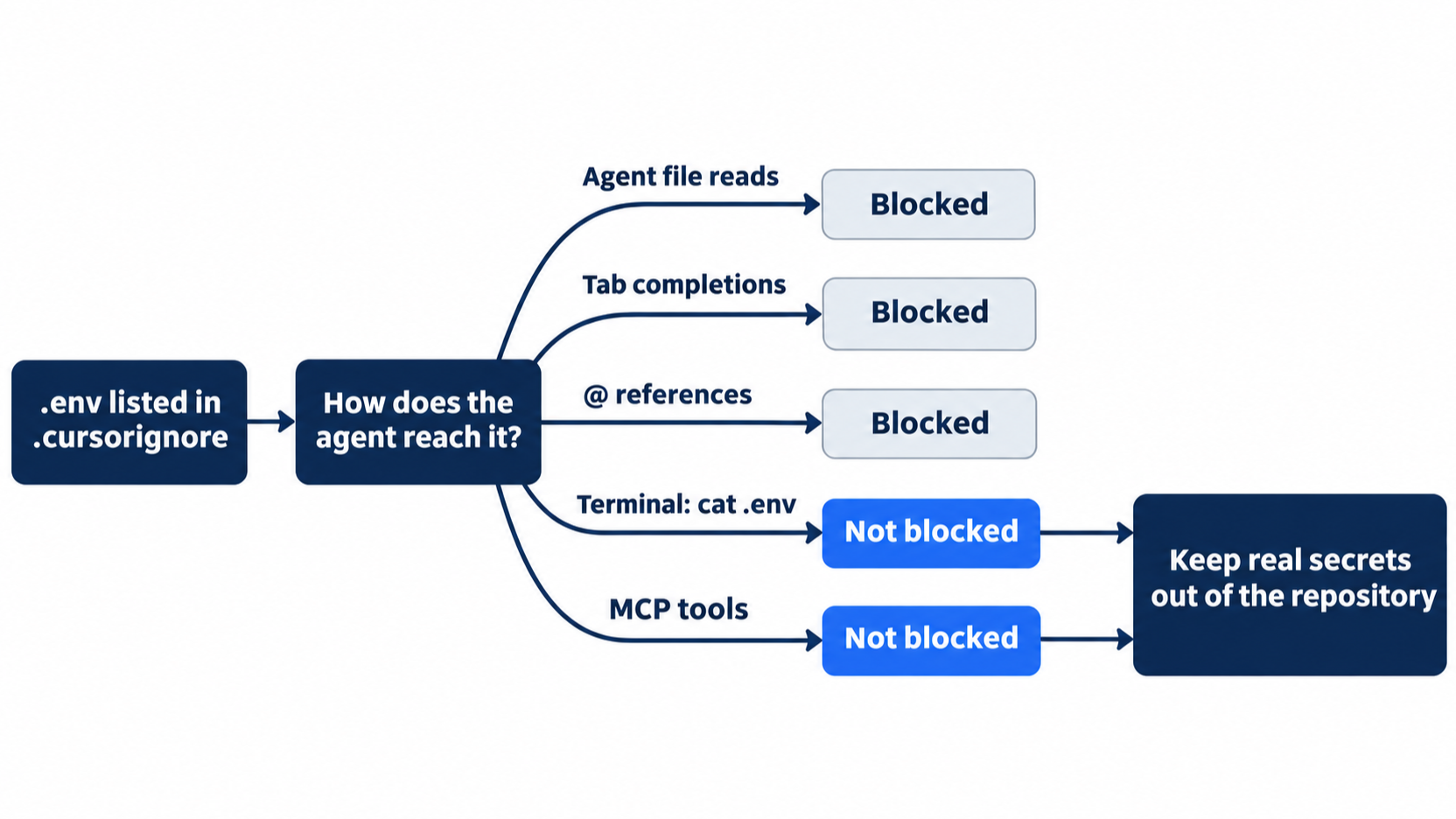
Ticket Triage has nothing to hide yet, and this guide did not test a .cursorignore on the pinned CLI, so there is no exercise here.
More @ mentions, and modes, in the editor
The CLI's @ picks files and folders (Using Agent in CLI). The editor's @ reaches further (Prompting agents): @Terminals adds terminal output, @Chats adds context from a previous conversation, @Commit (Diff of Working State) adds your uncommitted changes, @Branch (Diff with Main) adds your whole branch diff, and @Browser adds context from the built-in browser. The same page advises skipping @ when you are not sure which files matter, because the agent finds relevant files through its own search.
Two editor details change how the four runs behave there. Each editor mode, whether Agent, Ask, Plan, or Debug, uses its own context, so switching modes starts a fresh window, and the help page suggests a new chat when you change tasks (Agent mode help). The same page says Agent can search your past conversations as a tool. The CLI's new session answered UNKNOWN in the test. This guide has not yet tested whether an editor chat finds the code word through that search.
Print mode, Plan mode, and subagents
--mode accepts plan or ask (CLI parameters). In testing, cursor-agent -p --mode=plan with a plan request produced no output for more than five minutes, and only Ctrl+C stopped it. Use Plan mode in an interactive session, where you can read and approve the plan.
A subagent runs in its own context window and returns a result to the main conversation, so its file reads do not crowd your session (Agent mode help).
If you already use Claude Code: the habit carries over, and only the name changes: Claude Code's /compact is /summarize here. Cursor also reads a project's CLAUDE.md like AGENTS.md and always applies it (Rules help), so a CLAUDE.md in the repository loads into every new session, the way run 4's line did.
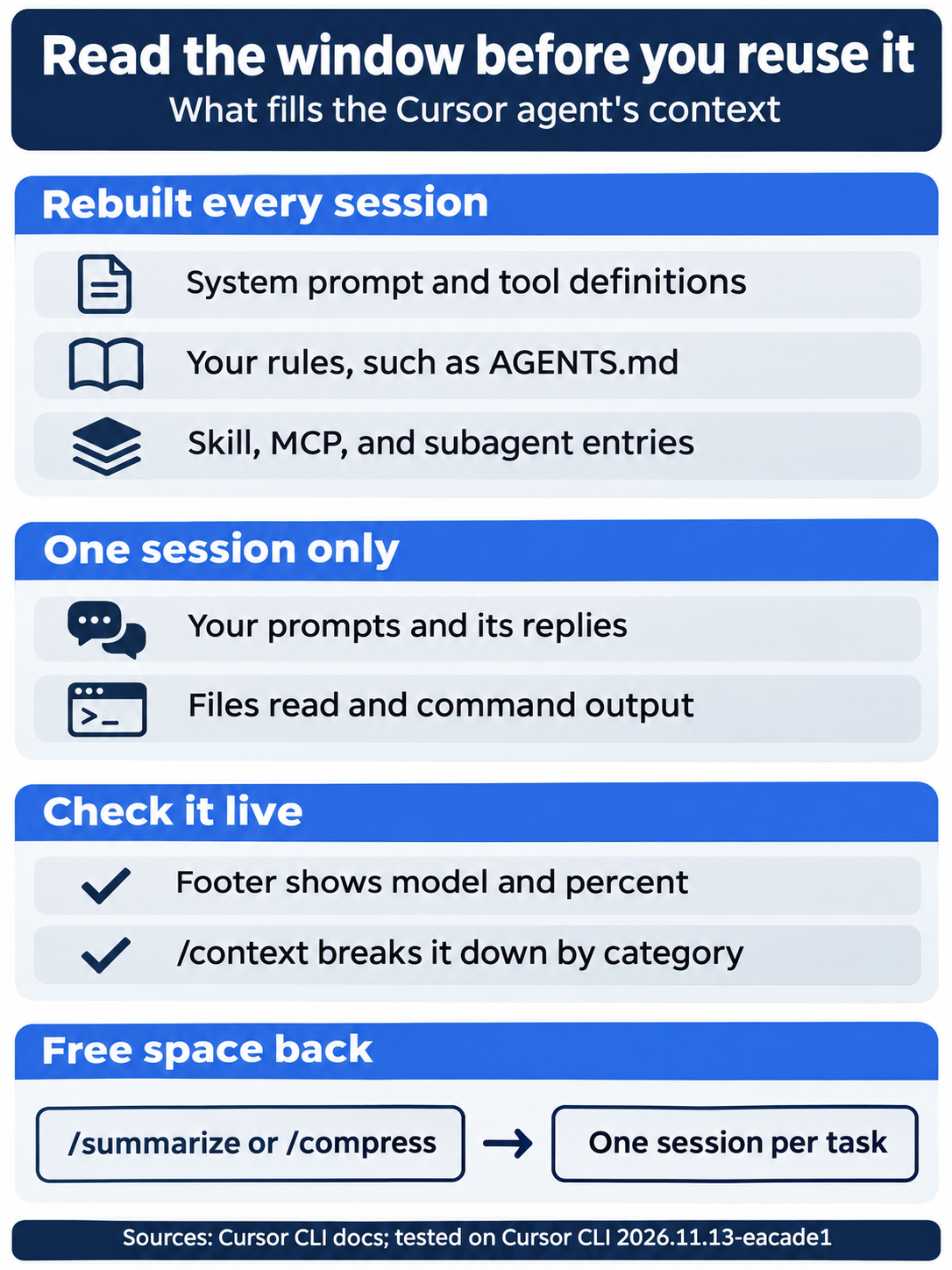
To sum up the window: part of it is rebuilt every session, part of it belongs to one session, the footer and /context show it, and /summarize or a new session per task gives space back.

The scene returns to run 3: the new session's conversation was empty, so the code word never reached the model.
Do this today
Everyone
- Repeat the four runs. Run the four Start here prompts in order and check the answers
OK,BLUE-HERON-7,UNKNOWN,BLUE-HERON-7. Then rungit checkout -- AGENTS.md,git status --short, andnpm test. The result:git status --shortprints nothing, andnpm testprintspass 7. - Start one habit: one session per task. When you switch tasks, type
/quitand start a newcursor-agentsession, and put any decision that must outlast the session inAGENTS.md. Check:/contextin the new session, before any prompt, shows "No context usage breakdown to show yet."
If you read Going deeper
- Find the missing command. Start
cursor-agent, type/, and find the/context Show context usage breakdownline. Then open the CLI slash commands page and confirm that/summarizeis listed and/contextis not. Reset:Esc,/quit, thengit status --shortprints nothing andnpm testprintspass 7. - Read your own window. In one of your own projects, start
cursor-agent, ask one question about a file with@, and run/context. Check: you can name the largest category other than Free space. Reset:/quit;git status --shortin that project shows what it showed before. - Repeat runs 3 and 4 in Auto-review. Add
--auto-reviewto both commands (run 3, then theechoand run 4). Check:UNKNOWN, thenBLUE-HERON-7, with no approval prompts. Reset:git checkout -- AGENTS.md, thengit status --shortprints nothing andnpm testprintspass 7.
The agent forgets on purpose
The agent was not flaky. It read exactly what it was given, and a new session is given an empty conversation. The same question got BLUE-HERON-7 in a continued session, UNKNOWN in a new one, and BLUE-HERON-7 again once the fact lived in AGENTS.md.
Chat is scratch space for one task. A decision that must outlast the task goes in a file the agent loads every time, and the footer percentage plus /context tell you when a session is too crowded to reuse.
Stop asking the agent to remember. Write it down where every session will read it.
This is Part 6 of "Cursor, Day-to-Day," an 18-part guide to using Cursor's agent every day, from the CLI and the editor.