
Ask First, Plan Second, Build Third: The Three Modes of Cursor's Agent
Cursor's agent is cheapest to correct before it writes code, so the daily habit is a three-step order: ask in a mode that cannot edit, plan in a mode that writes an editable plan, and only then press b to build and check the result with your own test run.
Use Ask mode to learn the code without touching it, Plan mode to agree on a written plan you can edit, and only then let the Cursor CLI build, with six passing tests you ran yourself.
You asked the agent for a small change, it rewrote behavior you depended on, and you only found out when an old test went red.
In this article: Day 3 of an 18-day guide. Start here takes one change through all three modes of the Cursor CLI on a small sample project: a read-only question in Ask mode, a written plan in Plan mode, one revision to that plan, and a local build that ends with six passing tests and a commit. Going deeper covers the other ways into each mode, where Cursor saves plan files, why Plan mode hangs in print mode, two screen lines that look like errors and are not, and why the agent's choice of test command matters for your allowlist.
Some changes look small but quietly alter what an existing test expects, and those are the ones that go wrong. The agent builds exactly what you asked for, and a case you never mentioned changes its answer.
Cursor's agent has a fix built into its modes. One answers questions and cannot edit a file, one writes a plan you can change before any code exists, and one builds. Used in that order, the agent agrees with you on paper first, where a wrong line costs one keystroke instead of a rewind.
Tested on Cursor CLI 2026.11.13-eacade1. Editor steps: written from the docs, not yet run.
Yesterday you reviewed a diff, rewound a bad try, and the agent committed a parcel keyword.
Start here
At the end of today, you can ask the agent a question that changes nothing, get a written plan for a change, edit that plan, and have the agent build it with six tests passing.
Starting fresh or fell behind? Run git switch -C main cursor/day-02. This replaces your main with the end of Day 2; to keep your own work, run git branch my-backup first.
Check your starting state
Start where Day 2 ended, in the Ticket Triage project, a small support-ticket classifier.
cd ~/code/ticket-triage
git status --short
git log --oneline -1
npm test
git status --short prints nothing. git log --oneline -1 shows the newest commit, with your own hash:
d0a4310 Add parcel to the shipping keywords
npm test ends with ℹ pass 5 and ℹ fail 0. If any check differs, finish Day 2 first.
Ask a question in Ask mode
Today's change is bigger than a keyword. Damaged items now land in shipping, and you want them in their own damaged category. The change breaks an expectation you already wrote: a Day 1 test says the crushed mug is shipping. Before you change anything, find out how the code decides.
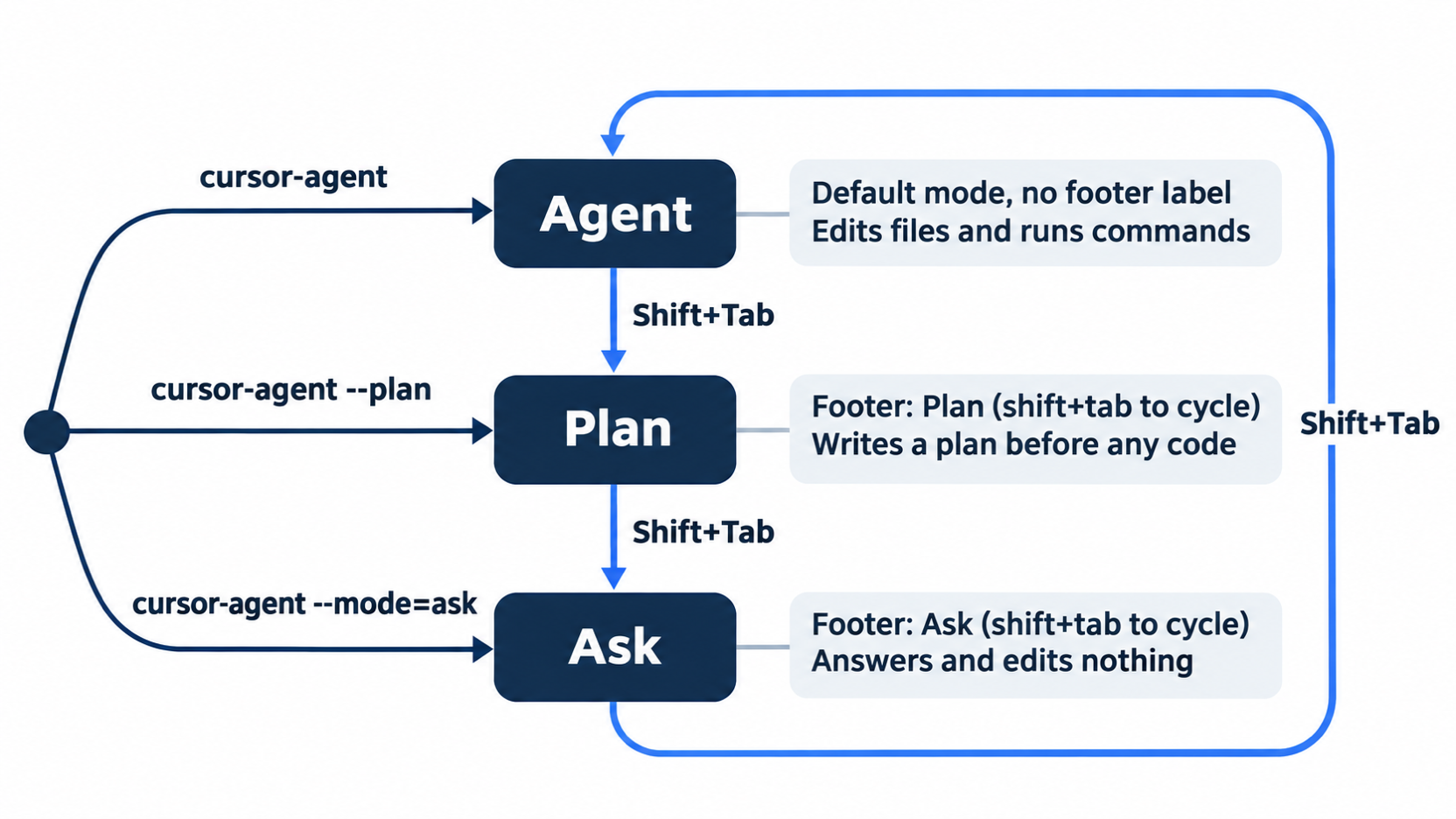
A mode sets what the agent may do in a session. The CLI has three. Agent is the default; it can edit files and run commands. Plan writes a plan before any code. Ask answers questions and edits nothing (CLI overview). The --mode=ask flag starts a session in Ask mode.
cursor-agent --mode=ask
The footer under the input box shows Ask (shift+tab to cycle). Send this question.
Which check in classify() runs first, and what does classify return for "The mug arrived crushed and I want my money back"?
The agent shows Read src/classify.js, quotes the function, and answers with lines such as "The refund check runs first" and "classify returns "refund"." The reason: "money back" matches the refund check before "crushed" reaches the shipping check. In allowlist mode and in Auto-review mode alike, no approval prompt appears.
Check that nothing changed. In a second terminal tab, run git status --short. It prints nothing. Ask mode read the code and left it alone.
Switch to Plan mode with Shift+Tab
Stay in the same session. Shift+Tab moves to the next mode, in the order Agent, Plan, Ask, and then back to Agent. You are in Ask, so press it twice.
Shift+Tab
Shift+Tab
After the first press, the mode line disappears, because Agent mode has no label. After the second press, the footer shows Plan (shift+tab to cycle).
Ask for a plan
A plan is a written description of a change: which files change, in what order, and what the code does afterward. Send this prompt exactly. It names the behavior that must change, the behavior that must not, and the order of work.
Plan a change: split damage out of shipping into its own damaged category. "crushed", "broken", and "in pieces" move from the shipping check to a new damaged check. The refund check stays first, so a damaged ticket that asks for money back stays refund. The crushed-mug test changes its expected value to damaged, and one new test checks that "The mug arrived crushed and I want my money back" is refund. Write the tests first.
The agent reads test/classify.test.js and draws a box titled Suggested Plan, with numbered sections: tests first, then the change in src/classify.js. Plans differ from run to run. In the tested run, a "Resulting behavior" table listed each kind of input and its category, including crushed + money back as refund (refund wins); another run stated the check order in one line, refund → shipping → damaged → other.
Whatever the layout, find the part that says what each kind of ticket returns, and check two things: the refund check stays first, and the crushed mug becomes damaged. This part is the behavior you are about to agree to. The box ends like this, with your own id:
 Saved to ~/.cursor/plans/Damaged ticket category-0c536537.plan.md

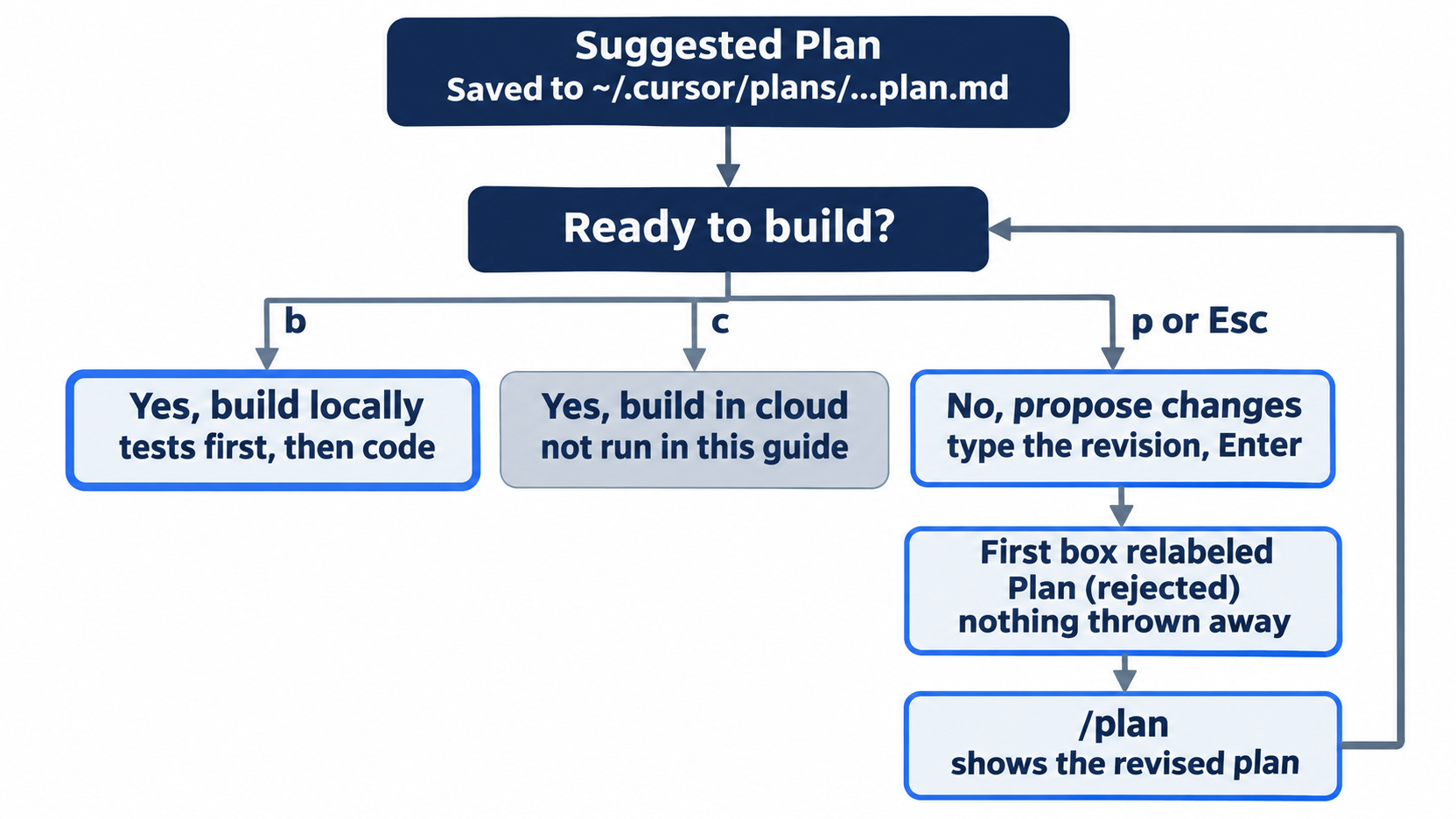
 Ready to build?

  → 1. Yes, build locally (b)
    2. Yes, build in cloud (c)
    3. No, propose changes (p or Esc)
The Saved to line names the plan file, a Markdown file in your home folder, outside your repository. Today you change the plan before you build. No approval prompt appears in either mode. In one of two tested Auto-review runs, the box left out Yes, build in cloud (c); b builds the same way.
Edit the plan
The plan does not name the new test. Give it a name you will recognize in the test output. Press p, and the input line changes to → Describe how to revise the plan (Enter to submit, Esc to cancel). Type the change and press Enter.
Name the new refund test "damaged with refund request is refund".
The first box is now labeled Plan (rejected), which only means you asked for changes. The agent shows two Edited Damaged ticket category-<id>.plan.md +1 -1 lines with their diffs and confirms the new test name. The footer says 1 file edited, and the edited file is the plan, not your code: git status --short in the second tab still prints nothing.
Build the plan
Type /plan and press Enter. The plan box comes back with your edit in it, led by a short to-do list of the two steps, and ends with Ready to build? again. Press b to build locally.
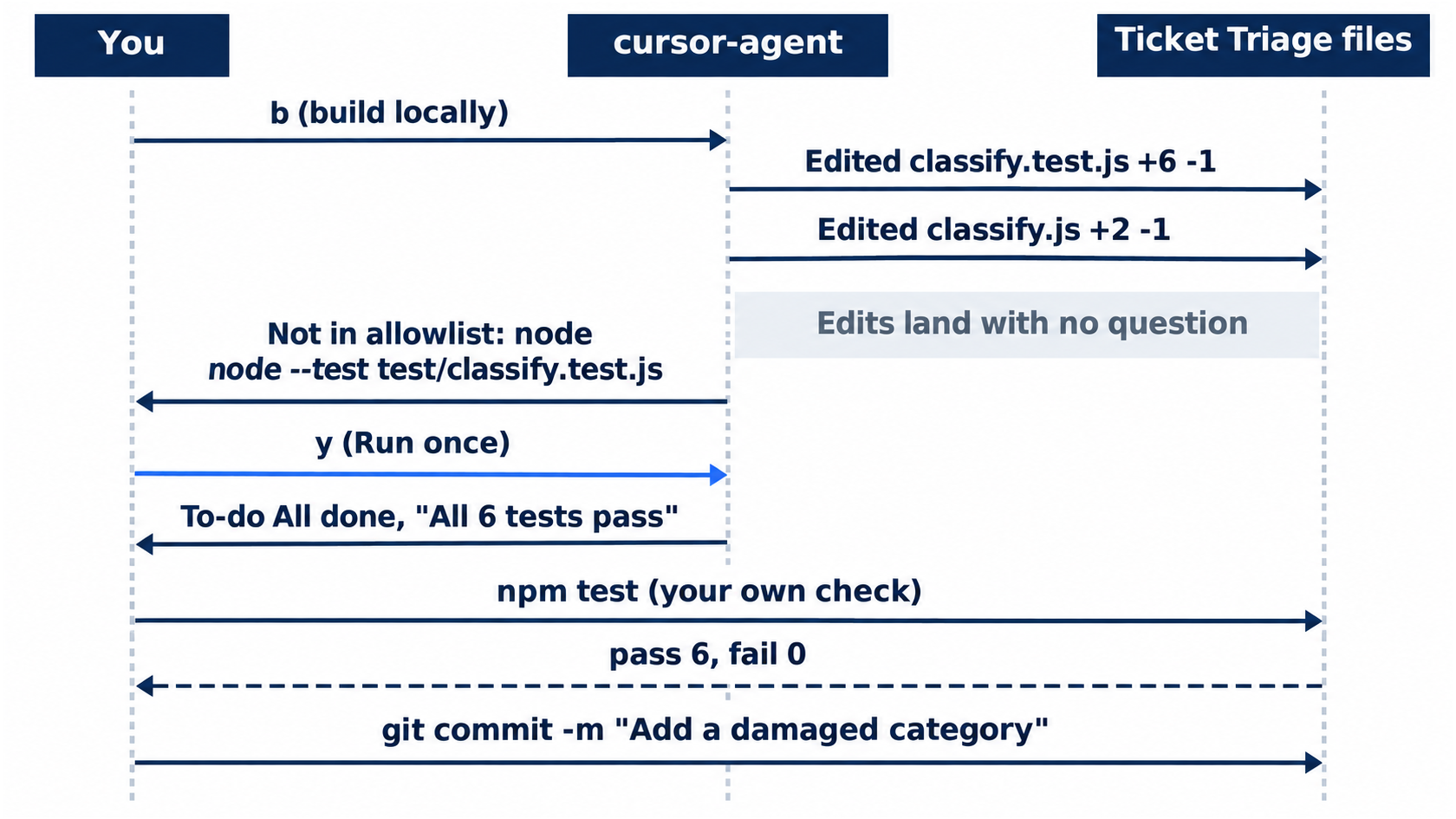
The agent shows Building: Split damaged out of shipping and To-do Working on 2 to-dos. It edits the tests first, Edited classify.test.js +6 -1, then the code, Edited classify.js +2 -1. The edits land on disk with no question. Then it asks to run the tests:
$ node --test test/classify.test.js
Not in allowlist: node
→ Run (once) (y)
  Add Shell(node) to allowlist? (tab)
  Run Everything (shift+tab)
  Skip & tell the agent what to do instead (esc or n)
The agent picked its own test command, node --test on one file instead of npm test, which is why the prompt names node. In allowlist mode, press y. In Auto-review mode, no prompt appears and the tests run. The to-do list ends with To-do All done, and the agent reports something like "All 6 tests pass". Leave the session with /quit.
Check the work yourself
The agent's report is a claim. Run the tests and both tickets in the terminal.
npm test
node --input-type=module -e "import { classify } from './src/classify.js'; console.log(classify('The box showed up crushed and the mug inside is in pieces'))"
node --input-type=module -e "import { classify } from './src/classify.js'; console.log(classify('The mug arrived crushed and I want my money back'))"
npm test ends with ℹ pass 6 and ℹ fail 0. The crushed mug prints damaged, and the crushed mug with "money back" prints refund. Run ls ~/.cursor/plans/ to see one file that ends in .plan.md; the agent names it, so yours differs. Commit the change by hand.
git add -A
git commit -m "Add a damaged category"
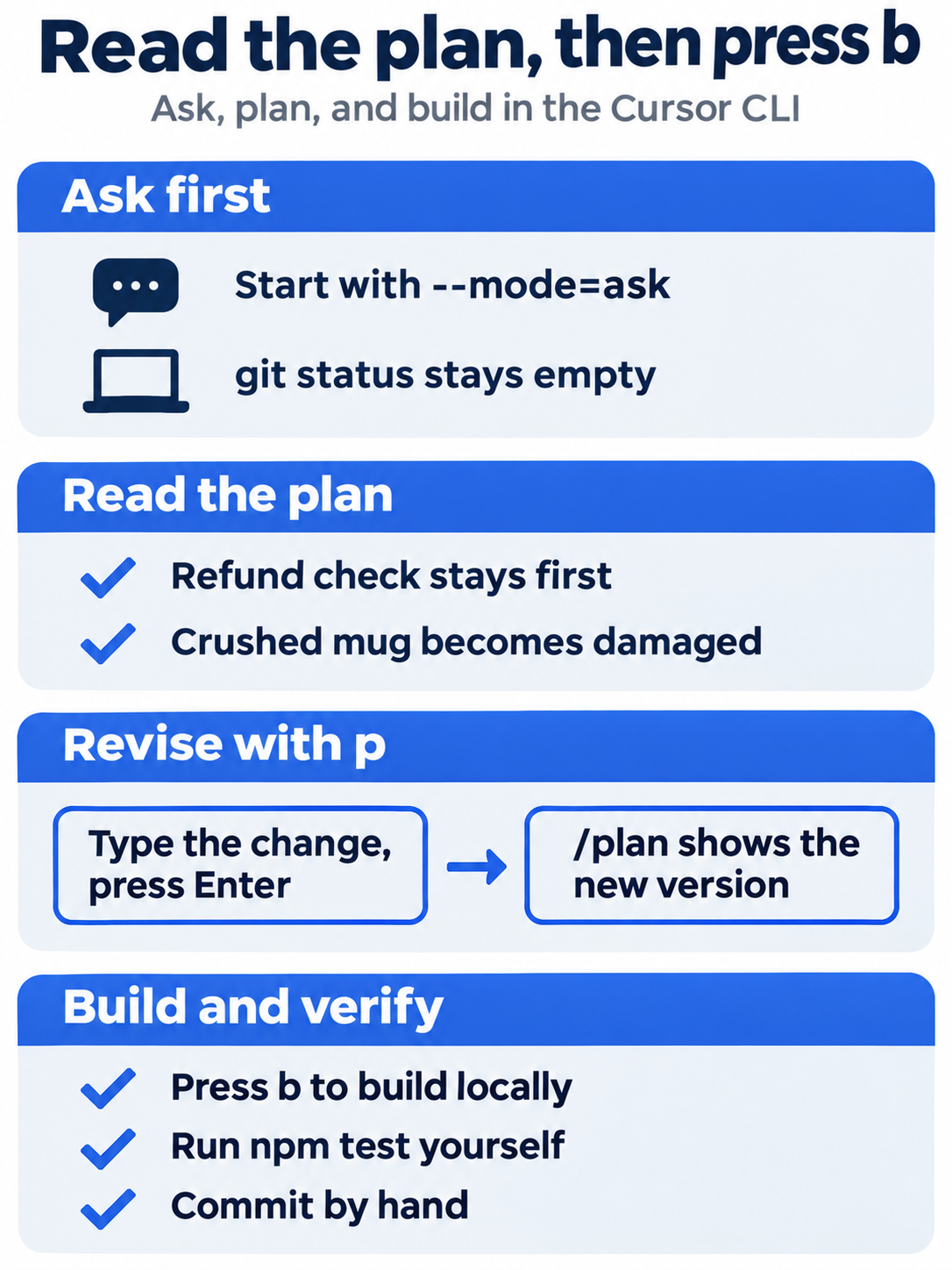
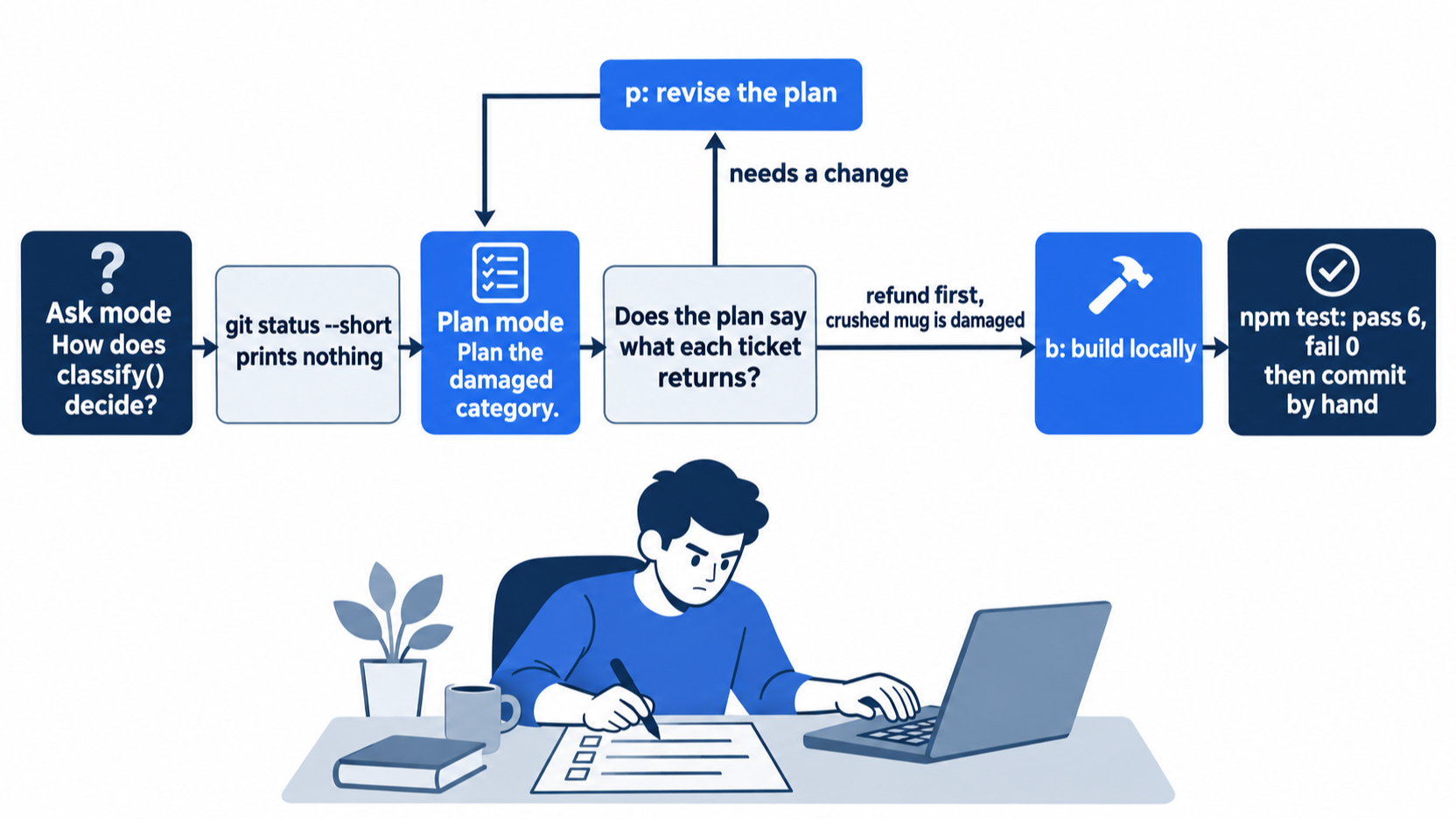
Today's steps make a routine. Ask first, and confirm git status --short is empty. In the plan, read what each kind of input returns. Revise with p until it matches what you want. Then build with b, and trust your own npm test, not the agent's report.
The same steps in the editor
The editor's Agent panel has the same modes, chosen from a mode picker. Ask is read-only, so you may run the question in both doors, but pick one door for the build; if you already built in the CLI, read this and do not run it. Every step here is written from the docs, not yet run.
- (written from the docs, not yet run) Open
~/code/ticket-triagein Cursor and open the Agent panel withCmd+Ion macOS orCtrl+Ion Windows and Linux. Choose Ask in the mode picker, or pressShift+Tabuntil it shows, and send the same question (Agent mode). Rungit status --short; it prints nothing. - (written from the docs, not yet run) Switch to Plan and send the plan prompt. In the editor, each mode has its own context, so the new mode starts a fresh context window and does not see your Ask answer.
- (written from the docs, not yet run) The plan opens as a file you can read and edit (Plan mode help). Type the new test name into it.
- (written from the docs, not yet run) Click Build. Approve the test command if the panel asks, then run the same checks and commit with the same message.
Your win
Run git log --oneline -1. It shows Add a damaged category, and the checks before the commit gave ℹ pass 6, ℹ fail 0, damaged, and refund. You asked before you planned, edited the plan before any code, and proved the build with your own test run.
You can stop here. Going deeper explains why this works and where it breaks.
Going deeper
This section is for readers who want the other ways into each mode, where plans live, and what went wrong or looked odd in testing.
What each mode may do
The CLI overview gives each mode one line. Agent has "Full access to all tools for complex coding tasks" and is the default when you pass no --mode value. Plan is for designing "your approach before coding with clarifying questions"; the agent may ask you questions before it writes the plan, and in the tested run the prompt was specific enough that it asked none. Ask is "Read-only exploration without making changes."
After the build, the footer showed no mode label, so the session was back in Agent mode, and its count read 3 files edited: the plan file plus your two files. The editor has a fourth mode, Debug, and the CLI reaches it with /debug [prompt] (CLI slash commands). This guide did not test Debug. Rules files, the instructions that load into every session, apply in all four modes.
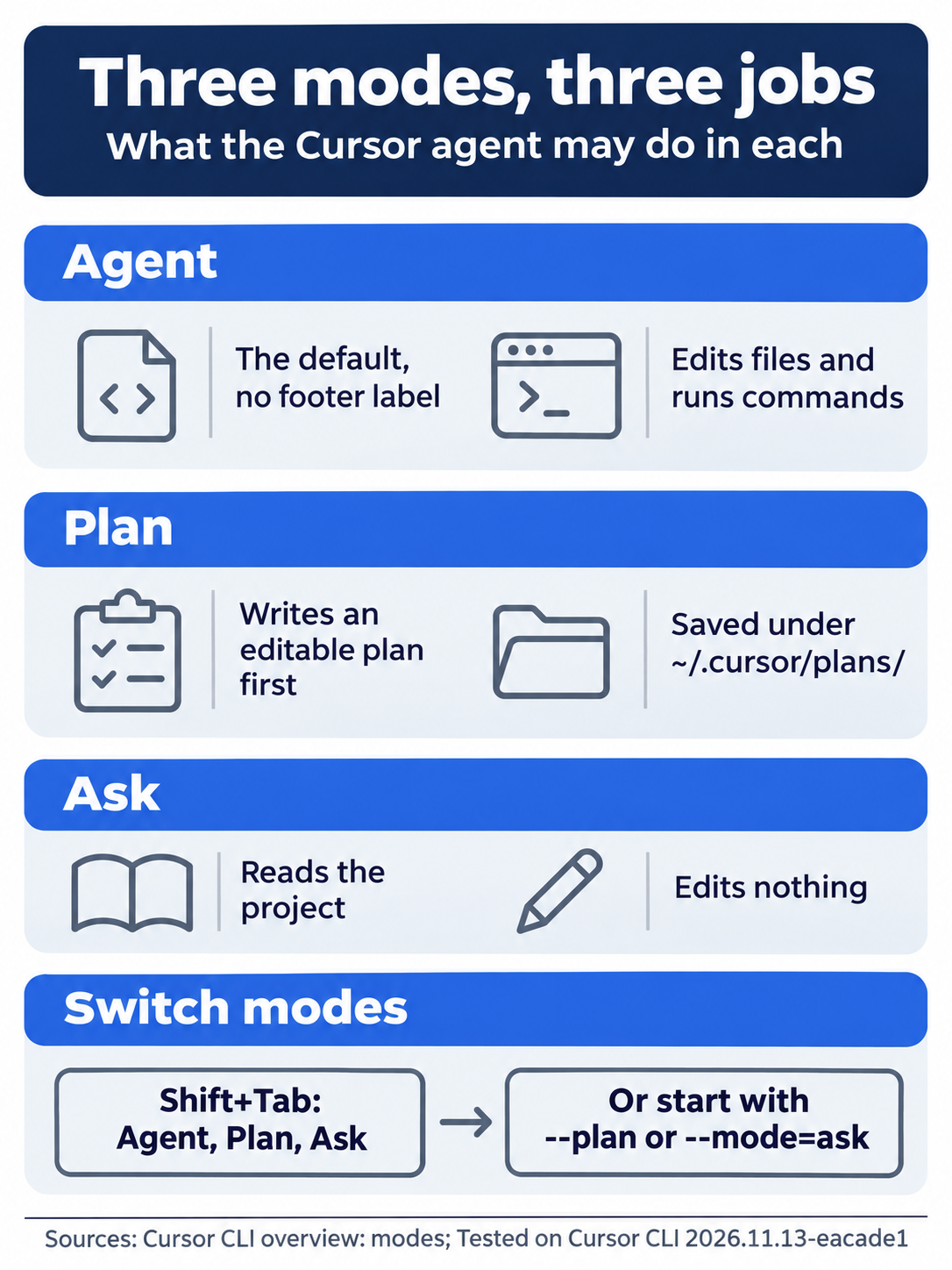
Agent is the default and may edit and run commands, Plan writes a plan you can revise before any code, Ask reads the project and changes nothing, and Shift+Tab cycles Agent, Plan, and Ask in that order.
Other ways into Plan and Ask
Shift+Tab is one of four ways into Plan mode. The others are the /plan slash command and two start flags, --plan and --mode=plan. Ask mode has /ask and --mode=ask (Using Agent in CLI). The --mode flag accepts only plan or ask; there is no --mode=agent, because Agent is what you get without the flag (CLI parameters).
This guide tested --mode=ask, --plan, Shift+Tab, and /plan after a plan already existed. It did not test --mode=plan in an interactive session, /ask, or /plan before a plan exists.
Plan mode does not work in print mode
-p (long form --print) runs one prompt without the interactive screen and exits, for scripts. In testing, cursor-agent -p --mode=plan with a plan request printed nothing for more than five minutes, and the tester stopped it with Ctrl+C. No docs page explains the hang. Use Plan mode interactively.
Where plans are saved
The docs say plans "are saved by default in your home directory," and that the editor's Save to workspace button moves a plan into your project "for future reference, team sharing, and documentation" (Plan Mode). No docs page names the folder. On the tested version, the Saved to line and ls both showed ~/.cursor/plans/, one file per plan, named from the plan's title plus an id. The Auto-review run of the same prompt titled its plan differently, so expect the name to vary.
The file starts with a block of to-dos, each with an id, a content line, and a status; your p revision edited it, and the build tracked against it. Because the file sits outside the repository, git status --short never shows it and git add -A does not commit it. To keep a plan in your history, copy it into the project yourself. This guide did not test Save to workspace.
Build in the cloud
The allowlist run offered 2. Yes, build in cloud (c). This guide did not run it and does not describe what it does. One Auto-review run left it out, and a second offered it. Build locally until you have set up the cloud on purpose.
Two lines that look like trouble
Two things on the plan screen look like failures and are not.
- Before the plan box, the tested run showed a line that starts
Error: Tool "CreatePlan" is already available directly. It followsExploring available MCP tools, the agent looking up its own tools, and the plan still arrived, complete. It is not about your code. - After you press
p, the first plan box is relabeledPlan (rejected). Nothing was thrown away; the revised plan replaces it when you type/plan.
The agent picks the test command
You asked for tests, not for a command, so the agent chose node --test test/classify.test.js, which runs one test file. npm test runs node --test over every test file. With one test file both give six passes; with more, the agent's command would skip the others.
The command also changes the approval prompt. Add Shell(node) to allowlist? would allow every command that starts with node, because a Shell(...) entry matches the first word of the command (CLI permissions). The entry covers far more than your tests. Choose y, run once, until you write your allowlist on purpose.
To steer it, name the command. Add "Run the tests with npm test" to the plan prompt, or press p at Ready to build? and send that sentence as a revision, so the plan's own steps say it. This guide did not test the steered version.
Why plan this change at all
The docs suggest Plan mode for "complex features with multiple valid approaches," changes that touch many files, and unclear requirements, and say that for "quick changes or tasks you've done many times before, jumping straight to Agent mode is fine" (Plan Mode). Yesterday's parcel keyword was a quick change. Today's was small in lines, but it changed an existing expectation: the crushed-mug test moved from shipping to damaged, and the money-back case had to stay refund. The plan put both in writing before any code, where a wrong row costs one p instead of a rewind.
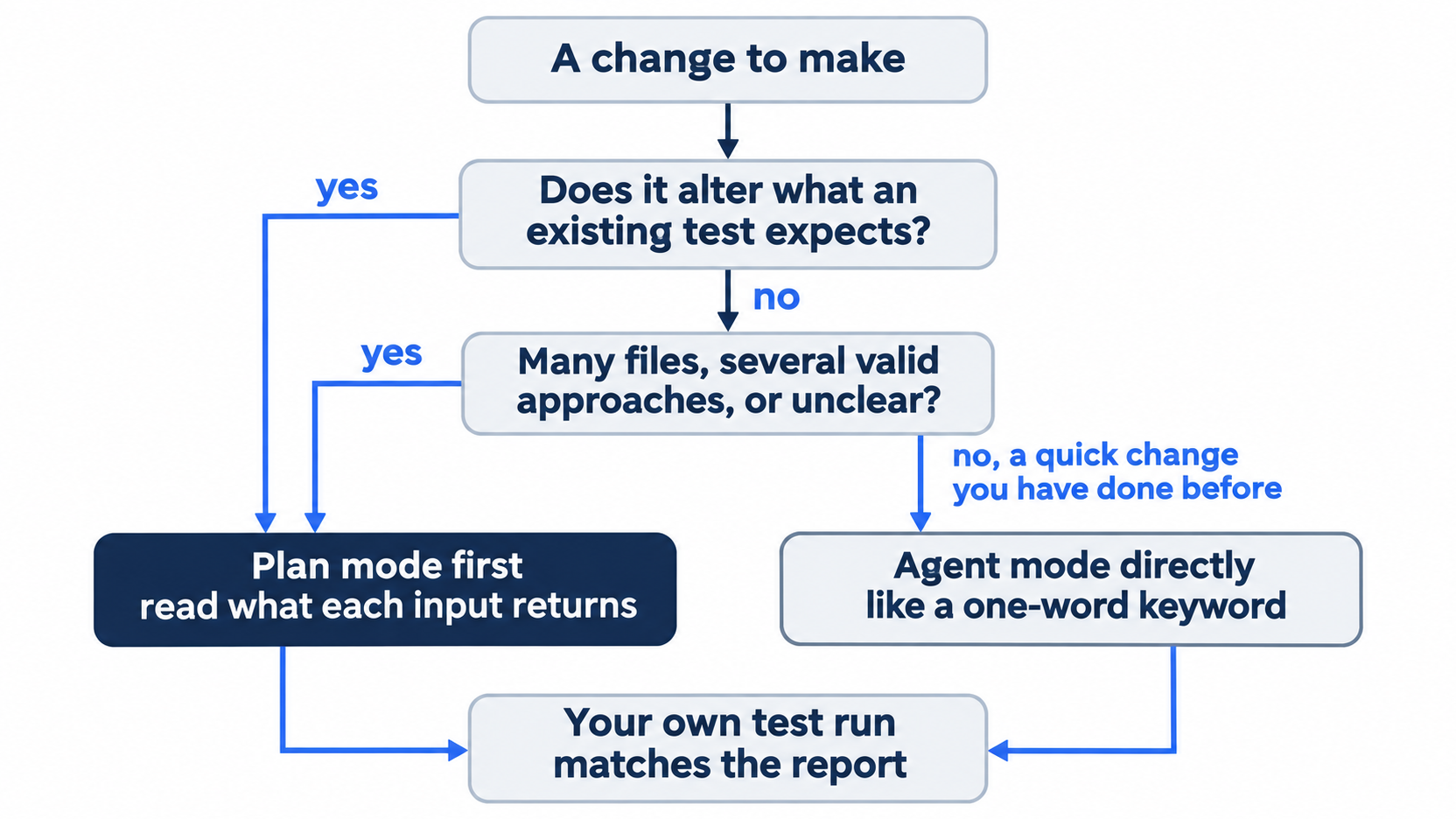

The scene shows the moment the day is built around: a developer reading the plan's behavior section before pressing b. A wrong row caught here costs one revision.
If you already use Claude Code: Shift+Tab cycles there too, but through permission modes, and plan mode is one stop on that cycle. In Cursor, Shift+Tab cycles Agent, Plan, and Ask, and you build with the b key at Ready to build?. Claude Code keeps its plan files in ~/.claude/plans/; Cursor keeps them in ~/.cursor/plans/.
Do this today
Everyone
- Repeat the win. In
~/code/ticket-triage, runnpm test, the twonode --input-type=modulechecks, andgit log --oneline -1. The result:ℹ pass 6andℹ fail 0, thendamaged, thenrefund, thenAdd a damaged category. - Start one habit: when a change alters what an existing test expects, plan it first. Read the part of the plan that says what each kind of input returns before you press
b. The result: every case it lists matches what you want, and your own test run matches the agent's report.
If you read Going deeper
- Read your plan file. Run
ls ~/.cursor/plans/andhead -12 ~/.cursor/plans/*.plan.md. The result: today's file, and atodos:block with two entries, one of which names "damaged with refund request is refund". Reset: the commands only read files, sogit status --shortprints nothing. - Ask a read-only question with
/ask(not tested in this guide). Startcursor-agent, type/ask, sendWhich tests cover the damaged category?, then/quit. The expected result: the footer showsAsk (shift+tab to cycle), and the answer names the tests without editing a file. Reset:git status --shortprints nothing andnpm testshowsℹ pass 6. - Start in Plan mode and steer the test command (not tested in this guide). Run
cursor-agent --planand sendPlan adding "cracked" to the damaged check, with one test. Run the tests with npm test.Pressb. The expected result: the approval prompt namesnpm testinstead ofnode; pressy, then/quit. Reset: rungit restore src/classify.js test/classify.test.js, then check thatgit status --shortprints nothing andnpm testshowsℹ pass 6.
Agree on paper, then build
The trouble in the opening was never the agent's skill. It built what it was asked to build. The trouble was that nobody wrote down, before the code, what the old cases should return afterward.
Cursor's modes give that step a place. Ask mode lets you learn the code with no risk to it. Plan mode puts the agent's intent in a file you can read and change with one key. Agent mode builds only after you press b, and your own npm test decides whether it worked.
A plan is cheap to fix and code is not. Read the plan before you let the agent build.
This is Part 3 of "Cursor, Day-to-Day," an 18-part guide to using Cursor's agent every day, from the CLI and the editor.