
The `crewai` CLI, End to End: The Two URLs That Stop Your AI Assistant From Hallucinating
CrewAI ships a live llms.txt and an official skills pack so AI coding agents can write correct CrewAI code, and pairing those two with a per-repo AGENTS.md (which the coding agent reads, not CrewAI) is the fastest way to build on this framework today.
Every CrewAI verb, grouped by what you actually do with it, plus the newer story: pointing Claude Code, Cursor, or Codex at llms.txt and the official skills pack so it writes real CrewAI code instead of confident fiction.
Your AI coding assistant keeps writing CrewAI code that does not compile, because it is guessing at an API that changed three releases ago. The fix is two URLs and a file your coding agent already knows how to read.
In this article: A practical, grouped tour of the
crewaiCLI: scaffold, run, debug, tune, ship. Then the part the docs only recently caught up to. You will learn how to point an AI coding agent at CrewAI'sllms.txtand thecrewAIInc/skillspack so it writes correct, current CrewAI code instead of inventing methods that no longer exist, and how a per-repoAGENTS.md(which the coding agent reads, not CrewAI) layers in your project's specifics. By the end you will know every verb worth memorizing and the two URLs that make your assistant trustworthy on this framework.
If you have built anything with CrewAI, you already have a relationship with the crewai command. You scaffold with it, you run with it, you reset memory with it when something gets weird, and one day you deploy with it. But most teams learn the CLI one verb at a time, in the order each problem forces them to. The full surface area never quite assembles into a map.
This article assembles the map. The first half is a grouped reference for every crewai command worth knowing, organized by where it shows up in the life of a project. The second half is the newer, less-documented story: CrewAI now ships specific tooling so AI coding agents can write correct CrewAI code. If you are building with Claude Code, Cursor, or Codex, and most readers are, that second half changes the calculus.
The framing matters. Your AI assistant is not bad at CrewAI on purpose. It is working from training data that froze months ago, on a framework that ships breaking changes every few releases. The fix is not a better prompt. It is a live reference the assistant can fetch on demand, a skills pack that teaches it the project's shape, and one extra file in your repo that every modern coding agent already reads. CrewAI publishes the first two; the third is a cross-tool convention that pairs naturally with them.
The CrewAI CLI, command by command
Everything below assumes you are in your project's root directory, which is where the CLI expects to find your configuration.
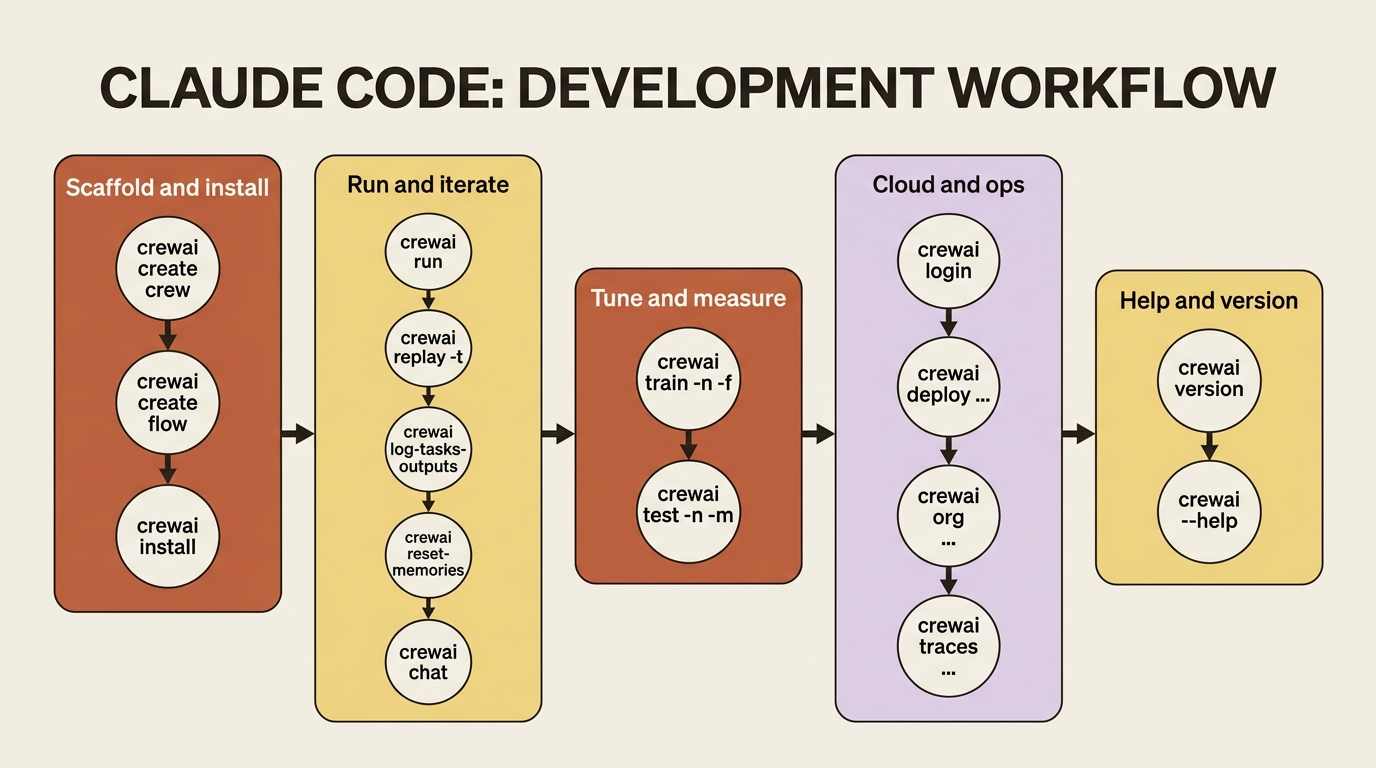
Scaffold and install
crewai create crew <name> and crewai create flow <name> scaffold a new project. This is where everything starts. The generator lays down agents.yaml, tasks.yaml, and crew.py (or the Flow equivalent), and on first run it walks you through choosing an LLM provider and entering an API key.
crewai install installs the project's dependencies into its environment. You run it once right after scaffolding and again whenever you add a dependency.
Run and iterate
crewai run runs the crew or flow. Since version 0.103.0, this single command handles both. It reads your pyproject.toml, detects whether the project is a crew or a flow, and runs the right thing. It is now the recommended way to run either. You may still see the older crewai flow kickoff in legacy docs and tutorials; crewai run supersedes it.
crewai replay -t <task_id> re-runs from a specific task, reusing the recorded outputs of everything before it. Pair it with crewai log-tasks-outputs, which lists the task IDs from your last kickoff so you know which one to pass to -t. Together they convert debugging from "re-run the whole crew and hope" into "re-run the one task I changed."
crewai reset-memories clears stored memory between runs, which is invaluable when stale memory is polluting your results during development. It takes flags per store: --long, --short, --entities, --kickoff-outputs, --knowledge, --agent-knowledge, or --all to wipe everything. When a crew is behaving oddly and you suspect it is remembering something wrong, this is the reset button.
crewai chat starts an interactive conversational session with your crew. Available since 0.98.0, it asks for the inputs the crew needs, runs it, and lets you keep talking afterward. It requires you to set a chat_llm on your Crew to drive the conversation.
Tune and measure
crewai train -n <iterations> -f <file.pkl> runs human-in-the-loop training. It iterates the crew, collects your feedback on each pass, and distills consolidated guidance into the .pkl file that future runs auto-load. It is interactive and will block waiting for input, so it is not safe to run in a non-interactive environment.
crewai test -n <iterations> -m <model> scores the crew. It runs the crew the given number of times and prints a 1-to-10 scorecard per task and for the crew overall, with execution time. It defaults to three iterations on gpt-4o-mini, and currently evaluates with OpenAI models.
Cloud and ops
crewai login authenticates to CrewAI AMP using a device-code flow: a short code appears in your terminal, you confirm it in the browser, and no password is typed into the CLI. It also authenticates you to the Tool Repository automatically.
crewai deploy create, crewai deploy push, crewai deploy status, crewai deploy logs, crewai deploy list, and crewai deploy remove are the full deployment lifecycle on AMP: register a deployment, ship it, watch it, and tear it down.
crewai org list, crewai org current, and crewai org switch <id> manage which AMP organization you are operating in. This matters once you belong to more than one.
crewai traces enable, crewai traces disable, and crewai traces status control execution trace collection, the observability toggle for runs on AMP.
Help and version
crewai version prints the installed CrewAI version, and crewai version --tools adds the tools package version. The command is trivial, but it is the first thing to check when a tutorial's behavior does not match yours. CrewAI moves fast and version drift is the usual culprit.
When in doubt, crewai --help lists everything, and crewai <command> --help (for example crewai deploy --help) shows the options for a specific command. Because the CLI changes across releases, the built-in help is the most reliable reference. It is more current than any article, including this one.
The same CLI, viewed as a lifecycle
The grouping above is one way to see the surface area. The other useful view is temporal: these verbs in the order a project actually meets them.
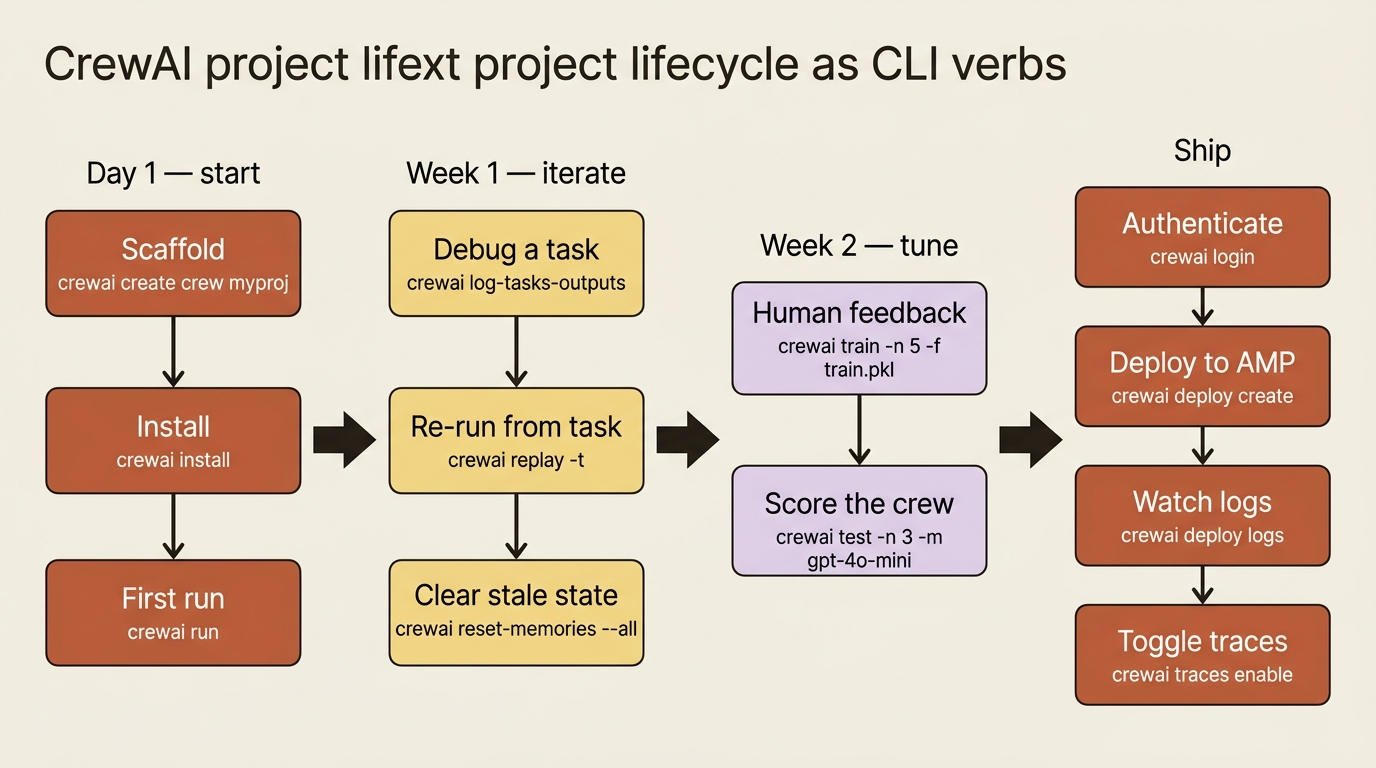
Day one is create, install, and run. The first week is log-tasks-outputs, replay, and reset-memories as the crew misbehaves in instructive ways. The second week is train and test once you know what "good" looks like. Then login, deploy create, deploy push, deploy logs, and traces enable when it is ready to ship. The CLI is small enough to fit on a single mental shelf, and every verb earns its place by being the right tool for one specific phase.
Letting a coding agent build CrewAI for you
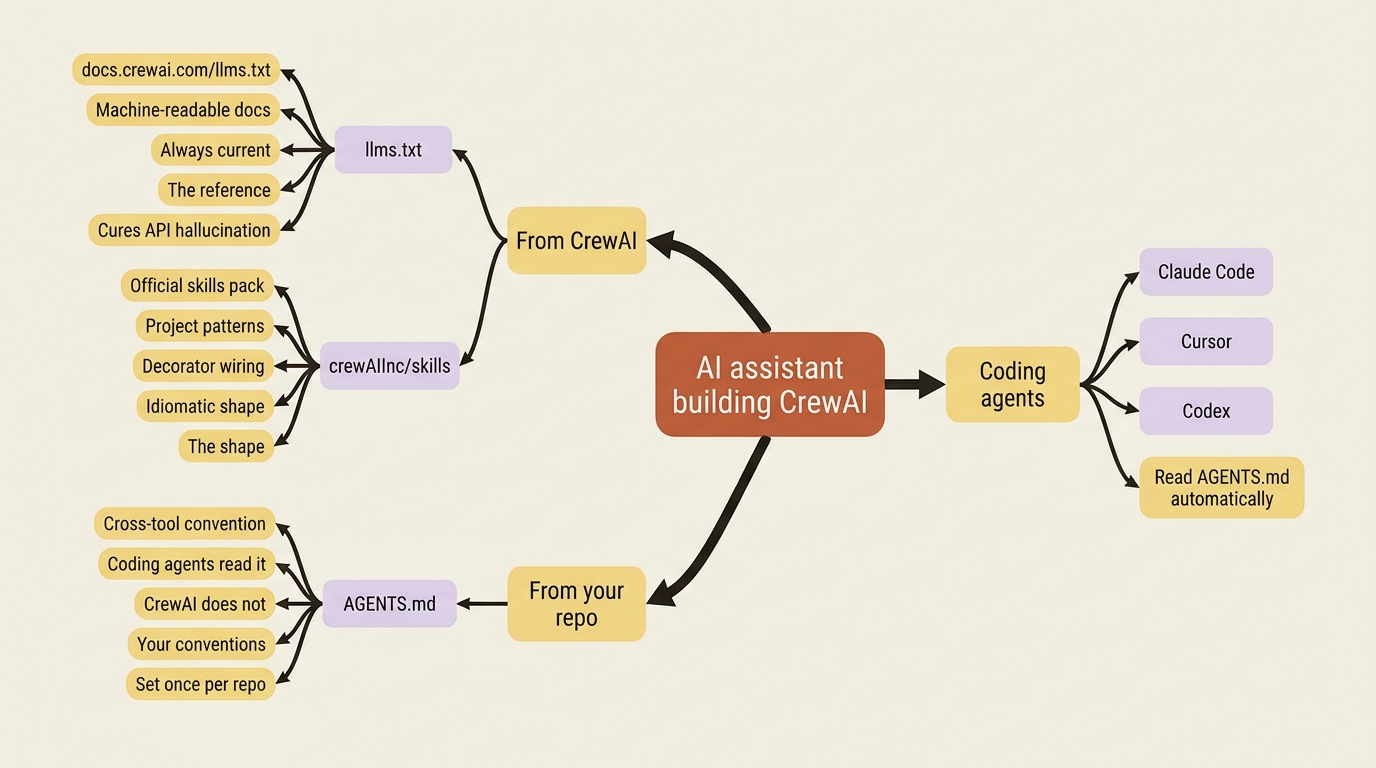
This is the part that did not exist in earlier agent frameworks, and it is genuinely new in how the industry ships docs. CrewAI publishes two artifacts specifically so an AI coding assistant can write correct CrewAI code rather than hallucinate an API from stale training data. A third piece, the cross-tool AGENTS.md convention, plugs in alongside them. If you build with Claude Code, Cursor, Codex, or anything similar, these three pieces together change how well your assistant works on this framework.
Piece one: llms.txt, a live reference CrewAI publishes
The first piece is llms.txt, a machine-readable version of the entire CrewAI documentation, served at https://docs.crewai.com/llms.txt. It follows an emerging convention for feeding docs to language models. Instead of your assistant scraping HTML and guessing, it fetches one structured text file with the full reference.
The practical move is to point your assistant at it directly. Something as simple as telling Claude Code or Cursor to "fetch https://docs.crewai.com/llms.txt for the CrewAI reference" is enough. Because the file is served live from the docs site, it is always current, which is exactly what you want for a framework that ships breaking changes. This is the antidote to the single most common failure mode of AI-written CrewAI: confidently using an API that was renamed three releases ago. The assistant is no longer guessing from training data; it is reading from the docs every time.
Piece two: crewAIInc/skills, the official patterns pack
The second piece is the official skills pack, crewAIInc/skills on GitHub. Skills are reusable instruction sets that teach a coding agent the patterns of building with CrewAI: how to structure a project, how the decorators wire together, the idioms that make a project look like real CrewAI. Where llms.txt supplies the reference, the skills pack supplies the shape. The two are complementary: skills teach what a CrewAI project is supposed to look like; llms.txt fills in the precise method names, arguments, and current behavior.
The pack is designed for the major coding agents and is published openly so you can see what it includes before installing it.
Piece three: AGENTS.md, a cross-tool convention the agent reads
The third piece is AGENTS.md, a project-root markdown file that the coding agents read automatically. Claude Code, Cursor, Codex, and several other modern assistants all watch for it; CrewAI itself does not consume it. The value sits on the agent side, not the framework side, but it pairs naturally with the first two pieces, scoped to your codebase rather than the framework in general. Tell the agent your conventions once, in a file it reads on every session, instead of repeating them every time you open a new chat.
The three pieces answer three different questions. llms.txt answers "what does the framework actually do right now?" The skills pack answers "what does a CrewAI project look like?" AGENTS.md answers "what does this repo look like?" The first two are about CrewAI; the third is about your code. Together they give your assistant the same three layers of context a new teammate would need: the language, the house style, and the specifics of your codebase.
What this looks like in practice
Picture a single turn with your assistant on a fresh CrewAI project.
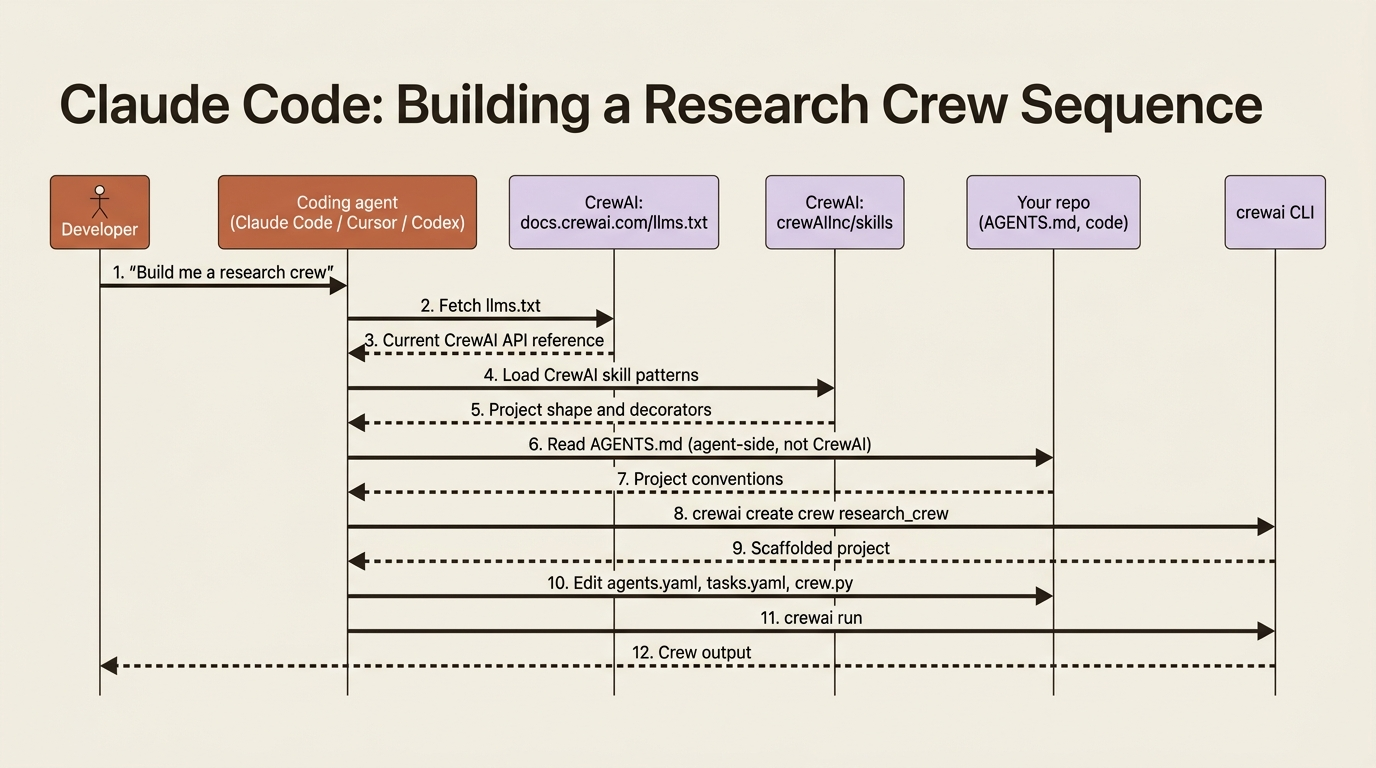
You ask for a research crew. The assistant fetches llms.txt to confirm the current CrewAI API, loads the CrewAI skills pack for the project shape, reads your AGENTS.md for repo conventions (because that is what coding agents do), runs crewai create crew research_crew, edits agents.yaml, tasks.yaml, and crew.py, and then runs crewai run to verify. Each step uses tools that already exist; the change is that the assistant is no longer guessing.
Putting it together
If you are starting a new CrewAI project with an AI assistant today, the workflow is straightforward.
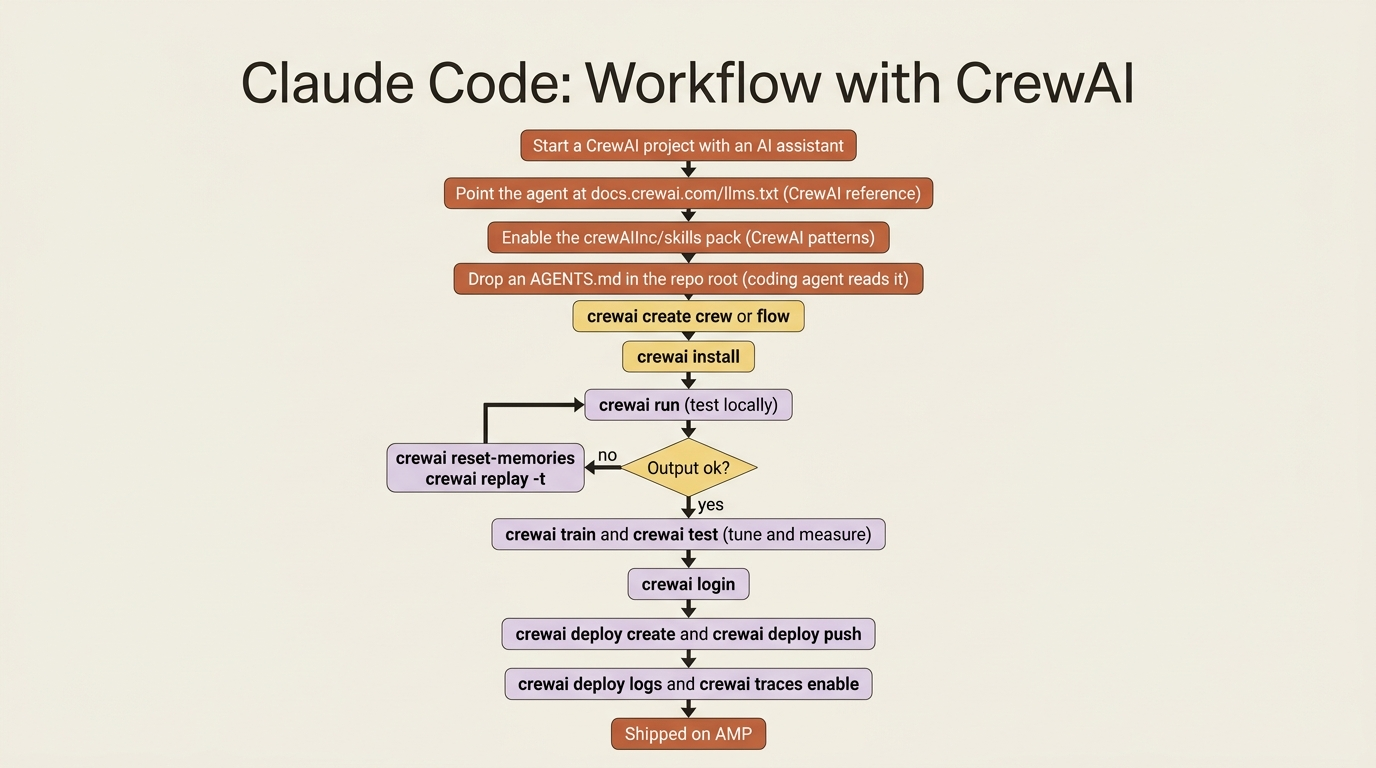
Point the agent at llms.txt so it has the current CrewAI reference. Install or enable the CrewAI skills pack so it knows the patterns. Drop an AGENTS.md in your repo with your project's specifics so the agent reads your conventions on every session. Then let the assistant scaffold with crewai create. From there the CLI commands carry you through the lifecycle: run to test locally, train and test to tune and measure, reset-memories when development state gets messy, and deploy when it is ready to ship.
Do this today
Five concrete moves, ten minutes, and your next CrewAI session changes.
- Drop one line in your assistant's instructions. Tell Claude Code, Cursor, or Codex: "For CrewAI questions, fetch
https://docs.crewai.com/llms.txtfirst." That single line cuts hallucinated APIs sharply. - Install the
crewAIInc/skillspack in whichever agent you use. You only do this once per machine. - Add an
AGENTS.mdto your repo root. Two or three paragraphs is enough: the LLM provider you use, the project layout you prefer, and any house rules. Your coding agent will pick it up automatically; CrewAI itself ignores it, and that is fine. - Run
crewai versionand pin it in yourpyproject.toml. Version drift is the most common cause of "this tutorial does not work." - Bookmark
crewai --helpandcrewai deploy --help. They are more current than any article, including this one.
The better end state
The series this appendix belongs to teaches you to build CrewAI by hand, which is the right way to learn it. You cannot supervise an assistant on a framework you do not understand, and the verbs only stick once you have typed them yourself. But once the shape is clear, these new pieces let you move much faster without giving up the understanding.
That is the better end state. You know enough to catch the assistant when it is wrong, and the assistant knows enough, through CrewAI's llms.txt, CrewAI's skills pack, and the AGENTS.md it reads from your repo, to be wrong far less often. The CLI is the same fifteen-or-so verbs it always was. What has changed is who is typing them, and whether they get the API right on the first try.
The two URLs are free. The file is one paragraph. The leverage is real.