
A Codex CLI Workflow You Can Review and Resume
Separate the file edit, review, commit authorization, and resumed conversation so each has an inspectable result.
Review one README change, approve its commit, and resume the conversation.
Reopening a familiar chat is easier when you also check the files and saved commit.
In this article: Add useful examples without changing the classifier, then check both the saved commit and reopened chat.
In Part 1, you fixed the crushed-mug classification, checked five passing tests, and committed the focused fix.
Tested on Codex CLI 0.169.0, macOS, Node.js 22.22.1, and Git 2.47.1.
Desktop actions are not run.
Start here
Prerequisites: Node.js 22 or later, Git, a signed-in Codex CLI, and Ticket Triage through Part 1.
codex resume --last
Check: The saved crushed-mug conversation opens in the Ticket Triage directory.
Run this from your existing ticket-triage folder. resume reopens a saved Codex conversation, and --last selects the most recent one for this directory. Today you will add useful examples, review the actual change, approve one Git operation, and return to the same conversation after closing Codex.
Starting fresh or fell behind? Run git switch -C main codex/day-01. This replaces your main with the end of Day 1; to keep your own work, run git branch my-backup first.
Check where you are starting
Check the reopened crushed-mug task and project path. The footer is the status line beneath the composer. Keep Ask for approval. If it shows Plan mode, which proposes work before implementation, press Shift+Tab until Default working mode returns. Resume can restore the earlier mode; it does not reset it.
Check: The footer no longer says Plan mode.
Before requesting anything, run this in the composer:
!git status --short && npm test
Check: Status is clean and all five tests pass.
Expect no status entries, five tests, five passes, and zero failures. Three tests means the starter lacks yesterday’s fix. Inspect any mismatch before adding work.
The initial ! runs your shell command. Wait for completion before sending the next request.
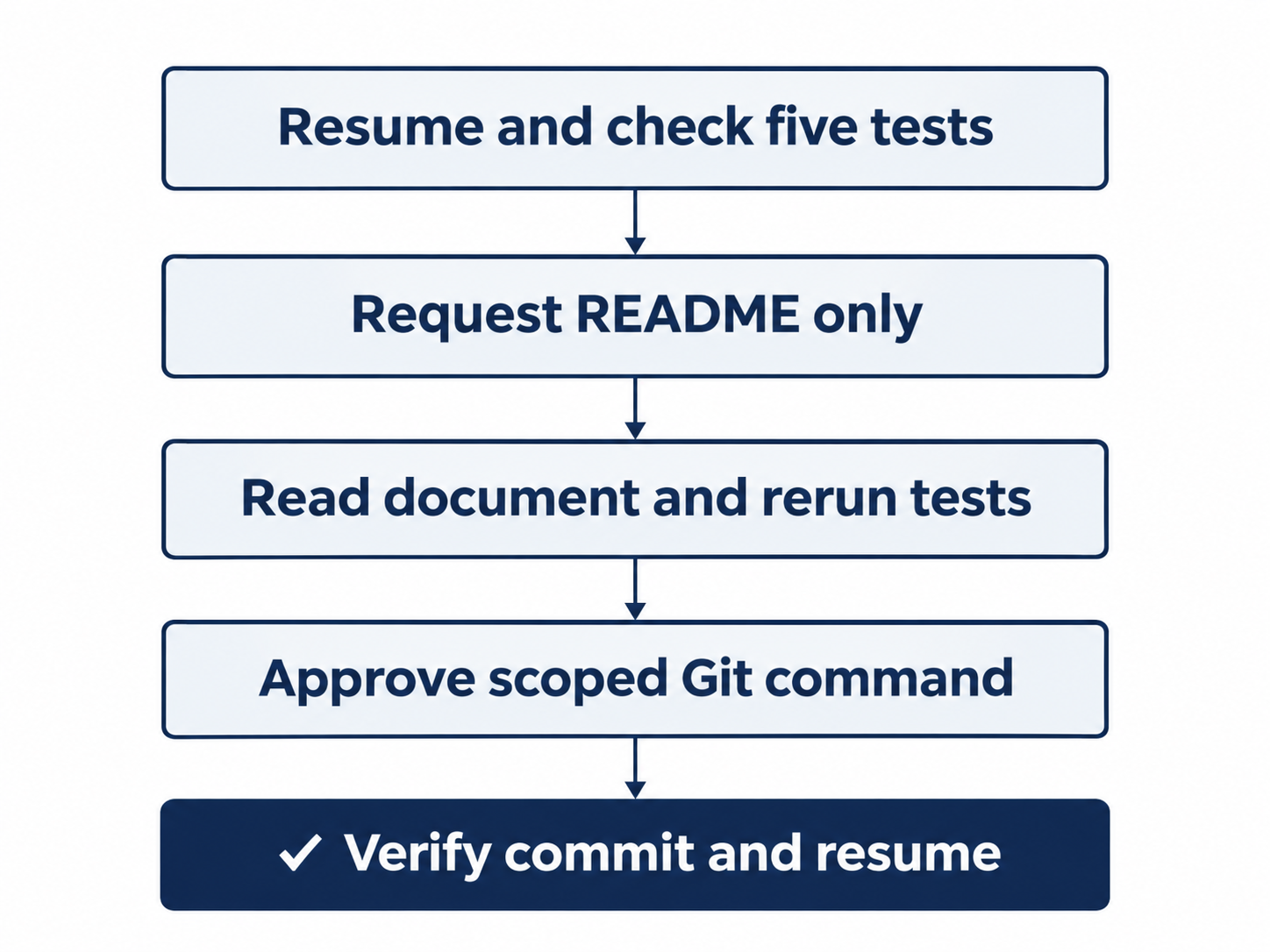
Request one document, read it, approve its commit, then resume and check.
Ask for one change
A README is the project's introductory document. Ours should explain how to run the tests and show what the classifier does. Send this prompt:
Read src/classify.js and test/classify.test.js. Create only README.md with a short Ticket Triage description, npm test instructions, and three examples: Hello -> other; The box showed up crushed and the mug inside is in pieces -> shipping; The mug arrived broken and I want a refund -> refund. Explain that refund takes priority over shipping. Do not change code or tests. Run npm test and explain the diff. Do not commit or push.
Check: Codex creates only README.md, includes the three examples, and runs the five tests.
The request names the inputs, document, and boundary. Its greeting, damaged-delivery, and refund examples preserve the classifier’s refund-first behavior.
Watch the transcript, the visible record of your messages and Codex's actions. Codex should read the two files, add README.md, and run npm test. Ask for approval allows these workspace reads, the README edit, and the test run without a per-edit dialog. Review the resulting change yourself.
Compare the explanation with the actual commands and output before accepting the result.
Read what changed
Run this after Codex finishes:
!git status --short && cat README.md && git diff -- src/classify.js test/classify.test.js && npm test
Check: Only README.md is untracked, its examples are correct, the code diff is empty, and five tests pass.
cat prints a file's contents. You should see ?? README.md in the status output: the question marks mean untracked, a new file Git has not yet included in its snapshots. Inspect the printed README for the three examples, the npm test instructions, and the sentence explaining refund priority.
Plain git diff omits untracked files, so read the README directly. The named program-file diff should be empty and the suite should still pass five tests.
Check shipping for the crushed mug, refund for the broken-mug refund request, and copyable test instructions. Request any missing correction, then repeat the review.
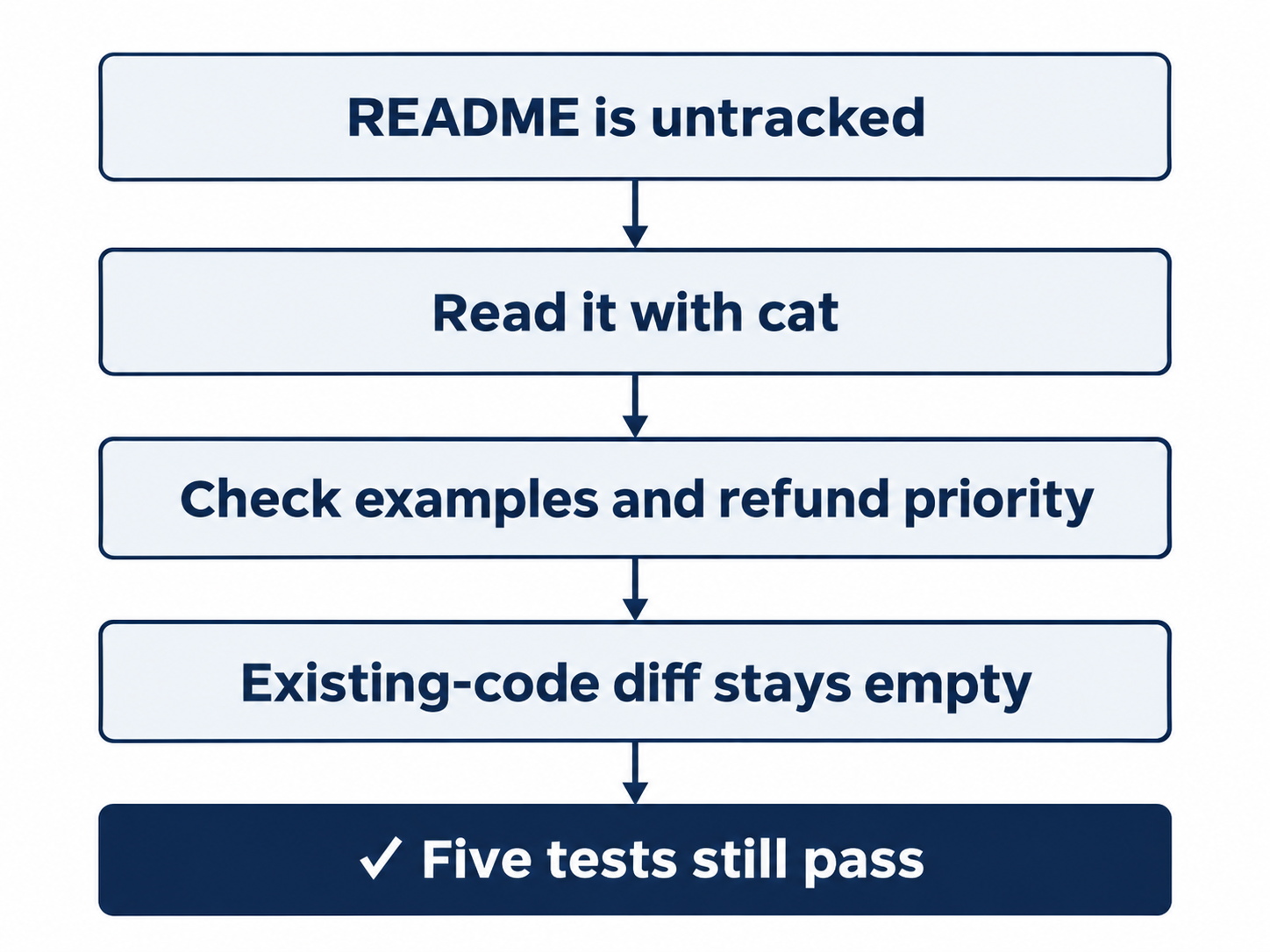
Read the README with cat; check existing program files separately with the diff.
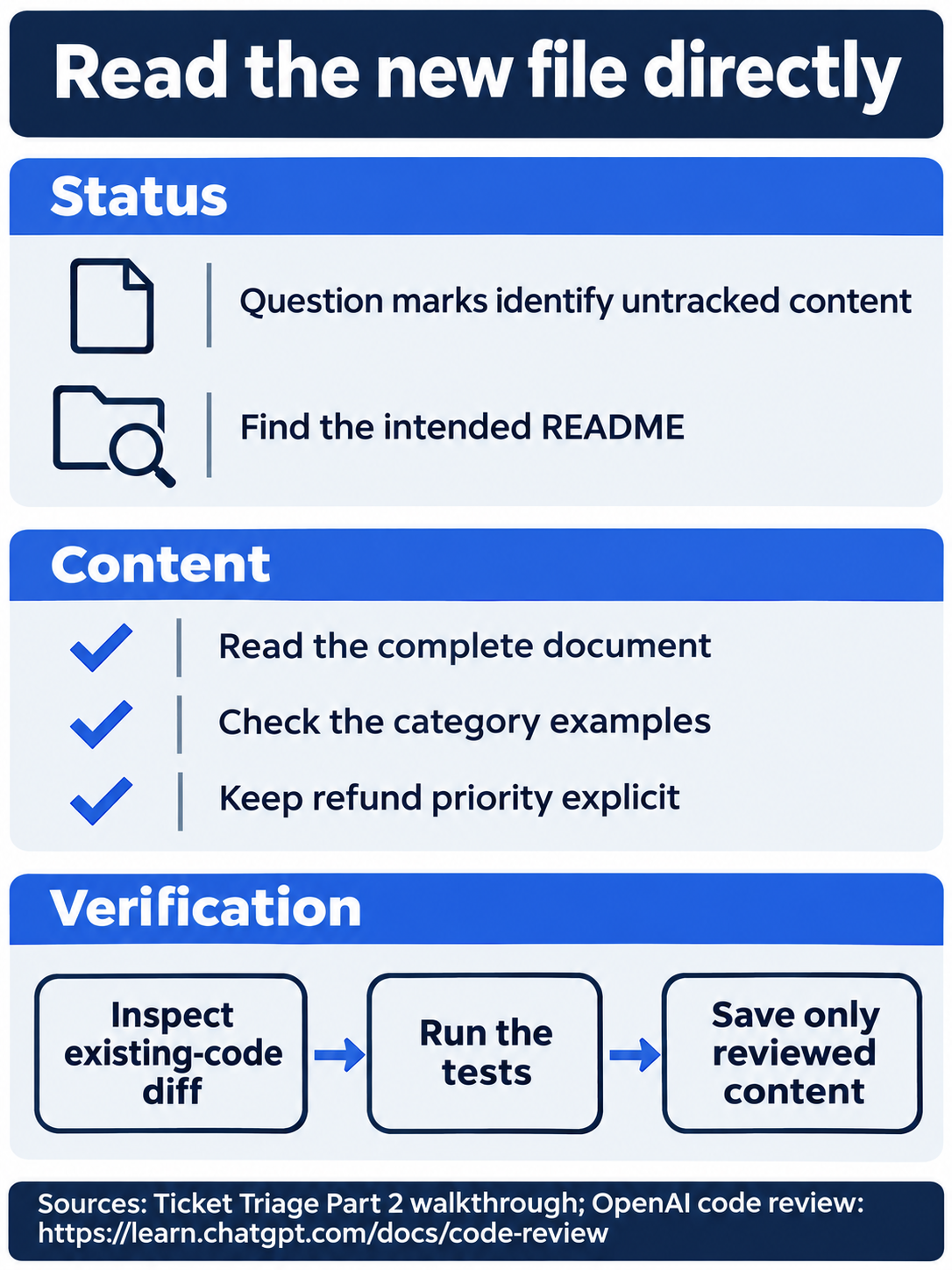
An empty tracked-file diff does not show whether a new README is correct.
Approve the commit
Once the README and checks satisfy the request, send:
The README and five passing tests are approved. Commit only README.md with the message "Document Ticket Triage examples". Do not push.
Check: Inspect the Git request; it must name only README.md and your commit message.
This authorizes a specific local snapshot. The initial Git attempt can report Operation not permitted while creating .git/index.lock, Git's protected bookkeeping lock. Codex then requests permission to run the reviewed commit command outside its ordinary boundary.
At Would you like to run the following command?, read the command and its reason. Check that the command adds only README.md, uses your commit message, and inspects the result. The choices were:
- Yes, proceed (y), allowing this request once.
- Yes, and don't ask again for commands that start with
git add -- README.md(p), saving a broader command-prefix approval. - No, and tell Codex what to do differently (esc), cancelling the request.
Choose 1. Yes, proceed. Check the paths before approving: this task calls for README.md, not a command adding every file. The one-time choice is sufficient for this exercise. If the command contains unrelated files or a push, cancel and restate the scope.
Check: One-time approval saves the README commit without pushing.
Verify, leave, and return
Check the completed snapshot yourself:
!git log -1 --oneline && git status --short && npm test
Check: The newest commit is Document Ticket Triage examples, status is clean, and five tests pass.
git log shows commits; -1 selects the newest, and --oneline prints its identifier and message. Your identifier will differ; verify the message, empty status, and five passes.
Enter /quit, then run this in your terminal:
codex resume --last
Check: The saved README conversation reopens.
Ask the reopened conversation:
Without changing files, what did we just commit, and which category wins when a damaged ticket asks for a refund?
Check: The answer names the README commit and says refund wins.
Check its answer against the repository: the commit documents the README examples, and the refund category wins. Reopening the conversation preserves the discussion; Git preserves the files and commits. You have checked both.
Continue in the desktop app
Not run: desktop steps. On macOS or Windows, enter /app in this CLI conversation to continue the same saved chat in the ChatGPT desktop app. Check that the app opens Ticket Triage and shows the README task before sending anything else.
Check: The app is on Ticket Triage with Ask for approval selected.
For a desktop-only run, open the existing project's chat, keep Ask for approval beneath the composer, and send the same README prompt. Inspect README.md in the local review pane. Choose New tab, then Terminal, to open the integrated terminal, the app's built-in shell. Run the same status, file, diff, and test commands there without the initial !. Send the same commit request, inspect its approval, and verify the resulting commit. Select the saved chat in the sidebar to reopen it and ask the same retention question. Record the clicks and screenshots as you complete this Not run route.
Check: If you complete the labeled desktop route, verify the same final result before removing its Not run label.
What you proved
- The README documents all three examples and refund priority.
- Its focused commit leaves the classifier unchanged and all five tests passing.
- The resumed conversation identifies the commit and refund rule.
You can stop here. Going deeper explains why this works and where it breaks.
Going deeper
Read this section if you want better ways to recover a conversation, keep a transcript, or take a short detour without expanding the main task.
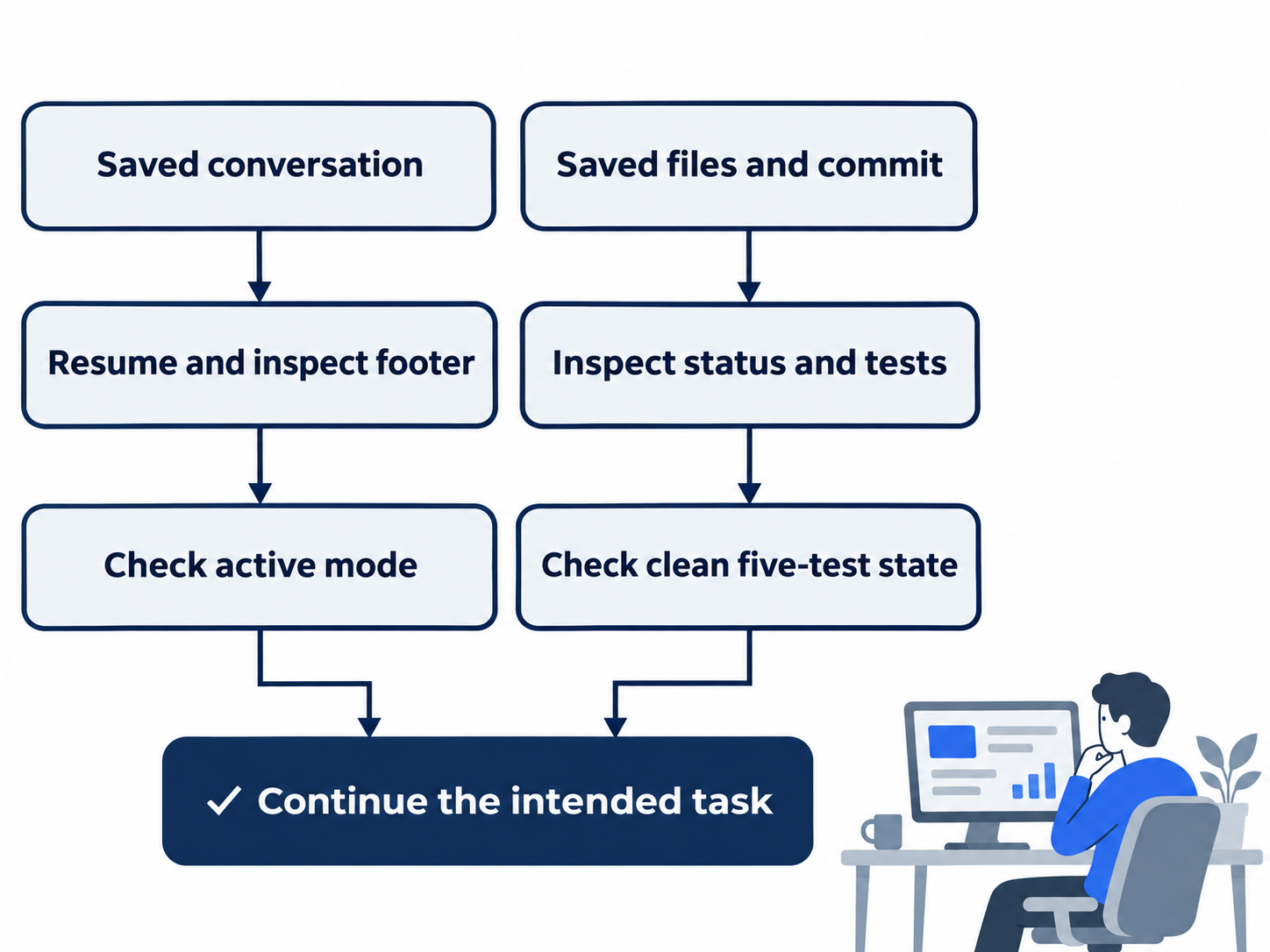
Resume restores the chat; status and tests establish the files’ current state.
A saved chat is not a clean checkout
Resuming restores conversation state, including settings such as the collaboration mode. It does not undo changed files or guarantee a clean Git status. Inspect both the conversation and the repository before requesting work. The projects guide describes separate chats for separate outcomes and the CLI resume routes.
The footer checks the conversation’s mode; Git status and tests check the repository.
Optional check: reopen the chat, inspect its footer, and run !git status --short && npm test. Reset: return to ordinary working mode with Shift+Tab if necessary; finish with clean status and five passes. Do not discard unfamiliar edits merely to obtain an empty status.
Recap and export
A recap summarizes where you are. /recap supplies one without compacting older context; /export saves a Markdown transcript. One helps you catch up, the other keeps a copy. See the CLI command reference.
Optional exercise, doc-backed, not run: when idle, enter /recap and check that it names the README work. Then enter /export, choose Save to file, and choose a new path outside Ticket Triage. Open the saved file and find your commit request. Transcripts can contain private project material, so inspect them before sharing. Reset: close the export view, return to the original chat, and delete only the disposable export you just created if you do not want to keep it. Check that Ticket Triage's status remains clean.
Side chats and saved prompts
/side opens a separate conversation for a focused follow-up. Its transcript is separate from the main chat. The slash-command guide documents inline questions such as /side Check whether this plan has an obvious risk; availability and persistence depend on the terminal's workspace support. Do not assume a temporary side chat will always remain in history.
Optional exercise, doc-backed, not run: ask /side Without changing files, explain why refund should win for a broken-mug refund request. Check that the answer refers to the existing classification rule. Reset: return to the parent chat using the displayed navigation control, then verify the README task is still your active conversation and the repository is clean.
/presets stores reusable prompts or commands in numbered slots. The documented n action saves a prompt, while s saves selected session settings. Open the picker to inspect what is already there before creating anything. This feature is useful for a short recurring request such as “Read the diff, run the tests, and report remaining concerns.” This optional feature is not run in this lesson; the main loop needs no saved preset. Reset after inspecting: press Escape without saving or applying a preset. Your active model and permission mode should remain unchanged.
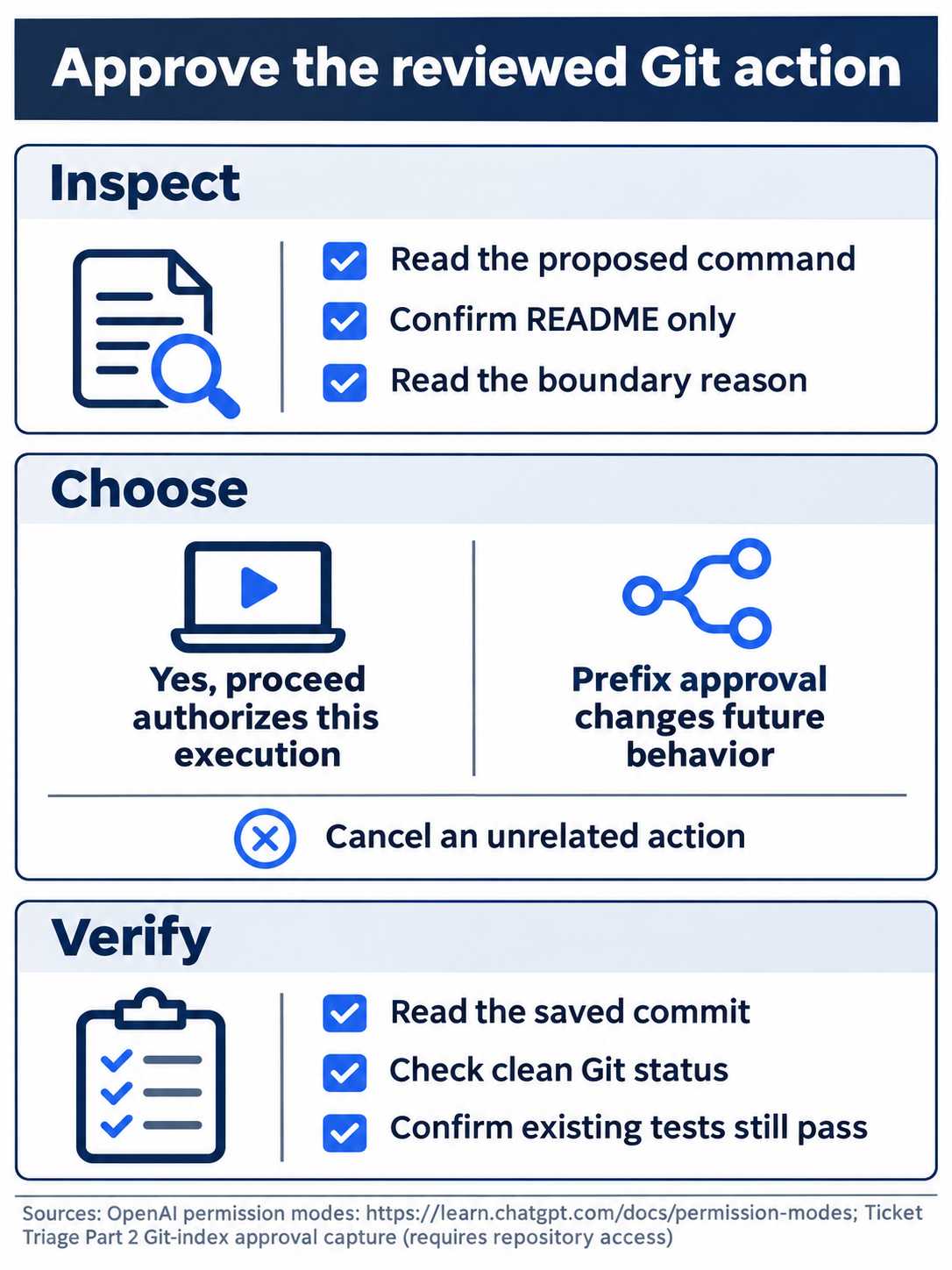
The one-time choice saves this README without creating a permanent prefix allowance.
What the approval actually covered
The Git approval covers the displayed command crossing a protected boundary. It did not approve every possible repository operation. Selecting a permanent prefix approval would change future behavior, so this exercise chose the single request. Approve for me sends eligible requests to automatic review; Full Access changes the available boundary. A reader using either mode should not expect the same interactive pause. The permission guide explains the distinction. Reset after inspecting permissions: keep Ask for approval selected and close the picker without changing the mode.
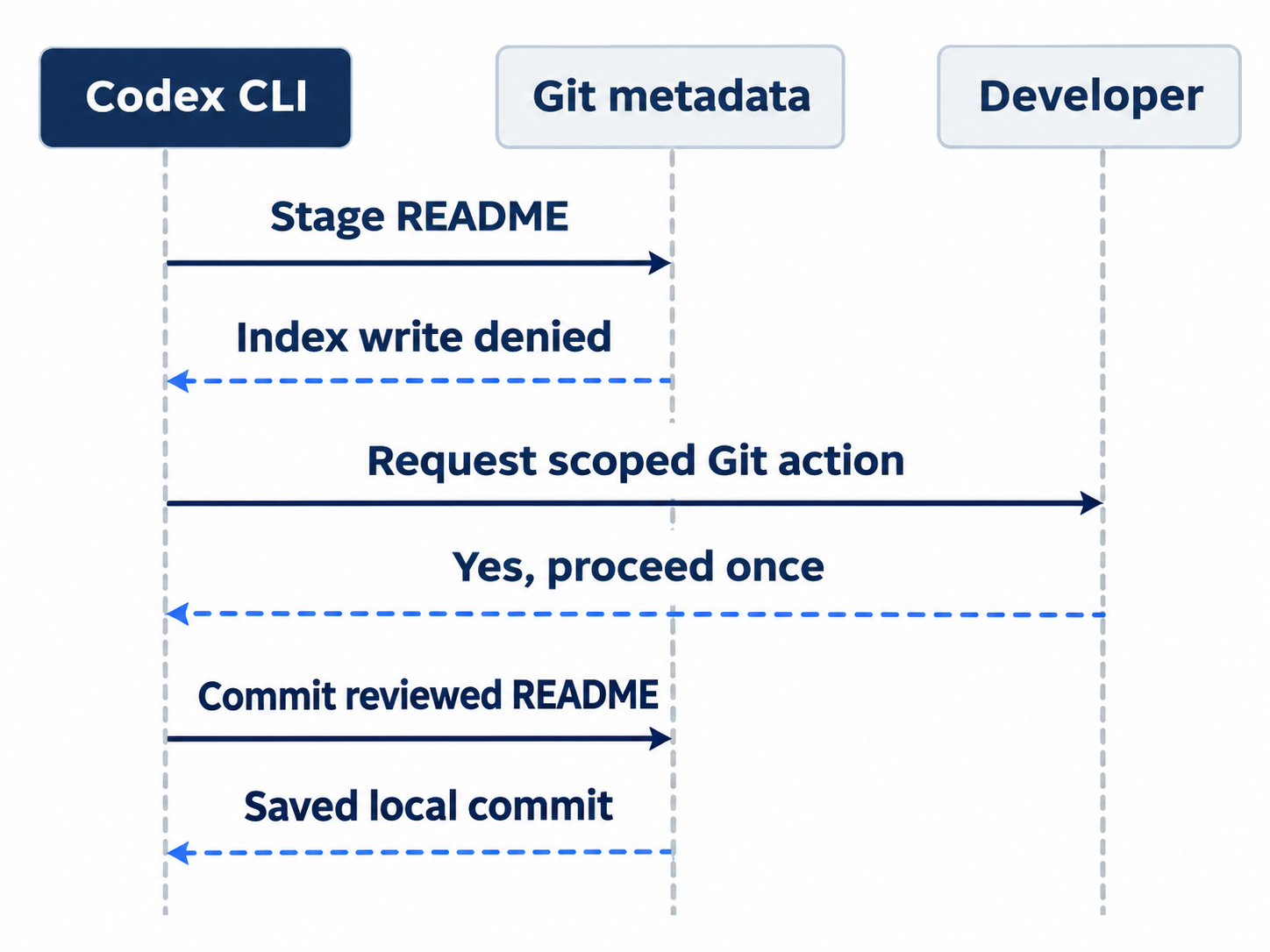
The README edit runs inline; writing Git’s protected index triggers the scoped request.
Desktop continuation is a separate manual check. The documented /app route does not verify every reverse handoff or setting. The integrated-terminal guide describes the app terminal.

Conceptual illustration: match the reopened discussion with its saved commit before requesting more.
Do this today
Everyone
- Save the README examples as one focused commit. Verify its message, five passing tests, and clean status.
- Close and resume the chat; check that its answer matches both the latest commit and refund priority.
If you read Going deeper
- Inspect the active mode after resume. Return to ordinary working mode and keep Ask for approval.
- Try one labeled optional conversation check, perform its reset, and verify that Ticket Triage remains clean.
Coming up in Part 3: Plan before you code, with a requirement you revise before implementation begins.