
Your First Codex CLI Change Should Be Easy to Check
Make the first coding-agent task small enough that a beginner can inspect its behavior and every changed file.
Install the pinned CLI and verify one focused ticket fix.
A passing baseline can still miss the customer ticket you need to fix.
In this article: Build a small classifier, reproduce its missed ticket, and verify the two-file fix yourself.
Tested on Codex CLI 0.169.0, macOS, Node.js 22.22.1, and Git 2.47.1.
Browser sign-in and desktop actions are not run.
Day 1 starts OpenAI Codex, Day-to-Day: one part daily, with 20-to-40-minute lessons and optional depth.
The roadmap, one part per day:
- Install Codex and make a first safe change.
- Prompt, inspect, test, commit, and resume a working session.
- Revise a plan before implementing it.
- Observe permissions and the sandbox.
- Put reliable project instructions in
AGENTS.md. - Inspect context and continue after compaction.
- Choose models and understand usage costs.
- Configure defaults and named profiles.
- Turn a repeatable task into a skill.
- Connect an external tool through MCP.
- Delegate bounded reviews to subagents.
- Trust a hook and verify its explicit denial.
- Install a plugin and check portability.
- Separate parallel work into worktrees.
- Review and complete work in the cloud.
- Save structured output from an unattended run.
- Assemble your own working routine.
It is easy to get stuck using Codex the way you first learned it. Codex keeps adding features, and some of them are a big step up in productivity. This guide keeps you current, in bite-sized daily chunks, so you pick up a few new techniques every day, do not get left behind, and use Codex the way it is meant to be used.
Start here
Prerequisites: Node.js 22 or later, Git, a terminal, and a ChatGPT Plus-or-higher account for CLI sign-in.
node --version
Check: Node.js is version 22 or later.
Node.js runs JavaScript outside a browser; --version prints its version. Today you will install Codex, build a small project, and verify a fix for a misclassified support ticket.
Install the terminal version
For ChatGPT sign-in, the CLI path needs Plus or higher. Free and Go support GPT-6 Luna at Standard speed in the desktop app only, subject to rollout. Complete the project setup below, then use the labeled desktop route. See plan availability. The Codex CLI is Codex's command-line interface, operated in a terminal. Check Git, then install the pinned package with npm, Node's package manager:
git --version
npm install -g @openai/codex@0.169.0
codex --version
Check: Git is available and Codex prints codex-cli 0.169.0.
The -g flag makes the command available outside one project. The @0.169.0 suffix selects the pinned version. Finish installation before continuing.
Get Ticket Triage
Ticket Triage is the small Node.js program this guide grows one day at a time. It classifies a support ticket, has no dependencies, and its tests use the test runner built into Node.js. The code for every day is in the ticket-triage-day-by-day repository on the codex branch, with one tag per day, codex/day-00 to codex/day-17. A repository is Git's record of a project, a branch is a named line of work, and a tag is a fixed name for one saved state of the code. Building it by hand in the next step is the recommended route on a first read.
If you build Ticket Triage by hand, run these two commands once in the ticket-triage folder after its starter commit, so the catch-up lines on later days work. They add upstream, a remote, which is Git's name for another copy of the repository.
git remote add upstream https://github.com/SpillwaveSolutions/ticket-triage-day-by-day.git
git fetch upstream --tags
If you are restarting the guide on a new machine, skip the build. mkdir makes an empty folder and cd enters it; never run the shortcut from your home folder.
mkdir codex-guide
cd codex-guide
codex "Clone https://github.com/SpillwaveSolutions/ticket-triage-day-by-day.git into a new folder named ticket-triage in the current directory. In ticket-triage, check out the codex branch, then run git switch -C main codex/day-00 and git branch --unset-upstream main. Rename the remote origin to upstream. Run npm test and show the summary."
Not run: shortcut (written from the docs, not yet run).
git switch -C main codex/day-00 makes your main branch point at the Day 0 code, replacing what main held. git branch --unset-upstream main stops your main from following the Spillwave copy. If Codex asks you to sign in, choose Sign in with ChatGPT and finish in your browser. At Trust this folder?, choose Trust and continue, here and later in ticket-triage, because this is the guide's own repository, cloned on purpose. For each Would you like to run the following command?, check that the command is one of the Git steps above, and choose 1. Yes, proceed. When the summary appears, enter /quit, a slash command that closes Codex. Then check the result yourself:
cd ticket-triage
npm test
git status -sb
Check: Three tests pass with zero failures, and git status -sb prints ## main with nothing after it, not ## main...upstream/main.
npm test runs node --test, Node's built-in test runner, and -sb prints a short status with the branch first. Continue at Now reproduce the missing case in Build Ticket Triage. Read the commit step after it, but do not run it, because codex/day-00 already holds that commit.
Build Ticket Triage
Use a new folder for Ticket Triage, a tiny support-ticket classifier. A classifier assigns a category to text. Ours returns refund, shipping, or other.
mkdir -p ticket-triage
cd ticket-triage
git init -b main
mkdir -p src test
Check: You are in the new ticket-triage repository on main, with src and test folders.
mkdir -p creates the folders, and cd enters one. git init -b main creates a repository, Git's record of the project, with its initial branch, a named line of work, called main. The src folder holds the program; test holds checks for its behavior.
In your editor, save this as package.json. It declares JavaScript modules, which let one file import another, and defines the test command.
{
  "name": "ticket-triage",
  "version": "0.1.0",
  "type": "module",
  "scripts": { "test": "node --test" }
}
Check: package.json contains the module declaration and test script shown above.
Save the classifier as src/classify.js:
// src/classify.js
// Classifies a support ticket as refund, shipping, or other.
export function classify(text) {
  const t = text.toLowerCase()
  if (t.includes("refund") || t.includes("money back")) return "refund"
  if (t.includes("shipping") || t.includes("delivery") || t.includes("package")) return "shipping"
  return "other"
}
Check: src/classify.js contains the refund-first classifier.
The function checks refund words first, shipping words second, and returns other when neither matches. Save these three checks as test/classify.test.js. An assertion compares the actual result with the expected category.
// test/classify.test.js
import { test } from "node:test"
import assert from "node:assert/strict"
import { classify } from "../src/classify.js"

test("refund", () => assert.equal(classify("I want my money back"), "refund"))
test("shipping", () => assert.equal(classify("Where is my package?"), "shipping"))
test("other", () => assert.equal(classify("Hello"), "other"))
Check: The test file contains the three original category checks.
Run the checks:
npm test
Check: Three tests pass with zero failures.
This invokes node --test, Node's built-in test runner. The project needs no extra packages.
Now reproduce the missing case. The following command runs the quoted JavaScript directly: --input-type=module permits the import, and -e supplies the program to execute.
node --input-type=module -e "import { classify } from './src/classify.js'; console.log(classify('The box showed up crushed and the mug inside is in pieces'))"
Check: The crushed-mug ticket prints other.
The customer said “box,” not “package,” and used no shipping keyword. The existing tests never ask about this ticket.
Save the starting point as a Git commit, a named snapshot you can compare with your changes:
git add package.json src/classify.js test/classify.test.js
git commit -m "Start Ticket Triage"
Check: Git records the three-file starter commit.
git add selects the files for the snapshot; git commit -m records it with the supplied message.
Open Codex and request the fix
Start Codex from this project folder:
codex
Check: Codex opens in Ticket Triage; complete the labeled sign-in route if required.
Not run: browser sign-in. If sign-in is required, choose Sign in with ChatGPT and complete the browser flow with your account. Return to the CLI after signing in. Keep this route marked unverified until you complete its manual check.
Check: Sign-in finishes and the CLI is ready to continue.
For your newly created repository, choose Trust and continue when Codex asks Trust this folder? Trust permits project-provided setup to load, so choose it here because these are the files you just created.
Check: The normal composer appears in the trusted Ticket Triage directory.
A slash command controls Codex itself. Enter /status to inspect the current session, the saved conversation for this task:
/status
Check: The project path is correct and Permissions reads Workspace (Ask for approval).
Record the project path, model, and reasoning level, the effort setting beside the model. Verify Permissions: Workspace (Ask for approval). This allows ordinary project work and asks at permission boundaries. Enter /permissions, keep Ask for approval, and press Escape. Leave Full Access unselected.
Check: The permissions picker closes with Ask for approval unchanged.
Type the task into the composer, the input box at the bottom, and submit it. A push publishes commits to another repository; this request leaves both committing and pushing to you:
Read src/classify.js and test/classify.test.js. The ticket "The box showed up crushed and the mug inside is in pieces" currently returns other. Make damaged tickets containing "crushed", "broken", or "in pieces" return shipping. Keep the refund check first. Add two tests: that exact crushed-mug ticket and a damaged ticket requesting a refund, which must remain refund. Preserve the three existing tests. Change only these two files, run npm test, and explain the diff. Do not commit or push.
Check: Codex changes only the source and test files, preserves refund priority, and runs the tests.
A diff shows changed lines. Inspect the file reads, edits, and test command. Damage keywords belong after refund; the two new tests must cover the missed ticket and refund precedence, meaning refund wins when both rules match.
Check the result yourself
In the Codex composer, an initial ! runs a shell command you supply. Run the checks independently:
!npm test
Check: Five tests pass with zero failures.
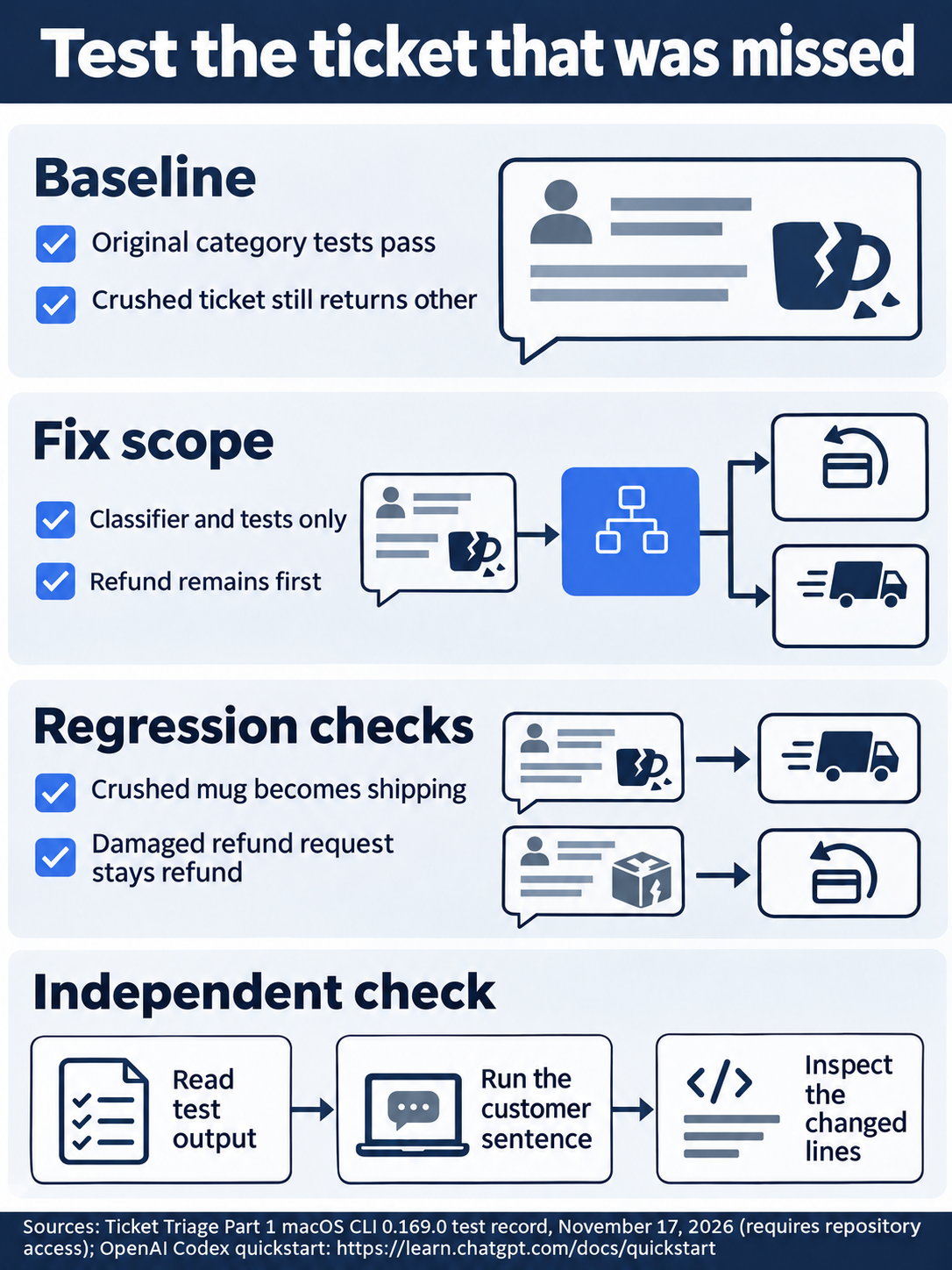
The missed sentence becomes a regression case while refund priority remains protected.
Now repeat the direct classification check with the ! prefix:
!node --input-type=module -e "import { classify } from './src/classify.js'; console.log(classify('The box showed up crushed and the mug inside is in pieces'))"
Check: The same crushed-mug ticket now prints shipping.
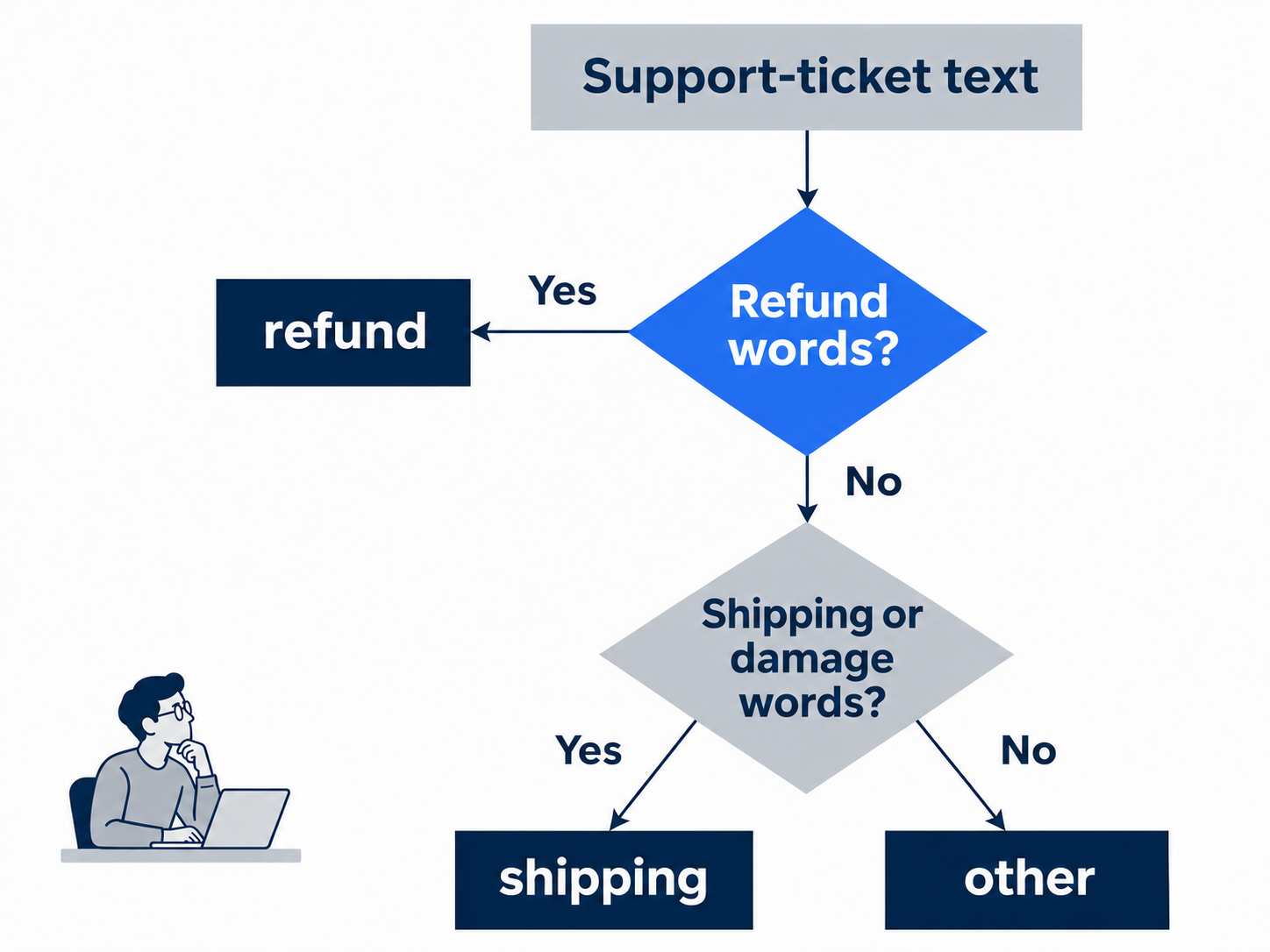
Refund words win before either shipping or damage keywords are checked.
Inspect the summary and changed lines:
!git diff --stat && git diff -- src/classify.js test/classify.test.js
Check: Only the classifier and test file changed; the refund check is first and two tests were added.
--stat summarizes changed files; && runs the next command after success. The standalone -- ends Git's options, leaving file paths. Save the verified fix:
!git add src/classify.js test/classify.test.js && git commit -m "Fix damaged ticket classification" && git status --short
Check: The two-file fix is committed and the final Git status prints nothing.
Your own shell command runs without a model approval dialog. --short requests compact status; empty output means the files match the saved snapshot. Enter /quit to return to your terminal and keep the saved conversation.
Check: Your terminal prompt returns after /quit.
The desktop path
Not run: desktop steps. Install the current ChatGPT desktop app, sign in, choose Codex from the ChatGPT dropdown, and open the ticket-triage folder. The former Codex app now lives in ChatGPT. Keep Ask for approval selected beneath the composer.
Check: The app is on Ticket Triage with Ask for approval selected.
Use the same starter files and fix prompt. Inspect the changes pane, then run the same tests, classification check, and final git add, git commit, and git status --short commands in the integrated terminal, the app's built-in shell, without the CLI's initial !. If you already completed the CLI fix, inspect it instead of repeating it. Record each result; keep the Not run label until you verify this route.
Check: If you complete the labeled desktop route, verify the same final result before removing its Not run label.
What you proved
- The three-test starter missed the crushed-mug ticket.
- The focused fix returns
shipping, preserves refund priority, and passes five tests. - The two-file fix is committed and Git status is clean.
You can stop here. Going deeper explains why this works and where it breaks.
Going deeper
Read this section if you want to understand your safety settings, authentication choices, or a setup failure.
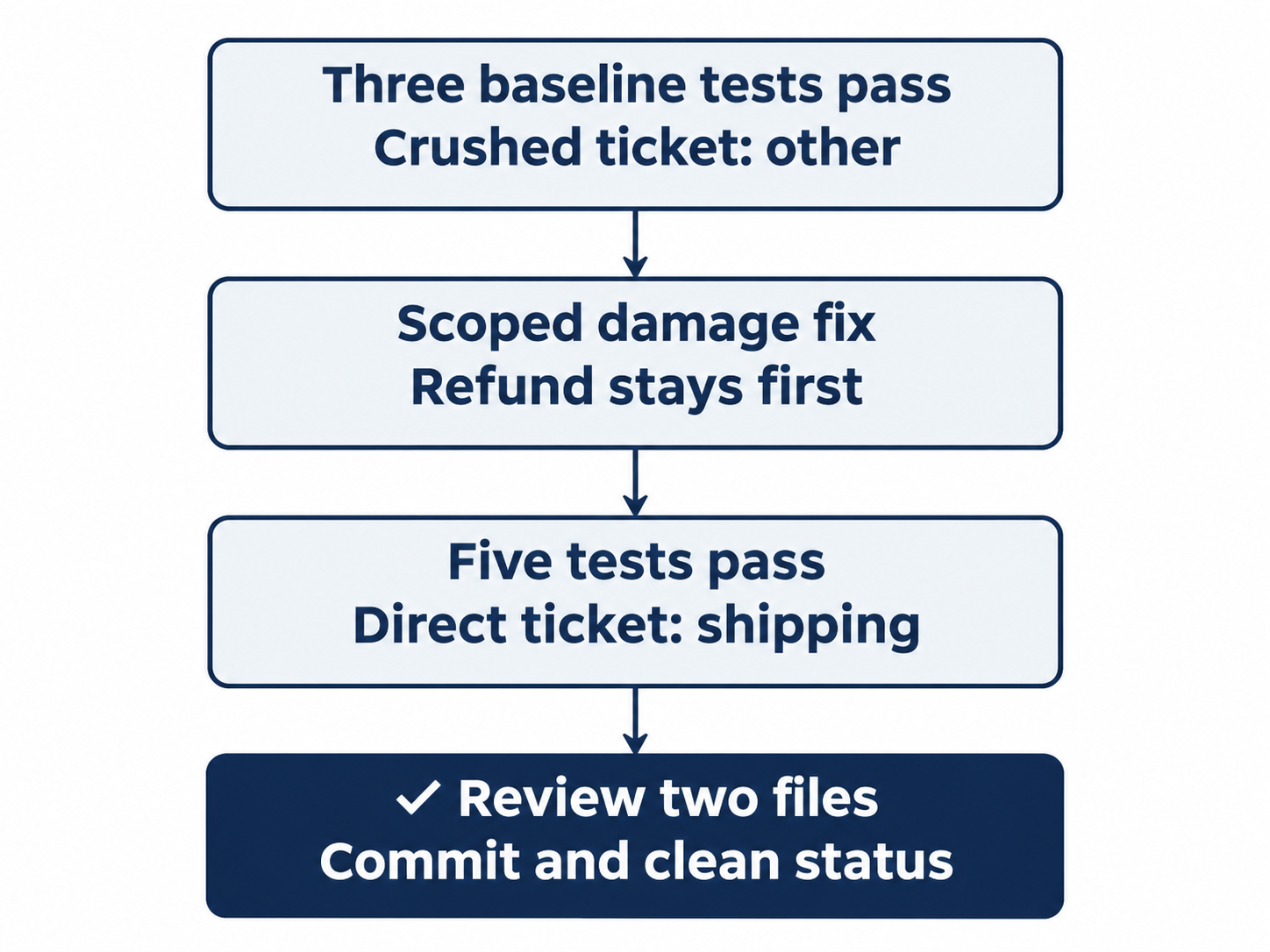
Reproduce the missed ticket, verify five tests, inspect two files, then commit.
Understand the permission boundary
Workspace (Ask for approval) permits ordinary project work and can ask at its boundary. It does not promise a dialog for every file. Trust loads project-provided setup, so inspect unfamiliar repositories first.
Read /status and /permissions for the active session. A separate debug invocation does not verify it. Existing settings, organization requirements, and the operating system affect the boundary. See the permission-mode guide and security guide.
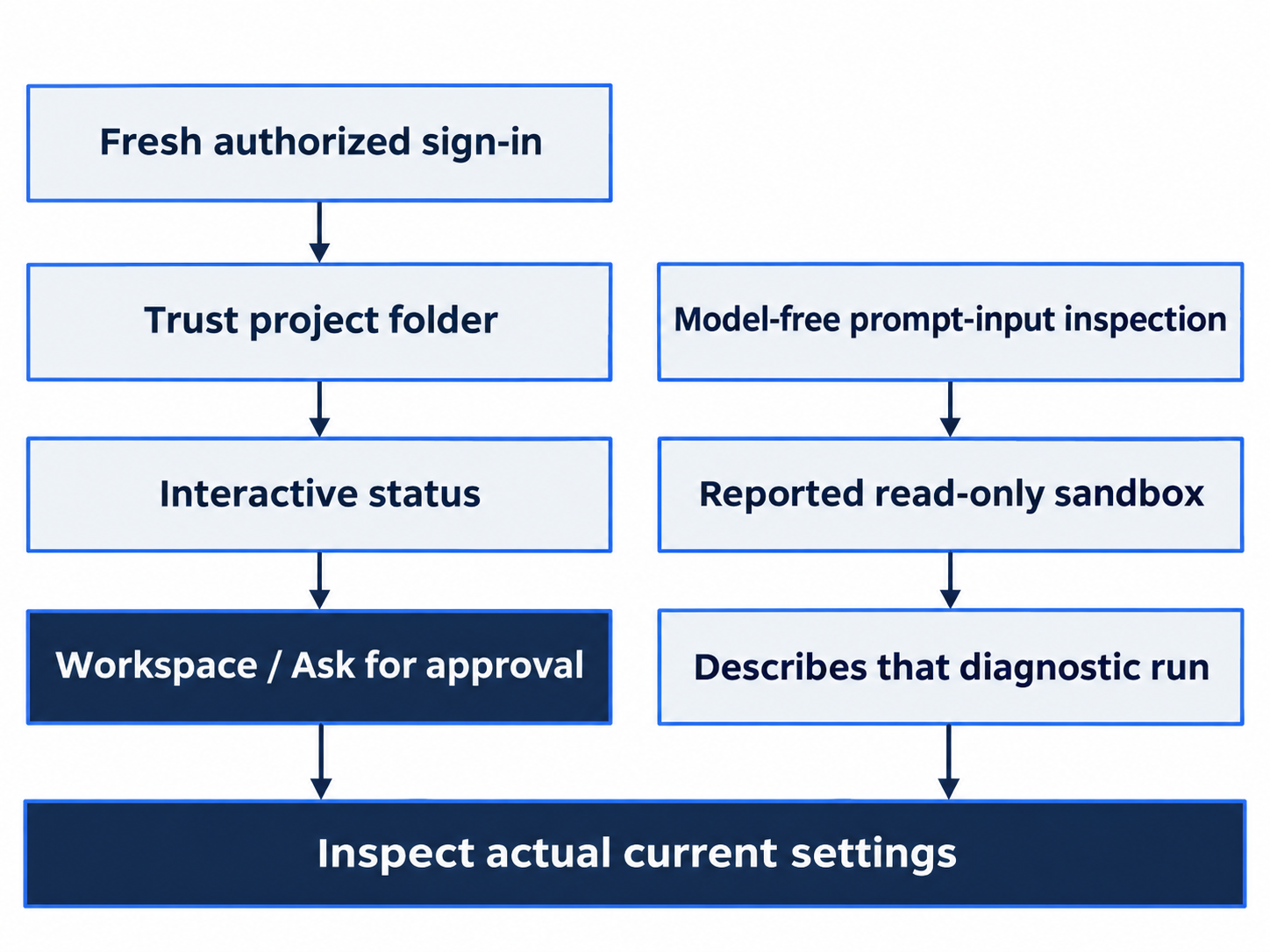
A separate prepared-input diagnostic does not replace the current interactive permission check.
Optional memories are separate from project files. Keep memories disabled for these exercises; if /memories offers Not now, choose it. The local-memory documentation explains the feature. A store-directory name does not prove that recall is enabled.
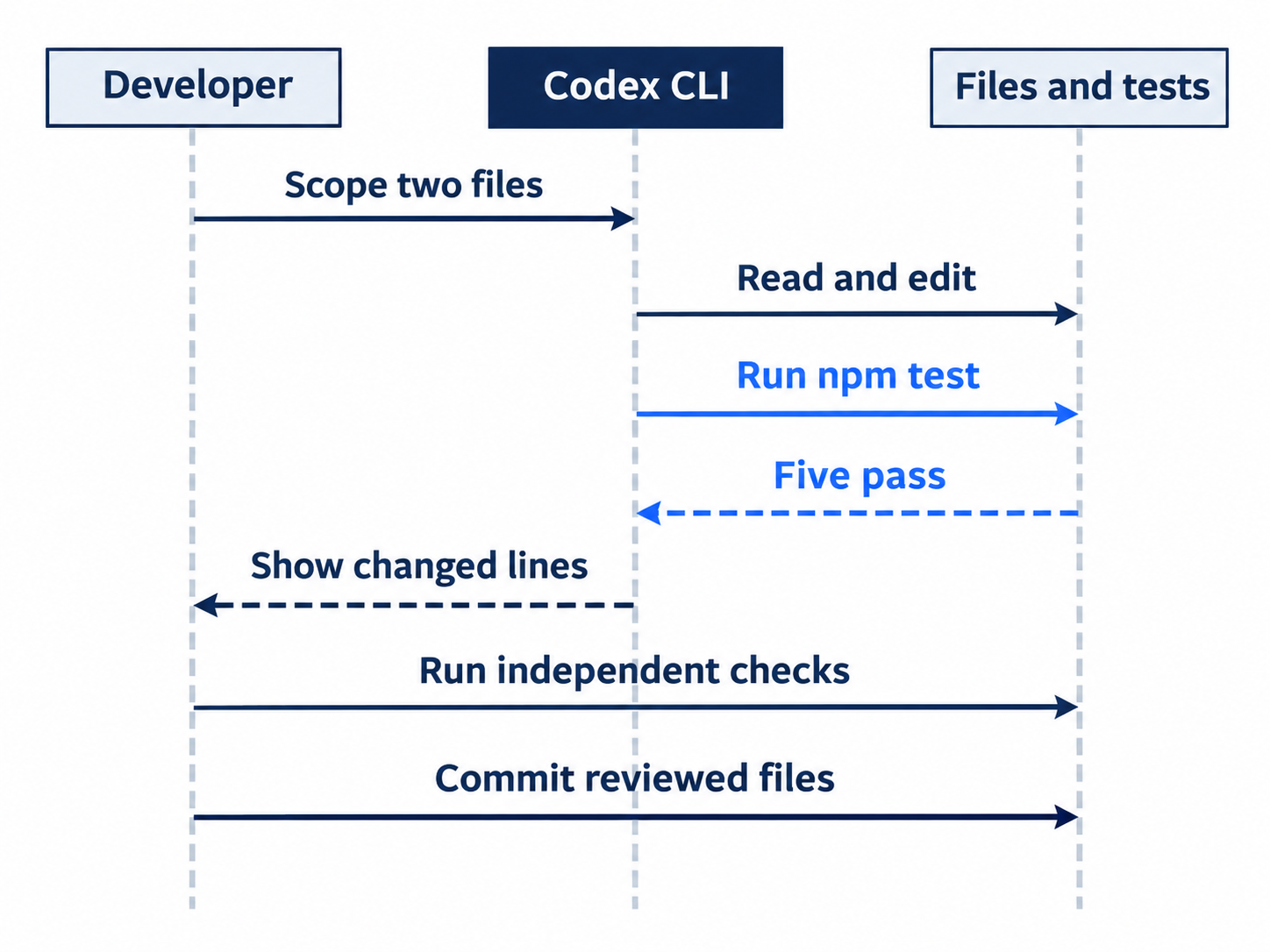
Codex edits and tests; you independently inspect and save the reviewed files.
Account and surface details
Check current plan availability, five-hour estimates, and weekly limits on the pricing page. Your signed-in picker establishes your available models; another account’s display does not.
ChatGPT sign-in uses subscription access. An API key, a credential for separately billed API use, changes billing and loses cloud-based features such as GitHub code review. Follow the authentication guide for the method you actually use.
OpenAI’s July 9 announcement explains that the Codex app became ChatGPT desktop, and the previous desktop app became ChatGPT Classic. Use the current app and check support notices before installing an older version.
For Windows and PowerShell, use the Windows setup guide. The Linux desktop preview lacks Computer Use. Neither platform alternative is run here.
When setup gets stuck
Keep the error and version output. Not run: codex doctor produces a local diagnostic report covering setup and runtime health; it is not a promised repair. Consult the command reference and troubleshooting guide.
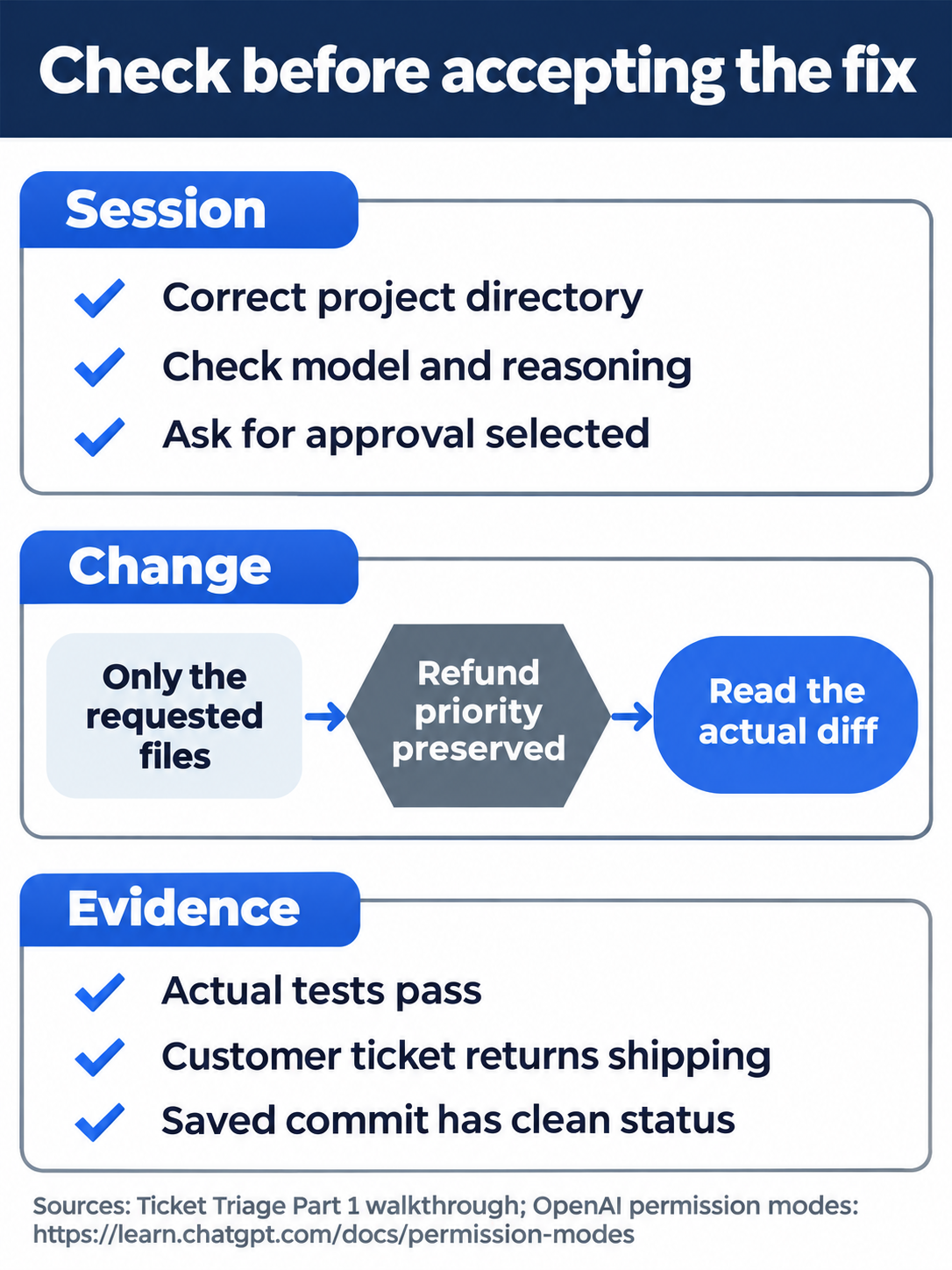
Confirm the project, requested files, and independent verification before accepting the change.
Do this today
Everyone
- Keep both the starter commit and the focused fix commit on disk. Check five passing tests and
shippingfor the crushed-mug ticket. - Before accepting a generated change, inspect its diff and rerun its test command yourself. Keep Ask for approval selected.
If you read Going deeper
- Check
/statusfor the active project and permission mode. Record the active values before requesting work. - Complete the browser-sign-in and desktop checklist in one manual session, marking each result only after observing it.

Conceptual illustration: compare the ticket result with the test evidence before continuing.
Coming up in Part 2: The daily loop, from a focused change to a tested commit and a resumed session.