
Make Claude Code Fail the Build: Headless claude -p as a Test Gate
claude -p turns Claude Code into a command that a script can call, so you can grade its answer with an exit code, but a run with no one at the keyboard cannot ask, so a refused call still exits 0 and the permissions you need belong in the command itself.
Run Claude Code from a script with no one at the keyboard, read its answer as JSON, see why a refused write still exits 0, and commit a gate that fails when a test fails.
You asked Claude Code to make a file from a script, the run reported success, and the file was not there.
In this article: Day 24 of a day-by-day guide to Claude Code. Start here: you run Claude Code from a script, read its answer as JSON, see a write refused with no prompt, and commit a script that fails when a test fails. Going deeper: what the JSON result holds and how to let a
-prun act, what changes in a folder that no one trusted, and how to callclaude -pfrom a GitHub Action or a Stop hook.
Tested on Claude Code 2.1.327.
Yesterday you published a test report as a private artifact and updated it once.
Start here
At the end of today, you can run Claude Code from a script, read its answer as JSON, see what it does with a step that needs your approval, and commit a script that fails when a test fails.
Starting fresh or fell behind? Run git switch -C main claude-code/day-23. This replaces your main with the end of Day 23; to keep your own work, run git branch my-backup first.
Every session so far had you at the keyboard. claude -p runs Claude Code in non-interactive mode, also called headless mode. It runs one prompt, prints the answer, and exits, with no one at the keyboard. -p is short for --print. If you read Day 1's or Day 18's Going deeper, you saw claude -p once already. Today you put claude -p in a script.
The script is a test gate, a check that a script runs and that passes or fails. A shell reports pass or fail with an exit code, a number that every command returns when it ends. 0 means success, and any other number means failure. Other scripts, git hooks, and CI services read that number.
Check the starting state
Open a terminal in Ticket Triage:
cd ~/code/ticket-triage
git status
npm test
jq --version
Git prints nothing to commit, working tree clean. Day 23 changed no file, so the tests show ℹ fail 0 and the same pass count as yesterday. Write your number down. The examples below show 22, and yours can differ. jq is the JSON tool that you installed for the hook on Day 11, so jq --version prints a version, such as jq-1.7.1.
Ask one question headless
Stay in the terminal. Do not start a session. Type:
claude -p "Run npm test. Reply with one line only: PASS <number> FAIL <number>."
After a few seconds, Claude prints one line with your pass count, and the shell prompt returns:
PASS 22 FAIL 0
Claude Code started, sent the prompt, let Claude run npm test, printed the answer, and exited. The <number> parts of the prompt are a template, and Claude fills in your counts. Claude ran npm test without asking. The docs say that a call that an allow rule covers runs without a prompt, and your Day 4 rule, Bash(npm test *), covers npm test.
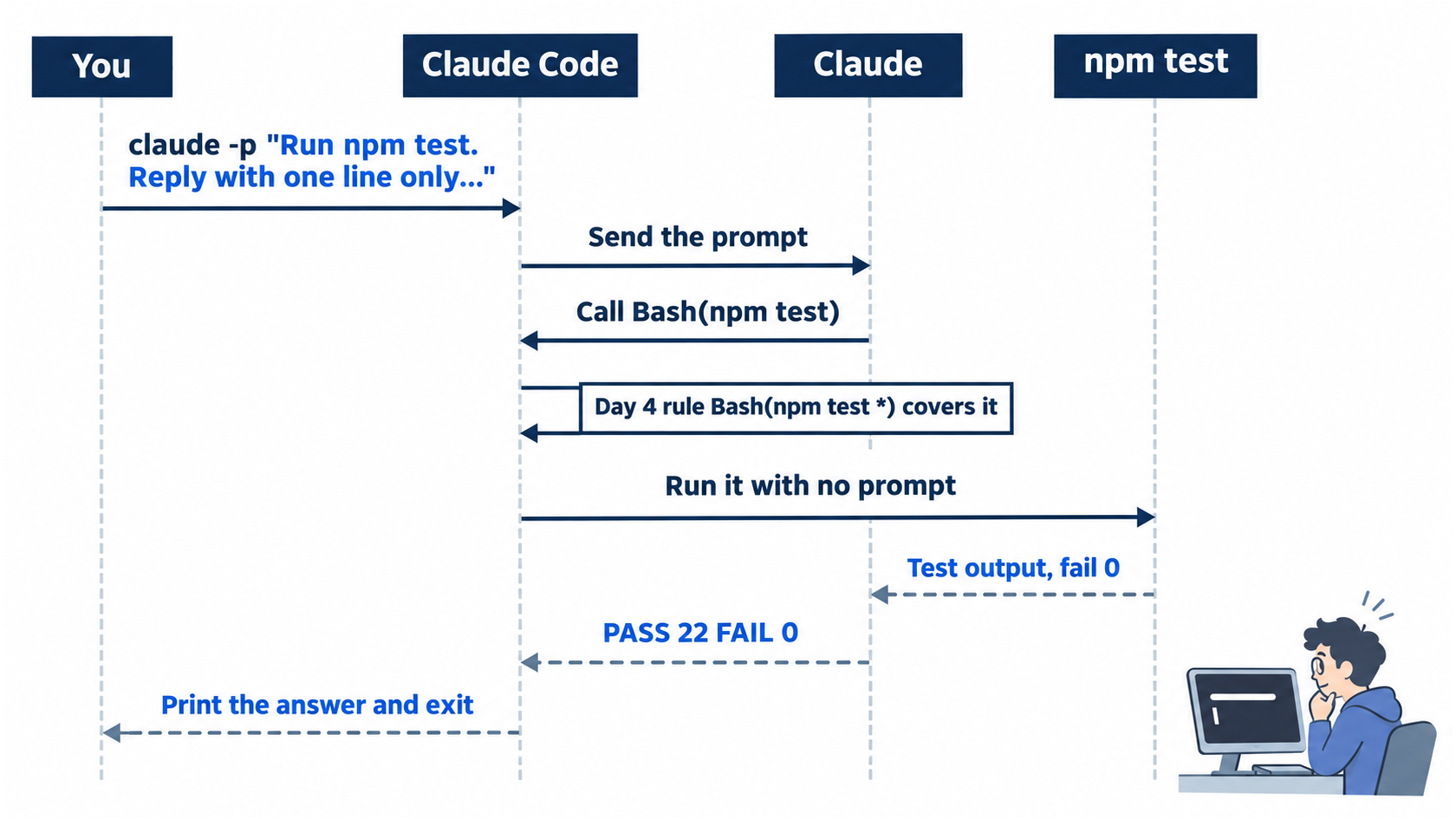
One command starts Claude Code, runs the tool calls that a rule allows, prints the answer, and hands the prompt back to your shell.
Manual mode: no prompts. A -p run cannot show one. A later step shows what happens instead.
Read the answer as JSON
A script needs more than the text. Add --output-format json, which prints one JSON object, a set of named fields, instead of plain text. Pipe it to jq to pick the fields to show:
claude -p "Run npm test. Reply with one line only: PASS <number> FAIL <number>." --output-format json | jq -c '{type, subtype, is_error, num_turns, result, permission_denials}'
jq -c prints the fields that you named, on one line. Both tested runs printed:
{"type":"result","subtype":"success","is_error":false,"num_turns":2,"result":"PASS 22 FAIL 0","permission_denials":[]}
resultis Claude's answer, the same line as before.is_errorisfalsewhen the run ended without an error, andsubtypereadssuccess.num_turnsis the number of turns that the run took.permission_denialslists each tool call that Claude Code refused. The empty list,[], means none.
To see the name of every field, replace the jq -c '{...}' part with jq -c 'keys'. The list includes session_id, total_cost_usd, duration_ms, and usage. Going deeper describes them.
Manual mode: no prompts.
Ask for a change that needs approval
Now ask for something that an interactive session would ask you about. Ask for a new file:
claude -p "Create a file named notes.txt that contains the word hello." --permission-mode default --output-format json | jq -c '{is_error, num_turns, result, permission_denials}'
--permission-mode default starts the run in Manual mode. Interactive sessions start in auto mode unless a setting picks another mode. A -p run is not interactive, and the docs say that it starts in Manual mode when nothing sets a mode. Naming the mode in the command makes the call behave the same for every reader, whatever defaultMode your settings hold.
One tested run printed this, shortened here:
{"is_error":false,"num_turns":2,"result":"I couldn't create `notes.txt` because the write wasn't approved, so the file doesn't exist yet. ...","permission_denials":[{"tool_name":"Write", ...}]}
Claude tried the Write tool, the tool that creates a file. Claude Code refused the call without a prompt and listed it in permission_denials, with "tool_name":"Write". Another tested run's reply began I didn't create notes.txt because the request to write it was declined. Your words can differ. The run still exited with code 0, and is_error stayed false, because the run itself worked. Only the write was refused.
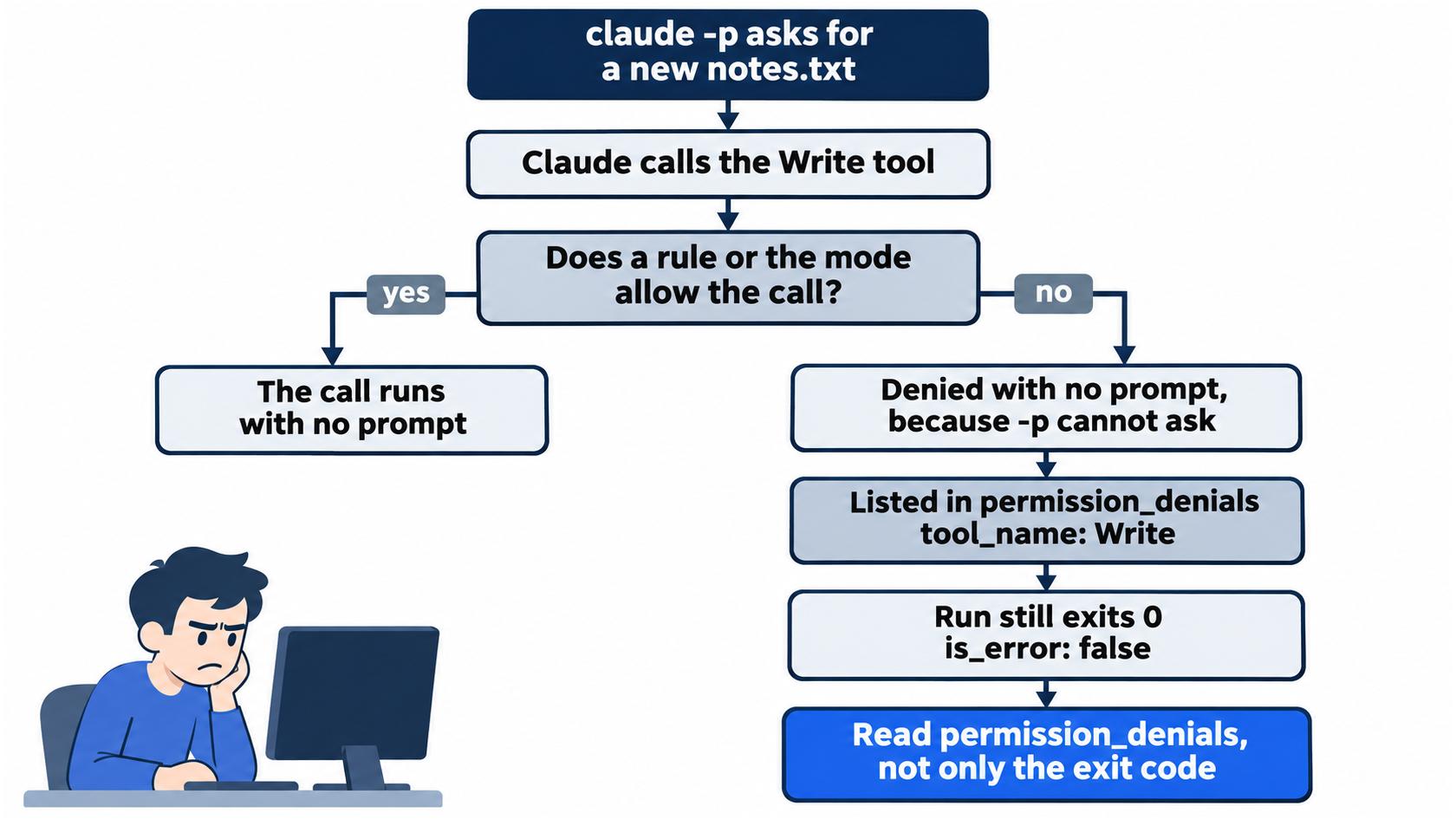
A run that cannot ask does not stop and wait. It refuses the call, records it, and reports success for the run itself.
Check that nothing changed:
git status --short
It prints nothing. There is no notes.txt. Going deeper shows how to let a -p run write.
Manual mode: no prompts. A -p run cannot ask, so a call that needs approval is denied, and permission_denials names it.
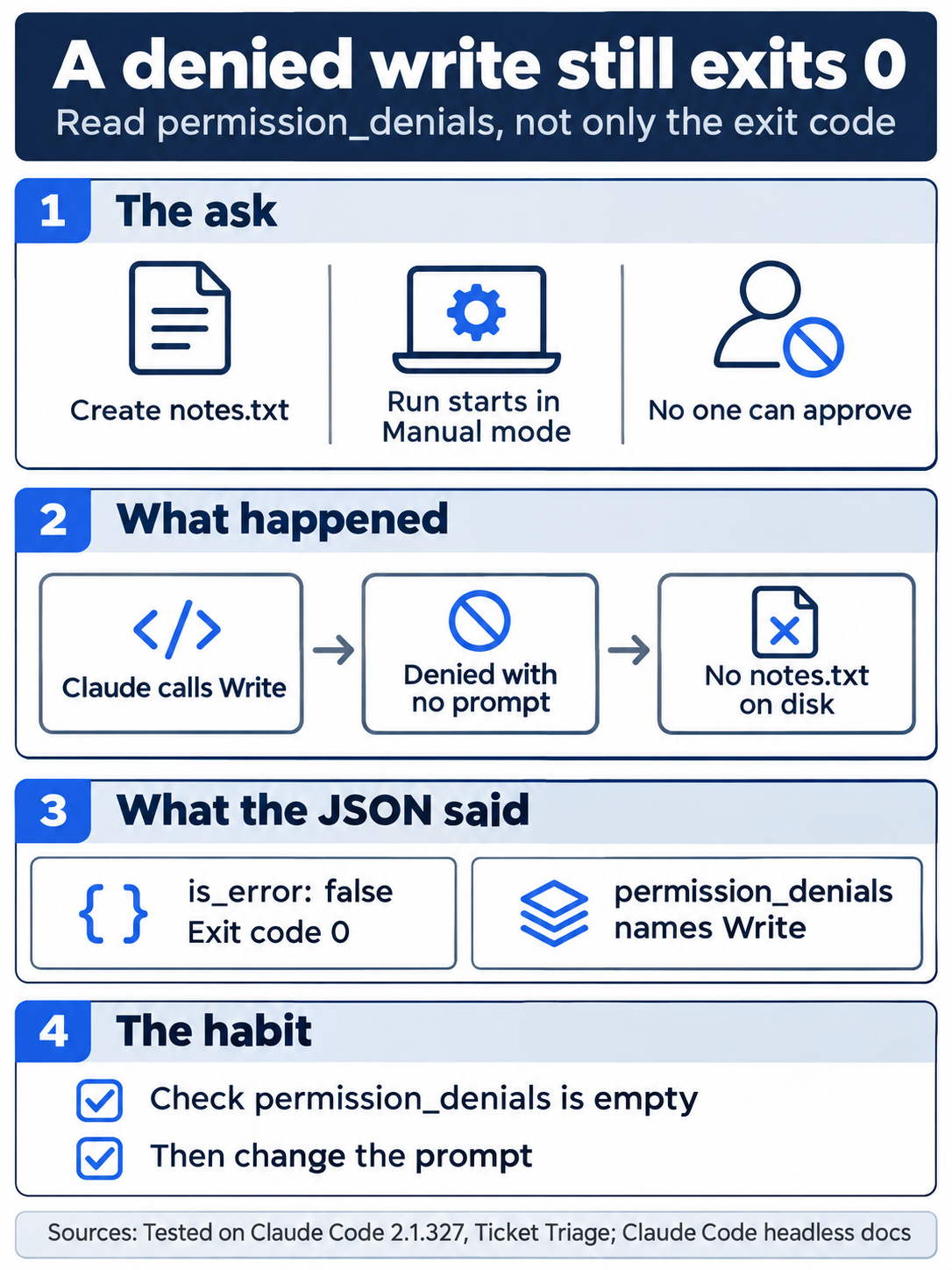
The exit code tells you whether the run worked. The permission_denials list tells you whether Claude got to do everything that you asked.
Write the gate script
Create scripts/check.sh. Paste this whole block into the terminal. The block makes the folder and writes the file for you:
mkdir -p scripts
cat > scripts/check.sh <<'EOF'
#!/usr/bin/env bash
# Ask Claude Code to run the tests with no one at the keyboard.
# Print its one-line answer, and exit 1 unless the answer ends in FAIL 0.
answer=$(claude -p "Run npm test. Reply with one line only: PASS <number> FAIL <number>." --permission-mode default --output-format json | jq -r '.result')
echo "$answer"
[[ "$answer" == *"FAIL 0" ]]
EOF
chmod +x scripts/check.sh
cat > scripts/check.sh <<'EOF' writes every line up to the closing EOF into the file. If you prefer your editor, create scripts/check.sh and type only the six lines between the two EOF markers. chmod +x marks the file as a program that you can run.
Read the script one line at a time:
#!/usr/bin/env bashtells your system to run the file with bash.- The two lines that start with
#are comments, notes for a person. Bash skips them. answer=$(...)runs the command inside the parentheses and stores what it prints in a variable namedanswer.- Inside, the
claude -pcall is the one from the JSON step, with--permission-mode defaultadded so that it runs in Manual mode for every reader.| jq -r '.result'keeps only theresultfield.-rprints it as raw text, without the quotes that JSON puts around text. echo "$answer"prints the answer, so you see it.[[ "$answer" == *"FAIL 0" ]]checks whether the answer ends inFAIL 0. The*matches any text before it. A bash script exits with the exit code of its last command, so the script exits 0 when the answer ends inFAIL 0and 1 when it does not.
The gate grades Claude's reply. Going deeper explains when to use the exit code of npm test itself instead.
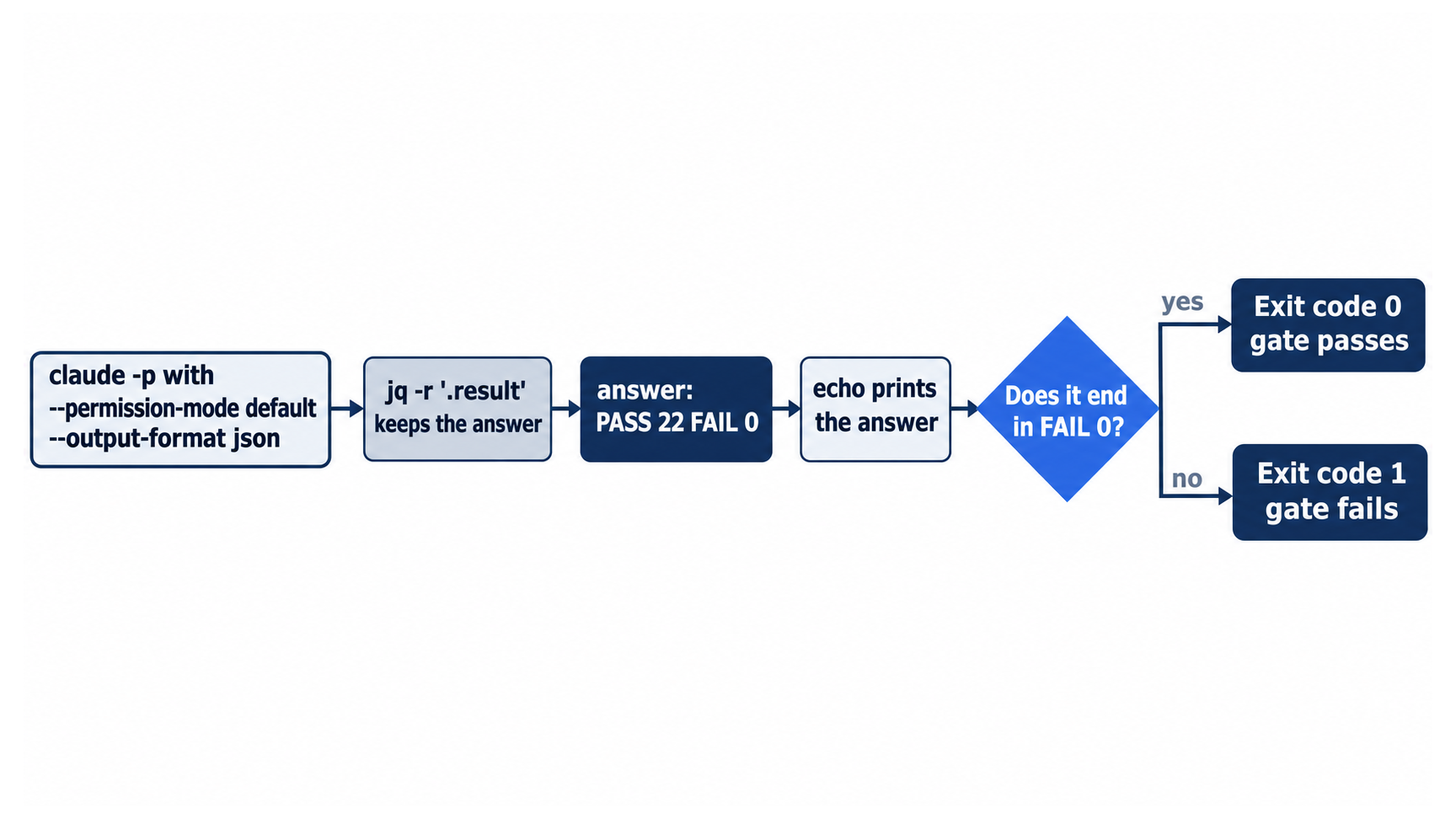
The whole gate is one call, one filter, and one pattern match. The pattern match is the last command, so its result becomes the script's exit code.
Run the gate three times
Run the gate, then print its exit code. $? holds the exit code of the last command:
./scripts/check.sh
echo $?
It prints:
PASS 22 FAIL 0
0
Next, prove that the gate can fail. A gate that never fails proves nothing. Plant a test that fails on purpose:
cat > test/gate.test.js <<'EOF'
import { test } from "node:test"
import assert from "node:assert/strict"

test("gate check: this test fails on purpose", () => {
  assert.equal(1, 2)
})
EOF
./scripts/check.sh
echo $?
assert.equal(1, 2) fails, because 1 does not equal 2. The gate prints:
PASS 22 FAIL 1
1
The answer does not end in FAIL 0, so the script exits 1. Remove the planted test and run the gate again:
rm test/gate.test.js
./scripts/check.sh
echo $?
It prints PASS 22 FAIL 0 and 0 again, with your pass count.
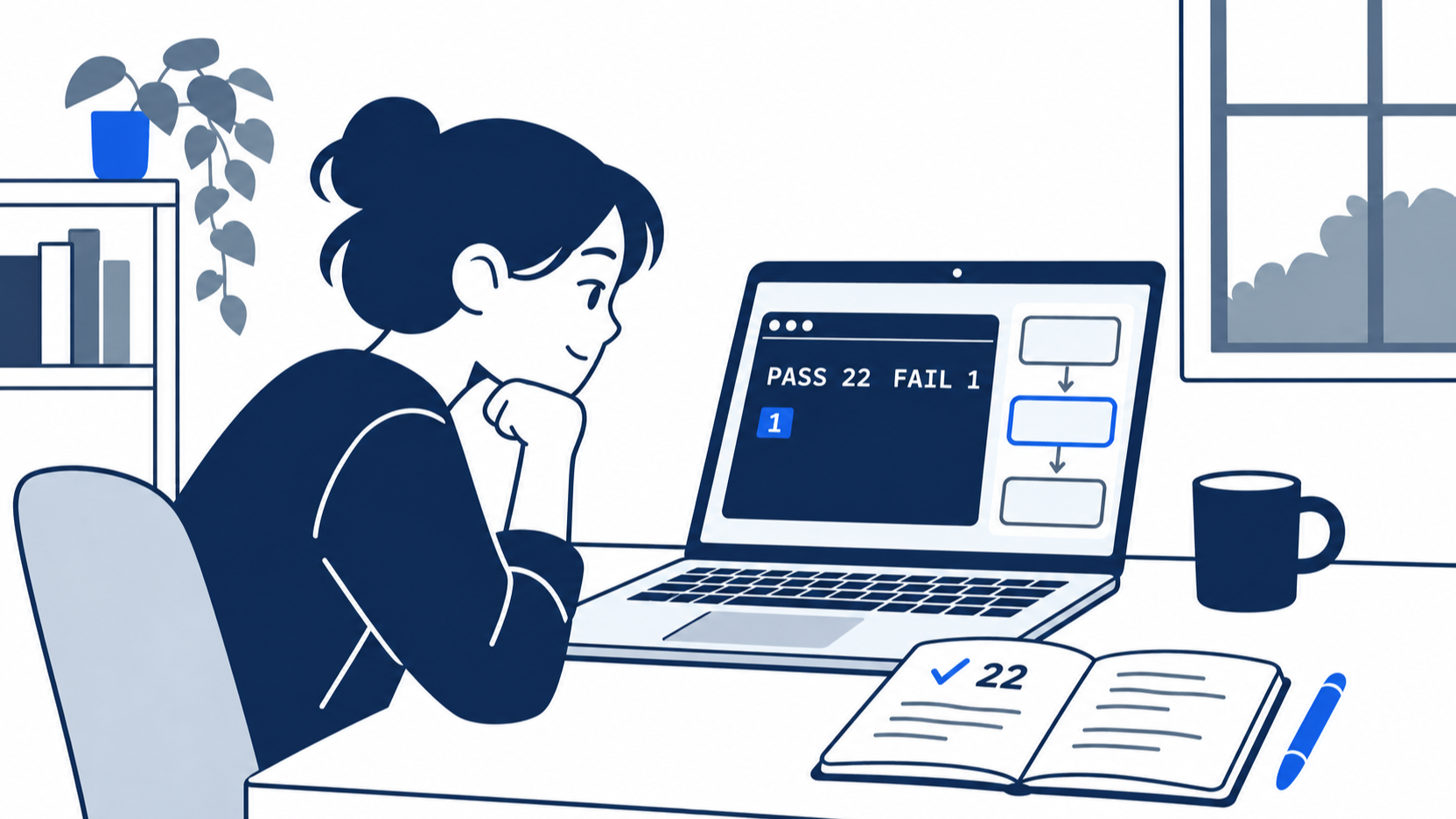
The planted test is the moment the gate earns trust. A check that you have seen fail is a check that you can believe when it passes.
Manual mode: no prompts in all three runs.
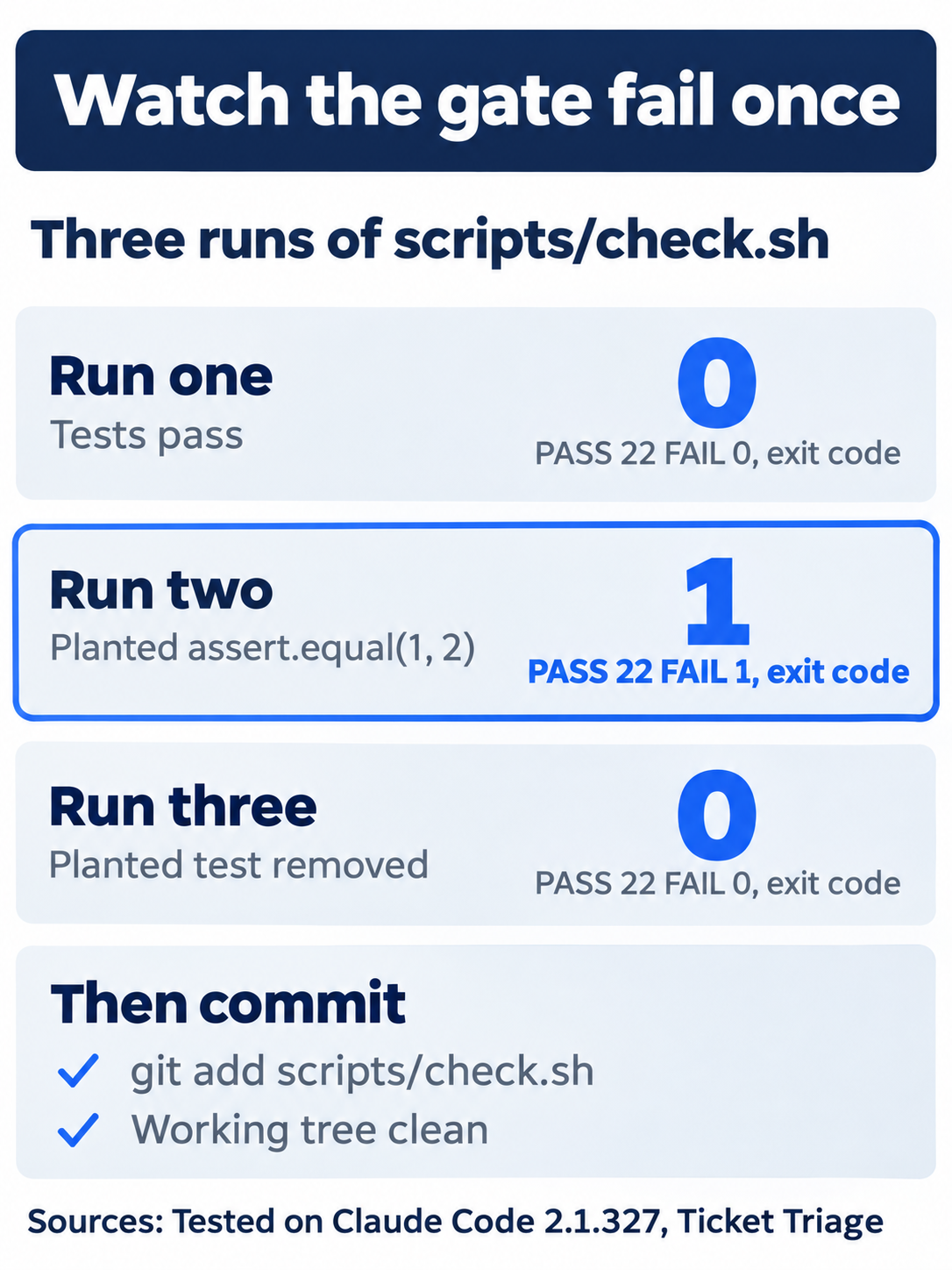
Three runs prove the gate in both directions: it passes on good tests, fails on a bad one, and passes again once the bad test is gone.
Commit the script
git add scripts/check.sh
git commit -m "Add a headless test check"
Check the win
git status
git log --oneline -1
npm test
Git prints nothing to commit, working tree clean. The log shows Add a headless test check after the hash. The tests show ℹ fail 0 and the same count as this morning, because test/gate.test.js is gone.
You ran Claude Code with no one at the keyboard, read its answer as JSON, saw a write refused with no prompt, and committed a script that passes when the tests pass and fails when one fails.
You can stop here. Going deeper explains why this works and where it breaks.
Going deeper
This section is for readers who want to know what else the JSON holds, how to let a -p run act, what changes in a folder that Claude Code never trusted, how to run the same check in a GitHub Action, and how to call claude -p from a hook without starting a chain. It assumes that you finished Start here in Parts 1 to 24.
The JSON result
The headless docs name three values for --output-format. text is the default. json is the one that Start here used. stream-json prints one JSON object per line as each event happens. The tested json result had 27 fields. A script reads these fields most:
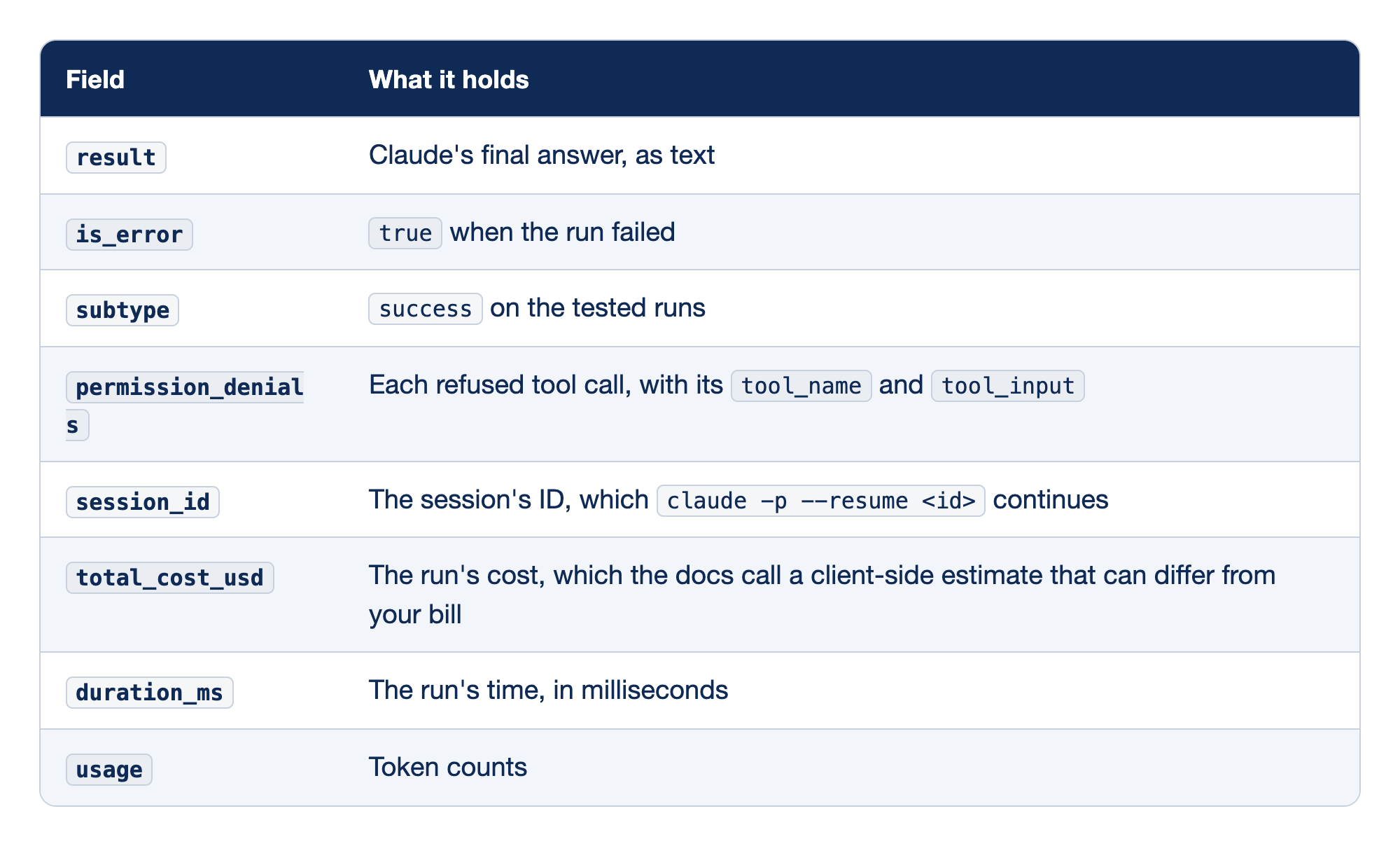
Eight fields of the json result matter most to a script. The Field column names each field, and the What it holds column says what the field carries.
result: the field holds Claude's final answer as text.is_error: the field istruewhen the run failed.subtype: the field readsuccesson the tested runs.permission_denials: the field lists each refused tool call with itstool_nameandtool_input.session_id: the field holds the session's ID, andclaude -p --resume <id>continues that session.total_cost_usd: the field holds the run's cost, which the docs call a client-side estimate that can differ from your bill.duration_ms: the field holds the run's time in milliseconds.usage: the field holds the token counts.
The denied write in Start here exited with code 0 and is_error false. A script that needs to know whether Claude did all the work checks that permission_denials is empty, not only the exit code. The docs say that Claude Code exits with a non-zero code when the run itself fails, and that a failure inside the run, such as missing authentication, prints as the result. scripts/check.sh fails closed: an error message does not end in FAIL 0, so the gate exits 1.
The gate also trusts Claude's count. Claude runs npm test and reports the numbers, and the script grades the report. Today's script shows how a script reads a -p answer. A gate that must not depend on the model runs npm test itself and reads its exit code.
From the docs, not tested here:
--json-schemawith a JSON Schema asks for an answer in a fixed shape, and the result then carries astructured_outputfield. The docs say to check that the field is present, because a run that ends without valid output has none.--continuesends a follow-up to the most recent conversation, and--resumewith asession_idsends one to a named conversation.- A
-prun reads standard input, sogit diff | claude -p "explain this change"works. The docs cap piped input at 10MB.
Let a -p run act
Tested on 2.1.327: with --permission-mode auto in place of --permission-mode default, the Start here write call created notes.txt, with no denial. The JSON held "num_turns":2 and "permission_denials":[], and the reply began I created notes.txt in the working directory. This guide deleted the file after the test.
The other ways come from the headless docs and the permission modes docs, not from this guide's tests:
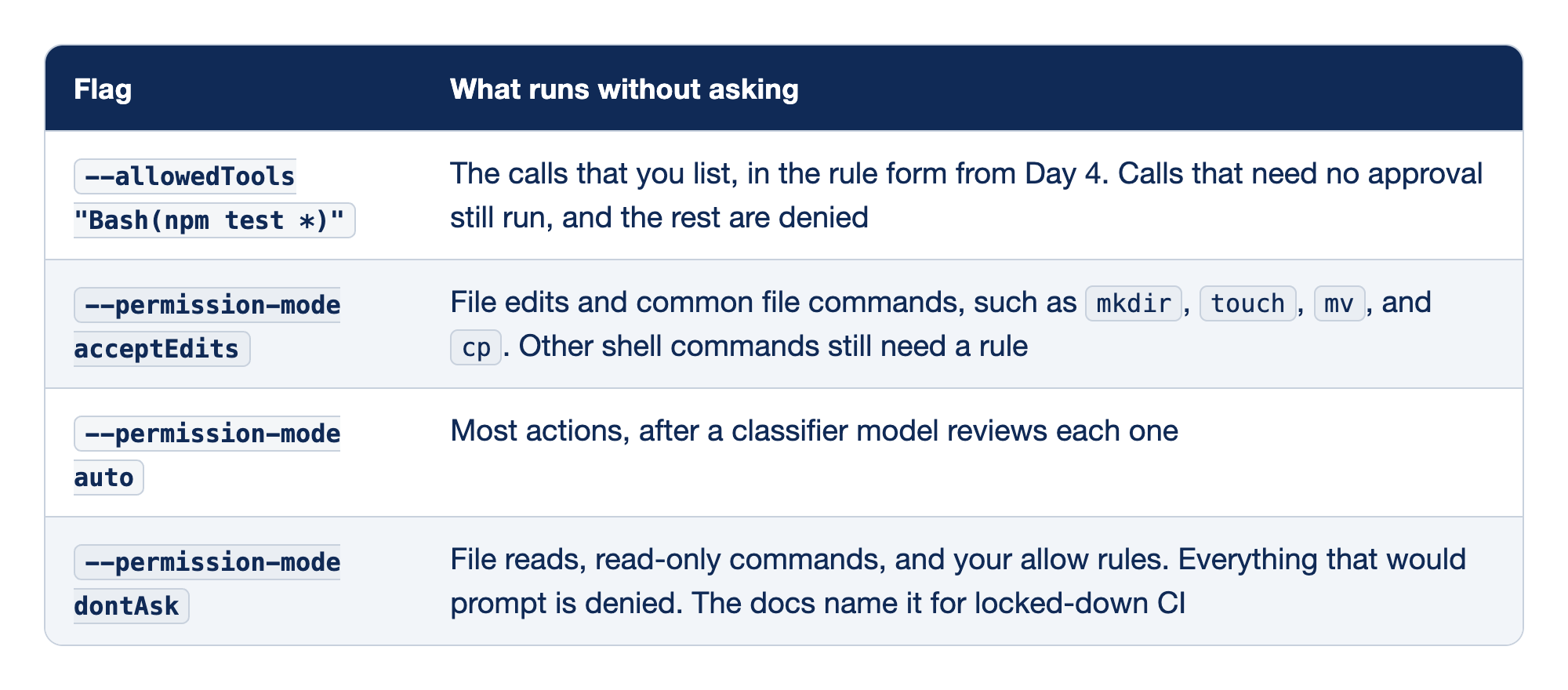
Four flags let a -p run act without asking. The Flag column names each flag, and the What runs without asking column says which calls it lets through.
--allowedTools "Bash(npm test *)": the calls that you list run, in the rule form from Day 4. Calls that need no approval still run, and Claude Code denies the rest.--permission-mode acceptEdits: file edits and common file commands, such asmkdir,touch,mv, andcp, run without asking. Other shell commands still need a rule.--permission-mode auto: most actions run after a classifier model reviews each one.--permission-mode dontAsk: file reads, read-only commands, and your allow rules run. Claude Code denies everything that would prompt, and the docs name this mode for locked-down CI.
The docs add a detail about auto mode: in a run that starts in auto mode, Claude Code drops a bare Bash entry in --allowedTools, and auto mode reviews each command instead. They reserve bypassPermissions, which skips every check, for isolated containers and virtual machines.
The docs say that with v2.1.302 or later, a claude -p run starts in Manual mode when nothing sets a mode. Before that version, some runs could start in auto mode. The same docs say that interactive sessions start in auto mode unless a setting picks another mode. They list permissions.defaultMode in a settings file as one of the things that set a mode, for a -p run too. Name the mode or the allowed tools in the command itself, as scripts/check.sh does with --permission-mode default, so that the script does not depend on a default that has changed before or on one reader's settings. For an unattended run, a short --allowedTools list is the narrowest choice.
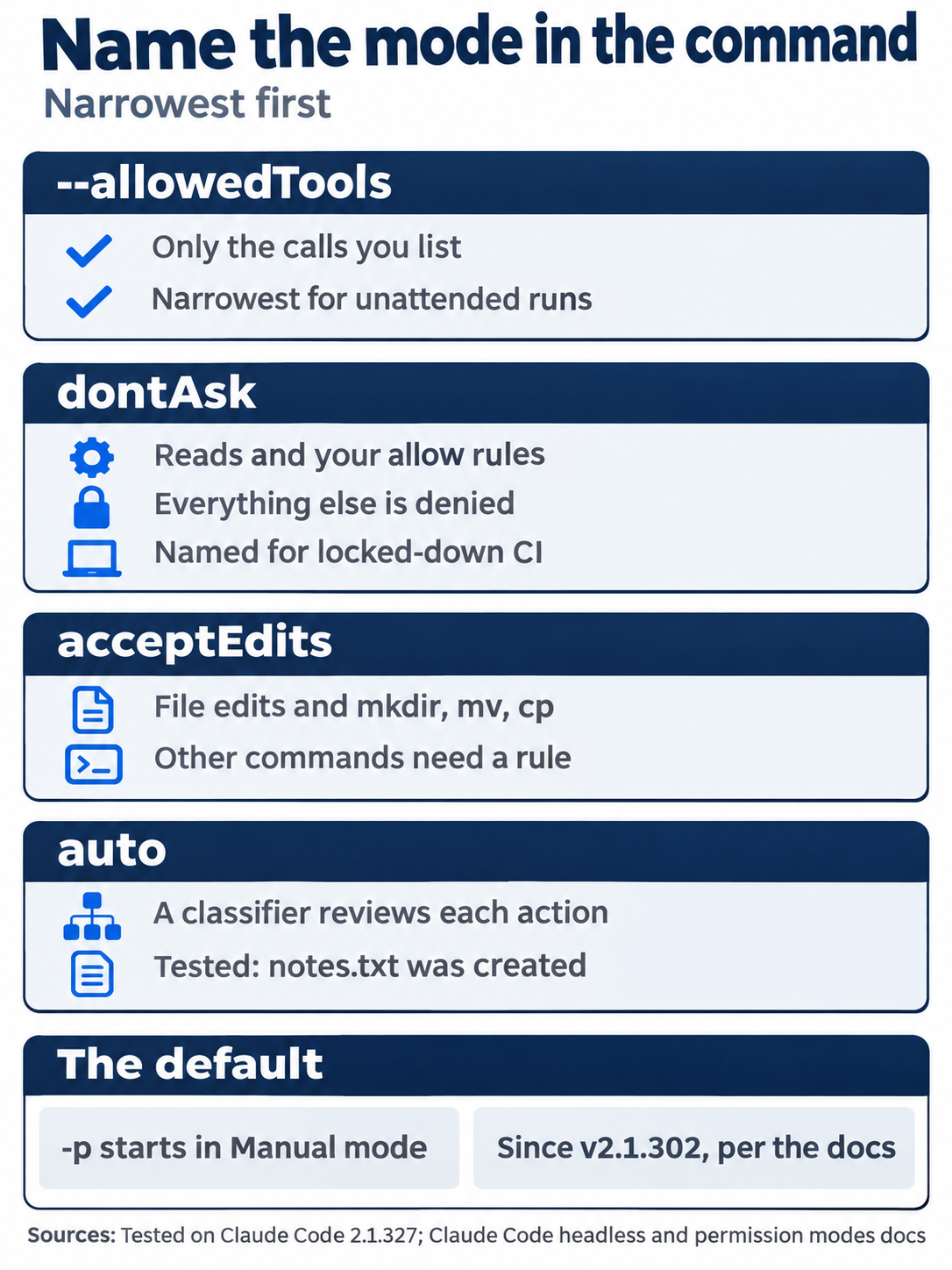
Each choice trades reach for safety. A short --allowedTools list gives an unattended run exactly what it needs and nothing more.
A folder that Claude Code never trusted
The Going deeper tests used a throwaway copy of Ticket Triage that never had an interactive session, so no one answered the trust dialog from Day 1 there. Every -p run in that copy printed:
Ignoring 1 permissions.allow entry from .claude/settings.json: this workspace has not been trusted.
The runs still ran the project's hooks. Both results match the docs. The hooks reference says that a -p session treats the folder as trusted for hooks. In the words of the headless docs, a repository's committed hooks run "even in a folder you've never trusted." The table "What runs before you trust a folder" in the permissions docs states both results for a claude -p run in a folder never trusted. For hooks, it says "Used." For permissions.allow rules in .claude/settings.json it says "Not used. Claude Code prints a this workspace has not been trusted warning to stderr". The same table says that servers in a repository's .mcp.json are "Connected without asking" in such a run. This guide did not test the .mcp.json row. Day 11 said that a -p run treats the folder as trusted. On 2.1.327, that held for hooks but not for allow rules.
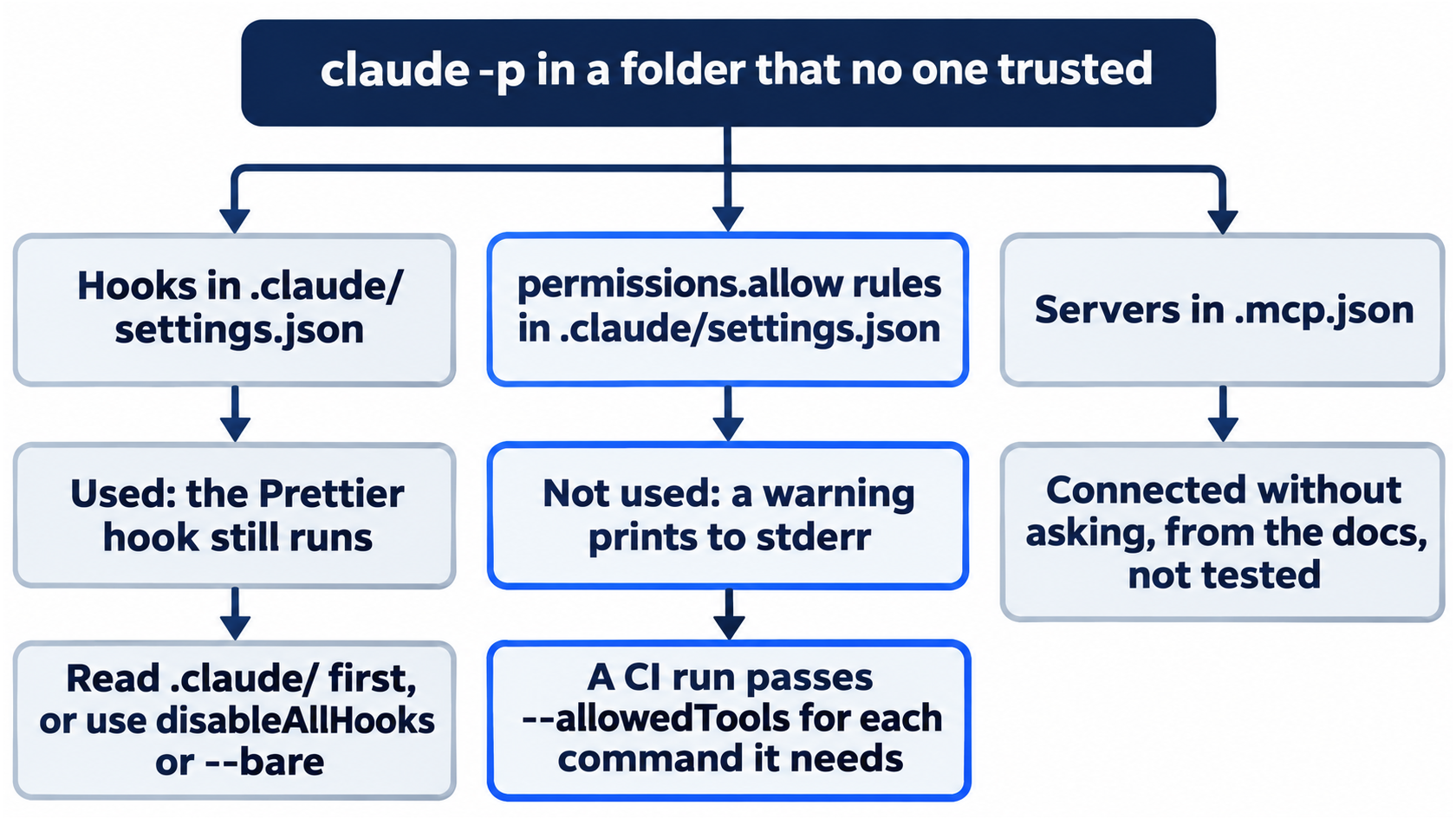
Trust splits the project's settings in two. The hooks run, and the allow rules do not, which is the opposite of what many readers expect.
A fresh checkout on a CI server is a folder that no one trusted. Your Day 4 rule does not apply there, so a CI run must pass --allowedTools for each command that it needs. The hooks in .claude/settings.json, such as the Day 11 Prettier hook, do run there. Before you script claude -p over a repository that you did not write, read its .claude/ settings files. The docs give two ways to keep a repository's hooks out of a run, not tested here:
--settings '{"disableAllHooks": true}'turns hooks off for one run.--bareskips hooks, skills, plugins, MCP servers, auto memory, and CLAUDE.md. The docs call it the recommended mode for scripted calls and say that it will become the default for-pin a future release. Bare mode never reads your claude.ai sign-in, so it needs anANTHROPIC_API_KEY.
Run it in a GitHub Action
This guide wrote this section from the docs and has not run it yet. A run needs a Claude credential saved as a secret in the test repository, and this guide does not enter credentials. The run is on this guide's update list for November 21, 2026. Everything in this section comes from the GitHub Actions docs.
Claude Code GitHub Actions is a GitHub Action, anthropics/claude-code-action, that runs Claude Code in a workflow on a GitHub server. It has two modes. With no prompt input, it waits for someone to write @claude in an issue or pull request comment and replies there. With a prompt input, it runs on any event that the workflow names, and its answer goes to the run's log. The docs call the second form automation mode.
Setup needs admin access to the repository and three pieces:
- The Claude GitHub App, installed on the repository from https://github.com/apps/claude.
- A secret with a credential. Run
claude setup-tokenand save the token as the repository secretCLAUDE_CODE_OAUTH_TOKEN. The docs say that this token uses your Claude subscription, on a Pro, Max, Ultra, Team, or Enterprise plan. An API key from the Claude Console works too, as the secretANTHROPIC_API_KEY. - A workflow file in
.github/workflows/.
/install-github-app, typed in a session in the repository, does all three: it installs the app, saves the secret, and pushes a branch with the workflow files. Then it opens a pull request page in your browser. The workflow files that it offers are its own, such as claude.yml, which answers @claude mentions, not the one below. It needs the GitHub CLI, signed in with gh auth login, and a repository on github.com. Since v2.1.327, it asks you to confirm before it changes a repository.
This workflow runs the Start here question on every push. It is the workflow from this guide's manual checks for Day 24:
name: Headless check
on:
  push:
    branches: [claude-code-daily]
jobs:
  check:
    runs-on: ubuntu-latest
    permissions:
      contents: read
      id-token: write
    steps:
      - uses: actions/checkout@v6
      - uses: actions/setup-node@v4
        with:
          node-version: 22
      - name: Run Claude
        uses: anthropics/claude-code-action@v1
        with:
          claude_code_oauth_token: ${{ secrets.CLAUDE_CODE_OAUTH_TOKEN }}
          prompt: "Run npm test. Reply with one line only: PASS <number> FAIL <number>."
          claude_args: '--allowedTools "Bash(npm test *)" --max-turns 5'
branches: [claude-code-daily]names this guide's test branch. Put your own branch there, such asmain.actions/checkoutandactions/setup-nodeget a copy of the repository and Node.js 22 on the server.promptmakes it an automation-mode run.claude_argspasses command-line flags to Claude Code.--allowedTools "Bash(npm test *)"matters because the checkout is a folder that no one trusted, where the project's allow rules do not apply.--max-turns 5caps the run at five turns.
The expected result, from the docs and not run yet: the Run Claude step's log ends with Claude's answer, such as PASS 22 FAIL 0, and the run is green. As written, the workflow reports the answer and grades nothing, the way the first two Start here calls did. The docs list the costs: GitHub Actions minutes for the runner, and tokens for Claude, which come from your subscription with an OAuth token. They suggest --max-turns, workflow timeouts, and GitHub's concurrency controls to cap both. For GitLab, see Claude Code GitLab CI/CD.
A Stop hook that calls claude -p
The first edition's hooks chapter ran claude -p from a Stop hook, a hook that runs when Claude finishes a response. The child claude -p session loads the same project settings, so it runs the same Stop hook, which starts another child. This guide tested the chain on 2.1.327, with the hook in .claude/settings.local.json of a throwaway copy.
The first hook had no guard. It counted its depth in a variable and stopped at 2, so the test could end:
d=${HOOK_DEPTH:-0}; echo "Stop hook ran at depth $d" >> .claude/hook.log; [ "$d" -ge 2 ] && exit 0; HOOK_DEPTH=$((d+1)) claude -p "Reply with OK." > /dev/null
One top-level claude -p "Reply with the word hi." made the hook run three times:
Stop hook ran at depth 0
Stop hook ran at depth 1
Stop hook ran at depth 2
Without the counter, each child would start one more. The second hook added the guard:
[ -n "$CLAUDE_HOOK_CHILD" ] && exit 0; echo "Stop hook ran" >> .claude/hook.log; CLAUDE_HOOK_CHILD=1 claude -p "Reply with OK." > /dev/null
It ran once, and the log held one line, Stop hook ran. The hook starts the child with CLAUDE_HOOK_CHILD=1. The child inherits the variable, so the child's own Stop hook sees it and exits at once. CLAUDE_HOOK_CHILD is not a Claude Code setting. It is a plain environment variable that the hook sets and checks, and any unused name works. The stop_hook_active field from the hooks reference does not stop this chain. It is true only when Claude is already continuing because of a Stop hook, and each child is a new session.
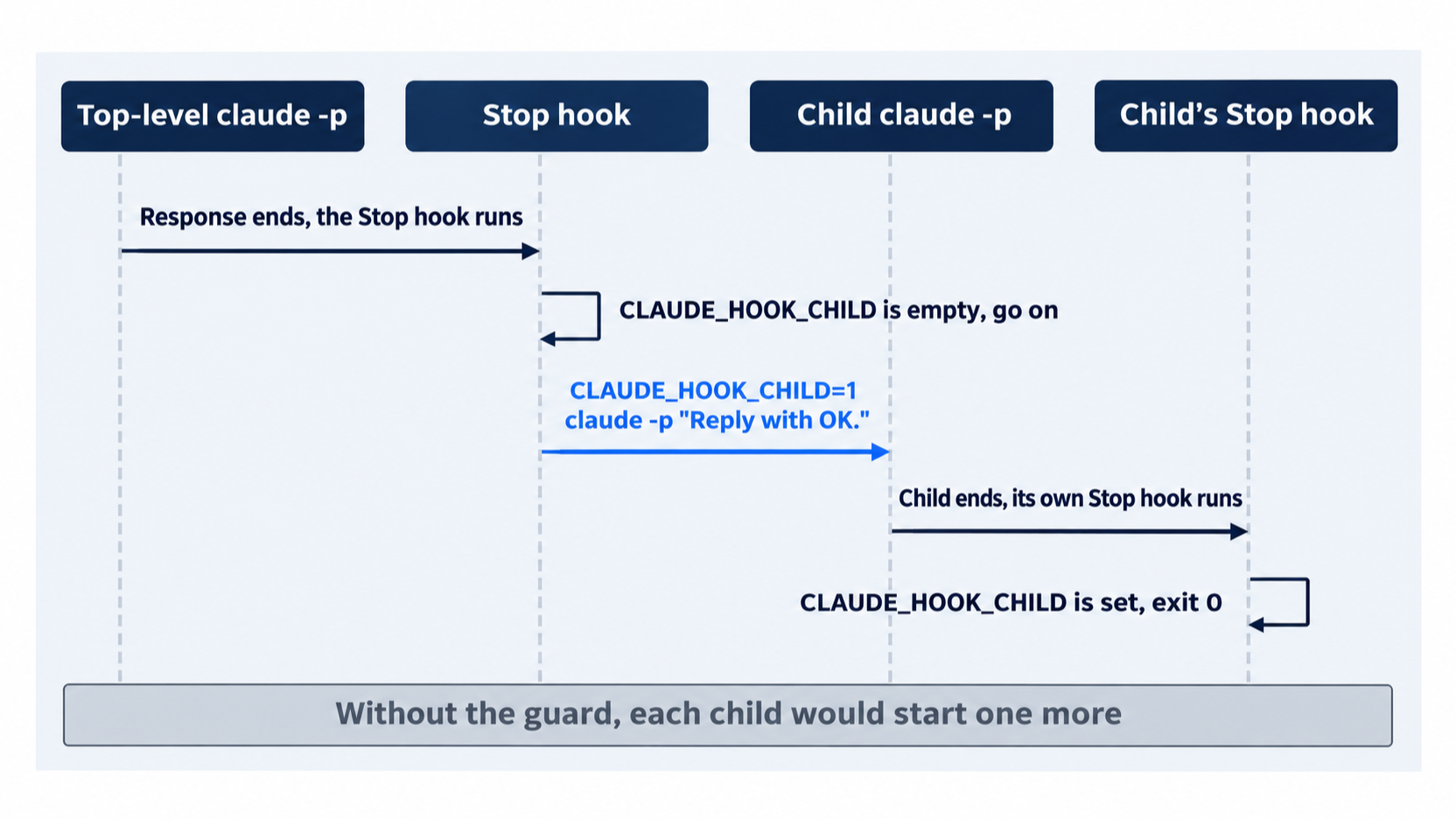
The guard is one environment variable. The parent sets it, the child inherits it, and the child's hook stops the chain at one level.
The docs say that Claude Code waits for a command hook to end before it goes on, and that "async": true on a command hook runs it in the background instead. The next exercise uses both the guard and async.
Exercise: mirror the whole task list after every turn
Day 3 described the task list and promised a copy on disk. Day 11's exercise appended each finished task to docs/tasks.md. This version rewrites the whole list after every turn, open tasks included. It is opt-in. This guide tested it once, in auto mode, on 2.1.327, and did not test the Manual mode version. The reset puts Ticket Triage back as Start here left it.
The Task tools are off by default on Opus 5.5 (Day 3), so the session turns them on. Two sessions share one task list when both have the same CLAUDE_CODE_TASK_LIST_ID. The hook's child inherits the variable from the session, so it reads the session's list.
-
The hook goes in
.claude/settings.local.json, your personal settings file, which git ignores. The next step replaces that file. Check whether you have one:ls .claude/settings.local.jsonIf it exists, move it aside with
mv .claude/settings.local.json .claude/settings.local.json.bak, and move it back in the reset. This guide did not test that move. -
Write the hook with
jq, which builds the JSON and its quotes for you:HOOK='[ -n "$CLAUDE_HOOK_CHILD" ] && exit 0; CLAUDE_HOOK_CHILD=1 claude -p "Read the task list with TaskList. Rewrite docs/tasks.md with one line per task: - [x] and the subject for a completed task, - [ ] and the subject for any other task. Change no other file." --allowedTools "Edit(docs/tasks.md)" > /dev/null 2>&1' jq -n --arg c "$HOOK" '{hooks: {Stop: [{hooks: [{type: "command", command: $c, async: true}]}]}}' > .claude/settings.local.jsonThe guard comes first. The child runs in Manual mode, because nothing sets its mode, so
--allowedTools "Edit(docs/tasks.md)"lets it change that one file and nothing else. Claude Code denied a first version withWrite(docs/tasks.md), because a rule for a file write uses theEdit(...)form.async: truelets you keep typing while the child works. -
Start a session with the Task tools on and a shared list ID:
CLAUDE_CODE_ENABLE_TODO_TOOLS=1 CLAUDE_CODE_TASK_LIST_ID=ticket-triage-day24 claude -
Type:
Make a task list with three tasks: run npm test and report the counts, count the files in test/, and list the files in src/. Do only the first task now, and mark it completed.On the tested run, the list under the reply read
1/3 tasks done,✔ Run npm test and report the counts,◻ Count the files in test/, and◻ List the files in src/. Wait about 40 seconds, then runcat docs/tasks.mdin a second terminal in Ticket Triage. The tested file held:- [x] Run npm test and report the counts - [ ] Count the files in test/ - [ ] List the files in src/Claude writes the task titles, so yours can differ.
-
Type
Do the next task and mark it completed.Wait about 40 seconds, and runcat docs/tasks.mdagain. On the tested run, the second line changed to- [x] Count the files in test/. -
Reset. Type
/exit, then:rm .claude/settings.local.json docs/tasks.md git status --shortIf you moved a file aside in step 1, move it back with
mv .claude/settings.local.json.bak .claude/settings.local.json. Check thatgit status --shortprints nothing. The shared list stays in~/.claude/tasks/ticket-triage-day24/, as Day 3 said. Delete that folder if you do not want to keep it.
Each turn now costs one more claude -p run. Keep the hook only while you need the file.
Cost and limits
This section comes from the docs, and this guide did not test it. A claude -p run is a full session, so it uses your plan, or your API key's billing, like a session that you type into. The tested Start here calls took 5 to 7 seconds each. Two flags cap a run:
--max-turns 3stops the run after three turns. The CLI reference says that it works only with-pand that there is no limit by default.--max-budget-usd 5.00stops the run when its estimated spend reaches the amount. The docs warn that spend can pass the cap, so leave some room.
A hook that calls claude -p after every turn, as in the exercise above, adds one run per turn. Use a cap and a short prompt for every unattended run.
From one call to a loop
Today's gate runs once and reports. The smallest loop is a shell for loop around claude -p, with your test command as the gate. Each round writes the test output to a file, and the next claude -p call gets that file, so Claude sees exactly what failed.
Go further: Six Frontiers of Advanced Claude Code: Where Daily Use Stops Being the Edge is the first edition's chapter on headless mode, structured output, the Agent SDK, agent teams, plugin distribution, and the away-from-terminal features, with Unix pipe and package.json examples. Read its line that a headless run uses "the same permission rules as your interactive session" with today's results in mind: a -p run starts in Manual mode, and in a folder that no one trusted, it ignores the project's allow rules.
Do this today
Everyone
- Run
claude -pin text and JSON form, watch the write get refused, writescripts/check.sh, prove that it fails on a planted test, and commit it. Check the win:./scripts/check.shprintsPASSand your count withFAIL 0,echo $?prints0,git log --oneline -1showsAdd a headless test check,git statusprintsnothing to commit, working tree clean, andnpm testshowsℹ fail 0with the same count as this morning. - Habit: when a
-prun did less than you asked, readpermission_denialsbefore you change the prompt. Check: add--output-format json | jq -c '.permission_denials'to the call, and it prints[]for a run that was allowed to do all its work.
If you read Going deeper
- Let a
-prun write. Runclaude -p "Create a file named notes.txt that contains the word hello." --permission-mode auto --output-format json | jq -c '.permission_denials'. Check: it prints[], andls notes.txtlists the file. This guide tested the call in auto mode only. Reset: runrm notes.txt, and check thatgit status --shortprints nothing. - Run the task-list mirror exercise. Check: after each turn,
docs/tasks.mdhas one line per task,- [x]for each finished task and- [ ]for each open one. Reset: runrm .claude/settings.local.json docs/tasks.md, put back any file that you moved aside, and check thatgit status --shortprints nothing.
One command, no keyboard
A claude -p run is a full Claude Code session with no one at the keyboard. It cannot ask, so every permission it needs must come from the command or from rules that apply in the folder. A call that nothing allows is denied, and the run still exits 0.
The gate that you committed today grades Claude's reply, and it fails closed. Read permission_denials when a run did less than you asked, name the mode in every command, and watch each gate fail once before you trust it.
This is Part 24 of "Claude Code, Day-to-Day (second edition)," a day-by-day guide to Claude Code in which each day takes 20 to 40 minutes. Part 24 is Day 24. All 28 days are out now.