
Give Claude Code a Finish Line with /goal
A /goal turns a long task into one prompt: you write a completion condition that Claude's own output can prove, a second model checks it after every turn, and you still review the change before you keep it.
Set a completion condition once, let Claude work turn after turn until a second model says it is met, and then check the commit, the tests, and the formatting yourself.
You asked for one change, and then you typed 'keep going' six times and still had to guess when the work was really done.
In this article: Day 18 of a day-by-day guide to Claude Code. Start here: you set a
/goalfor Ticket Triage, let Claude work until a second model says the goal is met, and confirm the commit and the tests with git. Going deeper: how the evaluator decides, how to write a condition that holds for a long run, and how/goalcompares with/loopand a Stop hook.
Tested on Claude Code 2.1.326.
Yesterday you started two named sessions, and the triage session sent the test counts to the reviewer session.
Start here
At the end of today, you can set a goal for Claude, let it work until a separate check says the goal is met, and confirm the result with git and the tests.
Starting fresh or fell behind? Run git switch -C main claude-code/day-17. This replaces your main with the end of Day 17; to keep your own work, run git branch my-backup first.
Every session so far has worked one turn at a time. A turn is one round of work: you send a prompt, Claude reads files and runs tools, and then Claude replies and waits for you. If the work is not finished, you type the next prompt. On a long task you type "keep going" many times.
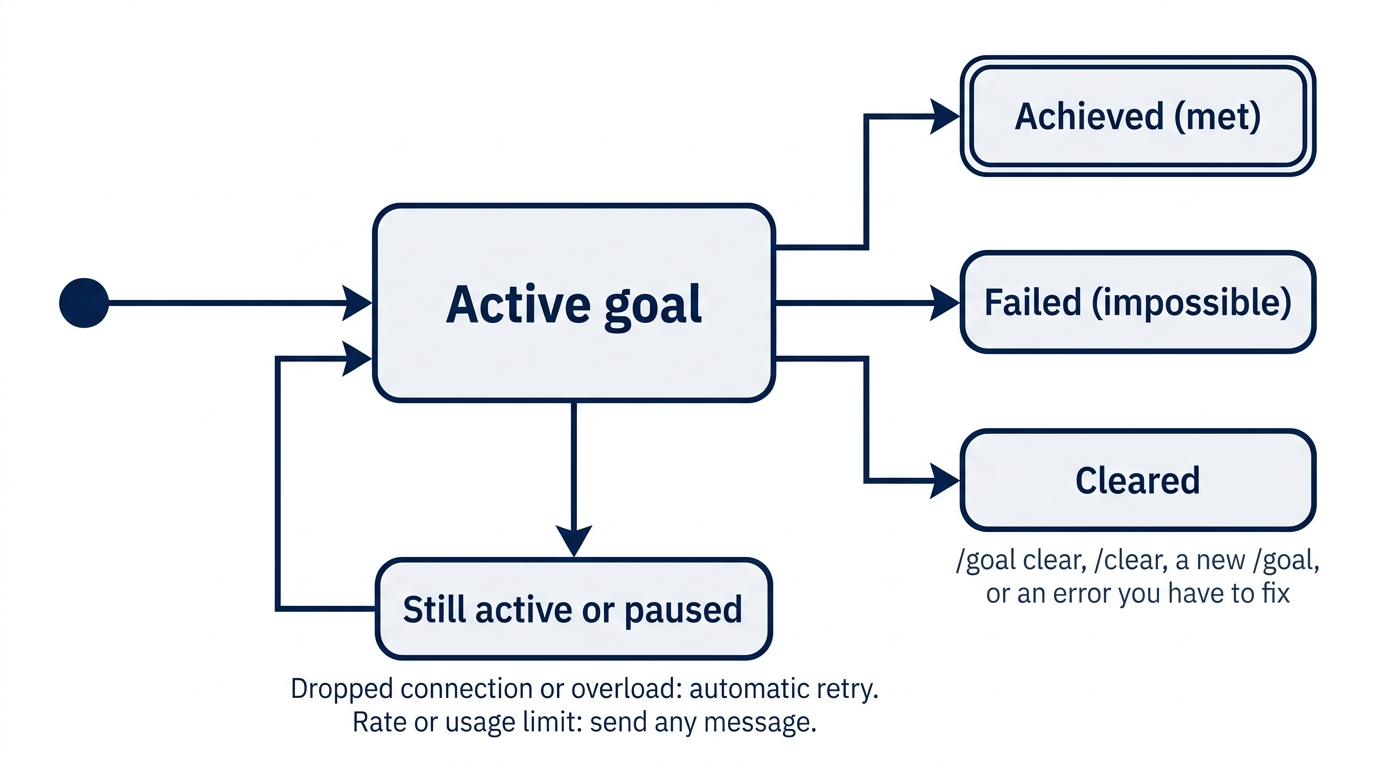
The /goal command removes those extra prompts. You give it a completion condition, a sentence that says what must be true when the work is done. Claude starts working at once. After each turn, a second, smaller model, the evaluator, checks whether the condition holds. If it does not, Claude starts another turn by itself. If it does, the goal ends and Claude waits for you.
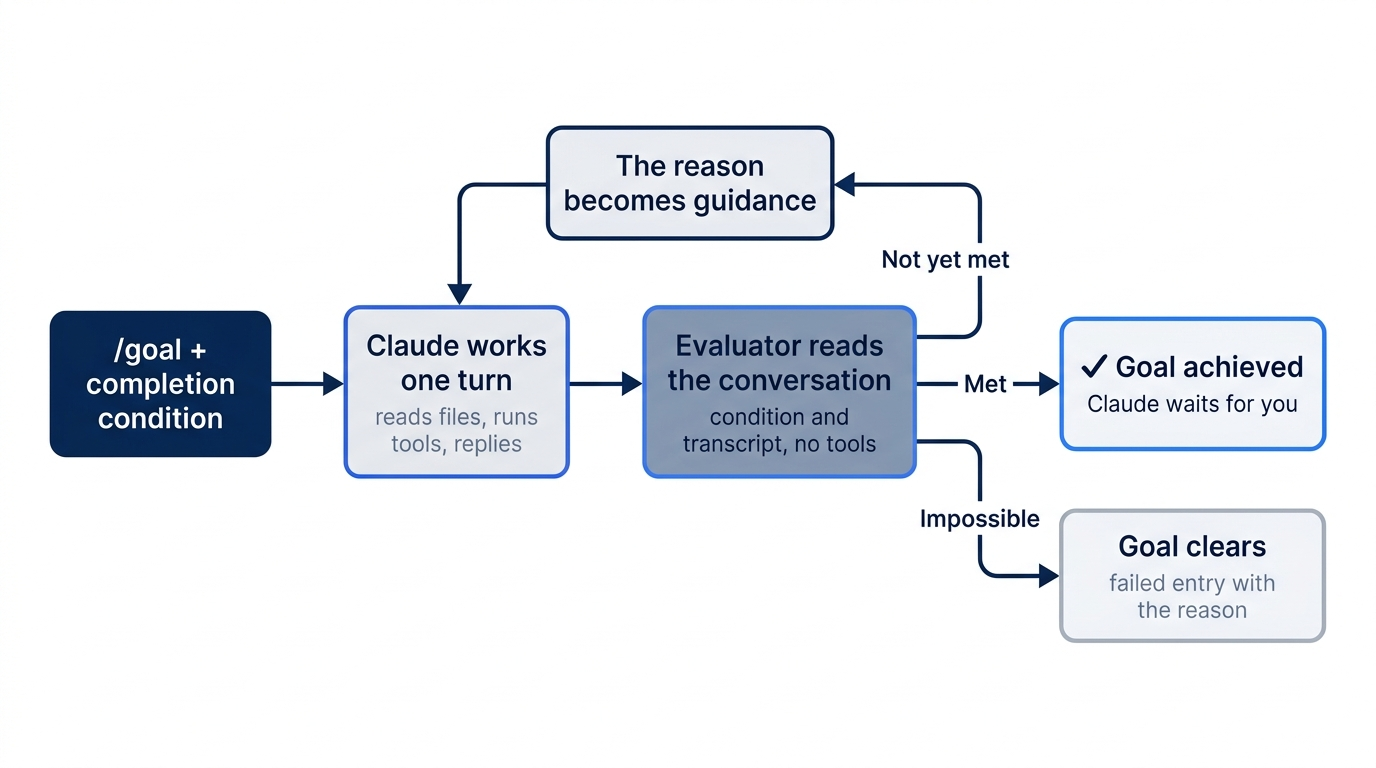
Today's goal is small on purpose. Claude adds one keyword to Ticket Triage, adds a test, runs the tests, and commits. The steps are the same for a goal that runs for an hour.
Check the starting state
Open a terminal in Ticket Triage:
cd ~/code/ticket-triage
git status
npm test
Git prints nothing to commit, working tree clean. The tests show ℹ fail 0 and the pass count from yesterday. It was 20 on the tested auto run and 21 on the Manual run, because Claude wrote a different number of tests on Day 16. Write your number down.
Start a session
Start Claude Code:
claude
The status bar shows ⏵⏵ auto mode on (shift+tab to cycle). Stay in auto mode today, because a goal can then run with no one at the keyboard. If it shows ⏸ manual mode on, keep it, and follow the Manual mode: line below. A goal does not change your permission mode.
Set the goal
Type this as one line and press Enter:
/goal classify() returns "refund" for "I want to return this", test/classify.test.js has a test for it whose ticket also matches an older rule as CLAUDE.md requires, npm test passes, and the change is committed with the message "Rate return tickets as refund". Stop after 5 turns.
Read the condition in parts:
classify() returns "refund" for "I want to return this"is the change: tickets about returns become refunds.has a test for it whose ticket also matches an older rule as CLAUDE.md requirespoints to the rule that you added to CLAUDE.md on Day 5: every new rule needs a test with a ticket that also matches an older rule.npm test passesis the check that proves the change works.the change is committed with the message "Rate return tickets as refund"is the last step, and the message gives you a line to look for ingit log.Stop after 5 turns.is a limit. The docs say that Claude reports its progress against the clause each turn, and the evaluator judges it from those reports, as it judges the rest. It is a request, not a hard stop, so watch a goal that runs long.
Every part names something that Claude's own output shows. The evaluator does not run commands and does not open files. It reads only the conversation, the record of everything that Claude said and every tool result on your screen. "npm test passes" works because Claude runs npm test, and the result appears on your screen, where the evaluator reads it. A condition such as "the code is clean" gives the evaluator nothing to read.
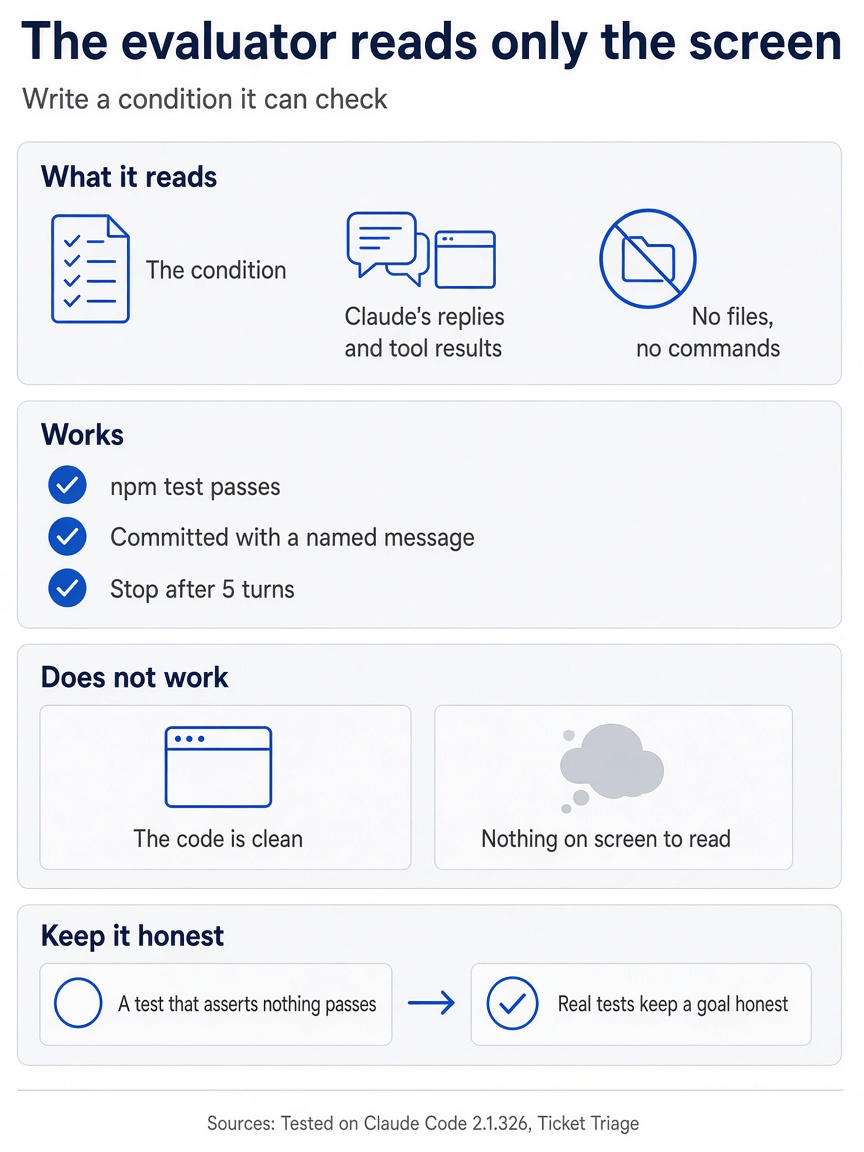
Each part of a condition has to point at something on screen, because the evaluator never opens a file or runs a command.
Under your command, Claude Code repeats the condition after Goal set:, and Claude starts at once. You do not send a second prompt. At the bottom right of the screen, under the input box, an indicator shows how long the goal has run:
◎ /goal active (5s)
The indicator stays while the goal is active.
Manual mode: two prompts, both Do you want to proceed?. The first is for one Bash command that edits classify.js, appends the tests, and runs npm test. On the tested run, its description read Add return keyword and tests, run tests, and it also showed the line Parser skipped input between top-level statements. The line is not an error: after 1. Yes, the whole command ran, and the tests passed. The second is for git add and git commit in one command, described as Commit the change. Read each command and choose 1. Yes at each. Ignore the tip about auto mode. The Day 4 rule allows npm test alone, but the first command also edits files, so Claude Code asks.
Watch the work
Progress shows in the transcript, the scrolling record of the session. On the tested auto run, Claude read the code and the tests, changed the refund rule, and added two tests. The screen showed the changed lines, shortened here:
  ⎿  Updated src/classify.js +1 -1
      5 -  if (t.includes("refund") || t.includes("money back")) return "refund"
      5 +  if (t.includes("refund") || t.includes("money back") || t.includes("return")) return "refund"
  ⎿  Updated test/classify.test.js +2
      12 +test("return", () => assert.equal(classify("I want to return this"), "refund"))
      13 +test("return beats shipping", () => assert.equal(classify("I want to return this package"), "refund"))
The second test is the one that CLAUDE.md asks for. "I want to return this package" also matches the older shipping rule through the word "package", and it must still come out as refund.
Then Claude committed. The command is shortened here:
⏺ Bash(git add src/classify.js test/classify.test.js && git commit -q -m "Rate return tickets as refund" …)
  ⎿  2f8b9ff Rate return tickets as refund
Claude wrote a short reply that named the commit and the test count. Below it, the goal ended:
✔ Goal achieved (30s · 1 turn · 1.8k tokens) (ctrl+o to expand)
The line gives the time, the number of turns, and the tokens spent. The Manual run showed ✔ Goal achieved (35s · 1 turn · 2.3k tokens). Your code, your test names, and your numbers can differ, because Claude writes them each time.

One /goal line replaced every "keep going" prompt, and the check mark arrived without another word from you.
Both tested runs finished in one turn. Claude met the whole condition in its first turn, the evaluator said "met", and no second turn started. Today's goal is small enough for that. The docs say that a bigger goal takes more turns, and that Claude starts each one with no prompt from you. This guide did not test a goal that needed a second turn.
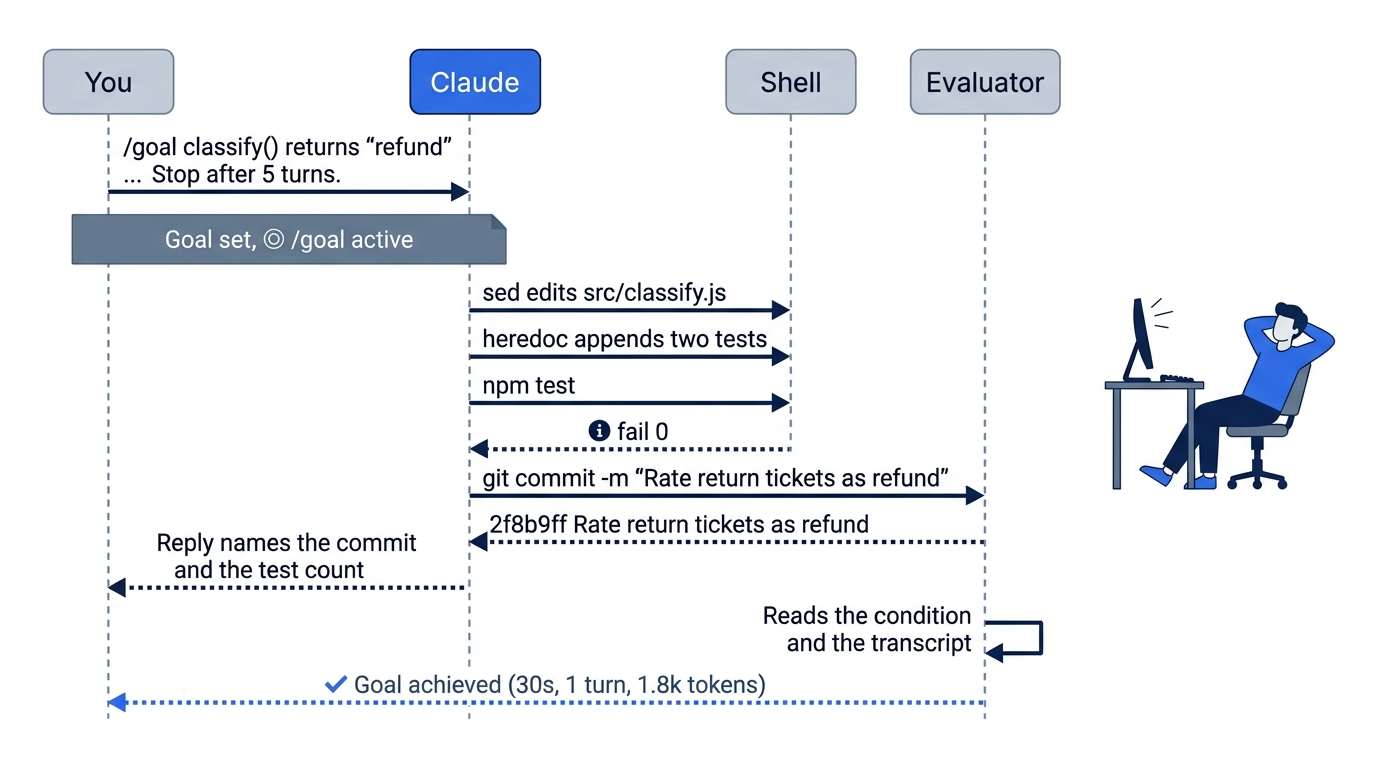
Read Claude's last reply before you move on. On both tested runs, it pointed out a side effect of the change. Going deeper explains it.
Check the goal status
Type /goal with no condition and press Enter. A panel opens below the input box. On the tested auto run, it showed:
  ✔ Goal achieved
  30s · 1 turn · 1.8k tokens

  Goal: classify() returns "refund" for "I want to return this", test/classify.test.js has a test for it whose ticket also matches an older rule as CLAUDE.md requires,
        npm test passes, and the change is committed with the message "Rate return tickets as refund". Stop after 5 turns.
  /goal <condition> to set another

  Esc to close
The panel shows the last goal, its result, and what it cost. The docs say that while a goal is still running, the same command shows its progress and the evaluator's latest reason. Press Esc to close the panel.
Manual mode: no prompts. The panel only reads.
Check the formatting
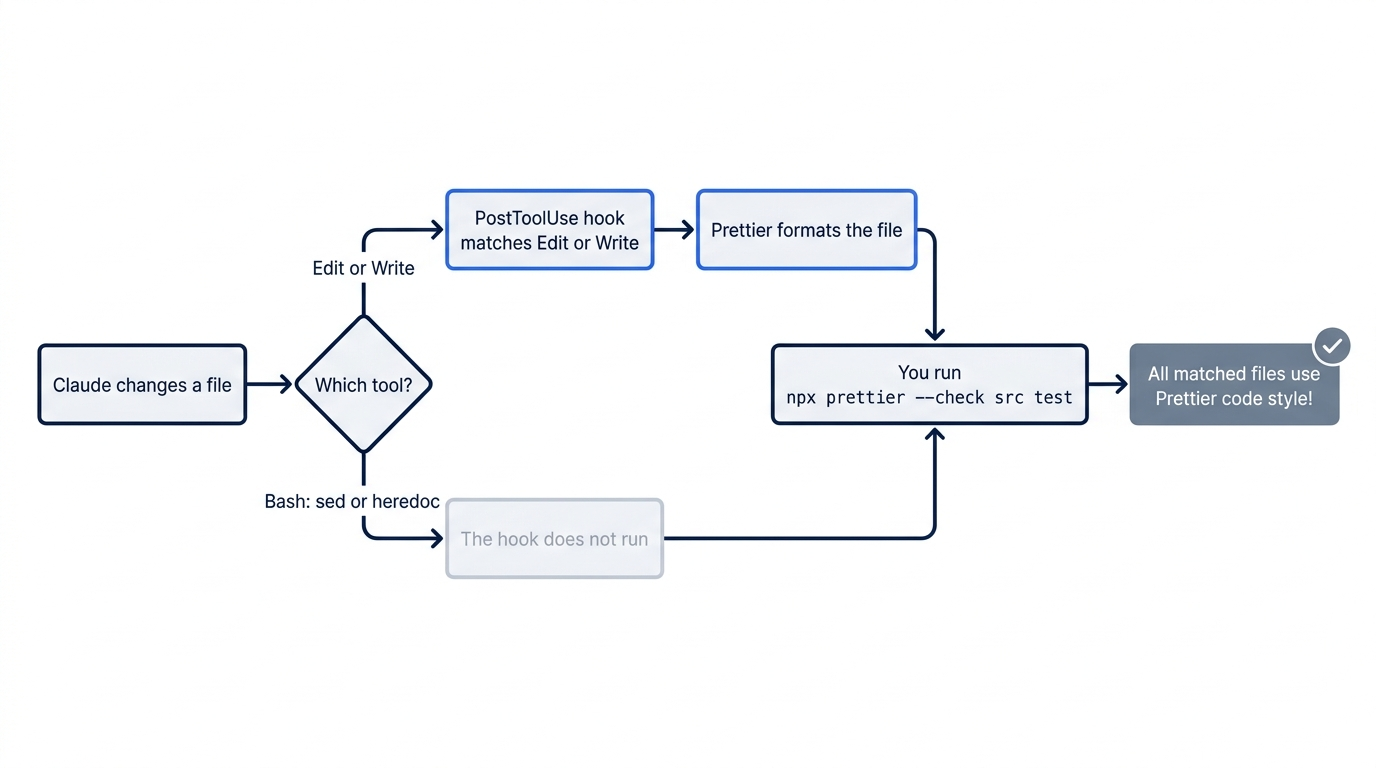
On Day 11 you added a hook that runs Prettier after each edit. The hook runs only after the Edit and Write tools. On both tested runs, Claude did not use them. It changed classify.js with sed, a command-line tool that edits text in a file. It added the tests with a heredoc, a shell form that feeds several lines into a command such as cat >>. The cat >> command appends those lines to a file. Both are shell commands, so the hook did not run.
Day 11 gave you the safety net for this case. Type /exit, and in the terminal, run:
npx prettier --check src test
On both tested runs, it printed All matched files use Prettier code style!, because the new lines already matched the house style. The tested runs never needed the next step. If your check lists a file, format and commit it:
npx prettier --write src test
git commit -am "Format with Prettier"
git log --oneline -2
The log shows Format with Prettier on the first line and Rate return tickets as refund on the second. Run npx prettier --check src test again, and it prints All matched files use Prettier code style!.
Check the win
In the same terminal, run:
git status
git log --oneline -1
git show HEAD
npm test
Git prints nothing to commit, working tree clean, so git diff has nothing to show. The change is in the commit. The log shows Rate return tickets as refund after the hash. If you made the formatting commit, run git log --oneline -2 instead and find it on the second line. On the tested runs, the hashes were 2f8b9ff and 5f1d192. git show HEAD prints the commit's diff, with one changed line in src/classify.js and the new tests in test/classify.test.js. The tests show ℹ fail 0 and more passes than this morning. Both tested runs added two tests: 22 passes on the auto run and 23 on the Manual run. If Claude wrote one test, you have one more than this morning.
You set a goal, watched Claude work until the evaluator said it was met, read the status with /goal, and confirmed the commit and the tests yourself.
You can stop here. Going deeper explains why this works and where it breaks.
Going deeper
This section is for readers who want to know how the evaluator decides, how to write a condition that holds for a long run, what a met goal does not prove, and how /goal compares with /loop and a Stop hook. It assumes that you finished Start here in Parts 1 to 18.
How the evaluator decides
The goal docs describe /goal as a wrapper around a session-scoped prompt-based Stop hook. Each time Claude finishes a turn, Claude Code sends the condition and the conversation so far to the small fast model that your model configuration names. The model returns one of three verdicts, each with a short reason:
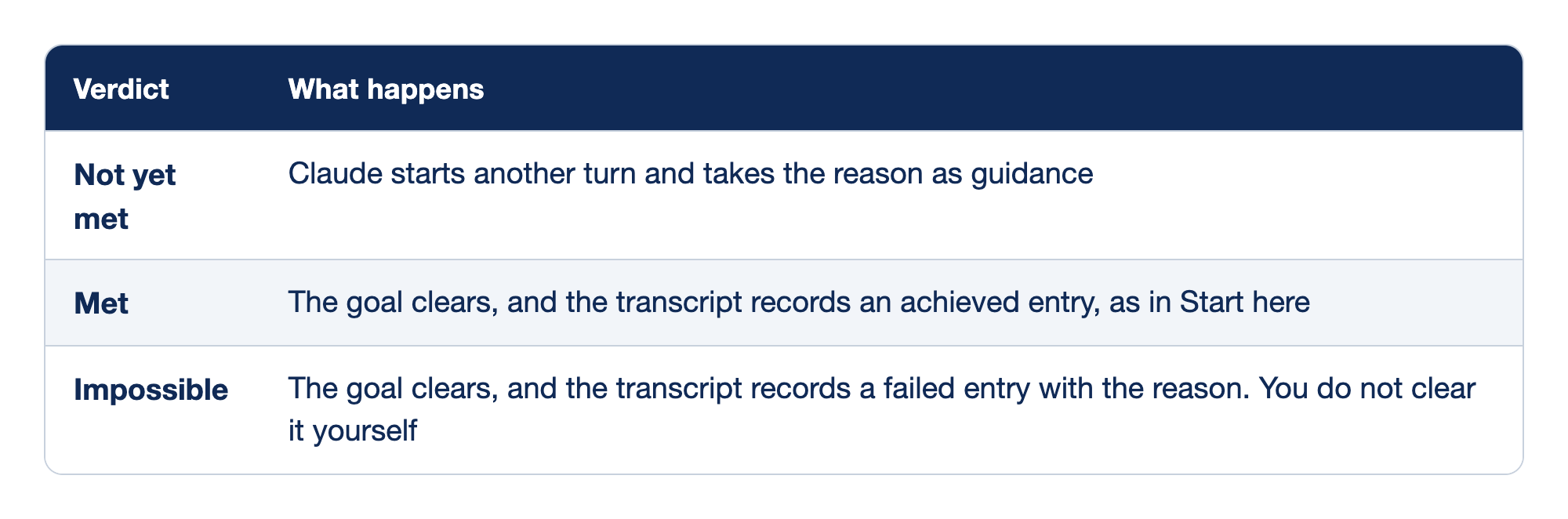
The evaluator returns one of three verdicts after each turn. The Verdict column names the verdict, and the What happens column says what Claude Code does next.
- Not yet met: Claude starts another turn and takes the evaluator's reason as guidance.
- Met: the goal clears, and the transcript records an achieved entry.
- Impossible: the goal clears, the transcript records a failed entry with the reason, and you do not clear it yourself.
Press Ctrl+O on a verdict line to see the reason behind it. The tested line showed (ctrl+o to expand). The docs add a guard: if Claude keeps answering the evaluator without progress, with no tool use for several turns in a row, Claude Code stops the loop, prints a warning, and returns control to you with the goal still set. The evaluator calls no tools, so it can only judge what Claude has already shown. Setting ANTHROPIC_DEFAULT_HAIKU_MODEL changes the evaluator's model, but the docs warn that Claude Code then uses that model for every small fast task, such as session titles. Evaluation tokens are billed on the small fast model, and the docs call them typically negligible next to the main turns.
/goal arrived in v2.1.139. Because the evaluator is part of the hooks system, the docs say that /goal follows the same workspace trust rule as hooks, and that it is not available when disableAllHooks is true or when managed settings set allowManagedHooksOnly.
Write a condition that holds
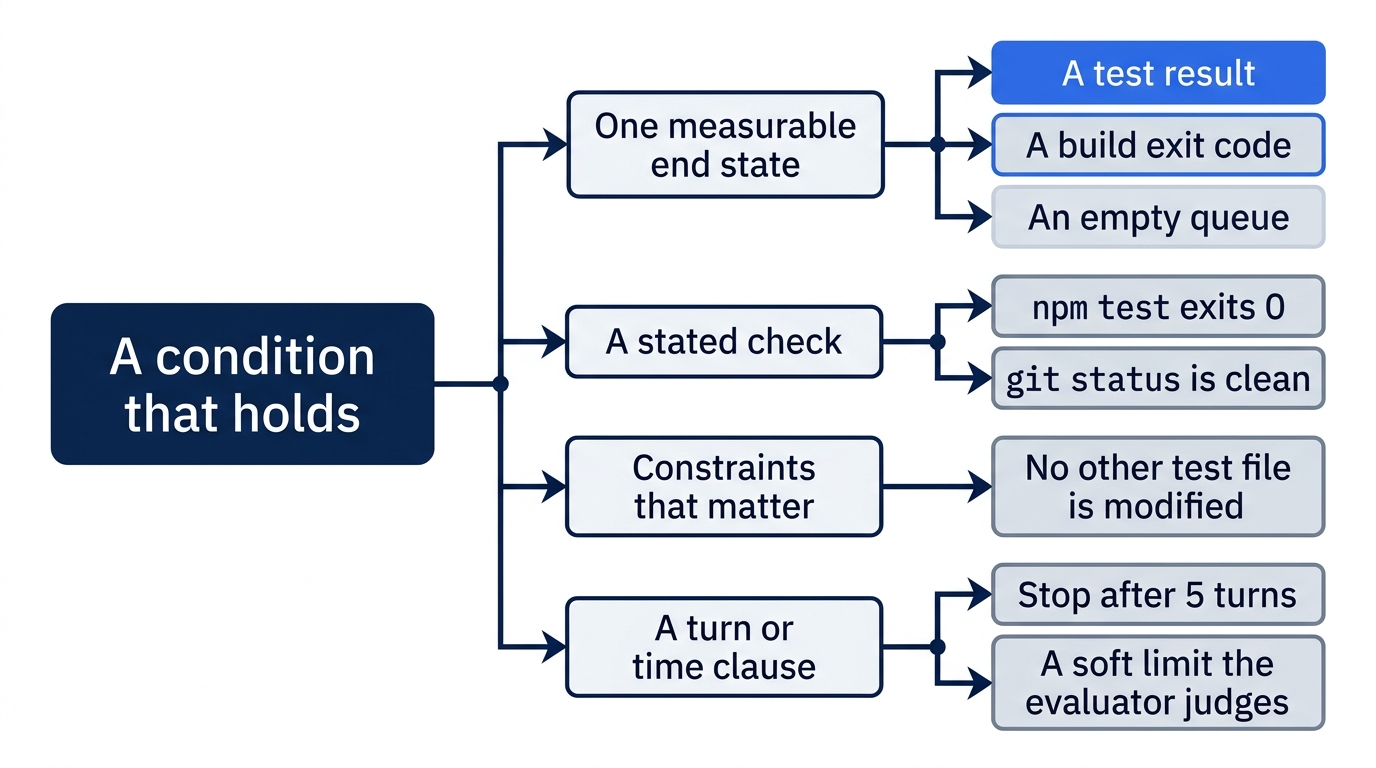
The docs list three parts of a condition that holds up across many turns:
- One measurable end state, such as a test result, a build exit code, a file count, or an empty queue.
- A stated check, such as "
npm testexits 0" or "git statusis clean". - Constraints that matter, things that must not change on the way, such as "no other test file is modified".
Today's condition had the first two, plus a turn clause. A condition can be up to 4,000 characters. A turn clause, such as "Stop after 5 turns", or a time clause, bounds the run. The docs say that Claude reports progress against the clause each turn, and that the evaluator judges it from the conversation, the same way it judges the rest. A goal that needs more than one turn was not tested for this guide, so the clause never came into play today.
The evaluator trusts what it reads. If Claude can make a check pass without doing the work, for example with a test that asserts nothing, the goal clears and the work is still wrong. Real tests are what keep a goal honest. This is the same lesson as Day 12: a change is done when a check you trust says so.
What a met goal does not prove
The evaluator checks the condition, not the whole change. On both tested runs, the condition was met, and the change also did something the condition did not ask for. The refund rule now matches "return" anywhere in a ticket, so other words that contain it count as refunds too. The auto reply named "returned" and "returning". The Manual reply named "returned" and "returns", and gave an example: "my package was returned to sender" was a shipping ticket before and is a refund ticket now. It suggested a narrower keyword, such as "return this".
A goal does not replace your review. The first edition said that progress shows in the in-session task list. On Opus 5.5, the task list is off by default (Day 3). Watch the transcript while a goal runs. Then read the reply, read git show HEAD, run npm test and npx prettier --check src test, and decide whether you want the change. If you do not, the "If you read Going deeper" list below shows how to check the example ticket, and a new goal or a normal prompt can narrow the rule.
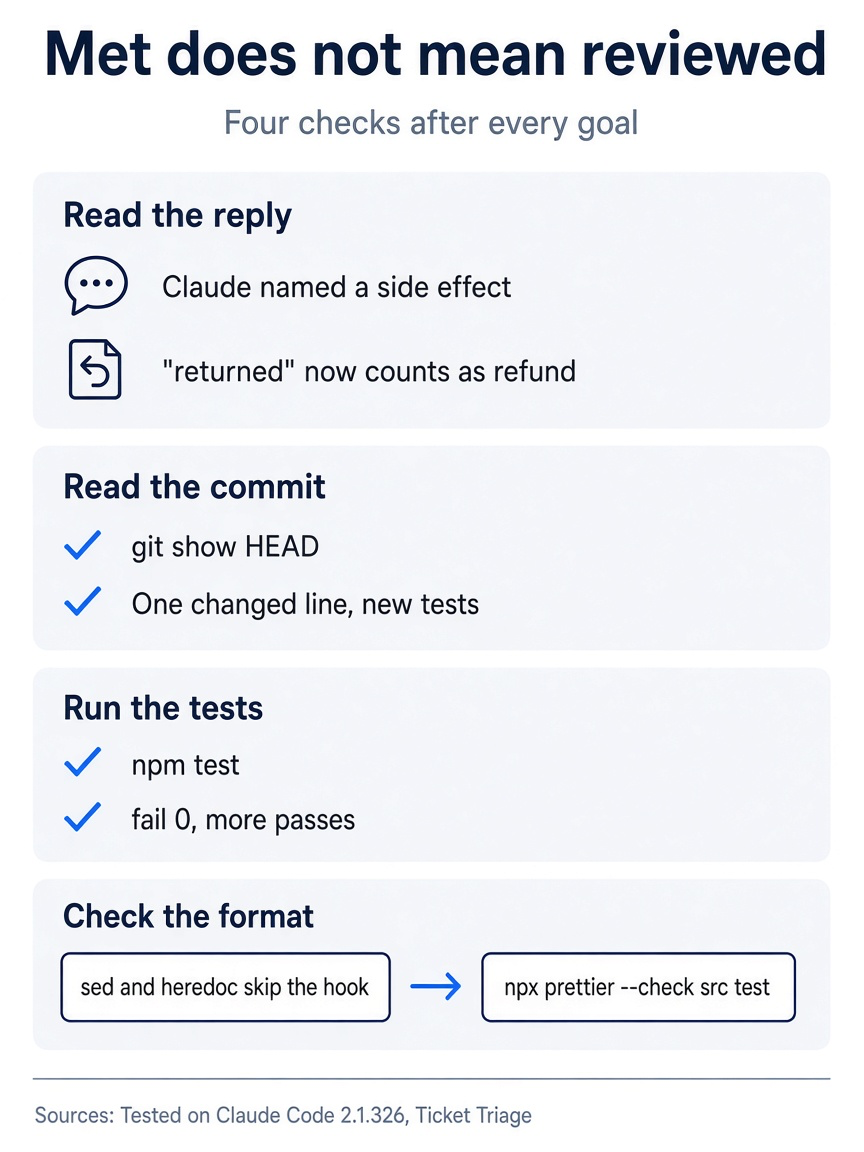
The evaluator checked the sentence you wrote. The four checks cover everything the sentence left out.
Why the format hook did not run
The hooks reference says that a PostToolUse hook that matches Edit|Write does not run when a Bash command rewrites a file. Day 11 found the same thing with cat >>. Today, both runs used sed and a heredoc, which are Bash commands, so the Prettier hook stayed silent both times. The new lines happened to match the house style. A goal that runs for many turns can change many files this way, so run npx prettier --check src test after every goal, before you push.
Permission modes and goals
Auto mode approves tool calls inside a turn, but it does not start a new turn. Claude stops when it judges the work done. /goal adds the evaluator, so a fresh model decides when the work is done, not the model that did it. The docs put it this way: auto mode removes per-tool prompts, and /goal removes per-turn prompts.
In Manual mode, the goal waits at each prompt until you answer. On the tested Manual run, the second prompt had a different option 2: Yes, and don't ask again for git add and git commit commands in your project folder. It saves an allow rule, as on Day 4. Choose it only if you want Claude to commit without asking in this project from now on.
Stop or change a goal
From the docs, not tested here:
/goal clearremoves an active goal before it resolves. Claude Code printsGoal cleared:and the condition, orNo goal setif nothing was active.stop,off,reset,none, andcancelwork in place ofclear. Version 2.1.326 fixed a bug where/goal clearor a new/goaldid not stick when you typed it while Stop hooks and background work were still running./clearstarts a new conversation and removes the goal too.- A new
/goal <condition>replaces the active goal. One goal can be active per session. - When you resume a session with
--continue,--resume, or the session picker, Claude Code restores a goal that was still active. It keeps the condition and resets the turn count, the timer, and the token count. It does not restore a goal that was achieved or cleared.
When a turn fails
The docs split errors into two kinds. An error that you have to fix, such as a failed sign-in, an exhausted credit balance, or a model that is not available, clears the goal with a warning that starts Goal cleared after an unrecoverable error. Claude Code added this in v2.1.234. Fix the cause, then set the goal again. Other errors leave the goal set. After a dropped connection or an overloaded server, a notice that starts Goal still active shows the wait before an automatic retry. After a rate limit or a usage limit, a notice that starts Goal paused names the cause. Send any message to start the next turn at once.
If a subagent or a background command is still running when a turn ends, Claude Code skips the evaluation for that turn and waits for the work to finish. After 30 minutes of waiting, Claude Code checks in on the background work. CLAUDE_CODE_GOAL_CHECKIN_MINUTES changes the interval, and 0 turns off the check-ins and the automatic retries. None of these cases was tested here.
Goals without a terminal
The docs say that /goal also works in the Desktop app, through Remote Control, and with claude -p, which runs one prompt and exits:
claude -p "/goal CHANGELOG.md has an entry for every PR merged this week"
With -p, the whole loop runs in one command. The default output prints only Claude's final reply when the loop ends, so a long goal can look stuck. The docs suggest --output-format stream-json --verbose to see each message as it arrives, and Ctrl+C to stop the run. This guide did not test it. Day 24 covers headless runs in full.
/goal, /loop, or a Stop hook
Three tools keep a session working without a new prompt from you. The goal docs compare them by what starts the next turn:
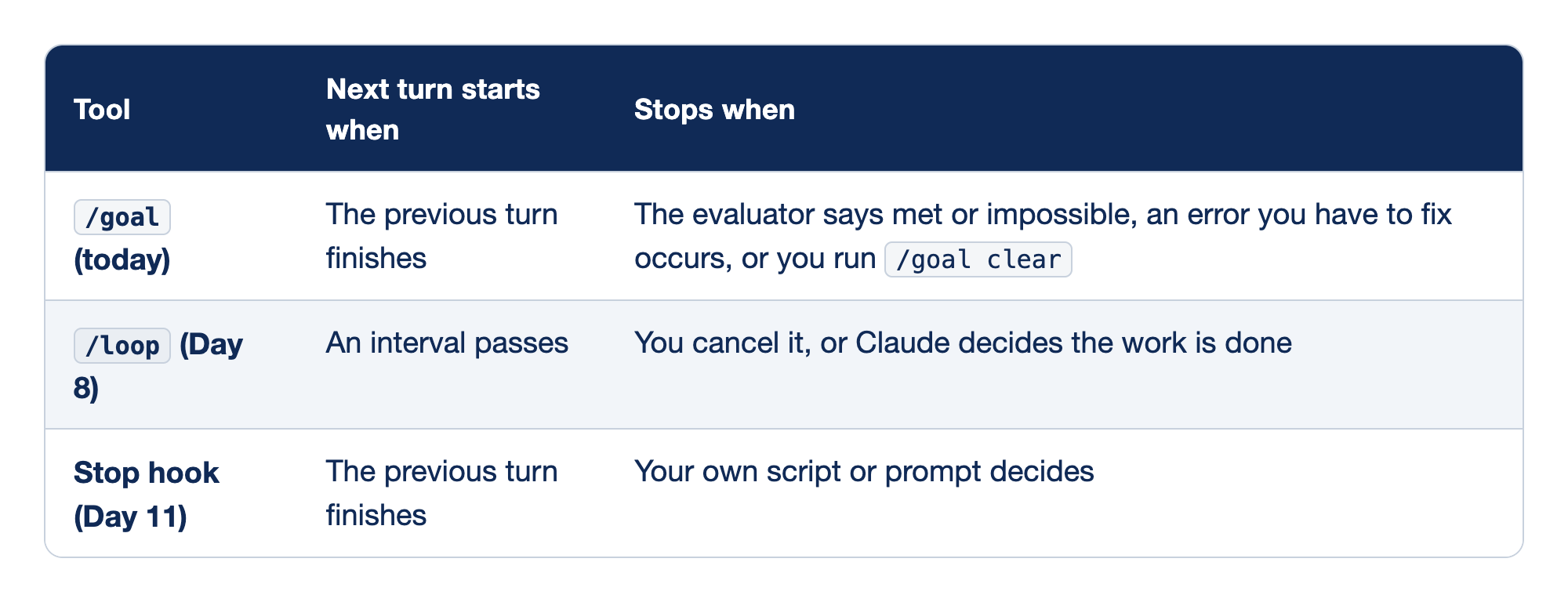
Three tools keep a session working without a new prompt from you. The Tool column names each one, the Next turn starts when column says what starts another turn, and the Stops when column says what ends the run.
/goal(today): the next turn starts when the previous turn finishes, and the run stops when the evaluator says met or impossible, when an error you have to fix occurs, or when you run/goal clear./loop(Day 8): the next turn starts when an interval passes, and the run stops when you cancel it or when Claude decides the work is done.- Stop hook (Day 11): the next turn starts when the previous turn finishes, and the run stops when your own script or prompt decides.
Docs pages: /loop.
Use /goal when the work has a clear end state. Use /loop to check something on a schedule, such as the tests every minute on Day 8. A Stop hook fires after every turn, like /goal, but it lives in a settings file and applies to every session in its scope. It can run a script for a check that must give the same answer every time. /goal is the quick version for one session.
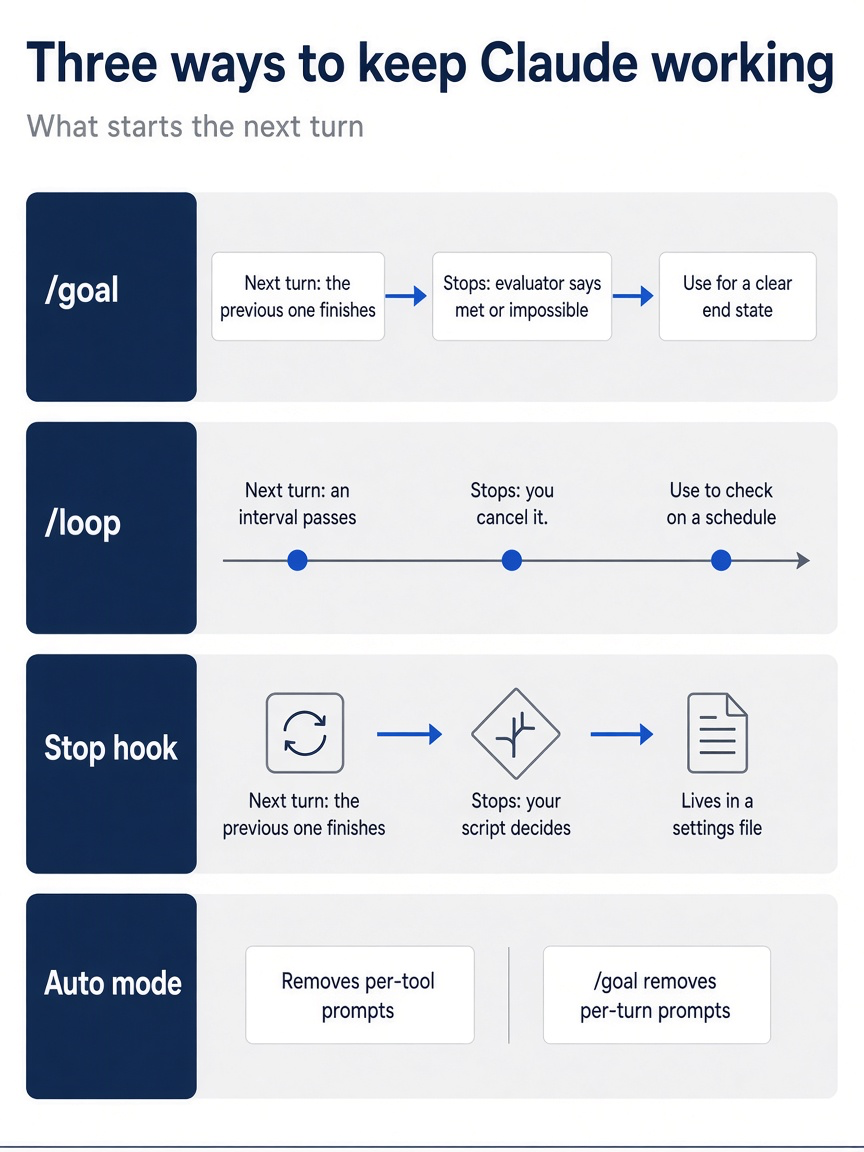
Pick the tool by what should start the next turn: the end of the last one, a clock, or your own script.
Go further: Stop Typing "Keep Going": The Autonomous Claude Code Commands That Finish Work While You Sleep is the first edition's chapter on autonomous work, with a two-hour /goal run against a spec and tours of /batch, /simplify, and /debug. Read its /loop section with Day 8 in mind: it says Esc stops a loop while it waits, but a fixed-interval loop such as /loop 5m stops only when you ask Claude to cancel it.
Do this today
Everyone
- Set the return-ticket goal, watch it end with
✔ Goal achieved, and read the status with/goal. Check the win:git log --oneline -1showsRate return tickets as refund,git statusprintsnothing to commit, working tree clean, andnpm testshowsℹ fail 0with more passes than this morning. If you made the formatting commit, rungit log --oneline -2and find the message on the second line. - Habit: before you set a goal, write down the check that Claude must show on screen, and add a turn clause as a soft limit that the evaluator judges, not a hard stop. Check: your next
/goalcondition names a command, such asnpm test, and ends with a clause such asStop after 5 turns.
If you read Going deeper
- Check the side effect that Claude reported. In Ticket Triage, run
node -e 'import("./src/classify.js").then((m) => console.log(m.classify("my package was returned to sender")))'. Check: it printsrefund, because "returned" contains "return" and the refund rule runs before the shipping rule. If it printsshipping, your Claude chose a narrower keyword, such as "return this", and the side effect is not in your code. This guide did not run this command. The command only reads, so there is nothing to reset. Check thatgit status --shortprints nothing. - Try
/goal clearwith no goal active. Startclaude, type/goal clear, and pressEnter. Check: the docs say it printsNo goal set. This guide did not test it. Reset: type/exit, and check thatgit status --shortprints nothing.
One sentence, one check, one review
A goal changes who decides when the work is done. You write the finish line once, and a second model reads the transcript after every turn until the line is crossed. The work is only as honest as the check the condition names.
Write the check before you write the goal, and read the change after the goal ends. A met goal is a good reason to review, not a reason to skip it.
This is Part 18 of "Claude Code, Day-to-Day (second edition)," a day-by-day guide to Claude Code in which each day takes 20 to 40 minutes. Part 18 is Day 18. All 28 days are out now.