
The Prompt That Types Itself: Running Your Tests Every Minute with Claude Code /loop
A /loop does not fix anything; it tells you within a minute that something broke, even when the change came from your editor and not from Claude, and the discipline is knowing how to cancel it.

Claude Code scheduled tasks turn a prompt you would repeat by hand into a loop that runs inside your session. This tested run catches a silent break, reports the repair, and then gets canceled cleanly.
You meant to rerun the tests after that small edit, you forgot, and you found the break an hour later when you no longer remembered what you changed.
In this article: Day 8 of a day-by-day guide to Claude Code. Start here: you start a
/loopthat runs the tests every minute, watch it catch a break and its repair, and cancel it. Going deeper: the three/loopforms, how to read cron and when a run really happens, and the schedulers that run without an open session.
Tested on Claude Code 2.1.326.
Yesterday you connected Ticket Triage to a browser and to your phone, sent a prompt from each, and approved Claude's edits there.
Start here
At the end of today, you can start a loop that runs the tests every minute, watch it catch a break and its repair, and cancel it.
Starting fresh or fell behind? Run git switch -C main claude-code/day-07. This replaces your main with the end of Day 7; to keep your own work, run git branch my-backup first.
A scheduled task is a prompt that Claude Code runs again on a schedule, inside your session. The /loop command creates one. You give it an interval and a prompt, and Claude Code sends the prompt to Claude at each interval while the session stays open. Today's loop runs the tests every minute, so you see a break the minute it happens, without asking.
Why a loop and not a habit? On Day 2 you checked the tests after each change, because you remembered to. A loop checks even when you forget, and it checks changes that did not come from Claude: an edit you make in your editor, a file that a teammate's merge changed, or a generated file that a build rewrote. The loop does not fix anything. It tells you, within a minute, that something broke, while you still remember what you just changed.
Check the starting state
Open a terminal in Ticket Triage:
cd ~/code/ticket-triage
git status
npm test
Git prints nothing to commit, working tree clean. The tests show ℹ fail 0 and the pass count you wrote down on Day 7, such as ℹ pass 18 after both the browser step and the phone step.
Start the loop
Start Claude Code with claude. Type:
/loop 1m run npm test and tell me the pass count and the fail count in one line
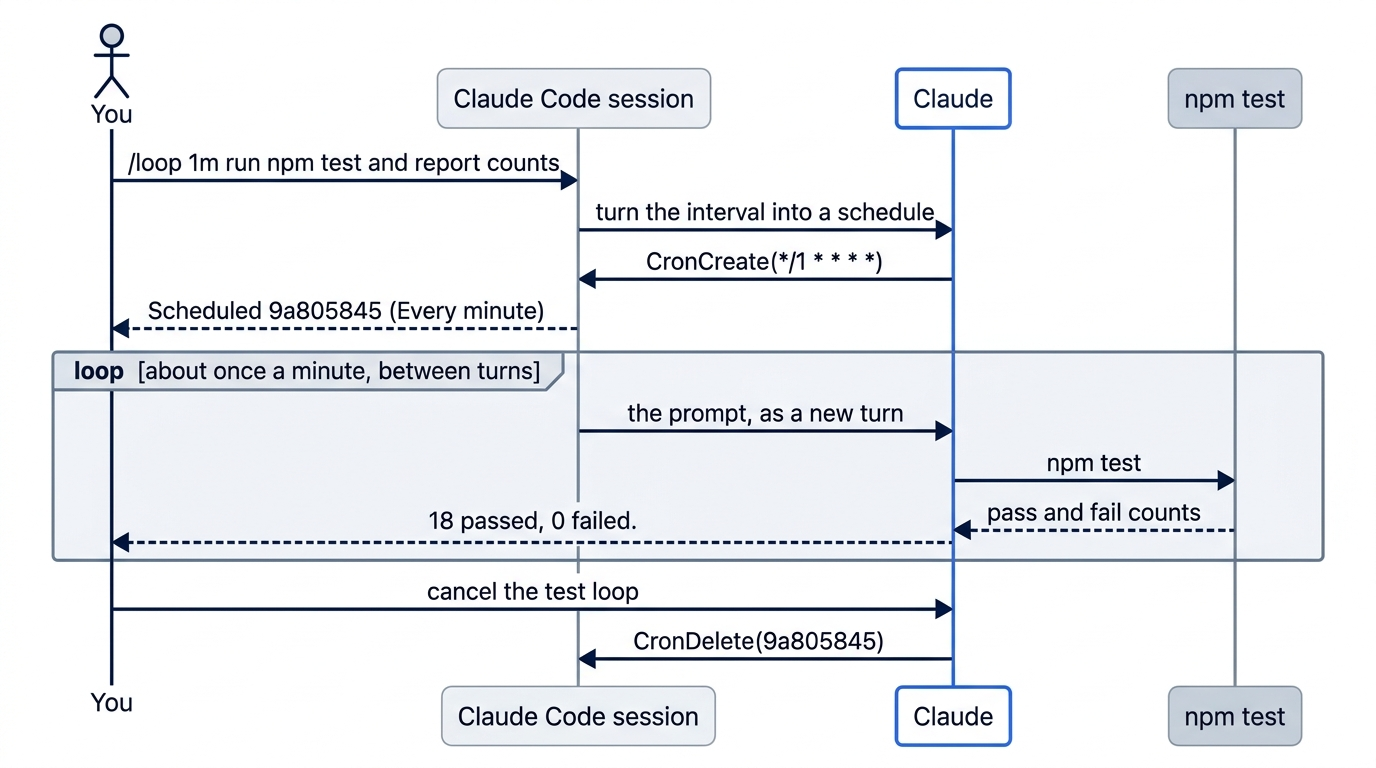
1m is the interval: one minute. The rest is the prompt that runs each time. Claude Code turns the interval into a schedule and shows it. On the tested run, the screen showed:
⏺ CronCreate(*/1 * * * *: run npm test and tell me the pass count and the fail count …)
  ⎿  Scheduled 9a805845 (Every minute, next run 11:08 PM)
CronCreate is the tool that schedules the task. */1 * * * * is the schedule in cron form, a standard way to write "every minute." /loop writes it for you from 1m, and Going deeper explains the fields. 9a805845 is the task's ID. Your ID and time differ. On the tested run, Claude also ran the tests once right away and replied 18 passed, 0 failed.
Manual mode: no prompts. The Day 4 rule lets npm test run.
Watch it run
Leave the session alone. About once a minute, a new turn starts by itself. A turn is one prompt and Claude's whole reply to it. In each turn, Claude runs npm test and replies in one line, such as 18 passed, 0 failed. A run can start up to 30 seconds late. Claude Code spreads scheduled runs out on purpose, and Going deeper explains why.
Keep two things in mind while a loop runs. First, you can keep working: type a prompt as usual, and a run that comes due waits until Claude finishes your turn. Second, each run is a real prompt, so it uses your plan's usage like any other prompt. A one-minute loop suits a short practice. For real work, five or ten minutes is usually enough.
Break a test and watch the loop catch it
While the loop runs, open src/priority.js in your editor. Delete || t.includes("asap") from the if line, so the function no longer checks "asap". If your priority() is written another way, such as with a list of keywords, remove "asap" from it in whatever form it has. Save the file.
Do not tell Claude. Wait for the next run. On the tested run, it replied:
⏺ 15 passed, 3 failed. Three tests broke since the last run, which had 18 passing and
  none failing.
On the tested run, three tests used "asap", so three failed. Your count depends on the tests that Claude wrote for you. The check is that the fail count goes above 0. Notice what you did not do: you did not type a prompt or run npm test. The loop found the break on its own, and its reply compares the run with the one before it. In a second terminal, put the file back:
git restore src/priority.js
Wait for the next run. The fail count goes back to 0. On the tested run, it replied 18 passed, 0 failed. and noted that the run before had 3 failures. You broke the code and fixed it, and the loop reported both without a prompt from you.
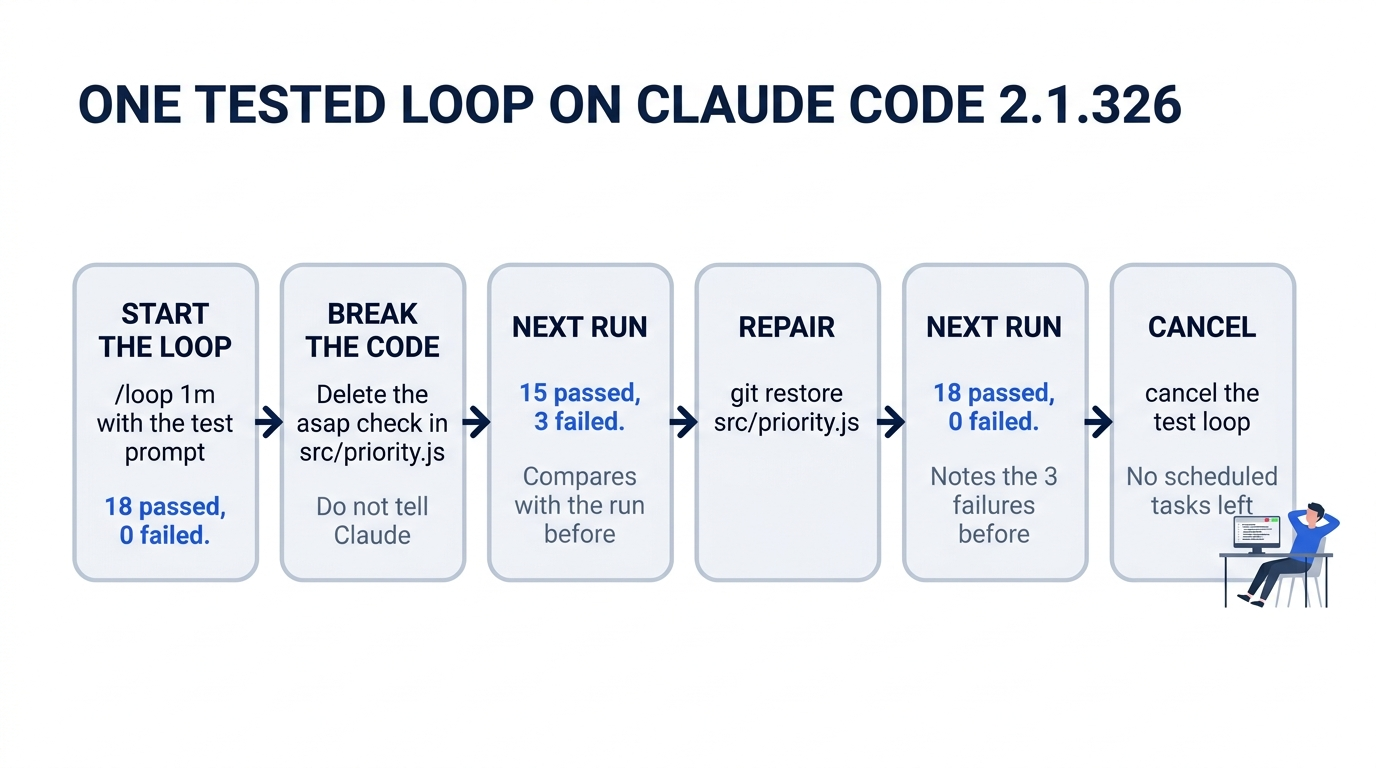
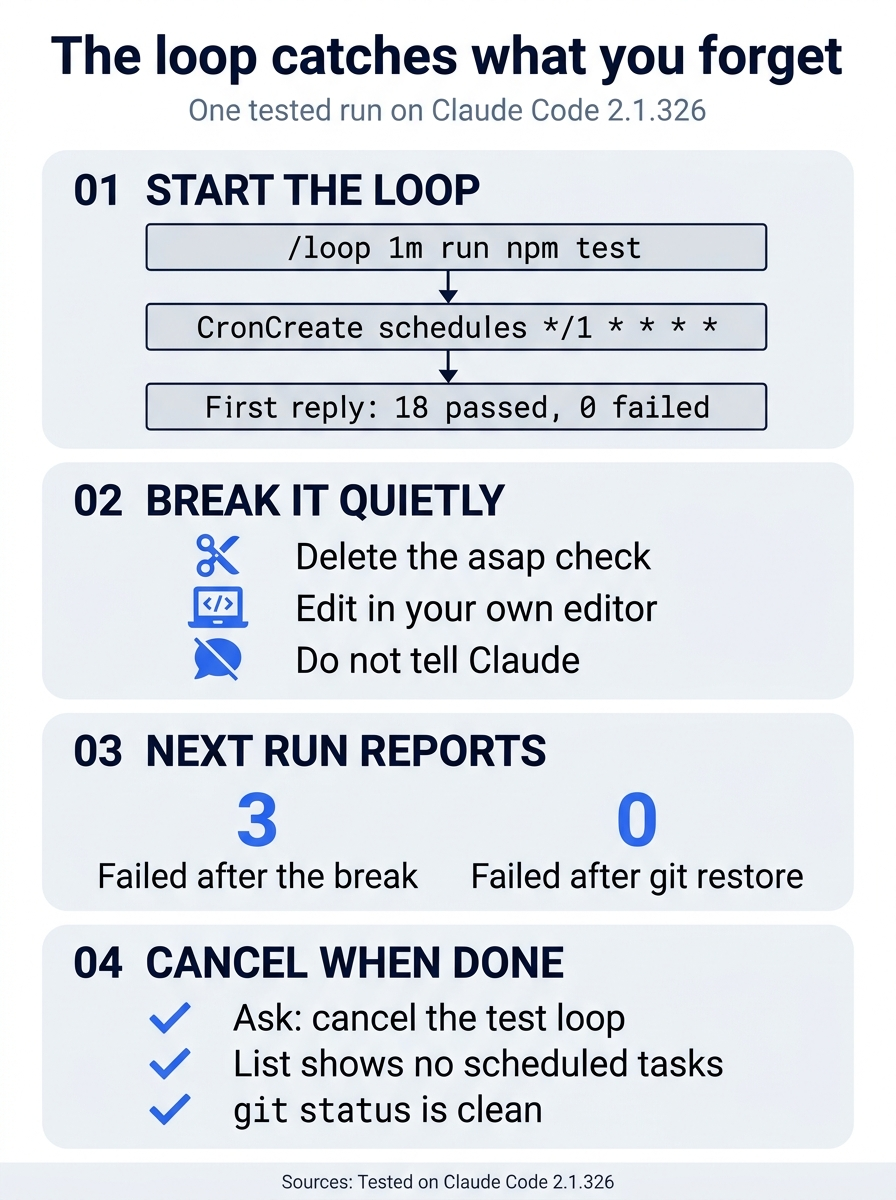
The tested run had four steps: start, break, report, and cancel. The counts are from the tested run, and the break was found with no prompt from the developer.
List and cancel the loop
A loop that runs every minute keeps running until you cancel it. Ask Claude:
what scheduled tasks do I have?
Claude lists the task, its ID, and its next run time. On the tested run: 9a805845 runs every minute: "run npm test and tell me the pass count and the fail count in one line". Next run is at 11:14pm. Now cancel it:
cancel the test loop
Claude replies that it canceled the task. Ask what scheduled tasks do I have? once more. The answer is that you have none.
Manual mode: no prompts. Listing and canceling a task asks for no approval.
Check the win
Wait two minutes. No new run starts. In the second terminal:
git status
npm test
Git prints nothing to commit, working tree clean. The tests show the same pass count as this morning, and ℹ fail 0.
You started a loop that ran the tests every minute, watched it catch a break and the repair, and canceled it.
You can stop here. Going deeper explains why this works and where it breaks.
Going deeper
This section is for readers who want the other loop modes, the limits of scheduled tasks, and the scheduling options that run without an open session. It assumes you finished Start here in Parts 1 to 8.
Three ways to use /loop
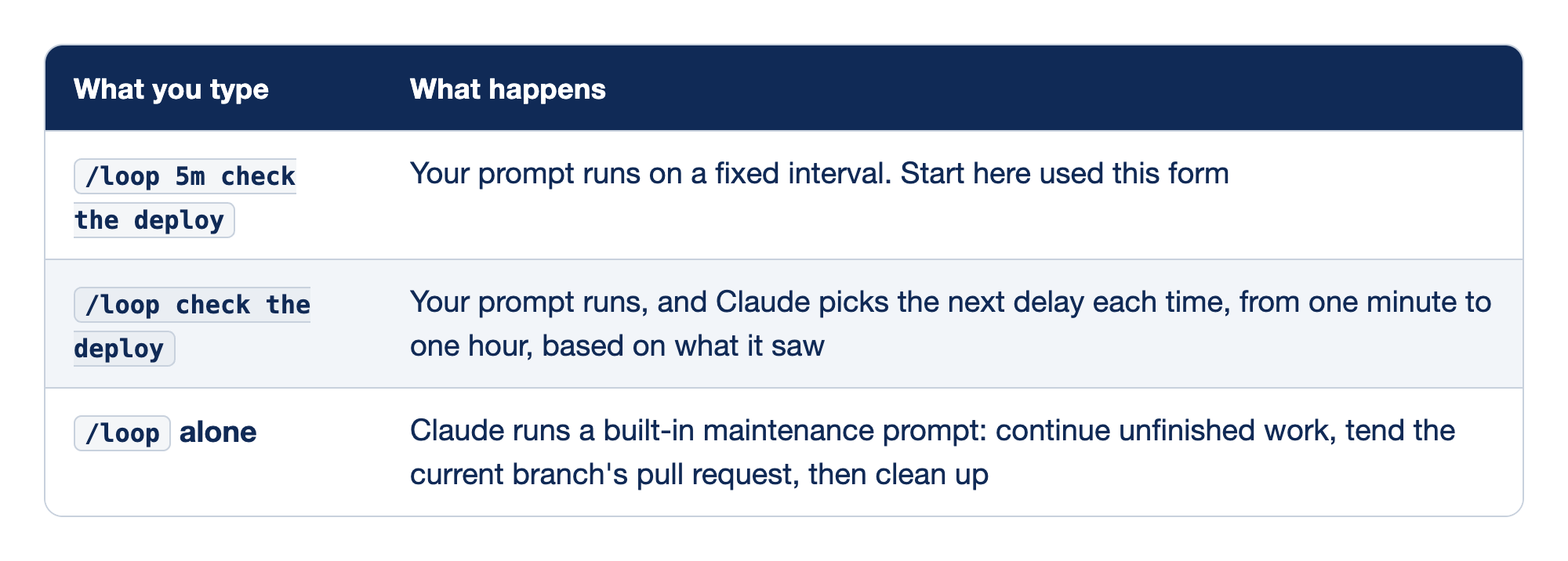
Each row pairs what you type after /loop with how the loop is timed and who picks the delay.
/loop 5m check the deployruns your prompt on a fixed interval, which is the form Start here used./loop check the deployruns your prompt, and Claude picks the next delay each time, from one minute to one hour, based on what it saw./loopalone runs a built-in maintenance prompt that continues unfinished work, tends the current branch's pull request, and then cleans up.
The interval can lead the prompt, as in 5m, or follow it, as in every 2 hours. The units are s, m, h, and d. Seconds round up to a whole minute. An interval that does not fit a cron step, such as 7m, rounds to one that does, and Claude says what it picked.
With no interval, Claude chooses the delay. It prints the delay and the reason at the end of each run, and it can end the loop by itself when the work is done. For a watch-the-build job, it may use the Monitor tool instead: a background script whose output lines come back to Claude, so nothing polls.
A .claude/loop.md file replaces the built-in maintenance prompt for a bare /loop in that project. ~/.claude/loop.md does the same in every project that has no file of its own. Claude Code ignores the file when you give a prompt on the command line.
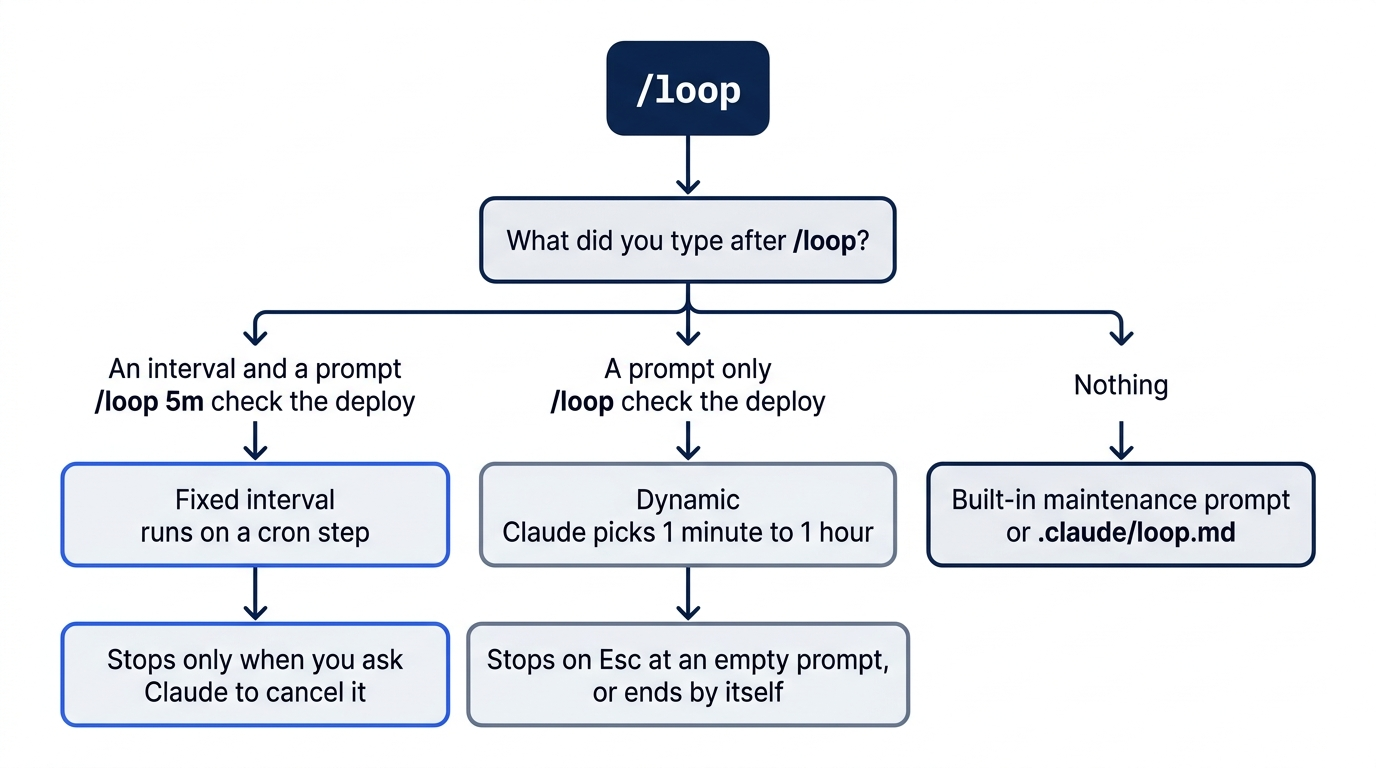
Stopping a loop
How you stop a loop depends on its kind:
- A fixed-interval loop, such as
/loop 1m, stops only when you ask Claude to cancel it.EscandCtrl+Cdo not stop it. - A loop with no interval stops when you press
Escon an empty prompt while it waits for its next run. Claude Code printsPending wakeup cancelled.
Every recurring task also stops seven days after you create it: it runs one last time, then deletes itself. A loop that runs every minute for a week is about 10,000 prompts, so cancel a loop when you are done with it.
Cron in one paragraph
A cron schedule has five fields: minute, hour, day of the month, month, and day of the week. * means "every". */5 in the first field means "every 5 minutes", and */1 means every minute. 0 9 * * 1-5 means 9 a.m. on weekdays. Claude writes the schedule from your words, so you need to read cron, not write it.
The tools behind it
Claude schedules with three tools. You can name them, or ask in plain words:
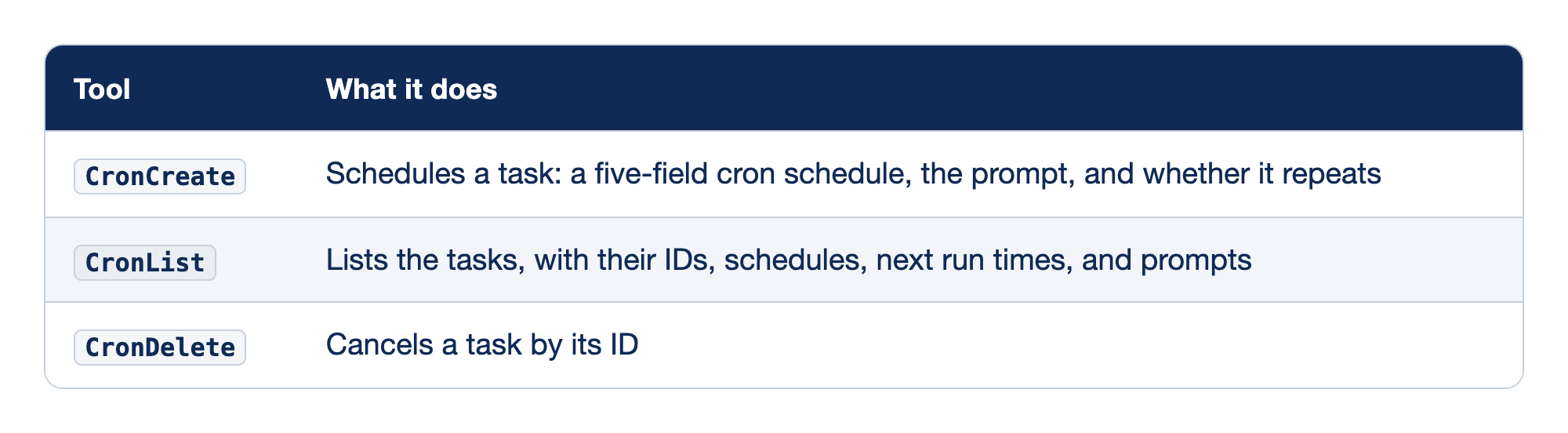
Each scheduling tool covers one step of a task's life, and each row says what the tool takes or returns.
CronCreateschedules a task from a five-field cron schedule, the prompt, and whether the task repeats.CronListlists the tasks, with their IDs, schedules, next run times, and prompts.CronDeletecancels a task by its ID.
A session holds up to 50 tasks. A one-time reminder needs no /loop: type "in 45 minutes, check whether the tests still pass", and Claude schedules a task that runs once and deletes itself.
When a run happens
- Between turns, never in the middle of one. If Claude is busy when a task is due, the run waits until the turn ends.
- In your local time zone.
0 9 * * *means 9 a.m. where you are. - A little late, on purpose. To keep many sessions from calling the API at the same moment, Claude Code delays each recurring run by up to half the gap to the next run, and at most 30 minutes. A task every 10 minutes starts 0 to 5 minutes late. A task every 5 minutes, written
*/5 * * * *, is not delayed. A one-time task set for:00or:30can run up to 90 seconds early. - No catch-up. If a run is due while Claude is busy, it runs once when Claude is free, not once for each missed run.
Limits
Scheduled tasks live in the session. They run only while Claude Code is running and idle. If you close the terminal, they stop. claude --resume and claude --continue bring back fixed-schedule tasks that have not expired, but they do not bring back a loop with no interval. Run /loop again for that. Background Bash commands do not restart either.
CLAUDE_CODE_DISABLE_CRON=1 turns the scheduler off, so /loop and CronCreate are not available.
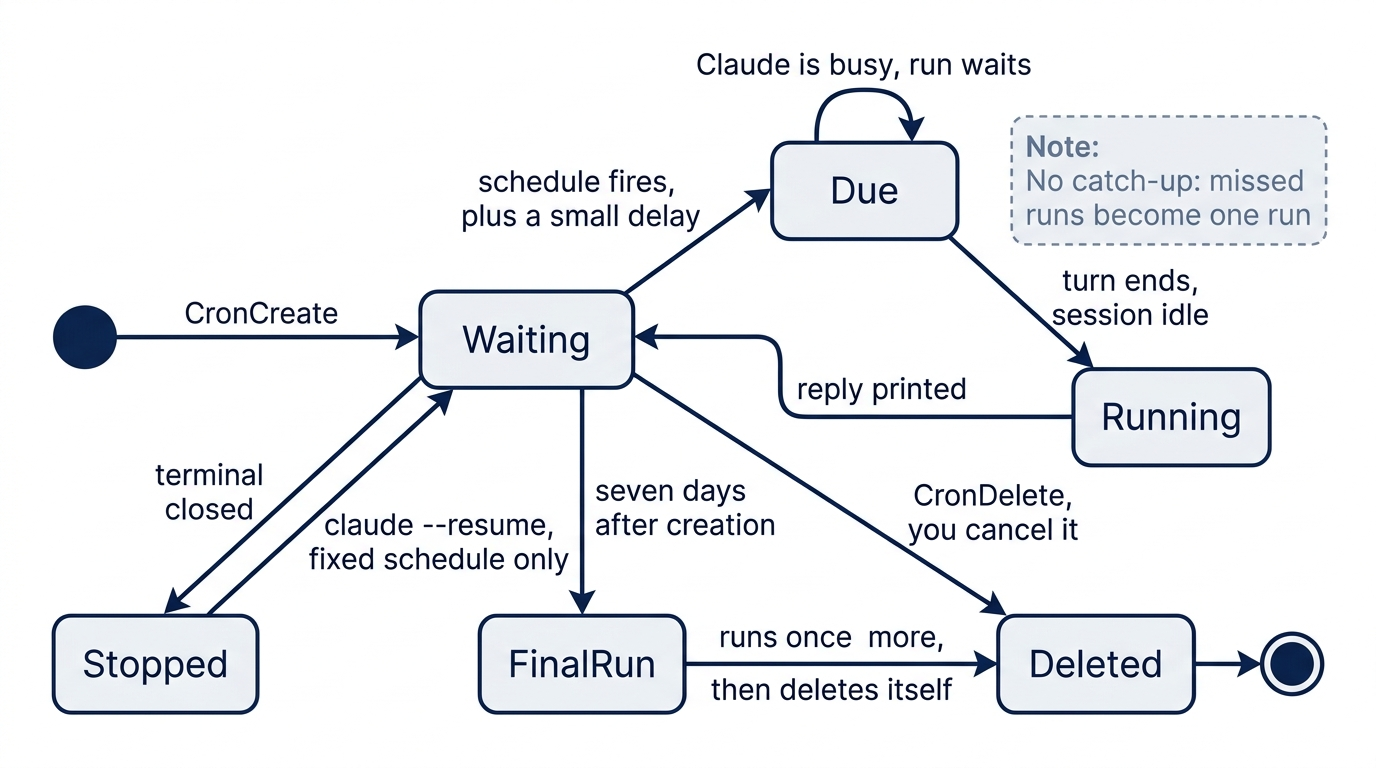
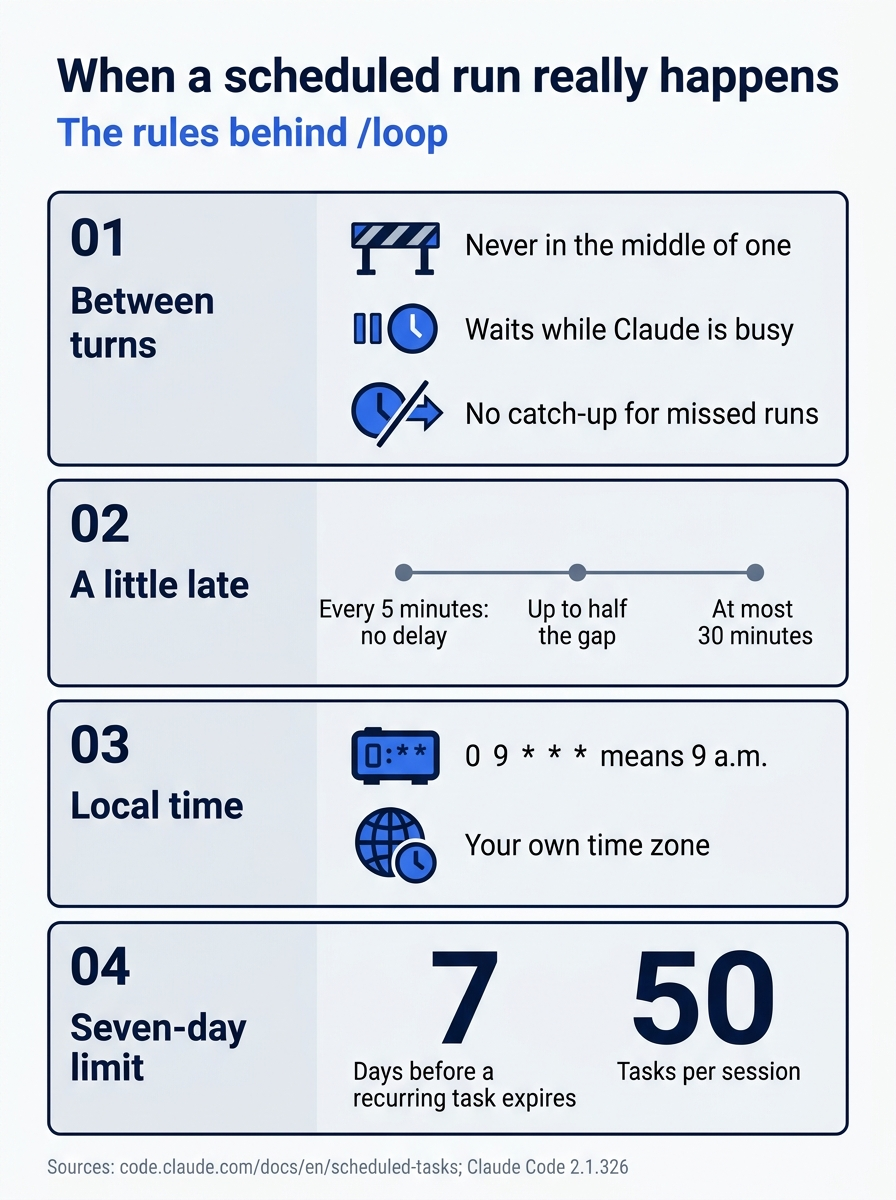
A run never interrupts a turn, it runs in your own time zone, it can start a little late, and a recurring task expires after seven days.
Scheduling that does not need an open session
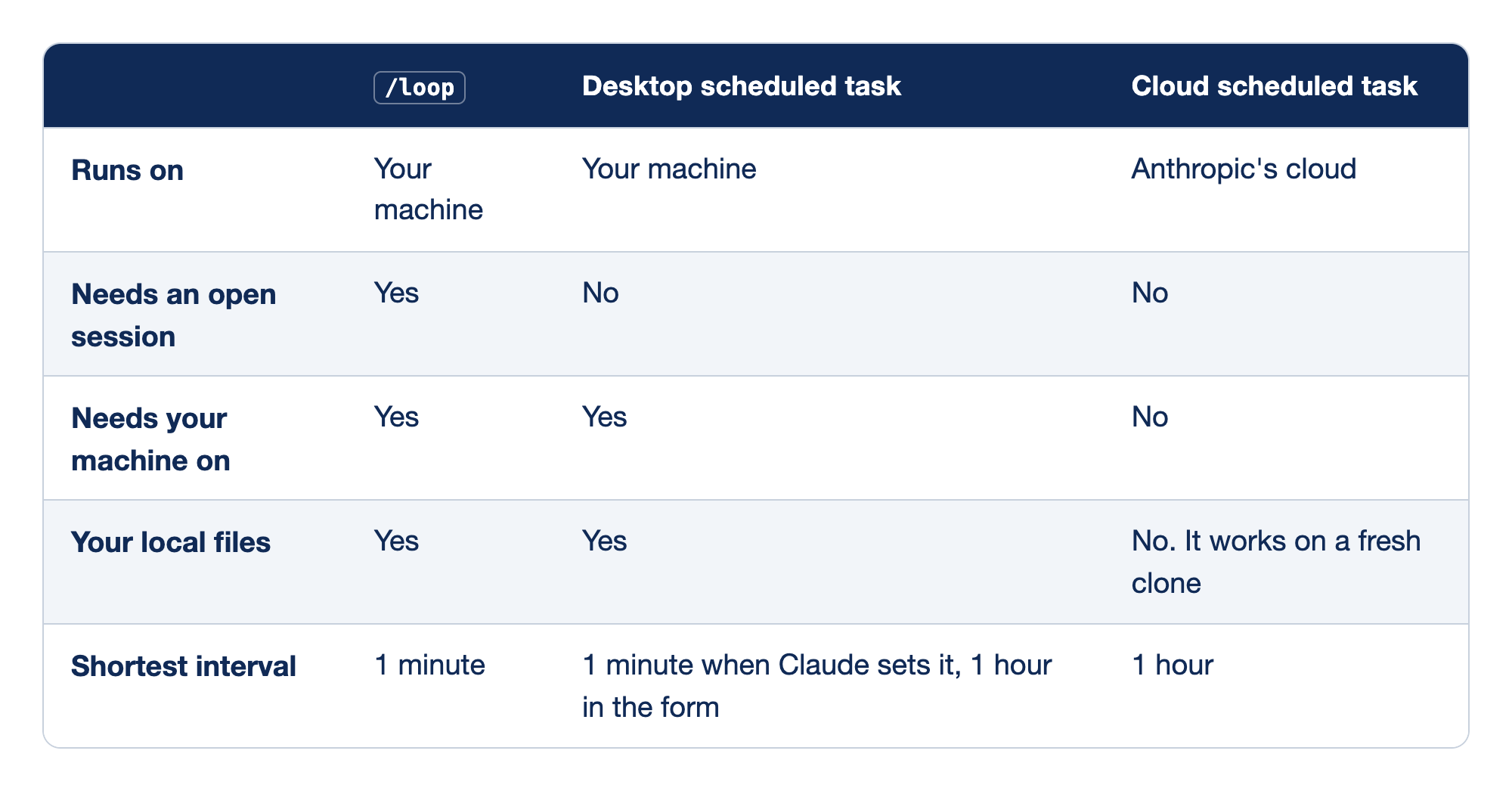
Claude Code has three schedulers, and they differ in what must stay on. Each row gives one property for /loop, for a Desktop scheduled task, and for a cloud scheduled task.
- Runs on:
/loopand a Desktop task run on your machine, and a cloud task runs in Anthropic's cloud. - Needs an open session: only
/loopneeds one, and a Desktop task and a cloud task do not. - Needs your machine on:
/loopand a Desktop task need it on, and a cloud task does not. - Your local files:
/loopand a Desktop task use them, and a cloud task does not, because it works on a fresh clone. - Shortest interval:
/loopcan run every minute, a Desktop task every minute when Claude sets it or every hour in the form, and a cloud task every hour.
Docs pages: Desktop scheduled task, Cloud scheduled task.
Use /loop for quick checks while you work. Use a Desktop task for local work that must run when no session is open. Use a cloud task for work that must run even when your machine is off. Day 21 sets up a cloud task.
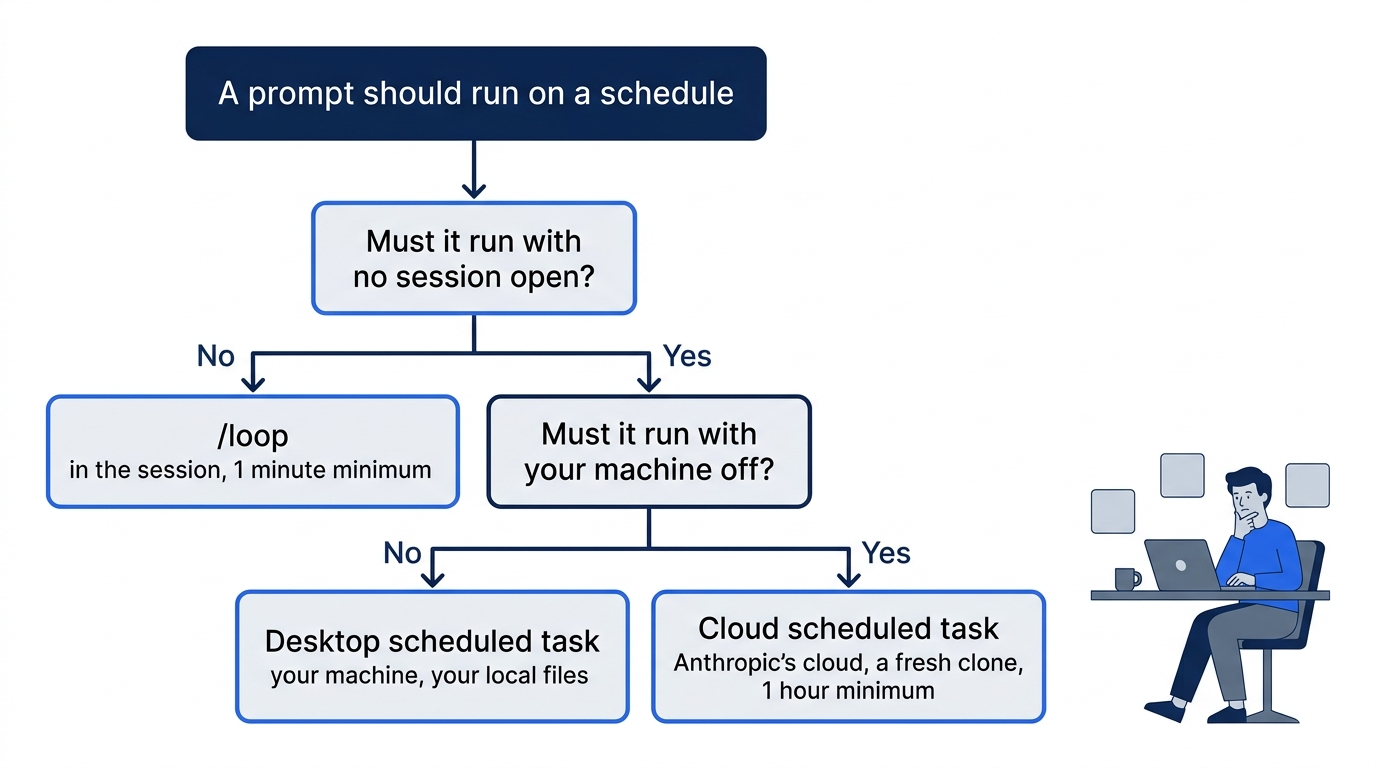
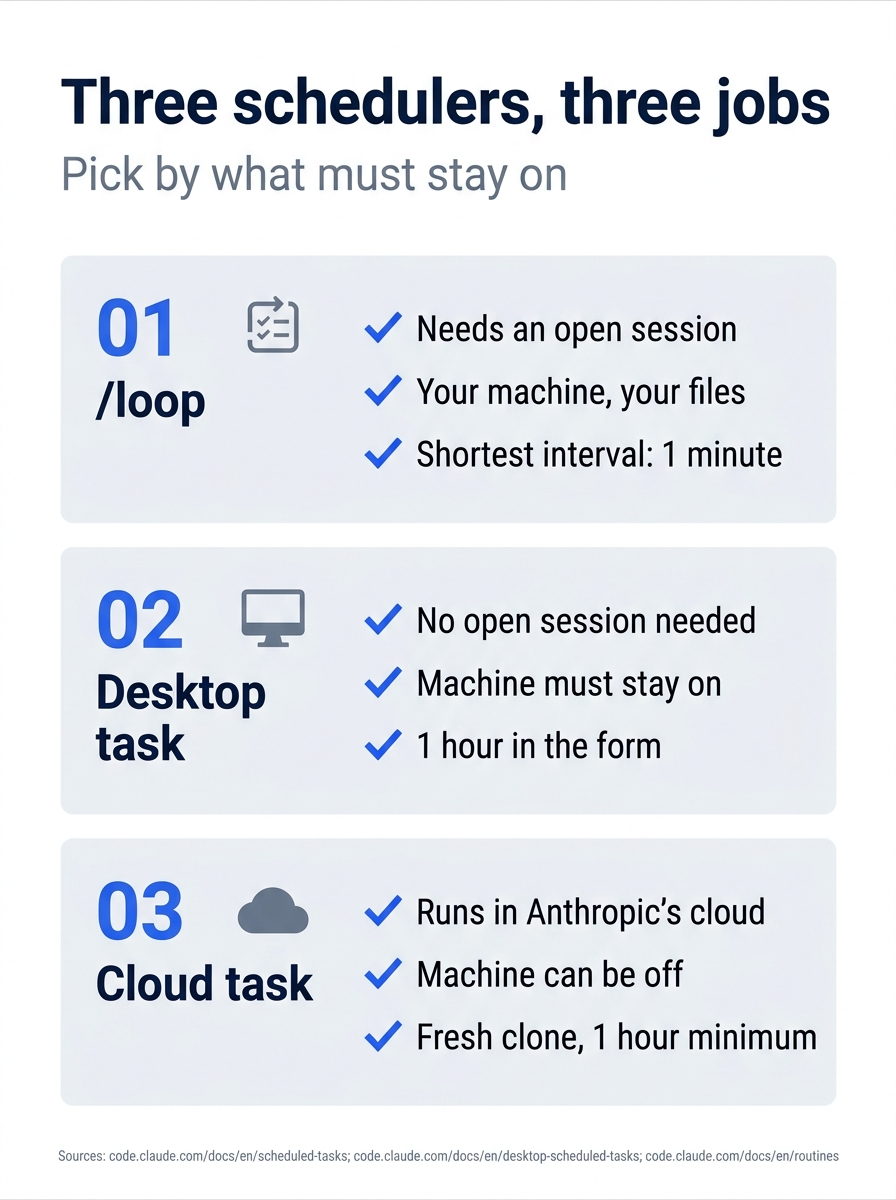
Pick a scheduler by what must stay on: the session, the machine, or neither.
Corrections to the first edition
"Claude Code Away from the Terminal," Part 6, was written in May 2026. This section checks it against the scheduled-tasks docs and Claude Code 2.1.326 on November 16, 2026:
Escstops only a loop with no interval. A fixed-interval loop such as/loop 5mstops only when you ask Claude to cancel it.- A task every 5 minutes is not delayed. The first edition said that every recurring task runs up to half its interval late.
claude --resumedoes not bring back a loop with no interval.
Go further: The Two Claude Code Schedulers That Run on Your Machine, and When to Use Each compares /loop with Desktop scheduled tasks and shows when to pick each. Read it with the corrections above in mind, because the page still has those three errors.
Do this today
Everyone
- Run
/loop 1mwith the test prompt, break and restoresrc/priority.jswhile it runs, then cancel it. Check the win:what scheduled tasks do I have?shows none,git statusis clean, andnpm testshowsℹ fail 0. - Habit: when you start a loop, decide when you will cancel it, and cancel it then. Check: at the end of the session,
what scheduled tasks do I have?shows none.
If you read Going deeper
- Run
/loop check whether npm test passes, and stop when it has passed twicewith no interval. Check: Claude prints the delay it chose after each run, and the loop ends by itself or when you pressEscon an empty prompt. Reset: askwhat scheduled tasks do I have?and cancel any task that is left. - Type
in 3 minutes, tell me the pass count. Check: three to four minutes later, one run starts and then nothing more. Reset: nothing to undo.
A watcher, not a fixer
A loop looks like automation, but its job is smaller and more useful than that. It does not repair the code. It notices, within a minute, that the code changed under you, whether the change came from Claude, from your editor, or from someone else's merge.
The tested run showed the whole bargain. One quiet deletion turned into 15 passed, 3 failed. with no prompt from you, and one git restore turned it back into 18 passed, 0 failed. The price is a prompt every interval, so the last step matters as much as the first: start the loop with a reason, and cancel it when the reason is gone.
This is Part 8 of "Claude Code, Day-to-Day (second edition)," a day-by-day guide to Claude Code in which each day takes 20 to 40 minutes. Part 8 is Day 8. All 28 days are out now.