
Steer, Check, Rewind: The Four-Move Loop That Runs Your Whole Day in Claude Code
The real skill in Claude Code is not the prompt; it is the loop around it: steer while Claude works, check the result yourself, and undo what you do not want.
Give a task, change Claude's direction while it works, check the result yourself, and undo what you do not want. A tested, hands-on walkthrough on Claude Code 2.1.326.
You watched Claude head the wrong way and did not know whether you could stop it, add to it, or take it back.
In this article: Day 2 of a day-by-day guide to Claude Code. Start here: you give Claude a task, steer it while it works, check its work with the tests, and undo a change you do not want. Going deeper: how queued messages and
Escbehave, where rewind does not reach, and a daily routine around the loop.
Tested on Claude Code 2.1.326.
Yesterday you installed Claude Code, ran /init, and added the damaged category to Ticket Triage.
Start here
At the end of today, you can give Claude a task, change its direction while it works, check its work with the tests, and undo a change you do not want.
Starting fresh or fell behind? Run git switch -C main claude-code/day-01. This replaces your main with the end of Day 1; to keep your own work, run git branch my-backup first.
Day 1's change left a gap. A ticket that says "water damage" gets the label other, because the damaged check looks for "broken", "damaged", or "crushed", and "damage" is none of those. Today you fix it, and you practice the four moves you will use every day:
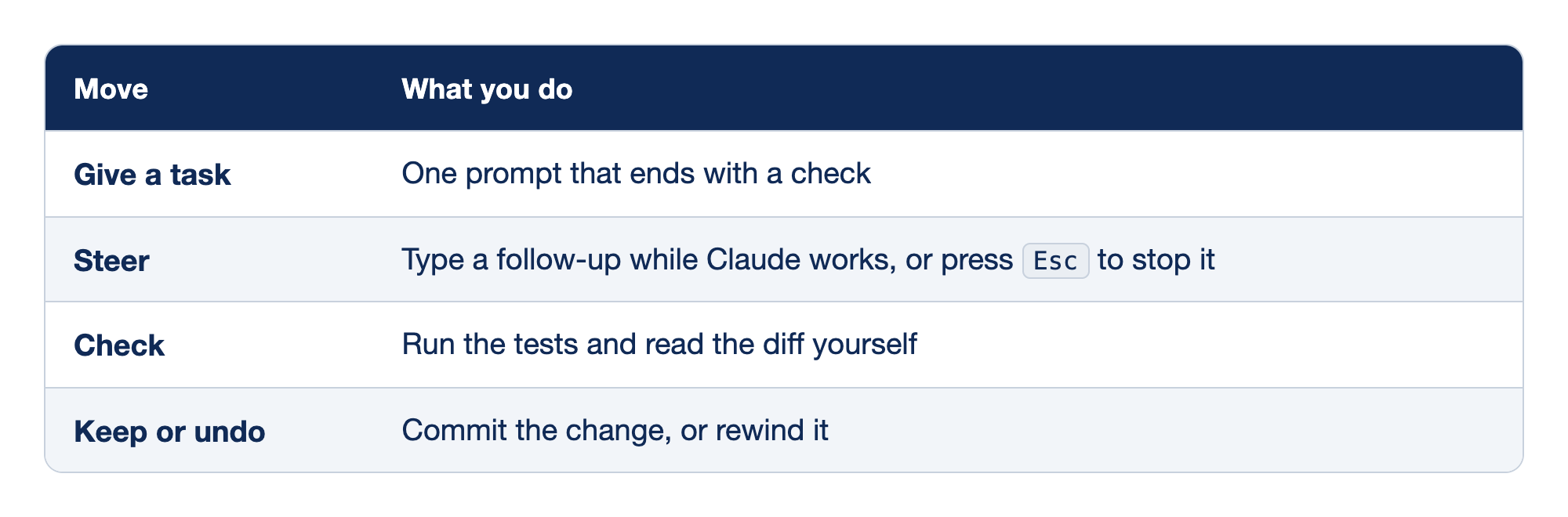
The four moves of the daily loop pair each move with what you do in it.
- Give a task means you write one prompt that ends with a check.
- Steer means you type a follow-up while Claude works, or press
Escto stop it. - Check means you run the tests and read the diff yourself.
- Keep or undo means you commit the change, or rewind it.
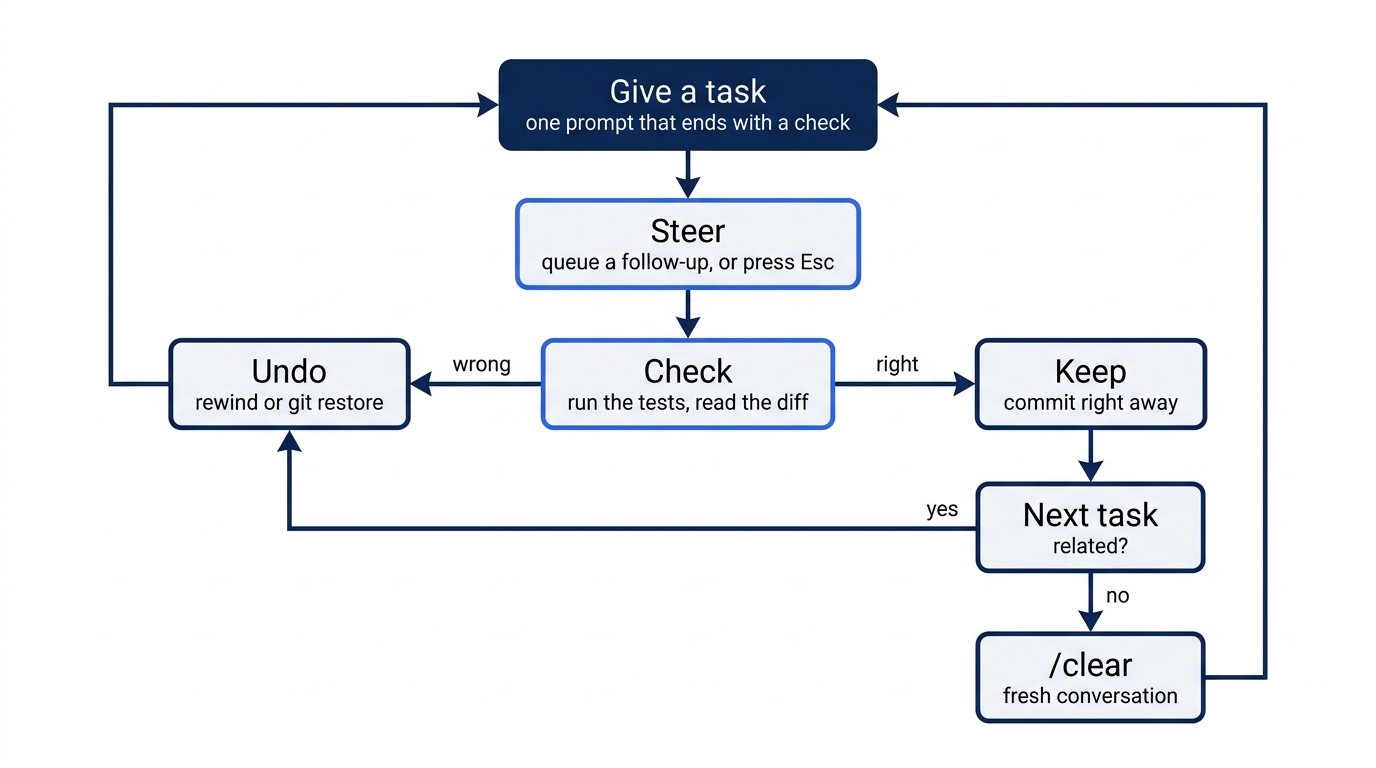
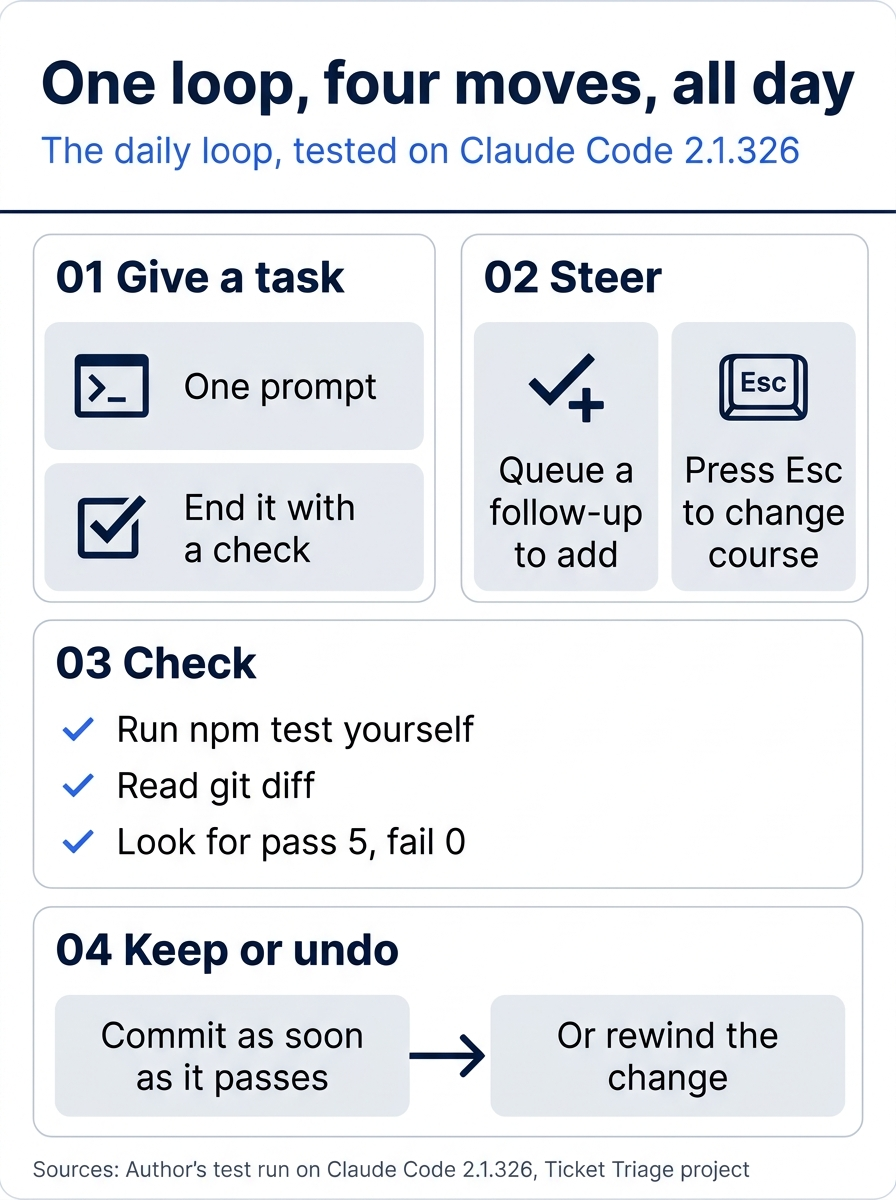
The loop has four moves: one prompt that ends with a check; a queued follow-up or Esc to steer; your own npm test and git diff, looking for pass 5 and fail 0; and a commit as soon as it passes, or a rewind.
Start the session
Open a terminal in Ticket Triage and check the starting state:
cd ~/code/ticket-triage
git status
npm test
Git prints nothing to commit, working tree clean. The tests show ℹ pass 4 and ℹ fail 0, the state at the end of Day 1. If either differs, finish Day 1 first. Start every task from a clean tree, so that git diff shows only what Claude changed.
Start Claude Code with claude. The status bar shows ⏵⏵ auto mode on (shift+tab to cycle). Stay in auto mode today. If it shows ⏸ manual mode on, keep it, and follow the Manual mode: lines below.
Give the task
Type this prompt and press Enter:
A ticket that says "water damage" gets the label other. Add damage as a new
keyword in the damaged check. Add one test for "The box has water damage".
Then run the tests and tell me if anything broke.
The prompt ends with a check, the habit from yesterday.
Queue a follow-up while Claude works
While Claude works, you can keep typing. You have just realized something: the checks use includes, which also matches inside a longer word, so "damage" already matches "damaged". The old keyword is now extra.
Do not wait for Claude to finish. Within a few seconds, type this follow-up and press Enter:
Since damage also matches damaged, remove the separate damaged keyword.
In Manual mode, type it before the first permission prompt opens. If a prompt is already open, answer it first.
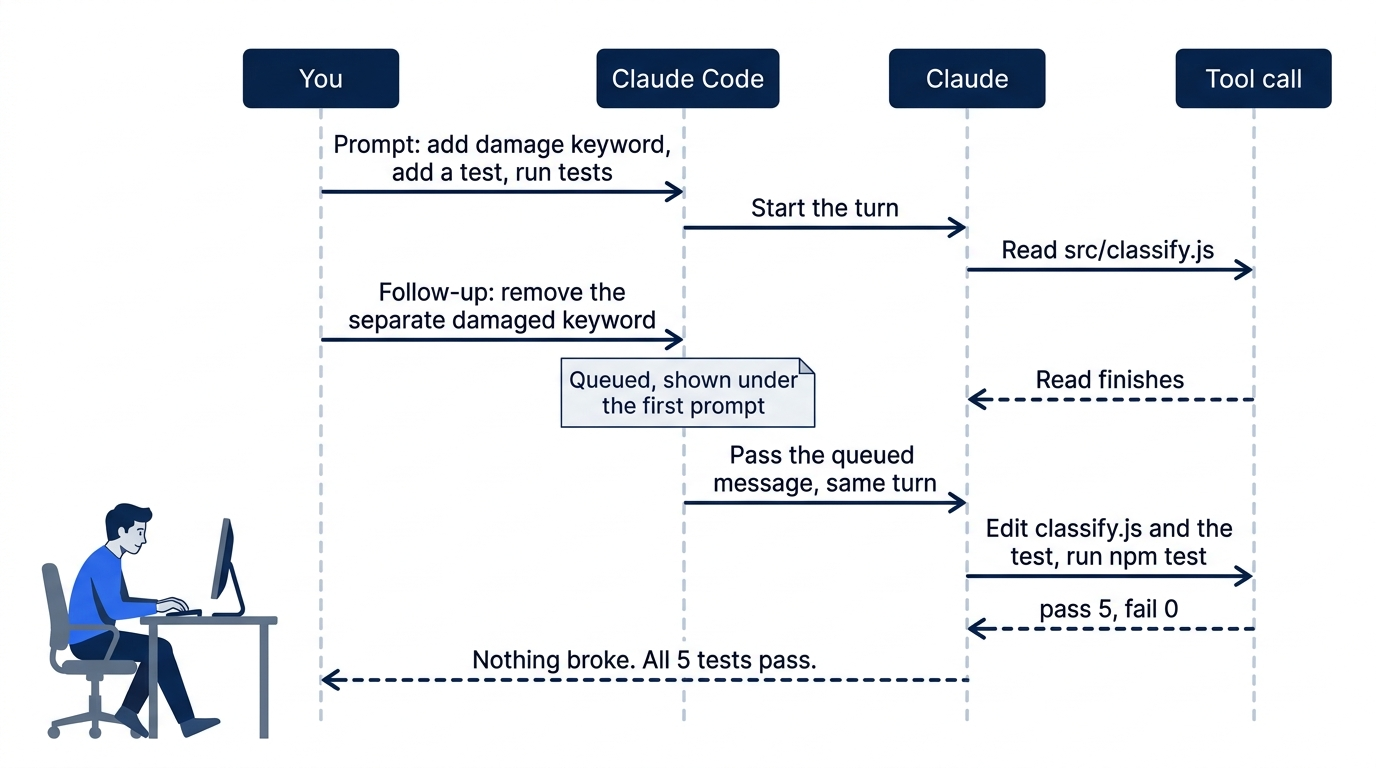
Claude Code does not interrupt Claude. It queues your message: it holds the message and shows it in the conversation until Claude reads it. On the tested run, the screen showed:
❯ A ticket that says "water damage" gets the label other. ...

  Read 1 file (ctrl+o to expand)

❯ Since damage also matches damaged, remove the separate damaged keyword.

✽ Grooving… (6s · ↓ 319 tokens · thought for 1s)

  ⏵⏵ auto mode on (shift+tab to cycle) · esc to interrupt
Check that your follow-up shows under the first prompt. The ✽ line means Claude is working: a random word, the seconds so far, and the tokens Claude has written. Read 1 file is a one-line record of a tool Claude used, and ctrl+o shows the details. Claude reads a queued message as soon as its current step ends. If Claude finishes before you press Enter, your follow-up goes out as a normal prompt, and the result is the same.
Manual mode: edit classify.js, edit classify.test.js, run npm test.
On the tested run, Claude's reply began: "Nothing broke. All 5 tests pass: the 4 that were already there plus the new water-damage test."
Check the work yourself
Do not take Claude's word for it. In a second terminal window, in the same folder, run npm test. Look for ℹ pass 5 and ℹ fail 0. Claude names the new test, so its name can differ from water damage.
Then look at what changed:
git diff --stat
On the tested runs, the summary was:
 src/classify.js       | 2 +-
 test/classify.test.js | 1 +
 2 files changed, 2 insertions(+), 1 deletion(-)
Read the diff with git diff. In src/classify.js, the damaged check contains "broken", "crushed", and "damage", in any order, and no longer contains "damaged". In test/classify.test.js, a new test checks "The box has water damage". If both are right, commit:
git commit -am "Add damage keyword"
Commit each change as soon as you check it.
Stop Claude with Esc
Sometimes you see that Claude is doing more than you need. Press Esc to stop it. Try it now. Type this prompt, which asks for a long answer:
Explain every line of src/classify.js and test/classify.test.js in detail.
When the explanation starts to scroll, press Esc. If the answer ends first, send the prompt again and press Esc sooner. Claude stops at once, and Claude Code shows Interrupted · What should Claude do instead?.
Claude keeps everything it did before you pressed Esc. In this case, Claude wrote only text. If Claude was editing files, those edits stay on disk, so run git status after you stop an edit. Now give the better instruction:
Just explain the damaged check in one sentence.
Claude answers with one sentence. Stop and redirect is the second way to steer: queue a message to add to the plan, and press Esc to change it.
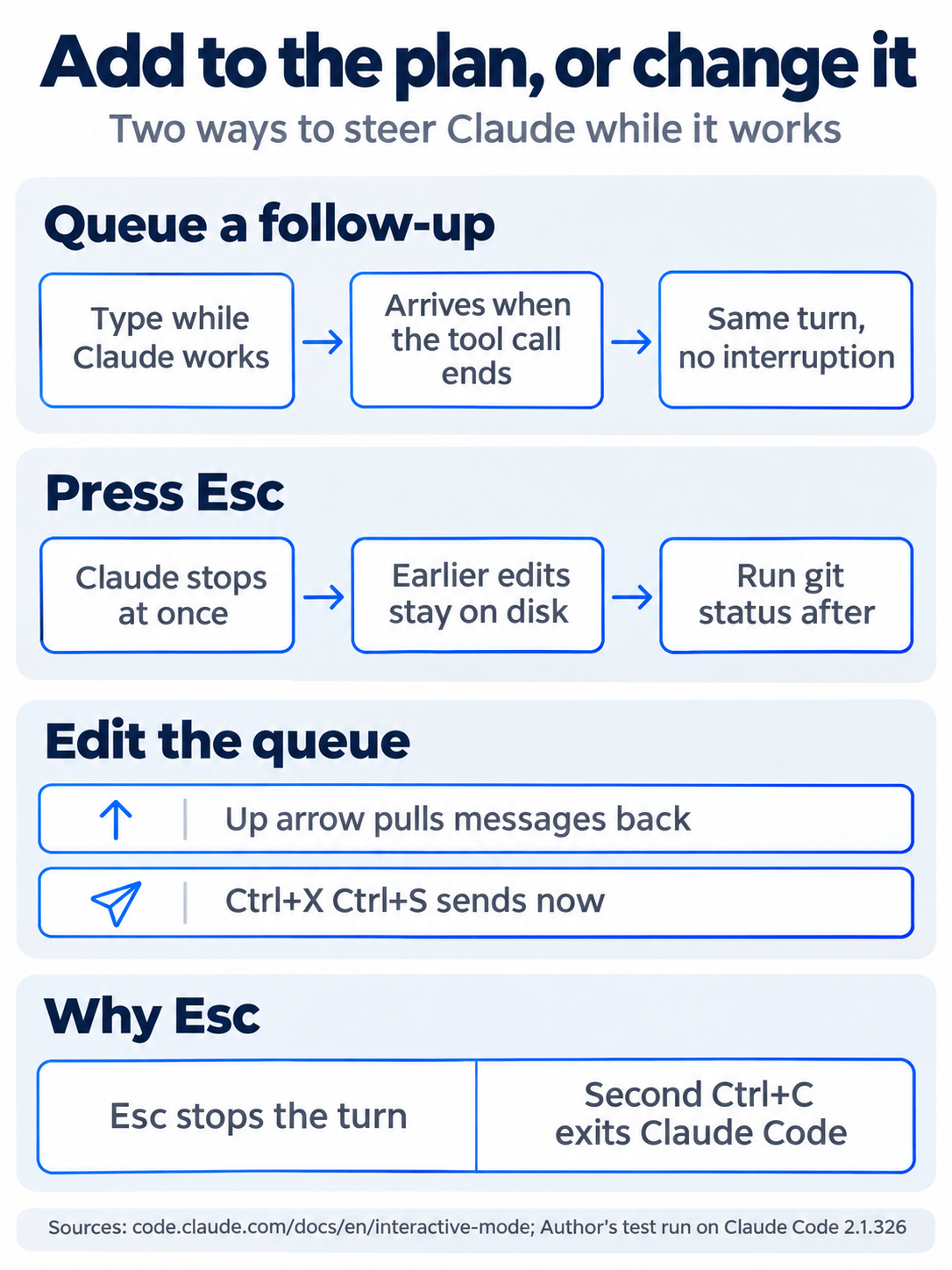
The two ways to steer work differently: a queued follow-up arrives in the same turn with no interruption, while Esc stops Claude at once and leaves earlier edits on disk. The up arrow pulls queued messages back, and Esc beats Ctrl+C as a habit.
Rewind a change you do not want
Claude Code saves a checkpoint of your files before each prompt you send. The rewind menu takes your files, the conversation, or both, back to a checkpoint.
Make a change that you will throw away. Type:
Rewrite src/classify.js to use a lookup table instead of the if statements.
Then run the tests.
Manual mode: overwrite classify.js, run npm test.
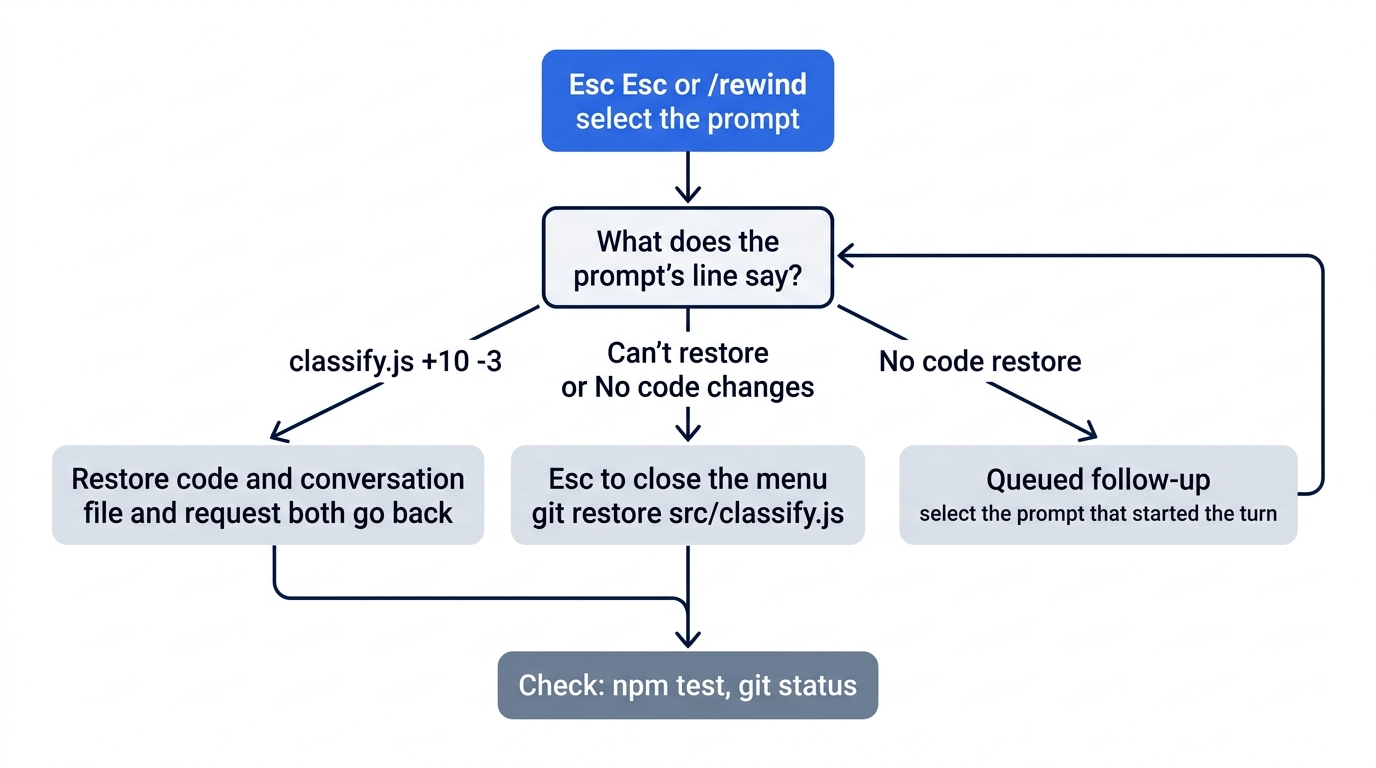
Let Claude finish. The tests still pass, but say you prefer the plain if statements. With the prompt box empty, press Esc twice, or type /rewind. The Rewind menu lists your prompts, each with a line that says what rewind can restore. On the tested run, the menu began and ended like this:
  Rewind

    A ticket that says "water damage" gets the label other. ...
    Can't restore 2 files (changed while a command ran)
    Since damage also matches damaged, remove the separate damaged keyword.
    ⚠ No code restore
    ...
    Rewrite src/classify.js to use a lookup table instead of the if statements. ...
    classify.js +10 -3

  ❯ (current)
classify.js +10 -3 means rewind can undo that change. Can't restore means that Claude changed the files with a shell command, such as sed, which rewind does not track. ⚠ No code restore marks the queued follow-up, which has no checkpoint of its own. No code changes marks a prompt that changed no file.
Press the up arrow to select the rewrite prompt, then press Enter. Claude Code shows a line such as The code will be restored +3 -10 in classify.js., with your own numbers, and five choices, starting with 1. Restore code and conversation. Choose it and press Enter. The file goes back to how it was, and Claude forgets the request. Your old prompt comes back in the prompt box. Press Ctrl+C to clear it.
If the rewrite prompt shows Can't restore or No code changes, press Esc to close the menu and run git restore src/classify.js instead.
Check the win
Run three commands in your second terminal:
npm test
git status
git log --oneline
The tests show ℹ pass 5 and ℹ fail 0. Git prints nothing to commit, working tree clean, so the lookup table is gone. The log shows four commits, with Add damage keyword on top. Write down the pass count, 5.
You gave Claude a task, added to it while Claude worked, stopped and redirected Claude, checked the result yourself, committed it, and rewound a change you did not want.
The scene is the moment the loop pays off: the rewrite you did not want is gone, the tests still pass, and nothing you wanted to keep was lost.
You can stop here. Going deeper explains why this works and where it breaks.
Going deeper
This section is for readers who want the details behind today's moves, the limits of rewind, and a daily routine around the loop. It assumes you finished Start here in Parts 1 and 2.
The working loop, written down
The four moves from Start here are one pass through a loop that you repeat all day:
- State the next thing. One sentence, with a check at the end. "Add a rate-limit header to the public API endpoints. Then run the tests." Do not design the whole solution in the prompt.
- Let Claude work, and steer. Queue a follow-up when you think of something. Press
Escwhen Claude goes the wrong way. - Check before you move on. Run the test, read the diff, and look at the screen if it is UI work. Do not stack up changes you have not checked. One bad change is easy to back out. Fifty are not.
- Note what you learned. If you corrected Claude twice on the same thing, write it down now (see "Turn anything you repeat into a file" below). The friction is the signal, and the signal fades.
- Keep or undo, then go on. Commit, or rewind. If the next task has nothing to do with this one, start a fresh conversation with
/clearfirst.
The habit under all five steps is the one Day 1 started: end the prompt with a check. Anthropic's own teams call a way for Claude to verify its work the highest-leverage thing you can give it.
Who runs the tests in this loop
In today's loop, Claude ran the tests, and you ran them again to check. When a test fails, give Claude the exact failure that the test printed, not your summary of it. Paste the failing test name and the expected and actual lines. A summary loses the detail that Claude needs to find the cause. Day 18 hands the rerun to /goal, and on Day 25 you build the loop yourself, with the same rule.
More about queued messages
A turn is one piece of Claude's work, from the prompt it picks up to the reply that ends it. The interactive mode docs describe the queue in full. The parts that matter day to day:
- When a queued message arrives. If Claude is running a tool, such as a file read or a test run, Claude Code passes your message to Claude when that tool call finishes, inside the same turn. If the turn ends first, the message goes out on its own, in the order you typed it. On one test run for this part, the follow-up reached Claude before its first edit, and Claude replaced
damagedwithdamagein one step. On the other, Claude had already addeddamage, then removeddamagedin a second edit. The end result was the same. - What you see. While a message waits, the prompt box reads
Press up to edit queued messages, and a hint showsctrl+x ctrl+s to send now. - Send it now.
Ctrl+Entersends what you queued at once, without waiting for the current step (v2.1.275 or later). Some terminals sendCtrl+Enteras a plainEnter.Ctrl+X Ctrl+Sworks in any terminal. - Take it back. Press the up arrow on the first line of the prompt box. Claude Code moves the queued messages back into the box so you can edit them or delete them.
Escwith a queue.Escstops the turn, and Claude Code sends what you queued right away. To stop and say something new, take the queue back first.- Slash commands wait. A queued slash command or
!shell command runs after the turn ends. A few commands, such as/modeland/effort, run as soon as you send them.
The auto mode setup box
On Claude Code 2.1.325, a box appeared once after a turn ended. It asked "Teach auto mode about your environment?", with 1. Yes selected, and offered a one-minute setup that tells the background safety check about your tools. It did not appear in any 2.1.326 test run. If you see it and do not want the setup now, press the down arrow to select 2. Not now, then press Enter. Enter alone chooses Yes.
What Esc keeps
Esc stops the current response or tool call. Claude keeps what it already did: the text it wrote, the files it read, and the edits it made. Stopping an edit halfway can leave a file half changed, which is why Start here says to run git status after you stop an edit. Ctrl+C also stops a running turn. When nothing is running, the first Ctrl+C clears the prompt box and the second exits Claude Code, so Esc is the safer key to make a habit.
On a permission prompt, Esc means No. In a dialog, Esc closes the dialog.
How rewind works, and where it does not reach
Claude Code saves a checkpoint before each prompt that starts a turn. It keeps file snapshots for the 100 most recent checkpoints in a session, and the checkpoints survive claude --continue. A retention sweep deletes a session's snapshots about 30 days after the last one, controlled by the cleanupPeriodDays setting. The full description is on the checkpointing page.
On Claude Code 2.1.325, the menu had six choices:
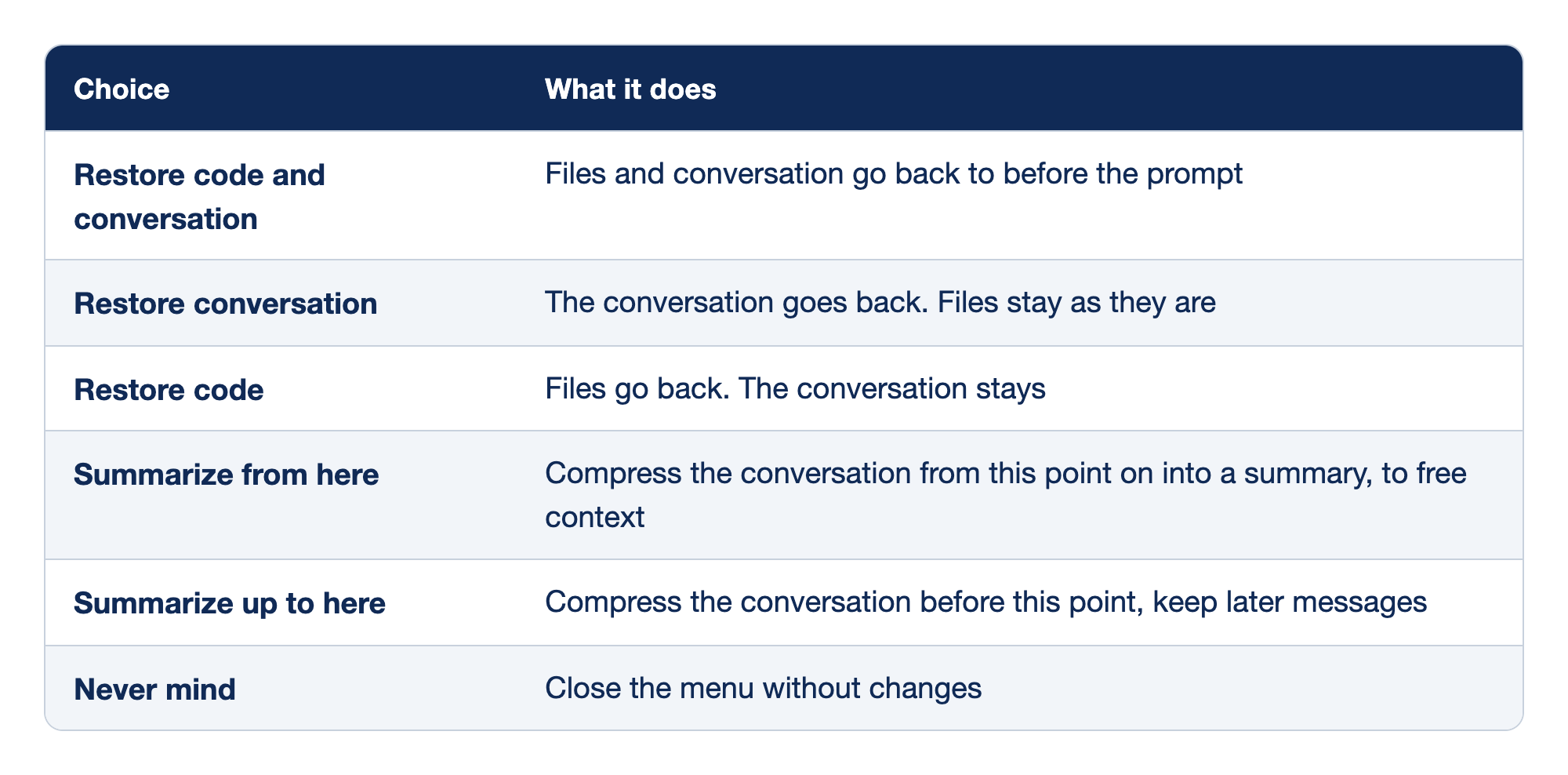
The six choices in the rewind menu on Claude Code 2.1.325 each restore a different part of the session.
- Restore code and conversation puts both the files and the conversation back to before the prompt.
- Restore conversation puts the conversation back and leaves the files as they are.
- Restore code puts the files back and keeps the conversation.
- Summarize from here compresses the conversation from this point on into a summary, to free context.
- Summarize up to here compresses the conversation before this point and keeps later messages.
- Never mind closes the menu without changes.
The two code choices appear only when the prompt has tracked file changes. Start here uses Restore code and conversation because Claude then forgets the change you threw away. Restore code is the right choice when the discussion was useful and only the edit was wrong.
The limits matter more than the menu:
- Shell commands are not tracked. Claude Code tracks edits made with Claude's file editing tools. A file that only a shell command changed is not tracked. On 2.1.325 the menu showed
No code changesfor it, and on 2.1.326 it showsCan't restore. Once Claude has edited a file with its editing tools in the session, rewind undoes later shell changes to that file too. Both 2.1.325 test runs for this part hit the untracked case: for the one-line keyword change, Claude editedsrc/classify.jswithsed, and the rewind menu listed that prompt asNo code changes, even though the file had changed. For the larger lookup-table rewrite, Claude used its Write tool, and rewind worked. You cannot choose which tool Claude uses, so commit after every change you check. Git catches every case. - Queued messages have no checkpoint. In the menu, a message you typed while Claude worked shows
⚠ No code restore. To undo the edits from that turn, select the prompt that started the turn. - Subagent edits. A subagent is a helper that Claude starts with its own context window. Rewind usually does not restore files that a subagent changed. Day 9 covers subagents.
- Edits outside the session. Changes you make in your editor, or that another session makes, are not tracked unless they touch a file this session edited.
- The warning at the bottom of the menu means what it says. "Restored files go back whole, losing later changes by anyone." If you edited
classify.jsby hand after Claude did, a code restore throws your edit away too. - Rewound messages can come back. If you exit right after a conversation rewind, before you send another prompt, the removed messages can return when you resume. Send one prompt before you exit.
Rewind is a quick undo inside one session. It is not version control. Commit early, and use git for anything you want to keep.
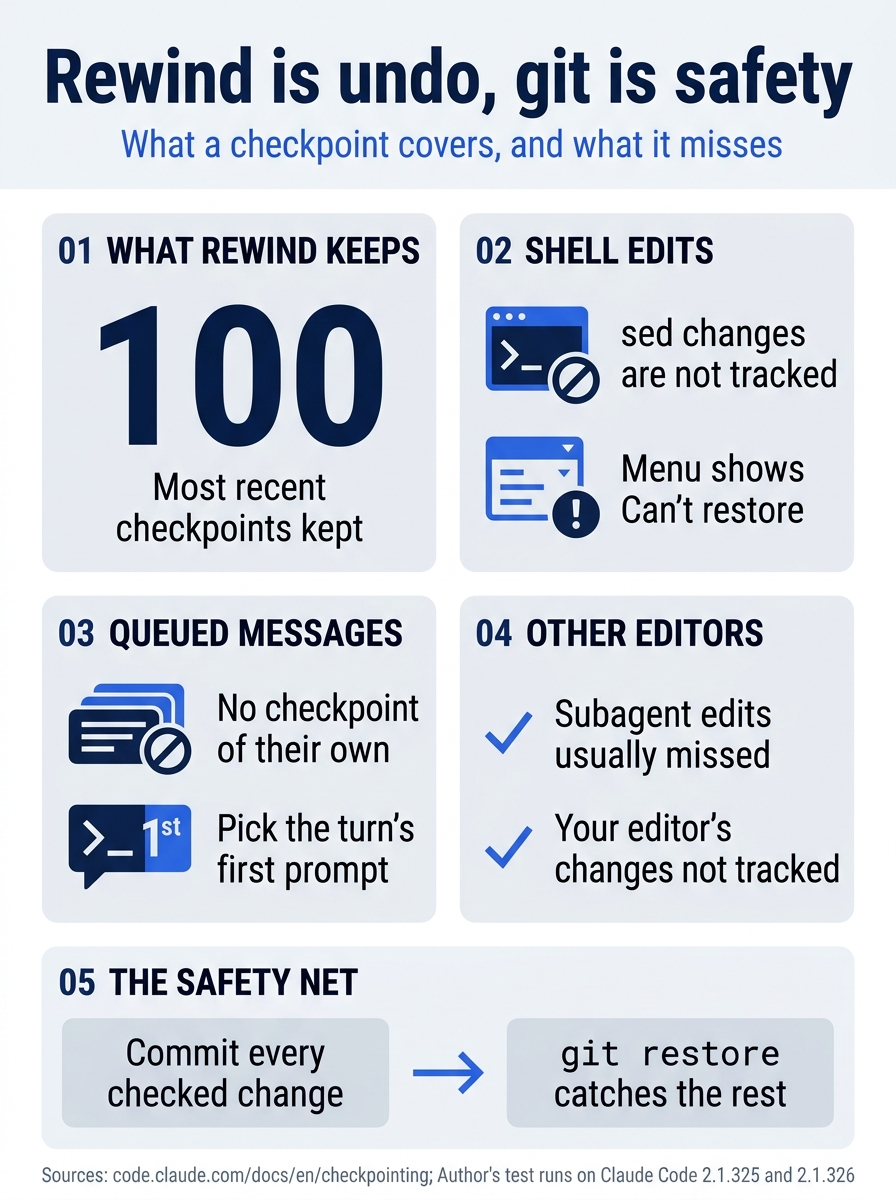
A checkpoint keeps snapshots for the 100 most recent checkpoints, but it misses shell edits, queued messages, and most subagent and editor changes. The safety net is a commit after every checked change, with git restore for the rest.
Try an alternative without losing this one: /branch and /fork
Rewind throws work away. Sometimes you want to keep the current state and try another direction too.
/branchcopies the conversation at this point, switches you into the copy, and keeps the original. Claude Code prints the/resumecommand, with the original session ID, that takes you back. It copies the conversation, not your files. On the test run, an edit made in the branch was still on disk after/resumereturned to the original, so commit first, and usegit restoreto drop the experiment./forkcopies the conversation into a new background session and keeps you where you are. Claude Code tells the copy to make its own git worktree before it changes code, so the two sessions do not edit the same files (v2.1.221 or later).
The first edition called /fork an alias of /branch. They are now two commands. See the commands reference.
Ask a side question with /btw
/btw what was the name of that config file again? answers from what is already in the conversation, in an overlay that you dismiss with Space, Enter, or Esc. The question and answer never enter the conversation, so they cost the main thread nothing. /btw has no tools: it cannot read new files or run commands. You can run it while Claude is working, and it does not interrupt the turn. In the overlay, press f to hand the question to a background subagent that does have tools. See side questions.
The three commands together: /btw for "answer me without adding to the conversation," /branch or /fork for "try another way without losing this one," and /rewind for "go back."
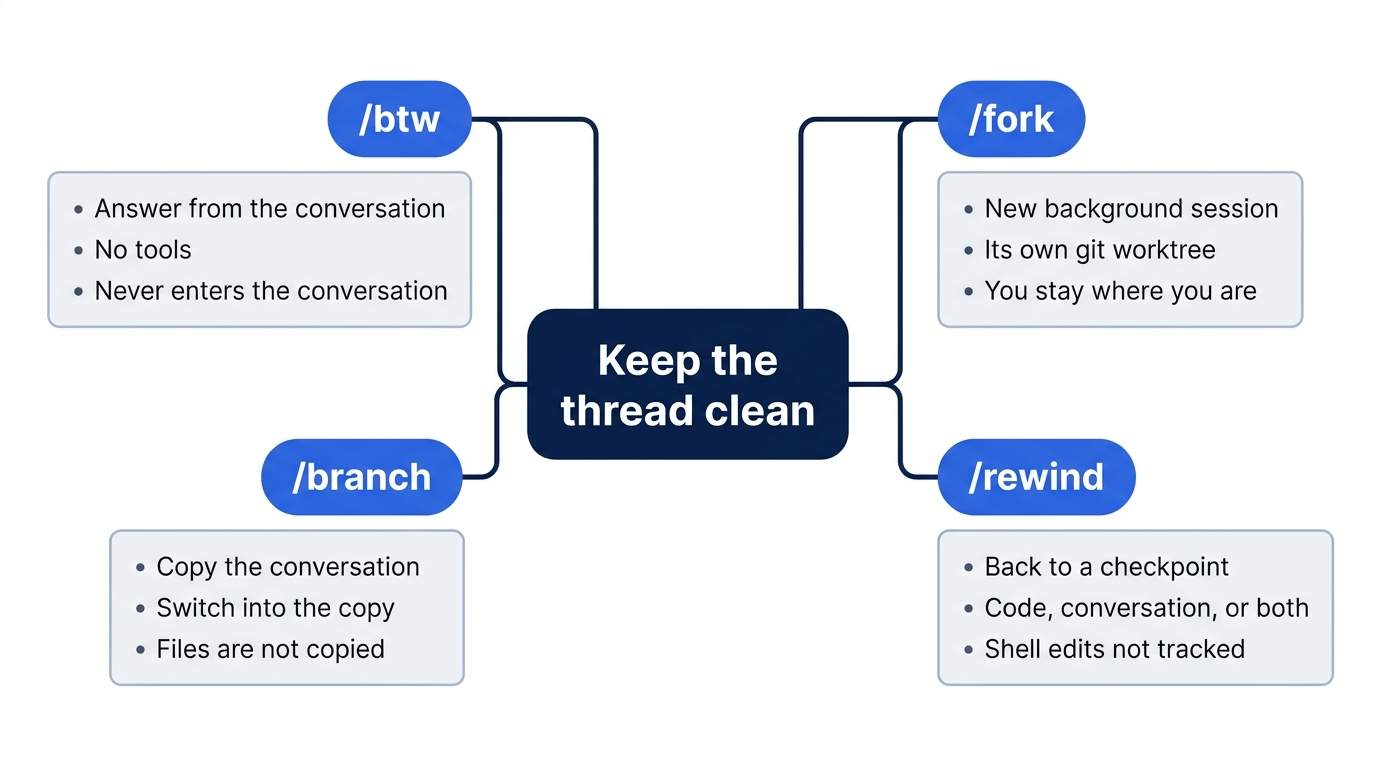
A three-minute start to the day
Experienced users open the day the same way every day:
- Re-anchor. Open
CLAUDE.mdand skim it. Check that the build, test, and lint commands you need today are in it. Rungit statusandgit log -5 --onelineso you see the state of the tree before Claude does. - Check what loads. Run
/memory. It lists every instruction file that loaded for the session and shows whether auto memory is on. Auto memory is the set of notes that Claude writes for itself across sessions, such as "the build runs withpnpm build, notnpm". Claude stores them under~/.claude/projects/<project>/memory/. It is on by default in local sessions. Day 5 covers/memoryin full. - Decide the shape of the day. Most days are one session in one folder. When you have two independent tasks, such as a bug fix and a feature, a git worktree gives each task its own copy of the repository on its own branch.
claude --worktree bugfix(short form-w) creates one under.claude/worktrees/bugfix/on a branch namedworktree-bugfixand starts Claude in it. Day 16 covers worktrees. Agent teams, which coordinate several Claude sessions on one task, are still experimental and off unless you setCLAUDE_CODE_EXPERIMENTAL_AGENT_TEAMS=1. Day 22 covers team-scale work. - Plan first when the task is big. If the first task touches more than two or three files or needs a design decision, start in plan mode, where Claude reads and writes a plan but does not change files. Press
Shift+Tabuntil the status bar says plan, or start the prompt with/plan. For work bigger than half a day, save the plan to a file, commit it, and build from it in a fresh session. Day 3 teaches plan mode.
A two-minute end to the day
- Leave no half-finished edits. Run
git status. Finish, revert, or commit each dirty file. AWIP:commit with a note about what is broken is fine. A tree where you cannot tell real work from leftovers is not. - Promote what Claude learned. Run
/memoryand skim today's auto-memory notes. Move each note to the right place:- A fact for the whole project that everyone needs goes in
CLAUDE.md. - A fact for one part of the code goes in a path-scoped rule (see the next section).
- A fact for the whole project that only you need goes in
CLAUDE.local.md. Claude Code does not ignore this file in git for you. AddCLAUDE.local.mdto.gitignoreyourself. The first edition said it was ignored by default. It is not. - A personal preference for this machine can stay in auto memory.
- A fact for the whole project that everyone needs goes in
- Clean up worktrees. When you exit a worktree session with nothing in it, Claude Code removes the worktree. If the worktree has work in it, Claude Code asks whether to keep it. Remove an old one by hand with
git worktree remove .claude/worktrees/<name>. - Leave one note for tomorrow. If you stop mid-task, write one line in
TODO.md, or rungit stash push -m "Mid-feature: still need to wire the refresh endpoint". Tomorrow you read the note first and start where you stopped.
Turn anything you repeat into a file
The first time something happens, it is a one-off. The second time, it is a pattern. Write it down in the place that fits it:
-
A fact that every session needs goes in
CLAUDE.md. "All API errors return{ error: string, code: string }." Add the line and commit. Claude Code loads the file at the start of every session. -
A fact that applies to some files only goes in a path-scoped rule: a Markdown file in
.claude/rules/with apathslist at the top. Claude Code loads the rule only when Claude works with a matching file, so your TypeScript sessions do not carry your Python rules:--- paths: ["**/*.py"] --- # Python conventions - Use `ruff` for formatting. Run `ruff check --fix` before committing. - Public functions need type hints. CI runs `mypy --strict`. - Tests live in `tests/`, mirror the source path, and use pytest.Patterns accept globs and braces, such as
"src/**/*.{ts,tsx}". A rule file with nopathslist loads every session, like CLAUDE.md. See path-specific rules. -
A procedure you start by name becomes a skill: a Markdown file of instructions that you run as a slash command, such as a
/shipcommand that runs the tests, then the linter, then the build, and stops at the first failure. Day 10 builds/ship. Anthropic'sskill-creatorplugin writes skills for you. It is in the official plugin marketplace, not built in. The first edition called it bundled. -
A step that must happen every time becomes a hook: a command that Claude Code runs on its own at a set point, such as running the formatter after every edit. A line in CLAUDE.md asks Claude. A hook does not depend on Claude remembering. Day 11 adds one.
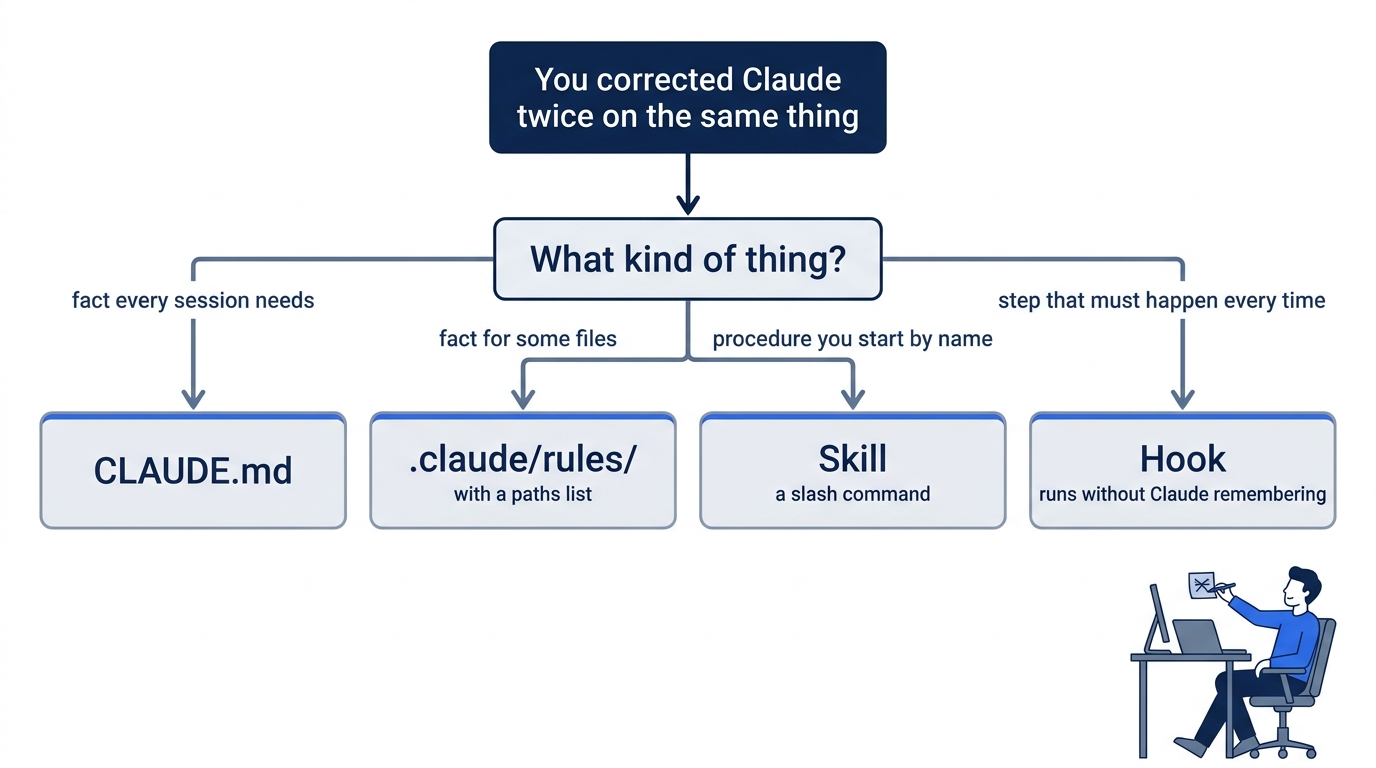
Keep heavy reading out of the main thread
A session that reads twenty files to find one function carries those twenty files for the rest of the day. For "find the files that do X" or "check whether anything still calls the old helper," ask Claude to use a subagent: "Use the Explore agent to find every place we call legacyAuth()." The subagent reads in its own context window and returns a short summary. Explore is built in. Day 9 covers subagents, and Day 6 shows how to measure what a session carries.
Corrections to the first edition
The first edition's Part 3 was written in May 2026. Checked against Claude Code 2.1.325 on November 16, 2026:
- New sessions start in auto mode on every plan, except some organization accounts that start in Manual mode. The first edition's loop assumed Manual mode (config value
default), where Claude asks before every edit. - Auto mode approves Claude's actions with a background safety check. It does not run your tests between actions, as the first edition said.
/forkis no longer an alias of/branch(see above).- A checkpoint is saved before each prompt, not before each edit, and shell-only changes are not tracked.
- Auto memory is on by default in local sessions. You do not need to turn it on.
CLAUDE.local.mdis not ignored by git by default.skill-creatoris a plugin from the official marketplace, not a bundled skill.
Go further: The Ten-Minute Ritual That Decides Whether Claude Code Actually Helps You adds the first edition's full start-of-day and end-of-day routine, or Mastering Claude Code's /btw, /fork, and /rewind: The Context Hygiene Toolkit goes deeper on the three commands.
Do this today
Everyone
- Add the
damagekeyword with a queued follow-up, stop one answer withEsc, and rewind the lookup-table rewrite. Check the win:npm testshowsℹ pass 5,git statusshows a clean tree, andgit log --onelineshows four commits. - Habit: commit each change as soon as the tests pass. Check: at the end of your next session,
git statusis clean before you exit.
If you read Going deeper
- Ask Claude for a one-line change, then open the rewind menu. Check: if the prompt shows
Can't restore(on 2.1.325,No code changes), rungit diffand confirm that the file changed anyway. If it shows a file count, rewind can undo the change. Reset: rungit restore .. Check thatgit status --shortprints nothing. - While Claude works on a task, queue a message, then press the up arrow on the first line of the prompt box. Check: the message moves back into the prompt box. Reset: press
Ctrl+Cto clear the prompt box. When the task ends, rungit restore .and check thatgit status --shortprints nothing. If it lists a new file with??, delete that file. - Run
/btw what does the damaged check match?while Claude is working. Check: the answer appears in an overlay, and after you dismiss it, the question is not in the conversation. Reset: when the task ends, rungit restore .and check thatgit status --shortprints nothing. - Run
/branch, ask for the lookup-table rewrite there, then run the/resumecommand that/branchprinted. Check: the original conversation does not contain the rewrite request, andgit statusshowssrc/classify.jsas changed. Reset: rungit restore src/classify.js. Check thatgit status --shortprints nothing. - Run
/memory. Check: Ticket Triage'sCLAUDE.mdis listed and auto memory is on. Reset: pressEscto close the panel.
The loop is the skill
The moments from the opening (a follow-up you thought of too late, a confident "all tests pass," a rewrite you did not want) stop being stressful once each has a move. Queue the follow-up. Press Esc to change course. Run the tests yourself. Rewind what you do not want.
Rewind makes experiments cheap, but it is not the safety net. The safety net is the oldest habit in software: a clean tree before the task, and a commit as soon as the change checks out. Rewind is fast; git is certain.
Give the task, steer, check, keep or undo. Then do it again.
This is Part 2 of "Claude Code, Day-to-Day (second edition)," a day-by-day guide to Claude Code in which each day takes 20 to 40 minutes. Part 2 is Day 2. All 28 days are out now.