
Your agent fleet dashboard is lying to you, and the permission model is why
You can see every agent you have permission to see, which is not the same as every agent you have. Foundry Control Plane, Microsoft Agent 365, and Application Insights are three different inventories, and enterprise AI agent governance starts by refusing to merge them.
Foundry Control Plane, Microsoft Agent 365, and Application Insights are three separate inventories that everyone merges into one. This article covers what each one actually knows, what it refuses to tell you, and why the hardest part of enterprise AI agent governance is still a person noticing something.
Your fleet dashboard looks complete. It is showing you the agents your RBAC role happens to cover, and nothing on the screen says so.
In this article: You will learn why Foundry Control Plane, Microsoft Agent 365, and Application Insights answer three different questions, and what breaks when you treat any two of them as one system. We cover the preview status that one research vendor got wrong twice, the permission model that makes two people see two different fleets, the three off switches with three different blast radii, the proxy-based path for registering shadow agents, and the autopilot blueprint model that is really an org chart wearing a feature's clothes. By the end you will know which pane answers a compliance question and which one quietly cannot.
There is a moment in every agent program where you stop being a builder and start being an owner. It usually arrives as a question from someone who does not write code. Whoever signs the subscription invoice wants to know why inference spend tripled. Whoever answers the security questionnaire wants a list of every agent that touches customer data.
You open the fleet view, and it looks complete. Every agent you know about is there, each one with a health score and a cost column. The appearance of completeness is the problem. It looks complete because it shows you everything you have permission to see, and nothing on the screen distinguishes "this is your fleet" from "this is the part of your fleet your RBAC role happens to cover."
Meanwhile somebody in contract analytics shipped a LangGraph agent on their own compute and pointed it at your model deployment. Somebody in treasury built a prompt agent in the portal and never published it. Somebody's Logic Apps workflow grew an agent loop. None of that is in your deployment manifest, and the fleet view will not find most of it either.
This article is about the governance layer of Microsoft Foundry, which is the layer where Foundry is furthest ahead of its hyperscaler peers, and about the honest limit underneath all of it: a fleet view is only as good as its inventory, and yours is missing the agent your neighboring team shipped last week.
Three planes, and the two that everyone merges
Foundry Control Plane, Microsoft Agent 365, and Application Insights answer three different questions. Treating any two of them as the same system is how a governance program ends up with a dashboard nobody trusts.
| Plane | Scope | Owns the question | Where you reach it |
|---|---|---|---|
| Foundry Control Plane | An Azure subscription, across every project in it | What agents, models, and tools exist in my Azure estate, and are they compliant | The Foundry portal, under Operate |
| Microsoft Agent 365 | A Microsoft Entra tenant | What agents exist in my organization, who owns them, and what identity do they hold | The Microsoft 365 admin center and the Entra admin center |
| Application Insights | Per resource, per project | What actually ran, how often it failed, and what it cost | Azure Monitor, and surfaced inside both of the above |
The table above maps each plane to its scope, its question, and the console you reach it from.
- Foundry Control Plane: scoped to an Azure subscription across every project in it, answers what agents, models, and tools exist in your Azure estate and whether they are compliant, reached in the Foundry portal under Operate.
- Microsoft Agent 365: scoped to a Microsoft Entra tenant, answers what agents exist in your organization, who owns them, and what identity they hold, reached in the Microsoft 365 admin center and the Entra admin center.
- Application Insights: scoped per resource and per project, answers what actually ran, how often it failed, and what it cost, reached in Azure Monitor and surfaced inside both of the other two.
Foundry Control Plane is the Azure-side fleet view. It consolidates inventory, observability, compliance, and security into one role-aware interface and integrates with Microsoft Defender, Microsoft Purview, and Microsoft Entra. Microsoft Agent 365 is Microsoft's enterprise control plane for agents, built on Entra Agent ID, and it treats agents as first-class Entra identities so that authentication, authorization, and lifecycle governance apply to the identity object itself.
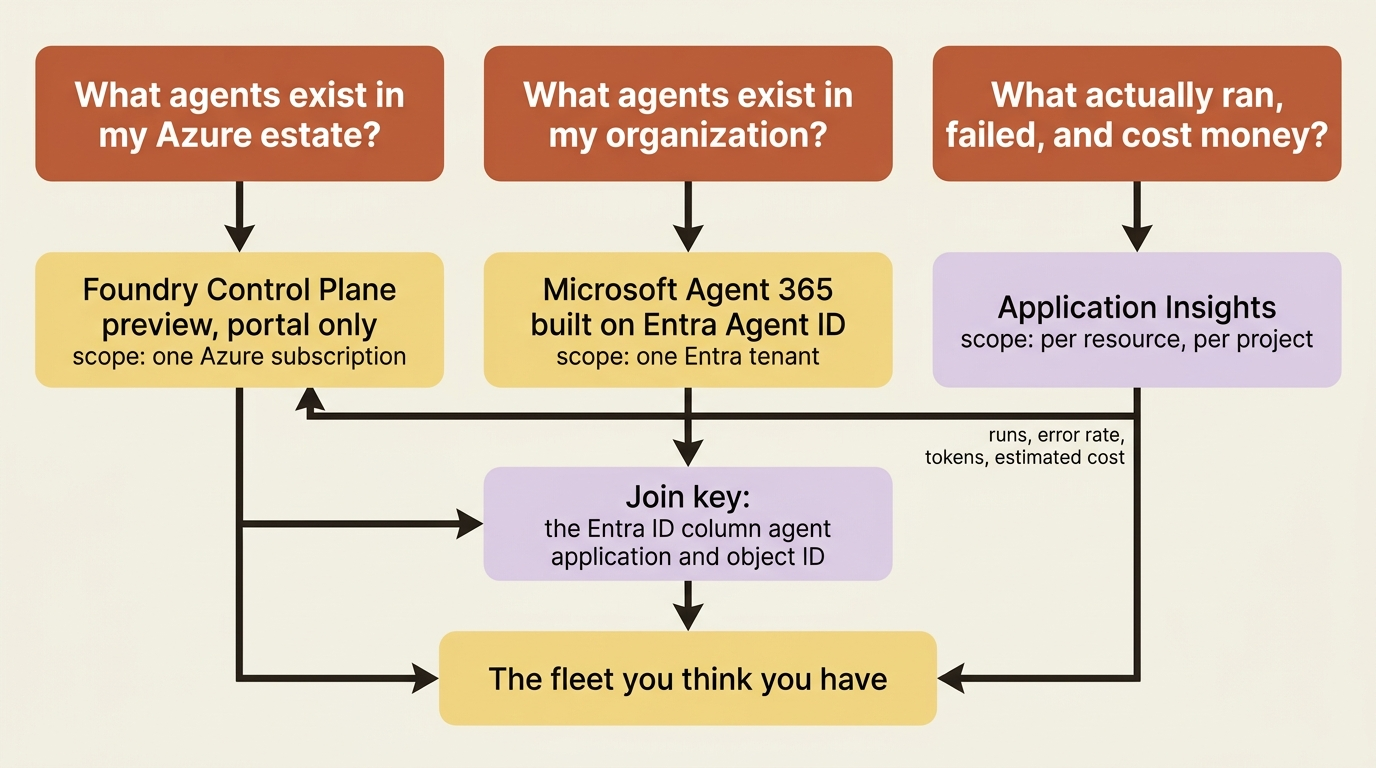
Gotcha: Agent 365 is an IT catalog, not a telemetry system, and Application Insights is a telemetry system, not a catalog. Foundry Control Plane reads telemetry from the Application Insights resources connected to your projects and computes runs, error rate, token usage, and estimated cost from it. Agents running on resources without Application Insights have no health metrics, no cost tracking, and no drill-down traces. An agent can be fully registered in every catalog you own and still be invisible in every operational sense.
Preview, not GA, and the rule that decides it
Foundry Control Plane is preview [PERISHABLE: checked September 2026]. The preview status matters enough to state before anything else in this article, because at least one research vendor asserts it reached general availability in March 2026, twice.
The clean citation is a Learn feature table listing what is new in the current portal, where the last row reads Foundry Control Plane | Preview, alongside Hosted agents | GA and A2A protocol | v1.0: GA; v0.3: Preview in the same table. The overview page corroborates it by pulling in the preview include above its key-features section.
This is the cleanest possible demonstration of a rule worth adopting for any platform that ships faster than its analysts can track it: prefer the Learn feature table over a conference announcement when they disagree. An announcement describes intent. A feature table describes what you can rely on, and the difference is a service-level agreement.
One honest wrinkle, because the reading discipline cuts both ways. The include that the overview page pulls is the marked-items form, the one that says items marked (preview) in this article are in public preview, and the overview page marks no individual item. Read on that page alone, the banner is ambiguous. The feature table is not, and two sources agreeing is why this article prints preview without hedging.
Two consequences follow, and both are design constraints rather than trivia. You get no service-level agreement, and the capabilities are accessible through the Foundry portal only. There is no CLI and no SDK for the fleet view. Every pane described below is something a human clicks, which means fleet governance on Foundry today is a job with a person in it rather than a step in a pipeline.
The Operate panes, and the two that are not under Operate
Selecting Operate in the Foundry workspace gives you subscription-wide panes:
- Overview, the fleet snapshot: active agents, cost trends, run completion rate, prevented behaviors, trend-based health scores, and alert summaries, with drill-through into inventory, observability, or policy.
- Assets, a unified searchable table of every agent, model, and tool across projects in the subscription, filterable by version, tags, health score, cost, alerts, and token usage.
- Compliance, where guardrail policies are defined, applied, and monitored, with bulk remediation for noncompliant assets.
Quota and AI Gateway are not under Operate. They sit under Manage, because they are project-scoped settings rather than subscription-wide views, and Manage acts on your current project selection rather than on the whole subscription. To act on a different project you switch projects first. The Quota pane defaults to showing only models with active deployments, and the Show all toggle reveals the full model and region list, which is the fastest way to check capacity before you create a deployment rather than after.
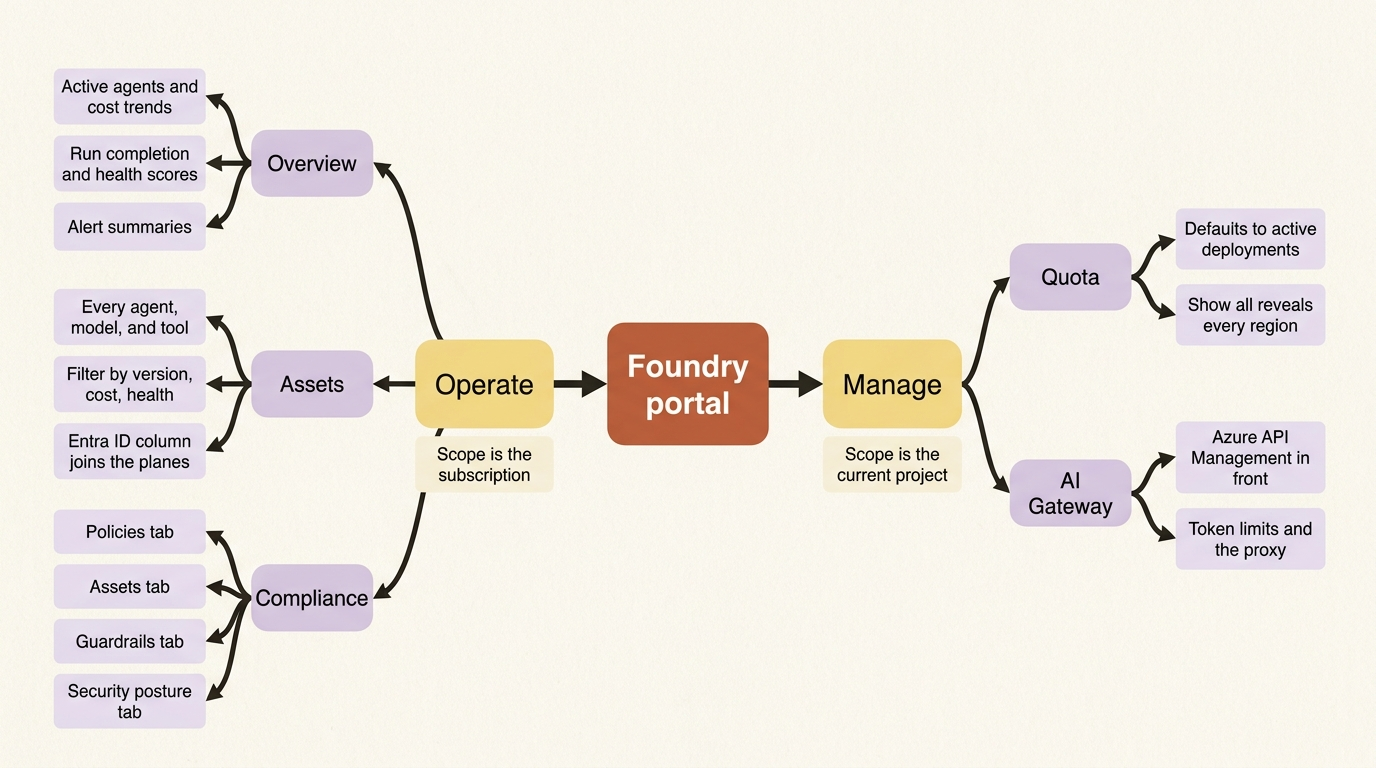
One naming note before it bites you. "AI gateway" here means Azure API Management sitting in front of your Foundry resource, which is what enforces tokens-per-minute limits and total token quotas at the project scope and what proxies registered custom agents. Foundry uses the same two words for an unrelated feature that registers externally hosted models. Same phrase, two features, and the control-plane one is the one that matters here.
The inventory is the product, and it is permission-shaped
Discovery is automatic across supported platforms, and the platform list is wider than Foundry itself: Foundry agents, including prompt agents, workflows, and hosted agents; Azure SRE Agent; Azure Logic Apps agent loops; and custom agents you register by hand. Classic agents and Azure OpenAI assistants are not supported.
The permissions model is the part to design around. Reader at the resource, resource group, or subscription scope sees the inventory and traces. Contributor adds lifecycle operations. Owner adds full management including permissions. Because the view aggregates across resources in a subscription, different users see different agents depending on their access on each resource.
Read that carefully before you use the pane as evidence. An auditor with Reader on two resource groups out of nine produces a screenshot of two ninths of your fleet, and nothing on the screen says so. If the fleet view is going to answer a compliance question, the person answering it needs subscription-scoped Reader, plus Log Analytics Reader on the Application Insights resources and Cost Management Reader for the cost columns.
Several inventory columns are worth knowing by name because they are the ones that stay empty. Error rate, Estimated cost, Token usage, and Runs all require observability configured, and cost and token usage are Foundry-platform columns rather than universal ones. The Entra ID column carries the Entra Agent ID application and object ID for the agent, which is the join key between the two control planes. Published as tells you whether the agent has its own endpoint. Logic Apps agent loops support no observability at all, traces or metrics.
Gotcha: metrics are not retroactive. Telemetry is collected only for runs that occur after you configure Application Insights, past runs are never backfilled, and data takes up to fifteen minutes to propagate after the first post-configuration run. An empty dashboard on the morning you connected it is the documented behavior, not a bug worth chasing.
What "stop" does, and the three verbs that are not the same verb
The fleet view offers several different off switches with different blast radii, and picking the wrong one either fails to stop anything or deletes a resource another tenant was using.
Lifecycle support depends on the platform, the agent type, and whether the agent was published:
| Platform and type | Supported actions | What it means |
|---|---|---|
| Foundry prompt agent or workflow, unpublished | None | No dedicated deployment. It uses the project endpoint, and its lifecycle is the project's. Deleting it is the only way to stop it |
| Foundry hosted agent, unpublished | Start and stop | Stops the deployment and deallocates its compute |
| Foundry agent of any type, published | Start and stop | Stops the deployment behind the published endpoint |
| Azure SRE Agent | Start and stop | |
| Azure Logic Apps agent loop | Start and stop | Stopping the Logic Apps resource stops every workflow in it |
| Custom agent | Block and unblock | Foundry has no access to the infrastructure, so it blocks inbound requests at the proxy instead |
The table above maps each agent platform and type to the lifecycle actions available on it.
- Foundry prompt agent or workflow, unpublished: no supported actions, because it has no dedicated deployment and uses the project endpoint, so deletion is the only way to stop it.
- Foundry hosted agent, unpublished: start and stop, which stops the deployment and deallocates its compute.
- Foundry agent of any type, published: start and stop, which stops the deployment behind the published endpoint.
- Azure SRE Agent: start and stop.
- Azure Logic Apps agent loop: start and stop, and stopping the Logic Apps resource stops every workflow in it.
- Custom agent: block and unblock, because Foundry has no access to the infrastructure and blocks inbound requests at the proxy instead.
Stopping deprovisions the agent's infrastructure and prevents new runs, and it does not terminate runs already in flight. A blocked custom agent keeps running on its own infrastructure and simply stops receiving requests. The first row is the one that catches people: an unpublished prompt agent has no off switch, because it never had a deployment of its own.
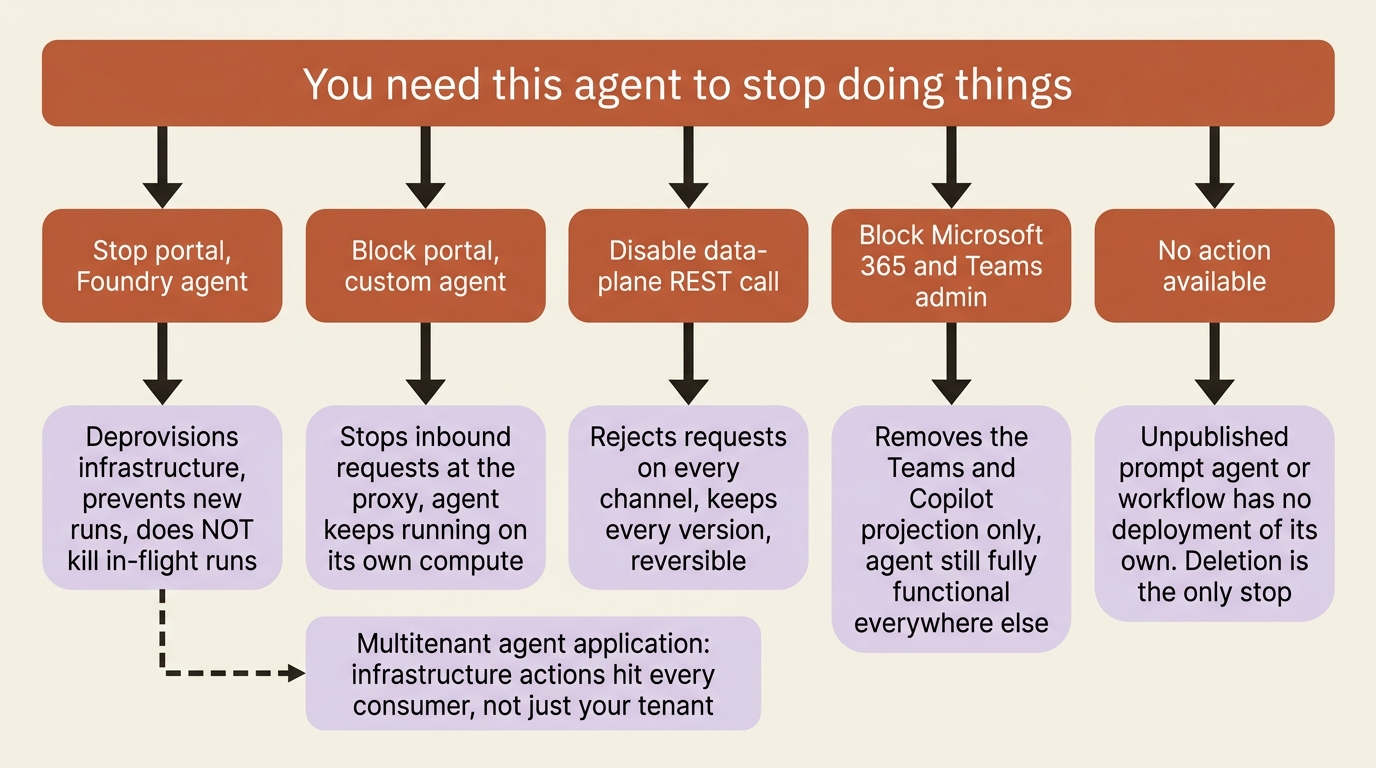
An Entra administrator reaching the same fleet from the Microsoft 365 side gets a fourth verb and a warning worth quoting. Block in the Microsoft 365 and Teams admin centers affects only the agent's projection into Teams and Microsoft 365 Copilot, leaving the agent fully functional in the Foundry portal and every other integration point. The Foundry actions are infrastructure operations on Azure resources, and if an agent application serves a multitenant scenario they affect every consumer of that agent, not just your tenant's users. The standing instruction is to prefer disabling a Foundry agent, or stopping an agent application, over deletion, because the first two are reversible and deletion is not.
Disabling a Foundry agent is not in the portal and not in the Microsoft 365 admin center. It is a data-plane REST call:
az rest --method POST \
  --uri "https://{accountName}.services.ai.azure.com/api/projects/{projectName}/agents/{agentName}:disable?api-version=v1" \
  --resource https://ai.azure.com
The :enable action reverses it, and the --resource https://ai.azure.com argument is required so that az rest requests a token for the right audience. A disabled agent keeps its versions and rejects requests across every channel at once, Teams, Microsoft 365 Copilot, the Foundry portal, and your APIs.
In production: an Entra administrator who needs to act on an agent probably cannot see the Azure resources behind it, because Entra roles do not carry Azure permissions. The documented path is elevation to User Access Administrator at root scope, then a narrow role assignment, then de-elevation in reverse order. Build the de-elevation step into the runbook, because the elevation step is the one people remember.
Guardrail policy at fleet scope, and the thirty minutes
Per-agent guardrail configuration has a failure mode that only shows up at fleet scale. Thirty-nine workers carrying a content-filter policy and one not carrying it is a fleet with one unguarded model and an identical-looking dashboard. Nothing inside a single project detects that.
The Compliance workspace does, through four tabs. Policies lists the guardrail policies applying to your subscription and project and flags any with Violations detected. Assets inverts the same data so you can start from a model deployment and see every policy governing it, which is why one asset can appear several times. Guardrails compares guardrail configurations across deployments so you can spot a subscription with no content filtering at all, whether or not a policy covers it. Security posture carries the Defender recommendations.
Creating a policy is a scoped wizard: choose controls such as content filters, prompt shields, or abuse detection, set the scope to a subscription or a resource group, and add exceptions for specific model deployments or resource groups. Remediation runs from the violation itself through Fix now, which opens the offending deployment's guardrail configuration.
Two constraints shape how you use it. Creating or editing a policy requires Owner or Resource Policy Contributor at the subscription or resource group level, because these are Azure Policy objects, while viewing compliance status needs nothing beyond project access. And the loop is slow: allow up to thirty minutes for a new or edited policy to appear and for Azure Policy to complete a scan.
Thirty minutes is fine for governance and useless as a deployment gate, which is the honest division of labor. Keep a declarative deployment file as the thing that prevents drift, and use the policy as the thing that catches what the file missed.
Note the scope boundary carefully, because it is easy to over-read. Guardrail policies mandate minimum guardrail controls for model deployments. Agent-level guardrail configuration and this subscription-level policy are related surfaces rather than the same surface, so verify against your own deployments before you promise a reviewer that one policy covers every agent in the estate.
Defender, Purview, and the sentence that decides enforcement
The security integrations are genuinely deep, and each one carries a precondition that decides whether it does anything at all.
Microsoft Defender for Cloud supplies security posture recommendations once it is enabled on the subscription, and threat protection for Foundry Tools supplies alerts for jailbreak and user input attacks detected in Foundry's risk detection. Both land on the Security posture tab, correlated with Purview audit records of AI interactions. Enabling Defender needs the Security Admin or Owner role on a subscription.
Microsoft Purview is the data-side integration, and it carries the sentence that decides whether it enforces anything. Purview Data Security Policies apply to interactions that use Microsoft Entra ID user-context authentication against Foundry's managed inference endpoint. For every other authentication scenario, interactions remain visible in Purview Audit and in DSPM for AI activity explorer classifications, and are not enforced by data security policies.
Read that against how most agents actually run. An agent calling with its own agent identity or a project managed identity, which is what unattended work looks like, is audited and not enforced. A multi-tenant agent multiplexing users through a user token is the shape Purview enforces against. The enforcement story and the unattended story pull in opposite directions, and nothing in the portal tells you which side of that line a given agent sits on.
Three more facts before you promise Purview to a compliance officer. Enabling it requires the account-owner role on the Foundry resource. Purview Audit is included with the Purview license for Foundry services, while data security policies bill through pay-as-you-go meters or an Agent 365 subscription, and without either only Audit works. And the integration does not yet support network isolation [PERISHABLE: checked September 2026]. If your Foundry resource is going behind a private endpoint, resolve that ordering before you build a control on top of Purview.
The shadow agent, and what registering it costs
Every agent your organization runs outside Foundry is invisible to the fleet view until a human registers it. The registration path exists because that keeps happening.
Registration turns an external agent into a first-class row in Assets, with traces, blocking, and inventory metadata. The mechanism is a proxy: Foundry uses Azure API Management to register the agent as an API, so it can control access and monitor activity. Four requirements decide whether a given agent qualifies:
- An AI gateway configured on the Foundry resource, because API Management is the proxy.
- A reachable exclusive endpoint, either public or reachable from the network where the Foundry resource is deployed.
- One of two supported protocols, HTTP in general or A2A specifically. An A2A registration also takes an agent card URL, defaulting to
/.well-known/agent-card.jsonif you leave it blank. - Emission of OpenTelemetry traces using the semantic conventions for generative AI, if you want anything beyond a bare HTTP span.
The cost is the part teams underestimate. Registration generates a new URL, and clients and users must switch to it, because the proxy is what makes governance possible. Authentication does not change: the original authorization scheme on the original endpoint still applies, so callers present the same credentials to the new URL. Registering an agent is therefore a client-side migration, not a read-only observation, which is exactly why shadow agents stay shadow agents.
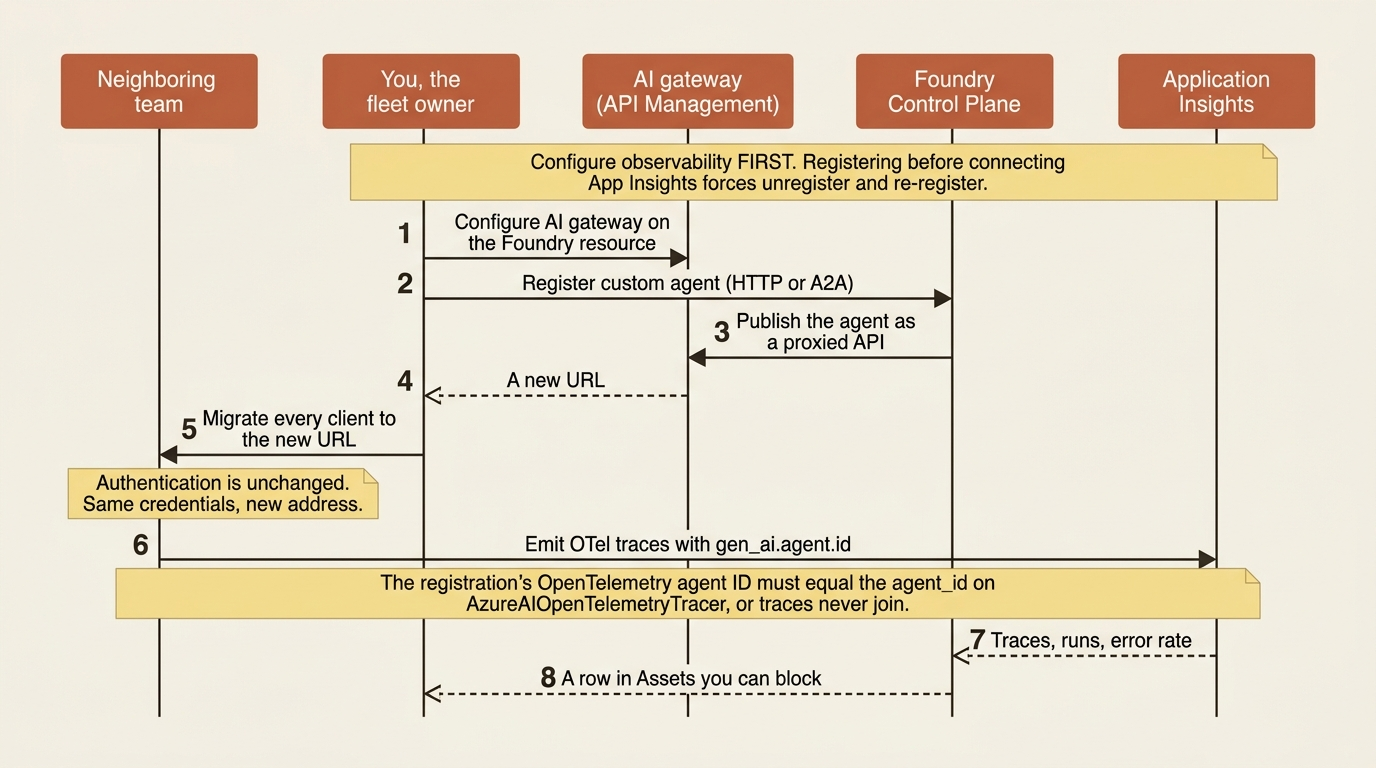
For a LangGraph agent running on its own compute, registration has to join up with its tracer. The OpenTelemetry agent ID field on the registration wizard has to match the agent_id configured on AzureAIOpenTelemetryTracer, and the tracer must point at the project endpoint where you are registering:
tracer = AzureAIOpenTelemetryTracer(
    connection_string=application_insights_connection_string,
    agent_id="contract-analytics",       # must equal the registration's OpenTelemetry agent ID
    enable_content_recording=False,      # set it explicitly, per environment
)
Without that match, the agent registers and its traces never join to it, because Foundry finds traces by the gen_ai.agent.id attribute on create_agent spans and falls back to the agent name when the field is blank.
Gotcha: if you connect Application Insights to the project after registering a custom agent, the registration does not pick it up. The documented fix is to unregister the agent and register it again. Configure observability first, then register.
In production: the fleet view is only as good as its inventory, and the inventory is the one part of this layer that no automation supplies. Automatic discovery covers Foundry, SRE Agent, and Logic Apps inside one subscription. Everything else is a person doing a client migration, and nothing anywhere alerts you that a team shipped something. Make the AI gateway and the registration step part of the deployment checklist for any agent that touches a Foundry model, because catching it at deploy time is cheap and catching it at audit time is not.
Agent 365: the tenant-side registry
Agent 365 is the other half of the answer, and it is not a bigger version of the first half. It inventories identities across a tenant rather than resources across a subscription.
Agent 365 stands on five pillars. Registry is a complete inventory of agents in the organization, including agents built in Foundry and Copilot Studio, agents registered by administrators, and shadow agents discovered in the tenant, with ownership details for governance and attestation. Access control brings agents under Entra identity-based authorization with RBAC, ABAC, and risk-based Conditional Access. Visualization maps connections between agents, people, and data. Interoperability gives agents access to Microsoft 365 apps and organizational data. Security covers Defender for threat detection and Purview for data protection on agent activity.
Because agents are Entra identities under this model, the governance machinery you already run applies to them: periodic access reviews, lifecycle policies for provisioning and deprovisioning, and owner attestation for high-impact agents. Agent identity is the piece of an agent platform with the widest gap between what a vendor supplies and what a team would otherwise build. This is what that gap buys at fleet scale: an access review cycle over agents, written by nobody on your team.
Foundry connects to Agent 365 two ways. Registry sync places Foundry agents in the Agent 365 inventory without manual registration. Autopilots are the deeper integration, and they get their own section below.
Support is not uniform by agent type:
| Foundry agent type | Registry sync | Autopilot publishing | Activity data collection |
|---|---|---|---|
| Prompt agent | Yes | No | Yes |
| Hosted agent | Yes | Yes | Only through the Agent 365 SDK |
The table above maps each Foundry agent type to what it supports in Agent 365.
- Prompt agent: registry sync yes, autopilot publishing no, activity data collection yes.
- Hosted agent: registry sync yes, autopilot publishing yes, activity data collection only through the Agent 365 SDK.
Gotcha: a hosted agent's activity data does not flow to Agent 365 just because the resource is enabled. Hosted agents require manual configuration, packing and configuring the Agent 365 SDK alongside your agent code, and without it no data flows. The agent's Entra agent identity also needs the Agent365.Observability.OtelWrite app role granted against the Agent365Observability service principal in your tenant, which takes Global Administrator or Application Administrator and one Graph call:
az rest --method POST \
  --uri "https://graph.microsoft.com/v1.0/servicePrincipals/<AGENT_PRINCIPAL_ID>/appRoleAssignments" \
  --body '{
    "principalId": "<AGENT_PRINCIPAL_ID>",
    "resourceId": "<AGENT365_OBSERVABILITY_SP_ID>",
    "appRoleId": "8f71190c-00c8-461d-a63b-f74abde9ba52"
  }'
The app role ID is a well-known fixed identifier rather than a per-tenant value, and <AGENT_PRINCIPAL_ID> is the agent identity object ID from the agent resource's JSON view, which is a different value from the application client ID. The distinction between the two IDs is the single most common failure in Entra role assignments against agents, and it fails silently.
Two enablement gates sit in front of all of it. Your tenant needs at least one Microsoft 365 Copilot license and enrollment in the Frontier preview program, and a global administrator has to enable Agent 365 in the Microsoft 365 admin center and accept the terms of service [PERISHABLE: preview program, checked September 2026]. Until both are done, no data flows regardless of what the Azure Resource Manager properties on the Foundry resource say.
Those properties are worth knowing, because the default is opt-out rather than opt-in. a365LoggingEnabled is the boolean you control and a365Status is the read-only result after licensing and consent checks, reading Enabled, Disabled, or NotLicensed. When Agent 365 is enabled for the tenant, Foundry resources in the same Azure tenant have a365LoggingEnabled set to true by default, and organizations must explicitly opt out per resource:
az resource update \
  --resource-group <resource-group> \
  --name <foundry-resource-name> \
  --resource-type Microsoft.CognitiveServices/accounts \
  --api-version 2026-03-15-preview \
  --set properties.a365LoggingEnabled=false
The setting applies at the Foundry resource level, every project and every prompt agent inside it inherits the same value, and there is no per-project or per-agent override. Azure Policy is the documented way to deny data collection across selected subscriptions or management groups.
In production: the reason to care about that flag is residency rather than volume. Foundry's data residency follows the Azure region you chose for the resource. Agent 365's follows the storage location of the Entra tenant. Agent activity data flowing from one into the other crosses from a region-based residency model into a tenant-based one, and opting individual resources out is the documented control for workloads where that crossing is not allowed. Note the one exception that inverts the control: explicit Agent 365 SDK configuration in a hosted agent overrides logging disablement at the resource level. Turning the resource off does not stop a container that was coded to send.
The agent that cannot be governed individually
Conditional Access, Identity Protection, and lifecycle governance attach to an agent identity. An agent that does not have one of its own inherits whatever policy covers the identity it borrows.
A new-model Foundry agent gets a unique Entra agent blueprint and agent identity at creation, with a non-null instance_identity. A legacy agent has a null one and uses the shared project identity, and there is no in-place upgrade; the documented path is to recreate the agent from the same definition.
Two facts turn that into a migration argument rather than a piece of trivia. First, the controls are identity-scoped: in the Entra admin center under Agent ID you get an inventory of every agent identity in the tenant and can apply Conditional Access policies, Identity Protection monitoring, network access controls, and governance for expiration, owners, and sponsors. Conditional Access can also be applied at the blueprint level to every agent of a type at once.
Second, and this is the sharp one: Foundry does not create additional Agent 365 registrations for project endpoints or project identities. An agent reached through the shared project endpoint under the shared project identity produces no registry row of its own. It cannot be inventoried individually, attested individually, or access-reviewed individually, and any Conditional Access policy you write against the identity it borrows lands on every agent in the project at once. The same page states plainly that project endpoints are not for production.
Those two facts are the whole argument for recreating a legacy agent. It is not about a nicer identity model. It is that the tenant-wide governance layer has no object to point at, and an agent that no policy can name is an agent no policy covers.
Autopilots: a blueprint, an instance, and an account with a calendar
An autopilot is defined by identity rather than capability, and what you actually ship is a blueprint that other people hire from. The product is an org chart as much as it is a feature.
Every Foundry agent has an Entra agent identity from creation. An autopilot also has an Entra agent user account, which gives it an email address, a calendar, OneDrive, Teams presence, and a place in the organization chart, and lets it perform Microsoft 365 actions as itself. The distinction is binary. An agent either has an agent user account or it does not.
Why that matters is a permissions problem rather than an ergonomics one. Without an agent user account, an agent can take Microsoft 365 actions only on behalf of a signed-in user, which breaks in two situations: an event-triggered agent has no user to act for, and in a group chat the agent has to guess whose permissions apply, attributing actions to someone who did not ask and potentially exposing members to content they cannot access.
Foundry names three agent types, and only one is an autopilot:
| Type | Identity | What it can do |
|---|---|---|
| Assistive | Agent identity with signed-in user context | Acts on behalf of a user, inside that user's permissions |
| Background service | Agent identity | Acts as itself through app-only permissions, and cannot perform Microsoft 365 actions |
| Autopilot | Agent identity and agent user account | Acts as itself in Microsoft 365, including in group settings |
The table above maps each agent type to the identity it carries and what that identity lets it do.
- Assistive: agent identity with signed-in user context, acts on behalf of a user inside that user's permissions.
- Background service: agent identity only, acts as itself through app-only permissions, and cannot perform Microsoft 365 actions.
- Autopilot: agent identity plus an agent user account, acts as itself in Microsoft 365 including in group settings.
Most agents anyone builds on Foundry are background service agents. Only Foundry hosted agents can be published as autopilot blueprints. Prompt agents sync to the registry and cannot become autopilots, which is one more argument for taking the hosted path early.
You build a blueprint, not an autopilot
The reason is drift. Building the agent directly ties it to one team, because the access that makes it useful is the access that locks it down. Grant your team's SharePoint site and Azure DevOps project to one agent and nobody else can reuse it, so they build their own. Ten teams later the organization has ten near-identical agents governed separately, their controls drift apart, and a compromised tool has to be chased down one agent at a time.
A blueprint defines what the agent knows how to do and the platform infrastructure it needs, and never grants access to any team's business resources. Each instance created from it gets its own agent identity, its own agent user account, and its own team-scoped access. Configure policy once and every instance inherits it. Update the blueprint and every instance updates. Block the blueprint and every instance stops, because every instance token chains back to the blueprint's credential.
Four roles, and the two gates between them
The lifecycle runs at three layers at once, and each layer has an owner:
| Role | Layer | The decision they own |
|---|---|---|
| Azure administrator | Platform | What the platform runs on, and who can build on it |
| Developer | Blueprint | The role and capabilities of the blueprint, and the conditions it was built and tested for |
| Tenant administrator | Fleet | Whether the autopilot can operate in this tenant, and under what policy |
| Manager | Instance | The employment of the instance, from hire to offboard |
The table above maps each role to the layer it operates at and the decision it owns.
- Azure administrator: the platform layer, owning what the platform runs on and who can build on it.
- Developer: the blueprint layer, owning the role and capabilities of the blueprint and the conditions it was built and tested for.
- Tenant administrator: the fleet layer, owning whether the autopilot can operate in this tenant and under what policy.
- Manager: the instance layer, owning the employment of the instance from hire to offboard.
Publishing declares permission scopes and two ceilings, who can hire the autopilot and the widest access any manager can later grant, and grants nothing. Approval is one gate with three actions: the tenant administrator reviews the blueprint, grants admin consent to its declared scopes, approves it, and selects who can hire it. Consent and hirer selection are separate decisions, and an administrator can approve a blueprint while consenting to only part of what it asked for.
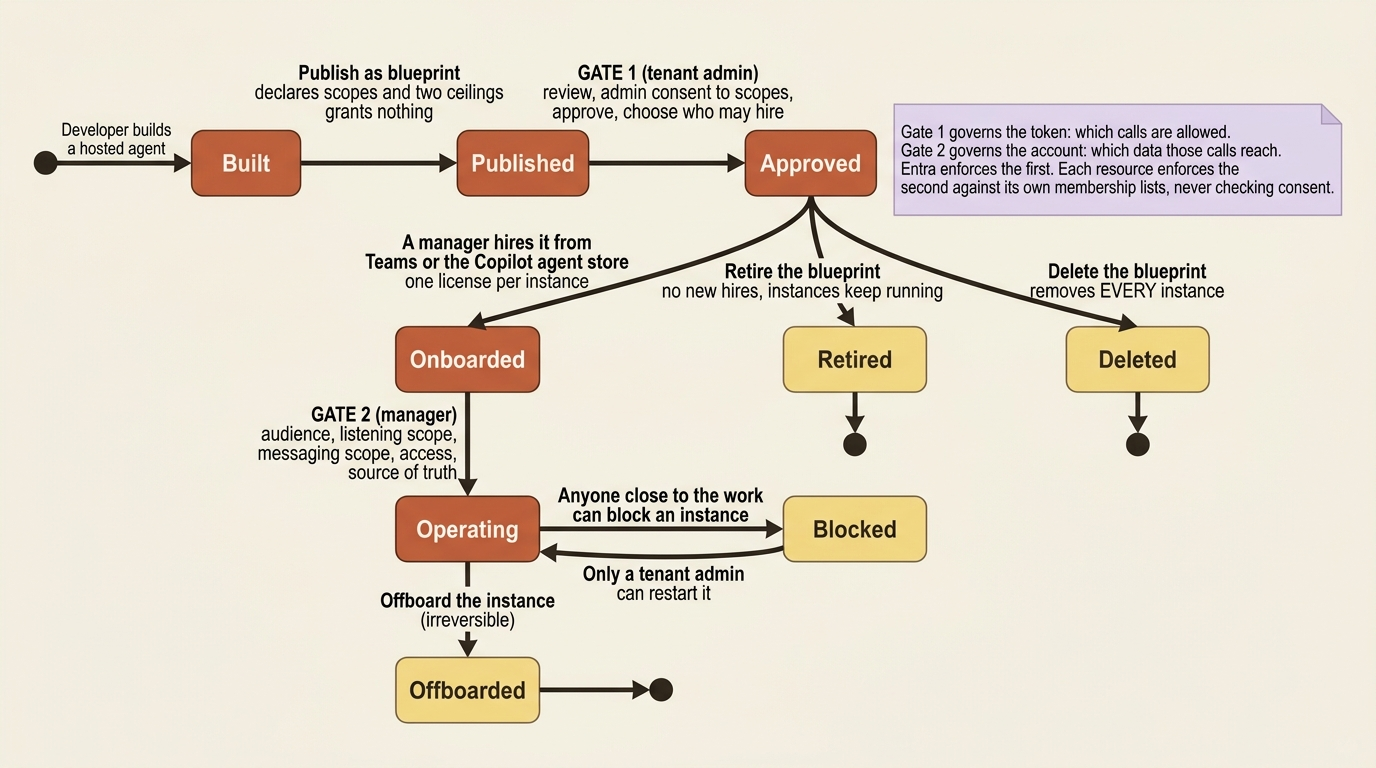
One sentence carries the whole lifecycle, and it is about two gates that look like one. Scopes and consent govern the token, which determines what kinds of calls the autopilot is allowed to make. Group memberships and roles govern the account, which determines what data those calls reach. Microsoft Entra ID enforces the first gate, and each resource enforces the second against its own membership lists, never checking consent. An autopilot can hold every scope it needs and reach no data at all. For a person, IT closes both gates before their first day. For an autopilot both gates are new at hire, which is why onboarding includes work that feels like it should already be done.
Hiring happens from the Microsoft Teams app store or the Microsoft 365 Copilot agent store, under Agents for your team, and creates the instance's agent identity and agent user account. The person who hires it becomes its manager. Onboarding is where the manager sets five things: audience, listening scope, messaging scope, access, and source of truth. Anyone outside the configured audience is blocked by default, before the autopilot calls a model.
The publish call itself is a Microsoft 365 API, and five fields are what separate an autopilot from an agent published to the Teams and Copilot stores. Read the marked lines against the numbered notes below them:
{
  "agentDisplayName": "Research Desk",
  "publishAsAutopilot": true,                              // ①
  "publishScope": "Tenant",                                // ②
  "useAgenticUserTemplate": true,                          // ③
  "agenticUserTemplate": {
    "Id": "digitalWorkerTemplate",
    "File": "agenticUserTemplateManifest.json",
    "SchemaVersion": "0.1.0-preview",
    "AgentIdentityBlueprintId": "<blueprint-client-id>",   // ④
    "CommunicationProtocol": "activityProtocol"            // ⑤
  }
}
① This flag is the fork in the road. With it absent the same call publishes an ordinary agent to the Teams and Copilot stores, and nothing downstream in the lifecycle applies.
② The scope is what puts a tenant administrator in the approval path, which is the first of this section's two gates.
③ This is the field that provisions an agent user account per instance, so it is what turns each hire into a principal with a mailbox and a manager rather than another caller of one shared deployment.
④ The blueprint client ID is the credential every instance token chains back to, which is the mechanism behind blocking the blueprint stopping every instance at once.
⑤ The communication protocol names the channel the autopilot is reached on, so this payload publishes to the Microsoft 365 message surface rather than to the HTTP endpoints the rest of the series has been calling.
Note: The full extracted listing at code/azure-foundry-hyperscaler/part-16-the-fleet-control-plane/listings/01-autopilot-publish-payload.json is the same body as strict JSON, with the teaching markers removed.
The endpoint is POST {project-endpoint}/agents/<agent-name>/microsoft365/publish?api-version=2025-11-15-preview with a token for the https://ai.azure.com audience. Each publish consumes a version number, and republishing the same one fails with version already exists.
Gotcha: each autopilot instance consumes one license, because each instance creates an agent user account, and eligible tenants get a twenty-five seat Frontier preview subscription [PERISHABLE: preview seat count, checked September 2026]. Check the seat count before you start. The documented failure mode is that the build completes and then hiring fails, which is the expensive ordering.
Two more lifecycle facts change how you plan a rollout. Blocking is deliberately asymmetric: anyone close enough to the work to see a problem can block an instance, and only a tenant administrator can start it again. And the two blueprint exits are not equivalent. Retire stops new hires and leaves current instances running. Delete removes every instance created from the blueprint, and offboarding an instance is equally irreversible.
Do this today
- Connect Application Insights to every project before you open the fleet view. Metrics are never backfilled, so an unconnected project shows four empty columns forever on the runs that already happened. Several projects can share one Application Insights resource.
- Check who has Reader, and at what scope, before anyone screenshots the fleet view as evidence. A compliance answer needs subscription-scoped Reader plus Log Analytics Reader on the Application Insights resources and Cost Management Reader for the cost columns.
- Put registration on the deployment checklist for any agent that touches a Foundry model. Configure the AI gateway and observability first, then register, and budget for the client migration to the new API Management URL. Registering after connecting Application Insights means unregistering and starting over.
- Scan the Entra ID column on every row. An empty value, or an agent reached through the project endpoint, means no individual registry row, no individual access review, and no Conditional Access policy that can name it. Recreating the agent from its own definition is the documented fix.
- Write down which tenancy model each agent uses. One multiplexed hosted agent with per-user isolation and a hired autopilot instance per team are both defensible, and no pane will ever ask you to make the choice explicitly. The next architect to read your design will assume the option you did not write down was never considered.
What transferred, and what did not
Foundry takes over the inventory and the governance surface, and this is the layer where it is furthest ahead of its peers. Automatic discovery of agents across every project in a subscription and across four platforms. A permission-aware asset table joining agent to identity to cost to error rate. Lifecycle operations with an explicit distinction between deallocating compute and revoking reachability. Fleet-wide guardrail policy implemented on Azure Policy with bulk remediation. Defender and Purview signals in the same pane. A proxy-based registration path for agents that were never yours. A tenant-wide identity registry with access reviews and owner attestation. An autopilot model that turns one published artifact into many separately governed instances with real Entra user accounts. A team that tried to build the identity registry alone would be building directory software.
What stays yours is a shorter list and a harder one. The inventory, because discovery covers one subscription and four platforms, and everything else is a person noticing. The registration decision, and the client migration it forces, which is why shadow agents persist. Which identity every agent holds, because an agent on a shared project identity is an agent no tenant-level policy can name. The scope and the assignee on every guardrail policy, app role, and consent grant, which this layer multiplied rather than reduced. The reconciliation between the two control planes, since nothing checks that your Azure inventory and your tenant registry describe the same fleet. And the tenancy model for each agent, multiplexed service or hired instance, which no pane will ever prompt you to decide.
The exit question has an unusual answer here, because most of this layer is not portable and most of it is also not lock-in. Agent identities are Entra service principals, guardrail policies are Azure Policy assignments, and cost and trace data sits in your own Application Insights and Log Analytics workspaces. All three keep working if the agent moves. What does not travel is the aggregation: cross-project discovery, the joined asset table, the registration proxy, the registry sync, and the autopilot blueprint model are Foundry and Microsoft 365 constructs with no equivalent to export to. You would not lose data by leaving. You would lose the single pane, and rebuilding one over three clouds is a program rather than a project.
Which leaves the uncomfortable part. A governed fleet is inventoried and visible, and nothing in this layer made a single agent harder to attack. Every control here answers the question of who is allowed to operate an agent. None of them answer the question of what happens when a covered company's press release contains a sentence written for the model rather than for the reader.