Microsoft Foundry Multi-Agent: The Protocol Is a Weekend. The Permissions Are the Project.
The honest multi-agent chapter is mostly an argument against multi-agent: A2A hands you transport and hands you nothing else, and the bill arrives as one complete harness per worker.
Foundry gives you three multi-agent topologies. One retires in ten weeks, one is the default nobody reaches for, and the middle one is a protocol that moves messages and inherits nothing.
The protocol is a weekend of work. The forty sets of role assignments behind it are the project.
In this article: You will learn how to pick a multi-agent topology on Microsoft Foundry using a rule about ownership rather than architecture, how to enable A2A in both directions without silently shipping on a preview protocol version, and what the full outbound authentication matrix actually decides. Then the part the pattern surveys skip: every separately deployed agent gets its own identity, its own role assignments, its own toolbox binding, its own memory scope, and its own guardrail policy, inheriting none of yours.
A weekly research brief covering forty topics is forty research tasks stacked into one context window, one model, and one session. The failure mode is not subtle, and it is not loud either. Somewhere around topic twenty-eight, the early filings stop being visible to the model writing the conclusion, and the brief gets quietly worse in a way an evaluation gate will catch and a trace will not explain.
Splitting the work is the obvious fix. It is also where most agent architectures go wrong, because the split gets designed at the level of boxes and arrows and paid for at the level of role assignments. Drawing the diagram takes an afternoon. Wiring the protocol takes a weekend. Provisioning forty harnesses that nobody can audit six months later takes the rest of the quarter.
Microsoft Foundry multi-agent offers three topologies. One of them is the default that teams skip, one is a protocol with a generally available version and a preview default that is not the one you want, and one stops existing on December 1, 2026. This article walks all three, then spends most of its length on the sentence that should govern the design: nothing is inherited.
Three topologies, and the rule that picks one
Pick by what needs to be separate, not by what looks distributed. Only one of these three adds a deployment boundary, and the boundary is the entire cost.
| Topology | What it is | Reach for it when | What it costs |
|---|---|---|---|
| In-process subagents | Your framework's own orchestration inside one container | Default, until something forces a boundary | Nothing new. One identity, one session, one set of grants |
| A2A | Separately deployed agents calling each other over a protocol | A worker needs its own lifecycle, release cadence, scaling, permission set, or team, or lives outside Foundry | A complete harness per agent, none of it inherited |
| Workflows | Portal-authored graph of nodes, edges, and branching | Never, for new work | Retirement on December 1, 2026, and a migration |
The table above compares the three multi-agent shapes Foundry supports, what each one is, when it is the right reach, and what you pay for it.
- Topology: in-process subagents. What it is: your framework's own orchestration inside one container. Reach for it when: this is the default, until something forces a boundary. What it costs: nothing new, one identity, one session, one set of grants.
- Topology: A2A. What it is: separately deployed agents calling each other over a protocol. Reach for it when: a worker needs its own lifecycle, release cadence, scaling, permission set, or team, or lives outside Foundry. What it costs: a complete harness per agent, none of it inherited.
- Topology: workflows. What it is: a portal-authored graph of nodes, edges, and branching. Reach for it when: never, for new work. What it costs: retirement on December 1, 2026, and a migration.
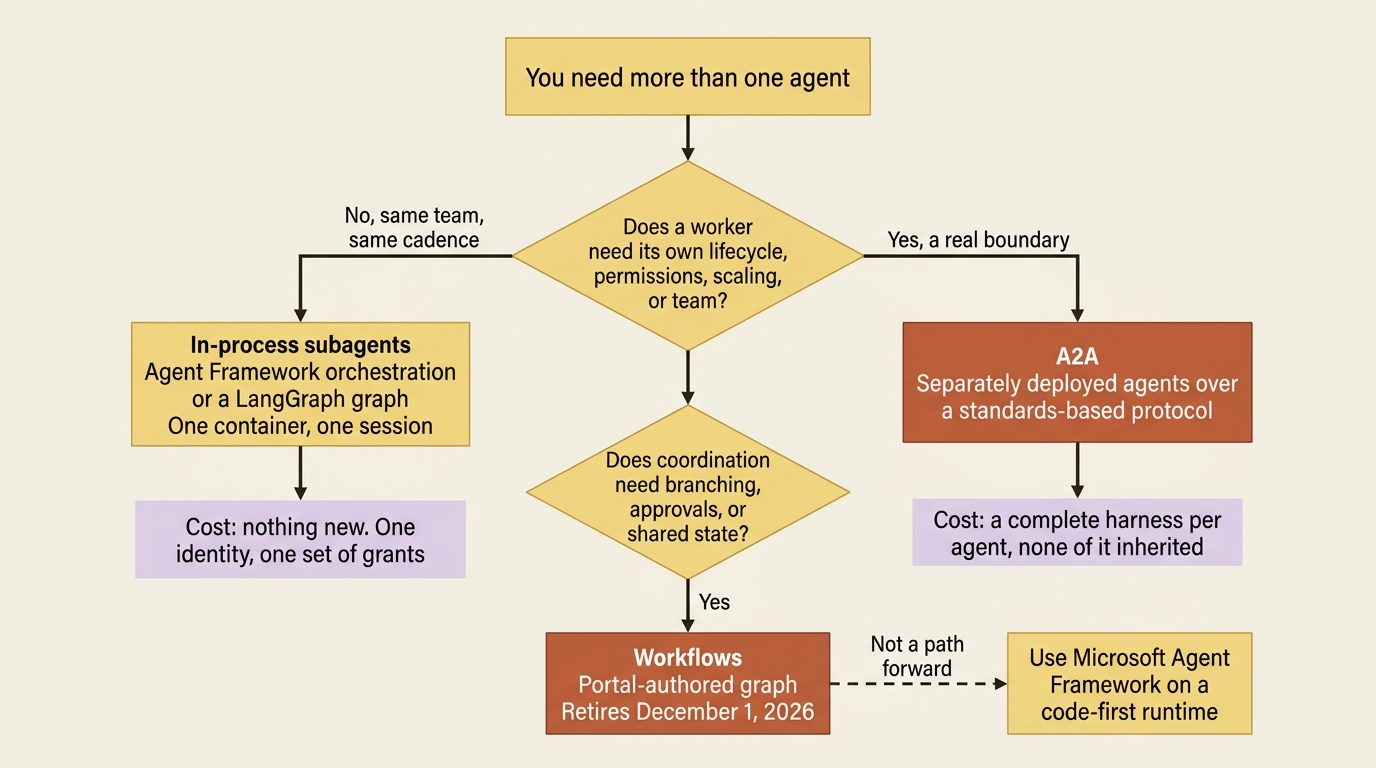
The rule that picks one is a question about ownership rather than architecture. If the same team ships every piece on the same cadence with the same permissions, a boundary buys you latency and role assignments and nothing else. If a topic-research worker needs to reach the research archive under credentials the orchestrator must never hold, the boundary is the point, and you should pay for it deliberately.
One piece of vocabulary needs clearing first. The classic Agents API had a Connected Agents tool, and it is gone. The migration table lists Connected Agents as public preview in classic Foundry and No in the new Foundry Agent Service, with A2A named as the recommendation. If you find a tutorial using agent.as_tool, you are reading a page about a service that no longer exists.
In process first, and why it stays the default
The cheapest multi-agent system is the one that never crosses a process boundary, and Foundry's own documentation sends you to your framework for it rather than to a platform feature.
The workflow concept page states that hosted agents are not supported in the workflow designer, and that to coordinate tasks, call other agents, or orchestrate work within a hosted agent you use Microsoft Agent Framework workflows or another framework that supports workflow capabilities from your hosted agent code. The routines page says the same thing from the other side: the agent a routine invokes can implement its own internal workflow using Microsoft Agent Framework or LangGraph.
Read that as the platform's actual position. In-container orchestration is not a Foundry feature, because it does not need to be. Your subagents share the container's session, the container's agent identity, the container's toolbox binding, and the container's trace. Everything the rest of this article describes as work is work you do not do.
The honest limit is the context window and the blast radius. Forty research passes in one process still share one context, and a tool grant any subagent needs is a grant the whole container holds. When either of those becomes the problem, you have found your boundary.
Incoming A2A: a card, a version, and a default that is not the one you want
Exposing a Foundry agent over A2A is two fields and a role assignment. The one thing that will bite you is the protocol version a client gets when it does not ask for one.
Foundry Agent Service supports generally available A2A protocol version 1.0 and preview version 0.3, and new integrations should target 1.0. The page carries the standard marked-items preview include while declaring v1.0 generally available, so read the per-item labels rather than the banner across the top.
Enabling it requires two things: an agent card describing what your agent does, and the A2A protocol turned on for the agent endpoint. For a prompt agent, both go in one call.
patched_agent = project.agents.update_details(
    agent_name="topic-worker",  # ①
    agent_endpoint=AgentEndpointConfig(
        protocol_configuration=ProtocolConfiguration(
            responses=ResponsesProtocolConfiguration(),  # ②
            a2a=A2AProtocolConfiguration(),  # ③
        ),
    ),
    agent_card=AgentCard(
        version="1.0",  # ④
        description="Researches one topic's filings, news, and public disclosures.",
        skills=[AgentCardSkill(
            id="topic-research", name="Topic research",
            description="Returns dated findings for one topic.",  # ⑤
        )],
    ),
)
① update_details patches an agent that already exists, so enabling A2A is a change to a deployed agent rather than a new creation call.
② The responses protocol stays declared because incoming A2A requires it; dropping it here disables the A2A endpoint along with it.
③ This single empty configuration object is the entire switch that turns the A2A endpoint on for this agent.
④ This version is the agent card's own version string, not the A2A protocol version a client negotiates, which are two different numbers that happen to read the same here.
⑤ The skill description is what a calling agent matches against when it decides whether this worker is the right one, so it names the output, not the agent.
Note: The full extracted listing at code/azure-foundry-hyperscaler/part-15-multi-agent-a2a-and-nothing-inherited/listings/01-enable-incoming-a2a.py shows the imports and the project client construction elided here.
The card is the contract. It is what a calling agent reads to decide whether to call you, and a description that says "helpful assistant" is a description that gets your agent called for the wrong things. Install azure-ai-projects>=2.5.0 for the models above, and note this is not yet configurable in the Foundry portal, so REST or the SDK is the path.
A hosted agent declares the same two things in azure.yaml instead.
    topic-worker:
        host: azure.ai.agent
        kind: hosted  # ①
        uses:
            - ai-project
            - worker-tools  # ②
        agentCard:  # ③
            description: Researches one topic's filings, news, and public disclosures.
            version: "1.0"
            skills:
                - id: topic-research
                  name: Topic research
                  description: Returns dated findings for one topic.
        agentEndpoint:
            protocols:
                - responses
                - a2a  # ④
            authorizationSchemes:
                - type: Entra  # ⑤
① kind: hosted is what makes this a container the deployment builds and runs, which is why the card and the endpoint are declared in the file rather than patched in over the SDK.
② The uses list is this worker's own toolbox binding, separate from the orchestrator's, and it is the line that keeps the research archive out of the worker's reach.
③ The card lives beside the service definition, so the contract a caller reads ships and versions with the code that honors it.
④ Adding a2a beside responses brings the A2A endpoint up with the deployment; responses is a prerequisite rather than a second option.
⑤ Entra is the only authorization scheme the A2A endpoint accepts, so this line is a declaration of the platform rule rather than a choice.
Note: The full extracted listing at
code/azure-foundry-hyperscaler/part-15-multi-agent-a2a-and-nothing-inherited/listings/02-worker-azure.yaml
shows the surrounding azure.yaml document elided here.
Gotcha: the how-to page for incoming A2A is written for prompt agents, down to a prerequisite reading "a deployed prompt agent." Meanwhile the hosted-agents concept page lists an A2A endpoint at {project_endpoint}/agents/{name}/endpoint/protocols/a2a among the endpoints every hosted agent gets, and the azure.yaml reference documents a2a as a hosted-agent protocol [CONTESTED: agents-how-to-enable-agent-to-agent-endpoint.md against agents-concepts-hosted-agents.md and agents-concepts-azure-yaml-reference.md]. The requirement the pages agree on is the responses protocol, not the agent kind. Declare A2A in azure.yaml for a hosted agent, and read the prompt-agent page for the card semantics.
The version default costs someone a day
Foundry serves both protocol versions on the same base path, and a client selects one of three ways: by fetching the version-specific agent card at …/agentCard/v1.0 or …/agentCard/v0.3 and letting its SDK negotiate from the card's protocolVersion field, by setting an A2A-Version: 1.0 header, or by appending ?a2a-version=1.0 to the URL. Supply both a header and a query string with different values and Foundry returns HTTP 400 with the version-ambiguous problem type.
Gotcha: a request specifying no version at all gets preview v0.3, in accordance with the A2A specification. Production integrations have to select v1.0 explicitly, through the header, the query string, or a client that fetched the v1.0 card. Nothing fails loudly when this goes wrong. You simply run production on a preview protocol version the docs say is not recommended for production workloads.
Three more constraints decide whether A2A fits at all, and they are all on the limitations list. A2A v1.0 on Foundry's incoming endpoint is JSONRPC only, with HTTP+JSON available on v0.3 and gRPC on neither. Only the text modality is supported, so file data does not cross the boundary. And streaming responses are not supported, which means every A2A call is a wait for a complete answer.
Retention is generous and worth writing down. Foundry retains A2A tasks and contexts for 60 days from their most recent write, and each new write resets the window.
Who is allowed to call, and how an outside client does it
Every A2A URL on Foundry requires Microsoft Entra ID, the agent card included, and the role granting it is the least-privilege one most teams skip past.
Anonymous access to the agent card is not supported, key-based authentication for incoming requests is not supported, and the calling identity needs the Foundry Agent Consumer role or another Foundry role granting endpoint access. Two patterns are supported on the way in: on-behalf-of the end user, where the caller passes through the user's identity and your agent can scope actions to that user's permissions, and service identity, where the caller authenticates as the agent identity, a service principal, or a managed identity.
Scope is the decision that matters, and the page offers exactly two.
az role assignment create \
  --assignee-object-id "<calling-principal-object-id>" \
  --assignee-principal-type "ServicePrincipal" \
  --role "eed3b665-ab3a-47b6-8f48-c9382fb1dad6" \
  --scope "<target-project-or-agent-scope>"
Assign at the project scope and the caller may call every agent endpoint in the project. Assign at the agent scope and it may call that one. Use the identity's Entra object (principal) ID, not its application (client) ID. Confusing those two is the single most common failed role assignment in this whole area.
For a new-model Foundry agent, the identity to grant is the one in the agent's instance_identity, unique from creation and unchanged by publishing. For a legacy Agent Application it is the shared project identity before publishing and the distinct application identity after.
Gotcha: the A2A authentication concept page still teaches the legacy lifecycle as if it were current, stating that before publishing all agents in a project share a common identity and after publishing each gets a unique one [CONTESTED: agents-concepts-agent-to-agent-authentication.md against agents-how-to-enable-agent-to-agent-endpoint.md and agents-how-to-migrate-agent-applications.md]. The discriminator settles it: a non-null instance_identity means the agent has its own identity from creation, and no publish step is involved. Check the agent object before you write the role assignment, because granting the project identity when the agent has its own produces a 403 whose message names permissions and not principals.
A caller outside Foundry uses the open-source Python A2A SDK, with two adjustments. The agent card requires a bearer token, and it lives at a custom path rather than the protocol's default .well-known/agent-card.json.
token = DefaultAzureCredential().get_token("https://ai.azure.com/.default").token  # ①

async with httpx.AsyncClient(headers={"Authorization": f"Bearer {token}"}) as httpx_client:  # ②
    resolver = A2ACardResolver(
        httpx_client=httpx_client,
        base_url=A2A_BASE_URL,          # …/agents/{agent}/endpoint/protocols/a2a  ③
        agent_card_path="agentCard/v1.0",  # ④
    )
    agent_card = await resolver.get_agent_card()
    client = await create_client(agent=agent_card, client_config=ClientConfig(
        streaming=False, httpx_client=httpx_client))  # ⑤
① The token is acquired for the https://ai.azure.com/.default scope, the same scope the rest of the desk uses, because Foundry authenticates the A2A endpoint through Entra rather than an API key.
② The bearer header is attached to the shared httpx client rather than to one request, so the card fetch carries it too; anonymous card access is not supported.
③ The base URL is the agent's A2A protocol path, and everything else in the listing hangs off it.
④ The custom card path is the line that pins the client to v1.0, replacing the protocol's default .well-known/agent-card.json location.
⑤ The same httpx client is handed to the A2A client so the credential survives into the calls, and streaming=False matches the only mode the endpoint supports.
Note: The full extracted listing at code/azure-foundry-hyperscaler/part-15-multi-agent-a2a-and-nothing-inherited/listings/03-external-a2a-client.py shows the imports, the base-URL construction, and the message send elided here.
The pinned versions on that page are a2a-sdk==1.0.2, azure-identity==1.25.3, and httpx==0.28.1. Setting streaming=False is not a preference; it is the only option the endpoint supports.
Calling out, and the authentication matrix
Outbound A2A is a project connection plus a tool, and the connection's --auth-type is the most consequential flag in this article, because it decides whose permissions the remote agent sees.
A connection stores the remote endpoint and the credentials, and a tool references that connection from an agent. Creating the connection is one command with six documented authentication variants.
--auth-type |
Additional flags | User context persists |
|---|---|---|
none |
none | No |
custom-keys |
--custom-key "Header=Value", repeatable |
No |
oauth2 |
--authorization-url, --token-url, --client-id, --client-secret, --scopes |
Yes |
user-entra-token |
--audience <entra-audience> |
Yes |
project-managed-identity |
--audience <entra-audience>, optional |
No |
agentic-identity |
--audience <entra-audience> |
No |
The table above lists the six outbound authentication modes, the extra flags each one takes, and whether the end user's identity survives the hop.
- Auth type:
none. Additional flags: none. User context persists: no. - Auth type:
custom-keys. Additional flags:--custom-key "Header=Value", repeatable. User context persists: no. - Auth type:
oauth2. Additional flags:--authorization-url,--token-url,--client-id,--client-secret,--scopes. User context persists: yes. - Auth type:
user-entra-token. Additional flags:--audience <entra-audience>. User context persists: yes. - Auth type:
project-managed-identity. Additional flags:--audience <entra-audience>, optional. User context persists: no. - Auth type:
agentic-identity. Additional flags:--audience <entra-audience>. User context persists: no.
For a Foundry agent on the other end, the docs give one answer and no ambiguity: use --auth-type agentic-identity with --audience https://ai.azure.com, and set the target to the remote agent's A2A base path.
azd ai connection create topic-worker-conn \
  --kind remote-a2a \
  --target "https://{account}.services.ai.azure.com/api/projects/{project}/agents/topic-worker/endpoint/protocols/a2a" \
  --auth-type agentic-identity \
  --audience "https://ai.azure.com"
Do not set an agent card path on that connection. Foundry resolves the default card path and negotiates the protocol version for you when the target is another Foundry agent.
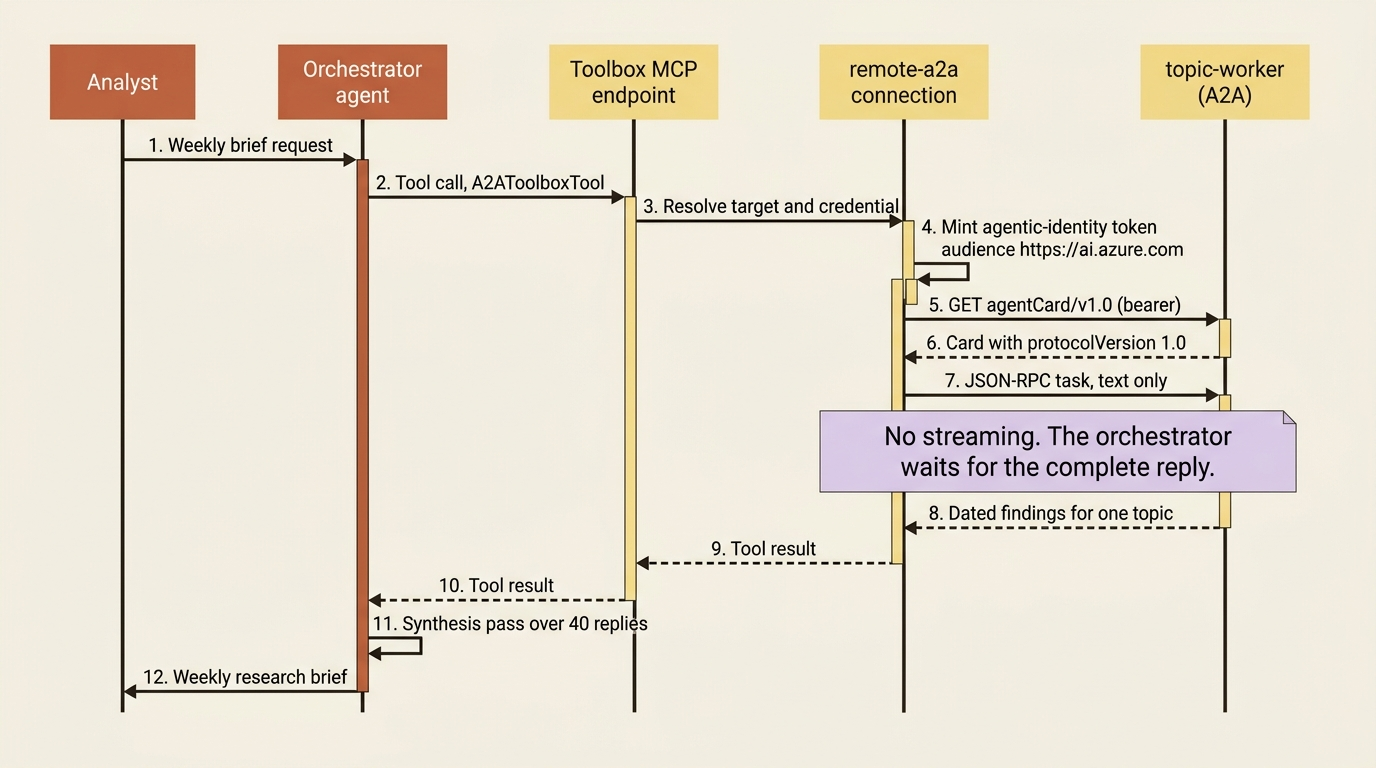
The three identity-based options are the access-control decision. agentic-identity means the remote agent sees the calling agent. project-managed-identity means it sees the project, one identity shared by every agent in it. user-entra-token passes the caller's own token, so the remote agent can scope actions to that user's permissions. Picking project-managed-identity because it was easier to grant is how an agent ends up holding permissions it was never designed to have.
OAuth identity passthrough earns a paragraph because of a role requirement that is easy to miss. Users interacting with your agent need the Foundry Agent Consumer role on the project or agent hosting the calling agent, and if the remote endpoint is another Foundry agent, they also need access to the remote target. Two grants per user per hop, and the symptom of getting it wrong is a consent flow that completes and tool calls that then fail.
One more field exists for non-Foundry endpoints. Whichever authentication method you choose applies to tool calls only by default, so the agent card fetch goes out anonymously. For endpoints that protect the card path, set send_credentials_for_agent_card to true in the tool definition.
{
  "type": "a2a",
  "a2a_version": "1.0",
  "base_url": "https://<a2a-endpoint>",
  "project_connection_id": "<connection-id>",
  "send_credentials_for_agent_card": true
}
It defaults to false, credentials go only to the host in base_url, and only over HTTPS. The docs are explicit that you enable it only when the endpoint publisher confirms the card path needs it, because sending a shared secret where it is not required widens its exposure.
Attaching the tool has two shapes, and the recommended one is not the obvious one. You can construct A2ATool and pass it straight into a PromptAgentDefinition, or you can put A2AToolboxTool into a toolbox and attach the toolbox to your agent as an MCP tool. The toolbox route is what the docs recommend and what hosted agents use.
toolbox = project.toolboxes.create_version(
    name="desk-a2a",
    description="Per-topic worker agents, reached over A2A",
    tools=[A2AToolboxTool(
        a2a_version=A2AProtocolVersion.V1_0,
        project_connection_id=a2a_connection.id,
    )],
)
The hosted agent then connects to the toolbox's MCP endpoint through FoundryToolbox in Python or AddFoundryToolboxes in .NET, exactly as it reaches every other managed tool. Remember that detail, because the next section turns on it.
Gotcha: the Azure Developer CLI toolbox flow creates the preview a2a_preview tool for A2A v0.3 and does not emit a2a_version at all. Use it only for existing preview integrations. To get the generally available a2a tool at v1.0, use the Python, C#, TypeScript, or REST path. A team that wires its whole fleet with azd ai toolbox create has silently standardized on the preview protocol.
The Model Router row that says No
The per-model tool-support matrix in the mirror has a model-router row, and it reads No for Agent2Agent [PERISHABLE: checked September 2026]. The same row reads Yes for MCP. If you put Model Router in front of an agent to stop routine work costing frontier-model money, that cell looks like a wall.
What the combination means splits in two: the documented part, and where it stops and design judgment starts.
The documented part: the toolbox overview page splits tool support into two columns, Toolbox and Direct tool integration, and A2A is Yes in both. The hosted-agents page states that hosted agents reach Foundry-managed tools, A2A included, through a Toolbox MCP endpoint provisioned in the project rather than by adding them directly to the agent definition. Two different attachment paths exist, and the model-router row is a row about tool types bound to a model.
The judgment: a hosted agent whose tools already arrive through a toolbox as MCP is on the Yes side of that row. Routing outbound A2A through A2AToolboxTool rather than binding A2ATool to a router-backed prompt agent is both the documented recommendation and the shape that keeps the system working. The mirror does not state that the matrix scopes only to direct tool integration, so treat this as a design you verify in your own region before committing forty workers to it.
There is a second, blunter answer, and it is usually the better one. The orchestrator is the agent that makes the A2A calls and writes the final output, and final output is exactly the request that needs deterministic model selection. Put the orchestrator on a direct model deployment, keep the cost-mode router on the workers where the traffic is high-volume and routine, and the question stops being load-bearing. You get the cost argument where the volume is and determinism where the A2A calls are.
In production: read the whole model-router row before designing around one cell of it. The same row is No for Azure AI Search and Web Search [PERISHABLE: checked September 2026], and most research agents use both. The toolbox indirection argument applies identically, and so does the advice to test it rather than trust a reading of a matrix.
Workflows, in the ten weeks before they stop existing
Microsoft Foundry is retiring workflows on December 1, 2026 [PERISHABLE: retirement date as published, checked September 2026]. The page is unambiguous about what to do instead: if you are building new workflows, use Microsoft Agent Framework.
What a workflow was is worth one paragraph, because you will inherit one. It is a UI-built declarative sequence that orchestrates agents and business logic in a visual builder, with node types for invoking an agent, if/else and for-each logic, data transformation, and basic chat. Power Fx formulas handle expressions, and a YAML view sits behind the canvas. Three templates shipped: human in the loop, sequential, and group chat.
What survives the date is narrower than the capability. After December 1, 2026, the visual designer and in-portal workflow execution are not supported, but Foundry continues to run YAML-based workflow definitions when you deploy them as a hosted agent. The YAML definition is the portable artifact, and the migration instruction is to export it from the designer's YAML view before the designer goes away. Three exits are documented: Microsoft Agent Framework for orchestration on a code-first runtime, which is the recommended path, Azure Logic Apps if a visual designer was the reason you were there, and plain A2A when one agent simply needs to call another.
Gotcha: the documentation has not finished absorbing its own retirement. The routines page, dated August 27, 2026, tells you to use a workflow when your scenario needs branching, multiple agents, human approval steps, or complex state, and the routines-against-workflows comparison table presents both as current options [CONTESTED: agents-concepts-routines.md against agents-concepts-workflow.md]. The boundary that table draws is still right. The thing on the far side of it is Microsoft Agent Framework now, not a workflow.
The approval step is a checkpoint, not a held connection
Approvals were one of the three reasons to reach for a workflow, so the pattern has to land somewhere else. For a hosted agent it lands on long-running task machinery. A @multi_turn_task chain does not end when a turn returns; it moves to the suspended state and stays alive under one task_id, and the next input on that same task_id reenters the handler with ctx.entry_mode == "resumed".
The handler is one function that runs twice, and the branch at the top is what tells the two runs apart.
@multi_turn_task(name="topic-escalation")  # ①
async def escalate(ctx: TaskContext[dict]) -> dict:
    if ctx.entry_mode == "resumed":  # ②
        return {"status": "approved" if ctx.input["decision"] == "approved" else "rejected"}  # ③

    finding = await build_escalation(ctx.input)
    ctx.metadata["finding_id"] = finding.id      # small watermark, survives the pause  ④
    return {"status": "awaiting_approval", "summary": finding.summary}  # ⑤
① @multi_turn_task is the decorator that makes the chain durable, so the function can return without the task ending.
② entry_mode is the only thing distinguishing the approval turn from the first turn, because both arrive at the same handler under one task_id.
③ The resumed branch reads the human decision out of the fresh input and closes the chain by returning a terminal status.
④ Only a small reference goes into ctx.metadata; the escalation artifact itself belongs in your own storage, because metadata is a watermark and not a document store.
⑤ Returning here suspends rather than completes, which is what leaves the chain alive and waiting for the analyst.
Note: The full extracted listing at
code/azure-foundry-hyperscaler/part-15-multi-agent-a2a-and-nothing-inherited/listings/04-approval-task-chain.py
shows the imports, the build_escalation helper, and the resume call elided
here.
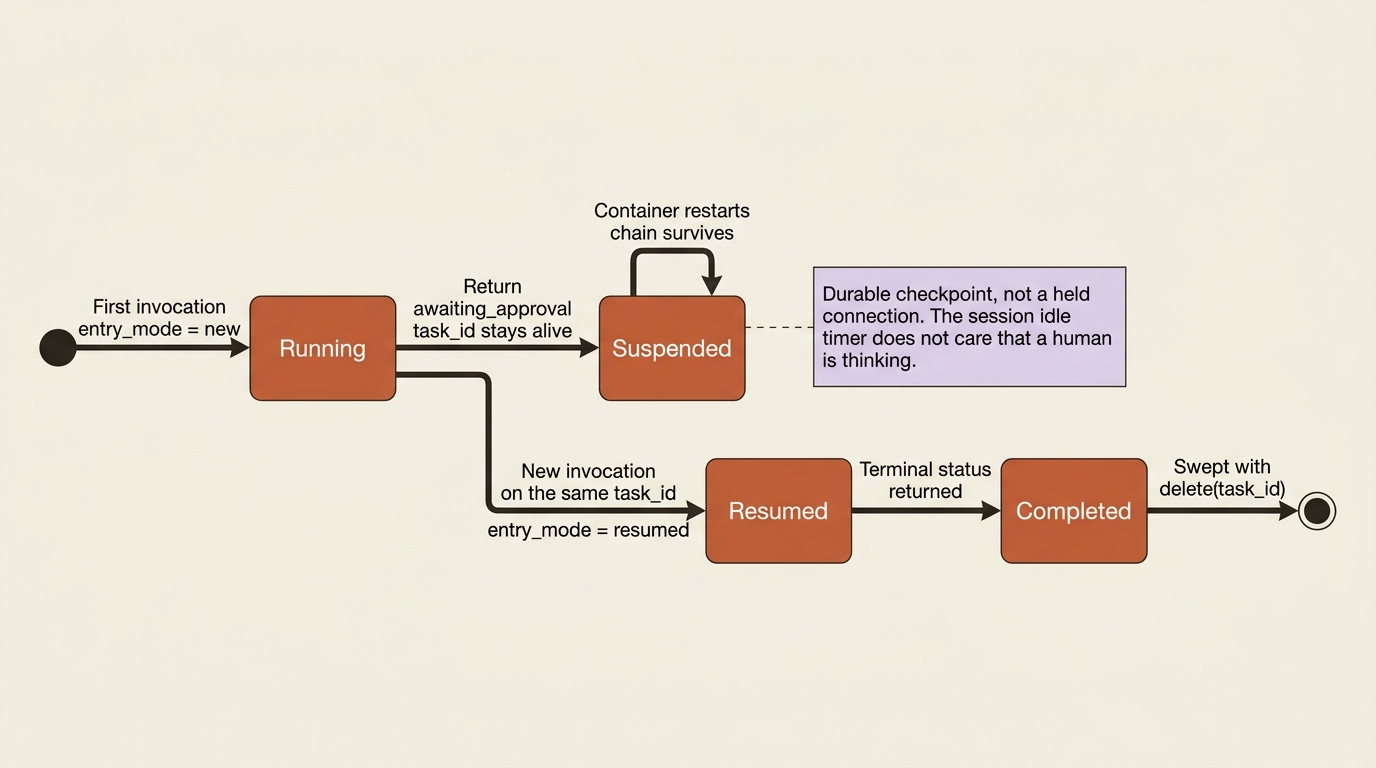
The wait can be minutes, hours, or days, and it survives container restarts, because the chain is durable rather than held open. Keep only small references in ctx.metadata, an ID or a step number, and put the full artifact in your own storage or a framework checkpoint. On LangGraph or Microsoft Agent Framework over a background response, use the framework's own interrupt mechanism, set resilient_background=True, and persist the checkpoint at the interrupt point.
One housekeeping rule bites later rather than sooner. A suspended chain is deleted only when you delete it explicitly, with await escalate.delete("<task_id>"). One-shot @task records clean up on completion; suspended chains accumulate until you sweep them.
Gotcha: nothing about a human being in the loop changes a timeout. The session idle timer counts, the A2A endpoint has no streaming to hold open, and the approval turn that resumes the chain is a new invocation from your application, not a continuation of an open request. Design the wait as an external trigger, a routine or a webhook calling back into the same task_id, and the pause costs you nothing while it lasts.
Nothing is inherited
This is the section the article exists for. A2A moves messages, and it moves nothing else, so every worker you deploy needs its own copy of the harness you built for one agent.
A single governed Foundry agent has an identity chain roughly five hops long: the user's token to the agent endpoint, the endpoint to your container, the container to Foundry services, the services to the toolbox, and the toolbox to the third-party system. Five hops, five distinct answers to "who is this," five distinct failure modes. Splitting into forty workers does not extend that chain. It creates forty of them, and Foundry copies not one thing forward.
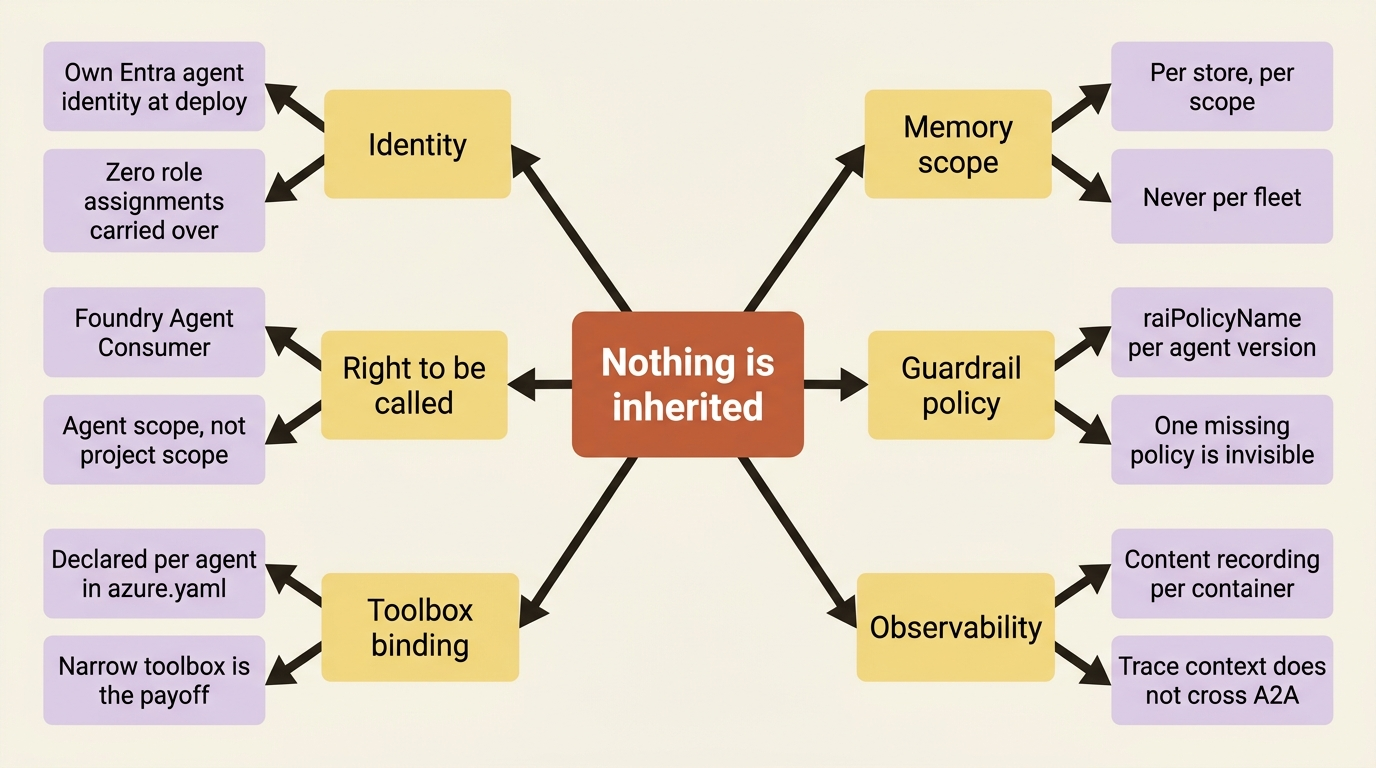
Go item by item, because the list is longer than teams expect.
Identity. Every hosted agent deployed to a project gets its own dedicated Entra agent identity and its own endpoint, created automatically at deploy time. It is the good news and the whole problem at once. A role assignment you made for the orchestrator's identity on the research archive covers the orchestrator's identity. The worker you deployed this morning is a different principal with zero grants.
The right to be called. A worker with incoming A2A enabled is reachable by any identity holding Foundry Agent Consumer at the project scope, which is every caller in the project. Least privilege here means assigning at the agent scope, once per worker, to the orchestrator's identity.
Toolbox binding. You attach a toolbox per agent through uses and toolboxes in that agent's azure.yaml service block. The orchestrator's toolbox is not the workers' toolbox unless you say so in each of their files, which is also the opportunity: a worker that only reads filings never needs the browser-automation tool the orchestrator holds.
Memory scope. You declare and point memory stores per agent, so a worker writing per-user memory into the orchestrator's store is a configuration you make deliberately and a grant you issue separately. Memory isolation guarantees are per store and per scope, not per fleet.
Guardrail policy. The policies block carrying raiPolicyName is per hosted-agent version, and the rule about using the full ARM resource ID applies to each of them. A fleet where thirty-nine workers carry the policy and one does not is a fleet with one unguarded model, and the traffic looks identical in the dashboard.
Observability and the gate. The content-recording posture is per container. The evaluation target is per agent, and target-based evaluation does not reach A2A agents at all: the docs say to evaluate the traces they emit instead.
The compounding effect is the point. Every one of those is a decision rather than a default, and there is no inheritance, no template, and no drift detection inside the project itself. Provision each worker's harness from the same declarative file, or watch permissions diverge into a fleet nobody can audit. The mitigation is not clever: one azure.yaml, one parameterized worker service, one deployment pipeline, and a review that reads the diff rather than the portal.
The costs the pattern surveys skip
Four costs, and only one of them is latency.
Token multiplication. Each worker run is a separate model-backed invocation carrying its own instructions and tool definitions, and its complete answer comes back into the orchestrator's context to be synthesized. Forty workers do not divide the context problem by forty. They trade one large context for forty medium ones plus one synthesis context holding forty summaries. The trade is usually worth it, and it is a trade and not a saving. A2A being text-only and non-streaming means the orchestrator waits for each complete reply rather than folding partial output in as it arrives.
The concurrency quota. Agent Service enforces a per-subscription limit on concurrent hosted agent sessions in each region: 2,000 in Canada Central, East US 2, Japan East, North Central US, South Africa North, Southeast Asia, and Sweden Central, and 1,000 everywhere else hosted agents run [PERISHABLE: checked September 2026]. A session counts while its compute is provisioning or running, and idle sessions keep their state without counting. Forty workers fanned out on a Monday morning consume forty of that budget per run, shared with every other project in the subscription and region.
Lost handoffs. The documented remedy for a slow remote agent is to increase the timeout and implement retry logic with exponential backoff, which is to say the retry policy is yours. A2A tasks and contexts persist for 60 days, so the record of what happened survives, and nothing re-drives a handoff that failed. In a forty-worker fan-out, the interesting failure is not all forty failing. It is thirty-nine succeeding and the output being silently short one topic.
The trace that does not follow. The documentation does not describe trace-context propagation across the A2A boundary. No tracing page in the mirror discusses A2A, so do not promise anyone a single waterfall spanning orchestrator and workers until you have seen one. The available correlation is the one you build: pass your own run identifier into each worker call and attach it to spans on both sides.
In production: A2A is not available in Azure Government. The Foundry Agent Service feature list for US Gov Virginia and US Gov Arizona marks Agent-to-Agent as No [PERISHABLE: checked September 2026]. A multi-agent architecture going to a government cloud is an in-process architecture.
Do this today
- Split by the boundary, not by the entity. One
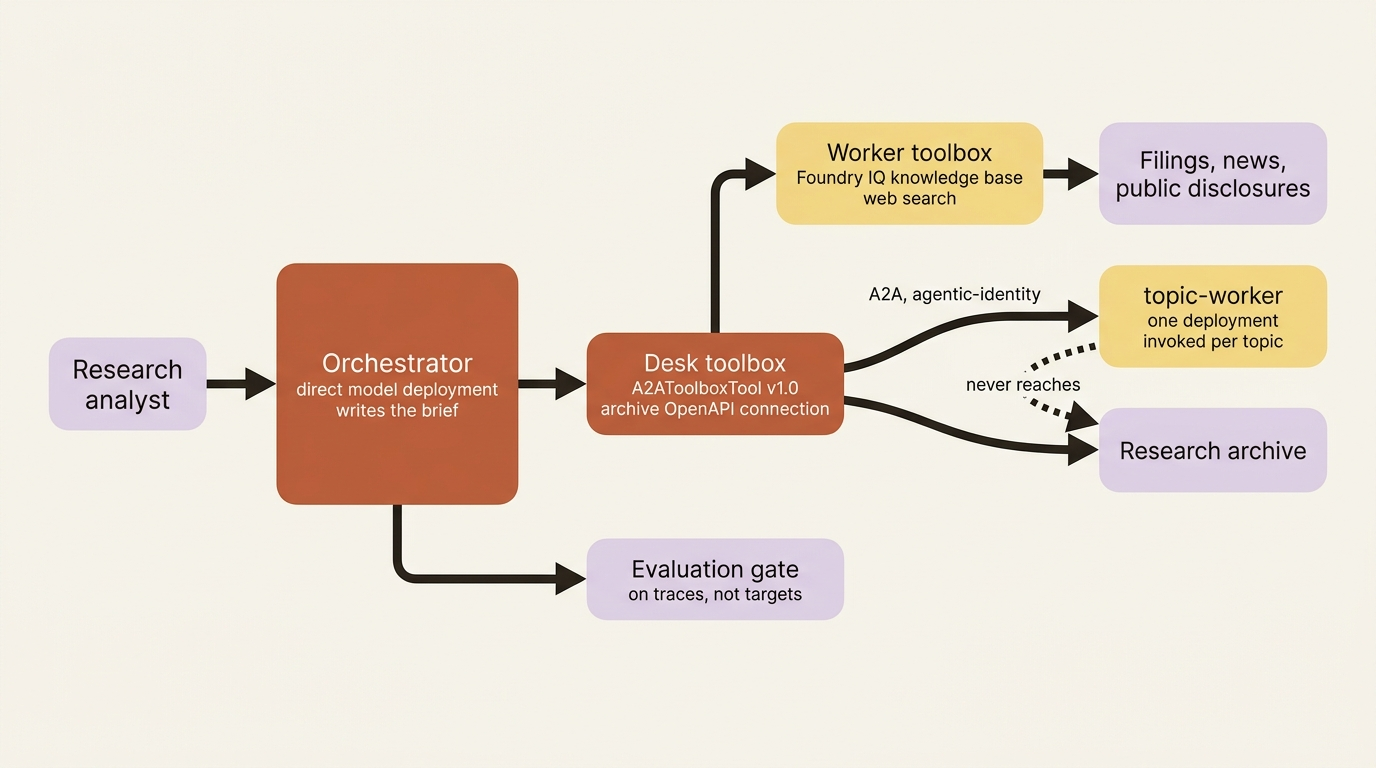
topic-workeragent deployed once and invoked per topic beats forty separately deployed agents, which would be forty identities, forty role assignments, forty toolbox bindings, and forty guardrail policies to keep aligned in exchange for nothing. - Give the worker the narrow toolbox. The worker reads filings and news through a knowledge base and web search. It does not need the research archive, and it should not hold the connection reaching it. Withholding that connection is the first real payoff of the boundary: a prompt injection in a covered company's press release lands in a process with nothing worth stealing.
- Pin the protocol version explicitly. Fetch
…/agentCard/v1.0once after deployment and confirm theprotocolVersionfield says what you expect, because a client that asks for nothing gets preview v0.3. - Grant at the agent scope, to the right principal. Foundry Agent Consumer on the worker agent rather than the project, to the orchestrator's
instance_identityobject ID, checked withaz role assignment listbefore the first run. - Move the evaluation gate to traces. Target-based evaluation invokes a deployed agent directly and does not cover A2A agents. Score the orchestrator's output from traces, filtered by agent, with worker spans providing the tool-call evidence.
What actually transferred
Pattern check: Foundry takes over the transport and the discovery, and that is a real subsystem. A standards-based agent protocol served at two versions on one base path, version negotiation through cards, headers, or query strings, an agent card published and projected into both version shapes from one authored definition, Entra authentication on every endpoint including discovery, a least-privilege consumer role assignable at project or agent scope, six authentication modes on the outbound connection including OAuth passthrough with managed token storage and refresh, task and context durability for 60 days, and a toolbox layer that makes a remote agent indistinguishable from any other tool your agent holds. Building the auth matrix alone, with consent flows, token storage, and refresh, is a quarter of work most teams do badly.
What stays yours is everything the protocol does not carry, and that list is the article. The topology decision, because nothing in the platform will tell you a boundary is unnecessary. Every role assignment, at every scope, to every principal, once per worker. Each worker's toolbox binding, memory scope, guardrail policy, and content-recording posture, because none of them inherit. The retry policy and the detection of a handoff that silently did not happen. The correlation identifier that makes a fan-out readable as one run. The protocol version, explicitly, on every production client, because the default is the preview one. And the discipline of provisioning the fleet from one declarative file, which is the only thing standing between a multi-agent system and a permission set nobody can reconstruct.
The exit question splits cleanly for once. A2A is a public protocol, not a Foundry construct. An agent card is an agent card, JSON-RPC is JSON-RPC, and the open-source SDKs that talk to a Foundry agent talk to anything else implementing the spec. Moving a worker off Foundry means re-hosting the container and publishing a card at /.well-known/agent-card.json, and the calling side changes a connection target. What does not travel is the Entra-shaped half: the agentic-identity token flow, the Foundry Agent Consumer role model, the managed OAuth passthrough with stored refresh tokens, and the connection abstraction keeping credentials out of your code. This article multiplied the number of places you would have to rebuild those.
One agent is a system you can reason about. Two is an architecture. Forty is an inventory problem, and it arrives with the two properties that make fleets hard: more principals than people, and more configuration than anyone reads. The protocol was the weekend. Everything after it is the project.