
Microsoft Foundry Lock-In Is Real. It Is Not Where You Think It Is.
Portability arguments go wrong because people measure at one layer and conclude about the whole system. Measure Microsoft Foundry at four layers separately and the answer stops being a slogan in either direction: three layers are cheap to leave, and the fourth is expensive because it holds your data.
Portability lives on four independent layers, and "it speaks an OpenAI-compatible API" is a statement about exactly one of them. Measure all four and the expensive one turns out to be a database decision you make on day one.
The second-year meeting where someone asks what it would cost to leave, and nobody in the room can answer because nobody measured the right thing. Portability lives on four independent layers, and "it speaks an OpenAI-compatible API" is a statement about exactly one of them.
In this article: You will learn why agent platform portability has to be measured at four separate layers, where Microsoft Foundry lock-in actually concentrates, what the four migrations Microsoft documents will and will not carry for you, and the single lever that converts the most expensive item on the list into an ordinary database you already back up. By the end you will be able to price an exit from evidence rather than from a slogan, and use the same evidence to decide whether to adopt.
Somewhere in the second year, someone asks the question. What would it cost us to leave?
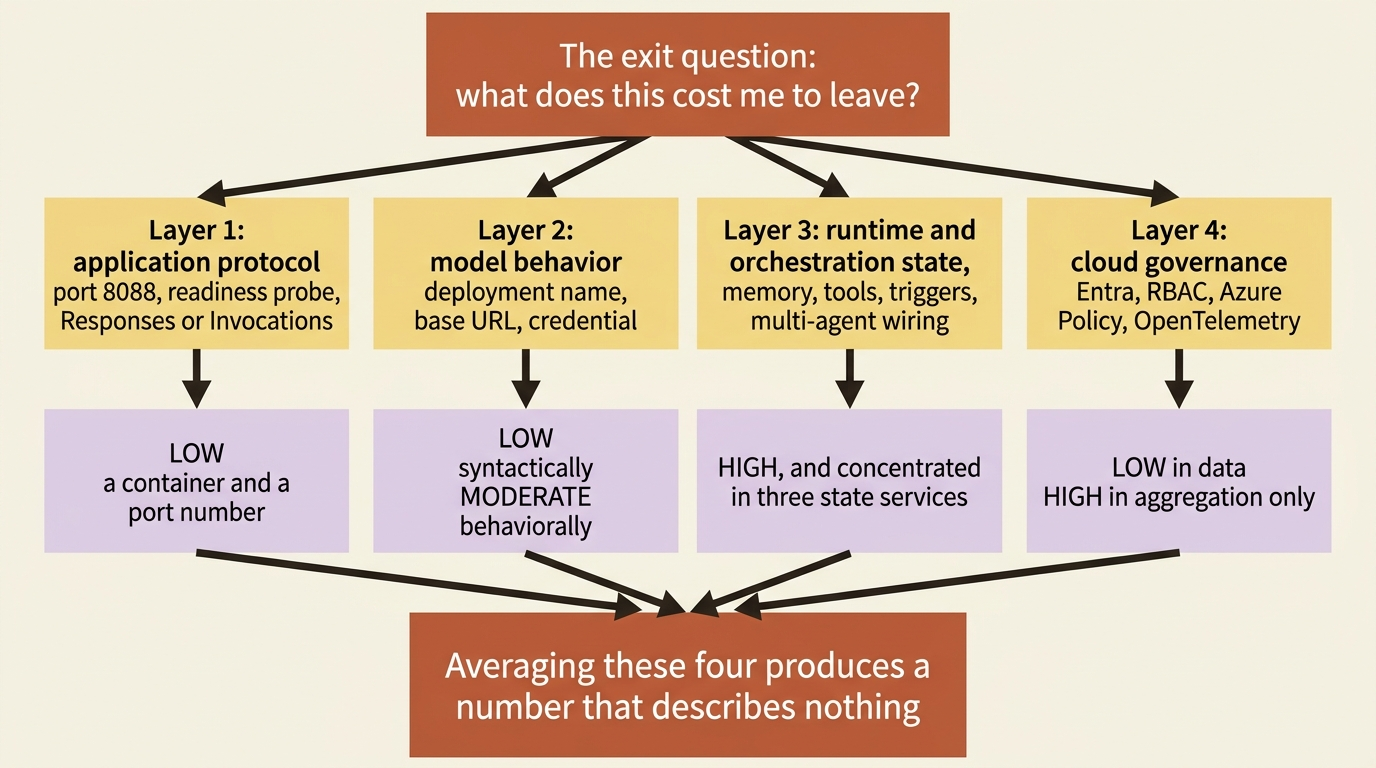
The room answers badly, and it answers badly for a specific reason. Someone says the API is OpenAI-compatible, so it is fine. Someone else says everything is proprietary, so it is not. Both people are describing one layer of a four-layer system and generalizing to the whole thing. Average their two answers and you get a number that describes nothing.
Microsoft Foundry is an unusually good subject for this, because the platform is excellent on three layers and immovable on the fourth, and the immovable one is immovable for an honest reason. Run the exit question four times, once per layer, and a useful shape appears: lock-in concentrates in the managed state services, not in the models. That sentence is checkable, and this article checks it.
Fair warning about the tone here. This is not an exit-ramp brochure. Three of the four layers are cheap to leave, the fourth is expensive, and the fourth is expensive because it is doing real work nobody enjoys building. A reader should be able to use this analysis to decide to adopt as readily as to leave.
Four layers, measured separately
Portability is not one property. It is four, and they diverge sharply.
| Layer | What it covers | What "portable" means here | Foundry's cost to leave |
|---|---|---|---|
| Application protocol | The wire shape your callers and your container speak | Another runtime can serve the same requests without changing the caller | Low |
| Model behavior | Which model answers, and how it behaves once it does | You can point at a different model and keep your outputs acceptable | Low syntactically, moderate behaviorally |
| Runtime and orchestration | State, memory, tools, triggers, resilience, multi-agent wiring | The loop and its durable state can run somewhere else | High, and concentrated |
| Cloud governance | Identity, RBAC, policy, telemetry, fleet inventory | Your controls keep working when the workload moves | Low in data, high in aggregation |
The table covers the four layers to measure a migration on, and what portability means at each one:
- Application protocol: covers the wire shape your callers and your container speak. Portable means another runtime can serve the same requests without changing the caller. Cost to leave: low.
- Model behavior: covers which model answers and how it behaves once it does. Portable means you can point at a different model and keep your outputs acceptable. Cost to leave: low syntactically, moderate behaviorally.
- Runtime and orchestration: covers state, memory, tools, triggers, resilience, and multi-agent wiring. Portable means the loop and its durable state can run somewhere else. Cost to leave: high, and concentrated.
- Cloud governance: covers identity, RBAC, policy, telemetry, and fleet inventory. Portable means your controls keep working when the workload moves. Cost to leave: low in data, high in aggregation.
Layer 1: the application protocol
This layer is as portable as it sounds, and the one thing you lose is worth naming precisely rather than waving at.
A hosted agent is a container that listens on port 8088 over plain HTTP with TLS terminated by the platform, returns 200 OK from GET /readiness, and implements at least one protocol endpoint. Nothing in that sentence is Azure-specific. The docs themselves describe the adapter packages that satisfy the contract, azure-ai-agentserver-responses and azure-ai-agentserver-invocations in Python and Azure.AI.AgentServer.Responses and Azure.AI.AgentServer.Invocations in .NET, as protocol-specific and framework-agnostic. Those packages work with any agent framework, including Microsoft Agent Framework, LangGraph, and custom code.
Your handler is the part you care about. The adapter is the shell around it, and the contract page lists exactly what the shell does: HTTP server setup on port 8088, the health probe, protocol-specific request parsing and response formatting, conversation history hydration on the Responses protocol, SSE streaming infrastructure, OpenTelemetry instrumentation, graceful shutdown on SIGTERM, and platform environment variable consumption. Off Azure, you replace that list with a web framework you already know, and seven of those eight items are ordinary server plumbing.
The eighth is the one to think about. Conversation history hydration is not plumbing. On the Responses protocol the platform manages the message record and hands your handler a hydrated request, which means your handler was never written to fetch history. Moving to a runtime without that service means your handler grows a retrieval step and a store to retrieve from. The work is a day, not a quarter, and the reason it is a day is that you can see the seam.
Agent-to-agent calls are the cleanest case on this layer. An agent card is an agent card and JSON-RPC is JSON-RPC, so a worker moved off Foundry re-hosts its container and publishes a card at /.well-known/agent-card.json, and the calling side changes a connection target.
In production: the cheap test of this layer costs nothing, and you can run it today. azd ai agent run starts the same container on localhost:8088, and --local routes an invocation there instead of to the deployed endpoint. Anything that works locally is running against the protocol rather than against the platform. Anything that only works deployed is a dependency you have not written down.
Layer 2: model behavior
The syntax moves in an afternoon. The behavior does not, and conflating the two is how a migration slips a quarter.
A deployment name is a string in an environment variable, the surface is OpenAI-compatible, and moving to another provider is a base URL and a credential. The docs make the same point from the other direction in their own migration guidance: the standard openai client replaces the classic azure-ai-inference path, the docs describe the migration as changing endpoint URLs to the /openai/v1/ form, and the note in the SDK mapping table reads "Azure-specific code eliminated".
The catalog is multi-vendor, which is the structural reason this layer stays cheap. Foundry sells you a router in front of a pool that includes Anthropic and other vendors' models next to the GPT family, and a platform that expects you to switch vendors inside it is not a platform that can charge you much for switching away from it.
Two things on this layer are stickier than the model name.
Deployment type is a residency commitment, not a performance setting. The global, data-zone, and regional families encode where inference happens, and reproducing a Data Zone processing guarantee on another provider is an infrastructure project with a legal review attached, not a configuration change.
Quota is capacity you negotiated per subscription and per region, and it does not travel. Neither does the reverse, which matters just as much on the way in: capacity you have on Azure today is not capacity you have somewhere else tomorrow.
Gotcha: prompts are tuned to models, and a swap that is syntactically free is not behaviorally free. Every instruction, few-shot example, and output-format assumption in your agent was fitted against whatever model you shipped on. The portable asset here is not the prompt. It is the golden set, because a golden set turns "does the new model still work" from an opinion into a run.
Layer 3: runtime and orchestration, where the lock-in actually lives
Sort the platform's managed services by cost to leave and the distribution is lopsided. Most of the runtime is portable in substance even when it is Foundry-shaped in surface. Three items are genuinely sticky, and the stickiness is a data problem rather than a code problem.
| Runtime service | Code you would change | What does not travel | Verdict |
|---|---|---|---|
| State store | A thin adapter over get_item, set_item, create_item, delete_item, and list_keys |
Nothing. The items are your JSON | Cheapest managed service to leave |
| Conversation store | A handful of Responses calls | The message record itself | Sticky. No documented export |
| Memory | A store name and a few calls | The consolidated corpus, extracted over months | Sticky. list_memories per scope is the export |
| Toolbox | One URL and one class import | Connections, auth types, version promotion history, tool_configs, guardrail attachments, skill pins |
Sticky in configuration, not in code |
| Routines | The trigger layer | Nothing durable. A routine is a trigger | Days of scheduler work |
| Resilient execution | Foundry-specific decorator and context names | Nothing. The pattern is portable | Small, if you kept the recovery branch small |
| Guardrails | An ARM resource ID and some middleware configuration | Tool-call and tool-response screening inside the loop's boundary | Cheap in config, expensive in placement |
| A2A | A connection target | The Entra-shaped identity half | Protocol is public, identity is not |
The table covers eight runtime services, what you would rewrite, and what you would leave behind:
- State store: you change a thin adapter over
get_item,set_item,create_item,delete_item, andlist_keys, and nothing is left behind because the items are your own JSON. Verdict: the cheapest managed service in the platform to leave. - Conversation store: you change a handful of Responses calls, and the message record itself is left behind. Verdict: sticky, with no documented export.
- Memory: you change a store name and a few calls, and the consolidated corpus extracted over months is left behind. Verdict: sticky, with
list_memoriesper scope as the export path. - Toolbox: you change one URL and one class import, and you leave behind connections, auth types, version promotion history,
tool_configstuning, guardrail attachments, and skill pins. Verdict: sticky in configuration, not in code. - Routines: you rebuild the trigger layer, and nothing durable is left behind because a routine is a trigger. Verdict: days of scheduler work.
- Resilient execution: you rename Foundry-specific decorator and context names, and nothing is left behind because the underlying pattern is portable. Verdict: small, if you kept the recovery branch small.
- Guardrails: you change an ARM resource ID and some middleware configuration, and you leave behind tool-call and tool-response screening inside the loop's boundary. Verdict: cheap in configuration, expensive in placement.
- A2A: you change a connection target, and you leave behind the Entra-shaped identity half. Verdict: the protocol is public, the identity model is not.
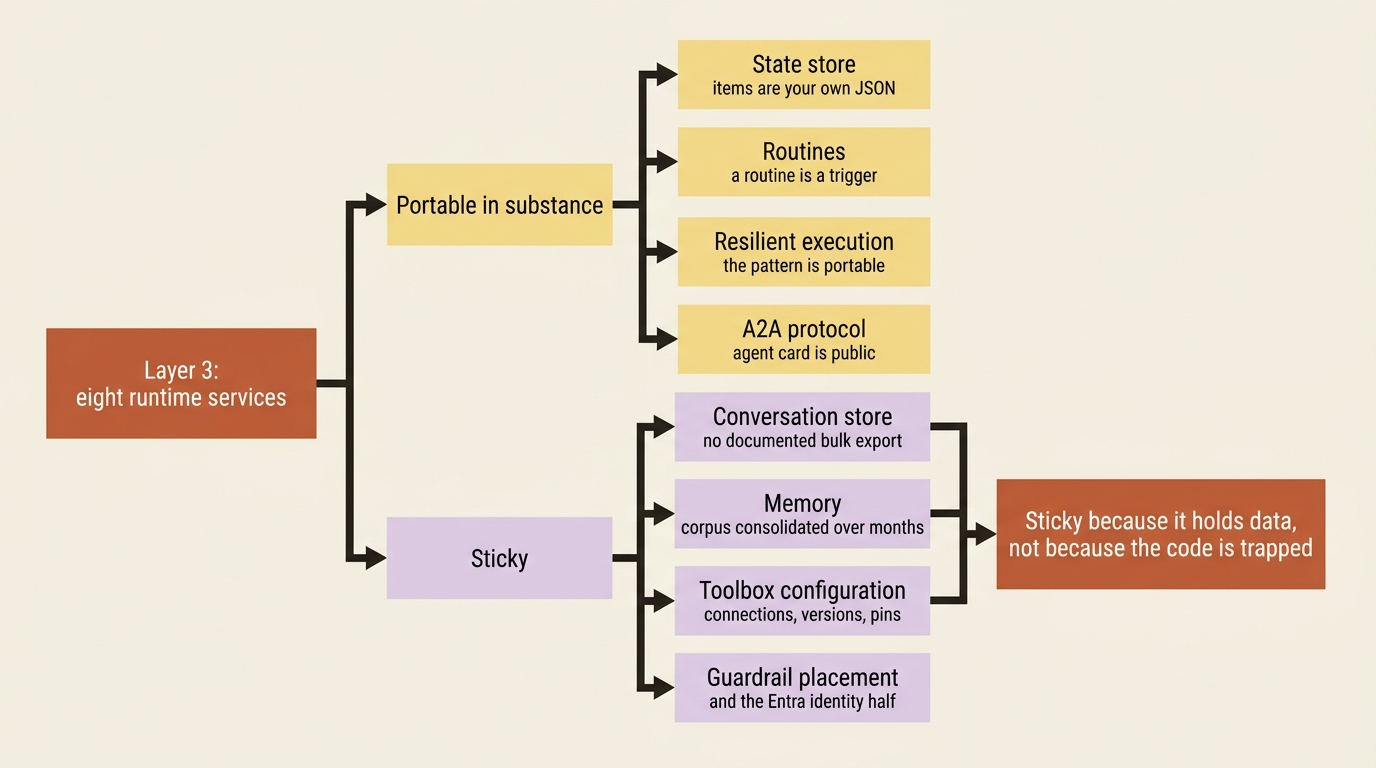
Three rows carry the weight: the conversation store, memory, and toolbox configuration.
The conversation store
This is the honest center of the argument, and it deserves care with the evidence, because the load-bearing claim is an absence.
What the documentation covers on conversations is creation, item addition, and deletion: openai.conversations.create(), conversations.items.create(), and conversations.delete() appear across the runtime-components and migration pages. No bulk export, archive, or account-level extraction operation appears anywhere in the mirror this analysis was built from. The flat claim that there is no bulk export of managed conversation state is [RESEARCH-ONLY], and a reader acting on it should check a live Learn page and the current API reference before treating it as settled.
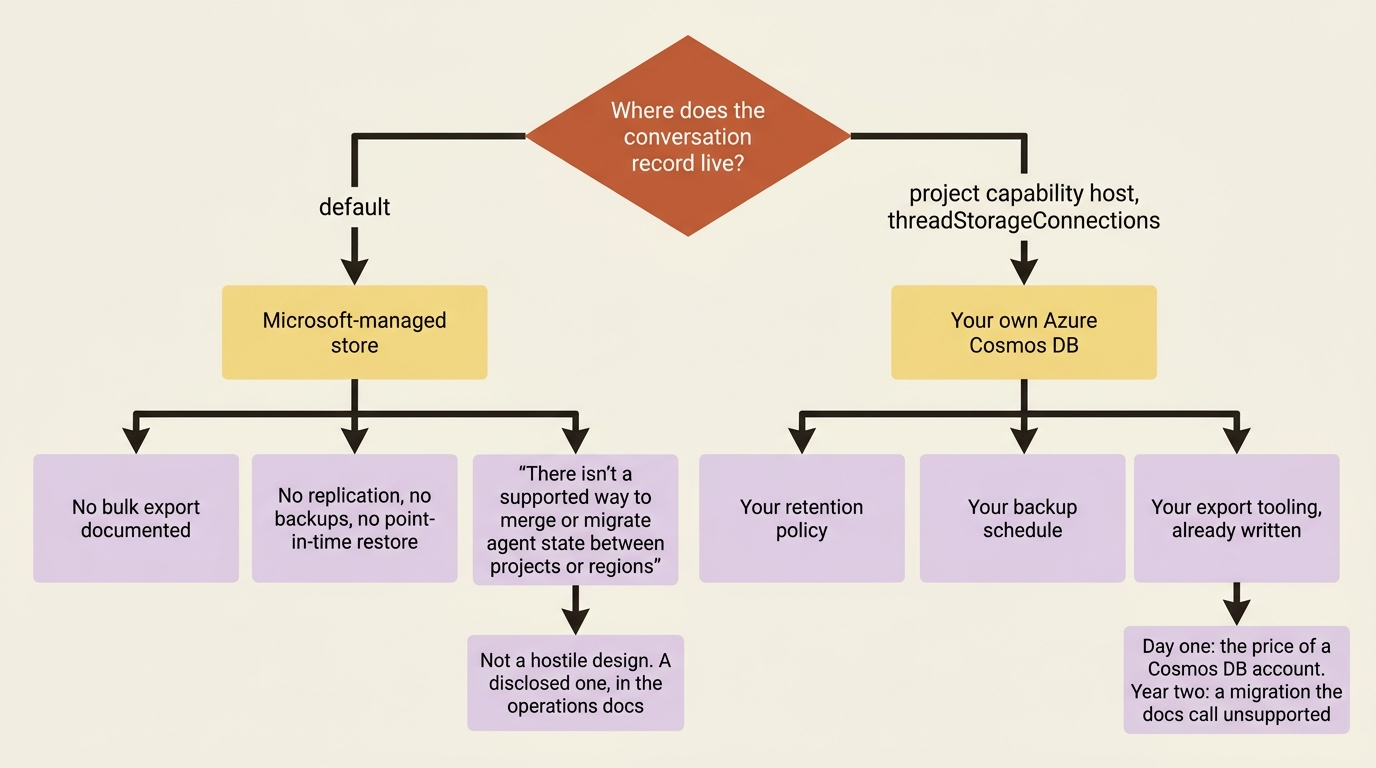
What is not research-only is stronger than the absence, and it is worth quoting. The disaster-recovery guidance states that Agent Service does not provide built-in disaster recovery capabilities, does not replicate state, does not create backups, and does not support point-in-time restore; that one project cannot use the data of another project; and that "Microsoft Support can't recover orphaned data, migrate data between projects, or combine state from multiple sources". The same page's limits table carries a row titled State migration that reads: "There isn't a supported way to merge or migrate agent state between projects or regions".
Read that carefully, because it is broader than an exit question. If state cannot be migrated between two projects inside the same subscription, the question of migrating it to another cloud is already answered. This is not a hostile design. It is a disclosed one, and the disclosure sits in the operations documentation rather than in the marketing.
There is a real lever, and it is one to pull early. Capability hosts let you point conversation storage at your own Azure Cosmos DB instead of the Microsoft-managed default, through a project capability host whose threadStorageConnections property names a Cosmos DB connection. Do that, and the conversation record lives in a database your own retention policy, backup schedule, and export tooling already cover. The docs are explicit that this is not automatic and not inherited: Agent Service reads the project-level capability host, and connections referenced only at the account level are not used for a project.
Gotcha: this is a create-time decision in practice, because deleting a capability host affects every agent that depends on it. The docs warn that deleting the project and account capability hosts leaves agents in the project without access to the files, conversations, and vector stores they previously used. Pulling this lever on day one costs a Cosmos DB account. Pulling it in year two costs a migration you were just told is unsupported.
Memory and toolbox
Memory is sticky for a different reason. Your code holds a store name and a handful of calls, which is a small diff. The corpus is the asset: consolidated free-text memories, extracted and reconciled over months, with list_memories on the memory store as the read path. With 100 scopes per store, walking every scope is a script rather than a feature. Memory is also still in preview, which means these quotas and this surface are [PERISHABLE] as of September 19, 2026 and should be re-checked before anyone plans around them.
Toolbox is the mildest of the three and the easiest to neutralize. The docs make the portability claim directly, under the heading "Foundry-homed, not Foundry-bound": toolboxes are created and managed in Foundry but are not limited to Foundry-based agents, and any MCP-compatible runtime or client can use one, including custom agents built with Microsoft Agent Framework, LangGraph, or your own code. What does not travel is the configuration, and the mitigation costs one commit: keep the toolbox YAML in source control and create versions from files, so azd ai toolbox create <name> --from-file <file>.yaml is the only way a toolbox ever changes.
Layer 4: cloud governance
Almost nothing on this layer is lock-in, and the one thing that is has no data in it.
Agent identities are Microsoft Entra service principals. Guardrail policies are Azure Policy assignments. Traces are OpenTelemetry in the GenAI semantic conventions, landing in an Application Insights resource you own. Role assignments are role assignments. Move the workload, and all four keep working, because none of them was ever a Foundry construct.
What does not travel is the aggregation. Cross-project discovery, the joined asset inventory, and the Agent 365 registry view are Foundry and Microsoft 365 constructs with nothing underneath them to export, because they are a join over data you already hold. You would not lose data by leaving. You would lose the single pane, and rebuilding one over three clouds is a program rather than a project.
One governance behavior is genuinely a rebuild: automatic per-caller session and conversation scoping, x-ms-user-identity delegation, and authorized history reads inside a shared session are platform features. On another substrate you write them, and writing them correctly is the work. The mitigation is to read identity through one function in one module, get_request_context() in Python or FoundryAgentRequestContext.Current in .NET, so the substrate-specific part of your container stays one file wide.
The four migrations Microsoft documents, and what each one leaves behind
Foundry documents four migrations. Every one of them is a migration into the current model rather than out of the platform, and every one of them tells you plainly what it does not bring. The asymmetry is itself a finding. A platform with four inbound migration guides and no outbound one is telling you where it expects traffic to flow.
Assistants API and classic agents to the new agents experience. Threads become conversations, runs become responses, and assistants become versioned agents created with create_version() rather than create_agent(). A migration tool on GitHub automates part of it, and the page is unambiguous about the boundary: "The tool migrates code constructs such as agent definitions, thread creation, message creation, and run creation. It doesn't migrate state data like past runs, threads, or messages". The troubleshooting table repeats it as a symptom with a resolution of "Start new conversations after migration". The code moved. The state did not.
The deadline has passed. The Assistants API sunset date is August 26, 2026, listed alongside the azure-ai-inference package retirement on the same date [PERISHABLE: stated as of the research date, September 19, 2026, and now in the past]. If you are reading this with an Assistants workload still running, the migration guide is the path and the tool is the starting point. To stop new ones from appearing while you work through it, set the MS-AOAI-Feature-Assistants tag to Disabled on the account, which blocks assistant, agent, thread, and run creation while leaving existing objects readable.
Classic SDK to the current one. azure-ai-projects 2.x targets the current portal and 1.x targets the classic experience. The docs state the incompatibility in an include reused across pages: "Code uses Azure AI Projects 2.x and is incompatible with Azure AI Projects 1.x". The SDK mapping table repeats it, with a warning that mixing a 2.x sample with a 1.x setup causes errors. This is a version cutover rather than a data migration, and it is the reason a sample you found on the internet does not run.
Agent Applications to the new agent object model. The new model collapses Agent Applications and Agent Deployments into the Agent object itself, which now carries agent_endpoint, protocol_configuration, instance_identity, and agent_card. Two things it explicitly does not do. There is no in-place upgrade of a legacy agent to a unique identity, and the documented path is to create a new agent from the same definition, with an in-place path described as planned. And role assignments do not follow: "Role assignments for the agent identities of Agent Application resources don't transfer to the agent object". A migration that silently drops your downstream permissions is a migration you run with a checklist.
Preview hosting backend to the current one. Agents deployed before April 2026 on the framework-specific adapter packages must be redeployed, and the page states that existing deployments on the old backend "aren't migrated automatically". The package map is the substance: azure-ai-agentserver-agentframework and azure-ai-agentserver-langgraph are removed in favor of the protocol libraries, with the Agent Framework track going through its own bridge rather than the protocol library directly. Several CLI commands were removed outright, including az cognitiveservices agent start and stop, because compute lifecycle is now automatic.
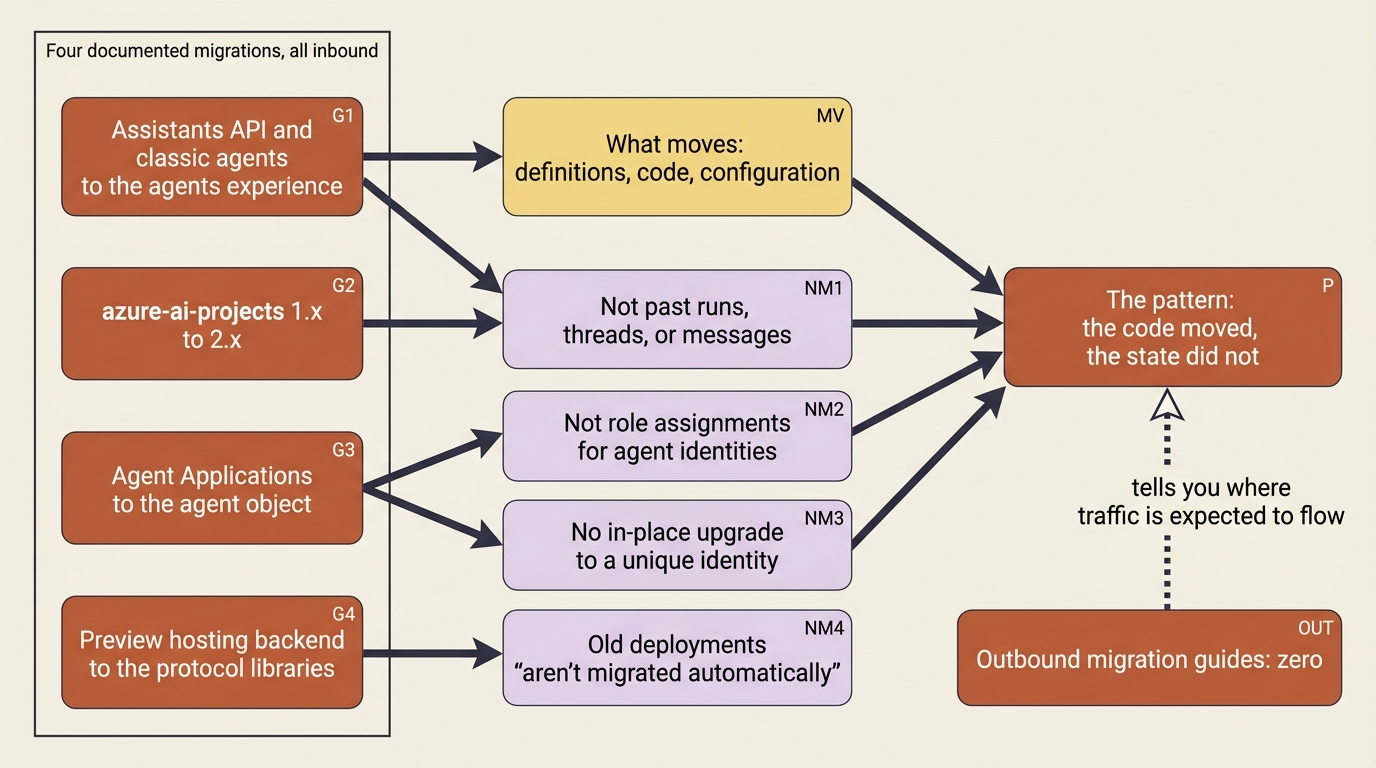
Four migrations, one pattern. Every one moves definitions, code, and configuration. Not one moves conversation state, and two of them explicitly warn you that identity and permissions need reassigning by hand.
Two seams that let Foundry govern what it does not host
The platform has two documented paths for reaching workloads outside itself, and both are useful to anyone thinking about a gradual exit or a gradual entry.
Register an external agent for observability and evaluation. Foundry lets you register agents running outside Foundry, on any cloud, on-premises, or any other host, so you can use the trace view and evaluation experiences against them. The doc is explicit about the limit: "Foundry stores only registration metadata for these agents. It doesn't host, proxy, or invoke the runtime". The mechanism is the portable one: an OpenTelemetry span carrying a gen_ai.agent.id attribute into an Application Insights resource connected to your project, plus a registration call. This is in preview and requires the Foundry-Features: ExternalAgents=V1Preview header, with SDK callers constructing AIProjectClient with allow_preview=True [PERISHABLE: preview as of September 19, 2026].
Read it as an exit tool and it changes the shape of a migration. You can move a worker off the platform and keep it in the same trace view and the same evaluation runs while you do, which means the move stops being a single cutover with no comparison data.
Bring your own model behind a gateway. The other seam runs the same direction at the model layer. Foundry Agent Service can connect to models hosted behind your own AI gateway, named in the docs as Azure API Management or other non-Azure managed AI model gateways, so the endpoint stays under your control while the agent capabilities stay in Foundry. The page carries a substantial responsibility notice worth reading before you rely on it: third-party models brought this way are Non-Microsoft Products under the Microsoft Product Terms, and you are responsible for your own responsible AI mitigations and for reviewing what data flows to them.
Both seams point at the same conclusion. Foundry is more willing to govern things it does not host than a platform optimizing purely for capture would be, and both seams are usable in either direction.
Do this today
Every expensive item above has a mitigation that is cheap on day one and expensive later, which means the exit plan is not a document you write when you are leaving.
- Put conversation storage in your own Cosmos DB through a project capability host, with
threadStorageConnectionsnaming the connection. This converts the most expensive row into an ordinary database you already back up. - Keep the toolbox YAML in source control and create every version from the file with
azd ai toolbox create <name> --from-file <file>.yaml. Configuration that only exists in a control plane is configuration nobody wrote down. - Mirror the memories you actually care about into storage you own as you write them, and treat the Foundry store as the working copy rather than the record of truth. Consolidation is the expensive machinery, and it stays Foundry's either way.
- Keep the golden set in your own repository. It is both the thing that makes a replacement evaluator measurable and the thing that makes a model swap a run rather than an argument.
- Read identity through one function in one module,
get_request_context()orFoundryAgentRequestContext.Current, so the substrate-specific part of your container stays one file wide. - Keep agent definitions, guardrail policies, and the
infra/templates in Bicep or Terraform, and keep the recovery branch small. Reconstruction from source is also what makes the documented disaster-recovery limitation survivable.
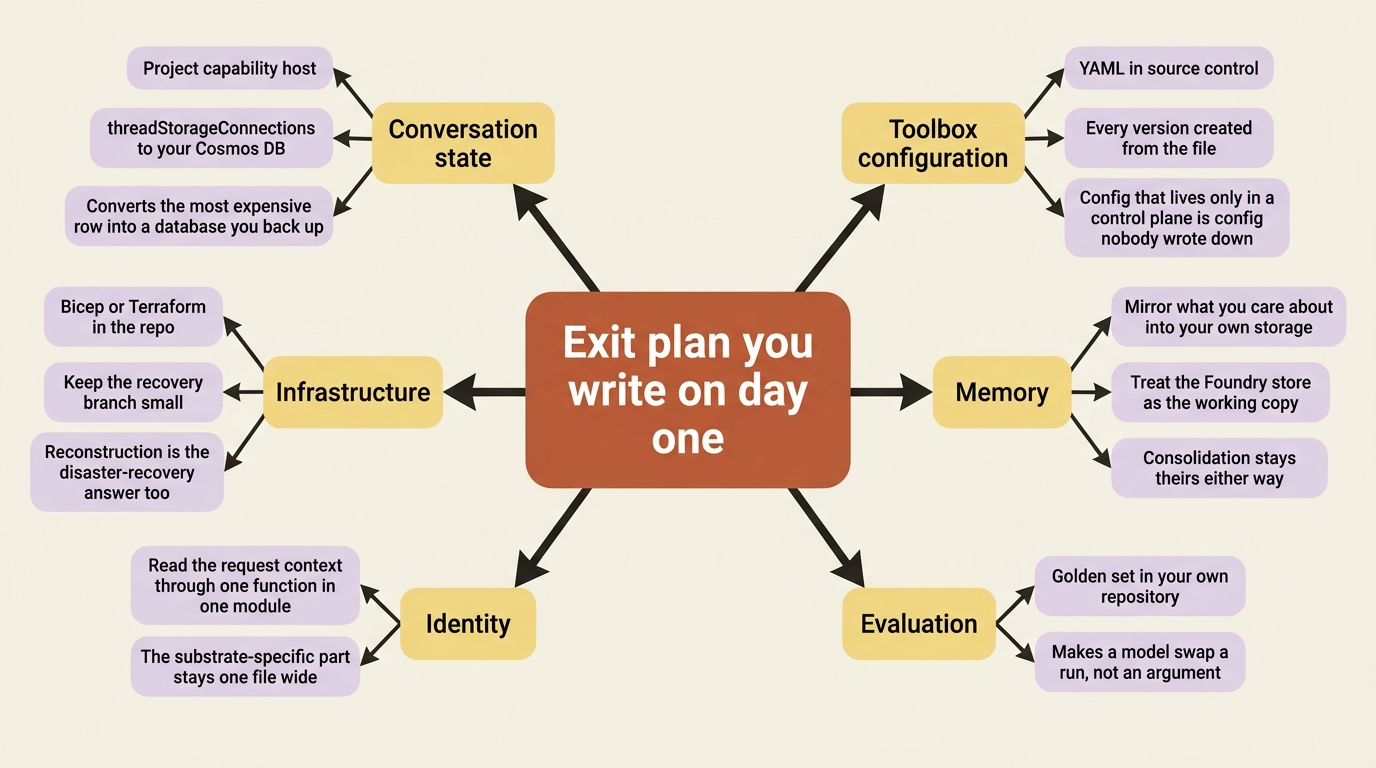
Every one of those is worth doing even if you never leave, which is the useful test for whether an exit plan is real. An exit plan that only pays off on the way out is a document. An exit plan that also improves your Tuesday is an engineering practice.
What this actually says about adopting Foundry
Lock-in concentrates in the managed state services, not the models. The model layer is the least sticky part of the platform. The protocol layer is a container and a port number. The governance layer is Entra and Azure Monitor, which most Azure customers were already running. What does not travel is state: the managed conversation record, the consolidated memory corpus, and the toolbox configuration that stopped living in your repository the moment it became somebody else's job.
The correction worth making is that the stickiest item is stickier than an exit question implies. "There isn't a supported way to merge or migrate agent state between projects or regions" is not a statement about leaving Azure. It is a statement about moving between two projects in the same subscription, and it means conversation-state portability is a design decision you make before the first conversation exists, not a migration you run later.
Be fair about what that price buys. The conversation store is durable, per-user authorized, independently reachable from the portal, the API, and Teams, and it outlives the compute that produced it. The memory service does extraction, consolidation, and conflict resolution, which is the expensive machinery nobody enjoys building. Toolbox does credential storage, exchange, refresh, injection, per-user token isolation, and a version lifecycle that lets an administrator promote a tool without a redeploy. These are not toll booths. They are the three services doing the most work, and durable state is sticky wherever it lives, including in the database you would have picked instead.
The honest version of the lock-in claim is not "Foundry traps you." It is narrower and more useful. Three of the four layers are cheap to leave. The fourth is expensive because it holds data, the expense is disclosed in the operations documentation rather than hidden, and the single lever that defuses most of it is a capability host you configure on day one for the price of a Cosmos DB account.
Adopt it knowing which layer you are betting on. Then pull the lever.