
Hosted Agents Do Not Exist in Azure Government. Read That Table Before the ATO Review.
The Azure Government feature-availability table is not a regional footnote, it is the compliance boundary, and one row in it deletes the hosted-agent half of every Foundry design.
One row in the Microsoft Foundry Azure Government feature table removes seven parts of a seventeen-part design. What survives, what you rebuild, and the three places the docs contradict themselves.
The architecture review where someone asks whether this runs in GovCloud, and the honest answer is that the container it runs in does not exist there. One row in the Microsoft Foundry Azure Government feature table removes seven parts of a seventeen-part design.
In this article: You will learn exactly which Microsoft Foundry capabilities exist in Azure Government and which do not, why a preview feature in a sovereign cloud cannot go in an authorization package, how the Azure Government axis differs from the deployment-type residency axis, and the SDK changes that separate a government client from a commercial one. By the end you will be able to price a sovereign rewrite from a feature table instead of discovering the cost during an authorization review.
The question arrives late, usually in an architecture review, usually from someone who has not been in the room for the previous six. "And this runs in GovCloud, right?"
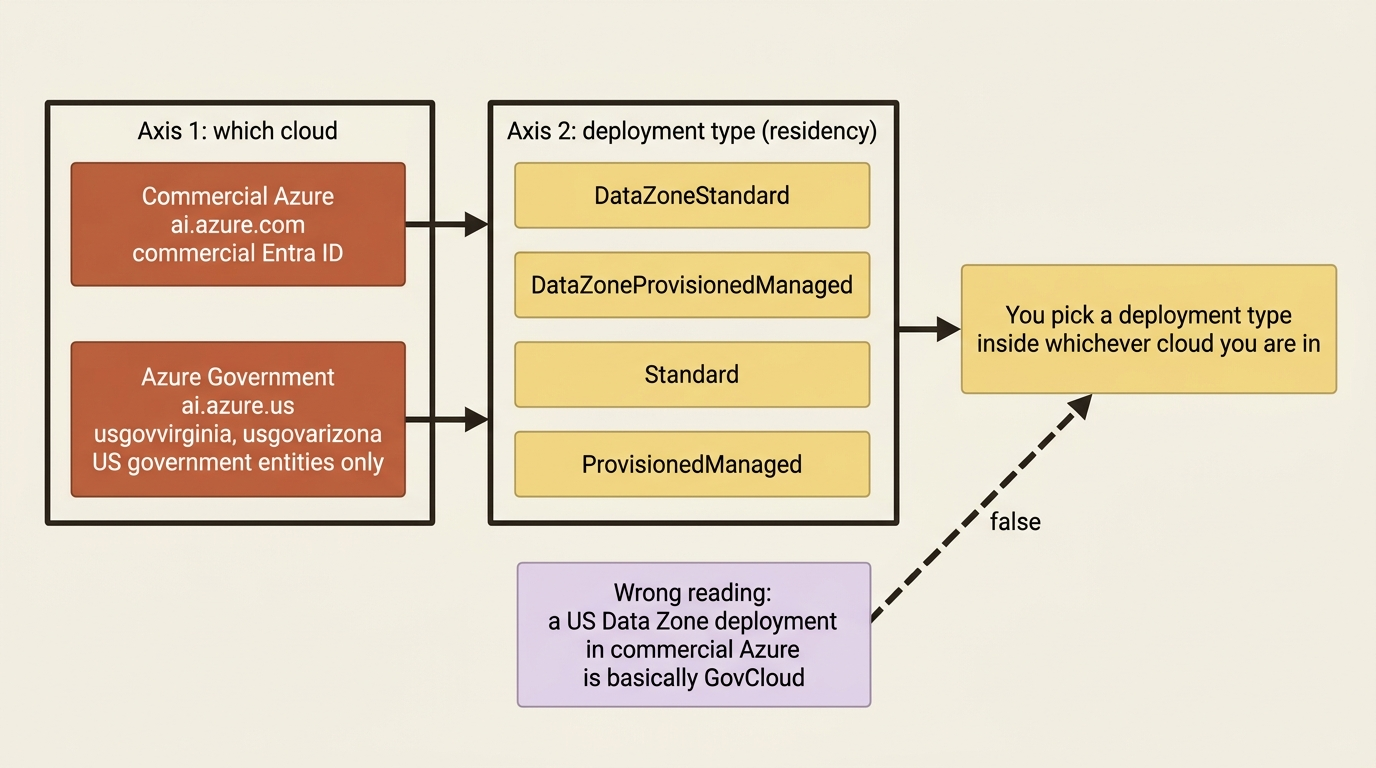
For a Foundry design built on hosted agents, the answer is no, and the reason is one row in one table. Foundry Agent Service in Azure Government lists prompt agents as available, workflows as preview, and hosted agents as not available. A hosted agent gives you a container, a runtime contract, per-user session isolation through the request context, resilient execution inside that container, and A2A fan-out across many of them. None of that has a sovereign-cloud form today.
Discovering the previous paragraph during an authority-to-operate review is the expensive way to learn it. Reading a feature-availability table is the cheap way. The feature-availability table is the compliance boundary. Everything else here is detail hanging off it.
Two regions, three URLs, and one thing they are not
Azure Government is a separate cloud with its own endpoints and its own portal, and being in it is a different decision from any deployment type you already chose.
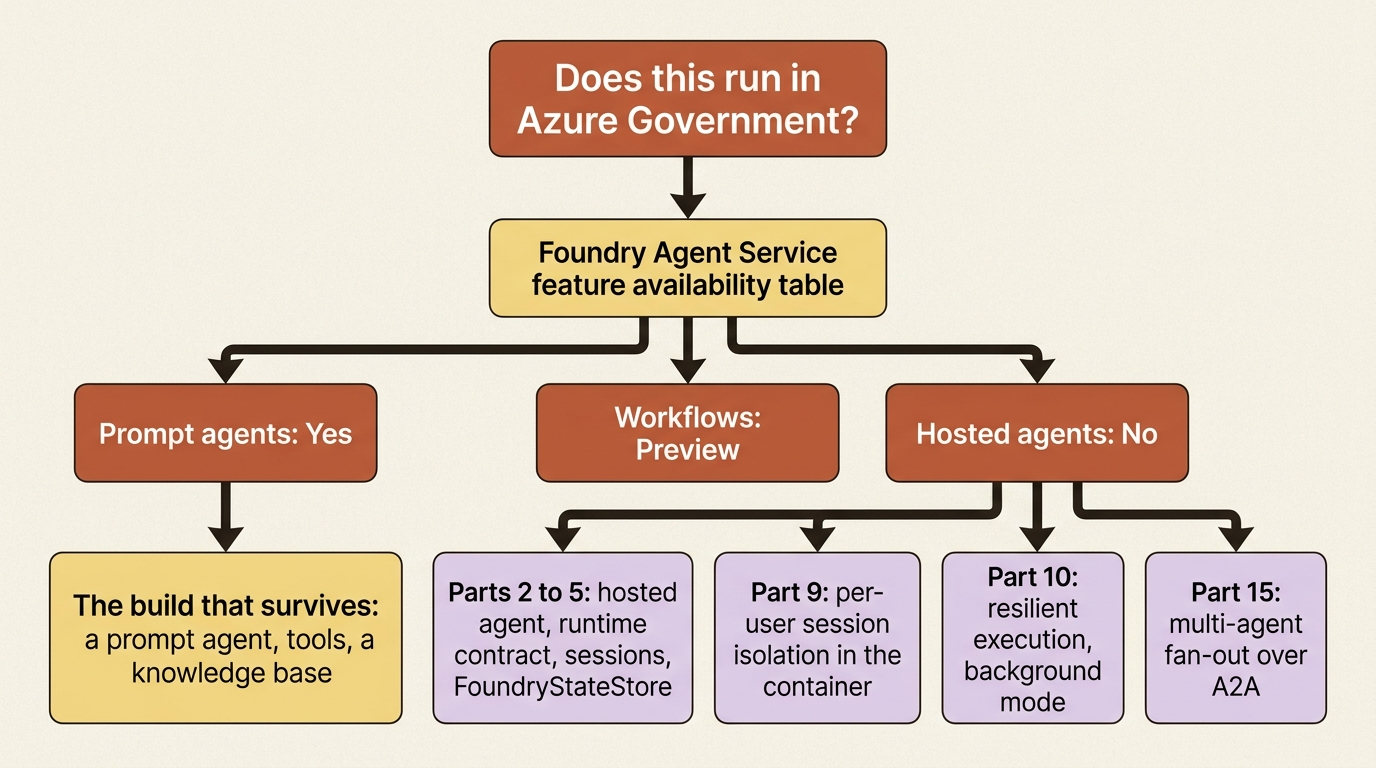
Microsoft Foundry is deployed in two Azure Government regions, US Gov Virginia (usgovvirginia) and US Gov Arizona (usgovarizona), and both the platform page and the Agent Service page name the same pair. Agent Service features are available in both regions unless a table says otherwise.
Three URLs change, and every one of them will break a copied runbook:
- Foundry portal:
https://ai.azure.us/nextgen - Project endpoint:
https://{resource-name}.services.ai.azure.us/api/projects/{project-name} - Azure portal:
https://portal.azure.us
Availability is restricted as well as different. Azure Government is available only to US government entities and their partners, so this is not a region you select because the latency looks good.
Gotcha: Azure Government is not a deployment type, and a Data Zone deployment is not a sovereign cloud. Residency is a property of the deployment type rather than of where your Foundry resource lives. Both statements are true at once, and they are different axes. A DataZoneStandard deployment in commercial Azure keeps inference inside the US data zone while still running on commercial endpoints, commercial Microsoft Entra ID, and the commercial compliance posture. Azure Government changes the cloud, the endpoints, the token audience, and the certification story, and then you still have to choose a deployment type inside it. Getting the deployment type right in the wrong cloud satisfies nobody.
Agent types: the row that deletes the front half of a Foundry design
Prompt agents are generally available, workflows are preview, hosted agents do not exist here, and preview in a sovereign cloud carries a compliance caveat the commercial preview banner does not.
| Agent type | Azure Government |
|---|---|
| Prompt agents | Yes |
| Workflows | Preview |
| Hosted agents | No |
The table above covers the three Foundry Agent Service agent types and their Azure Government status:
- Prompt agents: Yes, generally available
- Workflows: Preview, with the compliance caveat below
- Hosted agents: No, not available in this cloud
Source: agents-concepts-azure-government.md [PERISHABLE: page dated August 19, 2026, checked September 2026].
Read the preview rows with the page's own warning attached, because it is stronger than the standard preview boilerplate. Features marked preview are available for early adoption but might not carry the same compliance commitments, such as FedRAMP, DoD IL5, or CJIS, as generally available features, and the page tells you to confirm the posture of any preview feature with your security and compliance team before using it for a regulated workload. A preview feature in a sovereign cloud is not a feature you put in an authorization package.
Workflows deserve a second look for a reason that has nothing to do with government. Foundry retires workflows on December 1, 2026, and directs new development to Microsoft Agent Framework [PERISHABLE: checked September 2026]. A capability that is preview in Azure Government and retiring in commercial Azure is not a foundation.
The prompt-agent row is the one to build on, and it is more capable than it sounds. A prompt agent is enough when your agent is a prompt, some tools, and a knowledge base. In Azure Government that stops being a cost argument and becomes the only argument.
The tool subset, and where the public internet used to enter
Eight tools are supported, eight are not, and the unsupported list is the boundary where the open web used to reach your agent.
| Tool | Azure Government |
|---|---|
| Code Interpreter | Yes |
| Custom Code Interpreter | Preview |
| File Search | Yes |
| Azure AI Search | Yes |
| Azure Functions | Yes |
| Function calling | Yes |
| MCP servers | Yes |
| OpenAPI tool | Yes |
| Web search | No |
| Grounding with Bing | No |
| Image Generation | No |
| Browser Automation | No |
| Computer Use | No |
| Microsoft Fabric | No |
| SharePoint | No |
| Agent-to-Agent (A2A) | No |
The table above lists every Agent Service tool and whether Azure Government supports it:
- Code Interpreter: Yes
- Custom Code Interpreter: Preview
- File Search: Yes
- Azure AI Search: Yes
- Azure Functions: Yes
- Function calling: Yes
- MCP servers: Yes
- OpenAPI tool: Yes
- Web search: No
- Grounding with Bing: No
- Image Generation: No
- Browser Automation: No
- Computer Use: No
- Microsoft Fabric: No
- SharePoint: No
- Agent-to-Agent, A2A: No
Source: agents-concepts-azure-government.md [PERISHABLE: checked September 2026]. The page frames tool connection through a toolbox and links the toolbox overview for the details.
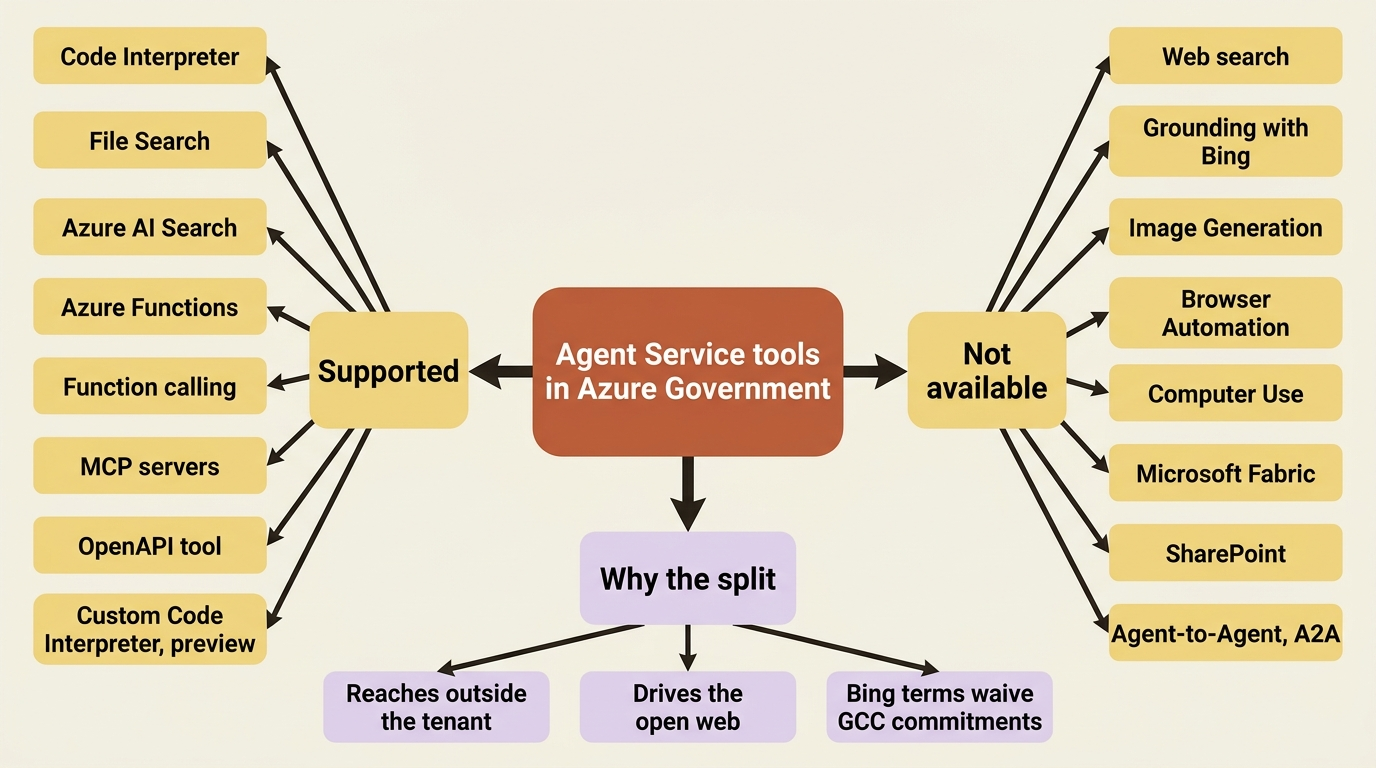
The shape of the unsupported column is not arbitrary. Web search, Grounding with Bing, browser automation, computer use, Microsoft Fabric, and SharePoint are the tools that reach outside the tenant or drive a browser on the open web, and one of them carries a warning in the commercial docs that explains the whole category. Data sent to Grounding with Bing Search or Grounding with Bing Custom Search flows outside the Azure compliance and Geo boundary, and using those services waives all elevated Government Community Cloud security and compliance commitments, including data sovereignty and screened or citizenship-based support. A tool whose own terms waive the commitments you are in this cloud to obtain is a tool a sovereign cloud will not offer.
Consider a market-research agent that reads public filings through browser automation and looks up prior research through an OpenAPI wrapper over an internal system. Exactly one of those survives.
The platform tables, read against a real design
The governance half of Foundry travels to Azure Government mostly intact. The operations half does not.
Three tables on the platform page cover everything outside Agent Service.
Azure OpenAI features: the Responses API is available, and Model router is not.
Enterprise and security features: agent identity through Microsoft Entra, private networking with VNet integration, role-based access control, Network Security Perimeter, and content safety and guardrails are all listed as available.
Guardrails: block lists, jailbreak detection, Content Safety, and protected materials detection are all available.
Observability: tracing for prompt agents is available, and evaluations and optimization are not.
Now put those rows next to the capabilities a full Foundry build depends on. This is the table to bring to the review.
| Capability | What it covers | Status in Azure Government |
|---|---|---|
| Hosted agents | The runtime contract, sessions, and FoundryStateStore |
Unavailable. Hosted agents are listed No, and the contract, the sandbox, and the state store are properties of that path |
| Toolbox and managed tools | The governed capability registry | Partial. Eight tools supported, eight not, with tool connection framed through a toolbox |
| Managed memory | Per-user memory across sessions | Not listed on either feature table. Absent from the commitment, and preview in commercial Azure |
| Agent identity and isolation | Entra identity plus per-user session isolation | Split. Agent identity through Entra is listed available; per-user session isolation and multiplexing are container-protocol mechanisms that follow the hosted path |
| Routines and resilient execution | Background mode, work that outlives the request | Not listed on either feature table |
| The model layer | Responses API, Model Router, deployment types | Partial. Responses API yes, Model router no, and four deployment types instead of nine |
| Guardrails and content safety | Block lists, jailbreak detection, protected materials | Available, all four kinds |
| Observability | Tracing and trace replay | Partial. Tracing for prompt agents is available |
| Evaluation and optimization | Evaluators, red teaming, the agent optimizer | Unavailable. Evaluations and optimization are both listed No |
| Multi-agent over A2A | Agent-to-agent fan-out | Unavailable. Agent-to-Agent is listed No in the tool table |
| The fleet control plane | Cross-agent governance and inventory | Not listed on either feature table |
| Networking and hardening | VNet integration, RBAC, Network Security Perimeter | Partial. All three listed available, with one contradiction noted below |
The table above maps each Foundry capability to its Azure Government status:
- Hosted agents, the runtime contract, sessions, and
FoundryStateStore: unavailable, because hosted agents are listed No - Toolbox and the managed tool surface: partial, eight tools supported and eight not
- Managed memory: not listed on either feature table, and preview in commercial Azure
- Agent identity and per-user isolation: split, Entra identity available but isolation follows the hosted path
- Routines, background mode, and resilient execution: not listed on either feature table
- The model layer: partial, Responses API yes and Model router no
- Guardrails and content safety: available, all four kinds
- Observability: partial, tracing for prompt agents is available
- Evaluation, red teaming, and the optimizer: unavailable, both listed No
- Multi-agent over A2A: unavailable, listed No in the tool table
- The fleet control plane: not listed on either feature table
- Networking, keys, and disaster recovery: partial, VNet integration, RBAC, and Network Security Perimeter listed available
Sources: agents-concepts-azure-government.md and concepts-foundry-azure-government.md [PERISHABLE: checked September 2026]. Rows that read "not listed" are exactly that, and a later section explains why an absent row is not the same as a No.
In production: the two rows worth arguing about before anything else are evaluation and Model Router. An evaluation that runs only when someone remembers is a dashboard rather than a gate, and in Azure Government the platform gate does not exist. Model Router is what keeps routine summaries from paying frontier prices, and in Azure Government that cost control is a routing layer you write yourself or a second deployment you switch between in configuration.
SDK configuration: a package floor, a token audience, and an authority host
Three changes separate a government client from a commercial one, and the token audience is the one that produces the confusing failure.
Agent Service in Azure Government requires azure-ai-projects version 2.0.0 or later:
pip install "azure-ai-projects>=2.0.0" azure-identity
The token audience and the project endpoint both differ from public cloud. Set credential_scopes to https://ai.azure.us/.default and point the client at the .us project endpoint:
import os
from azure.identity import DefaultAzureCredential, get_bearer_token_provider
from azure.ai.projects import AIProjectClient

endpoint = os.environ["FOUNDRY_PROJECT_ENDPOINT"]  # ①
scope = "https://ai.azure.us/.default"  # ②

with (
    DefaultAzureCredential() as credential,  # ③
    AIProjectClient(
        endpoint=endpoint,
        credential=credential,
        credential_scopes=[scope],  # ④
    ) as project_client,
):
    api_key = get_bearer_token_provider(credential, scope)  # ⑤
① The endpoint comes from the environment rather than a literal, because the government form is https://{resource-name}.services.ai.azure.us/api/projects/{project-name} and a hard-coded commercial .com endpoint is the first thing a copied runbook gets wrong.
② This is the government token audience. It is the single value the mirror names for Azure Government, and it replaces the commercial https://ai.azure.com/.default.
③ DefaultAzureCredential is unchanged from the commercial samples. The credential itself carries no cloud selection in the Python path, which is why the audience has to be supplied separately.
④ credential_scopes is where the audience is applied. Omit it and the credential still authenticates, against the commercial cloud, and the government endpoint returns 401 without explaining why.
⑤ The bearer-token provider reuses the same credential and the same scope, so the OpenAI-compatible calls that follow authenticate against the government audience as well.
Note: The full extracted listing at code/azure-foundry-hyperscaler/appendix-b-azure-government-compliance/listings/01-gov-project-client.py shows the imports and the environment lookup in one runnable file.
Everything after that point is the ordinary prompt-agent flow: project_client.agents.create_version with a PromptAgentDefinition, a conversation created through the OpenAI-compatible client, and a responses.create call carrying an agent_reference.
.NET changes in a different place. Rather than passing scopes, you set the authority host on the credential, and the gov page uses DefaultAzureCredentialOptions with AuthorityHost = AzureAuthorityHosts.AzureGovernment before constructing AIProjectClient. The same page installs Azure.AI.Projects as a prerelease package for this path.
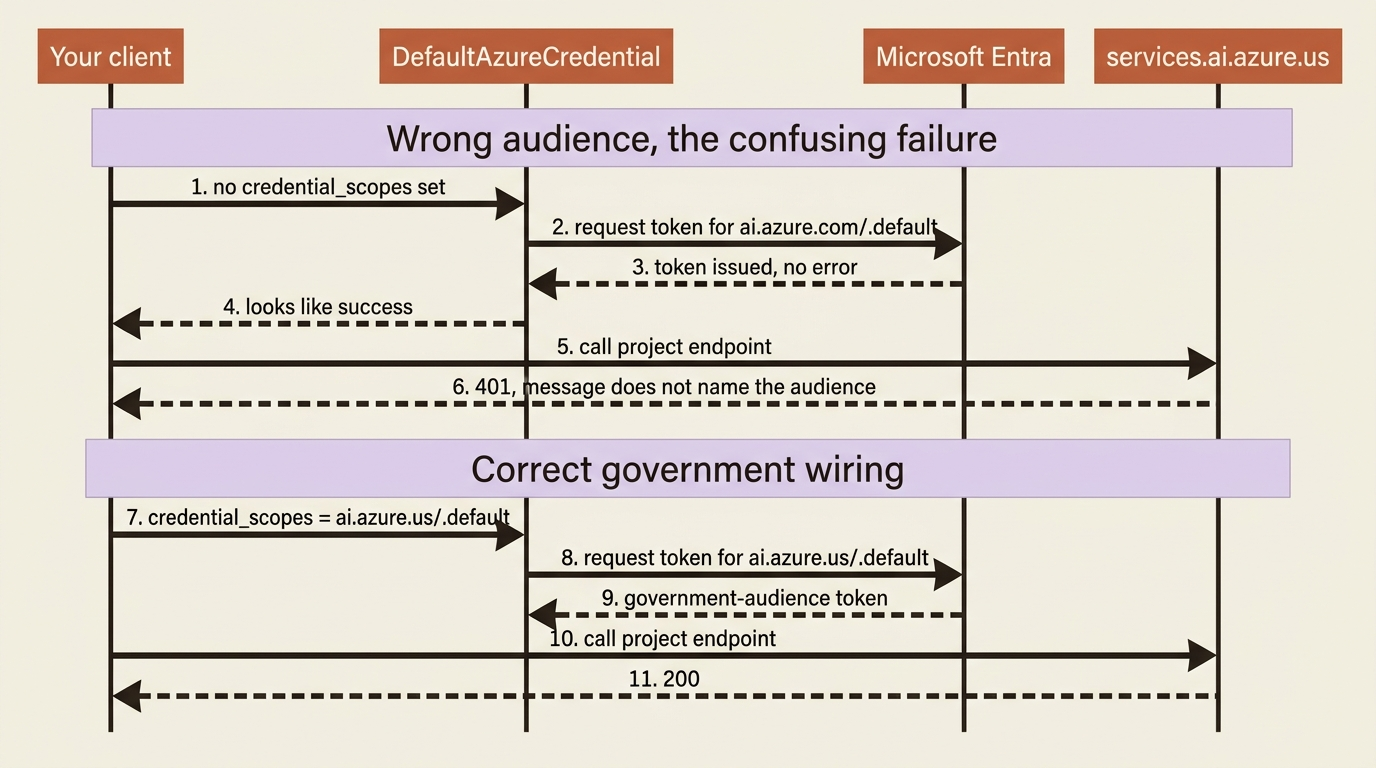
Gotcha: commercial Azure carries a genuine conflict between https://ai.azure.com/.default and https://cognitiveservices.azure.com/.default, resolved in favor of the first. Azure Government has no such ambiguity, and exactly one audience appears: https://ai.azure.us/.default. A credential that authenticates cleanly and then returns 401 against a .us endpoint is almost always a commercial audience on a government tenant, and the error message will not say so.
Deployment types: four instead of nine, and a data zone named USGov
The Global family, the batch types, and the Developer type are all absent, which removes the recommended commercial default and removes the cheapest way to run evaluation traffic.
| Deployment type | SKU code | Data processing | Billing |
|---|---|---|---|
| Data Zone Standard | DataZoneStandard |
Within the USGov data zone | Pay-per-token |
| Data Zone Provisioned | DataZoneProvisionedManaged |
Within the USGov data zone | Reserved PTU |
| Standard | Standard |
Single region | Pay-per-token |
| Regional Provisioned | ProvisionedManaged |
Single region | Reserved PTU |
The table above covers the four deployment types available in Azure Government:
- Data Zone Standard: SKU
DataZoneStandard, processes within the USGov data zone, billed pay-per-token - Data Zone Provisioned: SKU
DataZoneProvisionedManaged, processes within the USGov data zone, billed as reserved PTU - Standard: SKU
Standard, processes in a single region, billed pay-per-token - Regional Provisioned: SKU
ProvisionedManaged, processes in a single region, billed as reserved PTU
Source: foundry-models-includes-concepts-deployment-types-content-gov.md.
Put that beside the commercial nine-row table and three things are gone. GlobalStandard, which the commercial docs recommend as the starting point because it launches first, prices lowest, and covers the most regions, does not appear. Neither batch type appears, so the 50 percent discount for 24-hour work is not a lever here. DeveloperTier does not appear either, which is fine, because its commercial definition explicitly carries no data-residency guarantee and nothing about that belongs in a sovereign tenant anyway.
The residency rule reads the same way it does in commercial Azure, with a smaller map. Data stored at rest remains in the designated Azure region for every deployment type. USGov DataZone types process inferencing data only within the Azure Government cloud USGov data zone, which is the two government regions, and Standard and Regional types process in the deployment region. The choice between them is the same choice as in commercial Azure: a data zone buys you higher default quotas and cross-region routing for availability, and a single region buys you a narrower statement to put in a compliance document.
Version upgrades behave differently in a two-region cloud, and the difference is worth knowing before you set an automatic upgrade policy. In Azure Government, if an updated version is not available in the same deployment type and region, the model is not automatically upgraded. A deployment set to upgrade when a new default arrives can sit on an old version indefinitely because the new one never landed in usgovarizona, and the failure is silent until the retirement date arrives and the deployment stops accepting requests.
Gotcha: abuse monitoring is not fully enabled for Azure OpenAI deployments in Azure Government, and the documentation puts the consequence on you: you are responsible for implementing reasonable technical and operational measures to detect and mitigate use in violation of the Product Terms. Automated content classification and filtering stays enabled by default. Modified content filters take an application through the Azure Government-specific form at aka.ms/AOAIGovModifyContentFilter, which is a different form from the commercial one, and quota increases go through aka.ms/AOAIGovQuota.
Three contradictions, and one gap the docs cannot fill
The sovereign-cloud pages disagree with the general pages in three specific places, and in each one the dedicated government page is the more recent and more specific source.
The classic region-support include says Agent Service is unsupported. includes-reference-region-support-gov.md, dated April 13, 2026, lists "Azure AI Agents" and the agents playground among unsupported features in Azure Government regions, alongside fine-tuning, batch jobs, Azure OpenAI Evaluation, serverless endpoints, and the VS Code extension, and marks tracing as preview. The dedicated Agent Service page, dated August 19, 2026, documents prompt agents as available and gives a working SDK sample, and agents-concepts-limits-quotas-regions.md lists both government regions with Agents marked Yes [CONTESTED: includes-reference-region-support-gov.md against agents-concepts-azure-government.md and agents-concepts-limits-quotas-regions.md]. Take the newer dedicated pages for agents. Treat the older include's other rows, particularly Azure OpenAI Evaluation and fine-tuning, as corroborating the platform page's own No for evaluations rather than as independently current.
Private networking is Yes on one page and No in one column. concepts-foundry-azure-government.md lists private networking with VNet integration as available. The supported-regions table on agents-concepts-limits-quotas-regions.md gives US Gov Arizona and US Gov Virginia a No in its Private VNet column, the only two No values in a column that reads Yes for every commercial region [CONTESTED: concepts-foundry-azure-government.md against agents-concepts-limits-quotas-regions.md]. A narrower reading is available and may be the intended one: that table's own introduction describes the third column as "private class A IP address ranges" rather than VNet support in general, which would make the No a statement about address space rather than about network isolation. The documentation never reconciles the header with the sentence. Design for the weaker guarantee, plan the government network on ordinary private address space, and verify against a live page before you promise a network-secured standard agent setup in a government tenant.
The tool-by-region matrix has no government rows at all. The same limits page carries a fifteen-column tool matrix covering every commercial region, and neither government region appears in it, even though both appear in the supported-regions table two sections earlier. Do not read a tool's availability for a government tenant out of that matrix, because the rows are simply not there. The gov feature table is the only tool authority for this cloud.
The gap is quieter and matters more than any of the three. foundry-models-concepts-models-sold-directly-by-azure-gov.md is a four-paragraph shell whose entire model roster comes from an include that is not published alongside it, and the linked government quota, provisioned-throughput, and model-retirement pages are absent too. What the page does state is scoping rather than contents: models sold by Azure include all Azure OpenAI models offered in Azure Government, billed through your subscription and covered by Azure service-level agreements. Do not print a government model list from memory. The partner catalog is a separate question with a separate answer, and the one partner data point available is a negative: Fireworks on Foundry is not available to Azure Government cloud users, and the page states outright that FedRAMP is not achieved for it and tells you to consult your Authorization Official before use.
What the table does not say
An absent row is not a No, and it is not a Yes either, and for an authorization package the difference between an absent row and a Yes is the whole point.
Memory, routines, resilient execution, Foundry IQ, the Foundry Control Plane, and the Agent 365 integration appear on neither Azure Government page. Nothing states that any of them is unavailable there, and nothing states that any of them is available. Several of those are preview features in commercial Azure, and the gov page's own preview caveat tells you how to read that: a feature that has not reached general availability in commercial Azure is not a feature you plan a sovereign deployment around.
The useful discipline is simple. Prefer the feature table over the announcement, prefer the specific statement over the banner, and treat silence as silence. When a compliance reviewer asks whether managed memory is authorized in your government tenant, "the feature-availability page does not list it" is a real answer and a much better one than a confident guess.
Publishing is the one place the government page says more than you might expect. Azure Government supports publishing agents, each published agent gets a stable managed endpoint and a Microsoft Entra identity, and you can register the agent with the Entra Agent Registry for discovery within your tenant. Read what that sentence covers and what it does not. It commits to the endpoint, the identity, and the tenant registry. It does not name Microsoft Teams or Microsoft 365 Copilot, and no published page states that channel publishing works in Azure Government. The link target is the same publishing article, so the omission may be brevity rather than a boundary. Verify it live before you promise a Teams demo to a government customer.
What a sovereign build actually looks like
The government build is a different agent with the same job, and pricing the rewrite honestly takes about ten minutes once you have the table.
Take the research desk as the worked example. In Azure Government it is a prompt agent. Its filings source is an MCP server or an OpenAPI wrapper, not browser automation, because browser automation is not available and its public-web habit is the reason. Its archive lookups stay on the OpenAPI tool, which survives unchanged. Its research-policy knowledge base is Azure AI Search, which survives. Its analysis step can still use code interpreter. Its guardrails survive, all four kinds.
What it loses is the loop. There is no container, which means no FoundryStateStore checkpointing for a multi-day review, no per-topic worker fan-out over A2A, and no resilient execution across a restart. The weekday-morning schedule is not covered by a listed government feature, so a trigger becomes ordinary Azure scheduling against the agent endpoint. The evaluation gate moves out of the platform entirely and becomes a job your own pipeline runs against your own golden set, scoring with a model you deployed. The cost-routing decision becomes two deployments and a rule in your own code.
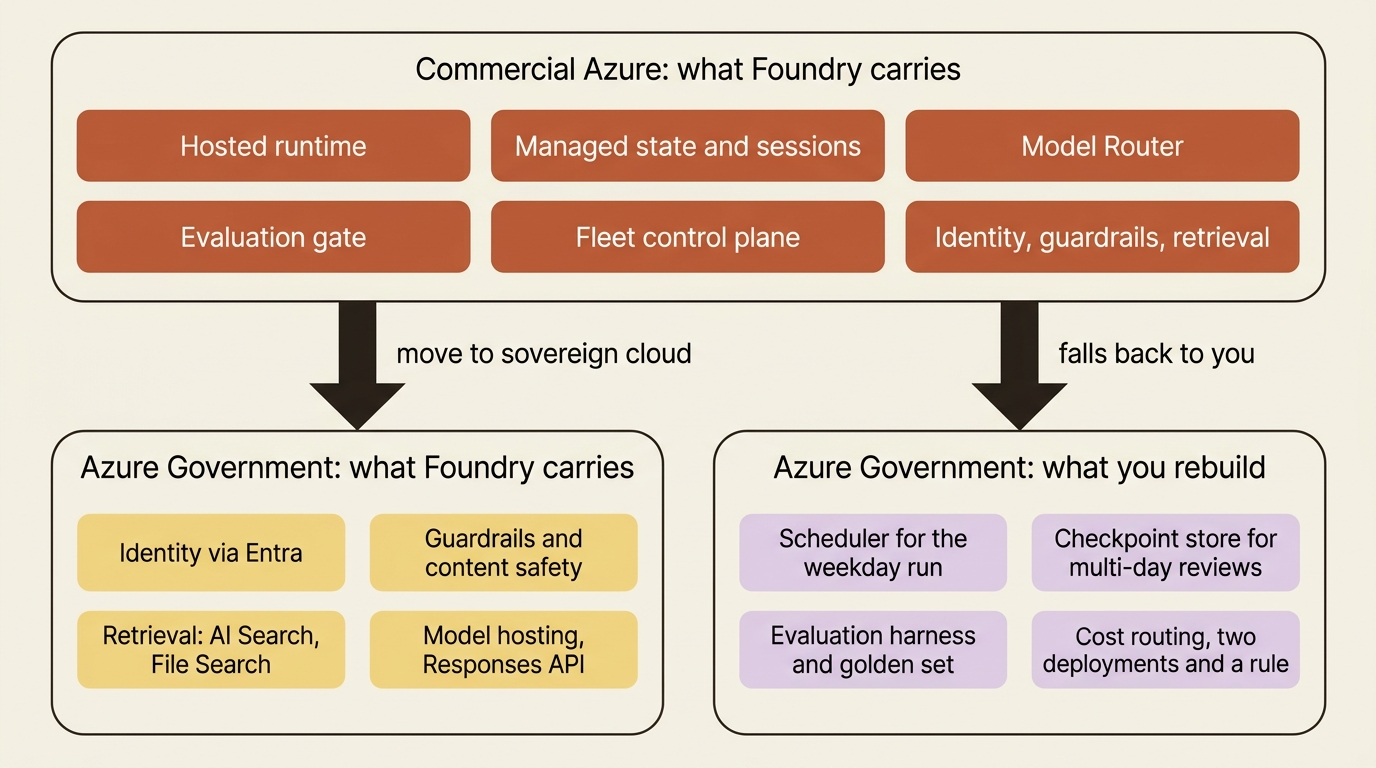
Count what that adds back. A scheduler, a checkpoint store, a fan-out coordinator, and an evaluation harness are four pieces of harness the commercial platform supplied and the sovereign one does not. The adoption question is always whether the platform is carrying enough of your harness to be worth its lock-in, and in Azure Government the honest recalculation is that it carries considerably less. The identity story, the guardrails, the retrieval tools, and the Azure governance surface are still real value. The agentic runtime is not on offer.
Pattern check: in commercial Azure, Foundry takes over the runtime, the state services, the router, the evaluators, and the fleet view, and leaves you the loop, the judgment, and the threat model. In Azure Government it takes over identity, guardrails, retrieval, and model hosting, and leaves you the loop, the judgment, the threat model, and the runtime. The "still yours" column did not shrink. The "theirs" column did.
Do this today
- Open the Foundry Agent Service Azure Government page and the platform page, and write down the date on each one before you read a single row.
- List every Foundry feature your current design depends on, then mark each one Yes, Preview, No, or Not listed against those two pages. Treat "Not listed" as its own category, never as a Yes.
- Check your client code for a hard-coded
.comendpoint or a missingcredential_scopes, and set the audience tohttps://ai.azure.us/.defaultbefore anyone spends an afternoon on a 401. - Price the four rebuild pieces explicitly: a scheduler, a checkpoint store, a fan-out coordinator, and an evaluation harness. Put the estimate in the same document as the architecture.
- Take every preview row to your security and compliance team before it enters an authorization package, and verify the private-networking and channel-publishing questions against live pages rather than against this article.
Read the table before the review, not during it
One page decides whether a Foundry design describes a system you can build in a government tenant, and it takes four minutes to read. Prompt agents yes, workflows preview, hosted agents no. Eight tools in, eight out. Responses API in, Model Router out. Guardrails in, evaluations and optimization out. Tracing in, for prompt agents. Two regions, four deployment types, one data zone named USGov, and a token audience ending in .us.
Three habits keep that reading honest. Date it, because the Agent Service government page carries an August 2026 date and the platform page a September 2026 one, and both will move. Prefer the dedicated government page over the general page when they disagree, which they do in at least three places named here. And treat an unlisted feature as unlisted rather than as available, because an authorization package is exactly the document where an optimistic reading becomes someone's finding.
The feature-availability table is not documentation about the compliance boundary. It is the compliance boundary, expressed as rows.