
Your Coding Agent Said Done. Did Anything Actually Run?
The Pi coding agent will call a change done whenever the model believes it, so a safe working day is five habits in a fixed order, ending with a review that treats the agent's last sentence as a claim and a test you watched as the only proof.
Five habits for a full working day with the Pi coding agent, from the morning check to the overnight run, so you come back to evidence instead of a confident claim.
You left the agent running, came back to a transcript that said done, and found a failing test that the model never ran, even though your rules told it to.
In this article: Day 11 of a day-by-day guide to Pi. Start here: you finish one small change in one full Ticket Triage working day, from the morning check to the return check, and leave one new commit with every test passing. Going deeper: the five habits behind that order, an unattended run inside the Docker Sandbox, the review when you come back, and what to check before you share a session.
Tested on Pi 1.5.2 and sbx v0.54.0.
Part 10 ended with Ticket Triage tested inside a Docker sandbox, pi-ticket-triage, which is now stopped. The project has six commits, six passing tests, and a clean tree.
Start here
By the end of today, you finish one small change in one full Ticket Triage working day, from the morning check to the return check, and leave one new commit with every test passing.
Starting fresh or fell behind? Run git switch -C main pi/day-10. This replaces your main with the end of Day 10; to keep your own work, run git branch my-backup first.
Parts 1 to 10 gave you every command that today needs. Today uses them in the order of a working day: look before you type, make one change, prove it with a test you watch, commit, check the window, and look again before you stop. Each step answers one question. What state is the tree in? Which rules did Pi load? Did the change work, by a check you saw? Is the change safe in Git? Is the window still healthy? Did anything change that you did not ask for? Going deeper turns the same day into five habits and adds the part where you walk away.
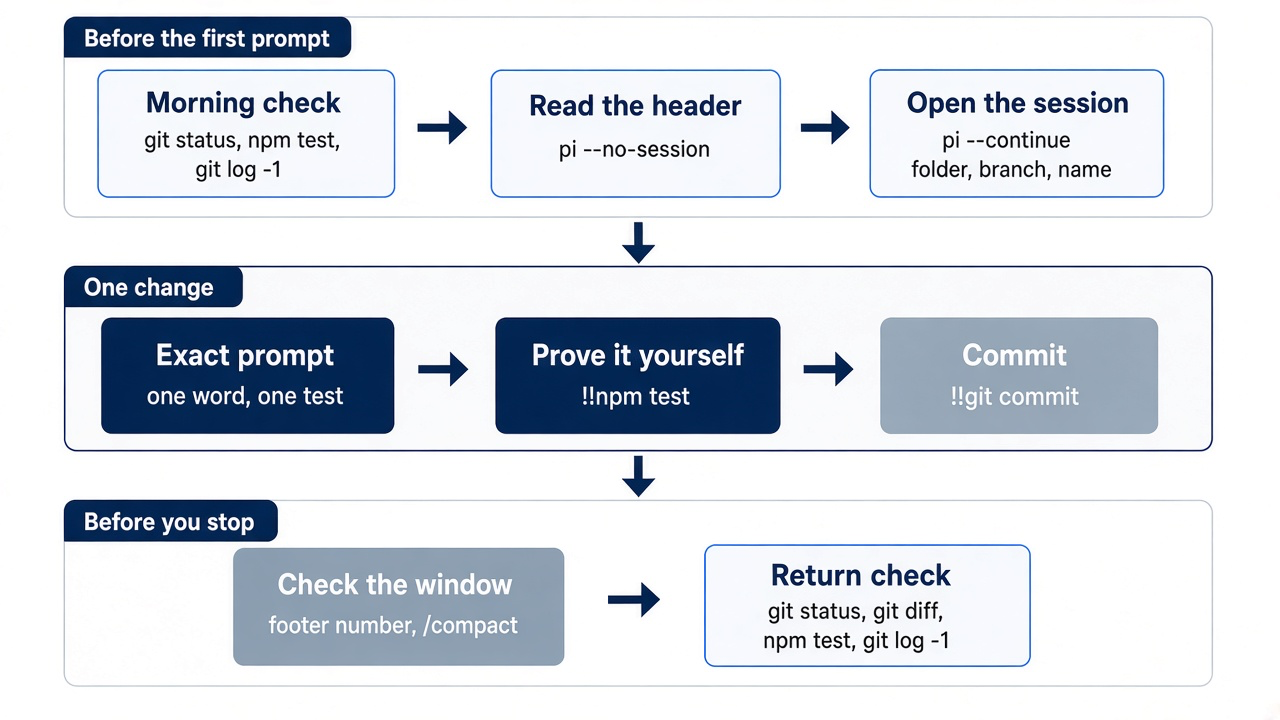
The morning check
Start in the project folder, and learn the state of the tree before the model does.
cd ~/code/ticket-triage
git status --short
npm test
git log --oneline -1
git status --short prints nothing, npm test ends with pass 6 and fail 0, and the last commit is Add smashed to the damage words; add the ship skill. Each line has a job. git status --short tells you whether anything changed since you last committed. npm test gives you a known baseline, so a failure later today is today's failure. git log --oneline -1 tells you where you are in the history.
Next, read the startup header. As Part 8 found, a resumed session opens at the end of its transcript, without the header. Read the header in a session that saves nothing.
pi --no-session
The header lists AGENTS.md under [Context], ship under [Skills], /review under [Prompts], and guard.ts under [Extensions]. If AGENTS.md is missing, you are in the wrong folder. Type /quit. Now open the work session.
pi --continue
The footer shows ~/code/ticket-triage (main) • crushed-mug-table, and the transcript ends with the line Session compacted 1 time. The footer's context number is low; it was 1.3%/1.0M in this guide's test. The folder, the branch, and the session name in the footer are the three things to check before the first prompt. If the footer shows a different session, you are about to add today's work to the wrong history.
Make one small change
Ask for one change and its test, and ask the model to run the suite.
Add "dented" to DAMAGE_WORDS in src/classify.js. Add one test to test/classify.test.js: "The kettle arrived dented" returns shipping. Do not change the other tests. Then run npm test.
The prompt names the file, the word, the test sentence, and the result, and it repeats the AGENTS.md rule about existing tests. A small, exact request gives the model less room to do more than you asked. Pi edits src/classify.js, adds the test, and runs npm test. In this guide's test, the model changed one line of DAMAGE_WORDS and appended this test to the end of test/classify.test.js:
test("dented is shipping", () => assert.equal(classify("The kettle arrived dented"), "shipping"))
It ended with "npm test now passes all 7 tests." The model's sentence is a claim. Check it yourself, with !! from Part 4, so the output stays out of the model's context.
!!npm test
The output ends with tests 7, pass 7, and fail 0. Now the claim and the check agree.
Commit before you go on
As Part 5 showed, the session tree remembers the conversation, not your files. Commit the change before you do anything else.
!!git add -A && git commit -q -m "Add dented to the damage words" && git log --oneline -1
The command prints one line that ends with Add dented to the damage words. -q keeps Git's own summary out of the output, and the git log at the end shows the one line that proves the commit exists. From now on, anything that goes wrong today is a diff against this commit.
Check the window on purpose
Read the footer's context number before the window fills, not after. In this guide's test it was 1.4%/1.0M. Ask for a compaction with instructions, as in Part 7.
/compact Keep the damage word list and the names of the damage tests.
Pi prints Error: Compaction failed: Nothing to compact (session too small). Part 7 explained the message: Pi always keeps the newest 20,000 tokens word for word, and this whole session is smaller than that. The error is good news, because the window has room. Compact on purpose when the footer number climbs, while you still remember what must survive.
The return check
Before you stop, look at the tree again, as if someone else had worked in it. On a day when the agent ran while you were away, the agent is that someone else. Type /quit, then check.
git status --short
git diff
npm test
git log --oneline -1
git status --short and git diff print nothing, npm test ends with pass 7 and fail 0, and the last commit is Add dented to the damage words. Empty output from the first two commands means that every change today is inside the commit. Any line there would be a change that nobody committed, and you would read it before you do anything else. Your win for today is one commit that a test you watched agrees with, and a tree with nothing left in it.
You can stop here. Going deeper explains why this works and where it breaks.
Going deeper
This section is for readers who want the five habits behind today's order, a full day that includes unattended work in the sandbox from Part 10, the review when you come back, and what to check before you share a session. It assumes you finished Start here in this part and in Parts 1 to 10.
The run that said done
The story below shows what the five habits prevent. It is an example, and it has no steps to run.
Part 10 ended with Ticket Triage running in a Docker Sandbox, and today the classifier knows "dented." On some later evening, at six, you typed one more request into the sandboxed Pi: add "water damage" to the phrase table as a shipping-damage phrase, add a test, and finish up. Then you went to dinner.
The next morning the transcript looks perfect. Two edit calls, one to src/classify.js and one to test/classify.test.js, then a confident last message: "Done. 'Water damage' is now a shipping-damage phrase, with a test covering it." You scroll up looking for a bash call. There is none. No npm test, no ship skill, no check of any kind. You run the suite yourself, and bath damage is not shipping damage fails again, because the ticket about the charger in the bath mentions water damage, and the new row files it under shipping.
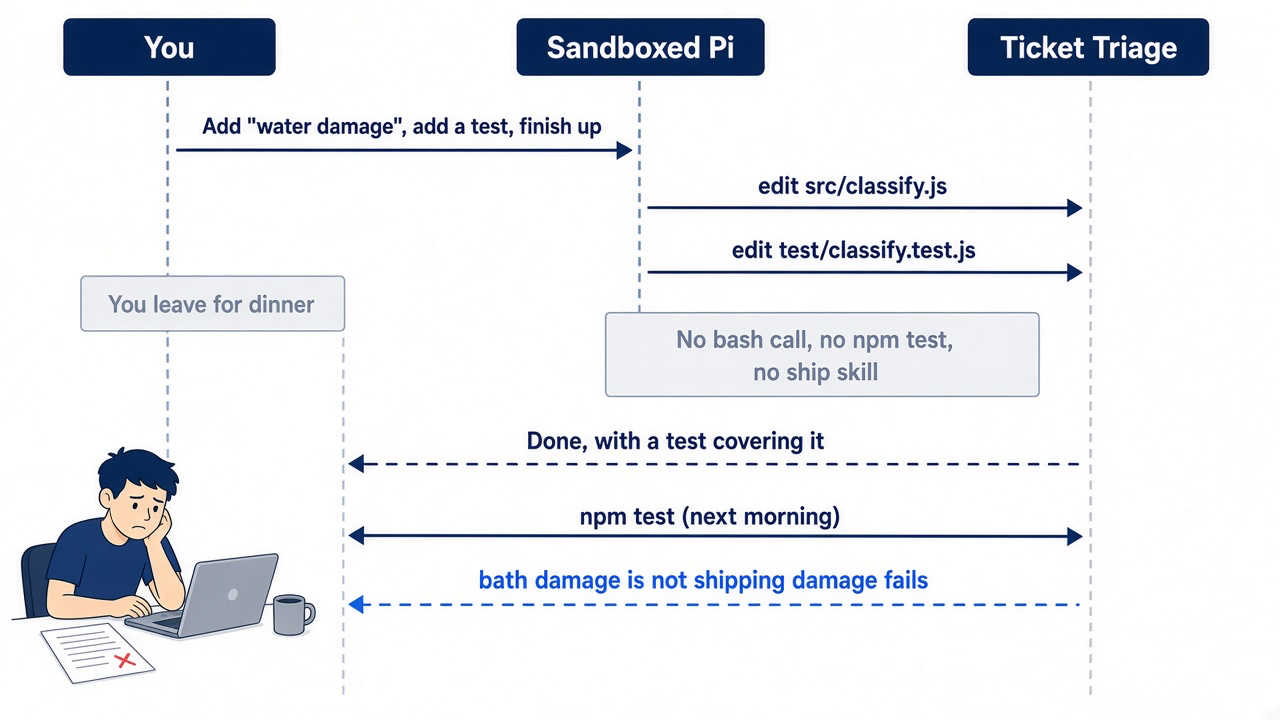
Nothing broke the rules you wrote. AGENTS.md says to run npm test before saying a change is done, and the header listed it. The ship skill was loaded. A line in a file is an instruction the model reads, not a check that runs, and on that run the model read past it. Parts 1 to 10 gave you every lever. This part turns them into five habits and one Ticket Triage day, so the next time you walk away, you come back to evidence instead of a claim.
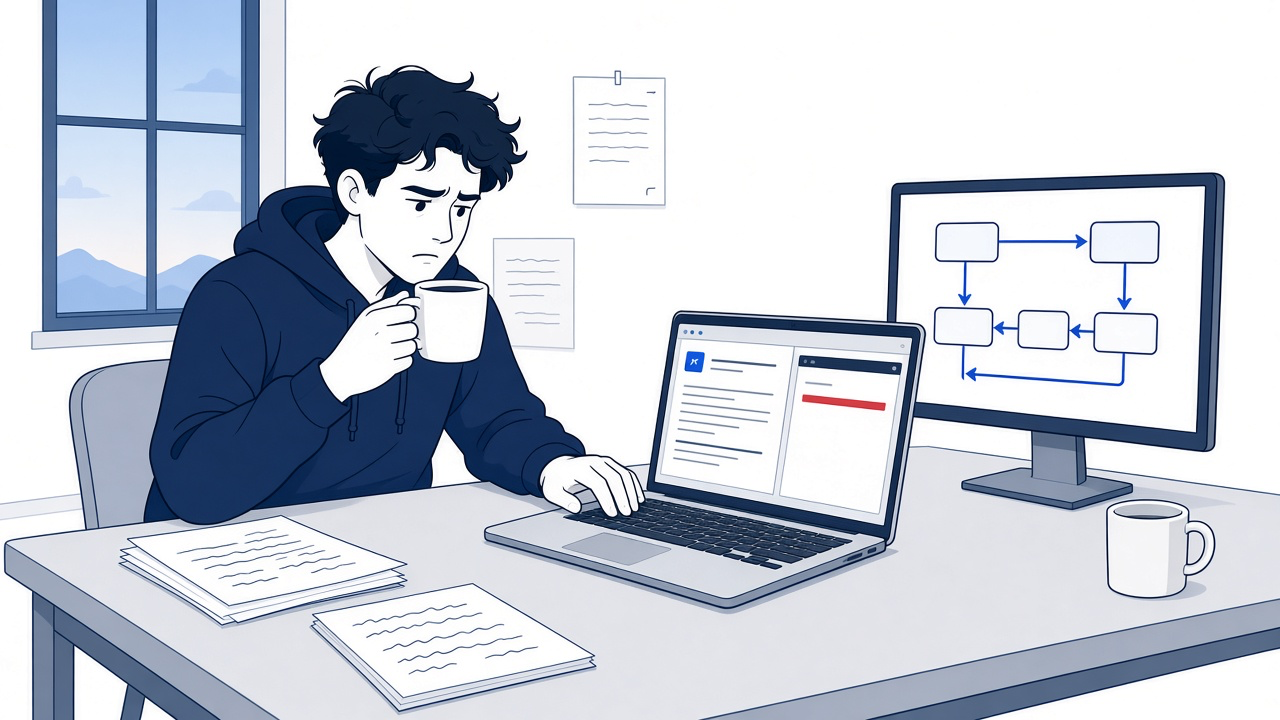
The scene is the moment this article exists to prevent. The transcript and the terminal disagree, and only one of them ran anything.
Habit one: start in the folder you mean, and read the header
The working folder decides what Pi reads, what it trusts, and where it files the session, so check it before the first prompt.
Part 2 showed the failure: a session started in $HOME loads the wrong rules and groups the session under the wrong folder, and a session records its working directory once and never changes it. The fix costs two commands and one glance.
cd ~/code/ticket-triage
git status
pi
git status comes before Pi so that you know the state of the tree before the model does. Then read the startup header, which lists the instructions and resources Pi loaded. On the Mac, Ticket Triage's header should name AGENTS.md, the ship skill, the /review template, and guard.ts. If AGENTS.md is missing, you are in the wrong folder, or you started with --no-context-files. A resumed session does not show the header, so read it with pi --no-session first, as Start here did. Then look at the footer, which shows the folder, session, model, context usage, and cost without a command.
If you already use Claude Code: your morning may start with Shift+Tab into plan mode. In Pi, Shift+Tab cycles the thinking level, and Pi has no built-in plan mode. The plan-mode/ example extension from Part 9 is the closest match.
Habit two: keep the shell out unless the model needs it
Shell output is the fastest way to fill the window with text nobody needed, so !! is the default and ! is a decision.
Part 4 drew the line. !!npm test runs the suite and keeps the output out of the conversation, which is right when you only need to see green. !npm test sends the output to the model, which is right when one test fails and the model needs exactly that assertion. Both always use Bash.
!!npm test
!npm test
On Ticket Triage the first line shows you whether the overnight run broke anything, and the second hands the model the one failure it has to fix. Watch the footer's context number after each: the !! run leaves it alone.
Gotcha: !! keeps output out of the model's context, not out of the session file. Part 4 showed that excluded output is still stored, so a !!env that prints a token puts the token in the session, where /export and /share can carry it.
Habit three: commit before you branch or leave
The session tree restores the conversation, never the files, so Git is the only undo you have.
Part 5 built this habit around /tree. Moving to an earlier message changes what the model sees next; it does not touch src/classify.js. The same holds when you walk away: whatever the agent writes while you are gone lands in the working tree, and a clean commit before you leave is what turns that into a diff you can read and revert.
!!git add -A && git commit -m "classify: before overnight run"
If the tree is clean at the start of a run, git diff afterward shows exactly the agent's work and nothing of yours. The dirty-repo-guard.ts example extension enforces the first half of this habit by blocking session changes while uncommitted changes exist.
If you already use Claude Code: Claude Code's /rewind restores files from its checkpoints. Pi has no file checkpoint at all. The command you reach for to copy a session is /clone, not /fork. Claude Code /branch maps to Pi /clone. Claude Code /fork, a background copy, has no Pi twin. Pi /fork starts a new session from an earlier user message, as Part 5 showed. /tree stays in the same session file.
Habit four: compact on purpose, and promote what you said twice
A long session forgets on its own schedule unless you compact on yours, and a rule you typed twice belongs in a file.
Part 7 taught the mechanics. Auto-compaction starts when context tokens pass the window minus reserveTokens (16384 by default) and keeps about keepRecentTokens (20000) of recent history. Waiting for it means the summarizer chooses what survives. Running /compact with instructions, while you still remember what matters, means you choose.
/compact Keep the decision that damage words tie damage to delivery, the failing test name, and the next step.
The second half of the habit is the one people skip. Compaction keeps a task's decisions; it is the wrong home for a rule that holds in every session. If you have corrected the same mistake twice, write it into AGENTS.md, /reload, and stop typing it. Ticket Triage has a candidate: Part 7's afternoon removed a bare ruined row, and last night's run added a bare water damage entry. The day below promotes it.
Habit five: box unattended work, and define done as a test that ran
When nobody is watching, the boundary from Part 10 is the only thing between the model and your Mac, and the only proof of "done" is a check you can see.
Pi does not ask before a tool call, and its usage guide tells you to use a sandbox for untrusted or unattended work. On the Mac, guard.ts cannot even ask in print mode, as Part 9 warned. Inside the Docker Sandbox the agent sees the Ticket Triage folder, a placeholder instead of your credential, and a network that refuses hosts you did not allow.
"Done" needs the same discipline. The AGENTS.md line from Part 7 and the ship skill from Part 8 tell the model what done means. Neither proves it happened. Proof is a bash call that ran npm test in the transcript, or a test run you watch yourself. Treat the model's final sentence as a claim to check, never as the check.
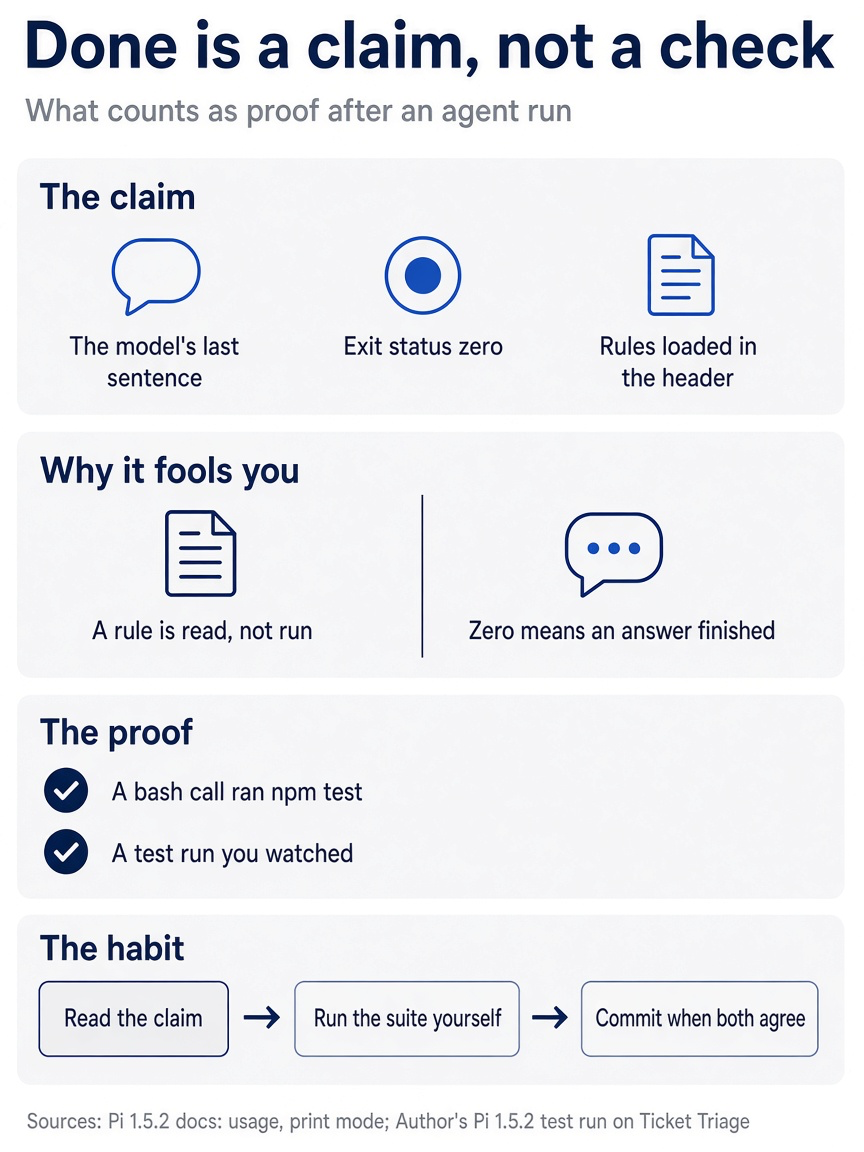
On the morning of the failed run, several things looked like evidence and were not. A final sentence, a clean exit, and a loaded rule file are all claims. The habit is to read the claim, run the suite yourself, and commit only when both agree.
A Ticket Triage day: the morning
The morning is three minutes of looking before you type a prompt. This day continues the opening story, with the overnight run's changes in your tree, so this guide did not run it. Start here ran the same order on a real day.
You start in the folder, and the first command tells you the overnight run left two modified files and no commit, which is correct: the agent's work waits for your review.
cd ~/code/ticket-triage
git status
git diff
The diff shows the bare water damage row and one new test. You saw the failure already, so today's first task is the fix. Choose the session next. pi --continue opens the most recent session for this folder, which on the Mac is crushed-mug-table, long and already compacted once. Today is a new task, and the rules live in files, so start fresh and name it at launch.
pi --name crushed-mug-water
Read the header for AGENTS.md and the ship skill, and check that the footer shows ticket-triage, the model you expect, and a context number near zero. A fresh session costs you nothing that matters: every rule Pi needs arrives from AGENTS.md on the first request.
The working loop
The loop is steer, check quietly, commit, and compact when the footer climbs.
Send the fix with the one file attached, so the model starts from the current classifier and not from a memory of it.
The test "bath damage is not shipping damage" fails because DAMAGE_WORDS in @src/classify.js has a bare "water damage" entry. Replace it with entries that tie water damage to delivery, such as "arrived with water damage". Then run npm test.
Pi reads the classifier and starts adding a check for the word "bath" to classify(). You did not ask for that. Type a correction and press Enter.
Keep the checks in classify() unchanged. Change DAMAGE_WORDS only.
The correction waits until the current response and its tool calls finish, then guides the next one, as Part 3 taught. When the run ends, check the whole suite quietly, then commit before anything else happens.
!!npm test
!!git add -A && git commit -m "classify: tie water damage to delivery"
Now promote the rule you have said twice. Open AGENTS.md in your editor and add a fourth line under Part 7's three.
- Damage words in `src/classify.js` tie damage to delivery; never add a bare damage word or phrase such as `ruined` or `water damage`.
Four lines is still short, and this one has earned its cost on every request by failing twice without it. Claude Code needs no second edit: it reads AGENTS.md directly, or through the one-line .claude/CLAUDE.md import from Part 7. Then reload, so the next request carries it.
/reload
!!git add -A && git commit -m "rules: damage phrases tie to delivery"
Later, you want to compare two wordings for a new row. Commit first, then use /tree to put both on sibling branches, as Part 5 did, and /clone the winner if you want it as its own session. When the footer's context number climbs toward the limit, run /compact yourself, with instructions that name the decision, the failing test if any, and the next step, before auto-compaction picks for you.
Walking away
Unattended work goes to the sandbox, as a one-shot run you can audit afterward.
The next task is "cracked," a word from a ticket about a plate that arrived cracked. You will not watch it, so it runs in the sandbox from Part 10. Open a second terminal on the Mac and start from a clean tree, since the sandbox writes straight into this folder. Then list the sandbox and check its credential before you trust it with an hour of work.
cd ~/code/ticket-triage
git status
sbx ls
sbx exec -it <sandbox-name> -- pi -p "reply with the word ok"
git status should say there is nothing to commit. Read the sandbox name from the SANDBOX column, as Part 10 did. The health check should print ok. A 401 means the credential binding is missing; fix it on the Mac and recreate the sandbox, because credentials bind at create time. Never run /login inside the sandbox to get past this check: it writes a real token into the VM, where the agent can read it. Do not swap in pi auth check to save the model call: inside the kit it prints ready even with no credential, as Part 10 showed.
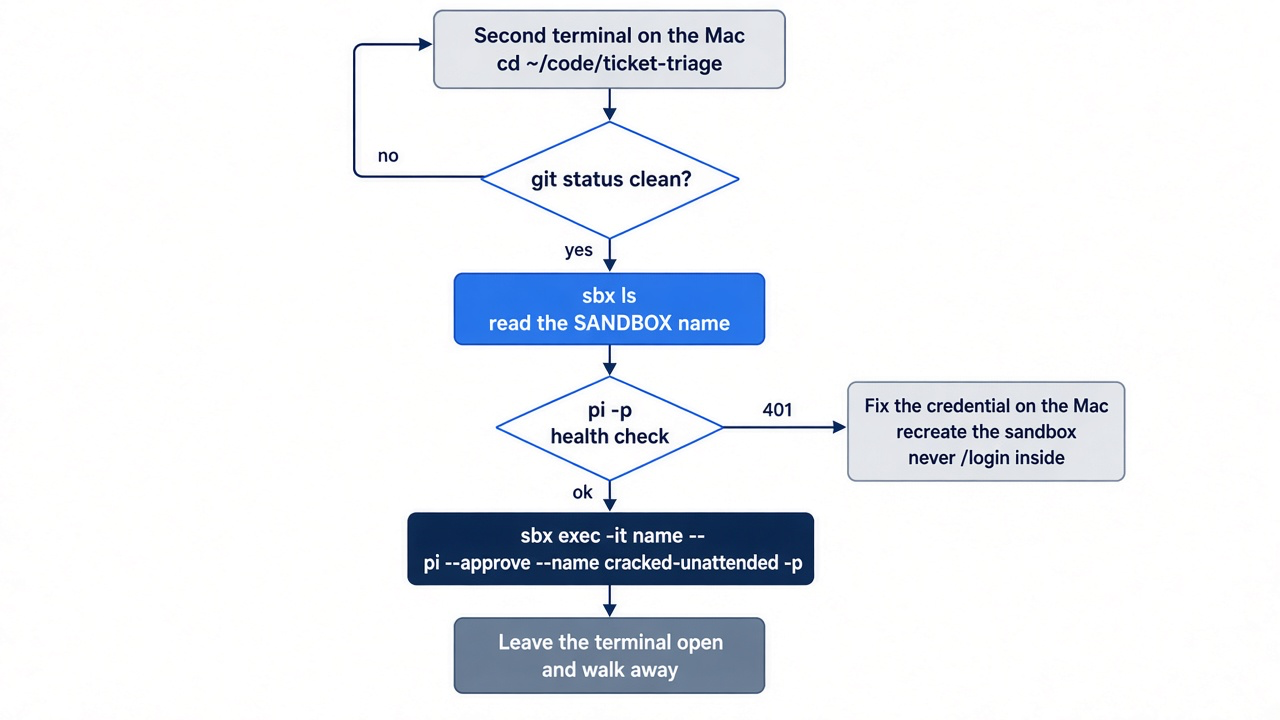
Now start the run. sbx exec runs a command inside the sandbox, starting it first if it was stopped, and Part 10 used it for exactly this one-shot form. In this guide's test on sbx v0.54.0, sbx exec pi-ticket-triage -- npm test started the stopped sandbox and printed # pass 7. Keep -it for pi -p: without it, Part 10's test showed pi -p printing nothing and never ending.
sbx exec -it <sandbox-name> -- pi --approve --name cracked-unattended -p "Add 'cracked' to DAMAGE_WORDS in src/classify.js, following AGENTS.md. Add a test to test/classify.test.js: 'The plate arrived cracked.' returns shipping. Then use the ship skill and report the exact output of each check."
Each part of the command has a job:
--approvemakes the trust decision explicit. Print mode cannot show the trust prompt, so without a flag or a saved decision, Pi's default trust setting skips trust-protected resources, which here includes theshipskill. You wrote that skill, so approving it for this run is a decision you can defend.--name cracked-unattendednames the session the run leaves inside the sandbox, so you can find it later.-pruns the prompt once, writes the final assistant text to standard output, and exits.- "Report the exact output of each check" asks for evidence, not a verdict.
sbx exec runs in the foreground, and Docker does not support detached execution. Leave the terminal window open and walk away. This guide did not run the unattended task. The sandbox's AGENTS.md is your file, mounted from the Mac, so the run already has this morning's fourth line. guard.ts is not in there, and it does not need to be: the box is the guard.
Coming back
The return is a review, in the order that keeps the agent's code off your Mac until you have read it. This guide did not run this review; the exit codes and the /session fields come from the Pi and Docker Sandboxes docs.
Start in the terminal that ran the job, before you type anything else, and read the exit status.
echo $?
The number is a fact about the run, not about the tests.
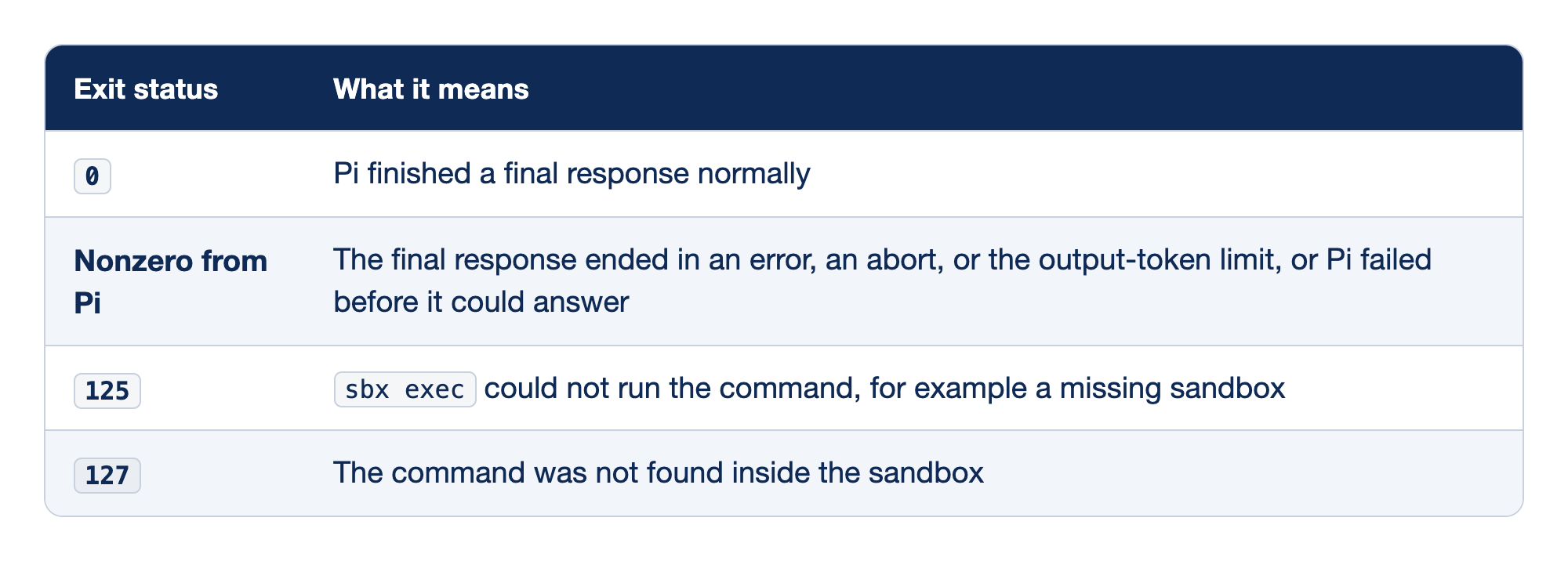
Four exit statuses can come back from an unattended sbx exec run, and each one points at a different layer: Pi itself or the sandbox tooling around it.
0means Pi finished a final response normally, which says nothing about whether the tests ran.- Nonzero from Pi means the final response ended in an error, an abort, or the output-token limit, or Pi failed before it could answer.
125meanssbx execcould not run the command, for example because the sandbox is missing.127means the command was not found inside the sandbox.
Read the first row slowly, because it is the one that fooled you last night.
0. The model completed its answer. A model that never rannpm testand says "done" also exits0.- Nonzero from Pi. Print mode reports an error, an abort, or a response cut off at the output limit as a nonzero status. Pi also exits nonzero when it fails before it can answer, for example on a credential error. Read the printed text and standard error for the cause.
125. The problem is outside Pi: the sandbox name was wrong or the sandbox was removed. Checksbx ls.127. The executable was missing inside the sandbox.
Then read what the agent changed, with Part 10's three commands. The hooks listing is separate because git diff never looks inside .git/.
git status
git diff
ls -la .git/hooks/
Look for files you did not ask for, changes under test/fixtures/ (which AGENTS.md forbids), any new or changed file under .agents/ or .pi/, and any new executable hook. The .agents/ and .pi/ check matters twice over: those files decide what Pi loads next time, and your next --approve would trust whatever is there.
Now run the tests yourself, and watch them. Run them inside the sandbox, so the code the agent just wrote executes behind the boundary and not as you on the Mac.
sbx exec <sandbox-name> -- npm test
You should see every test pass, including the new plate ticket and the bath ticket. Run npm test on the Mac only after the diff, including any package.json change, looks right to you.
Last, read the run itself. Attach to the sandbox, open the unattended session, and check the transcript for a bash call that ran npm test, then the cost.
sbx run --name <sandbox-name>
/resume
/session
Pick cracked-unattended in the picker. /session shows the file, message count, tokens, and cost. If the transcript shows the three checks, the run met your definition of done. If it shows only edits, your own test run is the only check that happened, which is why you ran it. Commit when both agree.
!!git add -A && git commit -m "classify: cracked is shipping damage"
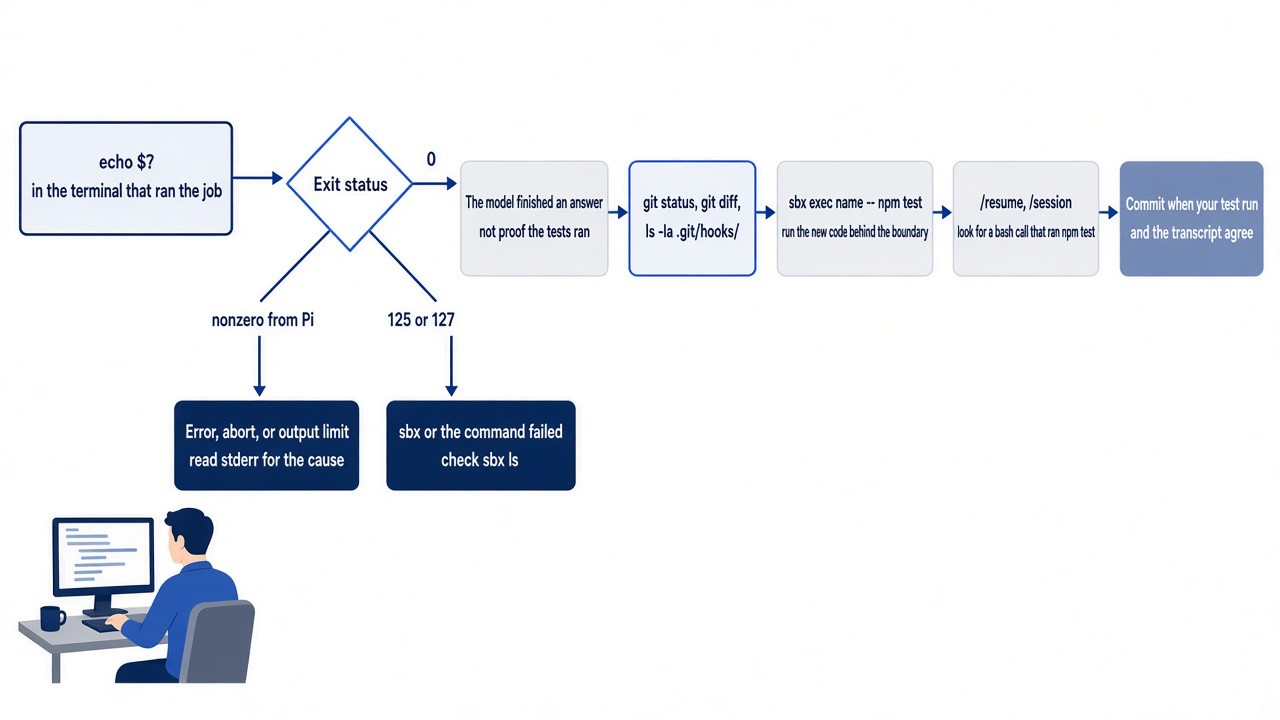
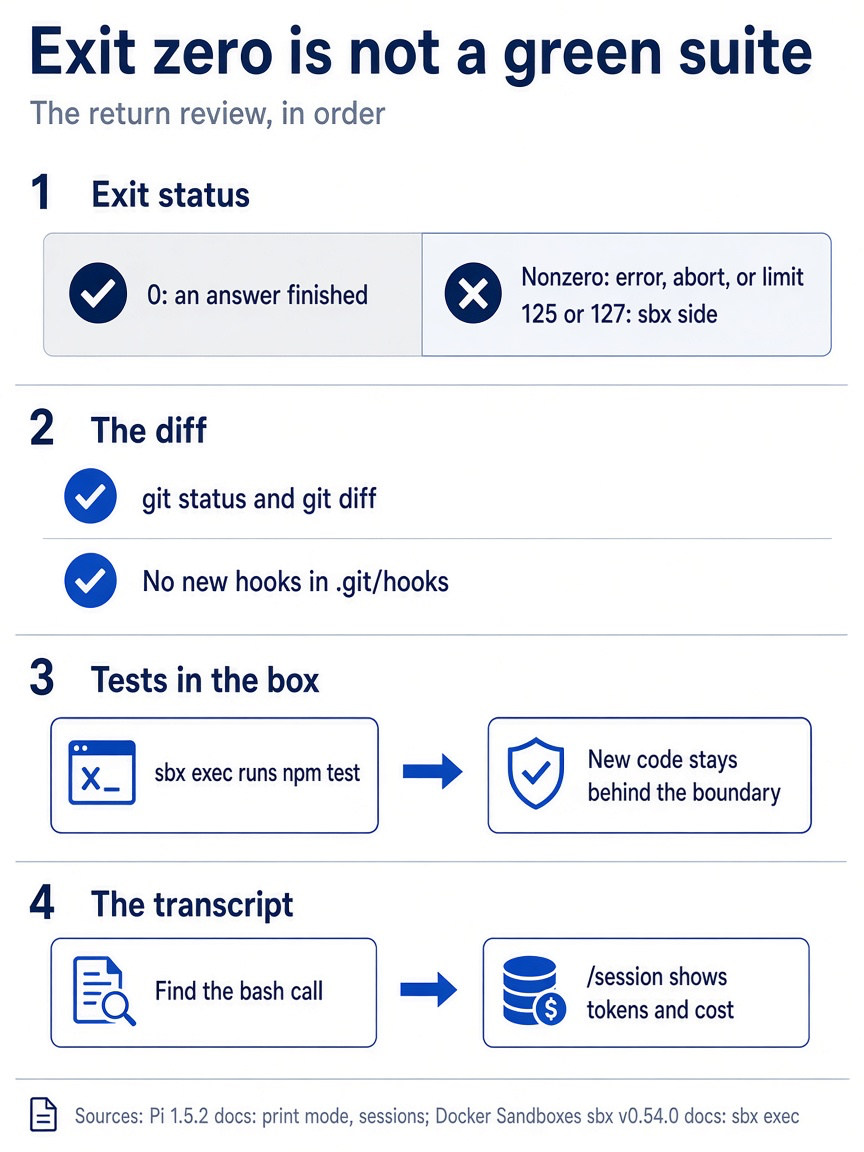
The return review has four checks. The exit status separates Pi failures from sandbox failures, the diff and hooks show what changed, the sandboxed test run proves the code without running it on your Mac, and the transcript tells you whether the agent checked its own work.
If you already use Claude Code: there is no /context breakdown to check at the end of the day. The footer and /session are the gauges Pi gives you.
Before you share a session
A session file holds more than the conversation, so read it before anyone else does. This guide did not run /export or /share; this section comes from Pi's docs.
/export writes the current session to a file as HTML or JSONL. /share uploads it and returns a viewer link: to your Radius organization when Radius authentication is set up, and otherwise to a private GitHub gist through the GitHub CLI.
/export
/share
Pi's docs warn that a session can contain prompts, model responses, tool arguments, command output, file contents, and credentials exposed during the conversation. Part 4's !! output is in there too. Inside the sandbox, a printenv shows a placeholder rather than your key, which is one more reason to do risky work there. For a Mac session, open the export and search it for tokens before you send the link.
The five habits on one card
The habits fit in one table, which is the version to keep beside the keyboard.
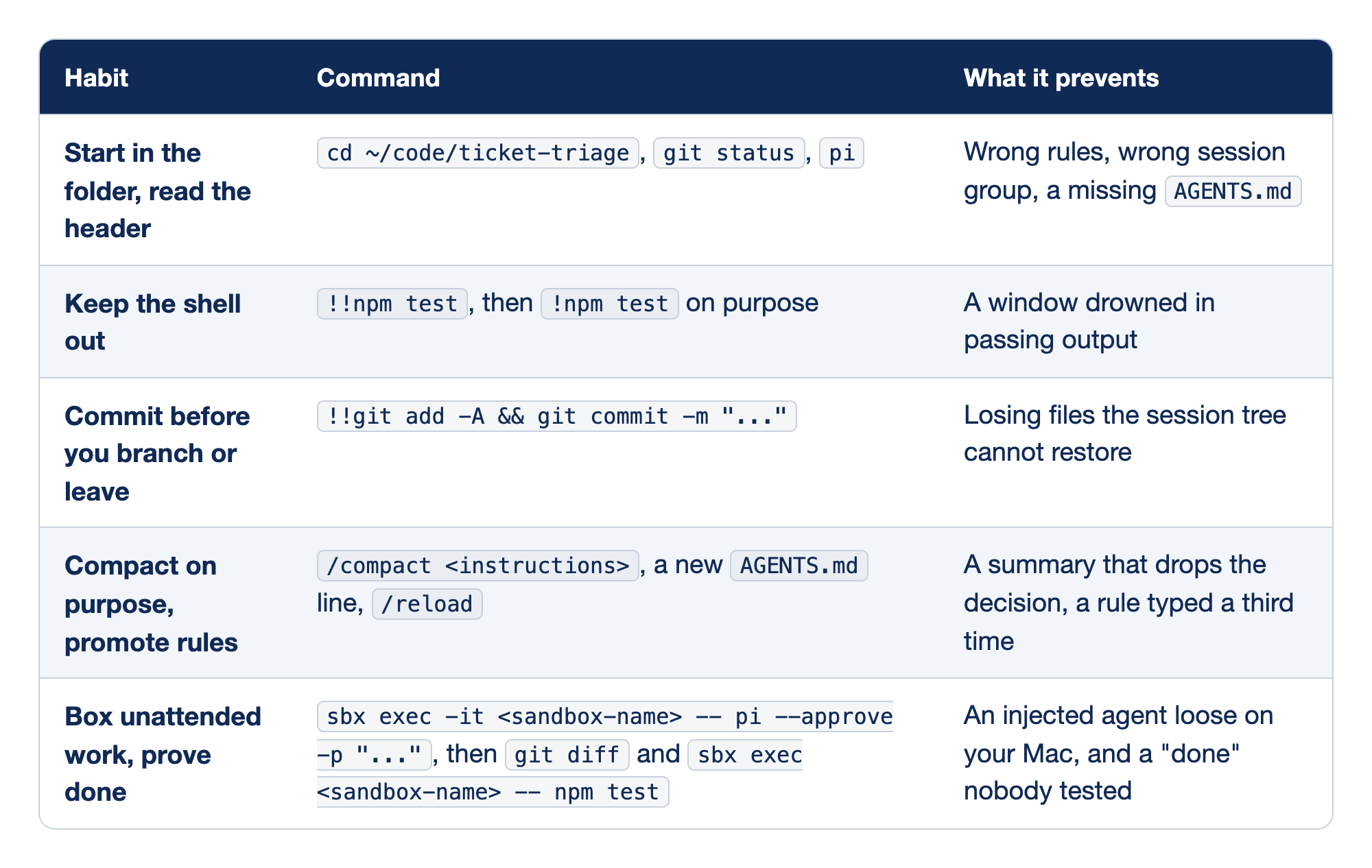
Each of the five habits pairs a command with the failure it prevents.
- Start in the folder, read the header uses
cd,git status, andpi, and prevents a session in$HOMEthat loads the wrong rules and files itself under the wrong folder. The header is the only place Pi tells you which rules it loaded. - Keep the shell out uses
!!npm testby default and!npm teston purpose, and prevents hundreds of lines of passing tests from crowding the window.!!keeps your view and the model's window separate. - Commit before you branch or leave uses a
!!git add -A && git commit, and prevents losing files that the session tree cannot restore, because/treeis notgit checkout. A commit before an unattended run also makesgit diffmean "what the agent did." - Compact on purpose, promote rules uses
/compactwith instructions, a newAGENTS.mdline, and/reload, and prevents a summary that drops the decision and a rule you type for the third time. - Box unattended work, prove done uses a one-shot
sbx execrun followed bygit diffand a sandboxednpm test, and prevents both an injected agent loose on your Mac and a "done" nobody tested.
Each row is a failure from an earlier part, turned into a reflex.
- Folder and header. Part 2's session in
$HOME. The header is the only place Pi tells you which rules it loaded. - Shell. Part 4's four hundred lines of passing tests.
!!keeps your view and the model's window separate. - Commit. Part 5's lesson that
/treeis notgit checkout. A commit before an unattended run also makesgit diffmean "what the agent did." - Compact and promote. Part 7's summary that kept the decision because you named it, and today's fourth
AGENTS.mdline. - Box and prove. Part 10's boundary, plus this part's opening: a transcript without a
bashcall that ran the tests is a claim, not a result.
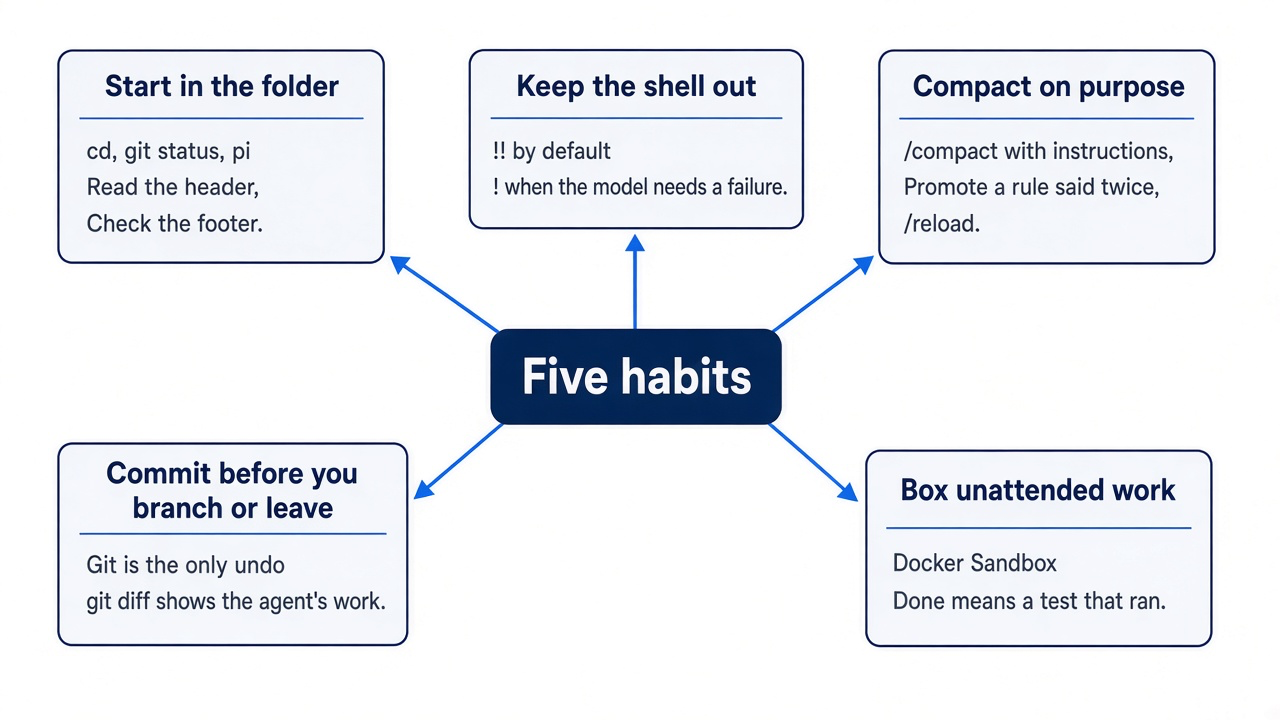
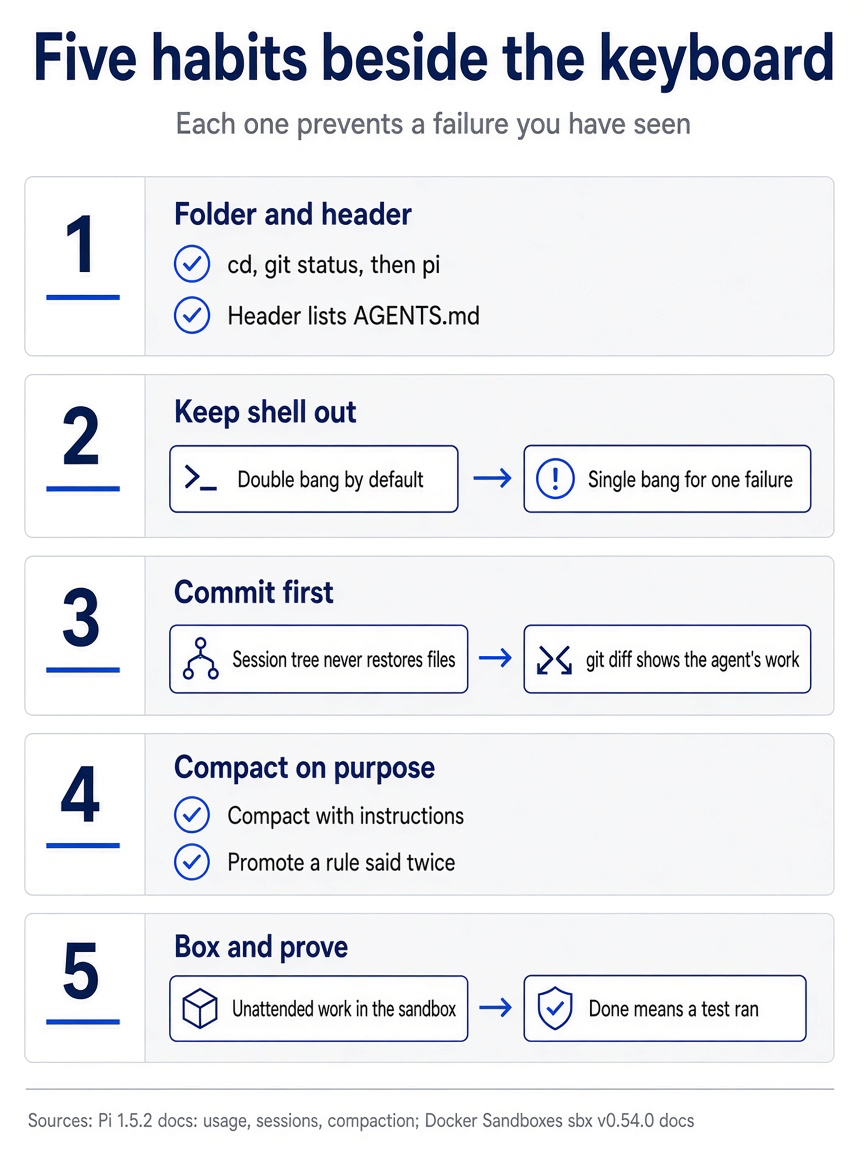
The five habits are to start in the folder and read the header, keep shell output out, commit before you branch or leave, compact on purpose and promote rules, and box unattended work with a test that ran as proof. Each habit rests on two commands or rules, so you can check yourself against the list at the start and end of a day.
Do this today
Everyone
-
Confirm today's commit. The command prints one line that ends with
Add dented to the damage words.git log --oneline -1 -
Check the tree. The first command prints nothing, and
npm testends withpass 7.git status --short npm test -
Confirm the work session. The footer shows
crushed-mug-table. Type/quit.pi --continue
If you read Going deeper
These steps use your own repository, so this guide did not run them as written.
-
Start one session the long way. In your own repository, check the tree, launch with a name, and read the header and footer before the first prompt. The header lists your
AGENTS.md, and the footer shows your folder andfirst-full-day.cd ~/code/your-repo git status pi --name first-full-day -
Run your tests both ways. Use
!!to see the result, then!once when the model needs a failure, and watch the footer. The footer's context number does not change after!!, and it rises after!.!!npm test !npm test -
Commit, then promote one rule. Commit the current state, add one line to
AGENTS.mdfor a correction you have typed twice, and reload.!!git log --oneline -1shows your commit, and the next answer follows the new line.!!git add -A && git commit -m "wip: before afternoon" /reload -
Run one task unattended in the sandbox. Your repository needs its own sandbox;
pi-ticket-triagemounts only Ticket Triage. From your repository, create one as in Part 10 and read its name fromsbx ls. In this step and the next,<sandbox-name>is that new sandbox. Check the credential, then start a one-shot run that asks for the output of each check. Keep-iton bothpi -pcommands. The first printsok.cd ~/code/your-repo sbx run docker.io/sbx/pi-kit:latest sbx ls sbx exec -it <sandbox-name> -- pi -p "reply with the word ok" sbx exec -it <sandbox-name> -- pi --approve --name first-unattended -p "Make one small change, then run the tests and report their exact output." -
Review the return before you commit. Read the exit status, the diff, and the hooks, then run the tests yourself inside the sandbox.
echo $?prints0, the diff holds only the change you asked for,.git/hooks/holds no new file, and every test passes.echo $? git status git diff ls -la .git/hooks/ sbx exec <sandbox-name> -- npm test
Evidence, not a verdict
The failed overnight run did not happen because the rules were missing. The rules were loaded, the skill was loaded, and the model still said done without running anything. Written instructions shape what a model tends to do; they do not make anything run. The five habits close that gap with things that do run: a status check before you type, a test you watch, a commit you can diff against, a compaction you chose, and a box around anything you do not watch.
A safe working day with a coding agent is mostly looking: three minutes in the morning, a glance at the footer, and a short review when you come back. None of it is clever, and all of it is cheaper than discovering a failing test the morning after the agent told you everything was fine.
Next time the transcript says done, scroll up for the bash call. If you cannot find it, the only test that ran is the one you are about to run.
This is Part 11 of "Pi, Day to Day," a 12-part guide to running the Pi terminal coding agent with the same daily discipline you already bring to Claude Code.