
A Rule Asks. A Pi Extension Can Say No.
Every instruction you give the Pi coding agent is a request until you write a TypeScript extension, and a ten-line guard.ts shows both the power of a tool_call handler that can say no and the exact limits of a string match that is not a security boundary.
Your AGENTS.md can tell the Pi coding agent to behave, but only TypeScript can stop a tool call. Build a ten-line guard, watch it refuse an rm -rf, and learn exactly what it will never catch.
You wrote never run rm -rf into your rules file, and you still flinch every time the agent reaches for the shell, because a rule is only a request and Pi does not ask before a tool call.
In this article: Day 9 of a day-by-day guide to Pi. Start here: you write a
guard.tsextension that makes Pi ask before anybashcommand containingrm -rf, and you watch it refuse one. Going deeper: what a string match cannot catch, how Claude Code hooks map to Pi extension events, and whether an Agent Plugins package loads in Pi.
Tested on Pi 1.5.2.
Part 8 ended with a /review template, a trusted ship skill in .agents/skills/ship/, six commits, and six passing tests.
Start here
By the end of today, a guard.ts extension makes Pi ask you before any bash command that contains rm -rf, and you have watched it refuse one.
Starting fresh or fell behind? Run git switch -C main pi/day-08. This replaces your main with the end of Day 8; to keep your own work, run git branch my-backup first.
Check where you start
Start in the project folder with a clean tree.
cd ~/code/ticket-triage
git status --short
npm test
git log --oneline -1
git status --short prints nothing, npm test ends with pass 6 and fail 0, and the last commit is Add smashed to the damage words; add the ship skill.
Write the guard
An extension is a TypeScript file that runs inside the Pi process. It can react to events, and one event, tool_call, fires before Pi runs a tool, early enough to stop it (extensions). A rule in AGENTS.md can say "never run rm -rf", and the model will usually comply. An extension can make Pi ask you every time. A guard.ts extension asks before any rm -rf, and it is the first thing in this series that can stop a tool call. Pi's extension quick start contains exactly that handler, and guard.ts is that handler on its own. Pi loads every extension in its auto-discovery folder, ~/.pi/agent/extensions/, in every project. Draft it outside the auto-discovery folder, so a mistake cannot load into every session. Save this as ~/pi-lab/guard.ts; the cat command below writes it.
mkdir -p ~/pi-lab
cat > ~/pi-lab/guard.ts <<'EOF'
import { type ExtensionAPI, isToolCallEventType } from "@earendil-works/pi-coding-agent";

export default function (pi: ExtensionAPI) {
  pi.on("tool_call", async (event, ctx) => {
    if (isToolCallEventType("bash", event) && event.input.command.includes("rm -rf")) {
      const ok = await ctx.ui.confirm("Dangerous!", "Allow rm -rf?");
      if (!ok) return { block: true, reason: "Blocked by user" };
    }
  });
}
EOF
When a bash command contains rm -rf, the handler shows a yes-or-no dialog. If you answer no, it returns { block: true, reason }, and the command never runs. Line by line:
- The default export is a factory that receives the
ExtensionAPIobject. pi.on("tool_call", …)subscribes to the event Pi fires before a tool executes, and that event can block.isToolCallEventType("bash", event)narrows the event so thatevent.input.commandis typed as a string.ctx.ui.confirmshows a yes-or-no dialog and waits.- Returning
{ block: true, reason }stops the call: the command never runs, and Pi records an error result for it, so the model learns the call failed.
A confirm whose answer you ignore blocks nothing, so the return line is the extension.
Trial it in a session that saves nothing
-e, or --extension, loads one extension for this run only. Pi loads TypeScript directly, so there is no build step. Because -e loads the file for this run only, a mistake in it cannot follow you into the next session. --no-session keeps the trial out of your session history, so that tomorrow's pi --continue still opens crushed-mug-table.
pi --no-session -e ~/pi-lab/guard.ts
The header lists guard.ts under [Extensions], beside AGENTS.md, the ship skill, and /review. Give the guard something real to refuse. !! runs the command without sending it to the model.
!!mkdir -p tmp-guard-test
Delete the tmp-guard-test folder with rm -rf. If the command is blocked, stop and tell me; do not try another command.
The model calls bash with rm -rf tmp-guard-test, and Pi shows the guard's dialog before the command runs. The dialog asks "Allow rm -rf?".
 Dangerous!
 Allow rm -rf?
 → Yes
   No
 ↑↓ navigate  enter select  escape/ctrl+c cancel
The cursor starts on Yes. Press Down to move it to No, then press Enter. The transcript shows Blocked by user under the command, and the model reports that the command was blocked and that it tried nothing else. The bash call is blocked, the folder is still there, and the model gets an error result instead of the command's output. Check the folder yourself.
!!ls -d tmp-guard-test
The command prints tmp-guard-test. Ask again and choose yes, and the folder is gone. Send the same prompt, press Enter on Yes, and !!ls -d tmp-guard-test reports that the folder no longer exists. Type /quit.
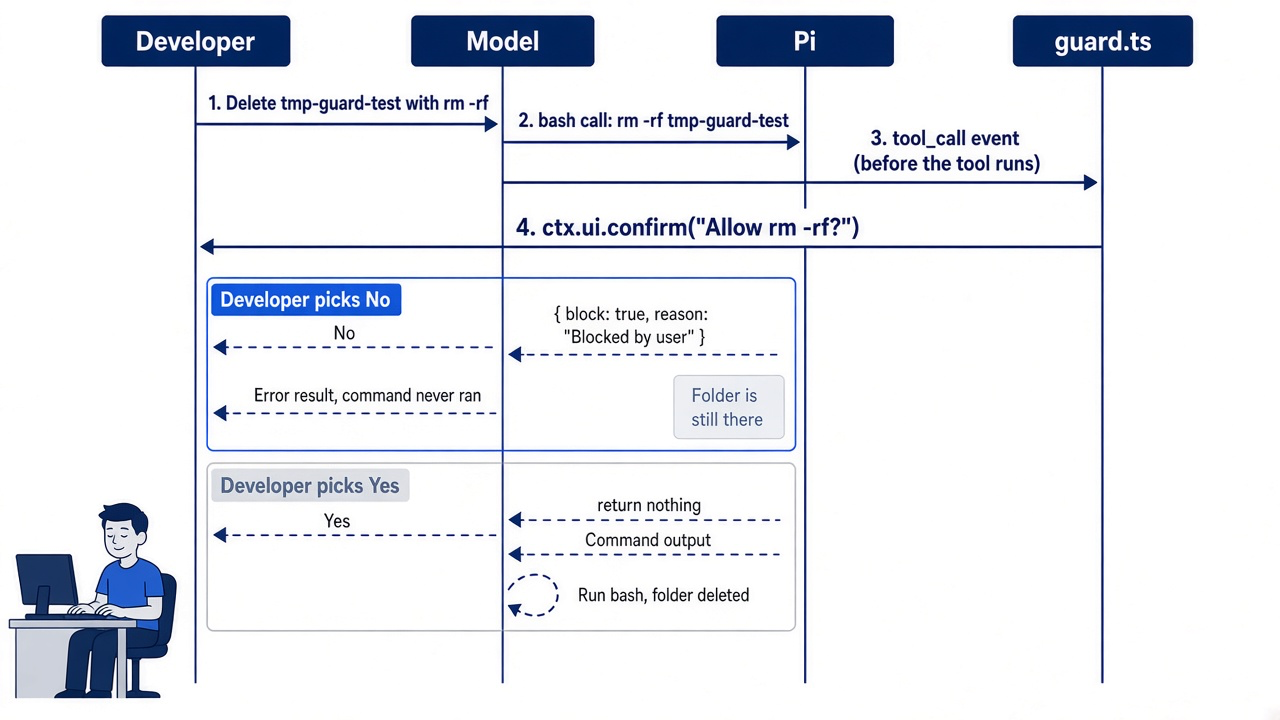

The scene captures the moment the work pays off. The model wanted to delete a folder, the guard put a dialog in its path, and one keystroke kept the folder on disk. A rules file could only have hoped for that outcome.
Know what the guard does not catch
The guard compares text. It looks for the five characters rm -rf in a bash command and nothing else. In this guide's test, the same request with rm -r -f in place of rm -rf ran with no dialog, and the folder was gone. The guard also never sees the write and edit tools, which can empty a file without any shell command. Treat it as a reminder that catches one habit of yours and of the model, not as a wall.
An extension also runs inside the Pi process with your own permissions. It can read what Pi reads and run what you can run. Load only extensions whose code you have read, and draft new ones in ~/pi-lab/ with -e before they go into the auto-discovery folder, as you did today.
Install it where Pi finds it
Quit the throwaway session and install the guard where Pi discovers it on its own. Pi discovers extensions in ~/.pi/agent/extensions/ and loads them in every project, so move the guard there.
mkdir -p ~/.pi/agent/extensions
mv ~/pi-lab/guard.ts ~/.pi/agent/extensions/guard.ts
pi --no-session
The header lists guard.ts under [Extensions]. Pi loaded it from the folder, with no -e. Type /quit, then check the tree.
git status --short
The command prints nothing. The guard lives in your home folder, not in Ticket Triage, so the repository has nothing to commit. Your win for today is an extension that Pi loads in every session, and one rm -rf that did not run because you said no.
You can stop here. Going deeper explains why this works and where it breaks.
Going deeper
This section is for readers who want to know what an extension can and cannot do, how Claude Code hooks map to Pi events, which example extensions to read, how MCP servers and Pi packages fit, and whether an Agent Plugins package loads in Pi. It assumes you finished Start here in this part and in Parts 1 to 8.
Rung four: guard.ts, an extension that can say no
An extension is the first rung that runs code, and the only one that can stop a tool call.
Part 2 made the point that Pi does not ask before a tool call. Part 8 climbed the first three rungs of the ladder: a rule, a template, and a skill. None of them can refuse anything.
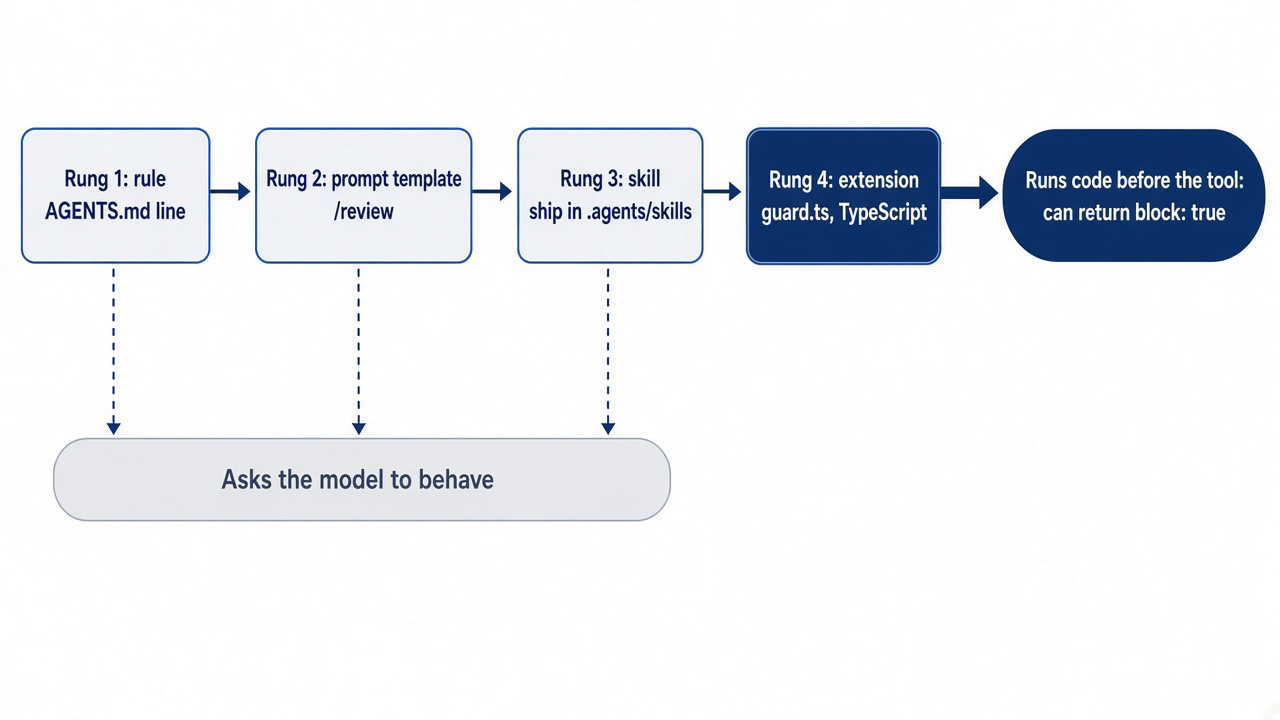
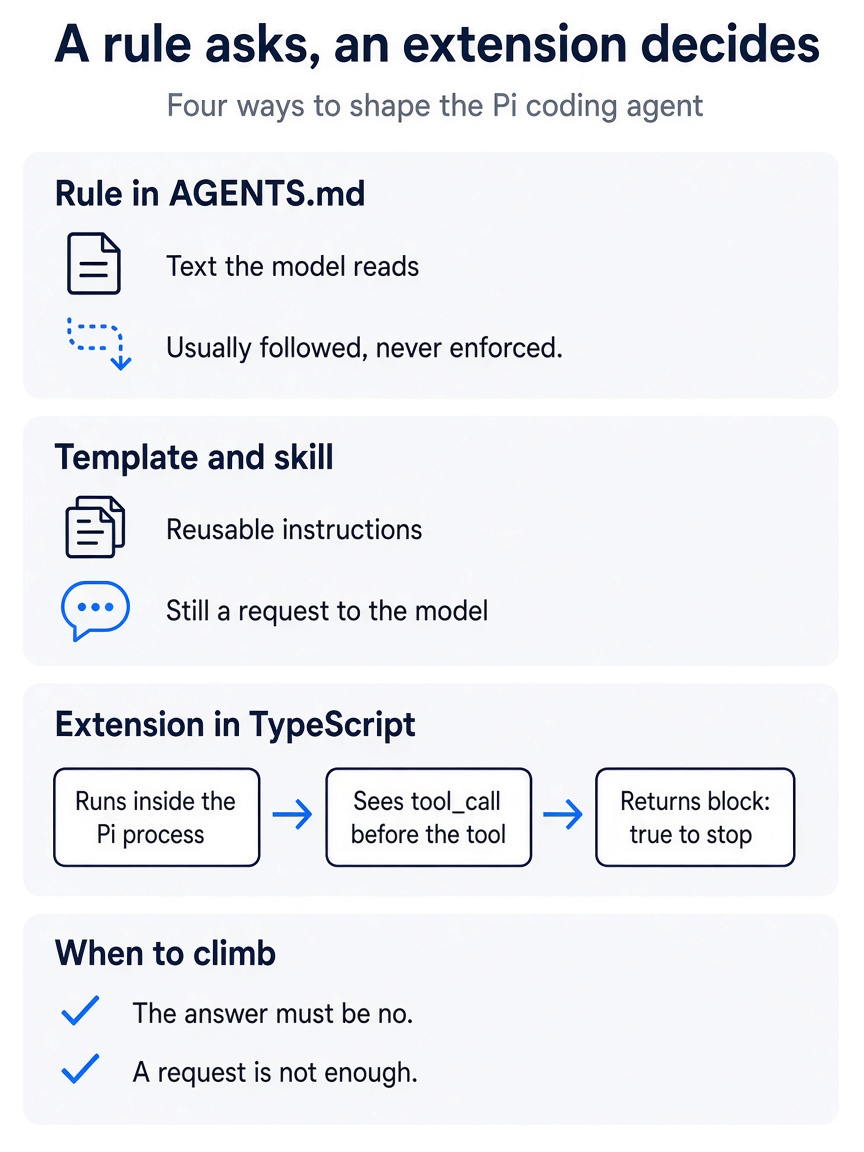
A rule, a template, and a skill are all requests the model usually honors. An extension runs inside the Pi process, sees the tool_call event before the tool runs, and can return block: true to stop it. Climb to that rung only when the answer must be no.
Start here walked through the handler line by line. The pattern is the one to copy for any gate: subscribe to tool_call, narrow the event to the tool you care about, decide, and return { block: true, reason } to stop the call.
Pi loads TypeScript through jiti, so there is no build step. Start here tried the file in a throwaway session from Ticket Triage, then installed the guard where Pi discovers it on its own.
Pi discovers extensions as *.ts or *.js files in ~/.pi/agent/extensions/, as a subfolder with an index.ts or index.js, or as a subfolder whose package.json has a pi.extensions field. Discovery goes one level deep. In a running Ticket Triage session, reload, and the guard is live there and in every project you open.
/reload
Extensions in auto-discovered locations hot-reload with /reload, so edit guard.ts in place from now on, and keep -e for trials. Project extensions live in .pi/extensions/ with the same layouts, load only after trust, and then run with your full permissions the moment Pi starts. The guard protects you, not Ticket Triage, so it belongs in your user folder.
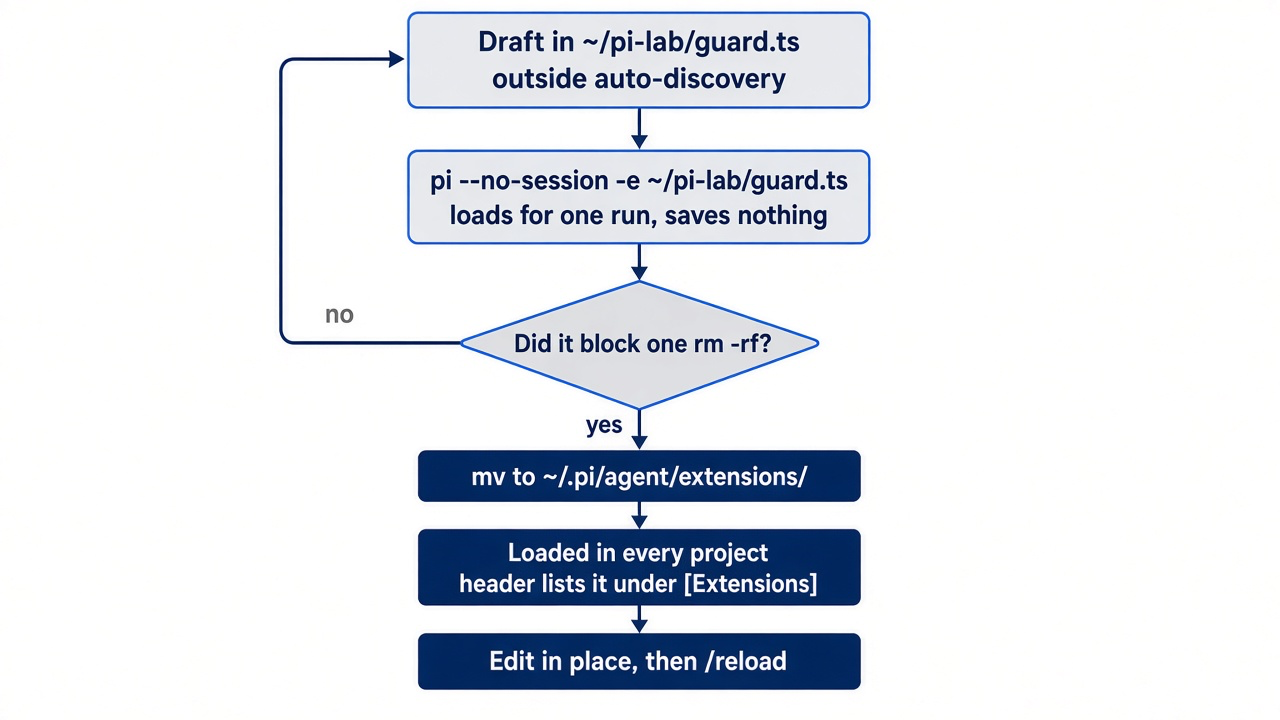
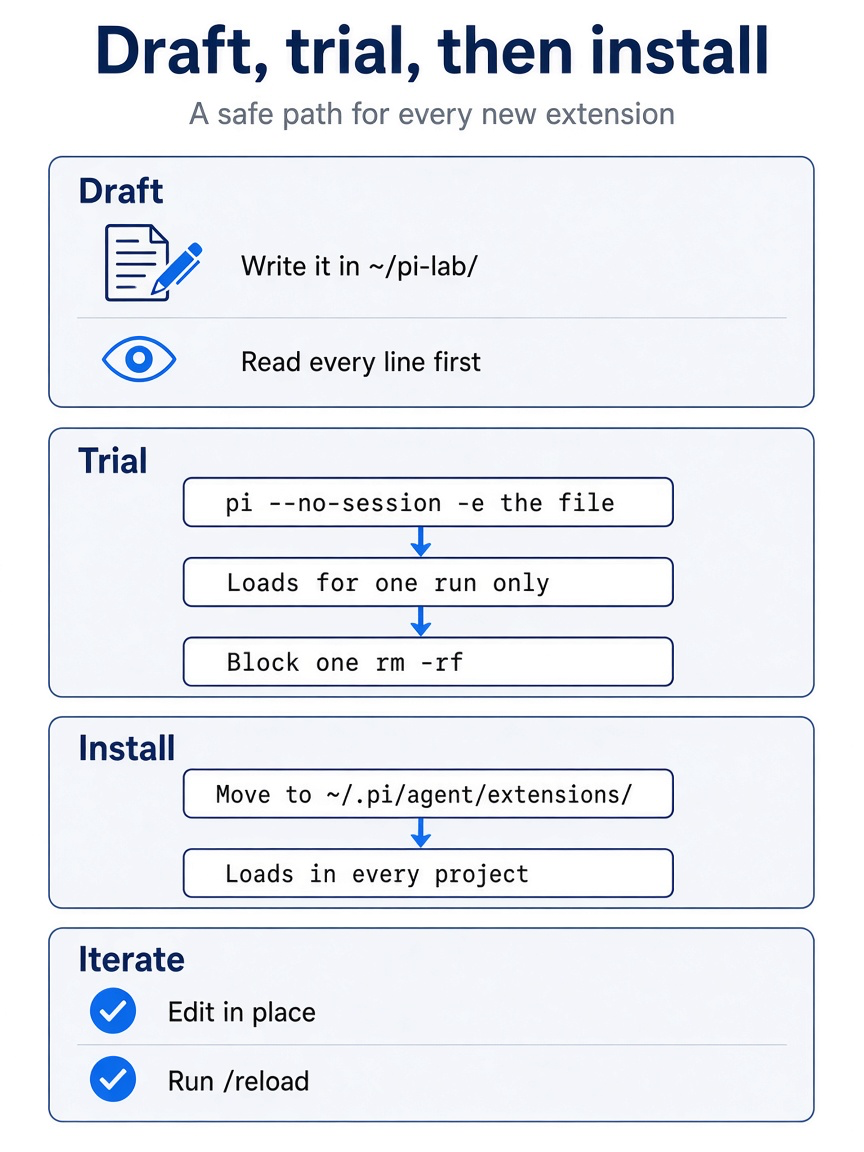
Make the workflow a habit. Draft every new extension in ~/pi-lab/ and read every line of it. Trial it with pi --no-session -e for one run. Move it into ~/.pi/agent/extensions/ only after it blocks what you meant it to block, then edit it in place and run /reload.
What a string match cannot do
guard.ts is a speed bump for one habit, and you should know exactly what it misses.
The check is command.includes("rm -rf"). It does not catch rm -fr, rm -r -f, find . -delete, git clean -fdx, or a script the model writes with write and then runs. It never looks at write or edit calls, which can empty a file just as thoroughly. A prompt-injected model does not have to type the five characters you search for. In this guide's test, the Start here prompt with rm -r -f in place of rm -rf ran with no dialog, and the folder was gone.
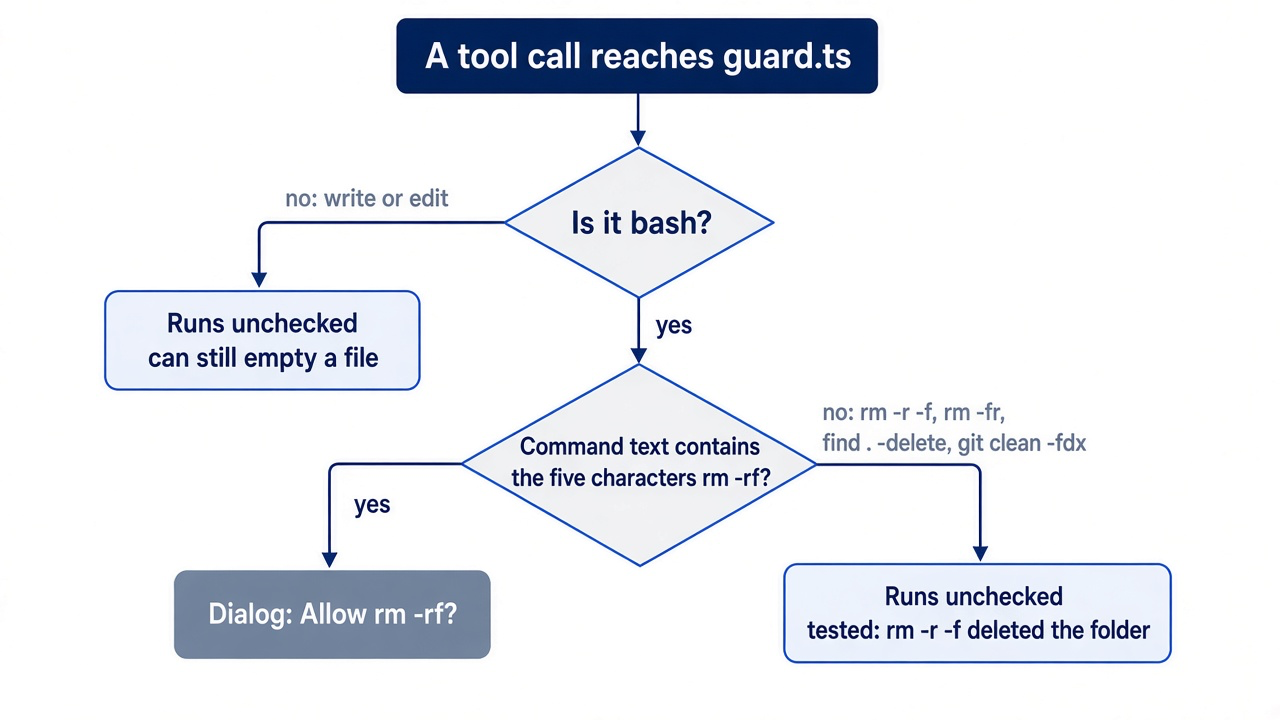
Pi's documentation draws the same line. An extension runs inside the Pi process with the same operating-system permissions, and it can inspect prompts, tool calls, files, credentials, and session history. Pi's security page adds that watching the transcript, granting project trust, and reviewing changes do not create a security boundary. guard.ts makes one mistake loud; it does not limit what a tool call can reach.
One behavior works in your favor. If a tool_call handler throws, Pi blocks the tool rather than running it, so a bug in your guard fails closed.
Gotcha: the guard cannot ask in print mode. In pi -p, extensions run but cannot prompt, ctx.hasUI is false, and Pi's docs do not say what confirm returns there. In this guide's test, pi --no-session -p with the installed guard blocked rm -rf with Blocked by user, and the folder stayed. With no screen to ask on, confirm answered no. Pi's docs say confirm() returns false when a dialog times out, so do not build on the print-mode result. Pi's guidance is that gate handlers should fail closed when they cannot decide. For unattended runs, add a line before the confirm: if (!ctx.hasUI) return { block: true, reason: "No UI to confirm rm -rf" };. Better still, run unattended work inside the boundary Part 10 builds.
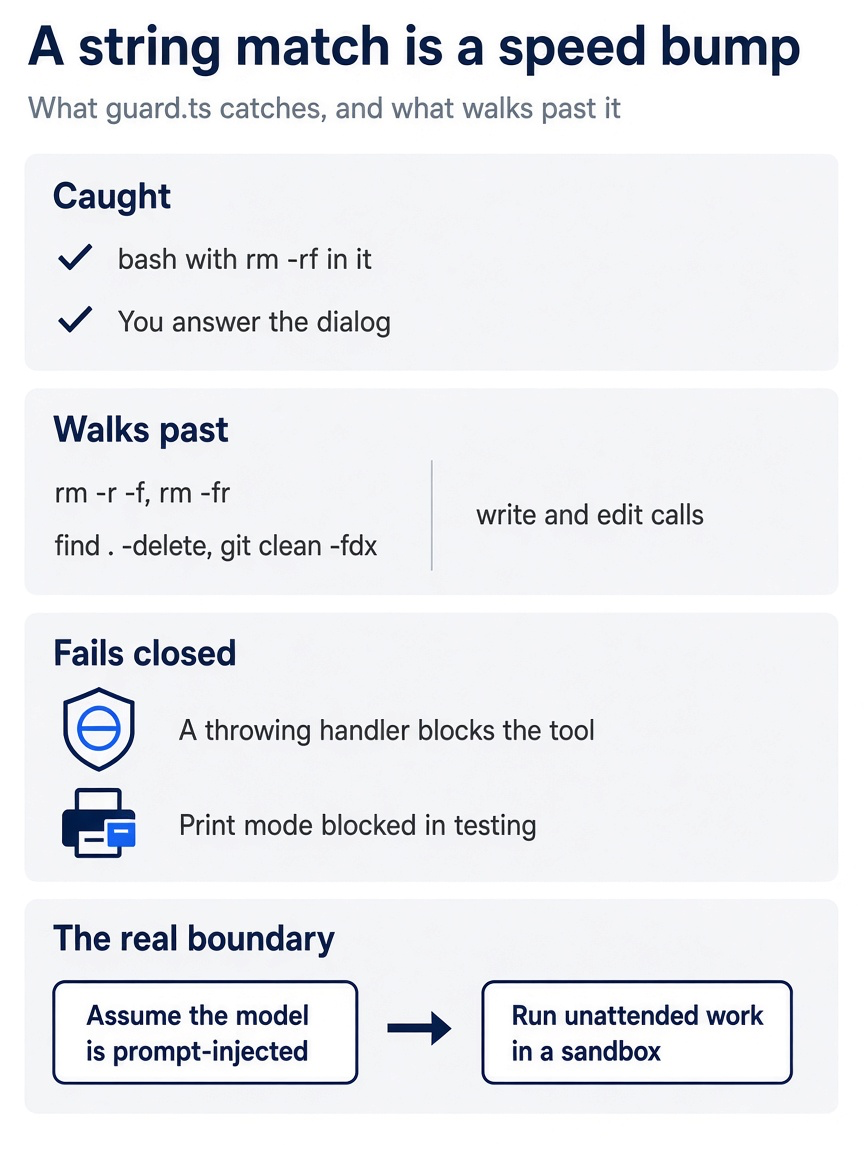
The guard's honest scope is narrow. It catches bash commands containing rm -rf and waits for your answer. Variants such as rm -r -f, find . -delete, and git clean -fdx walk past it, and so do write and edit calls. A throwing handler fails closed, which helps. The real boundary is assuming the model can be prompt-injected and running unattended work in a sandbox.
Hooks become extension events
Every Claude Code hook you rely on has a Pi event, named for the lifecycle rather than for permissions.
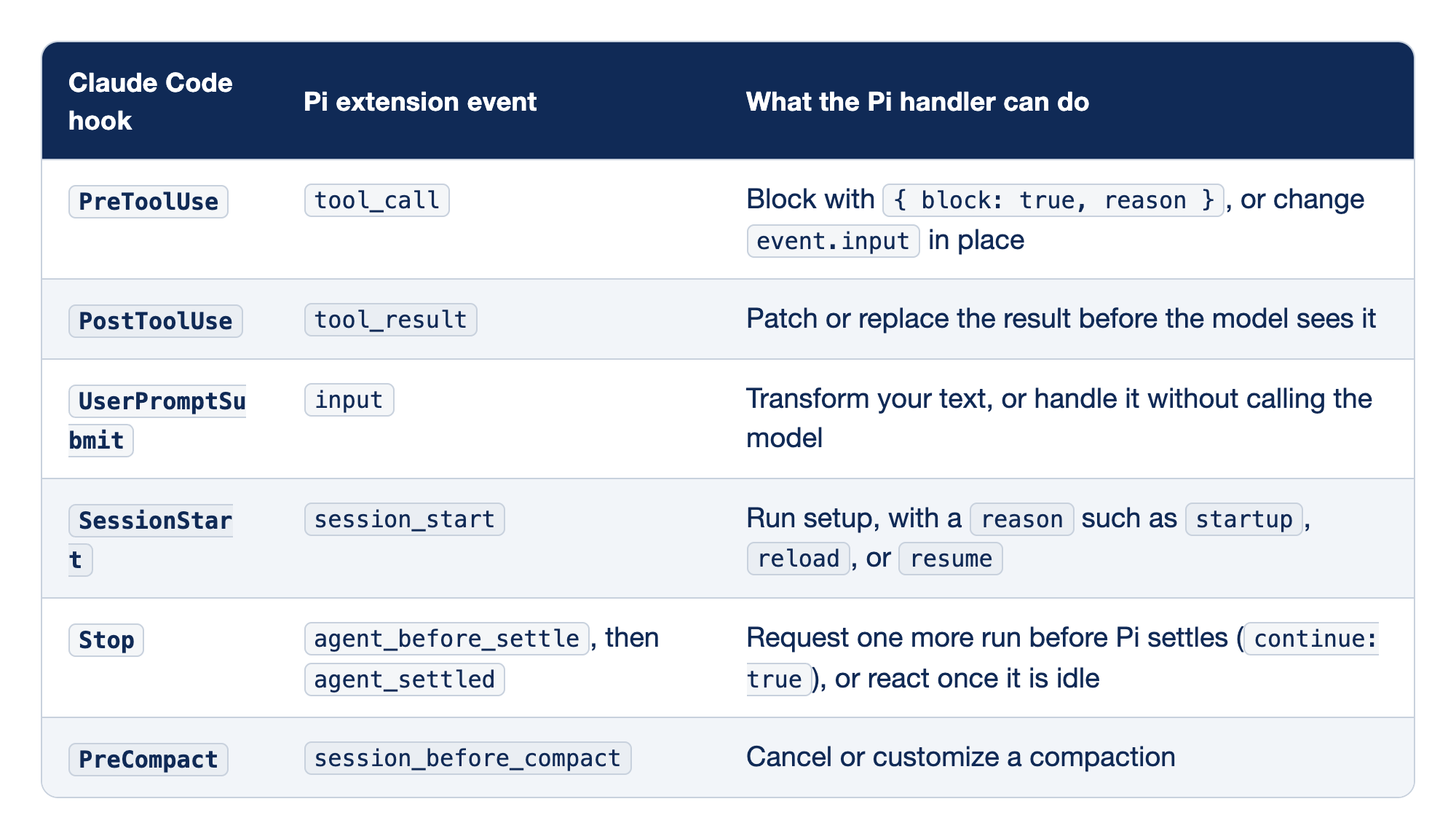
Six Claude Code hooks map to Pi extension events. Each row pairs a Claude Code hook with the Pi event that replaces it and says what a Pi handler for that event can do.
PreToolUsebecomestool_call, and a handler can block the call with{ block: true, reason }or changeevent.inputin place.PostToolUsebecomestool_result, and a handler can patch or replace the result before the model sees it.UserPromptSubmitbecomesinput, and a handler can transform your text or handle it without calling the model.SessionStartbecomessession_start, and a handler can run setup with areasonsuch asstartup,reload, orresume.Stopbecomesagent_before_settleand thenagent_settled, and a handler can request one more run before Pi settles or react once Pi is idle.PreCompactbecomessession_before_compact, and a handler can cancel or customize a compaction.
The left column is configuration that mostly runs shell commands; the right column holds functions in one TypeScript file. The jobs line up closely.
tool_call. Theguard.tsevent. A handler can also rewrite the tool's arguments, and Pi does not re-validate the edited input, so rewrite with care.tool_result. Handlers chain like middleware, each seeing the previous handler's version. It is the place for redacting or trimming a noisy result.input. It fires before skill and template expansion, so a handler sees/reviewas you typed it. Returninghandledskips the agent entirely.session_start. Thereasontells a fresh start from a/reloador a resume, so setup runs only when it should.agent_before_settle. It is the event that can say "not yet," the way a blockingStophook does: it can add a message and request one continuation.agent_settledfires after it and only notifies. Pi also hasagent_end, but a retry or a queued message can start another run after it.session_before_compact. Part 7's compaction, made programmable. Thecustom-compaction.tsexample summarizes the conversation its own way.
If you already use Claude Code: Pi has no ask or allow decision for a handler to return. A tool_call handler lets the call through or blocks it, and asking is something your handler does itself with ctx.ui.confirm or ctx.ui.select. Claude Code's deny > defer > ask > allow precedence becomes plain code order.
The example extensions worth reading
Pi's source repository ships dozens of example extensions, and five of them answer features Claude Code users miss.
The examples live in packages/coding-agent/examples/extensions/ in github.com/earendil-works/pi. They are examples, not built-ins: Pi has no built-in plan mode and no built-in subagents, and both exist here as extensions you load yourself.
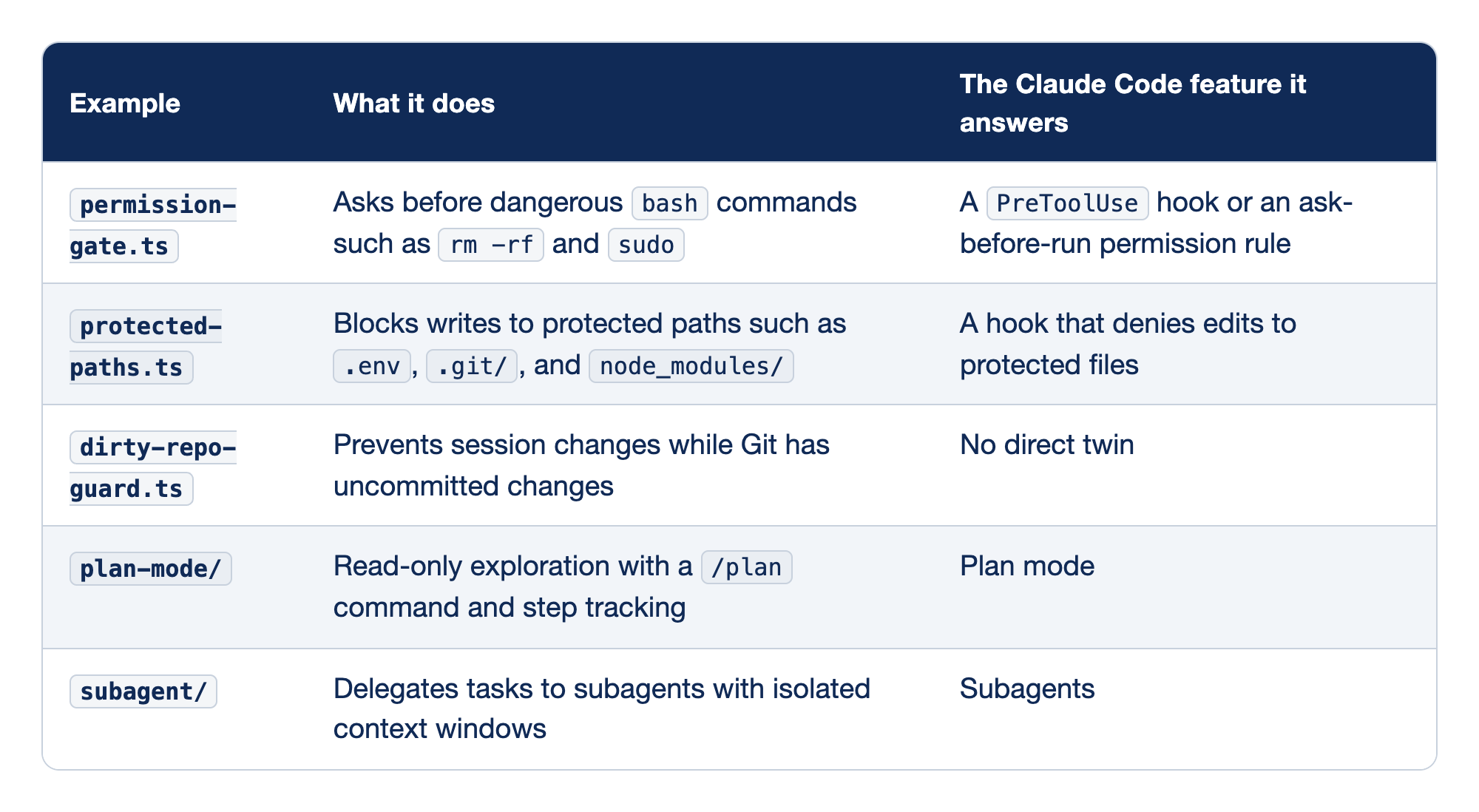
Five of Pi's example extensions answer features that Claude Code users miss. Each row names an example, says what it does, and names the Claude Code feature it stands in for.
permission-gate.tsasks before dangerousbashcommands such asrm -rfandsudo, and it answers aPreToolUsehook or an ask-before-run permission rule.protected-paths.tsblocks writes to protected paths such as.env,.git/, andnode_modules/, and it answers a hook that denies edits to protected files.dirty-repo-guard.tsprevents session changes while Git has uncommitted changes, and Claude Code has no direct twin for it.plan-mode/gives read-only exploration with a/plancommand and step tracking, and it answers Claude Code's plan mode.subagent/delegates tasks to subagents with isolated context windows, and it answers Claude Code's subagents.
The first two are variations on guard.ts, and the last two are whole features.
permission-gate.ts. The grown-upguard.ts, covering more than one pattern and asking withctx.ui.select. Compare its list with your own before you rely on either.protected-paths.ts. A gate on writes instead of onbash. Ticket Triage'stest/classify.test.jsrule is a natural path to add, turning a line the model usually follows into a write that Pi's own tools refuse. The line is Part 7's rule about existing tests.dirty-repo-guard.ts. It hooks session-change events rather than tool calls. Part 5 taught that/treeand/forknever move files; this example refuses to move the conversation while uncommitted work is on disk.plan-mode/. Pi's answer to Claude Code's plan mode: read-only exploration first, with steps you can track.subagent/. The delegated agent Part 4 pointed at, with its own context window per subagent.
Try any of them the way you tried the guard: copy the file into ~/pi-lab/, run it with pi --no-session -e, and read the code before you move it into ~/.pi/agent/extensions/. This guide's tests ran only guard.ts; the table comes from the examples README at the v1.5.2 tag.
MCP servers and Pi packages, briefly
MCP servers add tools beside the ladder, and packages ship everything on it.
Pi connects to Model Context Protocol servers over stdio or streamable HTTP. Ticket Triage needs none, so the commands below use the docs' filesystem example. pi mcp add writes a user-level server to ~/.pi/agent/mcp.json, and pi mcp list connects to each enabled server and reports its tools and errors.
pi mcp add filesystem -- npx -y @modelcontextprotocol/server-filesystem .
pi mcp list
In this guide's test, pi mcp list printed filesystem: connected, 16 tools (codemode, global) and named the tools. If you ran the block, remove the server again before Part 10, which starts with no MCP servers.
pi mcp remove filesystem
pi mcp list
pi mcp remove filesystem took the server out again, and it left ~/.pi/agent/mcp.json with an empty mcpServers object. pi mcp list then printed No MCP servers configured.
Add --local, or -l, to write the project's .pi/mcp.json instead. Pi reads the project file only after you trust the folder, and its MCP page advises keeping personal servers and servers with credentials in the user file. Inside a session, /mcp shows each server's state and lets you reconnect, sign in, change exposure, or disable it. Moving from Claude Code is a copy: Pi's mcp.json uses the same mcpServers format, so paste an existing entry and validate it with pi mcp list.
{
  "mcpServers": {
    "filesystem": {
      "command": "npx",
      "args": ["-y", "@modelcontextprotocol/server-filesystem", "."]
    }
  }
}
Two details tie MCP to this chapter. By default, a server's tools use codemode exposure, and Pi does not declare them to the model one by one, which keeps a large server from crowding the window. Every MCP call also passes through Pi's tool pipeline, so tool_call handlers apply to MCP tools; a gate like guard.ts can watch tool names that start with mcp__.
Pi packages are the distribution layer. A package is an npm package or Git repository with extensions/, skills/, prompts/, and themes/ folders, or a pi key in package.json that lists them. pi install npm:@example/pi-tools@1.0.0 adds one to ~/.pi/agent/settings.json, -l writes the project settings instead, pi list shows what is installed, and pi -e npm:@example/pi-tools tries one for a single run. A local folder works too: pi install ./local-package loads it from its path without copying. Packages can execute extension code and carry skills that tell the model to run programs, so read a package's source before you install it.
Open standards: plugins, and where they travel
Pi's own package format is how Pi ships extensions, and an Agent Plugins package is how several coding agents try to ship the same skills and MCP servers.
Agent Plugins 1.0 defines a package as a folder with three parts: a root plugin.json, in which only $schema and name are required; a skills/ folder of Agent Skills; and an optional mcp.json. Vendor-specific parts live in a reverse-domain namespace that other tools ignore. A reverse-domain folder, such as com.github.copilot/, holds the parts that only one tool understands, such as that tool's agents and hooks, so that one package can carry them without breaking the other tools. Part 8 answered the skills half of the standard. This section answers the plugin half with one shared package, hello-ap, the same shape that the OpenCode guide tested: a plugin.json, one skill named greet, and an mcp.json with one MCP server.
hello-ap/
├── plugin.json
├── skills/
│   └── greet/
│       └── SKILL.md
└── mcp.json
plugin.json holds the two required fields and two optional ones.
{
  "$schema": "https://agent-plugins.org/schemas/1.0.0/plugin.schema.json",
  "name": "hello-ap",
  "version": "1.0.0",
  "description": "A greeting skill and one MCP server"
}
skills/greet/SKILL.md is an ordinary Agent Skill.
---
name: greet
description: Greet the user and offer help. Use when the user asks for a greeting.
---

Greet the user warmly and offer help.
mcp.json declares the filesystem server from the MCP section, rooted at the plugin folder.
{
  "$schema": "https://agent-plugins.org/schemas/1.0.0/mcp.schema.json",
  "mcpServers": {
    "files": {
      "type": "stdio",
      "command": "npx",
      "args": ["-y", "@modelcontextprotocol/server-filesystem", "${PLUGIN_ROOT}"]
    }
  }
}
The test kept the package at ~/pi-lab/hello-ap and copied it to ~/.pi/agent/plugins/hello-ap.
Does Pi load an Agent Plugins folder? No. In this guide's test, with hello-ap in ~/.pi/agent/plugins/, Pi 1.5.2 listed no greet skill, the model saw no MCP server, and pi mcp list reported No MCP servers configured. One partial route exists through Pi's own package loader. pi --no-session -e ~/pi-lab/hello-ap loaded the folder as a Pi package for one run, and the header listed greet, ship under [Skills], because a Pi package also keeps its skills in skills/. The route reads neither plugin.json nor the plugin's mcp.json. Pi reads MCP servers only from its own mcp.json files.
With the community package. pi-agent-plugins 0.1.8 describes itself as an "Agent Plugins 1.0.0 client for the Pi coding agent". It is a Pi package with one extension, written by a community author, not by the Pi project. Its README says that it discovers plugins in ~/.pi/agent/plugins/<plugin>/ and, after project trust, in <project>/.pi/plugins/<plugin>/. The README adds that the package provides a /plugin command and needs a second package, pi-mcp-adapter, for the MCP half. In this guide's test, pi install npm:pi-agent-plugins@0.1.8 installed it under ~/.pi/agent/npm/. On the next start, before the header, the package asked about the plugin's MCP server.
 Trust plugin "hello-ap"?
 It declares MCP server(s): files. Trusting lets them run with your permissions.
 → Yes
   No
After Yes, the header listed greet, ship under [Skills] and pi-agent-plugins@0.1.8 under [Extensions], with the line Agent Plugins: MCP servers configured. Run /plugin reload to connect them. /plugin list showed hello-ap@1.0.0 [enabled] 1 skill, 1 MCP server (user). The package wrote the server into ~/.pi/agent/mcp.json as hello-ap__files. After /plugin reload, Pi's own pi mcp list reported hello-ap__files: connected, 16 tools (codemode, global). The test did not install pi-mcp-adapter; Pi 1.5.2's built-in MCP support connected the server. Afterward, remove everything that the test added.
pi mcp remove hello-ap__files
pi remove npm:pi-agent-plugins@0.1.8
rm -rf ~/.pi/agent/plugins ~/.pi/agent/plugin-data ~/.pi/agent/agent-plugins ~/pi-lab/hello-ap
pi list then printed No packages installed. pi remove left an empty packages list and a changelog note for the package in ~/.pi/agent/settings.json; both are harmless.
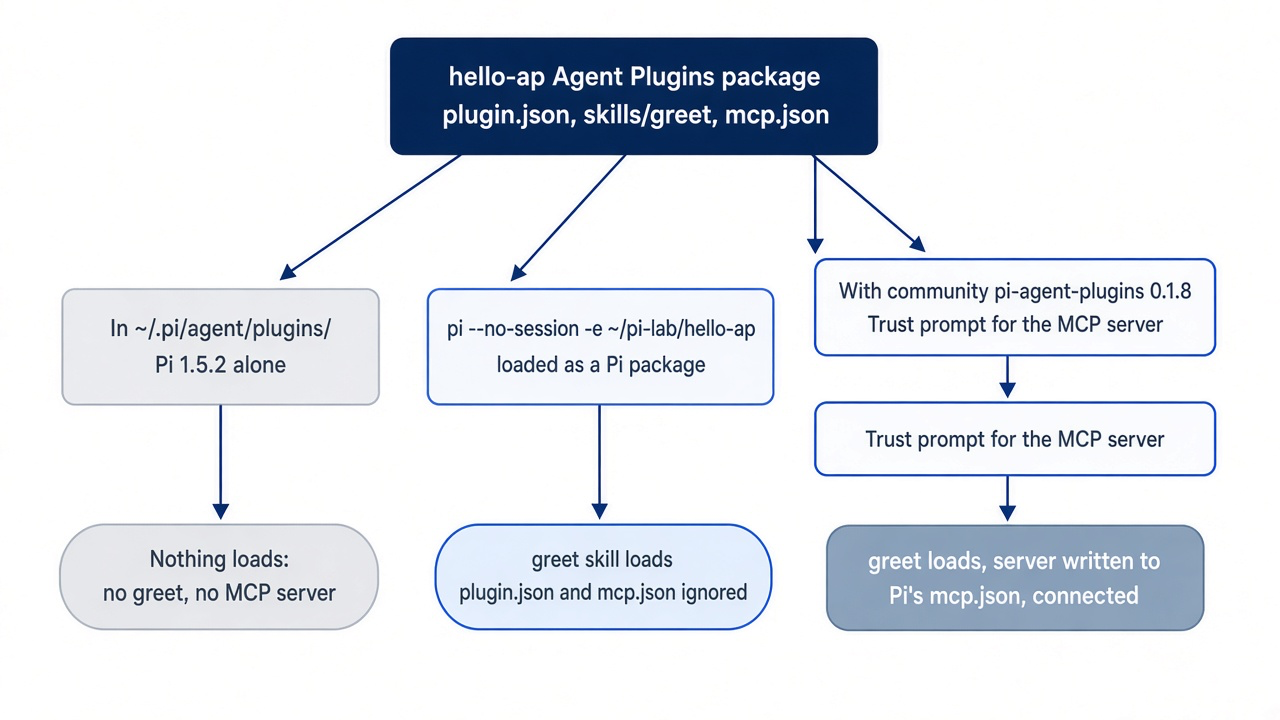
Vendor-specific parts. Pi's own format for Pi-only resources is the Pi package: extensions, skills, prompts, and themes that pi install loads. Inside an Agent Plugins package, pi-agent-plugins reads Pi-only additions from the manifest's extensions object under the dev.pi.agent key, according to its README. Pi itself has no such namespace, and without the community package it ignores the whole manifest. This guide did not test the dev.pi.agent key.
The test did check the other direction: another tool's folder inside the package. It added a com.github.copilot/ folder to hello-ap, with one Copilot agent file, agents/reviewer.agent.md, and one hooks file, hooks/hooks.json, and loaded the package through pi-agent-plugins 0.1.8. Pi ignored the folder, and nothing broke. The trust prompt named only the files server, and /plugin list still showed 1 skill, 1 MCP server. The header showed no warning, the model listed greet and ship and "None" for subagents, and pi mcp list reported hello-ap__files: connected. The package's own conformance notes say it ignores namespaces it does not know.
The portability check. One shared skill and one shared plugin from this series, loaded in Pi:
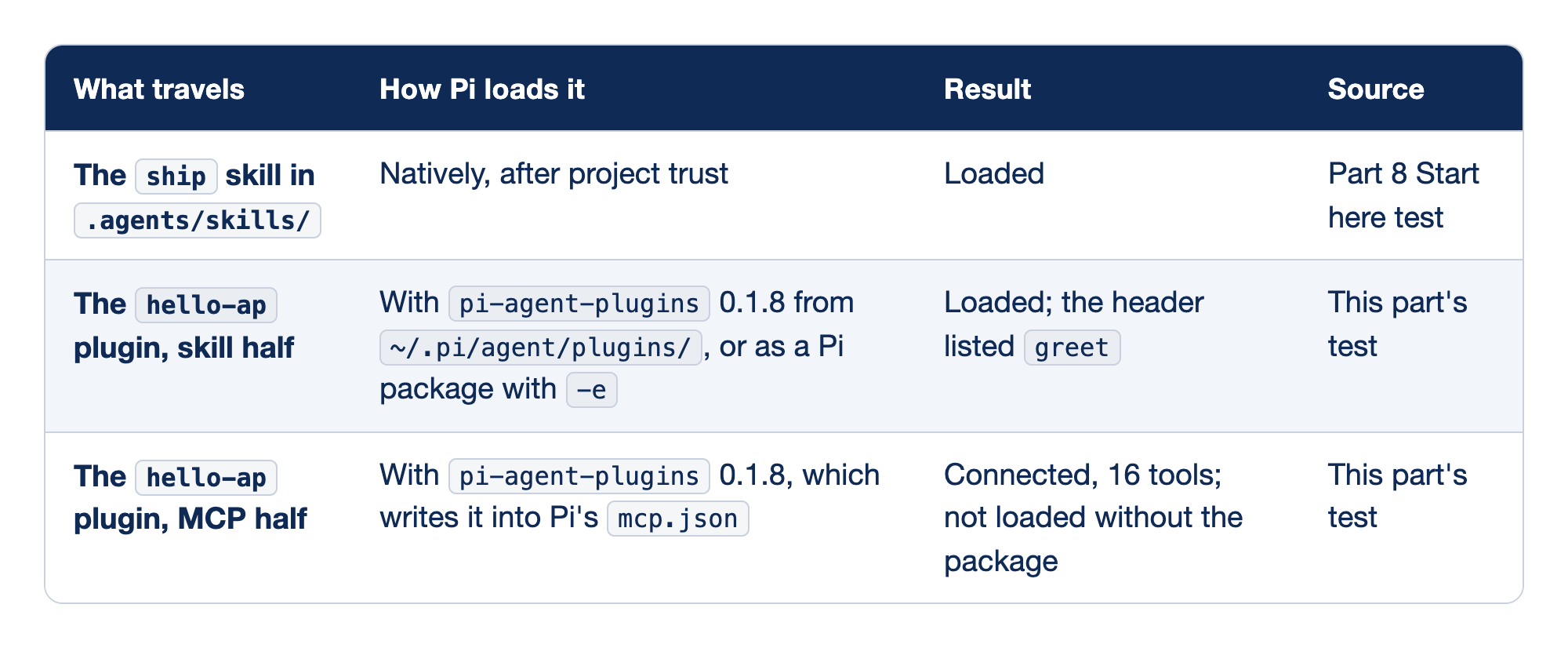
One shared skill and the two halves of one shared plugin were loaded in Pi. Each row names what travels, how Pi loads it, the result, and the source of that result.
- The
shipskill in.agents/skills/loads natively after project trust, as the Part 8 Start here test showed. - The skill half of the
hello-applugin loads withpi-agent-plugins0.1.8 from~/.pi/agent/plugins/, or as a Pi package with-e, and the header listedgreetin this part's test. - The MCP half of the
hello-applugin connected with 16 tools throughpi-agent-plugins0.1.8, which writes it into Pi'smcp.json, and it did not load without the package in this part's test.
The skill travels with no work. The plugin is the half that needs help.
- The
shipskill. Pi reads.agents/skills/natively, the folder that GitHub Copilot CLI and OpenCode read too. - The skill half of
hello-ap. The community package loads it from the plugin folder. Without the package, Pi's own loader takes theskills/folder when you load the plugin as a Pi package, and it ignores the manifest. - The MCP half of
hello-ap. Only the community package reads the plugin'smcp.json. It asks before the server may run, then hands the server to Pi's own MCP support.
The cross-tool table. Each guide in this series carries the same table, copied from one master file, verification/cross-tool/open-standards-table.md, so you can see where your skills and plugins can travel. Every cell links to the test record behind it.
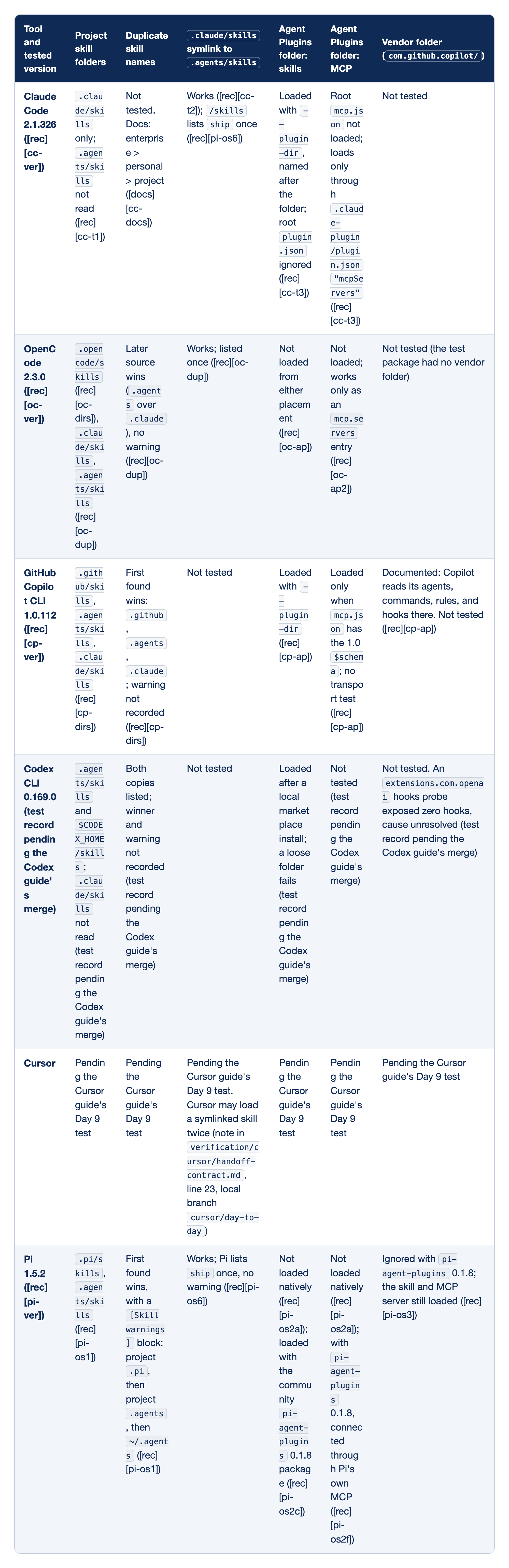
Six coding agents are compared on where they read project skills and how they treat Agent Plugins packages. Each row names a tool and its tested version, then gives the project skill folders it reads, how it resolves duplicate skill names, whether a .claude/skills symlink to .agents/skills works, whether it loads the skill and MCP halves of an Agent Plugins folder, and what it does with a vendor folder such as com.github.copilot/.
- Claude Code 2.1.326 reads only
.claude/skills, works with the symlink, loads a plugin's skills with--plugin-dirbut ignores the rootplugin.json, loads MCP servers only through.claude-plugin/plugin.json, and was not tested on duplicate names or a vendor folder. - OpenCode 2.3.0 reads
.opencode/skills,.claude/skills, and.agents/skills, lets the later source win on a duplicate name with no warning, lists a symlinked skill once, and loads neither half of an Agent Plugins folder. - GitHub Copilot CLI 1.0.112 reads
.github/skills,.agents/skills, and.claude/skills, lets the first one found win on a duplicate name, loads Agent Plugins packages with--plugin-dir, and loads the MCP half only whenmcp.jsonhas the 1.0$schema. - Codex CLI 0.169.0 reads
.agents/skillsand$CODEX_HOME/skillsbut not.claude/skills, lists both copies of a duplicate skill, and loads a plugin only after a local marketplace install, with its test records pending the Codex guide's merge. - Cursor has every cell pending the Cursor guide's own test, and Cursor may load a symlinked skill twice.
- Pi 1.5.2 reads
.pi/skillsand.agents/skills, lets the first one found win with a[Skill warnings]block, and lists a symlinked skill once. It loads neither half of an Agent Plugins folder natively, and with the communitypi-agent-plugins0.1.8 package it loads both halves and ignores the vendor folder.
Read the table by column. The skill columns decide whether one skill folder serves every tool, and the plugin columns decide whether one plugin package does.
- GitHub Copilot CLI. It reads all three shared folder names and loads Agent Plugins packages, with its own parts in
com.github.copilot/(Copilot CLI plugin reference, checked November 17, 2026). - Claude Code. It reads only
.claude/skills, which is why Part 8 added a symlink (Claude Code skills, checked November 17, 2026). - OpenCode. It reads the shared folders and resolves duplicates in the opposite direction from Pi (OpenCode skills, checked November 17, 2026).
- Codex CLI. It reads
.agents/skillsbut not.claude/skills, and it loads a plugin only from a marketplace. - Cursor. Its row waits for the Cursor guide's own test, because Cursor may list a symlinked skill twice.
- Pi. The row comes from Pi's skills docs and configuration docs, checked November 17, 2026, and from this guide's tests in Part 8 and this part.
The other rows come from the other guides' recorded tests, and this guide did not run them again. Each guide changes only its own row in the master file. The setup that the series teaches follows from the table: keep shared skills in .agents/skills, add a .claude/skills symlink for Claude Code, avoid duplicate skill names across folders, and ship each tool's native format beside an Agent Plugins package. In Pi, the native format is a Pi package. The standards stay in this section, and Start here in Parts 8 and 9 is about Pi alone. Every row above links to a dated page or a recorded test.
Do this today
Everyone
-
Confirm the guard loads in every session. Start
pi --no-session. The header listsguard.tsunder[Extensions]. Type/quit.pi --no-session -
Find the file Pi loads. The command prints
guard.ts.ls ~/.pi/agent/extensions/ -
Check the tree. The first command prints nothing, and
npm testends withpass 6.git status --short npm test
If you read Going deeper
-
Find what your guard misses. Read
permission-gate.tsin Pi's repository and list every pattern it catches thatguard.tsdoes not. The list has at least one entry.git clone --depth 1 --branch v1.5.2 https://github.com/earendil-works/pi.git ~/pi-lab/pi less ~/pi-lab/pi/packages/coding-agent/examples/extensions/permission-gate.ts -
Make the guard fail closed in print mode. Add the
ctx.hasUIline before the confirm, run/reload, and check that api -prequest to runrm -rfreports a block. -
Trial your next guard first. Load
guard.tsfor one throwaway run, block onerm -rf, then move it into the auto-discovery folder and reload. The header lists it after the move. -
Map one hook. Pick one hook from your Claude Code settings and write down the Pi event from the table that replaces it. The note names one event.
These steps use your own setup, so this guide did not run them as written.
Ten lines between a request and a refusal
A rules file is a conversation with the model. It works most of the time, and you cannot tell in advance which time it will not. An extension changes the relationship: ten lines of TypeScript sit between the model and the shell, and for one dangerous pattern, the final word is yours.
The same ten lines teach the limit. guard.ts compares text, and text has endless spellings. It makes one mistake loud; it does not limit what a tool call can reach. Treat it as a reminder that catches one habit, yours and the model's, and put the real boundary somewhere a string match cannot be talked around.
Write the guard. Watch it say no. Then go build the wall.
This is Part 9 of "Pi, Day to Day," a 12-part guide to moving daily coding work from Claude Code to the Pi terminal agent.