
Compact on Purpose: How Pi Decides What Your Coding Agent Forgets
Pi compaction trades old conversation for a model-written summary, and a summary keeps the gist and drops details, so you compact on purpose with instructions for this task and move the always-true rules into a three-line AGENTS.md that compaction can never touch.

A summary keeps the gist of a long session and drops the details. Tell it what to keep for this task, and put what is always true in a file no summary can touch.
The agent was on track all afternoon, then the window filled, a summary decided what survived, and the decision you made an hour ago is suddenly nowhere in what the model can see.
In this article: Day 7 of a day-by-day guide to Pi. Start here: compact your work session on purpose, read the summary Pi writes, and move Ticket Triage's rules into a three-line
AGENTS.mdthat no summary can touch. Going deeper: when Pi compacts on its own and what the summary keeps, the three compaction settings, and where Pi finds context files.
Tested on Pi 1.5.2.
Part 6 ended with a clean tree, four commits, five passing tests, and the word-table work in crushed-mug-table.
Start here
By the end of today, you have compacted your work session on purpose and read the summary that Pi wrote. Ticket Triage's rules also live in a three-line AGENTS.md that reaches the model on every request.
Starting fresh or fell behind? Run git switch -C main pi/day-06. This replaces your main with the end of Day 6; to keep your own work, run git branch my-backup first.
Check where you start
Start in the project folder with a clean tree.
cd ~/code/ticket-triage
git status --short
npm test
git log --oneline -1
git status --short prints nothing, npm test ends with pass 5 and fail 0, and the last commit is Keep damage words in a table.
Open the work session
Open crushed-mug-table by name, as in Part 6. The Part 6 checks saved newer sessions, so pi --continue would open one of them. pi --resume opens the session picker. Type table and press Enter.
pi --resume
The footer ends with • crushed-mug-table, and its context number reads about 1 percent of 1.0M. This guide's two test runs read 1.0%/1.0M and 0.8%/1.0M.
Ask for a compaction
Compaction replaces the older messages of a session with a summary that the model writes, and it keeps the newest messages word for word. Pi compacts on its own when the window is nearly full. /compact asks for a compaction now, and any text after the command tells the summarizer what to keep.
/compact Keep the damage word list and the names of the two damage tests.
Pi refuses.
Error: Compaction failed: Nothing to compact (session too small)
The refusal is correct. Pi never summarizes the newest 20,000 tokens of a session. The setting keepRecentTokens holds that number (compaction). The footer says that this session holds about 1 percent of a 1,000,000-token window, or about 8,000 to 10,000 tokens, so nothing is old enough to summarize. On a normal day you meet compaction near the end of a long session. Today you lower the kept amount for one compaction, so that you can watch it on a short session.
Lower the kept amount for one compaction
Pi reads its settings from ~/.pi/agent/settings.json. Open that file in your editor, in a second terminal or window, while Pi keeps running. In this guide's test run, it held one line from Part 1. Keep every line your file already has, and add the compaction block, so that the file reads like this:
{
  "lastChangelogVersion": "1.5.2",
  "compaction": {
    "keepRecentTokens": 2000
  }
}
Save the file. Back in Pi, run /reload, which makes the running Pi read its settings and context files again, so the new value takes effect without a restart. Then ask for the same compaction again. This time the session has history older than the kept amount.
/reload
/compact Keep the damage word list and the names of the two damage tests.
The model writes the summary, which takes a few seconds. Pi then shows a compaction entry in the transcript.
[compaction]
Compacted from 8,356 tokens (ctrl+o to expand)
Your token count differs; the first test run compacted 9,586 tokens. The footer's context number changes to ? until the next request measures it again.
Read the summary
Press Ctrl+O to expand the entry. The summary has fixed headings: Goal, Constraints & Preferences, Progress, Key Decisions, Next Steps, and Critical Context. Lists at the bottom, <read-files> and <modified-files>, name the files that the summarized work read and changed, such as src/classify.js.
Look at what the summary covers. In both of this guide's test runs it covered Parts 2 and 3: the CLAUDE.md question, the damage rule, and the two tests. Pi kept every message from Part 4 on word for word, the word-table work included. The model now receives the system prompt, then the summary, then those kept messages. The system prompt is the text that Pi sends at the start of every request, before any message: Pi's own instructions plus your context files. Press Ctrl+O again to collapse the entry.
Then compare the totals.
/session
The file path and the ID are the same as before. Compaction writes into the current session file. Compaction deleted nothing from it, and the cost is higher by the price of the summary call. In the test run, the cost went from $0.106 to $0.132, and /session showed the summary call on its own line, Tools/summaries: $0.025.
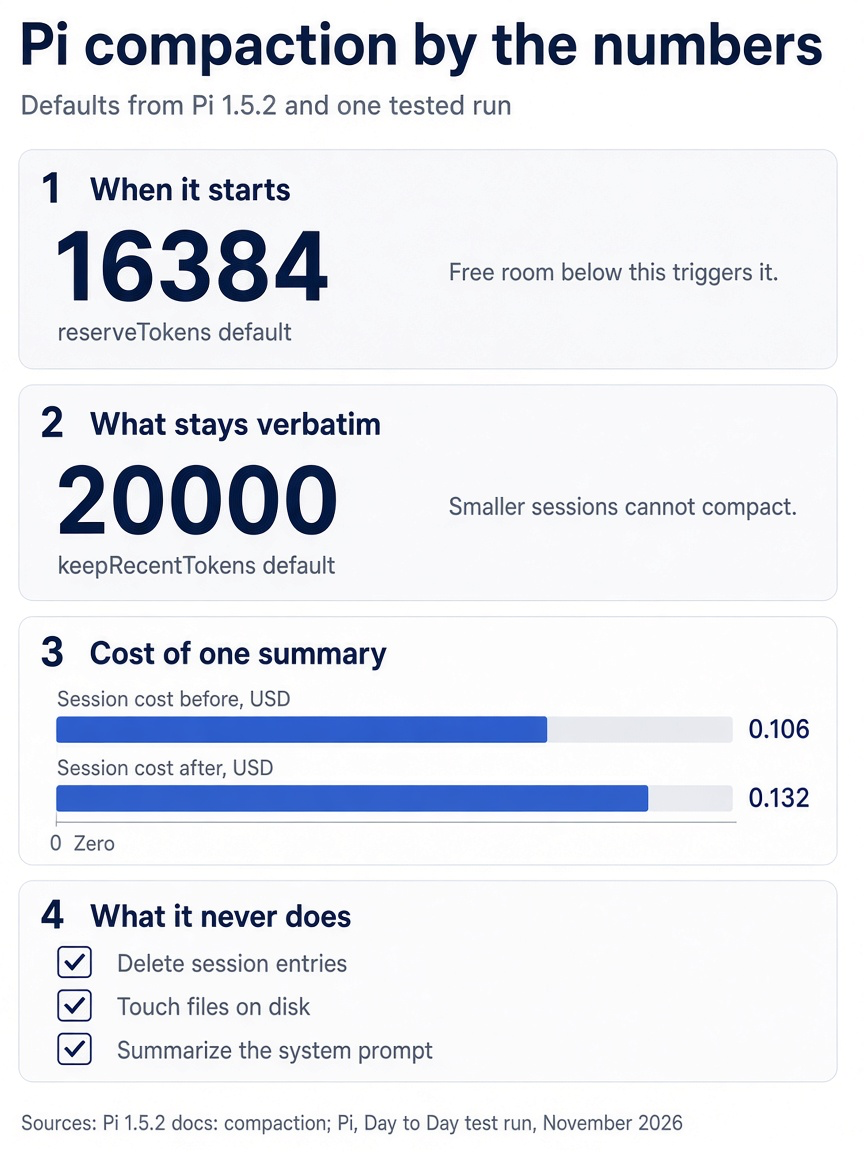
Two defaults decide when Pi compacts and how much it keeps verbatim, one summary call adds a few cents, and three things are always left alone: session entries, files on disk, and the system prompt.
Put the kept amount back
Delete the compaction block from ~/.pi/agent/settings.json, so that the file holds only what it held before, and reload.
/reload
From now on, Pi keeps the newest 20,000 tokens again. Type /quit to leave Pi.
Keep the rule in a file
A summary can shorten or drop a rule you typed. A context file cannot be summarized, because Pi puts it in the system prompt of every request, and compaction never touches the system prompt. Part 2 gave Ticket Triage a one-line CLAUDE.md. Rename it to AGENTS.md, the name that Pi's quickstart gives for folder instructions, so that Git keeps the file's history. Then write three lines into it.
git mv CLAUDE.md AGENTS.md
cat > AGENTS.md <<'EOF'
- Run `npm test` before you say a change is done.
- Never change an existing test to make it pass.
- Categories are exactly `refund`, `shipping`, and `other`.
EOF
git status --short
Git shows one renamed and changed file.
RM CLAUDE.md -> AGENTS.md
Each line is true in every session about Ticket Triage, whatever the task. A rule for one task only, such as "keep the refund check first", belongs in that task's prompts or /compact instructions instead.
Check that the file loads
Start a session that saves nothing, read the header, and ask.
pi --no-session
The header lists AGENTS.md under [Context], and no longer lists CLAUDE.md.
List the rules in your project instructions, one per line. Do not use any tool.
The model answers with the three lines from AGENTS.md. Type /quit, then commit.
git add -A && git commit -q -m "rules: three-line AGENTS.md for Pi and Claude Code" && git log --oneline -1
The commit line ends with rules: three-line AGENTS.md for Pi and Claude Code, and git status --short prints nothing. Your win for today is one compaction you asked for and read, and three rules that no compaction can touch.
You can stop here. Going deeper explains why this works and where it breaks.
Going deeper
This section is for readers who want the rules behind compaction and context files: when Pi compacts on its own, what the summary keeps, which settings change it, and where Pi looks for context files. It assumes that you finished Start here in this part and in Parts 1 to 6.
The afternoon the window filled
Part 5 ended in a new session. You cloned the word-table branch out of crushed-mug, named the copy crushed-mug-table, and left the original holding both experiments. The clone carries one branch, but it is a long one: the Part 2 CLAUDE.md question and every file Pi read after it, the Part 3 steering, the Part 4 test runs, and the word-table work. Suppose you spent the afternoon in it. You asked for more rows, such as "dented", and then a bare ruined row to catch "the charger came ruined." A new test started failing: bath damage is not shipping damage, a ticket about a charger dropped in the bath that the table now files under shipping instead of other. You ran !npm test four times on purpose, because the model needed the assertion each time.
Now the footer's context number sits close to the model's limit, and Pi's latest reply says that the word table is getting hard to maintain and that a keyword list with an exclusion list would be simpler. An edit call on src/classify.js follows. You press Escape, as Part 3 taught, and look at what the window actually holds.

The developer has just stopped the agent from undoing a decision, and the window holds no record of why it was made.
Nothing in it says why the word table won. You made that call in Part 5 after resetting the working tree with !!, and the commit that recorded it ran with !! too, so the model never saw either. The constraint "keep the checks in classify() unchanged" is in the window four times, once per prompt. The footer's context number says that Pi will soon summarize the older part of this session on its own, and the summarizer will decide what survives.
This part fixes both problems with two different tools. /compact with instructions decides what the summary keeps for this task. A context file holds what is true for every task, and Ticket Triage's ended Start here as three lines in one file. This afternoon was not run for this guide; Start here ran the real compaction on a short session.
How compaction decides when and what
Pi compacts when free context drops below a reserve, keeps about 20,000 tokens of recent history, and replaces everything older with a structured summary.
Pi's compaction reference gives the trigger as one comparison.
contextTokens > contextWindow - reserveTokens
The default reserveTokens is 16384, so automatic compaction starts once fewer than 16,384 tokens of the window are free. On a model with a 200,000-token window, the line falls at 183,616 tokens. On the 1,000,000-token window in this guide's footer, it falls at 983,616 tokens. The reserve only decides when compaction starts; it is not the size of the summary.
Pi checks the line at predictable moments. During a run, it checks after a batch of tool calls finishes and Pi appends their results, before the next assistant response. Compaction can therefore happen in the middle of a long task. It also checks before each new prompt you send. If the provider still rejects a request as too long, or a response stops early because it hit the length limit, Pi can compact and retry once.
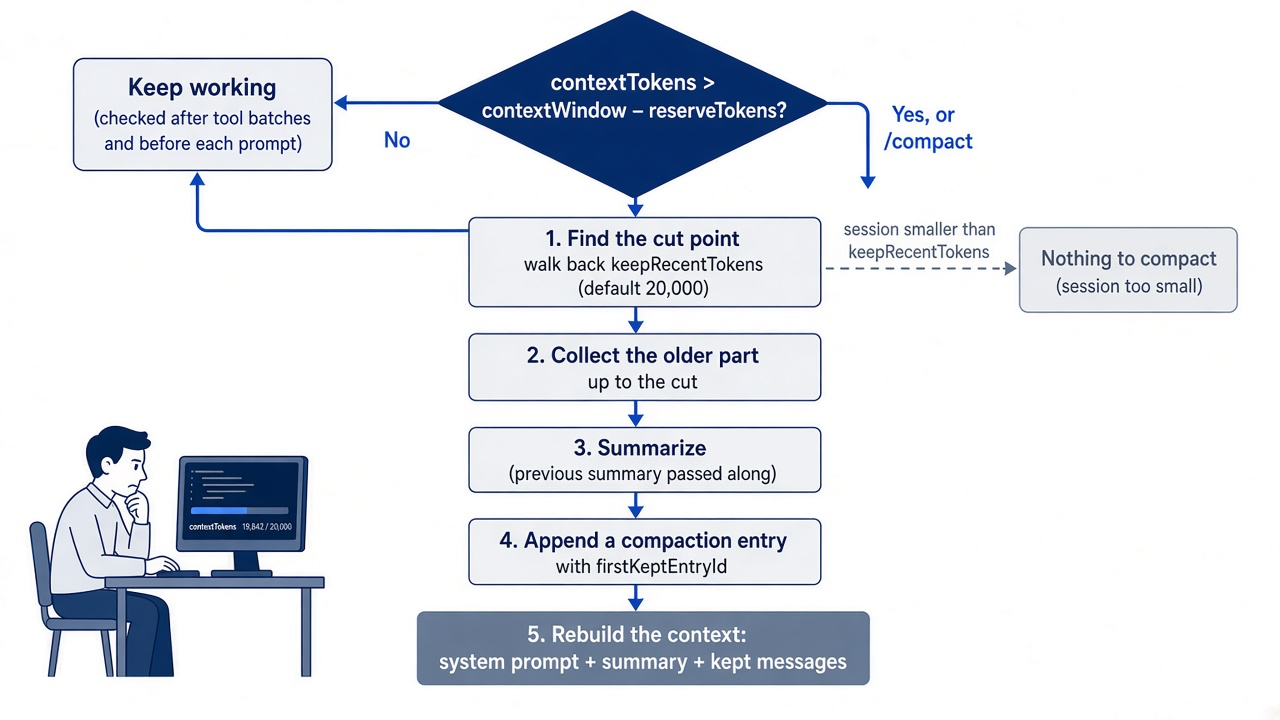
Once triggered, Pi works in five steps.
- Find the cut point. Pi walks backward from the newest entry, adding up token estimates until it reaches
keepRecentTokens, which defaults to 20000. Everything after the cut stays as written. If the whole session is smaller than that, there is no cut, and/compactfails with theNothing to compact (session too small)error from Start here. - Collect the older part. The messages from the start of the session, or from the previous compaction's kept boundary, up to the cut are the ones to summarize.
- Summarize. Pi asks the model for a structured summary and passes the previous summary along when one exists, so repeated compactions build on each other.
- Append an entry. Pi writes a
compactionentry to the session file with the summary and afirstKeptEntryIdthat marks where the kept messages begin. - Rebuild the context. The next request carries the system prompt, then the summary, then the kept messages.
The cut lands at a user message in the normal case, and never at a tool result, because a tool result must stay with the call that produced it. One Ticket Triage prompt can still run past the budget on its own, for example a single request that sends Pi through thirty tool calls. When one user message and its turns exceed keepRecentTokens, the cut lands inside that span at an assistant message. Pi then writes two summaries, one for the earlier history and one for the start of the long span, and merges them.
In both Start here test runs, keepRecentTokens was 2000, yet Pi kept every message from Part 4 on, far more than 2,000 tokens of text. The compaction docs do not explain the difference. Read the summary after you compact instead of predicting the cut.
The summary has a fixed shape: Goal, Constraints and Preferences, Progress (done, in progress, and blocked), Key Decisions, Next Steps, and Critical Context. Pi appends a list of files the summarized work read and a list it modified, and those lists accumulate across compactions. In the first Start here test run, the summarized part had read no file with the read tool, so only the <modified-files> list appeared. In the second run, both lists appeared.
Gotcha: the summarizer does not see your test logs in full. Before summarizing, Pi serializes the conversation as text, omits thinking blocks, and truncates each tool result to 2,000 characters. A failing test name that appears near the bottom of a long npm test log may never reach the summarizer, so the summary cannot keep it. Name it yourself in the instructions.
Gotcha: a summary describes the history it summarized, and it can name old code as current. In the first Start here test run, the summary's Critical Context printed the Part 3 classify() body under the heading "Current classify() body", without the word table. In the second run, it listed the Part 3 order of checks, also without the word table. The kept messages after it carried the Part 5 table, so the model still saw the newest code. After a compaction whose cut falls before your latest change, say in your next prompt which version is current, or point the model at the file with @.
Before and after, side by side
Compaction changes what the model receives, and almost nothing else.
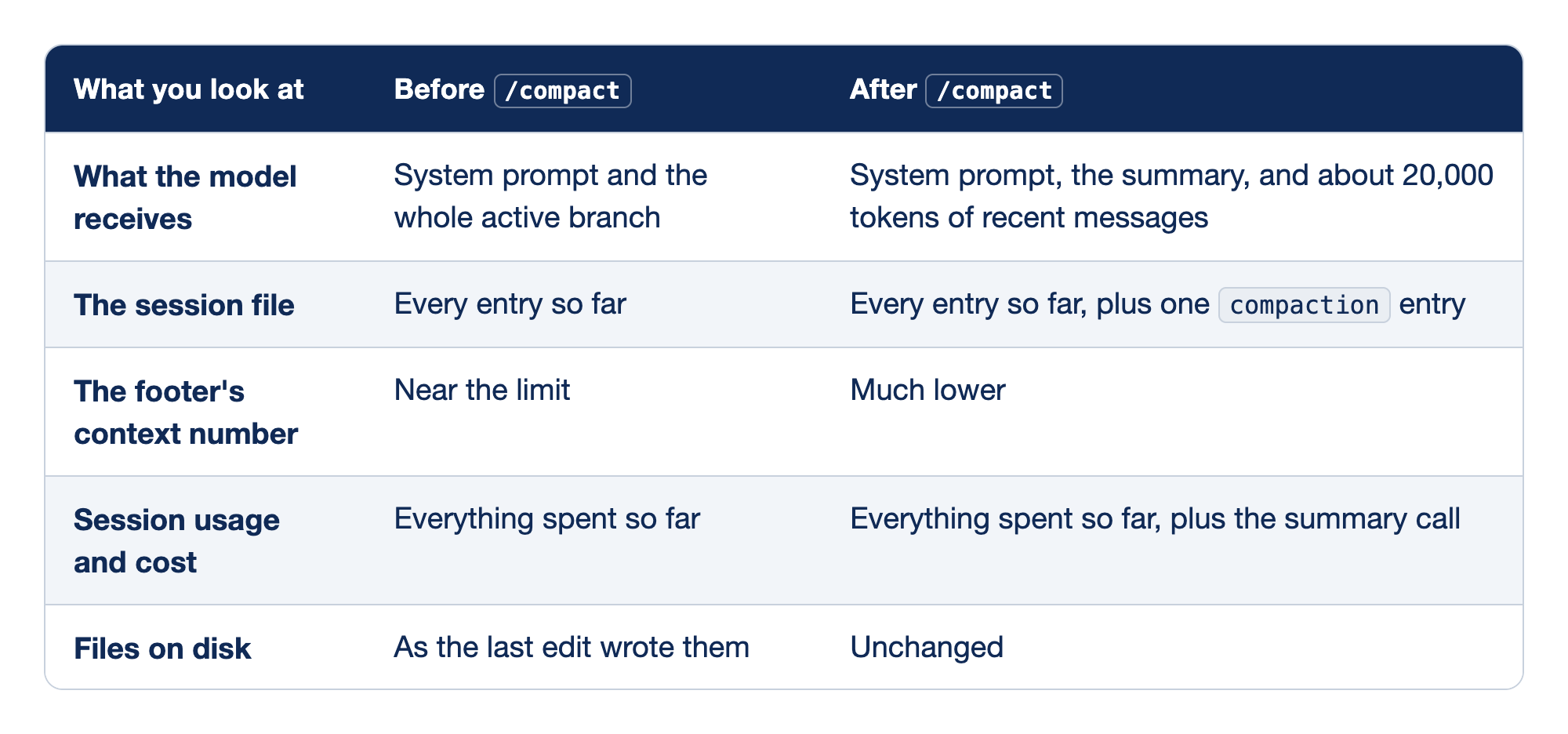
Compaction leaves most of your session exactly where it was. The first column names the thing you look at, the second its state before /compact, and the third its state after.
Read the table as a list of what you lose and what you keep. Only the first row loses anything, and it loses detail, not entries.
- What the model receives. The older messages stop going to the model. A model-written summary takes their place. Any detail that the summary leaves out is gone from the model's view, which is why you write instructions.
- The session file. Nothing is deleted. Pi's sessions page says that compaction adds a summary and keeps recent messages, and it does not delete the original entries. The compaction entry is one more line in the JSONL file, on the active branch.
- The footer's context number. It drops because the request got smaller. This is the number that decides when the next automatic compaction starts. Right after the compaction it shows
?, and the next request measures it. - Session usage and cost. They go up. The summary is a model call, Pi stores its usage on the compaction entry, and session totals include it. In the two Start here test runs, the summary call cost
$0.031and$0.025. - Files on disk. Compaction touches the conversation only. Your classifier, tests, and commits are exactly where you left them.
If you already use Claude Code: /compact behaves the same in spirit, and it even takes instructions the same way. The difference is that Pi keeps the originals in the session tree. A branch you start from an entry before the compaction does not include the compaction entry, because Pi rebuilds context from the path to the leaf, so the model gets the full original messages on that path again. Expect the footer to jump if you do it, and remember from Part 5 that /tree moves the conversation only; it restores no files.
Read the numbers with /session
The footer tells you the context is full, and /session gives you the numbers you compare before and after.
Part 2 asked you to write down the token number from /session. On the long afternoon above, you do this before you compact. Run it again now, in crushed-mug-table.
/session
Pi shows the session file, its ID, the message count, token usage, and cost. Note the token usage and the cost, and glance at the footer's context number beside them.
The two gauges measure different things, and a Claude Code habit can blur them. The footer's context number is the size of what goes to the model on the next request. The totals in /session are what you have spent in this session, including every request and every summary call. Compaction moves the first one down and the second one up. If the footer drops and the cost climbs a little, the compaction worked as designed.
Copy the session file path from the output. You use it in the next section to read the summary Pi writes.
Compact Ticket Triage on purpose
Run /compact while you still remember what must survive, and tell the summarizer what that is.
This section is a reading example for the long afternoon at the start of Going deeper, not a step for today. Your repository has no failing bath damage test, and at the default kept amount /compact on crushed-mug-table prints Nothing to compact. This guide did not run this walkthrough, except the jq command, which the test ran on the Start here compaction and which works on your session today.
The instructions are for this task, not for every task. Ticket Triage's always-true rules went into a file in Start here, so leave them out. Put in what the summarizer cannot know or might shorten: the decision and its reason, the failing test by name, the constraint on this change, and the next step.
/compact Keep the decision to use a word table in src/classify.js, and the reason it beat the keyword list: a new damage word is one more string in one obvious place. Keep the failing test name "bath damage is not shipping damage" and the cause, a bare "ruined" row. Keep the constraint that the checks in classify() stay unchanged. Next step: replace the bare row with phrases that tie damage to delivery.
Pi finds the cut point, sends the older part of the session to the model with your instructions, and appends the compaction entry. Look at the footer: the context number should be far below where it was. Run /session again and compare.
/session
The file path and ID are the same, because compaction writes into the current session file rather than starting a new one. Token usage and cost are a little higher, by the cost of the summary call.
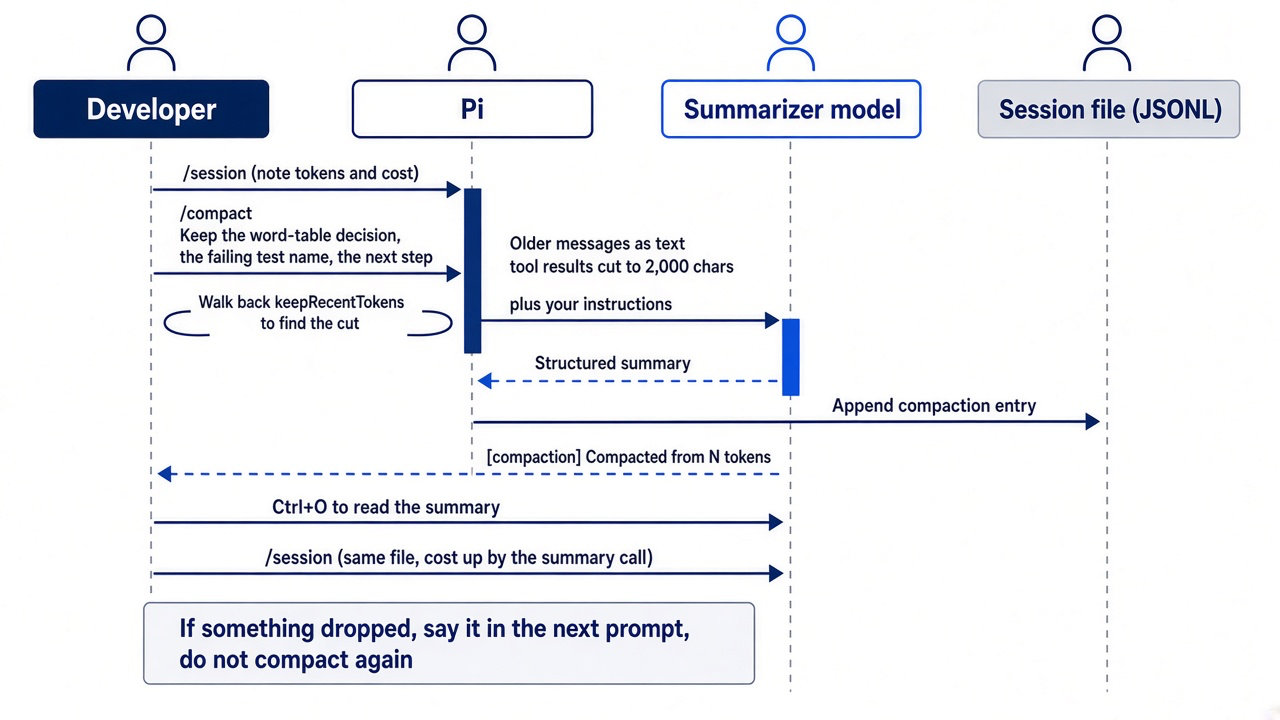
Then read what the summary kept. Ctrl+O expands it in the transcript, as in Start here. The compaction entry is also JSON in the session file, and if you have jq installed, one command prints the summaries, the latest last, out of the window.
!!jq -r 'select(.type == "compaction") | .summary' <session-file> | tail -n 40
Replace <session-file> with the path that /session printed. The output is the structured summary: look under Key Decisions for the word table and its reason, and under Critical Context or Next Steps for the failing test's name. The file lists at the bottom should name src/classify.js and test/classify.test.js.
If the summary dropped something, do not compact again to fix it; a fresh compaction has little new history to work with. Say it in your next prompt instead, and the message becomes part of the kept, recent history. With the summary in good shape, on that afternoon you send the fix.
Fix the failing test "bath damage is not shipping damage" in @src/classify.js only. Keep the word table. Replace the bare "ruined" row with rows that tie damage to delivery, such as "arrived ruined" and "came ruined". Then run npm test.
The model works from the summary, the kept messages, and the fresh copy of the classifier that it reads from @. When the run ends, check the suite and commit, with the output kept out of the window.
!!npm test
!!git add -A && git commit -m "classify: tie ruined to delivery phrases"
All tests should pass, including bath damage is not shipping damage, and the ticket about the charger in the bath comes back as other.
The settings, and when compaction fails
Three settings control automatic compaction, and the defaults suit daily Ticket Triage work.
Pi reads compaction settings from ~/.pi/agent/settings.json. The block below shows all three at their defaults; you do not need to add it unless you change one. Start here changed one for a single compaction and then removed it.
{
  "compaction": {
    "enabled": true,
    "reserveTokens": 16384,
    "keepRecentTokens": 20000
  }
}
Each setting answers one question about automatic compaction.
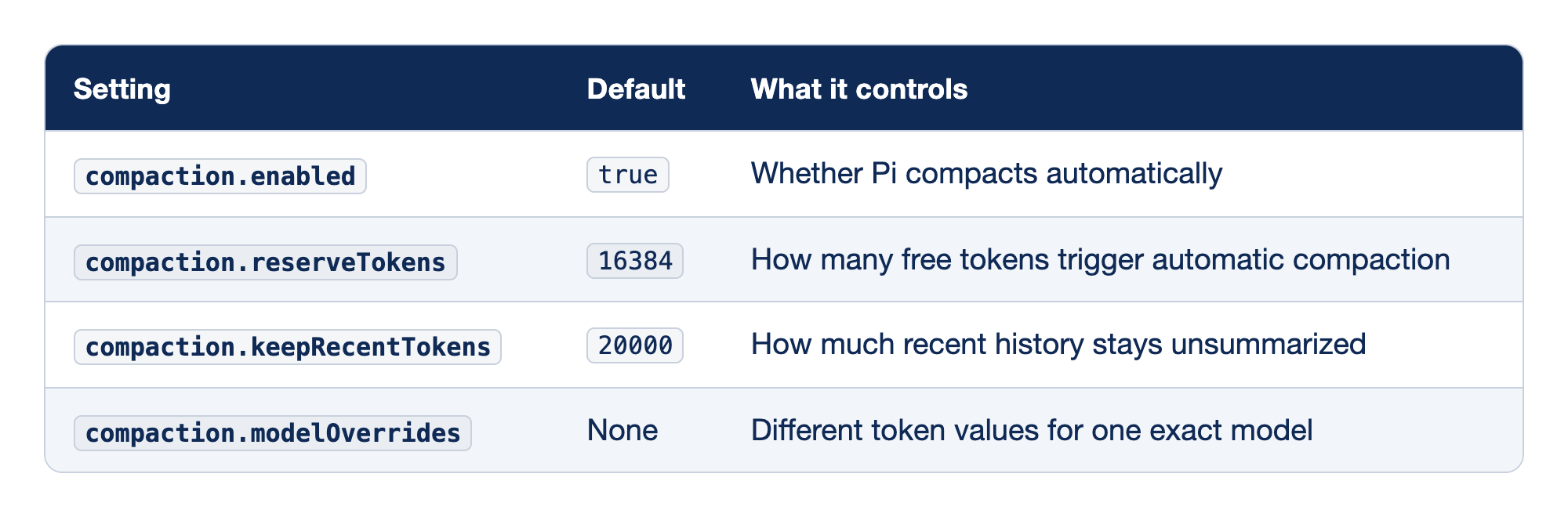
Four keys in the settings file shape automatic compaction. The first column is the key, the second its default, and the third the behavior it governs.
Change the reserve to compact earlier or later, change the kept amount to trade detail for room, and leave enabled alone unless you want to own every compaction yourself.
compaction.enabled. Set it tofalseto stop automatic compaction. The manual/compactcommand keeps working either way. In Pi 1.5.2,/settingslists it asAuto-compact.compaction.reserveTokens. A larger reserve starts compaction earlier and leaves more free room. It does not change how long the summary is.compaction.keepRecentTokens. A larger value keeps more recent messages word for word and makes the summary cover less. A smaller value frees more room and leans harder on the summary. Start here set it to 2000 for one compaction; Pi cannot compact a session smaller than this value.compaction.modelOverrides. Per-model values keyed by the exact, case-sensitiveprovider/modelId, so a model with a 1M-token window can use a much larger reserve while every other model keeps 16384.
Run /reload after you edit the file, as Start here did. /settings in Pi 1.5.2 shows Auto-compact but not the two token values, so you change those in the file. The same block also works in a project's .pi/settings.json, but that file is a trust-protected resource from Part 2. Adding it to Ticket Triage would bring up the trust prompt. Keep compaction settings in your user file for now; Part 8 is where Ticket Triage meets the trust prompt on purpose.
Gotcha: compaction can fail. The summary is a model request, so it fails when the provider is unavailable or rejects the request. A failed compaction leaves the session's entries where they were. Fix the provider problem, for example with /login or /model, and run /compact again. A failing command does not mean lost history, and the Nothing to compact error from Start here is the same: the session is unchanged.
Why the rule belongs in a file
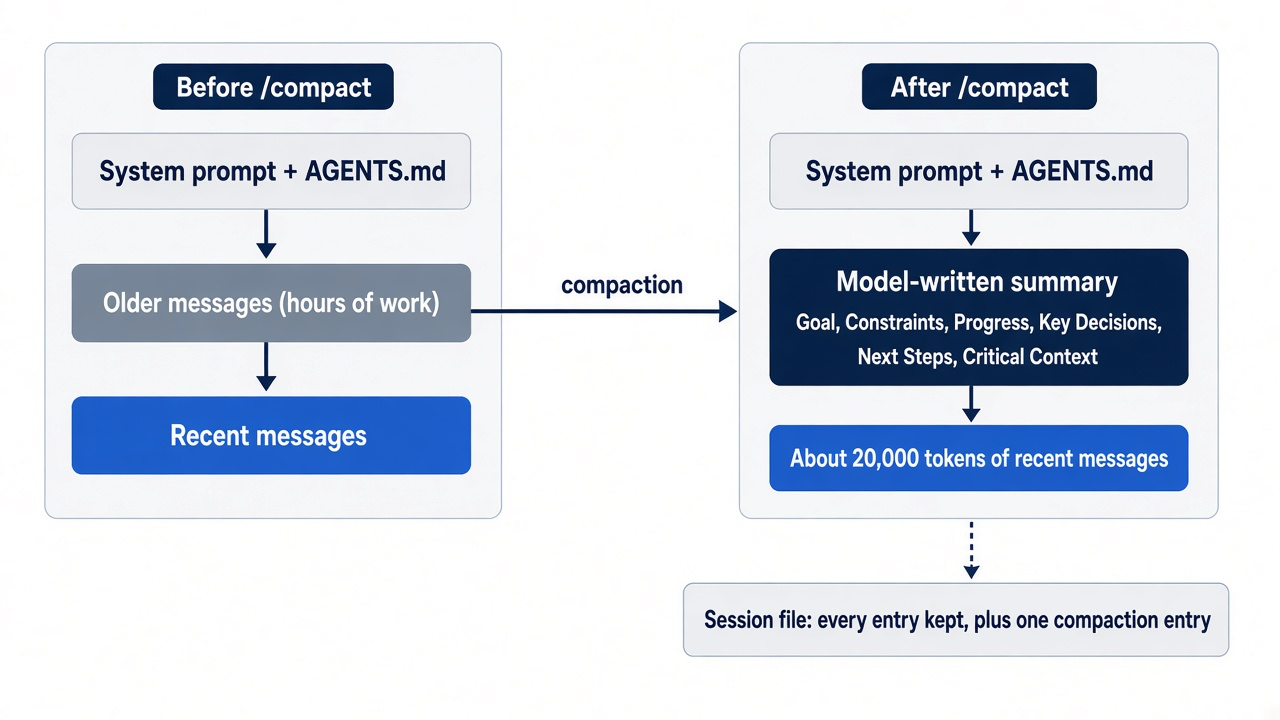
A context file is part of the system prompt, and compaction summarizes the conversation, never the system prompt.
Pi builds the system prompt from its base instructions and the context files it discovers, and every request carries it. A rule that you type in the editor is a message, which makes it part of the conversation that compaction summarizes. The summarizer may keep it word for word, shorten it, or fold it into a vague constraint. A rule in a context file arrives intact on every request, before the first message, no matter how many times the session compacts. In both Start here test runs, the summary also listed the CLAUDE.md rule under Constraints & Preferences, because the Part 2 question about it was part of the summarized history. The next compaction can shorten a rule that lives only in a summary. The same rule in a context file cannot.
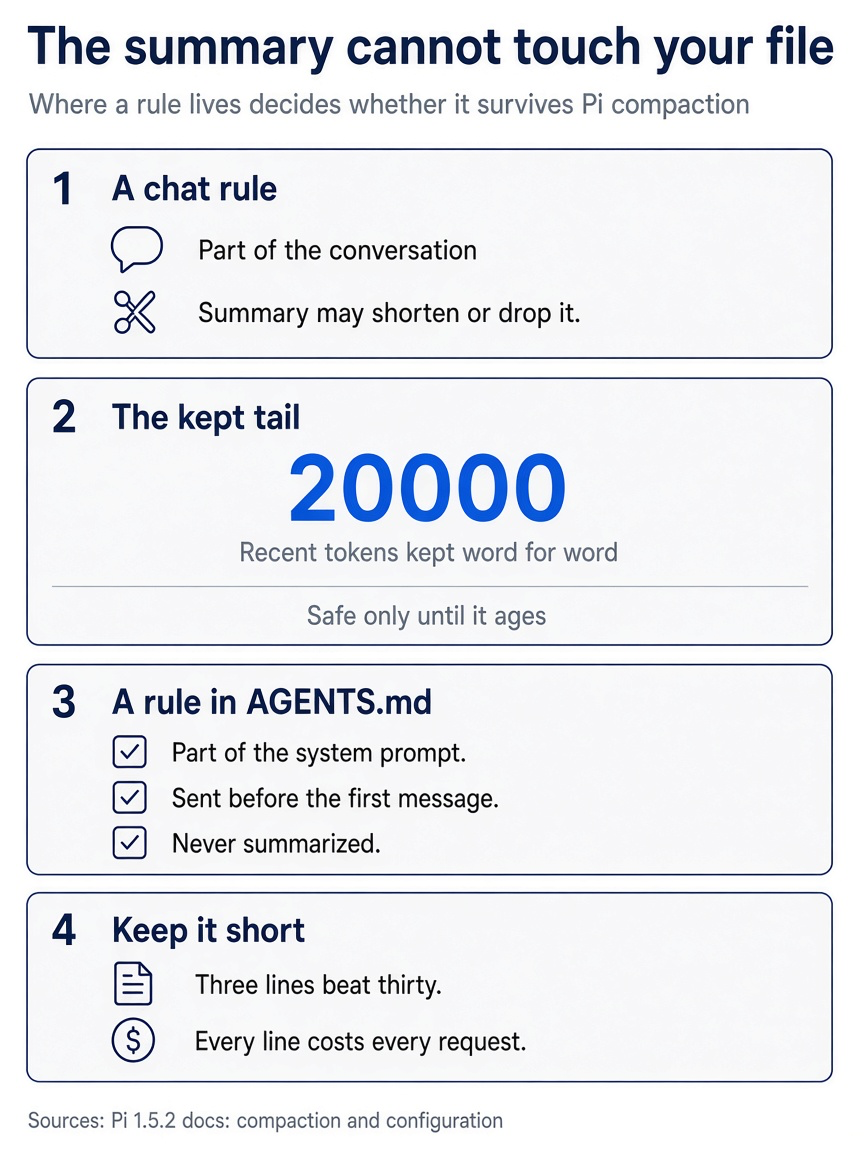
A typed rule depends on the summarizer, a recent message is safe only inside the kept tail, and a line in AGENTS.md is never summarized.
Part 3 warned about this: a correction that you type twice belongs in a file. The opening of this section shows the other half. Some of what you typed that afternoon was always true for Ticket Triage, and some was true only for this change. Sort each instruction before you decide where it goes.
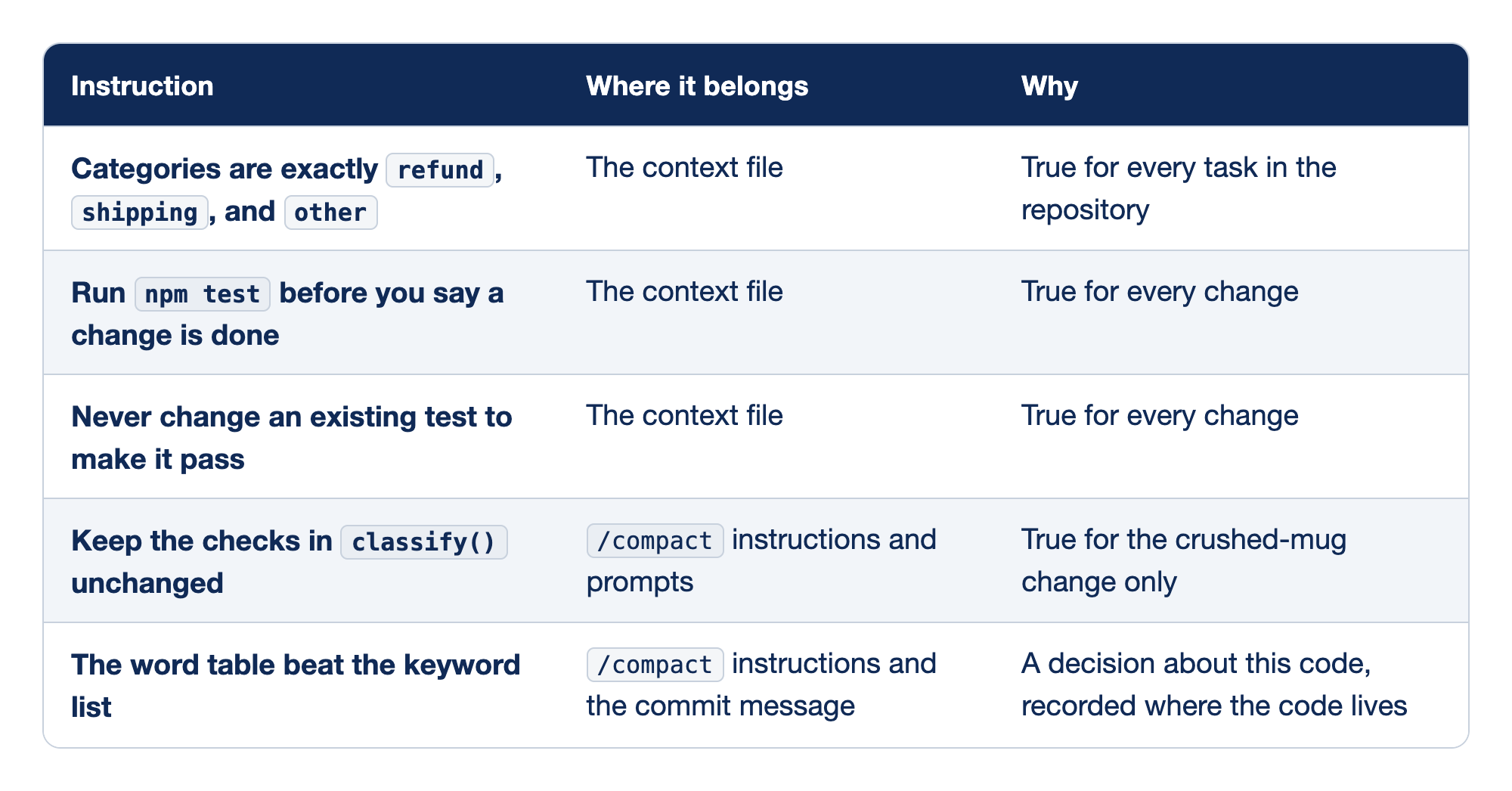
Five instructions from the long afternoon sort into three homes. The first column holds the instruction, the second where it belongs, and the third the reason.
The test for each row is one question: would this instruction be correct in a session about something else entirely?
- The categories. Part 3's Going deeper showed Pi turning the classifier into a state machine that could add categories. The rule did not sit in Ticket Triage's
CLAUDE.md, and it belongs in whatever file Pi loads. - Run
npm test. "Done" should mean the tests ran, not that the model said so. Part 11 builds a daily habit on this line. - The tests.
test/classify.test.jsholds the sample tickets that the classifier tests read. When a test fails, the quickest way for a model to make it pass is to edit the expected value it checks, and this line forbids that. When a test itself is wrong, as in Part 4, you say so in the prompt and name the test. - The checks in
classify(). The crushed-mug change lives in the word table, but a future change may need the classifier's checks. Put this constraint in a file, and the next task inherits a rule that no longer applies. - The word-table decision. It is about this code, so the commit message records it, and the compaction instructions carry it for the rest of this session.
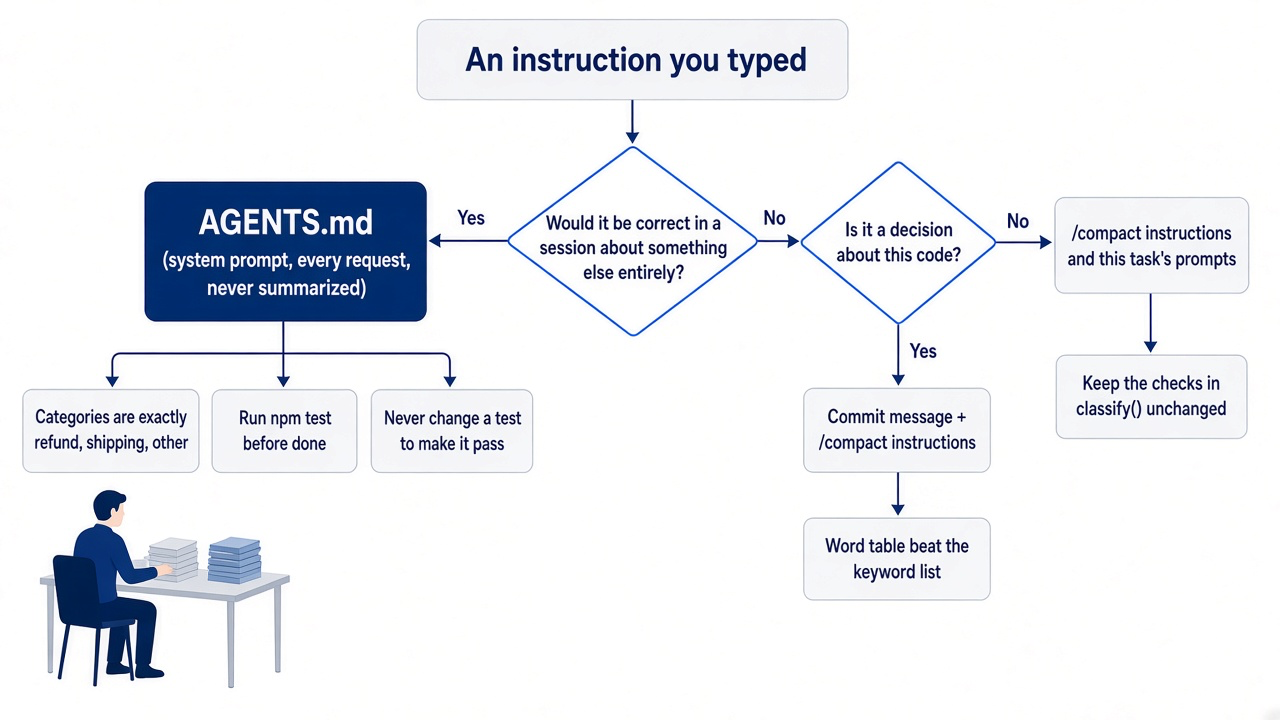
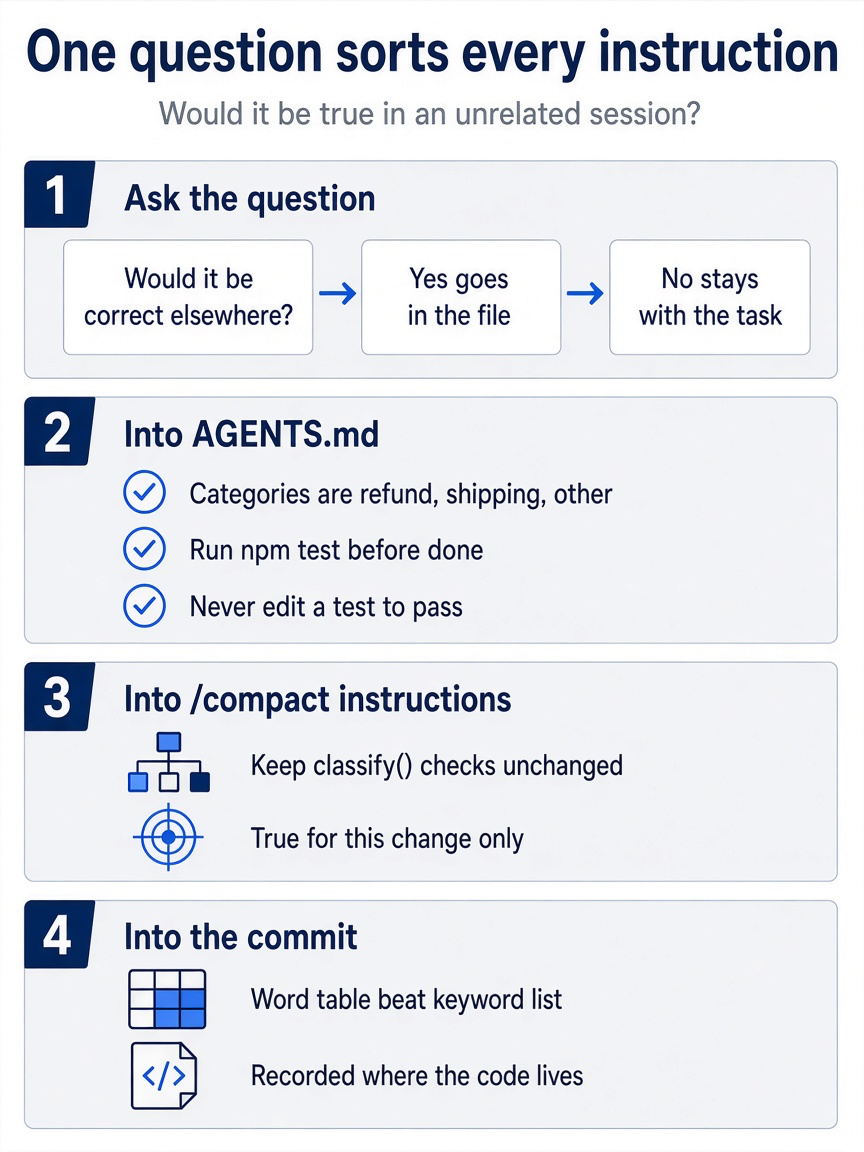
Both images carry the same rule: one question splits durable rules from task context.
Three lines beat thirty because every line in a context file costs context on every request, in every session, forever. The window you saved with /compact is the window a thirty-line rule file spends before you type anything.
If you already use Claude Code: the habit is the same one Claude Code's memory chapter teaches: lead with the corrections that you have made twice, and keep the file short, because adherence drops as the file grows. The difference is the number of layers. Claude Code stacks managed policy, user, project, local, and path-scoped rules plus auto memory. Pi has context files in three kinds of places, plus system-prompt files for heavier changes.
Where Pi finds context files
Pi looks in its agent directory, in the working folder, and in every parent of the working folder, and it needs no trust for any of them.
Part 2 introduced the search when it read the startup header. Pi's configuration page adds the details that matter once you write a file of your own.
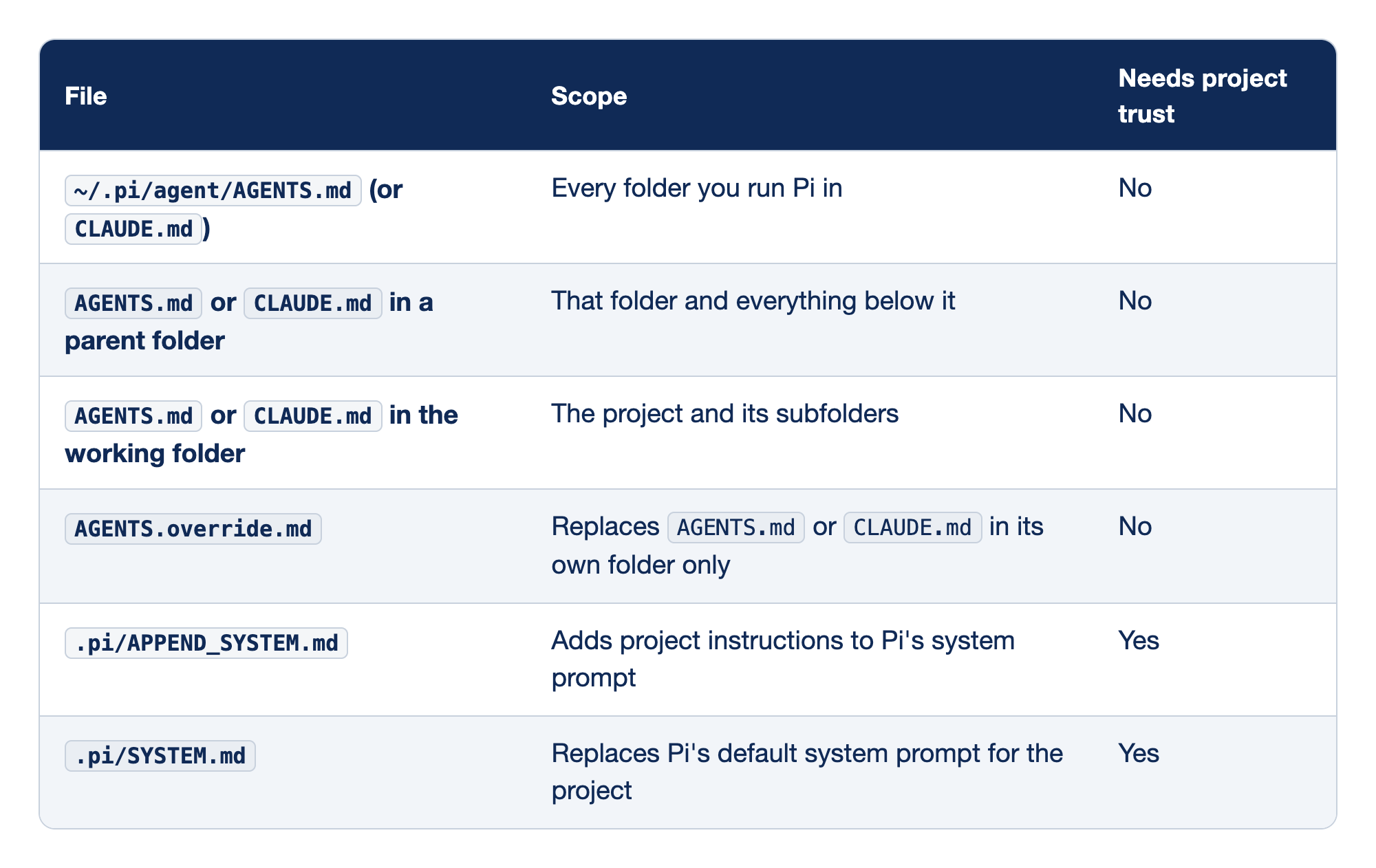
Six files can shape what Pi sends, and they differ in scope and in whether they need trust. The first column names the file, the second its scope, and the third whether it needs project trust.
The first four rows are context files, the light tool. The last two are system-prompt files, the heavy tool, and they sit behind trust.
- The agent directory.
~/.pi/agent/holds your personal rules for every project. As Part 6 noted, Pi does not read~/.claude/CLAUDE.md, so personal rules that you want in Pi go here. - Parent folders. A file in
~/code/applies to Ticket Triage and every other repository under it. Part 2's gotcha about a stray~/CLAUDE.mdis this row. - The working folder. Ticket Triage's file lives here. Because a context file applies to its folder and everything below it, starting Pi in
~/code/ticket-triage/srcstill loads it. AGENTS.override.md. It replaces theAGENTS.mdorCLAUDE.mdin the same folder and nowhere else; files from the agent directory and other folders still load. Use it for a temporary or personal variant of one folder's rules..pi/APPEND_SYSTEM.md. It adds to Pi's system prompt rather than sitting beside it as a context file, and it loads only after you grant project trust..pi/SYSTEM.md. It replaces Pi's default system prompt for the project, which is rarely what you want. It also needs trust, and a trusted project file takes precedence over the matching file in~/.pi/agent/; the two are not combined.
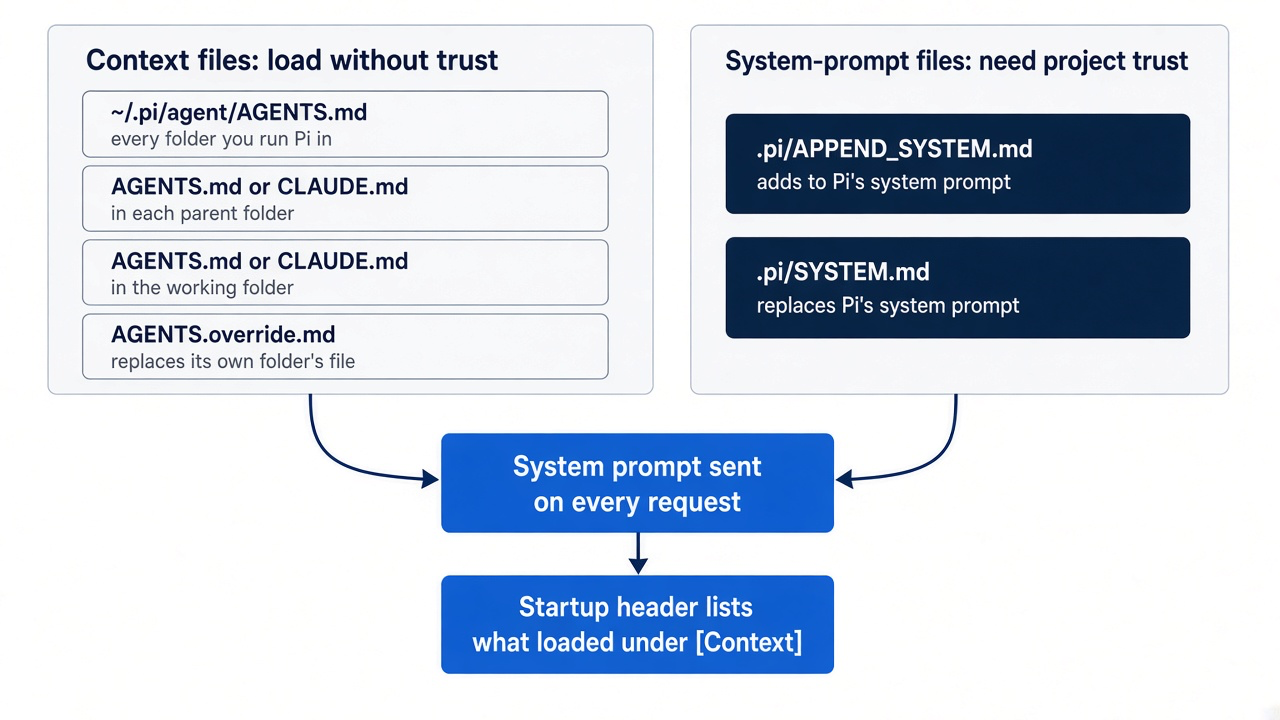
Ticket Triage needs neither system-prompt file. Adding one would also make the trust prompt appear, and Part 8 saves that moment for the ship skill. This guide's tests ran only the working-folder row; the other rows come from the configuration page.
Gotcha: context files load without trust, and Pi's security page tells you to treat instructions in a folder as untrusted input even when you decline trust. The parent walk widens this: a context file in any folder above the project reaches the model too. Read the header every time you start Pi in a repository that you did not write.
One context file per folder for Ticket Triage
Pi loads one context file per folder, so Ticket Triage keeps one, and the startup header tells you which one Pi read.
Pi's configuration page lists the names a context file can have in a folder: AGENTS.override.md, AGENTS.md, AGENTS.MD, CLAUDE.md, or CLAUDE.MD. The page joins the list with "or" and describes the override as replacing AGENTS.md or CLAUDE.md in its own folder. The docs do not state which of AGENTS.md and CLAUDE.md wins when both sit in the same folder. This guide's Part 6 test answered it: with both files in one folder, Pi 1.5.2 loaded AGENTS.md only. Do not build on a guess. Keep one file in each folder, and confirm in the header which file loaded.
If you already use Claude Code: with both files in one folder, Claude Code reads only CLAUDE.md (memory page), and Pi reads only AGENTS.md. Add an AGENTS.md beside your CLAUDE.md, and Pi stops reading your Claude Code rules.
Ticket Triage already had a CLAUDE.md from Part 2, and Pi has loaded it since Part 2. Start here renamed it to AGENTS.md, the name that Pi's quickstart points to for persistent folder instructions, so that Git keeps the file's history. If you prefer, open AGENTS.md in your editor and replace its contents with three lines, as Start here did with cat. Everything else that the old file said is still in Git history, and Part 8 gives the occasionally useful parts a better home in a prompt template or a skill. If Pi is running when you change the file, tell the running session to pick up the change.
/reload reloads context files along with keybindings, extensions, skills, templates, and themes, so the next request carries the new rules. The header is drawn at startup, though, so restart to read it, as Start here did with pi --no-session. To continue the work session instead, quit, and then continue the same session from Ticket Triage.
cd ~/code/ticket-triage
pi --continue
pi --continue opens the most recent session for the current folder, which is crushed-mug-table. Today's compaction wrote to it last. The resource listing in the header should name AGENTS.md and no longer name CLAUDE.md. In a long session, the header scrolls out of view; pi --no-session shows it at the top, as in Start here. If the header shows no context file at all, check for --no-context-files or its short form -nc, as Part 2 described. Before you commit, consider Claude Code. If you still run it in this repository, it needs no copy of the rules. Claude Code v2.1.277 and later reads AGENTS.md directly when the working folder and the folders above it hold no CLAUDE.md, .claude/CLAUDE.md, or CLAUDE.local.md, and the rename removed Ticket Triage's CLAUDE.md. Both tools now read the same three lines, so nothing can drift. Check the version.
claude --version
On v2.1.277 or later, start Claude Code in Ticket Triage and look for a line such as no CLAUDE.md found; AGENTS.md loaded near the top of the conversation. In this guide's test, Claude Code 2.1.326 showed no such line on its start screen, but /memory listed AGENTS.md among its memory files. An older Claude Code cannot read AGENTS.md, so give it a one-line file that imports it. Put the file at .claude/CLAUDE.md, where Pi never looks, because Pi searches the working folder and its parents, not subfolders. Claude Code resolves an import path from the file that holds it, so the path climbs one folder.
mkdir -p .claude
echo '@../AGENTS.md' > .claude/CLAUDE.md
Commit once the header looks right, with the import file if you made one. Start here already committed AGENTS.md, so this commit holds only the import file.
!!git add -A && git commit -m "rules: three-line AGENTS.md for Pi and Claude Code"
Pi's header still lists only AGENTS.md. If you would rather not rename anything, trim CLAUDE.md to the same three lines and leave it as the one file instead. Either way works; two candidates in one folder do not.
Gotcha: do not copy AGENTS.md into .claude/CLAUDE.md. A full copy drifts the first time you change a rule in one file and not the other. It also hides AGENTS.md from Claude Code, because a .claude/CLAUDE.md counts as a CLAUDE.md, and Claude Code then reads it instead of AGENTS.md. A one-line import cannot drift, because the rules live only in AGENTS.md. Do not count on @path imports inside AGENTS.md itself; Pi's docs describe no import syntax for context files, so keep the three lines in the file.
If you already use Claude Code: Pi has no /memory command. The startup header is the place to confirm which instruction files loaded, and a restart is how you see it again after an edit.
Do this today
Everyone
-
Read your numbers in the compacted session. Run
pi --continue. The footer ends with• crushed-mug-table. Run/session: the file path is the same as in Start here, and the cost includes the summary call. Type/quitto leave.pi --continue/session -
Find every context file Pi can see. List candidates in the project and the agent directory, and walk up the parents in your head. Each folder should hold one file. In Ticket Triage the command prints
AGENTS.mdonly.ls AGENTS.override.md AGENTS.md CLAUDE.md ~/.pi/agent/AGENTS.md ~/.pi/agent/CLAUDE.md 2>/dev/null -
Check that the kept amount is back to the default. The command prints nothing, because the
compactionblock is gone from your settings file.grep keepRecentTokens ~/.pi/agent/settings.json -
Check the tree. The first command prints nothing, and the last commit is the
AGENTS.mdcommit.git status --short git log --oneline -1
If you read Going deeper
-
Compact once with instructions in a real session. In your longest Pi session, note the footer's context number, then run
/sessionand note token usage and cost. Name the decision, the failing test or open problem, and the next step, then run/sessionagain and compare. PressCtrl+Oon the compaction entry and check that the summary kept what you named./compact Keep the decision to <decision> and why. Keep the failing test "<test name>". Next step: <next step>. /session -
Write three lines in your own project. If the project has a
CLAUDE.md, rename it, keep only what would be true in a session about something else entirely, and then startpi --no-session. Restart in the project and read the resource listing. The header listsAGENTS.mdand notCLAUDE.md.git mv CLAUDE.md AGENTS.md pi --no-session -
Point Claude Code at the same file. If you also use Claude Code, check its version. On v2.1.277 or later it reads
AGENTS.mditself, so add nothing. On an older version, add the one-line import file and commit it withAGENTS.md.claude --version mkdir -p .claude && echo '@../AGENTS.md' > .claude/CLAUDE.mdSteps 1 and 2 use your own repository, so this guide did not run them.
Let the summary forget the right things
Pi compaction is going to happen. The window is finite, a long session outgrows it, and a model-written summary is the price of keeping the session alive. The only question is whether the summarizer guesses what mattered or you tell it.
Two habits answer that question. Compact on purpose, while you still remember the decision, the failing test, and the next step, and put them in the instructions. Then move everything that is true for every task into a short AGENTS.md, where it rides in the system prompt on every request and no summary can reach it.
The afternoon the window fills will still come. When it does, the summary only has to carry today's work, because the rules were never in the conversation to begin with.
This is Part 7 of "Pi, Day to Day," a 12-part guide to running the Pi coding agent with the same daily discipline you bring to Claude Code.