
Your Pi Coding Agent Is Only as Smart as the Folder You Start It In
In the Pi coding agent, the folder you launch from is configuration: it decides which rules load, where paths point, what trust applies, and where your session is filed, so a deliberate first launch (right folder, read header, named session, side questions with --no-session) prevents a whole class of silent failures.
The Pi terminal agent takes its rules, its trust decision, its paths, and its session history from one place, and it never tells you when that place is wrong.
You spent ten minutes working with the agent before you noticed it had started in your home folder, never read your project rules, and filed the whole session where you will never find it again.
In this article: Day 2 of a day-by-day guide to Pi. Start here: you write a one-line
CLAUDE.md, start Pi in the right folder, name a session, and come back to it withpi --continue. Going deeper: what the folder decides, when Pi asks about trust, and where session files and the ways back into them live.
Tested on Pi 1.5.2.
Part 1 ended with Ticket Triage committed, Pi installed, an Anthropic API key saved, and a read-only first session that changed nothing.
Start here
By the end of today you have a one-line rule file that Pi reads on every start, a named session saved on disk, and the habit of coming back to it with pi --continue.
Starting fresh or fell behind? Run git switch -C main pi/day-01. This replaces your main with the end of Day 1; to keep your own work, run git branch my-backup first.
Check where you start
Start in the project folder with a clean tree.
cd ~/code/ticket-triage
git status --short
npm test
git status --short prints nothing, and npm test ends with tests 3, pass 3, and fail 0, as it did at the end of Part 1.
Write a one-line rule file
A context file is a file named CLAUDE.md or AGENTS.md that Pi reads when it starts and adds to what it sends the model. Pi looks for one in the folder you start it in and in every folder above it. Write a one-line CLAUDE.md and commit it.
printf 'Run `npm test` before you say a change is done.\n' > CLAUDE.md
git add CLAUDE.md
git commit -m "Add CLAUDE.md"
Git prints the new commit, Add CLAUDE.md. The rule is the one you would give a new colleague on the first day: "done" means the tests ran.
Start Pi in the project folder
The folder you start Pi in decides which context files load, where relative file paths point, and where Pi files the session. Start it from ~/code/ticket-triage, with no prompt.
pi
If Pi prints fd not found. Downloading... first, let it finish; Pi fetches the fd file finder on its first interactive start. Pi then opens its interactive screen: the startup header at the top, the transcript below it, the editor where you type, and the footer. The editor is the input box at the bottom of the screen.
Read the header before you type anything. Under [Context] it lists the context files Pi loaded:
[Context]
  CLAUDE.md
The rule you just wrote reached Pi as written. Then read the first footer line. It shows the folder and the git branch. The folder should read as Ticket Triage, ~/code/ticket-triage (main). If it shows your home directory, quit with /quit and start again from the right place; nothing you type in a wrong-folder session is worth keeping.
Pi did not ask whether to trust this folder. Pi asks only when a folder holds files that change how Pi itself runs, such as .pi/settings.json, and Ticket Triage has none of those. If the prompt appears anyway, choose Do not trust (this session only); Going deeper explains why and lists what triggers the prompt.
Name the session and send one prompt
A session is one conversation with Pi, saved as a file so that you can come back to it. Name the session now, while you still remember what it is for. Type this in the editor and press Enter:
/name crushed-mug
Pi prints Session name set: crushed-mug, and the first footer line now ends with • crushed-mug. Now send one prompt:
What does CLAUDE.md ask you to do? Answer in one sentence.
In this guide's test run, the answer was CLAUDE.md says to run npm test before saying a change is done. If the answer mentions a rule you wrote in CLAUDE.md and the transcript shows no read tool call for that file, the context file reached the model with the request, which is what the header promised.
Gotcha: Pi writes the session file only after the first message. In a test, a session that got a name and no prompt was never saved, and pi --continue later opened an older session. Always send at least one prompt before you quit a session you want back.
Read the session's numbers
Ask Pi for the session's vital signs.
/session
Pi shows the session file, its ID, the message count, the token totals, and the cost. In the test run /session showed one user message, one assistant message, and no tool calls. Your token and cost numbers differ from the guide's. The tool count matters today: zero tool calls means the model did not open CLAUDE.md. Pi sent it with the request.
Type /quit and press Enter. Pi prints the command that resumes this exact session:
To resume this session: pi --session 01a1e890-3436-70b1-b65e-f86963bfed7b
Come back with pi --continue
pi --continue opens the most recent session for the folder you are in.
pi --continue
The transcript shows your prompt and the answer, and the footer ends with • crushed-mug. Type /quit and press Enter.
Ask a side question without a session
Print mode runs one prompt from the shell, prints the final answer, and exits. You used it in Part 1 with -p. Pi saves every pi -p run as a session too, and a saved run becomes the most recent session in the folder. The next pi --continue then opens it instead of crushed-mug. For a side question, add --no-session, which saves nothing.
pi --no-session -p "In one sentence, name this folder and the test command in package.json."
A one-sentence answer that names ticket-triage and node --test or npm test proves three things. The shell found the pi you installed in Part 1. Pi found a working credential. The request reached the provider and came back.
Now prove that the side question did not take the place of your work session, and that the tree is still clean.
pi --continue
The footer still ends with • crushed-mug. Type /quit, press Enter, and check the tree.
git status --short
The command prints nothing. This empty result, after a footer that still said crushed-mug, is today's win: Pi starts in the right folder, reads your rule file, keeps one named session on disk, and answers a side question without losing your place.
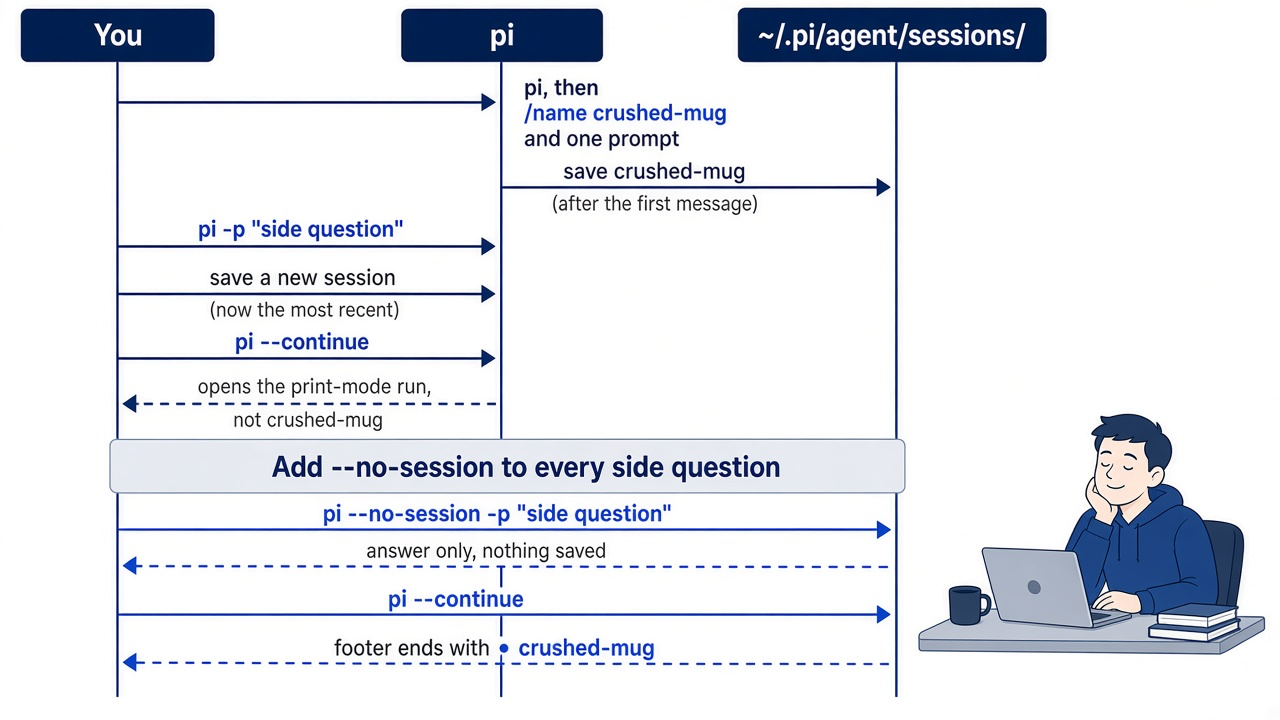
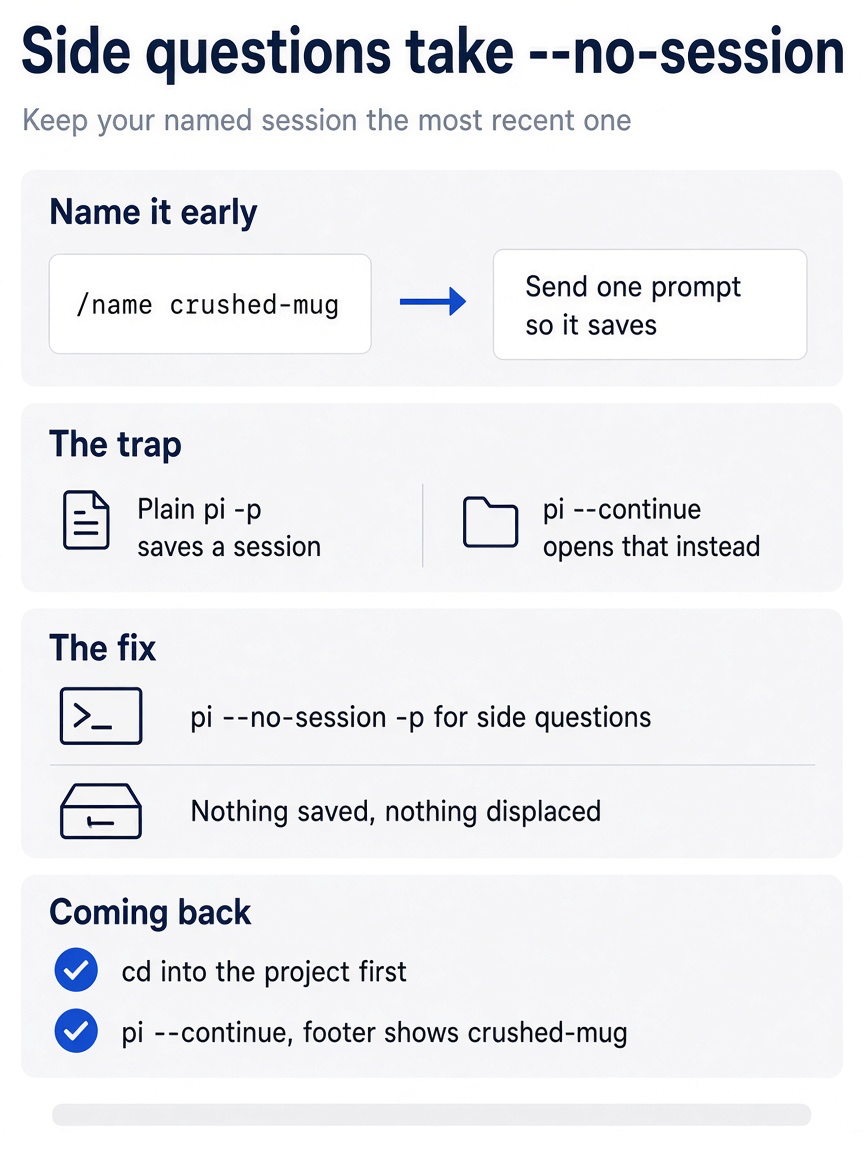
The session habit comes down to four steps. Name the session and send one prompt so it saves. Know that a plain pi -p saves a session that pi --continue will open next. Use pi --no-session -p for every side question. Come back by changing into the project and running pi --continue.
You can stop here. Going deeper explains why this works and where it breaks.
Going deeper
This section is for readers who want the rules behind the first launch: what the folder decides, when Pi asks about trust, where sessions live, and every way back into one. It assumes you finished Start here in this part and in Part 1.
The morning you started in the wrong folder
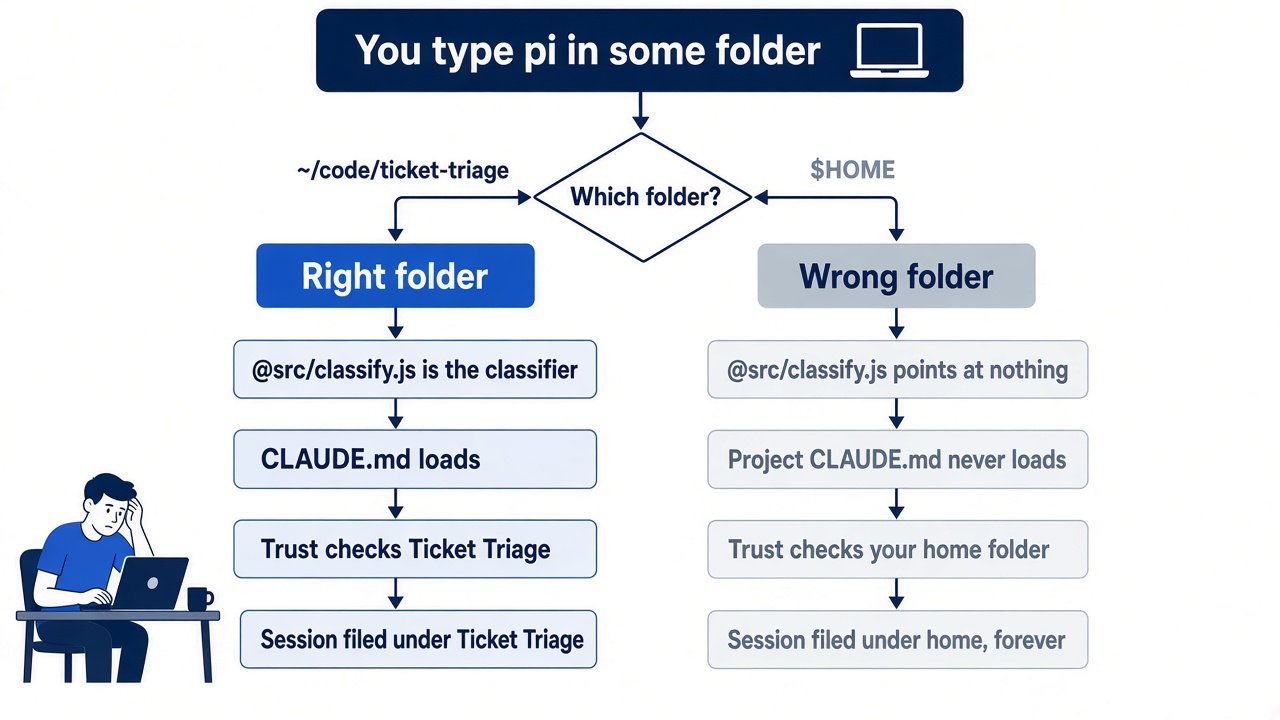
You open a new terminal on your MacBook Pro, type pi, and ask it to look at the crushed-mug ticket in @src/classify.js. The new terminal opened in your home directory, as new terminals do. Pi resolves @src/classify.js from there, and your home folder has no src/. Ticket Triage's CLAUDE.md never loads, because Pi looks for context files in the working folder and its parents, and ~/code/ticket-triage is neither. The model answers your question about the classifier with no idea that the categories are refund, shipping, and other.
You notice ten minutes in, quit, cd into the repository, and run pi --continue. It opens nothing useful. The session you just had is filed under your home directory, not under Ticket Triage, so the "most recent session for the current directory" is not the one you meant.
None of that is a bug. The working folder is the single input Pi uses to decide what it reads, what it trusts, and where it files your work. Part 1 left Ticket Triage clean, and this part makes the first launch in it deliberate: the right folder, the startup header, a trust prompt that correctly stays silent, the key from Part 1, a named session, and a one-line pi -p check.
The scene captures that morning: a developer who started in the wrong folder and only noticed when the footer gave it away. Every habit in this article exists so that moment never costs more than one /quit.
What the folder decides
In Pi, the working folder is not a convenience; it is configuration.
Pi uses the folder you start it in to discover files, instructions, and configuration, and to group saved sessions (sessions). Each session records the working directory it was created in and never changes it. On your machine, the folder decides four things: where @path and tools resolve, which context files load, whether project trust applies, and where the session is filed.
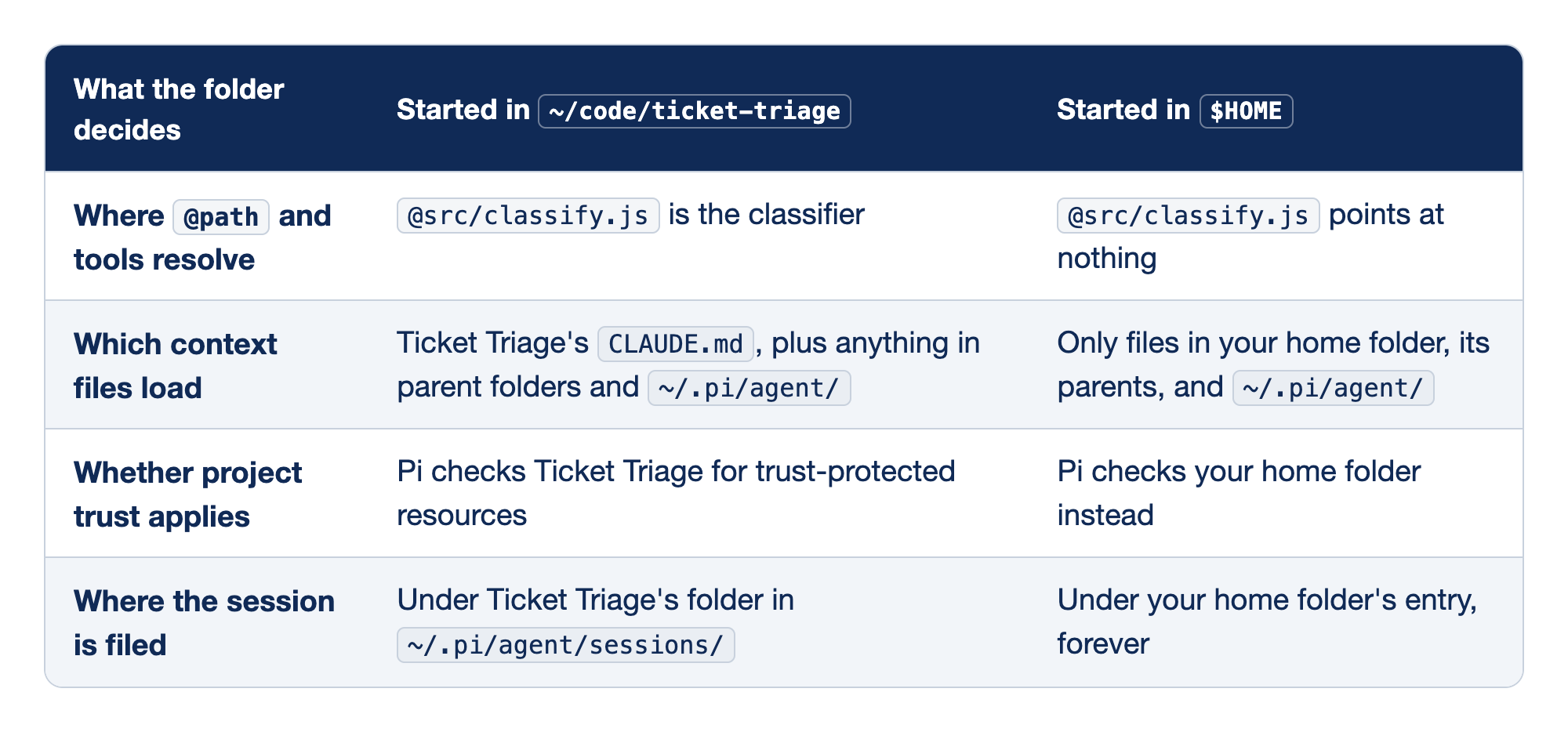
Read each row as something that goes wrong silently. Pi does not warn you that you started in the wrong place; it simply does its job against the wrong folder.
- Where
@pathand tools resolve. Pi resolves@pathfrom the current working directory, and the built-in tools default to it as well. A relative path that is correct in Ticket Triage is wrong everywhere else. - Which context files load. Pi loads
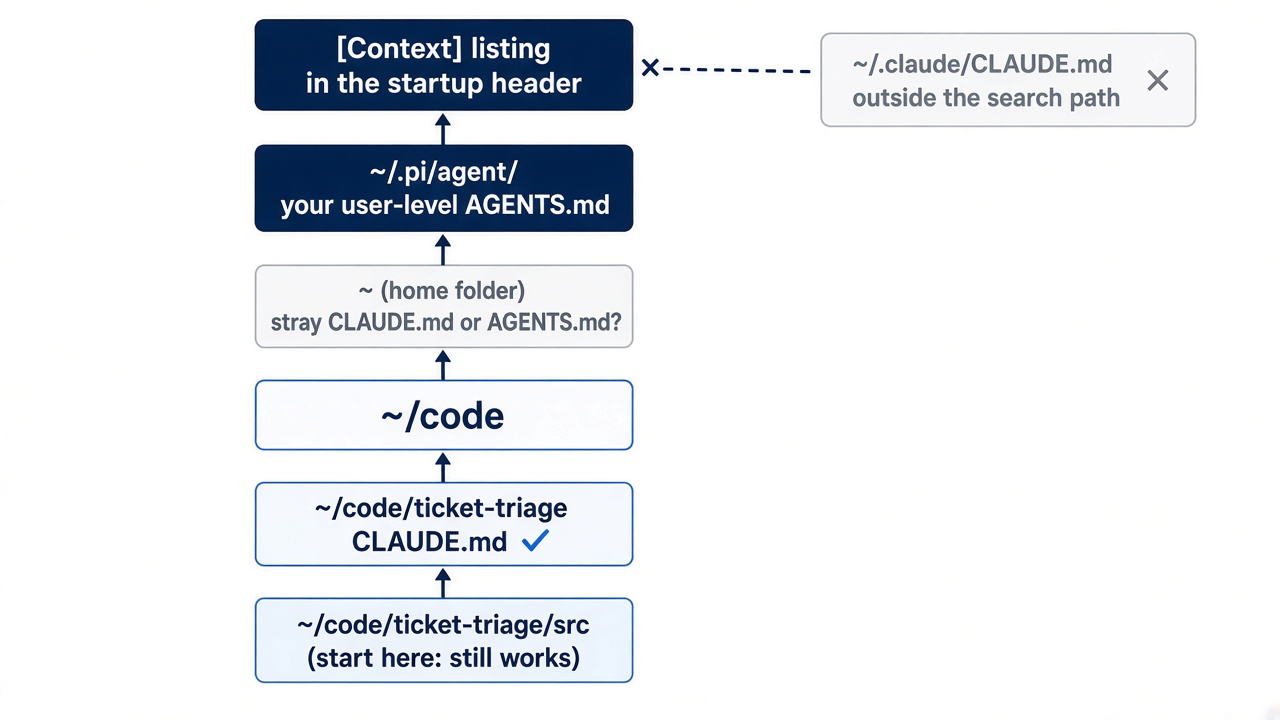
AGENTS.mdorCLAUDE.mdfrom the agent directory, the working directory, and each parent directory (configuration). A file applies whenever Pi runs in its directory or anywhere below it. Starting in~/code/ticket-triage/srcstill loads the repository'sCLAUDE.md, but starting in$HOMEnever does. - Whether project trust applies. Pi looks for trust-protected resources starting from the working directory, so the folder decides which ones it finds.
- Where the session is filed. Sessions are grouped by working directory. A session begun in the wrong folder stays there, which is why
pi --continuefrom the right folder cannot find it.
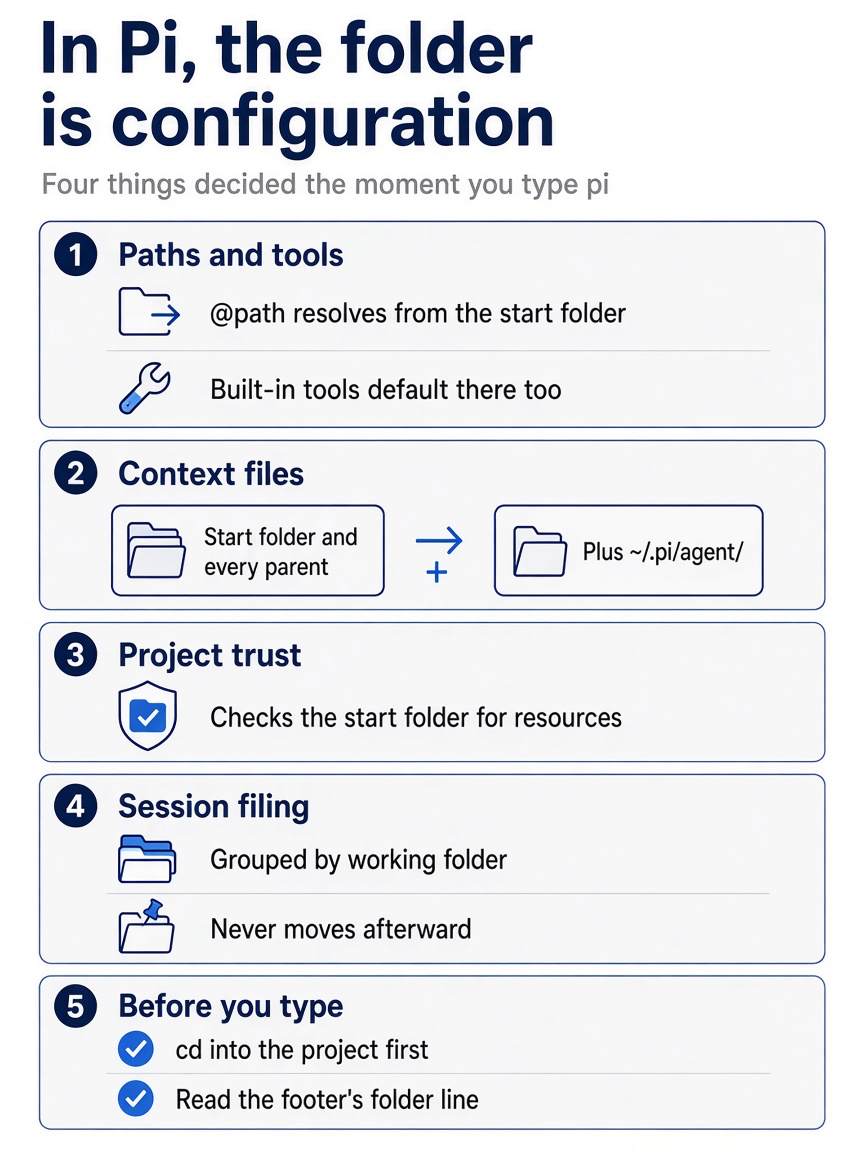
One habit prevents all four failures: change into the project before you type pi, and read the folder on the footer's first line before you type anything else.
Gotcha: the parent walk reaches your home folder too. A stray ~/CLAUDE.md or ~/AGENTS.md sits in a parent of every project under your home folder, so Pi loads it in all of them. If the header lists a file you did not expect, that is usually where it lives.
The first launch, in more detail
Read the header before you type anything. Pi's settings reference describes its parts: Pi's version and key hints, a line showing the model scope, and a listing of the resources Pi loaded. On the first launch the resource listing is short, and the line you are looking for is Ticket Triage's CLAUDE.md. Seeing it there is the first good surprise of the series: the rules you wrote for Claude Code reach Pi with no conversion. Every resource Parts 7 and 8 add will show up in this same listing. Press Ctrl+O to show the full startup help and every loaded resource. Ctrl+O was not run for this guide.
The footer shows the folder, session, model, context usage, and cost.
Gotcha: if the header is missing entirely, someone set quietStartup in ~/.pi/agent/settings.json. The value true hides the header and the resource listing; "header" keeps the version and key hints but hides the model scope line and the resource listing. Start once with pi --verbose to see the full startup information for that run. If the header appears but CLAUDE.md is missing, check that you did not start with --no-context-files (or -nc), which turns off AGENTS.md and CLAUDE.md discovery. This guide's tests did not run quietStartup, --verbose, or --no-context-files.
When you edit a context file mid-session, Pi does not notice on its own. Run /reload in the editor, which reloads keybindings, extensions, skills, templates, themes, and context files. /reload was not run for this guide.
/reload
If you already use Claude Code: the header plays the role of the Memory files list in Claude Code's /context; it tells you which instruction files actually loaded. Pi reads your project CLAUDE.md as-is. It does not read ~/.claude/CLAUDE.md, which is outside its search path; your user-level Pi rules belong in ~/.pi/agent/AGENTS.md.
Why Ticket Triage does not ask about trust
The trust prompt appears only when the folder holds trust-protected resources, and Ticket Triage has none yet.
Coming from Claude Code, you expect a trust dialog on the first launch in a new folder, and Ticket Triage's first launch is quiet. The quiet is correct. Pi asks only when it finds specific resources, and a repository with source files and a CLAUDE.md has none of them (security). The table lists what Pi looks for.
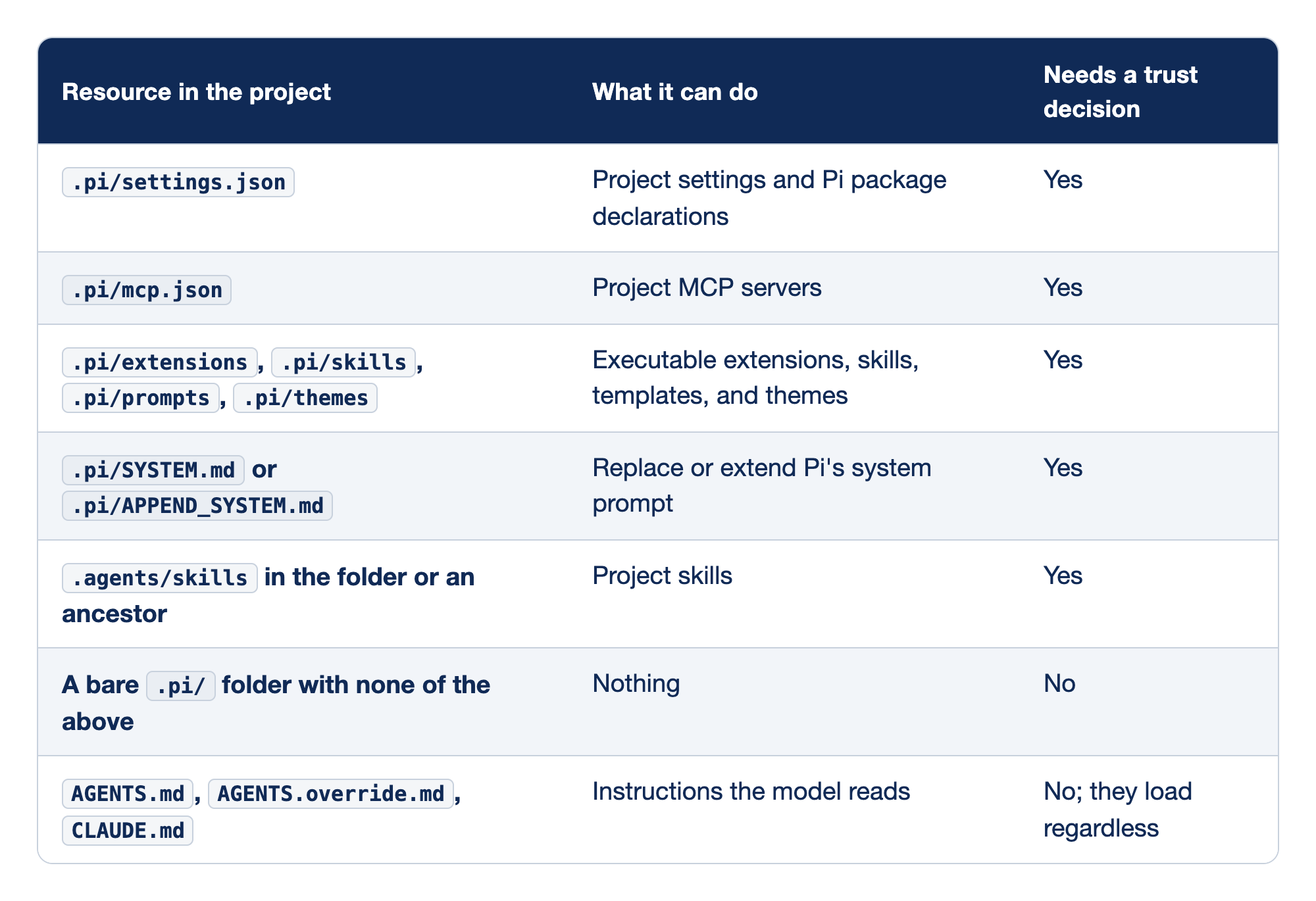
The table divides a project into things that can change how Pi runs and things the model merely reads. The first group waits for your decision. The second group loads every time.
.pi/settings.json. Project settings override your user settings, and they can declare Pi packages to install..pi/mcp.json. Project MCP servers start processes and connect tools. Pi reads this file only for trusted projects..pi/extensionsand the other resource folders. Extensions are TypeScript that runs inside the Pi process with your permissions. Stopping a folder from loading them silently is the main reason the prompt exists..pi/SYSTEM.mdand.pi/APPEND_SYSTEM.md. These change Pi's standing instructions to the model. Part 7 treats them as the heavy tools they are..agents/skills. A project skill folder, in the working directory or any ancestor, triggers the prompt. A skill folder in your home folder,~/.agents/skills, counts as your own skills, not a project's, and in this guide's install tests it caused no prompt. A copy in a folder such as~/code/.agents/skillswould. Part 8 puts ashipskill at.agents/skills/ship/in Ticket Triage, and that is the day this prompt first appears for you.- A bare
.pi/folder. An empty.pi/does not trigger a prompt. - Context files.
AGENTS.md,AGENTS.override.md, andCLAUDE.mdload whether you trust the folder or not, unless you disable context loading.
When a folder does hold protected resources, Pi shows a prompt before it loads them. In current releases it reads like this; your release may word it differently. Pi 1.5.2 showed this one in this guide's install tests:
 Trust project folder?
 /Users/you/code/ticket-triage
 This allows pi to load .pi settings and resources, install missing project packages, and execute project extensions.
 → Trust
   Trust parent folder (/Users/you/code)
   Trust (this session only)
   Do not trust
   Do not trust (this session only)
 ↑↓ navigate  enter select  escape/ctrl+c cancel
The five choices answer two questions: yes or no, and remember or not. The plain Trust and Do not trust answers become saved decisions, which Pi keeps in ~/.pi/agent/trust.json. The (this session only) answers apply to the running process and leave nothing behind. Trust parent folder saves the decision one level up, which covers every repository under ~/code. When several saved decisions could apply, the one closest to the working directory wins, so a saved "do not trust" on one repository still holds under a trusted parent. In the test, Escape canceled the prompt, and Pi printed This project is not trusted. Project .pi resources and packages are ignored. Use /trust to save a trust decision, then restart pi.
Granting trust loads everything in the first five rows, plus any missing packages the project settings declare. Declining skips all of it, with one exception. Pi reads the project's sessionDir setting while it selects or creates a session, before it resolves trust, so a project can choose where its sessions are stored even when you say no. Declining cannot undo that first lookup.
Gotcha: declining trust does not stop AGENTS.md or CLAUDE.md from loading. Pi's security page tells you to treat instructions in a folder as untrusted input even when you decline. Before you start Pi in a repository you cloned, read its context files and look for protected resources yourself.
cat AGENTS.md CLAUDE.md 2>/dev/null
ls -a .pi .agents 2>/dev/null
The first command prints the instructions the model is about to receive; the second shows whether a trust prompt is coming, as long as no parent folder holds .agents/skills either. In Ticket Triage the first prints your one line and the second prints nothing. To have Pi read an unfamiliar repository without its instructions in the window, start it with pi --no-context-files.
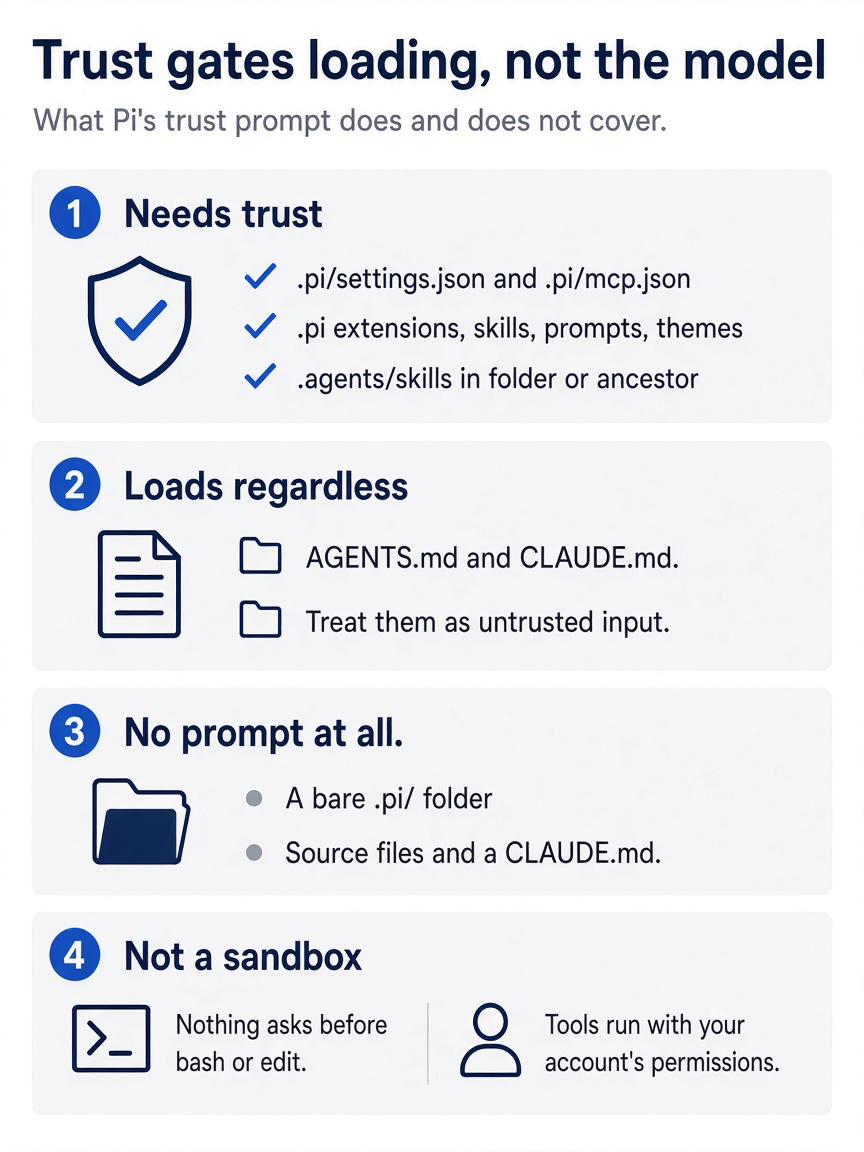
Trust gates loading, not the model: protected resources wait for trust, context files always load, a bare .pi/ folder triggers nothing, and none of it stops a tool call once the session runs.
How Pi decides without asking you
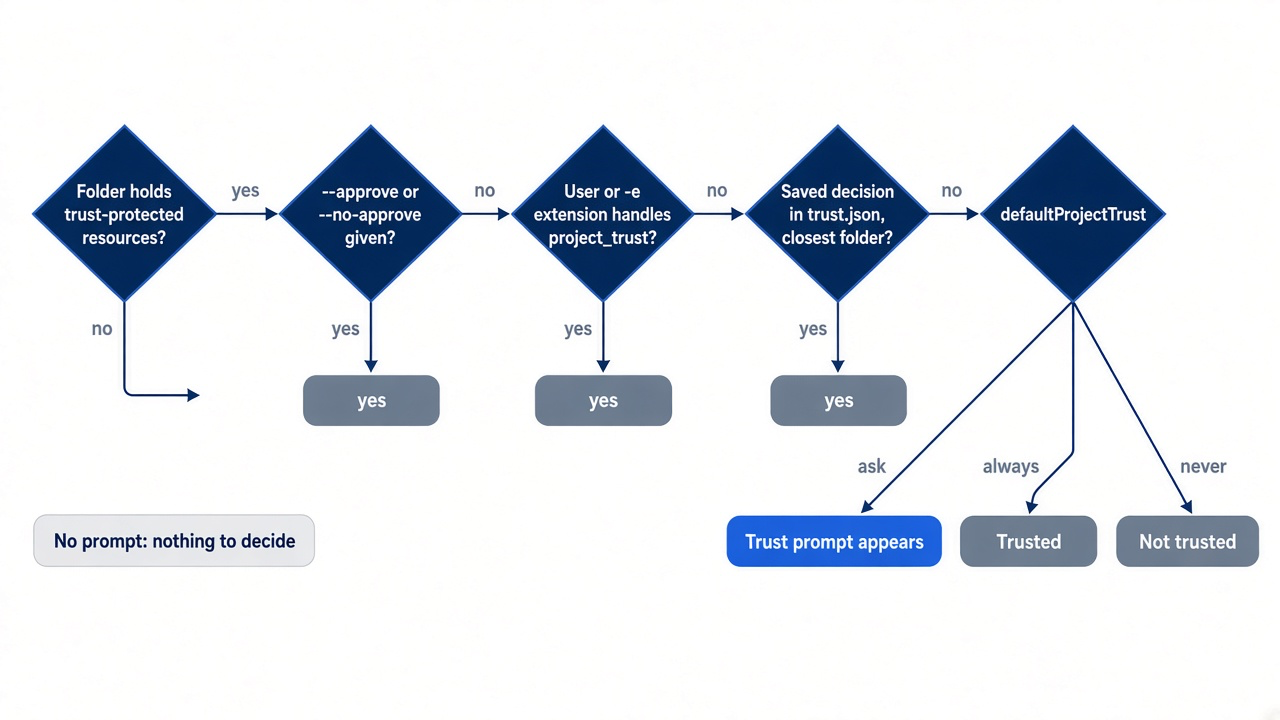
The prompt is the last step in a resolution order, not the first.
Pi reaches a trust decision through a fixed sequence, and the prompt appears only when nothing earlier has answered. The order tells you where to look when Pi trusts a folder you never approved.
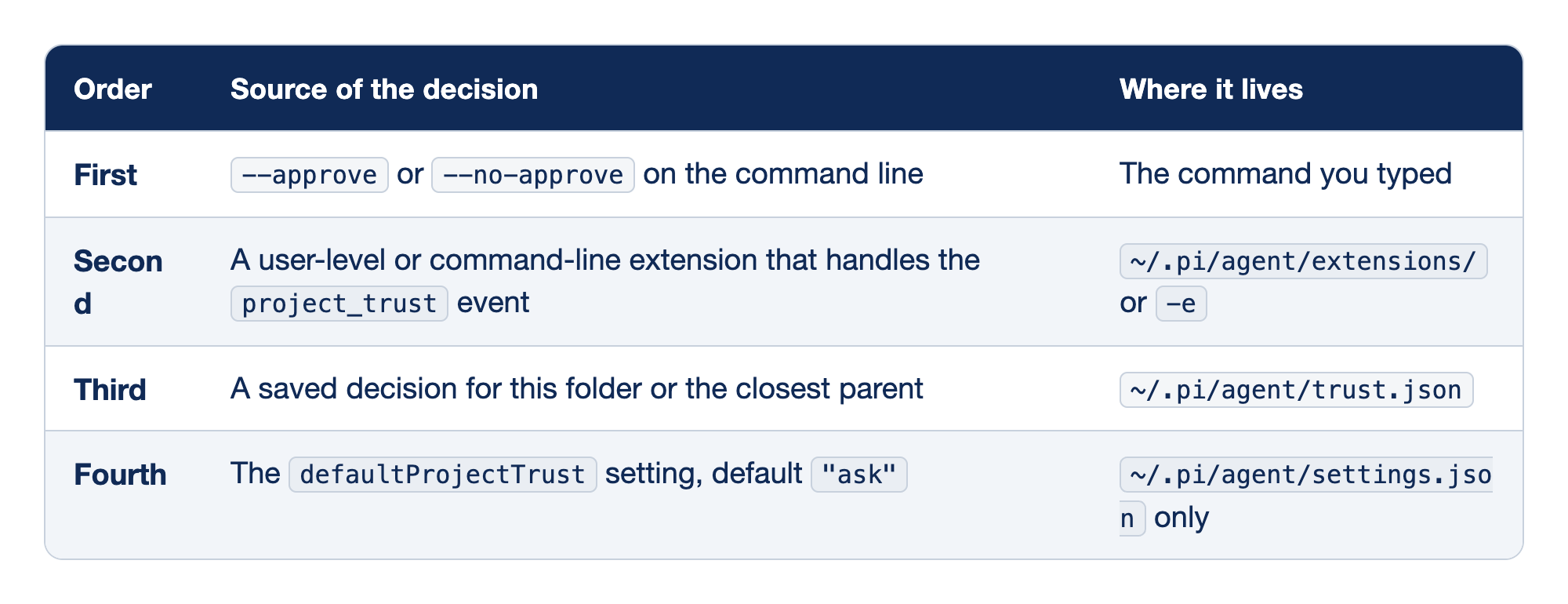
The table reads top to bottom, from the most explicit choice to the broadest fallback, and the first row that answers owns the decision. It follows the security docs; this guide's tests ran only --no-approve, not the other rows or /trust.
- Command-line override.
--approve(-a) trusts project-local configuration and resources for this process;--no-approve(-na) ignores them. Neither is saved. - An extension. User-level and command-line extensions can handle the
project_trustevent, and the first one that returns yes or no owns the decision. - A saved decision. Pi looks for a decision saved for the current directory or one of its parents, and the closest one applies.
- The default. If nothing else applies, Pi follows
defaultProjectTrust:"ask"shows the prompt,"always"trusts, and"never"declines. The setting works only in the agent-directory settings file, so a project cannot set its own default.
Run /trust inside Pi to save a decision for future Pi processes without waiting for the prompt. Do not run it in Ticket Triage today. A saved decision there stays in ~/.pi/agent/trust.json.
/trust
Non-interactive runs change the picture. Print, JSON, and RPC modes cannot show the trust prompt. With no override, extension, or saved decision, "always" loads the protected resources and "ask" or "never" skips them. Ticket Triage has nothing to skip yet, but after Part 8 it will, so build the habit now: any scripted run names its decision.
pi --no-session --no-approve -p "List the files in src and what each one does."
The run skips trust-gated project resources for this process and still loads CLAUDE.md, because context files never needed trust. In this guide's test run it listed src/classify.js and its three checks, and it saved no session.
If you already use Claude Code: the trust prompt is not a permission mode. Claude Code's trust dialog leads into a session where permission modes still decide what needs approval. Pi has no built-in second layer. Out of the box, nothing asks again before bash, edit, or write; the tools run with the permissions of your user account. Trust decides what loads at startup. Part 10 builds the boundary that decides what a tool call can reach.
Credentials belong to you, not to the folder
Credentials belong to your user account on this machine, not to the folder. Pi's quickstart describes the two common paths: sign in with a subscription, or store an API key. Part 1 saved an API key with pi auth login, and its Going deeper section covers /login, the model picker, and the order in which Pi looks for a credential. auth.json holds API keys and OAuth tokens. Keep it private, never commit it, and never create one inside a container.
A first interactive prompt that reads
The first task in a repository is orientation, and you want it to change nothing. Start Pi with pi --no-session. A plain pi would save a new session, and tomorrow's pi --continue would open it instead of crushed-mug. Pi's quickstart suggests the prompt you need.
Explain how this repository is structured and how to run its checks.
Pi shows each file read and command run as it works. A good answer names the one check, npm test, and the four files: package.json, src/classify.js, test/classify.test.js, and CLAUDE.md. If the answer mentions the three categories or a rule you wrote in CLAUDE.md without reading that file in the transcript, the context file reached the model through the system prompt, which is what the header promised. In this guide's test run, in a session started with pi --no-session, the model also ran npm test on its own and reported three passing tests, because CLAUDE.md asks for exactly that.
Only your wording kept this run read-only, and the test shows that the model runs commands when it decides to. Pi does not ask before a tool call, and nothing stops the model from deciding to "fix" what it finds. For a first look at a repository you do not know, limit the tools with --tools read,grep,find,ls, as Part 1 did. The list covers built-in tools only; MCP servers, which Ticket Triage does not have, follow their own exposure settings.
Then look at the footer again. The context number has climbed by the size of every file the model read: the conversation, growing for the first time.
Where session files live
The name shows up in the session picker, so tomorrow's pi --resume finds crushed-mug instead of a guessed title. Run /name with no argument to see the current name. To name a new session at launch instead, pass --name or -n. Use a new name, because crushed-mug already exists. If you only want to see the name in the footer, quit before you send a prompt, so Pi saves nothing. This command was not run for this guide.
pi -n scratch-check
Write down the token number that /session showed; Part 7 compares it before and after a /compact.
The file path in the /session output follows a fixed pattern. Sessions live under ~/.pi/agent/sessions/, in a folder named after the working directory: Pi drops the leading /, replaces each remaining / with -, and wraps the result in double dashes. From a second terminal, list them.
ls ~/.pi/agent/sessions/
ls ~/.pi/agent/sessions/--Users-you-code-ticket-triage--/
The first listing shows one folder per working directory you have used. The second shows Ticket Triage's sessions, each named <timestamp>_<session-id>.jsonl. In this guide's test run it held two files: the print-mode run from Part 1 Start here and crushed-mug. If you also ran Part 1's Do this today, you see a third. The side question from Start here added none. If you made the mistake from the wrong-folder story above, you also see a --Users-you-- folder holding the session that never found its way into Ticket Triage.
On Linux and WSL: your home folder is /home/you, so Ticket Triage's sessions sit in --home-you-code-ticket-triage--. The rule is the same; only the path differs.
If you already use Claude Code: /rename is /name in Pi, and ~/.claude/projects/ is ~/.pi/agent/sessions/. The habit carries over unchanged: name every session you might come back to.
Print mode, saved or not
One command from the shell checks the install, the login, and the connection at once. Run it from the second terminal, inside Ticket Triage. The --no-session flag keeps the check out of your session picker; you cannot resume an ephemeral session, and a path check is not worth resuming.
The CLI docs describe --no-session as "Don't save session (ephemeral)". They do not say that a plain pi -p run is saved. This guide's tests found that it is: each print-mode run without --no-session wrote a session file, and pi --continue then opened that run instead of the named session. Use --no-session for every side question, and leave it off only when you want to continue the print-mode conversation, as Part 6 does on purpose.
Each failure points at its own fix.
command not found: pimeans the install is not on yourPATH. Go back to "Which Pi am I running" in Part 1.- An authentication error means the credential is missing or stale. Run
pi auth check --provider anthropic, then/loginagain in an interactive session, orpi auth login anthropic --api-keyfrom the shell. - An answer that names your home folder means the second terminal is in the wrong place. Run
cd ~/code/ticket-triageand try again.
Coming back tomorrow
Every way back into a session runs it in a specific folder, and the entry point decides which one.
cd ~/code/ticket-triage
pi --continue
pi --resume
--continue (-c) opens the most recent session for the current directory, which is why the cd comes first. --resume (-r) opens the session picker; press Tab in it to include sessions from other directories. Inside Pi, /resume opens the same picker and /new starts a fresh session. The picker also searches, renames, and deletes sessions. Tab, /resume, and /new were not run for this guide.
In this guide's test run, the picker listed crushed-mug and the Part 1 print-mode run, newest first, with a message count and an age for each. Typing crushed filtered the list, but it kept the Part 1 run too. The filter also matches a session's first message, and that prompt mentions the crushed mug. Ctrl+N shows only named sessions. Enter opened crushed-mug.
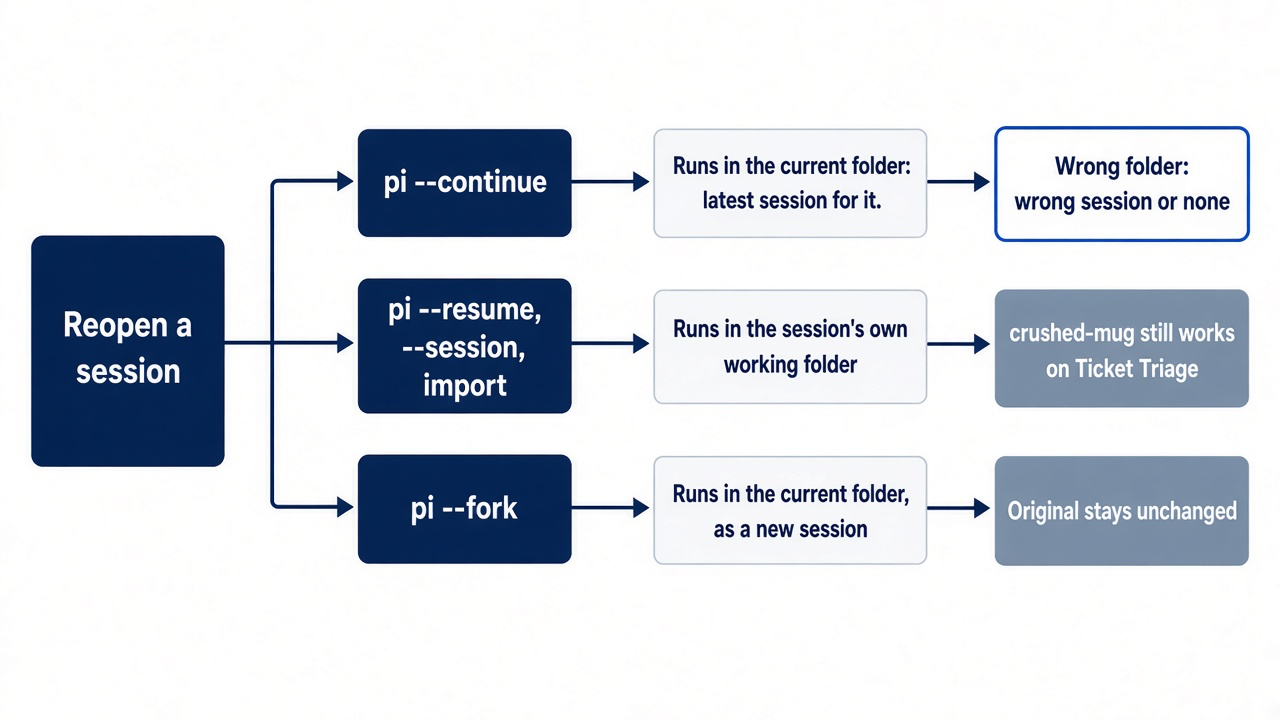
Each entry point picks a working directory by its own rule.
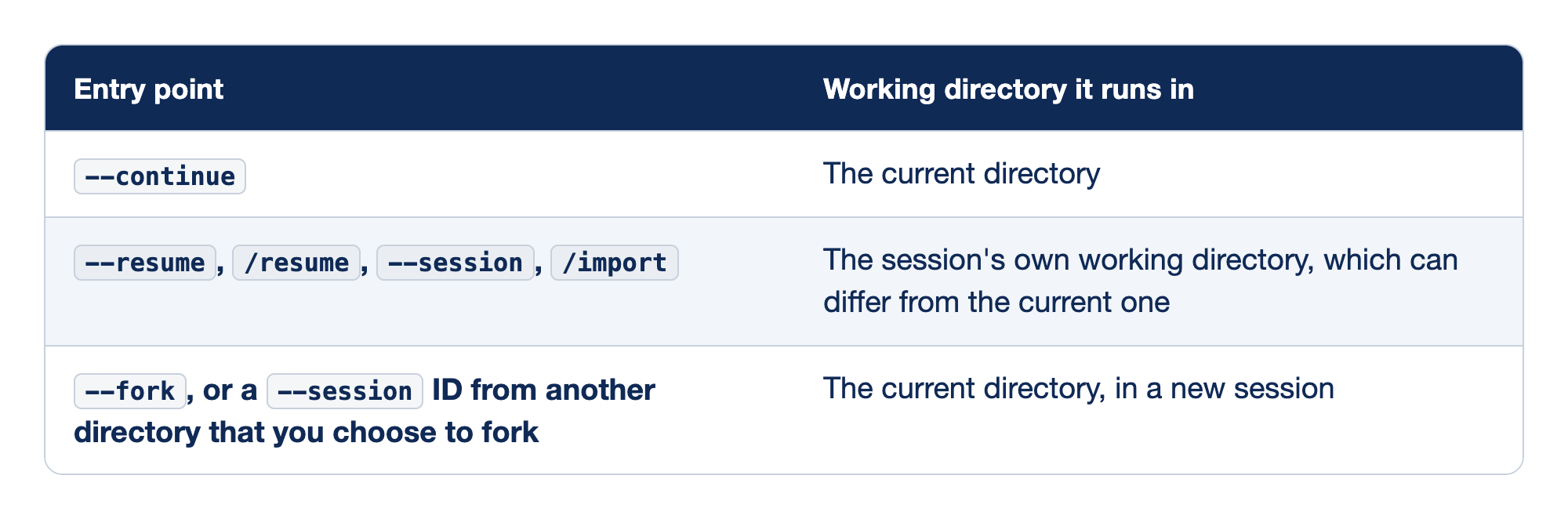
The table answers the question you have when you reopen a session from the wrong terminal: where will this session's tools and @ paths point?
--continue. It looks up the latest session for the folder you are in and runs there. From the wrong folder, it finds the wrong session or none.--resumeand its relatives. A session you pick, open by path or ID with--session, or bring in with/importruns in the folder where it was created. Resumingcrushed-mugfrom your home folder still works on Ticket Triage.--fork. A fork copies the session into the current directory as a new session, leaving the original unchanged. Part 5 explains when you want that and how it differs from/forkand/cloneinside a session.
Gotcha: rename or move a project folder and its sessions lose their home. When a session's working directory no longer exists, interactive mode asks whether to Continue in the current directory (asked again every time), Fork into a new session in the current directory, or Cancel. Print and JSON runs exit with an error instead. This prompt was not run for this guide.
Do this today
Everyone
-
Read the header without saving a session. Change into the repository, confirm the tree is still clean from Part 1, and start Pi.
--no-sessionworks for an interactive start too. Git should report a clean working tree. Confirm the folder in the footer and find yourCLAUDE.mdin the resource listing, under[Context]. Type/quitto leave.cd ~/code/ticket-triage git status pi --no-session -
Run the path check. The answer names
ticket-triageand the test command.pi --no-session -p "In one sentence, name this folder and the test command in package.json." -
Come back to your work session and read its numbers. If Pi is still open, run
/quit, then reopen the named session and confirm it is the one you left. The footer ends with• crushed-mug. Run these in Pi's editor, one at a time:/sessionshows one user message and one assistant message from Start here, and/quitleaves.pi --continue/session -
Check the tree. The command prints nothing.
git status --short
If you read Going deeper
-
Predict the trust prompt before it appears. Look for protected resources in your own repository; if this prints nothing, and no parent folder holds
.agents/skills, Pi will not ask.ls -a .pi .agents 2>/dev/null -
Find your session files. The listing shows one
.jsonlfile per saved session, and no file for the--no-sessioncheck.ls ~/.pi/agent/sessions/*ticket-triage*/ -
Open the picker and filter it to named sessions. Run
pi --resume, pressCtrl+N, and pressEnteroncrushed-mug. The footer ends with• crushed-mug. Type/quitto leave.
The folder is the first decision
The developer in the opening did not have a bad model or a broken install. They had a terminal that opened in the home directory, and an agent that faithfully did its job against the wrong folder: the wrong rules, the wrong paths, and a session filed where pi --continue would never look.
The fix is a handful of small habits. Change into the project before you type pi. Read the header for your context files and the footer for your folder. Name the session and send one prompt so it saves. Ask side questions with --no-session. Remember that trust decides what loads, not what the agent may do.
Pi will never tell you that you started in the wrong place, so the footer has to.
This is Part 2 of "Pi, Day to Day," a 12-part guide to using the Pi terminal agent with the same daily discipline you already bring to Claude Code.