
The Overnight Agent Run Looked Like a Success. None of It Came From `/goal`.
An unattended OpenCode run leaves no transcript to watch, so you build the evidence before you leave: permission rules that refuse with nobody present, one worktree per run, JSON events you can search for the test command, and a CI job whose checks the agent cannot skip.
How to run OpenCode headless and still trust the result: JSON events you can search, rules that refuse with nobody present, one worktree per run, and a CI job the agent cannot skip
You want to start two fixes at six in the evening and trust the results at nine in the morning, but the script you would have written leans on a loop that never ran and approvals that nobody gave.
In this article: Day 16 of a 17-day guide. Start here puts one deny in
opencode.jsonc, starts a one-keyword Ticket Triage fix with--autoin its own git worktree, and the next morning proves from the run's JSON events that the new test failed before the fix and passed after it, then merges the work by hand. Going deeper covers the scripted run that looked like a success for the wrong reasons, whatopencode runrecords and where the evidence sits, what your permission rules do when nobody can say yes, the worktree test record, a two-run night without--auto, and a GitHub Actions review job that gates on the test suite and proves the review changed nothing.
Part 15 showed that a session lives on a server, not in your terminal, so the work keeps going when you walk away. Today you start a fix in the evening, walk away for real, and check it the next morning.
Start here
By the end of today you can start a one-keyword Ticket Triage fix that runs with nobody watching, in its own copy of the repository, and the next morning prove from the run's own records that the new test failed before the fix and passed after it, then merge the work yourself.
Starting fresh or fell behind? Run git switch -C main opencode/day-15. This replaces your main with the end of Day 15; to keep your own work, run git branch my-backup first.
What changes when nobody is watching
You met opencode run in Part 1: it sends one prompt, lets the agent work, and prints the reply without opening the TUI. An unattended run is the same command, started before you leave. Three things change when nobody is at the keyboard.
- Nobody can answer an
ask. Part 4 gave Ticket Triage rules thatallow,ask, ordenyeach action. In a script, anaskhas nobody to answer it. The flag--autosettles that: it approves every permission that is not explicitly denied. With--auto, everyaskbecomes a yes, and only adenystill stops the agent. - Nobody reads the transcript. In the morning you need a record of what ran, not the model's last paragraph.
- Nobody catches a bad edit as it happens. The agent's changes should land somewhere other than the checkout you work in.
The recommended setup answers each one. Put every deny you rely on in opencode.jsonc first, then run with --auto. Save the run as a list of events you can search. Give the run its own worktree.
Step 1: put the denies in config first
Ticket Triage already denies most of what an unattended fix should never do. Part 4 denied git push and every .env file, and Part 14's guard plugin denies edits to package.json, opencode.jsonc, and anything under .opencode/. One gap is left. The global config file, ~/.config/opencode/opencode.jsonc, sits outside the project, and an edit there could switch the guard off. Ticket Triage only asks before an action reaches outside the project, and --auto would approve that ask.
Close the gap with one deny. The guard stops the agent from editing opencode.jsonc, so you make this edit yourself. Add this line at the end of the permissions list, after the two .env rules:
{ "action": "edit", "resource": "~/.config/opencode/*", "effect": "deny" },
Check that OpenCode reads the rule, then commit it. The worktree in step 2 starts from your last commit, so a rule you have not committed would not reach the run.
cd ~/code/ticket-triage
opencode debug agents | grep -A1 'config/opencode'
git add opencode.jsonc
git commit -m "Deny agent edits to the global OpenCode config"
git status --short
opencode debug agents prints every agent's rules, and the grep keeps the new one. OpenCode expands ~ to your home directory, and the pair of lines repeats once per agent:
        "resource": "/Users/you/.config/opencode/*",
        "effect": "deny"
git status --short prints nothing.
Step 2: start the run in its own worktree
A git worktree is a second working directory that shares your repository's history. The run edits files there, so your own checkout stays exactly as you left it, and the work reaches main only when you merge it.
Start the fix at the end of the day. The ticket is "The plate arrived smashed," which should go to shipping and lands in other today. The model is google/gemini-4-hydrogen (tested on OpenCode 2.3.0 on November 16, 2026).
mkdir -p ~/triage-runs
opencode run --worktree=smashed --standalone --auto -m google/gemini-4-hydrogen --format json --archived "Tests first. Add one test to test/classify.test.js: 'The plate arrived smashed' expects shipping. Run npm test and confirm the new test fails. Then add 'smashed' to the damage check in src/classify.js. Do not change or remove any existing test. Run npm test again. You are done when that run reports 0 failures." > ~/triage-runs/smashed.jsonl 2> ~/triage-runs/smashed.log
Each flag has one job.
--worktree=smashedstarts the session in a new worktree namedsmashed. Write the name after=. With a space instead, OpenCode makes up a name and sendssmashedto the model as the first word of your prompt.--standaloneruns a private server for this one command. Like the shared server, it reads the key you saved in Part 1. The server exits when the run ends.--autoapproves everyask. The denies from step 1 still hold.-m google/gemini-4-hydrogenpicks the model for this run, as in Part 1.--format jsonprints the run as JSON events, one per line, instead of text. Each event records one thing the run did, such as a model step or a tool call.--archivedcreates the session already archived, so a night of scripted runs does not bury the sessions you opened by hand.opencode session liststill shows it.
The > saves the events, and 2> saves the short messages OpenCode prints for you, such as the worktree's path. Both files live outside the repository, so they never show up in git status. The prompt carries its own done condition, and it asks for the test first and a failing run before the fix, so the records can prove the order. My test run of this exact command finished in under a minute.
Step 3: the next morning, read the records
Find the worktree first.
cat ~/triage-runs/smashed.log
git worktree list
The log holds one line, the worktree's path. git worktree list shows your checkout on main and the new worktree on no branch, which Git calls detached HEAD:
worktree /Users/you/.local/share/opencode/worktree/4e7a1c/smashed
/Users/you/code/ticket-triage                              5f914ca [main]
/Users/you/.local/share/opencode/worktree/4e7a1c/smashed   5f914ca (detached HEAD)
The hash and the six-character folder will differ on your machine. Copy the path from your own log.
Now read the events. jq is a command-line tool that filters JSON. It ships with recent macOS; on Linux, install it with your package manager. A tool_use event is written once for each tool call, when the call ends, and it records the tool's name and what the tool printed.
cd ~/triage-runs
jq -r 'select(.type=="tool_use") | .part.tool + ": " + .part.state.status' smashed.jsonl
jq -r 'select(.type=="tool_use" and .part.tool=="shell") | .part.state.output' smashed.jsonl | grep '^# fail'
The first command lists every tool call and how it ended. In my test it printed six lines:
read: completed
read: completed
edit: completed
shell: completed
edit: completed
shell: completed
The second command prints the failure count from each npm test the agent ran:
# fail 1
# fail 0
These lines are TAP, the plain-text test format from Part 1. Node's test runner prints TAP when its output is captured instead of shown in a terminal, and the agent's shell tool captures it. # fail 1 comes from the run before the fix, so the new test failed against the old code. # fail 0 comes from the run after it, so the fix made the test pass. Your model may read and edit in a different order; the check is the two counts.
If the second command prints nothing, look at the first. No shell line means the run never ran npm test, whatever its reply says. A shell line with no # fail count means your test runner does not print TAP; run the second command without | grep '^# fail' and read your runner's own failure count.
Step 4: check the work, then merge it yourself
Go into the worktree, with the path from your log, and check the work with your own commands.
cd /Users/you/.local/share/opencode/worktree/4e7a1c/smashed
git diff --stat
git diff test/ | grep '^-[^-]'
npm test; echo "exit $?"
git diff --stat lists src/classify.js and test/classify.test.js and nothing else. The grep prints nothing, because it shows removed lines in test/, and the prompt allowed a new test but no changed one. The last line is exit 0, from a suite you ran yourself.
The new test in the worktree is one line like this one, which is the version on the opencode/day-16 tag; your agent may name it differently.
test("smashed plate", () => assert.equal(classify("The plate arrived smashed"), "shipping"))
The worktree passed, so give it a branch and two commits, the test first.
git switch -c fix-smashed
git add test/classify.test.js
git commit -m "Add failing test: a smashed item goes to shipping"
git add src/classify.js
git commit -m "Route smashed items to shipping"
The # fail 1 event is your record that the test failed before the fix, and the two commits keep that order in the history. The branch is visible from your checkout at once, because a worktree shares the repository. Merge it there, run the suite, and remove the worktree.
cd ~/code/ticket-triage
git merge fix-smashed
npm test; echo "exit $?"
git worktree remove /Users/you/.local/share/opencode/worktree/4e7a1c/smashed
git worktree list
git log --oneline -2
Today's win is three results. npm test ends in exit 0, git worktree list shows your checkout alone, and git log --oneline -2 shows Route smashed items to shipping above Add failing test: a smashed item goes to shipping.
One limit stays with this setup. --auto approved every ask, so the run could have run any shell command that no deny names. The worktree kept the edits out of your checkout, but it does not stop a shell command. Keep unattended jobs this small, and add a deny before you trust a run with anything bigger.
You can stop here. Going deeper explains why this works and where it breaks.
Going deeper
This section is for readers who want the evidence behind each step: the full opencode run flag list, the event fields, what each rule does with nobody present, the worktree test record, a two-run night without --auto, other ways into worktrees, and a CI review job. It assumes you finished Start here in this part and in Parts 1 to 15.
The script that looked like a success
Two support tickets are stuck in the wrong category, and each fix is one keyword and one test. You would rather start both at six in the evening and read the results at nine in the morning. The obvious move is to take the OpenCode command that keeps working until a condition holds, /goal, and put it in a script.
The author's OpenCode 2.3.0 install tried exactly that on a copy of a small Node.js service called Ticket Triage. This /goal run finished in 9 steps for $0.018 on google/gemini-3.5-flash-lite, a single run. It read the files, ran npm test, edited the classifier and its tests, and ran npm test again, with 8 of 8 tests passing. It looked like a success, and none of it came from /goal. opencode run does not expand slash commands. The session export showed the first user message as the literal text /goal Add ..., and the event stream had no goal state, no rounds, and no stall count. The model read "/goal" as a word in a sentence and finished in one turn because the task was small. If it had stopped at step 3, nothing would have started it again. The command also carried --auto, so every shell command the model chose, short of an explicit deny, would have run without a question.
Nothing went wrong that time, and that is the trap: the only record you would read in the morning was the model's last paragraph. The rest of this article replaces each assumption with something you can check, so an OpenCode headless run leaves evidence instead of a story.
opencode run is one prompt and one reply
The CLI reference describes run in one line: it "sends a message and prints the reply without opening the interactive interface." There is no conversation to steer and no chance to queue a correction. One message goes in, the agent works, and one reply comes out. The command runs in the current directory against the project's opencode.jsonc, AGENTS.md, and plugins, exactly as an interactive session would. What changes is everything around the agent, and a handful of flags control it. The commands page documents each flag below except --worktree, which comes from opencode run --help on 2.3.0.
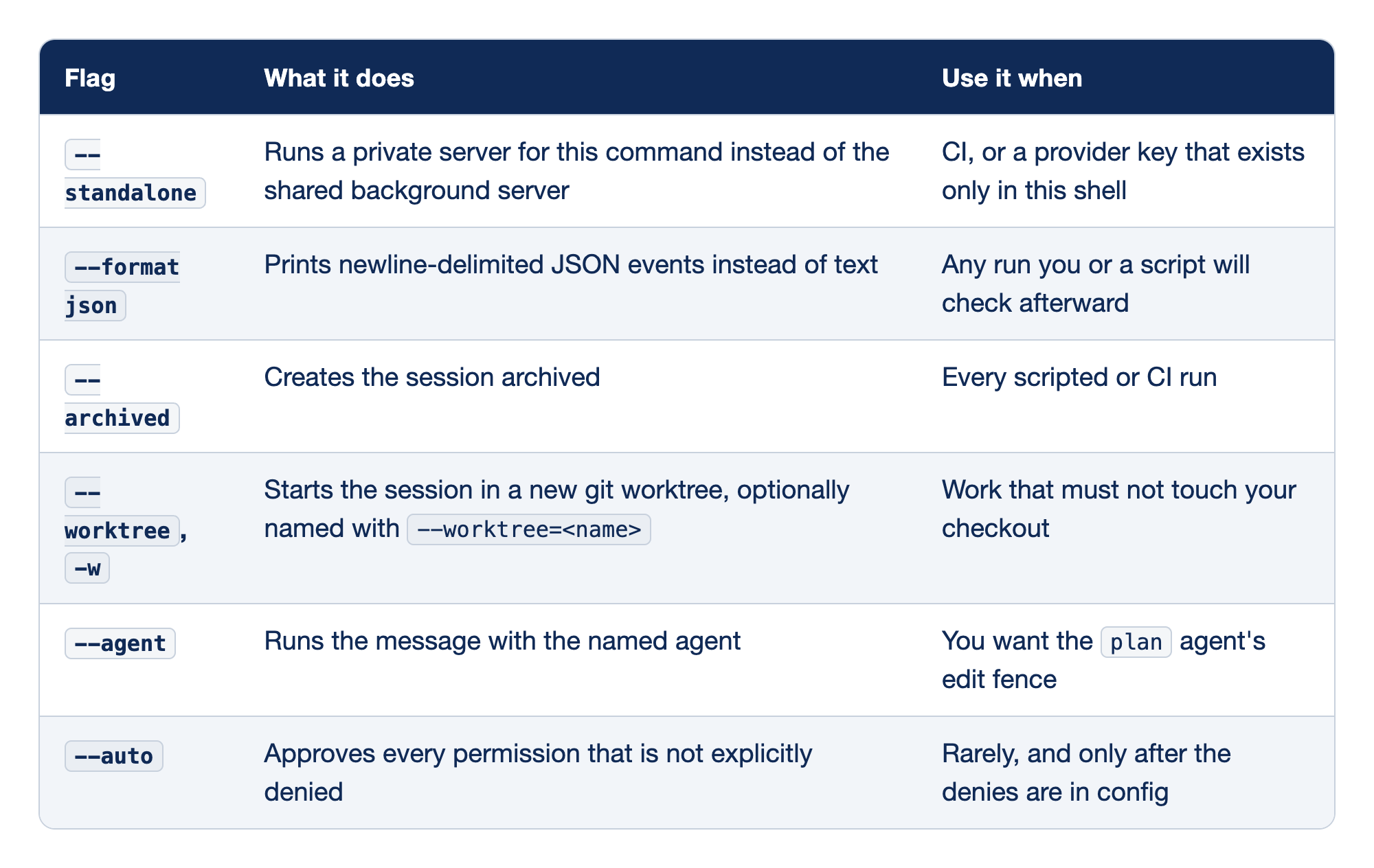
Each row pairs one opencode run flag with its effect on 2.3.0, in "What it does," and the moment you reach for it in an unattended run, in "Use it when."
--standalonestarts a private server from the current shell, which matters in CI and whenever the provider key exists only in that shell.--format jsonturns the run into a stream of JSON events, the flag that makes an unattended run checkable afterward.--archivedkeeps the session out of the inbox while it still exists and stays openable by ID, so a night of scripted runs does not bury the session you opened by hand.--worktree,-wstarts the session in a fresh git worktree, and only the--worktree=<name>form passes a name, a detail with its own section below.--agentruns the prompt with a named agent and its permissions, so--agent plancannot edit project files in a script either.--autoturns everyaskinto a yes, which is the opposite of what an unattended run needs, so it belongs only after your denies are in config.
Standalone is the server that sees your environment
By default, every OpenCode client, run included, "discovers or starts one shared background server for your user account." The shared server was started once, from some shell, and it holds the environment that shell had. A key you export now is invisible to a server that started an hour ago.
--standalone runs a private server for this command, started from this shell, so it sees what this shell sees.
export ANTHROPIC_API_KEY=sk-ant-...
cd ~/code/ticket-triage
opencode run --standalone --format json --archived "Run npm test and tell me how many tests passed."
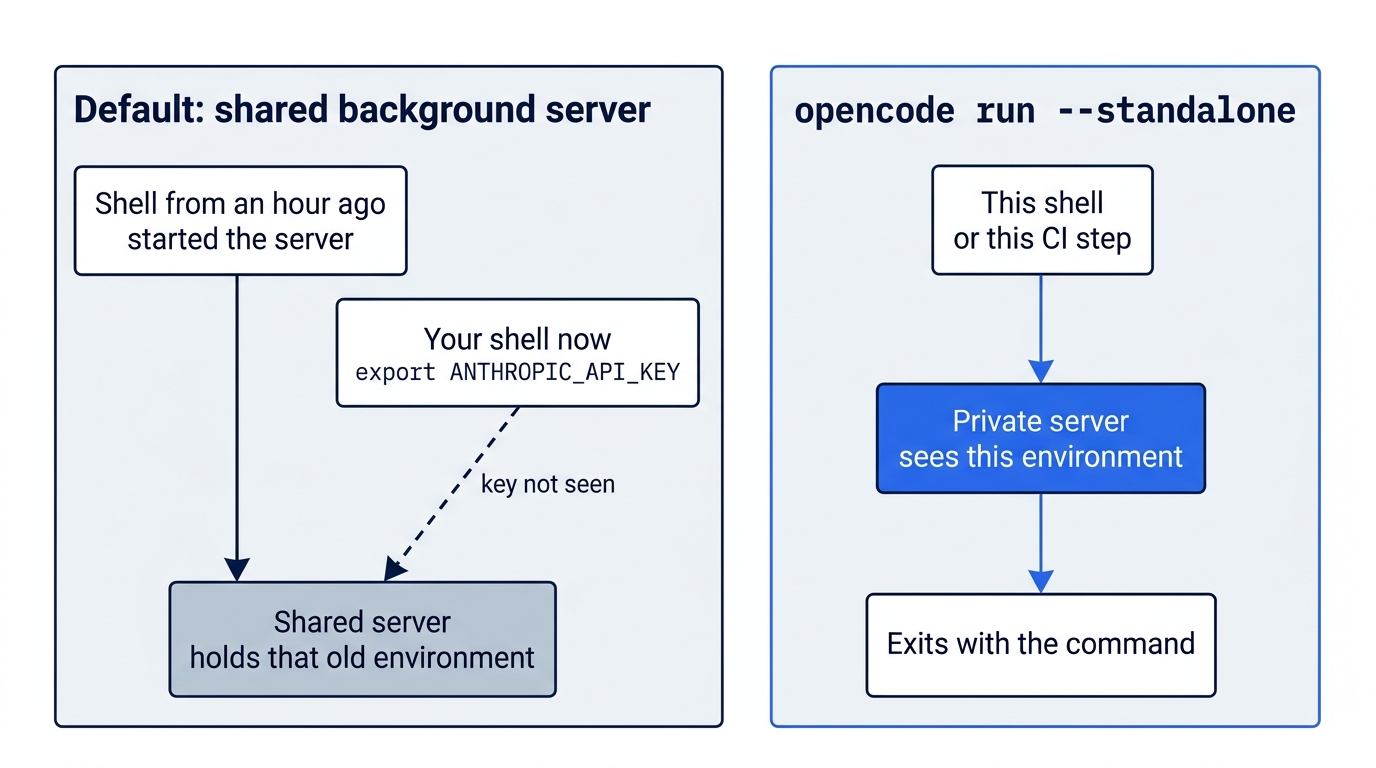
The private server exits with the command. In CI there is no shared server, and the only credential is the secret that the job passes in, which is why the CLI reference says: "In CI, pass a provider API key as a secret and use standalone mode so the private server receives it."
Gotcha: a private server that lives for one command can exit before slow work finishes. On the author's 2.3.0 install, opencode run --standalone -m ollama/llama3.2:latest failed with "Model unavailable," because Ollama discovery runs in the background and the private server exited first. With a long-running opencode serve, the same model appeared within a few seconds. For a local model, point the run at a server that is already up with --server <url>, and set OPENCODE_PASSWORD to the password that server printed when it started, or the server refuses the client.
Read the run as events, not prose
--format json prints one JSON event per line on standard output, and permission notices go to standard error. Save the two streams to different files outside the repository, so the run's records never show up in git status.
mkdir -p ~/triage-runs
cd ~/code/ticket-triage
opencode run --standalone --format json --archived "Run npm test and tell me how many tests passed." > ~/triage-runs/check.jsonl 2> ~/triage-runs/check.log
Every line is one JSON object with the same four top-level keys: type, timestamp, sessionID, and part. The type names the event, and everything specific to it sits under part. The tested run produced four event types, and a fifth appears when the run starts a background subagent.
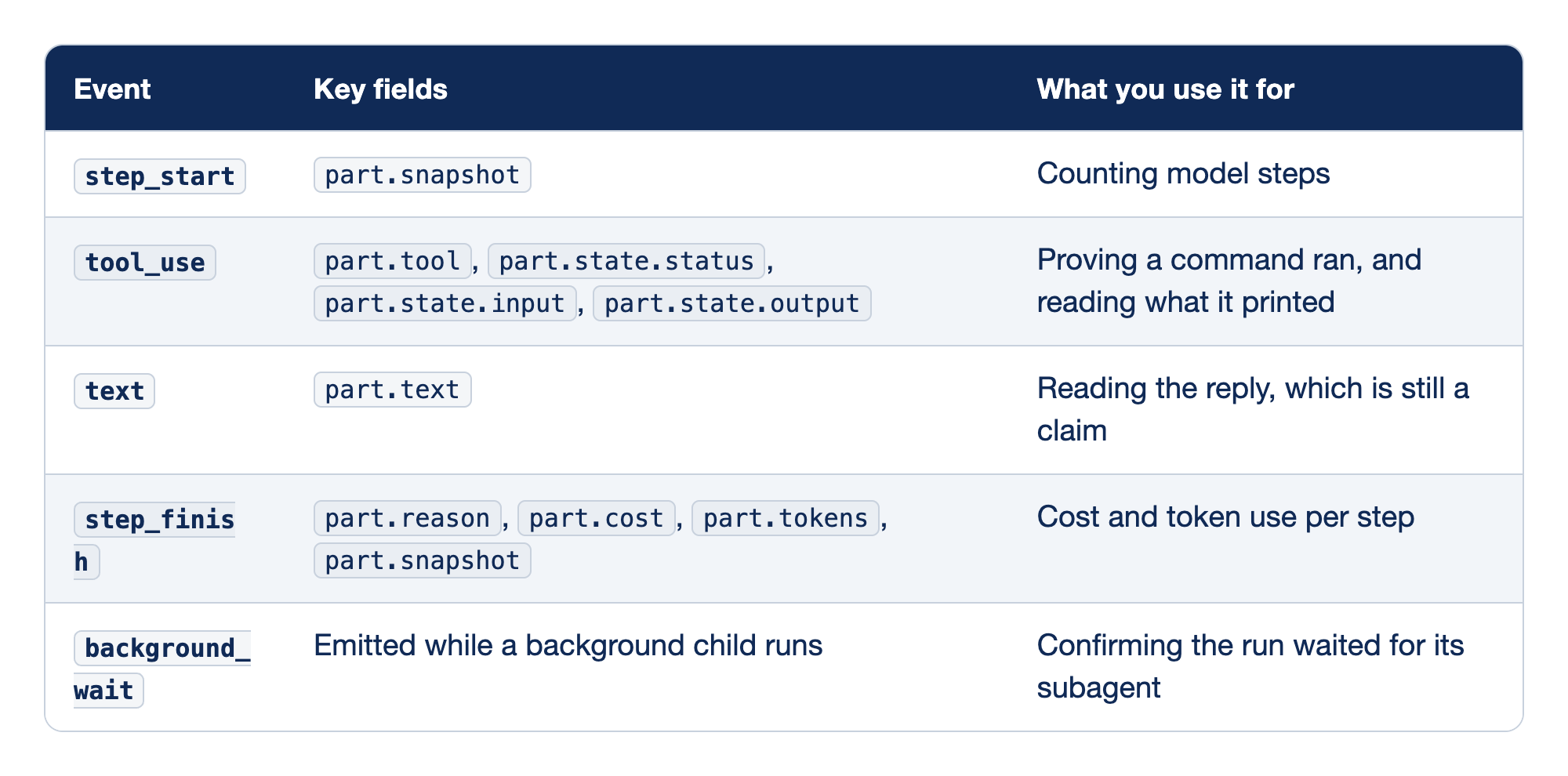
Each event type in the JSON stream answers a different question about the run. The Event column holds the type value, "Key fields" holds the full path to the fields worth reading, and the last column says what each event proves.
step_startmarks one model step and carriespart.snapshot, so the count of these events is your first sign of a run that wandered far beyond the size of its task.tool_useis the evidence:part.toolnames the tool, andpart.stateholds theinputthe model sent, theoutputthat came back, and thestatus, which the tested runs showed ascompleted, orerrorfor a denied call.textis the model's reply, which can say anything and remains a claim until atool_useevent backs it.step_finishis the meter: on the first tested run, which asked "Run npm test and tell me how many tests passed." ongoogle/gemini-3.5-flash, the first step sent 18,247 input tokens and cost $0.0285, and the second read 16,194 tokens from the prompt cache and cost $0.0066. Part 6 shows that the author's personal skills made up about two thirds of that first step. It is a different run from the opening's $0.018/goalrun, and Google's models page no longer listsgemini-3.5-flash. The snapshot is a git hash from OpenCode's own store, which "does not create commits, move branches, or intentionally change your repository's index."background_waitappeared in the tested runs that used a subagent, after the parent ended its turn, and the parent resumed when the child went idle, so a script does not exit before the child reports.
Each tool call produces exactly one tool_use event, written when the call finishes; in one tested run, 8 tool calls gave 8 events. A model can write anything in a text event. It cannot rewrite the output of a tool call it already made.
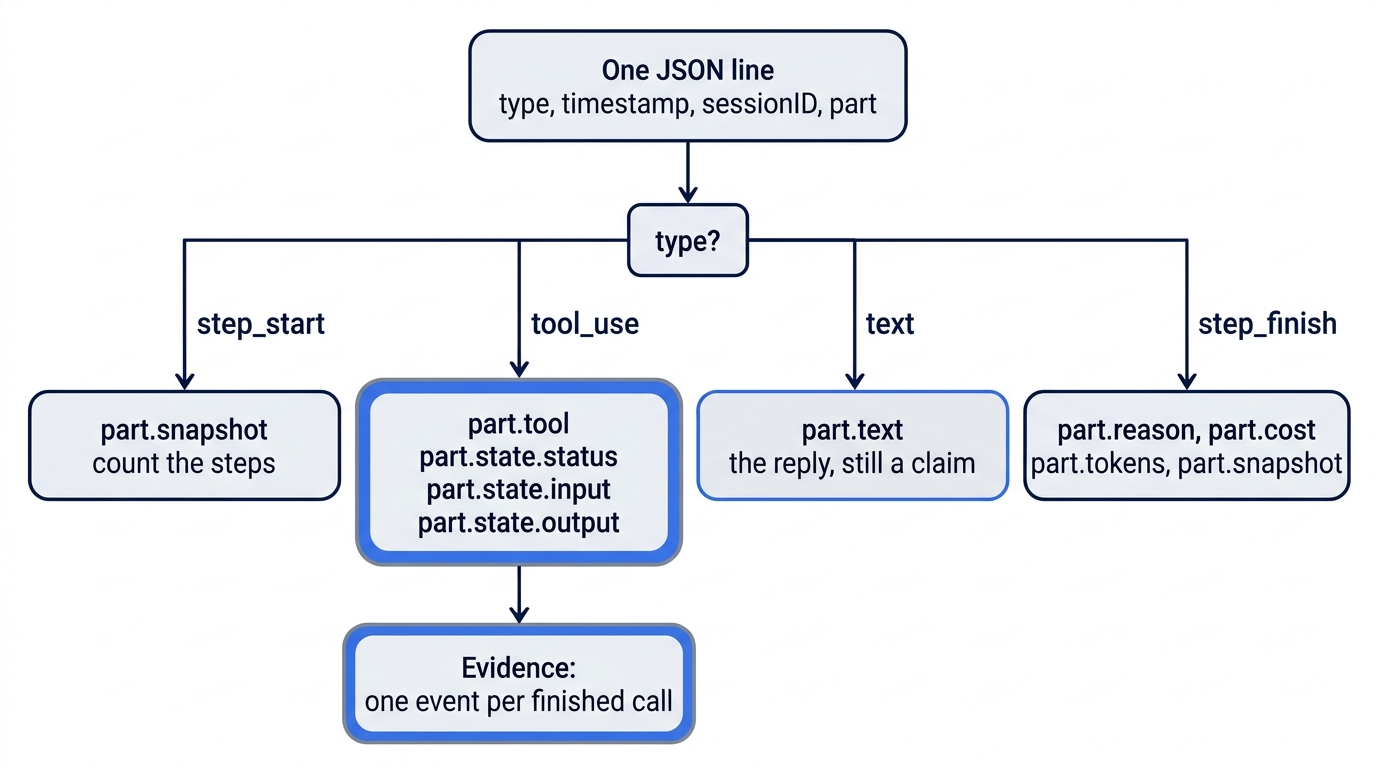
Look at one event on your own release before you write a filter, then list every tool call with how it ended. The second command prints one line per call, such as shell: completed.
head -n 3 ~/triage-runs/check.jsonl | jq .
jq -r 'select(.type=="tool_use") | .part.tool + ": " + .part.state.status' ~/triage-runs/check.jsonl
Now find the proof. These commands keep the tool_use lines that mention npm test, then pull the failure count out of the captured output.
grep tool_use ~/triage-runs/check.jsonl | grep 'npm test' | grep -o '# fail [0-9]*'
grep auto-rejecting ~/triage-runs/check.log
The first command should print # fail 0. On 2.3.0 it prints that line twice, because each tool_use event carries the shell output in two fields; the jq form in Start here prints it once. It says # fail because OpenCode's shell tool captures the output instead of handing Node a terminal, so Node's test runner prints TAP. The second command should print nothing. If the first prints nothing at all, the run never called npm test, whatever its reply says, and that empty result is the most useful output you can learn to read. A project whose test runner does not print TAP also prints nothing here, so list the tool calls with the first jq command to tell the two cases apart.
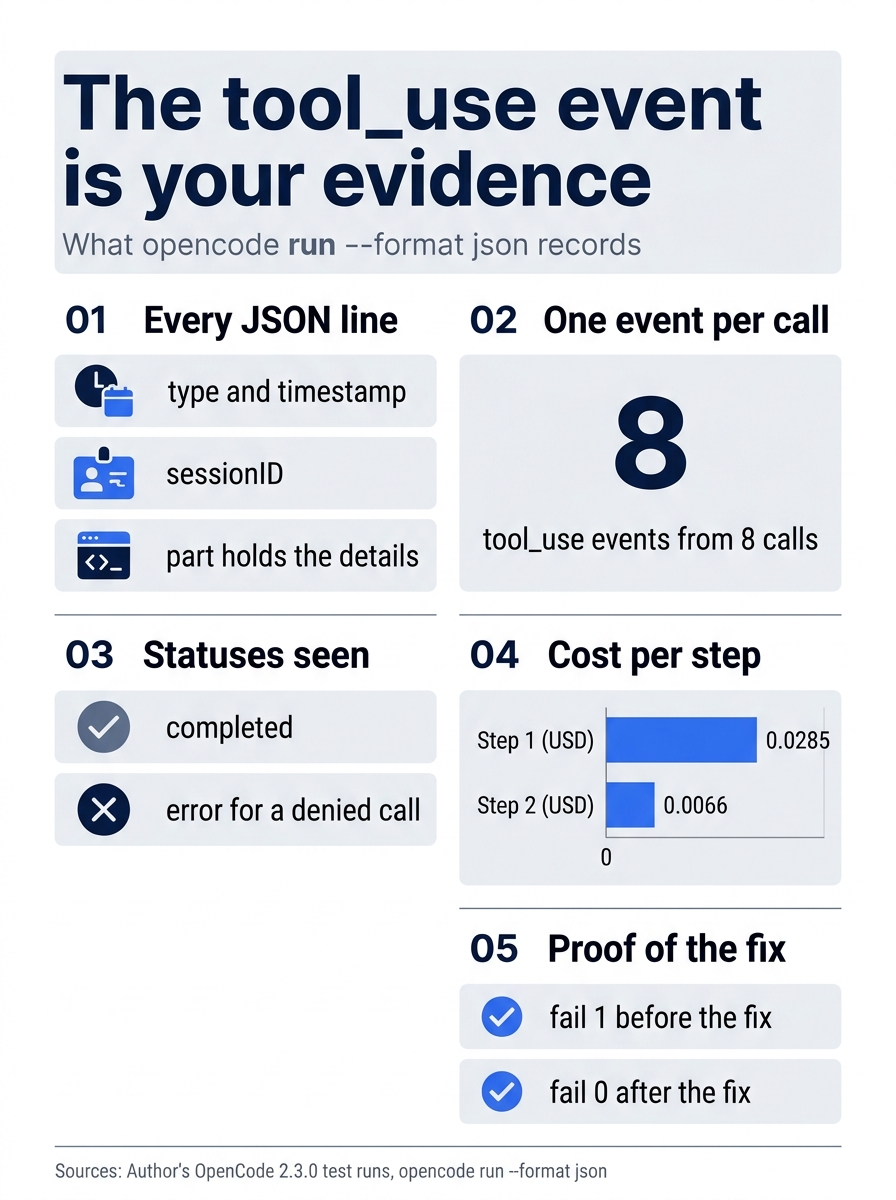
The event stream comes down to one rule: trust the tool_use events. Every line carries four keys, a tested run logged one event per call, two statuses appeared, the cost of two steps was measured, and two failure counts proved a test-first fix.
The commands page does not say what exit status opencode run returns when the model fails at its task, so write scripts that check the evidence, not that exit status.
Nobody is there to say yes
In a non-interactive opencode run, an ask becomes an automatic reject. Standard error records it, and the model gets a tool error with the reason.
! permission requested: shell (ls -la src .); auto-rejecting
The tool error reads: "This non-interactive run cannot ask the user for permission, so the request was rejected. Continue without this action." A deny is different. A git push * deny returned Permission denied: shell in a script, and the permissions page states the general rule: "configured deny rules always remain enforced."
Ticket Triage's rules were written for a person at a keyboard, but they fit this moment. The project allows edits and npm test, asks before any other shell command and before touching anything outside the project, and denies git push, reading .env files, and edits to package.json through a small guard plugin.
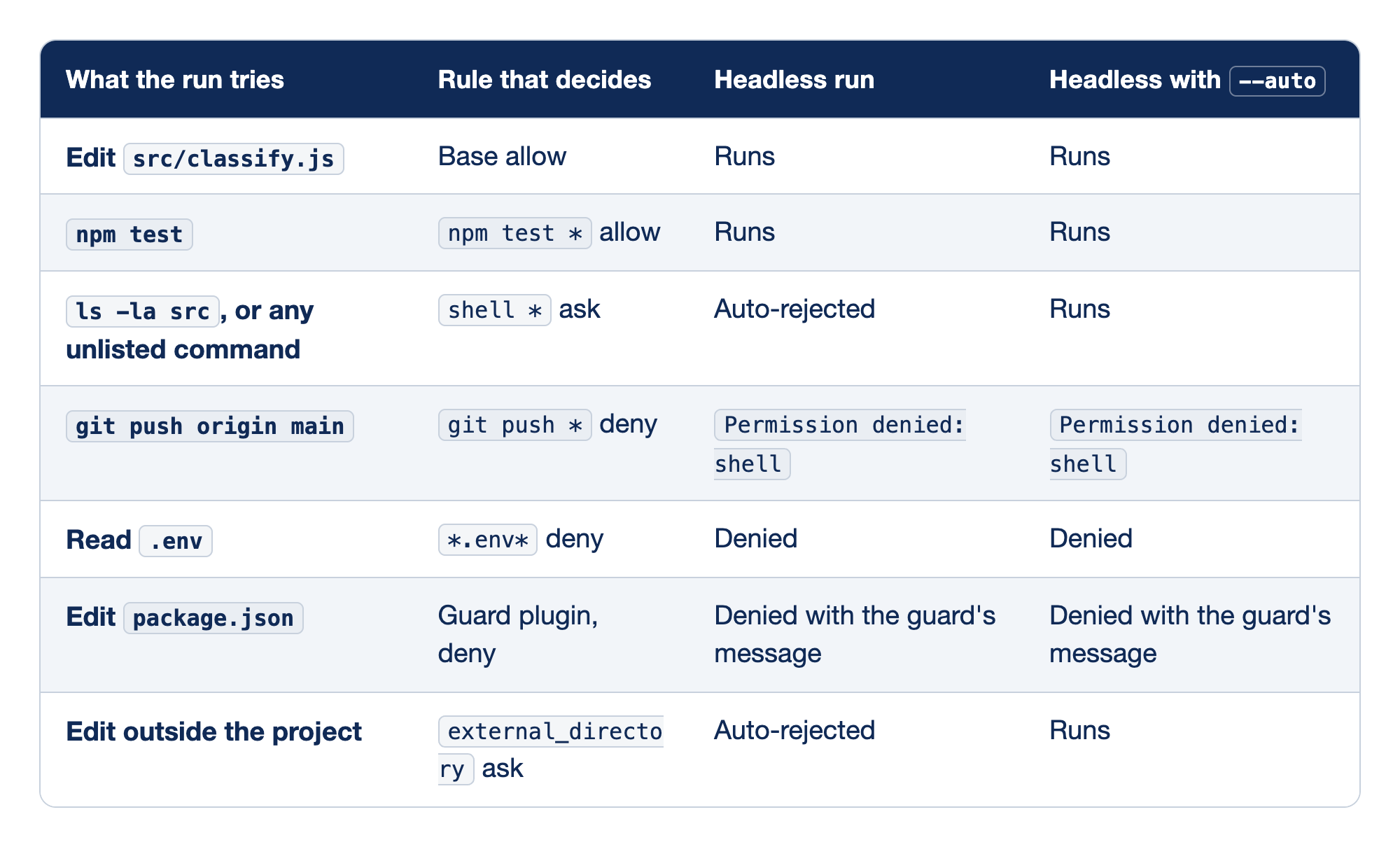
Each row is one action an unattended fix might attempt, matched to the rule that decides it. "What the run tries" names the action, "Rule that decides" names the matching rule, and the last two columns give the result without --auto and with it.
- Edit
src/classify.jsfalls under the base allow policy, so a headless run can make the fix with or without--auto. npm testis allowed by name, so the one check the run must make is never a question.ls -la src, or any unlisted command hits theshell *ask, which a headless run rejects and--autoapproves, along with installs, deletes, and commits.git push origin mainhits a configured deny, so neither mode gets past it.- Read
.envhits a deny on*.env*, which holds in both modes. - Edit
package.jsonis denied by the guard plugin with its own message in both modes; the author's test ran the full guard with--auto, andpackage.jsonstayed at0.1.0. - Edit outside the project hits the
external_directoryask, which a headless run rejects and--autoapproves, including an edit to the global config that could switch the guard off.
The two right-hand columns differ in only two rows, and both are asks. Every deny holds either way.
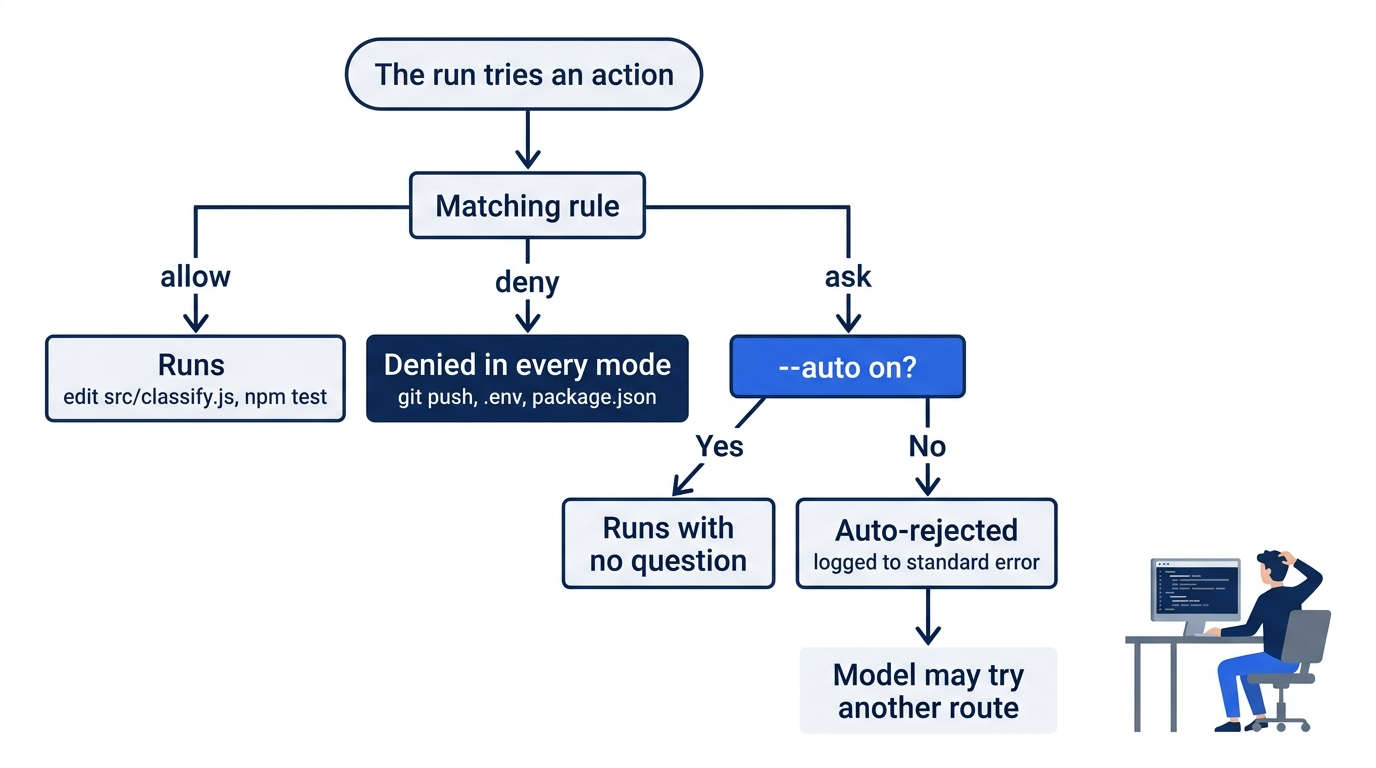
For a plain headless run in your checkout, the conclusion for Ticket Triage is simple: run without --auto. The rules already allow everything a keyword fix needs, and every rejected ask is something you did not want unattended. If a later task truly needs --auto, put the denies you rely on in opencode.jsonc first, including a home-path deny such as { "action": "edit", "resource": "~/.config/opencode/*", "effect": "deny" }, which Start here added. A worktree run is the exception, and Start here used --auto for it: the worktree lives outside your checkout, so its paths may trip the external_directory ask, and the only tested worktree runs used --auto.
A rejection is not the end of the story. "Continue without this action" invites the model to find another route: a denied ls led one tested model to list files with read and glob, and a guarded package.json led another to node -e. Every auto-rejecting line in the log is worth reading next to the diff.
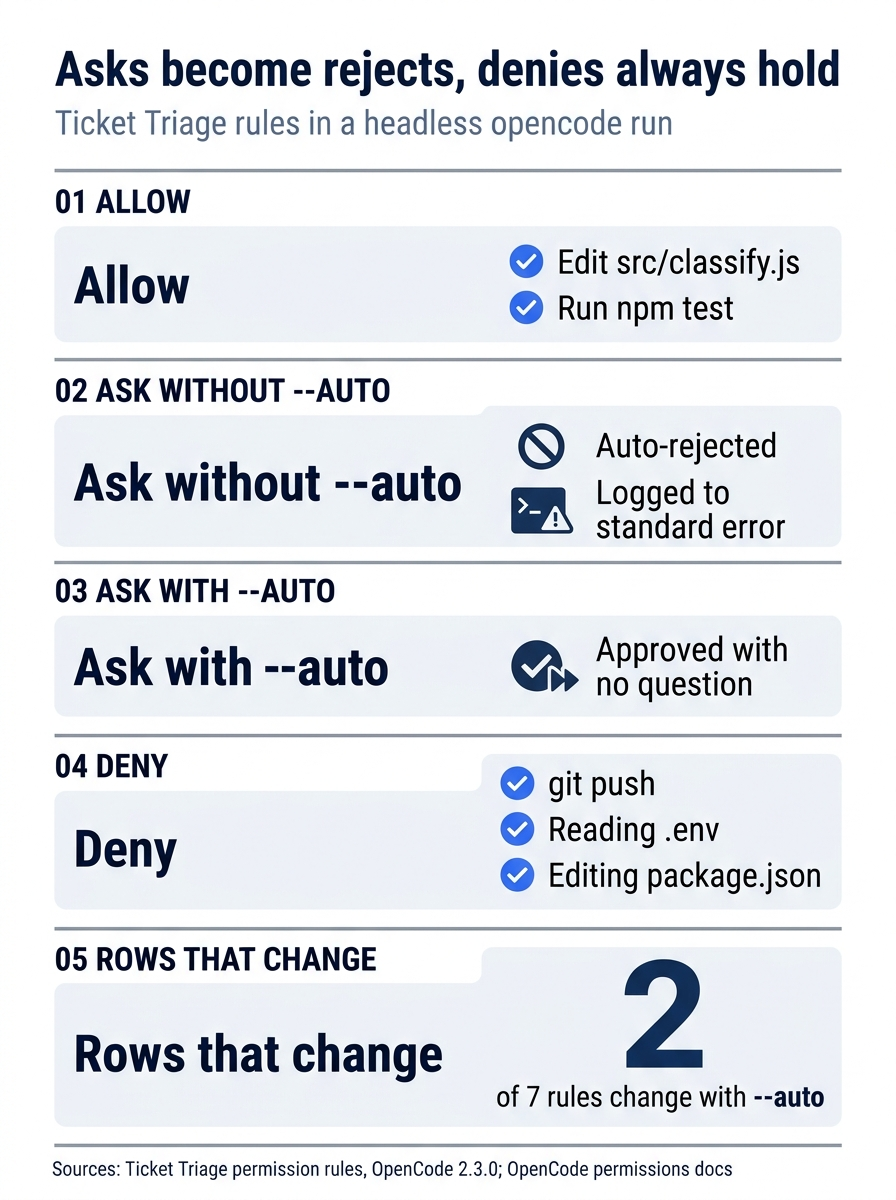
The rules sort into four outcomes. Allows run in both modes, asks are rejected without --auto and approved with it, and denies hold either way, so only 2 of Ticket Triage's 7 rules change behavior when --auto is on.
/goal belongs to the interactive interface
The opening run is the whole test record for /goal in scripts: run sent it to the model as plain text, and no goal machinery started. The 2.3.0 binary does register /goal, with the description "keep working until an objective is met," and it is a command for the interactive interface.
In a script, you do the two jobs /goal would do. Put the done condition in the prompt, in words the model can act on, and check it yourself afterward with a command. For Ticket Triage, the done condition is a failure count of zero in a tool_use event, plus an empty diff of the existing tests. The same binary registers /schedule, but it is in neither the docs nor the author's tests, so "overnight" here means a command you start before you leave.
One worktree per run
An unattended run in your main checkout edits the files you are working on, and two runs in one checkout edit each other's files. The fix is a git worktree: a second working directory that shares the repository's history, so each run gets its own copy of the files and the edits meet only when you merge.
The author's 2.3.0 test used a fresh repository with one commit, 12be88a, and put a space between -w and the name.
opencode run --standalone --auto -w notes-test "Create a file NOTES.md containing exactly one line: worktree test. Then run git status ..."
Standard error printed the new path, worktree <XDG_DATA_HOME>/opencode/worktree/12be88/glowing-eagle, and the run answered five questions you will ask about any worktree run.
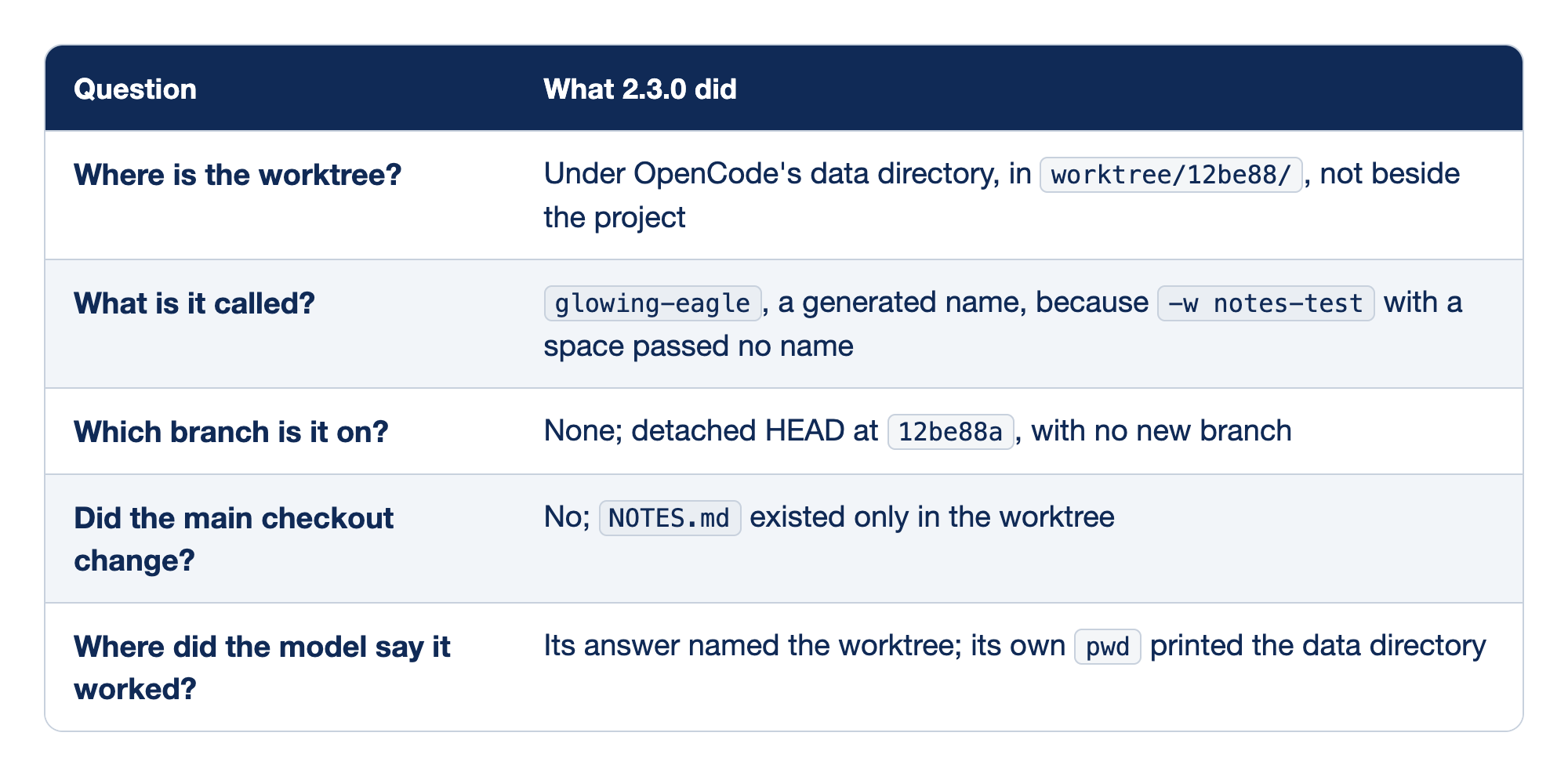
The test answers each practical question about a worktree run with what OpenCode 2.3.0 actually did. The Question column holds what you will ask in the morning, and the second column holds the recorded behavior.
- Where is the worktree? Under OpenCode's data directory, in a folder named for the first six characters of the project ID, which on the test matched the first commit;
opencode debug paths dataprints the data directory on your machine. - What is it called? A generated name,
glowing-eagle, because the flag's value is optional and a word after a space is not the name:notes-testbecame the first word of the prompt. - Which branch is it on? None, since the worktree sits in detached HEAD, so you create a branch inside it with
git switch -cbefore you merge anything. - Did the main checkout change? No, which is the point of the exercise: your own uncommitted work stays where you left it.
- Where did the model say it worked? Its answer and its own
pwddisagreed, so Git's list of worktrees is the record, not the model's report.
A second run with --worktree=notes-two created worktree/12be88/notes-two, also in detached HEAD. The help text writes the flag as --worktree/-w [=name], and the config page says OpenCode "appends the requested or generated worktree name," which holds once the name reaches the flag.
Gotcha: a worktree name needs the = form. --worktree=smashed creates a worktree named smashed. -w smashed with a space creates one with a generated name and sends smashed to the model as the first word of your prompt. The run still works, which is why the mistake is easy to miss.
One more failure is worth knowing: a copy whose .git was not a valid repository failed at once with "Cannot create a worktree from
The TUI has its own way into worktrees, a dialog for moving the current session into one, with keys listed on the keybinds page. The model has worktree_create, worktree_list, and worktree_remove tools, documented on the tools page, and a script that hosts OpenCode in code can create and remove worktrees through the SDK.
Two fixes, two worktrees, one merge
Start here ran one fix with --auto, the tested path. This section runs two fixes at once without --auto, a path that has not been run on 2.3.0, so read it as a design to test, not a recipe. Now the overnight job. "The plate arrived smashed" should go to shipping, and "Please reimburse me for the lamp" should go to refund; both land in other today. Start from a clean main, because a worktree starts from a commit and uncommitted work would not reach it, and make sure the provider key is in this shell.
Each prompt carries its own done condition, because there is no /goal to carry it, and each asks for the test first and a failing run before the fix, so the events can prove the order.
mkdir -p ~/triage-runs

opencode run --worktree=smashed --standalone --format json --archived "Tests first. Add one test to test/classify.test.js: 'The plate arrived smashed' expects shipping. Run npm test and confirm the new test fails. Then add 'smashed' to the damage check in src/classify.js. Do not change or remove any existing test. Run npm test again. You are done when that run reports 0 failures." > ~/triage-runs/smashed.jsonl 2> ~/triage-runs/smashed.log &

opencode run --worktree=reimburse --standalone --format json --archived "Tests first. Add one test to test/classify.test.js: 'Please reimburse me for the lamp' expects refund. Run npm test and confirm the new test fails. Then add 'reimburse' to the refund check in src/classify.js. Do not change or remove any existing test. Run npm test again. You are done when that run reports 0 failures." > ~/triage-runs/reimburse.jsonl 2> ~/triage-runs/reimburse.log &

wait
The trailing & starts each run in the background, and wait returns when both have finished. Neither carries --auto, so your rules decide. Two caveats come from the test record. The author's worktree tests all used --auto and ran one at a time, so this exact combination, two runs at once without --auto under an external_directory ask, has not been run. If your release objects to two private servers at once, drop the & and run the commands in sequence. Read the auto-rejecting lines first in the morning: one that names external_directory or the data directory tells you the worktree path itself tripped an ask.
In the morning, find the worktrees, then read the events.
git worktree list
cd ~/triage-runs
grep tool_use smashed.jsonl | grep 'npm test' | grep -o '# fail [0-9]*'
grep tool_use reimburse.jsonl | grep 'npm test' | grep -o '# fail [0-9]*'
grep auto-rejecting smashed.log reimburse.log
git worktree list should show your checkout on main and two worktrees under the data directory named smashed and reimburse, each in detached HEAD. A run that followed its prompt prints two lines, in order (each one twice on 2.3.0): # fail 1 from the run before the fix and # fail 0 from the run after it. The red line proves the new test failed against the old code; the green line proves the fix made it pass. One # fail 0 with no red line means the test never failed, so it proves nothing. No lines at all means the run never ran the suite.
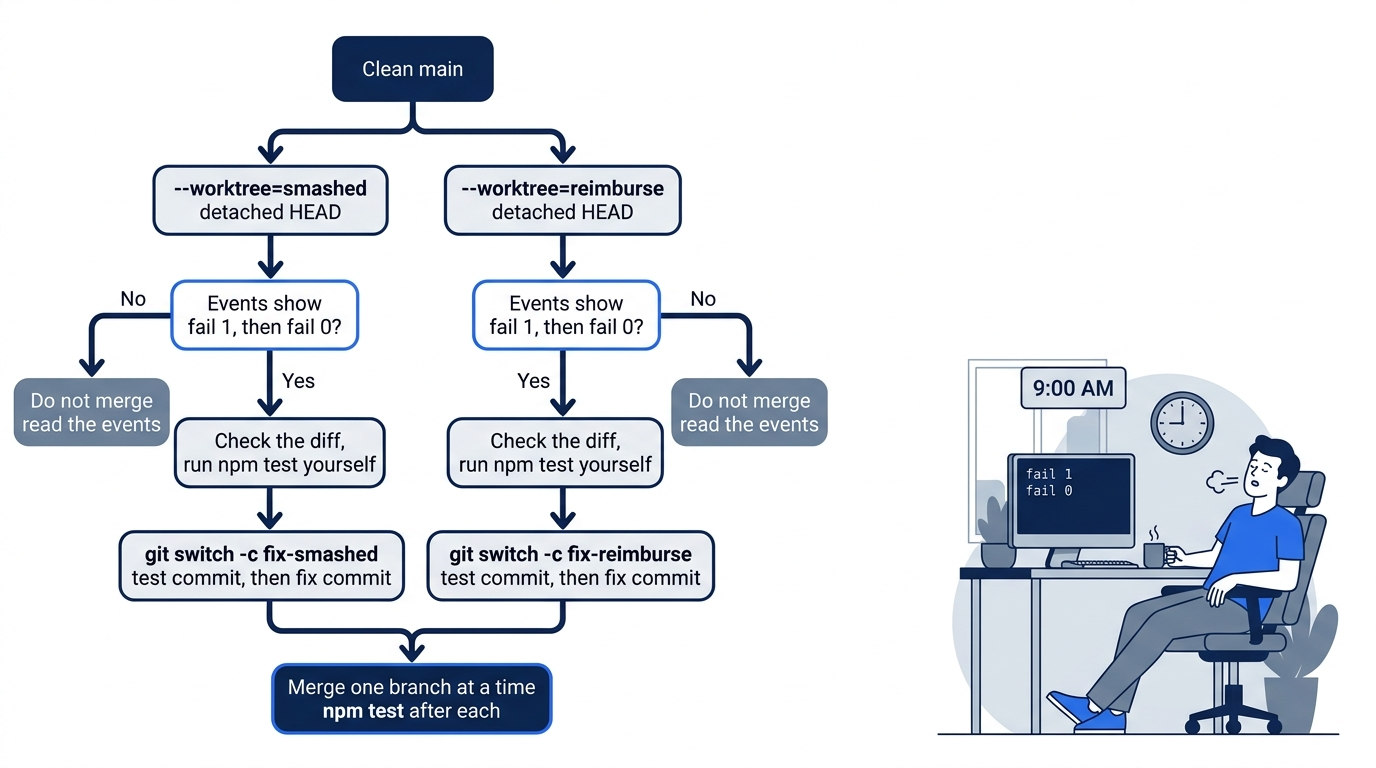
Then go into each worktree, using the path from its log, and check the work itself. The path is the worktree line in ~/triage-runs/smashed.log, and it is also the first column of the smashed line in git worktree list.
cd ~/.local/share/opencode/worktree/<id>/smashed
git diff --stat
git diff test/ | grep '^-[^-]'
npm test; echo "exit $?"
git diff --stat should list src/classify.js and test/classify.test.js and nothing else. The grep should print nothing, because the prompt allowed new tests and no changed ones; a removed line means the run bent an existing test. The last line should be exit 0, from a suite you ran yourself. Only a worktree that passes all of that gets a branch, with the test committed before the fix.
git switch -c fix-smashed
git add test/classify.test.js
git commit -m "Add failing test: a smashed item goes to shipping"
git add src/classify.js
git commit -m "Route smashed items to shipping"
cd ~/code/ticket-triage
git merge fix-smashed
npm test; echo "exit $?"
Because a worktree shares the repository, the new branch is visible from your main checkout at once. Merge one branch at a time and run the suite after each merge. Both runs appended a test to the same file, so the second merge may stop on a conflict in test/classify.test.js; keep both tests and run the suite again. If a run ended red, do not merge it. Read its events to see where it stopped. Clean up with git worktree remove, adding --force for a red run you no longer need, because it refuses a worktree with uncommitted changes.
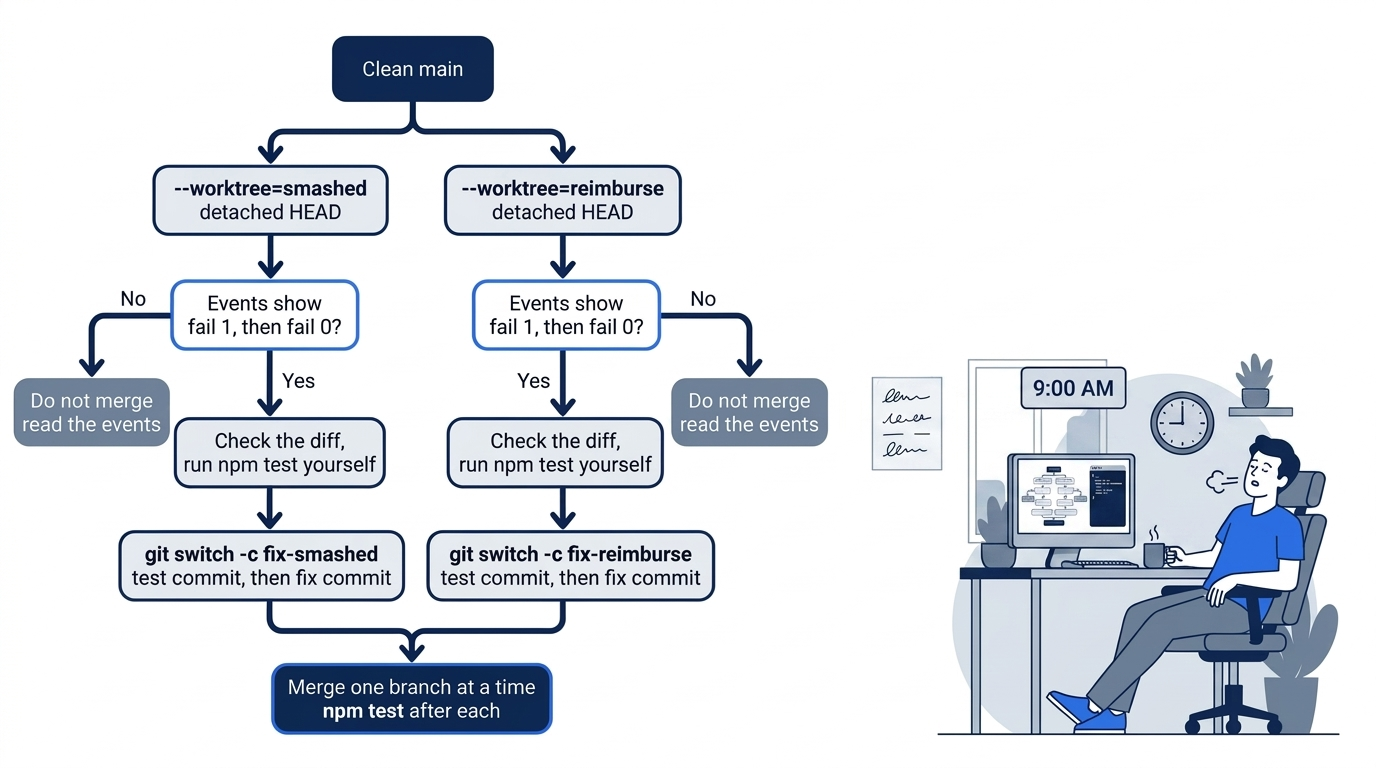
The scene is the morning this article builds toward: two fixes started the night before, judged from events and worktrees instead of from the model's last paragraph.
The review job in CI
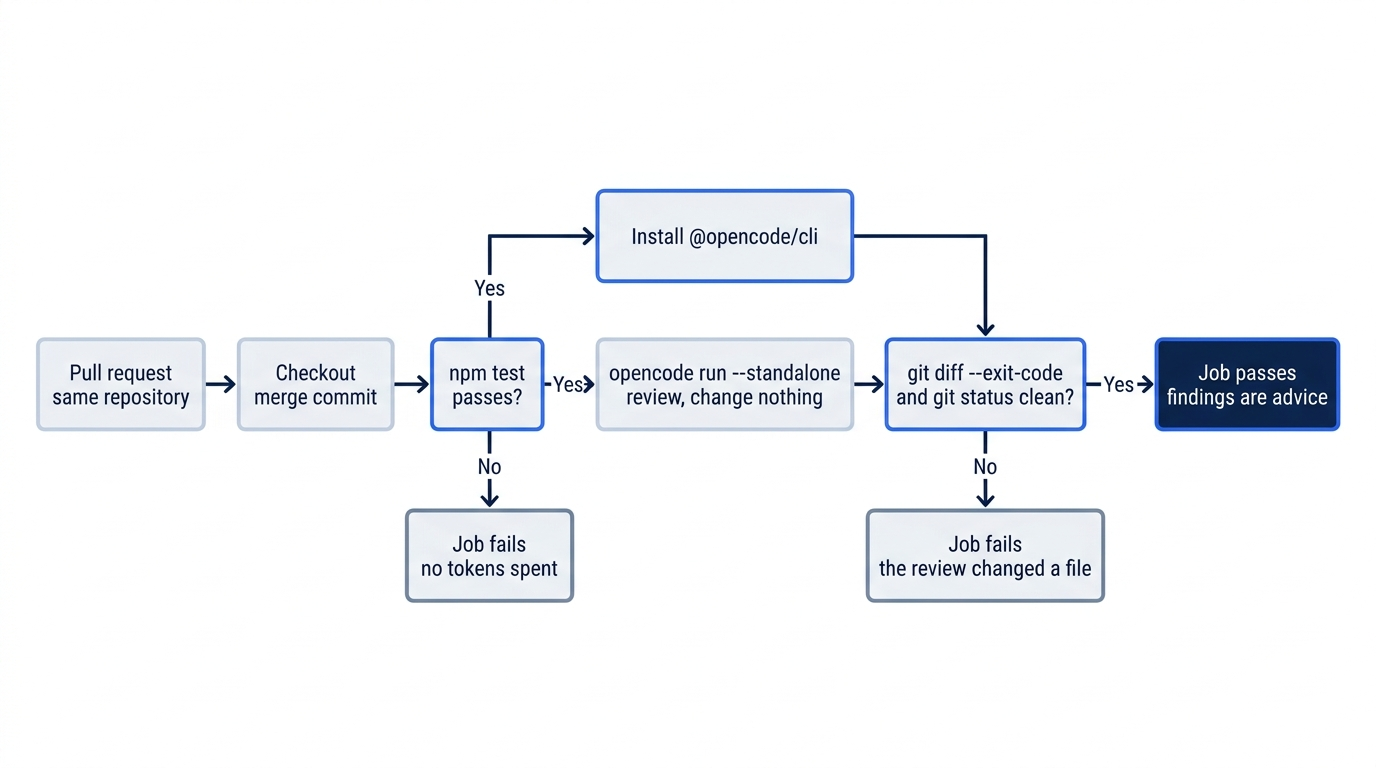
There is no opencode github command and no opencode pr. The CLI reference instead shows a plain GitHub Actions job: check out the code, install the V2 package, and run one standalone review with the key from secrets. Ticket Triage's version adds checks around the agent, one before it and two after it, at .github/workflows/opencode-review.yml.
The workflow is one job whose steps run in a fixed order: a test gate, the OpenCode install, the review, and two checks that the review changed nothing.
# .github/workflows/opencode-review.yml
name: OpenCode review
on: [pull_request]  # ①

jobs:
  review:
    runs-on: ubuntu-latest
    steps:
      - uses: actions/checkout@v4  # ②
      - run: npm test  # ③
      - run: npm install --global @opencode/cli  # ④
      - run: opencode run --standalone --archived --model anthropic/claude-sonnet-5-5 "Review src/classify.js and test/classify.test.js for rule-order mistakes and for keywords with no test that uses them. A damaged item with a money-back request must route to refund. Report findings in severity order. Change nothing."  # ⑤
        env:
          ANTHROPIC_API_KEY: ${{ secrets.ANTHROPIC_API_KEY }}  # ⑥
      - run: git diff --exit-code  # ⑦
      - run: test -z "$(git status --porcelain)"  # ⑧
① The job runs on every pull request; repository secrets reach it only when the pull request comes from a branch in the same repository.
② The checkout brings the project's opencode.jsonc, AGENTS.md, and guard plugin, so the review runs under the same rules as a laptop session.
③ The suite runs before any model call, and a red suite fails the job here at no token cost.
④ The @opencode/cli package installs V2; the older opencode-ai package installs V1.
⑤ One standalone, archived run sends the review prompt, and the prompt ends with "Change nothing."
⑥ The provider key comes from repository secrets into this step's environment, where the private server started by --standalone can read it.
⑦ git diff --exit-code fails the job if the review changed any tracked file.
⑧ git status --porcelain also lists untracked files, so test -z fails the job if the review created a new file.
Note: The full extracted listing at code/opencode/part-16-without-you/listings/01-opencode-review-workflow.yml is the complete workflow file without the markers.
Read the steps in order, because the order is the design. The test gate fails a red pull request before any token is spent. Ticket Triage has no dependencies and ubuntu-latest ships Node, so npm test runs as written; a project with dependencies needs npm ci, and usually actions/setup-node, before it. Install @opencode/cli, not opencode-ai, and do not add --ignore-scripts. Without --standalone, the CLI would discover or start the shared background server; standalone mode means the private server, started from this step, receives the key. On a pull_request event, the checkout is a merge commit that GitHub prepares: the pull request merged into its base branch.
Add the key as a repository secret named ANTHROPIC_API_KEY, commit the workflow on a branch, and open a pull request from a branch in the same repository. GitHub does not pass repository secrets to a pull_request workflow started from a fork, so a fork's pull request fails at the review step with no key.
Three honest limits come with this job. First, it has not run on GitHub Actions: the author's tests covered opencode run on a laptop, and the workflow adapts the docs' example, so treat the first pull request as its test. Second, the review runs on Anthropic, the provider the docs show, and if your writing agent also runs on Anthropic, the reviewer sits close to the writer. The docs do not name the variable the google provider reads; the author's Gemini runs worked with GEMINI_API_KEY set, alongside GOOGLE_APPLICATION_CREDENTIALS, but which of the two OpenCode read was not isolated, so this article does not build a Gemini job on that. A same-vendor review is still a fresh context that never saw the writer's reasoning, and the gate that decides the merge is npm test. Third, the review is advice. The job fails on a red suite or a changed file, never on the model's findings, because a sentence from a model is a claim and the steps around it are evidence. Add --agent plan if you want the reviewer unable to edit in the first place.
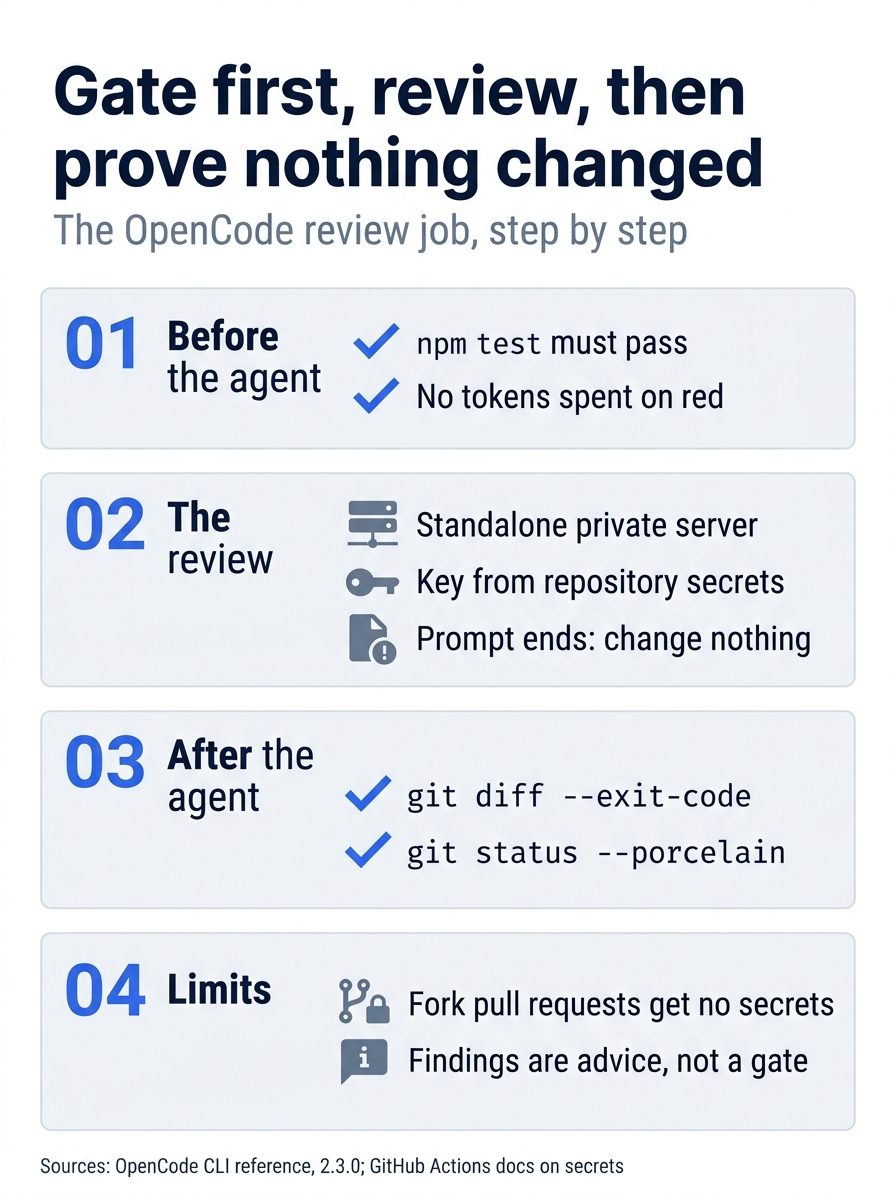
The job runs in this order: a gate the model never sees, the review itself, and two checks that the review changed nothing. Two limits remain: fork pull requests and advisory findings.
One new file now matters as much as your tests. .github/workflows/opencode-review.yml defines what a pull request must pass, so read any diff that touches .github/ as carefully as a diff that touches test/.
If you already use Claude Code: claude -p is the closest match to opencode run. Two habits misfire. claude -p "/goal ..." gets the goal loop, while opencode run sends the same text to the model as a plain sentence, so the done condition goes in the prompt and the check goes in your script. And claude --worktree feature-auth creates a worktree on a new branch, while opencode run needs --worktree=feature-auth with the equals sign to take the name and, on 2.3.0, leaves the worktree in detached HEAD under OpenCode's data directory. The CI shape carries over: a key from secrets, a non-interactive run, and checks that run outside the agent.
Do this today
Everyone
-
Run one unattended fix the Start here way. Commit the home-path deny, start one small fix in a named worktree with
--auto, and in the morning read the two failure counts from the events before you read the reply.cd ~/triage-runs jq -r 'select(.type=="tool_use" and .part.tool=="shell") | .part.state.output' smashed.jsonl | grep '^# fail'The command prints
# fail 1, then# fail 0. After you check, branch, and merge the worktree,git worktree listshows your checkout alone andnpm test; echo "exit $?"ends inexit 0. -
Start one habit: read the events before the reply. For every scripted run, list the tool calls with
jqfirst. A claim in the reply that notool_useevent backs is a claim, not a result.
If you read Going deeper
- Run one task with JSON events, archived. Use
opencode run --standalone --format json --archived "..." > ~/triage-runs/today.jsonl 2> ~/triage-runs/today.log, with the records outside the repository. - Find the test command in the events, not in the reply.
grep tool_use today.jsonl | grep 'npm test' | grep -o '# fail [0-9]*'should print your failure count (twice per run on 2.3.0), andgrep auto-rejecting today.logshould print nothing. - List what your rules do with nobody watching. Run
opencode debug agents, then mark everyaskthat a headless run would reject and every one--autowould approve. - Name your next worktree with the equals sign. Start a small run with
--worktree=next, then confirm withgit worktree listwhere it went and withgit status --shortthat your checkout did not change. Without--autothis is the untested path; ifgrep auto-rejectingprints a line, rerun it with--auto. - Add the review job. Copy the workflow, change the prompt to your project's rules, add your provider key as a repository secret, and open a pull request from a branch in the same repository.
Leave evidence, not instructions
The overnight script at the start of this article did not fail. It succeeded for reasons it could not show you: a loop that never ran, approvals that nobody reviewed, and a final paragraph that you would have had to take on faith. An unattended run is only as trustworthy as the record it leaves behind.
The fix is not a smarter prompt. Rules that refuse when nobody can say yes, a worktree that holds the blast radius, a tool_use event that shows # fail 1 and then # fail 0, and a CI job whose checks run outside the agent are evidence you can read at nine in the morning. Set them up before you leave, and the run can finish without you.
This is Part 16 of "OpenCode, Day-to-Day," a 17-part guide to using OpenCode V2 as a daily, provider-neutral coding agent.