
The Green Line Lied: Your MCP Server Was Never Called
A green `connected` line is a health check, not a result; an OpenCode MCP server costs context on every request from the moment it connects, so keep one only after the transcript shows a call you can check.
An OpenCode MCP server costs context on every request from the moment it connects. Learn where it lands in the request, how to prove a real call, what Code Mode saves, and which switch turns the cost off.
You connected a documentation server, saw the green line, and trusted it, then found the next morning that the agent wrote the test from memory and never called the server it was paying for on every request.
In this article: Day 13 of a 17-day guide. Start here connects one MCP server to Ticket Triage, a local reference server whose answer is arithmetic, and proves the agent called it by finding an
executeevent with 42 in its output, then removes the server and leaves a clean tree. Going deeper tells the story of a documentation server that showed a greenconnectedline and was never called, measures what one small server adds to every request with Code Mode on and off, shows why denyingexecuteraises the bill instead of lowering it, and scopes a server to the one agent that needs it with permission rules.
Part 12 closed a change on evidence: a failing test committed first, an empty test diff after the fix, a review on a different model, and a merge back to main. Today you connect the first piece of Ticket Triage's setup that lives outside the repository, and you hold it to the same standard.
Start here
By the end of today you can connect an MCP server to Ticket Triage and prove, from the run's own events, that the agent called it.
Starting fresh or fell behind? Run git switch -C main opencode/day-12. This replaces your main with the end of Day 12; to keep your own work, run git branch my-backup first.
What an MCP server adds
MCP, the Model Context Protocol, is an open standard for giving an agent extra tools that live outside it. An MCP server is the program that offers those tools. A local server is a command OpenCode starts on your machine; a remote server is a URL it connects to. Today uses one local server.
By default, OpenCode does not hand a server's tools to the model one by one. It lists them in a catalog behind one built-in tool, execute, which runs a short JavaScript program that calls them. OpenCode calls this Code Mode. A call to a server therefore shows up in the events as an execute call whose program names the server.
Two facts shape today's work.
- Connected is not called. A server that connects successfully has proved only that a process answered. The proof that it works is a tool call in the transcript with a result you can check.
- A connected server is never free. It adds text to every request from the moment it connects, whether the agent calls it or not. Keep a server only after it does something on the record.
Add the reference server
server-everything is the reference server from the MCP project. It runs locally with no account, and two of its tools are get-sum, which adds two numbers, and echo, which returns the text you send it. An answer you can check in your head makes it the right first server.
Start from a clean tree, so the last step can prove that nothing stayed behind. If git status --short lists files, commit them first.
cd ~/code/ticket-triage
git status --short
opencode mcp add everything -- npx -y @modelcontextprotocol/server-everything
opencode mcp add writes a server into your project configuration. The name comes first, and everything after -- is the command that starts the server. npx -y downloads the package on first use, so the first run that uses the server can take a few seconds longer. The command answers with the file it changed.
MCP server "everything" added to /Users/you/code/ticket-triage/opencode.jsonc
Read what it wrote. The command edits a file you commit, so the diff is the first thing to check.
git diff opencode.jsonc
The diff should add one mcp block near the end of the file, with your existing comments and rules untouched.
  "mcp": {
    "servers": {
      "everything": {
        "type": "local",
        "command": [
          "npx",
          "-y",
          "@modelcontextprotocol/server-everything"
        ]
      }
    }
  },
Prove the call
A prompt proves a server only when it requires the server. Name the server, and ask for a task whose answer you can check. Run it as a one-shot opencode run, on google/gemini-4-hydrogen (tested on OpenCode 2.3.0 on November 16, 2026). --format json prints the run as one JSON event per line instead of text, and --archived keeps this test session out of your session list.
opencode run -m google/gemini-4-hydrogen --format json --archived "Use the everything MCP server to add 17 and 25, then echo the result back with its echo tool. Tell me exactly which tools you called." > /tmp/mcp-proof.jsonl
grep tool_use /tmp/mcp-proof.jsonl
Each tool_use line is one tool call. The lines are long; the fields to read are tool, the code inside input, and output. In the tested run, the model made two calls, both through execute, one program per tool. Trimmed, they read like this.
"tool":"execute", ... "input":{"code":"return await tools.everything[\"get-sum\"]({ a: 17, b: 25 });"},"output":"The sum of 17 and 25 is 42."
"tool":"execute", ... "input":{"code":"return await tools.everything.echo({ message: \"The sum of 17 and 25 is 42.\" });"},"output":"Echo: The sum of 17 and 25 is 42."
Your model may write one program that calls both tools, or two programs, as this one did. The check is the same either way, and it has three parts.
- The prompt named the server. "Use the everything MCP server" leaves the model no way to answer from memory.
- The events show a call that reached it. The
toolisexecute, and itscodecallstools.everything. - The result is checkable. The
outputholds 42, which the model could not have taken from the server without calling it, and which you can check in your head.
The run needed no approval, because the shipped rule that Part 4 described allows every action that no later rule denies, and Ticket Triage's rules say nothing about MCP tools yet.
Why the server list is not the proof
opencode mcp list shows the servers OpenCode knows about and whether each one is connected. It is a health check. It says nothing about whether a model ever chose one of the server's tools, and it can print "No MCP servers configured" until a session has used the project. Use the tool_use events as the proof, as you just did.
Remove the server and check the tree
The everything server has done its job. Its tools add numbers and echo text, and nothing in Ticket Triage's work will call them, so it does not stay. The entry is the only uncommitted change, so restore the file and check the tree.
git checkout -- opencode.jsonc
git status --short
The last command prints nothing. Going deeper keeps a real server, Context7, and scopes it to the one agent that needs it.
Today's win is a tool_use event whose tool is execute, whose code reaches tools.everything, and whose output holds 42, and then a clean tree.
You can stop here. Going deeper explains why this works and where it breaks.
Going deeper
This section is for readers who want what a connected server costs on every request, how to measure it with Code Mode on and off, how remote servers sign in, how permission rules scope a server to one agent, and how Ticket Triage keeps Context7 for build alone. It assumes you finished Start here in this part and in Parts 1 to 12.
The green line that proved nothing
Ticket Triage is a small Node.js service that sorts support tickets into refund, shipping, or other. One evening you add the first piece of its setup that lives outside the repository. The next tests use Node's built-in test runner, and you never remember its API exactly, so you connect Context7, a documentation server, from the project folder.
cd ~/code/ticket-triage
opencode mcp add context7 --url https://mcp.context7.com/mcp
opencode mcp list
The list answers with the line every setup guide ends on.
✓ context7 connected
The next morning you ask the build agent for a test: "Add a test for 'The box arrived dented,' and check the current node:test documentation before you write it." It adds the test, runs npm test, and reports a pass. You scroll the transcript and find read, edit, and shell calls. You find no execute call and no Context7 tool. The model wrote the test from what it already knew. You discard it with git checkout -- test/classify.test.js, because the lookup was the point, not the test. The scenario is illustrative, not a recorded run, but the mechanism is documented: the green line says a connection is open, not that any agent used it.
The connection was not free either. Since the evening before, every request had carried a line telling the model where to find Context7's tools, whatever those tools add to the Code Mode catalog, and any instructions the server sent back when it connected. This article is about both halves of that problem: what an OpenCode MCP server costs before anything happens, and what proves that something happened.
Where an MCP server lands in every request
The OpenCode MCP page opens with a warning: "MCP tools consume model context, so add only the servers you need." OpenCode assembles the opening of every request in a fixed order, and a server adds to one of those rows and to the tool definitions beside them.
The row before it, Code Mode tool guidance, is already there. The ordering lists it as "Code Mode tool guidance, when enabled," and execute is a built-in tool that sits beside read and edit. A session with no MCP server already carries execute and its guidance, so connecting a server does not add them.
What a server adds lands in the next row, "MCP server, reference, and skill guidance." Two things go there. "For servers that use Code Mode, OpenCode adds a line that says where the agent can find the server's tools." And "when a server returns instructions during initialization, OpenCode adds them to the system prompt," inside an <mcp_instructions> block with one <server> entry per server. In the tool definitions, Code Mode lets the agent reach the server's tools through the execute tool it already had, and the server's tools join the catalog that execute calls into. With Code Mode off, the tools are listed directly, and the tools page says each one carries "its full definition in every request."
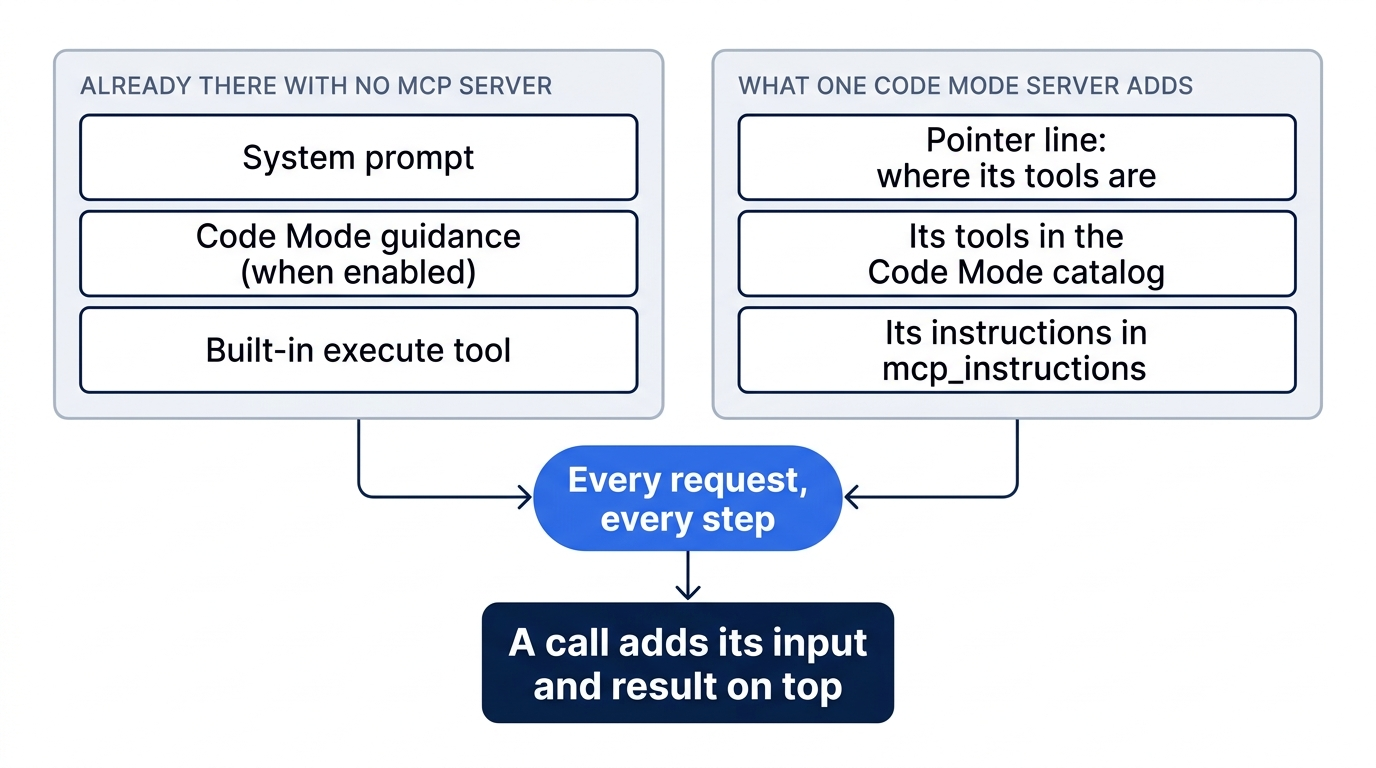
The diagram splits the opening of a request into two groups. The system prompt, the Code Mode guidance, and the built-in execute tool are present with no MCP server at all. One Code Mode server adds three things beside them: a pointer line to its tools, its tools in the catalog, and its instructions. Both groups go out on every request and every step.
None of this waits for a call. It rides every step of every session where the server is connected, and a call adds its input and result on top.
Add a server from the shell or by hand
opencode mcp add writes a server into configuration, as the CLI reference shows. A remote server takes --url; a local server takes the command to start it after --.
opencode mcp add context7 --url https://mcp.context7.com/mcp
opencode mcp add everything -- npx -y @modelcontextprotocol/server-everything
The second line starts the MCP project's reference server, @modelcontextprotocol/server-everything, as a local process that OpenCode talks to over stdio. Both commands write to the project configuration, the file you commit. Add --global to put a server in your global config, and pass environment variables to a local server with repeated --env flags. After any add, run git diff and read what the command wrote. In the author's 2.3.0 test, the command wrote to the project's existing opencode.jsonc and kept its comments and trailing commas.
Writing the entry yourself gives you every field. Servers live under mcp.servers, and the docs are explicit: "V2 does not place server names directly under mcp."
{
  "mcp": {
    "servers": {
      "everything": {
        "type": "local",
        "command": ["npx", "-y", "@modelcontextprotocol/server-everything"]
      }
    }
  }
}
The key is the server's name, and every other feature uses it: tool names, permission actions, and the /mcps dialog. A handful of fields cover nearly every server.
typeis"local"for a child process over stdio or"remote"for Streamable HTTP.commandorurlis an array with the executable first, or an absolute endpoint.environmentorheaderscarry secrets as{env:NAME}. "Shell expressions such as$NAMEare not expanded in JSON strings."oauthis on by default for remote servers; set it tofalseonly for a server that uses an API key or another header credential.disabled: truekeeps the entry without connecting. V2 has noenabledfield; the migration guide lists it among the V1 renames.codemode: falseexposes the tools directly instead of through Code Mode. It is the context lever measured below.
Gotcha: "A higher-precedence project config replaces the entire server object with the same name." If your global config defines context7 with headers and the project redefines it with only a url, the headers are gone.
Remote servers usually want an account. OpenCode discovers the authorization server, signs in with PKCE, refreshes tokens, and stores credentials "outside project configuration." When opencode mcp list shows needs authentication, sign in with /mcps in the terminal interface or opencode mcp auth <name> from the shell. Over SSH or in a container, the browser's callback page will not load; paste its address into the waiting sign-in prompt.
http://127.0.0.1:52817/callback?code=...&state=...
A server that takes an API key gets a header. Quote the {env:} reference so your shell passes it through literally.
opencode mcp add context7 --url https://mcp.context7.com/mcp --header 'CONTEXT7_API_KEY={env:CONTEXT7_API_KEY}'
Gotcha: the CLI reference shows the same command with --header CONTEXT7_API_KEY=secret. Run it with a real key and the key is in your project config, one git push away from your team's history. The background server, not your shell, has to see the variable, and a missing variable becomes an empty string with no error.
Connected is not the same as called
opencode mcp list shows "servers and their current connection state," in the words of the plugin API reference. It is a health check on a process or an endpoint. It says nothing about whether a model ever chose one of the server's tools, which is the only reason you added it.
The research for this series, run on OpenCode 2.3.0, turned up a second way the list misleads. With the server written into the project config by hand, opencode mcp list printed "No MCP servers configured" until a session had used the directory, and ✓ everything connected after the first run. If the list comes back empty after you edit the config, open a session in the project before you decide the entry is wrong.
The scene is the opening moment: the server list said connected, the test passed, and the transcript shows the model never touched the server.
Proof needs three things, and none of them is the list.
- A prompt that requires the server. Name the server and a task only its tools can do. "Check the documentation" can be satisfied from memory, and it was.
- A tool call in the transcript. Under Code Mode, look for an
executecall whose code reaches the server's namespace. With Code Mode off, look for a tool named<server>_<tool>. - A result you can check. The output has to contain something the model could not have made up, or something you can verify yourself.
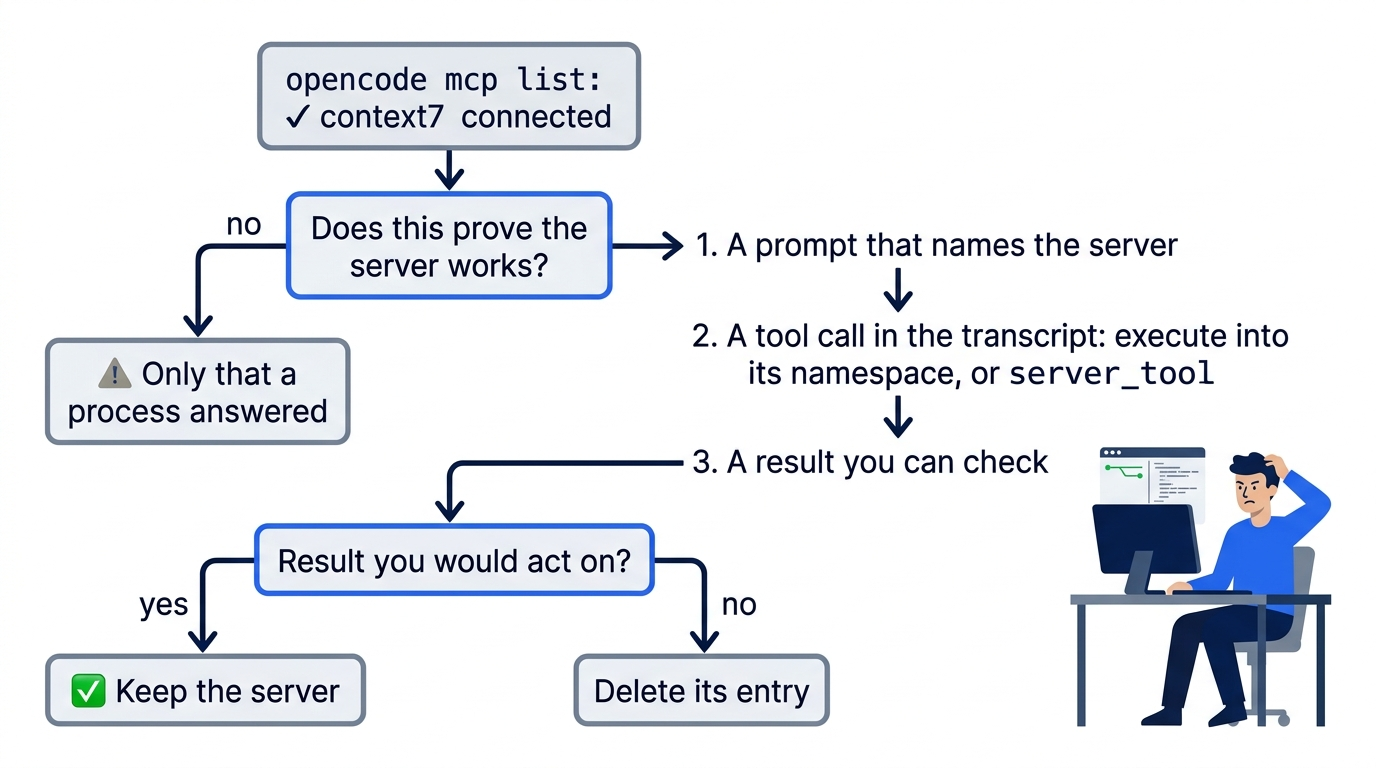
The flowchart starts at the green connected line and refuses it as proof. The path that counts runs through the three checks in order, then ends at one question: would you act on the result? A yes keeps the server, and a no deletes its entry.
In the terminal interface, the transcript shows each tool call as it runs. From a script, opencode run --format json prints one JSON event per line, and a tool_use event carries tool, state.status, input, and output.
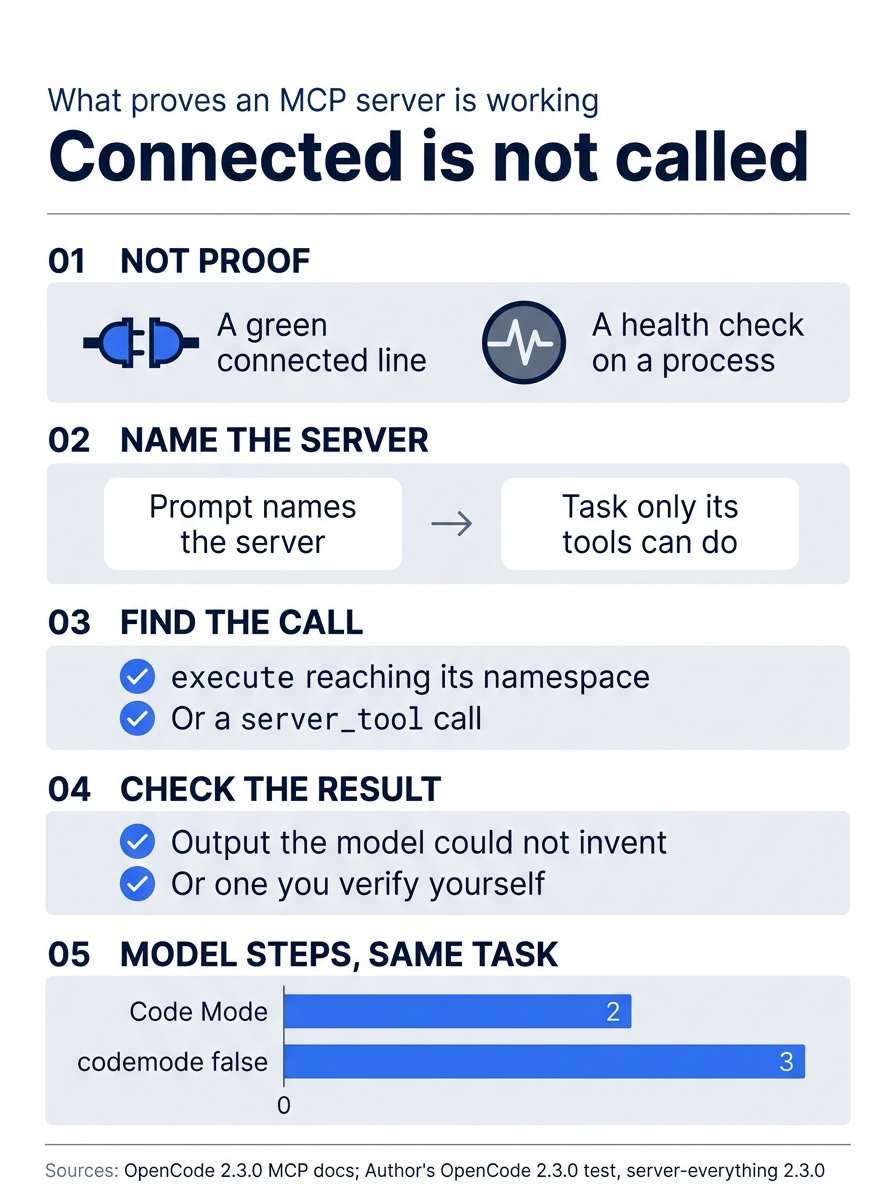
A connected line is not evidence, while a named prompt, a visible call, and a checkable result are. The same arithmetic task took 2 model steps with Code Mode and 3 with codemode: false.
Prove it on a server whose answer you know
Context7 returns documentation text, which is hard to check at a glance. Start with a server whose answer is arithmetic. server-everything runs locally with no account, and two of its tools are get-sum and echo. Take Context7 out of the measurement without deleting it by adding "disabled": true to its entry.
Take a baseline with no connected server first, and use the same prompt for every run so the only change is the MCP configuration.
opencode run --format json --archived "Use the everything MCP server to add 17 and 25, then echo the result back with its echo tool. Tell me exactly which tools you called." > /tmp/mcp-none.jsonl
The model has no such server, so its answer should say so. Next, add the server and run the same prompt.
opencode mcp add everything -- npx -y @modelcontextprotocol/server-everything
opencode run --format json --archived "Use the everything MCP server to add 17 and 25, then echo the result back with its echo tool. Tell me exactly which tools you called." > /tmp/mcp-codemode.jsonl
grep tool_use /tmp/mcp-codemode.jsonl
You should see a tool_use event whose tool is execute. In the series research, on google/gemini-3.5-flash-lite, its code input was a short async JavaScript function that called both tools and returned both results as one object. The block below is a reconstruction, not the recorded code: the two tool calls inside it match the record, and the wrapper and the echo argument are filled in. Start here's run on google/gemini-4-hydrogen wrote two programs instead, one per tool.
// Reconstructed: the two tool calls match the author's record; the wrapper and the echo argument do not.
async () => {
  const sum = await tools["everything"]["get-sum"]({ a: 17, b: 25 });
  const echoed = await tools["everything"].echo(/* the sum */);
  return { sum, echoed };
};
The output should contain 42. Under Code Mode, "tools are grouped by the normalized server name," and a tool name with a hyphen, such as get-sum, needs bracket syntax in JavaScript. The run needed no approval because OpenCode's default base rule allows every action that no later rule denies. You now have the proof: a prompt that named the server, an execute call that reached it, and a sum you can check in your head.
What the listing costs
Every step_finish event carries the step's token counts. Compare the first step_finish in each file, because the first request is the opening plus your prompt and nothing else. On a provider that caches the opening, add tokens.input, tokens.cache.read, and tokens.cache.write, since input alone leaves out what the provider served from or wrote to its cache.
grep step_finish /tmp/mcp-none.jsonl | head -n 1
grep step_finish /tmp/mcp-codemode.jsonl | head -n 1
Then add "codemode": false to the everything entry and run the prompt a third time. In the research run, "the config change took effect on the next run with no server restart." You should see two tool_use events, everything_get-sum and everything_echo, and no execute.
The research numbers came from google/gemini-3.5-flash-lite through a running opencode serve, with server-everything 2.3.0 configured as shown. Both everything rows used the prompt above. The no-server row was not a third run of that prompt: it was the first request of an earlier run on the same project and model, with a different one-line prompt and no tool calls.
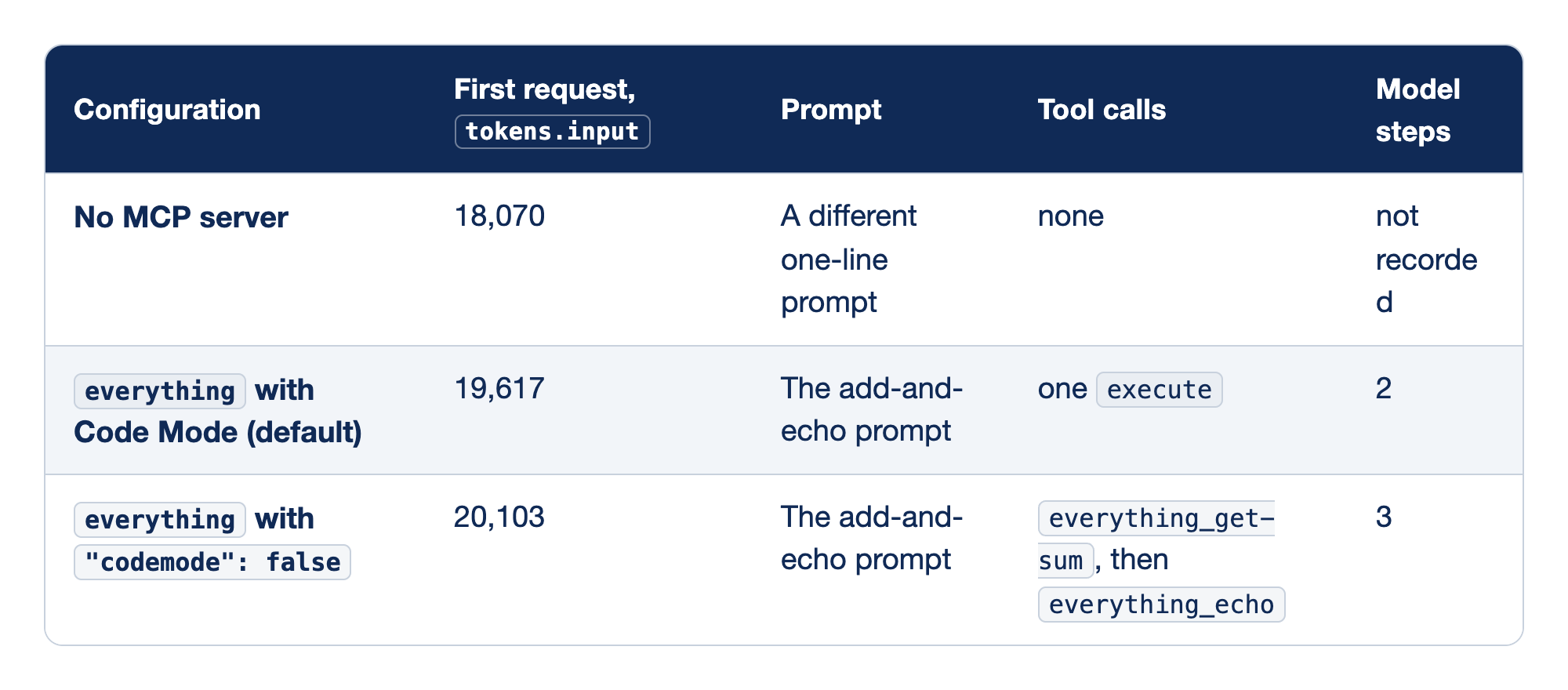
The three runs compare the input of one request across MCP configurations on one model. The Configuration column names the setup. The tokens.input column holds the first request's input tokens from step_finish; cache reads and writes were 0 on all three, so the figure is the whole first request. The Prompt column says which prompt produced the row, the Tool calls column lists what the model called, and the Model steps column counts model responses to finish the task.
- No MCP server sent 18,070 input tokens with a different one-line prompt and no tool calls, and its step count was not recorded. It is a rough floor that already includes the built-in
executetool and the Code Mode guidance, not a controlled baseline. All three runs had the author's 56 personal skills in view, which Part 6 shows add about 12,000 tokens to every row. The differences between rows do not depend on them. everythingwith Code Mode (default) sent 19,617 tokens with the add-and-echo prompt, made oneexecutecall for both tools, and finished in 2 model steps: one to write and run the program, one to answer.everythingwith"codemode": falsesent 20,103 tokens with the same prompt, calledeverything_get-sumand theneverything_echoas separate tools, and took 3 model steps.
Only the last two rows are a controlled comparison: listing this small server's tools natively cost 486 more tokens than Code Mode. The gap between the first two rows, about 1,547 tokens, is an estimate of what one small server adds on every request, whether or not the agent calls it. The prompts differ by a sentence or two, so part of that gap is prompt text. The rest is the server's pointer line, its catalog entries, and any instructions, on top of an execute tool and guidance that were already present. The research did not break the estimate down further or record how many tools the server listed. Your totals will differ with your model and provider; the differences are the part that carries over.
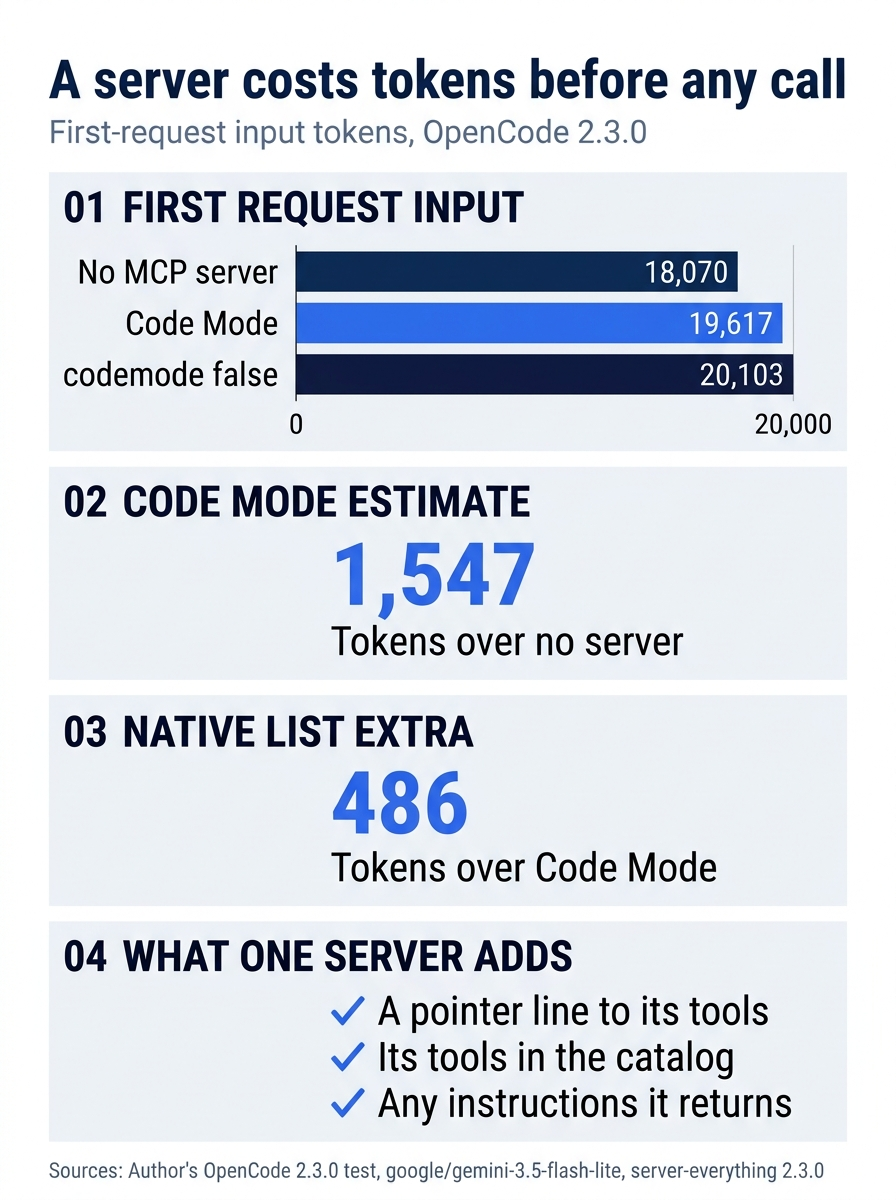
Taken together, the three first-request totals put one Code Mode server at an estimated 1,547 tokens and the native list at a controlled 486 tokens more. The server adds a pointer line, its tools in the catalog, and any instructions it returns.
An estimated fifteen hundred tokens on every step is not trivial. Each child session pays the opening again, so the server rides into every subagent that may use it. On a local model with a small window, a few servers like this take a visible bite out of your working room.
Code Mode turns calls into one program
The tools page describes execute in one sentence: it "runs JavaScript in Code Mode so the agent can call and combine tools from the catalog." The docs name two payoffs, "parallel independent calls" and "processing results without adding every intermediate value to the model context," and the measured run shows both on a small scale. The model wrote one program, the program called two tools and combined their results, and only the return value came back.
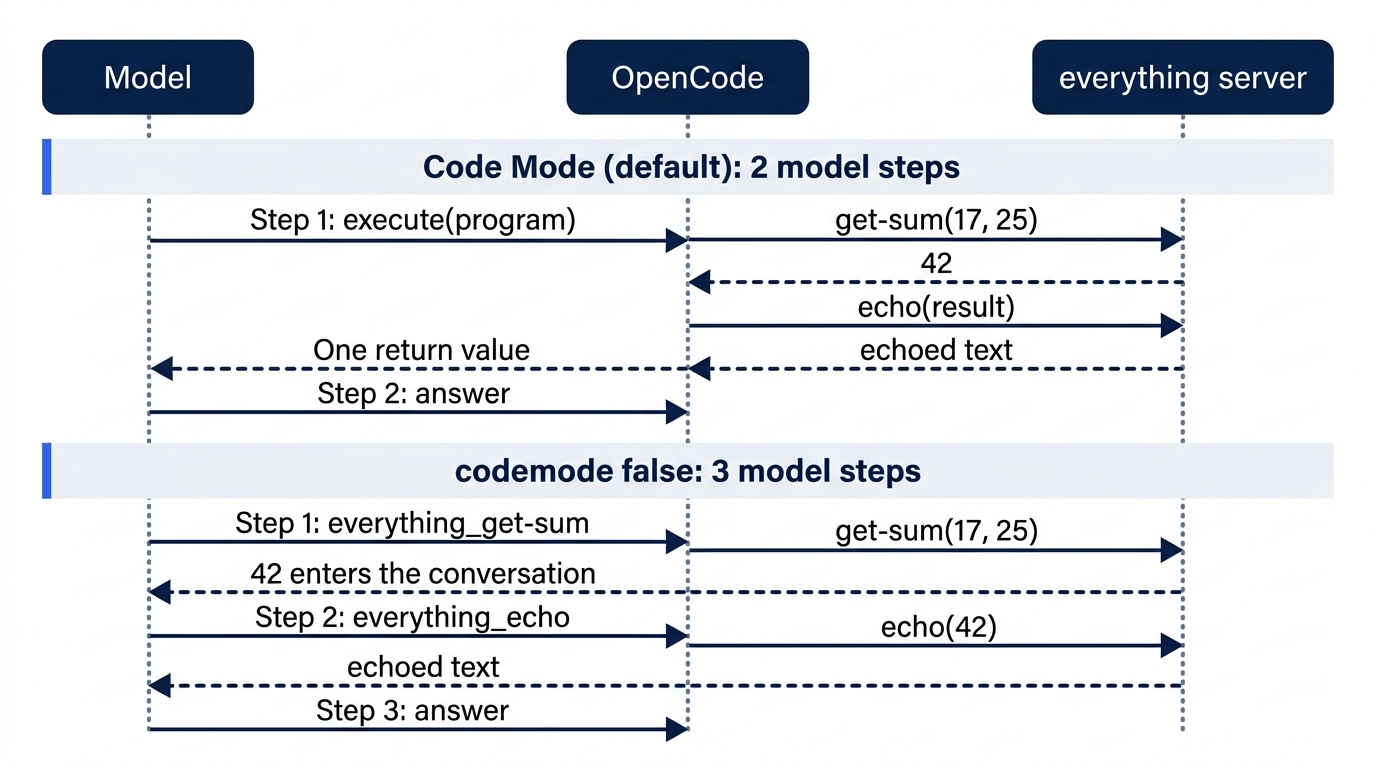
The sequence shows the same task twice. Under Code Mode, one execute program calls get-sum and echo, and only its return value reaches the model, so the task ends in 2 model steps. With codemode: false, each tool result enters the conversation before the model asks for the next, and the task takes 3.
With native tools, each call is a round trip: the model asks for one tool, the result enters the conversation, the model reads it and asks for the next. Each model step re-sends the opening, so five sequential native calls pay for it five or six times, while one program making the same calls pays once or twice. A lookup that resolves a library ID and then fetches a page is exactly that kind of chain.
The runtime is deliberately narrow. "The runtime has no direct filesystem access, imports, or timers. It provides fetch for HTTP requests; everything else goes through tools in its catalog." A program cannot read .env on its own; it has to call read, and "nested built-in and MCP tools still enforce their own permissions."
The cost of Code Mode is that the model must write correct JavaScript against a catalog it cannot see in full until it looks. In Part 9, the author's own explore child on a small local model ran two empty globs, typed a tool call as plain text for a tool that does not exist, and still recorded success. OpenCode's issue tracker holds matching public reports of small local models returning a tool call as text (issue #21181) and calling a tool that does not exist (issue #21354). A program is a bigger target than one call. If a server's calls keep failing under Code Mode, codemode: false on that server puts its tools "on the provider's native tool list," at the listing price you just measured.
Choosing what the model sees
Code Mode is one of several switches that change what a server costs per request. They live in server config, permission rules, and the disabled flag, and each one moves a different part of the listing.
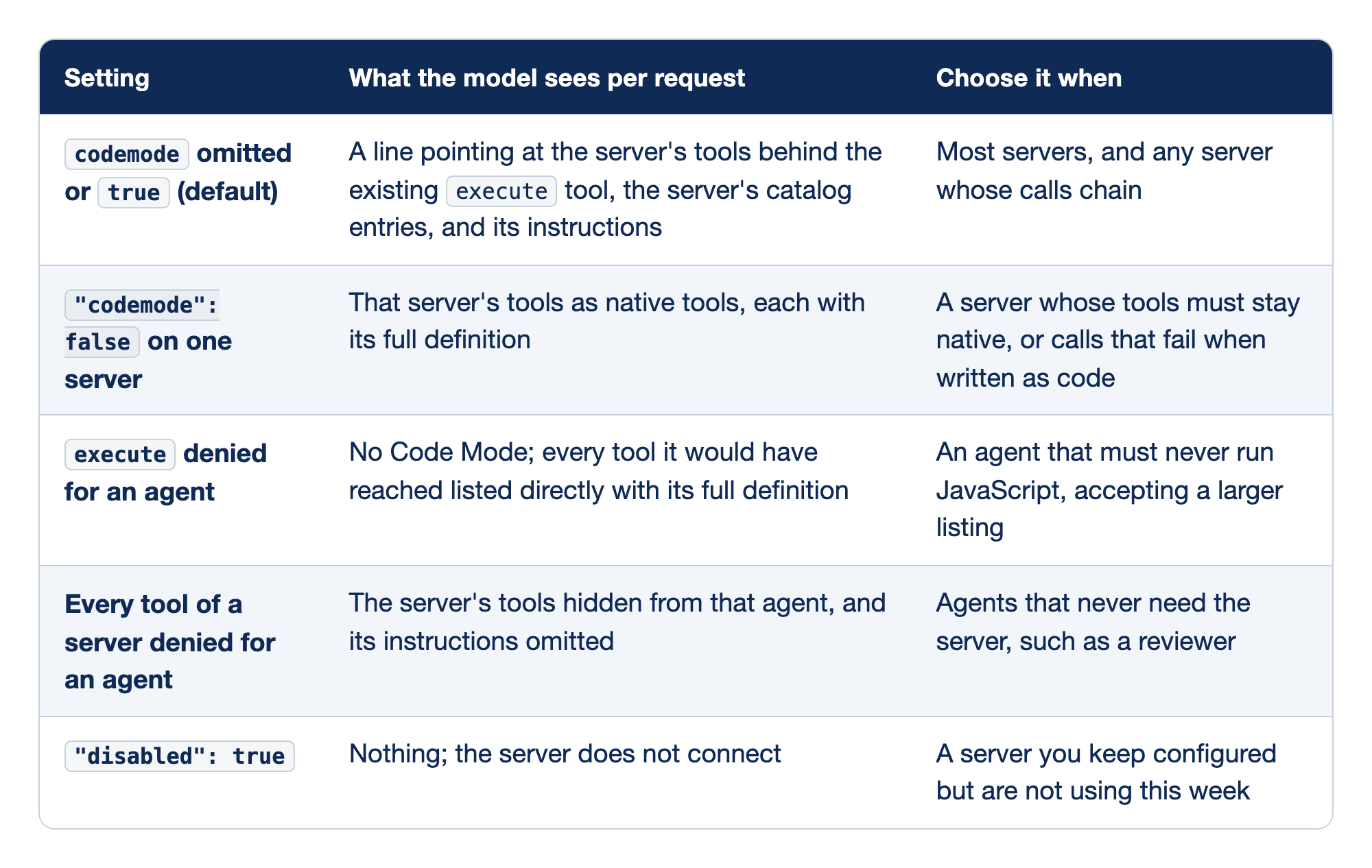
Five settings trade cost against control. The Setting column names the switch, the middle column says what the model receives on each request under it, and the last column says when to reach for it.
codemodeomitted ortrue(default) gives the model a pointer line to the server's tools behind theexecutetool it already has, the server's catalog entries, and its instructions. It is the right choice for most servers, and for any server whose calls chain."codemode": falseon one server lists that server's tools as native tools, each with its full definition. Use it where a tool must stay native or where calls fail when written as code.executedenied for an agent removes Code Mode and lists every tool it would have reached directly, with full definitions. The tools page warns that those tools "are then listed as direct tools, each with its full definition in every request. Deny those tools too if the agent should not have them." Locking down Code Mode can raise the bill.- Every tool of a server denied for an agent hides the server's tools from that agent and omits its instructions: "a server's instructions are omitted when the agent's permissions deny every one of its tools." It is how one agent keeps a server while another stops paying for its instructions.
"disabled": truemeans nothing connects while the entry stays in the file. Disconnecting in/mcpsis different: it "does not change configuration," so the next session may connect the server again.
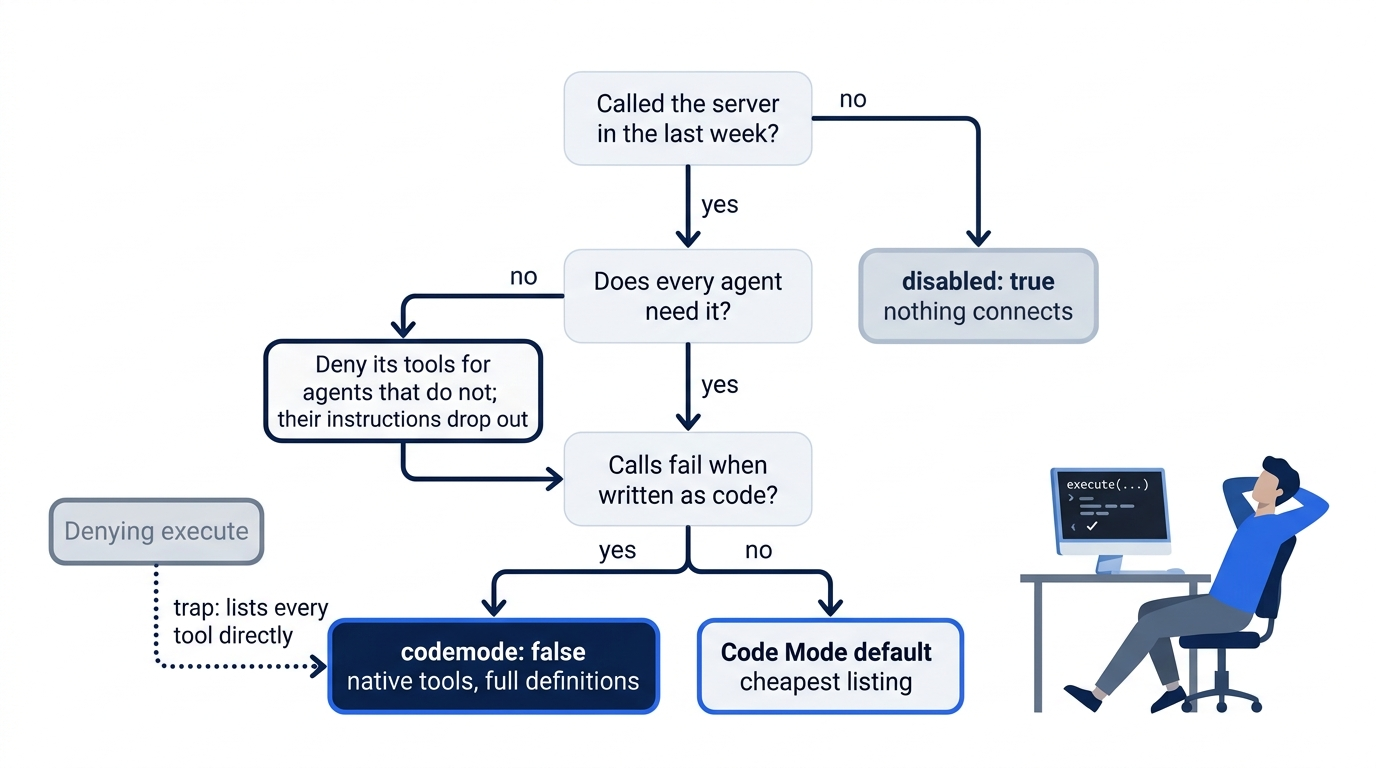
The decision flow asks three questions in order. A server nobody called in a week gets disabled: true. A server only some agents need gets its tools denied for the rest. A server whose calls fail as code gets codemode: false, and every other server keeps the Code Mode default. A dotted edge marks the trap: denying execute lands you on the native list without choosing it.
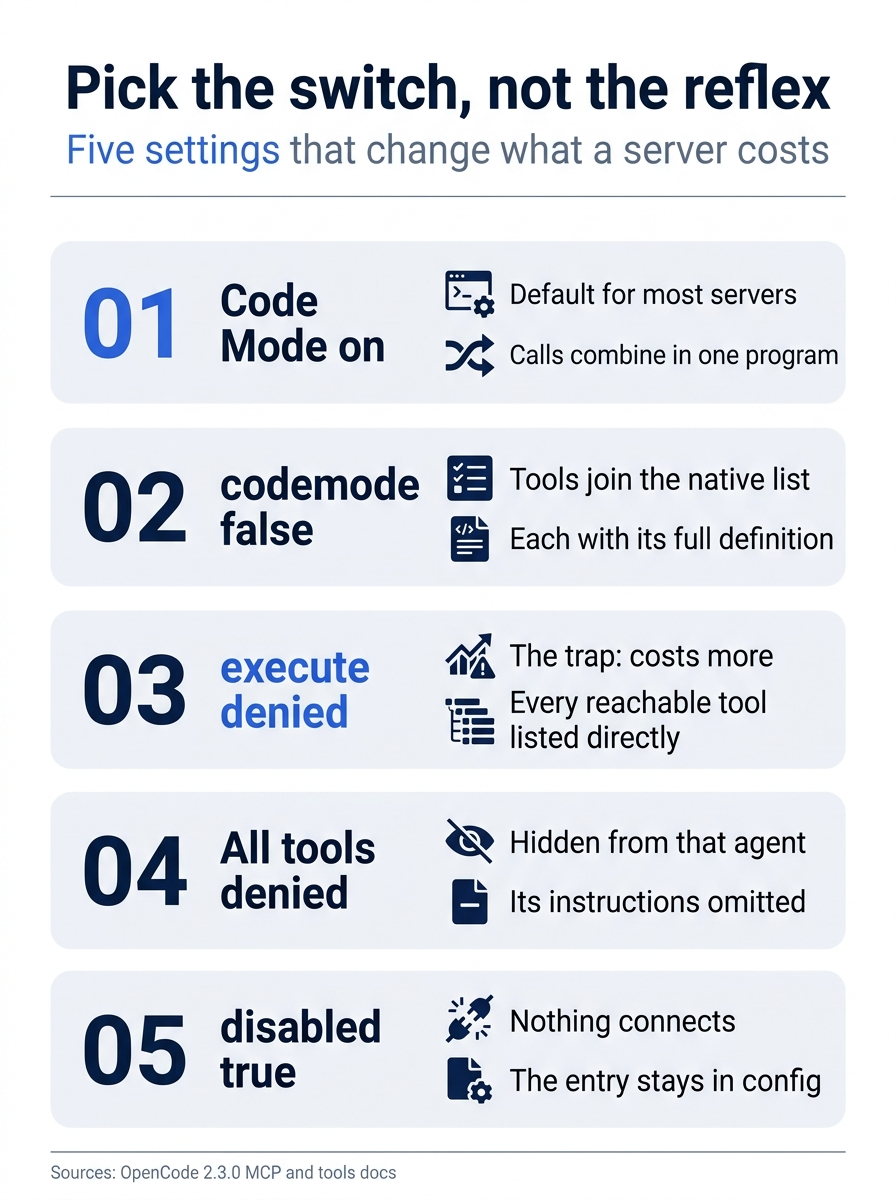
Pick the switch on purpose. Code Mode on is the default, codemode: false moves tools to the native list, denying execute is the trap that lists every reachable tool directly, denying all of a server's tools hides it from one agent and drops its instructions, and disabled: true connects nothing.
Permissions use the tool's own name
Every MCP tool is its own permission action. "OpenCode names a tool <server>_<tool>," replacing any character other than letters, numbers, _, and - with _, and the permission action is that normalized name with resource *. Wildcards work, so one rule covers a whole server.
{ "action": "context7_*", "resource": "*", "effect": "deny" }
Every agent starts from a shared *:* allow, so every MCP tool runs without asking for build, plan, general, and any custom agents. A read-only reviewer that cannot edit files can still call a server's tools. For a documentation server, the risk is a wasted call. For a server that files tickets or writes to a database, the same default lets a background child act on the outside world while you read something else. The built-in explore agent is the exception: its full list starts with the shared *:* allow, but the first rule it adds is a *:* deny, and its own rules allow back only a short list of read-and-search tools, so it has no execute and no MCP tools.
Ticket Triage wants Context7 for one agent: build, which writes the tests. Agent rules are appended after project rules and the last match wins. A project-level deny at the end of the top-level permissions list hides the server from everyone, and an allow in build's own list brings it back for build alone.
"agents": {
  "build": {
    "permissions": [
      { "action": "context7_*", "resource": "*", "effect": "allow" }
    ]
  }
}
Add that rule after whatever build already has, then check the result with opencode debug agents: build's list should end with the context7_* allow, after the project deny. Per the MCP page, the deny also keeps Context7's instructions out of the other agents' requests, because those agents now deny every one of its tools.
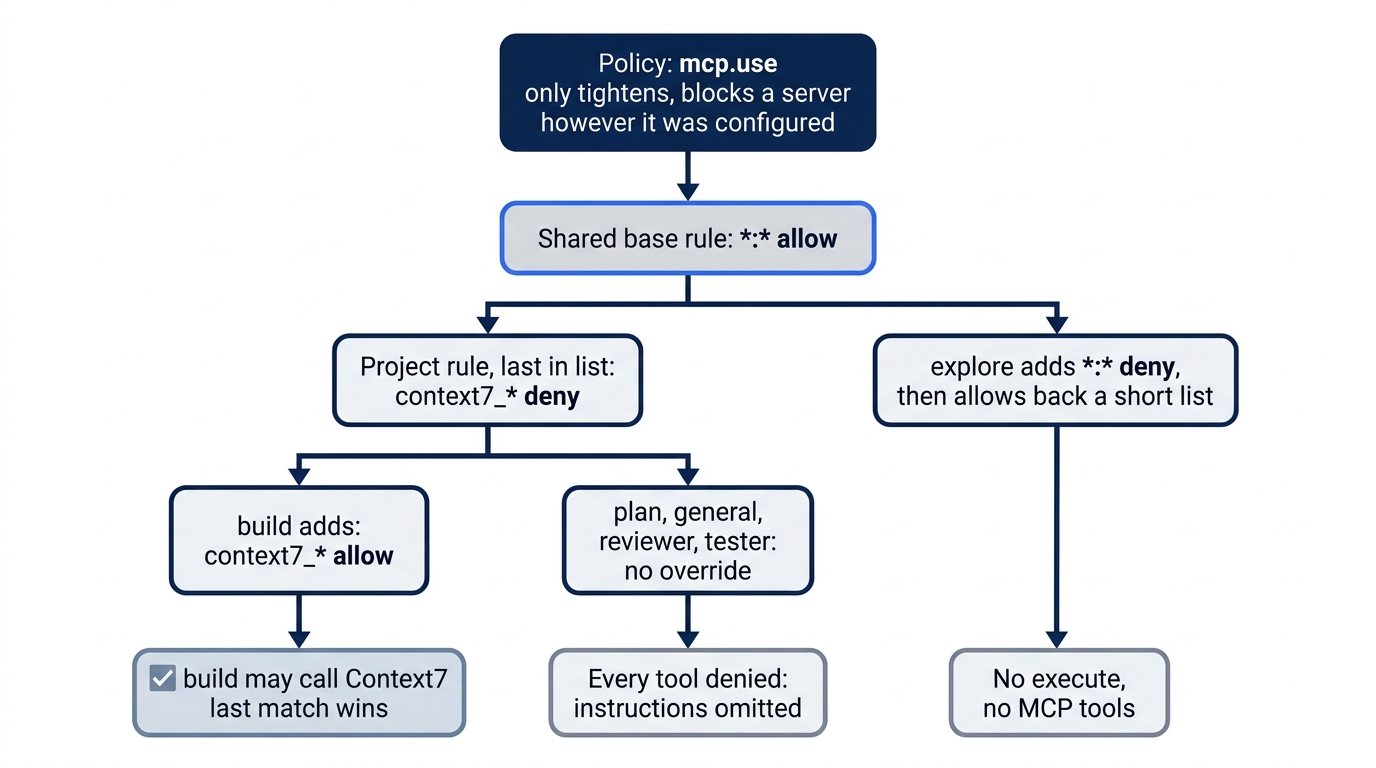
The diagram reads from the top down. A policy can remove a server before any rule runs. Below it, the shared *:* allow comes first, the project's context7_* deny follows, and build's own allow comes last, so build may call Context7 while plan, general, and the custom agents may not. The explore agent adds its own *:* deny and never sees MCP tools.
Resources, which servers expose as readable data rather than callable tools, have their own pair. Agents read them through two built-in tools, list_mcp_resources and read_mcp_resource. The permission actions that control those tools carry an opencode_ prefix: opencode_list_mcp_resources takes the server name as its resource, and opencode_read_mcp_resource takes <server>:<uri>.
Above all of this sit policies, which only tighten what permissions allow; inside the policy layer, an allow can lift a broader or lower-authority policy deny, and the permission rules then decide. The mcp.use policy action takes a server's configured name, and the policies page says a denied server is removed "however it was configured." A policy is how an organization blocks a server that a cloned repository adds to its own config.
Gotcha: "Servers connect automatically," and a local server is a command. Clone a repository whose config defines a local server, open OpenCode in it, and that command runs on your machine with your user's authority. The MCP page documents no approval step before a project's server connects. Read mcp.servers in an unfamiliar repository before you start a session there.
Instructions, prompts, and the session ID
A server can send more than tools. Its initialization instructions land in the system prompt inside <mcp_instructions>, and they ride every request until the server is disabled or denied for that agent. MCP prompts become commands named <server>:<prompt>, and the text after the command fills the prompt's arguments in order; like your own commands, they cost nothing until you type them.
/context_7:find_docs react "server components"
Servers can also ask for input during a call through MCP elicitation, and OpenCode shows a form. The docs do not say what happens in a headless run, so test such a server before you put it in CI. For calls made on behalf of a session, OpenCode sends the session ID in CallToolRequest.params._meta["ai.opencode/sessionID"]. If you write a server, treat it as an opaque correlation value: it can be absent, remote servers "may log or retain it," and the docs say "do not use it by itself for authentication or authorization."
Timeouts rarely need attention. startup and catalog default to 30 seconds and execution to 12 hours. An npx -y command that downloads its package on first run is the usual reason to raise startup, not execution.
Keep the server only after the call
The everything server has served its purpose. Its tools add numbers and echo text, and nothing in the real work will call them, so it does not stay. Delete its block, remove "disabled": true from Context7, and give Context7 the test it failed at the start, with a prompt that names it.
Use the context7 MCP server to look up how node:test groups related tests, then tell me exactly which tools you called and quote one line from the result.
The transcript should show an execute call that reaches tools.context7, and an output that is documentation text, not an error. Quoting a line makes the result checkable: you can search the library's real docs for it. If the server cannot produce a result you would act on, delete its entry too. One honest test is a better reason to remove a server than a week of green lines.
git diff opencode.jsonc
git add opencode.jsonc
git commit -m "Connect Context7 over MCP for build only; prove a call before keeping it"
If you already use Claude Code: claude mcp add maps to opencode mcp add, the /mcp check becomes /mcps, and the tool name mcp__<server>__<tool> becomes <server>_<tool>, which is also the permission action. The defaults point opposite ways. claude mcp add with no flag uses the local scope, which is private to you and never committed, while its project scope writes .mcp.json. opencode mcp add with no flag writes the project config that you commit, and OpenCode documents no private per-project scope, so a personal or credentialed server belongs in your global config. Claude Code defers MCP tool schemas through tool search; in OpenCode, Code Mode is the lever for listing cost. Claude Code also asks before it uses a project-scoped server for the first time, and OpenCode's MCP page documents no such step. The Spillwave Claude Code guide's MCP chapter walks through the Claude Code side: scopes, /mcp, tool names, tool search, and first-use approval.
Do this today
Everyone
-
Prove one call. Add the reference server and run a prompt whose answer you can check, then find the call. Start in Ticket Triage with a clean tree.
opencode mcp add everything -- npx -y @modelcontextprotocol/server-everything
opencode run -m google/gemini-4-hydrogen --format json --archived "Use the everything MCP server to add 17 and 25, then echo the result back with its echo tool. Tell me exactly which tools you called." > /tmp/mcp-proof.jsonl
grep tool_use /tmp/mcp-proof.jsonl
At least one line shows
"tool":"execute", acodethat callstools.everything, and anoutputwith 42. Then remove the entry and check the tree.git checkout -- opencode.jsonc git status --shortThe last command prints nothing.
-
Start one habit: name the server in the prompt, then look for the call. "Check the documentation" can be answered from memory. "Use the context7 MCP server" cannot, and the events show whether it happened.
If you read Going deeper
Each step works in your own repository and takes a few minutes. Ticket Triage names are shown; substitute yours.
-
List what you are connected to. Open a session in the project first, so the list reflects it, then list the servers and read the
mcpblocks that define them.opencode mcp list grep -n -A6 '"servers"' opencode.jsonc ~/.config/opencode/opencode.json* 2>/dev/null -
Measure one server both ways. Save a run with Code Mode on, set
"codemode": falseon the server, save another, and compare the firststep_finishin each.opencode run --format json --archived "Use the everything MCP server to add 17 and 25." > /tmp/on.jsonl $EDITOR opencode.jsonc opencode run --format json --archived "Use the everything MCP server to add 17 and 25." > /tmp/off.jsonl grep step_finish /tmp/on.jsonl | head -n 1; grep step_finish /tmp/off.jsonl | head -n 1 -
Scope each server to the agents that use it. Deny
<server>_*at the end of the top-levelpermissionslist, allow it back in the one agent that needs it, and check the order.opencode debug agentsbuild's list should end with thecontext7_*allow, after the project deny. -
Remove every server you have not called in a week. Delete its entry from the config where it was added, and remove stored OAuth credentials for any remote one.
$EDITOR opencode.jsonc
opencode mcp logout sentry
Connected is a status, called is a fact
The green line in the opening was honest about the one thing it measures: a process answered. Everything you actually care about lived elsewhere, in a transcript that showed no call and in a request that had grown on every step since the evening before.
Treat every OpenCode MCP server as a recurring cost that has to earn its place. Know what it adds to each request, keep Code Mode on unless calls fail, scope the server to the agents that need it, and disable or delete it the week it stops being called. Above all, demand the call: a prompt that names the server, an execute or <server>_<tool> entry in the transcript, and a result you can check.
The connector is not the proof. The call is.
This is Part 13 of "OpenCode, Day-to-Day," a 17-part guide to using OpenCode V2 as a daily, provider-neutral coding agent.