
You Asked for One Keyword and Got a Release
A 400-line release checklist in AGENTS.md rides every request and leaks into tasks that are not releases; OpenCode skills give a procedure a 'when,' commands make a daily prompt one word, and the line between them is trust, not convenience.
OpenCode skills cost one description line until the task matches, and commands cost nothing until you type them. Learn where a long procedure belongs, and why OpenCode keeps the two features apart.
You asked the agent for one keyword and got four changed files, including a version bump and a changelog entry nobody wanted, because a teammate's release checklist now rides along on every request.
In this article: Day 11 of a 17-day guide. Start here writes a
release-notesskill for Ticket Triage and proves with two short runs that the model loads it for a release-notes request and leaves it alone for an ordinary question. Going deeper moves a 400-line release checklist out ofAGENTS.md, explains the three layers a skill costs, where OpenCode finds skills and which copy wins, how a skill travels to Claude Code, Copilot, and Pi under the Agent Skills and Agent Plugins standards (with a portability test on OpenCode 2.3.0), who may load a skill, and how to turn two daily prompts into/verifyand/review-diffcommands, one of which runs outside your permission rules.
Part 10 gave Ticket Triage a read-only reviewer subagent that reads your diff in its own child session and reports back. Today you give a once-a-week procedure a skill, so it reaches the model only when a request needs it.
Start here
By the end of today you have a release-notes skill in Ticket Triage, and two short runs that show the model loads it for a release-notes request and leaves it alone for an ordinary question.
Starting fresh or fell behind? Run git switch -C main opencode/day-10. This replaces your main with the end of Day 10; to keep your own work, run git branch my-backup first.
A rule for every task, or a procedure for one
Part 5 put three rules in AGENTS.md, and Part 6 showed why that file works: OpenCode sends it with every request. Sending a line every time is right for a rule every task needs, such as "run npm test before you say a change is done." It is wrong for a long procedure that one kind of task needs, such as the steps for writing release notes. Every line of AGENTS.md rides every request, and the model reads an instruction file as instructions, whether or not the task in front of it is a release.
A skill is a folder of instructions that OpenCode advertises cheaply and loads on demand. The skills page puts the whole idea in one sentence: the agent "can then load its instructions with the skill tool instead of adding every skill to every prompt." A skill has two parts that matter today.
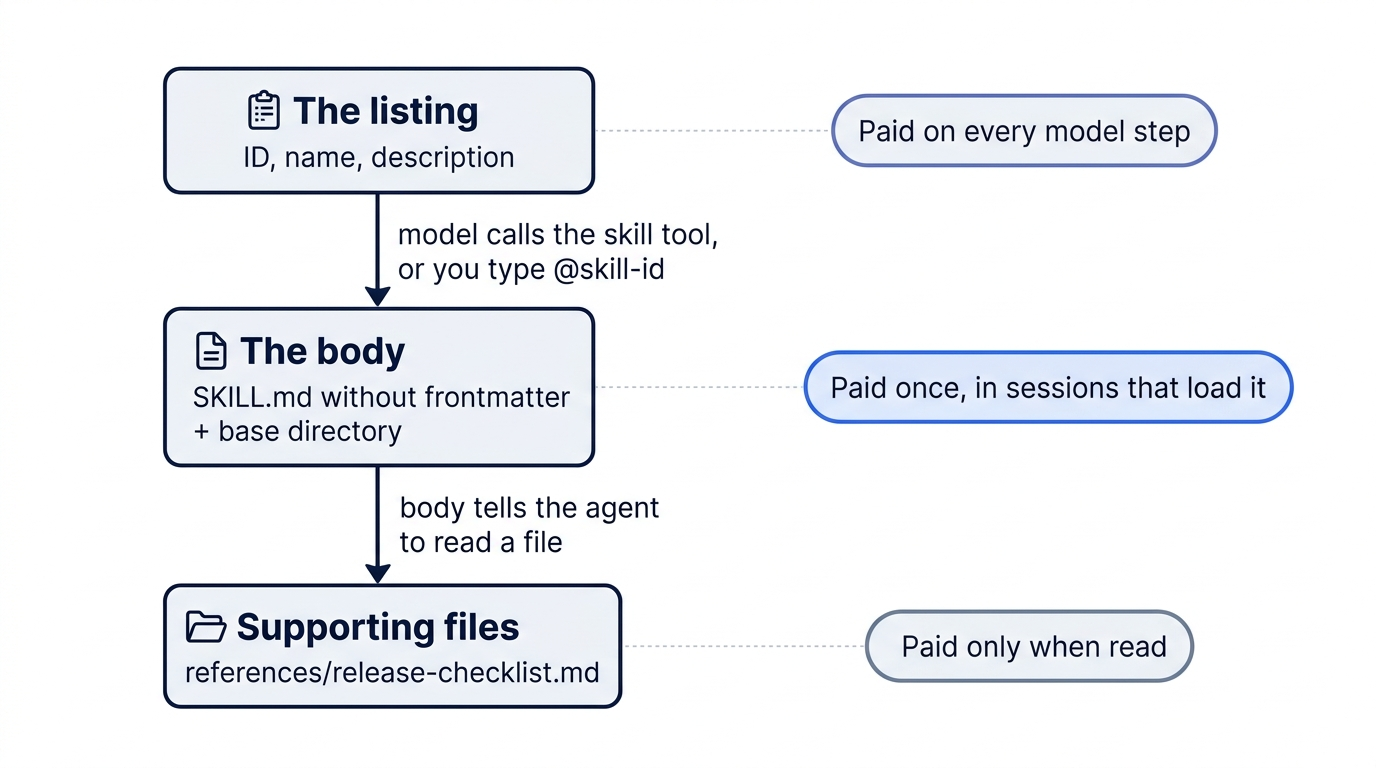
- The listing. On every model step, OpenCode sends the model one short entry per skill: its ID, its name, and its description. It does not send the rest of the file.
- The body. The instructions below the frontmatter. They reach the model only when the model calls the
skilltool with that skill's ID, because the request matches the description.
The description does the routing. The model reads it on every step and decides whether today's request needs the skill. The rule for the rest of the series is simple: a rule for every task goes in AGENTS.md, and a long procedure for one kind of task goes in a skill.
Write the release-notes skill
OpenCode finds project skills in .opencode/skills/, with no config entry needed. A skill is a folder there that holds a file named exactly SKILL.md, and the folder name is the skill's ID, the name the model passes to the skill tool. The skill has three files. The body is a short workflow, a script does the git work, and a checklist sits in a reference file the body points at. Create the folders first.
cd ~/code/ticket-triage
mkdir -p .opencode/skills/release-notes/scripts .opencode/skills/release-notes/references
Now write the body. Keep it short, because once the model loads it, it stays in the conversation.
$EDITOR .opencode/skills/release-notes/SKILL.md
Paste this into it.
---
name: Release Notes
description: Draft release notes from git history and prepare a release. Use when the user asks for release notes, a changelog, or to prepare or cut a release.
---

# Workflow

1. Run `scripts/changelog.sh` to list the commits since the last tag.
2. Group the commits under Added, Changed, and Fixed. For a classifier change, name the ticket category it affects: refund, shipping, or other.
3. If the user asked to prepare a release, not only for notes, read `references/release-checklist.md` and follow it step by step.
4. Show the draft to the user. Do not write `CHANGELOG.md`, edit `package.json`, or create a tag until the user approves.
The frontmatter has two fields. name is a display label for people. description is the only text the model sees before it decides, so it says what the skill does and when to use it, in the words a request would use: "release notes," "changelog," "prepare a release." Paths inside a skill "are relative to the directory containing SKILL.md." Step 3 reads the checklist only for a real release, so a request for notes never loads it. Step 4 is the safety line: the version bump and the changelog wait for your yes.
The script lists the commits. It falls back to the full history when the repository has no tag yet, which is the case in Ticket Triage.
cat > .opencode/skills/release-notes/scripts/changelog.sh <<'EOF'
#!/bin/sh
# Prints commits since the last tag, or all commits when no tag exists.
last=$(git describe --tags --abbrev=0 2>/dev/null)
if [ -n "$last" ]; then git log --oneline "$last"..HEAD; else git log --oneline; fi
EOF
chmod +x .opencode/skills/release-notes/scripts/changelog.sh
The checklist is the long procedure the skill keeps out of AGENTS.md. Ticket Triage's is short; a real team's may run to hundreds of lines.
printf '%s\n' '# Release checklist' '1. Run npm test and confirm every test passes.' '2. Bump the version in package.json.' '3. Add an entry at the top of CHANGELOG.md.' '4. Tag the commit vX.Y.Z.' > .opencode/skills/release-notes/references/release-checklist.md
The skill folder should now look like this.
.opencode/skills/release-notes/
├── SKILL.md
├── references/
│   └── release-checklist.md
└── scripts/
    └── changelog.sh
Prove it loads only when the task matches
A skill that loads on every task is a slower AGENTS.md. Check that the model reaches for it only when the request matches the description. Two headless runs do it: opencode run commands with no full-screen interface. --format json prints the run as one JSON event per line instead of text, and each tool call is one event that names the tool. --archived marks the session as archived, because it is only a test. grep -o keeps just the tool names. The model is the one you connected in Part 1, google/gemini-4-hydrogen (tested on OpenCode 2.3.0 on November 16, 2026).
The first prompt is an ordinary question that has nothing to do with releases.
opencode run -m google/gemini-4-hydrogen --format json --archived "Which category does classify() return for 'The lid arrived dented'? Read the code; do not change any file." | grep -o '"tool":"[a-z_]*"'
You should see read, grep, or glob calls and no skill call. The tested run printed three lines.
"tool":"glob"
"tool":"read"
"tool":"read"
The listing line was in the request, and the model passed over it. The second prompt matches the description.
opencode run -m google/gemini-4-hydrogen --format json --archived "Draft release notes for the commits since the last tag. Do not write any file." | grep -o '"tool":"[a-z_]*"'
This time the first line should be the skill tool. Its event carries the input {"id":"release-notes"}, the skill's ID.
"tool":"skill"
"tool":"glob"
"tool":"read"
...
More read and shell lines follow. The model tries to run the script, and Part 4's shell * ask rule stops it: a headless run cannot ask you, so it rejects the call. The skill loaded, and Part 4's rules still decided what it could run. In the tested run, the model then read the git history with tools the rules allow and printed draft notes. Run the same request in the TUI when you want real notes, and approve the script once.
Last, check that nothing was written.
git status --short
The only line is the new skill folder.
?? .opencode/skills/
Today's win is the pair of tool lists: no skill in the first, skill first in the second, and a tree whose only change is the folder you created. Commit the skill.
git add .opencode/skills
git commit -m "Add a release-notes skill"
You can stop here. Going deeper explains why this works and where it breaks.
Going deeper
This section is for readers who want the three costs of a skill, where OpenCode looks for skills and which copy wins, how a skill travels to other agent tools, who may load a skill, and two commands for the prompts you type every day. It assumes you finished Start here in this part and in Parts 1 to 10.
The checklist that rode every request
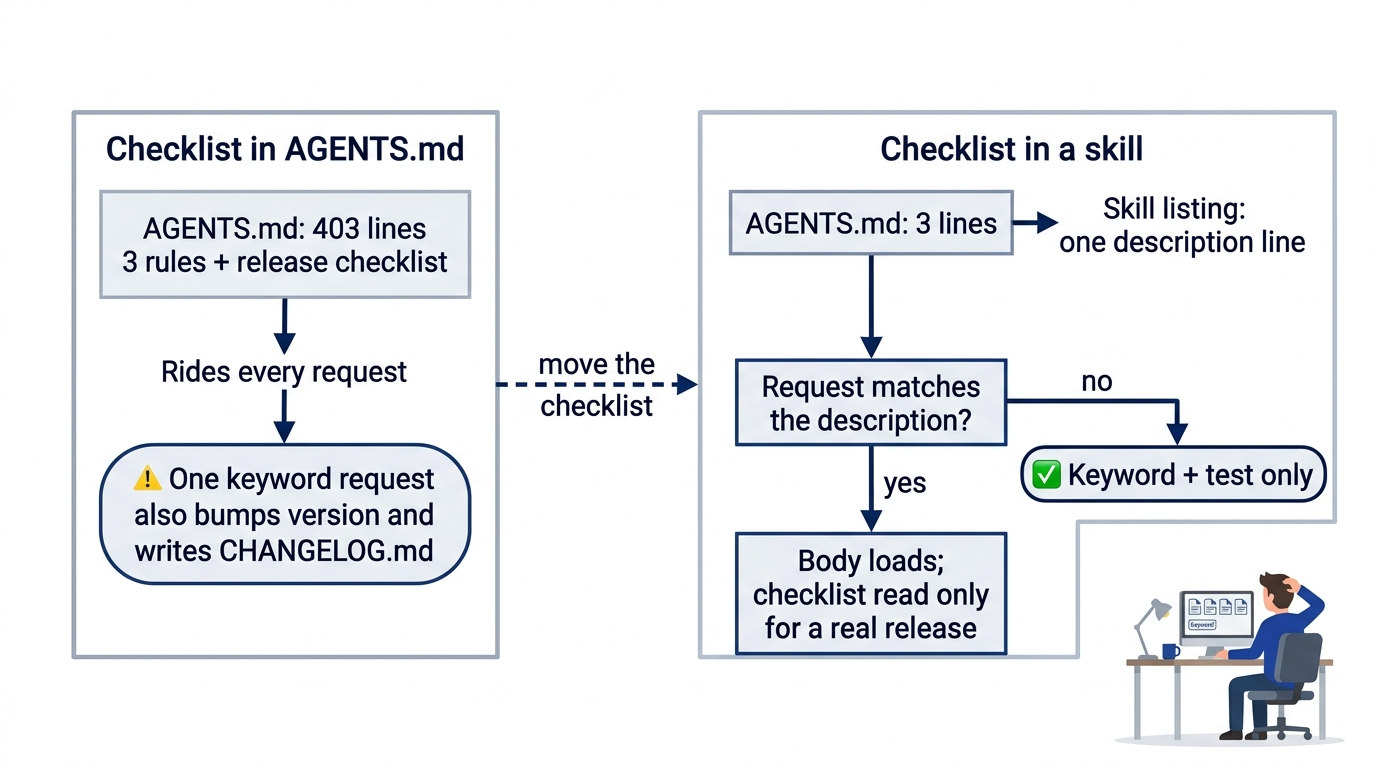
Ticket Triage is a small Node.js service that sorts support tickets into refund, shipping, or other. Its AGENTS.md held three lines. Then the teammate who cuts releases merged a pull request titled "Teach the agent our release process." It appended the team's release checklist: about 400 lines on changelog format, version bump rules, tag names, smoke tests for each ticket category, and who to notify. The three rules became lines 1 to 3 of 403.
On Monday you ask the agent for a small change: add "smashed" as a damage keyword, with a test. It adds the keyword, adds the test, and runs npm test. Then it keeps going. It bumps the patch version in package.json and writes a new entry at the top of CHANGELOG.md, because step 112 of the checklist says every change under src/ gets a changelog line and a version bump. You asked for one keyword and got four changed files. The scenario is illustrative, not a recorded run, but the mechanism is documented: every line of AGENTS.md rides every request, and the model reads an instruction file as instructions, whether or not the task in front of it is a release.
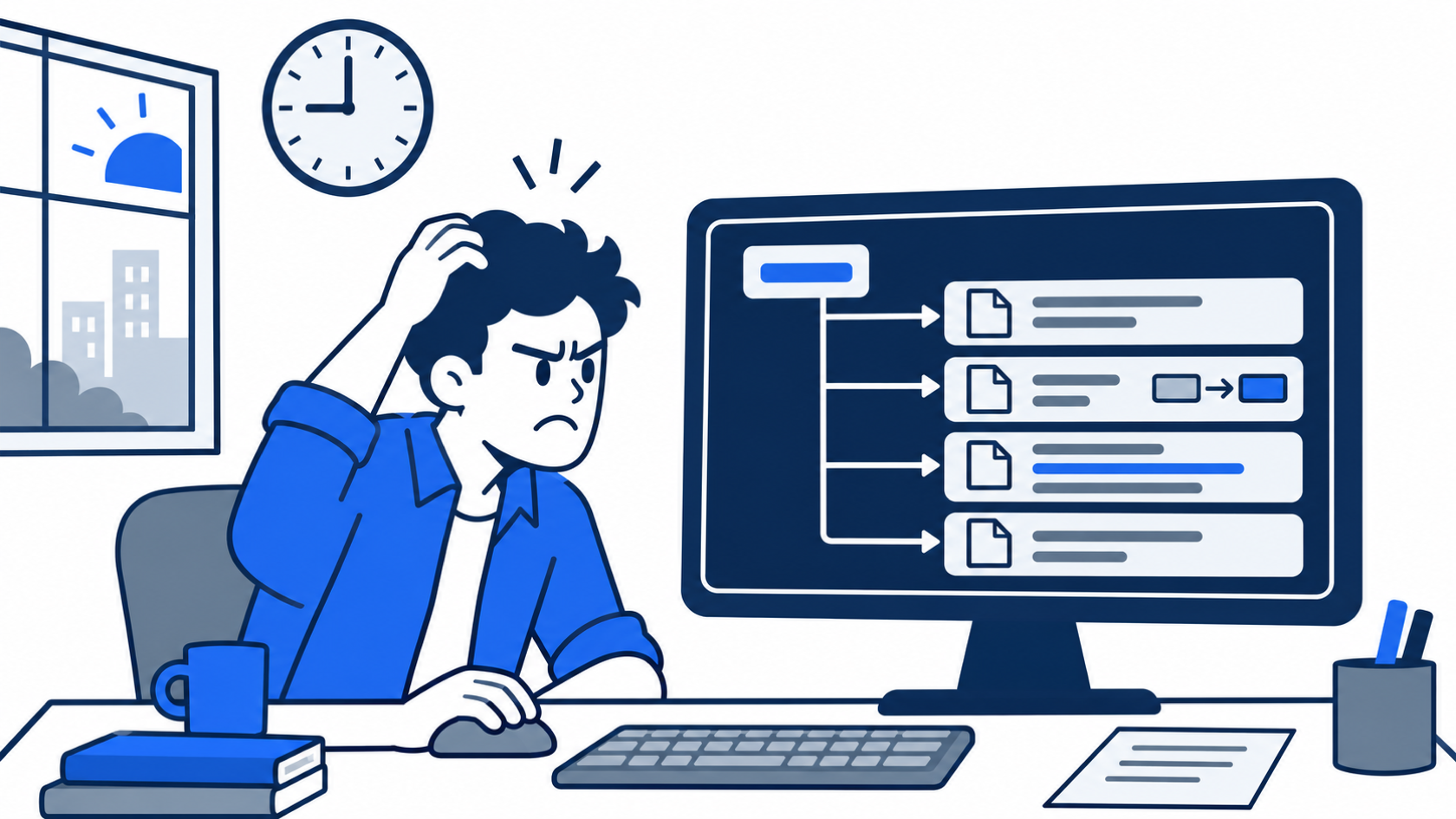
The scene captures the moment the diff comes back: one requested keyword, plus a version bump and a changelog entry that belong to a release nobody started.
The checklist is not wrong. It is right for one task a week and noise for every other task, and AGENTS.md cannot tell the difference, because it has no "when." An OpenCode skill gives it one, a command turns a daily prompt into one word, and the reason OpenCode keeps the two apart is the most useful thing to understand about either.
A skill comes in three layers, at three prices
A skill is a folder of instructions that OpenCode advertises cheaply and loads on demand, and the advertisement is short on purpose. "At each model step, OpenCode lists permitted skills that have a description and do not set opencode/autoinvoke to false. The list includes only the ID, name, and description, not the full Markdown body." Each layer after that loads later than the one before it.
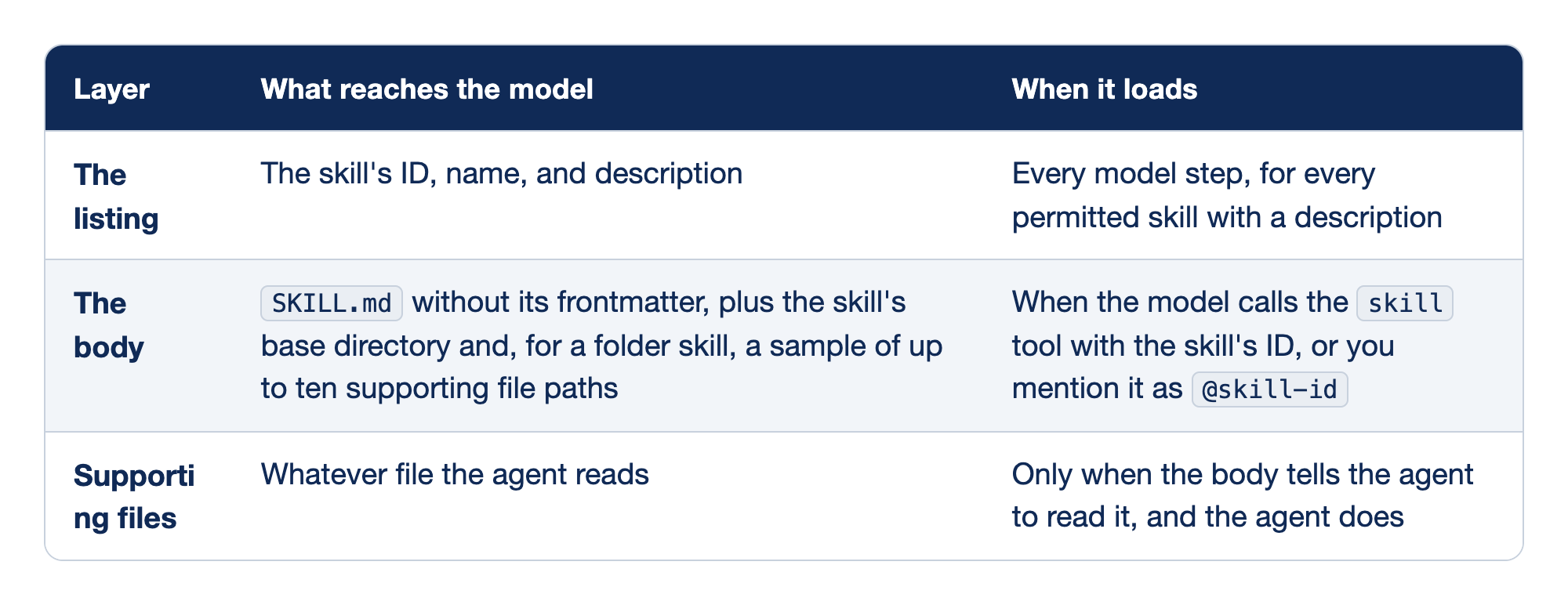
Read the three layers as a price list. The "Layer" column names each part of a skill, "What reaches the model" says which text is sent, and "When it loads" says what has to happen before you pay for it. The first layer is a recurring charge; the other two are one-time charges that land only in sessions that need them.
- The listing sends one line per skill on every step, about the price of one rule in
AGENTS.md. Forty skills cost forty lines, so the listing is where skill sprawl shows up on your bill. - The body loads when the model calls the
skilltool or you type@skill-id. OpenCode checks the agent'sskillpermission first, and the body then stays in the conversation like any other message. - Supporting files load only when the body directs the agent to read them: "Supporting file contents are not loaded automatically." The 400-line checklist goes here, so it reaches the model only on the day someone prepares a release.
The tool docs add one constraint on loading: "The ID must be in the advertised skill list or explicitly named by the user." The model cannot load a skill it was never shown unless you name it.
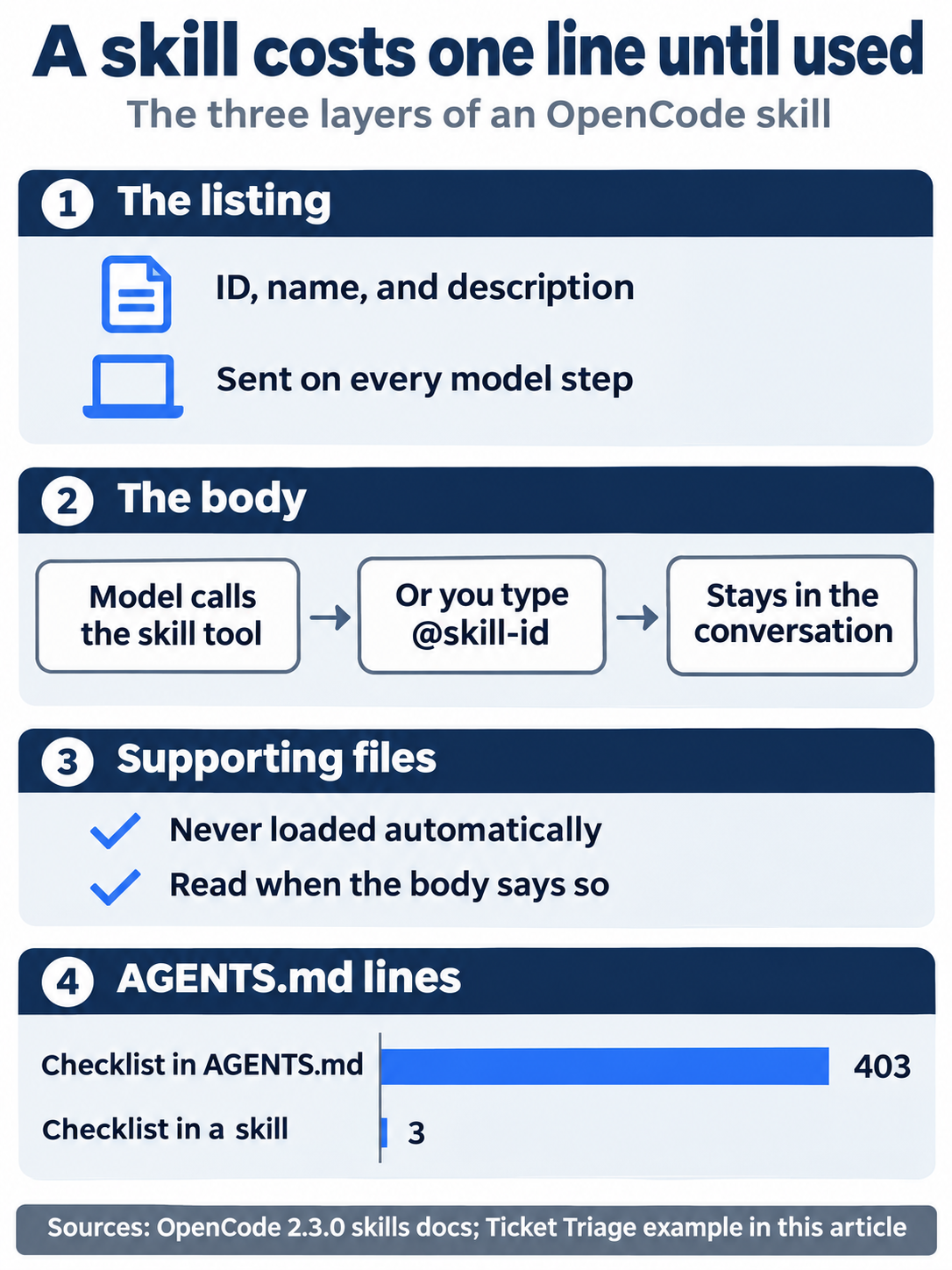
The price list is short: one description line on every step, a body that loads only on a match, files that load only when the body asks, and an AGENTS.md that shrinks from 403 lines to 3 once the checklist moves out.
Where OpenCode finds skills, and which copy wins
OpenCode finds skills by folder name, with no config entry needed: ~/.config/opencode/skills globally and .opencode/skills in the project. It also reads the folders other agent tools use, ~/.claude/skills, ~/.agents/skills, .claude/skills, and .agents/skills. A repository's CLAUDE.md does not reach OpenCode, but its skills do. Project sources are searched "from the current directory up to the project root," so a monorepo can keep skills beside the package that needs them.
A source accepts a flat file such as skills/review.md or a folder with a file named exactly SKILL.md. Use the folder form whenever the skill has anything besides instructions, because "it gives supporting files a private base directory." Extra sources, including HTTP catalogs, go in a skills array in opencode.jsonc. V1's separate skills.paths and skills.urls are now that one array, as the migration guide notes. OpenCode also ships two built-in skills: in the author's 2.3.0 tests, every skill list included opencode, for questions about OpenCode itself, and report, for filing an OpenCode bug report.
The frontmatter name is only a display label. The ID, the string the model passes to the skill tool and permission rules match, comes from the path: <source>/git-release/SKILL.md has the ID git-release, and <source>/teams/release/SKILL.md has the ID release. IDs are exact and case-sensitive, so use a lowercase kebab-case ID that matches the folder name.
Two skills with the same ID do not merge. "The source registered later supplies the skill that OpenCode loads," and sources register from lower to higher precedence.
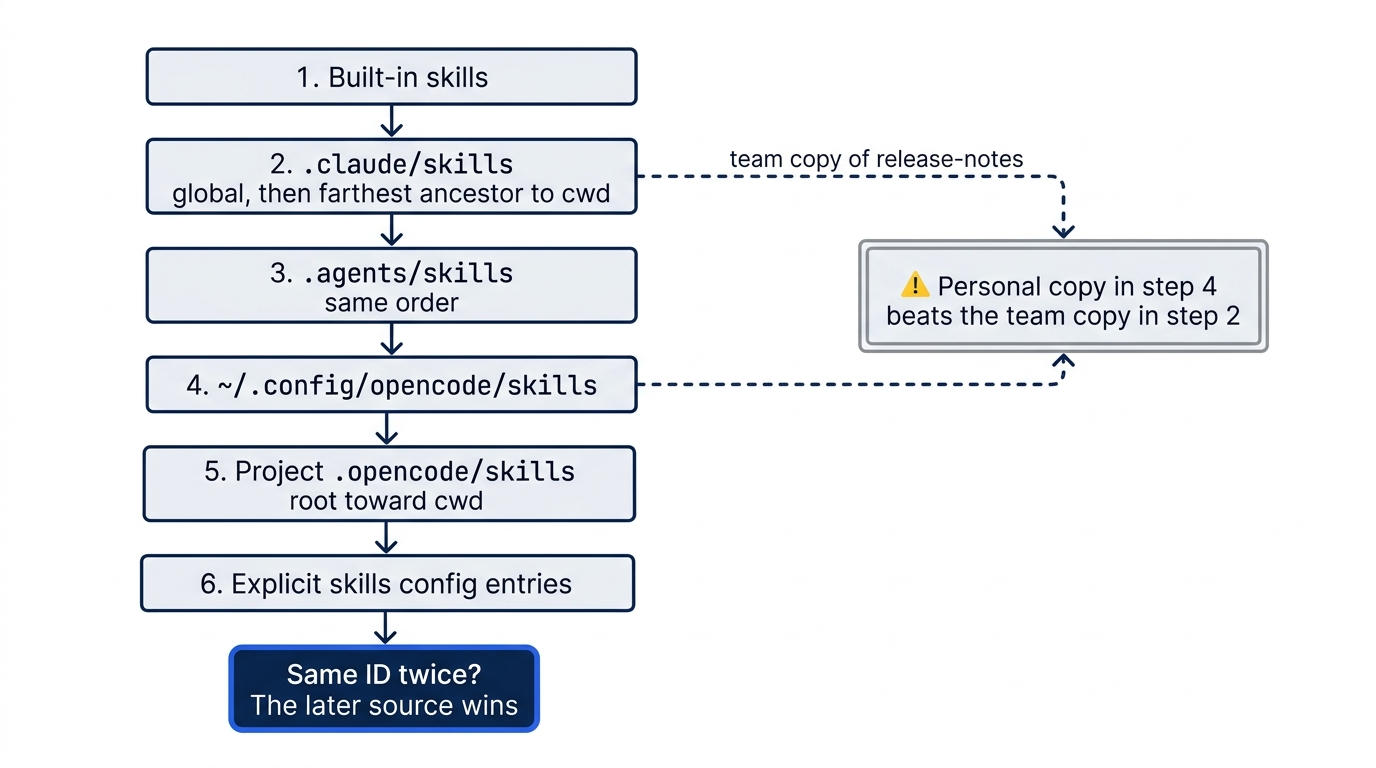
Gotcha: the order is by tool family, not by global versus project. A skill in your personal ~/.config/opencode/skills beats a team skill with the same ID in the repository's .claude/skills. If a teammate's agent follows the team's procedure and yours follows an old personal copy, look for a duplicate ID before you blame the model.
The frontmatter is short: a name for people, a description for the model, and two switches that take a skill off the list. The description is the only text the model sees before it decides, so write it as a routing rule in the words a request would use. "Skills without one are not advertised." Setting metadata.opencode/autoinvoke: false removes the listing line, yet "the skill remains registered and can still be loaded explicitly by ID." disable-model-invocation: true has the same effect under the name other agent tools use.
Skills that travel: Agent Skills and Agent Plugins
Two open standards decide where a skill can go besides OpenCode. Agent Skills is the format this chapter already uses: a folder with a SKILL.md, loaded on demand. Agent Plugins 1.0 packages skills with other parts: a root plugin.json, in which only $schema and name are required, a skills/ folder, and an mcp.json. Vendor-specific parts of a package live in a reverse-domain folder, such as com.github.copilot/ for GitHub Copilot, and other tools ignore that folder. Four questions decide how well OpenCode fits a team that uses more than one agent tool.
- Which skill folders does OpenCode read, and which duplicate wins?
.opencode/skills,.claude/skills, and.agents/skillsin the project, plus their global twins, as the previous section lists. Duplicate IDs do not merge; the source registered later wins, in the order of the previous section. - Does OpenCode load an Agent Plugins folder? No. The author's 2.3.0 test on November 16, 2026, built a small package with a
plugin.json, askills/greet/SKILL.md, and anmcp.jsonwith one server. It placed the package in.opencode/plugins/hello-ap/in one project and named it in thepluginsarray ofopencode.jsoncin another. In both, the model's skill list had nogreetand its tool list had no MCP tools. Pointing theskillsarray at the package'sskills/folder did loadgreet, and the MCP server worked only when rewritten as anmcp.serversentry. Two feature requests for native support, #40993 and #41561, are closed as not planned. - How does OpenCode handle vendor-specific extensions? Through its own formats, not a reverse-domain folder. OpenCode plugins use OpenCode's own plugin API and load from
.opencode/plugins/or thepluginsarray, as the plugins page describes. Inside a skill, OpenCode's own field carries its name as a namespace,metadata.opencode/autoinvoke, and OpenCode also reads the shareddisable-model-invocationfield. Because OpenCode does not load an Agent Plugins package at all, a vendor folder inside one is never read. - Does the series' shared skill load? Yes, once. The author's portability check on November 16, 2026, put
release-notesin.agents/skills/release-notes/, added.claude/skillsas a symlink to.agents/skills, and askedgoogle/gemini-4-hydrogen, in a one-shot--standalonerun with no tools, to list every skill it could load.release-notesappeared once, beside the two built-in skills. A real copy in.claude/skillswith a different description also gave one entry, the.agents/skillscopy, because that source registers later. A matching request then loaded the skill from.agents/skills. The plugin half of the check is the answer to question 2: the package does not load.
The same four questions have different answers in other tools.
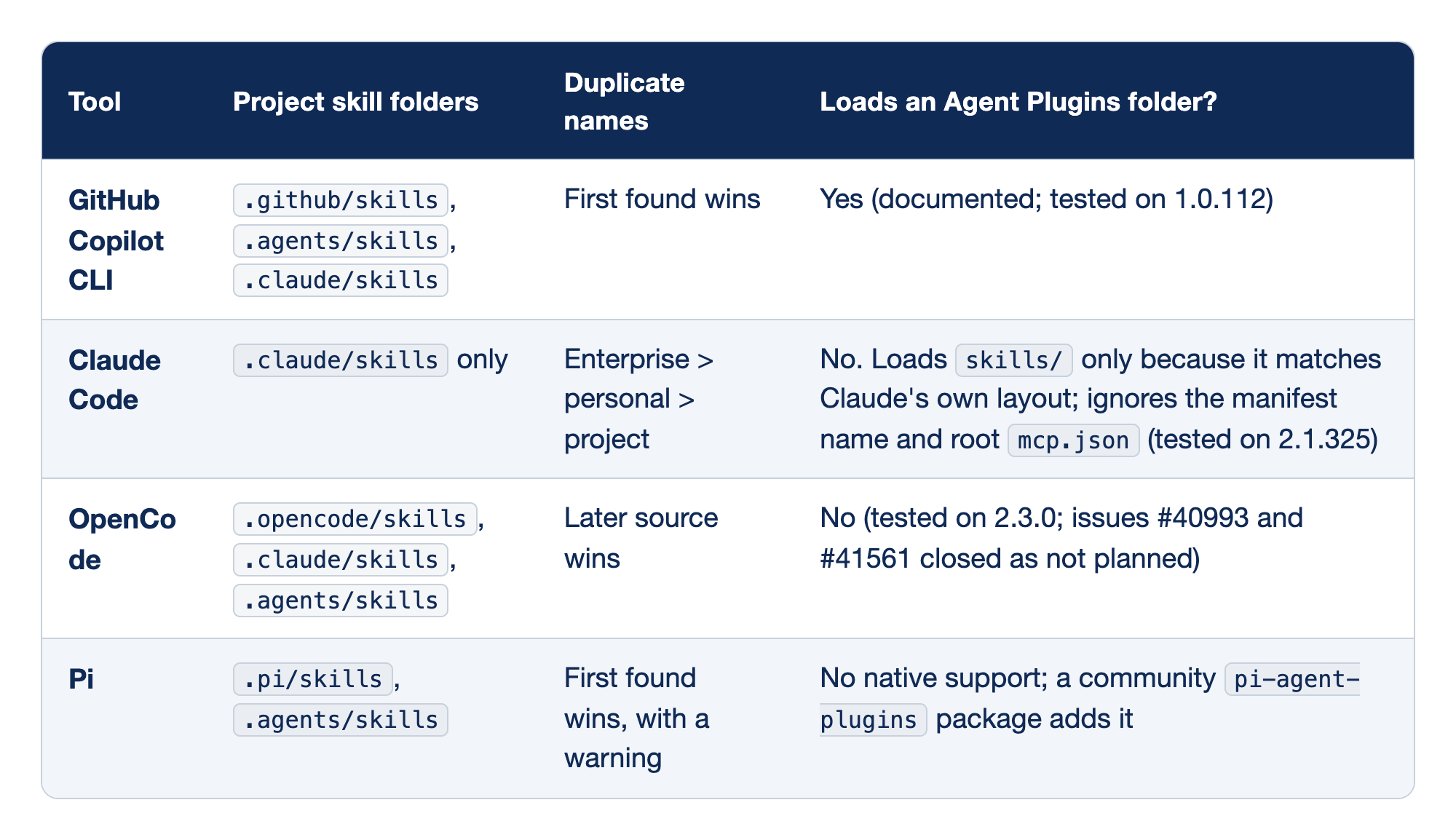
The rows were checked on November 16, 2026, against the Copilot CLI plugin reference, Claude Code's skills page, OpenCode's skills page, and Pi's skills docs, Pi's configuration docs for .pi/skills, the pi-agent-plugins package. The Copilot and Claude Code test results come from the companion guides' runs on those versions.
- GitHub Copilot CLI reads three project folders and keeps the first skill it finds with a given name. It loads an Agent Plugins package natively.
- Claude Code reads
.claude/skillsin the project. A personal skill beats a project skill with the same name, and an enterprise skill beats both. It does not load an Agent Plugins package as one; askills/folder works only because Claude Code's own plugin layout uses the same name. - OpenCode reads three project folders, and the later source wins a duplicate name. It does not load an Agent Plugins package.
- Pi reads
.pi/skillsand.agents/skills, keeps the first skill it finds with a given name, and warns about the second. Agent Plugins support comes only from a community package.
The setup that works across all four: keep shared skills in .agents/skills, which Copilot, OpenCode, and Pi read, and add a .claude/skills symlink to it for Claude Code. Avoid duplicate skill names across folders, because the tools resolve them in opposite directions: OpenCode keeps the later source, and Copilot and Pi keep the first. For plugins, author an Agent Plugins 1.0 package for the tools that support it, and ship each tool's native format beside it. For OpenCode, the native format is a plugin in .opencode/plugins/ and an mcp.servers entry. Part 14 writes the plugin.
Move the checklist out of AGENTS.md
Start here wrote the skill with a five-line checklist. The 400 lines from the Monday story belong in the same reference file. Cut them out of AGENTS.md and paste them into the reference file.
$EDITOR AGENTS.md
$EDITOR .opencode/skills/release-notes/references/release-checklist.md
wc -l AGENTS.md
wc -l should report 3, and the cut applies from the next request without a restart. Step 3 of the body is progressive disclosure inside the skill: notes need only the commit list, and the 400 lines load only for a real release. Step 4 is the line the Monday request was missing, because the version bump and the changelog now wait for a yes.
A skill's script is not exempt from your permission rules. The agent runs it with the shell tool, and the shell rule matches the command string the model sends, not the commands inside the script. In the Start here run, the model sent bash .opencode/skills/release-notes/scripts/changelog.sh; another run, with the skill in .agents/skills, sent the path alone, so a saved approval for one form may not match the other. Ticket Triage asks before every shell command (a shell * ask rule), so OpenCode asks the first time. The script runs with your full authority, so review a skill's scripts in a pull request the way you review code.
More ways to check a skill
For discovery, the 2.3.0 command list includes /skills, and the keybinds page lists a prompt.skills binding ("Open skill selector") with no default key. If release-notes is missing, check the usual causes: the file name, an ID that comes from the path, a missing description, an agent skill rule that hides it, or a later source with the same ID.
Start here's two runs used grep -o to keep only tool names. Use grep tool_use instead to see each whole event, including the skill tool's input {"id": "release-notes"}. In the matching run, the script's shell * ask became an automatic reject, and the model read the git history with the read tool and the allowed git diff instead. The runs were recorded on 2.3.0 with google/gemini-4-hydrogen; a model may choose differently on a vague prompt.
You can also skip the model's judgment. The skills page says, "To load a skill yourself, mention it in your prompt as @skill-id."
@release-notes draft the notes for this week, Fixed section only
The series has not yet confirmed this syntax on a model-backed 2.3.0 run, so if the mention does nothing on your release, name the skill in plain words and check the transcript for the skill call.
Who may load which skill
Loading a skill is a permission check like any other, as the permissions page describes. The action is skill, the resource is the skill ID, and the last matching rule wins. allow "advertises and loads matching skills without approval," ask "advertises matching skills and asks before loading them," and deny "hides matching skills from the model and rejects loading," which also removes the listing line for that agent. Ticket Triage needs no new skill rule. For a skill with more at stake, such as a deploy procedure, one rule placed after any broader skill rule turns loading into a question.
{ "action": "skill", "resource": "release-notes", "effect": "ask" },
Commands are the prompts you type every day
A skill is the model's choice. A command is yours. The commands page puts it simply. Create .opencode/commands/verify.md and you have /verify; type it, and OpenCode expands the file's text into a user prompt and submits it. Global commands live in ~/.config/opencode/commands/, and a nested path such as team/review.md becomes /team/review.
The Markdown body is the prompt template. Optional frontmatter accepts description (shown in command lists), agent (the agent selected when the command runs), model, and subagent (run in a background child). A project command replaces a global one with the same name, and OpenCode reloads command files automatically.
In the template, $ARGUMENTS becomes "the complete argument string exactly as entered," and $1, $2, and higher are parsed positions. With no placeholder at all, OpenCode "appends non-empty arguments after a blank line," which both Ticket Triage commands use. The most powerful rule is the shell block. An exclamation mark followed by a backticked command, such as !`git diff`, runs that command and inserts its output "before the prompt is submitted," with argument placeholders expanded first. Stored templates do not expand @path, so attach files through the composer when you invoke the command.
Name your commands with care: "A custom definition can also replace an earlier built-in command." The 2.3.0 binary registers a built-in /review, and a project file named review.md would silently replace it, which is why the command below is /review-diff.
Write /verify and /review-diff
The prompt you type most is some version of "run the tests and tell me what failed." Ticket Triage already has a tester agent with mode: subagent, the test-writing subagent from Part 10's Going deeper. If you skipped it, create it first, or set agent: build and add subagent: true. /verify runs npm test while the command expands and hands the output to tester. Save this as .opencode/commands/verify.md.
---
description: Run npm test now and summarize the result
agent: tester
---

Here is the output of npm test, run when this command expanded:

!`npm test || echo "npm test exited with status $?"`

Report the tests, pass, and fail counts and the name of every failing test.
Do not run the suite again and do not edit any file.
The shell block runs npm test in the project before any model sees anything. The docs say only that the block "inserts its combined output," so the || echo half writes a failure into the inserted text whatever OpenCode does with a nonzero exit status. tester gets the output without spending a tool call and a second test run, and the last line keeps a verification command from turning into a repair job.
The file has no subagent line, yet /verify still runs in a background child. Set subagent: true to always use a child or false to always use the current session; omit it, and the agent's own mode decides. tester is mode: subagent, so /verify gets a child without saying so.
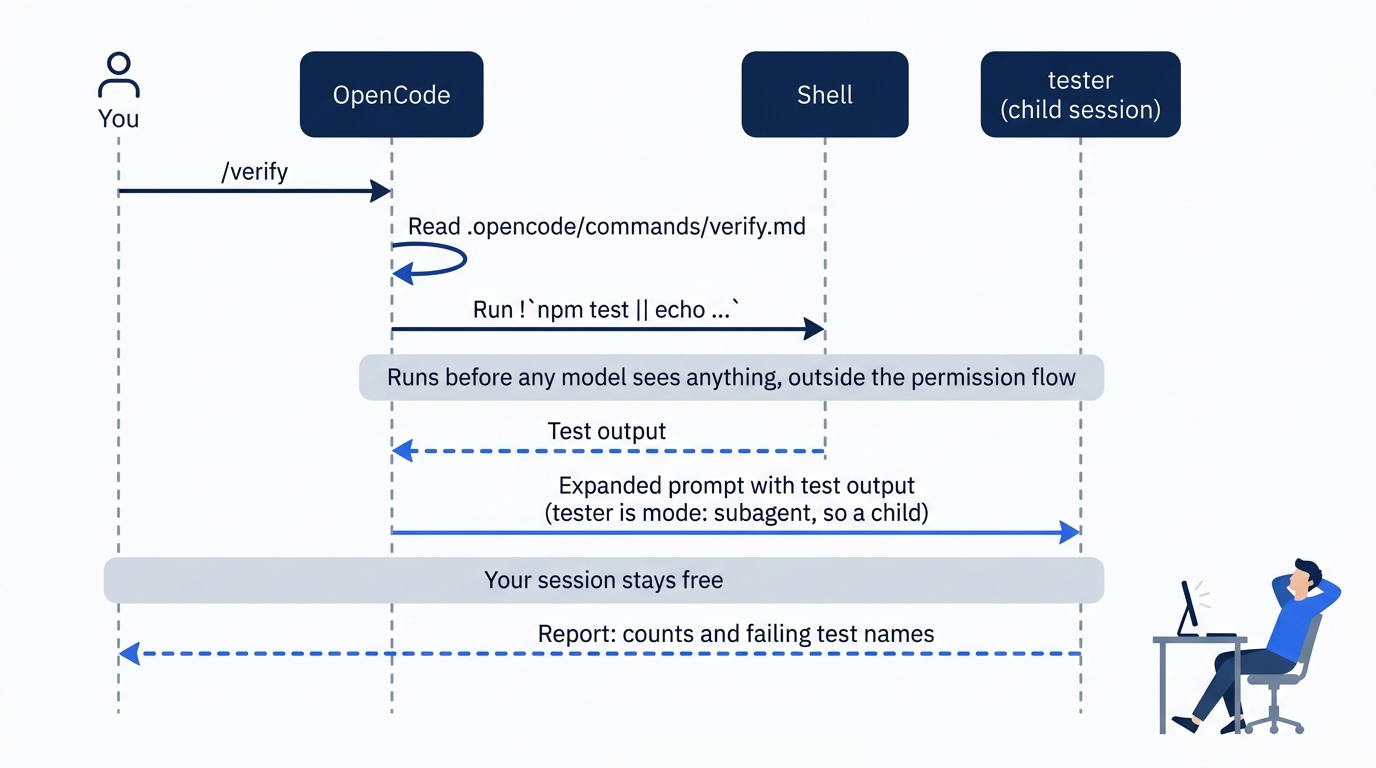
Type /verify in the TUI. On a clean tree the report should give the counts and no failing names. To see the other path, change the expected category in one test of test/classify.test.js from shipping to other, run /verify again, and the report should name that test. Then restore the file. git checkout -- <file> throws away every uncommitted edit to that file, not just the line you broke, and git keeps no copy, so run git diff test/classify.test.js first and commit anything you want to keep.
git checkout -- test/classify.test.js
The second daily prompt is "review what I changed." Save this as .opencode/commands/review-diff.md.
---
description: Review the working-tree changes in a background reviewer
agent: reviewer
subagent: true
---

Review these changes. The status and diff below were captured when this command ran;
read a full file only if the diff is not enough to judge it.

!`git status --short && git diff`
subagent: true is redundant for reviewer, which is already mode: subagent, but it states the intent: this command never lands in your session. The block runs git status --short first because git diff misses untracked files, such as a new test you have not added yet. The status list gives only the new file's name, such as ?? test/extra.test.js, and a new folder appears as the folder alone, so the reviewer reads a new file with its read tool. Anything you type after the name is appended.
/review-diff Check the rule order: a dented lid with a money-back request must still be refund.
Your session stays free while the reviewer reads, and the report arrives as a <subagent> message.
Gotcha: a shell block runs when OpenCode evaluates the command, "outside the agent's tool permission flow." Ticket Triage denies git push *, and that deny stops the agent's shell tool, but a command whose block runs git push pushes the moment you type it, with no ask and no deny. The docs warn, "do not place untrusted arguments inside shell blocks," because a block such as !`git show $ARGUMENTS` hands whatever you or a pasted string supply to the shell. Keep arguments out of blocks, as both commands here do, and treat .opencode/commands/ in a repository you clone as code that runs with your authority.
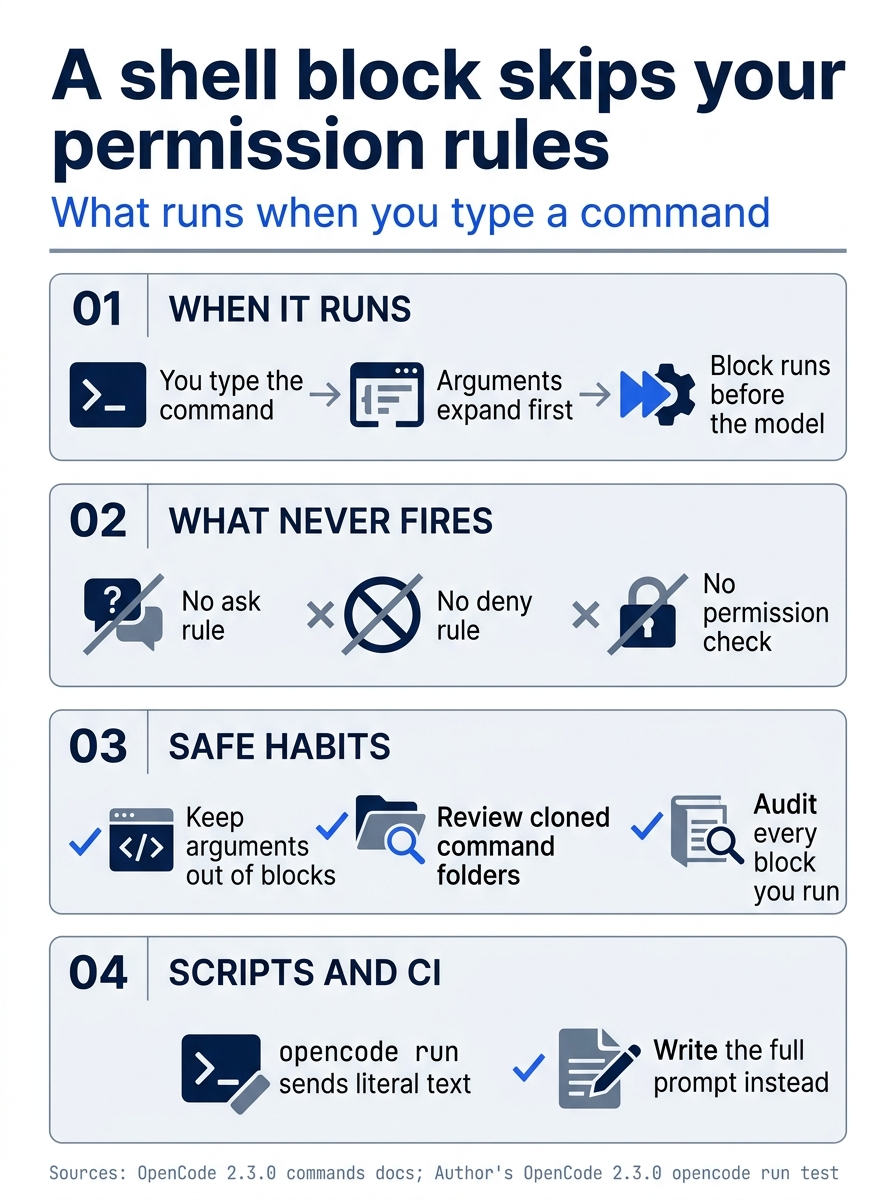
Three habits keep shell blocks safe: arguments stay out of blocks, cloned command folders get a review, and scripts send the full prompt.
Gotcha: commands are a client feature. In the author's 2.3.0 test, opencode run recorded a slash command as literal text, because run does not expand slash commands. In a script or in CI, write the prompt out in full. MCP servers add one more source of commands: each prompt a server exposes becomes a command named <server>:<prompt>, as the MCP servers page shows.
Why OpenCode keeps skills and commands apart
Skills and commands both turn reusable text into something you do not have to retype, and another tool could merge them. OpenCode documents them as two features with different triggers, costs, and trust.
- Who decides. A skill is the model's choice, or yours through
@skill-id. A command is only ever yours; the model cannot type a slash command. - What it costs. A skill pays its listing line on every step. A command's text reaches the model only when you type it.
- What it can run. A skill's scripts run through the agent's
shelltool, under your permission rules. A command's shell block runs before the model is involved, under no permission rule at all. - Where it runs. A command can pick an agent, a model, and a background child. A skill loads into whichever agent called it.
Read together, the split follows the trust. Anything the model can trigger on its own goes through the permission flow, and anything that runs with your authority and no permission check waits for you to type it. If a skill's shell block could fire on the model's choice, the model could route around every rule you wrote; if commands were advertised like skills, every saved shortcut would cost a line per step. This reading is an interpretation of the documented behavior, not a design note from the docs, but it gives you a decision rule.
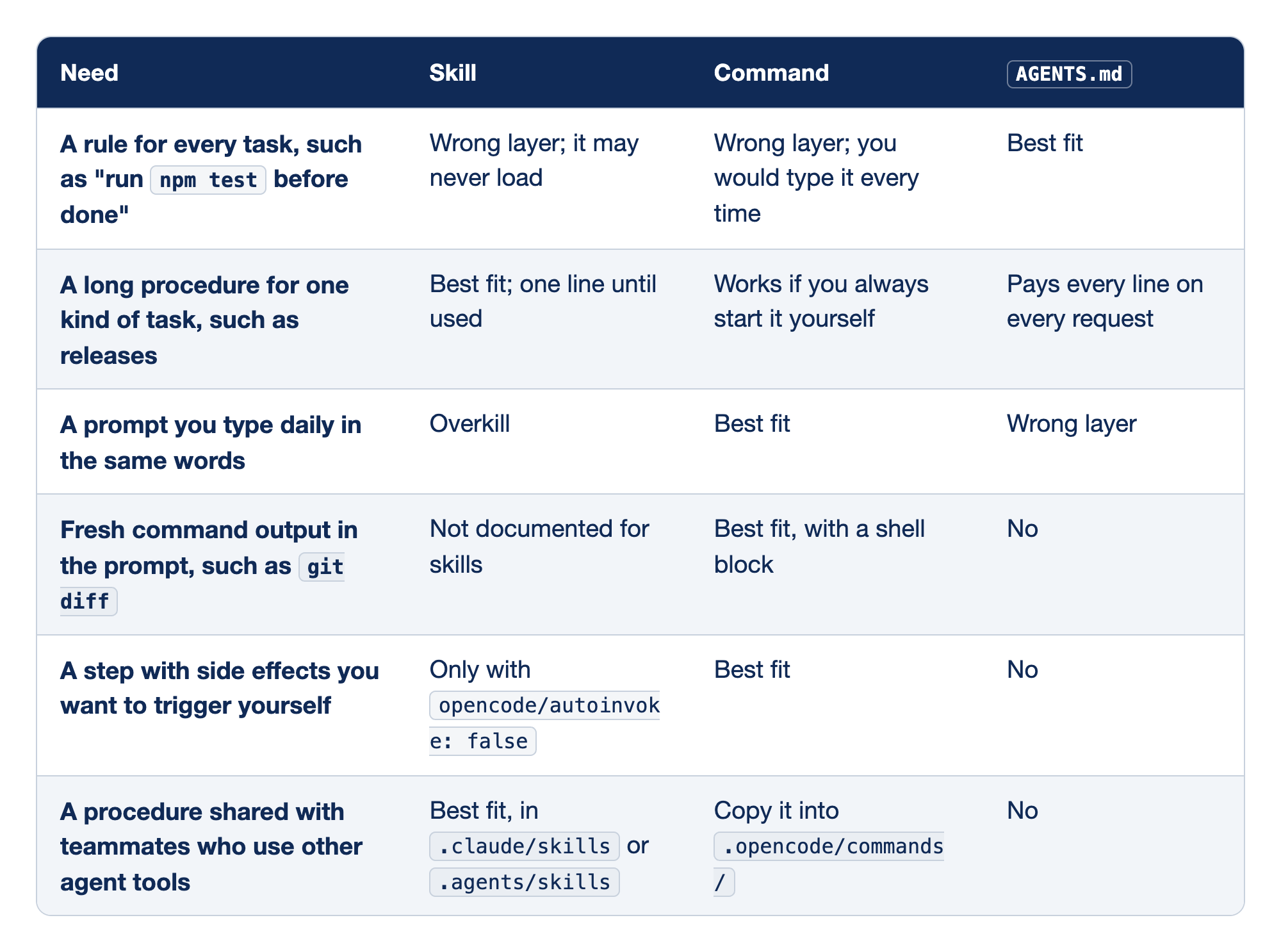
The decision rule matches six common needs against the three places a reusable instruction can live. The "Need" column describes the job, and the "Skill," "Command," and "AGENTS.md" columns say how well each layer fits it, so you find the need and pick the column that says "best fit."
- A rule for every task belongs in
AGENTS.md. A skill may never load, and a rule that loads only sometimes is sometimes missing; a command you would type every time. - A long procedure for one kind of task belongs in a skill, at one line until used. A command works if you always start it yourself, while
AGENTS.mdpays every line on every request. - A prompt you type daily in the same words belongs in a command. A skill is overkill, and
AGENTS.mdis the wrong layer. - Fresh command output in the prompt belongs in a command with a shell block, which skills do not document and
AGENTS.mdcannot do. - A step with side effects you want to trigger yourself, such as cutting a tag, belongs in a command. A skill fits only with
opencode/autoinvoke: false, andAGENTS.mddoes not fit. - A procedure shared with teammates who use other agent tools belongs in a skill in
.claude/skillsor.agents/skills. Commands must be copied into.opencode/commands/, andAGENTS.mddoes not fit.
Most procedures fail the first row's test, and that is the point.
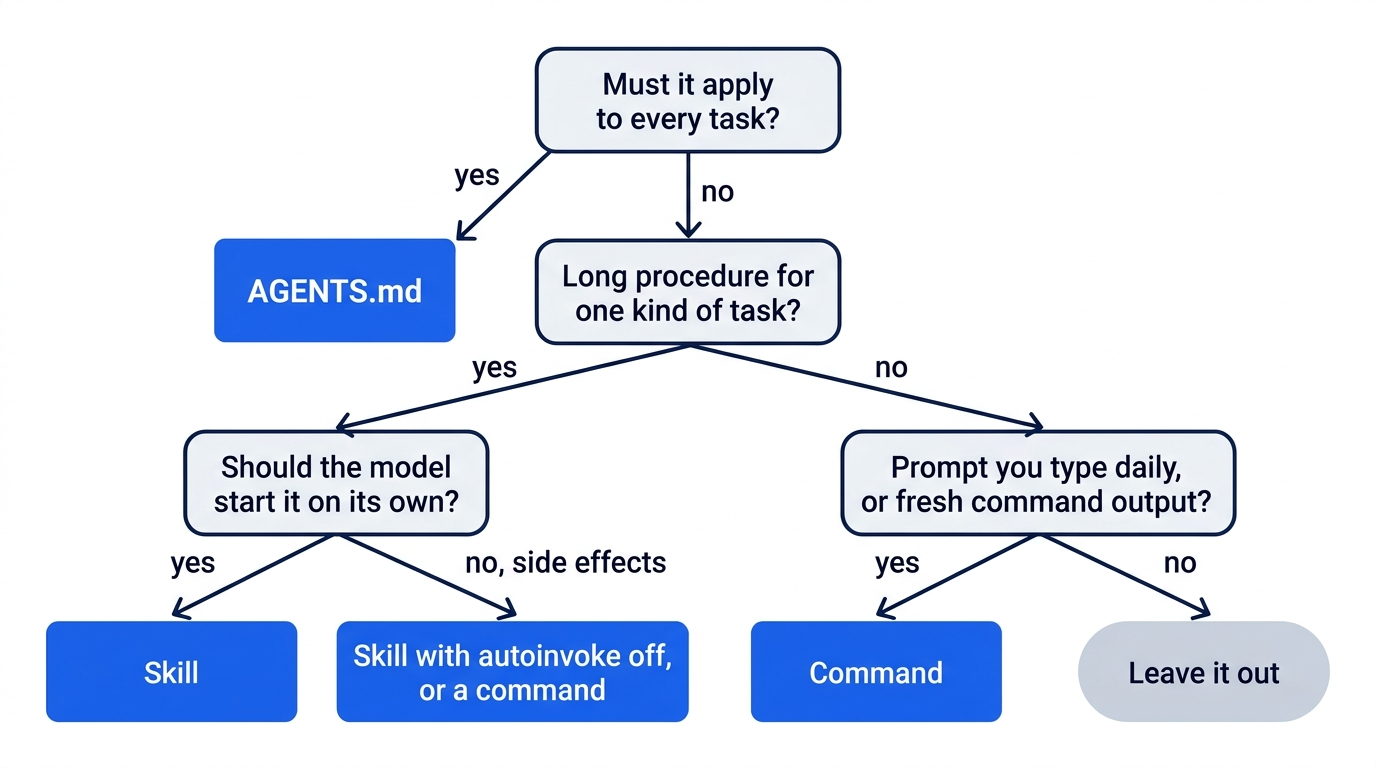
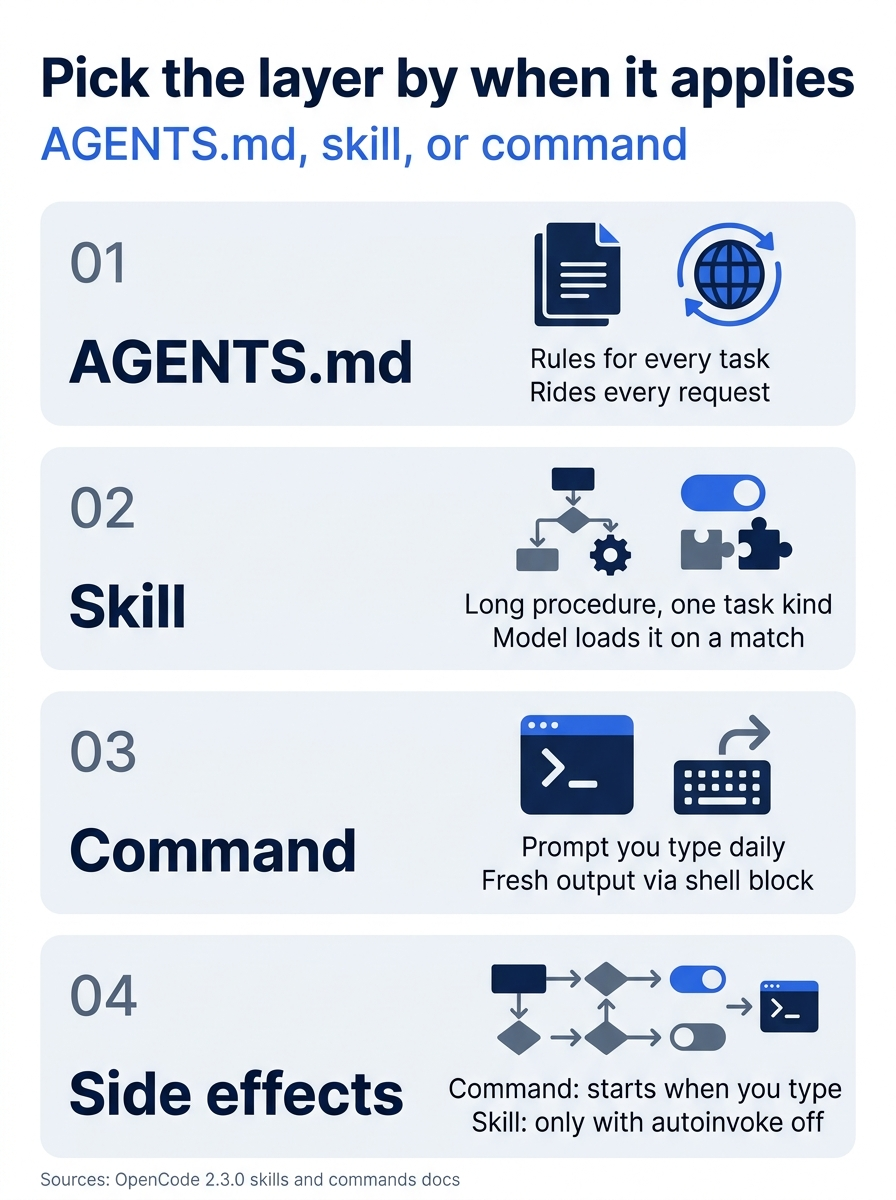
The decision rule has three layers and one tiebreaker: when it applies decides where it lives, and a step with side effects starts when you type it.
If you already use Claude Code: OpenCode reads .claude/skills directly, the SKILL.md shape matches Claude Code's skills, and disable-model-invocation: true carries over. The difference is the slash command. Claude Code turns a skill into /<name>; OpenCode loads it with @skill-id, and your commands belong in .opencode/commands/. OpenCode's skills page also does not document shell blocks inside a skill or ${CLAUDE_SKILL_DIR}, so check any shared skill that relies on either.
Do this today
Everyone
-
Repeat the routing check. In Ticket Triage, run one unrelated prompt and one matching prompt, and look for
skillin the second list only.opencode run -m google/gemini-4-hydrogen --format json --archived "Which category does classify() return for 'The lid arrived dented'? Read the code; do not change any file." | grep -o '"tool":"[a-z_]*"' opencode run -m google/gemini-4-hydrogen --format json --archived "Draft release notes for the commits since the last tag. Do not write any file." | grep -o '"tool":"[a-z_]*"' git status --short -
Start one habit: ask "every task?" before you grow
AGENTS.md. If only one kind of task needs a new section, write a skill with a description that names that task.
If you read Going deeper
-
Move one long procedure out of
AGENTS.md. Pick the section you use least often, give it a skill folder with a two-sentence description and a short body, and move the long text into a reference file that the body tells the agent to read. Confirm withwc -l AGENTS.md. -
Prove it loads only when it matches. Run one unrelated prompt and one matching prompt through
opencode run --format json --archived ... | grep tool_use, and look for askillcall in the second only. -
Turn one daily prompt into a command. Start with your test command and a subagent-mode agent, keep arguments out of the shell block, and run it once in the TUI.
-
Audit every shell block you can run. Read each one as a command that runs with your authority and no permission rule.
grep -rn '!`' .opencode/commands ~/.config/opencode/commands 2>/dev/null -
Share one skill across tools. Move a shared skill to
.agents/skills, link.claude/skillsto it, and confirm OpenCode still lists the skill once.mkdir -p .agents/skills .claude git mv .opencode/skills/release-notes .agents/skills/release-notes ln -s ../.agents/skills .claude/skills
Give every procedure a "when"
The Monday version bump was not the model misbehaving. It read 403 lines of instructions and followed them, because AGENTS.md has no way to say "only for releases." Moving the checklist into a skill gave it that missing condition: one description line on every step, the body on a match, and the 400 lines only when someone actually cuts a release.
Commands solve the other half. A prompt you type every day becomes one word, with its agent, its child session, and its fresh git diff pinned in a file you can review. The price is trust, because a command's shell block runs with your authority and no permission rule, which is exactly why OpenCode makes you type it.
Keep rules in AGENTS.md, procedures in skills, and daily prompts in commands. Ask of every instruction when it should apply, and put it where that answer is enforced.
This is Part 11 of "OpenCode, Day-to-Day," a 17-part guide to using OpenCode V2 as a daily, provider-neutral coding agent.