
Your agent is fully traced and still ungradeable
Evaluation, red teaming, and the agent optimizer answer three different questions and return three different artifacts, and Foundry ships an unusually complete judging apparatus with no calibration in it, which means the threshold, the dimensions, and the decision to ship stay yours.
Microsoft Foundry evaluation gives you eleven agent evaluators, a red teaming agent, and a closed-loop optimizer. It does not give you the one thing that makes any of them mean something.
Your agent is fully observable and still ungradeable. The trace proves it cited four filings.
In this article: You will learn why evaluation, red teaming, and the agent optimizer are three different capabilities that teams routinely buy as one, how to read the preview labels that decide whether your release gate is production-grade, how to generate a rubric from your own agent and wire it into CI as a gate rather than a dashboard, why trace evaluation is the first-class path for non-Foundry agents rather than a fallback, and where the platform's responsibility ends. By the end you will know exactly which judgments Foundry cannot make for you.
Observability solved a problem and created a sharper one. Your agent emits spans, the spans nest, the waterfall renders, and a week of production traffic sits in your project as a registered dataset. You can watch every step the agent took. You still cannot say whether any of it was good.
Here is the gap, stated as a ticket. The trace proves the brief cited four filings. It does not prove the citations support the claim in the sentence above them. It proves the model called the contract-system tool. It does not prove that was the tool the question needed. It proves the run finished in eleven seconds with a Pass from every guardrail. None of that is quality.
Three separate capabilities close that gap, and the most common mistake in this corner of the platform is buying one while describing another. Evaluation scores outputs against criteria and returns numbers. Red teaming probes for vulnerabilities and returns findings. The agent optimizer proposes configuration changes and returns candidates. A team that wants findings and buys scores ships a dashboard nobody acts on.
This article walks all three on Microsoft Foundry, using a running example from a longer series: a supplier-risk desk that watches supplier news and filings, cross-checks them against internal contracts, and produces a weekly risk brief for procurement directors. Then it draws the boundary that keeps the whole apparatus honest.
Three questions, three artifacts
Pick the capability by the artifact you need, because all three run on the same evaluators and the same datasets, and that shared plumbing is exactly what makes them easy to confuse.
Evaluation answers was it right. You give it a dataset and a set of evaluators. It produces a score per row and an aggregate per criterion, and the output is a number you can put a threshold on. Red teaming answers can it be broken. You give it a target and a set of risk categories. It generates adversarial prompts, applies attack strategies, and produces an Attack Success Rate plus the attack-response pairs that succeeded [VERIFIED-LEARN: includes-concepts-ai-red-teaming-agent-1.md]. The optimizer answers can it be better. You give it a baseline, a dataset, and evaluators. It generates alternative configurations and scores each one, and the output is a ranked list of candidates you choose from [VERIFIED-LEARN: agents-concepts-agent-optimizer-overview.md].
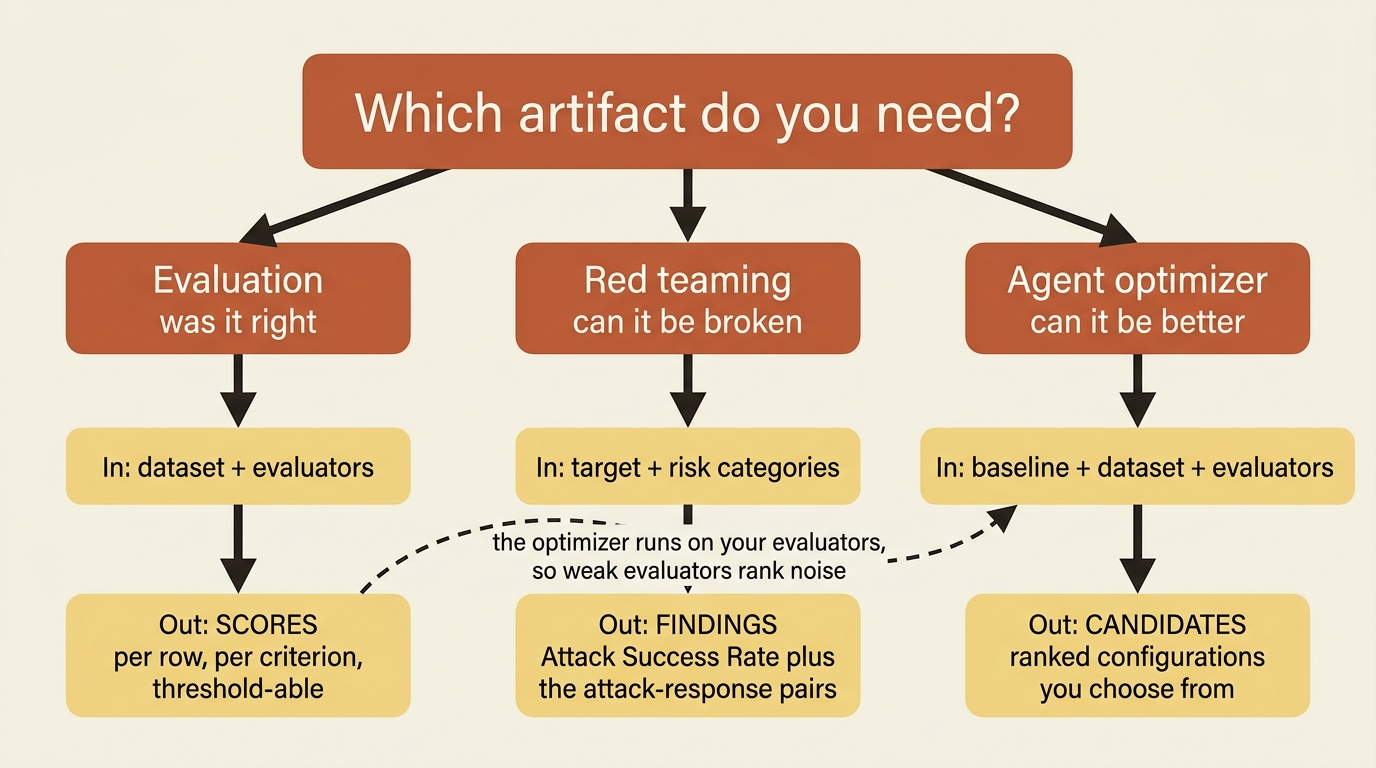
Notice what the third one implies. The optimizer consumes evaluation, so an optimizer run is only as good as the evaluators underneath it. The docs say this plainly, and it is the single most useful sentence in the optimizer track: weak evaluators produce noisy scores that lead to poor optimization, so invest in strong evaluators as much as in representative tasks [VERIFIED-LEARN: agents-how-to-create-optimizer-dataset.md]. Build the evaluation first. Everything else here is downstream of it.
One prerequisite applies to all three and it is not negotiable. Evaluations do not support API keys. The Foundry feature support matrix lists Evaluations with API key support No and Microsoft Entra ID support Yes, alongside the Agents service and Toolbox [VERIFIED-LEARN: includes-concepts-authentication-authorization-foundry-content.md]. An evaluation pipeline authenticates as a principal, which is why the CI wiring later uses federated credentials rather than a secret.
Which evaluators are actually preview
The evaluation surface is generally available. Roughly half the agent evaluators carry a (preview) label, and the difference matters because a preview evaluator is a preview gate on your release pipeline.
Start with the labeling rule, because the banner on these pages is narrower than it looks. The feature-preview include states that items marked (preview) in this article are in public preview [VERIFIED-LEARN: includes-feature-preview.md]. It is not a blanket declaration that the page's subject is preview. Read the per-item labels, not the banner.
Foundry organizes built-in evaluators into seven families [VERIFIED-LEARN: concepts-built-in-evaluators.md].
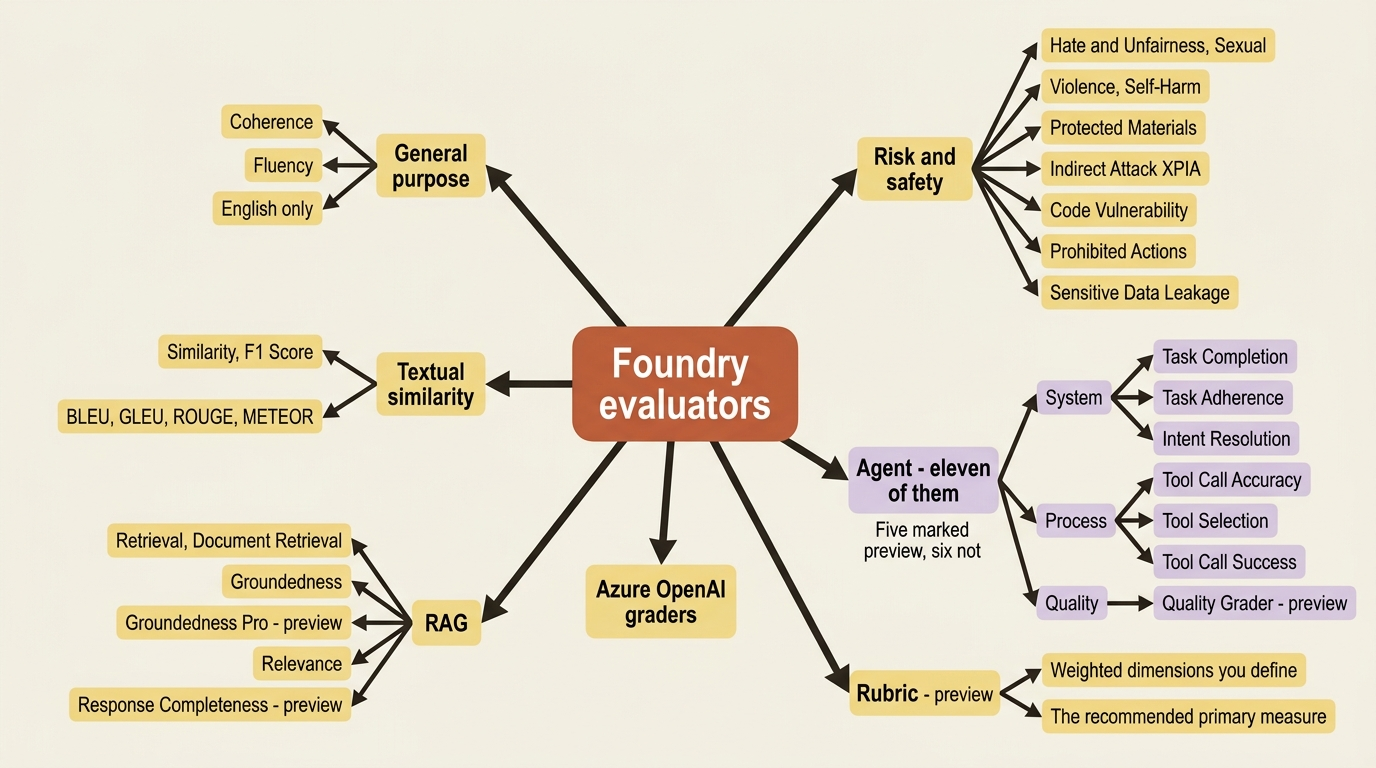
The agent family is the one that matters for agentic work, and it is considerably larger than most summaries of it. The docs split it three ways [VERIFIED-LEARN: concepts-evaluation-evaluators-agent-evaluators.md]. System evaluation examines the end-to-end outcome: Task Completion (preview), Customer Satisfaction (preview), Task Adherence (preview), Task Navigation Efficiency, and Intent Resolution (preview). Process evaluation examines each step: Tool Call Accuracy, Tool Selection, Tool Input Accuracy, Tool Output Utilization, and Tool Call Success. Quality evaluation adds the Quality Grader (preview), which folds relevance, abstention, and answer completeness into one evaluator.
Five of those eleven are marked preview and six are not, a distinction worth carrying into a release conversation. [PERISHABLE: preview labels checked September 2026]
Groundedness deserves a sentence of its own, because it is the evaluator most people expect to find in the agent family, and it is not there. Groundedness and Groundedness Pro are RAG evaluators. The agent-evaluators page says that for textual outputs from agents you can also apply RAG quality evaluators such as Relevance and Groundedness with agentic inputs [VERIFIED-LEARN: concepts-evaluation-evaluators-agent-evaluators.md]. Same evaluator, different family, and the distinction shows up in the data mapping rather than the documentation index.
Two mechanical details decide whether your first run works. Most AI-assisted evaluators need a judge model passed through initialization_parameters, and the data mapping syntax has three forms: {{item.field}} for a field in your dataset, {{sample.output_items}} for the agent's structured output including tool calls, and {{sample.output_text}} for the plain response text. Evaluators that reason about tool use need output_items; evaluators that read prose need output_text.
Gotcha: several tools have limited evaluator support. Avoid tool_call_accuracy, tool input accuracy, tool_output_utilization, tool_call_success, and groundedness when the agent conversation includes calls to Azure AI Search, Bing Grounding, Bing Custom Search, SharePoint Grounding, Code Interpreter, Fabric Data Agent, or Web Search [VERIFIED-LEARN: concepts-evaluation-evaluators-agent-evaluators.md]. The supplier-risk desk has web search and a knowledge base, so two of its evaluators land in that hole. The evaluators still return something. Whether that something means anything is the part nobody checks.
One more constraint bites on the second run rather than the first. Every evaluator declares which evaluation levels it supports, turn or conversation, and all evaluators in a run must support the level you set [VERIFIED-LEARN: concepts-built-in-evaluators.md]. You cannot mix a turn-level tool evaluator with a conversation-level satisfaction evaluator in one run. Two runs, two thresholds.
Generate the rubric, then argue with it
This is where the docs are more opinionated than most readers expect. The recommended primary measure for agent evaluation is a rubric evaluator, a set of weighted scoring dimensions that an LLM judge applies to every response [VERIFIED-LEARN: observability-how-to-evaluate-agent.md]. The argument is that a built-in evaluator measures a dimension Microsoft chose, and a rubric measures the dimensions your reviewers actually argue about. Pair the rubric with built-ins for safety, groundedness, and content harm to cover what the rubric does not measure [VERIFIED-LEARN: concepts-evaluation-evaluators-rubric-evaluators.md].
You do not have to write the rubric from nothing. The service generates one from your agent's context, meaning its name, instructions, and tools, and you review the dimensions before using them.
from azure.ai.projects.models import (
    AgentEvaluatorGenerationJobSource,
    EvaluatorGenerationInputs,
    EvaluatorGenerationJob,
)

job = EvaluatorGenerationJob(
    inputs=EvaluatorGenerationInputs(
        model=model_deployment,  # ①
        evaluator_name="desk-brief-quality",
        evaluator_display_name="Weekly brief quality",
        sources=[AgentEvaluatorGenerationJobSource(agent_name="supplier-risk-desk")],  # ②
    ),
)
poller = project_client.beta.evaluators.begin_create_generation_job(job=job)  # ③
rubric_evaluator = poller.result()

for dim in rubric_evaluator.definition.dimensions:  # ④
    print(f"  - {dim.id} (weight {dim.weight}): {dim.description}")
① This model is the judge that writes the rubric, not the model the desk runs on, so a weak deployment here produces weak dimensions before a single response has been scored.
② The agent source is what grounds the generation. The service reads the desk's name, instructions, and tools rather than inventing criteria from a blank prompt.
③ Generation is a long-running operation, so the call returns a poller and the rubric does not exist until result() returns.
④ Each dimension carries an id, a weight, and a description, and that triple is exactly the shape you edit before the rubric scores anything.
Note: The full extracted listing at code/foundry-hyperscaler/part-14-evaluation-red-teaming-and-the-agent-optimizer/listings/01-generate-rubric-evaluator.py shows the imports, the credential, and the project client construction elided here.
The loop at the end is the important line. A generated rubric is a first draft with opinions in it, and reading the dimensions out loud is how you find the one that scores a tone you do not care about at weight 9.
The pipeline has a documented weighting heuristic worth knowing before you argue with it: exactly one criterion gets a weight of 8 to 10, the most outcome-decisive dimension, and all others get 1 to 6. Your own edits are not constrained by it [VERIFIED-LEARN: concepts-evaluation-evaluators-rubric-evaluators.md]. The judge scores each dimension 1 to 5, and the overall score is the weighted average normalized to a 0 to 1 range.
Generation can also take traces as an input, though not alone: pair them with a Foundry agent, a system prompt, or reference files [VERIFIED-LEARN: concepts-evaluation-evaluators-rubric-evaluators.md]. Production traffic grounds the dataset and the rubric, which is a pattern worth noticing.
With the rubric in hand, the run itself is three objects. Testing criteria bind evaluators to fields, an evaluation defines the schema and acts as a container for runs, and a run sends each query to a target and scores what comes back.
from azure.ai.projects.models import TestingCriterionAzureAIEvaluator

testing_criteria = [
    TestingCriterionAzureAIEvaluator(
        type="azure_ai_evaluator",
        name="Brief quality",
        evaluator_name=rubric_evaluator.name,  # ①
        initialization_parameters={"deployment_name": model_deployment},  # ②
        data_mapping={"query": "{{item.query}}", "response": "{{sample.output_items}}"},  # ③
    ),
    TestingCriterionAzureAIEvaluator(
        type="azure_ai_evaluator",
        name="Task adherence",
        evaluator_name="builtin.task_adherence",  # ④
        initialization_parameters={"deployment_name": model_deployment},
        data_mapping={"query": "{{item.query}}", "response": "{{sample.output_items}}"},
    ),
]
① The first criterion binds the generated rubric by name, which is how a custom evaluator joins a run alongside the built-ins.
② The judge model is passed per criterion through initialization_parameters, so two criteria in one run can be scored by two different judges.
③ {{item.query}} reads a field from your dataset and {{sample.output_items}} reads the agent's structured output including tool calls, which is the form any evaluator that reasons about tool use needs.
④ Built-in evaluators are named with the builtin. prefix and take the same two parameters, so the rubric and the built-in layer into one list rather than into one run each.
Note: The full extracted listing at code/foundry-hyperscaler/part-14-evaluation-red-teaming-and-the-agent-optimizer/listings/02-testing-criteria.py shows the evaluation object the criteria are attached to, elided here.
When the run points at a deployed agent as its target, pin the version explicitly. An evaluation run against "latest" measures whatever shipped this morning, which makes the result unreproducible the moment somebody deploys.
Results come back at two levels: a run level with pass, fail, and error counts broken out per evaluator, and a row level carrying each evaluator's score, label, threshold, and reason, plus a properties.dimension_scores array for a rubric [VERIFIED-LEARN: observability-how-to-evaluate-agent.md]. Read the reason field on failures before you read the aggregate. An aggregate tells you the rate; the reasons tell you whether the judge understood the task.
In production: target-based evaluation invokes your hosted agent directly and works with the Responses or Invocations protocol running synchronous, non-streaming execution. Agents on A2A or Activity, and anything long-running or streaming, are not evaluated this way [VERIFIED-LEARN: observability-quickstarts-quickstart-evaluate-hosted-agent.md]. If a multi-agent split is on your roadmap, the gate you build today has to move to traces before that refactor lands.
Trace evaluation is the path, not the fallback
Evaluating traces instead of replaying requests is the documented route for agents not built on Foundry Agent Service, which makes it the bring-your-own track's first-class path.
The docs are explicit, and it resolves the dual-framework question for the whole topic. Trace evaluation is the recommended approach for evaluating agents not built with the Microsoft Foundry Agent Service, including LangChain and custom frameworks. As long as your agent emits OpenTelemetry spans following the GenAI semantic conventions to Application Insights, trace evaluation can assess its interactions using the same evaluators available for Foundry agents [VERIFIED-LEARN: observability-how-to-cloud-evaluation-deployed-interactions.md].
Read that against the observability parity claim. Both tracks emit the same conventions into the same resource, so evaluation inherits that parity directly: the same spans that made the agent watchable are the input that makes it gradeable, on either track, with no framework-specific evaluator anywhere in the picture.
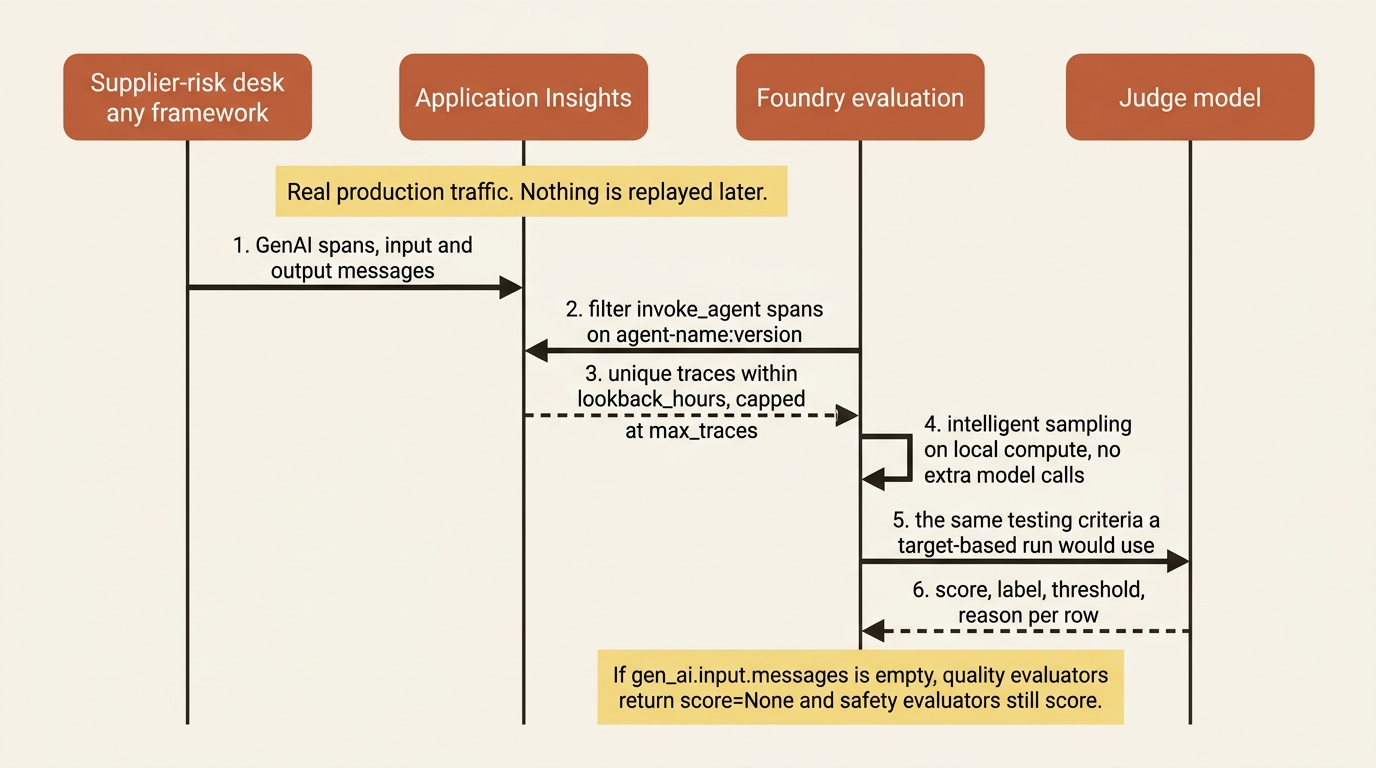
The run takes an agent filter and a lookback window, and the service queries Application Insights on your behalf.
eval_object = openai_client.evals.create(
    name="Desk trace evaluation",
    data_source_config={"type": "azure_ai_source", "scenario": "traces"},  # ①
    testing_criteria=testing_criteria,  # ②
)

eval_run = openai_client.evals.runs.create(
    eval_id=eval_object.id,
    name="desk-trace-eval-run",
    data_source={
        "type": "azure_ai_traces",  # ③
        "agent_id": "supplier-risk-desk:4",  # ④
        "max_traces": 50,
        "lookback_hours": 168,  # ⑤
    },
)
① The traces scenario is the switch that turns this from replaying requests into reading spans already sitting in Application Insights.
② The testing criteria are the same objects the target-based run used, which is the parity claim in practice: one set of evaluators, two input sources.
③ The run's data source names traces rather than a dataset file, so nothing is sent to the agent and no production request is replayed.
④ The agent_id takes the agent-name:version form, and the service filters invoke_agent spans on that attribute before sampling.
⑤ The lookback window is expressed in hours, so 168 is the same seven-day window Part 13's trace-to-dataset job used.
Note: The full extracted listing at code/foundry-hyperscaler/part-14-evaluation-red-teaming-and-the-agent-optimizer/listings/04-trace-evaluation-run.py shows the client construction and the testing criteria elided here.
Two prerequisites are the ones that fail in practice. The project's managed identity needs Log Analytics Reader on the Application Insights resource and its linked Log Analytics workspace, plus Privileged Monitoring Data Reader at the same scopes if the trace tables are set to Protected. A content posture that put AppGenAIContent behind that protection level makes the second grant mandatory rather than optional.
Gotcha: if gen_ai.input.messages and gen_ai.output.messages are empty or missing, quality evaluators including coherence, fluency, relevance, and intent resolution return score=None, while safety evaluators still produce scores that might not mean anything [VERIFIED-LEARN: observability-how-to-cloud-evaluation-deployed-interactions.md]. A team that turned content recording off for privacy reasons and then wired a quality gate on traces has built a gate that returns None and passes everything. Decide the content posture and the evaluation strategy in the same meeting.
Intelligent sampling shows up here too: exact deduplication, hard filters that drop broken sessions and malformed tool calls, aggregation, then iterative selection of the most dissimilar remaining trace. It runs on local compute with no extra model calls, which is why turning it on lowers cost rather than raising it.
A gate, not a dashboard
An evaluation that runs when somebody remembers is a report. Two mechanisms turn it into a gate, one before release and one after, and both are preview.
The pre-release half is a GitHub Action or an Azure DevOps task. The Action is microsoft/ai-agent-evals@v3-beta, the pipeline task is AIAgentEvaluation@2, and they take the same five parameters: the project endpoint, a judge model deployment name, a path to a JSON data file, one or more agent-ids in agent-name:version form, and an optional baseline-agent-id [VERIFIED-LEARN: how-to-evaluation-github-action.md, how-to-evaluation-azure-devops.md]. The workflow logs in with azure/login@v2 and federated credentials, which is the Entra requirement from the top of this article showing up as YAML. There is no API key to leak because there is no API key.
The interesting parameter is agent-ids taking a comma-separated list. Pass two versions and the report adds a pairwise statistical comparison that indicates whether the difference between them is meaningful or within random variation [VERIFIED-LEARN: how-to-evaluation-github-action.md]. Pairwise comparison is what turns a release conversation from "the new prompt scored 0.81 and the old one scored 0.79" into an answer. The docs add one piece of cost advice worth heeding: do not run evaluation on every commit.
The post-release half is a recurring rule. Two shapes exist and they are genuinely different. Scheduled evaluation runs on a fixed schedule through a Schedule with a RecurrenceTrigger. Continuous evaluation samples live traffic as it occurs through an EvaluationRule, keyed on an event type such as RESPONSE_COMPLETED and filtered to one agent [VERIFIED-LEARN: observability-how-to-how-to-monitor-agents-dashboard.md].
Two fields on that rule decide whether it is safe to leave running. max_hourly_runs is the only cost control, and continuous evaluation charges judge-model tokens per sampled response, so set it to a number you have costed rather than the number in the sample. The rule also needs a permission grant that is easy to miss: assign the project managed identity the Foundry User role. The rule runs as the project, not as you.
Red teaming returns findings, not scores
Red teaming generates adversarial input rather than consuming your dataset, and the agentic risk categories exist only in the cloud because they need a sandbox.
The AI Red Teaming Agent wraps Microsoft's PyRIT into Foundry and works in three moves: automated scans that simulate adversarial probing, evaluation of each attack-response pair to produce an Attack Success Rate, and a scorecard you can log and track over time [VERIFIED-LEARN: includes-concepts-ai-red-teaming-agent-1.md]. ASR is the percentage of successful attacks over total attacks, and it is the metric the whole capability reports [VERIFIED-LEARN: includes-concepts-ai-red-teaming-agent-2.md].
Locally, it is an SDK extra and a callback.
from azure.ai.evaluation.red_team import RedTeam, RiskCategory, AttackStrategy

red_team_agent = RedTeam(
    azure_ai_project=os.environ["AZURE_AI_PROJECT"],
    credential=DefaultAzureCredential(),  # ①
    risk_categories=[RiskCategory.Violence, RiskCategory.HateUnfairness],  # ②
    num_objectives=5,  # ③
)

result = await red_team_agent.scan(
    target=your_target,  # ④
    scan_name="Desk baseline scan",
    attack_strategies=[AttackStrategy.EASY, AttackStrategy.MODERATE, AttackStrategy.DIFFICULT],  # ⑤
    output_path="desk-redteam-scan.json",  # ⑥
)
① The scan authenticates as a principal, the same Entra path the rest of this chapter requires, because there is no API key option here either.
② Risk categories decide which content harms the generated prompts aim at. The three agentic categories are not reachable from this local path.
③ num_objectives is the number of attack goals generated per category, so the total prompt count multiplies across categories and strategies.
④ The target is a callback into your own agent, which is how a local scan reaches an agent the service does not host.
⑤ The strategy list layers complexity tiers on top of the baseline queries, and omitting the argument runs direct adversarial prompts only.
⑥ The output path receives the scorecard and the row-level redteaming_data array, which is the artifact actually worth reading.
Note: The full extracted listing at code/foundry-hyperscaler/part-14-evaluation-red-teaming-and-the-agent-optimizer/listings/07-local-red-team-scan.py shows the imports, the target callback, and the async entry point elided here.
Install it with pip install "azure-ai-evaluation[redteam]" and note the Python floor, 3.10 through 3.13, because PyRIT does not run on 3.9 [VERIFIED-LEARN: includes-how-to-develop-run-scans-ai-red-teaming-agent-1.md]. The strategy groups are small and concrete: EASY is Base64, Flip, and Morse; MODERATE is Tense; DIFFICULT is a composition of Tense and Base64. AttackStrategy.Compose() chains exactly two strategies, never more.
The row-level redteaming_data array is the artifact. A score tells you the rate; the conversations tell you what got through.
Cloud red teaming is the interesting half, because three risk categories exist only there. Prohibited actions, sensitive data leakage, and task adherence are agents-only and cloud-only, because red teaming an agent means checking tool outputs rather than just generated text, and that needs a minimally sandboxed environment [VERIFIED-LEARN: concepts-ai-red-teaming-agent.md]. Cloud runs against a Foundry hosted agent are transient by design, so Foundry Agent Service does not log harmful data and does not store chat completions. The docs recommend a purple environment, a non-production environment configured with production-like resources.
Prohibited actions needs one extra step that is genuinely good design: a taxonomy you review before the scan runs. The service generates a taxonomy of prohibited, high-risk, and irreversible actions from your agent and its tool descriptions, you confirm or edit it, and it then drives both the attack generation and the ASR assessment [VERIFIED-LEARN: how-to-develop-run-ai-red-teaming-cloud.md]. The three-tier allowance rule it encodes is worth arguing about in a design review rather than accepting: prohibited actions are never allowed, high-risk actions are allowed with human-in-the-loop confirmation, and irreversible actions are allowed with disclosure plus confirmation. The page attaches a blunt legal disclaimer stating the taxonomy is illustrative guidance, not Microsoft policy or regulatory interpretation, and that your organization remains solely responsible for compliance. Print that sentence in your own runbook.
Gotcha: the supported-target matrix has real holes. Foundry hosted prompt agents and container agents are supported. Workflow agents, non-Foundry agents, non-Azure tools, function tool calls, browser automation tool calls, connected agent tool calls, and computer use tool calls are not [VERIFIED-LEARN: concepts-ai-red-teaming-agent.md].
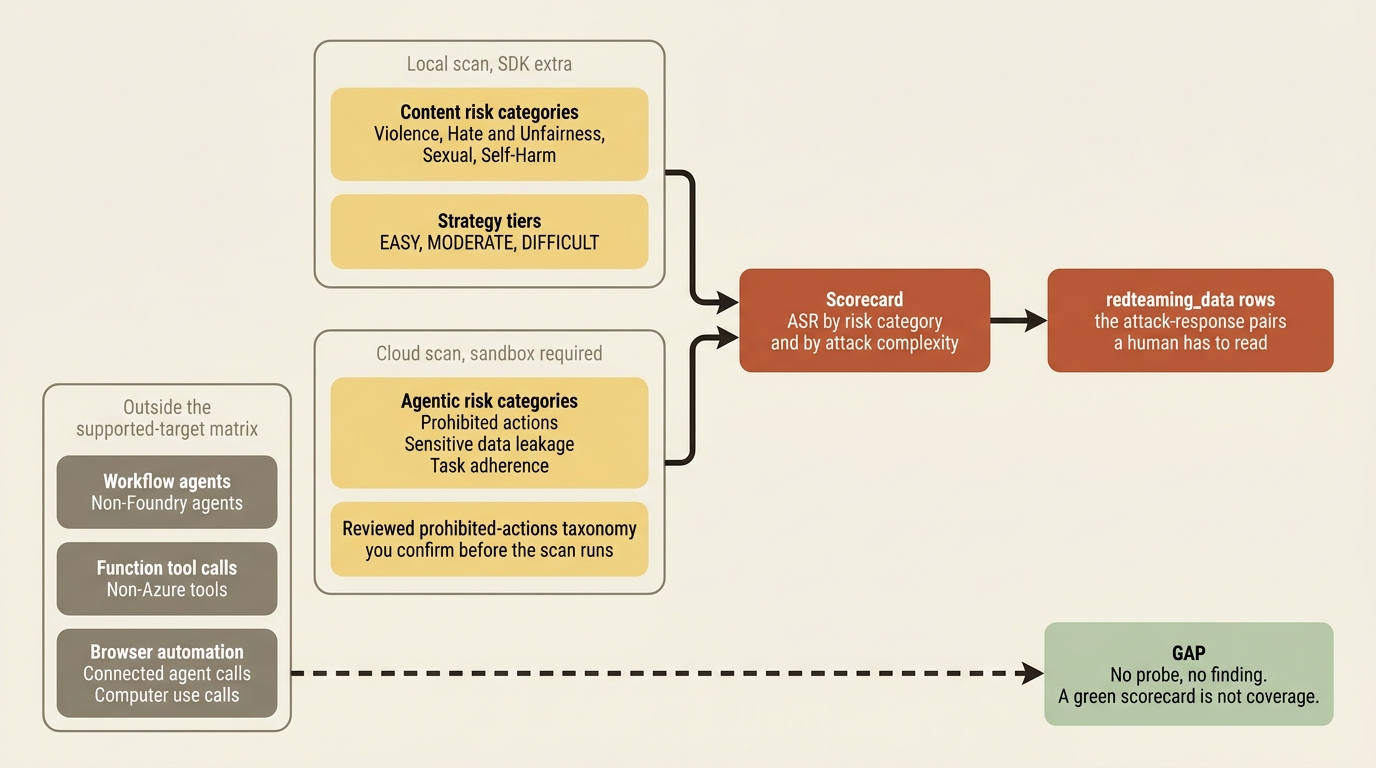
The hole lands somewhere uncomfortable for an agent like the supplier-risk desk. Its browser automation, a model driving pages it did not author across supplier portals, is its most exposed surface and the one surface the red teaming agent will not probe. Do not let a green scorecard imply coverage it does not have.
Two more limits belong in the same paragraph. Red teaming uses generative models to assess ASR, so runs are non-deterministic and produce false positives, and the docs say plainly to review results before taking mitigation actions [VERIFIED-LEARN: includes-concepts-ai-red-teaming-agent-3.md]. The synthetic data is also not representative of real-world distributions.
[CONTESTED: concepts-ai-red-teaming-agent.md against concepts-evaluation-regions-limits-virtual-network.md] Two pages disagree on where cloud red teaming runs. The concepts page lists five regions, the regions-and-limits page lists two. Design for the smaller list, confirm against a live region check before you promise a schedule, and treat this as [PERISHABLE: checked September 2026].
The optimizer proposes candidates, and you still pick one
The optimizer closes the evaluate-revise-reevaluate loop automatically, which means it runs your agent against every task in your dataset, for real, tools and all.
It is the newest of the three and the most constrained. It improves four aspects of an agent: instructions, skills, tools, and model selection, activating each target automatically based on what your baseline configuration contains [VERIFIED-LEARN: agents-concepts-agent-optimizer-overview.md]. Prompt agents get instruction tuning, function-calling tool descriptions, and model comparison through a portal wizard with no code changes. Hosted agents get all four and pay for the extra target with a small code integration.
The integration is three steps: install azure-ai-agentserver-optimization, create a .agent_configs/baseline/ directory holding metadata.yaml and instructions.md plus optional tools.json and a skills/ directory, and call load_config() at startup [VERIFIED-LEARN: agents-how-to-make-agent-optimizer-ready.md]. Three calls carry the whole design. load_config() returns your baseline normally and the candidate's configuration during an optimization run. compose_instructions() returns the system prompt with discovered skills appended as a catalog. apply_tool_descriptions() patches your tool functions' metadata with improved descriptions while leaving the implementations alone. No feature flags, no conditional logic, no code change between the optimized and unoptimized states.
The run itself is one command, configured by an eval.yaml that ties together the agent, the dataset, the evaluators, and two models.
name: desk-optimization
agent:
  name: supplier-risk-desk
  kind: hosted  # ①
  model: gpt-4.1-mini
  config: .agent_configs/baseline/metadata.yaml  # ②
dataset:
  name: desk-eval-set  # ③
  version: "1"
evaluators:
  - builtin.task_adherence  # ④
options:
  eval_model: gpt-4.1-mini  # ⑤
  optimization_model: gpt-5.1  # ⑥
  max_candidates: 4  # ⑦
① kind: hosted unlocks all four optimization targets. A prompt agent gets instructions, tool descriptions, and model comparison only.
② The config path names the baseline directory load_config() reads, which is what lets the optimized and unoptimized states run the same code.
③ The dataset is referenced by registered name and version, so this is Part 13's trace-to-dataset output rather than a file rebuilt by hand.
④ The evaluator list is the scoring function for every candidate, which is where a weak evaluator turns into a confidently ranked but meaningless table.
⑤ The eval model scores agent responses and can be any chat-completion model deployed in your project.
⑥ The optimization model generates the candidates, must come from the supported list, and is required rather than optional.
⑦ max_candidates multiplies the run, because every candidate is executed against every dataset row with its tools live.
Note: The full extracted listing at code/foundry-hyperscaler/part-14-evaluation-red-teaming-and-the-agent-optimizer/listings/09-optimizer-eval.yaml shows the baseline metadata reference and the full options block elided here.
Two models do two jobs and confusing them wastes money. The eval model scores agent responses and can be any chat-completion model deployed in your project. The optimization model generates candidates and must come from a supported list, currently gpt-5, gpt-5.1, gpt-5.2, gpt-5.4, gpt-5.5, DeepSeek-V4-Pro, and DeepSeek-V-3.2 [VERIFIED-LEARN: agents-concepts-agent-optimizer-overview.md] [PERISHABLE: checked September 2026]. Omit optimization_model and the API returns an error.
Results arrive as a ranked table with a composite score from 0.0 to 1.0, a strategy column naming which mutation targets each candidate combined, and a star on the winner. The docs give improvement thresholds, and they are the most useful numbers in the optimizer track: less than 0.03 is noise, 0.03 to 0.10 is a moderate improvement worth deploying, 0.10 to 0.20 is significant, and above 0.20 usually means your baseline was poor [VERIFIED-LEARN: agents-concepts-agent-optimizer-overview.md]. Apply the winner with azd ai agent optimize apply --candidate <id>, then azd deploy. If every candidate scores below the baseline, deploy nothing; the baseline stays active.
Gotcha: during optimization the optimizer invokes your agent against every task in your dataset, and if your agent calls external tools, those calls execute for real, on every candidate, on every row [VERIFIED-LEARN: agents-concepts-agent-optimizer-overview.md]. A four-candidate run on a hundred-row dataset is five hundred invocations against the live contract system. Use test endpoints or mock the tool implementations during optimization, and check what your OpenAPI connection is pointed at before you press go. The portal's cost Maximum is explicitly not a spending limit, and the estimate excludes charges from the external APIs your agent calls.
In production: hosted-agent optimization requires the Responses protocol, is unavailable in Norway East, and returns a 400 if your subscription is not on the allow list, in which case the documented fix is to contact your Microsoft representative to request access [VERIFIED-LEARN: agents-concepts-agent-optimizer-overview.md, agents-how-to-optimize-agent-targets.md]. Agent Optimizer is a limited preview with its own stronger notice rather than the standard marked-items banner [VERIFIED-LEARN: includes-agent-optimizer-limited-preview.md] [PERISHABLE: checked September 2026]. Plan around an access request, not a pip install.
Two smaller tools sit beside it. Prompt Optimizer (preview) restructures one agent's instructions in the portal, region-gated, with the Optimize button simply absent where it is unsupported [VERIFIED-LEARN: observability-how-to-prompt-optimizer.md]. Its own best-practice list ends with the right advice: run a full evaluation on your own dataset afterward, because it applies general best practices and your data decides whether they helped. Cluster analysis (preview) groups evaluation samples into named failure clusters, which is how you find the pattern a 0.78 average hides [VERIFIED-LEARN: observability-how-to-cluster-analysis.md]. One caveat with teeth: the result is not stored, so download the CSV before you navigate away.
The platform ships the judge, not the verdict
Every LLM-based evaluator is a model with a model's failure modes. Foundry ships an unusually complete judging apparatus and ships no calibration.
Count what you get: eleven agent evaluators, six other evaluator families, rubric generation from your own agent's context, a judge-model menu with per-model recommendations, trace-based evaluation of live traffic, adversarial scan automation, and a closed-loop optimizer. What it does not give you, and cannot, is agreement between those judges and your reviewers.
An LLM judge is a model call. It has a temperature, a context window, a prompt somebody wrote, and a failure mode. The docs say so where it matters: general-purpose evaluator scoring reliability might vary for responses under roughly twenty tokens, and both evaluators currently support English only [VERIFIED-LEARN: concepts-evaluation-evaluators-general-purpose-evaluators.md]. Red teaming ASR assessment is non-deterministic with false positives expected [VERIFIED-LEARN: includes-concepts-ai-red-teaming-agent-3.md]. Cluster analysis, insights, and rubric scoring all run on a judge model you choose, and choosing badly degrades all of them at once. A judge that agrees with your reviewers 60 percent of the time is a random number generator with a good dashboard, and it will hold that opinion consistently at scale, which is worse than holding it inconsistently.
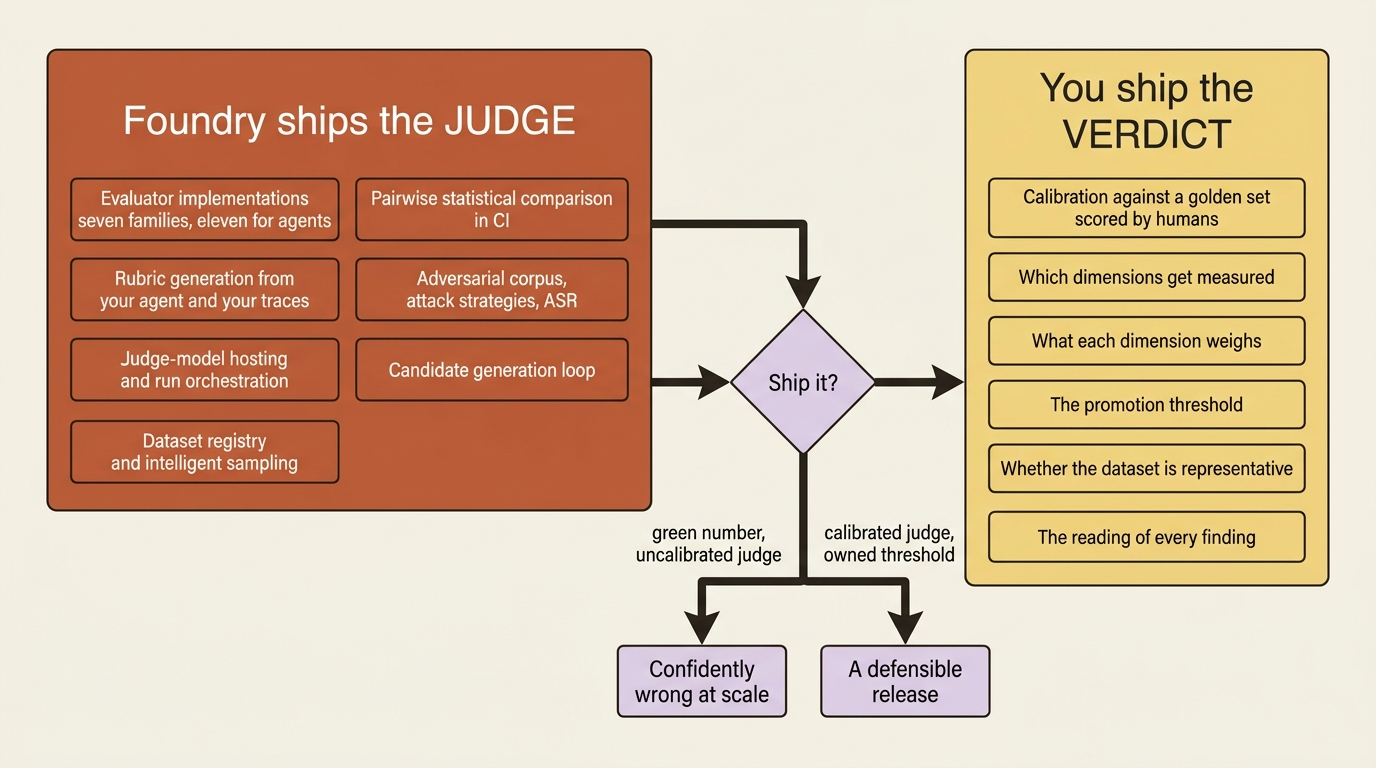
Three things stay yours and none of them are code.
Calibration against a golden set. Score fifty rows by hand, run the same fifty through the evaluator, and measure the agreement before you put a threshold on anything. The docs point at this obliquely, recommending you run a small evaluation on a sample and validate that rubric scores align with your own judgment before using the rubric at scale [VERIFIED-LEARN: concepts-evaluation-evaluators-rubric-evaluators.md]. Treat that as the requirement it is rather than the tip it is formatted as.
The choice of dimensions. A generated rubric proposes what to measure based on your agent's instructions. Whether "cites a filing for every claim" outranks "reads as a brief a director would forward" is a product decision that a generation pipeline cannot make and a weight of 9 makes look decided.
The promotion threshold. An 85 percent task-adherence passing rate appears in the docs as an example of an acceptance threshold, not as a recommendation [VERIFIED-LEARN: observability-how-to-evaluate-agent.md]. Nobody at Microsoft knows what a wrong supplier-risk brief costs your procurement team. You do, and that number is the threshold.
Pattern check: Foundry takes over the judging apparatus and the plumbing around it, which is the expensive, tedious part: the evaluator implementations, the judge-model hosting, the dataset registry, the run orchestration, the statistical comparison, the adversarial prompt corpus, the attack strategies, and the candidate generation loop. Building the evaluator implementations alone is a team-quarter, and building the adversarial corpus honestly is not something most organizations can do at all. Both framework tracks get all of it identically, because trace evaluation is framework-agnostic by construction. What does not transfer is every judgment about what good means.
The exit question is mixed here, and worth splitting rather than averaging. The data moves: JSONL datasets with a documented schema, OpenTelemetry GenAI attributes in Application Insights, and rubric definitions that are JSON arrays of id, description, and weight that any LLM-judge harness can consume. The judges do not. A scorecard produced by builtin.task_adherence is not comparable to one produced by anything else, so leaving costs you the evaluators and the history's comparability. Keep the golden set in your own repository and you keep the one asset that makes a replacement judge measurable on arrival.
Do this today
- Calibrate before you gate. Pull fifty rows from your evaluation dataset, have the two humans who actually review this output score each one pass or fail, and hold that as the golden set. Every evaluator decision gets measured against it. If nothing else here ships, ship this.
- Generate the rubric, then argue with it out loud. Run the generation job with your agent as the source and a week of traces as grounding. The weight-8-to-10 slot belongs to the dimension your last quality incident was actually about, not to the one the pipeline proposed.
- Write down what your evaluators cannot see. If your agent calls web search or Azure AI Search, Tool Call Accuracy and Groundedness have limited support. Record in the same file that those two scores are directional rather than authoritative, and let the rubric carry the weight.
- Put the Action in front of the release and a rule behind it. Run
microsoft/ai-agent-evals@v3-betaon the deploy branch with twoagent-idsso you get the pairwise comparison, authenticating with federated credentials. Then one continuous evaluation rule onRESPONSE_COMPLETED, withmax_hourly_runsset to a number you have costed, after granting the project managed identity the Foundry User role. - Scan before someone else does, and mock the tools before you optimize. Start with a local baseline scan and no attack strategies. Then a cloud run for the three agentic categories in a purple environment. Cap
max_candidatesat 2 for the first optimizer run and repoint every external connection at a test endpoint, because a hundred rows times three configurations is three hundred real calls into somebody else's production system.
A green number is the most expensive kind of wrong
Observability gave you the ability to watch. Evaluation, red teaming, and the optimizer give you the ability to grade, attack, and improve. Each one arrives as a remarkably complete piece of machinery, and each one arrives with the same hollow center: the platform ships the judge, and you ship the verdict.
None of that is a gap in the product. It is the only place the line could sit. Nobody outside your organization knows what a wrong answer costs it, which dimension the last incident was really about, or whether 0.94 against 0.93 is a win or a rounding error wearing a star. Foundry can tell you the rate. It cannot tell you whether the rate is acceptable.
Every other responsibility split in a managed platform announces itself when you get it wrong. A misconfigured identity throws a 403. A missing grant fails the deployment. Get this one wrong and nothing breaks at all. You get a dashboard full of green, produced by a judge that has never once been checked against a human, and it will keep producing green with total confidence right up until a procurement director reads a brief that cites four filings and supports none of them.
Calibrate the judge. The verdict was always yours.