
Your agent pays frontier prices to summarize a press release
The model layer is the one place Foundry lock-in is weakest, and saying that out loud is what makes the rest of the lock-in argument credible. The real binding is not the model name; it is the deployment type, the quota pool, and the policy assignment.
Microsoft Foundry's model layer is the least sticky thing it sells. Model Router is why, and the one dropdown that genuinely locks you in is not the one you are watching.
Your agent's nightly sweep runs 260 times a year and pays frontier-model prices to turn a press release into three sentences. Nobody on the team has ever looked at the bill.
In this article: You will learn how Foundry's model catalog is actually structured, why swapping models is usually a string change rather than a migration, and how Microsoft Foundry Model Router turns per-request model selection into a deployment setting instead of code you maintain. It covers the Claude-on-Azure hosting split and its separate billing meter, how to watch the router's decisions, how to govern its pool with Azure Policy, and the deployment type that quietly decides where your inference is processed. By the end you will have a two-router configuration that stops paying frontier prices for routine work.
A procurement agent runs itself now. A routine fires at 7 AM Chicago time, a sweep pulls overnight filings and news for every tier-one supplier, deep reviews survive a container restart, and a reminder brings the agent back when a quarterly filing finally lands. It serves three hundred buyers in isolation. Every sentence in that paragraph is about capability.
Here is the arithmetic nobody ran. The weekday sweep executes about 260 times a year and spends most of its tokens turning press releases and 8-K filings into three-sentence summaries. The weekly brief runs 52 times a year and genuinely reasons: it weighs a finding against a contract clause, decides whether a supplier's credit downgrade crosses a buyer's threshold, and writes something a procurement director signs. Both call the same deployment name. Both therefore pay the same per-token price.
The fix is one line of configuration. Getting to it means looking at a layer most Foundry writeups skip, and the reason it gets skipped is the most interesting thing about it: it is the layer where Foundry has almost no hold on you at all.
The catalog is the least sticky thing Foundry sells
Models are the one Foundry surface where the exit cost is a string change, and the documentation is structured in a way that tells you why.
Foundry's catalog splits into exactly two categories, and the split is legal and operational rather than technical [VERIFIED-LEARN: includes-concepts-foundry-models-overview-1.md]. Foundry Models sold by Azure are hosted and sold by Microsoft under Microsoft Product Terms, come with enterprise SLAs and Microsoft support, and pass through Microsoft's internal Responsible AI review before they appear. Foundry Models from partners and community are the vast majority by count, developed, supported, and validated by their providers rather than by Microsoft, and billed through Azure Marketplace. Between them the two categories cover Azure OpenAI, Anthropic, DeepSeek, Meta, Mistral, Cohere, NVIDIA, Hugging Face, Grok, the Microsoft MAI family, and a separate healthcare collection [VERIFIED-LEARN: foundry-models-includes-models-azure-direct-others.md, foundry-models-includes-models-partners.md].
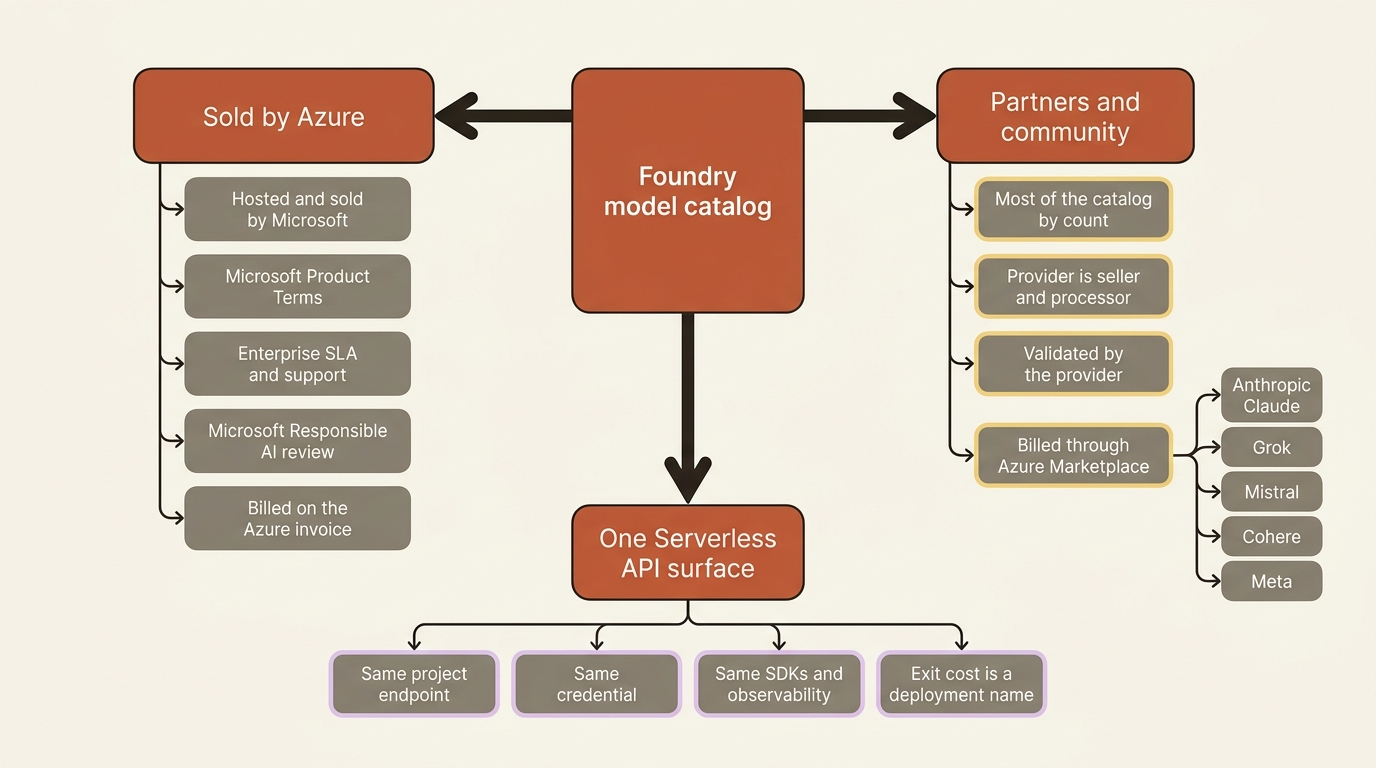
The catalog page puts the size at over 10,000 models with roughly 50 new models published each month [VERIFIED-LEARN: includes-concepts-foundry-models-overview-1.md dated July 28, 2026, what-is-foundry.md] [PERISHABLE: checked September 2026]. Treat that as an order of magnitude and not a number; Microsoft's own surfaces have carried different figures at different times.
The shape underneath matters more. Models sold by Azure and select partner models both deploy through the Serverless API option, which the docs call the preferred and most capable path, and they all answer on the same project endpoint with the same authentication, the same SDKs, and the same observability [VERIFIED-LEARN: concepts-deployments-overview.md]. If your container already holds a project endpoint and a DefaultAzureCredential, pointing it at a different model is a deployment name, not a rewrite.
The inversion is worth sitting with. Foundry owns procurement, hosting, capacity, and the compliance paperwork for a catalog no single team could negotiate alone, and what stays yours is a choice that is reversible in a way almost nothing else on the platform is. Compare it with the managed conversation store, which has no bulk export. Lock-in on Foundry concentrates in state, not in models.
Choosing a model is an engineering decision with three inputs
Quality, latency, and cost trade against each other on a curve the docs publish. Reading the curve beats reading a launch blog.
The model-choice guide is a head-to-head between GPT-5 and GPT-4.1, and the useful part is the framing rather than the pairing [VERIFIED-LEARN: foundry-models-includes-how-to-model-choice-guide-content.md]. A reasoning model earns its latency on multistep logic, planning, agentic tool use, and synthesis. A fast non-reasoning model wins on real-time chat, short factual queries, and high-throughput work. Reasoning effort is a dial rather than a switch: minimal, low, medium, and high trade depth against latency and cost in that order, with medium as the default. One constraint on that dial is easy to trip over: parallel tool calls are not supported at minimal reasoning effort, so an agent that fans out tool calls needs low or higher.
Gotcha: that guide is dated May 19, 2026, and it compares a model generation the rest of the documentation has already moved past [VERIFIED-LEARN: foundry-models-how-to-model-choice-guide.md] [PERISHABLE: checked September 2026]. Read it for its reasoning about tradeoffs, not for its roster. Model-specific pages age faster than conceptual ones.
For an actual comparison, the leaderboards give you a quality index, safety scores expressed as attack success rates where lower is better, latency and throughput, and an estimated cost metric [VERIFIED-LEARN: includes-concepts-model-benchmarks-1.md]. One detail changes how you read the cost column: it assumes a three-to-one input-to-output token ratio, nothing like the ratio you get when an agent feeds a 40-page filing in and gets three sentences out. Scenario leaderboards exist too, so an agentic workload should start there rather than at the overall index. Public benchmarks standardize the comparison; only an evaluation on your own data settles it.
Claude on Foundry: two hostings, one seller, one bill
A multi-vendor catalog is easy to claim and hard to operate. The Claude pages are where Foundry shows its working.
Claude models reach Foundry through the partners-and-community category, which means Anthropic is the seller of record and the data processor under both hosting options, Microsoft bills you on your Azure invoice, and the models are Non-Microsoft Products under the Product Terms [VERIFIED-LEARN: foundry-models-includes-concepts-claude-models-content.md, foundry-models-includes-claude-models-hosting-comparison-content.md]. The whole surface carries a preview banner as of the page date [PERISHABLE: page dated September 11, 2026, checked September 2026].
Two hosting versions exist, and picking between them is the only real decision on the page [VERIFIED-LEARN: foundry-models-includes-claude-models-hosting-comparison-content.md].
| Dimension | Hosted on Azure | Hosted on Anthropic infrastructure |
|---|---|---|
| Where inference runs | Azure infrastructure end to end | Anthropic infrastructure, possibly outside Azure and outside your selected region |
| Data residency | Data at rest in the selected Azure geography, processing scoped to the Global or Data Zone deployment option | Data might be processed outside Azure |
| Deployment types | Global Standard and Data Zone Standard (US) | Global Standard only |
| Supported APIs | Messages, Token counting | Messages, Token counting, plus files and skills |
| Model availability | Opus 5, Opus 4.8, Sonnet 5, Haiku 4.5 | The above plus preview models and older Opus, Sonnet, and Haiku versions |
The table above compares the two ways to run Claude on Foundry, across five dimensions.
- Where inference runs, Azure-hosted: Azure infrastructure end to end.
- Where inference runs, Anthropic-hosted: Anthropic infrastructure, possibly outside Azure and outside your selected region.
- Data residency, Azure-hosted: data at rest in the selected Azure geography, processing scoped to the Global or Data Zone deployment option.
- Data residency, Anthropic-hosted: data might be processed outside Azure.
- Deployment types, Azure-hosted: Global Standard and Data Zone Standard for the US zone.
- Deployment types, Anthropic-hosted: Global Standard only.
- Supported APIs, Azure-hosted: Messages and Token counting.
- Supported APIs, Anthropic-hosted: Messages and Token counting, plus files and skills.
- Model availability, Azure-hosted: Opus 5, Opus 4.8, Sonnet 5, and Haiku 4.5.
- Model availability, Anthropic-hosted: all of the above plus preview models and older Opus, Sonnet, and Haiku versions.
The decision rule is short. Choose Azure-hosted when you need residency in a specific Azure geography or the US data zone. Choose Anthropic-hosted when you need an API feature that has not reached the Azure version yet.
Billing surprises Azure-native teams. Claude usage meters in Claude Consumption Units (CCU), pay-as-you-go with no prepaid credits, purchased through an Azure Marketplace subscription to the Claude Platform on Foundry offer, and MACC-eligible so the spend decrements a Microsoft Azure Consumption Commitment [VERIFIED-LEARN: foundry-models-includes-claude-models-hosting-comparison-content.md].
Gotcha: MACC eligibility and Azure Prepayment are different instruments. The cost-management page states plainly that Azure Prepayment credit cannot pay for other-provider model charges, because those bill through Azure Marketplace [VERIFIED-LEARN: includes-concepts-manage-costs-2.md]. Both statements are true at once, and a finance conversation that conflates them ends with someone surprised by an invoice.
Quota works on three measurements rather than the single tokens-per-minute number the rest of Foundry uses: requests per minute, uncached input tokens per minute, and output tokens per minute [VERIFIED-LEARN: foundry-models-includes-claude-models-quotas-limits-content.md]. The word uncached matters. Tokens read from a prompt cache do not count toward the input limit, while tokens written to it do, so for an agent that replays a long system prompt every turn, prompt caching moves the rate limit and not just the bill.
Calling Claude uses the Anthropic SDK rather than an OpenAI-compatible client, which is the one place in this article where "swap the deployment name" stops being true [VERIFIED-LEARN: foundry-models-includes-how-to-use-foundry-models-claude-2.md]:
from anthropic import AnthropicFoundry  # ①
from azure.identity import DefaultAzureCredential, get_bearer_token_provider

token_provider = get_bearer_token_provider(
    DefaultAzureCredential(), "https://ai.azure.com/.default"  # ②
)

client = AnthropicFoundry(
    azure_ad_token_provider=token_provider,
    base_url="https://<resource-name>.services.ai.azure.com/anthropic",  # ③
)

message = client.messages.create(
    model="claude-sonnet-4-6",          # your deployment name  ④
    messages=[{"role": "user", "content": "Summarize this filing."}],
    max_tokens=1048,  # ⑤
)
① AnthropicFoundry comes from the Anthropic SDK, so this is the one listing in the chapter where changing vendors means changing clients rather than changing a deployment name.
② The bearer token provider requests the https://ai.azure.com/.default scope, the same one Part 1 settled on, so the credential the rest of the desk already carries works here without a second identity.
③ The base URL ends in /anthropic rather than the /openai/v1 path the rest of the series uses, which is what points the client at the Claude surface on your own Foundry resource.
④ The model argument is your Foundry deployment name, not Anthropic's public model string, so the deployment decides which Claude version answers.
⑤ The Messages API requires max_tokens rather than treating it as optional, which is the first line a port from an OpenAI-style client fails on.
Note: The full extracted listing at code/foundry-hyperscaler/part-11-the-model-layer/listings/01-claude-foundry-client.py shows the module wrapper and the resource-name lookup elided here.
Entra ID is not optional for every model here either. The Mythos variants support Microsoft Entra ID authentication only [VERIFIED-LEARN: foundry-models-includes-how-to-use-foundry-models-claude-2.md].
Model Router: one deployment, a pool, and no count worth printing
Model Router is a model that picks models. You deploy it exactly like any other model, and every lever it gives you is a deployment-time setting rather than a request parameter.
Model router is a trained language model that routes each prompt in real time to a suitable underlying model, packaged as a single deployment you create from the catalog under the name model-router [VERIFIED-LEARN: openai-concepts-model-router.md, openai-how-to-model-router.md]. It is both a drop-in deployment and an optimization layer that replaces the workflow where you compare models by hand and then write routing logic yourself.
Do not go looking for a model count. The documentation contradicts itself inside a single file: a May 2026 what's-new entry and an August 2026 entry for a later refresh give different pool sizes [CONTESTED: foundry-models-includes-whats-new-model-router-1.md against itself] [PERISHABLE: checked September 2026]. The pool changes monthly in both directions, because refreshes add models and retire others in the same entry. What is stable is the mechanism, and the mechanism is what you can act on.
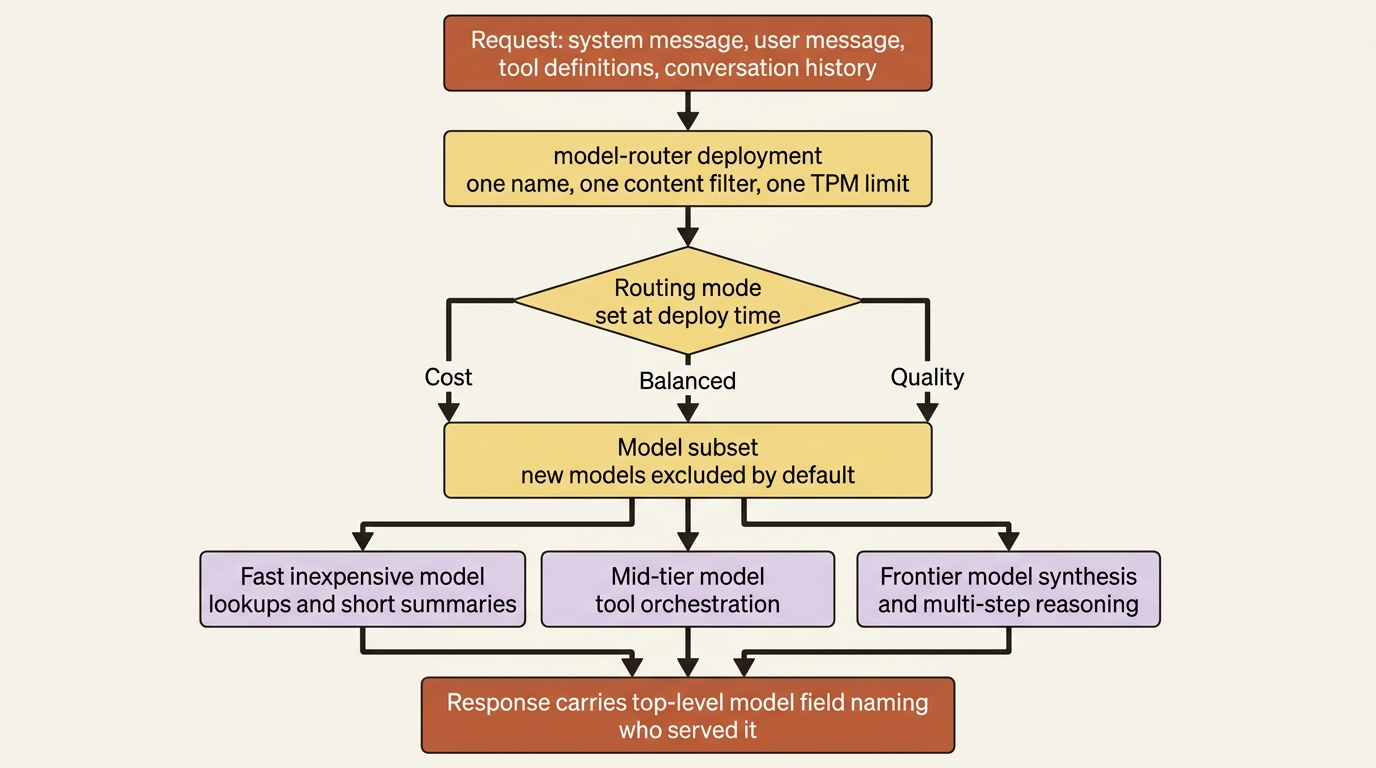
Three levers exist, all set when you deploy [VERIFIED-LEARN: openai-concepts-model-router.md, openai-how-to-model-router.md].
| Lever | What it does | Default |
|---|---|---|
| Routing mode | Skews selection toward quality, toward cost, or between them | Balanced |
| Model subset | Restricts routing to models you pick, at least one required | The full supported set for the mode |
| Deployment type | Global Standard or Data Zone Standard | Chosen at deploy time |
The table above lists the three deployment-time levers on a router.
- Routing mode: skews selection toward quality, toward cost, or between them. Default is Balanced.
- Model subset: restricts routing to models you pick, with at least one required. Default is the full supported set for the mode.
- Deployment type: Global Standard or Data Zone Standard, chosen at deploy time.
Balanced weighs cost and quality together for general-purpose work. Quality prioritizes accuracy for legal review, medical summaries, and complex reasoning. Cost prioritizes savings for high-volume, budget-sensitive work such as classification and simple question answering. Changes to either lever can take up to five minutes to take effect, which is exactly long enough to make you think the change did not apply.
Four behaviors then decide whether the router fits your architecture, and three of them are easy to get wrong. Automatic failover is on for default deployments with no configuration: when a routed model hits endpoint instability, the router redirects to the next most appropriate model [VERIFIED-LEARN: foundry-models-includes-whats-new-model-router-1.md]. New models introduced later are excluded by default from an existing custom subset until you add them explicitly, which is a governance feature rather than an oversight. Deployment settings apply to the router as a whole, so you attach one content filter and one tokens-per-minute rate limit to the router deployment and do not set them on underlying models [VERIFIED-LEARN: openai-how-to-model-router.md]. And the one that bites: you do not deploy the supported models separately, with the exception of Claude models, which you must deploy to your Foundry resource yourself before the router can select them [VERIFIED-LEARN: openai-concepts-model-router.md, openai-how-to-model-router.md].
For agents, the routing story is specific. The router reads the full request context, system message, user message, tool definitions, and conversation history, and routes each request independently, so one conversation can use three different models across five turns [VERIFIED-LEARN: openai-how-to-model-router-agents.md]. Simple lookups and greetings go to fast inexpensive models, tool orchestration goes to mid-tier models that reliably emit valid structured calls, and retrieval synthesis plus multi-step orchestration goes to frontier models. The docs put typical simple-interaction traffic at 50 to 60 percent of an agent workload, and describe the net effect as paying frontier-model prices only for requests that genuinely need frontier-model capability [VERIFIED-LEARN: openai-how-to-model-router-agents.md].
Gotcha: there is a per-model tool-support matrix, and model-router is a row in it. The row reads No for Agent2Agent, Azure AI Search, Azure Functions, Computer Use, Image Generation, and Web Search, and Yes for Browser Automation, Code Interpreter, File Search, Functions, MCP, OpenAPI, SharePoint, Grounding with Bing, Fabric Data Agent, and Work IQ [VERIFIED-LEARN: agents-concepts-limits-quotas-regions.md, section "Tool support by region and model"] [PERISHABLE: checked September 2026]. Read that row before you commit, because the No column is not a list of obscure features. If your roadmap includes splitting an agent into workers that talk over Agent2Agent, note that Agent2Agent reads No.
Watching the router decide
The serving model is always in the response. Everything richer than that is preview metadata you opt into with a header.
Every Chat Completions response from a router deployment carries a top-level model field naming the underlying model that served the request, and that field alone is enough to build a routing-distribution dashboard [VERIFIED-LEARN: openai-how-to-model-router.md, openai-how-to-model-router-agents.md]. For anything more, you opt in with a preview feature header, Foundry-Features: ModelRouterControls=V1Preview, which adds an optional model_selection_details object to the response [VERIFIED-LEARN: openai-how-to-monitor-model-router.md].
Inside that object, model_selection_details.model_router_details carries three things: mode for the routing mode used, routing_trace for ordered model attempts with a reported latency, an HTTP status, and an optional error per attempt, and session_affinity for the stickiness decision. An attempt list with a failed entry followed by a successful one is how automatic failover looks from the outside [VERIFIED-LEARN: openai-how-to-monitor-model-router.md]:
{
  "model": "example-model-b",
  "model_selection_details": {
    "model_router_details": {
      "mode": "balanced",
      "routing_trace": [
        { "latency_ms": 51,
          "attempts": [
            { "model": "example-model-a", "result": { "status": 429 } },
            { "model": "example-model-b", "result": { "status": 200 } } ] } ]
    }
  }
}
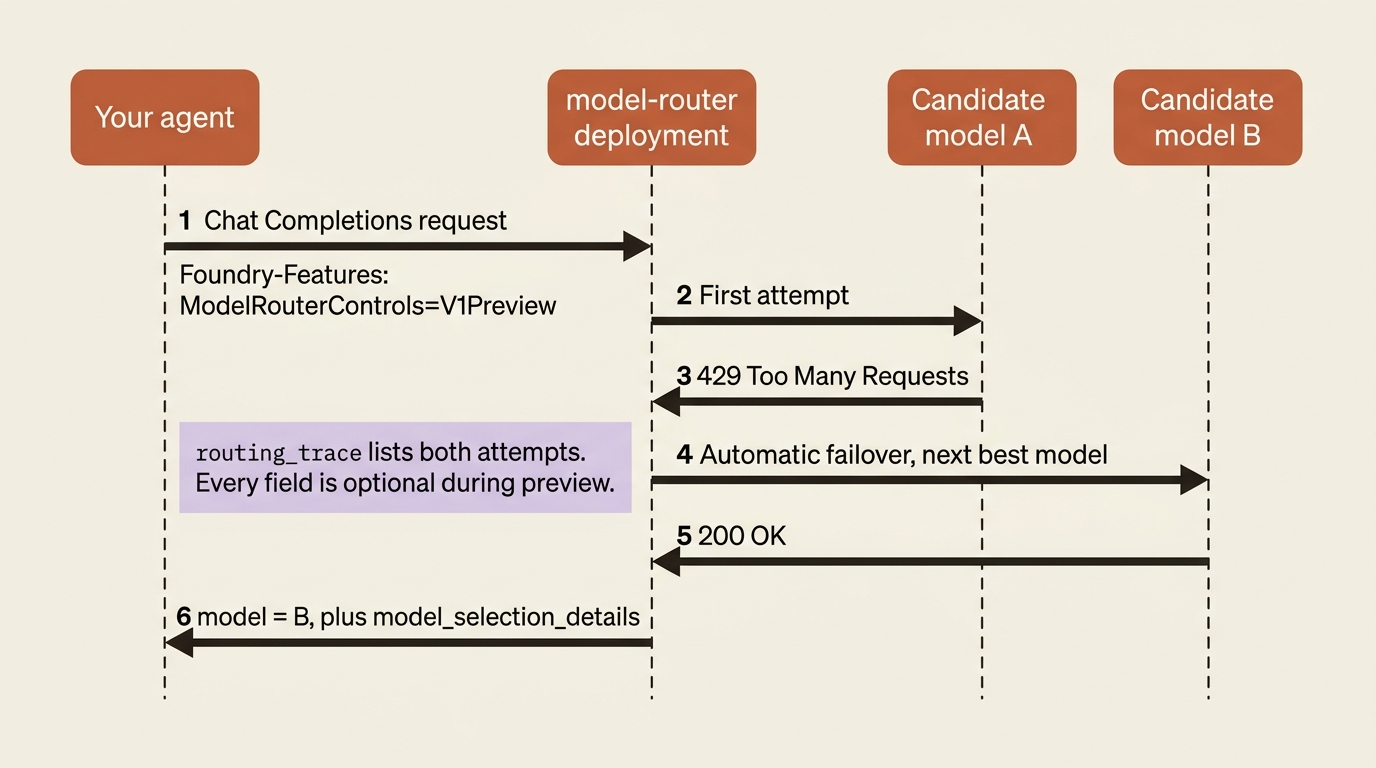
The first attempt was rate-limited, the second served the request, and the client got a correct answer without knowing any of it happened. Parse this defensively. The docs are explicit that the envelope and every child field are optional during preview, that additional fields can appear in future service versions, and that you must not infer a routing decision from an absent field.
Session affinity is the other preview signal, and its caveat matters more than the feature [VERIFIED-LEARN: openai-how-to-monitor-model-router.md, openai-how-to-model-router-agents.md]. You supply an opaque session ID on related turns and the router attempts the same eligible model across them, but it is best-effort, it does not prevent normal fallback, and it covers direct Chat Completions requests only. Agent Service sessions are not part of it, which means a Foundry agent still routes per request no matter what you set.
Governing the pool so it cannot silently widen
The same built-in Azure Policy that governs model deployments governs which models a router may route to, enforced when the deployment is created.
Two built-in policy definitions apply, both generally available, both evaluated at deployment time [VERIFIED-LEARN: how-to-model-deployment-policy.md]. Foundry model deployments should only use approved models answers "is this exact model on my allow-list," parameterized by allowedPublishers and allowedAssetIds. Foundry model deployments should meet eligibility requirements answers "does this model meet my standards for source and maturity," parameterized by onlyAllowDirectFromAzure and denyPreviewModels, both defaulting to false, so an unconfigured assignment restricts nothing.
Model Router honors the approved-models policy and applies it to the model subset a developer may select, consistently across the portal, REST, the CLI, and ARM templates [VERIFIED-LEARN: how-to-model-router-policy.md]:
{
  "effect":            { "value": "Deny" },
  "allowedPublishers": { "value": ["OpenAI", "Microsoft", "Anthropic"] },
  "allowedAssetIds":   { "value": ["azureml://registries/azure-openai/models/gpt-5/"] }
}
Two things in that snippet are traps. Microsoft has to be in the publisher list because Microsoft is the publisher of model router itself, and every publisher represented in the routing set needs to be there too, Anthropic included if Claude models are in the pool [VERIFIED-LEARN: openai-how-to-model-router.md, how-to-model-router-policy.md]. And asset IDs match as a prefix, so .../models/gpt-5 silently also allows GPT-5.2 and GPT-5.4, while .../models/gpt-5/ with the trailing slash allows only GPT-5 and all its versions. Asset IDs and publisher names are case-sensitive.
Know the developer-side behavior before someone files a bug. In the portal, unapproved models stay visible with disabled checkboxes, because the docs deliberately preserve discoverability so a developer can request approval. Through REST, the CLI, or ARM, any noncompliant model in the requested set fails the whole deployment [VERIFIED-LEARN: how-to-model-router-policy.md]. Allow up to 15 minutes for an assignment to propagate, and use the Audit effect first to measure blast radius before switching to Deny.
Gotcha: two pages disagree about when enforcement happens, and the difference is not cosmetic. how-to-model-router-policy.md describes deploy-time enforcement on the model subset throughout. how-to-model-deployment-policy.md states that "model router only routes requests to models that satisfy your assigned policies," which reads as per-request enforcement [CONTESTED: how-to-model-deployment-policy.md against how-to-model-router-policy.md]. Design for the weaker guarantee, which is deploy-time, and treat any runtime filtering as a bonus rather than a control you can point a compliance reviewer at.
Deployment types are where a model choice becomes a compliance decision
The deployment type decides where inference is processed, how you pay, and what latency variance you accept. It is the one model-layer choice you cannot reverse with a string change.
Serverless API deployments come in three families crossed with three data-processing scopes, plus one temporary type [VERIFIED-LEARN: foundry-models-includes-concepts-deployment-types-content-4.md, foundry-models-includes-concepts-deployment-types-content-6.md].
| Deployment type | SKU code | Data processing | Billing |
|---|---|---|---|
| Global Standard | GlobalStandard |
Any Azure region | Pay-per-token |
| Global Provisioned | GlobalProvisionedManaged |
Any Azure region | Reserved PTU |
| Global Batch | GlobalBatch |
Any Azure region | 50% discount, 24-hour target |
| Data Zone Standard | DataZoneStandard |
Within the data zone | Pay-per-token |
| Data Zone Provisioned | DataZoneProvisionedManaged |
Within the data zone | Reserved PTU |
| Data Zone Batch | DataZoneBatch |
Within the data zone | 50% discount |
| Standard | Standard |
Within the Azure geography | Pay-per-token |
| Regional Provisioned | ProvisionedManaged |
Within the Azure geography | Reserved PTU |
| Developer | DeveloperTier |
Any Azure region | Pay-per-token, 24-hour lifetime |
The table above lists every Serverless API deployment type with its SKU code, its data-processing scope, and how it bills.
- Global Standard: SKU
GlobalStandard, processed in any Azure region, billed pay-per-token. - Global Provisioned: SKU
GlobalProvisionedManaged, processed in any Azure region, billed as reserved PTU. - Global Batch: SKU
GlobalBatch, processed in any Azure region, billed at a 50% discount with a 24-hour target. - Data Zone Standard: SKU
DataZoneStandard, processed within the data zone, billed pay-per-token. - Data Zone Provisioned: SKU
DataZoneProvisionedManaged, processed within the data zone, billed as reserved PTU. - Data Zone Batch: SKU
DataZoneBatch, processed within the data zone, billed at a 50% discount. - Standard: SKU
Standard, processed within the Azure geography, billed pay-per-token. - Regional Provisioned: SKU
ProvisionedManaged, processed within the Azure geography, billed as reserved PTU. - Developer: SKU
DeveloperTier, processed in any Azure region, billed pay-per-token with a 24-hour lifetime.
The recommendation is unambiguous: start with Global Standard, because it launches first when a new model releases, carries the lowest price and the highest default quota, and covers the most regions. Move off it only for a stated reason. New types arrive in a fixed order, Global, then Data Zone, then geography-based, and geography-based types have no guaranteed availability date at all [VERIFIED-LEARN: foundry-models-includes-concepts-deployment-types-content-2.md].
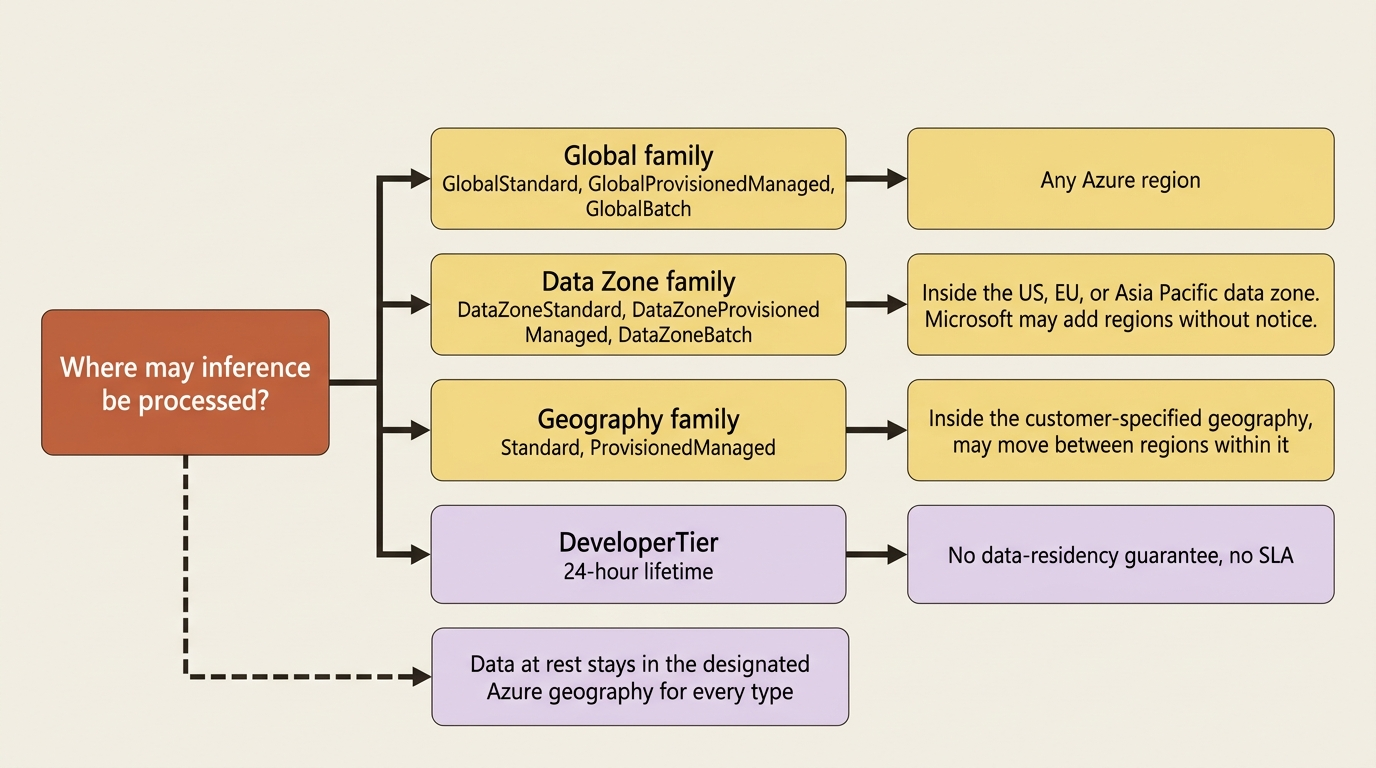
Gotcha: residency is a property of the deployment type, not of where your Foundry resource lives. The docs state it in one IMPORTANT callout worth reading twice: data stored at rest remains in the designated Azure geography for every deployment type, and inferencing data is processed differently per type [VERIFIED-LEARN: foundry-models-includes-concepts-deployment-types-content-2.md]. Global types may be processed in any Azure region. Data Zone types are processed only within the Microsoft-specified data zone, US, EU, or Asia Pacific, with the EU zone following the Azure EU Data Boundary and possibly including EFTA countries such as Norway and Switzerland. Standard and Regional Provisioned types stay within the customer-specified geography and might move between regions inside it. Microsoft can add regions to a data zone without prior notice.
Read that once more with a concrete case attached. A team that creates its Foundry resource in Sweden Central and deploys Global Standard has not kept inference in the EU. Discovering that during a data protection impact assessment is expensive.
Two more facts fill out the picture. Batch types trade real-time responsiveness for half the cost on a separate enqueued-token quota, and provisioned types buy reserved capacity for lower and more consistent latency. The Developer type exists only for fine-tuned model evaluation: 24-hour fixed lifetime, automatic deletion on expiry, no SLA, and explicitly no data-residency guarantee [VERIFIED-LEARN: foundry-models-includes-concepts-deployment-types-content-4.md, content-6.md]. Nothing about that combination belongs near production data.
Outside the Serverless API option sits managed compute, in public preview, for open-source and custom-weight models that need dedicated GPUs [VERIFIED-LEARN: concepts-deployments-overview.md, concepts-managed-compute-overview.md]. It serves on the same project endpoint under <endpoint>/managed-deployments/<deployment-name>/, bills hourly per accelerator SKU, and draws on quota that is separate from Azure VM quota and cannot be satisfied by it. Content filtering is not available for managed compute in public preview, which is the constraint most likely to disqualify it for a governed workload.
Quota, token limits, and the bill nobody set a ceiling on
Quota is a capacity allocation you manage. Token limits are an enforcement you configure. Neither one is a budget cap.
Azure assigns quota per subscription, per region, and per model in tokens per minute, and the portal's Quota pane lets you reallocate it between deployments in the same subscription [VERIFIED-LEARN: how-to-quota.md]. Seeing any of it requires the Cognitive Services Usages Reader role at subscription scope; editing allocations additionally needs Cognitive Services Contributor [VERIFIED-LEARN: includes-how-to-quota-1.md].
Quota is not enforcement, though, and this is where the control plane earns its section. Foundry Control Plane integrates with AI Gateway, an Azure API Management instance in front of your model deployments, to enforce limits at project scope [VERIFIED-LEARN: control-plane-how-to-enforce-limits-models.md]. Two dimensions apply together, and they fail differently on purpose:
- TPM rate limit caps tokens per minute. Exceeding it returns
429 Too Many Requests. - Total token quota caps tokens per period, hourly through yearly. Exhausting it returns
403 Forbidden.
Limits apply per project, which is what makes multi-team token containment possible: one project cannot monopolize a shared resource's capacity. Concurrent requests can temporarily push consumption past a configured limit until responses are processed, so treat the number as a ceiling with overshoot rather than a hard gate. Control Plane itself remains preview [PERISHABLE: checked September 2026], which is worth knowing before you plan a rollout around it.
Gotcha: there is no budget kill switch. The cost-management page states it outright: while OpenAI offers hard limits that prevent exceeding a budget, Azure OpenAI does not currently provide that functionality, and automating a shutdown from a budget alert's action group is custom development you write [VERIFIED-LEARN: includes-concepts-manage-costs-2.md]. Budgets, alerts, and scheduled cost exports to a storage account are the documented path [VERIFIED-LEARN: includes-concepts-manage-costs-1.md, includes-concepts-manage-costs-2.md]. Adopt the reconciliation loop the docs recommend before the router goes in: estimate in the pricing calculator, deploy a small test workload, group actual costs by resource and then by meter, and compare meters against your estimate assumptions. You need the before number to prove the after number.
The agent stops paying frontier prices for a filing summary
Two router deployments, not one. The two workloads have genuinely different requirements, and the docs describe exactly this pattern: create multiple router deployments, each with its own routing mode and model subset, and assign each workload the one that fits [VERIFIED-LEARN: openai-how-to-model-router-agents.md].
Deploy router-sweep in Cost mode and router-brief in Quality mode from the catalog, both Global Standard, both with a model subset the platform team chooses. Then the hosted agent's azure.yaml carries both names into the container:
services:
  supplier-risk-desk:
    host: azure.ai.agent
    project: src/desk
    kind: hosted
    uses:
      - ai-project
    env:
      SWEEP_MODEL_DEPLOYMENT: ${SWEEP_MODEL_DEPLOYMENT}
      BRIEF_MODEL_DEPLOYMENT: ${BRIEF_MODEL_DEPLOYMENT}
Those two variable names are the agent's own, not platform-injected ones. The documentation spells the model deployment variable at least four different ways across its own pages [CONTESTED: agents-how-to-update-hosted-agent-model.md against agents-how-to-author-azure-yaml.md], so the name in your env map and the name in your code are one decision made twice.
Set them and redeploy. Use azd up rather than azd deploy when the deployment itself still needs provisioning [VERIFIED-LEARN: agents-how-to-update-hosted-agent-model.md]:
azd env set SWEEP_MODEL_DEPLOYMENT=router-sweep
azd env set BRIEF_MODEL_DEPLOYMENT=router-brief
azd up
Inside the handler, the choice is one expression, because the agent already knows which job it is doing: a routine dispatch arrives on the sweep path, an analyst's brief request arrives on the other.
DEPLOYMENT = {
    "sweep": os.environ["SWEEP_MODEL_DEPLOYMENT"],  # ①
    "brief": os.environ["BRIEF_MODEL_DEPLOYMENT"],
}

response = await client.responses.create(
    model=DEPLOYMENT[job_kind],  # ②
    input=prompt,
)
print(response.model)   # the underlying model the router actually picked  ③
① Both router names arrive as environment variables set by azd env set, so moving a workload to a different router is a configuration change rather than a code change.
② The only routing decision left in the desk's own code is a dictionary lookup on the job kind, because the router deployment itself picks the model.
③ response.model names the underlying model that actually served the call, which is the routing distribution you group by job kind in week one.
Note: The full extracted listing at code/foundry-hyperscaler/part-11-the-model-layer/listings/02-router-deployment-dispatch.py shows the imports, the client construction, and the handler wrapper elided here.
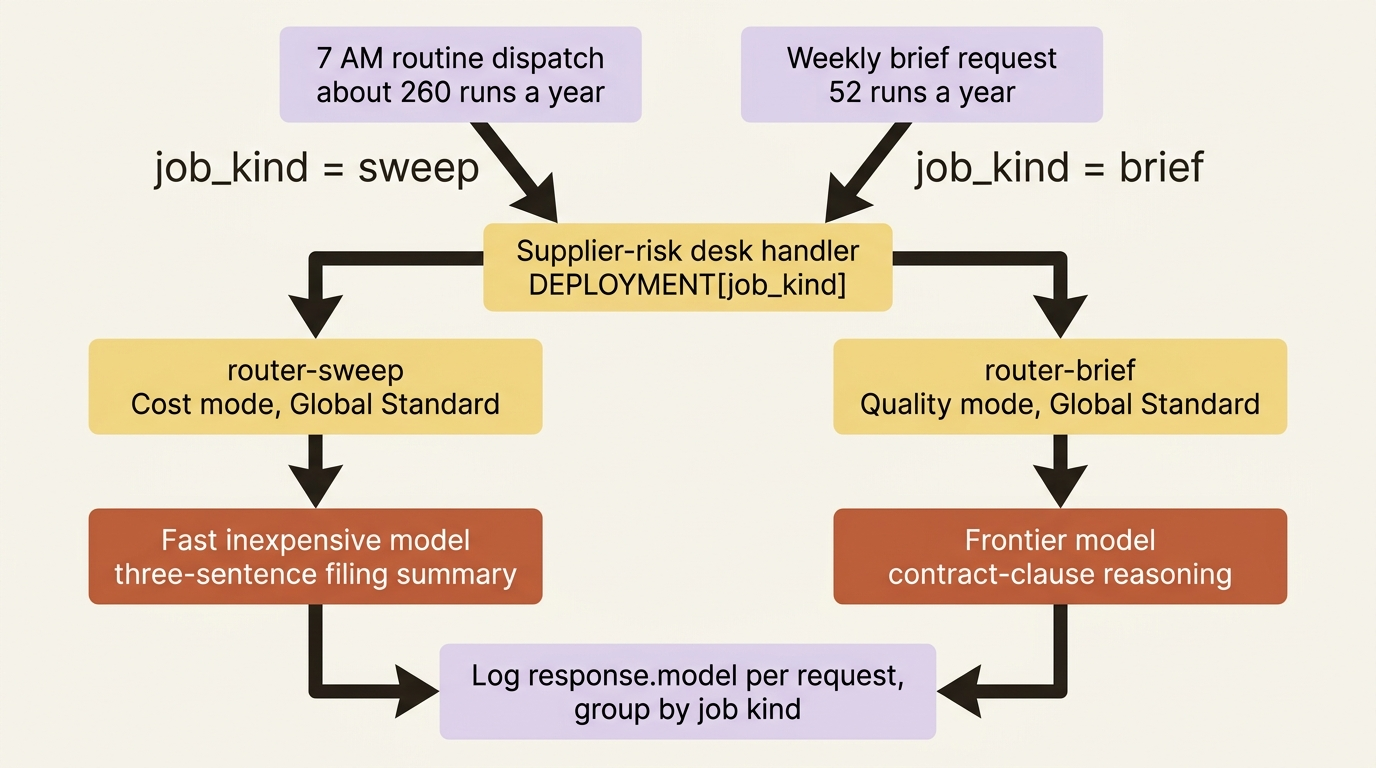
The last print is the whole observability story for week one. Log response.model per request, group by job kind, and you have the routing distribution every tuning decision depends on. When you want attempt-level detail, add the preview header and read routing_trace.
What changes for the procurement team is not the agent's behavior. The 7 AM sweep still runs under agent identity, still writes per-supplier findings to its own review store, and still enforces per-user isolation. What changes is that a three-sentence summary of a press release now routes to a fast inexpensive model, while the brief's contract-clause reasoning still reaches a frontier model, and neither decision lives in the agent's code. When a better cheap model joins the pool, the platform team adds it to the router-sweep subset and nothing redeploys.
In production: treat the first router deployment as a starting configuration rather than a result. The docs say so directly and twice: benchmark the router against your current model for response quality, estimated cost, and latency before sending production traffic; keep the baseline, instructions, tools, and trace set fixed while you change one routing lever; and evaluate with representative multi-turn traces including tool calls and handoffs [VERIFIED-LEARN: openai-concepts-model-router.md, openai-how-to-model-router-agents.md].
Do this today
- Log the top-level
modelfield on every response your agent already gets. You need a week of routing-free baseline distribution before you change anything. - Look up the deployment type behind every model deployment you run in production and check its data-processing scope against what your legal team was told. A Foundry resource in an EU region plus a Global Standard deployment is not EU inference.
- Split your agent's workloads by cost profile on paper. If the high-volume path and the high-judgment path share one deployment name, you have the arithmetic problem from the top of this article.
- Assign the approved-models policy with the Audit effect, wait for compliance results, and read the blast radius before switching to Deny. Remember
MicrosoftinallowedPublishers, and the trailing slash on asset ID prefixes. - Set a budget and an alert on the subscription, and accept that it notifies rather than stops. There is no hard cap to turn on.
Models are portable. Residency is not.
The exit question has the shortest answer on the whole platform. Models are portable. A deployment name is a string in an environment variable, the Serverless API surface is OpenAI-compatible, and moving to another provider's endpoint is a base URL and a credential. Model Router is thinner than it looks in lock-in terms: its output is an ordinary Chat Completions response, its levers are deployment settings rather than code, and replacing it means writing the routing logic you did not write, which is a known quantity rather than an unknown one.
The thinness is also what makes the router worth taking. Routing logic, a fallback ladder, and a per-request complexity classifier are things teams build, maintain, and then fail to retune when the roster moves under them. Foundry maintains that for you and charges almost nothing in stickiness. What stays yours is every judgment the router cannot make: which workloads deserve Quality mode, what belongs in a subset, and the evaluation that proves routing did not quietly degrade the output.
The genuinely sticky pieces of this layer are the two nobody thinks of as models at all. The deployment type encodes a residency commitment your legal team signed off on, and reproducing Data Zone processing somewhere else is an infrastructure project. The quota allocation is capacity you negotiated per subscription and region, and it does not travel.
Keep the deployment names in configuration, keep the routing decision out of your prompt logic, and the model layer stays the reversible part of your Foundry footprint. The dropdown you should be nervous about was never the model name. It was the one labeled deployment type, sitting two fields below it, quietly deciding which continent your customer's filing gets read on.