
The publish button is four API calls in a trench coat
The publish button is four API calls in a trench coat. Publishing a Foundry agent to Teams is a distribution step, not a deployment step, and it fails first on a permission no Foundry role grants and second on a network setting made months earlier.
Publishing a Microsoft Foundry agent to Teams and Microsoft 365 Copilot looks like one click. It is an Azure resource you have never created, a permission no Foundry role grants, a network setting made two sprints ago, and a limitations list worth reading before you promise anyone a demo.
You promised procurement a Teams demo on Thursday. On Wednesday the publish button returns 403, and nothing in the portal warned you it would.
In this article: You will learn what actually happens when you publish a Foundry agent to Microsoft Teams and Microsoft 365 Copilot: the five operations behind the button, why two of them quietly edit your agent's endpoint, the Azure Bot Service permission your Foundry roles do not carry, and the five-step REST flow a virtual-network-secured project has to use instead of the portal. You will also get the limitations that decide whether the demo survives a real user, and a correction to a widely repeated claim about stateless Responses.
Here is the week that produces this article. On Monday you promise procurement a Teams demo for Thursday. On Wednesday you open the Foundry portal, click Publish, and get back 403. Nothing warned you. The cause is a networking decision someone made at account creation time, months before anyone said the word "Teams," and the fix is not a setting you can toggle in the dialog that just failed.
Publishing to Microsoft 365 is the one part of shipping a Foundry agent that looks trivial and is not. It is a mechanical topic and there is no point pretending otherwise: publishing a Foundry agent to Teams is four API calls, one Azure resource you have probably never created, one permission your Foundry roles do not carry, and a short list of limitations that decide whether the demo survives a real user.
The interesting part is the shape underneath. Publishing used to mean "make this agent callable." It does not mean that anymore, and anyone who learned the old model will spend an afternoon hunting for a step that no longer exists.
Publishing is a distribution step, not a deployment step
The takeaway: under the new agent object model your agent's endpoint is live from the moment you create it, so publishing now means exactly one thing, putting the agent in the Microsoft 365 Copilot and Teams catalogs.
Every agent in Foundry has a stable endpoint from creation, with no separate publish step to activate it, and the URL does not change as you roll out new versions [VERIFIED-LEARN: agents-how-to-configure-agent.md]. The migration page states the shift in one line: creating an agent is the only step needed to get a stable endpoint and a unique agent identity, and publishing now refers specifically to distributing the agent through Microsoft 365 and Teams channels [VERIFIED-LEARN: agents-how-to-migrate-agent-applications.md].
Under the legacy model it meant considerably more. Publishing created an Agent Application resource plus a Deployment, each with its own identity, endpoint, and lifecycle, and distributing to Teams was a second gesture on top of the first [VERIFIED-LEARN: agents-how-to-migrate-agent-applications.md].
The discriminator between the two worlds is one field, and it decides whether any of this applies to you. A null agent.identity, or a null instance_identity on the agent object, means a legacy agent. A non-null value means a new-model agent. A legacy agent cannot be published to Teams or Microsoft 365 Copilot through its stable endpoint at all, and the portal says so in plain language, telling you the agent uses an older format and offering an upgrade [VERIFIED-LEARN: agents-how-to-publish-copilot.md]. There is no in-place upgrade. You create a new agent from the same definition, publish that, and decommission the old application [VERIFIED-LEARN: agents-how-to-migrate-agent-applications.md].
One decision belongs before the publish call rather than after it. Your agent's version_selector is what the channel serves, and the default routing policy is Always use latest, which means creating a new version automatically changes what Teams and Microsoft 365 users get [VERIFIED-LEARN: agents-how-to-configure-agent.md]. Pin it to a specific version with a single FixedRatio rule at traffic_percentage 100 when you want channel behavior to stay still while you keep shipping versions. Traffic splitting between versions is not supported, so that array holds exactly one rule.
What publishing actually does, in five steps
The takeaway: the publish button is a wrapper around five operations, and two of them silently change your agent's endpoint configuration.
Foundry's own documentation enumerates them, and the list is the most useful paragraph on the subject [VERIFIED-LEARN: agents-includes-publish-copilot-what-happens.md]. Publishing validates the properties you submit, such as display name, description, and version. It compiles a Teams app manifest as a .zip package. It submits that manifest to the Microsoft 365 Copilot and Teams agent catalogs on your behalf. It enables the activity protocol, which the agent needs in order to exchange messages with Microsoft 365 and Teams. And it enables an authorization scheme, either BotServiceRbac or BotServiceTenant, that controls who can call the agent.
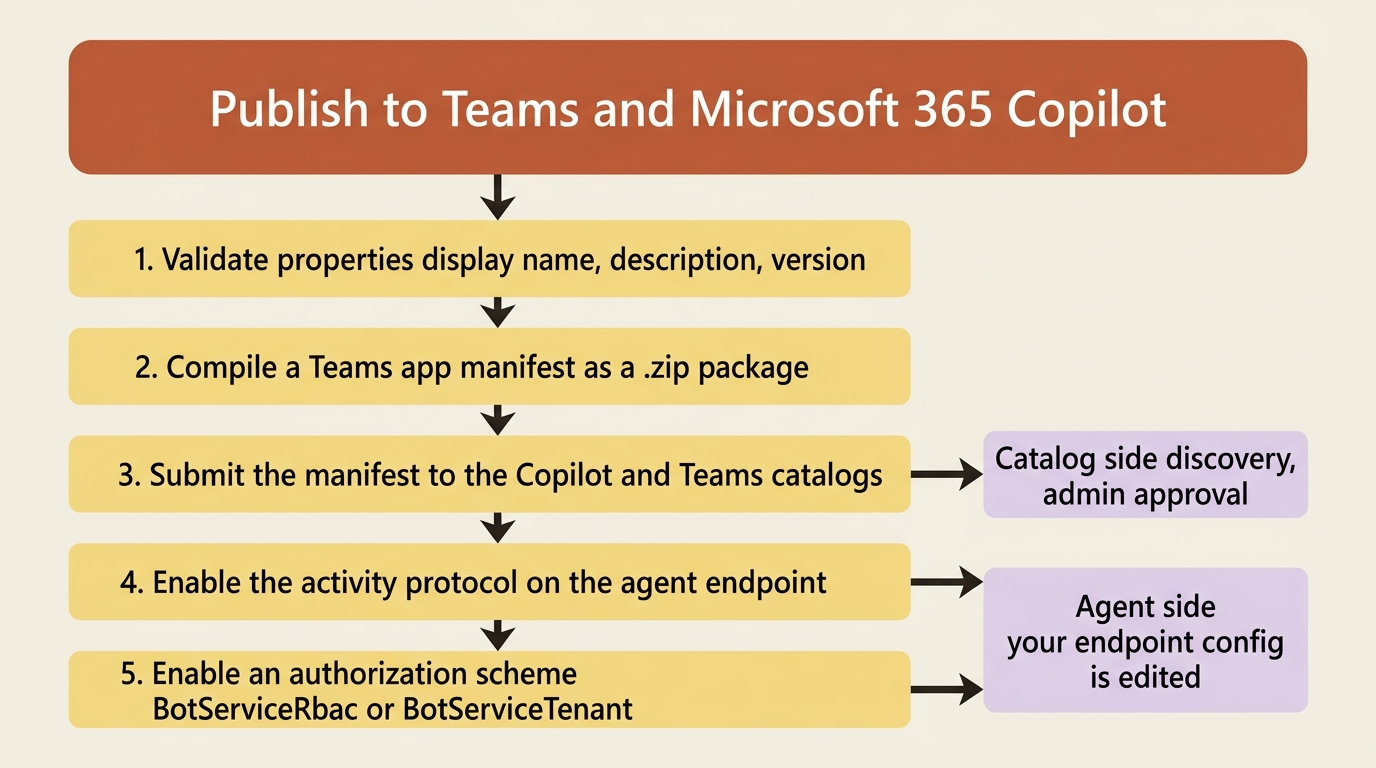
The last two are the ones to notice, because they are edits to your agent rather than to a catalog. This is the automatic Responses-to-Activity bridge arriving as a configuration change: the Responses protocol keeps powering the agent logic, and the platform bridges it to Activity for channel delivery with no separate wiring in your container [VERIFIED-LEARN: agents-concepts-hosted-agents.md]. You write no Activity handler. Your azure.yaml does not need to declare activity for the portal path, because publishing adds the protocol for you when the project allows public network access [VERIFIED-LEARN: agents-how-to-publish-copilot-virtual-network.md].
The Activity route gets its own URL alongside the ones your code already serves [VERIFIED-LEARN: agents-how-to-configure-agent.md]:
https://{account}.services.ai.azure.com/api/projects/{project}/agents/{agent}/endpoint/protocols/activityprotocol
This URL is the address the Microsoft channel infrastructure delivers to, and it is the value you hand to Azure Bot Service in a moment.
Visibility and authorization are two settings that move together
The takeaway: the scope you pick in the publish dialog sets two different things at once, who can discover the agent and who can call it, and the second one overwrites whatever Bot Service scheme was there before.
Two scopes exist, and the portal and the REST API name them differently for the same behavior [VERIFIED-LEARN: agents-includes-publish-copilot-what-happens.md, agents-how-to-publish-copilot-virtual-network.md]:
| Portal option | REST publishScope |
Authorization scheme | Admin approval | Where it appears |
|---|---|---|---|---|
| Just you | Shared (and Personal, treated as Shared) |
BotServiceRbac |
Not required | Your agents in the agent store, shared by link |
| People in your organization | Tenant |
BotServiceTenant |
Required | Built by your org, after admin approval |
The table covers the two publish scopes and what each one implies. Read as a list:
- Portal option: Just you. REST
publishScope:Shared, andPersonalis treated asShared. Authorization scheme:BotServiceRbac. Admin approval: not required. Where it appears: under Your agents in the agent store, shared by link. - Portal option: People in your organization. REST
publishScope:Tenant. Authorization scheme:BotServiceTenant. Admin approval: required. Where it appears: under Built by your org, after admin approval.
The distinction underneath is worth keeping straight, because the two words sound interchangeable and are not. Scope controls visibility, which is who can discover the agent in the stores. The authorization scheme Foundry sets to match controls who can call it. BotServiceRbac requires the caller to be in the project's tenant and to hold the Azure permissions needed to invoke the agent in Foundry. BotServiceTenant requires only that the caller be in the project's tenant [VERIFIED-LEARN: agents-how-to-publish-copilot-virtual-network.md].
Gotcha: publishing sets the matching scheme and replaces a different Bot Service scheme, so switching scope later rewrites authorization on a live endpoint [VERIFIED-LEARN: agents-how-to-publish-copilot-virtual-network.md]. Pick the scope that matches the audience you actually intend, then check the endpoint afterward rather than assuming the setting you configured by hand survived.
An organization-scoped publish is a request, not a deployment. A Microsoft 365 administrator reviews it in the Microsoft 365 admin center, and until they approve, the agent sits under Requests and nobody else sees it [VERIFIED-LEARN: agents-how-to-publish-copilot.md]. Build that wait into the schedule.
The permissions no Foundry role grants
The takeaway: publishing creates an Azure Bot Service resource, Azure-AI-scoped roles carry none of the permissions that requires, and this is the first thing that fails for most teams.
Two control-plane permissions are involved: Microsoft.BotService/botServices/write at the resource group scope to create the bot, and Microsoft.BotService/botServices/channels/write at the bot resource scope to configure its channels [VERIFIED-LEARN: agents-concepts-hosted-agent-permissions.md]. The permissions page prints the answer as a table where the interesting column is all one value: Owner and Contributor at resource group scope can create the bot service, and Foundry User, Foundry Project Manager, Foundry Account Owner, and Foundry Owner cannot. The note underneath says why, and it is not a bug: Azure Bot Service is a separate resource type, and Azure-AI-scoped built-in roles do not include Microsoft.BotService/* permissions.
The least-privilege answer is the Azure Bot Service Contributor Role, which grants exactly those two permissions; Contributor and Owner also work and grant considerably more [VERIFIED-LEARN: agents-how-to-publish-copilot.md]. On top of that you still need Foundry User on the Foundry project scope to create, manage, and publish agents. Both, not either.
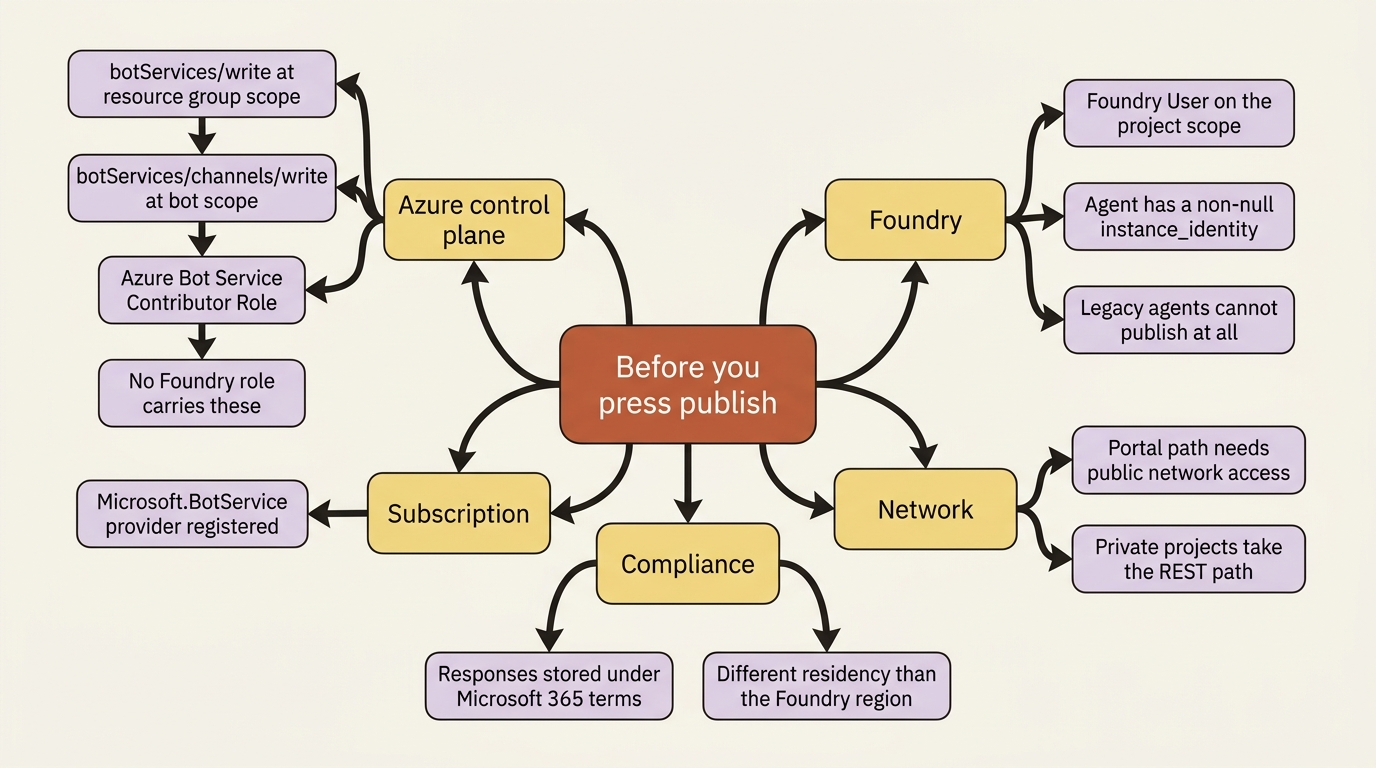
One more prerequisite hides behind a subscription setting rather than a role. The publish flow creates a Microsoft.BotService resource, and that resource provider has to be registered in the subscription [VERIFIED-LEARN: agents-how-to-publish-copilot.md]:
az provider register --namespace Microsoft.BotService
Run that once per subscription, well before the demo. The symptom when you skip it is a bot service creation failure inside the publish dialog, which reads like a permissions problem and is not.
In production: publishing moves data across a compliance boundary, and the docs open with a warning about it rather than burying it. When you publish to Microsoft 365 and Teams, those services process and store data associated with publishing and using the agent, including the agent's name, icon, and description, and including the content of the responses the agent returns to users who query it from those surfaces. This data is subject to the Microsoft 365 and Teams terms, compliance commitments, and data residency commitments, not to the ones covering your Foundry region [VERIFIED-LEARN: agents-how-to-publish-copilot.md]. A Foundry resource has region-based residency, and the Microsoft 365 side does not. Evaluate the resulting flows before you publish, because publishing is the moment they start.
The private-network path, where the portal button stops working
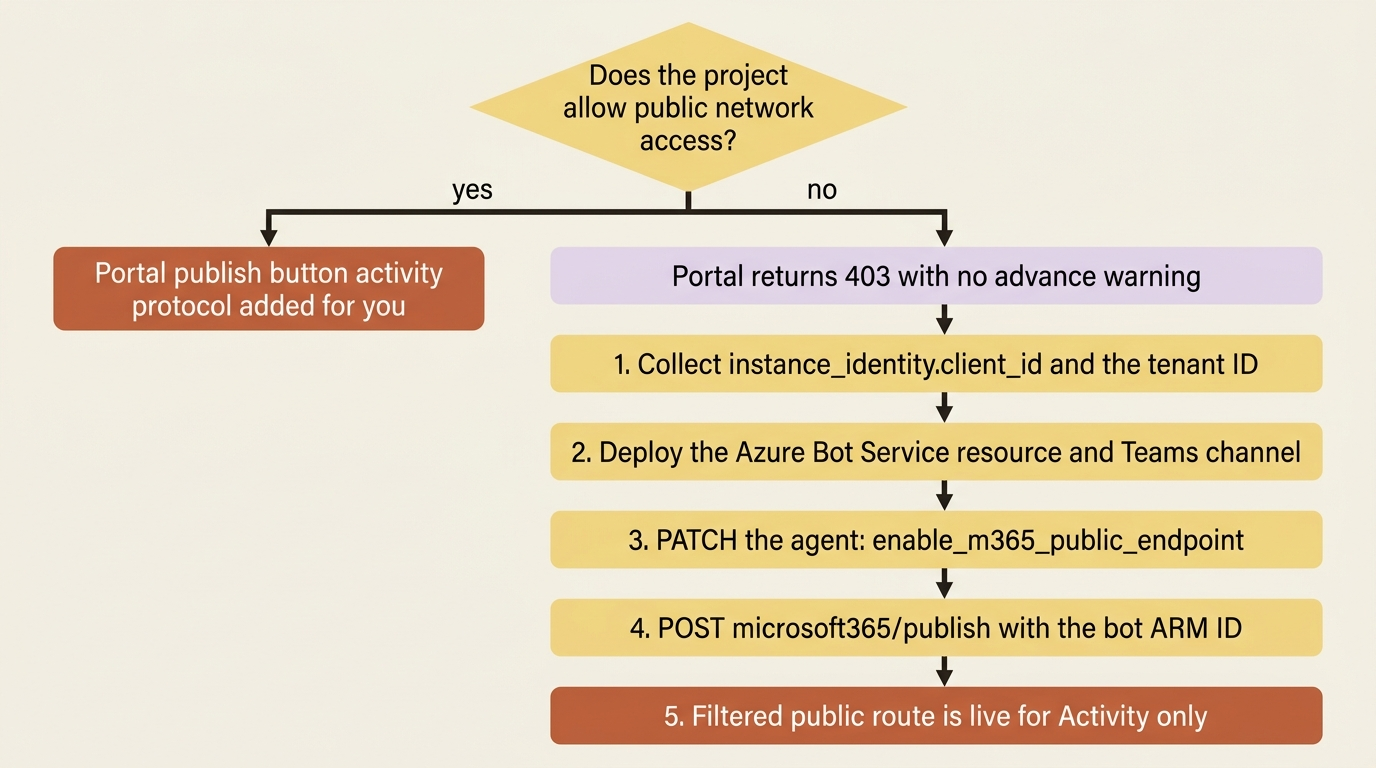
The takeaway: a project with public network access disabled cannot be published from the portal at all, and the supported alternative is a five-step REST flow that opens a source-IP-filtered public route to the Activity protocol and nothing else.
Gotcha: publishing from the Foundry portal is not supported for projects that disable public network access, and the portal returns 403 [VERIFIED-LEARN: agents-how-to-publish-copilot.md, agents-how-to-publish-copilot-virtual-network.md]. Nothing in the portal warns you ahead of time. The networking decision that causes it is made at account create time, and the publish button is the thing everyone assumes will work.
The reason is not a Foundry limitation. Microsoft 365 does not support private network connectivity for agents and requires the endpoints it invokes to be routable over the public internet [VERIFIED-LEARN: agents-how-to-publish-copilot-virtual-network.md]. Foundry's answer is a narrow, service-managed exception rather than a hole in your network.
The flow has five steps, and three of them are the REST equivalent of the portal button. Run every request from a client that can reach the project's private endpoint, such as a jump box in a peered virtual network or a workstation on VPN or ExpressRoute, because the management calls themselves stay governed by your private-network settings.
Step one, collect two identifiers. Get a bearer token for the https://ai.azure.com audience with az account get-access-token --resource https://ai.azure.com. Call GET {endpoint}/agents/{agent_name}?api-version=v1 and copy instance_identity.client_id from the response; the principal_id beside it is not used in this flow. Get your tenant ID with az account show --query tenantId -o tsv [VERIFIED-LEARN: agents-how-to-publish-copilot-virtual-network.md].
Step two, create the Azure Bot Service resource. The bot proxies messages between the Microsoft channel adapters and your agent. The documented template creates it with public network access disabled and attaches the Teams channel:
resource botService 'Microsoft.BotService/botServices@2022-09-15' = {  // ①
  name: botName
  kind: 'azurebot'
  location: 'global'
  sku: { name: botServiceSku }        // F0
  properties: {
    displayName: displayName
    endpoint: endpoint                 // the agent's activityProtocol URL  ②
    msaAppId: msaAppId                 // instance_identity.client_id from step one  ③
    msaAppTenantId: tenantId
    msaAppType: 'SingleTenant'         // ④
    publicNetworkAccess: 'Disabled'    // ⑤
  }
}

resource botServiceMsTeamsChannel 'Microsoft.BotService/botServices/channels@2021-03-01' = {
  parent: botService                   // ⑥
  location: 'global'
  name: 'MsTeamsChannel'
  properties: { channelName: 'MsTeamsChannel' }
}
① The bot is a Microsoft.BotService resource, a different resource type from anything in the Foundry account, which is why the roles that govern it are a different set too.
② The endpoint is the agent's Activity protocol route, so the bot relays channel messages to the agent rather than to any code you host yourself.
③ msaAppId is the agent's own identity client ID, which is what lets Foundry validate a signed channel token against this agent and not another one in the same tenant.
④ A single-tenant app type keeps the bot's identity scoped to your directory.
⑤ The bot resource itself stays off the public network. The single public route is opened on the agent in step three, not here.
⑥ The Teams channel is declared as a child of the bot, so one deployment both creates the bot and attaches the channel.
Note: The full extracted listing at code/foundry-hyperscaler/appendix-a-teams-and-m365-copilot/listings/01-bot-service-teams-channel.bicep shows the parameter declarations elided here.
One detail bites when you copy the endpoint value. The publishing page writes the Activity route with an explicit api-version query string, ?api-version=2025-05-15-preview, where the endpoint table on the configuration page writes the same route with no query string and all-lowercase activityprotocol [VERIFIED-LEARN: agents-how-to-publish-copilot-virtual-network.md, agents-how-to-configure-agent.md]. Copy the form from the page you are following rather than mixing them. After deploying, capture the bot's ARM resource ID with az bot show --query id -o tsv, because step four needs it.
Step three, open the Activity route and set the authorization scheme. This is the step that exists only for private-network projects, and it is one flag:
PATCH {{endpoint}}/agents/{{agent_name}}?api-version=v1
Content-Type: application/merge-patch+json

{
  "agent_endpoint": {
    "protocol_configuration": {          // ①
      "responses": {},                   // ②
      "activity": { "enable_m365_public_endpoint": true }   // ③
    },
    "authorization_schemes": [           // ④
      { "type": "Entra" },
      { "type": "BotServiceRbac" }       // ⑤
    ]
  }
}
① protocol_configuration is the full set of protocols the endpoint serves, and the request rewrites that set rather than adding to it.
② responses is repeated here only to survive the rewrite, because it is the protocol the agent logic actually runs on.
③ This is the one flag the whole step exists for. It opens the Activity route, and only the Activity route, to the filtered public path.
④ authorization_schemes is rewritten wholesale by the same request, so it carries every scheme the endpoint must keep.
⑤ The Bot Service scheme is what the channel traffic authenticates against, alongside the Entra scheme your own callers already use.
Note: The full extracted listing at code/foundry-hyperscaler/appendix-a-teams-and-m365-copilot/listings/02-enable-m365-public-endpoint.http shows the variable and token declarations elided here.
enable_m365_public_endpoint changes network reachability for the Activity route and nothing else. It does not make the Responses, Invocations, A2A, MCP, or other project APIs public, and it does not change authorization [VERIFIED-LEARN: agents-how-to-publish-copilot-virtual-network.md, agents-how-to-configure-agent.md]. On the Python side the same change goes through AgentEndpointConfig with a ProtocolConfiguration holding ResponsesProtocolConfiguration() and ActivityProtocolConfiguration(), plus EntraAuthorizationScheme() and BotServiceRbacAuthorizationScheme() in authorization_schemes, applied with project_client.agents.update_details() [VERIFIED-LEARN: agents-how-to-configure-agent.md].
Gotcha: that PATCH replaces protocol_configuration and authorization_schemes wholesale rather than merging into them [VERIFIED-LEARN: agents-how-to-publish-copilot-virtual-network.md, agents-how-to-configure-agent.md]. Every protocol and scheme the endpoint must keep has to appear in the body, which is why responses and Entra are in the snippet above even though the request is about Activity. Omit them and your agent's primary protocol and its Entra authorization disappear in a request that returns success.
Step four, publish. One call, with the bot's ARM ID in the body:
POST {{endpoint}}/agents/<agent-name>/microsoft365/publish?api-version=v1
Content-Type: application/json

{
  "agentDisplayName": "Supplier Risk Desk",          // ①
  "botServiceArmId": "<bot-service-arm-id>",         // ②
  "publishScope": "Tenant",                          // ③
  "publishAsAutopilot": false,                       // ④
  "appVersion": "1.0.0",                             // ⑤
  "shortDescription": "Weekly supplier risk briefs for procurement.",
  "fullDescription": "Monitors supplier filings and news, cross-checks contracts, and drafts the weekly risk brief.",
  "developerName": "Procurement Platform",           // ⑥
  "developerWebsiteUrl": "https://contoso.example",
  "privacyUrl": "https://contoso.example/privacy",
  "termsOfUseUrl": "https://contoso.example/terms"
}
① The display name is the catalog-facing label, which is separate from the agent name the service resolves out of the URL.
② The ARM ID of the bot from step two is the only thing tying this publish to the resource you deployed.
③ publishScope sets visibility and the matching authorization scheme together, so this one value decides both who finds the agent and who may call it.
④ Autopilot publishing belongs to the Agent 365 path, and stays false on this one.
⑤ appVersion is the store version, not the agent version. Republishing an existing value fails, so an update raises it.
⑥ The developer and URL block is store metadata, subject to the validation limits below: 32 characters here, and an https:// prefix on each URL.
Note: The full extracted listing at code/foundry-hyperscaler/appendix-a-teams-and-m365-copilot/listings/03-microsoft365-publish.http shows the variable and token declarations elided here.
The agent name lives in the URL, and the service resolves the agent and its identity from it, so no agent GUID or bot ID goes in the body. A successful response returns the published title ID as titleId [VERIFIED-LEARN: agents-how-to-publish-copilot-virtual-network.md]. Three optional fields are worth knowing about: canRespondWithoutMention, which controls whether an autopilot answers every message on its Teams surfaces or only when mentioned, and colorIconBase64 and outlineIconBase64 for a 192x192 and a 32x32 PNG.
The validation rules are strict and they are all in the error table, so save yourself a round trip: appVersion may contain only digits and periods and may not start with 0, developerName is capped at 32 characters, fullDescription at 4,000, and every URL must begin with https:// [VERIFIED-LEARN: agents-how-to-publish-copilot-virtual-network.md].
Step five, understand what you opened. A user's message travels through the Microsoft 365 or Teams channel infrastructure, arrives at the Activity route over the public internet, and gets checked against Foundry's own Azure Bot Service and Microsoft 365 source ranges before anything else happens. Foundry then validates the signed channel token against the agent's identity and applies the authorization scheme, including tenant and RBAC checks. Only then does the activity reach the active agent version [VERIFIED-LEARN: agents-how-to-publish-copilot-virtual-network.md].
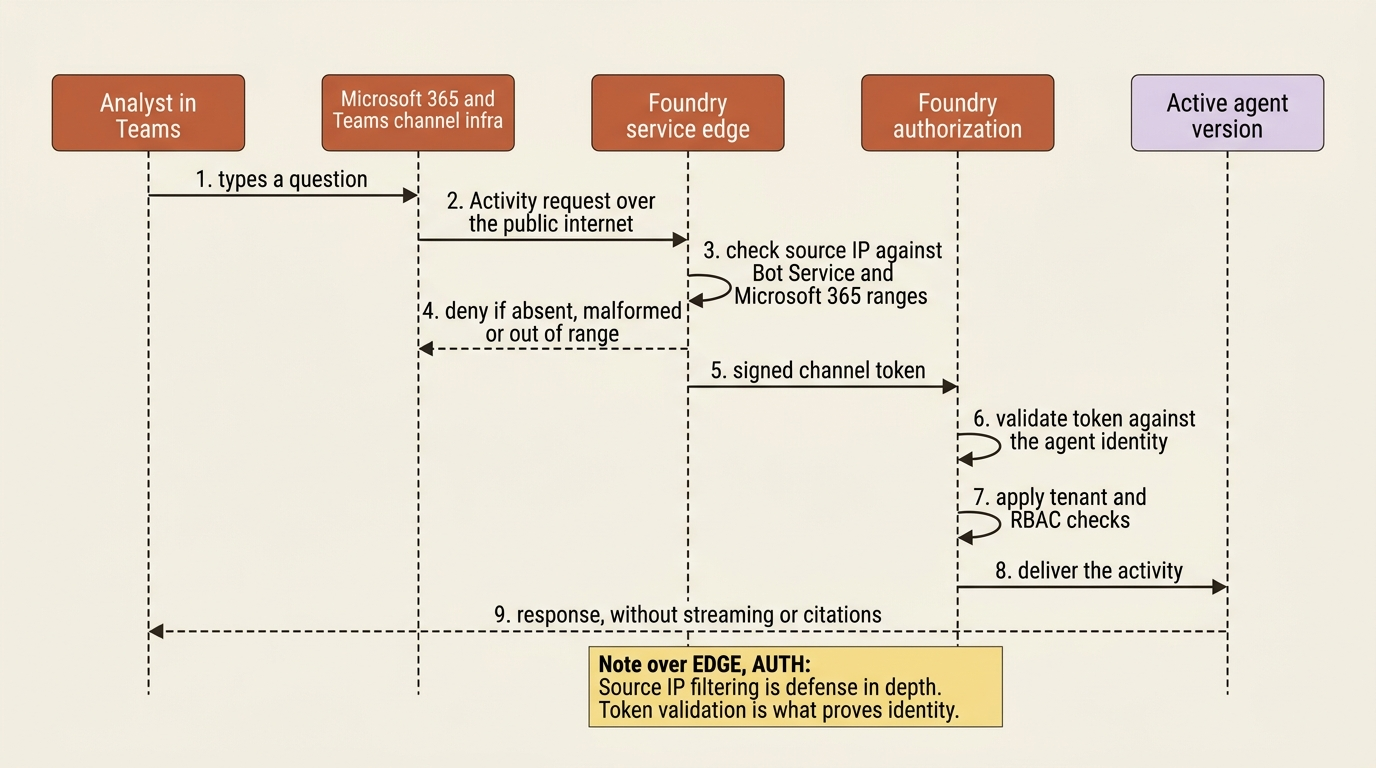
Four properties of that route are Foundry's responsibility rather than yours, and they are the reason this is cheaper than a reverse proxy. Foundry exposes the route over its own public service endpoint, so you deploy no public IP address, DNS record, DNAT rule, load balancer, or proxy. Foundry terminates TLS with its own certificate. Foundry maintains the source ranges, so nothing goes in your firewall. And the handling fails closed: requests with an absent or malformed source IP, and requests from outside the allowed ranges, are denied. Foundry determines the source IP at the service edge and replaces client-supplied source-IP metadata, so a forwarding header buys an attacker nothing.
Read the page's own caveat before you present this to a security reviewer, because it is the honest version. Source IP filtering is defense in depth and not proof of identity: Azure Bot Service and Microsoft 365 source ranges are shared by multiple tenants and resources, and traffic relayed through some other Bot Service resource can originate from an allowed address. The source IP check identifies the service network. Token validation and the authorization scheme are what establish that the request was meant for your agent [VERIFIED-LEARN: agents-how-to-publish-copilot-virtual-network.md].
One thing the flag does not touch: outbound. enable_m365_public_endpoint changes inbound reachability for one route and leaves your egress rules exactly as you configured them [VERIFIED-LEARN: agents-how-to-publish-copilot-virtual-network.md].
Updating a published agent, and the two things that update separately
The takeaway: agent behavior and store metadata move on different tracks, and only one of them needs a republish.
Rolling out new agent behavior is a version-selector change and nothing more. The stable endpoint URL does not change, so there is no republish to Microsoft 365 or Teams [VERIFIED-LEARN: agents-how-to-publish-copilot.md]. With the default Always use latest policy, a new version serves in the channels automatically; with a pinned selector you update the pin when you are ready.
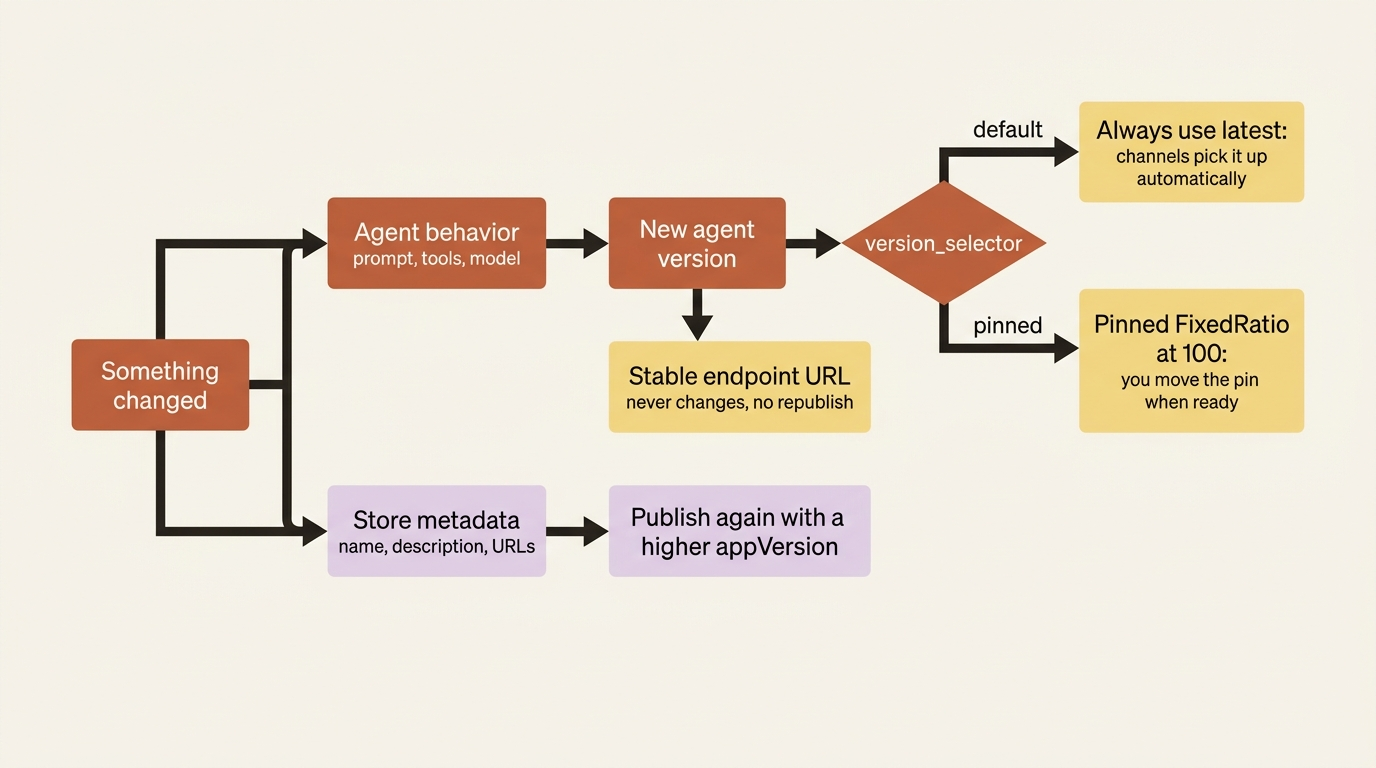
Changing what users see in the store is the other track: display name, descriptions, and URLs update through Update agent Teams and Microsoft 365 Copilot display properties in the portal's Publish dropdown, where the fields you supply overwrite the existing values, unchanged fields carry forward, and the version auto-increments if you do not increment it yourself [VERIFIED-LEARN: agents-how-to-publish-copilot.md]. Through the API the same update is another publish call with a higher appVersion, because republishing an existing version returns a version already exists error [VERIFIED-LEARN: agents-how-to-publish-copilot-virtual-network.md].
Two operational facts save a support ticket each. The agent store cache refreshes only when the store is opened, on roughly a one-hour cycle, so an agent that does not appear right after publishing is usually just early; a sign-out and sign-in shortens the wait for Shared scope. And guest users cannot call these agents at all, which surfaces as a rejected request rather than a hidden agent [VERIFIED-LEARN: agents-how-to-publish-copilot-virtual-network.md].
The limitations worth reading before you promise a Teams demo
The takeaway: three capabilities silently disappear when an agent is reached through a channel, and one of them is the one your demo script probably opens with.
The published-agent limitations table is short and every row costs something [VERIFIED-LEARN: agents-how-to-publish-copilot-virtual-network.md]:
- File uploads and image generation do not work in Microsoft 365. They do work in Microsoft Teams. Same agent, same tools, different surface.
- Channel traffic does not use Private Link. It uses the source-IP-filtered public Activity route described above, which is worth restating to anyone who believes a private endpoint covers every path to the agent.
- Published agents do not support streaming responses or citations. An agent whose value proposition is watching the answer assemble token by token, or a brief whose credibility rests on visible source links, loses something real on this surface.
Two runtime behaviors belong beside those. A conversation can enter a locked state after a tool error, where later messages keep failing with symptoms like no tool output found, and the documented recovery is to start a fresh conversation. Microsoft 365 Copilot lets you start a new chat. Teams does not yet offer a way to start a new session, so the documented workaround is to send the agent the message /foundry_new_preview, which resets the conversation and cannot be undone [VERIFIED-LEARN: agents-how-to-publish-copilot-virtual-network.md] [PERISHABLE: preview command, checked September 2026].
The licensing footnote is genuinely good news and worth quoting to whoever is costing the rollout. End users do not need a Microsoft 365 Copilot license to use a published agent in Microsoft 365 Copilot Chat. Usage that reaches shared tenant data, such as SharePoint or Copilot connectors, might incur usage-based charges [VERIFIED-LEARN: agents-how-to-publish-copilot-virtual-network.md].
One failure mode from the runtime table deserves its own sentence, because it catches teams that tested thoroughly. An agent that works in the Foundry playground and fails after publishing is usually an identity problem: the agent's identity is missing permissions on the resources it uses [VERIFIED-LEARN: agents-how-to-publish-copilot-virtual-network.md]. The playground call and the channel call arrive as different principals, and only one of them has been granted anything.
The stateless-Responses limitation, and where it actually applies
The takeaway: the widely repeated claim that published Foundry agents support only stateless Responses is a statement about the legacy Agent Application resource, and printing it as a property of the current publishing path is wrong.
Here is the claim in its original form. On the legacy Agent Application endpoint, the OpenAI-compatible API is deliberately restricted: only the stateless Responses API (POST /responses) is supported, and /conversations, /files, /vector_stores, and /containers are inaccessible, which means the client has to store conversation history for multi-turn conversations [VERIFIED-LEARN: agents-how-to-agent-applications.md]. The same page's FAQ gives the reason: Foundry Agent Service supports managed conversation history but did not yet enforce end-user isolation between conversations within one project, so someone who knew another user's conversation ID could read that history. The page calls the limitation temporary and says work to fix it is underway.
Three things scope that claim, and all three are in the documentation.
First, the page it comes from opens with a note declaring itself the legacy publishing experience and pointing at the new agent model [VERIFIED-LEARN: agents-how-to-agent-applications.md]. The restriction is documented on the applications/{app}/protocols/openai endpoint, which is not the endpoint a new-model agent exposes. New-model agents serve agents/{agent}/endpoint/protocols/openai/responses [VERIFIED-LEARN: agents-how-to-migrate-agent-applications.md].
Second, the stated rationale no longer describes the platform. Per-user isolation is the documented default behavior of an agent endpoint: each user's conversation history, meaning their messages, tool calls, and responses, is private to that user, and one user cannot read or list another user's conversations [VERIFIED-LEARN: agents-how-to-isolate-sessions-per-user.md]. That model answers the FAQ's worry directly, because a raw conversation ID is not an authorization boundary. The platform checks the caller's identity rather than the identifier's secrecy.
Third, the current publishing pages never mention it. The limitations table for published agents lists file uploads, image generation, Private Link, streaming, and citations, and says nothing about stateless Responses or absent conversations. Its runtime troubleshooting, meanwhile, covers a conversation entering a locked state, resetting a conversation, and a request failing because conversation history filled the model's context window [VERIFIED-LEARN: agents-how-to-publish-copilot-virtual-network.md]. Those are not the failure modes of a stateless endpoint. The documentation never states outright that published new-model agents carry conversation state, which makes this a reading rather than a quotable fact, but it is a reading the pages support and the alternative contradicts.
The resolution to carry: treat the stateless restriction as a property of the legacy Agent Application resource, verify it live before designing around it if you are still running one, and do not repeat it as a limitation of the current publish flow [CONTESTED, resolved] [PERISHABLE: checked September 2026].
One more conflict sits in the same neighborhood, and it resolves by date. The migration page states that publishing is available only through the Foundry portal and that there is no public publish API [VERIFIED-LEARN: agents-how-to-migrate-agent-applications.md], while the REST publishing page documents POST {endpoint}/agents/<agent-name>/microsoft365/publish?api-version=v1 in full and the portal page says the button calls that same Microsoft 365 publish API [VERIFIED-LEARN: agents-how-to-publish-copilot-virtual-network.md, agents-how-to-publish-copilot.md]. The two publishing pages are dated August 2026 and the migration page July 2026. Take the later, more specific pages: the API exists, and it is the only path for a private-network project.
Do this today
- Run
az provider register --namespace Microsoft.BotServiceon every subscription that will host a published agent, long before anyone schedules a demo. - Check your agent for a non-null
instance_identity. If it is null, you have a legacy agent, and publishing means recreating it from the same definition rather than upgrading it in place. - Ask whether the project allows public network access. If it does not, book the time for the five-step REST flow instead of assuming the portal button will work on the day.
- Get someone the Azure Bot Service Contributor Role at the resource group scope, and confirm the publisher also holds Foundry User on the project. Both roles, not either.
- Take the streaming-and-citations limitation to whoever owns the agent's prompt now. If your answers depend on visible source links, the sources have to move into the body of the response before launch, not after the first complaint.
Publishing is where the compliance conversation starts
Publishing is the least glamorous step in shipping a Foundry agent and the one most likely to slip a launch date. Nothing about it is hard. Everything about it is somewhere else: a resource type outside your Foundry account, a role outside your Foundry roles, a provider registration outside your resource group, and a network setting decided before the project had a name.
Two things change about an agent the moment it lands in a channel, and no code review will show you either. Its answers start flowing into Microsoft 365, processed and stored under that service's terms and residency commitments rather than your Foundry region's. And it loses its citations on that surface, which means a claim with no visible source, which is the one thing a careful reader will not forgive.
Get both of those on the table before you press the button. The button itself is four API calls in a trench coat, and you want to know all four the first time it fails.