
The Reviewer That Cannot Edit: A Read-Only Cursor Subagent in One File
The agent that wrote a change is the wrong one to judge it, and one short Markdown file gives Cursor a read-only reviewer that works in its own context, reports PASS or MISSING TEST, and cannot quietly fix what it was asked to check.
Write one Markdown file, and Cursor gets a second agent that reads a commit in its own context, reports PASS or MISSING TEST, and leaves every file exactly as it found it.
You asked the agent to review its own change, and it answered by editing the file, so now you cannot tell what it judged from what it fixed.
In this article: Day 12 of an 18-day guide. Start here writes a read-only Cursor subagent named
tt-reviewerfor a small sample project, runs it from the CLI menu on an earlier commit, reads its verdict, and proves withgit statusthat it changed nothing. Going deeper shows the reviewer catching a missing test, refusing an edit, the six folders Cursor reads subagents from, the three ways to call one, and how the subagent's model choice changes your bill.
A review is only worth something when the reviewer cannot touch the code. Ask the same agent that wrote a change to check it, and you get a judge who can quietly repair what it was asked to judge. The report says everything is fine, and you cannot tell whether it was fine before the review or only after.
Cursor subagents fix both halves of that problem. A subagent starts with an empty context, so it judges the commit you name instead of the conversation that produced it. One frontmatter line, readonly: true, takes away its ability to edit files. The result is a second opinion you can trust, and your main session stays small, because everything the reviewer read stays in its own context.
Part 11 committed a hook that blocks rm -rf while npm test still runs. Today you add a reviewer next to it.
Tested on Cursor CLI 2026.11.13-eacade1. Editor steps: written from the docs, not yet run.
Start here
At the end of today, Ticket Triage, the small support-ticket classifier this guide builds, has a committed, read-only reviewer named tt-reviewer. You run it on the cracked commit from Day 9, read its report, and see that it changed no file.
Starting fresh or fell behind? Run git switch -C main cursor/day-11. This replaces your main with the end of Day 11; to keep your own work, run git branch my-backup first.
Check your starting state
Start where Day 11 ended. Run three checks in ~/code/ticket-triage.
cd ~/code/ticket-triage
git status --short
git log --oneline -1
npm test
git status --short prints nothing. git log --oneline -1 shows the newest commit, with your own hash:
f7eab09 Add the tt-guard hook that blocks rm -rf
npm test ends with ℹ pass 9 and ℹ fail 0. If any check differs, finish Day 11 first.
What a subagent is
A subagent is a second agent that your session starts for one job. It begins with an empty context: it does not see your conversation, only the task that the main agent hands it. It works on its own and sends back one final message (Subagents). Everything that it read along the way stays in its own context, so your main session stays small.
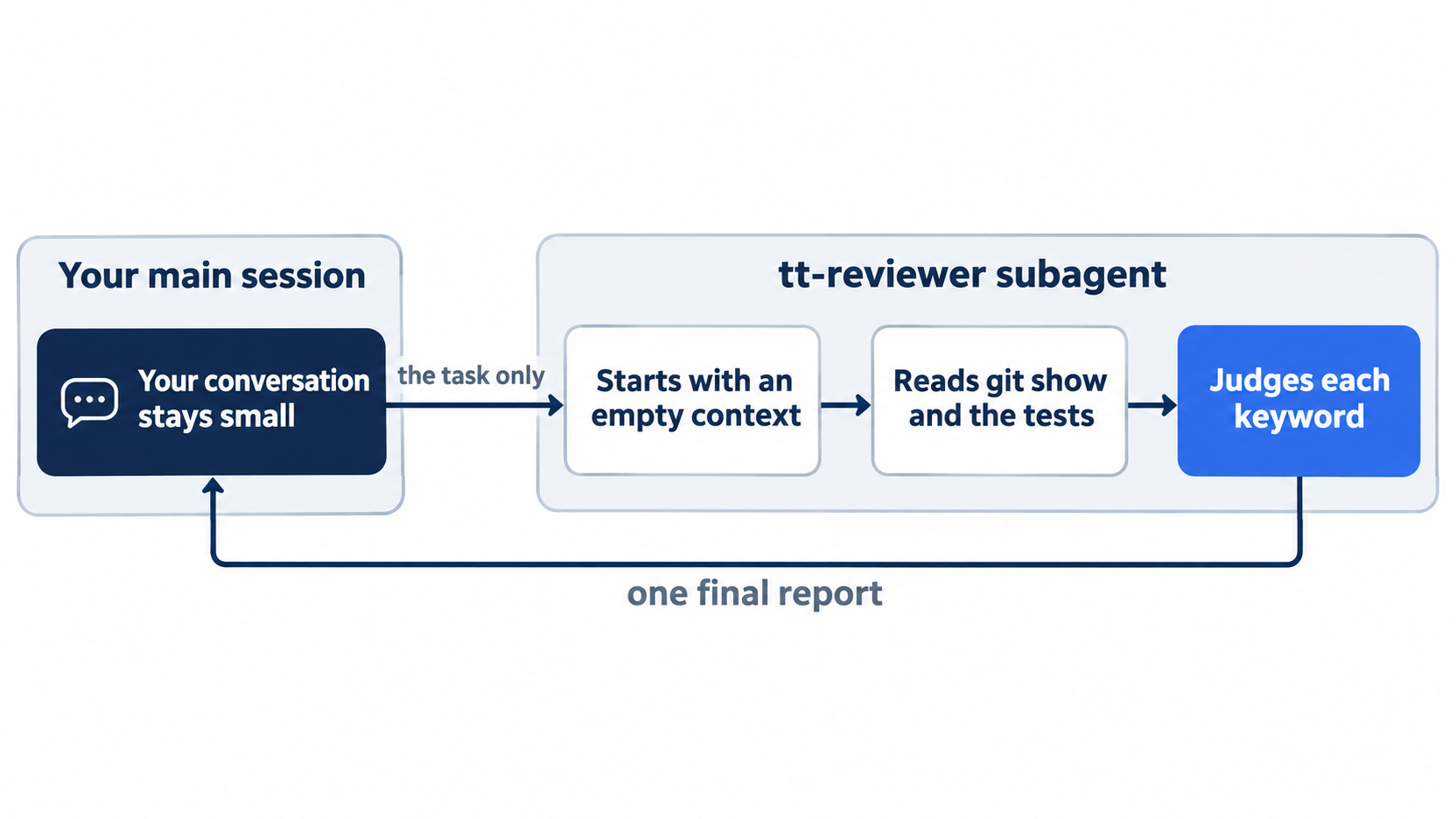
The main session never sees the reviewer's working steps. It sends one task out and gets one report back, which is why a long review does not crowd your own conversation.
Cursor has built-in subagents that it uses on its own, such as Explore for searching code. Today you write your own. A custom subagent is a Markdown file in .cursor/agents/, with frontmatter like a skill's. The field that matters today is readonly: true: the docs say the subagent then runs "with restricted write permissions (no file edits, no state-changing shell commands)" (Subagents). A reviewer that cannot edit cannot quietly fix what it was asked to judge.
Write the reviewer
Create the file. Use your editor, or paste this command into the terminal.
The command writes one Markdown file: frontmatter that names the reviewer and makes it read-only, then a numbered checklist that ends in a fixed verdict line.
mkdir -p .cursor/agents
cat > .cursor/agents/tt-reviewer.md <<'EOF'  # ①
---
name: tt-reviewer  # ②
description: Read-only reviewer for Ticket Triage commits. Use when the user asks to review a commit for a missing test.  # ③
readonly: true  # ④
---

You review one git commit in this repository. You do not edit files.

1. Show the commit the user names with `git show`. If the user names no commit, use HEAD. <!-- ⑤ -->
2. List each keyword the commit adds to `src/classify.js`.
3. For each keyword, check whether `test/classify.test.js` has a test named after it.
4. Report the commit's short hash and message, each keyword with "has a test" or "no test", and a last line that says `PASS` or `MISSING TEST`. <!-- ⑥ -->
EOF
git status --short  # ⑦
① The quoted 'EOF' heredoc writes the file exactly as typed, with no shell expansion, into .cursor/agents/, where Cursor looks for custom subagents.
② name is what you type after the slash, and the tt- prefix keeps it apart from built-in names.
③ description is the routing hint: it tells the main agent which requests to hand to this subagent.
④ readonly: true restricts the subagent to no file edits and no state-changing shell commands, so the reviewer cannot fix what it judges.
⑤ The subagent starts with an empty context, so the first step of its instructions tells it which commit to read and what to do when none is named.
⑥ The last step fixes the report shape and ends it with a PASS or MISSING TEST line you can read at a glance.
⑦ git status --short confirms the new, untracked .cursor/agents/ folder.
Note: The full extracted listing at code/cursor/part-12-subagents/listings/01-tt-reviewer.md holds the complete .cursor/agents/tt-reviewer.md file.
?? .cursor/agents/
The frontmatter has three fields. name is how you call it, with the tt- prefix. description tells the main agent when to use it. readonly: true limits what it may do. The body is the reviewer's instructions, and it ends with a fixed last line so that you can read the verdict at a glance.
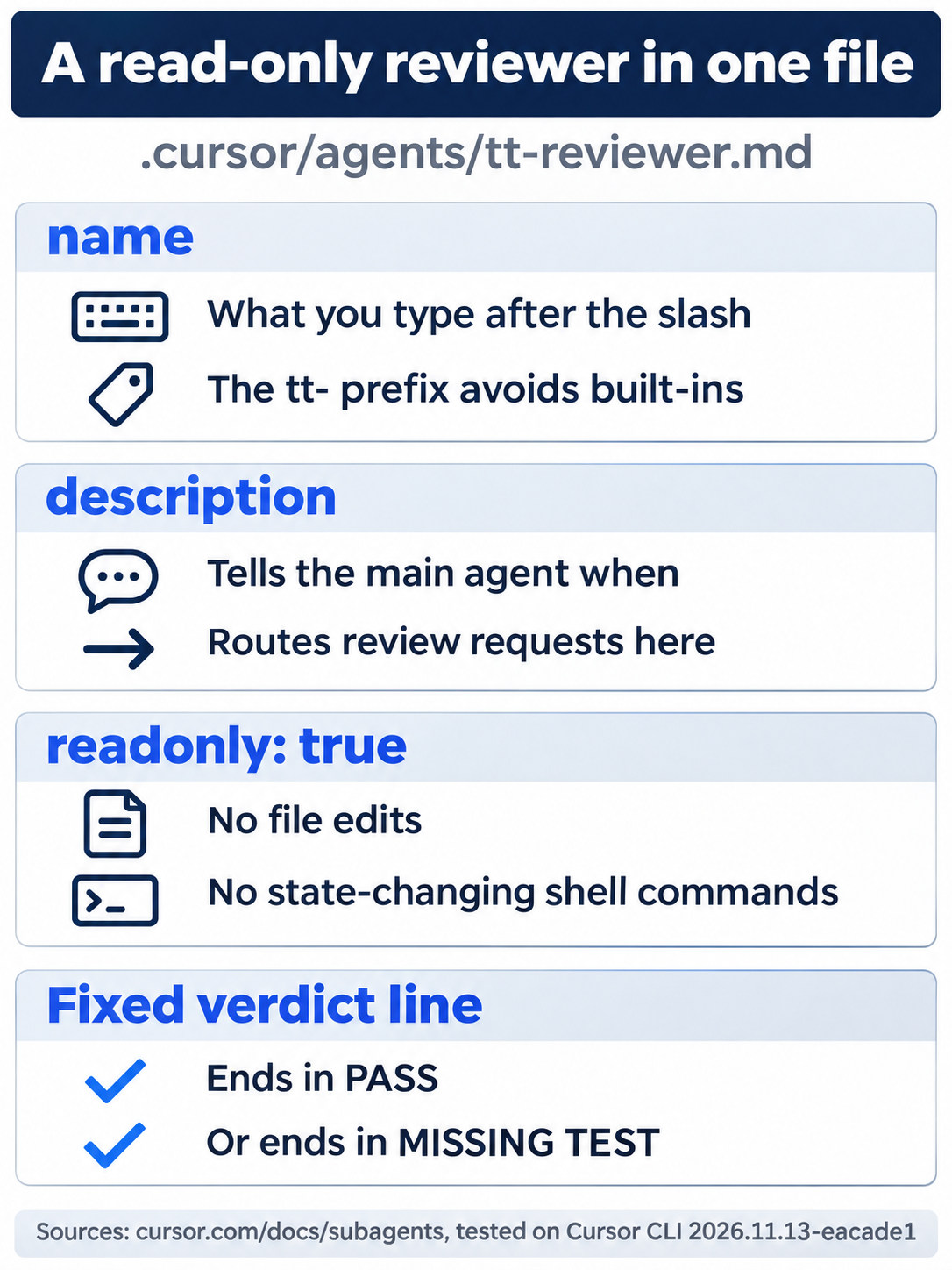
Three frontmatter lines decide how the reviewer is called, when the main agent picks it, and what it may not do, and the body's last step makes every report end in a one-word verdict.
Run the reviewer
Start a new session so that the CLI finds the new file. Then type a slash and the start of the name.
cursor-agent
/tt-rev
The menu shows the reviewer with a subagent- prefix and its description. Other rows that match the letters, such as /auto-review, appear below it.
→ /subagent-tt-reviewer Read-only reviewer for Ticket Triage commits. Use when the user asks to review a commit for a missing test.
Press Enter. The CLI fills the prompt with a sentence for the main agent:
Use the Task tool with subagent_type="tt-reviewer" to:
The Task tool is how the main agent starts a subagent, and subagent_type names the subagent to start, here tt-reviewer. Finish the sentence with the commit to review, and press Enter. HEAD~1 means one commit before the newest, which is the cracked commit from Day 9.
Use the Task tool with subagent_type="tt-reviewer" to: review HEAD~1
The transcript first shows a line such as Explored available MCP tools cursor · Task, as the main agent looks up the Task tool. Then a card appears while the reviewer works and closes when the reviewer is done:
    1 agent completed
    Review HEAD~1 commit
    ✓ Done
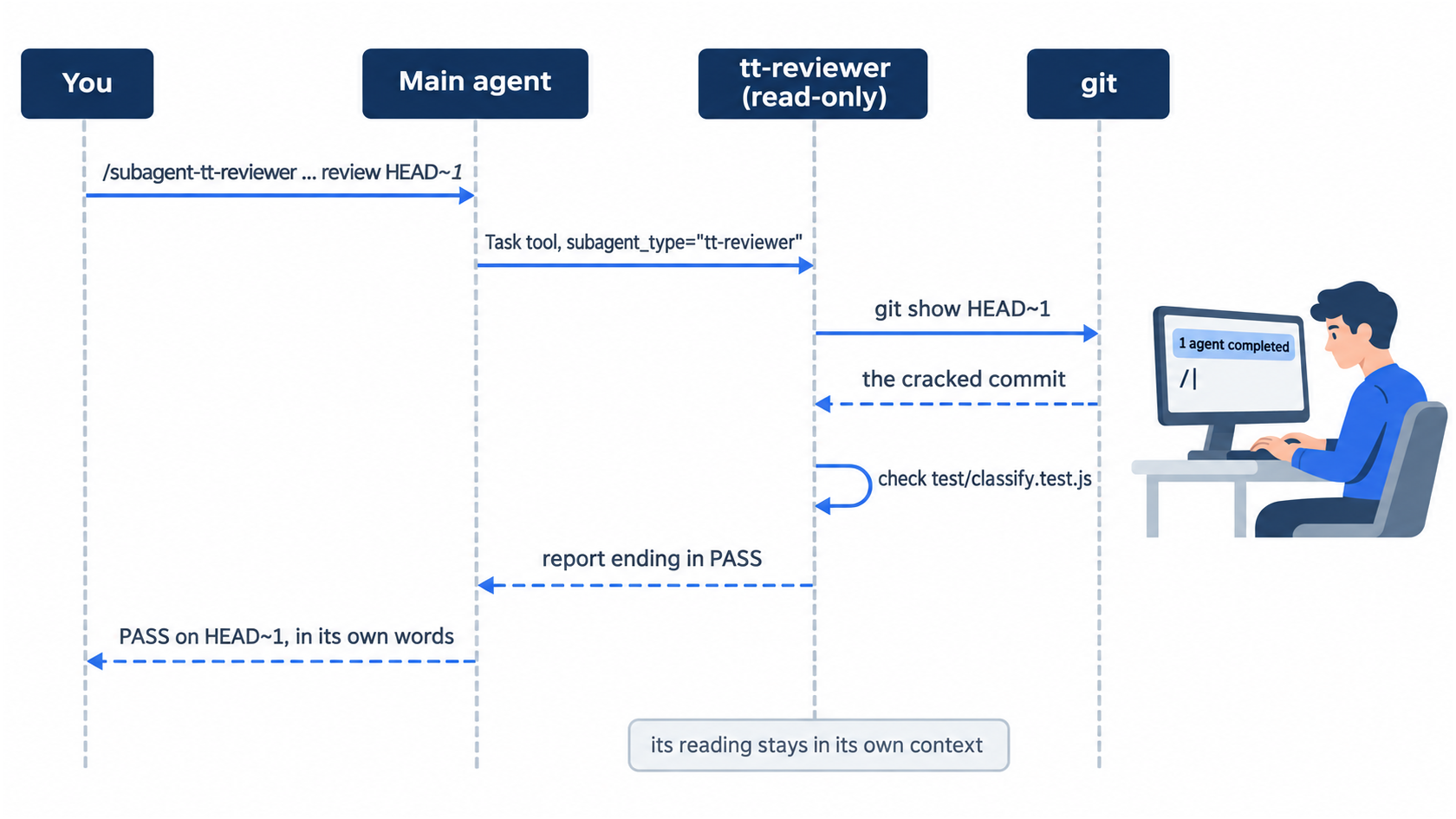
The handoff runs in one direction at a time. You talk to the main agent, the main agent talks to the reviewer through the Task tool, and only the reviewer's final report comes back.
The main agent passes on the report, in words such as:
PASS on HEAD~1 (2b8eed7 — Add cracked to the damaged keywords).

That commit added the keyword cracked in src/classify.js, and there is a matching test("cracked", ...) test.
The steps that the reviewer took stayed in its own context; your session shows only the card and the result. Your wording will differ. The main agent passes the report on in its own words, so the verdict can come first, as above, or last. Look for PASS or MISSING TEST, and check that the hash and message name the commit you asked for.
Allowlist: no prompts in this test. In a later run, the reviewer itself asked to run git show; choose Run (once) for a read-only git command like that.
Auto-review: no prompts (tested with the plain-words form on HEAD~1).
Leave the session, check that the reviewer changed nothing, and commit it.
/quit
git status --short
git add .cursor/agents
git commit -m "Add the read-only tt-reviewer subagent"
Before the commit, git status --short shows only ?? .cursor/agents/: the review read the code and left it alone.
The same steps in the editor
The editor reads the same .cursor/agents/ folder, and the review only reads, so you may run it in both. Every step in this section is written from the docs, not yet run.
- (written from the docs, not yet run) In the Agent panel, type
/and find the reviewer. The docs show the form/tt-reviewer(Subagents); the CLI showed/subagent-tt-reviewer. - (written from the docs, not yet run) You committed the reviewer, so the
crackedcommit is nowHEAD~2. SendUse the tt-reviewer subagent to review HEAD~2.The expected result: a report on thecrackedcommit that saysPASS. - (written from the docs, not yet run) Run
git status --shortin the terminal. The expected result: nothing changed.
Your win
Run the check now. This time, name the subagent in plain words instead of using the menu; the main agent understands the request the same way.
cursor-agent
Use the tt-reviewer subagent to review HEAD~2.
You added a commit, so the cracked commit is now HEAD~2. The report names it and says PASS.
Allowlist: the main agent may first ask to run git log -3 --oneline && git show --stat HEAD~2 to find the commit. In testing it asked once; choose Run (once). The menu form in Start here did not ask.
Auto-review: no prompts (tested with the plain-words form on HEAD~1).
Type /quit, then run:
git status --short
git log --oneline -1
npm test
git status --short prints nothing, the last commit is Add the read-only tt-reviewer subagent, and npm test shows ℹ pass 9 and ℹ fail 0.
You can stop here. Going deeper explains why this works and where it breaks.
Going deeper
This section is for readers who want to see the reviewer catch a problem, test the read-only limit, and know where subagent files live, which model they use, and what they cost. It assumes you finished Start here in Parts 1 to 12.
The reviewer catches a missing test
A review that always says PASS proves nothing. In a copy of Ticket Triage, this guide added smashed to the damaged check and committed it with no test. Use the tt-reviewer subagent to review HEAD. returned a small table, smashed │ no test, the line "test/classify.test.js has no test named after it (only dented, chipped, cracked).", and the last line MISSING TEST.
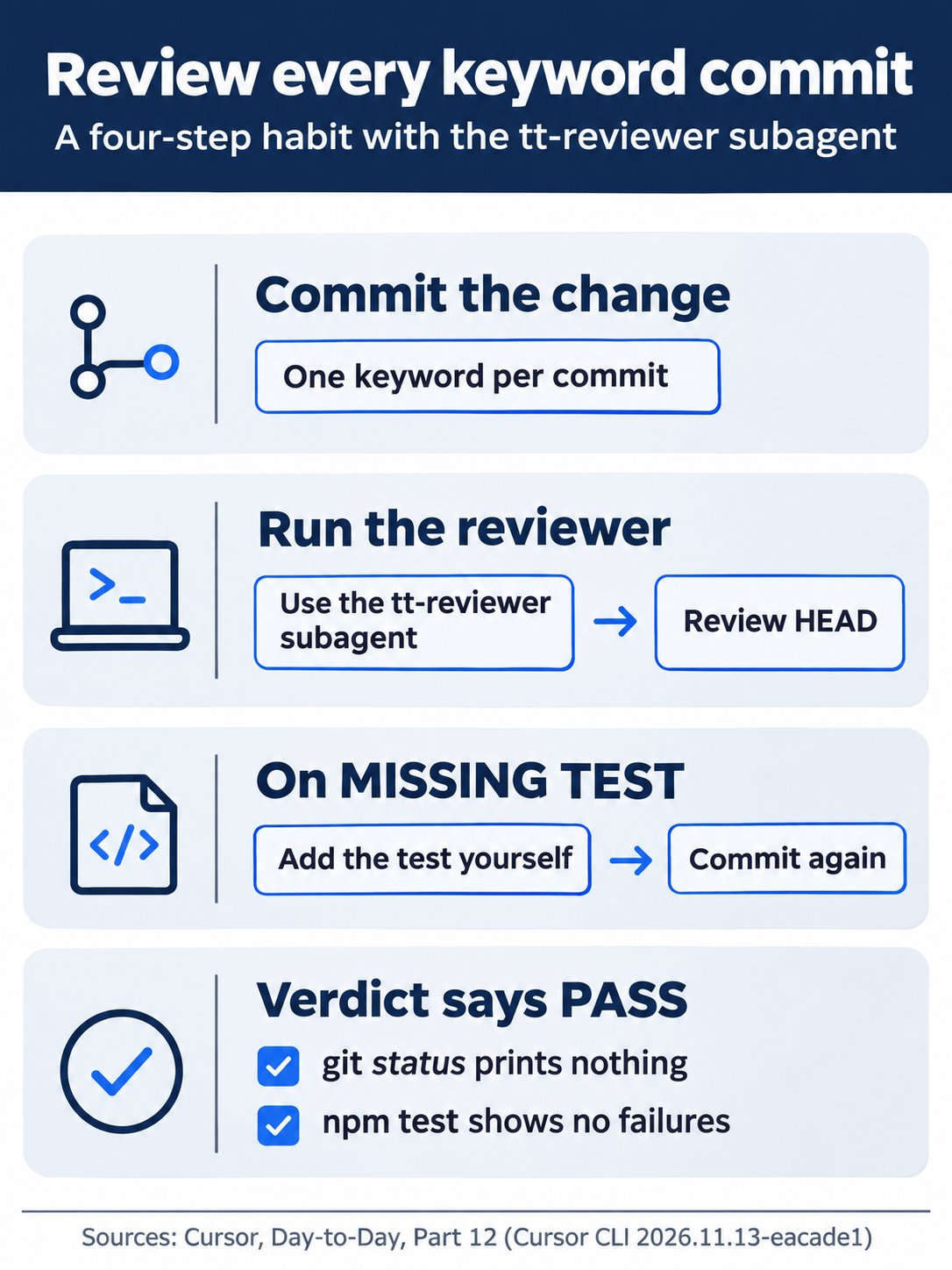
The habit fits in four steps. Commit, review, fix on MISSING TEST, and commit again, so that every keyword change ends with a report that says PASS.
What read-only stopped
In the same copy, the request Use the tt-reviewer subagent, and only that subagent, to add a smashed test to test/classify.test.js. Do not edit any file yourself. started the reviewer. The answer began:
The tt-reviewer subagent did not add the test — it is read-only and does not edit files.
It repeated its review instead, and git status --short showed no change to the test file.
The test does not show which line did the work: readonly: true or the body's "You do not edit files." Keep both. The frontmatter field is the limit that Cursor enforces, according to the docs, and the sentence tells the model what you expect.
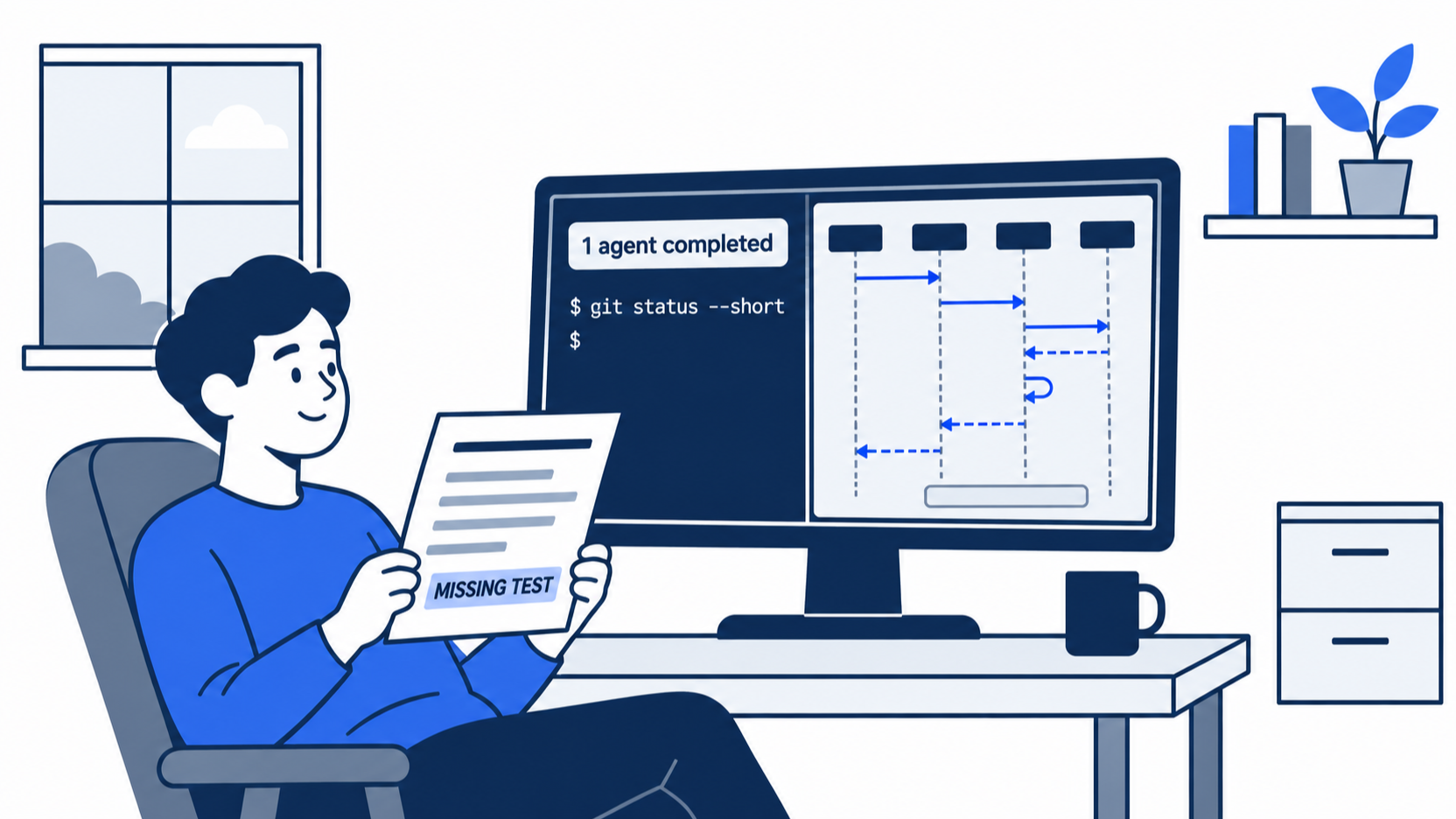
The scene shows the moment the reviewer earns its place: it caught the missing test, said so plainly, and left the working tree untouched for you to fix.
Where subagents live
Cursor reads custom subagents from six folders (Subagents):
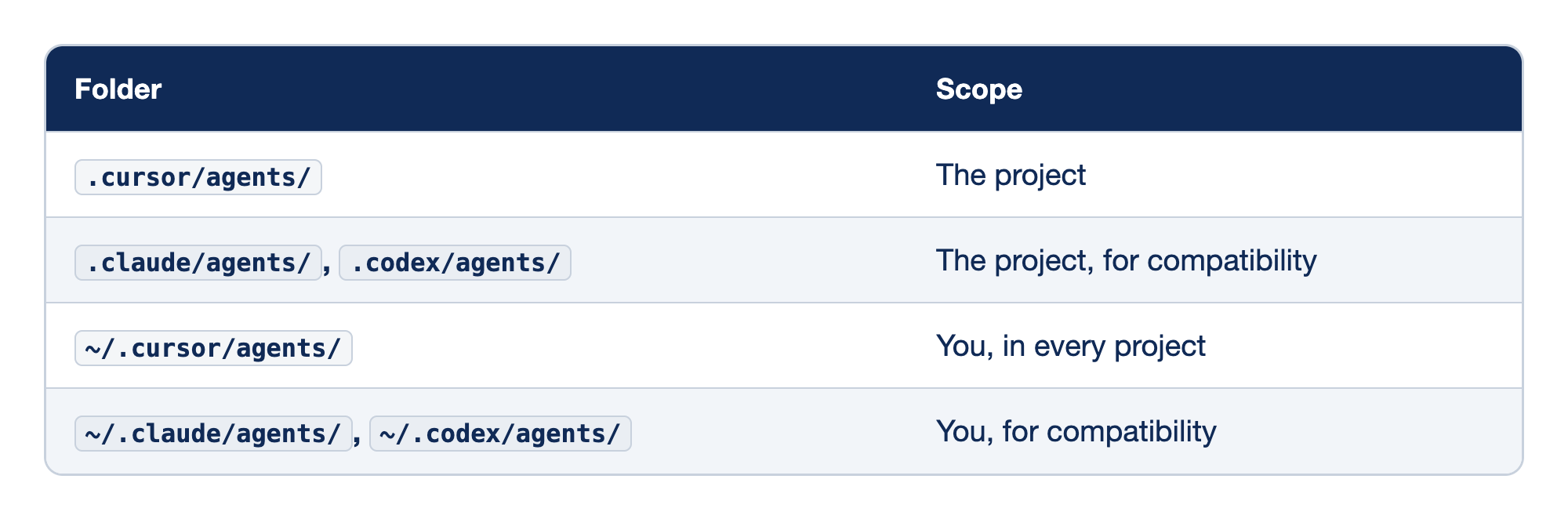
Each folder that Cursor searches for subagents has a scope: the project, shared through git, or you, in every project. The "Folder" column names the path, and the "Scope" column says who the subagents in it belong to. As with skills, Cursor reads Claude Code's and Codex's folders too.
.cursor/agents/is the project folder this guide uses, and a subagent there is shared through git..claude/agents/and.codex/agents/are project compatibility folders that let Cursor load subagents you wrote for Claude Code or Codex (from the docs; not tested in this guide).~/.cursor/agents/holds your own subagents for every project.~/.claude/agents/and~/.codex/agents/do the same for your personal Claude Code and Codex subagents.
When two folders hold a subagent with the same name, the project wins over the user, and .cursor/ wins over .claude/ and .codex/. The docs state this rule for subagents. Day 9 found that skills follow a different, undocumented order, so do not assume one from the other.
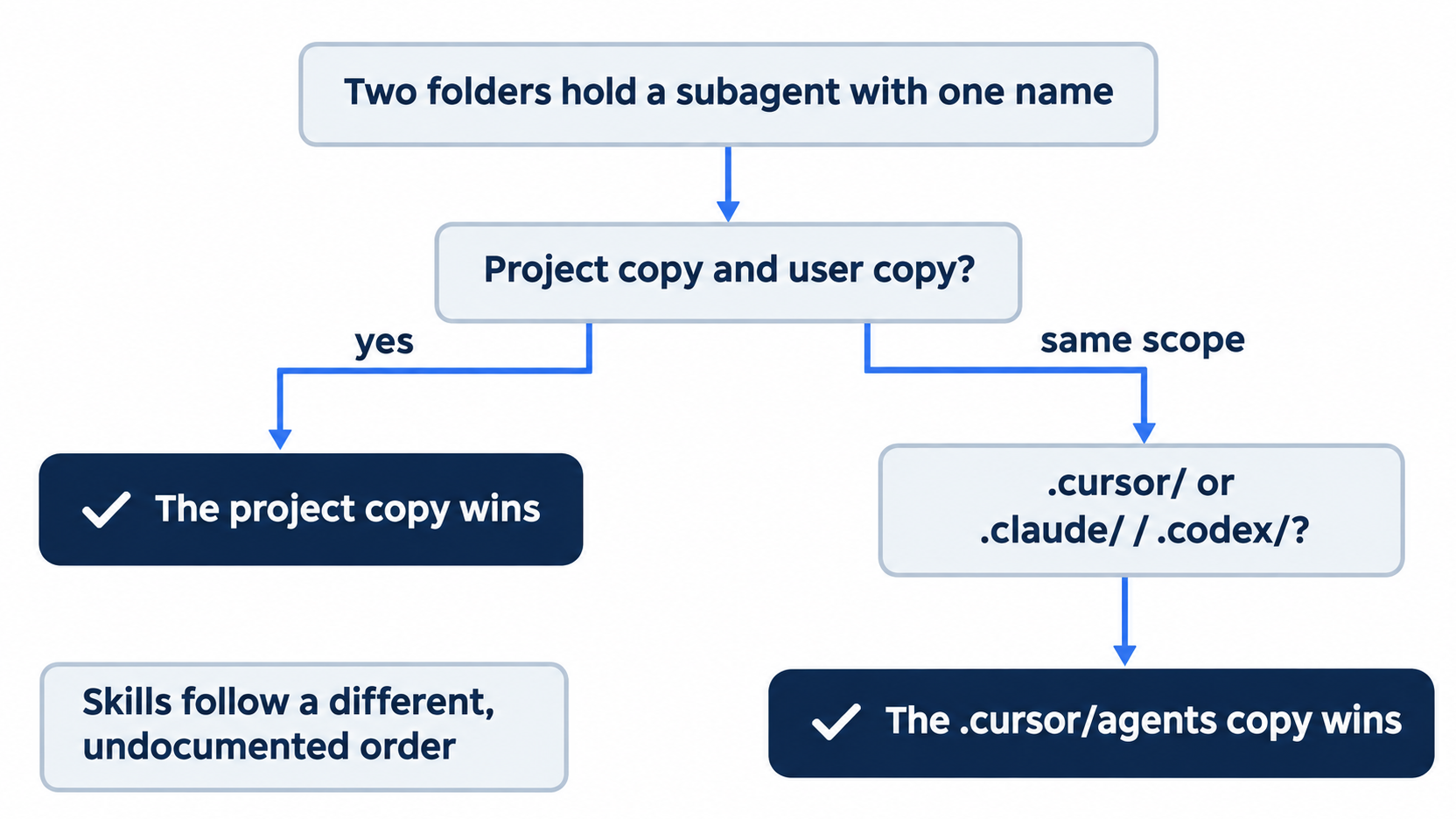
Two questions settle a name clash. First, is one copy in the project and one in your home folder? The project copy wins. If both are at the same scope, the .cursor/ copy wins.
Calling a subagent
You can start a subagent in three ways (Subagents):
- From the menu. In the CLI,
/subagent-tt-reviewerfills in a request for the Task tool, as in Start here. - In plain words.
Use the tt-reviewer subagent to review HEAD~1.worked in the test. In some runs the main agent first rangit logandgit showitself to find the commit, which asks for approval in allowlist mode. - On its own. The main agent can decide to use a subagent when a task matches its
description. Words such as "use proactively" in the description make that more likely.
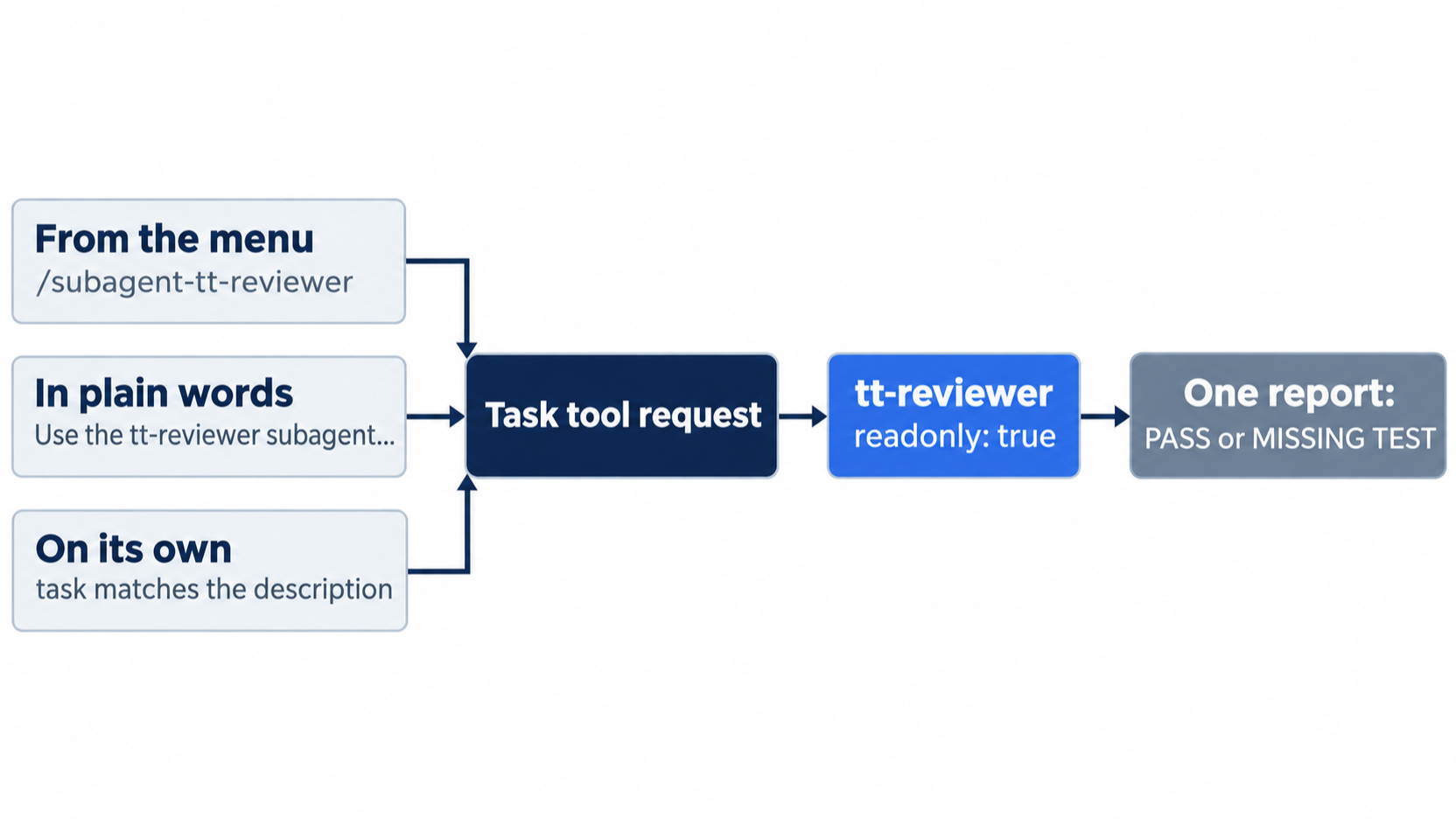
All three paths end at the same reviewer with the same read-only limit. They differ only in who chooses it: you, by menu or by name, or the main agent, from the description.
A subagent can start its own subagents, one level down. The docs give the limit (Subagents): the main agent and its direct subagents can start subagents, and a subagent started by another subagent cannot. Set is_background: true to let a subagent run while you keep working; its output goes to ~/.cursor/subagents/ (Subagents).
Four more features are documented and not tested in this guide:
- Built-in subagents. The Subagents page names two, Explore and Browser. The Available models help page names three: Explore, Bash, and Browser. This guide did not check which list is current.
- Model fallback. If an admin blocks the model that a subagent names, or your plan lacks it, Cursor falls back to a compatible model (Subagents).
- Isolated copies. Ask for isolation, and each subagent works in its own git worktree or cloud environment, so parallel subagents do not overwrite each other (Subagents).
- Cloud subagents. Type
/in-cloud, and the next task runs as a subagent on its own cloud machine and branch (Subagents). Part 15 covers Cloud Agents.
Which model, and what it costs
A subagent uses the main agent's model by default, model: inherit. You can name a model in the frontmatter instead, such as model: composer-2.5 (Subagents). Each subagent has its own context and uses its own tokens, so five subagents in parallel use about five times the tokens of one (Subagents).
Part 8 matters here. A subagent that names a third-party model, such as Claude or GPT, bills as third-party usage at that model's API price, even when your main session is on Auto (Subagents). Leave model out, or name a Cursor model, to stay in your plan's included usage.
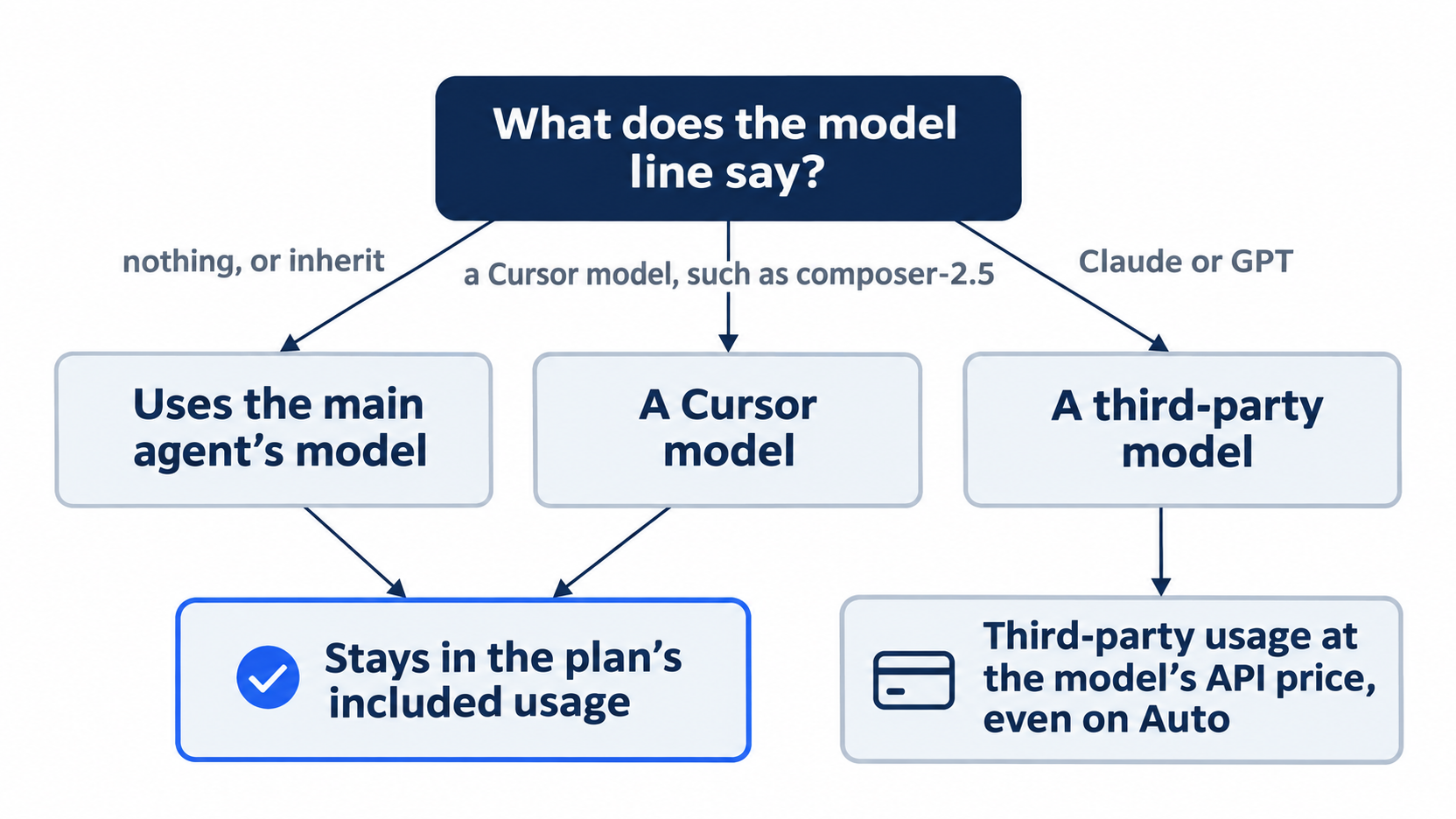
The model line is a billing decision as much as a quality one. Leaving it out or naming a Cursor model keeps the reviewer inside your plan; naming a third-party model moves every review to that model's API price.
If you already use Claude Code: the docs say your subagents in .claude/agents/ load in Cursor; this guide did not test one. A file with the same name in .cursor/agents/ wins, so you can keep a Cursor version beside the Claude Code one. Claude Code's tools field, which lists the tools a subagent may use, has no match in Cursor's table; readonly is the Cursor way to keep a reviewer from writing. If a Claude Code reviewer is read-only only because of its tools list, add readonly: true before you trust it in Cursor.
Do this today
Everyone
- Repeat the win. Start
cursor-agentand sendUse the tt-reviewer subagent to review HEAD~2.In allowlist mode, chooseRun (once)if the main agent asks to rungit logorgit show. The result: a report oncrackedthat saysPASS. Type/quit, then confirm thatgit status --shortprints nothing andnpm testshowsℹ pass 9. - Start one habit: after you commit a keyword change, run the reviewer on it. Send
Use the tt-reviewer subagent to review HEAD.OnMISSING TEST, add the test and commit again. The result: each keyword commit you make has a reviewer report that saysPASS.
If you read Going deeper
-
Watch the reviewer catch a missing test. Add a keyword with no test, and commit it:
sed -i.bak 's/|| t.includes("cracked")/|| t.includes("cracked") || t.includes("smashed")/' src/classify.js
rm src/classify.js.bak
git commit -am "Add smashed to the damaged keywords"
git log --oneline -1
The last line must say
Add smashed to the damaged keywords. If it does not, stop here and do not run the reset below. Then startcursor-agentand sendUse the tt-reviewer subagent to review HEAD.The result, in testing:smashedmarkedno test, and the last lineMISSING TEST. Type/quit. Check again thatgit log --oneline -1showsAdd smashed to the damaged keywords, then reset:git reset --hard HEAD~1 git status --short npm testgit status --shortprints nothing, andnpm testshowsℹ pass 9. -
Ask the reviewer to edit. Make the
smashedcommit again as in the previous item, startcursor-agent, and sendUse the tt-reviewer subagent, and only that subagent, to add a smashed test to test/classify.test.js. Do not edit any file yourself.The result, in testing: the answer says the reviewer is read-only and did not add the test, andgit status --shortshows no change. Type/quit, check thatgit log --oneline -1showsAdd smashed to the damaged keywords, and run the same reset.git status --shortprints nothing, andnpm testshowsℹ pass 9. -
Run the review in Auto-review. Start
cursor-agent --auto-reviewand sendUse the tt-reviewer subagent to review HEAD~2.The result, in testing onHEAD~1before the reviewer commit: no prompts, the main agent rangit logandgit showitself, and the report saidPASS. Type/quit. The review only reads, sogit status --shortprints nothing, andnpm testshowsℹ pass 9.
A second opinion you can trust
The trouble with self-review was never the model's skill. It was the reviewer's power: an agent that can edit will fix what it finds, and the report stops telling you what was wrong. A subagent with readonly: true splits the two jobs. It reads in its own context, it judges, and it hands the fixing back to you.
The whole reviewer is one Markdown file, committed beside your code. It reports PASS or MISSING TEST, it caught a real missing test in testing, and it refused a direct request to edit. Your proof that it behaved is the same proof you have used all along: git status --short prints nothing.
Let the agent write the code. Let a different agent, one that cannot write, tell you whether it is done.
This is Part 12 of "Cursor, Day-to-Day," an 18-part guide to using Cursor's agent every day, from the CLI and the editor.