
Stop Retyping the Same Prompt: Build a Tested /ship Skill in Claude Code
The prompt you retype before every commit belongs in a file: a Claude Code skill with numbered steps, a two-word verdict, and a hard limit, tested on a clean tree and a broken one and then committed for the whole team.
A Claude Code skill is a prompt in a file. Write one that checks your repository before every commit, watch it say "Ready to commit" on a clean tree and "Not ready" on a broken one, then commit it so your whole team gets the same command.
You have typed the same pre-commit prompt for the hundredth time, and on the day you forgot one step, the broken test went out with the commit.
In this article: Day 10 of a day-by-day guide to Claude Code. Start here: you write a
/shipskill, run it on a clean tree and on a broken one, and commit it for your team. Going deeper: who can start a skill, where Claude Code loads skills from, and how skills travel to other coding agents through the Agent Skills open standard.
Tested on Claude Code 2.1.326.
Yesterday you handed a search to the Explore subagent and measured what the delegation cost.
Start here
At the end of today, you can write a /ship skill that checks whether Ticket Triage is ready to commit, run it on a clean tree and on a broken one, and commit it for your team.
Starting fresh or fell behind? Run git switch -C main claude-code/day-09. This replaces your main with the end of Day 9; to keep your own work, run git branch my-backup first.
Since Day 1 you have typed "run the tests and tell me if anything broke" many times. A skill turns a prompt like that into a command. It is a folder with a file named SKILL.md: a short header that names the skill and says what it does, then the instructions. Claude Code turns each skill in .claude/skills/ into a slash command. /loop from Day 8 is a skill that Claude Code includes.
Check the starting state
Open a terminal in Ticket Triage:
cd ~/code/ticket-triage
git status
npm test
Git prints nothing to commit, working tree clean. The tests show ℹ fail 0 and the pass count from Day 7, such as ℹ pass 18.
Write the skill
Create the folder:
mkdir -p .claude/skills/ship
In your editor, create .claude/skills/ship/SKILL.md with this content:
---
name: ship
description: Check that Ticket Triage is ready to commit. Runs the tests and lists the changed files. Use before every commit.
disable-model-invocation: true
---

Check that this repository is ready to commit:

1. Run `npm test` as its own command, with no other command joined to it. If any test fails, list each failing test by name.
2. Run `git status --short` as a separate command, and list each changed or new file.
3. End with one line: `Ready to commit` if every test passed, or `Not ready` if any test failed.

Do not commit, stage, or change any file.
Read it from the top:
- The lines between the two
---lines are the frontmatter, the skill's header. nameis the command:shipbecomes/ship.descriptionsays what the skill does and when to use it. It shows in the command menu, the list that opens when you type/.disable-model-invocation: truemeans that only you start this skill. Without it, Claude can also start a skill by itself when your request matches the description. Today you want to decide when the check runs.- Everything after the frontmatter is the prompt that runs when you type
/ship.
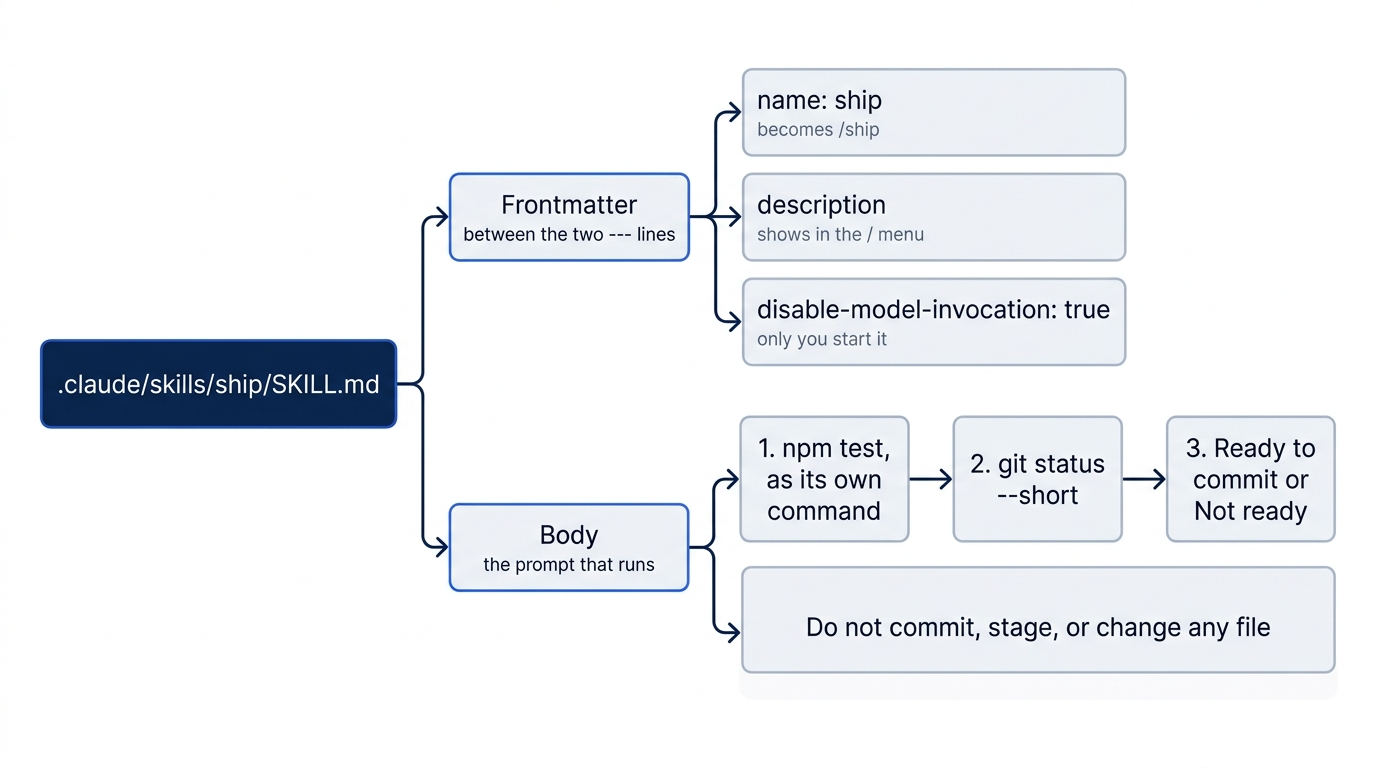
The body follows three rules that make a skill reliable:
- Numbered steps in a fixed order. Claude runs them in that order every time, so two runs of
/shipgive reports that you can compare. - A last line that you can check.
Ready to commitorNot readyis the whole answer in two words. You read the details only when you need them. - A limit on what it may do. "Do not commit, stage, or change any file" keeps the check a check. A skill that reports and a skill that acts are two different skills, and the one that acts deserves its own name and more care.
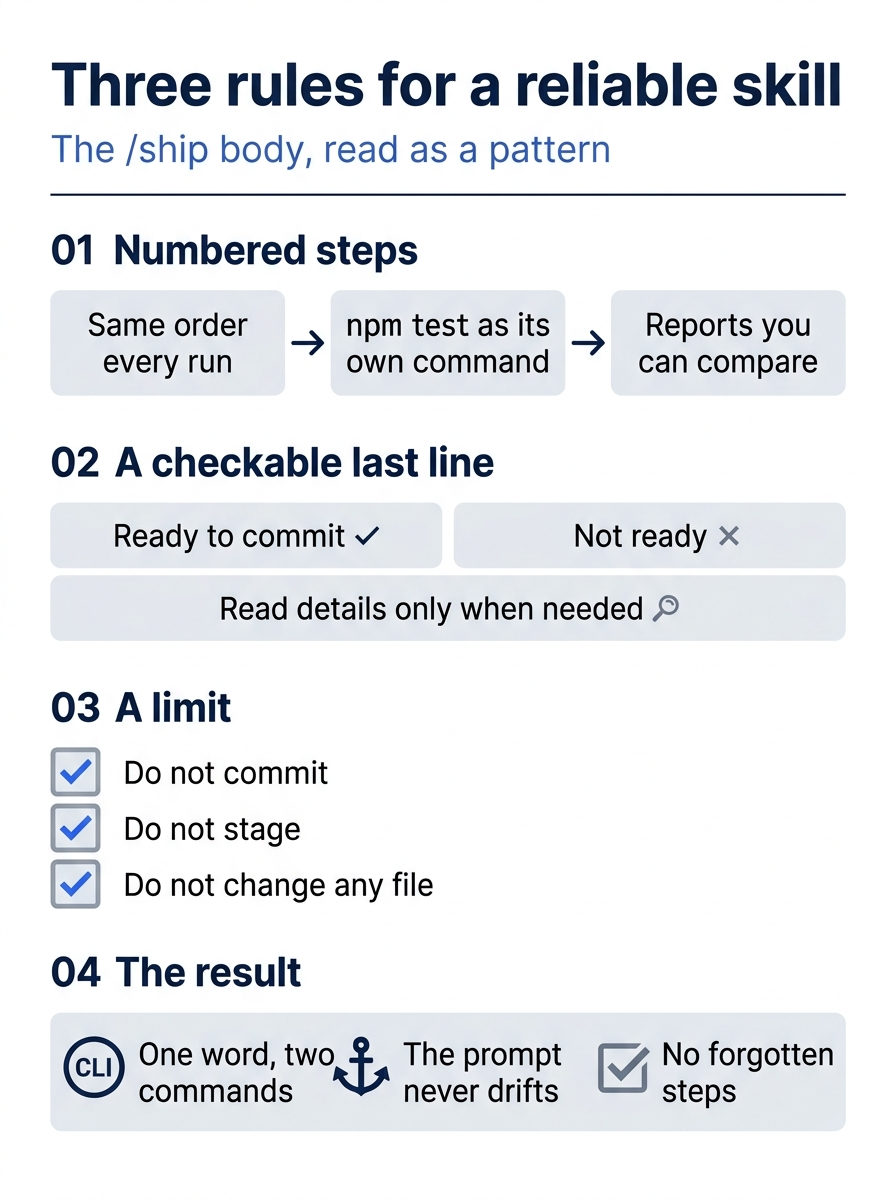
The three rules turn a loose request into a repeatable procedure. Steps fix the order, the last line fixes the verdict, and the limit fixes the scope.
A skill or a CLAUDE.md rule?
On Day 5 you put a rule in CLAUDE.md. A skill is different in two ways. CLAUDE.md loads into every session, so it suits a rule that applies to every task. A skill's body loads only when the skill runs, so it suits a procedure that you start on purpose, such as a check before a commit. Also, a rule says what to do; a skill does it, step by step, when you type its name. If you catch yourself pasting the same multi-step prompt again, make it a skill. If you catch yourself correcting Claude the same way again, make it a CLAUDE.md rule.
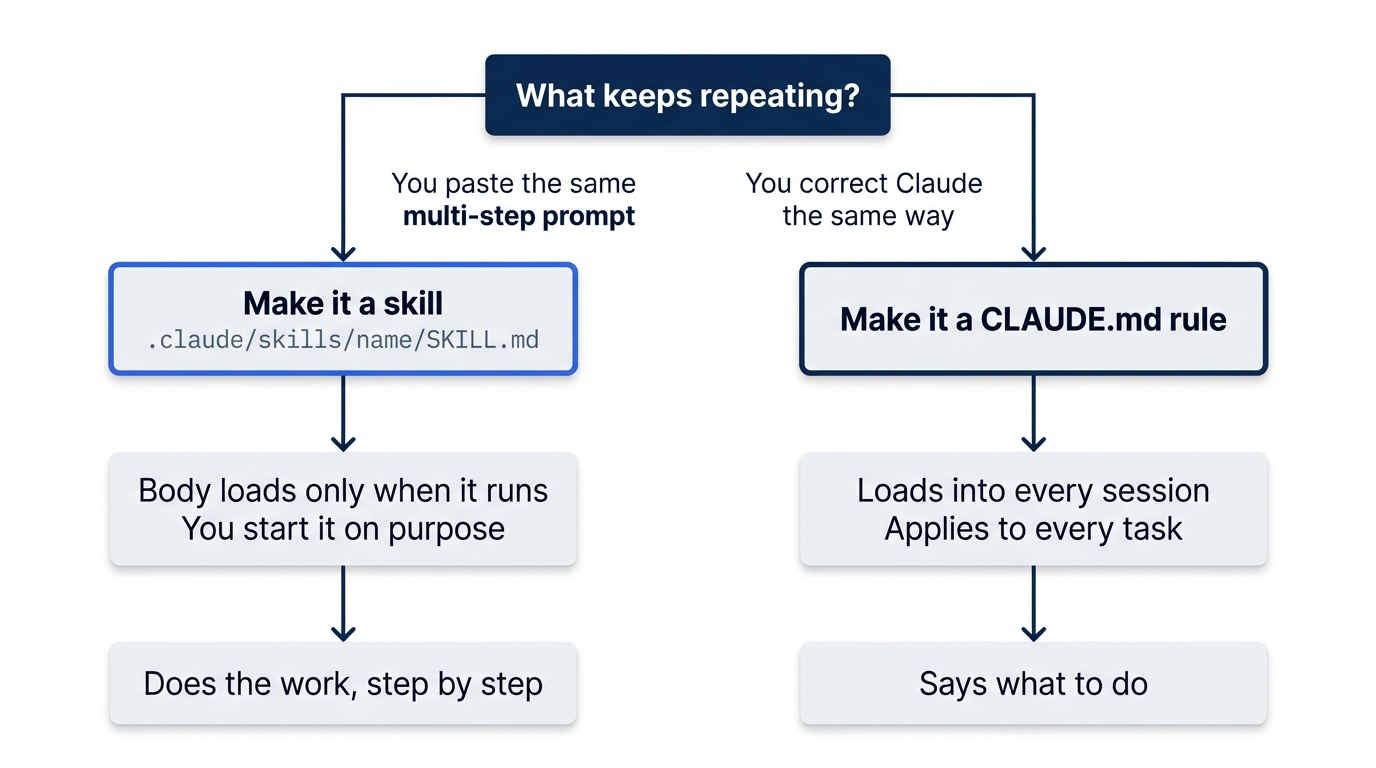
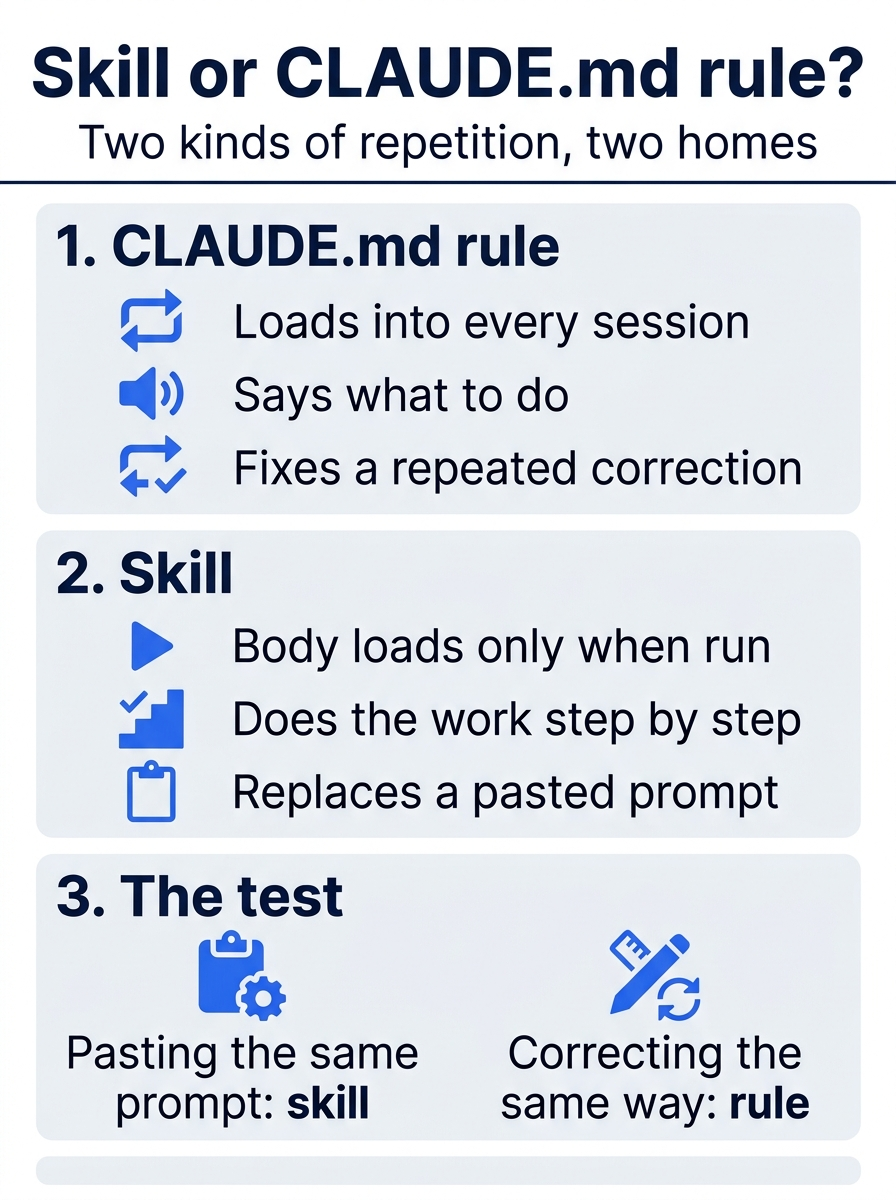
Two kinds of repetition get two homes: the pasted prompt becomes a command, and the repeated correction becomes standing guidance.
Run it on a clean tree
Start a new session with claude, so that Claude Code loads the new skill. Type /sh and stop. The command menu shows the skill:
❯ /ship Check that Ticket Triage is ready to commit. Runs the tests and lists the changed files. Use before every commit. (project)
(project) means that the skill comes from this repository. Finish the command and press Enter:
/ship
Claude runs npm test, then runs git status --short as a second command, then reports. On the tested run, the report was:
⏺ Tests: all 18 passed, none failed.

  Changed or new files (from git status --short):
  - ?? .claude/skills/: an untracked directory, and the only change. Git shows
    the folder rather than each file inside it.

  No tracked files are modified, so the only thing a commit could include is
  that untracked folder.

  Ready to commit
The new skill folder is the only change, so the tree is ready. Claude ran two commands for one word of yours. This is the point of a skill: the prompt is the same every time, so you stop retyping it and you stop forgetting a step.
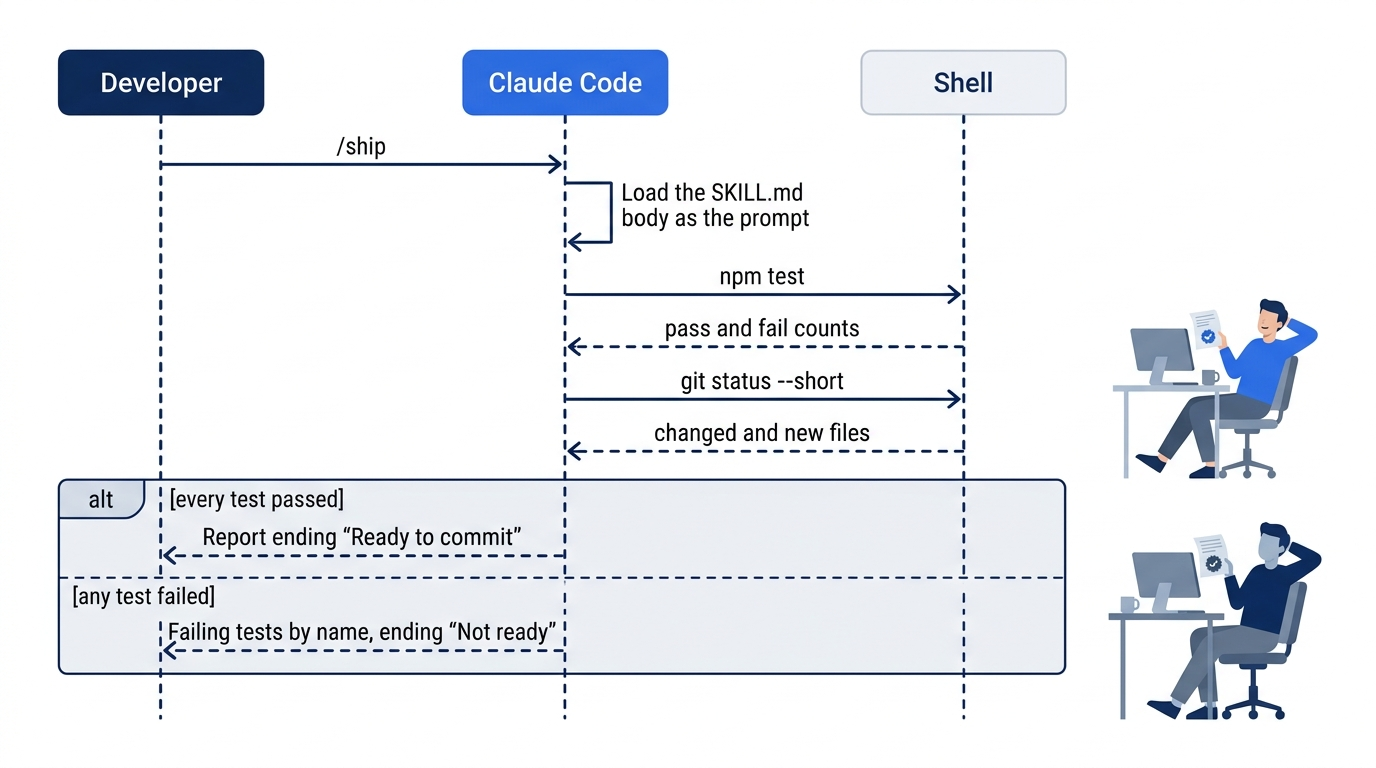
Manual mode: no prompts on the tested runs. Claude ran npm test alone, which the Day 4 rule allows, and git status --short, which ran without a prompt because it only reads. If a prompt does appear, read the command, then choose 1. Yes.
Run it on a broken tree
Now make the check fail. In your editor, delete || t.includes("asap") from the if line in src/priority.js and save. Type /ship again. On the tested run, the report was:
⏺ Tests: 3 of 18 failed this time. All three are in test/priority.test.js, and
  each one expected "high" but got "normal":
  - asap (test/priority.test.js:7)
  - mixed case (test/priority.test.js:12)
  - asap with punctuation (test/priority.test.js:14)

  Changed or new files (from git status --short):
  -  M src/priority.js: modified since the last check, and the likely cause of
    the failures. ASAP-style tickets are no longer marked high priority.
  - ?? .claude/skills/: an untracked directory, the same as before.

  I didn't change, stage or commit anything.

  Not ready
Your test names can differ, because Claude wrote your tests. The check is that the report names the failing tests and ends with Not ready. In a second terminal, put the file back:
git restore src/priority.js
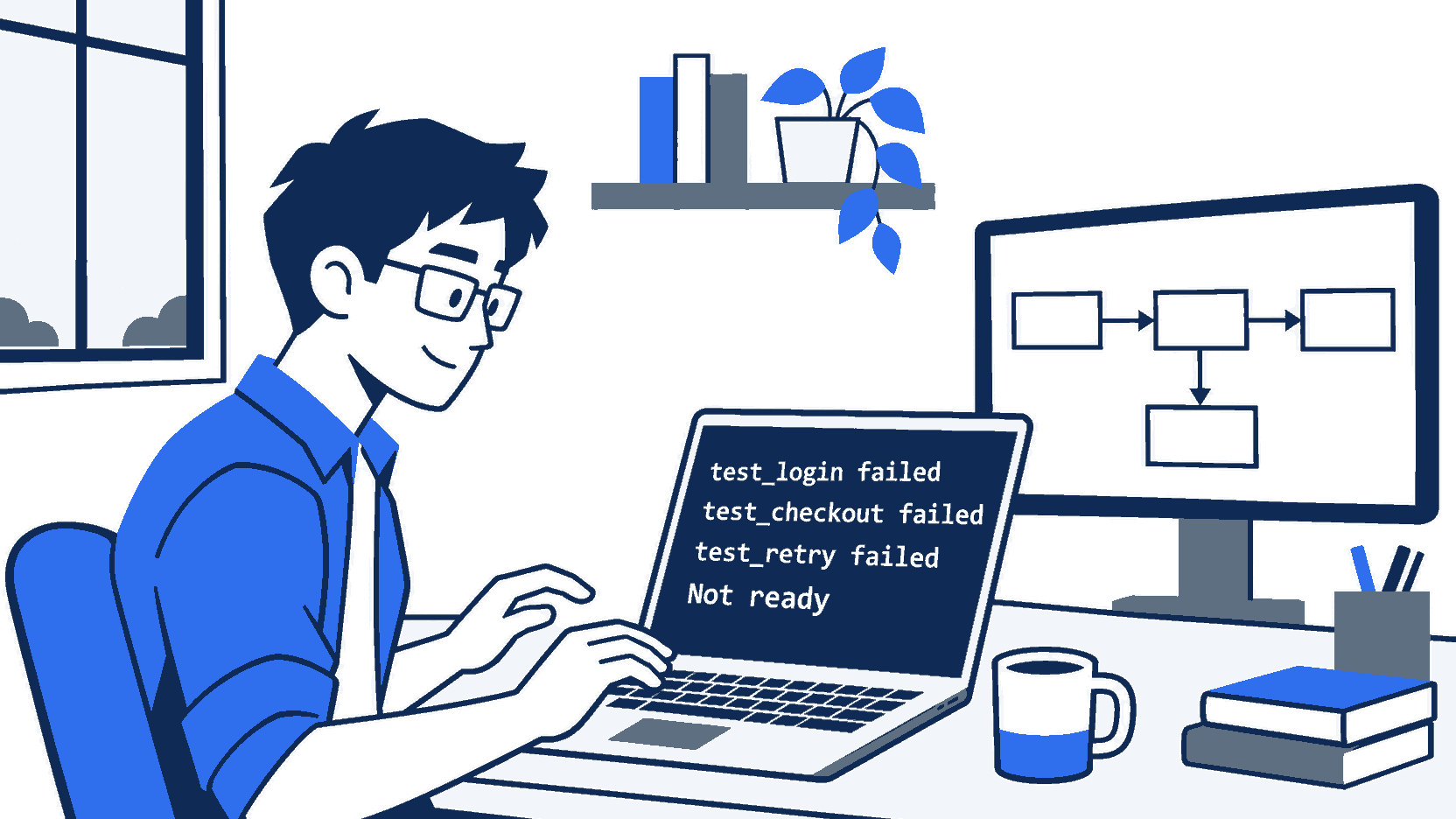
The scene captures the moment the skill earns its place: one typed word caught a broken rule before it reached a commit.
Check the win and commit
Run npm test in the second terminal. It shows ℹ fail 0 again. Commit the skill from the second terminal, so that everyone who clones Ticket Triage gets /ship. A skill is a file in the repository, like the code. A teammate gets it with their next pull, and a change to the skill shows in git diff like any other change:
git add .claude/skills/ship/SKILL.md
git commit -m "Add the /ship skill"
git status
Git prints nothing to commit, working tree clean.
You wrote a skill, ran it as /ship on a clean tree and on a broken one, and committed it for your team.
You can stop here. Going deeper explains why this works and where it breaks.
Going deeper
This section is for readers who want the other frontmatter fields, where skills live, how skills travel to other coding agents, and how to keep a skill small. It assumes you finished Start here in Parts 1 to 10.
Who can start a skill
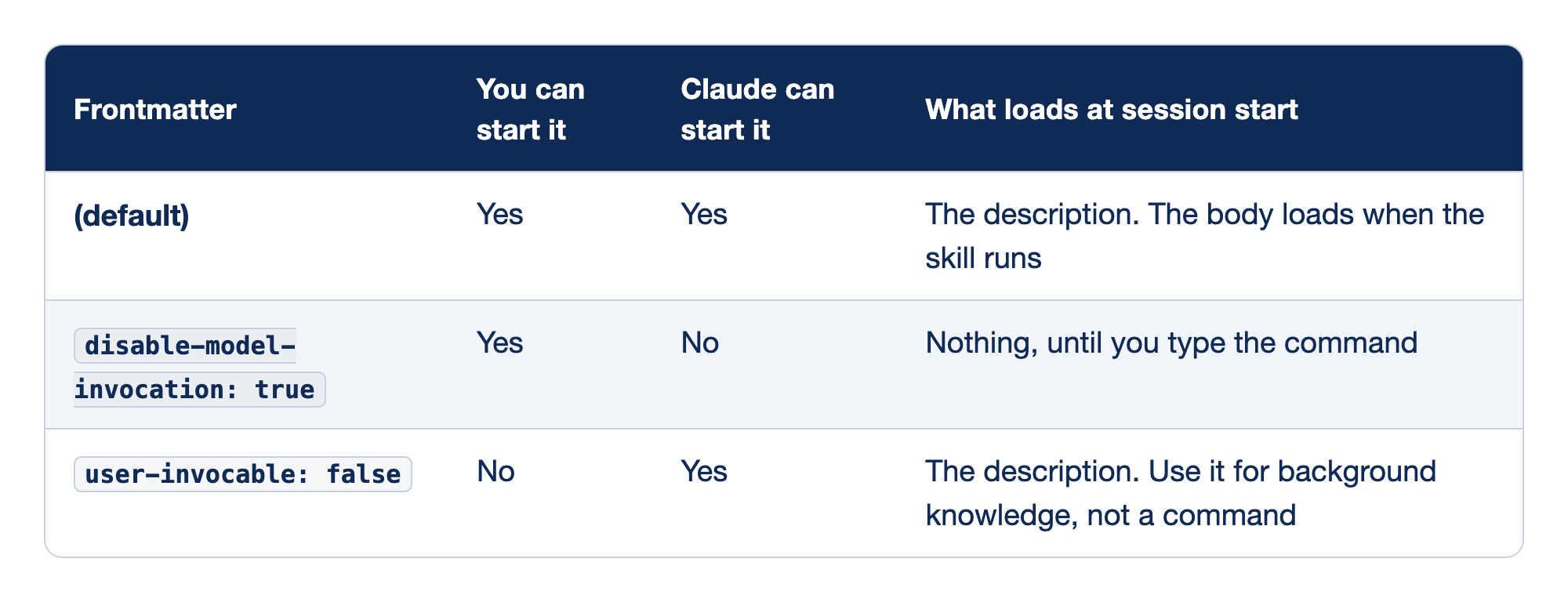
Two frontmatter fields decide who can start a skill and what it costs in context. The Frontmatter column holds the setting. "You can start it" says whether the skill works as a slash command for you, "Claude can start it" says whether Claude may run it on its own when a request matches, and "What loads at session start" says what the skill puts into context before anyone runs it.
- (default), with neither field set, lets both you and Claude start the skill. The description loads at session start, and the body loads when the skill runs.
disable-model-invocation: truelets only you start the skill, and nothing loads until you type the command.user-invocable: falselets only Claude start the skill. Its description loads at session start, which suits background knowledge rather than a command.
Use disable-model-invocation: true for any skill with side effects, such as a deploy or a commit, so that Claude does not run it because the code "looks ready". It also saves context: the description does not load until you type the command. A skill like this does not run from a /loop either. A loop can take a skill as its prompt, such as the docs example /loop 20m /review-pr 1234, but a scheduled run only runs skills that Claude may start. /loop 20m /ship sends the text /ship to Claude instead of running the skill.
More frontmatter
argument-hintshows a hint in the menu, such as[branch-name]. In the body,$ARGUMENTSis everything typed after the command:/ship --quickmakes$ARGUMENTSequal to--quick.when_to_useadds trigger phrases to the description, for a skill that Claude starts.allowed-toolslimits what the skill may call.context: forkwithagent: Exploreruns the skill in a subagent, like Day 9's delegation, so only its answer comes back.
The full list is on the skills page. This guide's test used only name, description, and disable-model-invocation.
Supporting files
A skill folder can hold more than SKILL.md: a checklist, a template, or a script. Name the file in the body, for example "Use checklist.md in this folder", and Claude reads it only when the skill runs. Keep SKILL.md short and put long reference material in those files.
Where skills load from
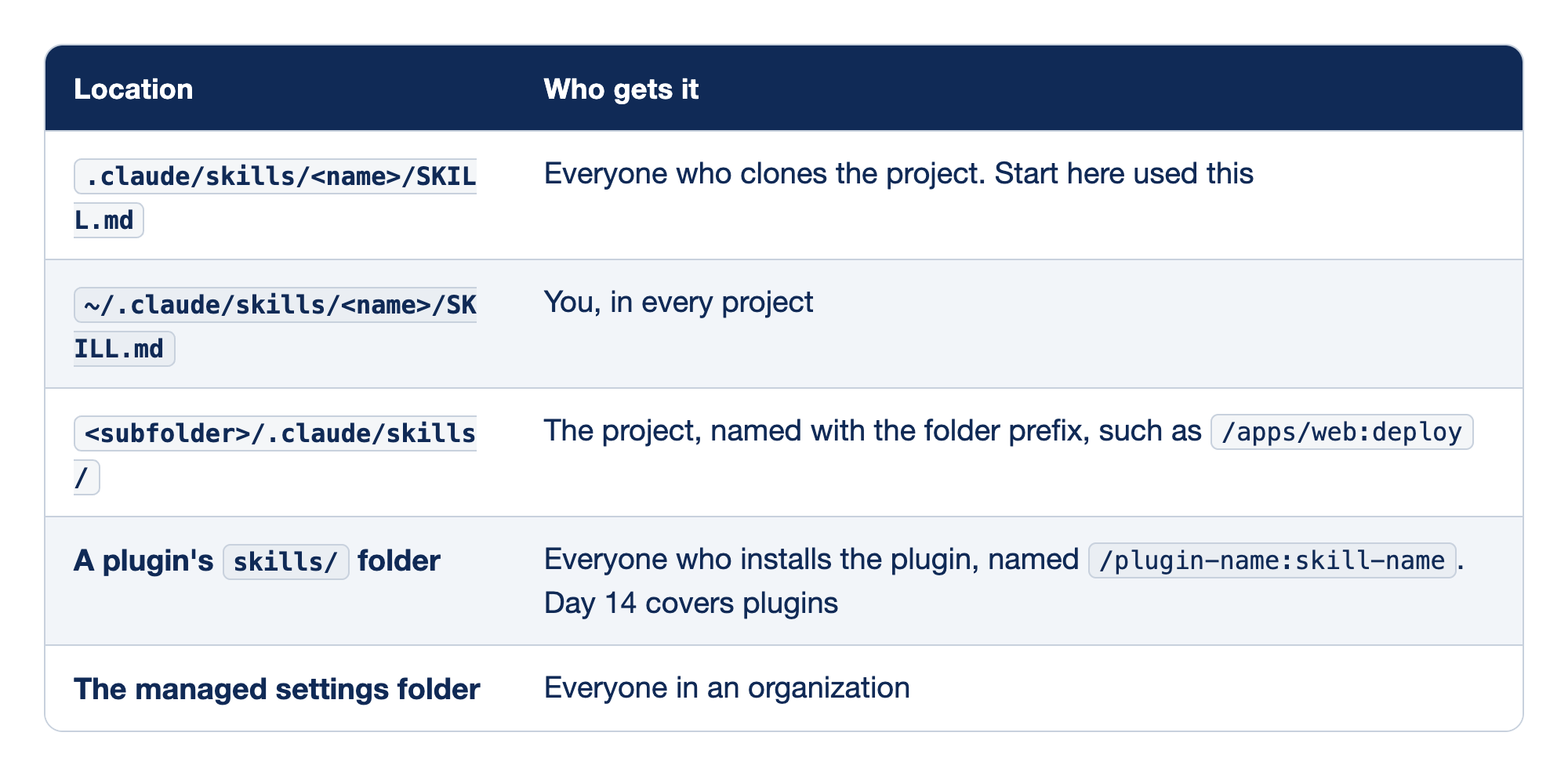
Claude Code reads skills from five places, and the place decides who gets the command. The Location column holds the folder path, and the "Who gets it" column names the people who see the skill and, where it applies, how the command is named.
.claude/skills/<name>/SKILL.mdreaches everyone who clones the project, and it is the location that Start here used.~/.claude/skills/<name>/SKILL.mdreaches only you, but in every project on your machine.<subfolder>/.claude/skills/reaches the project, and its commands carry the folder prefix, such as/apps/web:deploy.- A plugin's
skills/folder reaches everyone who installs the plugin, and its commands are named/plugin-name:skill-name. Day 14 covers plugins. - The managed settings folder reaches everyone in an organization.
Docs pages: plugin, managed settings.
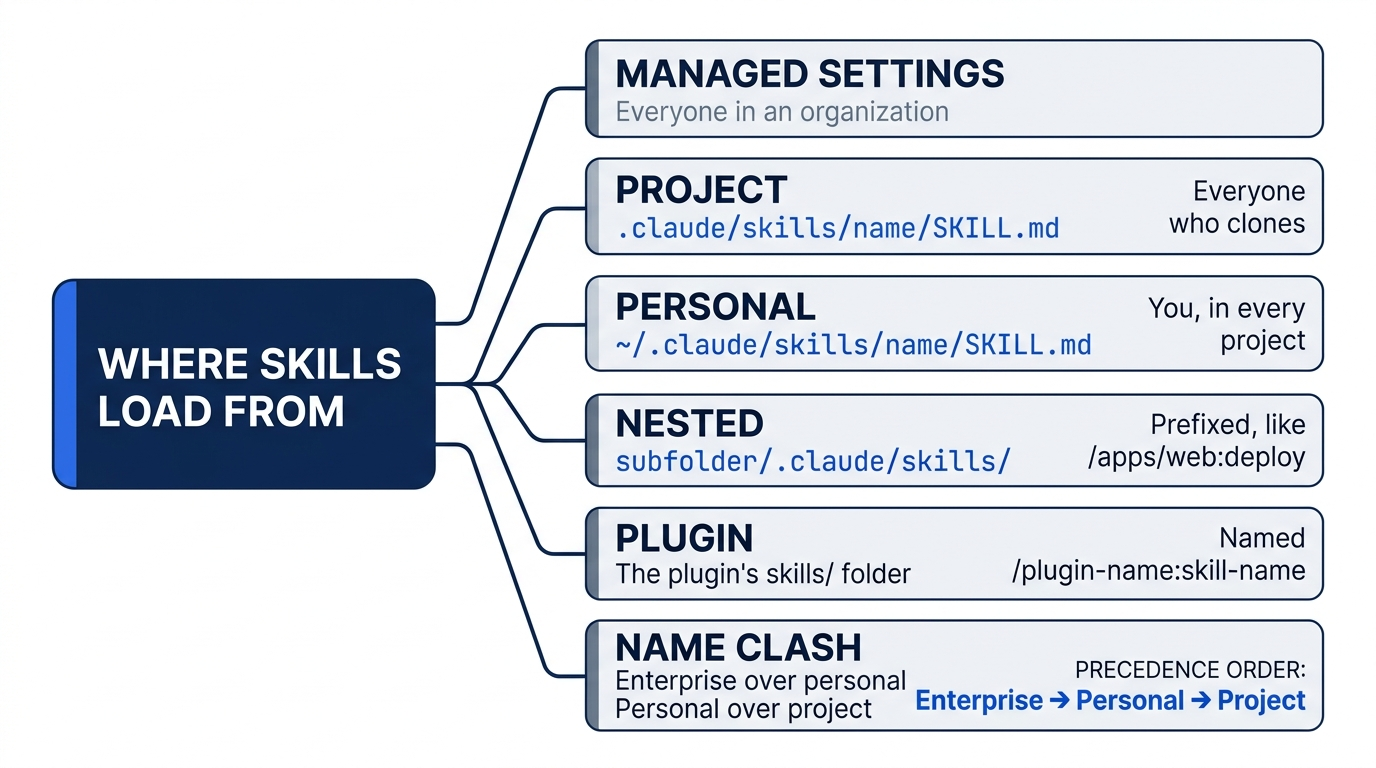
When two skills share a name, enterprise wins over personal, and personal wins over project. A plugin skill has its own prefix, so it never collides. A skill wins over an old .claude/commands/ file with the same name.
Skills that Claude Code includes
Claude Code includes skills of its own, such as /loop and /verify. They are in the / menu with no (project) label. To build a new skill with Claude's help instead of by hand, ask: "Help me write a skill that ..." and review the SKILL.md it writes before you commit it.
The open standards: Agent Skills and Agent Plugins
Claude Code skills follow the Agent Skills open standard: a folder with a SKILL.md, loaded when needed. Other coding agents read the same format, so a skill can travel. A second standard, Agent Plugins 1.0, announced August 6, 2026, packages skills and MCP servers: a root plugin.json (only $schema and name are required), a skills/ folder, and an mcp.json. Its maintainers are Amazon, Cursor, Microsoft, OpenAI, and Vercel.
This guide answers four questions about Claude Code and the two standards. The tests ran on Claude Code 2.1.325 and again on 2.1.326, with the same results.
- Which Agent Skills folders does Claude Code read? Only
.claude/skillsin a project, plus the personal, nested, plugin, and managed locations above. It does not read.agents/skills, the folder that other tools share. The request to support it is issue #31005, still open. Duplicate names resolve enterprise, then personal, then project. - Does it load an Agent Plugins folder? No. In the test, Claude Code loaded the package's
skills/folder only because that folder matches its own plugin layout. It ignored the rootplugin.json, so the plugin took its folder name, not its manifest name, and it ignored the rootmcp.json. - How does it handle vendor-specific parts? With its own format: a manifest at
.claude-plugin/plugin.json. A package can carry both manifests. With"mcpServers": "./mcp.json"in.claude-plugin/plugin.json, Claude Code also loads the sharedmcp.json. Day 14 builds such a package. - Portability check. The
/shipskill, kept in.agents/skills/ship/with a.claude/skills -> ../.agents/skillssymlink, loaded in Claude Code as/ship. Without the symlink, it did not load. The record isverification/claude_code/day-by-day/portability/README.md.
Outside Claude Code, only six frontmatter fields are portable: name, description, license, compatibility, metadata, and allowed-tools. disable-model-invocation is a Claude Code field. Other tools ignore it, and claude.ai rejects some Claude-only fields on upload.
Where your skills and plugins can travel, as of November 16, 2026:
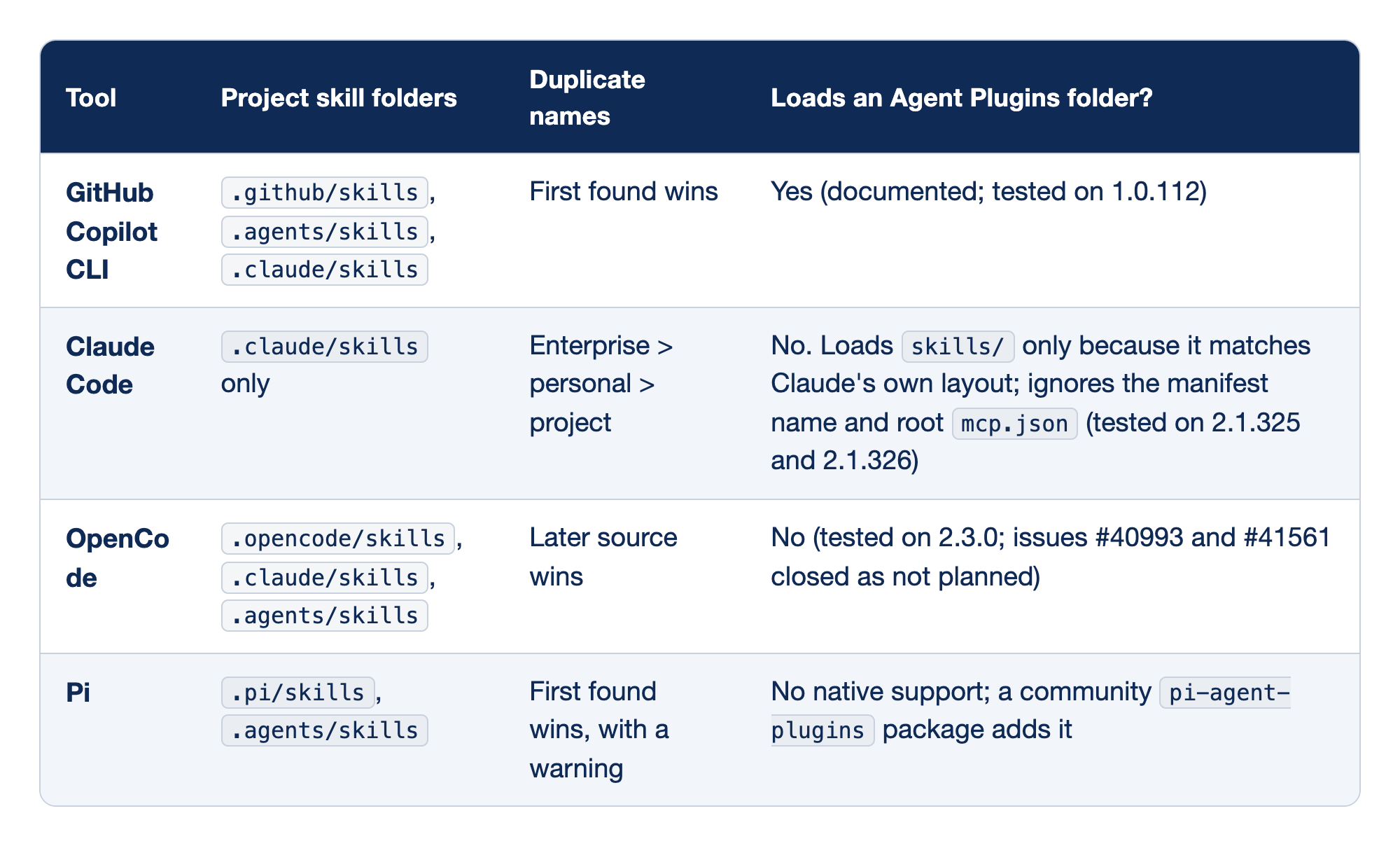
Four coding agents read skills, and they disagree on folders, on name clashes, and on plugin packages. The Tool column names the agent. "Project skill folders" lists the folders it reads in a project, "Duplicate names" says which skill wins when two share a name, and "Loads an Agent Plugins folder?" says whether it reads the Agent Plugins 1.0 package format, with the version tested.
- GitHub Copilot CLI reads
.github/skills,.agents/skills, and.claude/skills, lets the first skill found win a name clash, and loads an Agent Plugins folder, which is documented and was tested on 1.0.112. - Claude Code reads only
.claude/skills, resolves a clash enterprise over personal over project, and does not load an Agent Plugins folder. It loadsskills/only because that matches its own layout, and it ignores the manifest name and the rootmcp.json, as tested on 2.1.325 and 2.1.326. - OpenCode reads
.opencode/skills,.claude/skills, and.agents/skills, lets the later source win a clash, and does not load an Agent Plugins folder, as tested on 2.3.0, with issues #40993 and #41561 closed as not planned. - Pi reads
.pi/skillsand.agents/skills, lets the first skill found win with a warning, and has no native Agent Plugins support, although a communitypi-agent-pluginspackage adds it.
The setup for a team that uses more than one agent: keep shared skills in .agents/skills, which Copilot, OpenCode, and Pi read, and add a .claude/skills symlink for Claude Code. Avoid duplicate skill names across folders, because the tools resolve them in opposite directions.
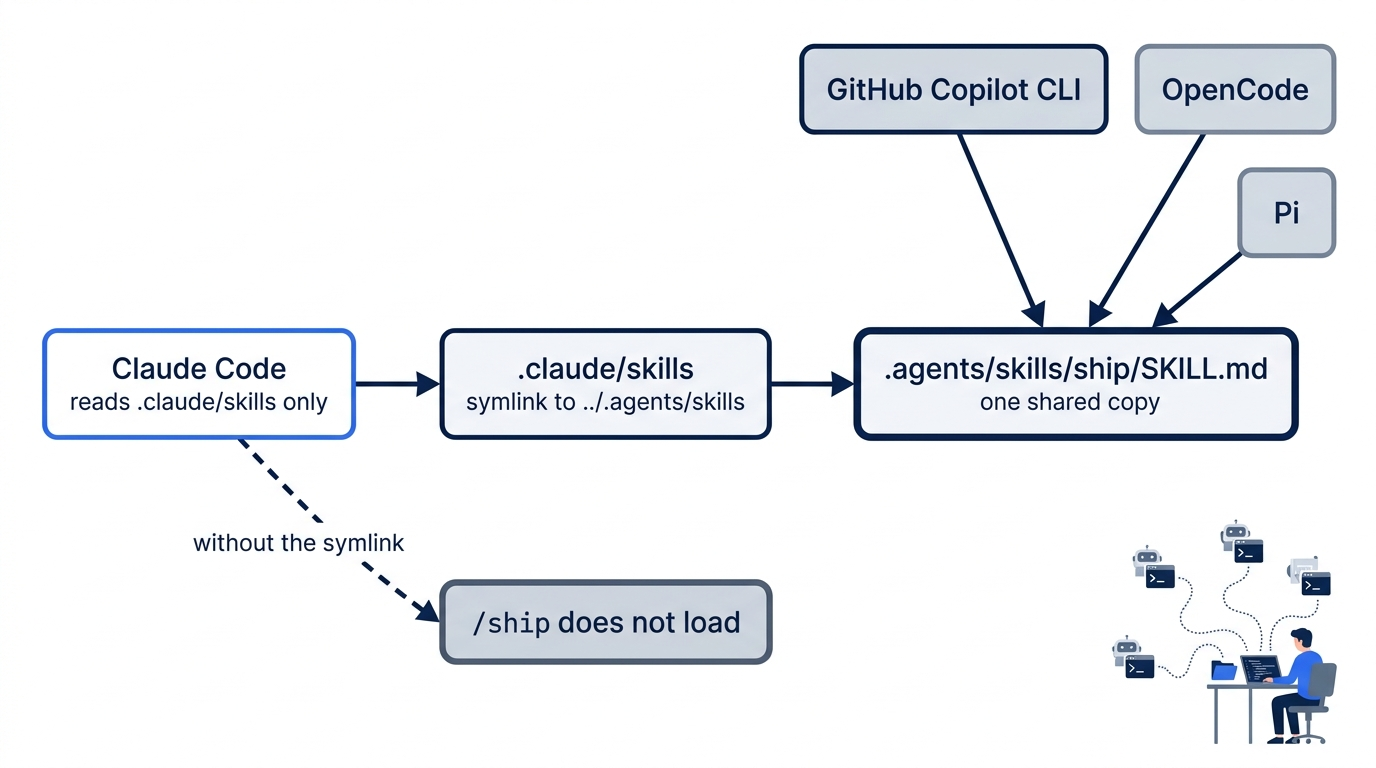
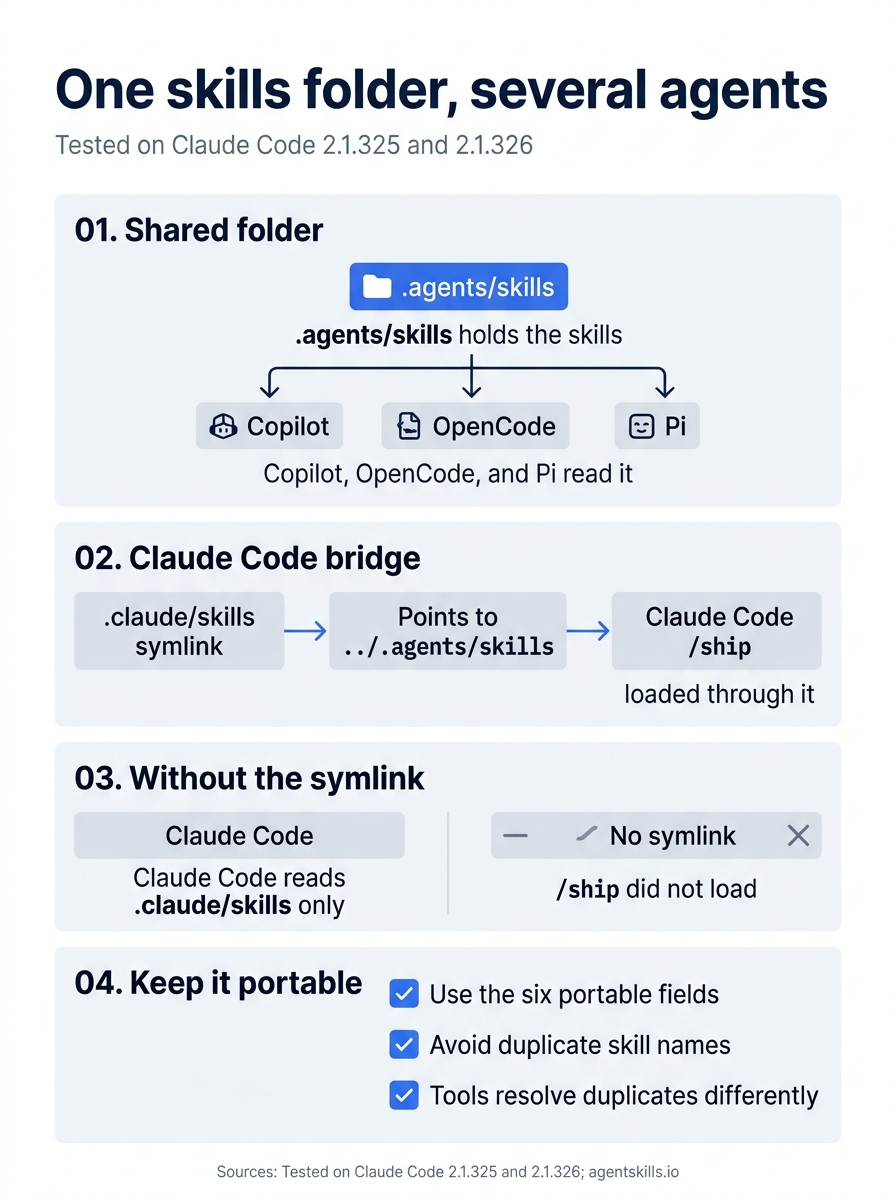
One folder serves every agent, and one symlink brings Claude Code along. Without the symlink, the tested /ship skill did not load in Claude Code.
When a skill does not work
- The command is not in the menu. Start a new session. Check that the file is named
SKILL.md, in a folder under.claude/skills/, and that the frontmatter starts and ends with---. - Claude starts the skill when you did not ask. Add
disable-model-invocation: true, or make the description narrower. - Claude never starts a skill that it should. Rewrite the description in the words that you use when you ask for that work.
- The skill causes more permission prompts than you expect. A skill's wording shapes the commands that Claude runs. An earlier version of
/shipsaid only "Runnpm test" and "Rungit status --short". Claude joined the two into one shell command, the Day 4 rule did not cover it, and Manual mode asked once or twice per run. Step 1 now says "as its own command", and the tested runs showed no prompts.
Go further: Stop Retyping the Same Prompt: A Practical Guide to Claude Code Skills is the first edition's skills chapter. The same chapter is also on Medium. It also installs a plugin and an MCP server, which come later in this edition.
Do this today
Everyone
- Write
/ship, run it on a clean tree and on a broken one, and commit it. Check the win:/shipends withReady to commiton a clean tree andNot readyon the broken one, andgit statusis clean after the commit. - Habit: run
/shipbefore every commit. Check: your next commit comes after a/shipreport that ends withReady to commit.
If you read Going deeper
- Add
argument-hint: [quick]to the frontmatter, and a line to the body: "If$ARGUMENTSisquick, skip step 2." Start a new session and run/ship quick. Check: the report has no file list. Reset: rungit restore .claude/skills/ship/SKILL.md. Check thatgit status --shortprints nothing. - Try the shared-folder setup in a copy, so Ticket Triage stays as it is:
cp -R ~/code/ticket-triage /tmp/tt-copy && cd /tmp/tt-copy && mkdir -p .agents && mv .claude/skills .agents/skills && ln -s ../.agents/skills .claude/skills. Startclaudethere. Check:/shipis in the menu. Reset: type/exit, then runcd ~/code/ticket-triage && rm -rf /tmp/tt-copy. Check thatls /tmp/tt-copysaysNo such file or directoryand thatgit status --shortin Ticket Triage prints nothing.
One word, the same check every time
The prompt you retype is a procedure that has not been written down yet. Once it lives in .claude/skills/ship/SKILL.md, it stops drifting: the steps run in the same order, the answer ends in the same two words, and the limit keeps a check from turning into a commit.
The broken-tree run is the part to remember. One typed word named three failing tests and said Not ready before anything reached the history. Commit the skill, and every teammate gets that same guard with their next pull. Your future self, typing /ship at the end of a long day, will not have to remember anything at all.
This is Part 10 of "Claude Code, Day-to-Day (second edition)," a day-by-day guide to Claude Code in which each day takes 20 to 40 minutes. Part 10 is Day 10. All 28 days are out now.