
You Told Claude Yesterday. It Forgot. Put the Rule Where It Loads Every Time.
A correction typed in chat dies with the session, so prove, with one committed line and a fresh session, that CLAUDE.md is the place where a rule survives until tomorrow.
A tested walkthrough of CLAUDE.md and /memory in Claude Code: which instruction files load, how to add one checkable rule, and how to prove that a brand-new session follows it without a reminder.
You corrected Claude yesterday, and today it makes the same mistake, because the correction lived in a conversation that no longer exists.
In this article: Day 5 of a day-by-day guide to Claude Code. Start here: you see which instruction files Claude Code loads, add one rule to CLAUDE.md, and prove that a new session follows it without a reminder. Going deeper: the six places instructions can live and how they load, path-scoped rules and auto memory, and
AGENTS.mdwith the/doctor prompt-auditcheckup.
Tested on Claude Code 2.1.326.
Yesterday you added an allow rule for npm test and built priority() from the spec in Manual mode.
Start here
At the end of today, you can see which instruction files Claude Code loads, add a rule to CLAUDE.md, and prove that a new session follows it.
Starting fresh or fell behind? Run git switch -C main claude-code/day-04. This replaces your main with the end of Day 4; to keep your own work, run git branch my-backup first.
A new session does not carry over yesterday's conversation. A correction you typed in chat is not there tomorrow. CLAUDE.md, the instruction file that /init wrote on Day 1, fixes this: Claude Code loads it at the start of every session. Today you add one rule to it and check that Claude obeys the rule without being told.
See which files load
Check the starting state, then start a session in Ticket Triage:
cd ~/code/ticket-triage
git status
npm test
claude
Git prints nothing to commit, working tree clean. The tests show ℹ fail 0 and the pass count you wrote down on Day 4, such as ℹ pass 14. If either differs, finish Day 4 first.
The status bar shows auto mode. Leave it there today. If it shows ⏸ manual mode on, keep it, and follow the Manual mode: lines below. Run:
/memory
/memory opens a panel that lists the instruction files for this session. With nothing in your personal ~/.claude folder yet, Claude Code 2.1.326 showed this panel:
  Memory

  ❯ Auto-memory  on

  ❯ Project instructions   Checked in at ./CLAUDE.md
    User instructions      Saved in ~/.claude/CLAUDE.md
    Open auto-memory folder
The first ❯ marks the auto-memory switch. The second ❯ marks the selected line, which the arrow keys move.
Read it from the top:
- Auto-memory is a set of notes that Claude writes for itself as you work, such as a preference you stated. It is on by default. Leave it on. Going deeper explains where the notes live.
- Project instructions is the project's
CLAUDE.md, the one from Day 1. "Checked in" means git tracks the file, so everyone who clones the repository gets it. - User instructions is
~/.claude/CLAUDE.md, an optional personal file that loads in every project on your machine. The panel lists it even when the file does not exist yet. - Open auto-memory folder opens the folder that holds Claude's notes.
If your list has more lines, that is fine. Each extra line is one more file that loads.
Today's rule goes in the project file, because it is about this project and your team should get it too.
Add a rule to CLAUDE.md
In the panel, use the arrow keys to select Project instructions and press Enter. Claude Code prints Opened ./CLAUDE.md, and the file opens in your editor. Claude Code uses the editor that the $EDITOR or $VISUAL environment variable names. If neither is set, it uses your system's default editor. You can also open CLAUDE.md in your editor yourself. If the file opens inside the terminal, in an editor such as vim or nano, save the file and quit that editor to return to Claude Code.
Add these lines at the end of the file:
## Rules

- Every new category or rule needs a test with a ticket that also matches an older rule.
In this line, "rule" means one keyword check in classify(), such as the refund check. It has nothing to do with the permission rule from Day 4.
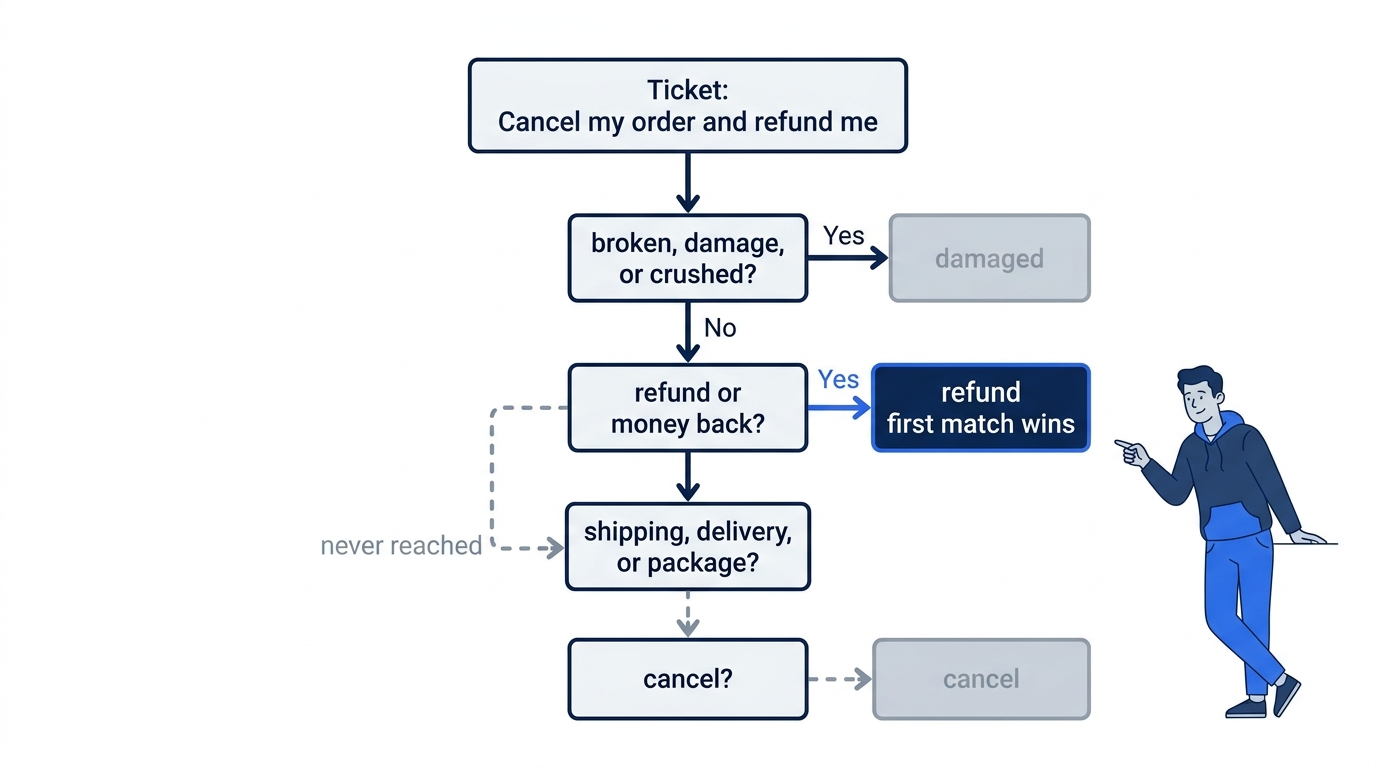
The rule protects Ticket Triage from its biggest trap. classify() runs its checks in order, and the first match wins. A test whose ticket matches only the new keyword passes no matter where the new check sits. A ticket that also matches an older check shows which check wins, so the test fails if the order is wrong.
Save the file. In a second terminal window, in the same folder, run git status --short. It lists only M CLAUDE.md. Then commit it:
git commit -am "Add a test rule to CLAUDE.md"
Git reports one changed file, CLAUDE.md, with 3 or 4 insertions, depending on the blank lines.
Start a new session
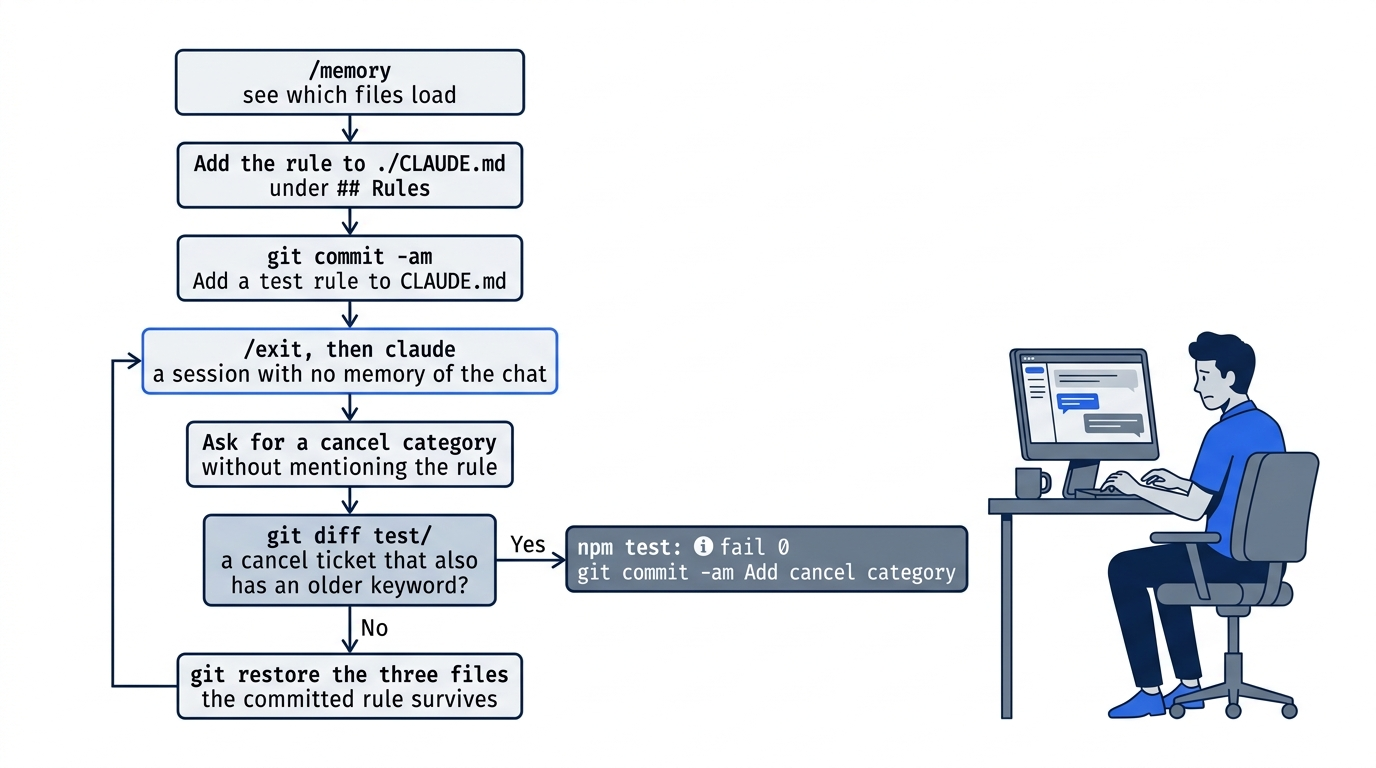
Claude now has your rule in the file, but this session also has today's conversation. To prove that the file carries the rule, test it in a session that has never heard of it. Type /exit, then start Claude Code again:
claude
Run /memory again. Project instructions still points to ./CLAUDE.md, the file that holds your rule. The panel lists the file, and the next step proves that Claude read it. Press Esc to close the panel.
Ask for a small change
Give Claude a task that the rule applies to. Do not mention the rule:
Add a fifth category, cancel, for tickets that mention cancel. Add a test
for it. Then run the tests and tell me if anything broke.
Claude adds a cancel check to classify(), adds tests, and runs npm test. In auto mode, it does all of this without asking.
Manual mode: on the tested run, Claude showed one prompt for a python3 command that edits three files and runs the tests. Claude can also use one edit prompt for each file. Read each command before you choose 1. Yes.
Check that Claude followed the rule
Read Claude's reply first. On the tested run, Claude explained where the new check goes:
⏺ I added the cancel category and nothing broke: all 16 tests pass (14 old, 2 new).

  Code: in src/classify.js, any ticket containing "cancel" is now classified as
  "cancel". Because the first rule that matches wins, where the new rule goes
  matters. I put it last, after damaged, refund and shipping.
Claude's wording, its tickets, and where it puts the check can differ on your run. The check is the same. Look at the new tests:
git diff test/
On the tested run, the diff added these two lines:
test("cancel", () => assert.equal(classify("Please cancel my order"), "cancel"))
test("cancel loses to older rules", () => assert.equal(classify("Cancel my order and refund me"), "refund"))
The second ticket contains "cancel" and also an older keyword, "refund". This test pins down which check wins. If at least one new ticket also contains one of broken, damage, crushed, refund, money back, shipping, delivery, or package, Claude followed the rule. On all four tested runs with the rule, Claude wrote such a test.
Compare this with runs before the rule existed. The same prompt, from the same Day 4 state without the rule, ran twice. Each run wrote only the ticket "Please cancel my order". It matches no older check, so it cannot catch a check in the wrong place.
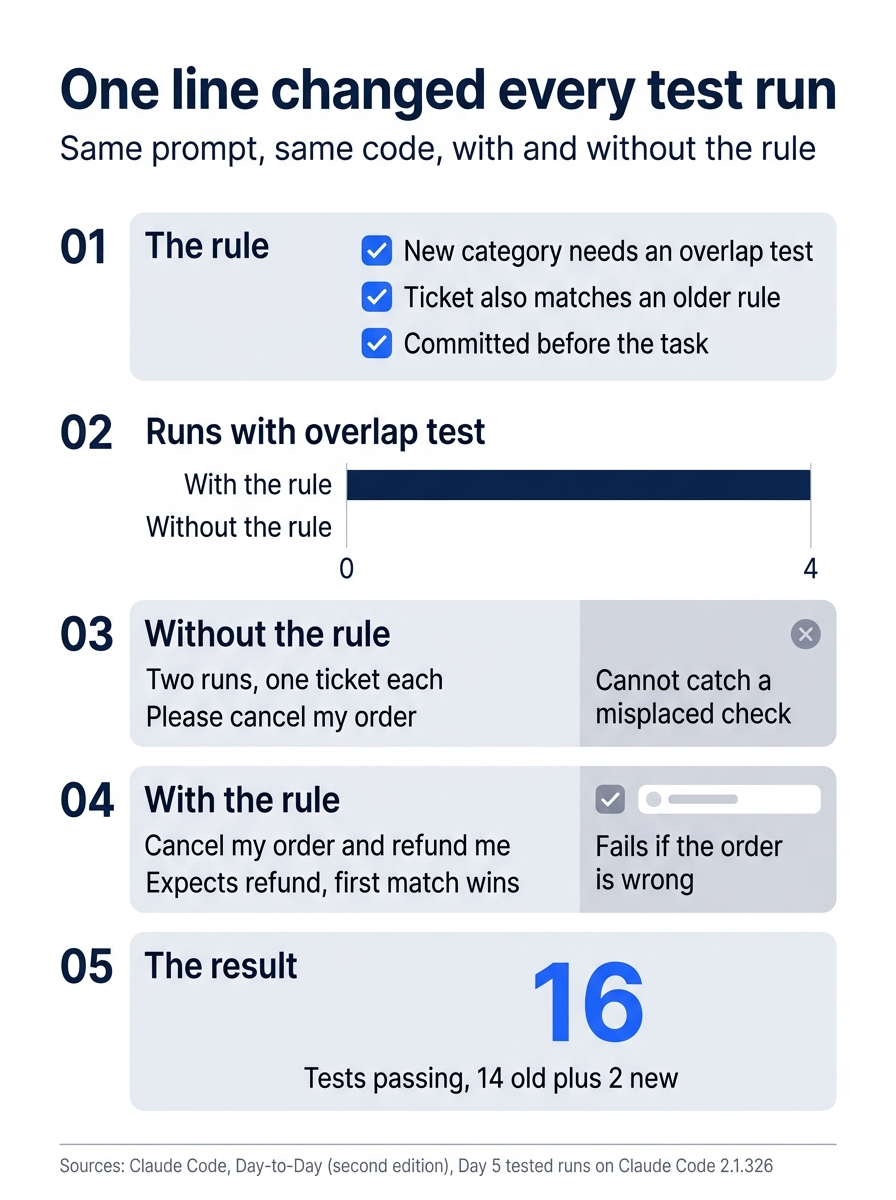
One committed line in CLAUDE.md, and no reminder in the prompt, turned a test that could not catch an ordering bug into one that does, on every tested run.
Now run the tests yourself:
npm test
The classify tests and your cancel tests pass. On the tested run, the output began:
✔ refund
✔ shipping
✔ other
✔ damaged
✔ water damage
✔ cancel
✔ cancel loses to older rules
The priority tests from Day 4 follow, then the summary. Look for ℹ fail 0. On the tested run, the summary showed ℹ tests 16 and ℹ pass 16: the 14 from Day 4 plus 2 new tests. Your count is your Day 4 count plus the tests Claude wrote today.
Then check which files changed:
git diff --stat
On every tested run, three files changed: CLAUDE.md, src/classify.js, and test/classify.test.js. Claude updated the list of categories in CLAUDE.md. Your run may change only the two code files. Open CLAUDE.md and check that the ## Rules section is still at the end. If you like the change, commit it:
git commit -am "Add cancel category"
If no new ticket also contains an older keyword, the rule did not work. Check that CLAUDE.md on disk holds the rule, and that /memory lists ./CLAUDE.md. Your rule is safe, because you committed it before the task. Throw away only today's change, by name:
git restore src/classify.js test/classify.test.js CLAUDE.md
CLAUDE.md goes back to your committed version, with the rule, and loses only Claude's edit from today. Then try again in a new session.

The scene captures the payoff: yesterday's correction no longer depends on anyone remembering to repeat it.
You saw which files load, added a rule to CLAUDE.md, and watched a new session follow it without being told. Write down your pass count, 16 on the tested run.
You can stop here. Going deeper explains why this works and where it breaks.
Going deeper
This section is for readers who want every place that instructions can live, how each one loads, and how to keep them accurate. It assumes you finished Start here in Parts 1 to 5.
Six places for instructions
Today you used one place, the project CLAUDE.md. Claude Code reads instructions from six:
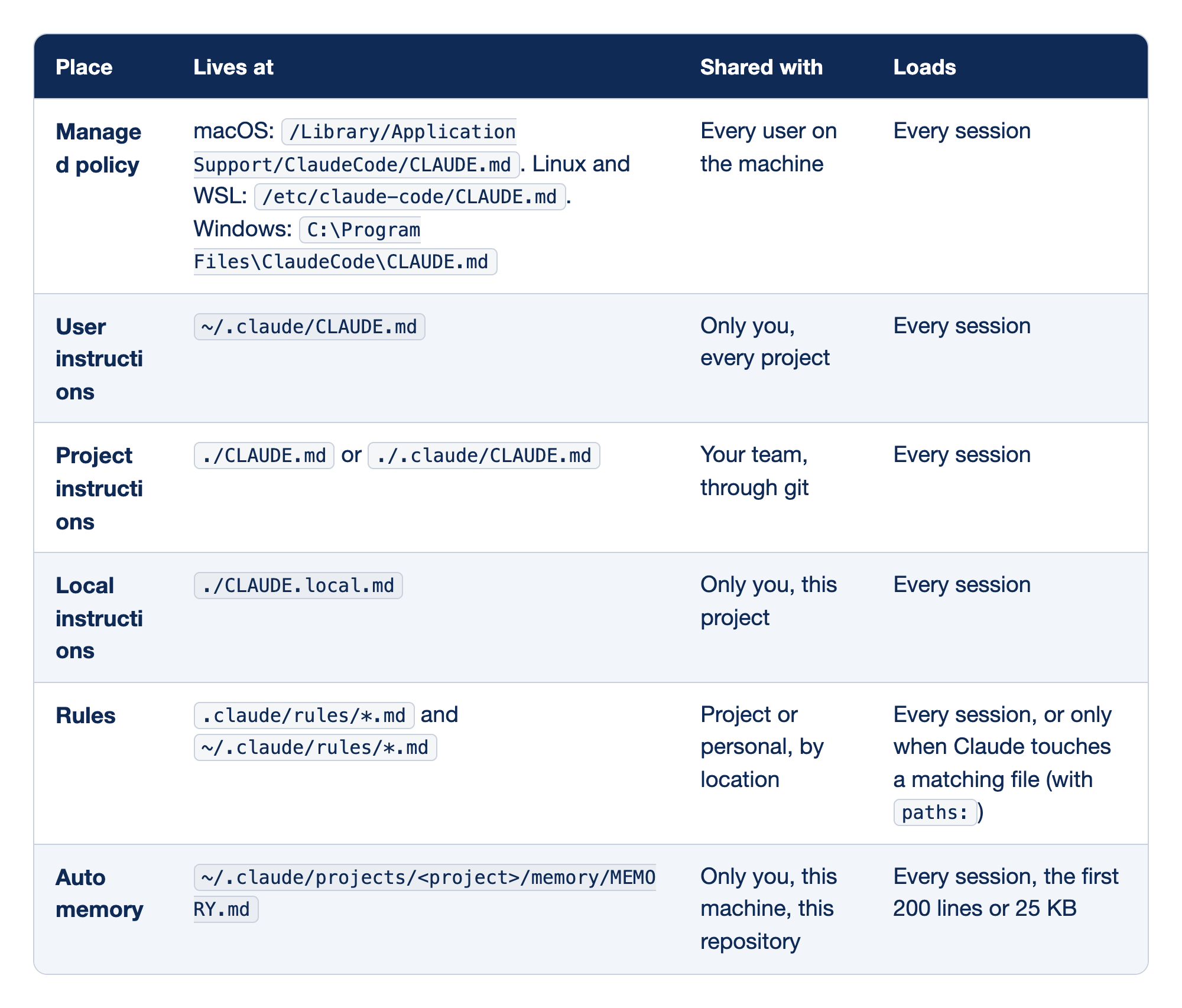
Each instruction source has a file location, an audience, and a loading behavior. The columns are Place (the name of the source), Lives at (the file path), Shared with (who else gets the instructions), and Loads (when Claude Code reads the file).
- Managed policy lives at
/Library/Application Support/ClaudeCode/CLAUDE.mdon macOS,/etc/claude-code/CLAUDE.mdon Linux and WSL, andC:\Program Files\ClaudeCode\CLAUDE.mdon Windows. It applies to every user on the machine and loads every session. - User instructions live at
~/.claude/CLAUDE.md, apply only to you across every project, and load every session. - Project instructions live at
./CLAUDE.mdor./.claude/CLAUDE.md, reach your team through git, and load every session. - Local instructions live at
./CLAUDE.local.md, apply only to you in this one project, and load every session. - Rules live in
.claude/rules/*.mdand~/.claude/rules/*.md, are project or personal depending on the folder, and load every session, or only when Claude touches a matching file if the rule has apaths:field. - Auto memory lives at
~/.claude/projects/<project>/memory/MEMORY.md, belongs only to you on this machine for this repository, and loads its first 200 lines or 25 KB every session.
Docs pages: Managed policy, Rules, Auto memory.
An organization's IT team deploys managed policy, and the claudeMdExcludes setting that skips other CLAUDE.md files cannot skip it. A seventh source, AGENTS.md, can stand in for the project file. It has its own section below.
How the files load
The files do not override each other. Claude Code joins them into one block of context, in this order:
- Managed policy, then your user
CLAUDE.md. - Every
CLAUDE.mdfrom the filesystem root down to the folder where you started Claude Code. Start it infoo/bar/andfoo/CLAUDE.mdcomes beforefoo/bar/CLAUDE.md. In each folder,CLAUDE.local.mdcomes afterCLAUDE.md. - Rules without
paths:, with the same priority as.claude/CLAUDE.md. User rules come before project rules. - Auto memory's
MEMORY.md.
Instructions that load later are read last. When two instructions conflict, Claude may follow either one, so remove conflicts instead of counting on the order.
A CLAUDE.md in a subfolder, such as src/CLAUDE.md, does not load at launch. It loads the first time Claude reads, writes, or edits a file in that subfolder.
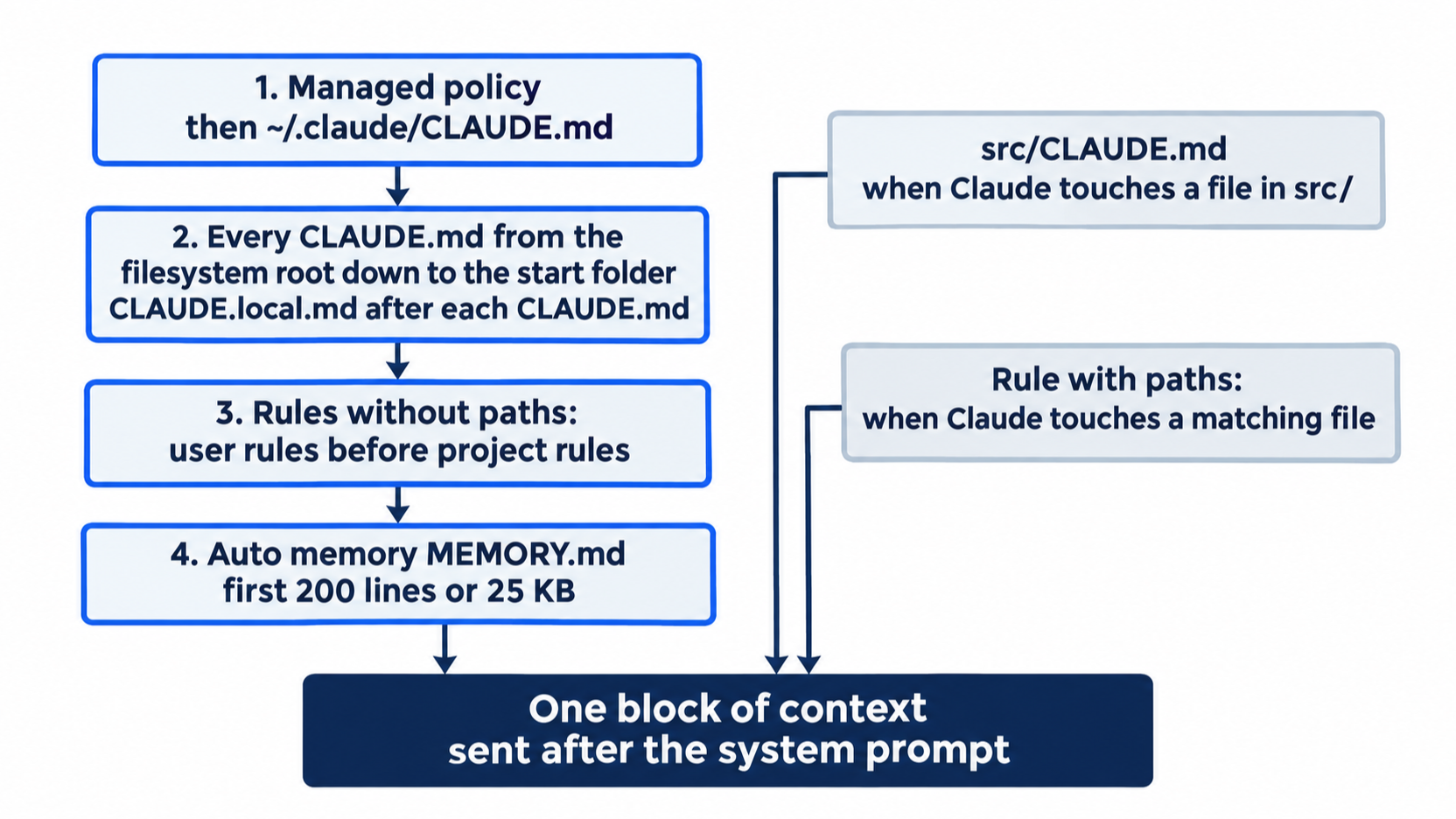
CLAUDE.md is guidance, not configuration. Claude Code sends it as a message after the system prompt. The more specific and short the instruction, the more often Claude follows it.
A running session can also see an edit. On the tested run, a session answered a question about CLAUDE.md, then the file changed on disk, and the next answer used the new line. Start here still uses a new session, because a new session has no conversation about the rule. Only the file can explain what it does.
What /memory shows, and what it does not
On Claude Code 2.1.325, the /memory panel listed the project and user CLAUDE.md, CLAUDE.local.md, AGENTS.md when Claude read it, and rules without paths:. A path-scoped rule did not appear in the panel, even after it loaded. When a path-scoped rule loads, the conversation shows a line such as Loaded .claude/rules/tests.md under the tool call that triggered it.
/memory is also an editor. Select any file to open it. Selecting one that does not exist yet creates it. The Auto-memory line is a toggle that turns auto memory on or off. The setting is saved as autoMemoryEnabled in ~/.claude/settings.json.
CLAUDE.md, done well
- Keep each file under 200 lines. Longer files cost more context, and Claude follows them less reliably. Claude Code warns at startup and in
/statuswhen a file is over the recommended length. - Lead with what Claude got wrong twice. A correction you typed twice is the best line you can add. The docs add two more triggers: a code review catches something Claude should have known, and a new teammate would need the same context.
- Write rules that someone can check. "Use 2-space indentation" beats "format code nicely." "Run
npm testbefore committing" beats "test your changes." Today's rule works because you can check it in the diff. - Use HTML comments for notes to people. Claude Code strips block-level comments, such as
<!-- maintainer notes -->, before the file reaches Claude, so they cost no tokens. Comments inside code blocks stay. - Cut three kinds of line. Cut the kitchen sink, which is every chat you had with Claude, pasted in. Cut the history lesson, which explains why the project exists. Cut the aspirational rule, such as "write clean code." None of them is specific enough to follow.
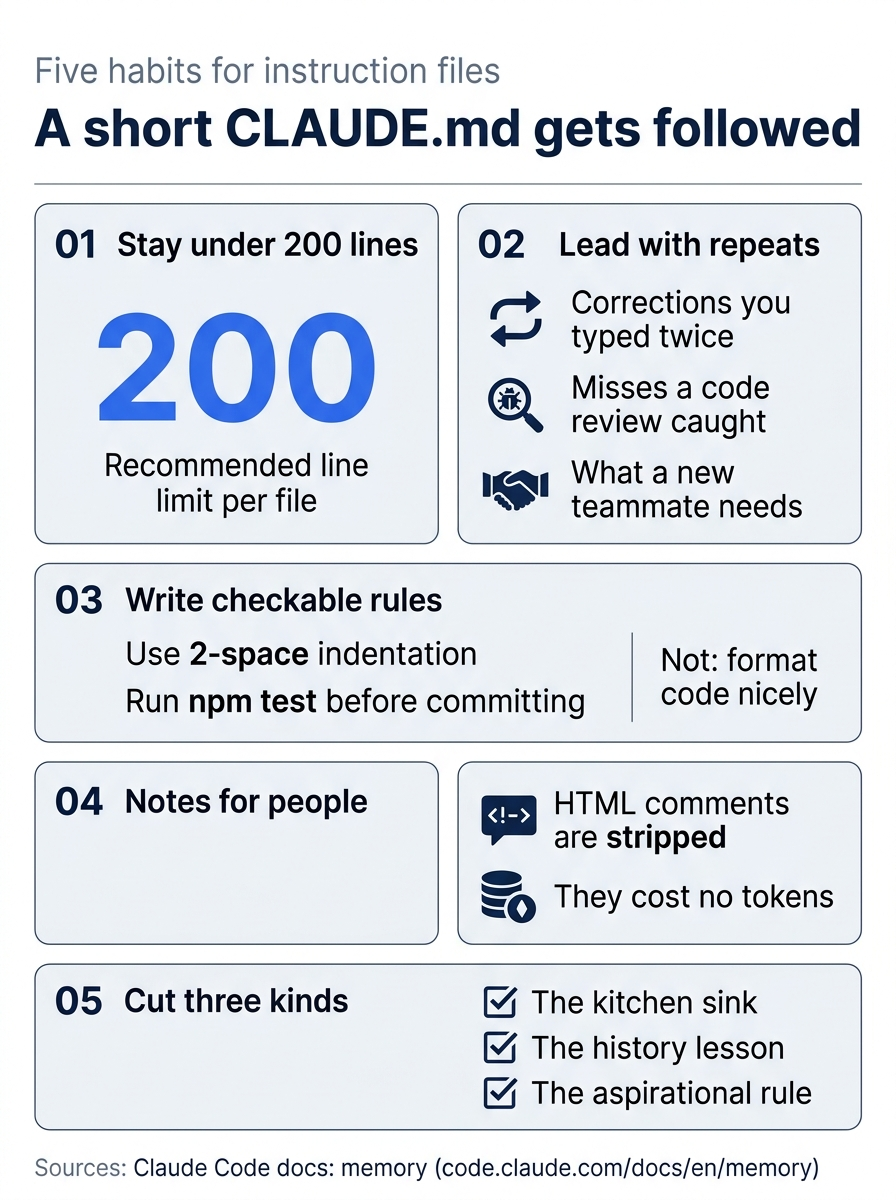
Those five habits come down to one idea: short, specific, and checkable lines are the ones Claude follows.
A sample for a TypeScript and React project shows the shape:
# Project overview

Two-page web app with a TS/React frontend and a Node API. Auth uses
RS256 JWTs (not HS256). Database is Postgres via Prisma.

# Build and test commands

- Install: `pnpm install`
- Tests: `pnpm test` (Vitest)
- Type check: `pnpm typecheck`

# Conventions

- All API errors return `{ error: string, code: string }`.
- Tests live next to source: `Foo.ts` next to `Foo.test.ts`.

# Things to never do

- Don't commit to `main` directly. Always open a PR.
- Don't use `any` in TypeScript. Use `unknown` and narrow.
Anything that does not fit a section like these is a candidate for a rule file, a skill, or the delete key.
Imports
A CLAUDE.md can pull in other files with @path:
See @README.md for the project overview and @package.json for npm commands.

# Workflow
- git rules @docs/git-instructions.md
A relative path resolves from the file that holds the import, not from your working folder. An imported file can import others, up to four hops deep. Wrap a path in backticks (`@README`) to mention it without importing it. A path with spaces needs a backslash before each space.
Imports organize a long file. They do not shrink it: an imported file loads in full, together with the file that imports it. The first time a project's file imports something outside the project folder, such as @~/.claude/my-notes.md, Claude Code asks you to approve it. If you decline, the import stays off.
CLAUDE.local.md
CLAUDE.local.md sits next to CLAUDE.md and holds your personal notes for one project, such as your sandbox URL or test data. Claude Code loads it right after CLAUDE.md. On the tested run, a line in CLAUDE.local.md reached Claude and the /memory panel listed the file.
Claude Code does not keep it out of git for you. Add it to .gitignore yourself:
echo "CLAUDE.local.md" >> .gitignore
/init adds it for you only in the interactive flow that CLAUDE_CODE_NEW_INIT=1 turns on, when you choose the personal option.
A gitignored file exists only in the folder where you made it, so it does not follow you into a second git worktree. For notes that every worktree should share, import a file from your home folder instead: @~/.claude/ticket-triage-notes.md.
/init on a project that already has CLAUDE.md
You ran /init on Day 1, on a project with no CLAUDE.md. On a project that has one, the docs say /init suggests improvements instead of overwriting the file. With CLAUDE_CODE_NEW_INIT=1 set, /init runs an interactive flow: it asks which files to set up (CLAUDE.md files, skills, and hooks), explores the code with a subagent, asks follow-up questions, and shows a proposal before it writes anything. /init also reads Cursor and Copilot rule files and carries the useful parts into CLAUDE.md. This guide did not test /init on an existing file.
Rules in .claude/rules/
A rule file is a Markdown file in .claude/rules/. It works like a piece of CLAUDE.md, with one addition: an optional paths: field at the top that limits it to matching files. For Ticket Triage, a rule for test files looks like this:
---
paths:
  - "test/**/*.js"
---

# Test files

- Name each test after the label it checks, such as "cancel beats shipping".
A rule with paths: loads only when Claude reads, writes, or edits a matching file. Viewing a single file with cat or head counts as a read. On the tested run, a rule with paths: ["src/**/*.js"] did not reach Claude at the start of a session. After Claude read src/x.js, the rule was in context.
Notes on rules:
- Globs:
**/*.tsmatches at any depth,src/**/*matches everything undersrc/, and/*.mdmatches only the top folder. Brace groups such as"src/**/*.{ts,tsx}"match more than one extension. Apaths:list can have many entries. - Rules without
paths:load at launch, every session. Use them to split a longCLAUDE.mdby topic:testing.md,security.md. - Folders: Claude Code finds
.mdfiles in subfolders of.claude/rules/too. The folder name does not change when a rule loads. Onlypaths:does. - Bad frontmatter: if the YAML between the
---lines does not parse, Claude Code loads the rule as if it had nopaths:. Runclaude --debugto see the error. - Personal rules:
~/.claude/rules/holds rules for every project on your machine. - Shared rules:
.claude/rules/follows symlinks, so a team can link one shared folder into many projects:ln -s ~/shared-claude-rules .claude/rules/shared. A link to a folder outside the project counts as an outside import. It waits for your approval, and after approval only the rules withoutpaths:load.
The split to remember: CLAUDE.md is for the whole project. A rule with paths: is for a slice of it. When CLAUDE.md nears 200 lines, ask which lines matter only for some files. Those lines move into rules.
Auto memory
Auto memory is the layer that Claude writes. It has been on by default since v2.1.59. As you work, Claude saves notes of four kinds, and records the kind as a type field in each note:
user: your role, skills, and working preferences.feedback: corrections you give, and approaches you confirm.project: ongoing work, deadlines, and decisions that the code and git history do not show.reference: where to find outside information, such as an issue tracker.
Claude skips what it can work out from the code, and anything your CLAUDE.md already says. It does not save something every session.
To save a note on purpose, say so:
Remember that I review every change with git diff before I commit.
On the tested run, Claude replied "I've saved that to memory" and wrote two files in ~/.claude/projects/<project>/memory/. <project> is the repository's path with each / changed to -. MEMORY.md got a one-line index entry, and a topic file got the note with type: feedback. The note also said "Do not commit on your own", which the prompt did not say. Read what Claude saves. Edit or delete a note that goes further than you meant.
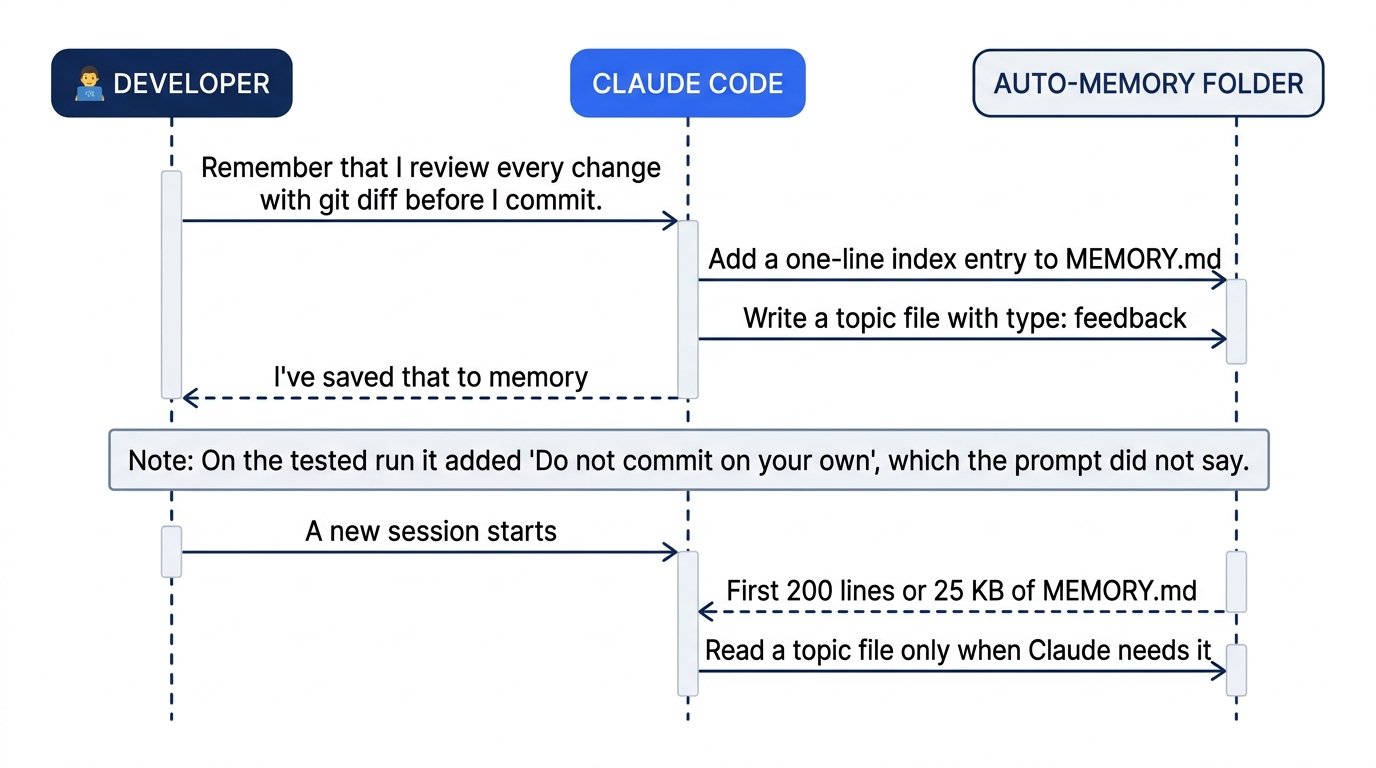
How it loads and where it lives:
- The first 200 lines or 25 KB of
MEMORY.md, whichever comes first, load at the start of every session. Topic files load only when Claude reads them. This is the only instruction file with a load cap. ACLAUDE.mdloads in full, up to 4 MiB. - All worktrees and subfolders of one git repository share one memory folder. Auto memory is machine-local: it does not sync between machines or to cloud sessions.
- To move the folder, set
autoMemoryDirectoryin a settings file, to an absolute path or one that starts with~/. Claude Code now reads the setting from any settings scope. In a project's.claude/settings.json, it takes effect only in a trusted folder. - To turn auto memory off, use the toggle in
/memory, set"autoMemoryEnabled": falsein a project's settings, or setCLAUDE_CODE_DISABLE_AUTO_MEMORY=1.
The main session's auto memory does not load into subagents. A subagent can keep its own.
Move notes to where they belong
Auto memory is the right place for your own notes. When a note matters to anyone else, move it:
- To
CLAUDE.mdwhen it is true for the whole codebase and every teammate needs it: "The auth service uses RS256 JWTs, not HS256." If it stays in your private notes, a teammate's Claude never sees it. - To a rule with
paths:when it is true for one slice: "Database migrations must be reversible" belongs in.claude/rules/migrations.mdwithpaths: ["migrations/**"]. - To
CLAUDE.local.mdwhen it is true for the whole project but only for you: "I use pnpm even though the team uses npm." - Leave it in auto memory when it is personal, tied to this machine, or not proven yet.
To move one, open the auto-memory folder from /memory, copy the line into the target file, and delete it from the memory file. Two minutes at the end of each day keeps team knowledge in the repository instead of on one laptop.
Where does this go?
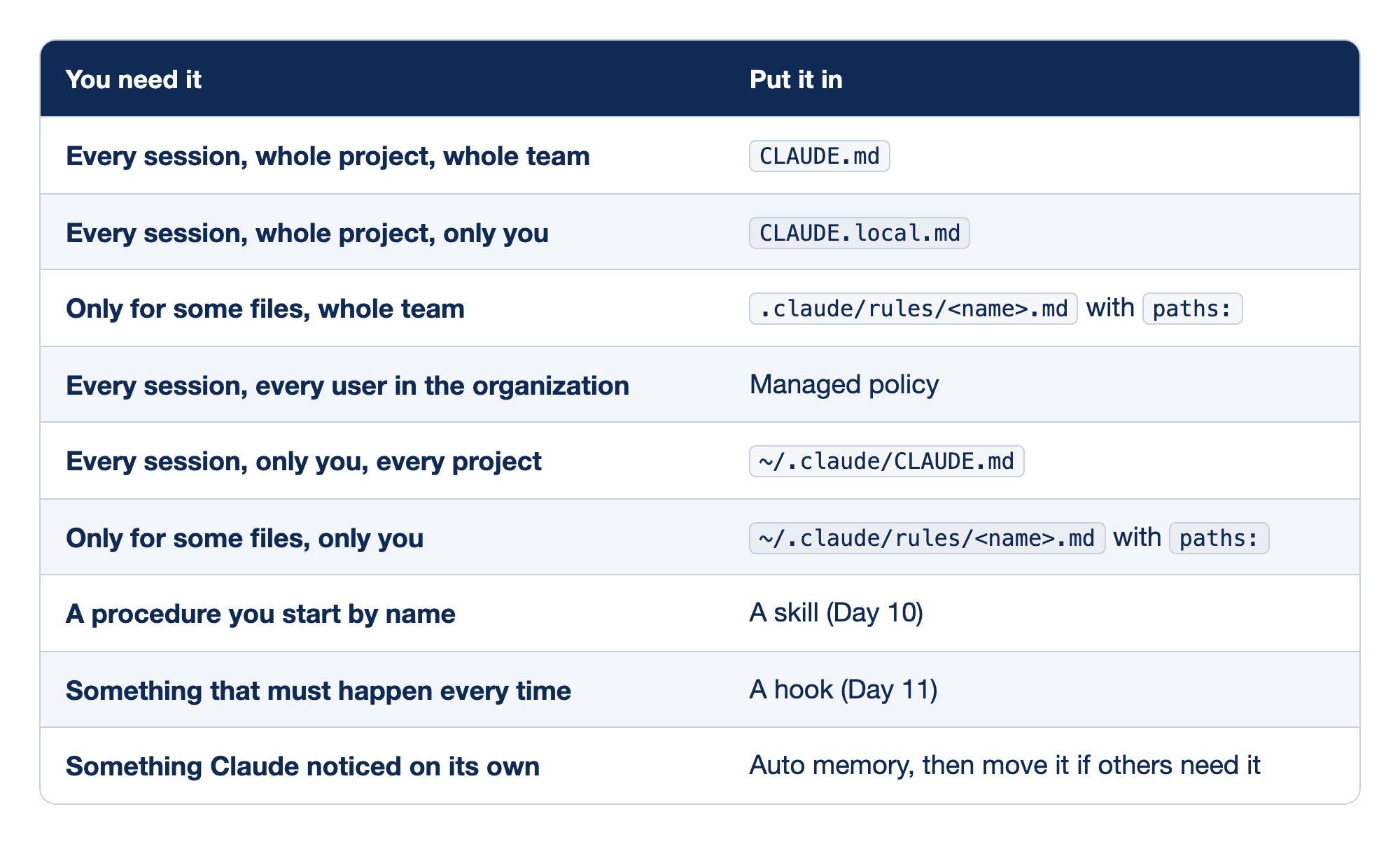
Each kind of instruction maps to the file or feature that should hold it. The columns are You need it (when the instruction applies and who needs it) and Put it in (the place that fits).
- An instruction for every session, the whole project, and the whole team goes in
CLAUDE.md. - An instruction for every session and the whole project, but only for you, goes in
CLAUDE.local.md. - An instruction for only some files, for the whole team, goes in
.claude/rules/<name>.mdwithpaths:. - An instruction for every session and every user in the organization goes in managed policy.
- An instruction for every session and every project, but only for you, goes in
~/.claude/CLAUDE.md. - An instruction for only some files, only for you, goes in
~/.claude/rules/<name>.mdwithpaths:. - A procedure you start by name goes in a skill, covered on Day 10.
- Something that must happen every time goes in a hook, covered on Day 11.
- Something Claude noticed on its own goes in auto memory, and you move it if others need it.
Docs pages: hook.
The last rows draw the line: memory is guidance that Claude reads. A hook is behavior that Claude Code enforces. A CLAUDE.md line that says "always run lint before committing" is a request. A hook that runs the linter before every git commit and blocks the commit on failure is a rule. If an instruction must hold every time, it needs a hook, not a line in CLAUDE.md.
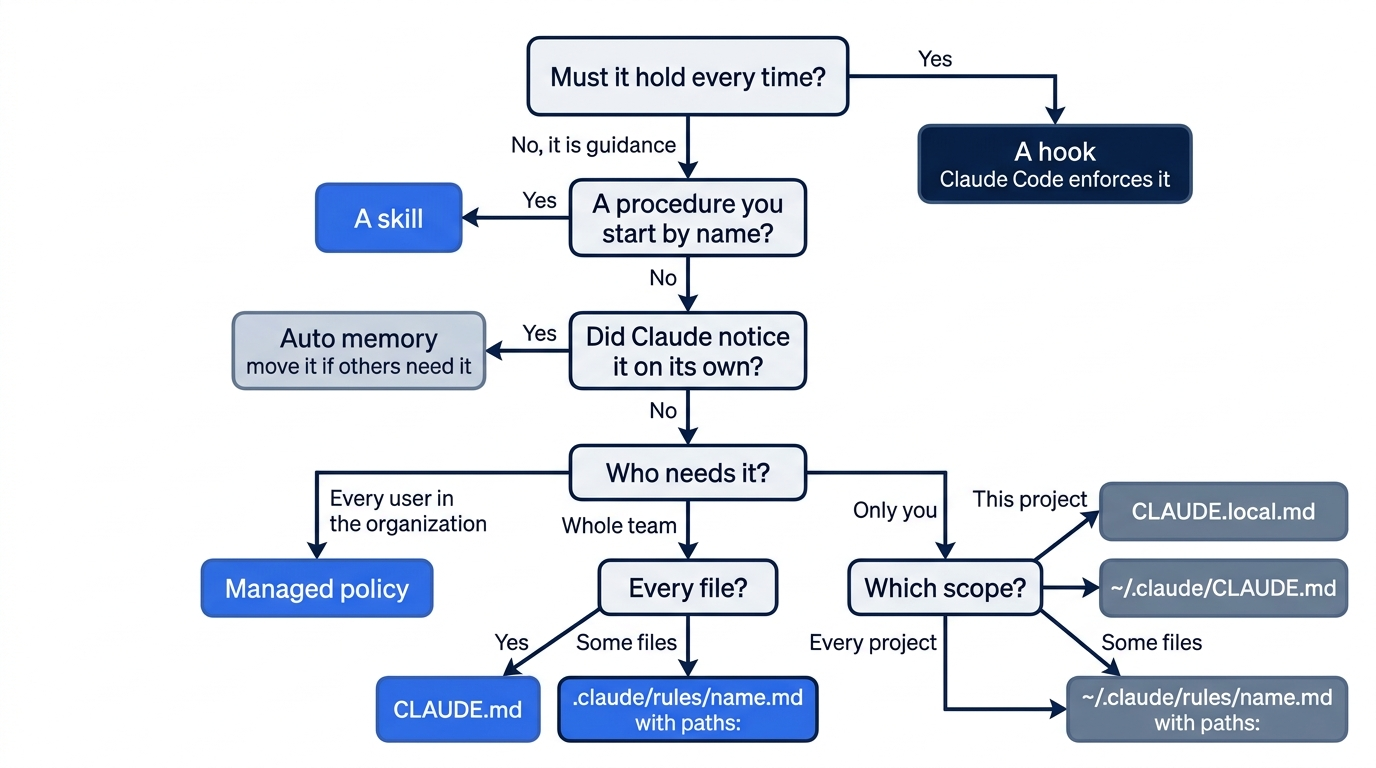
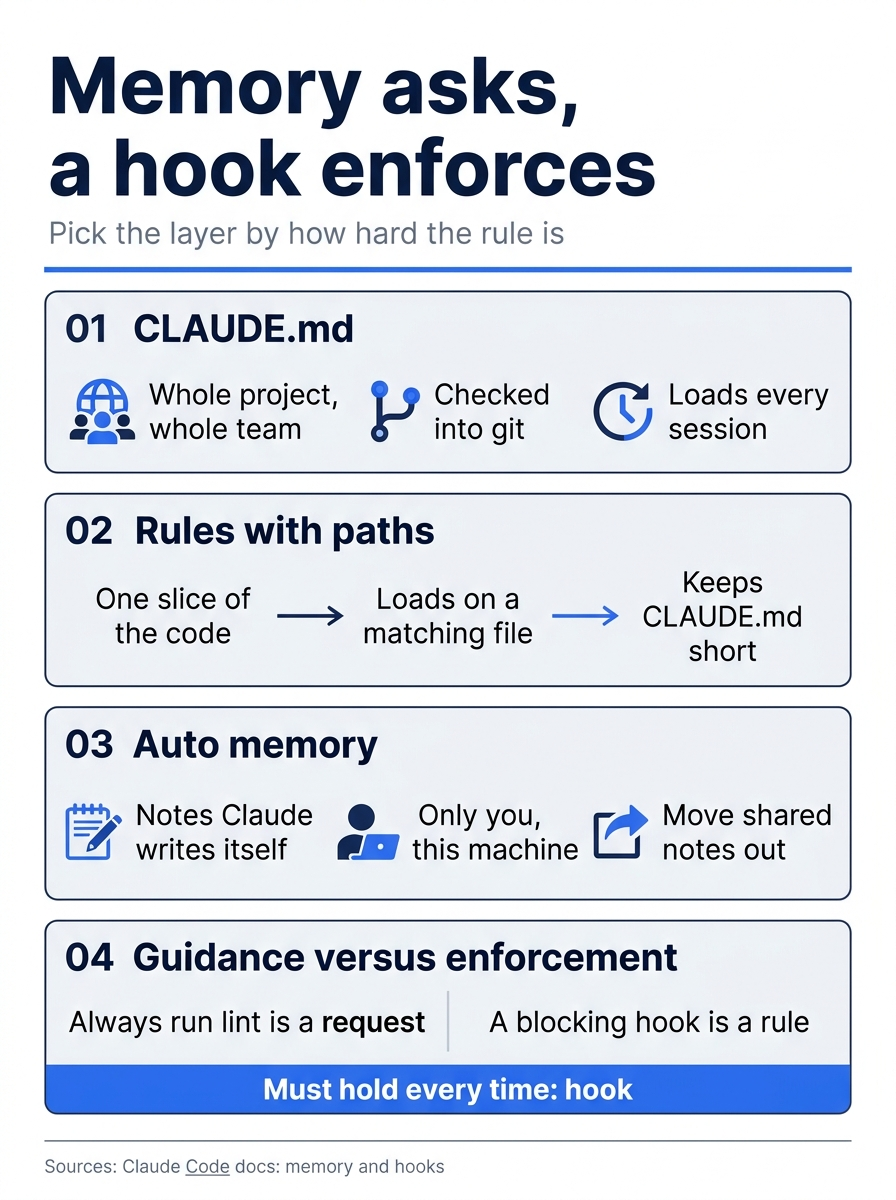
The three memory layers guide Claude, and only a hook enforces: pick the layer by how hard the rule has to be.
AGENTS.md
AGENTS.md is the instruction file that many other coding agents read. Since v2.1.277, Claude Code reads it too, but by default only when the project has no CLAUDE.md. On Claude Code 2.1.325, each test folder held an AGENTS.md with a code word in it, and a one-prompt run asked Claude for the code word with all tools turned off:
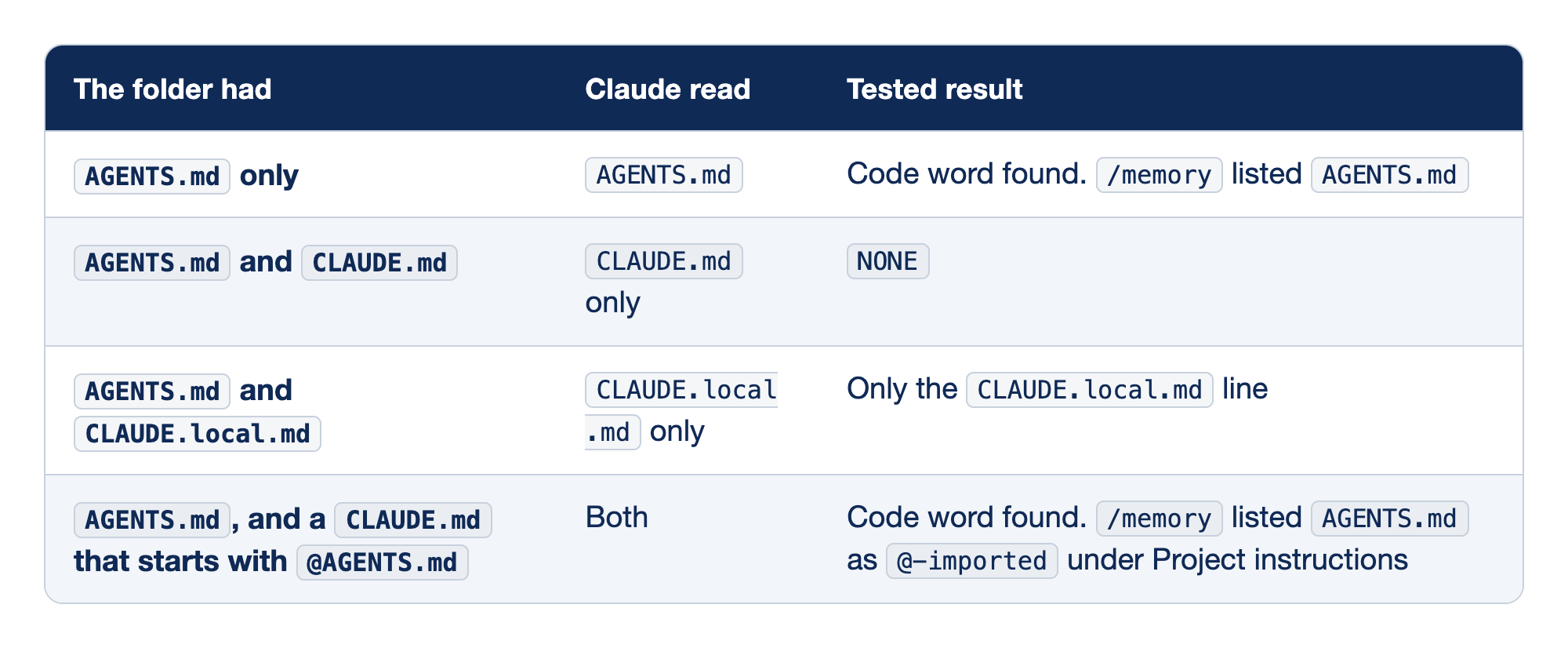
Four test folders show when Claude Code reads AGENTS.md. The columns are The folder had (which instruction files the folder held), Claude read (which of them reached Claude), and Tested result (what Claude answered when asked for the code word, and what /memory showed).
- With
AGENTS.mdonly, Claude readAGENTS.md, found the code word, and/memorylistedAGENTS.md. - With
AGENTS.mdandCLAUDE.md, Claude read onlyCLAUDE.mdand answeredNONE. - With
AGENTS.mdandCLAUDE.local.md, Claude read onlyCLAUDE.local.mdand returned only theCLAUDE.local.mdline. - With
AGENTS.mdand aCLAUDE.mdthat starts with@AGENTS.md, Claude read both, found the code word, and/memorylistedAGENTS.mdas@-importedunder Project instructions.
The check counts a CLAUDE.md, .claude/CLAUDE.md, or CLAUDE.local.md in your working folder or any folder above it. Your ~/.claude/CLAUDE.md, managed policy, and .claude/rules/ do not count, and they load next to AGENTS.md. Claude Code does not read AGENTS.local.md, AGENTS.override.md, or anything in an .agents/ folder.
Ticket Triage already has a CLAUDE.md, so a new AGENTS.md would be ignored. If your team also uses another agent, keep the shared rules in AGENTS.md and put an import at the top of CLAUDE.md. This is the setup that this guide tested:
@AGENTS.md

## Claude Code

- Run tests with npm test.
Claude reads the imported file first, then the Claude-only lines below it. An import never makes Claude read AGENTS.md twice. On a machine where every user is on macOS or Linux, a symlink also works (ln -s AGENTS.md CLAUDE.md), but Claude cannot edit through the link, and on Windows git can check the link out as a one-line text file. The import has neither problem.
To change the default, open /config and set Project instructions. The docs list four values: claude-md-or-agents-md (the default), claude-md-and-agents-md (both, with each folder's CLAUDE.md first), claude-md (never read AGENTS.md), and managed-only. This guide did not test the setting. A note on CLAUDE.local.md: it counts in the check above, so adding one to a project that relies on AGENTS.md stops Claude from reading AGENTS.md. Use the import, or set claude-md-and-agents-md.
To copy instructions in from another tool once, the docs describe /import, which brings in configuration from OpenAI Codex, Gemini CLI, or Cursor. This guide did not test it.
/doctor prompt-audit
/doctor prompt-audit (alias /checkup prompt-audit) arrived in v2.1.283. It looks for three kinds of problem in your instruction files:
- Instructions written for older models. Shouting such as "CRITICAL" and "BE THOROUGH", and step-by-step scripts that an older model needed. Current models follow instructions closely, and pressure words can push them to overdo it. On the tested run, the full audit flagged "BE THOROUGH. Explore deeply." in a user-level agent file and proposed "Read the actual files rather than guessing."
- Stale facts. Paths, commands, and descriptions the code has outgrown. On the tested Ticket Triage run on 2.1.325, it was a line that still said
classify()returns three labels, as the example below shows. - Files that contradict each other.
With no path, the audit covers your CLAUDE.md, CLAUDE.local.md, and AGENTS.md files, plus the rules, skills, commands, subagents, and output styles under .claude/ and ~/.claude/. It reports on plugin files but proposes no edits to them. Pass a path to audit one file or folder. On the tested run, the scoped audit of CLAUDE.md took 43 seconds. The full audit, on a setup with 55 plugins, took 2 minutes 8 seconds.
The audit runs through the built-in /claude-api skill, so it does not work when that skill is turned off. It proposes a diff and changes nothing until you ask. Check its claims before you apply them: on the tested run, the full report said the cancel change was still uncommitted when git status was clean.
Plain /doctor is a wider checkup of the install and settings. For a checked-in CLAUDE.md, the docs say it proposes trims: it cuts what Claude can work out from the code, such as directory layouts, and keeps pitfalls and conventions.
Try it on Ticket Triage.
CLAUDE.md can go out of date. Yours was written on Day 1, and Claude may not have updated it for every category since. Claude Code has a checkup for instruction files. In the session, run:
/doctor prompt-audit CLAUDE.md
Claude reads CLAUDE.md, checks each claim against the code, and prints a report with a proposed diff. It changes nothing until you ask. On the tested run on 2.1.325, the audit took 43 seconds. It found that CLAUDE.md still said classify() returns three labels, and it proposed a rewrite that kept the Rules section.
Read the report. If you agree with the diff, type Apply the diff., check that the ## Rules section is still at the end of CLAUDE.md, and commit. If you do not agree, do nothing. Reset: check that git status --short prints nothing.
When memory goes wrong
Claude does not follow CLAUDE.md. Run /memory first and check that the file is listed. If it is not listed, Claude cannot see it. If it is listed, the usual causes are a vague instruction, two files that disagree, or a file so long that the rule gets lost. Make the line specific, remove the conflict, and move slice-only lines into rules. Also check for guidance that Claude Code adds on its own. For example, if your CLAUDE.md sets commit rules, the docs suggest turning off the built-in ones with the includeGitInstructions setting.
You do not know what auto memory saved. Select Open auto-memory folder in /memory. Every note is plain Markdown that you can read, edit, or delete.
CLAUDE.md is too large. Trim lines that are not needed every session, and move slice-only lines into rules with paths:. Splitting into imports helps you read the file. It does not make it smaller.
Claude ignores the end of a subfolder CLAUDE.md or a path-scoped rule. Files that load on demand have a size limit per file. With a 1 million token window on current models, the limit is 150,000 characters. Claude gets only the start of a longer file. Check with wc -m path/to/CLAUDE.md.
An instruction disappears after /compact. /compact summarizes the conversation to free space. Afterward, Claude Code reads the project-root CLAUDE.md from disk again. A subfolder CLAUDE.md and a path-scoped rule come back the next time Claude touches a matching file. An instruction that you only typed in chat is gone. Put it in CLAUDE.md.
Headless runs read the same file
A claude -p run reads the same CLAUDE.md as your interactive session. On the tested run, a claude -p call with today's cancel prompt quoted the rule from CLAUDE.md and wrote a test ticket with both "cancel" and "refund". A rule you write today also applies when no one watches the run. Day 24 puts claude -p in a script.
Go further: Why You Keep Explaining the Same Thing to Claude (and the Five Layers That Fix It) covers the same layers from the first edition, with diagrams of how they stack.
Do this today
Everyone
- Run
/memory, add the test rule toCLAUDE.md, start a new session, and ask for thecancelcategory. Check the win:git log --oneline -2showsAdd cancel categoryandAdd a test rule to CLAUDE.md,npm testshowsℹ fail 0, and each newcanceltest ticket intest/classify.test.jsalso contains an older keyword. - Habit: when you correct Claude the same way twice, open
/memory, add the correction toCLAUDE.mdas a line that someone can check, and commit it.
If you read Going deeper
- Create
CLAUDE.local.mdwith one personal line and add it to a new.gitignorefile. Check:git status --shortlists?? .gitignorebut notCLAUDE.local.md, and/memorylistsCLAUDE.local.md. Reset: runrm CLAUDE.local.md .gitignore. Check thatgit status --shortprints nothing. - Add
.claude/rules/tests.mdwithpaths: ["test/**/*.js"]. Ask Claude to readtest/classify.test.js. Check: the conversation showsLoaded .claude/rules/tests.md. Reset: runrm -r .claude/rules. Check thatgit status --shortprints nothing. - Type "Remember that I review every change with git diff before I commit." Check:
MEMORY.mdin the auto-memory folder has a new line. Read the note it points to, and fix anything it added that you did not say. Reset: the note is outside the project. Keep it, or delete the note file and its line inMEMORY.md. - Run
/doctor prompt-auditwith no path. Check: the report lists the files it covered, andgit status --shortprints nothing. Reset: nothing changed. - If your team uses another coding agent, move the shared rules into
AGENTS.mdand startCLAUDE.mdwith@AGENTS.md. Check:/memorylistsAGENTS.mdas@-imported. Reset: in Ticket Triage, rungit restore CLAUDE.mdandrm AGENTS.md. Check thatgit status --shortprints nothing.
The conversation ends; the file stays
A correction in chat is a favor Claude does for you once. A line in CLAUDE.md is a contract that every future session signs at startup, including the ones you never watch. The proof is not that the file appears in /memory; it is a test ticket, "Cancel my order and refund me", written by a session that was never told why it mattered.
Keep the file short, make every line checkable, and move anything that must hold every time into a hook. Then the next time you catch yourself explaining the same thing twice, you will know where the explanation goes.
Stop repeating yourself to Claude. Write it down once, where it loads every time.
This is Part 5 of "Claude Code, Day-to-Day (second edition)," a day-by-day guide to Claude Code in which each day takes 20 to 40 minutes. Part 5 is Day 5. All 28 days are out now.