
One agent, three hundred users, one endpoint, and a security reviewer who wants proof
Every hosted agent is a real object in Microsoft Entra ID, and the identity you assume is the principal is not the one that needs the role assignment.
Every hosted agent on Microsoft Foundry is a real object in Microsoft Entra ID, with its own service principal, its own role assignments, and its own line in the audit log. This article covers what that identity buys you, the RBAC mistake almost every team makes exactly once, and how per-user isolation actually works.
The security reviewer's question: one agent, three hundred users, one endpoint. Prove that user A cannot reach user B's anything.
In this article: You will learn the two Microsoft Entra identities that appear when you deploy a hosted agent, and why assigning roles to the wrong one produces a permission error that looks like everything is configured correctly. Then the caller side: what per-user session isolation gives you for free, how delegated identity works when your own application owns the login, why session multiplexing is safe and where it stops being safe, and the five-hop identity chain that every later security conversation refers back to.
Your agent is about to ship. One deployment serves every user in the department. Then the security reviewer asks the question that decides whether it ships at all.
Prove that user A cannot list user B's sessions. Prove she cannot read user B's conversation, download user B's session files, or pull user B's remembered preferences. Then name what the agent authenticates as when it opens user A's records in a downstream system that has its own permission model.
Both halves of that question have documented answers on Microsoft Foundry, and they are different kinds of answers. The second half is about identity: the agent is a principal in your directory, and you grant it access the way you grant anything else access. The first half is about isolation: the platform derives the caller from a verified token and partitions almost everything by it, with two exceptions that will cost you if you do not know them.
This article covers both, and it is the one where Microsoft Entra agent identity stops being an architecture-diagram box and becomes a thing you assign roles to.
Two identities, and the one you assume is the principal is not
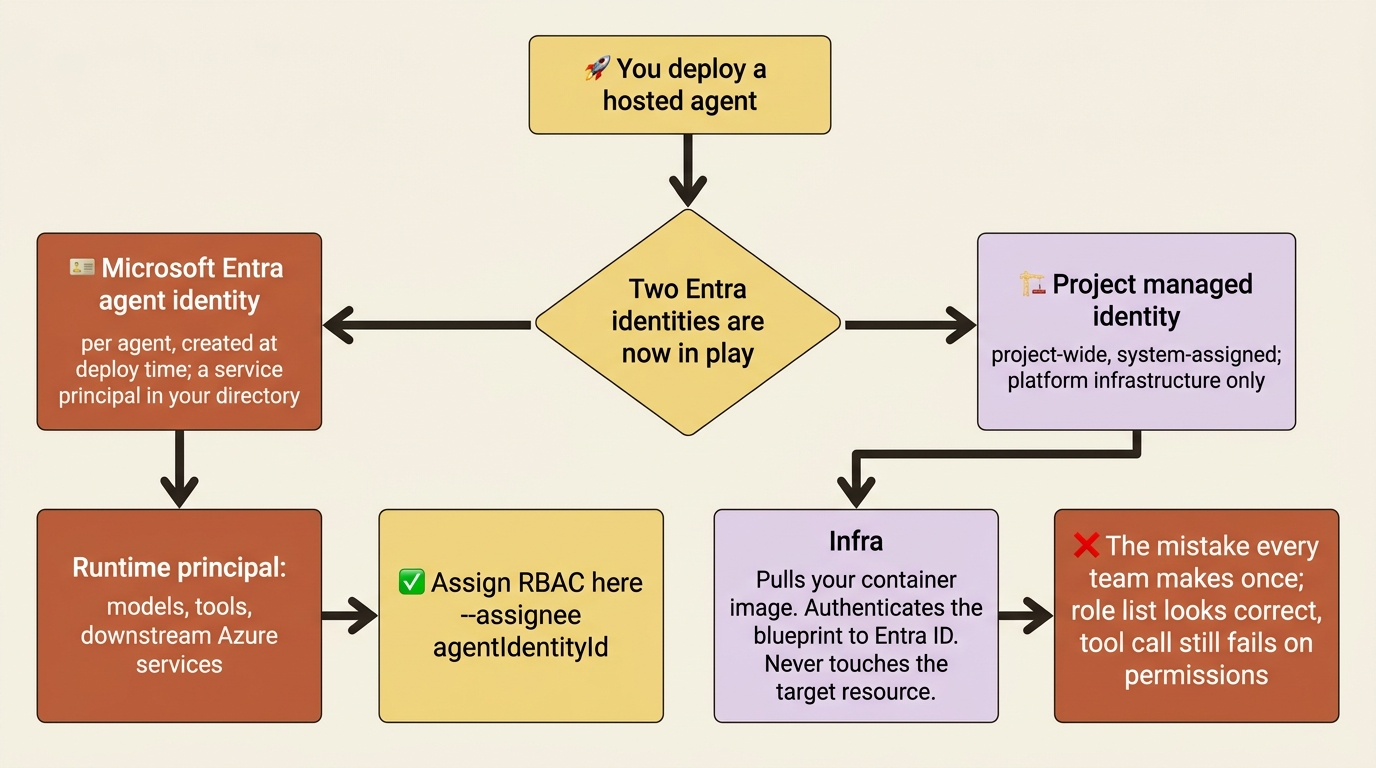
The takeaway: a hosted agent deployment involves two Microsoft Entra identities with two different jobs, and the one that pulls your container image is not the one that calls your storage account.
The docs publish the split as a two-row table worth reading twice.
| Identity | Scope | Purpose |
|---|---|---|
| Microsoft Entra agent identity (per agent) | Created automatically at deploy time | The identity the agent container authenticates with at runtime. Used for model invocation, tool access, and downstream Azure services. |
| Project managed identity (project-wide) | System-assigned on the Foundry project | Used by the platform for infrastructure operations, for example, Container Registry Repository Reader on the container registry. Not the agent's runtime identity. |
The table covers the two identities a hosted agent deployment creates and what each one is for.
- Microsoft Entra agent identity: one per agent, created automatically at deploy time, and the identity your container authenticates with at runtime for models, tools, and downstream Azure services.
- Project managed identity: one per project, system-assigned, and used only by the platform for infrastructure operations such as pulling your container image. It is not the agent's runtime identity.
An agent identity is a specialized identity type in Microsoft Entra ID designed for AI agents, and underneath it is a service principal in your directory. The whole tenant inventory shows up in the Microsoft Entra admin center under Entra ID > Agent ID > All agent identities, where an administrator applies Conditional Access, identity protection, and governance for expiration, owners, and sponsors. Governing an agent is governing a directory object, not clicking around a product console.
Above it sits an agent identity blueprint, a second Entra object that governs a class of agents the way a type governs its instances, and the target for Conditional Access that should cover every agent of that kind. The blueprint Foundry provisions gets a federated credential trust relationship with the project's managed identity, so there is no stored secret anywhere in the chain.
Now the trap, stated in a note that is easy to scroll past.
Gotcha: the project managed identity authenticates the blueprint to Entra ID. It never touches the downstream resource. The agent identity, not the managed identity, is the principal that requires RBAC role assignments on the target resource. Every team gets this wrong once, because the managed identity is the one visible in the portal during provisioning, it already holds Container Registry Repository Reader and Log Analytics Data Reader, and granting it one more role feels like the obvious next step. The tool call still fails on permissions, the role assignment list looks correct, and the assignment is simply on the wrong principal. The docs list this first under common issues, phrased as "roles assigned to the wrong identity".
The assignee you want is the agentIdentityId, which you copy from the JSON view of the project or the agent resource in the Azure portal, and it takes an ordinary role assignment:
az role assignment create \
    --assignee "<agentIdentityId>" \
    --role "Storage Blob Data Contributor" \
    --scope "/subscriptions/<subscription-id>/resourceGroups/<resource-group>/providers/Microsoft.Storage/storageAccounts/<storage-account>"
Nothing about that command is Foundry-specific, which is the point. An agent identity is a service principal, and it takes the same tooling, the same scopes, and the same least-privilege review as any workload identity you already run.
One thing to check before you design around any of this. Agents created before the current object model are legacy agents that still share the project identity, and the field that tells them apart is instance_identity on the agent object, where null means legacy. A null value means every agent in the project shares one blast radius, which is exactly the situation the security reviewer is asking about. There is no in-place upgrade; the documented path is to create a new agent from the same definition, which receives a unique blueprint and identity by default.
One caveat on least privilege. An agent has implicit access to core capabilities inside its own project, specifically model inferencing through the project endpoint and session storage read and write, so the standard case needs no role assignment at all. You start assigning roles when the agent reaches outside that boundary: an external resource, data in another project, or an account-level capability such as Speech or Content Safety called directly rather than proxied through the project endpoint.
The token exchange, and the one value that fails silently
The takeaway: you never write token code, and the single field you can still get wrong is the audience.
When an agent invokes a tool, a four-stage OAuth 2.0 exchange runs between Agent Service, Microsoft Entra ID, and the downstream resource, with no developer-managed tokens anywhere in it. Agent Service presents the blueprint's credentials, Entra ID issues a token for the specific agent identity, Agent Service exchanges it for an access token scoped to the downstream service's audience, and the resource validates that token and checks the agent identity's role assignments before answering.
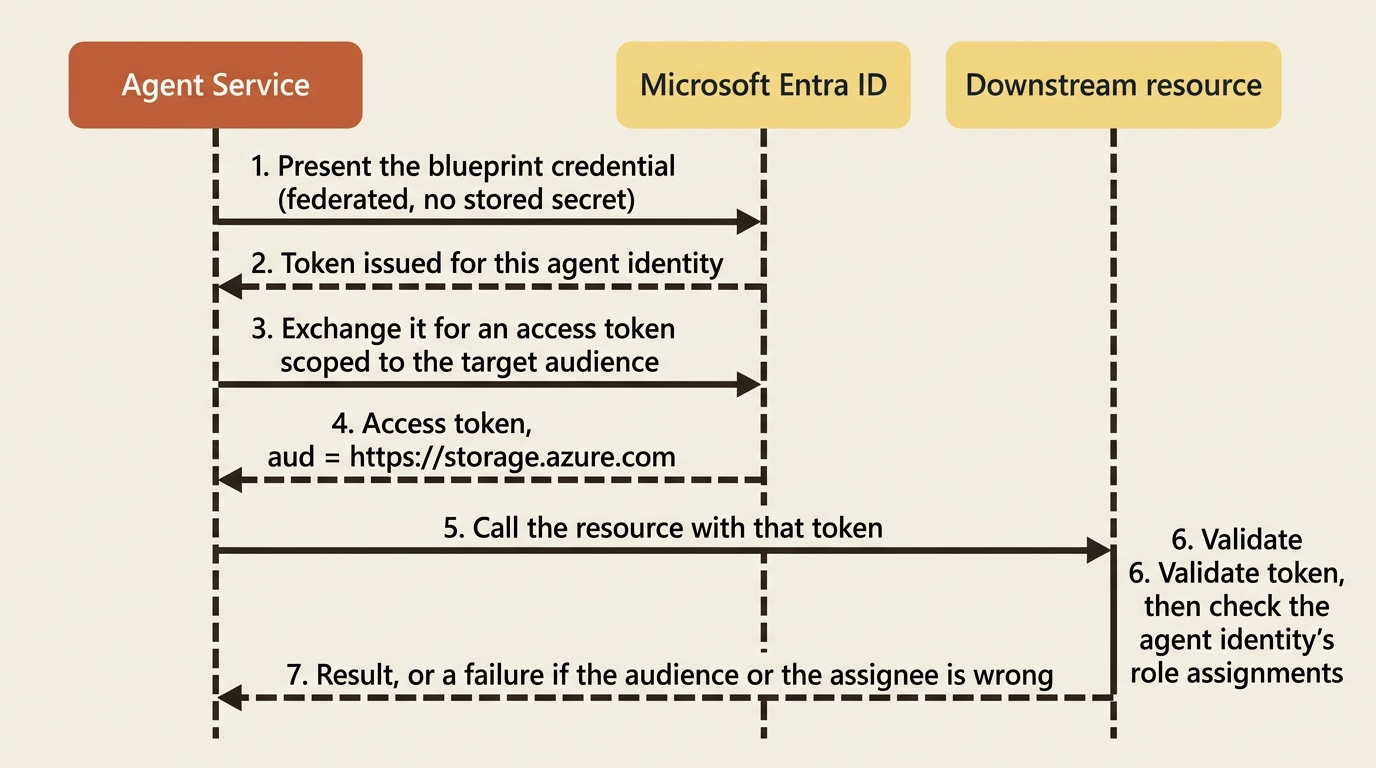
The audience is the OAuth resource identifier for the target service, and the docs publish a table of the common ones: https://storage.azure.com for Azure Storage, https://logic.azure.com for Logic Apps, https://cosmos.azure.com for Cosmos DB, https://graph.microsoft.com for Microsoft Graph, and https://vault.azure.net for Key Vault.
Gotcha: an incorrect audience value causes authentication failures even when the RBAC roles are correct, and the audience must match the resource identifier of the downstream service rather than the URL of the MCP server you are calling. Those two strings often look similar enough to copy the wrong one, and the resulting error points at permissions rather than at the field that is actually wrong.
Agent identity authentication is not universal across the tool surface. Two tool families support it today, MCP servers and A2A endpoints, configured through a project connection whose auth type is AgenticIdentityToken. Everything else uses key-based connections, managed identity on a connection, or OAuth identity passthrough that runs the call as the signed-in user.
On the caller side, the token scope to reach for is https://ai.azure.com/.default [CONTESTED: sources give more than one scope for the same client]. API keys bypass RBAC entirely and cannot express a user identity, which is why none of the isolation in this article is reachable from a key-authenticated call, and why the Agent Application endpoint refuses key authentication outright.
What the agent authenticates as depends on who invoked it
The takeaway: an agent working for a person and an agent working alone are two different principals in the audit log, and the platform picks between them by whether a user token is present.
Agent identities support two authentication scenarios, and the docs name them attended and unattended. Attended means the agent works for a human through the OAuth 2.0 on-behalf-of flow: your application passes the user's token to Agent Service, which exchanges it for a token carrying both the agent identity and the user's delegated permissions, so the agent reaches only what that user consented to. Unattended means the agent acts under its own authority through the client credentials flow, governed entirely by its own role assignments. For Microsoft 365 channels such as Teams, the same split becomes two identity modes chosen per invocation: a user token present means on-behalf-of, subject to Entra tenant policy, and no user token, the shape of every autonomous or background run, means the agent's own identity. Either way the agent keeps its dedicated identity for authentication, authorization, and auditability, which is what makes an audit trail readable: the log names the agent, and where a user was involved it names the user too.
Hold onto that distinction if you plan to run the agent on a schedule. A scheduled run has no user token by construction, and its dispatch identity is a create-time decision with consequences.
Per-user isolation is the default, and it comes from the token
The takeaway: one agent, one endpoint, and three things isolated for you without any code.
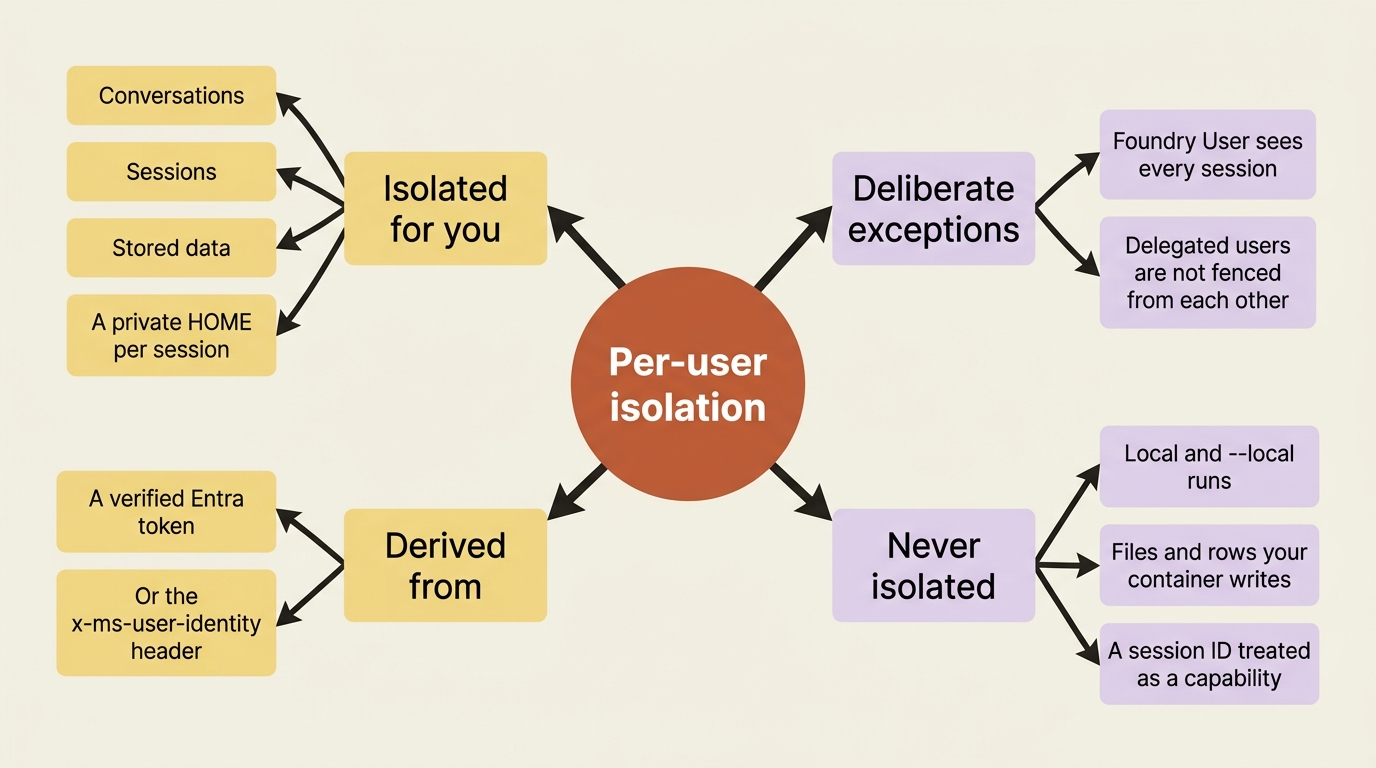
A single hosted agent serves many users from one endpoint, identifying each caller from their Microsoft Entra token and keeping their data private to that identity. Three things stay isolated by default: conversations, so one user cannot read or list another's message history, tool calls, and responses; sessions, so each caller gets their own and the list a user sees excludes every other user's; and stored data, scoped to the user it was stored for. Each session also gets its own private $HOME filesystem in its own sandbox, isolated for the simple reason that each user got their own session in the first place.
The verification procedure is short enough that there is no excuse for assuming instead. Invoke the agent as two different identities, confirm the returned agent_session_id values differ, and confirm that listing sessions as each identity returns only that identity's sessions. Do it against the deployed agent rather than reasoning about it.
The session ID comes back on the response payload rather than as a typed property, which catches people:
openai_client = project.get_openai_client(agent_name="my-agent")

response = openai_client.responses.create(
    input="Summarize the latest support tickets",
)
session_id = response.model_extra.get("agent_session_id")
The OpenAI client authenticates with the caller's Entra credential, which is the entire mechanism: the session is scoped to that identity because that identity is what the platform verified.
Gotcha: local runs do not enforce isolation. azd ai agent run and --local invokes target a single user, and isolation is a platform-side behavior. An isolation test that passes locally has proved nothing at all, which makes it worse than no test.
One deliberate exception exists. An administrator or automation holding the Foundry User role on the project can list and manage every session on the agent regardless of who created it. Grant that to an operations identity for incident response, and grant consumers the least-privilege Foundry Agent Consumer role instead, which covers agent endpoint interaction and nothing else. Scope either one to a single agent with a resource URI ending in /agents/<agentName>, with one caveat: agent-scope assignments are currently evaluated only for endpoint access and grant no management permissions.
Delegated identity, for when your application owns the login
The takeaway: if your users do not have Entra identities, a trusted middle tier tells Foundry who they are with one header and one custom role.
Plenty of applications authenticate their own end users through Google, GitHub, or a custom provider. A trusted service still gets per-end-user isolation by sending the user's stable identifier in the x-ms-user-identity header, which the platform treats as an opaque string and uses to scope the session. The value must be 1 to 256 characters using only letters, digits, and the characters . _ : - @, and the platform rejects other values.
Sending that header requires a permission that no built-in role grants:
Microsoft.CognitiveServices/accounts/AIServices/agents/endpoints/UserIdentityImpersonation/action
The Microsoft.CognitiveServices/* data action previously covered it, and no longer grants it, including for Foundry User and Foundry Owner. Create a custom role containing exactly that data action, assign it to your middle tier's identity at project or agent scope, and expect a 403 for any caller without it.
Once the middle tier holds it, the call is the ordinary Responses call with one extra header:
openai_client = project.get_openai_client(agent_name="my-agent")

response = openai_client.responses.create(
    input="Summarize my open tickets",
    extra_headers={"x-ms-user-identity": "<stable-end-user-id>"},
)
The session is now scoped to that end user rather than to the calling service, and a service holding the permission can mix delegated and non-delegated calls freely, since only requests carrying the header are isolated per end user.
Gotcha: delegation is a weaker boundary than it looks, and the docs say so in a warning. Within delegation, the platform does not fence one delegated end user from another. It enforces a hard boundary only between delegated and non-delegated callers, and it lets any of your delegated users into a session your app created. Give each user their own session ID. If you route two delegated users to the same session without meaning to, they can see each other's data, and the platform considers that your decision rather than an error.
In production: your service is the trust boundary under delegation, and the header value must come from an authenticated server-side identity rather than from anything the browser supplied. A caller who can set that header to another user's identifier reads that user's data. Grant the permission only to services you trust, choose identifiers that are stable, unique, and hard to guess, and reuse the same value for the same user so their sessions resume.
One version warning. Before protocol 2.0.0, isolation was caller-supplied rather than token-derived, through --isolation-key, --user-isolation-key, and --chat-isolation-key flags that set matching headers. If you find those in a search result or an older runbook, you have found the deprecated design. Agents still on protocol 1.0.0 work until July 31, 2026, after which the platform blocks requests to them [PERISHABLE: checked September 2026]. Protocol 2.0.0 requires azure-ai-agentserver-core 2.0.0b7 or later in Python, or Azure.AI.AgentServer.Core 1.0.0-beta.26 or later in .NET. The two models do not mix: a legacy isolation header on a 2.0.0 path returns an error, because the platform user context replaces that model rather than supplementing it.
Session multiplexing, when one session per user stops working
The takeaway: the reason to share a session is quota, the thing that makes it safe is the platform's per-user conversation authorization, and the thing that makes it unsafe is your own storage.
Per-user sessions are the default and right for most applications, but they do not scale linearly. Agent Service applies a per-subscription limit on concurrent hosted agent sessions in each region, counting every session across every Foundry account and project in that subscription and region while its compute is provisioning or running, while idle sessions keep their state without counting [PERISHABLE: checked September 2026]. The documented default is 2,000 concurrent sessions in seven named regions and 1,000 everywhere else hosted agents run, with an increase available by support request.
The sizing argument fits in one sentence worth internalizing: users read, think, and type between turns, so peak concurrent requests are typically a small fraction of total user count. Size a bounded pool to that peak, map users onto it, and identify the acted-for user on every call.
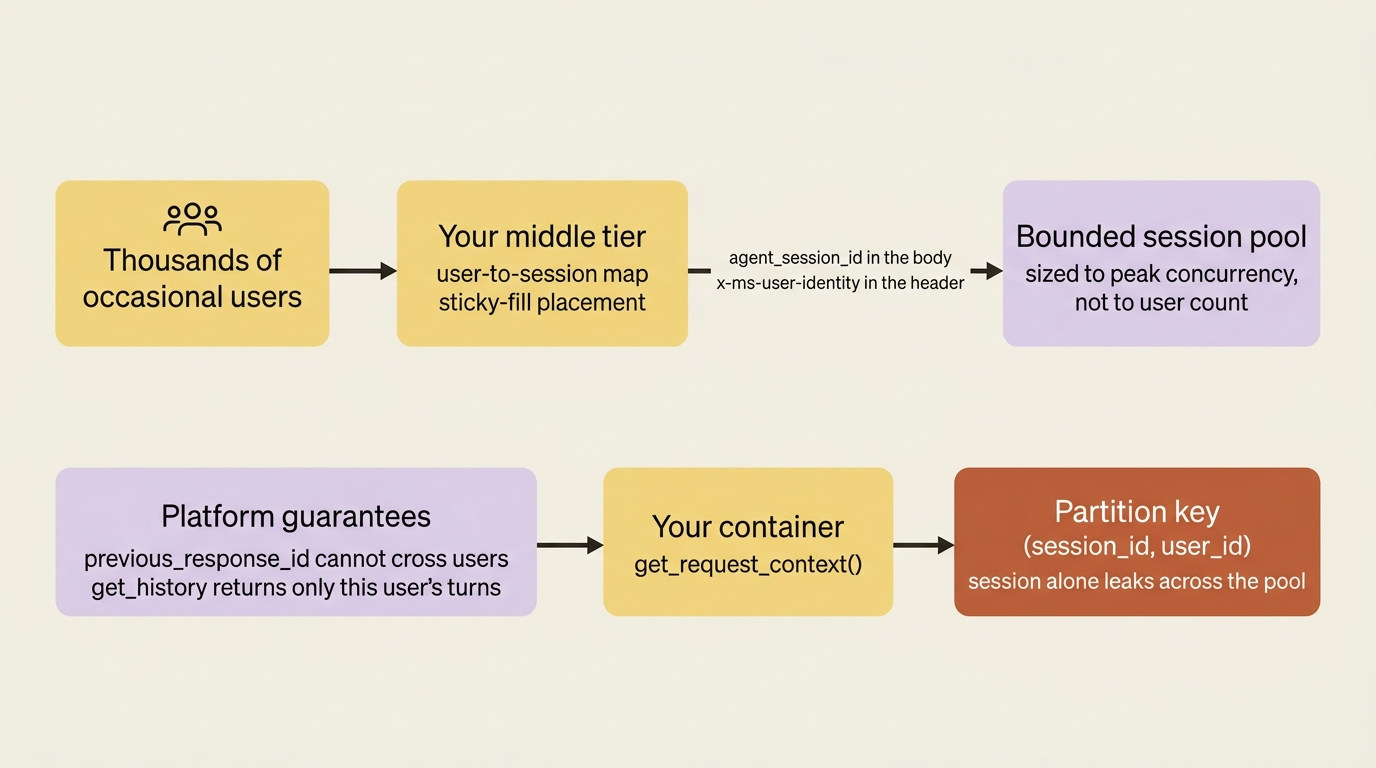
What makes this safe rather than reckless is a guarantee the platform provides inside a shared session. A response chain one user creates cannot be continued by another user through previous_response_id, and context.get_history() returns only the history the current request's user is authorized to see. You own exactly two things: the user-to-session mapping in your middle tier, and the partitioning of any data your container stores itself.
The caller side sets the session in the body and the user in the header:
responses_client = project_client.get_openai_client(agent_name=agent_name).responses

kwargs = {
    "input": user_message,
    "stream": False,
    "store": True,
    "extra_body": {"agent_session_id": session_id},  # ①
    "extra_headers": {"x-ms-user-identity": user_id},  # ②
}
if previous_response_id:
    kwargs["previous_response_id"] = previous_response_id  # ③

response = responses_client.create(**kwargs)  # ④
① The shared session is named in the request body, which is what puts several users into one session rather than one session each.
② The acted-for user travels in the header, and the platform resolves that value before your container ever sees the request.
③ A response chain is continued only when the middle tier already holds one for this user, because a chain another user created will be refused.
④ One ordinary Responses call carries all three values, so nothing about the client is multiplexing-specific.
Note: The full extracted listing at code/azure-foundry-hyperscaler/part-9-agent-identity-and-isolation/listings/01-multiplexed-responses-call.py shows the client construction elided here.
Note what is absent. The caller does not send x-agent-user-id, because Foundry sets the container-side request context itself after resolving the acted-for user. The value your container reads is produced by the platform, not forwarded by the caller, and that is the whole reason your partition key is allowed to rest on it.
Pool assignment is ordinary application code, and the docs list four strategies: sticky least-loaded, hash-based with hash(user_id) % pool_size, round-robin, and group-based routing. The sample implements sticky-fill, where a returning user keeps their session and a new user fills the least-loaded one:
def get_session_for_user(self, user_id: str) -> str:
    if user_id in self.user_to_session:
        return self.user_to_session[user_id]      # returning user is sticky  ①
    session_id = self._next_fill_session()        # new user: place by strategy  ②
    self.user_to_session[user_id] = session_id    # ③
    self.session_user_counts[session_id] += 1     # ④
    return session_id
① The returning-user lookup comes first, which is what keeps an analyst's turns together in a session whose sandbox they have already warmed.
② Only a genuinely new user consults the placement strategy, so swapping sticky-fill for hash-based or group routing means changing one method.
③ The user-to-session mapping is your middle tier's own state, and it is the half of multiplexing the platform does not keep for you.
④ The per-session count is what gives "least loaded" a meaning, and what tells the pool when it has to open another session.
Note: The full extracted listing at code/azure-foundry-hyperscaler/part-9-agent-identity-and-isolation/listings/02-sticky-fill-session-pool.py shows the pool state and the fill strategy elided here.
Sticky assignment is the right default for a review workload. Hash-based assignment is tempting for its statelessness until you resize the pool and reshuffle every user.
Inside the container, the handler validates the context and lets the platform serve the history:
from azure.ai.agentserver.core import get_request_context

@app.response_handler
async def handler(request, context, _cancellation_signal):
    ctx = get_request_context()                 # ①
    if not (ctx.user_id and ctx.call_id):
        raise ValueError("A user context is required on protocol 2.0.0.")  # ②

    user_input = await context.get_input_text() or "Hello!"
    history = await context.get_history()       # platform-authorized for this user  ③
    ...
① The context comes from the protocol library rather than from a caller header, which is the reason the container is allowed to trust it.
② The handler fails closed on a missing context, which matters because a local run does not populate one and would otherwise look like a pass.
③ History is fetched from the platform instead of kept in the container, so a shared session still returns only the current user's turns.
Note: The full extracted listing at code/azure-foundry-hyperscaler/part-9-agent-identity-and-isolation/listings/03-multiplexed-response-handler.py shows the host setup and the response return elided here.
Gotcha: the platform partitions conversation state and does not partition yours. When users share a session, any data your container stores itself, whether files, database rows, or a cache, is not partitioned automatically, and a container that keys by session ID alone shows every user in the pool the same data. The documented key is both values together:
from azure.ai.agentserver.core import get_request_context

def partition_key() -> tuple[str, str]:
    ctx = get_request_context()                  # ①
    if not ctx or not ctx.user_id:
        raise PermissionError("A user context is required on protocol 2.0.0.")  # ②
    return (ctx.session_id, ctx.user_id)   # key all user-owned data by this  ③
① One function reads identity for the whole container, which keeps the substrate-specific call one file wide.
② A missing or user-less context raises rather than returning a partial key, because a partial key would silently widen the partition.
③ Both values together are the key: the session alone is shared under multiplexing, and the user alone would merge their separate reviews.
Note: The full extracted listing at code/azure-foundry-hyperscaler/part-9-agent-identity-and-isolation/listings/04-partition-key.py shows a caller of the key elided here.
One function, one identity read, and the platform verifies the inputs while your code decides whether to use them. In .NET the equivalent is FoundryAgentRequestContext.Current, with UserId and SessionId on it and the same fail-closed shape.
Verify multiplexing with an A-A-B test against the deployed agent. As user A, create a response in the shared session, then a second one chained to it with previous_response_id. As user B, in the same session, send a request with previous_response_id set to user A's second response, and confirm the call fails. Use two genuinely different Entra users or object IDs, because two labels that resolve to the same identity prove nothing.
Gotcha: a raw session ID or conversation ID is not an authorization boundary, and this is the sentence to carry out of the article. Knowing an identifier is not permission to use it, the platform checks the caller's identity rather than the identifier's secrecy, and the moment your container starts treating a session ID as a capability you have built the vulnerability the isolation model was designed to prevent.
Both frameworks, and this time there is no seam
The takeaway: identity and isolation live in the protocol and in Azure, below either framework, so Microsoft Agent Framework and LangGraph get them identically.
Usually the native framework gets the tighter integration and you have to name the seam. There is none here, and the reason is structural rather than lucky. The caller side is HTTP and Entra: a token, an x-ms-user-identity header, and an agent_session_id in the body, none of which knows what runs inside your container. The agent identity, the blueprint, and every role assignment are Azure Resource Manager and Microsoft Entra objects attached to the agent resource, not to the framework. And the container side is get_request_context() from azure.ai.agentserver.core, the protocol library rather than either SDK.
The LangGraph track reaches the same function by inheritance, because the langchain-azure-ai[hosting] extra installs the same protocol libraries the multiplexing page names as prerequisites. One honest gap: every container-side sample in the documentation is written against the raw protocol library with @app.response_handler, and neither hosting page repeats the pattern for its own framework. Where you place the call, inside a graph node or a pre-model hook on the LangGraph side, is your integration work.
One agent, every user
Wire it up, and the striking thing is how little new code appears. You deploy one agent, every user calls the same endpoint, and every user's Entra token produces a different partition. Three hundred analysts get three hundred private workspaces out of the default behavior.
Follow one of them through the layers. Her token reaches the endpoint, and the platform scopes her session and conversation to her identity. Her session gets its own sandbox with its own $HOME, so the working notes the agent writes during a multi-day review are hers. Inside the container, get_request_context() returns her user_id, and that one value keys three things: the durable state store partition, where user_isolation=True keeps her checkpoints away from everyone else's, the managed memory scope where her thresholds live, and any file or row the agent writes for her. When she asks the agent to open her records, the downstream call runs under OAuth identity passthrough, so that system applies her entitlements rather than the agent's, and a user who cannot see a record at the source cannot see it through the agent either.
Two operational details finish the picture. Managed memory has a documented ceiling of 100 scopes per store, so map user to store deterministically from the same user ID that keys everything else, which keeps one identifier in charge of the whole isolation design. And your operations identity holds Foundry User on the project so it can clean up sessions during an incident, while every client holds only Foundry Agent Consumer, scoped to this agent.
Three hundred analysts with human typing rhythms sit far under a 1,000-session regional limit, so per-user sessions are correct and simpler here. Multiplexing becomes the right answer the day you embed the agent in a portal where thousands of occasional users each ask one question, and the change at that point is a middle-tier pool plus a partition key that already includes the user ID.
In production: draw the identity chain once, because every later security discussion refers back to it and nobody reconstructs it correctly from memory.
user (Entra token, or delegated via x-ms-user-identity)
  -> agent endpoint          platform verifies the caller, scopes the session
  -> your container          x-agent-user-id / get_request_context().user_id
  -> Foundry services        x-agent-foundry-call-id forwarded unchanged
  -> toolbox                 credential injection, or OAuth passthrough as the user
  -> third-party system      agent identity token, scoped to the audience
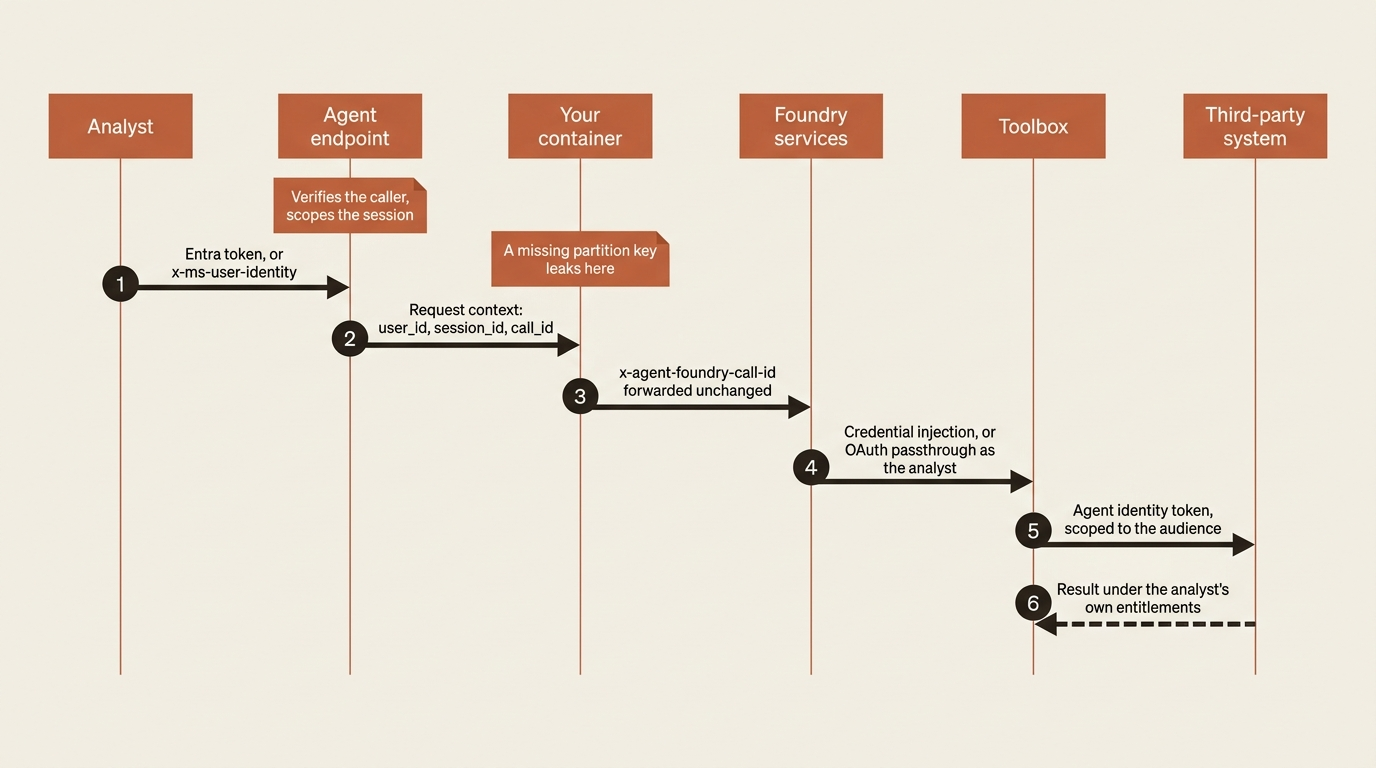
Five hops, five different answers to "who is this," and the failure modes are distinct at every one. A wrong token scope fails at hop two. A missing partition key leaks at hop three. A dropped call ID breaks caller resolution at hop four. A missing tenant match breaks passthrough at hop five, which bites guest users in partner tenants. A role on the project managed identity instead of the agent identity fails at the last hop with an error that names permissions and not principals.
Do this today
- Open the JSON view of your agent resource and read
instance_identity. Null means a legacy agent sharing the project identity, and that is a blast radius your security review will find before you do. - Audit every role assignment you made for this agent. If the assignee is the project managed identity rather than the
agentIdentityId, you have found the reason a tool call fails while the role list looks correct. - Run the isolation test against the deployed agent, not locally. Invoke as two identities, compare the returned
agent_session_idvalues, and confirm that listing sessions as each identity returns only that identity's sessions. - Grep your container for anything keyed by session ID alone. Replace it with the
(session_id, user_id)pair, read through a singleget_request_context()wrapper that raises on a missing user. - Decide who, if anyone, gets
UserIdentityImpersonation. It is not in any built-in role for a reason, and any service holding it can act as any of your end users.
The plane you were never going to build
The identity plane is the piece of Foundry with the widest gap between what the platform supplies and what a team would otherwise build. Nobody hand-builds a directory object per agent with Conditional Access, lifecycle governance, and a tenant-wide inventory, or a secretless federated credential chain ending in a correctly scoped downstream token. Per-caller isolation derived from a verified token is the kind of thing teams do build, badly, usually as a tenant ID threaded through every function signature. And per-user authorization of conversation history inside a shared session, the control that makes multiplexing safe, is something almost no hand-built harness has.
What stays yours is a short list, and every item on it is a decision rather than a mechanism. The partition key on data your container stores, which the platform hands you and never checks. The user-to-session mapping when you multiplex. The scope and the assignee on every role assignment. Whether to grant UserIdentityImpersonation at all, and to which service. And the isolation test, run against the deployed agent, before a reviewer asks for it.
A lock-in conversation rarely has a cheerful part, and this one does. Almost nothing above is Foundry-specific, because almost all of it is Microsoft Entra ID and Azure RBAC, which you were already running. Agent identities are service principals, blueprints are directory objects, role assignments are role assignments. What does not travel is the isolation behavior itself, and rebuilding automatic per-caller scoping, x-ms-user-identity delegation, and authorized get_history() on another substrate is real work. The mitigation costs one file: read identity through a single function in a single module the rest of the container calls, and the substrate-specific part of your design never spreads past it.
Then answer the security reviewer with a test result instead of an architecture diagram.